انتقل إلى المحتوى الرئيسي
اضغط على Enter للبحث أو ESC للإغلاق
إغلاق البحث
شعار Transync AI – الشعار الرسمي لخدمة الترجمة الفورية Transync AI
  • نسخة تجريبية مجانية
قائمة طعام
  • منتج
    • الترجمة الفورية بالذكاء الاصطناعي
    • ترجمة الاجتماعات المباشرة باستخدام الذكاء الاصطناعي
    • وضع العرض التقديمي
    • ملاحظات اجتماع الذكاء الاصطناعي
    • فصل المتحدثين بالذكاء الاصطناعي
    • مترجم صوتي بالذكاء الاصطناعي
    • مساعد الذكاء الاصطناعي: الكلمات الرئيسية والسياق
    • Picture-in-Picture، ترجمة عائمة
    • اللغات المدعومة
  • حالات الاستخدام
    • ترجمة زووم
    • ترجمة Microsoft Teams
    • ترجمة جوجل ميت
    • ترجمة المكالمات الصوتية عبر واتساب
    • ترجمة الاجتماعات الشخصية
  • مدونة
  • التسعير
  • مَشرُوع
  • اتصال
  • يدعم
  • تحميل
  • نسخة تجريبية مجانية
  • منتج
    • الترجمة الفورية بالذكاء الاصطناعي
    • ترجمة الاجتماعات المباشرة باستخدام الذكاء الاصطناعي
    • وضع العرض التقديمي
    • ملاحظات اجتماع الذكاء الاصطناعي
    • فصل المتحدثين بالذكاء الاصطناعي
    • مترجم صوتي بالذكاء الاصطناعي
    • مساعد الذكاء الاصطناعي: الكلمات الرئيسية والسياق
    • Picture-in-Picture، ترجمة عائمة
    • اللغات المدعومة
  • حالات الاستخدام
    • ترجمة زووم
    • ترجمة Microsoft Teams
    • ترجمة جوجل ميت
    • ترجمة المكالمات الصوتية عبر واتساب
    • ترجمة الاجتماعات الشخصية
  • مدونة
  • التسعير
  • مَشرُوع
  • اتصال
  • يدعم
  • تحميل

hello@transyncai.com

ابدء

4
  • دليل البدء السريع لأجهزة الكمبيوتر المكتبية
  • دليل البدء السريع للهواتف المحمولة
  • قائمة التحقق من إعداد الصوت للاجتماع
  • اتصل بنا

دليل المستخدم

13
  • كيفية تسجيل Transync AI
  • كيفية بدء الترجمة في الوقت الفعلي
  • كيفية اختيار وضع الترجمة في برنامج Transync AI
  • كيفية مشاركة الصوت على الكمبيوتر
  • كيفية استخدام تشغيل الصوت في Transync AI
  • كيفية استخدام استنساخ الصوت
  • كيفية استخدام الميكروفون الافتراضي على نظام macOS
  • كيفية إعداد الميكروفون الافتراضي على نظام Windows
  • كيفية استخدام وضع Picture-in-Picture
  • كيفية الوصول إلى نصوص وملخصات الاجتماعات
  • كيفية استخدام مساعد الذكاء الاصطناعي
  • كيفية إدارة سجلات الترجمة
  • كيفية إعادة الشحن وطلب استرداد الأموال

وضع العرض التقديمي

2
  • كيفية استخدام وضع العرض التقديمي في برنامج Transync AI
  • كيفية الانضمام إلى عرض تقديمي لشركة Transync AI

مَشرُوع

1
  • دليل المؤسسة

موارد

3
  • مركز الثقة
  • الشروط والسياسة
  • سجل التغييرات
عرض الفئات
  • الرئيسية
  • المستندات
  • وضع العرض التقديمي
  • كيفية الانضمام إلى عرض تقديمي لشركة Transync AI

كيفية الانضمام إلى عرض تقديمي لشركة Transync AI

قراءة لمدة 5 دقائق

To join Presentation Mode in Transync AI, use the link, QR code, or Room ID shared by the host. After joining, you can choose one of the languages enabled by the host and follow the live translation on your own device.

Audience members can read the original and translated text and listen with voice playback when it is available. Audience members cannot speak into or control the host’s translation task.

1. Join Presentation Mode with a Link or QR Code #

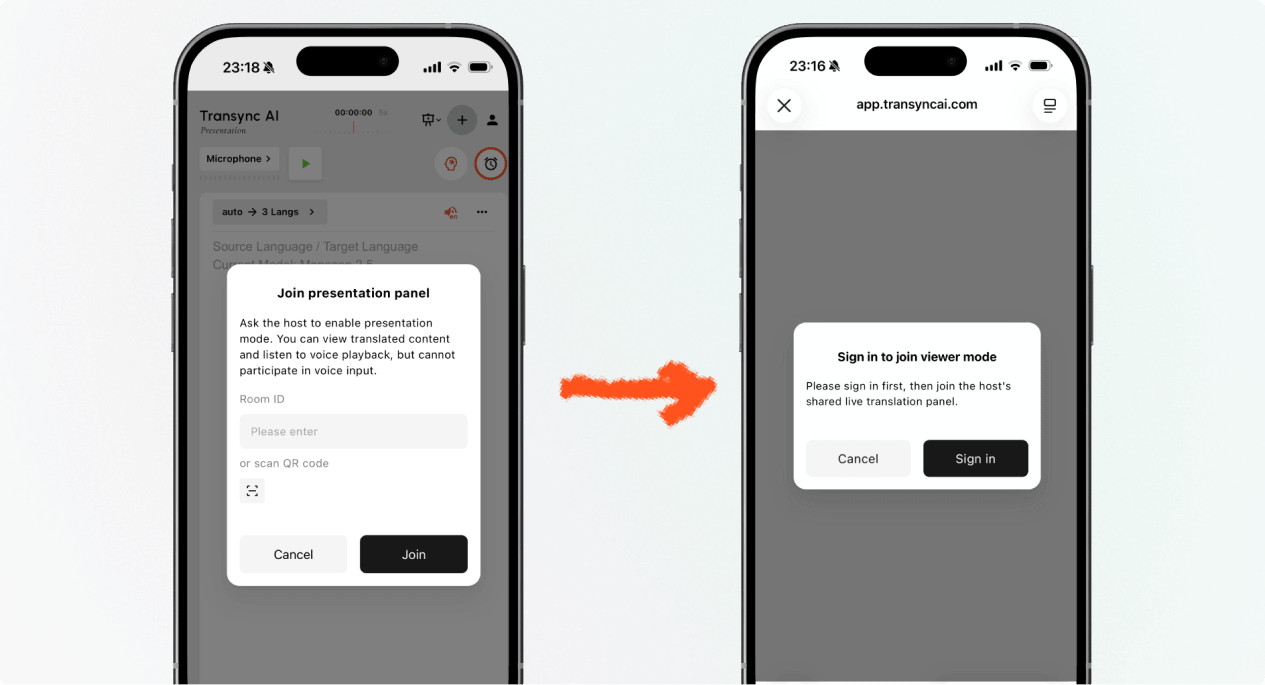
  1. Open the link sent by the host, or scan the presentation QR code with your phone.
  2. Review the name or masked account of the person sharing the presentation.
  3. If Transync AI asks you to sign in, complete sign-in and return to join Presentation Mode.
  4. يختار ينضم.

When you join Presentation Mode with a link or QR code, your device may open the web experience or offer to continue in the Transync AI app. If the presentation is no longer active, ask the host for a new active link, QR code, or Room ID.

Sign in to Transync AI before you join Presentation Mode on mobile.
Sign in when Transync AI asks you to confirm your account before joining.

2. Join Presentation Mode with a Room ID #

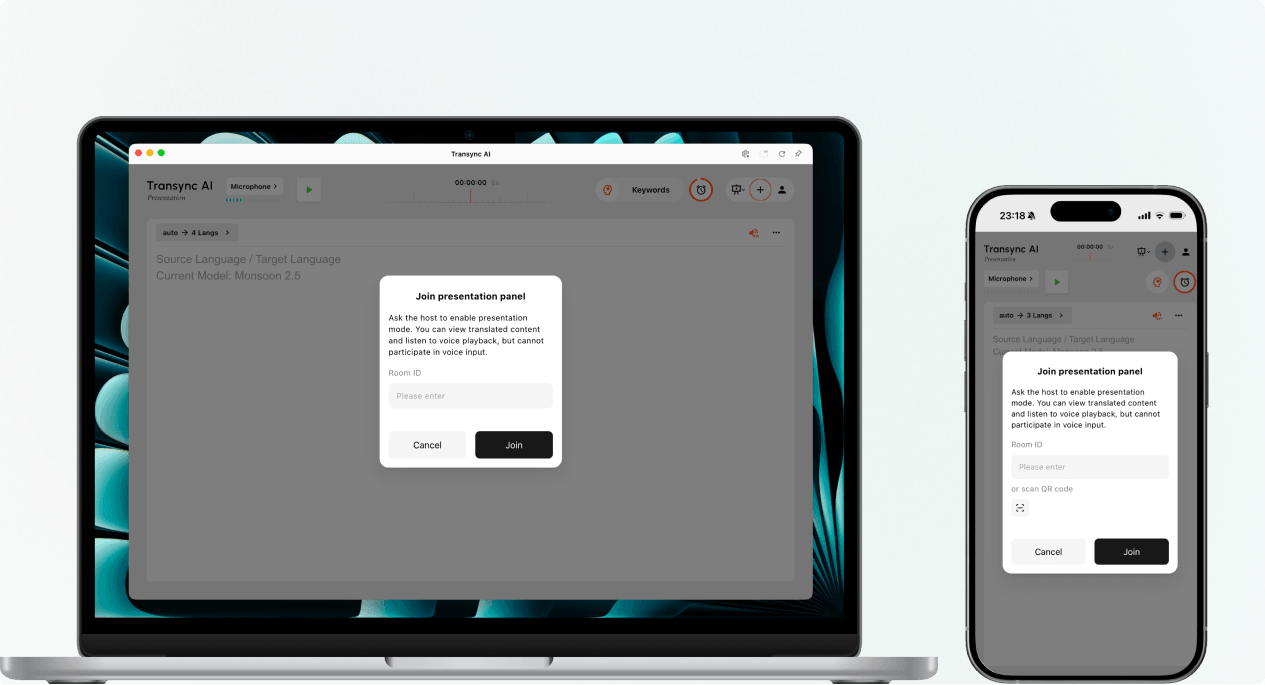
  1. Open the Presentation Mode join entry in the Transync AI web app or Transync AI app.
  2. Enter the Room ID provided by the host, or use the scan button to scan a presentation QR code.
  3. يختار ينضم.

ملحوظة: A Room ID only works while the host’s presentation is active. If you cannot join Presentation Mode, confirm the Room ID and contact the host.

Enter a Presentation Mode Room ID or scan a QR code on desktop or mobile.
Enter the host's Room ID or scan the presentation QR code.

3. Choose Your Language #

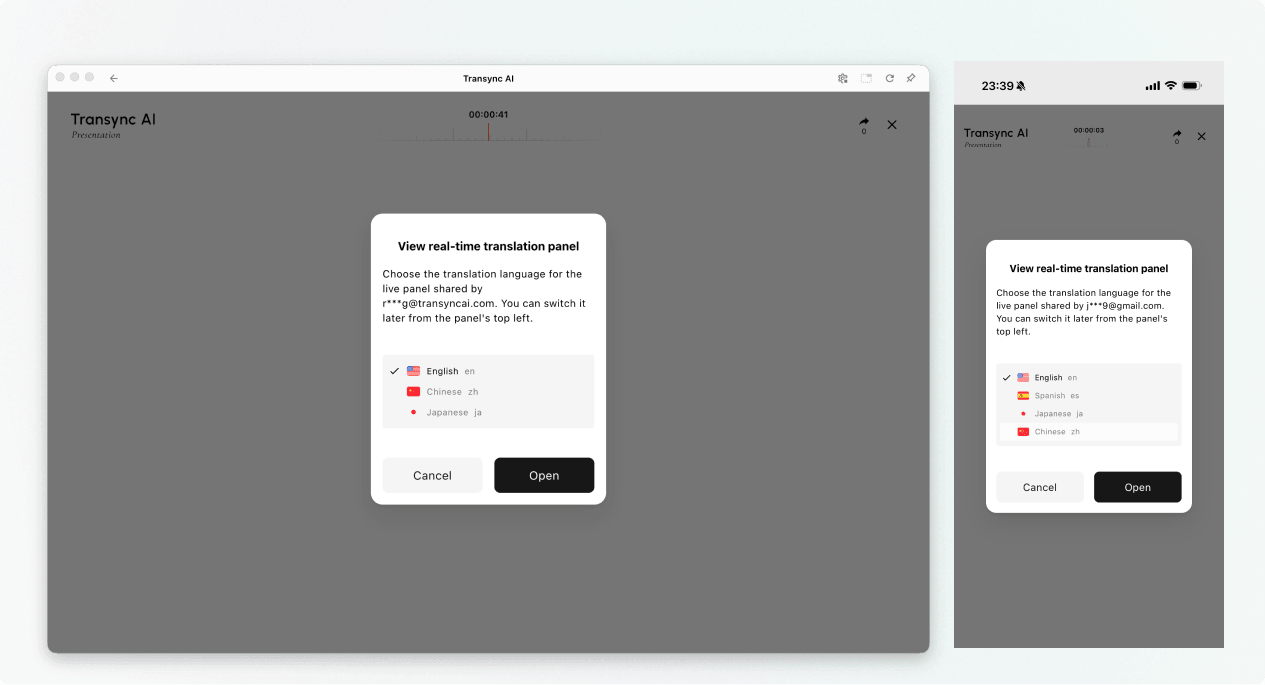
Before the live presentation panel opens, choose the language you want to read and hear. The list contains the target languages enabled by the host. The host’s source language may also be shown for reference.

  1. Select one available translation language.
  2. Review the displayed source language.
  3. يختار يفتح to join Presentation Mode and open the presentation panel.
Choose an available translation language before opening the live presentation panel.
Choose the language you want to read and hear.

4. Read and Listen During the Presentation #

After you join Presentation Mode, the presentation panel shows the host’s speech and the translation in real time. You can:

  • Read the original text and translated text.
  • Use the available display controls to make the text easier to read.
  • Turn on voice playback when it is available for the selected language.
  • Use headphones when listening in a shared space to reduce echo and avoid disturbing other audience members.
  • View the current online audience count when it is displayed.

For more information about listening settings, see كيفية استخدام تشغيل الصوت في Transync AI.
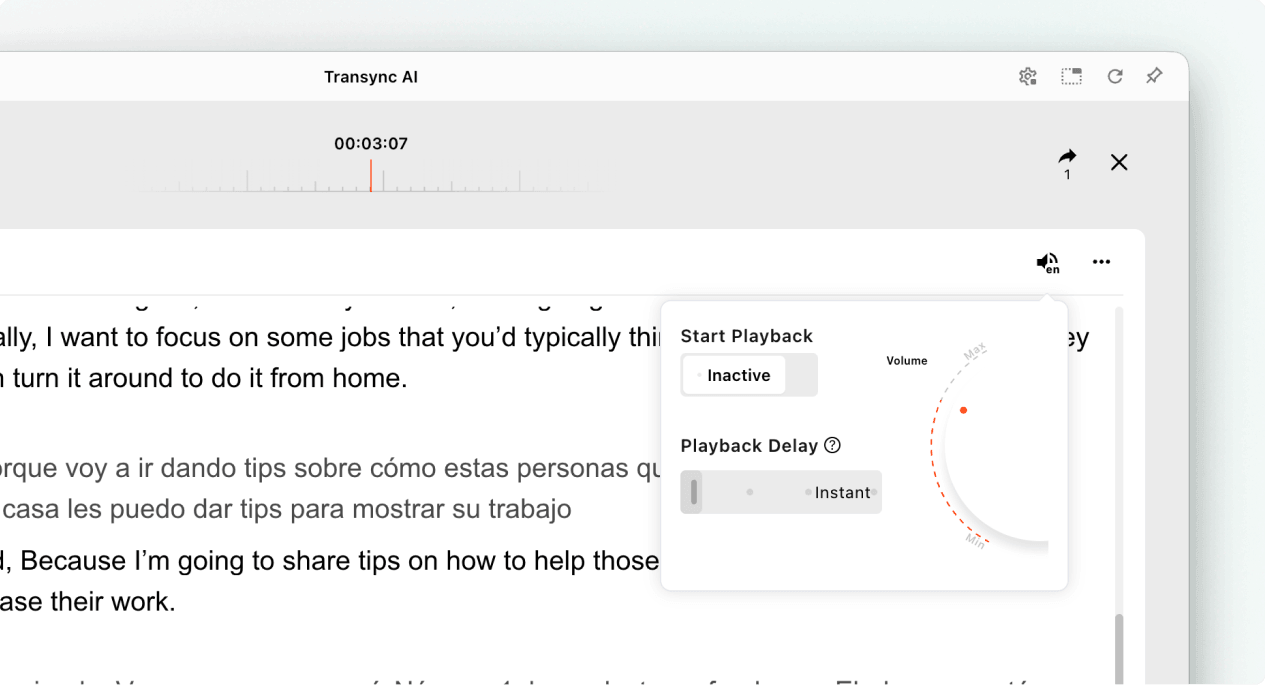
Open voice playback settings while viewing a live Transync AI presentation.
Turn on voice playback and adjust its delay and volume when needed.

5. Switch Languages #

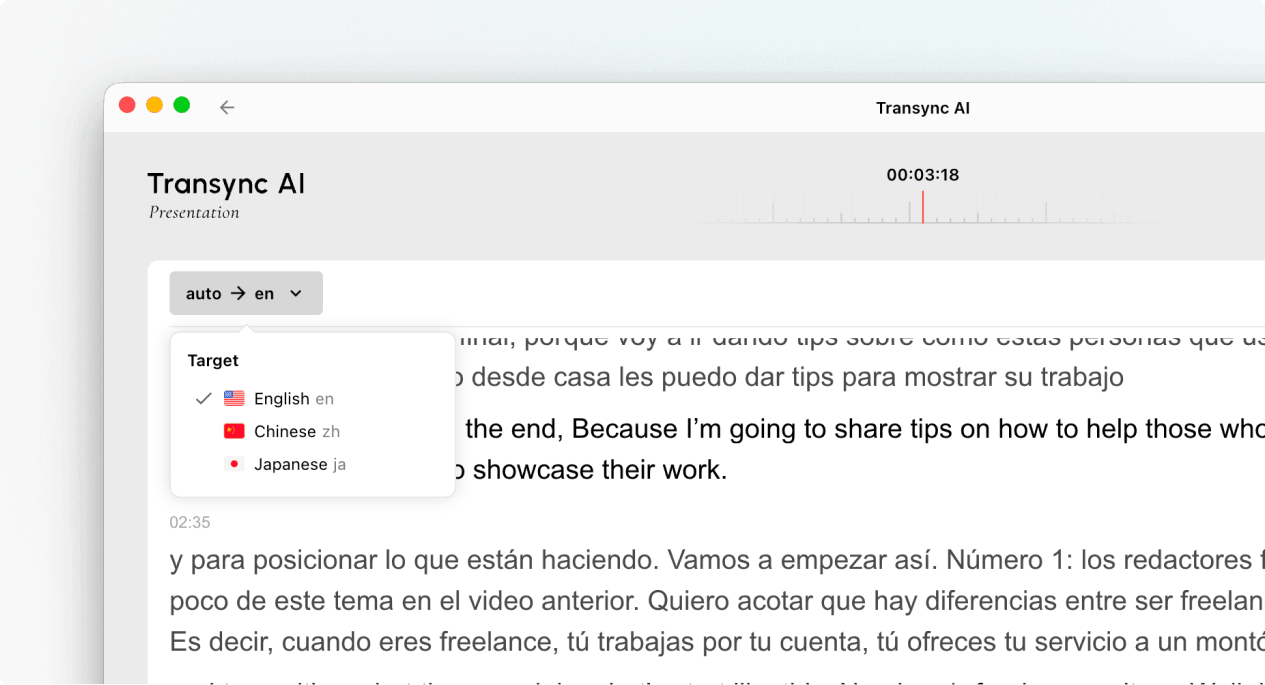
If you want to follow the presentation in another language, open the language selector and choose another language enabled by the host. If the language you need is not listed, ask the host whether it can be added to the presentation.

Use the language selector to switch the audience translation language during a presentation.
Switch to another language enabled by the host.

6. Leave or Rejoin the Presentation #

Leaving your presentation panel does not end the host’s task. If the host’s presentation is still active, you can join Presentation Mode again using the active link, QR code, or Room ID.

When Transync AI asks you to confirm the exit, select Exit only if you want to close your audience panel.

7. View a Shared Record After the Presentation #

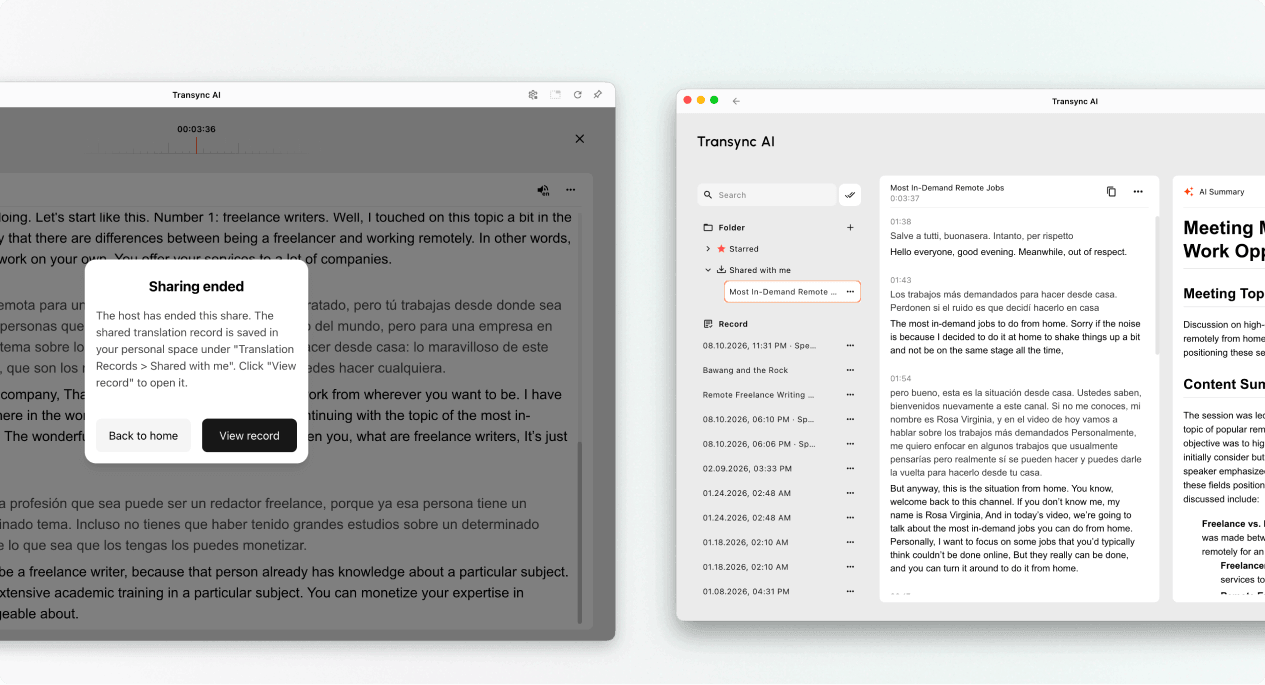
When the host ends the presentation, Transync AI shows a sharing-ended message. If the host chose to share the transcript, select View record or open Profile → Translation History → Shared with Me.

If the host did not share the transcript, you can close the end message but will not receive a shared presentation record.

Open a shared presentation record from Shared with Me after the host ends sharing.
When sharing ends, open the record from Shared with Me if the host shared it.

Troubleshooting #

I am asked to sign in #

Complete sign-in and return to join Presentation Mode. If you do not have an account, follow كيفية تسجيل Transync AI, then reopen the active presentation link or Room ID.

I cannot join Presentation Mode #

The host may not have started Presentation Mode, or the presentation may have ended. Contact the host and request a currently active join option.

I cannot find my language #

Audience members can only select languages enabled by the host. Ask the host whether the language can be added.

I cannot hear voice playback #

Check your device volume, confirm that voice playback is available and enabled, and make sure the correct language is selected. You can continue reading the live translated text even when voice playback is off.

الأسئلة الشائعة #

Do I need a Transync AI account? #

If the join flow asks you to sign in, complete sign-in before joining. The exact entry experience may depend on the device, browser, and current product version.

Can I speak into the presentation? #

No. The audience panel is for viewing and listening. Only the host provides voice input to the presentation task.

Can I change my language after joining? #

Yes, you can switch to another language that the host has enabled for the active presentation.

Can I rejoin after leaving? #

Yes, as long as the host’s presentation remains active and you still have a valid link, QR code, or Room ID.

Will I receive the transcript after the presentation? #

Only if the host chooses to share it. Shared presentation records appear in Shared with Me after the task ends.

Related Articles #

  • كيفية استخدام وضع العرض التقديمي في برنامج Transync AI
  • كيفية تسجيل Transync AI
  • كيفية استخدام تشغيل الصوت في Transync AI
  • كيفية إدارة سجلات الترجمة
حُدثت بتاريخ 11 ديسمبر 2026

هل كان هذا المستند مفيدًا؟

  • مفيد
  • غير مفيد

شارك هذه المقالة :

  • فيسبوك
  • إكس
  • LinkedIn
  • بينتريست
كيفية استخدام وضع العرض التقديمي في برنامج Transync AIكيفية استخدام وضع العرض التقديمي في برنامج Transync AI
جدول المحتويات
  • 1. Join Presentation Mode with a Link or QR Code
  • 2. Join Presentation Mode with a Room ID
  • 3. Choose Your Language
  • 4. Read and Listen During the Presentation
  • 5. Switch Languages
  • 6. Leave or Rejoin the Presentation
  • 7. View a Shared Record After the Presentation
  • Troubleshooting
    • I am asked to sign in
    • I cannot join Presentation Mode
    • I cannot find my language
    • I cannot hear voice playback
  • الأسئلة الشائعة
    • Do I need a Transync AI account?
    • Can I speak into the presentation?
    • Can I change my language after joining?
    • Can I rejoin after leaving?
    • Will I receive the transcript after the presentation?
  • Related Articles

RedNote دوين بيليبيلي 知乎 يوتيوب TikTok LinkedIn

رقم برنامج المقارنات الدولية 2025119728

اتصال:support@transyncai.com

منتج

  • أدوات
  • الترجمة الفورية بالذكاء الاصطناعي
  • ترجمة الاجتماعات المباشرة بالذكاء الاصطناعي
  • ملاحظات اجتماع الذكاء الاصطناعي
  • مترجم صوتي بالذكاء الاصطناعي
  • مساعد الذكاء الاصطناعي
  • Picture-in-Picture، ترجمة عائمة
  • اللغات المدعومة
  • حالات الاستخدام
  • ترجمة زووم
  • ترجمة Microsoft Teams
  • ترجمة جوجل ميت
  • ترجمة واتساب
  • ترجمة الاجتماعات الشخصية

الصفحات

  • التسعير
  • مدونة
  • يدعم
  • تحميل
  • مَشرُوع
  • سجل التغييرات
  • نسخة تجريبية مجانية

موارد

  • حقائق عن الذكاء الاصطناعي من Transync
  • قارن بين تقنية الذكاء الاصطناعي من Transync
  • بدائل الذكاء الاصطناعي من Transync

شروط

  • خصوصية
  • شروط الخدمة
  • مركز الثقة

© 2026 Transync AI – الترجمة الفورية.

العربية
English 简体中文 日本語 한국어 Русский Français Español Deutsch Italiano Čeština ไทย 繁體中文繁體中文 Português do Brasil हिन्दी Bahasa Indonesia Tiếng Việt Türkçe Nederlands Polski Українська