跳至主要内容
按回车键搜索,或按 ESC 键关闭
关闭搜索
Transync AI 标志 – Transync AI 实时翻译服务的官方品牌标志
  • 免费试用
菜单
  • 产品
    • AI 实时翻译
    • AI 会议翻译
    • 演示模式
    • AI 会议记录
    • AI说话人分离
    • AI 语音翻译
    • AI 助手:关键词与语境
    • 画中画浮动字幕
    • 支持的语言
  • 用例
    • Zoom 翻译
    • Microsoft Teams 翻译
    • Google Meet 翻译
    • WhatsApp 语音通话翻译
    • 现场会议翻译
  • 博客
  • 定价
  • 企业版
  • 点击联系
  • 支持
  • 下载
  • 免费试用
  • 产品
    • AI 实时翻译
    • AI 会议翻译
    • 演示模式
    • AI 会议记录
    • AI说话人分离
    • AI 语音翻译
    • AI 助手:关键词与语境
    • 画中画浮动字幕
    • 支持的语言
  • 用例
    • Zoom 翻译
    • Microsoft Teams 翻译
    • Google Meet 翻译
    • WhatsApp 语音通话翻译
    • 现场会议翻译
  • 博客
  • 定价
  • 企业版
  • 点击联系
  • 支持
  • 下载

hello@transyncai.com

入门

4
  • 桌面端快速入门指南
  • 手机端快速入门指南
  • 会议音频设置检查清单
  • 联系我们

用户指南

13
  • 如何注册 Transync AI
  • 如何开始实时翻译
  • 如何在Transync AI中选择翻译模式
  • 如何共享电脑音频
  • 如何在 Transync AI 中使用语音播放
  • 如何使用语音克隆
  • 如何在 macOS 上使用Virtual Microphone
  • 如何在 Windows 上设置Virtual Microphone
  • 如何使用画中画模式
  • 如何查看会议转写稿和摘要
  • 如何使用 AI 助手
  • 如何管理翻译记录
  • 如何充值和申请退款

演示模式

2
  • 如何在 Transsync AI 中使用演示模式
  • 如何参加 Transsync AI 演示

企业版

1
  • 企业指南

资源

3
  • 信任中心
  • 条款和政策
  • 变更日志
查看类别
  • 首页
  • 文档
  • 演示模式
  • 如何参加 Transsync AI 演示

如何参加 Transsync AI 演示

5 分钟阅读

To join Presentation Mode in Transync AI, use the link, QR code, or Room ID shared by the host. After joining, you can choose one of the languages enabled by the host and follow the live translation on your own device.

Audience members can read the original and translated text and listen with voice playback when it is available. Audience members cannot speak into or control the host’s translation task.

1. Join Presentation Mode with a Link or QR Code #

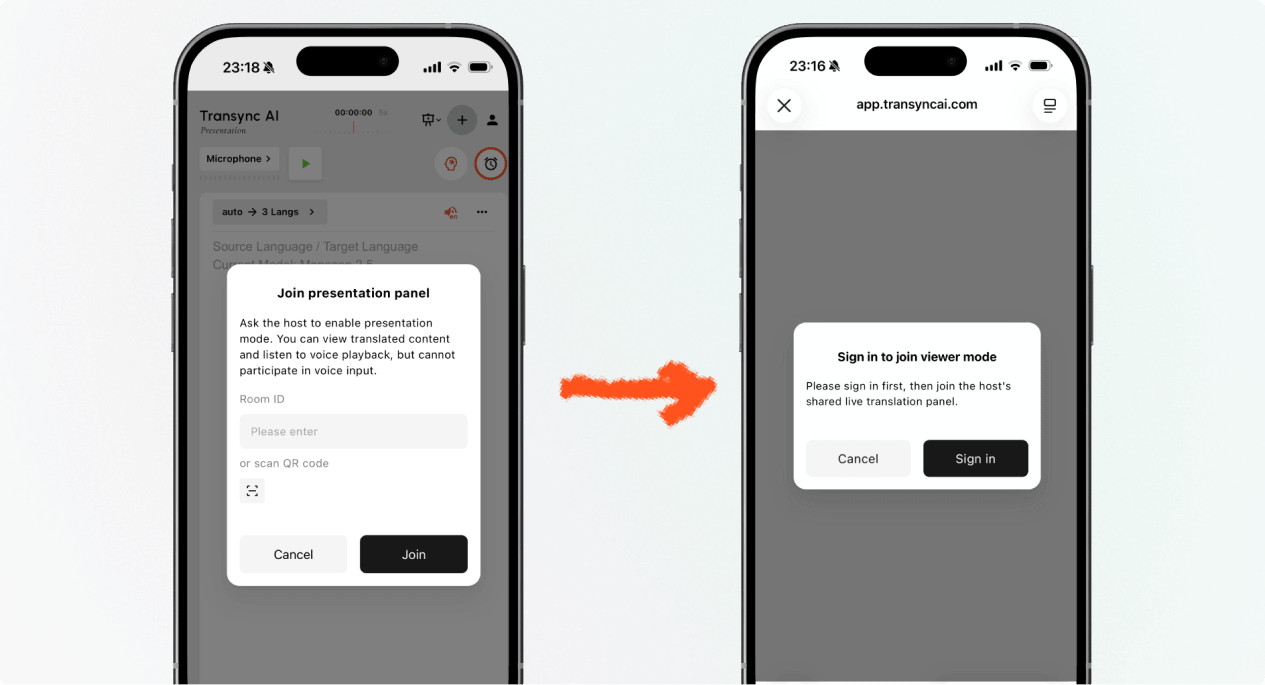
  1. Open the link sent by the host, or scan the presentation QR code with your phone.
  2. Review the name or masked account of the person sharing the presentation.
  3. If Transync AI asks you to sign in, complete sign-in and return to join Presentation Mode.
  4. 选择 加入.

When you join Presentation Mode with a link or QR code, your device may open the web experience or offer to continue in the Transync AI app. If the presentation is no longer active, ask the host for a new active link, QR code, or Room ID.

Sign in to Transync AI before you join Presentation Mode on mobile.
Sign in when Transync AI asks you to confirm your account before joining.

2. Join Presentation Mode with a Room ID #

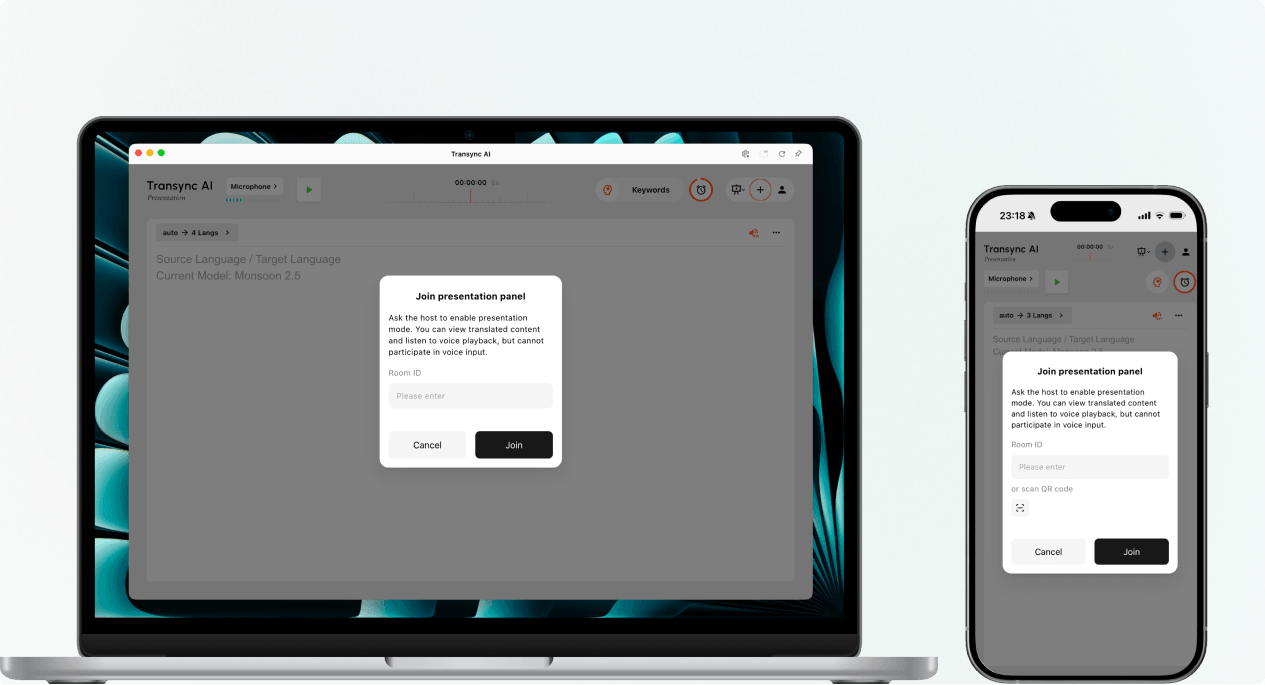
  1. Open the Presentation Mode join entry in the Transync AI web app or Transync AI app.
  2. Enter the Room ID provided by the host, or use the scan button to scan a presentation QR code.
  3. 选择 加入.

笔记: A Room ID only works while the host’s presentation is active. If you cannot join Presentation Mode, confirm the Room ID and contact the host.

Enter a Presentation Mode Room ID or scan a QR code on desktop or mobile.
Enter the host's Room ID or scan the presentation QR code.

3. Choose Your Language #

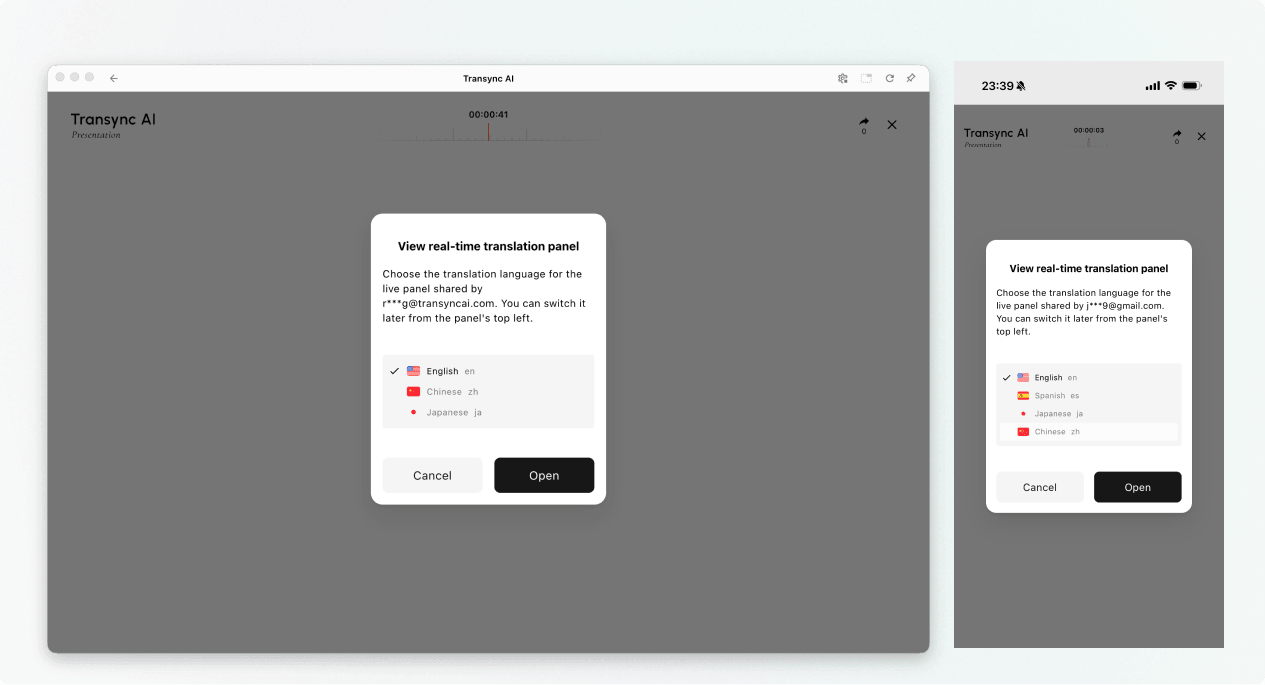
Before the live presentation panel opens, choose the language you want to read and hear. The list contains the target languages enabled by the host. The host’s source language may also be shown for reference.

  1. Select one available translation language.
  2. Review the displayed source language.
  3. 选择 打开 to join Presentation Mode and open the presentation panel.
Choose an available translation language before opening the live presentation panel.
Choose the language you want to read and hear.

4. Read and Listen During the Presentation #

After you join Presentation Mode, the presentation panel shows the host’s speech and the translation in real time. You can:

  • Read the original text and translated text.
  • Use the available display controls to make the text easier to read.
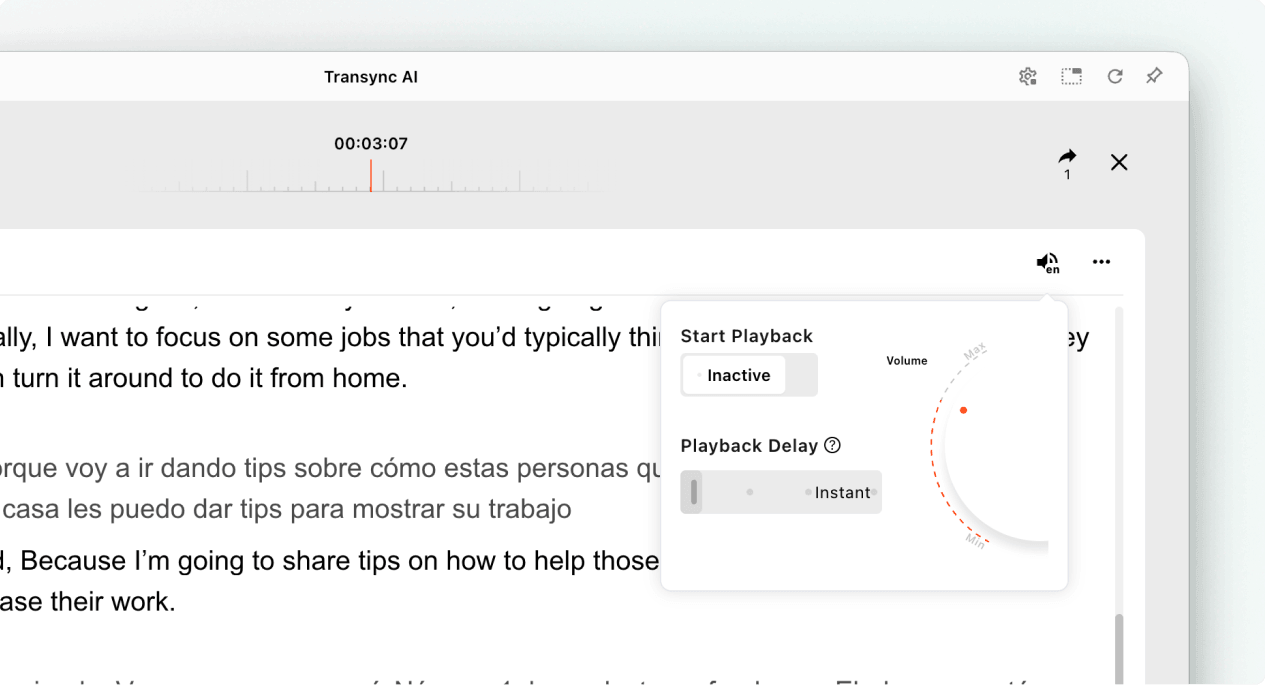
  • Turn on voice playback when it is available for the selected language.
  • Use headphones when listening in a shared space to reduce echo and avoid disturbing other audience members.
  • View the current online audience count when it is displayed.

For more information about listening settings, see 如何在 Transync AI 中使用语音播放.

Open voice playback settings while viewing a live Transync AI presentation.
Turn on voice playback and adjust its delay and volume when needed.

5. Switch Languages #

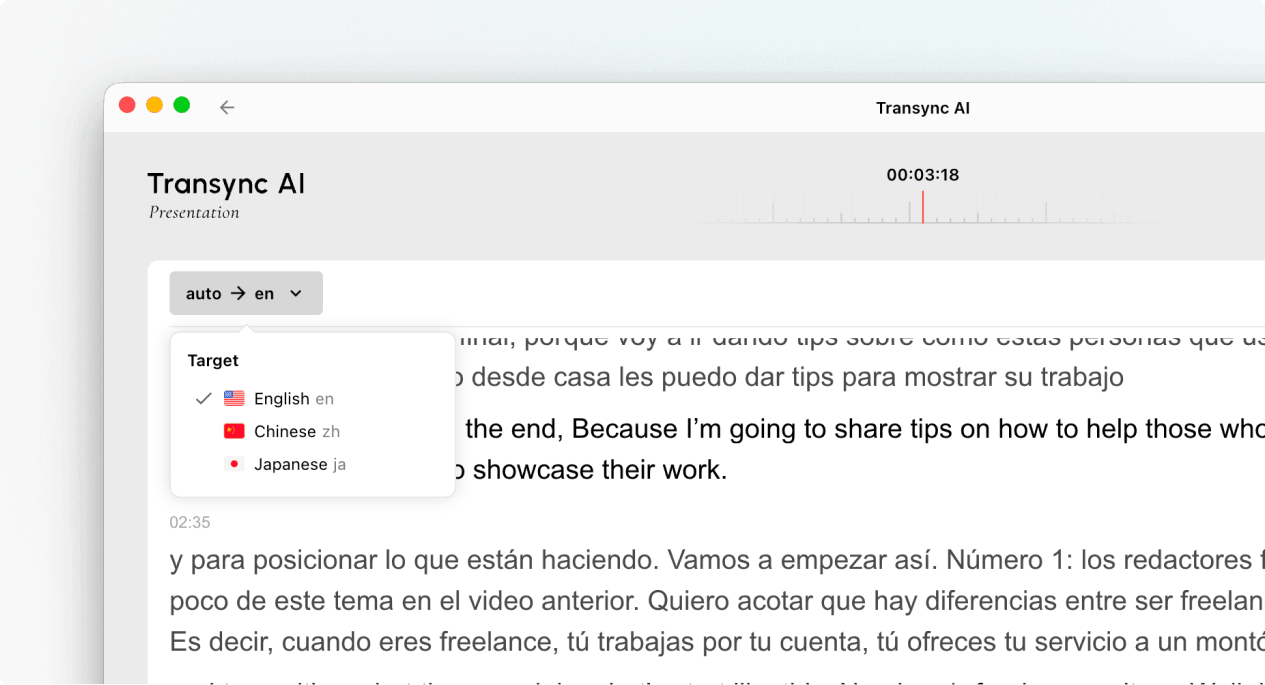
If you want to follow the presentation in another language, open the language selector and choose another language enabled by the host. If the language you need is not listed, ask the host whether it can be added to the presentation.

Use the language selector to switch the audience translation language during a presentation.
Switch to another language enabled by the host.

6. Leave or Rejoin the Presentation #

Leaving your presentation panel does not end the host’s task. If the host’s presentation is still active, you can join Presentation Mode again using the active link, QR code, or Room ID.

When Transync AI asks you to confirm the exit, select Exit only if you want to close your audience panel.

7. View a Shared Record After the Presentation #

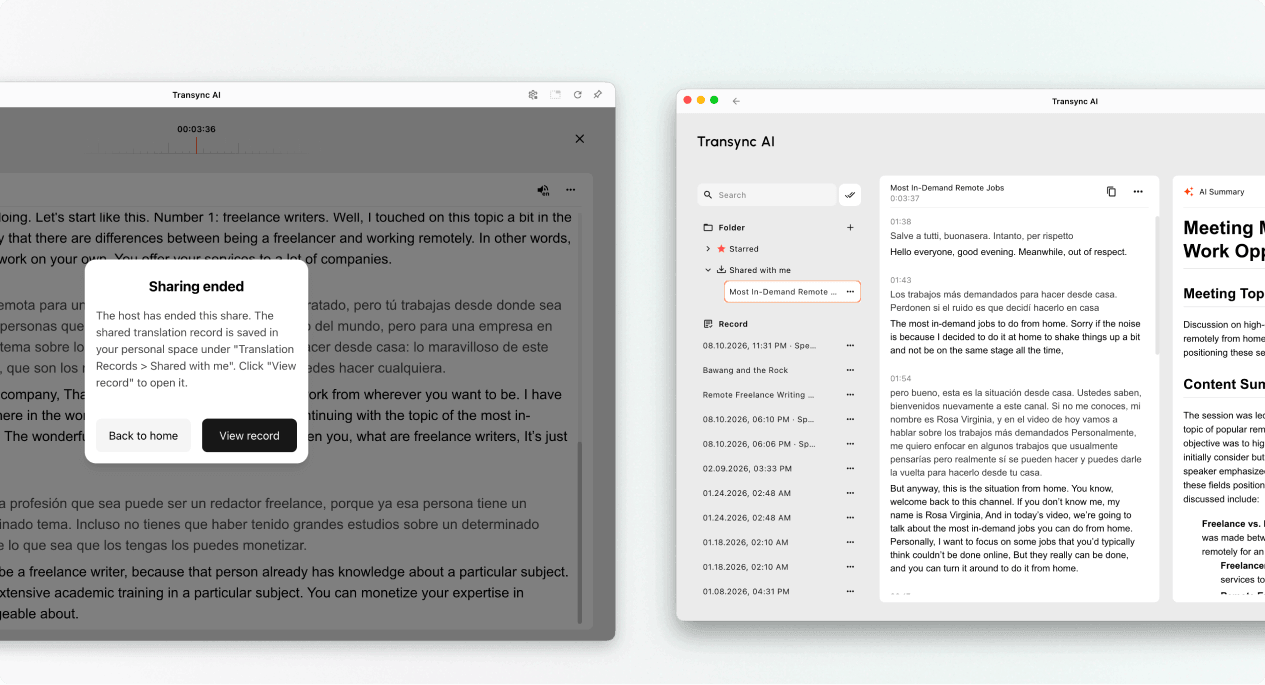
When the host ends the presentation, Transync AI shows a sharing-ended message. If the host chose to share the transcript, select View record or open Profile → Translation History → Shared with Me.

If the host did not share the transcript, you can close the end message but will not receive a shared presentation record.

Open a shared presentation record from Shared with Me after the host ends sharing.
When sharing ends, open the record from Shared with Me if the host shared it.

Troubleshooting #

I am asked to sign in #

Complete sign-in and return to join Presentation Mode. If you do not have an account, follow 如何注册 Transync AI, then reopen the active presentation link or Room ID.

I cannot join Presentation Mode #

The host may not have started Presentation Mode, or the presentation may have ended. Contact the host and request a currently active join option.

I cannot find my language #

Audience members can only select languages enabled by the host. Ask the host whether the language can be added.

I cannot hear voice playback #

Check your device volume, confirm that voice playback is available and enabled, and make sure the correct language is selected. You can continue reading the live translated text even when voice playback is off.

常见问题解答 #

Do I need a Transync AI account? #

If the join flow asks you to sign in, complete sign-in before joining. The exact entry experience may depend on the device, browser, and current product version.

Can I speak into the presentation? #

No. The audience panel is for viewing and listening. Only the host provides voice input to the presentation task.

Can I change my language after joining? #

Yes, you can switch to another language that the host has enabled for the active presentation.

Can I rejoin after leaving? #

Yes, as long as the host’s presentation remains active and you still have a valid link, QR code, or Room ID.

Will I receive the transcript after the presentation? #

Only if the host chooses to share it. Shared presentation records appear in Shared with Me after the task ends.

Related Articles #

  • 如何在 Transsync AI 中使用演示模式
  • 如何注册 Transync AI
  • 如何在 Transync AI 中使用语音播放
  • 如何管理翻译记录
更新 2026 年 8 月 11 日

这篇文档有帮助吗?

  • 有帮助
  • 没有帮助

分享这篇文章 :

  • Facebook
  • 十
  • LinkedIn
  • Pinterest
如何在 Transsync AI 中使用演示模式如何在 Transsync AI 中使用演示模式
目录
  • 1. Join Presentation Mode with a Link or QR Code
  • 2. Join Presentation Mode with a Room ID
  • 3. Choose Your Language
  • 4. Read and Listen During the Presentation
  • 5. Switch Languages
  • 6. Leave or Rejoin the Presentation
  • 7. View a Shared Record After the Presentation
  • Troubleshooting
    • I am asked to sign in
    • I cannot join Presentation Mode
    • I cannot find my language
    • I cannot hear voice playback
  • 常见问题解答
    • Do I need a Transync AI account?
    • Can I speak into the presentation?
    • Can I change my language after joining?
    • Can I rejoin after leaving?
    • Will I receive the transcript after the presentation?
  • Related Articles

RedNote 抖音 哔哩哔哩 知乎 YouTube TikTok LinkedIn

沪ICP备2025119728号

点击联系:support@transyncai.com

产品

  • 工具
  • AI 实时翻译
  • AI 实时会议翻译
  • AI 会议记录
  • AI 语音翻译
  • AI 助手
  • 画中画浮动字幕
  • 支持的语言
  • 用例
  • Zoom 翻译
  • Microsoft Teams 翻译
  • Google Meet 翻译
  • WhatsApp 翻译
  • 现场会议翻译

页面

  • 定价
  • 博客
  • 支持
  • 下载
  • 企业版
  • 变更日志
  • 免费试用

资源

  • Transync AI 产品事实
  • Transync AI 同类比较
  • Transync AI 替代方案

条款

  • 隐私政策
  • 服务条款
  • 信任中心

© 2026 Transync AI – 实时翻译。

简体中文
English 日本語 한국어 Русский Français Español Deutsch Italiano Čeština ไทย 繁體中文繁體中文 Português do Brasil العربية हिन्दी Bahasa Indonesia Tiếng Việt Türkçe Nederlands Polski Українська