Bỏ qua nội dung chính
Nhấn enter để tìm kiếm hoặc ESC để đóng
Đóng tìm kiếm
Logo Transync AI – logo thương hiệu chính thức của dịch vụ dịch thuật thời gian thực Transync AI.
  • Dùng thử miễn phí
Thực đơn
  • Sản phẩm
    • Dịch thuật thời gian thực bằng AI
    • Bản dịch cuộc họp trực tiếp AI
    • Biên bản cuộc họp AI
    • Trình dịch giọng nói AI
    • Trợ lý AI: Từ khóa và Bối cảnh
    • Hình ảnh trong hình ảnh Phụ đề nổi
    • Ngôn ngữ được hỗ trợ
  • Các trường hợp sử dụng
    • Phóng to bản dịch
    • Dịch thuật Microsoft Teams
    • Dịch thuật Google Meet
    • Dịch cuộc gọi thoại qua WhatsApp
    • Dịch thuật cuộc họp trực tiếp
  • Blog
  • Giá cả
  • Doanh nghiệp
  • Ủng hộ
  • Tải xuống
  • Dùng thử miễn phí
  • Sản phẩm
    • Dịch thuật thời gian thực bằng AI
    • Bản dịch cuộc họp trực tiếp AI
    • Biên bản cuộc họp AI
    • Trình dịch giọng nói AI
    • Trợ lý AI: Từ khóa và Bối cảnh
    • Hình ảnh trong hình ảnh Phụ đề nổi
    • Ngôn ngữ được hỗ trợ
  • Các trường hợp sử dụng
    • Phóng to bản dịch
    • Dịch thuật Microsoft Teams
    • Dịch thuật Google Meet
    • Dịch cuộc gọi thoại qua WhatsApp
    • Dịch thuật cuộc họp trực tiếp
  • Blog
  • Giá cả
  • Doanh nghiệp
  • Ủng hộ
  • Tải xuống

hello@transyncai.com

Bắt đầu

3
  • Hướng dẫn nhanh dành cho máy tính để bàn
  • Hướng dẫn nhanh dành cho thiết bị di động
  • Liên hệ với chúng tôi

Hướng dẫn sử dụng

13
  • Cách đăng ký Transync AI
  • Cách bắt đầu dịch thuật thời gian thực
  • Cách chọn chế độ dịch trong Transync AI
  • Cách chia sẻ âm thanh máy tính
  • Hướng dẫn sử dụng tính năng phát lại giọng nói trong Transync AI
  • Cách sử dụng tính năng sao chép giọng nói
  • Hướng dẫn sử dụng micro ảo trên macOS
  • Hướng dẫn thiết lập micro ảo trên Windows
  • Hướng dẫn sử dụng chế độ hình ảnh trong hình ảnh
  • Cách truy cập Biên bản và Tóm tắt cuộc họp
  • Cách sử dụng Trợ lý AI
  • Cách quản lý hồ sơ dịch thuật
  • Cách nạp tiền và yêu cầu hoàn tiền

Doanh nghiệp

1
  • Hướng dẫn doanh nghiệp

Tài nguyên

3
  • Trung tâm tin cậy
  • Điều khoản và Chính sách
  • Nhật ký thay đổi
Xem danh mục
  • Trang chủ
  • Tài liệu
  • Hướng dẫn sử dụng
  • Cách chọn chế độ dịch trong Transync AI

Cách chọn chế độ dịch trong Transync AI

Thời gian đọc: 3 phút

Transync AI supports different translation modes so each task can match the way people are communicating. Before you start a translation task, choose the mode that fits your scenario: Dịch thuật một chiều, Dịch thuật hai chiều, hoặc Dịch thuật đa ngôn ngữ.

What Are Translation Modes? #

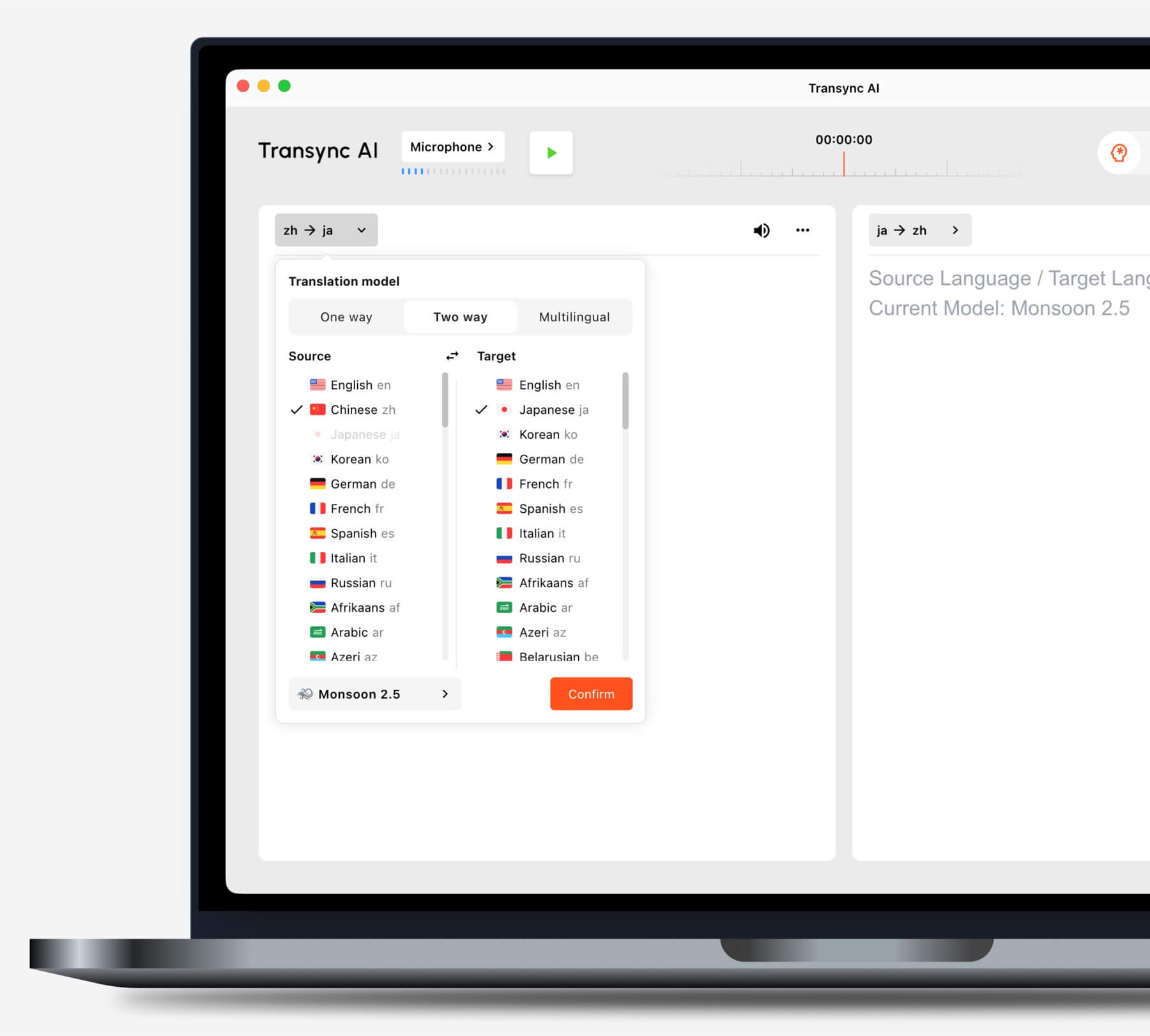
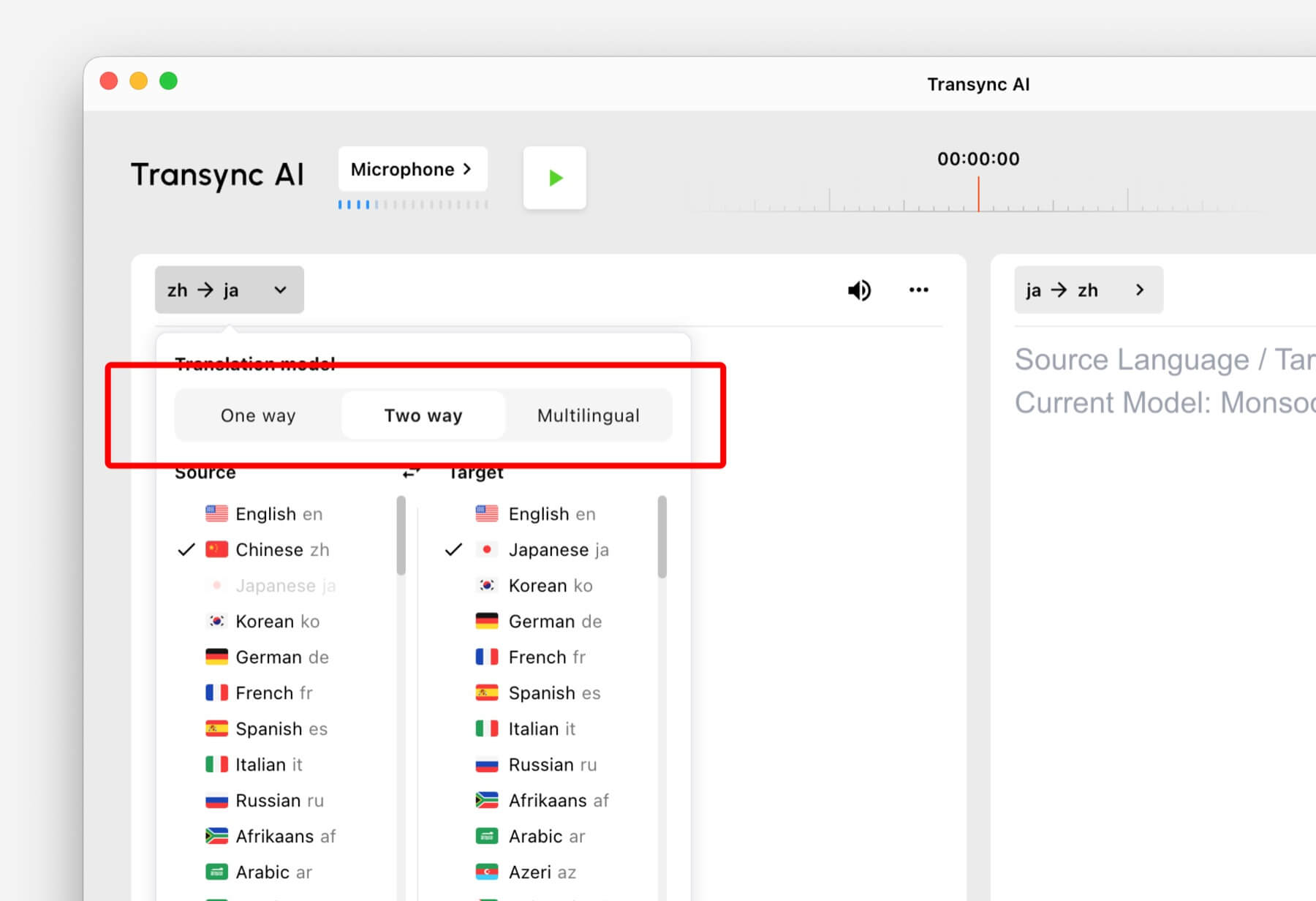
Translation modes control how Transync AI handles the direction of speech and the target language output. In the app, these options may appear as One way, Two way, Và Đa ngôn ngữ.

Select One way, Two way, or Multilingual translation mode in Transync AI
Choose the translation mode that matches your scenario before starting a task.

Choose a Mode Based on Your Scenario #

Dịch thuật một chiều #

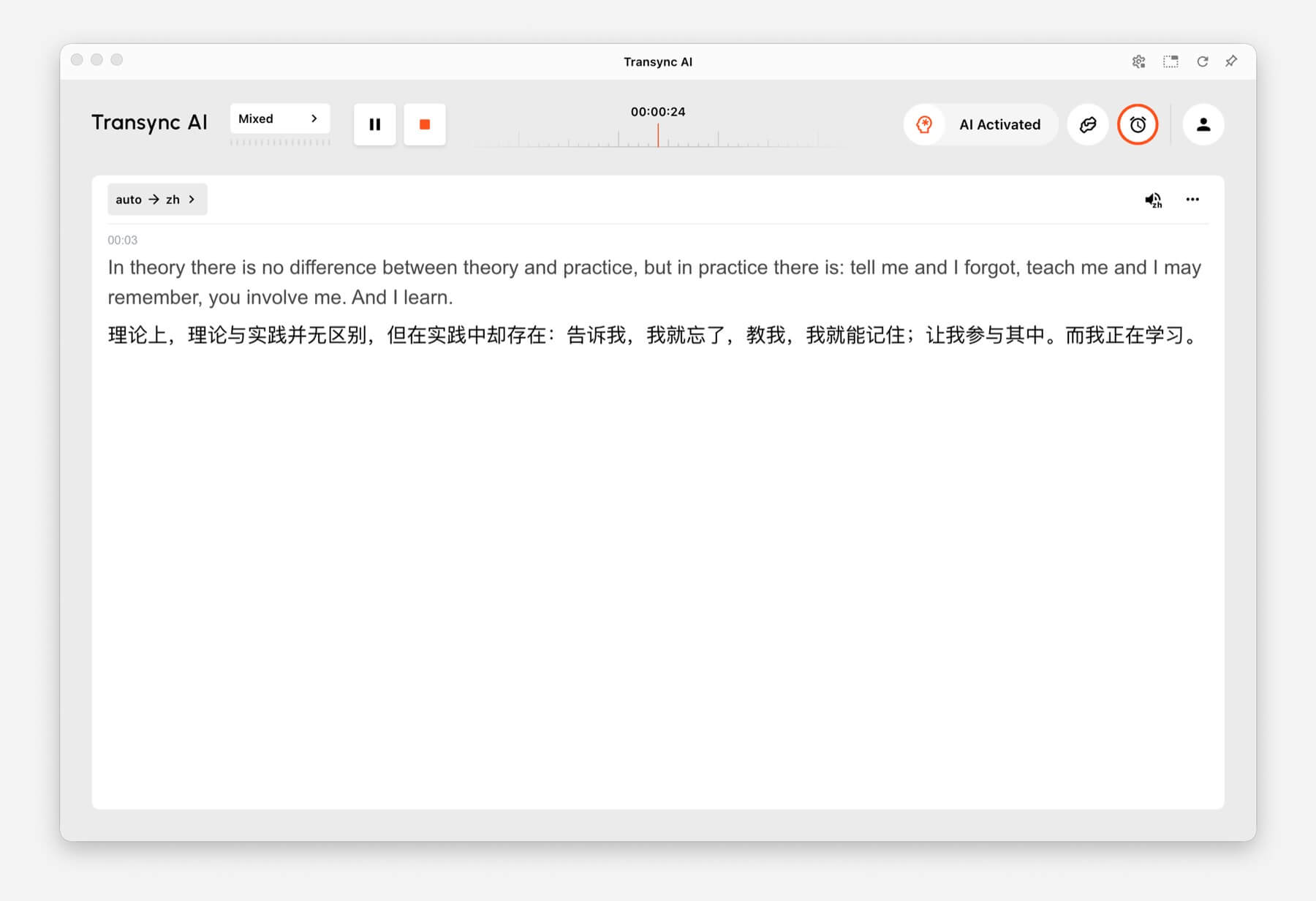
Sử dụng Dịch thuật một chiều when you mainly need to listen, such as during a class, lecture, webinar, video, training session, or talk. This mode is useful when one speaker or one audio source needs to be translated into your target language.

One-way Translation showing source audio translated into Chinese in Transync AI
One-way Translation is designed for listening scenarios such as lectures, webinars, and classes.

Dịch thuật hai chiều #

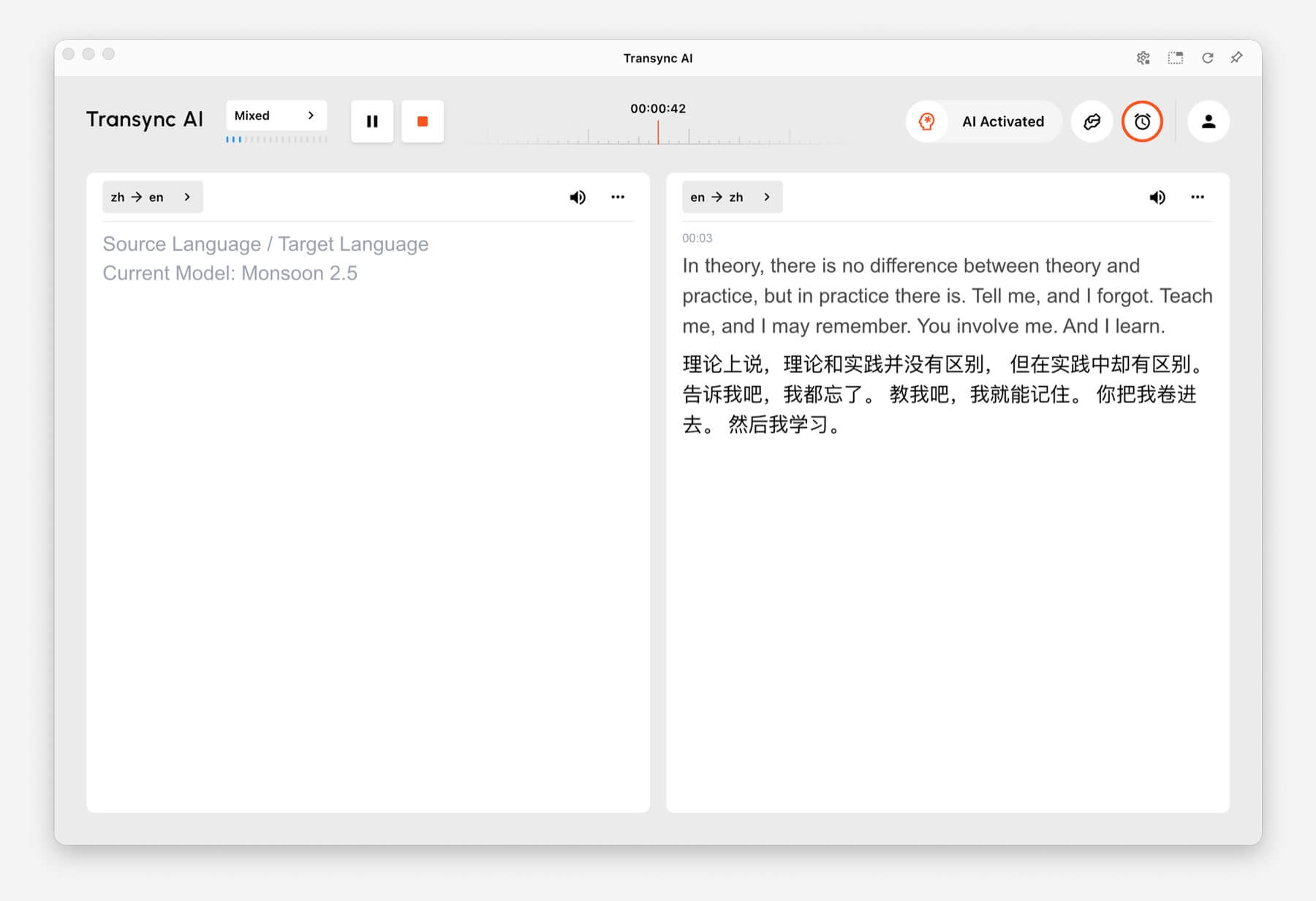
Sử dụng Dịch thuật hai chiều for back-and-forth conversations, including meetings, calls, interviews, travel conversations, customer discussions, and in-person communication. This mode is designed for situations where both sides speak and respond.

Two-way Translation showing Chinese and English panels in Transync AI
Two-way Translation supports back-and-forth conversations between two languages.

Dịch thuật đa ngôn ngữ #

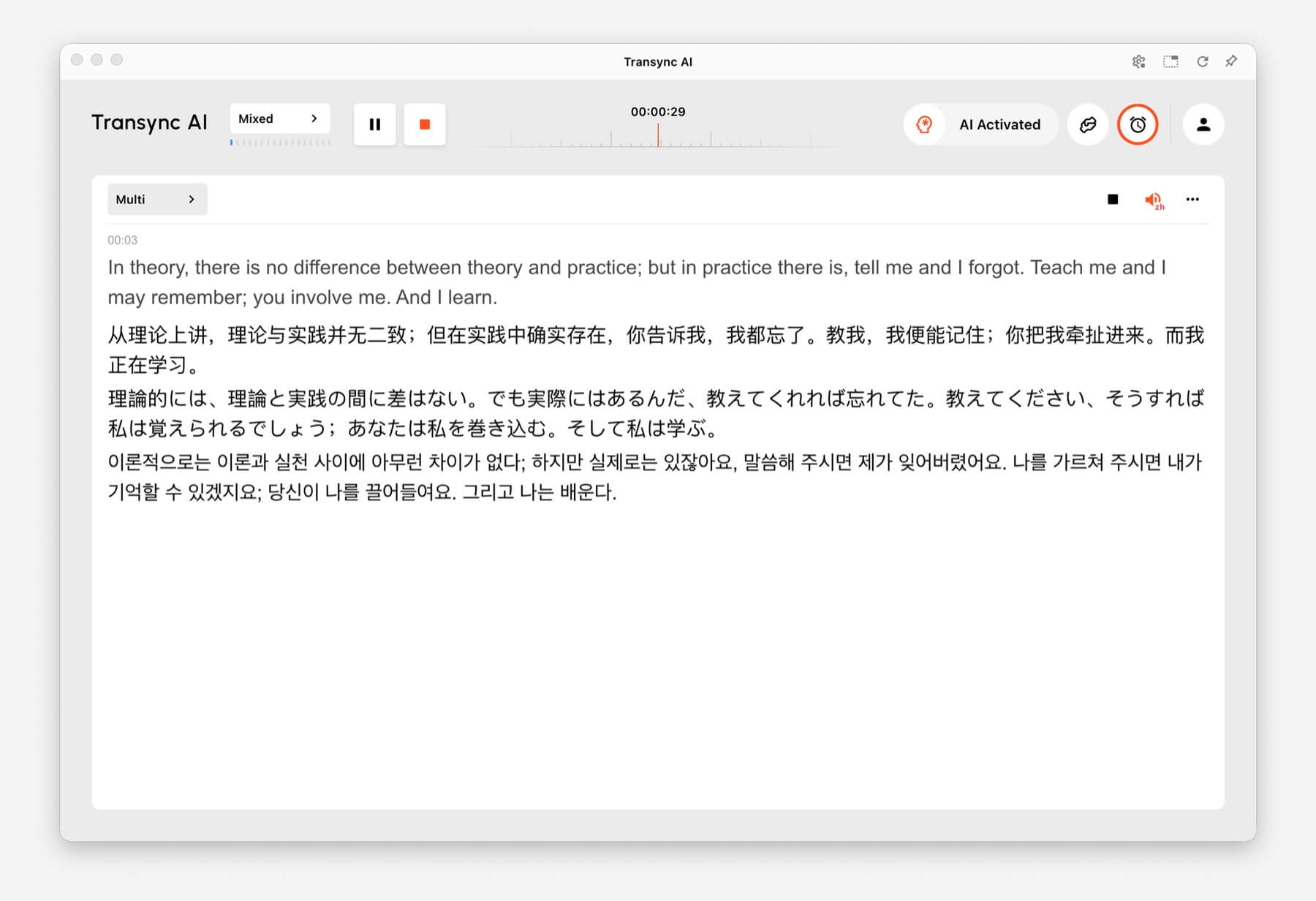
Sử dụng Dịch thuật đa ngôn ngữ when one task needs several target languages at the same time. This is helpful for global teams, multilingual meetings, international training, and sessions where participants need to follow the same content in different languages.

Multilingual Translation showing one task translated into English, Chinese, Japanese, and Korean
Multilingual Translation can output multiple target languages in the same task.

How to Switch Translation Modes #

Mode selector tabs for One way, Two way, and Multilingual translation in Transync AI
Switch between One way, Two way, and Multilingual before you start translating.
  1. Open Transync AI on desktop, mobile, web, or the app you normally use.
  2. Open the language or translation settings before starting the task.
  3. Lựa chọn One way, Two way, hoặc Đa ngôn ngữ based on your scenario.
  4. Choose your source and target language settings, then start translation.

If you are not sure which mode to choose, start with Dịch thuật một chiều for listening scenarios, Dịch thuật hai chiều for conversations, and Dịch thuật đa ngôn ngữ when multiple target languages are needed in one task.

How Billing Works for Translation Modes #

Dịch thuật một chiều Và Dịch thuật hai chiều are billed at the standard 1x rate. Dịch thuật đa ngôn ngữ is billed based on the number of languages selected.

  • 3 languages: 2x time consumption.
  • Each additional language: adds 1x time consumption.
  • Maximum: 10 languages, which counts as 9x time consumption.

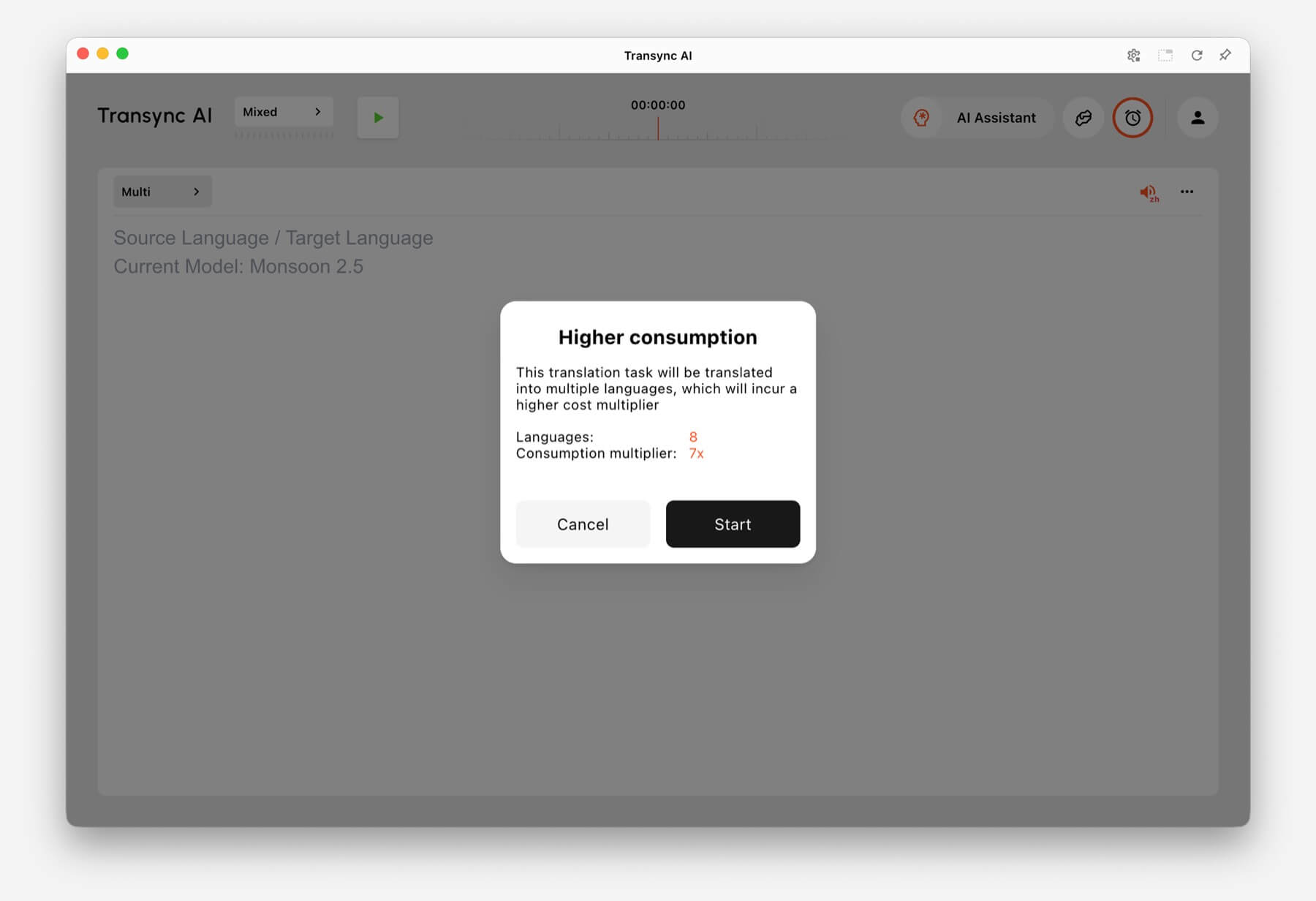
For example, selecting 8 languages in Multilingual Translation counts as 7x time consumption. Transync AI shows a higher consumption warning before you start when the selected language count increases usage.

Higher consumption warning showing 8 languages and 7x consumption multiplier in Transync AI
When many languages are selected, Transync AI shows the multilingual consumption multiplier before the task starts.

Câu hỏi thường gặp #

Can I change modes after starting a task? #

For the most reliable setup, choose the translation mode before starting the task. If you need a different mode, stop the current task and start a new one with the correct mode.

Which mode should I use for online meetings? #

Sử dụng Dịch thuật hai chiều for normal meeting conversations. Use Dịch thuật đa ngôn ngữ if the same meeting needs output in several target languages.

Which mode should I use for classes or lectures? #

Sử dụng Dịch thuật một chiều when you mainly listen to a speaker, class, lecture, webinar, or video.

How is Multilingual Translation billed? #

Multilingual Translation starts from at least 3 languages and counts as 2x time consumption. Each additional language adds 1x, up to 10 languages at 9x time consumption.

Cập nhật vào Ngày 24 tháng 6 năm 2026

Tài liệu này có hữu ích không?

  • Hữu ích
  • Không hữu ích

Chia sẻ bài viết này :

  • Facebook
  • X
  • LinkedIn
  • Pinterest
Cách bắt đầu dịch thuật thời gian thựcCách chia sẻ âm thanh máy tính
Mục lục
  • What Are Translation Modes?
  • Choose a Mode Based on Your Scenario
    • Dịch thuật một chiều
    • Dịch thuật hai chiều
    • Dịch thuật đa ngôn ngữ
  • How to Switch Translation Modes
  • How Billing Works for Translation Modes
  • Câu hỏi thường gặp
    • Can I change modes after starting a task?
    • Which mode should I use for online meetings?
    • Which mode should I use for classes or lectures?
    • How is Multilingual Translation billed?

RedNote Douyin Bilibili 知乎 YouTube TikTok LinkedIn

沪ICP备2025119728号

Contact:support@transyncai.com

Sản phẩm

  • Công cụ
  • Dịch thuật thời gian thực AI
  • Bản dịch AI Live Meeting
  • Biên bản cuộc họp AI
  • Trình dịch giọng nói AI
  • Trợ lý AI
  • Hình ảnh trong hình ảnh Phụ đề nổi
  • Ngôn ngữ được hỗ trợ
  • Các trường hợp sử dụng
  • Dịch thuật Zoom
  • Dịch thuật Microsoft Teams
  • Dịch thuật Google Meet
  • Dịch thuật WhatsApp
  • Dịch thuật cuộc họp trực tiếp

Trang

  • Giá cả
  • Blog
  • Ủng hộ
  • Tải xuống
  • Doanh nghiệp
  • Nhật ký thay đổi
  • Dùng thử miễn phí

Tài nguyên

  • Thông tin thực tế về Transync AI
  • So sánh Transync AI
  • Các giải pháp thay thế cho Transync AI

Điều khoản

  • Sự riêng tư
  • Điều khoản dịch vụ
  • Trung tâm tin cậy

© 2026 Transync AI – Dịch thuật thời gian thực.

Tiếng Việt
English 简体中文 日本語 한국어 Русский Français Español Deutsch Italiano Čeština ไทย 繁體中文繁體中文 Português do Brasil العربية हिन्दी Bahasa Indonesia Türkçe Nederlands Polski Українська