Hit enter to search or ESC to close
Close Search
Transync AI logo – official brand logo for Transync AI real-time translation service
  • Free Trial
Menu
  • Product
    • Translation
      • AI Real-Time TranslationTranslate conversations as they happen
      • AI Voice TranslatorListen to translations spoken aloud
      • Presentation ModeShare live subtitles on a larger screen
    • Meetings
      • AI Live Meeting TranslationFollow multilingual meetings in real time
      • AI Meeting NotesTurn conversations into clear meeting notes
      • AI Speaker SeparationKeep track of who said what
    • Tools & Coverage
      • AI Assistant: Keywords and ContextAdd keywords and context for better translations
      • Picture in Picture Floating SubtitlesKeep translated subtitles above other windows
      • Supported LanguagesExplore supported languages and language pairs
  • Use Cases
    • Zoom translationTranslate your Zoom meetings in real time
    • Microsoft Teams translationFollow multilingual conversations in Teams
    • Google Meet TranslationUnderstand every conversation on Google Meet
    • WhatsApp Translation voice callTranslate WhatsApp voice calls as you talk
    • In-Person Meeting TranslationCommunicate face to face across languages
    • Gaming Livestream TranslationFollow gaming livestreams in your language
    • Lecture TranslationFollow classes across languages and review the key points
    • Webinar TranslationFollow webinars and live events across languages
    • Gaming Commentary TranslationBroadcast translated commentary and bilingual captions
    • Sales & Supplier Meeting TranslationDiscuss requirements across languages and keep a clear record
  • Blog
  • Pricing
  • Enterprise
  • Contact
  • Support
    • User GuideGet started with clear, step-by-step guides
    • Video TutorialsExplore features with guided video walkthroughs
  • Download
  • Free Trial
  • Product
    • Translation
      • AI Real-Time TranslationTranslate conversations as they happen
      • AI Voice TranslatorListen to translations spoken aloud
      • Presentation ModeShare live subtitles on a larger screen
    • Meetings
      • AI Live Meeting TranslationFollow multilingual meetings in real time
      • AI Meeting NotesTurn conversations into clear meeting notes
      • AI Speaker SeparationKeep track of who said what
    • Tools & Coverage
      • AI Assistant: Keywords and ContextAdd keywords and context for better translations
      • Picture in Picture Floating SubtitlesKeep translated subtitles above other windows
      • Supported LanguagesExplore supported languages and language pairs
  • Use Cases
    • Zoom translationTranslate your Zoom meetings in real time
    • Microsoft Teams translationFollow multilingual conversations in Teams
    • Google Meet TranslationUnderstand every conversation on Google Meet
    • WhatsApp Translation voice callTranslate WhatsApp voice calls as you talk
    • In-Person Meeting TranslationCommunicate face to face across languages
    • Gaming Livestream TranslationFollow gaming livestreams in your language
    • Lecture TranslationFollow classes across languages and review the key points
    • Webinar TranslationFollow webinars and live events across languages
    • Gaming Commentary TranslationBroadcast translated commentary and bilingual captions
    • Sales & Supplier Meeting TranslationDiscuss requirements across languages and keep a clear record
  • Blog
  • Pricing
  • Enterprise
  • Contact
  • Support
    • User GuideGet started with clear, step-by-step guides
    • Video TutorialsExplore features with guided video walkthroughs
  • Download

hello@transyncai.com

Getting Started

4
  • Desktop Quickstart Guide
  • Mobile Quickstart Guide
  • Meeting Audio Setup Checklist
  • Contact Us

User Guide

15
  • How to Register Transync AI
  • How to Start Real-Time Translation
  • How to Choose a Translation Mode in Transync AI
  • How to Share Computer Audio
  • How to Use Voice Playback in Transync AI
  • How to Use the AI Assistant
  • How to Manage Personal Vocabulary
  • How to Manage Personalized Memory
  • How to Use Voice Clone
  • How to Use the Virtual Microphone on macOS
  • How to Set Up Virtual Microphone on Windows
  • How to Use Picture-in-Picture Mode
  • How to Access Meeting Transcripts and Summaries
  • How to Manage Translation Records
  • How to Recharge and Request a Refund

Presentation Mode

2
  • How to Use Presentation Mode in Transync AI
  • How to Join a Transync AI Presentation

Enterprise

1
  • Enterprise guide

Resources

3
  • Trust Center
  • Terms and Policy
  • Changelog
View Categories
  • Home
  • Docs
  • User Guide
  • How to Recharge and Request a Refund

How to Recharge and Request a Refund

3 min read

0:00 / 3:00
  • View as Markdown Open this page as plain Markdown (opens in a new tab)
  • Open in ChatGPT Ask questions about this page (opens in a new tab)
  • Open in Claude Ask questions about this page (opens in a new tab)
  • Open in Google AI Studio Ask questions about this page (Google account required) (opens in a new tab)

How to Recharge and Refund in Transync AI #

Transync AI uses a flexible Membership + Time Card billing model designed to give users control over translation time and costs. you can check pricing

1. How to Recharge a Membership #

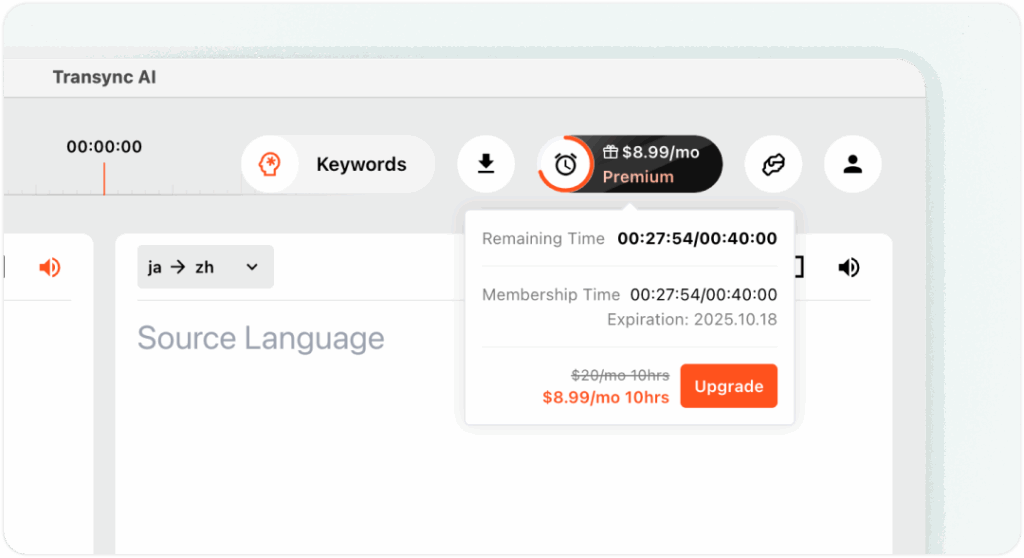
A membership plan includes 10 hours of usage time per month.

Once your membership expires, all benefits and remaining time will become invalid, so please plan your usage in advance.

You can recharge your membership from:

  • The top navigation bar in the Transync AI app
  • The Personal Center section
How to Recharge and Request a Refund

Important:

An annual membership equals purchasing 12 monthly memberships at once.

However, the usage time for each month remains valid only during that specific month and does not carry over.

2. How to Recharge a Time Card #

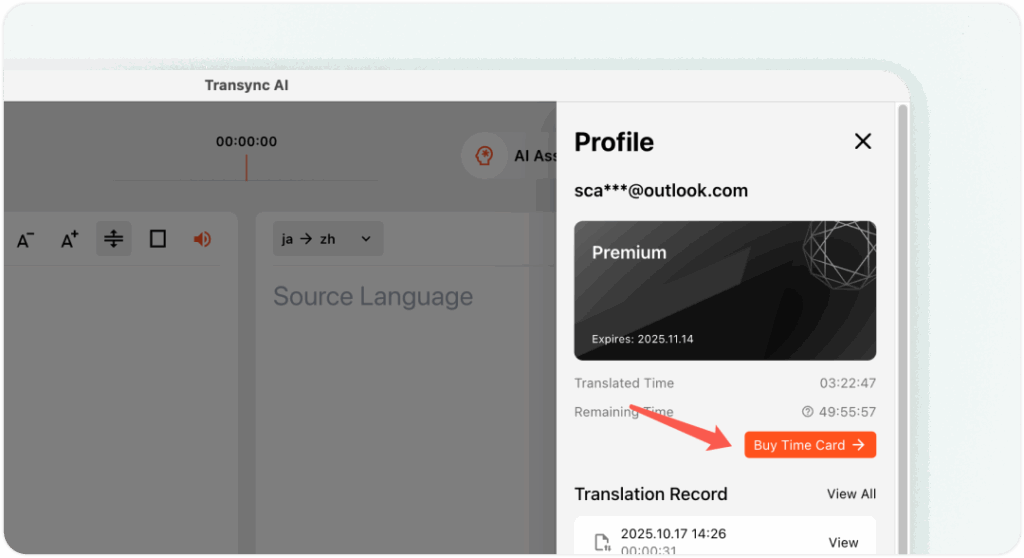
Only active members can recharge Time Cards.

You can find the recharge option in Personal Center → Buy Time Card .

Policy Notes:

  • Time cards never expire, but they will be frozen when your membership ends.
  • Once your membership is renewed, your time card hours will reactivate automatically.
  • Transync AI always consumes time in the following order:
    1. Membership hours (expire monthly)
    2. Time card hours (do not expire)

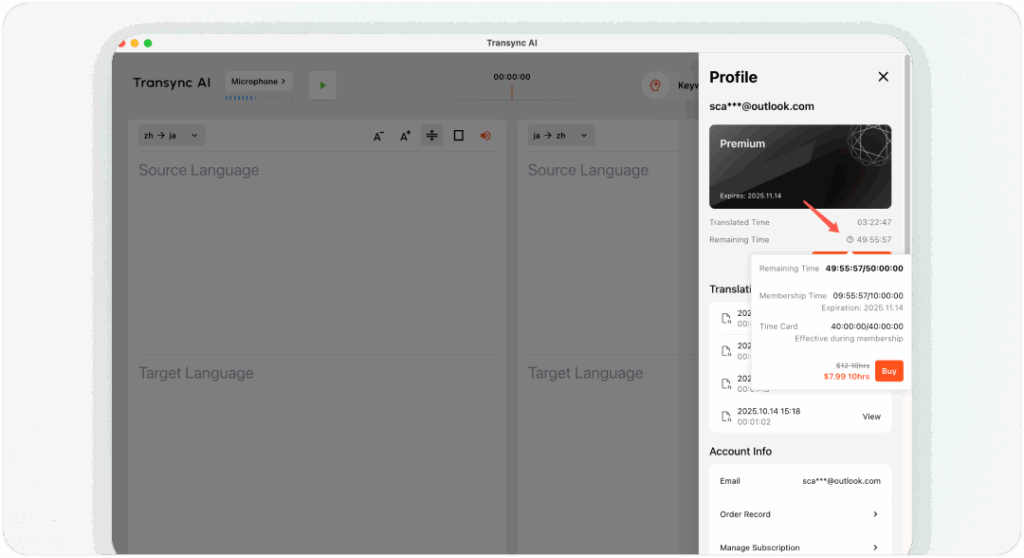
3. Viewing Remaining Time #

Go to your Personal Center to view:

  • Membership expiration date
  • Remaining membership hours for the current month
  • Remaining time card hours

This helps you manage your translation usage more efficiently.
4. How to Cancel and Request a Refund #

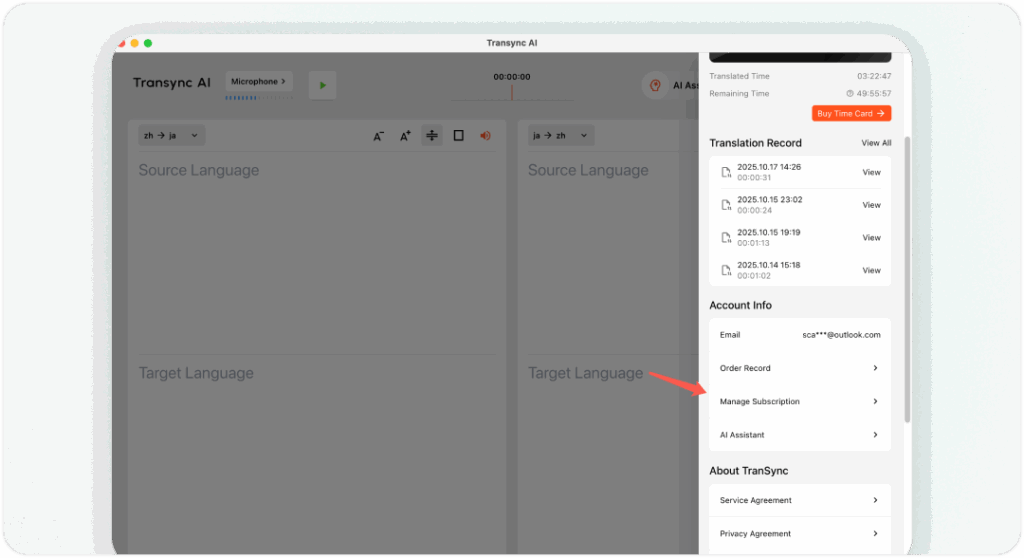
If you subscribed through Stripe, Apple App Store, or Google Play, Transync AI provides subscription-based services only.

Please manage or cancel your subscription directly through the corresponding store’s subscription settings.

You can also find a “Manage Subscription” link inside Transync AI’s Personal Center.

If you delete your Transync AI account and the account has an active Stripe subscription, Transync AI will automatically attempt to cancel that Stripe subscription during account deletion.

If your experience doesn’t meet expectations, please contact us directly — we will issue a no-questions-asked refund.

💬 Please contact our support team rather than leaving negative reviews on social media or app stores — we’re committed to resolving all issues quickly and transparently.
If you use Alipay for your subscription.

  1. Open settings: Launch Alipay, tap “My” in the lower right corner, then tap the gear icon in the upper right (Settings).
  2. Manage payment settings: Select “Payment Settings” to enter the payment management page.
  3. Turn off auto-renewal: Tap “Auto-renewal/Password-free Payments” and find the subscription you want to cancel.
  4. Confirm cancellation: Tap the corresponding item, choose “Turn off service,” and complete the cancellation.
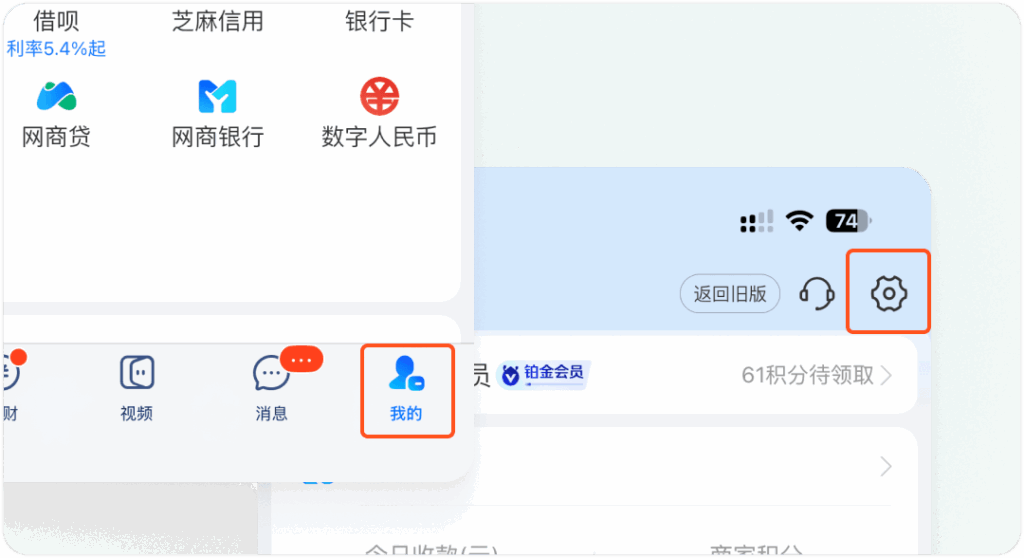
Manage subscription in Alipay

5. How to Get an Invoice #

The process for obtaining invoices depends on your payment channel:

  • Apple App Store / Google Play: The respective app store will automatically send an invoice or receipt to your store email address. Transync AI does not issue invoices for these transactions.
  • Stripe (Credit or Debit Card Payments): Stripe will automatically email your invoice to the payment email address used during checkout. Transync AI does not issue separate invoices for these payments.
  • Alipay: If you purchased through Alipay and require an invoice, please go to Personal Center → Contact Customer Service, and provide:
    • Invoice title
    • Email address
    • Payment amount Our support team will issue your invoice within one business day.

You can find all the information to contact us on this page.

Updated on May 27, 2026

Is this document helpful?

  • Happy
  • Sad

Share This Article :

  • Facebook
  • X
  • LinkedIn
  • Pinterest
How to Manage Translation RecordsHow to Register Transync AI
Table of Contents
  • How to Recharge and Refund in Transync AI
    • 1. How to Recharge a Membership
    • 2. How to Recharge a Time Card
    • 3. Viewing Remaining Time
    • 4. How to Cancel and Request a Refund
    • 5. How to Get an Invoice

RedNote Douyin Bilibili 知乎 YouTube TikTok LinkedIn

沪ICP备2025119728号

Contact:support@transyncai.com

Product

  • Tools
  • AI Real-time translation
  • AI Live Meeting translation
  • Presentation Mode
  • AI Meeting Notes
  • AI Speaker Separation
  • AI Voice Translator
  • AI Assistant
  • Picture in Picture Floating Subtitles
  • Supported languages
  • Translation Hours Calculator
  • Savings Calculator
  • 翻译小时计算器
  • 节省费用计算器
  • Use Cases
  • Zoom Translation
  • Teams Translation
  • Google Meet Translation
  • WhatsApp Translation
  • In-Person Meeting Translation

Pages

  • Pricing
  • Blog
  • Support
  • Video Tutorials
  • Download
  • Enterprise
  • Changelog
  • Free Trial

Resources

  • Transync AI Facts
  • Compare Transync AI
  • Transync AI Alternatives

Terms

  • Privacy
  • Terms of Service
  • Trust center

© 2026 Transync AI – Real-Time Translation.

English
简体中文 日本語 한국어 Русский Français Español Deutsch Italiano Čeština ไทย 繁體中文繁體中文 Português do Brasil العربية हिन्दी Bahasa Indonesia Tiếng Việt Türkçe Nederlands Polski Українська