

Guia de transcrição do Zoom AI: aprenda como legendas, transcrições, resumos de IA, legendas traduzidas e a IA Transync dão suporte a reuniões multilíngues.
Transcrição por IA do Zoom Pode transformar uma reunião dinâmica em um registro escrito pesquisável. Isso pode ajudar as equipes a revisar o que foi dito, identificar itens de ação, revisitar detalhes esquecidos e criar resumos da reunião sem depender inteiramente de anotações manuscritas.
Mas o fluxo de trabalho torna-se confuso quando os usuários esperam que uma única funcionalidade faça tudo.
Legendas ao vivo nem sempre são iguais a uma transcrição arquivada. Uma transcrição não é o mesmo que um resumo gerado por IA. Um resumo não é um registro completo. Além disso, a transcrição não significa automaticamente que todos os participantes receberão uma tradução em seu idioma preferido.
Essas distinções são ainda mais importantes em encontros internacionais.
Se um falante de inglês, um fornecedor japonês e um cliente que fala espanhol participarem da mesma chamada, gravar o áudio em inglês é apenas parte do problema. Os participantes também podem precisar de tradução simultânea, legendas bilíngues, transcrição da voz, suporte para terminologia técnica e anotações úteis após a reunião.
Este guia explica como funciona a transcrição por IA do Zoom, onde ela é mais útil, por que os fluxos de trabalho de transcrição comuns falham e como ferramentas como o Transync AI podem adicionar uma camada de comunicação multilíngue.
Resposta rápida: O que é a transcrição por IA do Zoom?
Transcrição por IA do Zoom É a utilização de reconhecimento de voz e recursos de IA para converter o áudio de reuniões em texto escrito.
Dentro do fluxo de trabalho mais amplo do Zoom, os usuários podem encontrar diversos recursos relacionados, porém diferentes:
| Recurso | Objetivo principal |
|---|---|
| Legendas automáticas | Exibir legendas legíveis de voz convertida em texto durante uma reunião ao vivo. |
| Transcrições de reuniões | Conservar o conteúdo da transcrição de voz como registro da reunião. |
| Resumo da Reunião de Acompanhamento de IA | Elabore um resumo e defina os próximos passos a serem seguidos a partir da reunião. |
| Gravação inteligente | Organize uma gravação na nuvem em capítulos, destaques e tarefas a serem tomadas. |
| Legendas traduzidas | Converter o idioma falado em legendas em outro idioma. |
| Tradutor de voz | Converter legendas traduzidas em áudio falado em fluxos de trabalho compatíveis. |
O importante é que essas funcionalidades resolvem problemas diferentes.
Quem deseja acompanhar a reunião ao vivo precisa de legendas. Quem precisa de um registro permanente precisa de uma transcrição. Quem precisa de uma revisão concisa pode preferir um resumo gerado por IA. Quem participa de uma reunião em outro idioma precisa de tradução, além da transcrição.
Legendas vs. Transcrições vs. Resumos de IA
Os termos são frequentemente usados como sinônimos, mas não deveriam ser.
As legendas servem para facilitar a leitura em tempo real.
Legendas automáticas exibem a fala como texto durante a reunião. Elas ajudam os participantes a acompanhar o orador em tempo real e podem melhorar a acessibilidade quando o áudio é difícil de ouvir.
As legendas são projetadas para serem lidas conforme a conversa acontece.
As transcrições são para fins de retenção.
A transcrição de uma reunião preserva o conteúdo da fala convertida em texto para que possa ser revisado posteriormente.
Esta é a melhor opção quando as equipes precisam:
- Procure uma declaração
- Analisar uma decisão
- Verifique um nome ou número
- Criar documentação
- Relembrar uma seção perdida
- Utilize o conteúdo da reunião em outro fluxo de trabalho.
Os resumos de IA são interpretações condensadas.
Um resumo de reunião feito por IA não é uma transcrição palavra por palavra. Ele seleciona e organiza as informações em um formato mais conciso.
Um resumo pode incluir:
- Principais pontos de discussão
- Decisões
- Próximos passos
- Itens de ação
- Questões
- Tópicos de acompanhamento
Resumos economizam tempo, mas não devem substituir a transcrição quando a redação exata é importante.
Atualização importante do Zoom para 2026
O Zoom agora separa as legendas ao vivo de forma mais clara das transcrições de reuniões armazenadas.
A partir de 18 de maio de 2026, as legendas ocultas não poderão mais ser salvas ou baixadas diretamente. As legendas continuarão disponíveis para leitura em tempo real, incluindo a possibilidade de retroceder um pouco durante a reunião. Os usuários que precisarem manter os dados de transcrição de voz devem ativar a opção "Transcrição da reunião".
Por isso, é importante configurar a funcionalidade correta antes do início da reunião.
Quando a transcrição por IA do Zoom é suficiente?
O fluxo de trabalho de transcrição nativo do Zoom pode ser suficiente quando:
- Todos entendem a linguagem da reunião.
- O objetivo principal é criar um registro escrito.
- Os participantes precisam apenas de legendas no mesmo idioma.
- A equipe deseja um resumo e uma lista de ações a serem tomadas.
- A reunião segue um fluxo de trabalho Zoom já estabelecido.
- A terminologia técnica é limitada.
- Não é necessária uma tradução exata.
Por exemplo, uma equipe de produto que fala inglês pode usar a transcrição por IA do Zoom para registrar uma reunião de status semanal. A transcrição fornece detalhes, enquanto o resumo da IA destaca as decisões e as tarefas atribuídas.
O fluxo de trabalho torna-se mais complicado quando os participantes não compartilham o mesmo idioma.
Quando a transcrição não é suficiente?
A transcrição registra a fala em forma escrita. A tradução modifica o idioma.
São processos distintos.
Considere uma reunião em que um fornecedor japonês fala japonês e um comprador americano fala inglês.
Uma transcrição em japonês ajuda quem lê japonês. Ela não ajuda automaticamente o participante que fala inglês a entender a conversa.
A reunião poderá exigir:
- reconhecimento de fala
- Transcrição
- Tradução
- Legendas bilíngues
- Saída de voz traduzida
- Resumo pós-reunião
Uma ferramenta de reunião multilíngue deve processar toda a cadeia de mensagens com rapidez suficiente para que os participantes possam continuar conversando.
Solução 1: Defina o idioma de fala correto.
O reconhecimento de fala depende muito do idioma selecionado.
Se a reunião estiver sendo conduzida em espanhol, mas o idioma das legendas estiver definido para inglês, o sistema de transcrição poderá tentar interpretar sons em espanhol como palavras em inglês. O resultado pode ser impreciso ou ilegível.
Antes da reunião:
- Confirme o idioma principal falado.
- Verificar se os participantes irão mudar de idioma.
- Defina o idioma correto das legendas.
- Informe os falantes que a transcrição está ativa.
- Teste o microfone com uma frase curta.
- Confira nomes, números e vocabulário técnico.
Esta etapa é particularmente importante para o Zoom AI Companion, pois a precisão dos resumos depende da qualidade da transcrição original.
Uma transcrição fraca gera um resumo fraco.
Correção 2: Ativar transcrições, não apenas legendas ao vivo
Um erro comum é presumir que as legendas visíveis se tornarão automaticamente uma transcrição permanente.
No fluxo de trabalho atualizado do Zoom para 2026, as legendas e as transcrições retidas são separadas.
Caso a ata da reunião seja relevante, confirme que:
- As transcrições das reuniões são ativadas pelo administrador.
- O anfitrião tem permissão para reter a transcrição.
- Os participantes compreendem como o conteúdo da reunião será armazenado.
- A transcrição poderá ser acessada após a reunião.
- As configurações de retenção atendem à política da empresa.
- As informações sensíveis são tratadas de forma adequada.
Os usuários do Zoom podem acessar as transcrições do AI Companion por meio do portal da web do Zoom em Gravações e transcrições, dependendo das configurações e permissões da conta.
Para uma visão geral, consulte a documentação oficial do Zoom sobre Transcrições de reuniões para AI Companion.
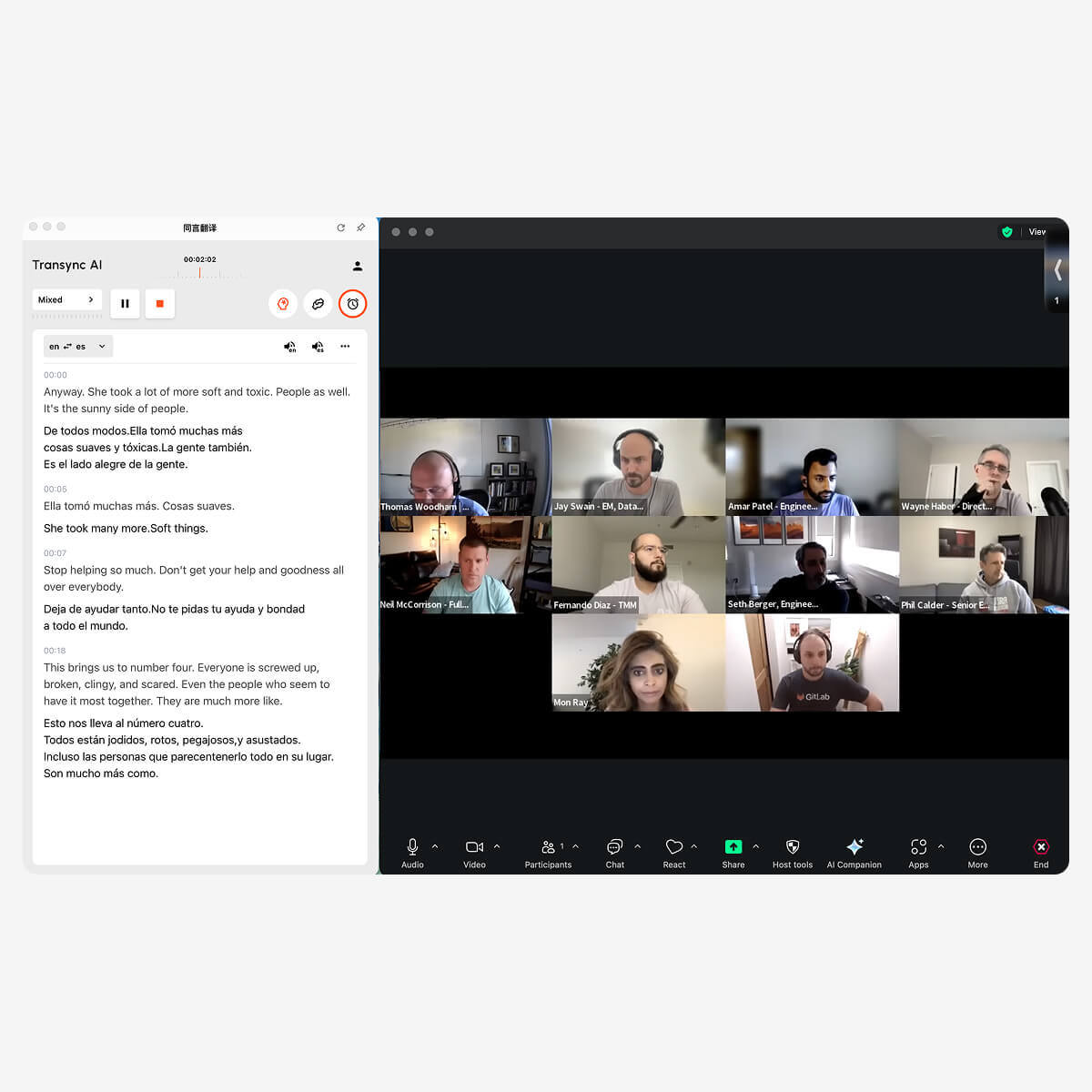
A IA da Transync permite que os anfitriões do Zoom forneçam legendas traduzidas em tempo real para todos os participantes durante reuniões ao vivo.
Correção 3: Trate o Resumo da IA como um rascunho
Resumos gerados por IA são úteis porque a maioria das pessoas não quer ler a transcrição completa após cada reunião.
No entanto, um resumo é uma interpretação da reunião. Ele pode condensar ou omitir detalhes.
Analise cuidadosamente o resumo quando a reunião incluir:
- Termos do contrato
- Preços
- Percentagens
- Datas de entrega
- Números de modelo do produto
- Informações médicas ou jurídicas
- Requisitos técnicos
- Compromissos com o cliente
- Responsabilidades atribuídas
Um fluxo de trabalho prático pós-reunião é:
- Leia o resumo sobre IA.
- Compare as afirmações importantes com a transcrição.
- Nomes, números e terminologia corretos.
- Confirme as decisões com os participantes relevantes.
- Compartilhe o resumo aprovado.
- Armazene a transcrição de acordo com a política da empresa.
Isso leva mais tempo do que aceitar o resumo sem revisão, mas reduz o risco de distribuir informações incorretas.
Correção 4: Preparar nomes e termos técnicos
Os sistemas gerais de reconhecimento de fala geralmente têm dificuldades com palavras que são raras fora de uma empresa ou setor específico.
Exemplos incluem:
- Nomes dos produtos
- Nomes dos funcionários
- Nomes dos clientes
- Acrônimos
- Terminologia científica
- Funcionalidades do software
- Números de modelo
- nomes de marcas regionais
Considere a seguinte frase:
John, da equipe da região Ásia-Pacífico, analisará as especificações do inversor fotovoltaico para o modelo X300.
Uma ferramenta de transcrição pode capturar incorretamente termos como “APAC”, “inversor fotovoltaico” ou “X300”. Se a transcrição estiver errada, o resumo e a tradução também podem estar incorretos.
Por esse motivo, a Transync AI fornece palavras-chave e configurações contextuais de fundo.
Os usuários podem adicionar termos como:
- Transync AI = 同言翻译
- inversor fotovoltaico
- embalagem de semicondutores
- Modelo X300
- APAC
- João Smith
- otimização da cadeia de suprimentos
- rede neural
Eles também podem descrever a reunião:
Esta é uma reunião técnica de fornecedores sobre equipamentos de energia renovável, cronogramas de produção, inspeção de qualidade, conformidade regional e especificações de inversores.
Esse contexto ajuda o sistema de tradução a escolher significados que se adequem à discussão.
Saiba mais em Contexto de palavras-chave do assistente de IA.
 Correção 5: Adicionar tradução em tempo real para reuniões multilíngues
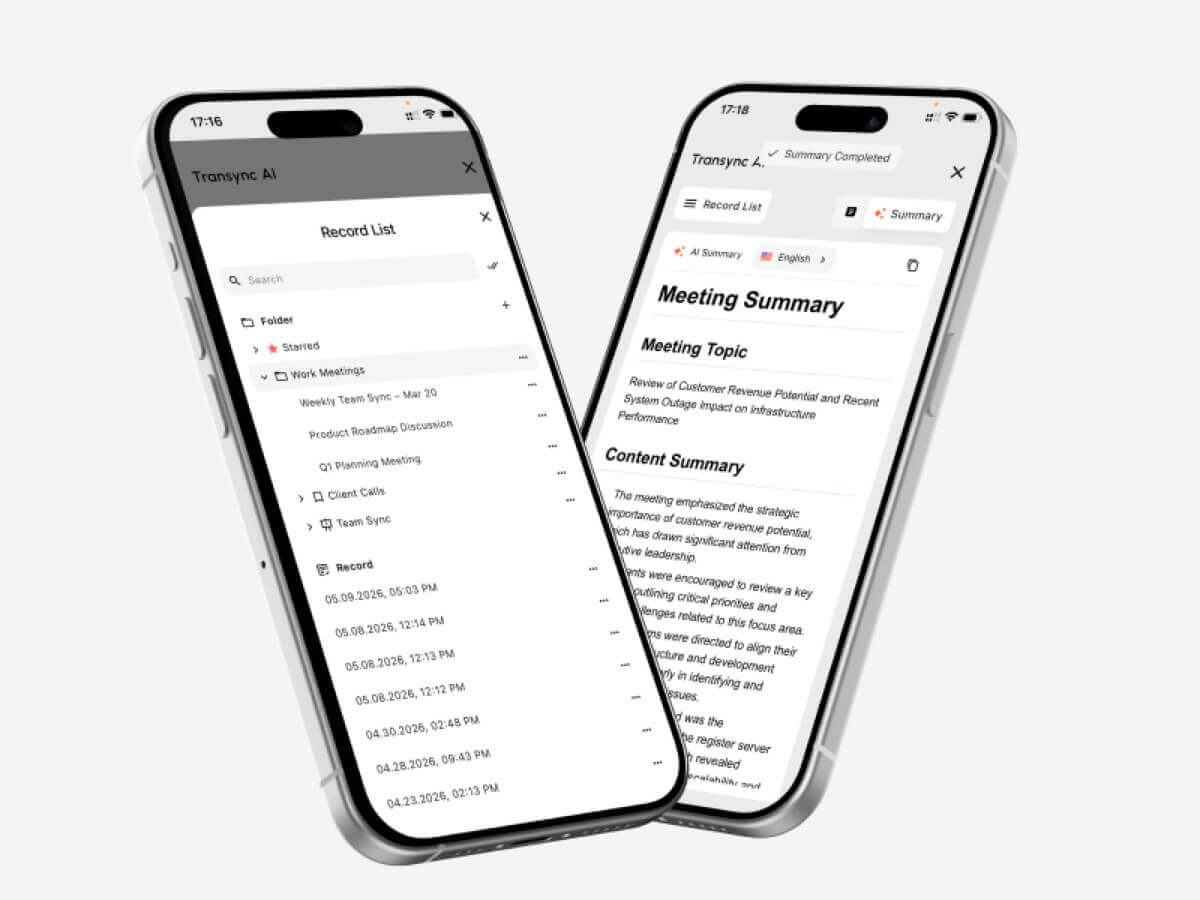 Correção 5: Adicionar tradução em tempo real para reuniões multilíngues
A transcrição é mais útil após a reunião. Participantes multilíngues precisam de ajuda durante a reunião.
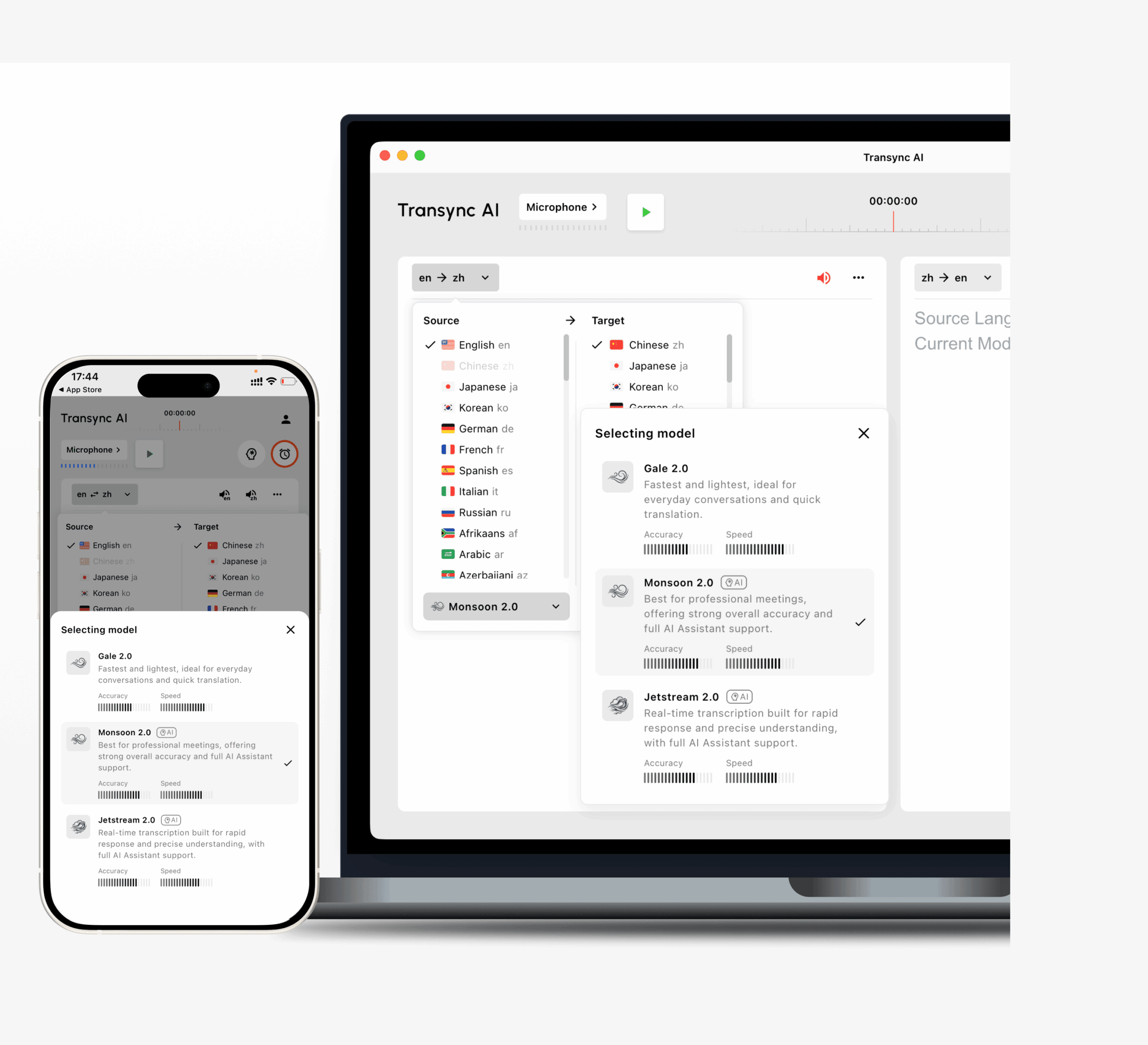
A IA da Transync pode funcionar em conjunto com o Zoom para fornecer:
- Tradução bidirecional em tempo real
- Legendas originais e traduzidas
- Distinção automática entre idiomas selecionados
- Transmissão de voz de IA
- Pré-visualização de voz
- Clonagem de voz
- Palavras-chave e contexto
- Notas de reunião de IA
- Legendas de imagem em imagem
O Transync AI oferece suporte a 60 idiomas e mais de 1.000 pares de idiomas, incluindo inglês, espanhol, chinês, japonês, coreano, cantonês, francês, alemão, italiano e russo.
Isso permite que dois participantes falem em seus idiomas preferidos, em vez de depender de uma única pessoa para conduzir toda a reunião em um segundo idioma.
Explore as opções disponíveis em Idiomas suportados pela IA Transync página.
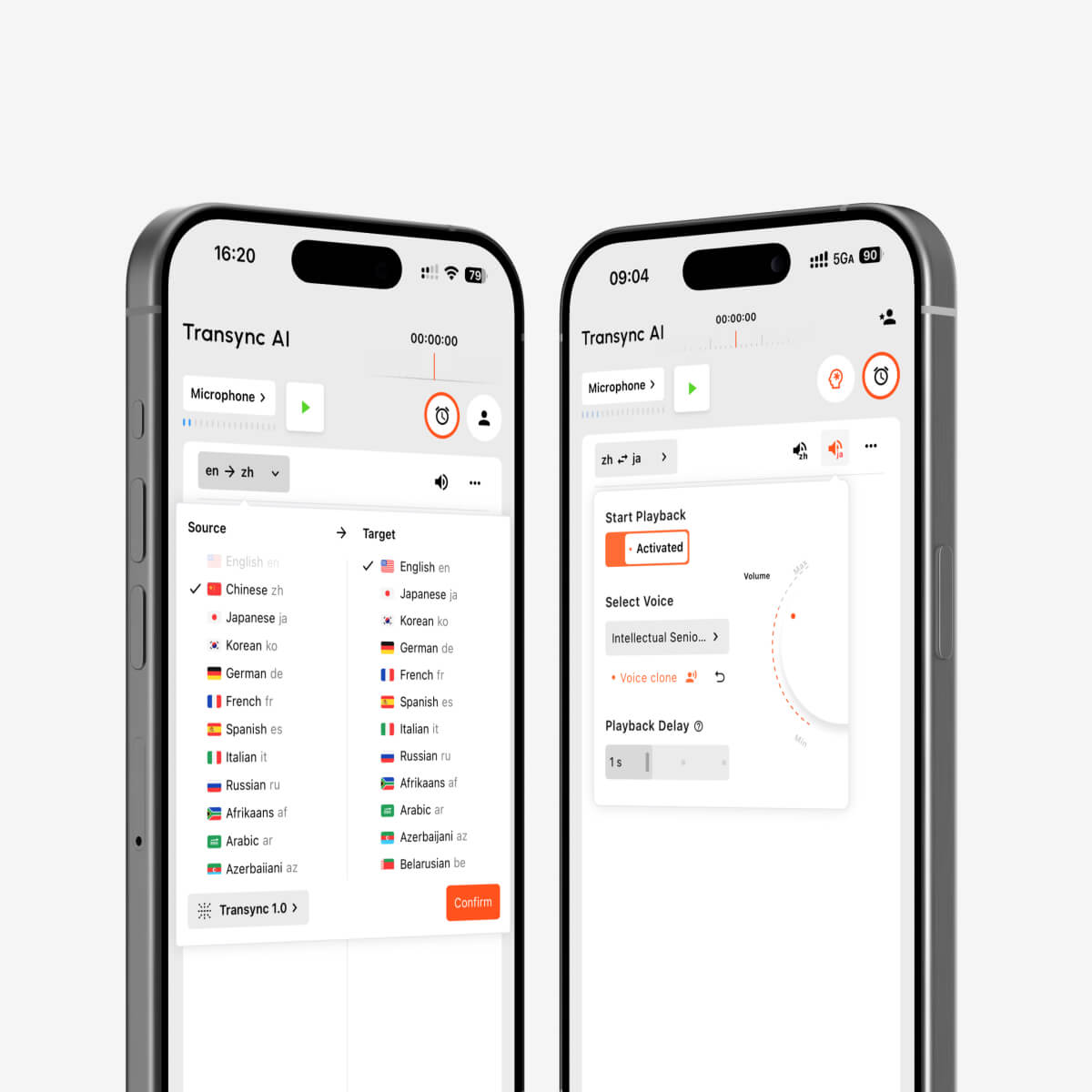
Reprodução de voz por IA e clonagem de voz para interpretação multilíngue em tempo real.
Correção 6: Manter as legendas traduzidas visíveis durante o trabalho
Os participantes da reunião raramente passam a chamada inteira olhando para a lista de palestrantes.
Eles podem precisar:
- Apresentar slides
- Demonstrar software
- Analise um documento
- Confira uma planilha
- Abra a página do produto
- Anote
- Responder mensagens de chat
- Alternar entre abas do navegador
Se as legendas traduzidas desaparecerem por trás de outro aplicativo, os participantes perdem o acesso à conversa.
O Transync AI oferece legendas flutuantes em modo Picture-in-Picture em fluxos de trabalho compatíveis com Mac, Windows e iOS. A janela de legenda compacta pode permanecer visível sobre outros aplicativos.
Isso é especialmente útil para:
- Demonstrações de produtos
- Webinários internacionais
- Aulas online
- Treinamento de software
- Apresentações de vendas
- Reuniões com fornecedores
- Oficinas técnicas
Saiba mais em Legendas flutuantes em modo Picture-in-Picture.
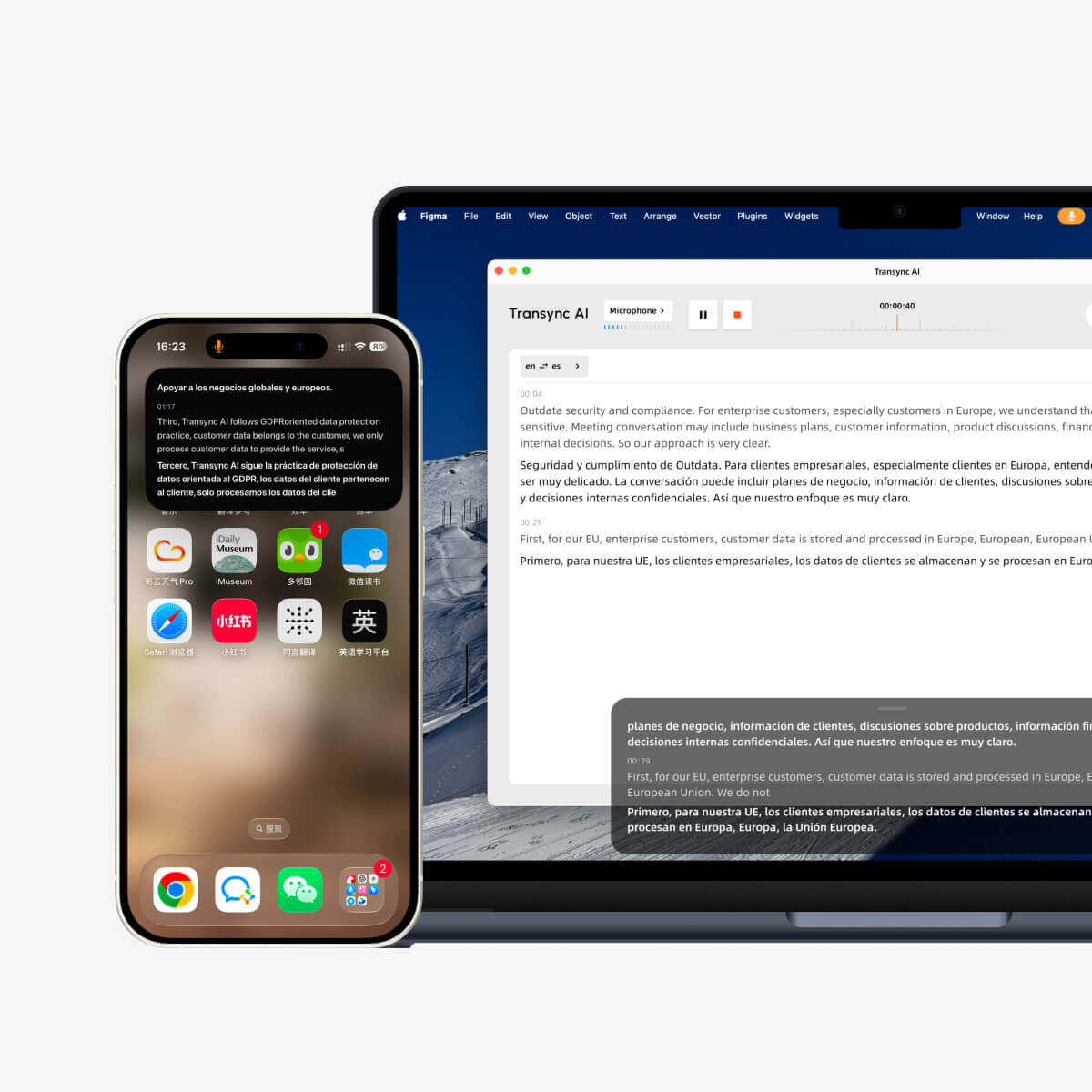
Transcrição por IA do Zoom vs. Transync AI
Zoom e Transync AI têm algumas sobreposições, mas não são produtos idênticos.
| Exigência | Fluxo de trabalho nativo do Zoom | Transync AI |
| Legendas ao vivo no mesmo idioma | Disponível através de legendas automáticas. | Disponível como parte da tradução bilíngue. |
| Transcrição da reunião retida | Disponível quando as transcrições de reuniões estiverem ativadas. | Os registros de tradução podem ser revisados e exportados. |
| Resumo da reunião sobre IA | Disponível através do AI Companion | Notas de reunião geradas por IA |
| Legendas traduzidas | Disponível através das configurações e planos do Zoom compatíveis. | Tradução em tempo real em 60 idiomas |
| Alternância bidirecional de idiomas | Depende da funcionalidade e da configuração da reunião. | Distingue automaticamente os idiomas selecionados. |
| Voz traduzida | Disponível em fluxos de trabalho de tradução por voz do Zoom compatíveis. | Transmissão de voz por IA com múltiplas vozes |
| Clonagem de voz | Não é o fluxo de trabalho principal de transcrição. | Apoiado |
| Palavras-chave e contexto da reunião | Limitado em comparação com um fluxo de trabalho de tradução dedicado. | Os usuários podem definir palavras-chave e contexto de fundo. |
| Legendas bilíngues flutuantes | As legendas do Zoom permanecem na interface da reunião. | A janela Picture-in-Picture pode permanecer sempre visível, sobrepondo-se a outros aplicativos. |
| Plataformas de reunião | Integração mais completa dentro do Zoom Workplace | Ferramenta independente para Zoom, Teams e Google Meet. |
| Uso offline | Os recursos da nuvem exigem conectividade. | O modo offline não está disponível. |
A opção correta depende do problema.
Se todos falam o mesmo idioma e a equipe precisa principalmente de uma transcrição e um resumo, as ferramentas nativas do Zoom podem ser suficientes.
Se os participantes precisarem compreender e responder em idiomas diferentes, um fluxo de trabalho de tradução dedicado em tempo real pode ser mais adequado.
A transcrição e as legendas traduzidas pelo Zoom AI não são a mesma coisa.
As legendas traduzidas do Zoom podem converter o idioma falado em uma reunião em legendas em outro idioma.
Isso é útil para os participantes que conseguem ler o idioma traduzido. No entanto, as legendas traduzidas ainda diferem de um fluxo de trabalho totalmente multilíngue.
As equipes também podem precisar de:
- tradução bidirecional
- Reprodução de voz traduzida
- Personalização de terminologia
- Legendas flutuantes entre aplicativos
- Tratamento de nomes de marcas sensível ao contexto
- Anotações de IA baseadas em conversas multilíngues
Um participante também pode preferir ouvir em vez de ler. Nesse caso, a tradução simultânea da voz torna-se importante.
A Zoom introduziu recursos de tradução de voz em fluxos de trabalho de reuniões compatíveis, enquanto a Transync AI oferece transmissão de voz por IA como parte de seu sistema de tradução em tempo real.
É necessário verificar a disponibilidade, as licenças, os idiomas e as configurações de administrador antes de uma reunião importante.
Como usar o Transsync AI com o Zoom
O Transync AI funciona como um software independente, e não como um plugin do Zoom.
Passo 1: Selecione os idiomas
Selecione os dois idiomas utilizados na reunião.
Por exemplo:
- Inglês ↔ Espanhol
- Inglês ↔ Japonês
- Chinês ↔ Inglês
- Coreano ↔ Inglês
- Francês ↔ Alemão
Etapa 2: Adicionar terminologia
Insira nomes, marcas, modelos de produtos, abreviações e termos técnicos.
Etapa 3: Adicionar contexto à reunião
Descreva o setor, os participantes e o tema.
Passo 4: Inicie o Zoom
Participe da reunião como de costume.
Passo 5: Inicie o Transync AI
Inicie a tarefa de tradução em tempo real e confirme se a fonte de áudio correta está selecionada.
Passo 6: Ative as legendas bilíngues ou flutuantes
Mantenha a janela do Transync AI visível ou ative as legendas Picture-in-Picture.
Passo 7: Configure a saída de voz quando necessário.
O áudio traduzido pode ser conectado ao Zoom por meio de fluxos de trabalho compatíveis com áudio do sistema ou microfone virtual.
Etapa 8: Revisar as anotações da reunião
Após a chamada, verifique as anotações geradas por IA, incluindo nomes, números, termos técnicos, decisões e itens de ação.
Ver Tradução de reuniões ao vivo com IA para Zoom, Teams e Google Meet Para obter mais informações.
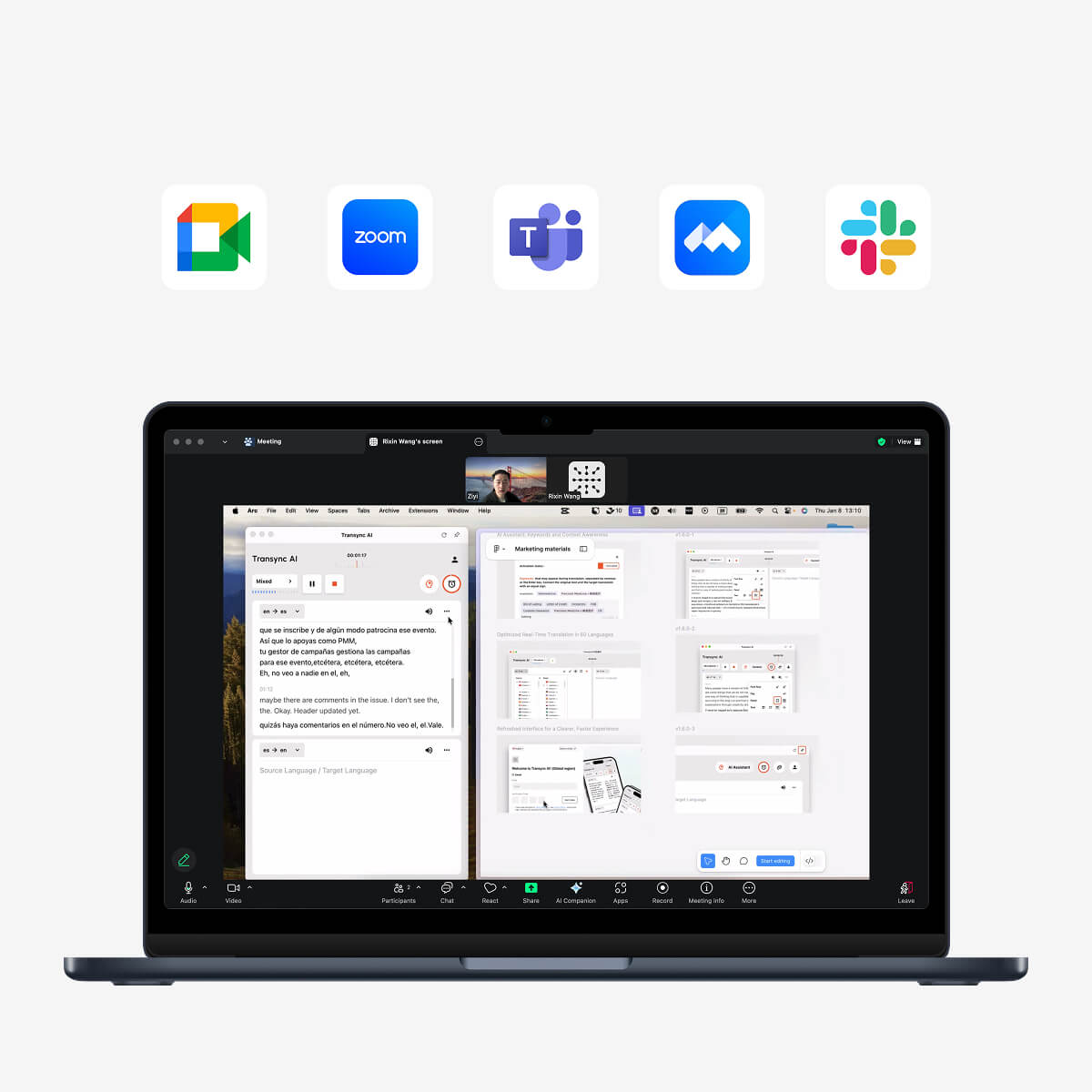
Compatível com as principais plataformas de reuniões online para tradução contínua em tempo real.
Um teste prático de transcrição do Zoom
Antes de confiar na transcrição para uma reunião importante, faça um teste de 15 minutos.
Ambiente de teste
Registro:
- Data do teste
- Versão Zoom
- Recurso de transcrição ou legenda utilizado
- Computador e sistema operacional
- Microfone
- Tipo de rede
- Idioma de reunião
- Número de palestrantes
Script de teste
Incluir:
- Uma breve introdução
- Dois nomes de palestrantes
- Nome de um produto
- Uma explicação técnica
- Um número de modelo
- Um preço
- Uma porcentagem
- Uma data de entrega
- Uma correção
- Uma ação final
Exemplo:
Podemos entregar 1.250 unidades do Modelo X300 até 18 de outubro — ou melhor, 28 de outubro — se a especificação atualizada for aprovada nesta sexta-feira.
Tabela de avaliação
| Métrica | O que verificar |
| reconhecimento de fala | O Zoom capturou as palavras originais corretamente? |
| Etiquetas dos alto-falantes | As declarações foram atribuídas à pessoa correta? |
| Números | As datas, quantidades e preços estavam corretos? |
| Terminologia | Os nomes e siglas dos produtos foram reconhecidos? |
| Pontuação | A transcrição era fácil de ler? |
| Resumo | O AI Companion preservou os pontos importantes? |
| Itens de ação | As responsabilidades foram atribuídas corretamente? |
| Tradução | Os participantes multilingues conseguiriam compreender a reunião ao vivo? |
| Retenção | A transcrição estava disponível após a reunião? |
Problemas comuns de transcrição com IA no Zoom
Legenda incorreta
O sistema pode interpretar a fala usando um modelo de linguagem incorreto.
Qualidade ruim do microfone
Microfones distantes, eco e ruído de fundo reduzem a precisão do reconhecimento.
Alto-falantes sobrepostos
Quando várias pessoas falam ao mesmo tempo, as palavras podem se perder ou serem atribuídas incorretamente.
Nomes e abreviações
Termos incomuns podem ser transcritos como palavras comuns de som semelhante.
Contexto ausente
O sistema pode capturar as palavras, mas interpretar erroneamente sua importância no resumo.
Retenção incompleta de transcrição
Os usuários podem presumir que as legendas serão salvas sem ativar as transcrições da reunião.
Dependência excessiva do resumo
Detalhes importantes podem estar condensados ou omitidos.
Confundir transcrição com tradução
Uma transcrição correta em espanhol não ajuda quem só lê japonês.
Considerações sobre privacidade e consentimento
A transcrição de reuniões cria um registro do que os participantes dizem.
Antes de habilitá-lo:
- Notificar os participantes
- Respeite as leis locais de gravação e privacidade.
- Analisar as políticas da organização
- Limitar o acesso a usuários autorizados
- Decida por quanto tempo as transcrições devem ser mantidas.
- Evite informações sensíveis desnecessárias.
- Confirme se os resumos das reuniões podem ser compartilhados.
- Verifique quais administradores podem acessar os recursos da reunião.
Os administradores do Zoom podem controlar se os usuários podem reter as transcrições geradas pelos recursos do AI Companion.
A Transync AI afirma que os dados do usuário não são usados para treinamento de IA. Mesmo assim, as organizações devem revisar toda a documentação de privacidade e conformidade antes de processar reuniões confidenciais.
Quando você deve usar um anotador humano ou um intérprete?
A transcrição por IA é útil, mas não deve ser tratada como um registro infalível.
Utilize revisão humana ou apoio profissional quando a reunião envolver:
- Depoimento legal
- Decisões médicas
- Negociação de contrato
- Conformidade regulamentar
- conflitos trabalhistas
- Compromissos financeiros
- Instruções de segurança
- Questões de imigração
- Processos governamentais
- Declarações públicas onde a redação exata importa
A IA pode reduzir o trabalho manual. Ela não transfere a responsabilidade pela verificação de informações importantes.
Perguntas frequentes: Transcrição por IA do Zoom
O que é a transcrição por IA do Zoom?
A transcrição por IA do Zoom converte a fala da reunião em texto escrito. Ela pode ser usada para legendas ao vivo, transcrições de reuniões arquivadas, resumos por IA ou gravações inteligentes, dependendo dos recursos ativados.
As legendas e transcrições do Zoom são a mesma coisa?
Não. As legendas são projetadas para serem lidas ao vivo. As transcrições são projetadas para preservar o conteúdo da fala sintetizada após a reunião.
Ainda é possível baixar legendas do Zoom?
A partir de 18 de maio de 2026, o Zoom não permitirá mais que os usuários salvem ou baixem legendas ocultas diretamente. As transcrições de reuniões devem ser ativadas quando a retenção da transcrição de áudio para texto for necessária.
O Zoom AI Companion cria resumos de reuniões?
Sim. O Resumo da Reunião com IA Companion pode gerar um resumo estruturado e os próximos passos com base na conversa da reunião.
A transcrição por IA do Zoom consegue traduzir idiomas?
Transcrição e tradução são diferentes. O Zoom oferece legendas traduzidas em fluxos de trabalho compatíveis, mas os usuários precisam ativar as configurações e os idiomas corretos.
A IA da Transync consegue traduzir uma reunião do Zoom?
Sim. O Transync AI pode funcionar em conjunto com o Zoom para fornecer legendas bilíngues em tempo real, transmissão de voz por IA, palavras-chave e contexto, além de anotações de reunião por IA.
O Transync AI requer um plugin do Zoom?
Não. O Transync AI é um software independente, e não um plugin do Zoom.
Os participantes conseguem ouvir a fala traduzida?
O Transync AI suporta a transmissão de voz traduzida. Pode ser necessário configurar o áudio do sistema ou um microfone virtual para enviar o áudio traduzido para a reunião do Zoom.
Quais idiomas o Transync AI suporta?
O Transync AI oferece suporte a 60 idiomas e mais de 1.000 pares de idiomas, incluindo inglês, espanhol, chinês, japonês, coreano, cantonês, francês, alemão, italiano e russo.
O Transync AI funciona offline?
Não. O Transync AI requer uma conexão com a internet e atualmente não oferece suporte à tradução offline.
Considerações finais: Crie o fluxo de trabalho ideal para a transcrição com IA do Zoom.
Transcrição por IA do Zoom É valioso quando as equipes precisam de legendas ao vivo, um registro pesquisável, resumos de IA ou gravações na nuvem mais organizadas.
Mas a transcrição é apenas uma das camadas da compreensão de uma reunião.
Um fluxo de trabalho completo também pode exigir:
- Configurações de idioma corretas
- Transcrições retidas
- Revisão humana
- Tradução em tempo real
- Legendas bilíngues
- Voz traduzida
- Controles de terminologia
- Notas pós-reunião
- Configurações de privacidade adequadas
Para reuniões monolíngues, os recursos nativos de transcrição e IA Companion do Zoom podem já fornecer o fluxo de trabalho necessário.
Para reuniões multilíngues, o Transync AI adiciona tradução bidirecional, exibição bilíngue, transmissão de voz por IA, clonagem de voz, palavras-chave e contexto, anotações de reunião e legendas flutuantes no Zoom, Microsoft Teams e Google Meet.
A pergunta certa não é simplesmente: "A reunião pode ser transcrita?"“
Isso é:
Será que todos os participantes conseguem entender a reunião enquanto ela está acontecendo — e ainda encontrar as informações importantes depois?
Para começar, visite Transync AI, explore o ferramenta de tradução em tempo real, Ou faça o download do aplicativo para o seu dispositivo preferido.
 🤖
🤖 