

Tradução de voz em tempo real, tradutor de reuniões com IA, tradutor de fala ao vivo, legendas bilíngues, tradução de voz instantânea
UM tradutor em tempo real Ajuda as pessoas a se entenderem enquanto ainda estão falando. Em vez de copiar o texto para uma caixa de tradução e esperar, os usuários podem acompanhar uma conversa por meio de legendas ao vivo, áudio traduzido ou ambos.
Essa diferença é importante. Em uma reunião multilíngue, mesmo um pequeno atraso pode interromper o fluxo da conversa. Em uma sala de aula, perder uma explicação pode dificultar a compreensão do tópico seguinte. Durante uma viagem, uma resposta rápida e verbal pode ser mais importante do que um documento perfeitamente formatado.
Este guia de solução de problemas explora oito situações em que a tradução em tempo real pode ser útil. Ele também compara sete ferramentas diferentes para que você possa escolher a tecnologia mais adequada à conversa, em vez de se basear apenas na quantidade de idiomas.
Que problema resolve um tradutor em tempo real?
A tradução tradicional costuma ser assíncrona: alguém escreve ou grava o conteúdo, envia para tradução e lê o resultado posteriormente. A tradução em tempo real tenta concluir o processo durante a troca de informações em tempo real.
A sequência principal é:
Ouvir a fala → reconhecer palavras → compreender o contexto → traduzir o significado → mostrar ou falar o resultado
Um sistema eficiente pode reduzir três problemas comuns de comunicação:
- Esperando: Os participantes não precisam fazer uma pausa após cada frase para a tradução manual.
- Incerteza: As legendas bilíngues permitem que os usuários comparem o discurso original com a tradução.
- Informação perdida: Transcrições e anotações podem preservar a conversa para revisão posterior.
No entanto, os produtos são projetados para diferentes finalidades. Alguns se concentram em viagens, outros em grandes eventos, outros em produção de mídia e outros em reuniões ou APIs para desenvolvedores.
8 situações em que um tradutor em tempo real pode ajudar
1. Uma visita de vendas a um cliente internacional
O problema não se resume apenas à linguagem. As conversas de vendas incluem nomes de produtos, números, objeções e perguntas sutis. Se um termo-chave for traduzido incorretamente, ambas as partes podem ficar com expectativas diferentes.
Transync AI aborda esse cenário com seu ferramenta de tradução em tempo real, que exibe a fala original e traduzida com baixa latência. Antes da chamada, o vendedor pode inserir a terminologia do produto e informações básicas por meio do Recurso de palavras-chave e contexto do assistente de IA.
Após a discussão, o Recurso de anotações de reuniões com IA Pode fornecer uma transcrição e um registro estruturado para acompanhamento.
 2. Uma reunião de equipe multilíngue
 2. Uma reunião de equipe multilíngue
Os membros da equipe precisam compreender as ideias e responder sem precisar ficar pedindo para os outros repetirem o que disseram. Ler legendas sozinho pode ser cansativo, mas a tradução somente por voz pode dificultar a verificação de nomes e termos técnicos.
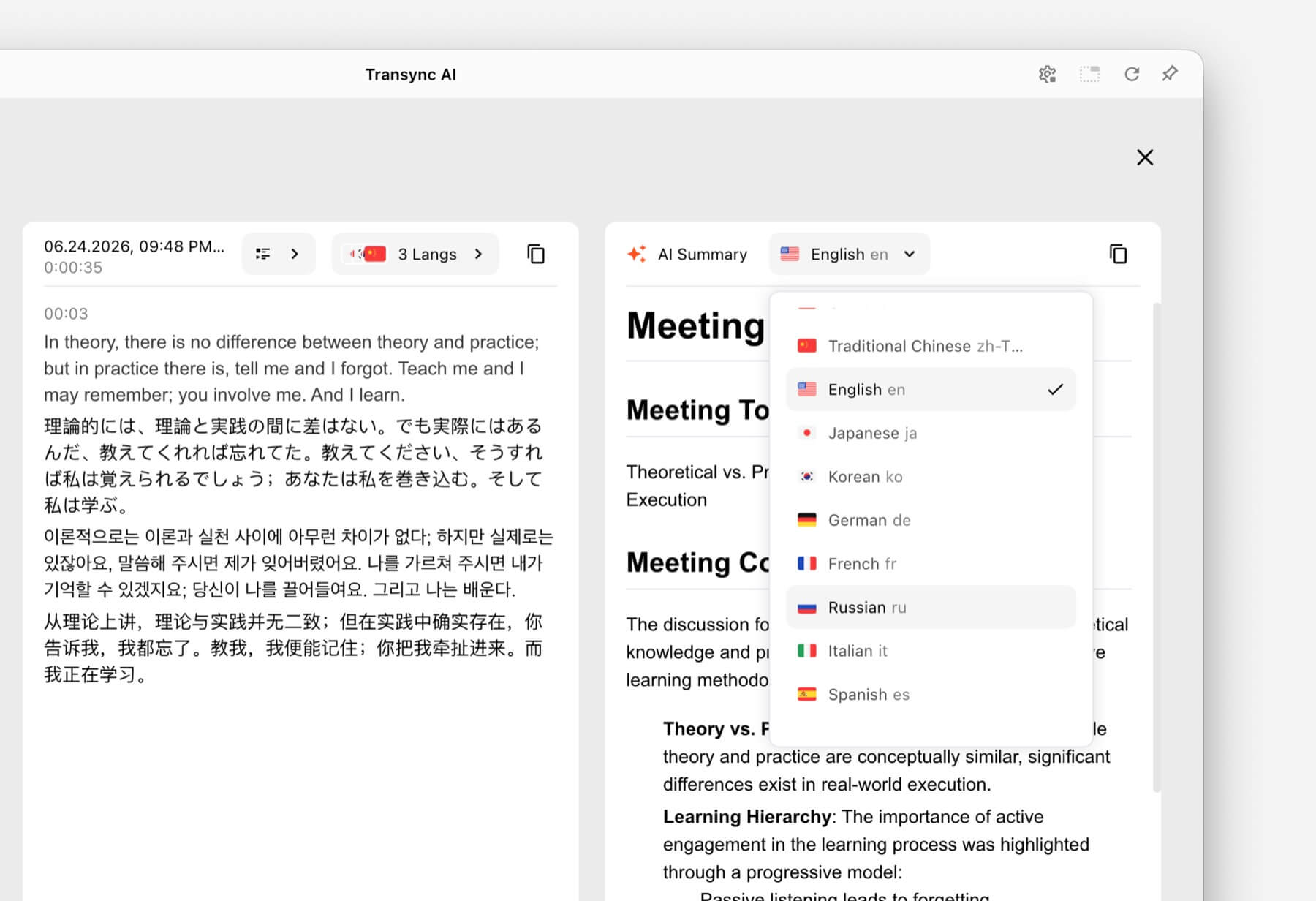
A solução é combinar texto e áudio. Transync AI fornece legendas bilíngues juntamente com seu Tradutor de voz de IA. Os participantes podem ouvir a fala traduzida enquanto verificam o texto quando a precisão for importante.
Para chamadas em Zoom, Microsoft Teams, ou Google Meet, o recurso de tradução ao vivo em reuniões Oferece suporte a um fluxo de trabalho orientado a reuniões sem ser um plugin específico para uma plataforma.

Compatível com as principais plataformas de reuniões online para tradução contínua em tempo real.
3. Uma apresentação com slides na tela
A alternância entre slides e uma janela de tradução obriga o público a escolher qual informação acompanhar. A tradução é menos útil se estiver escondida atrás da apresentação.
O Recurso de legendas bilíngues Picture-in-Picture Mantém as legendas originais e traduzidas visíveis sobre outros aplicativos em plataformas compatíveis. Isso proporciona aos apresentadores e participantes uma visualização compacta da tradução enquanto continuam trabalhando com slides, documentos ou demonstrações de software.

Legendas flutuantes em tempo real em computadores e dispositivos móveis.
4. Uma palestra em outro idioma
Uma palestra contém ideias interligadas, vocabulário especializado e explicações longas. Um tradutor de frases pode lidar com frases individuais, mas não fornece um registro útil após a aula.
Os alunos podem usar Transync AI Para acompanhar as legendas bilíngues durante a sessão, adicione os termos do curso com o Recurso de palavras-chave e contexto do assistente de IA, e revise os resultados através do Recurso de anotações de reuniões com IA.
A tradução deve sempre ser verificada em relação ao material do curso, especialmente quando envolver definições, fórmulas ou instruções de avaliação.
 5. Uma conversa presencial durante viagens
 5. Uma conversa presencial durante viagens
As conversas sobre viagens costumam ser mais curtas e práticas. Os usuários podem precisar pedir informações sobre direções, explicar uma restrição alimentar ou confirmar uma reserva.
Talkao e Google Tradutor São ideais para traduções do dia a dia e para o consumidor comum, incluindo tarefas em dispositivos móveis que vão além da comunicação empresarial presencial. Podem ser mais adequadas quando a prioridade é a tradução por câmera, a tradução rápida de textos ou o uso casual em viagens.
 Transync AI É útil para conversas presenciais mais longas, mas não oferece modo offline, reconhecimento de imagem ou tradução de documentos somente texto.
6. Uma conferência com centenas de participantes
Um tradutor pessoal e uma plataforma de tradução para eventos resolvem problemas de distribuição diferentes. Em uma grande conferência, muitos participantes podem precisar de legendas ou áudio traduzido em seus próprios dispositivos, sem precisar acessar uma conta privada da equipe.
Mundano É projetado para reuniões e eventos com acesso dos participantes por meio de links ou códigos QR. Para conferências, webinars e eventos híbridos, este fluxo de trabalho em escala de público pode ser mais apropriado.
 Para chamadas internas recorrentes ou reuniões menores onde cada participante precisa de legendas, reprodução de voz e anotações, Transync AI Proporciona uma experiência mais pessoal, com foco no encontro inicial.
7. Um projeto de localização de vídeo ou webinar
As equipes de mídia frequentemente precisam de mais do que apenas compreensão ao vivo. Elas podem precisar de legendas editáveis, dublagem, transcrição, localização e conteúdo reutilizável após a transmissão.
Maestra Está presente em diversas áreas, como tradução de mídia, legendagem, dublagem, webinars e eventos ao vivo. Esse fluxo de trabalho de produção mais amplo pode ser mais adequado para equipes de conteúdo.
 Quando a principal necessidade é uma conversa comercial bilateral em vez de produção de mídia, Transync AI Oferece uma combinação mais restrita de legendas ao vivo, tradução simultânea da fala, contexto e anotações pós-reunião.
8. Uma empresa que desenvolve seu próprio produto de fala.
Um aplicativo para o usuário final não é a solução ideal quando os desenvolvedores precisam incorporar a tradução em um agente de voz, plataforma de suporte ao cliente ou aplicativo personalizado.
Soniox Oferece recursos de conversão de fala em texto, conversão de texto em fala e tradução para casos de uso de desenvolvedores e empresas.
 DeepL Também fornece APIs e fluxos de trabalho mais abrangentes para texto, documentos, escrita e linguagem empresarial, juntamente com produtos de voz selecionados.
 Escolher Transync AI Escolha uma plataforma de tradução quando o objetivo for usar um tradutor automático em tempo real para reuniões. Já uma plataforma de API é a ideal quando o objetivo for criar e manter uma experiência de tradução personalizada.
Tabela de comparação de tradutores em tempo real
Esta comparação centra-se no posicionamento do produto e nos fluxos de trabalho típicos. Verifique as funcionalidades atuais, a cobertura linguística e as opções de compra no website oficial de cada produto.
| Ferramenta | Caso de uso principal | Texto traduzido ao vivo | Voz traduzida | Saída pós-conversa | Melhor ajuste |
|---|---|---|---|---|---|
| Transync AI | Reuniões, chamadas e conversas presenciais. | Legendas bilíngues | Sim, com opções de voz. | Transcrições e atas de reuniões sobre IA | Equipes e indivíduos que desejam um tradutor de reuniões pronto para uso |
| Talkao | Viagens, tradução móvel e aprendizado | Dependente do aplicativo | Sim | Não é um foco principal | Consumidores que precisam de amplas funcionalidades de tradução móvel |
| Mundano | Conferências, webinars e eventos | Sim | Sim | Transcrições e resumos | Organizadores oferecendo tradução para muitos participantes. |
| Soniox | APIs de voz e produtos personalizados | Capacidade de API/aplicativo | Capacidade TTS/API | Dependente da implementação | Desenvolvedores criando sua própria experiência de voz |
| Maestra | Localização de mídia e conteúdo ao vivo | Sim | Voz ao vivo e dublagem | Transcrições e fluxos de trabalho de conteúdo | Equipes de mídia que trabalham com legendas, dublagem ou webinars. |
| DeepL | Texto, documentos, fluxos de trabalho em linguagem empresarial e usos selecionados de voz. | Dependente do produto | Dependente do produto de voz | Não é um fluxo de trabalho essencial para anotações de reuniões. | Organizações com necessidades substanciais de tradução escrita |
| Google Tradutor | Tradução gratuita para o dia a dia | Não se encontrar primeiro | Reprodução de áudio da tradução | Não | Tradução rápida e informal de conteúdo comum |
Como funciona? Transync AI Você consegue lidar com tradução em tempo real?
Transync AI É um produto de tradução independente para fluxos de trabalho na web, Windows, macOS, iOS e Android. Ele foi projetado para ajudar os usuários a ouvir, ler, responder e manter um registro durante a comunicação multilíngue.
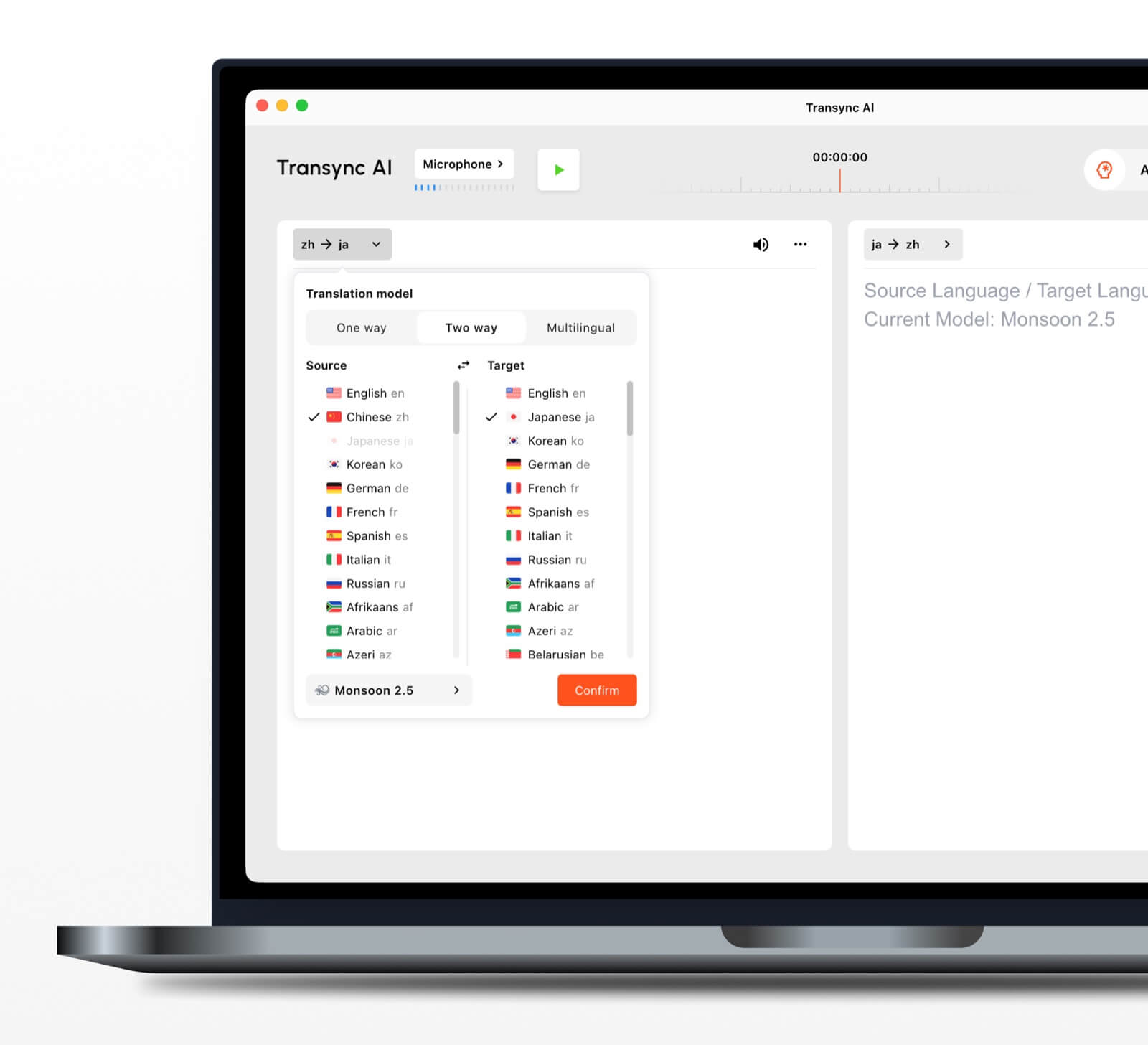
 reconhecimento automático de linguagem bidirecional
 reconhecimento automático de linguagem bidirecional
Dentro de um par de idiomas selecionado, o ferramenta de tradução em tempo real É possível distinguir qual idioma está sendo falado. Isso reduz a necessidade de alternar manualmente entre idiomas durante uma conversa.
Mais de 60 idiomas suportados
A plataforma suporta mais de 60 idiomas e mais de 1.000 pares de idiomas. Sempre verifique o par de idiomas necessário no site. Página de idiomas suportados antes de uma reunião importante.
Reprodução e clonagem de voz
O Tradutor de voz de IA Pronuncia o conteúdo traduzido em voz alta, usando opções de voz natural. recurso de clonagem de voz Pode gerar reprodução traduzida com uma voz modelada a partir da voz do usuário, ajudando a tornar a experiência mais pessoal em aulas, demonstrações e chamadas.
Roteamento de áudio para reuniões online
O recurso de compartilhamento de áudio do computador Captura as vozes de outros participantes durante uma reunião online. recurso de microfone virtual Ajuda a enviar a fala traduzida para a chamada para que outros possam ouvi-la.
Registros e resumos de conversas
O Recurso de anotações de reuniões com IA cria resultados pós-conversa, enquanto o guia de gerenciamento de registros de tradução Explica como acessar e gerenciar registros salvos.
O que torna a tradução em tempo real mais precisa?
Nenhuma ferramenta apresenta o mesmo desempenho em todos os ambientes. Estas práticas podem melhorar o resultado:
- Use um microfone com som limpo. Posicione-o perto o suficiente para captar a fala sem ruído ambiente excessivo.
- Peça às pessoas que se revezem. Falas sobrepostas são mais difíceis de reconhecer e traduzir.
- Use uma conexão de internet estável. A tradução de voz baseada em nuvem depende de uma conexão confiável.
- Forneça contexto. Adicione nomes, marcas, siglas e termos técnicos antes da sessão.
- Fale com clareza e clareza. A fala extremamente fragmentada ou ambígua pode reduzir a qualidade da tradução.
- Teste o par de idiomas real. O desempenho pode variar de acordo com o idioma, o sotaque e o tema.
- Verifique detalhes importantes. Confirme números, datas, linguagem jurídica e especificações técnicas.
Para comunicações médicas, jurídicas, de segurança crítica ou com força de contrato, considere a utilização de um intérprete humano qualificado ou a revisão profissional. A tradução por IA pode auxiliar na comunicação, mas não garante a preservação de todas as nuances.
Como escolher o tradutor em tempo real certo
Utilize um teste simples em três partes.
Passo 1: Defina a conversa
Decida se a tarefa principal é viajar, fazer uma chamada particular, reunir uma equipe, participar de um grande evento, produzir conteúdo para a mídia, trabalhar com documentos ou desenvolver um produto.
Etapa 2: Defina a saída desejada
Pergunte se os usuários precisam de:
- Áudio traduzido.
- Legendas bilíngues.
- Um link de acesso para participantes.
- Uma transcrição ou resumo.
- Tradução de documentos ou imagens.
- Uma API para uma aplicação personalizada.
Etapa 3: Teste em condições reais
Execute a ferramenta com o dispositivo, par de idiomas, plataforma, rede, sotaques e vocabulário reais. Um breve teste em um ambiente realista revela mais do que uma lista geral de recursos.
Como iniciar uma sessão com Transync AI
- Abrir Transync AI em um dispositivo compatível.
- Selecione os dois idiomas usados na conversa.
- Selecione o microfone ou a fonte de áudio do sistema correta.
- Adicione terminologia com o Recurso de palavras-chave e contexto do assistente de IA.
- Comece o ferramenta de tradução em tempo real.
- Confira as legendas originais e traduzidas.
- Ative o Tradutor de voz de IA Quando os participantes precisam de comunicação oral.
- Use o Recurso de legendas bilíngues Picture-in-Picture ao trabalhar em outro aplicativo.
- Analise o Notas de reunião de IA após a sessão.
Para uma chamada de vídeo, consulte o guia de tradução para reuniões ao vivo e testar o roteamento de áudio antes que outros participantes entrem.
Perguntas frequentes sobre o tradutor em tempo real
Qual é o melhor tradutor em tempo real para reuniões?
Transync AI é uma ótima opção para iniciar uma reunião, pois combina tradução bilíngue em tempo real, reprodução de voz traduzida, legendas flutuantes, contexto terminológico e Notas de reunião de IA. A melhor opção ainda depende do par de idiomas, da plataforma de reunião, das regras de privacidade e da duração da sessão.
Um tradutor em tempo real pode funcionar em uma reunião por vídeo?
Sim. O Recurso de tradução simultânea de reuniões da Transync AI trabalha ao lado de Zoom, Microsoft Teams, e Google Meet. Ele pode fornecer legendas ao vivo e voz traduzida durante chamadas multilíngues.
É possível traduzir os dois lados automaticamente?
O Ferramenta de tradução em tempo real da Transync AI É possível distinguir o idioma do falante dentro do par de idiomas compatível selecionado, reduzindo a necessidade de troca de botões.
A tradução em tempo real funciona offline?
A disponibilidade offline depende do produto. Transync AI Requer conexão com a internet e não oferece modo offline. Confirme a disponibilidade do modo offline diretamente com o aplicativo antes de utilizá-lo durante viagens.
Existe algum tradutor em tempo real gratuito?
Google Tradutor É uma opção gratuita e amplamente acessível para traduções informais. Transync AI Oferece um período inicial gratuito após o cadastro para que os usuários possam testar os recursos voltados para reuniões antes de escolher um plano pago.
Os dados da conversa são privados?
As políticas de privacidade variam. Transync AI Afirma que os dados do cliente não são usados para treinamento de IA por padrão e que o áudio é excluído após o processamento. As organizações devem revisar o Centro de Confiança e os termos atuais em relação aos seus requisitos de segurança e conformidade.
Resposta final: Qual tradutor em tempo real você deve escolher?
Escolha por fluxo de trabalho:
- Talkao ou Google Tradutor Para viagens casuais e tarefas do dia a dia.
- Mundano Para eventos multilíngues com muitos participantes.
- Soniox Para APIs de desenvolvedores e produtos de voz personalizados.
- Maestra Para tradução de mídia, legendagem e dublagem.
- DeepL Para textos, documentos e fluxos de trabalho em linguagem empresarial.
- Transync AI Para reuniões ao vivo que exigem legendas bilíngues, tradução simultânea da fala, contexto terminológico e anotações úteis posteriores.
Para reuniões internacionais recorrentes, um tradutor em tempo real Deve fazer mais do que simplesmente converter palavras. Deve ajudar os participantes a acompanhar a conversa, responder naturalmente, verificar detalhes importantes e reter as informações necessárias após a chamada.
Se você quer uma experiência de última geração, Transync AI lidera o caminho com tradução em tempo real, impulsionada por IA, que mantém as conversas fluindo naturalmente. Você pode experimente grátis agora.
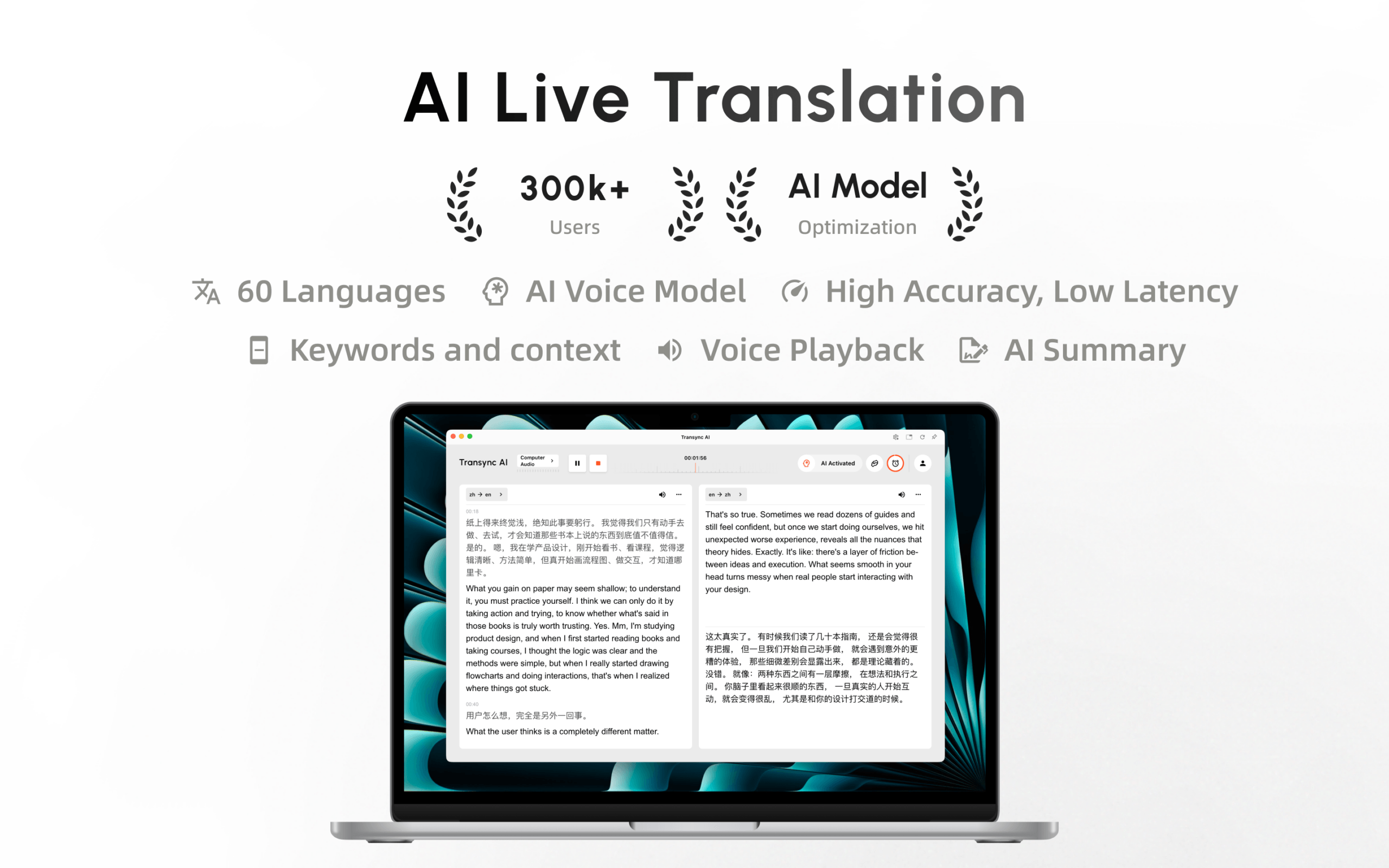
O Transync AI já está disponível na Mac App Store. Faça o download facilmente, receba atualizações automáticas e comece a traduzir em tempo real no seu Mac.
