

gerçek zamanlı ses çevirisi, yapay zeka destekli toplantı çevirmeni, canlı konuşma çevirmeni, çift dilli altyazılar, anlık ses çevirisi
A gerçek zamanlı çevirmen Bu özellik, insanların konuşurken birbirlerini anlamalarına yardımcı olur. Kullanıcılar, metni çeviri kutusuna kopyalayıp beklemek yerine, canlı altyazılar, çevrilmiş ses veya her ikisi aracılığıyla bir konuşmayı takip edebilirler.
Bu fark önemlidir. Çok dilli bir toplantıda, kısa bir gecikme bile akışı bozabilir. Bir sınıfta, bir açıklamayı kaçırmak, bir sonraki konunun anlaşılmasını zorlaştırabilir. Yolculuk sırasında, hızlı bir sözlü yanıt, mükemmel biçimlendirilmiş bir belgeden daha önemli olabilir.
Bu problem-çözüm kılavuzu, gerçek zamanlı çevirinin yardımcı olabileceği sekiz durumu inceliyor. Ayrıca, yalnızca dil sayısına göre seçim yapmak yerine, teknolojiyi konuşmaya uygun hale getirebilmeniz için yedi farklı aracı karşılaştırıyor.
Gerçek Zamanlı Çevirici Hangi Sorunu Çözüyor?
Geleneksel çeviri genellikle eşzamansızdır: biri içerik yazar veya kaydeder, çeviri için gönderir ve sonucu daha sonra okur. Gerçek zamanlı çeviri ise bu süreci canlı etkileşim sırasında tamamlamayı hedefler.
Temel sıralama şöyledir:
Konuşmayı duyma → kelimeleri tanıma → bağlamı anlama → anlamı çevirme → sonucu gösterme veya söyleme
Gelişmiş bir sistem, yaygın olarak karşılaşılan üç iletişim sorununu azaltabilir:
- Beklemek: Katılımcıların her cümleden sonra manuel çeviri için duraklamalarına gerek yoktur.
- Belirsizlik: İki dilli altyazılar, kullanıcıların orijinal konuşma ile çeviriyi karşılaştırmasına olanak tanır.
- Kayıp bilgiler: Konuşma kayıtları ve notlar, daha sonra incelenmek üzere konuşmayı muhafaza edebilir.
Ancak ürünler farklı işler için tasarlanmıştır. Bazıları seyahate, bazıları büyük etkinliklere, bazıları medya prodüksiyonuna, diğerleri ise toplantılara veya geliştirici API'lerine odaklanmıştır.
Gerçek Zamanlı Çevirmenin Yardımcı Olabileceği 8 Durum
1. Uluslararası bir müşteriyle yapılan satış görüşmesi
Sorun sadece dil değil. Satış görüşmeleri ürün adlarını, rakamları, itirazları ve ince soruları içerir. Anahtar bir terim yanlış çevrilirse, her iki taraf da farklı beklentilerle ayrılabilir.
Transync AI Bu senaryoyu şu şekilde ele alıyor: gerçek zamanlı çeviri aracı, Orijinal ve çevrilmiş konuşmayı düşük gecikmeyle görüntüleyen bir özellik. Satış temsilcisi, görüşmeden önce ürün terminolojisini ve arka plan bilgilerini bu özellik aracılığıyla girebilir. Yapay Zeka Asistanı Anahtar Kelimeler ve Bağlam özelliği.
Tartışmanın ardından, Yapay zeka destekli toplantı notları özelliği Takip işlemleri için transkript ve yapılandırılmış kayıt sağlayabilir.
 2. Çok dilli bir ekip toplantısı
 2. Çok dilli bir ekip toplantısı
Ekip üyelerinin fikirleri anlamaları ve sürekli olarak başkalarından kendilerini tekrar etmelerini istemeden yanıt vermeleri gerekir. Sadece altyazıları okumak yorucu olabilir, ancak yalnızca sesli çeviri, isimlerin ve teknik terimlerin doğrulanmasını zorlaştırabilir.
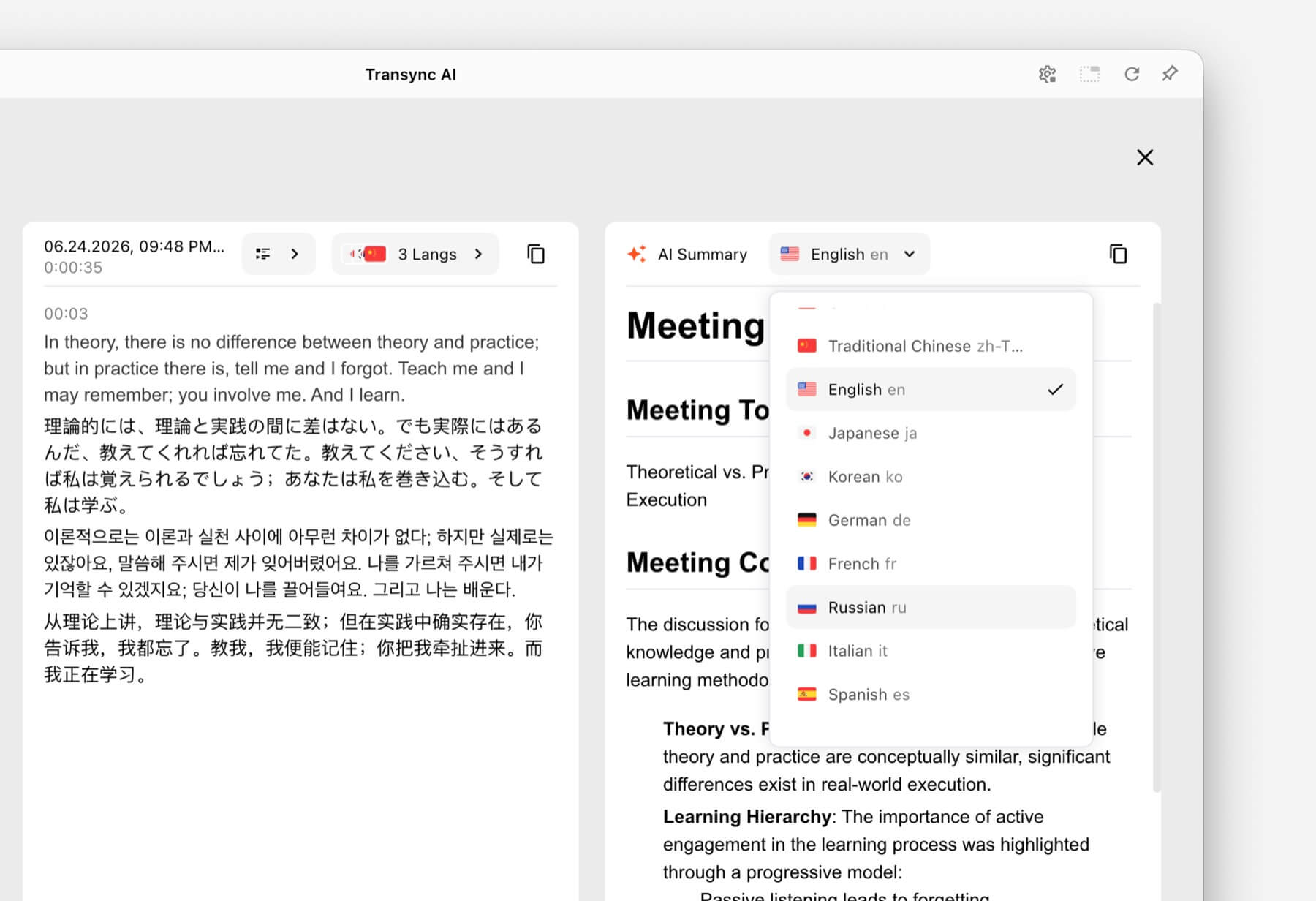
Çözüm, metin ve sesi birleştirmektir. Transync AI İçeriğinde çift dilli altyazılar da bulunmaktadır. Yapay zeka ses çevirmeni. Katılımcılar, doğruluk önemli olduğunda metni kontrol ederken çevrilmiş konuşmayı da dinleyebilirler.
Çağrılar için Zoom, Microsoft Teams, veya Google Meet, canlı toplantı çeviri özelliği Platforma özgü bir eklenti olmaksızın toplantı odaklı bir iş akışını destekler.

Sorunsuz gerçek zamanlı çeviri için başlıca çevrimiçi toplantı platformlarıyla uyumludur.
3. Ekranda slaytların yer aldığı bir sunum
Slaytlar ve çeviri penceresi arasında geçiş yapmak, izleyicinin hangi bilgiyi takip edeceğine karar vermesini zorunlu kılar. Çeviri, sunumun arkasına gizlenirse daha az faydalı olur.
The Resim içinde resim çift dilli altyazı özelliği Desteklenen platformlarda orijinal ve çevrilmiş altyazıları diğer uygulamaların üzerinde görünür halde tutar. Bu, sunum yapanlara ve katılımcılara slaytlar, belgeler veya yazılım tanıtımlarıyla çalışmaya devam ederken kompakt bir çeviri görünümü sağlar.

Masaüstü ve mobil cihazlarda gerçek zamanlı kayan altyazılar.
4. Başka bir dilde verilen ders
Bir ders, birbiriyle bağlantılı fikirler, uzmanlık terimleri ve uzun açıklamalar içerir. Bir cümle çevirici, tek tek cümleleri işleyebilir ancak ders sonrasında faydalı bir kayıt sağlamaz.
Öğrenciler kullanabilirler. Transync AI Ders boyunca çift dilli altyazıları takip etmek için, ders terimlerini ekleyin. Yapay Zeka Asistanı Anahtar Kelimeler ve Bağlam özelliği, ve sonuçları aşağıdaki yöntemle inceleyin. Yapay zeka destekli toplantı notları özelliği.
Çeviri, özellikle tanımlar, formüller veya değerlendirme yönergeleri söz konusu olduğunda, ders materyalleriyle karşılaştırılmalıdır.
 5. Seyahat sırasında yüz yüze bir görüşme
 5. Seyahat sırasında yüz yüze bir görüşme
Seyahatle ilgili konuşmalar genellikle daha kısa ve daha pratiktir. Kullanıcılar yol tarifi sormaya, diyet kısıtlamalarını açıklamaya veya rezervasyonu onaylamaya ihtiyaç duyabilirler.
Talkao Ve Google Çeviri Tüketici ve günlük çeviri için konumlandırılmış olup, canlı iş iletişimi dışındaki mobil görevler de dahil olmak üzere çeşitli amaçlara hizmet vermektedir. Kamera üzerinden çeviri, hızlı metin çevirisi veya gündelik seyahat kullanımı öncelikli olduğunda daha uygun olabilirler.
 Transync AI Uzun süreli yüz yüze konuşmalar için kullanışlıdır, ancak çevrimdışı mod, görüntü tanıma veya yalnızca metin içeren belgelerin çevirisi özelliklerini sunmaz.
6. Yüzlerce katılımcının olduğu bir konferans
Kişisel çevirmen ve etkinlik çeviri platformu, farklı dağıtım sorunlarını çözüyor. Büyük bir konferansta, birçok katılımcı özel bir ekip hesabına katılmadan kendi cihazlarında altyazı veya çevrilmiş ses dosyalarına ihtiyaç duyabilir.
Dünyevi Bu, katılımcıların bağlantılar veya QR kodları aracılığıyla erişebildiği toplantılar ve etkinlikler için tasarlanmıştır. Konferanslar, web seminerleri ve hibrit etkinlikler için bu kitle ölçekli iş akışı daha uygun olabilir.
 Altyazı, ses kaydı ve notlara ihtiyaç duyan her katılımcının yer aldığı düzenli iç görüşmeler veya daha küçük toplantılar için, Transync AI Daha kişisel ve öncelikli bir görüşme deneyimi sunar.
7. Bir video veya web semineri yerelleştirme projesi
Medya ekipleri genellikle canlı yayından sonra sadece içeriği anlamaktan daha fazlasına ihtiyaç duyarlar. Düzenlenebilir altyazılara, dublaja, transkripsiyona, yerelleştirmeye ve yayın sonrasında yeniden kullanılabilir içeriğe ihtiyaç duyabilirler.
Maestra Medya çevirisi, altyazı, dublaj, web seminerleri ve canlı etkinlikler gibi alanlarda konumlanmıştır. Bu daha geniş üretim iş akışı, içerik ekipleri için daha uygun olabilir.
 Asıl ihtiyaç medya prodüksiyonundan ziyade iki yönlü bir iş görüşmesi olduğunda, Transync AI Canlı altyazılar, çevrilmiş konuşma, bağlam ve toplantı sonrası notların daha dar bir kombinasyonunu sunar.
8. Kendi konuşma ürününü geliştiren bir şirket
Geliştiricilerin çeviri özelliğini bir sesli asistan, müşteri destek platformu veya özel uygulama içine entegre etmeleri gerektiğinde, son kullanıcı uygulaması doğru çözüm değildir.
Soniox Geliştirici ve kurumsal kullanım senaryoları için konuşmadan metne, metinden konuşmaya ve çeviri yetenekleri sunar.
 DerinL Ayrıca, seçilmiş ses ürünlerinin yanı sıra API'ler ve daha geniş kapsamlı metin, belge, yazma ve kurumsal dil iş akışları da sunmaktadır.
 Seçmek Transync AI Toplantılar için hazır bir gerçek zamanlı çevirmen kullanmak amaçlandığında API platformu tercih edin. Özel bir çeviri deneyimi oluşturmak ve sürdürmek amaçlandığında da API platformu tercih edilebilir.
Gerçek Zamanlı Çevirmen Karşılaştırma Tablosu
Bu karşılaştırma, ürün konumlandırması ve tipik iş akışlarına odaklanmaktadır. Her bir resmi web sitesinde mevcut özellikleri, dil desteğini ve satın alma seçeneklerini doğrulayın.
| Alet | Birincil kullanım senaryosu | Canlı çevrilmiş metin | Çevrilmiş ses | Konuşma sonrası çıktı | En uygun olan |
|---|---|---|---|---|---|
| Transync AI | Toplantılar, telefon görüşmeleri ve yüz yüze görüşmeler | İki dilli altyazılar | Evet, sesli seçeneklerle. | Toplantı tutanakları ve yapay zeka toplantı notları | Hazır kullanıma uygun toplantı çeviricisi isteyen ekipler ve bireyler. |
| Talkao | Seyahat, mobil çeviri ve öğrenme | Uygulamaya bağlı | Evet | öncelikli odak noktası değil | Geniş kapsamlı mobil çeviri özelliklerine ihtiyaç duyan tüketiciler |
| Dünyevi | Konferanslar, web seminerleri ve etkinlikler | Evet | Evet | Transkriptler ve özetler | Organizasyon ekibi birçok katılımcıya tercüme hizmeti sunuyor. |
| Soniox | Konuşma API'leri ve özel ürünler | API/uygulama yeteneği | TTS/API yeteneği | Uygulamaya bağlı | Geliştiriciler kendi ses deneyimlerini oluşturuyorlar. |
| Maestra | Medya yerelleştirme ve canlı içerik | Evet | Canlı seslendirme ve dublaj | Transkriptler ve içerik iş akışları | Altyazı, dublaj veya web seminerleri üzerinde çalışan medya ekipleri |
| DerinL | Metin, dokümanlar, kurumsal dil iş akışları ve seçili ses kullanımları | Ürüne bağlı | Ses ürününe bağlı | Toplantı notları için temel bir iş akışı değil. | Yazılı çeviriye önemli ölçüde ihtiyaç duyan kuruluşlar |
| Google Çeviri | Ücretsiz günlük çeviri | Önce görüşmemek | Çeviri ses oynatımı | HAYIR | Sık kullanılan içeriklerin hızlı ve gündelik çevirisi |
Nasıl Transync AI Gerçek Zamanlı Çeviriyi Yönetebiliyor musunuz?
Transync AI Web, Windows, macOS, iOS ve Android iş akışları için bağımsız bir çeviri ürünüdür. Çok dilli iletişim sırasında kullanıcıların dinlemesine, okumasına, yanıt vermesine ve kayıt tutmasına yardımcı olmak üzere tasarlanmıştır.
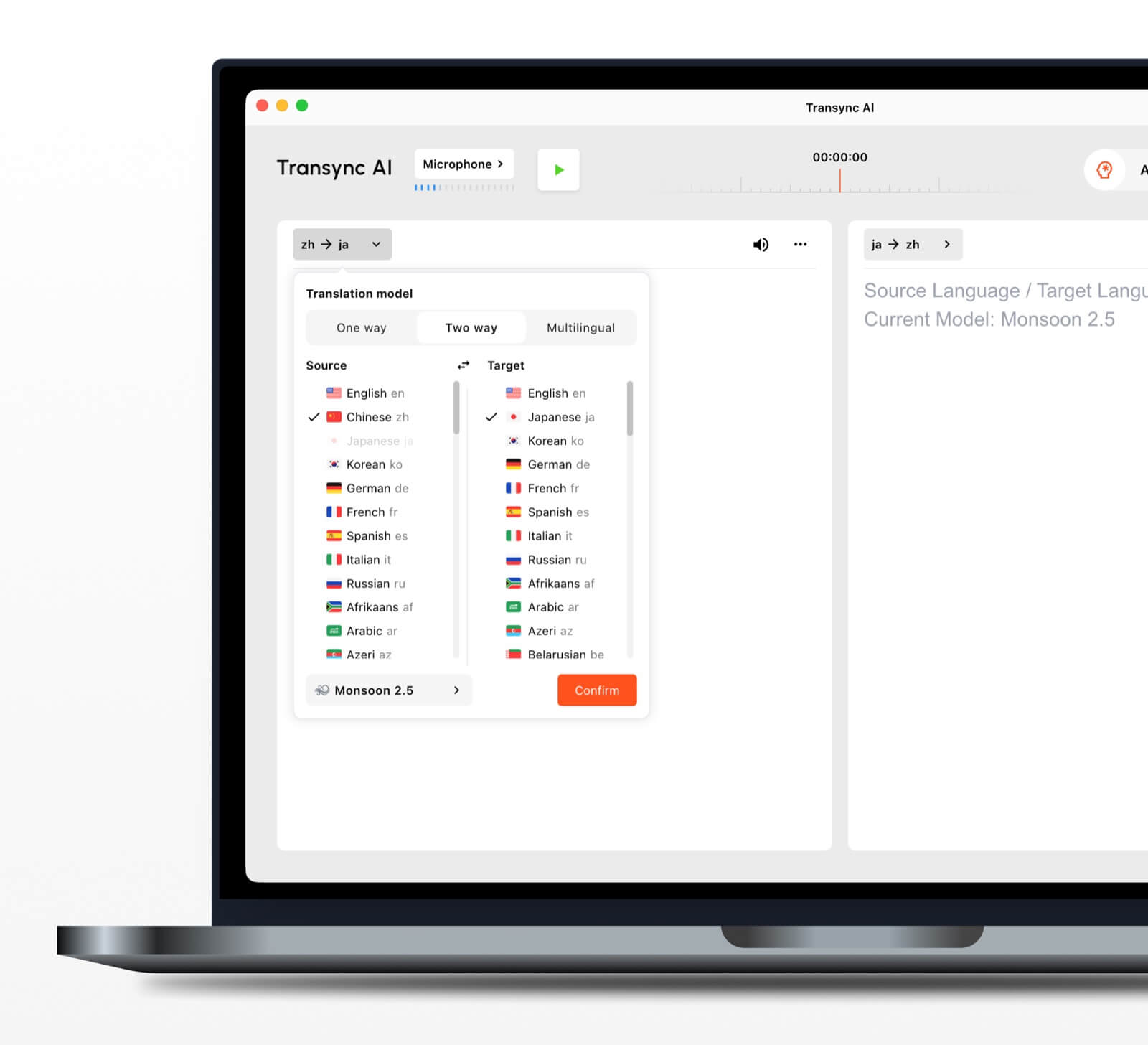
 Otomatik çift yönlü dil tanıma
 Otomatik çift yönlü dil tanıma
Seçilen bir dil çifti içinde, gerçek zamanlı çeviri aracı Hangi dilin konuşulduğunu ayırt edebilir. Bu, karşılıklı konuşma sırasında manuel dil değiştirme ihtiyacını azaltır.
60'tan fazla dil desteklenmektedir.
Platform 60'tan fazla dili ve 1.000'den fazla dil çiftini desteklemektedir. Gerekli dil çiftini her zaman doğrulayın. desteklenen diller sayfası Önemli bir toplantı öncesinde.
Ses oynatma ve ses klonlama
The Yapay zeka ses çevirmeni Çevrilmiş içeriği doğal ses seçeneklerini kullanarak sesli olarak okur. ses klonlama özelliği Kullanıcının sesine göre modellenmiş bir sesle çevrilmiş seslendirme oluşturabilir, bu da derslerde, sunumlarda ve görüşmelerde çıktının daha kişisel hissettirmesine yardımcı olur.
Çevrimiçi toplantı ses yönlendirmesi
The bilgisayar ses paylaşım özelliği Çevrimiçi bir toplantı sırasında diğer katılımcıların seslerini kaydeder. sanal mikrofon özelliği Çevrilmiş konuşmanın arama sırasında diğer kişiler tarafından duyulabilmesi için arama içeriğine gönderilmesine yardımcı olur.
Konuşma kayıtları ve özetleri
The Yapay zeka destekli toplantı notları özelliği konuşma sonrası çıktı oluştururken, çeviri kayıt yönetimi kılavuzu Kaydedilmiş kayıtlara nasıl erişileceğini ve bunların nasıl yönetileceğini açıklar.
Gerçek Zamanlı Çeviriyi Daha Doğru Hale Getiren Nedir?
Hiçbir araç her ortamda aynı performansı göstermez. Bu uygulamalar sonucu iyileştirebilir:
- Lütfen net ses veren bir mikrofon kullanın. Ortam gürültüsünü aşırıya kaçırmadan konuşmaları kaydedebilecek kadar yakın bir yere konumlandırın.
- İnsanlardan sırayla yapmalarını isteyin. Üst üste binen konuşmaları tanımak ve çevirmek daha zordur.
- İstikrarlı bir internet bağlantısı kullanın. Bulut tabanlı konuşma çevirisi, güvenilir bir bağlantıya bağlıdır.
- Bağlam sağlayın. Oturumdan önce isimleri, markaları, kısaltmaları ve teknik terimleri ekleyin.
- Düşüncelerinizi tam olarak ifade edin. Son derece parçalı veya belirsiz konuşma, çeviri kalitesini düşürebilir.
- Gerçek dil çiftini test edin. Performans, dillere, aksanlara ve konulara göre değişiklik gösterebilir.
- Kritik detayları kontrol edin. Rakamları, tarihleri, yasal dili ve teknik özellikleri onaylayın.
Tıbbi, hukuki, güvenlik açısından kritik veya sözleşmeye bağlı iletişimlerde, nitelikli bir insan tercüman veya profesyonel incelemeyi göz önünde bulundurun. Yapay zekâ çevirisi iletişime yardımcı olabilir, ancak her nüansın korunacağını garanti edemez.
Doğru Gerçek Zamanlı Çevirmen Nasıl Seçilir?
Basit üç aşamalı bir test kullanın.
Adım 1: Konuşmanın konusunu belirleyin.
Ana görevin seyahat, özel görüşme, ekip toplantısı, büyük etkinlik, medya prodüksiyonu, doküman çalışması veya ürün geliştirme olup olmadığına karar verin.
Adım 2: Gerekli çıktıyı tanımlayın
Kullanıcıların şunlara ihtiyacı olup olmadığını sorun:
- Ses kaydının çevirisi.
- İki dilli altyazılar.
- Katılımcı erişim bağlantısı.
- Bir metin dökümü veya özet.
- Belge veya görüntü çevirisi.
- Özel bir uygulama için API.
Adım 3: Gerçek koşullarda test edin
Aracı gerçek cihaz, dil çifti, platform, ağ, aksanlar ve kelime dağarcığıyla çalıştırın. Gerçekçi bir ortamda kısa bir deneme, genel özellik listesinden daha fazlasını ortaya koyacaktır.
Bir oturuma nasıl başlanır? Transync AI
- Açık Transync AI Desteklenen bir cihazda.
- Konuşmada kullanılan iki dili seçin.
- Doğru mikrofonu veya sistem ses kaynağını seçin.
- Terminolojiyi aşağıdakilerle ekleyin: Yapay Zeka Asistanı Anahtar Kelimeler ve Bağlam özelliği.
- Başla gerçek zamanlı çeviri aracı.
- Orijinal ve çevrilmiş altyazıları kontrol edin.
- Etkinleştir Yapay zeka ses çevirmeni Katılımcıların sözlü çıktıya ihtiyaç duyduğu durumlarda.
- Kullanın Resim içinde resim çift dilli altyazı özelliği Başka bir uygulamada çalışırken.
- İncele Yapay zeka toplantı notları oturumdan sonra.
Video görüşmesi için lütfen aşağıdaki bilgileri inceleyin. canlı toplantı çeviri kılavuzu Diğer katılımcılar katılmadan önce ses yönlendirmesini test edin.
Gerçek Zamanlı Çevirmen SSS
Toplantılar için en iyi gerçek zamanlı çevirici hangisidir?
Transync AI Toplantıyı ilk sıraya koyma seçeneği güçlüdür çünkü şunları birleştirir: gerçek zamanlı iki dilli çeviri, çevrilmiş ses kaydı, yüzen altyazılar, terminoloji bağlamı ve Yapay zeka toplantı notları. En iyi seçenek yine de dil çiftine, toplantı platformuna, gizlilik kurallarına ve oturum süresine bağlıdır.
Gerçek zamanlı çevirmen video toplantılarında çalışabilir mi?
Evet. Transync AI'nin canlı toplantı çeviri özelliği yanında çalışır Zoom, Microsoft Teams, Ve Google Meet. Çok dilli aramalar sırasında canlı altyazı ve ses çevirisi sağlayabilir.
Her iki tarafı da otomatik olarak çevirebilir mi?
The Transync AI'dan gerçek zamanlı çeviri aracı Seçilen desteklenen dil çifti içindeki konuşmacının dilini ayırt edebilir, böylece düğme değiştirme ihtiyacını azaltır.
Gerçek zamanlı çeviri çevrimdışı çalışır mı?
Çevrimdışı kullanılabilirlik ürüne bağlıdır. Transync AI İnternet bağlantısı gerektirir ve çevrimdışı mod sunmaz. Seyahat sırasında kullanmadan önce, çevrimdışı dil seçeneğinin kullanılabilirliğini doğrudan herhangi bir tüketici uygulamasından doğrulayın.
Gerçek zamanlı çeviri hizmeti ücretsiz mi?
Google Çeviri Günlük çeviri için yaygın olarak erişilebilen ücretsiz bir seçenektir. Transync AI Kullanıcılara kayıt olduktan sonra toplantı odaklı özellikleri test edebilmeleri ve ardından ücretli bir plan seçebilmeleri için ücretsiz bir başlangıç hakkı sunar.
Konuşma verileri gizli mi?
Gizlilik politikaları farklılık gösterebilir. Transync AI Müşteri verilerinin varsayılan olarak yapay zeka eğitimi için kullanılmadığını ve sesin işlendikten sonra silindiğini belirtiyor. Kuruluşlar bunu gözden geçirmelidir. Güven Merkezi ve mevcut şartları güvenlik ve uyumluluk gereksinimlerine göre değerlendirmektedirler.
Son Cevap: Hangi Gerçek Zamanlı Çeviriciyi Seçmelisiniz?
İş akışına göre seçin:
- Talkao veya Google Çeviri Günlük seyahatler ve günlük işler için.
- Dünyevi Çok sayıda katılımcının olduğu çok dilli etkinlikler için.
- Soniox Geliştirici API'leri ve özel konuşma ürünleri için.
- Maestra Medya çevirisi, altyazı ve dublaj için.
- DerinL Metinler, belgeler ve kurumsal dil iş akışları için.
- Transync AI İki dilli altyazı, çevrilmiş konuşma, terminoloji bağlamı ve sonrasında faydalı notlar gerektiren canlı toplantılar için.
Tekrarlanan uluslararası toplantılar için, gerçek zamanlı çevirmen Sadece kelimeleri dönüştürmekten daha fazlasını yapmalıdır. Katılımcıların konuşmayı takip etmelerine, doğal bir şekilde yanıt vermelerine, önemli ayrıntıları doğrulamalarına ve görüşmeden sonra ihtiyaç duydukları bilgileri akıllarında tutmalarına yardımcı olmalıdır.
Yeni nesil bir deneyim istiyorsanız, Transync AI Konuşmaların doğal bir şekilde akmasını sağlayan gerçek zamanlı, yapay zeka destekli çeviriyle öncülük ediyor. ücretsiz deneyin Şimdi.
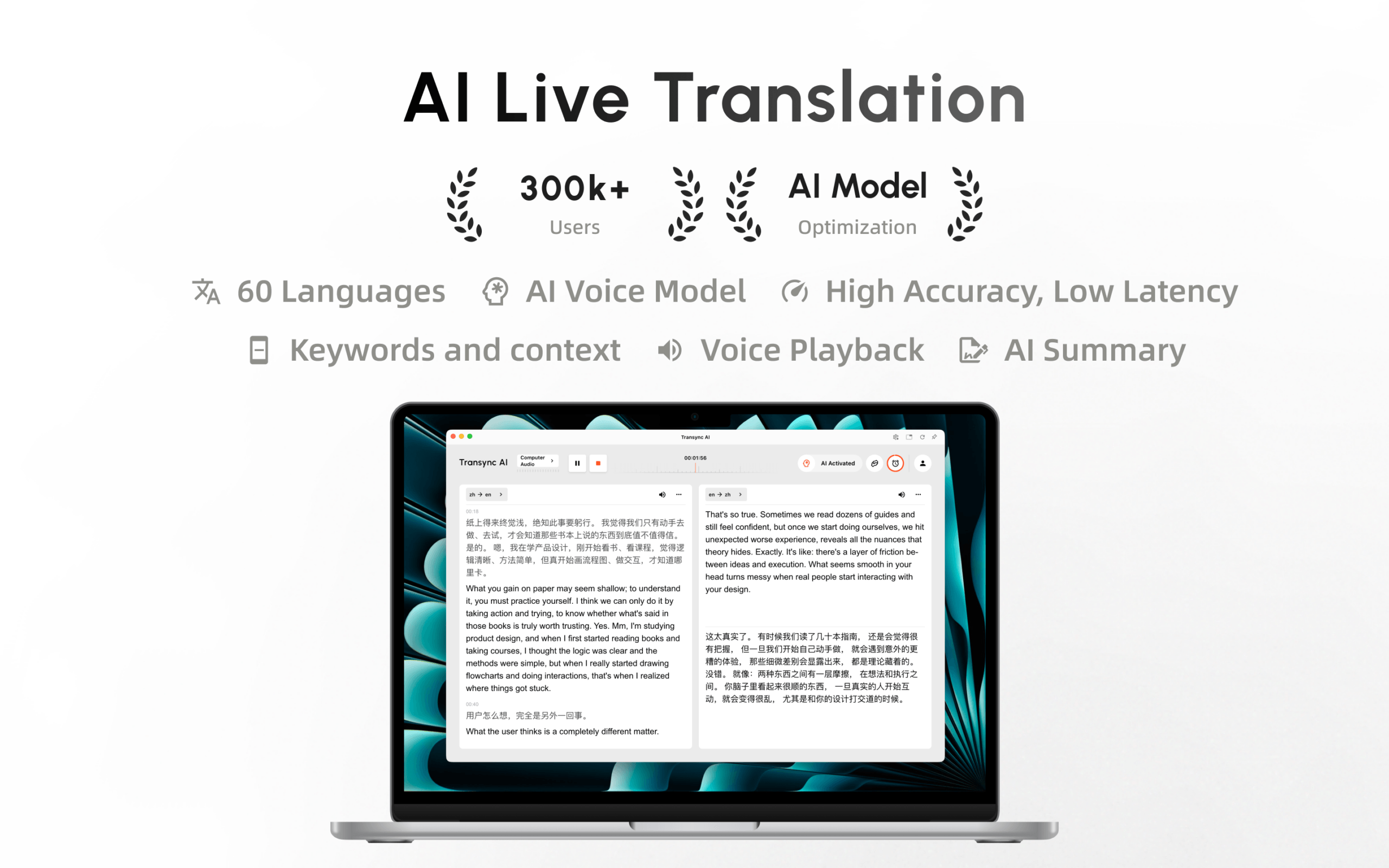
Transync AI artık Mac App Store'da mevcut. Kolayca indirin, otomatik güncellemeleri alın ve Mac'inizde gerçek zamanlı çeviriye başlayın.
