

tłumaczenie głosowe w czasie rzeczywistym, tłumacz spotkań AI, tłumacz mowy na żywo, napisy dwujęzyczne, natychmiastowe tłumaczenie głosowe
A tłumacz w czasie rzeczywistym Pomaga ludziom zrozumieć się nawzajem, gdy jeszcze mówią. Zamiast kopiować tekst do okna tłumaczenia i czekać, użytkownicy mogą śledzić rozmowę za pomocą napisów na żywo, przetłumaczonego dźwięku lub obu tych opcji.
Ta różnica jest istotna. Podczas spotkania wielojęzycznego nawet krótkie opóźnienie może zakłócić płynność. W sali wykładowej pominięcie jednego wyjaśnienia może utrudnić zrozumienie kolejnego tematu. Podczas podróży szybka odpowiedź ustna może być ważniejsza niż idealnie sformatowany dokument.
Ten poradnik rozwiązywania problemów omawia osiem sytuacji, w których tłumaczenie w czasie rzeczywistym może być pomocne. Porównuje również siedem różnych narzędzi, dzięki czemu możesz dopasować technologię do rozmowy, zamiast kierować się wyłącznie liczbą języków.
Jaki problem rozwiązuje tłumacz w czasie rzeczywistym?
Tradycyjne tłumaczenie jest zazwyczaj asynchroniczne: ktoś pisze lub nagrywa treść, wysyła ją do tłumaczenia i odczytuje wynik później. Tłumaczenie w czasie rzeczywistym próbuje dokończyć proces podczas wymiany zdań na żywo.
Sekwencja podstawowa jest następująca:
Słuchaj mowy → rozpoznaj słowa → zrozum kontekst → tłumacz znaczenie → pokaż lub powiedz wynik
Sprawny system może zredukować trzy typowe problemy komunikacyjne:
- Czekanie: Uczestnicy nie muszą robić przerw po każdym zdaniu, aby dokonać ręcznego tłumaczenia.
- Niepewność: Dzięki dwujęzycznym napisom użytkownicy mogą porównywać oryginalną wypowiedź i tłumaczenie.
- Utracone informacje: Transkrypcje i notatki pozwalają zachować rozmowę do późniejszego przejrzenia.
Produkty są jednak projektowane do różnych celów. Niektóre koncentrują się na podróżach, inne na dużych wydarzeniach, jeszcze inne na produkcji medialnej, a jeszcze inne na spotkaniach lub interfejsach API dla programistów.
8 sytuacji, w których tłumacz w czasie rzeczywistym może pomóc
1. Rozmowa handlowa z klientem zagranicznym
Problem nie tkwi tylko w języku. Rozmowy sprzedażowe obejmują nazwy produktów, liczby, zastrzeżenia i subtelne pytania. Jeśli kluczowy termin zostanie przetłumaczony niepoprawnie, obie strony mogą wyjść z różnymi oczekiwaniami.
Transync AI rozwiązuje ten scenariusz za pomocą narzędzie do tłumaczenia w czasie rzeczywistym, który wyświetla oryginalną i przetłumaczoną mowę z niskim opóźnieniem. Przed rozmową handlowiec może wprowadzić terminologię produktu i informacje ogólne za pośrednictwem Funkcja słów kluczowych i kontekstu asystenta AI.
Po dyskusji, Funkcja notatek ze spotkań AI może dostarczyć transkrypt i ustrukturyzowany zapis na potrzeby dalszych działań.
 2. Spotkanie zespołu wielojęzycznego
 2. Spotkanie zespołu wielojęzycznego
Członkowie zespołu muszą rozumieć idee i odpowiadać, nie prosząc innych o ciągłe powtarzanie. Samo czytanie napisów może być męczące, ale tłumaczenie głosowe może utrudniać weryfikację nazw i terminów technicznych.
Rozwiązaniem jest połączenie tekstu i dźwięku. Transync AI zapewnia dwujęzyczne napisy obok Tłumacz głosowy AI. Uczestnicy mogą słuchać przetłumaczonej mowy i sprawdzać tekst, gdy ważna jest precyzja.
Do połączeń na Zoom, Microsoft Teams, Lub Google Meet, ten funkcja tłumaczenia spotkań na żywo obsługuje przepływ pracy zorientowany na spotkania, nie będąc wtyczką specyficzną dla danej platformy.

Zgodność z głównymi platformami do spotkań online, umożliwiająca bezproblemowe tłumaczenie w czasie rzeczywistym
3. Prezentacja ze slajdami na ekranie
Przełączanie między slajdami a oknem tłumaczenia zmusza odbiorców do wyboru informacji, które chcą śledzić. Tłumaczenie jest mniej przydatne, jeśli jest ukryte za prezentacją.
Ten Funkcja dwujęzycznych napisów „obraz w obrazie” Oryginalne i przetłumaczone napisy są widoczne nad innymi aplikacjami na obsługiwanych platformach. Dzięki temu prezenterzy i uczestnicy mają kompaktowy widok tłumaczenia, podczas gdy kontynuują pracę ze slajdami, dokumentami lub demonstracjami oprogramowania.

Napisy w czasie rzeczywistym wyświetlane na komputerach stacjonarnych i urządzeniach mobilnych
4. Wykład w innym języku
Wykład zawiera spójne idee, specjalistyczne słownictwo i obszerne wyjaśnienia. Tłumacz fraz może analizować pojedyncze zdania, ale nie dostarczy po zajęciach żadnych przydatnych danych.
Studenci mogą korzystać Transync AI aby korzystać z dwujęzycznych napisów podczas sesji, dodawaj terminy kursu za pomocą Funkcja słów kluczowych i kontekstu asystenta AI, i przejrzyj wyniki za pomocą Funkcja notatek ze spotkań AI.
Tłumaczenie nadal powinno być sprawdzane pod kątem zgodności z materiałami kursu, zwłaszcza gdy dotyczą one definicji, wzorów lub instrukcji oceniania.
 5. Rozmowa twarzą w twarz podczas podróży
 5. Rozmowa twarzą w twarz podczas podróży
Rozmowy o podróżach są zazwyczaj krótsze i bardziej praktyczne. Użytkownicy mogą potrzebować zapytać o drogę, wyjaśnić ograniczenia dietetyczne lub potwierdzić rezerwację.
Talkao I Tłumacz Google Są przeznaczone do tłumaczeń konsumenckich i codziennych, w tym do zadań mobilnych wykraczających poza bezpośrednią komunikację biznesową. Mogą być bardziej odpowiednie, gdy priorytetem jest tłumaczenie na potrzeby kamer, szybkie tłumaczenie tekstu lub okazjonalne wykorzystanie w podróży.
 Transync AI przydaje się podczas dłuższych rozmów twarzą w twarz, ale nie oferuje trybu offline, rozpoznawania obrazu ani tłumaczenia dokumentów wyłącznie w formie tekstowej.
6. Konferencja z setkami uczestników
Osobisty tłumacz i platforma do tłumaczeń wydarzeń rozwiązują różne problemy związane z dystrybucją. Na dużej konferencji wielu uczestników może potrzebować napisów lub przetłumaczonego dźwięku na własnych urządzeniach, bez konieczności zakładania prywatnego konta zespołowego.
Światowy jest przeznaczony do spotkań i wydarzeń z dostępem dla uczestników za pośrednictwem linków lub kodów QR. W przypadku konferencji, webinariów i wydarzeń hybrydowych ten przepływ pracy dostosowany do skali grupy odbiorców może być bardziej odpowiedni.
 W przypadku powtarzających się połączeń wewnętrznych lub mniejszych spotkań, podczas których każdy uczestnik potrzebuje napisów, odtwarzania głosu i notatek, Transync AI zapewnia bardziej osobiste doświadczenie spotkania.
7. Projekt lokalizacji wideo lub webinarium
Zespoły medialne często potrzebują czegoś więcej niż tylko zrozumienia przekazu na żywo. Mogą potrzebować edytowalnych napisów, dubbingu, transkrypcji, lokalizacji i treści nadających się do ponownego wykorzystania po emisji.
Mistrzyni jest pozycjonowany w zakresie tłumaczeń multimedialnych, napisów, dubbingu, webinariów i wydarzeń na żywo. Ten szerszy proces produkcyjny może lepiej odpowiadać potrzebom zespołów ds. treści.
 Gdy główną potrzebą jest dwustronna rozmowa biznesowa, a nie produkcja medialna, Transync AI oferuje węższą kombinację napisów na żywo, tłumaczeń mowy, kontekstu i notatek ze spotkań.
8. Firma tworząca własny produkt głosowy
Aplikacja dla użytkownika końcowego nie jest właściwym rozwiązaniem, gdy programiści muszą osadzić tłumaczenie w obrębie agenta głosowego, platformy obsługi klienta lub niestandardowej aplikacji.
Soniox oferuje funkcje przetwarzania mowy na tekst, zamiany tekstu na mowę i tłumaczenia dla potrzeb deweloperów i przedsiębiorstw.
 DeepL dostarcza również interfejsy API oraz szersze możliwości przetwarzania tekstu, dokumentów, tekstów i języków korporacyjnych, obok wybranych produktów głosowych.
 Wybierać Transync AI gdy celem jest korzystanie z gotowego tłumacza w czasie rzeczywistym podczas spotkań. Wybierz platformę API, gdy celem jest stworzenie i utrzymanie niestandardowego środowiska tłumaczeniowego.
Tabela porównawcza tłumacza w czasie rzeczywistym
To porównanie koncentruje się na pozycjonowaniu produktu i typowych procesach. Sprawdź aktualne możliwości, dostępność językową i opcje zakupu na każdej oficjalnej stronie internetowej.
| Narzędzie | Podstawowy przypadek użycia | Tekst tłumaczony na żywo | Przetłumaczony głos | Wyjście po konwersacji | Najlepiej pasuje |
|---|---|---|---|---|---|
| Transync AI | Spotkania, rozmowy telefoniczne i rozmowy osobiste | Napisy dwujęzyczne | Tak, z opcjami głosowymi | Transkrypcje i notatki ze spotkań AI | Zespoły i osoby poszukujące gotowego do użycia tłumacza spotkań |
| Talkao | Podróże, tłumaczenia mobilne i nauka | Zależny od aplikacji | Tak | Nie jest to główny cel | Konsumenci potrzebujący szerokich funkcji tłumaczeń mobilnych |
| Światowy | Konferencje, webinaria i wydarzenia | Tak | Tak | Transkrypcje i streszczenia | Organizatorzy zapewniają tłumaczenie wielu uczestnikom |
| Soniox | Interfejsy API mowy i produkty niestandardowe | Możliwości API/aplikacji | Możliwość TTS/API | Zależne od wdrożenia | Deweloperzy tworzący własne środowisko głosowe |
| Mistrzyni | Lokalizacja mediów i treści na żywo | Tak | Głos na żywo i dubbing | Transkrypcje i przepływy pracy dotyczące treści | Zespoły medialne pracujące z napisami, dubbingiem lub webinariami |
| DeepL | Tekst, dokumenty, przepływy pracy w języku korporacyjnym i wybrane zastosowania głosowe | Zależne od produktu | Zależny od produktu głosowego | Nie jest to podstawowy przepływ pracy dotyczący notatek ze spotkań | Organizacje z dużymi potrzebami w zakresie tłumaczeń pisemnych |
| Tłumacz Google | Bezpłatne codzienne tłumaczenie | Nie spotykając się najpierw | Odtwarzanie dźwięku tłumaczenia | NIE | Szybkie, swobodne tłumaczenie powszechnie używanych treści |
Jak to działa Transync AI Czy obsługujesz tłumaczenie w czasie rzeczywistym?
Transync AI to samodzielny produkt do tłumaczeń dla systemów webowych, Windows, macOS, iOS i Android. Został zaprojektowany, aby pomóc użytkownikom w słuchaniu, czytaniu, odpowiadaniu i dokumentowaniu komunikacji wielojęzycznej.
 Automatyczne dwukierunkowe rozpoznawanie języka
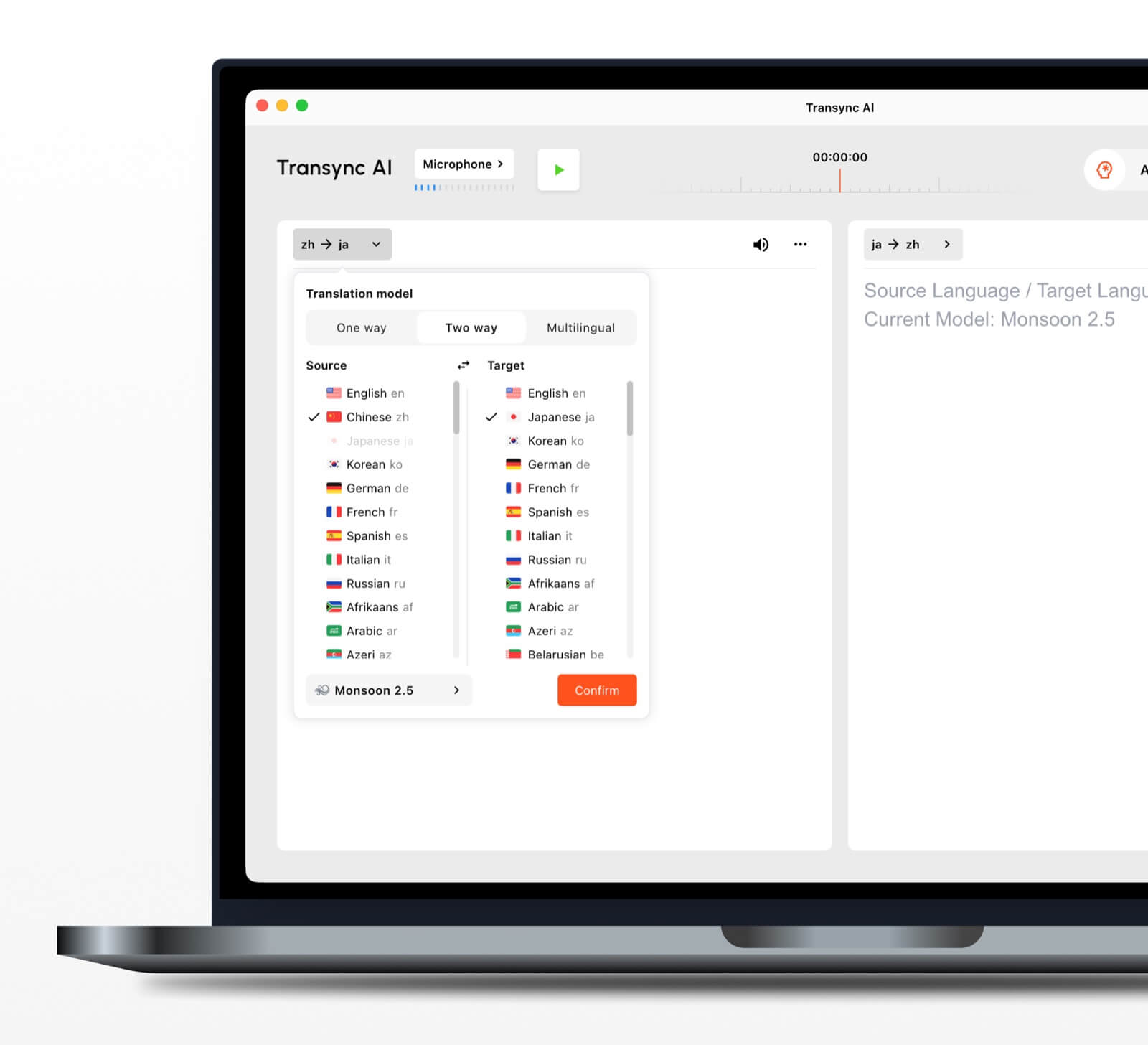 Automatyczne dwukierunkowe rozpoznawanie języka
W ramach wybranej pary językowej narzędzie do tłumaczenia w czasie rzeczywistym Potrafi rozróżnić język, w którym się mówi. Zmniejsza to konieczność ręcznego przełączania języka podczas rozmowy.
Ponad 60 obsługiwanych języków
Platforma obsługuje ponad 60 języków i ponad 1000 par językowych. Zawsze sprawdzaj wymaganą parę na strona obsługiwanych języków przed ważnym spotkaniem.
Odtwarzanie głosu i klonowanie głosu
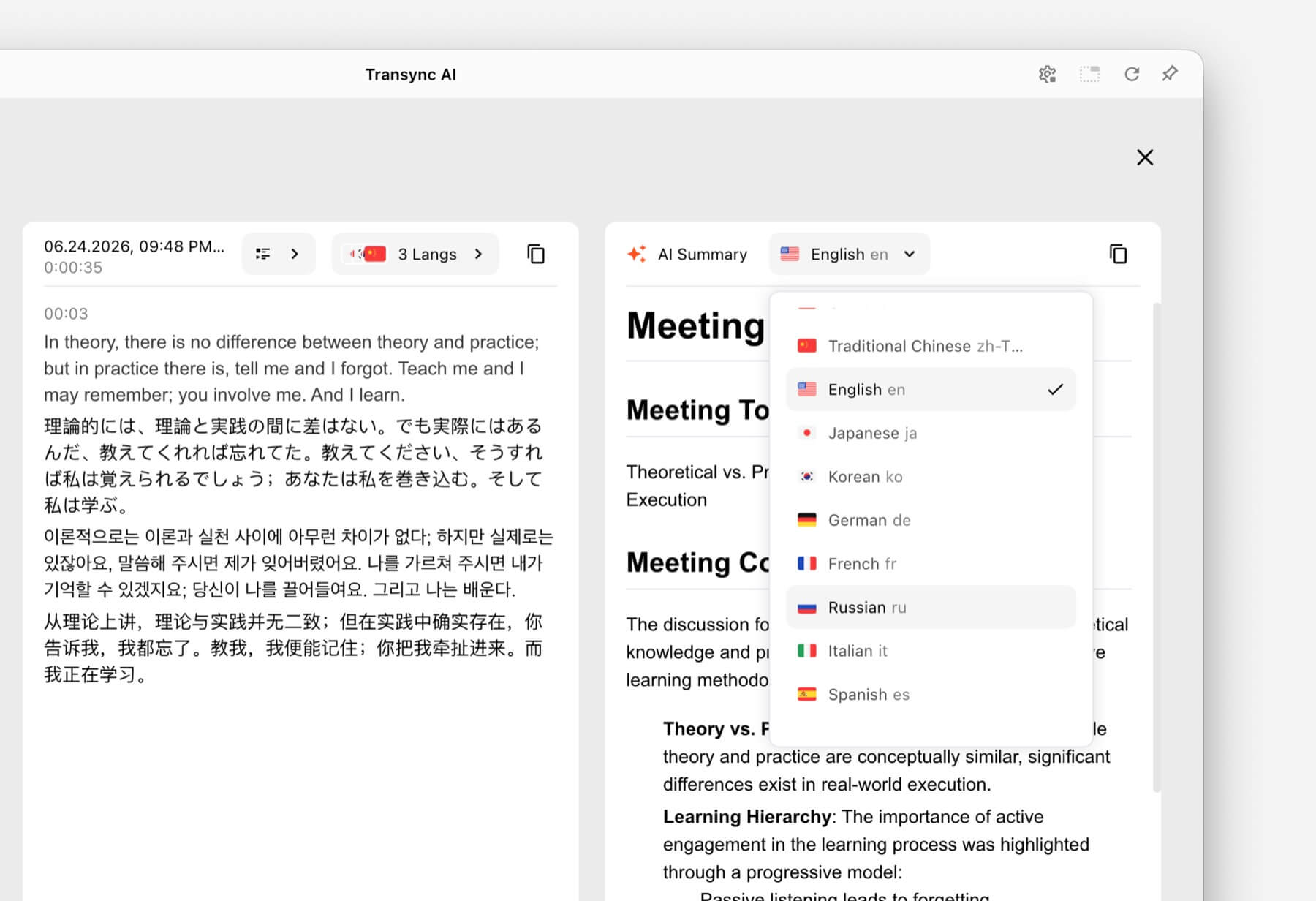
Ten Tłumacz głosowy AI wypowiada przetłumaczone treści na głos, korzystając z opcji naturalnego głosu. funkcja klonowania głosu może generować przetłumaczone odtwarzanie głosem dostosowanym do użytkownika, dzięki czemu wyniki podczas zajęć, demonstracji i rozmów telefonicznych będą sprawiały wrażenie bardziej osobistych.
Kierowanie dźwiękiem podczas spotkań online
Ten funkcja udostępniania dźwięku z komputera rejestruje głosy innych uczestników podczas spotkania online. funkcja wirtualnego mikrofonu pomaga przesyłać przetłumaczoną mowę do rozmowy, aby inni mogli ją usłyszeć.
Zapisy i podsumowania rozmów
Ten Funkcja notatek ze spotkań AI tworzy dane wyjściowe po rozmowie, podczas gdy przewodnik po zarządzaniu rekordami tłumaczeń wyjaśnia, jak uzyskać dostęp do zapisanych rekordów i nimi zarządzać.
Co sprawia, że tłumaczenie w czasie rzeczywistym jest dokładniejsze?
Żadne narzędzie nie działa identycznie w każdym środowisku. Poniższe praktyki mogą poprawić rezultaty:
- Użyj dobrego mikrofonu. Umieść urządzenie wystarczająco blisko, aby móc przechwytywać mowę bez nadmiernego hałasu otoczenia.
- Poproś ludzi, aby robili to na zmianę. Nakładające się na siebie wypowiedzi są trudniejsze do rozpoznania i przetłumaczenia.
- Używaj stabilnego łącza internetowego. Tłumaczenie mowy w chmurze wymaga niezawodnego połączenia.
- Podaj kontekst. Przed sesją dodaj nazwy, marki, akronimy i terminy techniczne.
- Mów pełnymi myślami. Bardzo fragmentaryczna lub niejednoznaczna wypowiedź może obniżyć jakość tłumaczenia.
- Przetestuj rzeczywistą parę językową. Wydajność może się różnić w zależności od języka, akcentu i tematu.
- Sprawdź najważniejsze szczegóły. Potwierdź liczby, daty, sformułowania prawne i specyfikacje techniczne.
W przypadku komunikacji medycznej, prawnej, krytycznej dla bezpieczeństwa lub wiążącej umownie, rozważ skorzystanie z usług wykwalifikowanego tłumacza lub profesjonalnej weryfikacji. Tłumaczenie AI może ułatwić komunikację, ale nie gwarantuje zachowania wszystkich niuansów.
Jak wybrać odpowiedniego tłumacza w czasie rzeczywistym
Zastosuj prosty test składający się z trzech części.
Krok 1: Zdefiniuj rozmowę
Zdecyduj, czy głównym zadaniem jest podróż, prywatna rozmowa, spotkanie zespołu, duże wydarzenie, produkcja medialna, praca nad dokumentacją czy rozwój produktu.
Krok 2: Określ wymagany wynik
Zapytaj, czy użytkownicy potrzebują:
- Przetłumaczone audio.
- Napisy dwujęzyczne.
- Link dostępu dla uczestników.
- Transkrypcja lub podsumowanie.
- Tłumaczenie dokumentu lub obrazu.
- API dla niestandardowej aplikacji.
Krok 3: Test w rzeczywistych warunkach
Uruchom narzędzie z rzeczywistym urządzeniem, parą językową, platformą, siecią, akcentami i słownictwem. Krótki test w realistycznym środowisku ujawnia więcej niż tylko ogólną listę funkcji.
Jak rozpocząć sesję z Transync AI
- Otwarte Transync AI na obsługiwanym urządzeniu.
- Wybierz dwa języki używane w rozmowie.
- Wybierz właściwy mikrofon lub źródło dźwięku systemowego.
- Dodaj terminologię za pomocą Funkcja słów kluczowych i kontekstu asystenta AI.
- Rozpocznij narzędzie do tłumaczenia w czasie rzeczywistym.
- Sprawdź oryginalne i przetłumaczone napisy.
- Włącz Tłumacz głosowy AI gdy uczestnicy potrzebują wypowiedzi mówionej.
- Użyj Funkcja dwujęzycznych napisów „obraz w obrazie” podczas pracy w innej aplikacji.
- Przejrzyj Notatki ze spotkań AI po sesji.
W przypadku połączenia wideo zapoznaj się z przewodnik po tłumaczeniach spotkań na żywo i przetestuj przesyłanie dźwięku zanim dołączą inni uczestnicy.
Najczęściej zadawane pytania dotyczące Tłumacza w Czasie Rzeczywistym
Jaki jest najlepszy tłumacz w czasie rzeczywistym na potrzeby spotkań?
Transync AI jest silną opcją na spotkanie, ponieważ łączy tłumaczenie dwujęzyczne w czasie rzeczywistym, przetłumaczone odtwarzanie głosu, pływające napisy, kontekst terminologiczny i Notatki ze spotkań AI. Najlepsza opcja nadal zależy od pary językowej, platformy spotkania, zasad prywatności i długości sesji.
Czy tłumacz w czasie rzeczywistym może pracować podczas wideokonferencji?
Tak. funkcja tłumaczenia spotkań na żywo od Transync AI pracuje obok Zoom, Microsoft Teams, I Google Meet. Może zapewnić napisy na żywo i tłumaczenie głosu podczas rozmów wielojęzycznych.
Czy może automatycznie przetłumaczyć obie strony?
Ten narzędzie do tłumaczeń w czasie rzeczywistym od Transync AI może rozróżnić język mówcy w wybranej obsługiwanej parze, zmniejszając potrzebę przełączania przycisków.
Czy tłumaczenie w czasie rzeczywistym działa również w trybie offline?
Dostępność offline zależy od produktu. Transync AI Wymaga połączenia z internetem i nie oferuje trybu offline. Sprawdź dostępność języka offline bezpośrednio w dowolnej aplikacji konsumenckiej przed korzystaniem z niej w podróży.
Czy tłumacz w czasie rzeczywistym jest darmowy?
Tłumacz Google jest powszechnie dostępną, bezpłatną opcją umożliwiającą codzienne tłumaczenie. Transync AI zapewnia bezpłatny pakiet startowy po rejestracji, dzięki czemu użytkownicy mogą przetestować funkcje zorientowane na spotkania przed wyborem płatnego planu.
Czy dane dotyczące konwersacji są prywatne?
Polityki prywatności są różne. Transync AI stwierdza, że dane klientów nie są domyślnie wykorzystywane do szkolenia AI, a dźwięk jest usuwany po przetworzeniu. Organizacje powinny dokonać przeglądu Centrum zaufania i aktualne warunki w kontekście wymogów bezpieczeństwa i zgodności.
Ostateczna odpowiedź: Którego tłumacza w czasie rzeczywistym powinieneś wybrać?
Wybierz według przepływu pracy:
- Talkao Lub Tłumacz Google do codziennych podróży i zadań.
- Światowy na wydarzenia wielojęzyczne z dużą liczbą uczestników.
- Soniox dla interfejsów API dla programistów i niestandardowych produktów głosowych.
- Mistrzyni do tłumaczeń multimedialnych, napisów i dubbingu.
- DeepL do tekstów, dokumentów i przepływów pracy w językach korporacyjnych.
- Transync AI do spotkań na żywo, które wymagają dwujęzycznych napisów, tłumaczenia wypowiedzi, kontekstu terminologicznego i przydatnych notatek na później.
W przypadku cyklicznych spotkań międzynarodowych tłumacz w czasie rzeczywistym Powinien robić coś więcej niż tylko zamieniać słowa. Powinien pomagać uczestnikom śledzić rozmowę, reagować naturalnie, weryfikować ważne szczegóły i zapamiętywać informacje, których potrzebują po zakończeniu rozmowy.
Jeśli chcesz przeżyć doświadczenie nowej generacji, Transync AI wyznacza trendy dzięki tłumaczeniom w czasie rzeczywistym, opartym na sztucznej inteligencji, które zapewniają naturalny przepływ rozmów. Możesz wypróbuj za darmo Teraz.
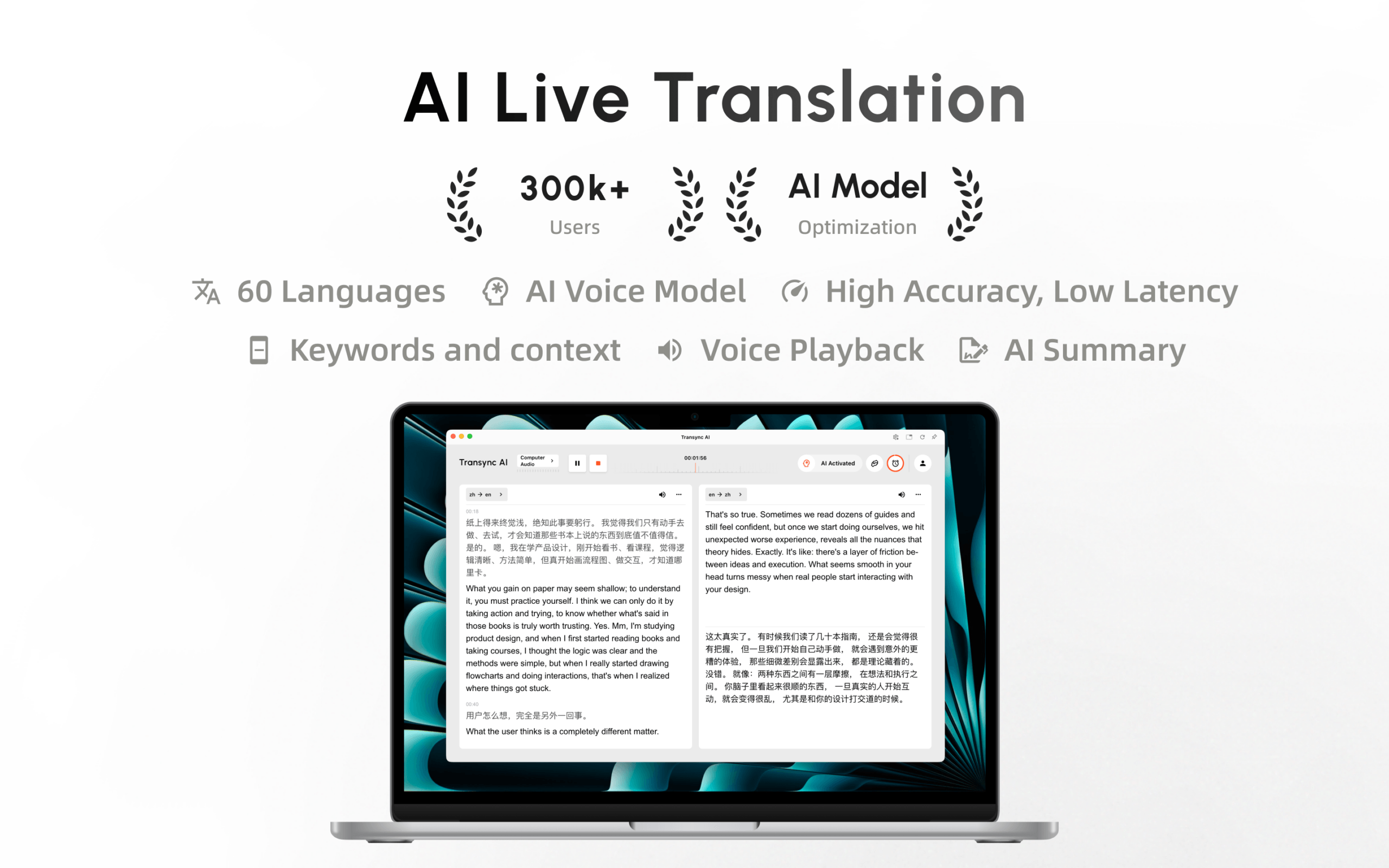
Aplikacja Transync AI jest już dostępna w Mac App Store. Pobierz ją łatwo, otrzymuj automatyczne aktualizacje i rozpocznij tłumaczenie w czasie rzeczywistym na komputerze Mac.
