

การแปลเสียงแบบเรียลไทม์, โปรแกรมแปลการประชุมด้วย AI, โปรแกรมแปลคำพูดสด, คำบรรยายสองภาษา, การแปลเสียงแบบทันที
เอ นักแปลแบบเรียลไทม์ ช่วยให้ผู้คนเข้าใจกันขณะที่กำลังพูดคุยกัน แทนที่จะคัดลอกข้อความลงในช่องแปลแล้วรอ ผู้ใช้สามารถติดตามบทสนทนาผ่านคำบรรยายสด เสียงแปล หรือทั้งสองอย่างได้.
ความแตกต่างนั้นสำคัญมาก ในการประชุมที่มีผู้เข้าร่วมหลายภาษา แม้แต่ความล่าช้าเพียงเล็กน้อยก็อาจทำให้การดำเนินงานหยุดชะงักได้ ในห้องเรียน การพลาดคำอธิบายหนึ่งข้ออาจทำให้เข้าใจหัวข้อถัดไปได้ยากขึ้น ในระหว่างการเดินทาง การตอบกลับด้วยวาจาอย่างรวดเร็วอาจมีความสำคัญมากกว่าเอกสารที่จัดรูปแบบอย่างสมบูรณ์แบบ.
คู่มือแก้ปัญหาฉบับนี้จะสำรวจสถานการณ์แปดอย่างที่การแปลแบบเรียลไทม์สามารถช่วยได้ นอกจากนี้ยังเปรียบเทียบเครื่องมือที่แตกต่างกันเจ็ดแบบ เพื่อให้คุณสามารถเลือกใช้เทคโนโลยีให้เหมาะสมกับการสนทนา แทนที่จะเลือกจากจำนวนภาษาเพียงอย่างเดียว.
เครื่องแปลภาษาแบบเรียลไทม์ช่วยแก้ปัญหาอะไร?
การแปลแบบดั้งเดิมมักเป็นแบบไม่พร้อมกัน: ผู้เขียนหรือผู้บันทึกเนื้อหาจะส่งไปแปลและอ่านผลลัพธ์ในภายหลัง ในขณะที่การแปลแบบเรียลไทม์พยายามทำให้กระบวนการเสร็จสิ้นในระหว่างการแลกเปลี่ยนข้อมูลแบบสดๆ.
ลำดับหลักคือ:
ฟังคำพูด → จดจำคำศัพท์ → เข้าใจบริบท → แปลความหมาย → แสดงหรือพูดผลลัพธ์
ระบบที่มีประสิทธิภาพสามารถลดปัญหาการสื่อสารทั่วไปได้ 3 ประการ:
- ซึ่งรอคอย: ผู้เข้าร่วมไม่จำเป็นต้องหยุดพักหลังจากทุกประโยคเพื่อทำการแปลด้วยตนเอง.
- ความไม่แน่นอน: คำบรรยายสองภาษาช่วยให้ผู้ใช้สามารถเปรียบเทียบเสียงพูดต้นฉบับและคำแปลได้.
- ข้อมูลที่สูญหาย: การถอดเสียงและจดบันทึกสามารถเก็บรักษาบทสนทนาไว้เพื่อทบทวนในภายหลังได้.
อย่างไรก็ตาม ผลิตภัณฑ์ต่างๆ ถูกออกแบบมาเพื่อการใช้งานที่แตกต่างกัน บางอย่างเน้นด้านการเดินทาง บางอย่างเน้นด้านงานอีเวนต์ขนาดใหญ่ บางอย่างเน้นด้านการผลิตสื่อ และบางอย่างเน้นด้านการประชุมหรือ API สำหรับนักพัฒนา.
8 สถานการณ์ที่โปรแกรมแปลภาษาแบบเรียลไทม์สามารถช่วยได้
1. การสนทนาทางโทรศัพท์กับลูกค้าต่างประเทศเพื่อเสนอขายสินค้า
ปัญหาไม่ได้อยู่ที่ภาษาเพียงอย่างเดียว การสนทนาทางการขายนั้นรวมถึงชื่อผลิตภัณฑ์ ตัวเลข ข้อโต้แย้ง และคำถามที่แฝงนัย หากคำสำคัญคำใดคำหนึ่งถูกแปลผิด ทั้งสองฝ่ายอาจมีความคาดหวังที่แตกต่างกันออกไป.
Transync เอไอ จัดการกับสถานการณ์นี้ด้วย เครื่องมือแปลแบบเรียลไทม์, ซึ่งแสดงผลทั้งเสียงต้นฉบับและเสียงที่แปลแล้วด้วยความหน่วงต่ำ ก่อนการโทร พนักงานขายสามารถป้อนคำศัพท์เกี่ยวกับผลิตภัณฑ์และข้อมูลพื้นฐานผ่านทางนี้ได้ ฟีเจอร์คำหลักและบริบทของ AI Assistant.
หลังจากการสนทนาเสร็จสิ้น ฟีเจอร์บันทึกการประชุมด้วย AI สามารถจัดทำเอกสารถอดเสียงและบันทึกที่เป็นระบบเพื่อใช้ในการติดตามผลได้.
 2. การประชุมทีมหลายภาษา
 2. การประชุมทีมหลายภาษา
สมาชิกในทีมจำเป็นต้องเข้าใจแนวคิดและตอบสนองโดยไม่ต้องขอให้ผู้อื่นพูดซ้ำอยู่ตลอด การอ่านคำบรรยายเพียงอย่างเดียวอาจทำให้เหนื่อยล้า แต่การแปลด้วยเสียงเพียงอย่างเดียวอาจทำให้การตรวจสอบชื่อและคำศัพท์ทางเทคนิคทำได้ยาก.
วิธีแก้ปัญหาคือการผสานข้อความและเสียงเข้าด้วยกัน. Transync เอไอ มีคำบรรยายสองภาษาควบคู่ไปกับเนื้อหา เครื่องแปลเสียง AI. ผู้เข้าร่วมสามารถฟังเสียงแปลขณะตรวจสอบข้อความได้เมื่อต้องการความแม่นยำ.
สำหรับการโทรเข้า Zoom, Microsoft Teams, หรือ Google Meet, เดอะ ฟีเจอร์การแปลการประชุมสด รองรับเวิร์กโฟลว์ที่เน้นการประชุมโดยไม่เป็นปลั๊กอินเฉพาะแพลตฟอร์ม.

ใช้งานร่วมกับแพลตฟอร์มการประชุมออนไลน์หลักๆ เพื่อการแปลแบบเรียลไทม์ที่ราบรื่น
3. การนำเสนอโดยใช้สไลด์บนหน้าจอ
การสลับไปมาระหว่างสไลด์และหน้าต่างแปลภาษาจะบังคับให้ผู้ชมต้องเลือกว่าจะติดตามข้อมูลใด การแปลจะมีประโยชน์น้อยลงหากซ่อนอยู่หลังการนำเสนอ.
การ คุณสมบัติคำบรรยายสองภาษาแบบภาพซ้อนภาพ แอปนี้จะแสดงคำบรรยายต้นฉบับและคำบรรยายที่แปลแล้วไว้เหนือแอปอื่นๆ บนแพลตฟอร์มที่รองรับ ทำให้ผู้บรรยายและผู้เข้าร่วมสามารถดูคำแปลได้อย่างกระชับในขณะที่ยังคงทำงานกับสไลด์ เอกสาร หรือการสาธิตซอฟต์แวร์ต่อไปได้.

คำบรรยายแบบลอยตัวแบบเรียลไทม์บนเดสก์ท็อปและอุปกรณ์มือถือ
4. การบรรยายในภาษาอื่น
การบรรยายประกอบด้วยแนวคิดที่เชื่อมโยงกัน คำศัพท์เฉพาะทาง และคำอธิบายที่ยาว ส่วนโปรแกรมแปลวลีอาจแปลได้เฉพาะประโยค แต่ไม่สามารถบันทึกข้อมูลที่เป็นประโยชน์หลังเลิกเรียนได้.
นักเรียนสามารถใช้ได้ Transync เอไอ หากต้องการดูคำบรรยายสองภาษาในระหว่างการเรียนการสอน ให้เพิ่มคำศัพท์ของหลักสูตรด้วย ฟีเจอร์คำหลักและบริบทของ AI Assistant, และตรวจสอบผลลัพธ์ผ่านทาง ฟีเจอร์บันทึกการประชุมด้วย AI.
ควรตรวจสอบคำแปลกับเอกสารประกอบการเรียนอยู่เสมอ โดยเฉพาะอย่างยิ่งเมื่อเกี่ยวข้องกับคำจำกัดความ สูตร หรือคำแนะนำในการประเมินผล.
 5. การสนทนาแบบเห็นหน้ากันขณะเดินทาง
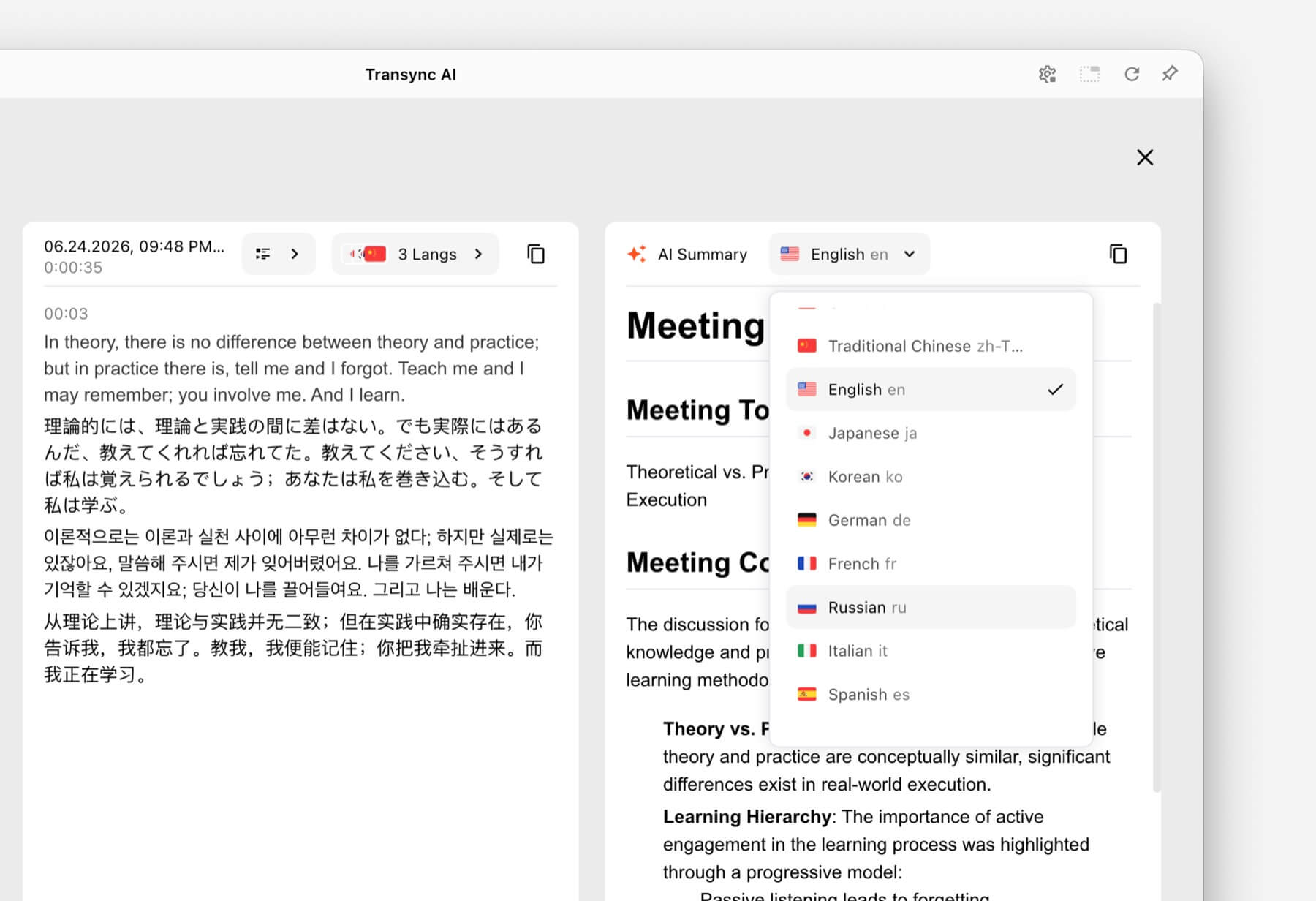 5. การสนทนาแบบเห็นหน้ากันขณะเดินทาง
บทสนทนาเกี่ยวกับการเดินทางมักจะสั้นและเน้นเรื่องที่เป็นประโยชน์มากกว่า ผู้ใช้อาจต้องการสอบถามเส้นทาง อธิบายข้อจำกัดด้านอาหาร หรือยืนยันการจอง.
ทอล์คาโอ และ Google แปล เหมาะสำหรับงานแปลภาษาสำหรับผู้บริโภคและการใช้งานทั่วไป รวมถึงงานบนมือถือที่นอกเหนือจากการสื่อสารทางธุรกิจแบบเรียลไทม์ อาจเหมาะสมกว่าเมื่อต้องการแปลภาษาจากกล้อง การแปลข้อความอย่างรวดเร็ว หรือการใช้งานทั่วไประหว่างเดินทาง.
 Transync เอไอ มีประโยชน์สำหรับการสนทนาแบบตัวต่อตัวที่ยาวนาน แต่ไม่มีโหมดออฟไลน์ การจดจำภาพ หรือการแปลเอกสารเฉพาะข้อความ.
6. การประชุมที่มีผู้เข้าร่วมหลายร้อยคน
นักแปลส่วนตัวและแพลตฟอร์มการแปลสำหรับงานอีเวนต์ช่วยแก้ปัญหาการกระจายงานที่แตกต่างกัน ในการประชุมขนาดใหญ่ ผู้เข้าร่วมจำนวนมากอาจต้องการคำบรรยายหรือไฟล์เสียงที่แปลแล้วบนอุปกรณ์ของตนเองโดยไม่ต้องเข้าร่วมบัญชีทีมส่วนตัว.
โลกแห่งโลก ออกแบบมาสำหรับงานประชุมและกิจกรรมที่ผู้เข้าร่วมสามารถเข้าถึงได้ผ่านลิงก์หรือคิวอาร์โค้ด สำหรับงานประชุม สัมมนาออนไลน์ และกิจกรรมแบบผสมผสาน ขั้นตอนการทำงานที่เน้นกลุ่มเป้าหมายนี้อาจเหมาะสมกว่า.
 สำหรับการประชุมภายในที่เกิดขึ้นเป็นประจำ หรือการประชุมขนาดเล็กที่ผู้เข้าร่วมแต่ละคนต้องการคำบรรยาย การเล่นเสียง และบันทึกย่อ, Transync เอไอ มอบประสบการณ์การพบปะที่เน้นความเป็นส่วนตัวมากขึ้น.
7. โครงการแปลวิดีโอหรือเวบินาร์เป็นภาษาท้องถิ่น
ทีมงานสื่อมักต้องการมากกว่าแค่ความเข้าใจแบบเรียลไทม์ พวกเขาอาจต้องการคำบรรยายที่แก้ไขได้ การพากย์เสียง การถอดเสียง การแปลเป็นภาษาท้องถิ่น และเนื้อหาที่สามารถนำกลับมาใช้ใหม่ได้หลังจากการออกอากาศ.
อาจารย์ มีการวางตำแหน่งครอบคลุมงานแปลสื่อ คำบรรยาย การพากย์เสียง การสัมมนาออนไลน์ และกิจกรรมสด กระบวนการทำงานด้านการผลิตที่ครอบคลุมมากขึ้นนี้อาจเหมาะสมกับทีมงานด้านคอนเทนต์มากกว่า.
 เมื่อความต้องการหลักคือการสนทนาทางธุรกิจแบบสองทางมากกว่าการผลิตสื่อ, Transync เอไอ นำเสนอการผสมผสานที่กระชับยิ่งขึ้นระหว่างคำบรรยายสด คำแปล บริบท และบันทึกหลังการประชุม.
8. บริษัทที่สร้างผลิตภัณฑ์ด้านการพูดของตนเอง
แอปสำหรับผู้ใช้ปลายทางไม่ใช่คำตอบที่เหมาะสม เมื่อนักพัฒนาต้องการฝังฟังก์ชันการแปลไว้ในระบบตอบรับอัตโนมัติด้วยเสียง แพลตฟอร์มสนับสนุนลูกค้า หรือแอปพลิเคชันที่กำหนดเอง.
โซนิอ็อกซ์ มีฟังก์ชันแปลงเสียงเป็นข้อความ ข้อความเป็นเสียง และการแปลภาษา สำหรับการใช้งานของนักพัฒนาและองค์กร.
 ดีพแอล นอกจากนี้ยังให้บริการ API และเวิร์กโฟลว์ด้านข้อความ เอกสาร การเขียน และภาษาสำหรับองค์กรที่ครอบคลุมมากขึ้น ควบคู่ไปกับผลิตภัณฑ์เสียงที่เลือกสรรมาแล้ว.
 เลือก Transync เอไอ เมื่อเป้าหมายคือการใช้โปรแกรมแปลภาษาแบบเรียลไทม์ที่เสร็จสมบูรณ์แล้วสำหรับการประชุม ควรเลือกใช้แพลตฟอร์ม API เมื่อเป้าหมายคือการสร้างและบำรุงรักษาประสบการณ์การแปลแบบกำหนดเอง.
ตารางเปรียบเทียบโปรแกรมแปลภาษาแบบเรียลไทม์
การเปรียบเทียบนี้เน้นที่การวางตำแหน่งผลิตภัณฑ์และขั้นตอนการทำงานทั่วไป โปรดตรวจสอบความสามารถในปัจจุบัน การรองรับภาษา และตัวเลือกการซื้อบนเว็บไซต์อย่างเป็นทางการของแต่ละบริษัท.
| เครื่องมือ | กรณีการใช้งานหลัก | ข้อความที่แปลแบบเรียลไทม์ | เสียงแปล | ผลลัพธ์หลังการสนทนา | เหมาะสมที่สุด |
|---|---|---|---|---|---|
| Transync เอไอ | การประชุม การโทร และการสนทนาแบบตัวต่อตัว | คำบรรยายสองภาษา | ใช่ มีตัวเลือกการสั่งงานด้วยเสียง | บันทึกการประชุมและรายงานการประชุมที่สร้างโดย AI | ทีมงานและบุคคลที่ต้องการโปรแกรมแปลภาษาสำหรับการประชุมที่พร้อมใช้งาน |
| ทอล์คาโอ | การเดินทาง การแปลผ่านมือถือ และการเรียนรู้ | ขึ้นอยู่กับแอป | ใช่ | ไม่ใช่เป้าหมายหลัก | ผู้บริโภคที่ต้องการคุณสมบัติการแปลภาษาบนมือถือที่หลากหลาย |
| โลกแห่งโลก | การประชุม สัมมนาออนไลน์ และกิจกรรมต่างๆ | ใช่ | ใช่ | บทถอดเสียงและบทสรุป | ผู้จัดงานได้จัดเตรียมคำแปลให้กับผู้เข้าร่วมงานจำนวนมาก |
| โซนิอ็อกซ์ | API สำหรับการพูดและผลิตภัณฑ์ที่ออกแบบเอง | ความสามารถของ API/แอป | ความสามารถ TTS/API | ขึ้นอยู่กับการนำไปใช้งาน | นักพัฒนาสร้างประสบการณ์การสั่งงานด้วยเสียงของตนเอง |
| อาจารย์ | การแปลสื่อและเนื้อหาสด | ใช่ | เสียงสดและการพากย์ | การถอดเสียงและขั้นตอนการทำงานของเนื้อหา | ทีมงานสื่อที่ทำงานเกี่ยวกับคำบรรยาย การพากย์เสียง หรือการจัดสัมมนาออนไลน์ |
| ดีพแอล | ข้อความ เอกสาร เวิร์กโฟลว์ภาษาขององค์กร และการใช้งานเสียงที่เลือกไว้ | ขึ้นอยู่กับผลิตภัณฑ์ | ขึ้นอยู่กับผลิตภัณฑ์เสียง | ไม่ใช่เวิร์กโฟลว์หลักสำหรับการจดบันทึกการประชุม | องค์กรที่มีความต้องการการแปลเอกสารเป็นลายลักษณ์อักษรจำนวนมาก |
| Google แปล | บริการแปลภาษาฟรีทุกวัน | ไม่ได้นัดพบกันก่อน | การเล่นเสียงแปล | เลขที่ | การแปลเนื้อหาทั่วไปอย่างรวดเร็วและไม่เป็นทางการ |
อย่างไร Transync เอไอ จัดการกับการแปลแบบเรียลไทม์ได้หรือไม่?
Transync เอไอ เป็นผลิตภัณฑ์แปลภาษาแบบสแตนด์อโลนสำหรับเว็บ, Windows, macOS, iOS และ Android ออกแบบมาเพื่อช่วยผู้ใช้ในการฟัง อ่าน ตอบกลับ และบันทึกข้อมูลระหว่างการสื่อสารหลายภาษา.
 ระบบรู้จำภาษาแบบสองทางอัตโนมัติ
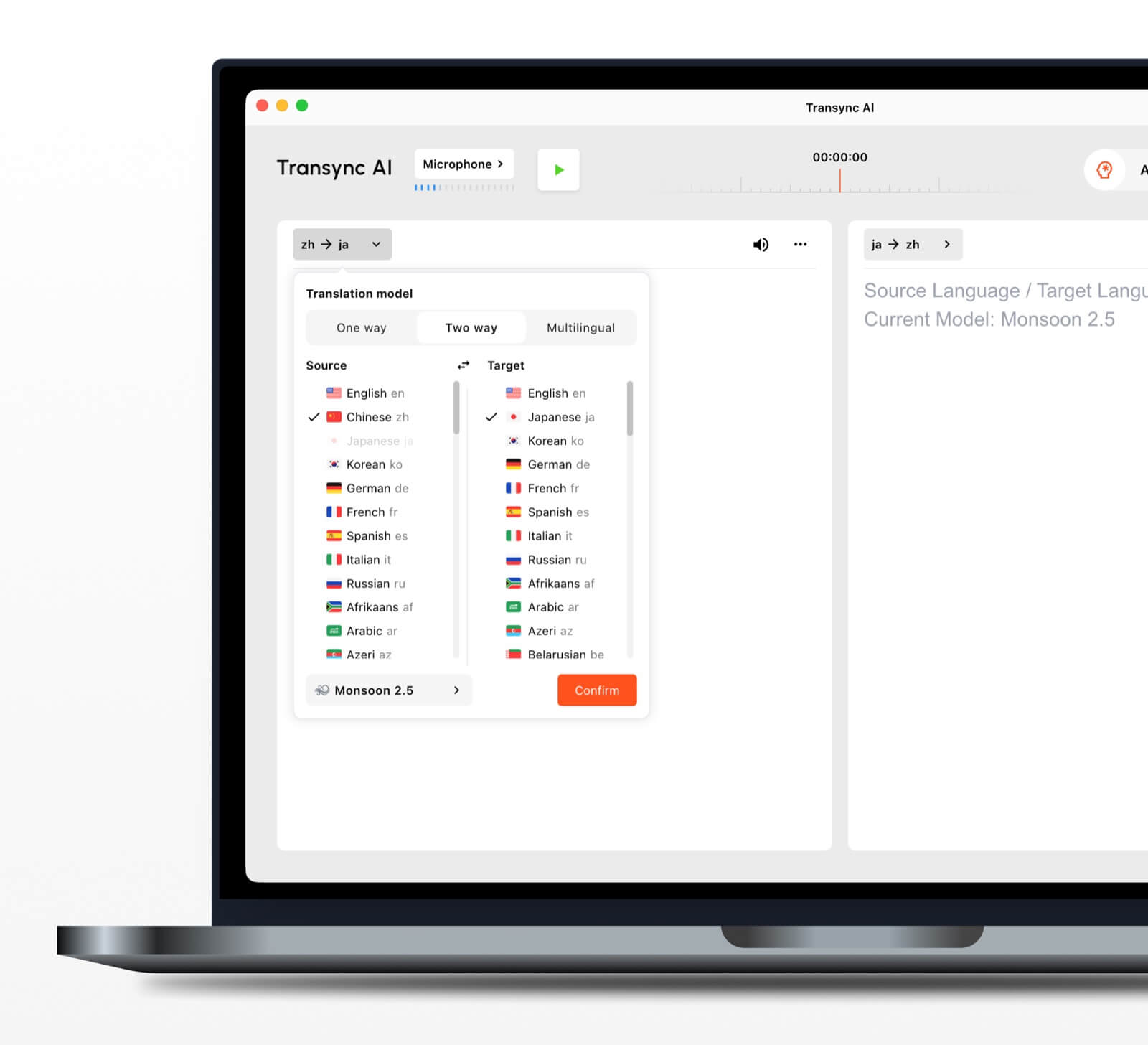 ระบบรู้จำภาษาแบบสองทางอัตโนมัติ
ภายในคู่ภาษาที่เลือกไว้ เครื่องมือแปลแบบเรียลไทม์ สามารถแยกแยะได้ว่ากำลังพูดภาษาอะไรอยู่ ซึ่งช่วยลดการสลับภาษาไปมาโดยอัตโนมัติระหว่างการสนทนา.
รองรับมากกว่า 60 ภาษา
แพลตฟอร์มนี้รองรับมากกว่า 60 ภาษา และคู่ภาษามากกว่า 1,000 คู่ โปรดตรวจสอบคู่ภาษาที่ต้องการทุกครั้ง หน้าภาษาที่รองรับ ก่อนการประชุมสำคัญ.
การเล่นเสียงและการโคลนเสียง
การ เครื่องแปลเสียง AI อ่านเนื้อหาที่แปลแล้วออกเสียงโดยใช้ตัวเลือกเสียงที่เป็นธรรมชาติ คุณสมบัติการโคลนเสียง สามารถสร้างเสียงพูดที่แปลแล้วโดยจำลองเสียงของผู้ใช้ ช่วยให้ผลลัพธ์มีความเป็นส่วนตัวมากขึ้นในชั้นเรียน การสาธิต และการสนทนา.
การกำหนดเส้นทางเสียงสำหรับการประชุมออนไลน์
การ คุณสมบัติการแชร์เสียงคอมพิวเตอร์ บันทึกเสียงจากผู้เข้าร่วมคนอื่นๆ ระหว่างการประชุมออนไลน์ คุณสมบัติไมโครโฟนเสมือนจริง ช่วยส่งข้อความเสียงที่แปลแล้วเข้าไปในการสนทนา เพื่อให้ผู้อื่นได้ยิน.
บันทึกและสรุปการสนทนา
การ ฟีเจอร์บันทึกการประชุมด้วย AI สร้างผลลัพธ์หลังการสนทนา ในขณะที่ คู่มือการจัดการบันทึกการแปล อธิบายวิธีการเข้าถึงและจัดการข้อมูลที่บันทึกไว้.
อะไรทำให้การแปลแบบเรียลไทม์มีความแม่นยำมากขึ้น?
ไม่มีเครื่องมือใดทำงานได้เหมือนกันทุกประการในทุกสภาพแวดล้อม แนวทางปฏิบัติเหล่านี้สามารถช่วยปรับปรุงผลลัพธ์ได้:
- ใช้ไมโครโฟนที่ให้เสียงชัดเจน. วางไมโครโฟนให้ใกล้พอที่จะบันทึกเสียงพูดได้โดยไม่เกิดเสียงรบกวนจากห้องมากเกินไป.
- ขอให้ทุกคนผลัดกันทำ. การพูดซ้อนกันทำให้ยากต่อการแยกแยะและแปล.
- ใช้การเชื่อมต่ออินเทอร์เน็ตที่เสถียร. การแปลเสียงพูดบนระบบคลาวด์นั้นขึ้นอยู่กับการเชื่อมต่อที่เสถียร.
- ให้ข้อมูลเพิ่มเติมประกอบ. เพิ่มชื่อ แบรนด์ คำย่อ และคำศัพท์ทางเทคนิคก่อนเริ่มการประชุม.
- พูดโดยใช้ความคิดทั้งหมดอย่างครบถ้วน. คำพูดที่ขาดตอนหรือคลุมเครือมากเกินไปอาจลดคุณภาพการแปลได้.
- ทดสอบคู่ภาษาจริง. ประสิทธิภาพในการแสดงออกอาจแตกต่างกันไปตามภาษา สำเนียง และหัวข้อต่างๆ.
- ตรวจสอบรายละเอียดที่สำคัญ. ตรวจสอบตัวเลข วันที่ ข้อกำหนดทางกฎหมาย และข้อกำหนดทางเทคนิคให้แน่ใจ.
สำหรับการสื่อสารทางการแพทย์ กฎหมาย ความปลอดภัยที่สำคัญ หรือข้อผูกพันตามสัญญา ควรพิจารณาใช้ล่ามที่เป็นมนุษย์ที่มีคุณสมบัติเหมาะสม หรือการตรวจสอบโดยผู้เชี่ยวชาญ การแปลด้วย AI สามารถช่วยในการสื่อสารได้ แต่ไม่สามารถรับประกันได้ว่าทุกรายละเอียดปลีกย่อยจะได้รับการรักษาไว้.
วิธีเลือกโปรแกรมแปลภาษาแบบเรียลไทม์ที่เหมาะสม
ใช้การทดสอบแบบง่ายๆ ที่ประกอบด้วยสามส่วน.
ขั้นตอนที่ 1: กำหนดขอบเขตของการสนทนา
ตัดสินใจว่าภารกิจหลักคือการเดินทาง การโทรส่วนตัว การประชุมทีม งานอีเวนต์ขนาดใหญ่ การผลิตสื่อ การทำงานด้านเอกสาร หรือการพัฒนาผลิตภัณฑ์.
ขั้นตอนที่ 2: กำหนดผลลัพธ์ที่ต้องการ
สอบถามว่าผู้ใช้ต้องการอะไรบ้าง:
- ไฟล์เสียงที่แปลแล้ว.
- คำบรรยายสองภาษา.
- ลิงก์สำหรับผู้เข้าร่วม.
- บันทึกการถอดเสียงหรือบทสรุป.
- การแปลเอกสารหรือรูปภาพ.
- API สำหรับแอปพลิเคชันที่กำหนดเอง.
ขั้นตอนที่ 3: ทดสอบในสภาพจริง
ทดลองใช้เครื่องมือนี้กับอุปกรณ์จริง คู่ภาษา แพลตฟอร์ม เครือข่าย สำเนียง และคำศัพท์ที่ใช้จริง การทดลองใช้งานสั้นๆ ในสภาพแวดล้อมที่สมจริงจะเผยให้เห็นมากกว่าแค่รายการคุณสมบัติทั่วไป.
วิธีเริ่มต้นเซสชั่นกับ Transync เอไอ
- เปิด Transync เอไอ บนอุปกรณ์ที่รองรับ.
- เลือกภาษาทั้งสองที่ใช้ในการสนทนา.
- เลือกไมโครโฟนหรือแหล่งสัญญาณเสียงจากระบบให้ถูกต้อง.
- เพิ่มคำศัพท์ด้วย ฟีเจอร์คำหลักและบริบทของ AI Assistant.
- เริ่ม เครื่องมือแปลแบบเรียลไทม์.
- ตรวจสอบคำบรรยายต้นฉบับและคำบรรยายที่แปลแล้ว.
- เปิดใช้งาน เครื่องแปลเสียง AI เมื่อผู้เข้าร่วมต้องการการพูดออกมา.
- ใช้ คุณสมบัติคำบรรยายสองภาษาแบบภาพซ้อนภาพ ขณะทำงานในแอปพลิเคชันอื่น.
- ตรวจสอบ บันทึกการประชุม AI หลังจากเสร็จสิ้นการประชุม.
สำหรับการสนทนาทางวิดีโอ โปรดตรวจสอบ คู่มือการแปลสำหรับการประชุมสด และทดสอบการกำหนดเส้นทางเสียงก่อนที่ผู้เข้าร่วมคนอื่นๆ จะเข้าร่วม.
คำถามที่พบบ่อยเกี่ยวกับโปรแกรมแปลภาษาแบบเรียลไทม์
โปรแกรมแปลภาษาแบบเรียลไทม์ที่ดีที่สุดสำหรับการประชุมคืออะไร?
Transync เอไอ เป็นตัวเลือกที่ดีสำหรับการจัดประชุมก่อน เพราะเป็นการผสมผสานระหว่าง การแปลสองภาษาแบบเรียลไทม์, การเล่นเสียงที่แปลแล้ว, คำบรรยายลอยตัว, บริบทของคำศัพท์ และ บันทึกการประชุม AI. ตัวเลือกที่ดีที่สุดยังคงขึ้นอยู่กับคู่ภาษา แพลตฟอร์มการประชุม กฎความเป็นส่วนตัว และระยะเวลาของการประชุม.
โปรแกรมแปลภาษาแบบเรียลไทม์สามารถใช้งานในการประชุมทางวิดีโอได้หรือไม่?
ใช่. ฟีเจอร์การแปลการประชุมสดจาก Transync AI ทำงานควบคู่กันไป Zoom, Microsoft Teams, และ Google Meet. สามารถแสดงคำบรรยายสดและเสียงแปลระหว่างการโทรหลายภาษาได้.
สามารถแปลทั้งสองฝ่ายโดยอัตโนมัติได้หรือไม่?
การ เครื่องมือแปลภาษาแบบเรียลไทม์จาก Transync AI สามารถแยกแยะภาษาของผู้พูดภายในคู่ภาษาที่เลือกไว้ได้ ช่วยลดความจำเป็นในการสลับปุ่ม.
การแปลแบบเรียลไทม์ใช้งานได้แบบออฟไลน์หรือไม่?
ความพร้อมใช้งานแบบออฟไลน์ขึ้นอยู่กับผลิตภัณฑ์นั้นๆ. Transync เอไอ แอปนี้ต้องใช้การเชื่อมต่ออินเทอร์เน็ตและไม่มีโหมดออฟไลน์ โปรดตรวจสอบความพร้อมใช้งานของภาษาออฟไลน์กับแอปโดยตรงก่อนใช้งานระหว่างการเดินทาง.
โปรแกรมแปลภาษาแบบเรียลไทม์ใช้งานได้ฟรีหรือไม่?
Google แปล เป็นตัวเลือกฟรีที่เข้าถึงได้ง่ายสำหรับการแปลแบบไม่เป็นทางการ. Transync เอไอ มีบริการให้ใช้งานฟรีในช่วงเริ่มต้นหลังการลงทะเบียน เพื่อให้ผู้ใช้สามารถทดสอบฟังก์ชันการใช้งานที่เน้นการประชุมก่อนเลือกใช้แผนแบบชำระเงิน.
ข้อมูลการสนทนาถือเป็นข้อมูลส่วนตัวหรือไม่?
นโยบายความเป็นส่วนตัวแตกต่างกันไป. Transync เอไอ ระบุว่าโดยปกติแล้วข้อมูลลูกค้าจะไม่ถูกนำมาใช้ในการฝึกอบรม AI และไฟล์เสียงจะถูกลบหลังจากประมวลผลเสร็จแล้ว องค์กรควรตรวจสอบเรื่องนี้ ศูนย์ความไว้วางใจ และเงื่อนไขปัจจุบันที่สอดคล้องกับข้อกำหนดด้านความปลอดภัยและการปฏิบัติตามกฎระเบียบของพวกเขา.
คำตอบสุดท้าย: คุณควรเลือกโปรแกรมแปลภาษาแบบเรียลไทม์ตัวไหนดี?
เลือกตามขั้นตอนการทำงาน:
- ทอล์คาโอ หรือ Google แปล เหมาะสำหรับการเดินทางแบบสบายๆ และกิจกรรมประจำวัน.
- โลกแห่งโลก สำหรับงานอีเวนต์ที่ใช้หลายภาษาและมีผู้เข้าร่วมจำนวนมาก.
- โซนิอ็อกซ์ สำหรับ API ของนักพัฒนาและผลิตภัณฑ์เสียงพูดแบบกำหนดเอง.
- อาจารย์ สำหรับงานแปลสื่อ คำบรรยาย และการพากย์เสียง.
- ดีพแอล สำหรับข้อความ เอกสาร และเวิร์กโฟลว์ภาษาขององค์กร.
- Transync เอไอ สำหรับใช้ในการประชุมสดที่ต้องการคำบรรยายสองภาษา คำแปลคำพูด บริบทของคำศัพท์ และบันทึกย่อที่เป็นประโยชน์หลังการประชุม.
สำหรับการประชุมระหว่างประเทศที่จัดขึ้นเป็นประจำ นักแปลแบบเรียลไทม์ ควรทำมากกว่าแค่แปลงคำพูด ควรช่วยให้ผู้เข้าร่วมสามารถติดตามบทสนทนา ตอบโต้ได้อย่างเป็นธรรมชาติ ตรวจสอบรายละเอียดที่สำคัญ และจดจำข้อมูลที่ต้องการได้หลังจากการสนทนาสิ้นสุดลง.
หากคุณต้องการประสบการณ์รุ่นถัดไป Transync เอไอ นำทางด้วยการแปลแบบเรียลไทม์ที่ขับเคลื่อนด้วย AI ซึ่งช่วยให้การสนทนาไหลลื่นอย่างเป็นธรรมชาติ คุณสามารถ ทดลองใช้ฟรี ตอนนี้.
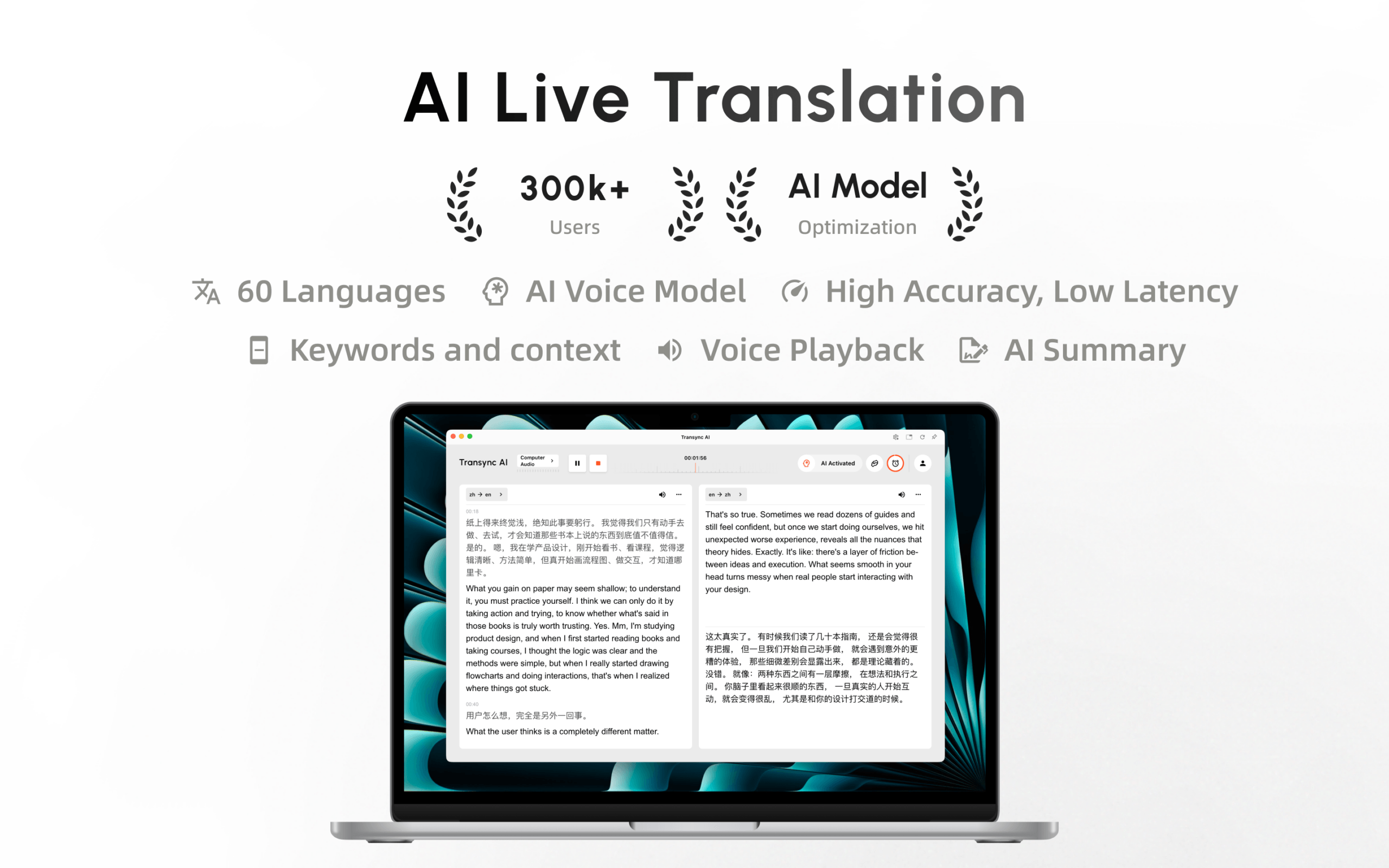
Transync AI พร้อมใช้งานแล้วบน Mac App Store ดาวน์โหลดได้ง่าย รับการอัปเดตอัตโนมัติ และเริ่มการแปลแบบเรียลไทม์บน Mac ได้เลย.
