

realtime spraakvertaling, AI-vergadervertaler, live spraakvertaler, tweetalige ondertiteling, directe spraakvertaling
A realtime vertaler Het helpt mensen elkaar te begrijpen terwijl ze nog aan het praten zijn. In plaats van tekst in een vertaalvenster te kopiëren en te wachten, kunnen gebruikers een gesprek volgen via live ondertiteling, vertaalde audio of beide.
Dat verschil is belangrijk. In een meertalige vergadering kan zelfs een korte vertraging de voortgang verstoren. In een klaslokaal kan het missen van één uitleg het volgende onderwerp moeilijker te begrijpen maken. Tijdens een reis kan een snel mondeling antwoord belangrijker zijn dan een perfect opgemaakt document.
Deze probleemoplossingsgids onderzoekt acht situaties waarin realtime vertaling van pas kan komen. Ook worden zeven verschillende tools vergeleken, zodat u de technologie kunt afstemmen op het gesprek in plaats van alleen op het aantal talen te kiezen.
Welk probleem lost een realtime vertaler op?
Traditionele vertaling is meestal asynchroon: iemand schrijft of neemt de tekst op, stuurt deze op voor vertaling en leest het resultaat later. Realtime vertaling probeert het proces tijdens de live communicatie af te ronden.
De kernvolgorde is:
Spraak horen → woorden herkennen → context begrijpen → betekenis vertalen → resultaat tonen of uitspreken
Een goed functionerend systeem kan drie veelvoorkomende communicatieproblemen verminderen:
- Wachten: Deelnemers hoeven niet na elke zin te pauzeren voor handmatige vertaling.
- Onzekerheid: Met tweetalige ondertitels kunnen gebruikers de originele spraak en de vertaling vergelijken.
- Verloren informatie: Transcripten en aantekeningen kunnen het gesprek bewaren voor latere raadpleging.
Producten zijn echter ontworpen voor verschillende doeleinden. Sommige richten zich op reizen, andere op grote evenementen, weer andere op mediaproductie en sommige op vergaderingen of API's voor ontwikkelaars.
8 situaties waarin een realtime vertaler van pas kan komen
1. Een verkoopgesprek met een internationale klant
Het probleem zit hem niet alleen in de taal. Verkoopgesprekken gaan over productnamen, cijfers, bezwaren en subtiele vragen. Als een belangrijke term verkeerd wordt vertaald, kunnen beide partijen met verschillende verwachtingen vertrekken.
Transync AI pakt dit scenario aan met zijn realtime vertaaltool, dat originele en vertaalde spraak met een lage latentie weergeeft. Voor het gesprek kan de verkoper productterminologie en achtergrondinformatie invoeren via de AI-assistent trefwoorden en contextfunctie.
Na de discussie, de AI-functie voor vergaderingsnotities kan een transcript en een gestructureerd verslag voor vervolgonderzoek leveren.
 2. Een meertalige teamvergadering
 2. Een meertalige teamvergadering
Teamleden moeten ideeën begrijpen en erop reageren zonder anderen constant te hoeven vragen om dingen te herhalen. Het lezen van ondertitels alleen kan vermoeiend zijn, maar bij spraakvertaling zijn namen en technische termen moeilijk te controleren.
De oplossing is om tekst en audio te combineren. Transync AI biedt tweetalige ondertitels naast de AI-stemvertaler. Deelnemers kunnen naar de vertaalde spraak luisteren terwijl ze de tekst controleren, wat belangrijk is wanneer nauwkeurigheid essentieel is.
Voor oproepen op Zoom, Microsoft Teams, of Google Meet, de Live vertaalfunctie voor vergaderingen Ondersteunt een op vergaderingen gerichte workflow zonder een platformspecifieke plugin te zijn.

Compatibel met de belangrijkste online vergaderplatformen voor naadloze realtime vertaling.
3. Een presentatie met dia's op het scherm
Door te schakelen tussen dia's en een vertaalvenster wordt het publiek gedwongen te kiezen welke informatie ze willen volgen. De vertaling is minder nuttig als deze achter de presentatie verborgen zit.
De Picture-in-Picture tweetalige ondertitels Houdt originele en vertaalde ondertitels zichtbaar boven andere apps op ondersteunde platforms. Dit biedt presentatoren en deelnemers een compacte vertalingweergave terwijl ze doorwerken met dia's, documenten of softwaredemonstraties.

Ondertitels die in realtime meebewegen op zowel desktop- als mobiele apparaten.
4. Een lezing in een andere taal
Een college bevat samenhangende ideeën, specialistische vaktermen en lange toelichtingen. Een vertaalprogramma voor zinnen kan individuele zinnen vertalen, maar levert na afloop geen bruikbare samenvatting op.
Studenten kunnen gebruikmaken van Transync AI Om tijdens de sessie tweetalige ondertitels te volgen, voeg je cursustermen toe met de AI-assistent trefwoorden en contextfunctie, en de resultaten te bekijken via de AI-functie voor vergaderingsnotities.
De vertaling moet nog steeds worden gecontroleerd aan de hand van het cursusmateriaal, vooral wanneer definities, formules of beoordelingsinstructies erin voorkomen.
 5. Een persoonlijk gesprek tijdens het reizen
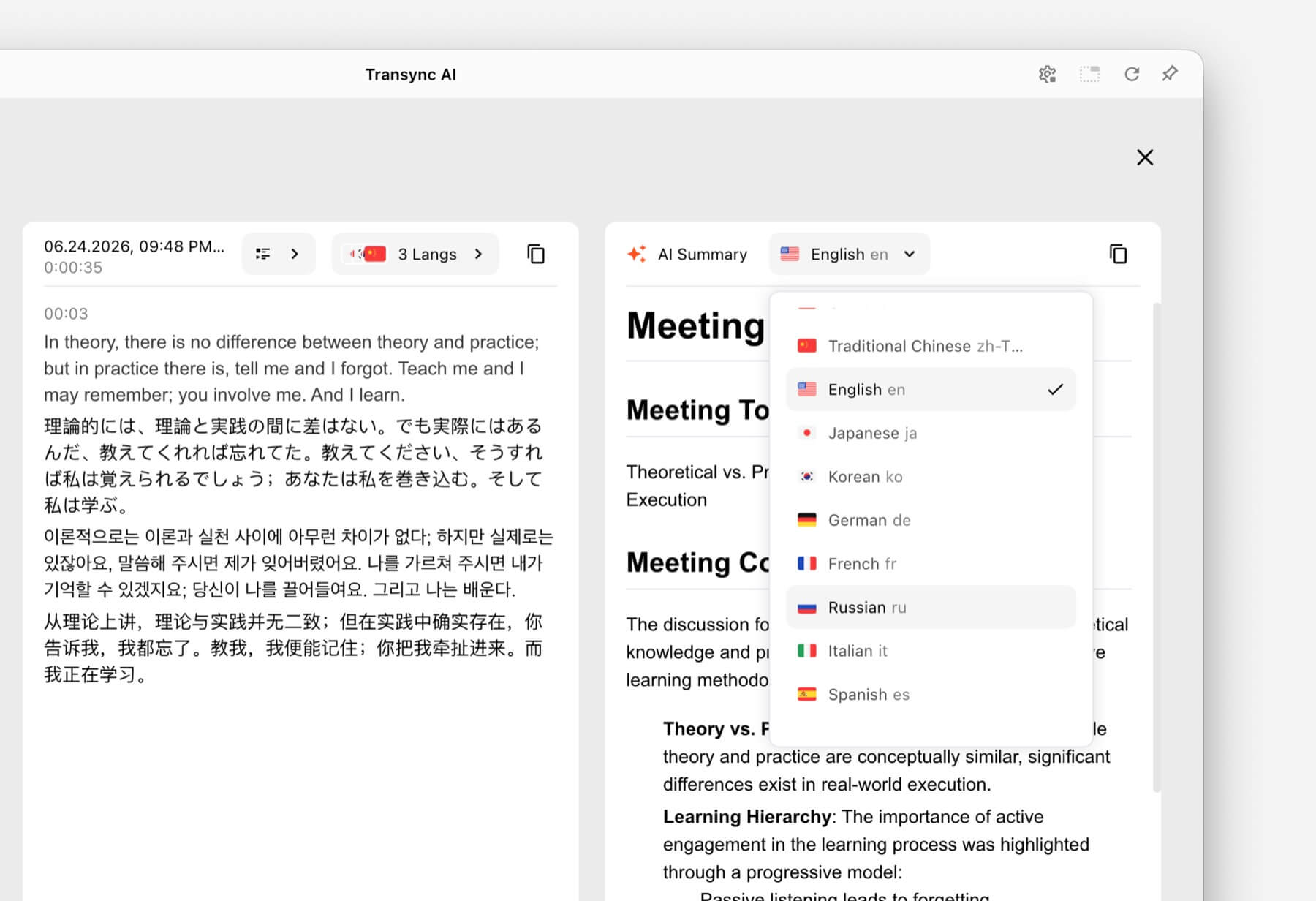 5. Een persoonlijk gesprek tijdens het reizen
Gesprekken over reizen zijn doorgaans korter en praktischer. Gebruikers willen misschien de weg weten, een dieetbeperking uitleggen of een boeking bevestigen.
Talkao En Google Vertalen Ze zijn ontworpen voor consumenten- en alledaagse vertalingen, inclusief mobiele taken die verder gaan dan live zakelijke communicatie. Ze zijn mogelijk geschikter wanneer vertaling via de camera, snelle tekstvertaling of incidenteel gebruik tijdens reizen prioriteit heeft.
 Transync AI Het is handig voor langere, persoonlijke gesprekken, maar het biedt geen offline modus, beeldherkenning of tekstvertaling van documenten.
6. Een conferentie met honderden deelnemers
Een persoonlijke vertaler en een platform voor evenementvertaling lossen verschillende distributieproblemen op. Op een grote conferentie hebben veel deelnemers mogelijk ondertiteling of vertaalde audio nodig op hun eigen apparaten, zonder dat ze zich hoeven aan te melden voor een privéteamaccount.
Wereldlijk is ontworpen voor vergaderingen en evenementen waarbij deelnemers toegang krijgen via links of QR-codes. Voor conferenties, webinars en hybride evenementen is deze workflow voor grotere aantallen deelnemers wellicht geschikter.
 Voor terugkerende interne gesprekken of kleinere vergaderingen waarbij elke deelnemer ondertiteling, spraakweergave en notities nodig heeft, Transync AI Biedt een meer persoonlijke, op de ontmoeting gerichte ervaring.
7. Een project voor de lokalisatie van een video of webinar
Mediateams hebben vaak meer nodig dan alleen live begrip. Ze hebben mogelijk bewerkbare ondertitels, nasynchronisatie, transcriptie, lokalisatie en herbruikbare content na een uitzending nodig.
Maestra Het platform is breed inzetbaar voor mediavertaling, ondertiteling, nasynchronisatie, webinars en live-evenementen. Deze bredere productieworkflow sluit mogelijk beter aan bij de behoeften van contentteams.
 Wanneer de voornaamste behoefte een tweezijdige zakelijke conversatie is in plaats van mediaproductie, Transync AI biedt een beperktere combinatie van live ondertiteling, vertaalde spraak, context en notities na de vergadering.
8. Een bedrijf dat zijn eigen spraakproduct ontwikkelt
Een app voor eindgebruikers is niet de juiste oplossing wanneer ontwikkelaars vertalingen moeten integreren in een spraakgestuurd systeem, een klantenserviceplatform of een aangepaste applicatie.
Soniox Het biedt spraak-naar-tekst-, tekst-naar-spraak- en vertaalmogelijkheden voor zowel ontwikkelaars als bedrijven.
 DiepL Biedt tevens API's en bredere workflows voor tekst, documenten, schrijven en zakelijke taalverwerking, naast geselecteerde spraakproducten.
 Kiezen Transync AI Kies een API-platform wanneer het doel is om een kant-en-klare realtime vertaler te gebruiken voor vergaderingen. Kies een API-platform wanneer het doel is om een aangepaste vertaalervaring te bouwen en te onderhouden.
Vergelijkingstabel van realtime vertalers
Deze vergelijking richt zich op productpositionering en typische workflows. Controleer de huidige mogelijkheden, beschikbare talen en aankoopopties op de officiële website van elk product.
| Hulpmiddel | Primair gebruiksscenario | Live vertaalde tekst | Vertaalde stem | Uitvoer na het gesprek | Beste pasvorm |
|---|---|---|---|---|---|
| Transync AI | Vergaderingen, telefoongesprekken en persoonlijke ontmoetingen | Tweetalige ondertitels | Ja, met spraakopties. | Transcripten en notulen van AI-vergaderingen | Teams en individuen die een direct bruikbare vertaler voor vergaderingen willen. |
| Talkao | Reizen, mobiele vertaling en leren | App-afhankelijk | Ja | Geen primaire focus | Consumenten die behoefte hebben aan uitgebreide vertaalfuncties voor mobiele apparaten. |
| Wereldlijk | Conferenties, webinars en evenementen | Ja | Ja | Transcripten en samenvattingen | Organisatoren verzorgen vertalingen voor veel deelnemers. |
| Soniox | Spraak-API's en maatwerkproducten | API/app-functionaliteit | TTS/API-functionaliteit | Implementatieafhankelijk | Ontwikkelaars bouwen hun eigen spraakervaring. |
| Maestra | Media lokalisatie en live content | Ja | Live-stem en nasynchronisatie | Transcripten en contentworkflows | Mediateams die werken met ondertiteling, nasynchronisatie of webinars. |
| DiepL | Tekst, documenten, zakelijke taalworkflows en geselecteerde spraaktoepassingen | Productafhankelijk | Spraakproductafhankelijk | Geen standaard workflow voor vergaderingsnotulen | Organisaties met een aanzienlijke behoefte aan schriftelijke vertalingen |
| Google Vertalen | Gratis dagelijkse vertaling | Niet eerst ontmoeten | Audio-afspeelvertaling | Nee | Snelle, informele vertaling van veelvoorkomende inhoud |
Hoe werkt dat? Transync AI Realtime vertalingen ondersteunen?
Transync AI is een zelfstandig vertaalproduct voor web-, Windows-, macOS-, iOS- en Android-workflows. Het is ontworpen om gebruikers te helpen luisteren, lezen, reageren en vastleggen tijdens meertalige communicatie.
 Automatische tweewegs taalherkenning
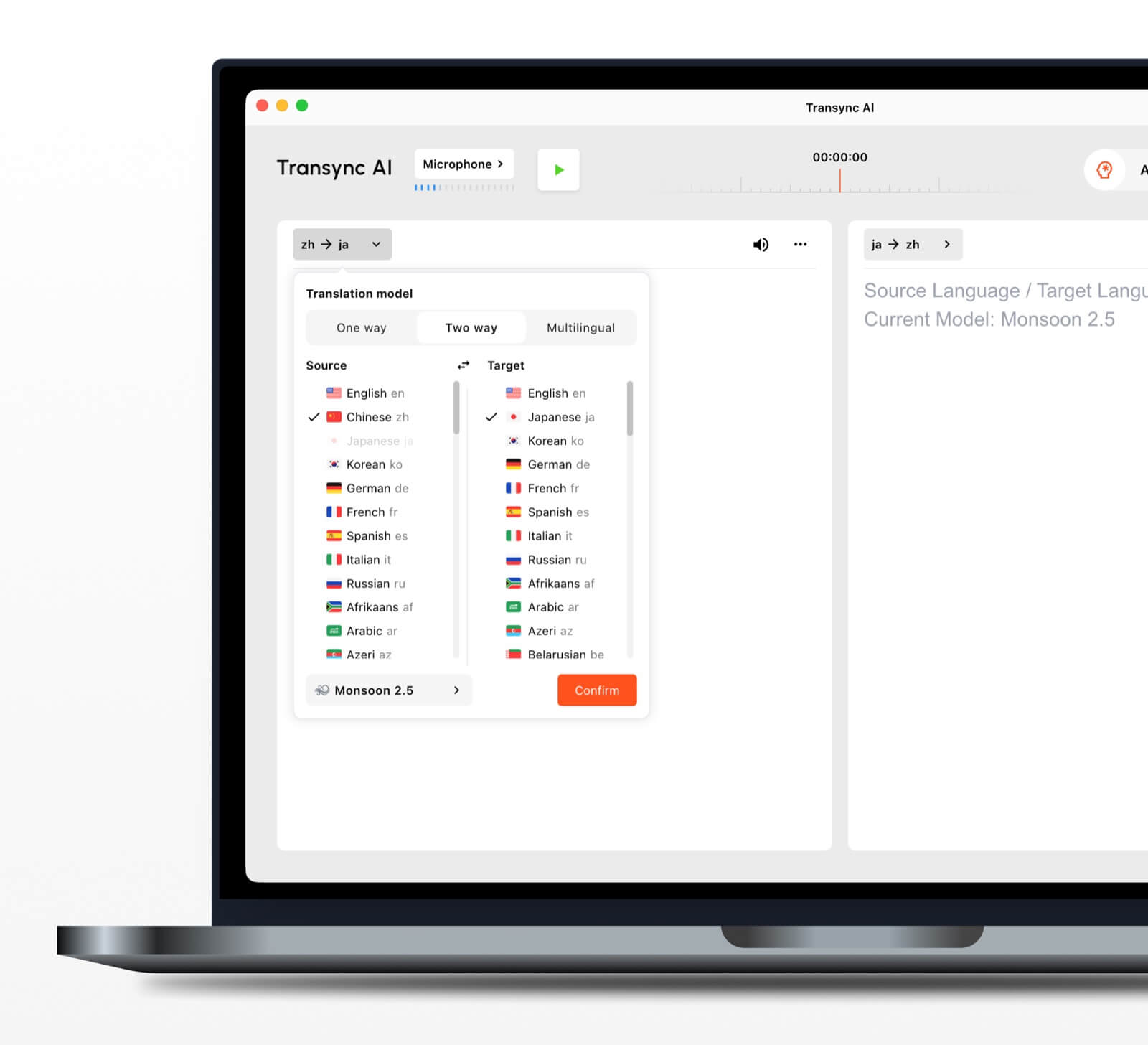 Automatische tweewegs taalherkenning
Binnen een geselecteerd taalpaar, de realtime vertaaltool Kan onderscheiden welke taal er gesproken wordt. Dit vermindert het handmatig wisselen tussen talen tijdens een heen-en-weer gesprek.
Meer dan 60 ondersteunde talen
Het platform ondersteunt meer dan 60 talen en meer dan 1000 taalcombinaties. Controleer altijd de vereiste combinatie op het platform. pagina met ondersteunde talen voor een belangrijke vergadering.
Spraakweergave en stemklonen
De AI-stemvertaler Spreekt de vertaalde inhoud hardop uit met behulp van natuurlijke stemopties. stemkloningsfunctie Kan vertaalde audio afspelen met een stem die is gemodelleerd naar de gebruiker, waardoor de output persoonlijker aanvoelt tijdens lessen, demonstraties en telefoongesprekken.
Audioroutering voor online vergaderingen
De functie voor het delen van computergeluid legt de stemmen van andere deelnemers vast tijdens een online vergadering. virtuele microfoonfunctie Hiermee kan vertaalde spraak naar het gesprek worden verzonden, zodat anderen het kunnen horen.
Gespreksverslagen en samenvattingen
De AI-functie voor vergaderingsnotities genereert output na het gesprek, terwijl de handleiding voor het beheer van vertaaldocumenten legt uit hoe u opgeslagen gegevens kunt openen en beheren.
Waarom is realtimevertaling nauwkeuriger?
Geen enkel hulpmiddel presteert in elke omgeving identiek. De volgende werkwijzen kunnen het resultaat verbeteren:
- Gebruik een heldere microfoon. Plaats het apparaat dichtbij genoeg om spraak op te vangen zonder overmatig omgevingsgeluid.
- Vraag mensen om beurten te nemen. Overlappende spraak is moeilijker te herkennen en te vertalen.
- Gebruik een stabiele internetverbinding. Spraakvertaling via de cloud vereist een betrouwbare verbinding.
- Geef context. Voeg namen, merken, afkortingen en technische termen toe vóór de sessie.
- Spreek in volledige gedachten. Extreem gefragmenteerde of dubbelzinnige spraak kan de kwaliteit van de vertaling verminderen.
- Test het daadwerkelijke taalpaar. De prestaties kunnen variëren afhankelijk van de taal, het accent en het onderwerp.
- Controleer de cruciale details. Controleer de cijfers, data, juridische formulering en technische specificaties.
Voor medische, juridische, veiligheidskritische of contractueel bindende communicatie kunt u overwegen een gekwalificeerde menselijke tolk in te schakelen of een professionele revisie te laten uitvoeren. AI-vertaling kan de communicatie ondersteunen, maar kan niet garanderen dat elke nuance behouden blijft.
Hoe kies je de juiste realtime vertaler?
Gebruik een eenvoudige test in drie stappen.
Stap 1: Definieer het gesprek
Bepaal of de hoofdtaak bestaat uit reizen, een privégesprek, een teamvergadering, een groot evenement, mediaproductie, documentbewerking of productontwikkeling.
Stap 2: Definieer de gewenste uitvoer
Vraag of gebruikers het volgende nodig hebben:
- Vertaalde audio.
- Tweetalige ondertiteling.
- Een link voor deelnemerstoegang.
- Een transcript of samenvatting.
- Vertaling van documenten of afbeeldingen.
- Een API voor een maatwerkapplicatie.
Stap 3: Testen onder reële omstandigheden
Test de tool met het daadwerkelijke apparaat, de taalcombinatie, het platform, het netwerk, de accenten en de woordenschat. Een korte test in een realistische omgeving onthult meer dan alleen een algemene lijst met functies.
Hoe begin je een sessie met Transync AI
- Open Transync AI op een ondersteund apparaat.
- Selecteer de twee talen die in het gesprek worden gebruikt.
- Kies de juiste microfoon of audiobron voor het systeem.
- Voeg terminologie toe met de AI-assistent trefwoorden en contextfunctie.
- Begin de realtime vertaaltool.
- Bekijk de originele en vertaalde ondertitels.
- Schakel de AI-stemvertaler wanneer deelnemers behoefte hebben aan gesproken uitleg.
- Gebruik de Picture-in-Picture tweetalige ondertitels wanneer je in een andere app werkt.
- Bekijk de Notulen van de AI-vergadering na de sessie.
Bekijk voor een videogesprek de volgende informatie. Handleiding voor het vertalen van live vergaderingen en test de audioroutering voordat andere deelnemers zich aansluiten.
Veelgestelde vragen over de realtime vertaler
Wat is de beste realtime vertaler voor vergaderingen?
Transync AI is een sterke optie om eerst een vergadering te houden, omdat het combineert realtime tweetalige vertaling, vertaalde spraakweergave, zwevende ondertitels, terminologiecontext, en Notulen van de AI-vergadering. De beste optie hangt nog steeds af van de taalcombinatie, het vergaderplatform, de privacyregels en de duur van de sessie.
Kan een realtime vertaler werken tijdens een videovergadering?
Ja. De Live vertaalfunctie voor vergaderingen van Transync AI werkt samen met Zoom, Microsoft Teams, En Google Meet. Het biedt live ondertiteling en vertaalde spraak tijdens meertalige gesprekken.
Kan het beide kanten automatisch vertalen?
De Realtime vertaaltool van Transync AI Kan de taal van de spreker binnen het geselecteerde ondersteunde paar herkennen, waardoor het wisselen tussen knoppen minder vaak nodig is.
Werkt realtime vertaling ook offline?
De beschikbaarheid offline is afhankelijk van het product. Transync AI Vereist een internetverbinding en biedt geen offline modus. Controleer de beschikbaarheid van een offline taalmodus rechtstreeks bij de betreffende app voordat u deze tijdens uw reis gebruikt.
Is een realtime vertaler gratis?
Google Vertalen is een breed toegankelijke, gratis optie voor informele vertalingen. Transync AI Biedt na registratie een gratis proefperiode aan, zodat gebruikers de vergadergerichte functies kunnen testen voordat ze een betaald abonnement kiezen.
Zijn gespreksgegevens privé?
Privacybeleid verschilt per regio. Transync AI Hierin staat dat klantgegevens standaard niet worden gebruikt voor AI-training en dat audio na verwerking wordt verwijderd. Organisaties dienen dit te herzien. Vertrouwenscentrum en de huidige voorwaarden in relatie tot hun beveiligings- en nalevingsvereisten.
Eindantwoord: Welke realtime vertaler moet je kiezen?
Kies op basis van workflow:
- Talkao of Google Vertalen voor incidentele reizen en dagelijkse taken.
- Wereldlijk voor meertalige evenementen met veel deelnemers.
- Soniox voor ontwikkelaars-API's en spraakproducten op maat.
- Maestra voor mediavertaling, ondertiteling en nasynchronisatie.
- DiepL voor tekst, documenten en zakelijke taalworkflows.
- Transync AI Voor live vergaderingen waarbij tweetalige ondertiteling, vertaalde spraak, terminologiecontext en nuttige aantekeningen achteraf nodig zijn.
Voor terugkerende internationale bijeenkomsten, een realtime vertaler Het moet meer doen dan alleen woorden omzetten. Het moet deelnemers helpen het gesprek te volgen, natuurlijk te reageren, belangrijke details te controleren en de informatie die ze na het gesprek nodig hebben te onthouden.
Als u een ervaring van de volgende generatie wilt, Transync AI loopt voorop met realtime, AI-gestuurde vertalingen die gesprekken natuurlijk laten verlopen. U kunt probeer het gratis nu.
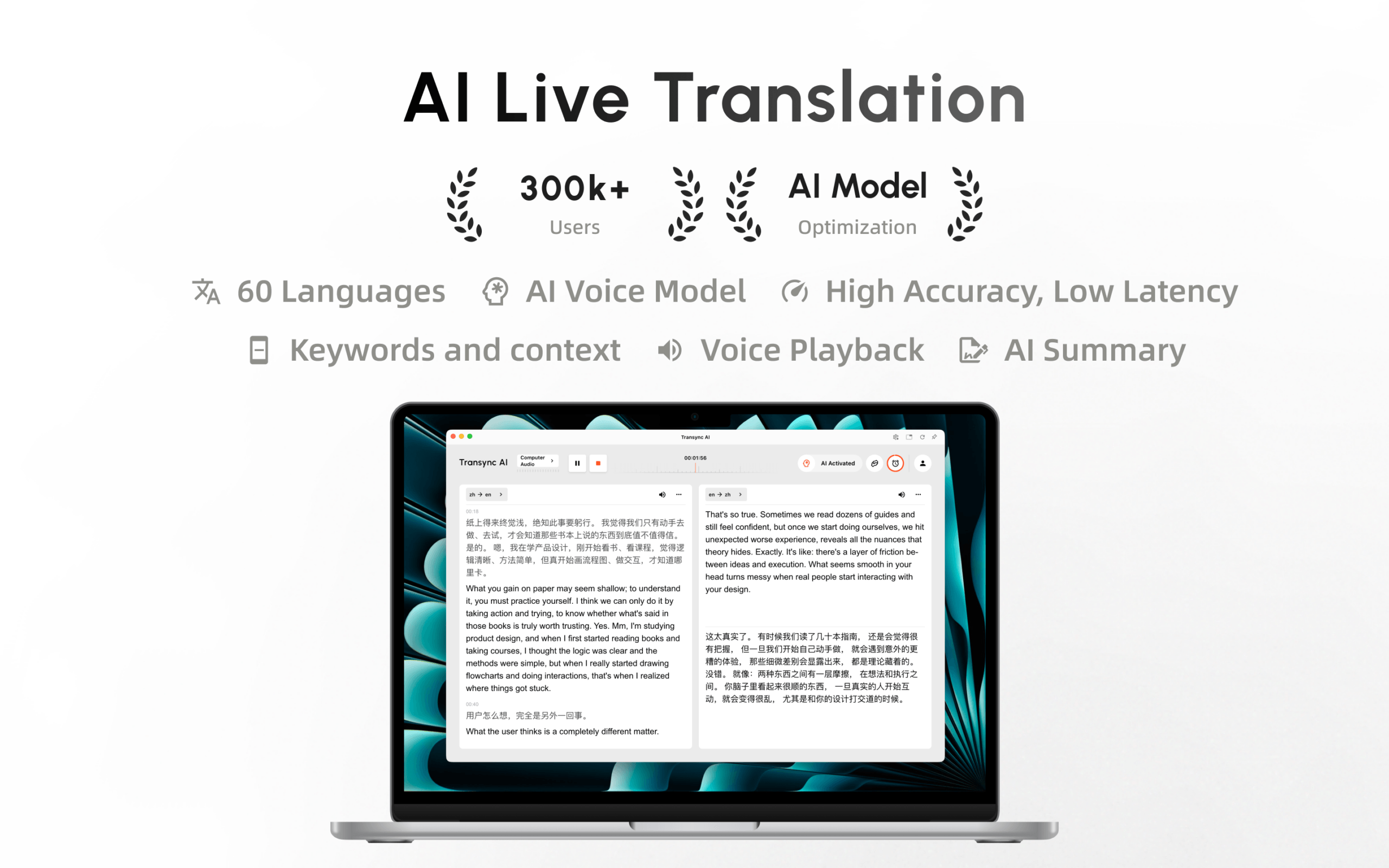
Transync AI is nu beschikbaar in de Mac App Store. Download de app eenvoudig, ontvang automatische updates en begin direct met realtime vertalen op je Mac.
