

Traduction vocale en temps réel, traducteur de réunion IA, traducteur vocal en direct, sous-titres bilingues, traduction vocale instantanée
UN traducteur en temps réel Cela permet aux personnes de se comprendre pendant qu'elles parlent. Au lieu de copier du texte dans une zone de traduction et d'attendre, les utilisateurs peuvent suivre une conversation grâce aux sous-titres en direct, à la traduction audio ou aux deux.
Cette différence est importante. Lors d'une réunion multilingue, même un court délai peut perturber le déroulement des échanges. En classe, manquer une explication peut rendre le sujet suivant plus difficile à comprendre. En voyage, une réponse orale rapide peut s'avérer plus utile qu'un document parfaitement formaté.
Ce guide pratique explore huit situations où la traduction en temps réel peut s'avérer utile. Il compare également sept outils différents afin que vous puissiez choisir la technologie la plus adaptée à la conversation, plutôt que de vous baser uniquement sur le nombre de langues.
Quel problème résout un traducteur en temps réel ?
La traduction traditionnelle est généralement asynchrone : une personne rédige ou enregistre un contenu, l’envoie à la traduction et lit le résultat ultérieurement. La traduction en temps réel vise à réaliser le processus pendant l’échange direct.
La séquence principale est :
Écouter un discours → reconnaître les mots → comprendre le contexte → traduire le sens → présenter ou énoncer le résultat
Un système performant peut réduire trois problèmes de communication courants :
- En attendant: Les participants n'ont pas besoin de faire une pause après chaque phrase pour effectuer une traduction manuelle.
- Incertitude: Les sous-titres bilingues permettent aux utilisateurs de comparer le texte original et sa traduction.
- Informations perdues : Les transcriptions et les notes permettent de conserver la conversation pour une consultation ultérieure.
Cependant, les produits sont conçus pour des usages différents. Certains sont axés sur les voyages, d'autres sur les grands événements, d'autres encore sur la production multimédia, et d'autres enfin sur les réunions ou les API pour développeurs.
8 situations où un traducteur en temps réel peut être utile
1. Un appel commercial avec un client international
Le problème ne se limite pas à la langue. Les conversations commerciales incluent des noms de produits, des chiffres, des objections et des questions subtiles. Si un terme clé est mal traduit, les deux parties risquent d'avoir des attentes différentes.
Transync AI aborde ce scénario avec son outil de traduction en temps réel, qui affiche le discours original et sa traduction avec une faible latence. Avant l'appel, le vendeur peut saisir la terminologie produit et les informations générales via le Fonctionnalité Mots clés et contexte de l'assistant IA.
Après la discussion, le Fonctionnalité de prise de notes de réunion par IA peut fournir une transcription et un compte rendu structuré pour le suivi.
 2. Une réunion d'équipe multilingue
 2. Une réunion d'équipe multilingue
Les membres de l'équipe doivent comprendre les idées et y répondre sans avoir à demander constamment aux autres de se répéter. La simple lecture des sous-titres peut être fatigante, mais la traduction vocale seule peut rendre la vérification des noms et des termes techniques difficile.
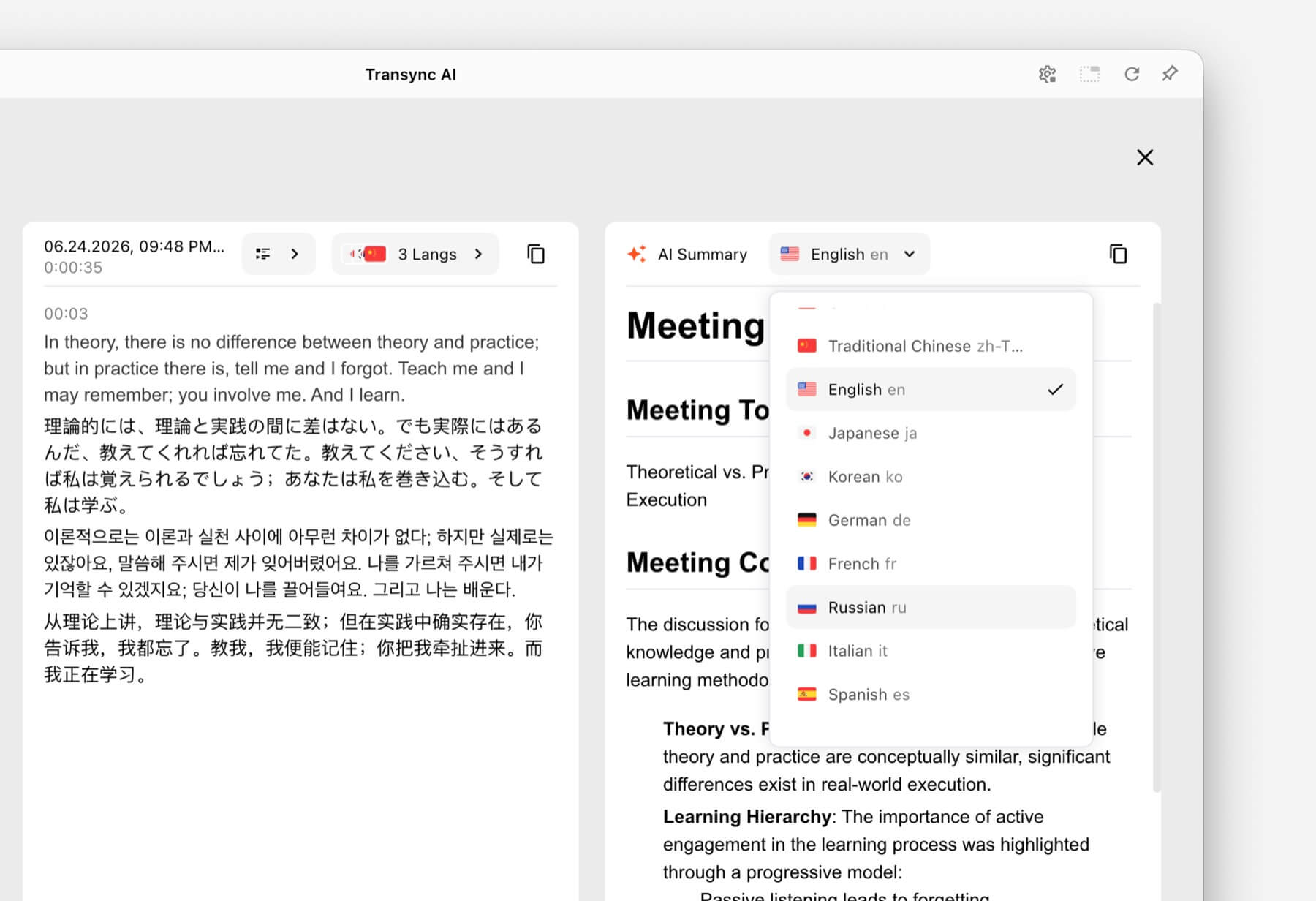
La solution consiste à combiner texte et audio. Transync AI propose des sous-titres bilingues en plus de ses Traducteur vocal IA. Les participants peuvent écouter la traduction vocale tout en vérifiant le texte lorsque la précision est importante.
Pour les appels sur Zoom, Microsoft Teams, ou Google Meet, le fonctionnalité de traduction en direct pour les réunions Prend en charge un flux de travail axé sur les réunions sans être un plugin spécifique à une plateforme.

Compatible avec les principales plateformes de réunion en ligne pour une traduction en temps réel fluide
3. Une présentation avec des diapositives à l'écran
L'alternance entre les diapositives et une fenêtre de traduction oblige le public à choisir les informations à suivre. La traduction est moins utile si elle reste masquée par la présentation.
Le Fonction de sous-titres bilingues en mode image dans l'image Sur les plateformes compatibles, les sous-titres originaux et traduits restent visibles au-dessus des autres applications. Les présentateurs et les participants bénéficient ainsi d'une vue de traduction compacte tout en continuant à travailler sur leurs diapositives, documents ou démonstrations logicielles.

Sous-titres flottants en temps réel sur les appareils de bureau et mobiles
4. Une conférence dans une autre langue
Un cours magistral présente des idées liées entre elles, un vocabulaire spécialisé et de longues explications. Un traducteur automatique peut traiter des phrases isolées, mais ne fournit aucun compte rendu utile après le cours.
Les étudiants peuvent utiliser Transync AI Pour suivre les sous-titres bilingues pendant la session, ajoutez les termes du cours avec le Fonctionnalité Mots clés et contexte de l'assistant IA, et examiner les résultats par le biais du Fonctionnalité de prise de notes de réunion par IA.
La traduction doit tout de même être vérifiée par rapport aux supports de cours, notamment lorsqu'elle contient des définitions, des formules ou des consignes d'évaluation.
 5. Une conversation en face à face pendant le voyage
 5. Une conversation en face à face pendant le voyage
Les conversations liées aux voyages sont généralement plus courtes et plus pratiques. Les utilisateurs peuvent avoir besoin de demander leur chemin, d'expliquer une restriction alimentaire ou de confirmer une réservation.
Talkao et Google Traduction Elles sont conçues pour la traduction grand public et les tâches de traduction quotidiennes, y compris les applications mobiles autres que la communication professionnelle en direct. Elles seront plus adaptées lorsque la priorité est donnée à la traduction par caméra, à la traduction rapide de textes ou à une utilisation occasionnelle en voyage.
 Transync AI Il est utile pour les conversations orales prolongées en face à face, mais il n'offre pas de mode hors ligne, de reconnaissance d'images ni de traduction de documents textuels uniquement.
6. Une conférence avec des centaines de participants
Un traducteur personnel et une plateforme de traduction événementielle répondent à des problématiques de diffusion différentes. Lors d'une grande conférence, de nombreux participants peuvent avoir besoin de sous-titres ou de traductions audio sur leurs appareils personnels, sans avoir à créer de compte d'équipe privé.
Mondial Ce système est conçu pour les réunions et événements dont l'accès se fait par lien ou code QR. Pour les conférences, webinaires et événements hybrides, un flux de travail adapté à un public plus large peut s'avérer plus approprié.
 Pour les appels internes récurrents ou les réunions plus restreintes où chaque participant a besoin de sous-titres, d'un enregistrement audio et de notes, Transync AI offre une expérience de rencontre plus personnalisée.
7. Un projet de localisation de vidéo ou de webinaire
Les équipes médias ont souvent besoin de plus qu'une simple compréhension en direct. Elles peuvent avoir besoin de sous-titres modifiables, de doublage, de transcription, de localisation et de contenu réutilisable après la diffusion.
Maestra Elle couvre la traduction, le sous-titrage, le doublage, les webinaires et les événements en direct. Ce flux de production plus large peut mieux convenir aux équipes de contenu.
 Lorsque le besoin principal est une conversation commerciale bilatérale plutôt qu'une production médiatique, Transync AI propose une combinaison plus restreinte de sous-titres en direct, de discours traduit, de contexte et de notes post-réunion.
8. Une entreprise qui développe son propre produit vocal
Une application destinée à l'utilisateur final n'est pas la solution idéale lorsque les développeurs ont besoin d'intégrer la traduction dans un agent vocal, une plateforme de support client ou une application personnalisée.
Soniox offre des fonctionnalités de conversion de la parole en texte, de la synthèse vocale et de traduction pour les développeurs et les entreprises.
 DeepL Fournit également des API et des flux de travail plus larges pour le texte, les documents, la rédaction et les langages d'entreprise, ainsi que des produits vocaux sélectionnés.
 Choisir Transync AI Optez pour une plateforme API si votre objectif est d'utiliser un traducteur en temps réel prêt à l'emploi pour vos réunions. En revanche, si vous souhaitez créer et maintenir une expérience de traduction personnalisée, privilégiez une plateforme API.
Tableau comparatif des traducteurs en temps réel
Cette comparaison porte sur le positionnement des produits et les flux de travail typiques. Consultez le site web officiel de chaque produit pour connaître les fonctionnalités actuelles, les langues disponibles et les options d'achat.
| Outil | Cas d'utilisation principal | Texte traduit en direct | Voix traduite | Résultat de la conversation | Meilleure adaptation |
|---|---|---|---|---|---|
| Transync AI | Réunions, appels et conversations en personne | Sous-titres bilingues | Oui, avec des options vocales | Transcriptions et notes de réunion sur l'IA | Équipes et particuliers souhaitant un traducteur de réunion prêt à l'emploi |
| Talkao | Voyages, traduction mobile et apprentissage | Dépendant de l'application | Oui | Ce n'est pas un axe de recherche principal. | Les consommateurs qui ont besoin de fonctionnalités de traduction mobile étendues |
| Mondial | Conférences, webinaires et événements | Oui | Oui | Transcriptions et résumés | Les organisateurs assurent la traduction pour de nombreux participants. |
| Soniox | API vocales et produits personnalisés | Fonctionnalités API/application | Fonctionnalités TTS/API | Dépend de l'implémentation | Des développeurs créent leur propre expérience vocale |
| Maestra | Localisation des médias et contenu en direct | Oui | voix en direct et doublage | Transcriptions et flux de travail de contenu | Équipes médias travaillant sur le sous-titrage, le doublage ou les webinaires |
| DeepL | Texte, documents, flux de travail en langage d'entreprise et utilisations vocales sélectionnées | dépendant du produit | dépendant du produit vocal | Flux de travail de prise de notes de réunion non essentiel | Organisations ayant d'importants besoins en traduction écrite |
| Google Traduction | Traduction gratuite du quotidien | Pas de première rencontre | Lecture audio de la traduction | Non | Traduction rapide et informelle de contenu courant |
Comment Transync AI Gérer la traduction en temps réel ?
Transync AI est un logiciel de traduction autonome pour les flux de travail web, Windows, macOS, iOS et Android. Il est conçu pour aider les utilisateurs à écouter, lire, répondre et conserver une trace écrite lors de communications multilingues.
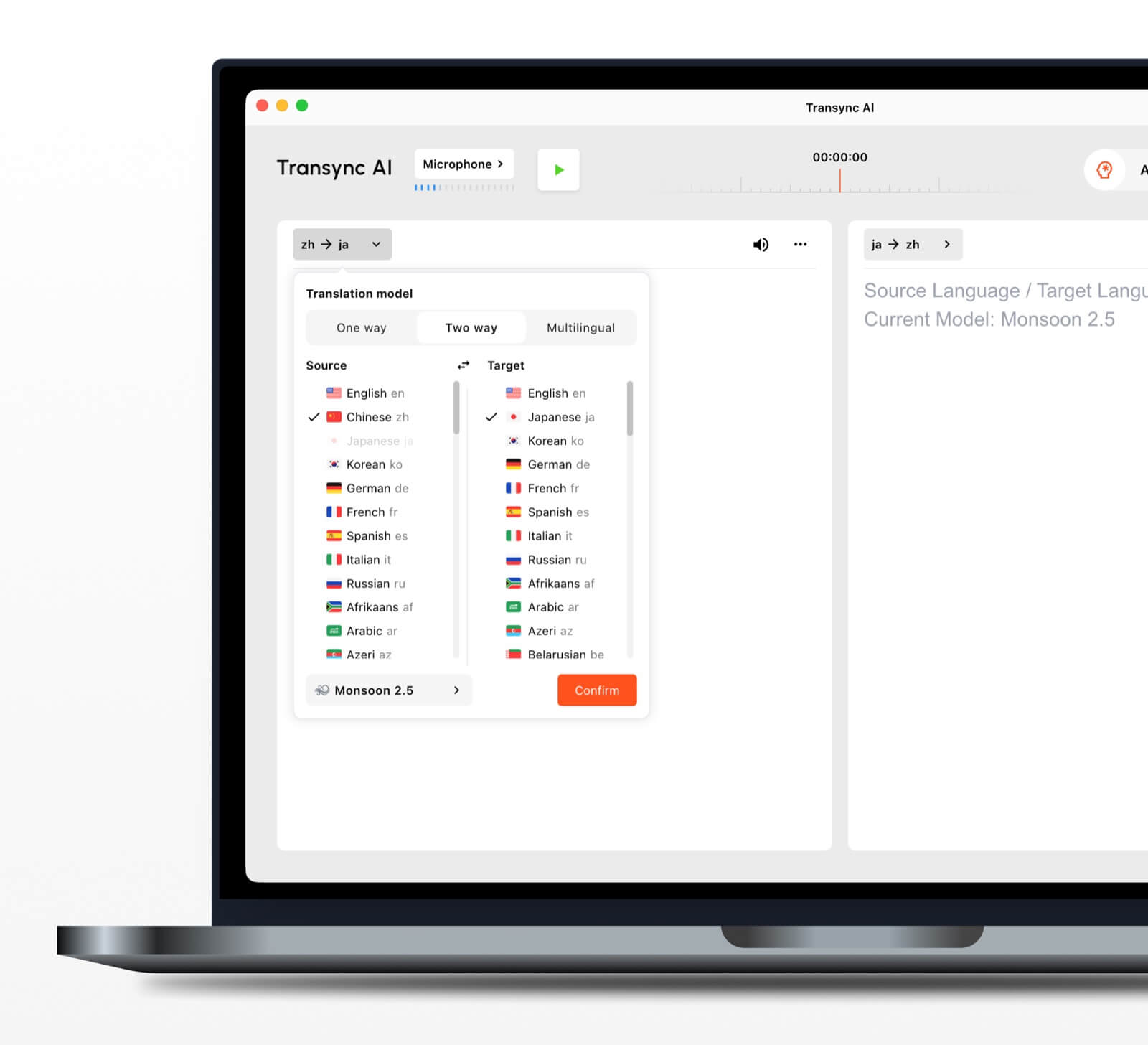
 Reconnaissance automatique bidirectionnelle des langues
 Reconnaissance automatique bidirectionnelle des langues
Au sein d'une paire de langues sélectionnée, le outil de traduction en temps réel permet de distinguer la langue parlée. Cela réduit les changements manuels de langue lors des échanges.
Plus de 60 langues prises en charge
La plateforme prend en charge plus de 60 langues et plus de 1 000 paires de langues. Vérifiez toujours la paire requise sur le site web. page des langues prises en charge avant une réunion importante.
Lecture vocale et clonage vocal
Le Traducteur vocal IA énonce à voix haute le contenu traduit en utilisant des options de voix naturelles. fonction de clonage vocal peut générer une lecture traduite avec une voix calquée sur celle de l'utilisateur, ce qui rend le résultat plus personnel lors des cours, des démonstrations et des appels.
Routage audio des réunions en ligne
Le fonction de partage audio de l'ordinateur capte les voix des autres participants lors d'une réunion en ligne. fonctionnalité de microphone virtuel permet de diffuser un discours traduit lors de l'appel afin que d'autres personnes puissent l'entendre.
Comptes rendus et résumés de conversations
Le Fonctionnalité de prise de notes de réunion par IA crée un résultat post-conversationnel, tandis que le guide de gestion des dossiers de traduction explique comment accéder aux enregistrements sauvegardés et les gérer.
Qu’est-ce qui rend la traduction en temps réel plus précise ?
Aucun outil ne fonctionne de manière identique dans tous les environnements. Ces pratiques peuvent améliorer le résultat :
- Utilisez un microphone clair. Placez-le suffisamment près pour capter la parole sans bruit ambiant excessif.
- Demandez aux gens de faire chacun leur tour. Les discours qui se chevauchent sont plus difficiles à reconnaître et à traduire.
- Utilisez une connexion internet stable. La traduction vocale dans le cloud dépend d'une connexion fiable.
- Fournir le contexte. Ajoutez les noms, marques, acronymes et termes techniques avant la séance.
- Exprimez-vous en pensées complètes. Un discours extrêmement fragmenté ou ambigu peut réduire la qualité de la traduction.
- Tester la paire de langues réelle. Les performances peuvent varier selon les langues, les accents et les sujets.
- Vérifiez les détails essentiels. Veuillez confirmer les numéros, les dates, le langage juridique et les spécifications techniques.
Pour les communications médicales, juridiques, critiques en matière de sécurité ou ayant une valeur contractuelle, il est recommandé de faire appel à un interprète humain qualifié ou à un professionnel pour une relecture. La traduction automatique peut faciliter la communication, mais elle ne peut garantir la restitution de toutes les nuances.
Comment choisir le bon traducteur en temps réel
Utilisez un test simple en trois parties.
Étape 1 : Définir la conversation
Déterminez si la tâche principale consiste en un voyage, un appel privé, une réunion d'équipe, un événement important, une production multimédia, un travail sur des documents ou un développement de produit.
Étape 2 : Définir le résultat attendu
Demandez si les utilisateurs ont besoin de :
- Audio traduit.
- Sous-titres bilingues.
- Lien d'accès pour les participants.
- Une transcription ou un résumé.
- Traduction de documents ou d'images.
- Une API pour une application personnalisée.
Étape 3 : Tester en conditions réelles
Lancez l'outil avec votre appareil, votre paire de langues, votre plateforme, votre réseau, vos accents et votre vocabulaire réels. Un court essai en environnement réaliste vous révélera bien plus qu'une simple liste de fonctionnalités.
Comment démarrer une session avec Transync AI
- Ouvrir Transync AI sur un appareil compatible.
- Sélectionnez les deux langues utilisées dans la conversation.
- Choisissez le microphone ou la source audio système appropriée.
- Ajouter la terminologie avec le Fonctionnalité Mots clés et contexte de l'assistant IA.
- Commencez le outil de traduction en temps réel.
- Vérifiez les sous-titres originaux et traduits.
- Activer Traducteur vocal IA lorsque les participants ont besoin d'une production orale.
- Utilisez le Fonction de sous-titres bilingues en mode image dans l'image lorsque vous travaillez dans une autre application.
- Examiner Notes de réunion IA après la séance.
Pour un appel vidéo, consultez les guide de traduction pour les réunions en direct et tester le routage audio avant que d'autres participants ne se joignent à vous.
FAQ sur le traducteur en temps réel
Quel est le meilleur traducteur en temps réel pour les réunions ?
Transync AI est une excellente option pour une première réunion car elle combine traduction bilingue en temps réel, Lecture vocale traduite, sous-titres flottants, le contexte terminologique et Notes de réunion IA. La meilleure option dépend toujours de la paire de langues, de la plateforme de réunion, des règles de confidentialité et de la durée de la session.
Un traducteur en temps réel peut-il fonctionner lors d'une réunion vidéo ?
Oui. Fonctionnalité de traduction en direct pour les réunions Transync AI travaille à côté Zoom, Microsoft Teams, et Google Meet. Il peut fournir des sous-titres en direct et une traduction vocale lors d'appels multilingues.
Peut-il traduire automatiquement les deux côtés ?
Le Outil de traduction en temps réel de Transync AI peut distinguer la langue de l'orateur parmi la paire prise en charge sélectionnée, réduisant ainsi le besoin de changer de bouton.
La traduction en temps réel fonctionne-t-elle hors ligne ?
La disponibilité hors ligne dépend du produit. Transync AI Nécessite une connexion Internet et ne propose pas de mode hors ligne. Veuillez vérifier la disponibilité des langues hors ligne directement auprès de l'application avant de l'utiliser en voyage.
Existe-t-il un traducteur en temps réel gratuit ?
Google Traduction est une option gratuite et largement accessible pour la traduction occasionnelle. Transync AI offre une allocation de démarrage gratuite après l'inscription afin que les utilisateurs puissent tester les fonctionnalités dédiées aux réunions avant de choisir un forfait payant.
Les données de conversation sont-elles privées ?
Les politiques de confidentialité varient. Transync AI Il est indiqué que les données client ne sont pas utilisées par défaut pour l'entraînement de l'IA et que les fichiers audio sont supprimés après traitement. Les organisations devraient examiner les Centre de confiance et les conditions actuelles au regard de leurs exigences en matière de sécurité et de conformité.
Réponse finale : Quel traducteur en temps réel choisir ?
Choisir par flux de travail :
- Talkao ou Google Traduction pour les voyages occasionnels et les tâches quotidiennes.
- Mondial pour les événements multilingues avec de nombreux participants.
- Soniox pour les API de développement et les produits vocaux personnalisés.
- Maestra pour la traduction, le sous-titrage et le doublage de contenus multimédias.
- DeepL pour les textes, les documents et les flux de travail en langage d'entreprise.
- Transync AI pour les réunions en direct qui nécessitent des sous-titres bilingues, la traduction des discours, le contexte terminologique et des notes utiles après la réunion.
Pour les réunions internationales récurrentes, une traducteur en temps réel Il ne devrait pas se contenter de convertir des mots. Il devrait permettre aux participants de suivre la conversation, de répondre naturellement, de vérifier les détails importants et de retenir les informations nécessaires après l'appel.
Si vous voulez une expérience de nouvelle génération, Transync AI ouvre la voie avec une traduction en temps réel, optimisée par l'IA, qui assure un flux naturel des conversations. Vous pouvez essayez-le gratuitement maintenant.
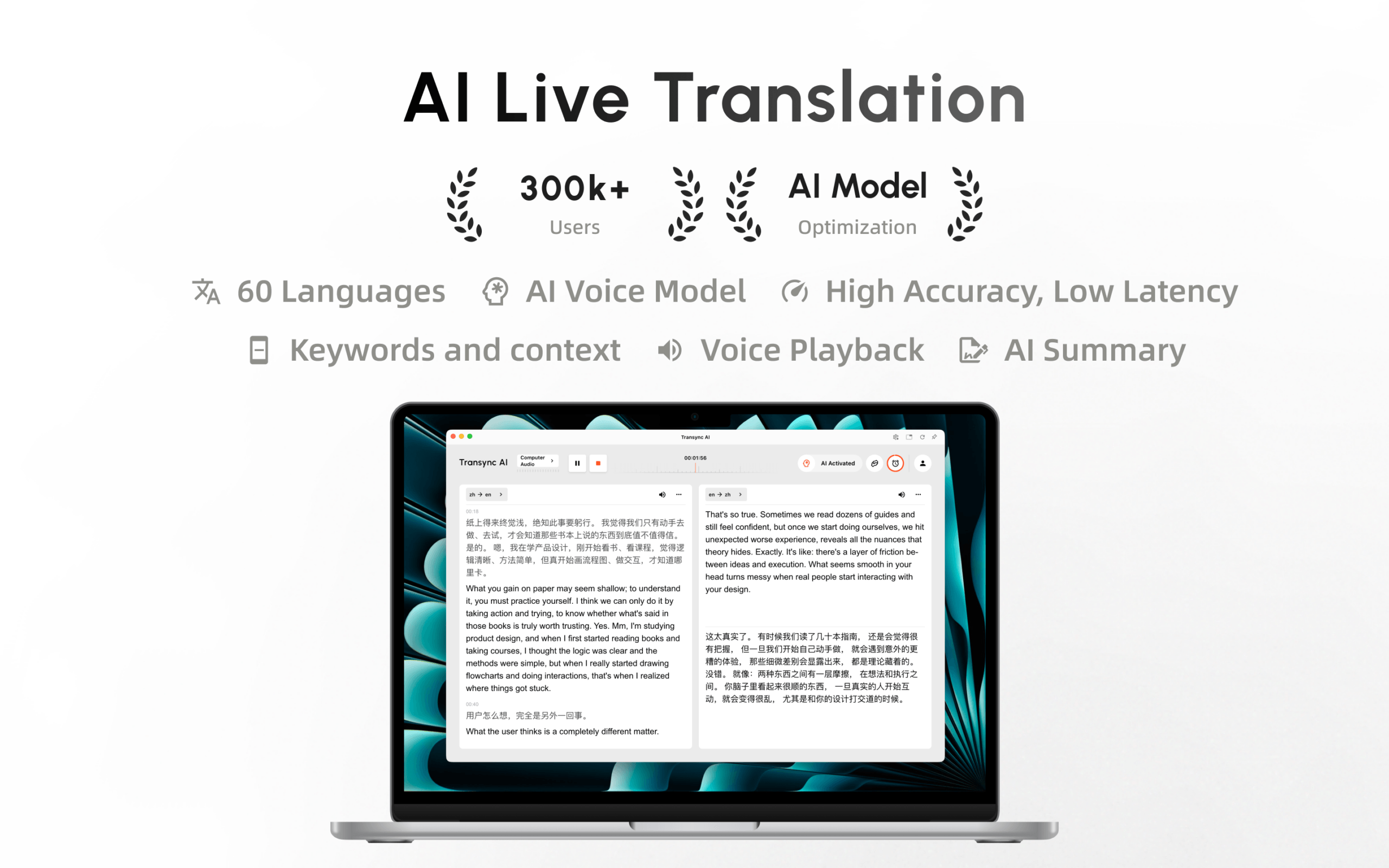
Transync AI est désormais disponible sur le Mac App Store. Téléchargez-le facilement, recevez des mises à jour automatiques et commencez la traduction en temps réel sur Mac.
