

Porównaj 7 narzędzi do tłumaczenia na żywo na potrzeby spotkań, podróży, wydarzeń i multimediów, obejmujących m.in. tłumaczenie głosowe, napisy dwujęzyczne i notatki ze spotkań.
A tłumacz na żywo Konwertuje mowę z jednego języka na drugi w trakcie rozmowy. W przeciwieństwie do podstawowego tłumacza tekstu, może pomóc użytkownikom śledzić spotkania, zajęcia, wydarzenia, rozmowy z klientami i rozmowy twarzą w twarz, dzięki tłumaczeniu mowy, napisom lub obu tym elementom.
Najlepsza opcja zależy od sytuacji. Podróżny może potrzebować szybkich fraz mobilnych, podczas gdy zespół globalny może potrzebować dwujęzycznych napisów, naturalnego odtwarzania głosu, obsługi platformy konferencyjnej i notatek po rozmowie. Ten przewodnik porównuje siedem narzędzi i wyjaśnia, jak wybrać odpowiednie dla swojego procesu pracy.
Czym jest tłumacz na żywo?
Tłumacz na żywo wykorzystuje rozpoznawanie mowy, tłumaczenie maszynowe i syntezę głosu do przetwarzania języka mówionego w czasie niemal rzeczywistym. Typowy przepływ pracy wygląda następująco:
Dźwięk mówiony → rozpoznawanie mowy → tłumaczenie → napisy lub przetłumaczony głos
W zależności od produktu użytkownicy mogą otrzymać:
- Przetłumaczona mowa za pomocą naturalnego głosu sztucznej inteligencji.
- Oryginalne i przetłumaczone napisy wyświetlane razem.
- Automatyczne rozpoznawanie języka mówcy.
- Transkrypcja lub podsumowanie rozmowy.
- Tłumaczenie za pomocą aplikacji, integracji ze spotkaniami lub interfejsu API dla programistów.
Te różnice mają znaczenie. Krótka wymiana doświadczeń to nie to samo, co 60-minutowe spotkanie biznesowe, a konferencja wielojęzyczna ma inne wymagania niż prywatna rozmowa handlowa.
Szybkie porównanie: 7 narzędzi do tłumaczenia na żywo
Poniższa tabela porównuje każdy produkt pod względem jego głównego pozycjonowania. Możliwości produktu mogą się zmieniać, dlatego przed zakupem sprawdź najważniejsze funkcje i obsługiwane języki na oficjalnych stronach internetowych.
| Narzędzie | Najlepszy dla | Napisy na żywo | Przetłumaczony głos | Notatki ze spotkania | Główne rozważania |
|---|---|---|---|---|---|
| Transync AI | Spotkania, rozmowy telefoniczne i rozmowy osobiste w wielu językach | Tak, dwujęzyczny | Tak | Tak | Produkt przeznaczony przede wszystkim do spotkań, łączący napisy, głos, kontekst i notatki |
| Talkao | Podróże, tłumaczenia mobilne i nauka języków | Zależny od rozmowy | Tak | Nie jest to główny cel | Silne funkcje konsumenckie zamiast dedykowanego procesu spotkań biznesowych |
| Światowy | Konferencje, webinaria i duże wydarzenia | Tak | Tak | Transkrypcje i streszczenia | Zaprojektowano z myślą o dostępie uczestników na dużą skalę |
| Soniox | Programiści tworzący produkty mowy | Dostępne za pośrednictwem API/możliwości aplikacji | Możliwość TTS/API | Zależne od produktu | Platforma techniczna, a nie tylko narzędzie do spotkań z użytkownikami końcowymi |
| Mistrzyni | Lokalizacja mediów, dubbing, webinaria i wydarzenia | Tak | Tak | Tak | Szerokie przepływy pracy w mediach mogą przekraczać potrzeby uczestników spotkań |
| DeepL | Tekst, dokumenty, praca w języku korporacyjnym i wybrane przepływy pracy głosowe | Zależne od produktu | Dostępne za pośrednictwem produktów głosowych | Nie jest to główny cel tłumacza | Bardziej znany z szerokiego zakresu języków i przepływów pracy nad dokumentami |
| Tłumacz Google | Bezpłatne codzienne tłumaczenie | Nie jest to przepływ pracy, w którym najpierw odbywa się spotkanie | Odtwarzanie dźwięku tłumaczenia | NIE | Wygodne rozwiązanie do szybkich zadań, ale ograniczone jako kompletne rozwiązanie do spotkań |
Na co zwrócić uwagę wybierając tłumacza na żywo?
Prędkość w czasie rzeczywistym
Długie opóźnienia sprawiają, że rozmowa wydaje się nienaturalna. Dobry tłumacz na żywo powinien przetwarzać mowę na tyle szybko, aby umożliwić słuchaczom odpowiedź bez wielokrotnych przerw. Przetestuj opóźnienie, używając rzeczywistej pary językowej, mikrofonu, sieci, akcentu i warunków panujących w pomieszczeniu, w którym zamierzasz pracować.
Wyjście tekstowe i głosowe
Przetłumaczone audio wspiera naturalną konwersację, a napisy ułatwiają weryfikację nazw, numerów i terminów technicznych. Produkty oferujące obie te funkcje dają uczestnikom swobodę słuchania, czytania lub korzystania z obu materiałów jednocześnie.
Dokładna terminologia
Tłumaczenie ogólne może błędnie interpretować nazwy firm, terminy produktowe, skróty lub słownictwo branżowe. Funkcja kontekstowa może poprawić wyniki, informując system, czego dotyczy rozmowa, zanim się rozpocznie.
Zgodność platformy
Mobilny tłumacz może działać dobrze osobiście, ale słabo podczas spotkań na komputerze. Sprawdź kompatybilność z systemem operacyjnym, oprogramowaniem konferencyjnym, źródłem dźwięku i preferowanym urządzeniem.
Przydatne informacje po spotkaniu
W przypadku rozmów biznesowych tłumaczenie to tylko część pracy. Transkrypcje, streszczenia i notatki ze spotkań utrwalają decyzje i ułatwiają ich późniejszą realizację.
Prywatność i przetwarzanie danych
Zawsze sprawdzaj, jak dostawca przetwarza dźwięk na żywo, transkrypcje i dane głosowe. Klienci biznesowi powinni również wziąć pod uwagę zasady przechowywania danych, mechanizmy kontroli administratora, przepisy dotyczące prywatności i dokumentację bezpieczeństwa.
Dlaczego warto używać Transync AI jako tłumacz na żywo podczas spotkań?
Transync AI Został zaprojektowany z myślą o wielojęzycznych spotkaniach, rozmowach na żywo i rozmowach osobistych. Łączy kilka elementów procesu komunikacji, zamiast traktować tłumaczenie głosowe jako serię odizolowanych fraz.
Tłumaczenie w czasie rzeczywistym o niskim opóźnieniu
Ten narzędzie do tłumaczenia w czasie rzeczywistym Słucha mowy na żywo i wyświetla oryginalną i przetłumaczoną treść z niskim opóźnieniem. Automatycznie rozróżnia dwa wybrane języki, redukując potrzebę naciskania przycisku przy każdej zmianie mówcy.
 Jest to przydatne podczas wywiadów, dyskusji handlowych, lekcji i codziennych rozmów, w których obie strony chcą mówić naturalnie.
Napisy dwujęzyczne podczas rozmów na żywo
Jednoczesne widzenie obu języków pomaga uczestnikom potwierdzić, co zostało powiedziane, i wychwycić szczegóły, które mogłyby być trudniejsze do zrozumienia z samego dźwięku. Napisy dwujęzyczne typu „obraz w obrazie” mogą pozostać widoczne ponad innymi aplikacjami na obsługiwanych platformach.
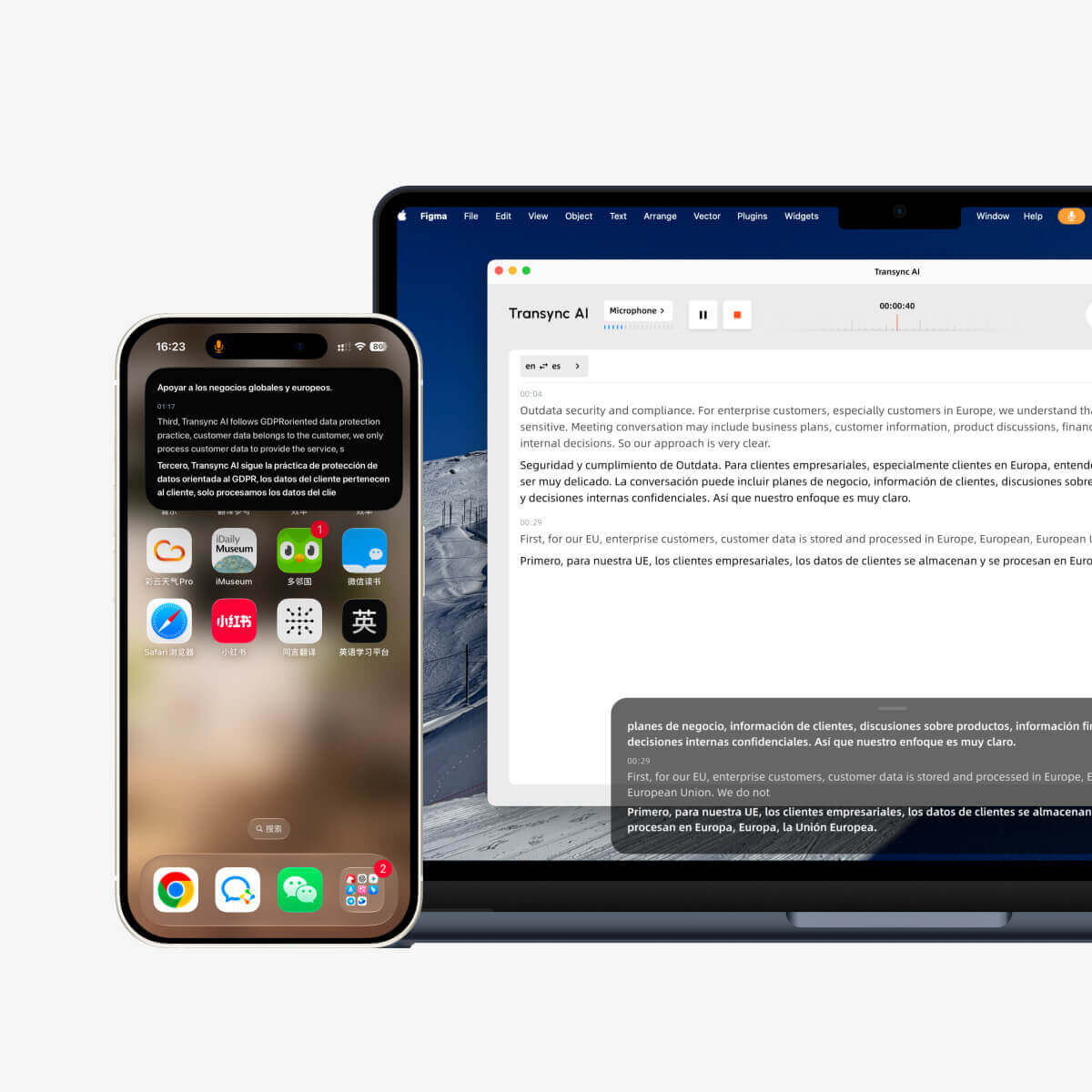 Pływające napisy są szczególnie przydatne, gdy użytkownik:
- Prezentowanie slajdów z jednoczesnym śledzeniem przetłumaczonej wypowiedzi.
- Prezentacja oprogramowania podczas międzynarodowej rozmowy handlowej.
- Robienie notatek w osobnej aplikacji.
- Uczestniczenie w zajęciach z jednoczesnym przeglądaniem materiałów kursu.
Naturalnie przetłumaczony głos wyjściowy
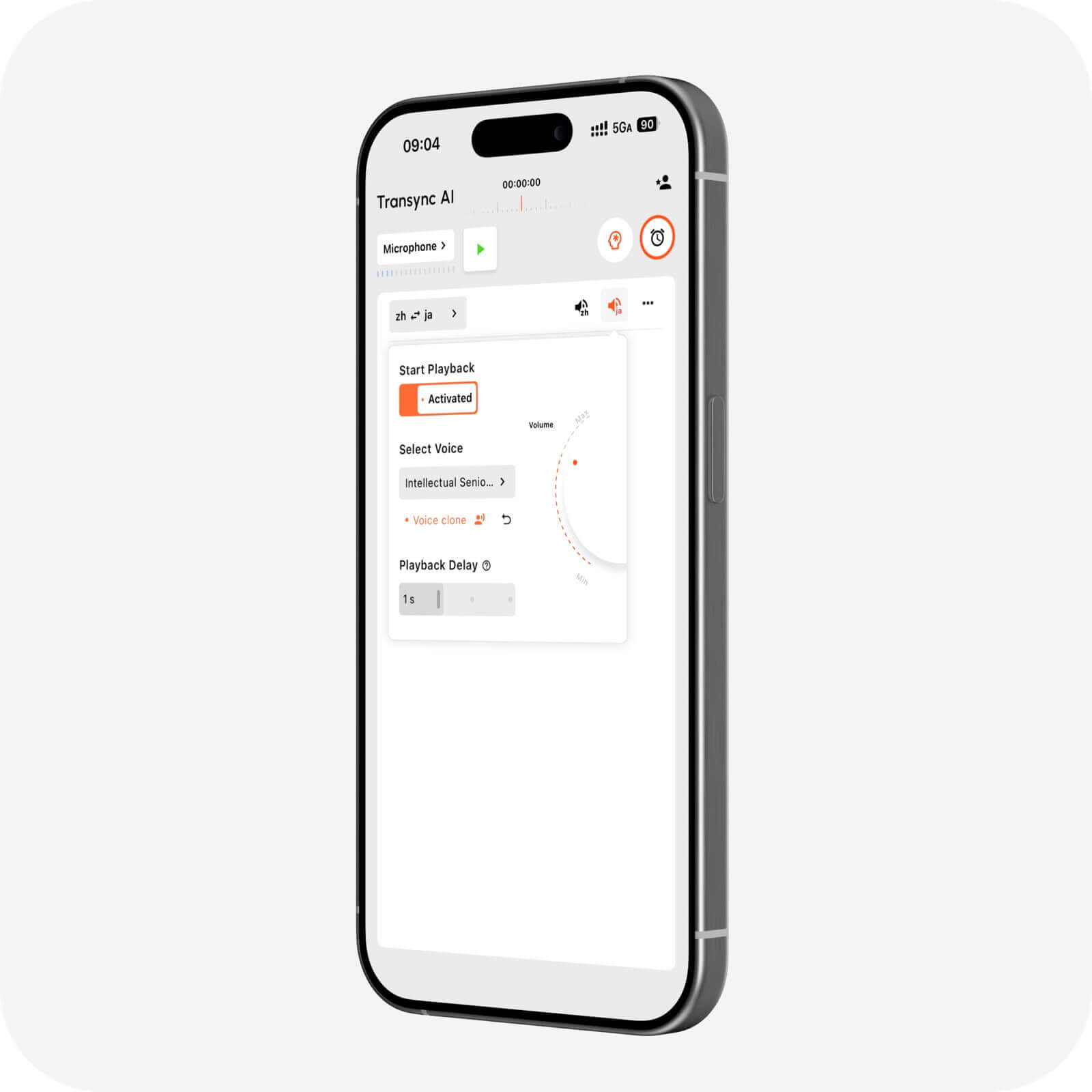
Ten Tłumacz głosowy AI Potrafi czytać przetłumaczone treści na głos, korzystając z odtwarzania naturalnego głosu. Użytkownicy mogą wybierać spośród różnych stylów głosu i prędkości, w zależności od konwersacji.
Ten funkcja klonowania głosu może odtwarzać przetłumaczoną mowę głosem dopasowanym do użytkownika. Dzięki temu demonstracje, zajęcia, rozmowy z klientami i rozmowy osobiste mogą być bardziej spójne z oryginalnym mówcą.
 Wsparcie dla spotkań online
 Wsparcie dla spotkań online
Ten funkcja tłumaczenia spotkań na żywo pracuje obok Zoom, Microsoft Teams, I Google Meet. Może również obsługiwać inne przepływy pracy związane z wywoływaniem, w tym WhatsApp połączenia.
Transync AI to samodzielne oprogramowanie, a nie wtyczka specyficzna dla danej platformy. Obsługuje przepływy pracy w sieci, systemach Windows, macOS, iOS i Android, pozwalając użytkownikom wybrać konfigurację dopasowaną do danej rozmowy.
Ten funkcja wirtualnego mikrofonu pomaga przesyłać przetłumaczoną mowę do rozmowy online, podczas gdy udostępnianie dźwięku z komputera umożliwia aplikacji przetwarzanie głosów innych uczestników spotkania.
Słowa kluczowe i kontekst dla większej dokładności
Ten Funkcja słów kluczowych i kontekstu asystenta AI umożliwia użytkownikom wprowadzanie nazw, marek, terminologii specjalistycznej i informacji ogólnych przed rozpoczęciem dyskusji.
Na przykład menedżer ds. produktów energii odnawialnej może podać nazwy komponentów, temat spotkania i role uczestników. Pomaga to systemowi interpretować słowa, które w innym przypadku mogłyby być niejednoznaczne.
 Rekordy wygenerowane przez sztuczną inteligencję po spotkaniu
 Rekordy wygenerowane przez sztuczną inteligencję po spotkaniu
Ten Funkcja notatek ze spotkań AI Zamienia wielojęzyczną rozmowę w transkrypcję i ustrukturyzowane notatki. Zamiast polegać na pamięci, uczestnicy mogą przejrzeć dyskusję i wykorzystać zapis do dalszych działań.
Ten przewodnik po zarządzaniu rekordami tłumaczeń wyjaśnia, jak użytkownicy mogą uzyskać dostęp do zapisanych rozmów i je uporządkować.
Szeroki zakres języków i urządzeń
Transync AI Obsługuje ponad 60 języków i ponad 1000 par językowych. Ponieważ dostępność języków może się zmieniać, sprawdź strona obsługiwanych języków dla dokładnej pary źródłowej i docelowej.
Kiedy lepiej skorzystać z usług innego tłumacza na żywo?
Żaden produkt nie jest najlepszy do każdego zadania. Przed dokonaniem wyboru weź pod uwagę główny cel.
Wybierz narzędzie do codziennych tłumaczeń mobilnych przeznaczone do podróży
Talkao koncentruje się na tłumaczeniach mobilnych, podróżach, funkcjach aparatu i rozszerzonej rzeczywistości (AR) oraz nauce języków obcych. Tłumacz Google jest powszechnie dostępny do szybkiego tłumaczenia tekstów, obrazów, stron internetowych i tekstów na co dzień.
 Narzędzia te mogą okazać się lepszym rozwiązaniem w przypadku znaków, menu, krótkich fraz i okazjonalnych podróży. Transync AI nie obsługuje trybu offline, rozpoznawania obrazów ani tłumaczenia dokumentów zawierających wyłącznie tekst.
Wybierz platformę wydarzenia dla dużej publiczności
Światowy Koncentruje się na spotkaniach i wydarzeniach, na których uczestnicy mogą uzyskać dostęp do przetłumaczonych napisów lub dźwięku za pośrednictwem linku lub kodu QR. To doskonała opcja na konferencje, webinaria, wydarzenia hybrydowe i programy dotyczące dostępności.
 Wybierać Transync AI gdy potrzebny jest osobisty lub zespołowy przepływ pracy tłumaczeniowej w ramach regularnych spotkań i rozmów telefonicznych. Wybierz Światowy gdy priorytetem jest rozmieszczenie uczestników i skala wydarzenia.
Wybierz API podczas tworzenia produktu
Soniox jest przeznaczony dla programistów i zespołów technicznych pracujących z interfejsami API do przetwarzania mowy na tekst, zamiany tekstu na mowę i tłumaczeń. Jest odpowiedni, gdy firma chce zintegrować inteligencję mowy z własną aplikacją.
 Wybierać Transync AI gdy użytkownicy potrzebują gotowego do użycia tłumacza, a nie niestandardowego projektu.
Wybierz platformę medialną do lokalizacji i dubbingu
Mistrzyni Obejmuje transkrypcję, napisy, dubbing, lokalizację wideo, webinaria i tłumaczenie na żywo. Zespoły medialne, które potrzebują usprawnienia procesów edycji i publikacji, mogą skorzystać z tego szerszego zakresu.
 Do codziennych spotkań wielojęzycznych, Transync AI zapewnia bardziej ukierunkowane połączenie napisów na żywo, odtwarzania głosu, kontekstu i notatek.
Wybierz platformę językową dla tekstów i dokumentów
DeepL koncentruje się na tłumaczeniu tekstów, tłumaczeniu dokumentów, pomocy w pisaniu, interfejsach API, korporacyjnych przepływach pracy w językach oraz wybranych produktach głosowych. Może być preferowany, gdy treść pisemna jest ważniejsza niż spotkania na żywo.
 Lista kontrolna wyboru tłumacza na żywo
 Lista kontrolna wyboru tłumacza na żywo
Przed subskrypcją przetestuj produkt w rzeczywistym scenariuszu:
- Czy obsługuje konkretną parę językową?
- Czy potrafi wykryć obie strony dwustronnej konwersacji?
- Czy napisy są łatwe do odczytania podczas korzystania z innej aplikacji?
- Czy słuchacze słyszą przetłumaczoną mowę?
- Czy działa z wymaganą platformą konferencyjną?
- Czy użytkownicy mogą podać nazwy i słownictwo specjalistyczne?
- Czy transkrypty i streszczenia są później dostępne?
- Czy polityka prywatności jest odpowiednia do rozmowy?
- Czy wydajność pozostaje użyteczna przy realistycznych akcentach i hałasie pomieszczenia?
- Czy cena jest odpowiednia do oczekiwanej długości i częstotliwości spotkań?
Unikaj wyboru wyłącznie na podstawie liczby obsługiwanych języków. Przepływ pracy, opóźnienie, dane wyjściowe i obsługa kontekstu mogą mieć równie duże znaczenie.
Jak używać Transync AI na rozmowę na żywo
- Otwarte Transync AI na obsługiwanym urządzeniu.
- Wybierz dwa języki używane w rozmowie.
- Wybierz mikrofon lub źródło dźwięku systemowego.
- Dodaj odpowiednie terminy za pomocą Funkcja słów kluczowych i kontekstu asystenta AI.
- Rozpocznij narzędzie do tłumaczenia w czasie rzeczywistym.
- Sprawdź, czy oryginalne i przetłumaczone napisy są prawidłowo aktualizowane.
- Włącz Tłumacz głosowy AI Lub funkcja wirtualnego mikrofonu gdy trzeba usłyszeć przetłumaczoną mowę.
- Otwarte Napisy dwujęzyczne typu „obraz w obrazie” czy napisy mają być wyświetlane nad inną aplikacją.
- Przejrzyj dane wyjściowe za pomocą Funkcja notatek ze spotkań AI po rozmowie.
Przeprowadź krótki test przed ważną rozmową. Sprawdź źródło dźwięku, głośność głośnika, połączenie sieciowe, kierunek języka i słownictwo specjalistyczne.
Często zadawane pytania dotyczące tłumacza na żywo
Jaki tłumacz na żywo jest najlepszy na spotkania?
Transync AI jest silną opcją na spotkanie, ponieważ łączy tłumaczenie w czasie rzeczywistym, dwujęzyczne napisy pływające, przetłumaczone odtwarzanie głosu, kontekst terminologiczny i Notatki ze spotkań AI. Najlepszy wybór nadal zależy od wymaganych języków, platformy, długości sesji i zasad prywatności.
Czy tłumacz na żywo może wypowiedzieć tłumaczenie na głos?
Tak. Kilka produktów zapewnia wyjście audio w różnych procesach pracy. Tłumacz głosowy AI od Transync AI może odtwarzać przetłumaczoną mowę przy użyciu naturalnych głosów, z opcjami stylu głosu i klonowania głosu.
Czy tłumacz na żywo może pracować podczas rozmowy wideo?
Tak. Transync AI współpracuje z popularnymi narzędziami do połączeń, takimi jak Zoom, Microsoft Teams, I Google Meet. Jego funkcja tłumaczenia spotkań na żywo zapewnia napisy i tłumaczenie głosowe dla rozmów wielojęzycznych.
Czy tłumacz na żywo działa bez internetu?
Niektóre narzędzia konsumenckie mogą oferować możliwość pobierania ograniczonej liczby języków w trybie offline. Transync AI wymaga połączenia internetowego i obecnie nie oferuje trybu offline.
Czy sztuczna inteligencja może zastąpić tłumacza?
Nie w każdej sytuacji. Sztuczna inteligencja jest przydatna do przyspieszenia, ułatwienia dostępu i prowadzenia wielu rutynowych rozmów, ale może źle zrozumieć niejednoznaczny język, osoby mówiące jednocześnie, nietypową terminologię lub niuanse kulturowe. Dyskusje prawne, medyczne, dotyczące bezpieczeństwa i wiążące umownie mogą wymagać pomocy wykwalifikowanego tłumacza lub profesjonalnej konsultacji.
Czy tłumaczenie głosu na żywo jest prywatne?
Prywatność zależy od dostawcy. Transync AI stwierdza, że dane klientów nie są domyślnie wykorzystywane do szkolenia AI, a dźwięk jest usuwany po przetworzeniu. Organizacje powinny dokonać przeglądu Centrum zaufania i aktualne warunki przed skorzystaniem z usług tłumacza na żywo w przypadku treści wrażliwych.
Ostateczny werdykt: Którego tłumacza na żywo powinieneś wybrać?
Prawo tłumacz na żywo powinny pasować do tematu, a nie tylko mieć najdłuższą listę funkcji.
- Wybierać Talkao Lub Tłumacz Google do codziennych zadań mobilnych i podróży.
- Wybierać Światowy na imprezy z udziałem dużej liczby osób.
- Wybierać Soniox dla interfejsów API dla programistów i niestandardowych produktów głosowych.
- Wybierać Mistrzyni do lokalizacji mediów i procesów dubbingowych.
- Wybierać DeepL do tekstów, dokumentów i szerszych operacji językowych.
- Wybierać Transync AI w przypadku spotkań wielojęzycznych wymagających napisów dwujęzycznych na żywo, tłumaczenia wypowiedzi, terminologii kontekstowej i notatek po rozmowie.
Dla zespołów, które komunikują się w różnych językach co tydzień, Transync AI oferuje skoncentrowany sposób słuchania, zrozumienia, reagowania i zapamiętywania najważniejszych informacji z wielojęzycznej konwersacji.
