

Compara 7 herramientas de traducción en directo para reuniones, viajes, eventos y medios de comunicación, que incluyen traducción de voz, subtítulos bilingües y notas de reuniones.
A traductor en vivo Convierte el habla de un idioma a otro mientras se desarrolla una conversación. A diferencia de un traductor de texto básico, puede ayudar a las personas a seguir reuniones, clases, eventos, llamadas de clientes y conversaciones cara a cara mediante audio traducido, subtítulos o ambos.
La mejor opción depende del contexto. Un viajero puede necesitar frases rápidas para móviles, mientras que un equipo global puede requerir subtítulos bilingües, reproducción de voz natural, compatibilidad con plataformas de reuniones y notas posteriores a la llamada. Esta guía compara siete herramientas y explica cómo elegir la más adecuada para tu flujo de trabajo.
¿Qué es un traductor en vivo?
Un traductor en vivo utiliza reconocimiento de voz, traducción automática y síntesis de voz para procesar el lenguaje hablado prácticamente en tiempo real. Un flujo de trabajo típico se ve así:
Audio hablado → reconocimiento de voz → traducción → subtítulos o voz traducida
Dependiendo del producto, los usuarios pueden recibir:
- Discurso traducido mediante una voz de IA natural.
- Los subtítulos originales y traducidos se muestran juntos.
- Reconocimiento automático del idioma del hablante.
- Una transcripción o resumen después de la conversación.
- Traducción a través de una aplicación, integración con reuniones o API para desarrolladores.
Estas diferencias son importantes. Un breve intercambio de viajes no es lo mismo que una reunión de negocios de 60 minutos, y una conferencia multilingüe tiene requisitos diferentes a los de una llamada de ventas privada.
Comparación rápida: 7 herramientas de traducción en tiempo real
La siguiente tabla compara cada producto según su posicionamiento principal. Las funcionalidades del producto pueden variar, por lo que le recomendamos verificar las características esenciales y los idiomas compatibles en los sitios web oficiales antes de realizar la compra.
| Herramienta | Mejor para | Subtítulos en vivo | Voz traducida | Notas de la reunión | Consideración principal |
|---|---|---|---|---|---|
| Transync AI | Reuniones, llamadas y conversaciones presenciales multilingües. | Sí, bilingüe | Sí | Sí | Un producto diseñado para reuniones que combina subtítulos, voz, contexto y notas. |
| Talkao | Viajes, traducción móvil y aprendizaje de idiomas | Dependencia de la conversación | Sí | No es un enfoque principal | Funcionalidades potentes para el consumidor en lugar de un flujo de trabajo específico para reuniones de negocios. |
| Mundo | Conferencias, seminarios web y grandes eventos | Sí | Sí | Transcripciones y resúmenes | Diseñado para el acceso de los asistentes a gran escala. |
| Soniox | Desarrolladores que crean productos de voz | Disponible a través de las capacidades de la API/aplicación. | Capacidad TTS/API | Depende del producto | Una plataforma técnica en lugar de una simple herramienta para reuniones de usuarios finales. |
| Maestra | Localización de medios, doblaje, seminarios web y eventos. | Sí | Sí | Sí | Los flujos de trabajo multimedia complejos pueden exceder las necesidades de un participante en una reunión. |
| DeepL | Texto, documentos, trabajo en lenguaje empresarial y flujos de trabajo de voz seleccionados. | Depende del producto | Disponible a través de productos de voz. | No es un enfoque principal del traductor | Más conocido por su amplio lenguaje y flujos de trabajo de documentos. |
| Google Translate | Traducción gratuita para el día a día | No es un flujo de trabajo que priorice las reuniones. | Reproducción de audio de la traducción | No | Útil para tareas rápidas, pero limitada como solución completa para reuniones. |
¿Qué debes buscar en un traductor en directo?
Velocidad en tiempo real
Las demoras prolongadas hacen que una conversación se sienta poco natural. Un traductor en vivo adecuado debe procesar el habla con la suficiente rapidez para que las personas puedan responder sin interrupciones constantes. Pruebe la latencia utilizando el par de idiomas, el micrófono, la red, el acento y las condiciones de la sala que prevé usar.
Texto y salida de voz
El audio traducido facilita la conversación natural, mientras que los subtítulos permiten verificar nombres, números y términos técnicos con mayor facilidad. Los productos que ofrecen ambas opciones brindan a los participantes la libertad de escuchar, leer o utilizar ambos formatos simultáneamente.
Terminología precisa
La traducción automática puede interpretar erróneamente nombres de empresas, términos de productos, abreviaturas o vocabulario específico del sector. Una función de contexto puede mejorar los resultados al indicar al sistema de qué trata la conversación antes de que comience.
Compatibilidad de la plataforma
Un traductor móvil puede funcionar bien en persona, pero no tanto durante una reunión por ordenador. Compruebe la compatibilidad con su sistema operativo, software de videoconferencia, fuente de audio y dispositivo preferido.
Resultados útiles posteriores a la reunión
En las reuniones de negocios, la traducción es solo una parte del trabajo. Las transcripciones, los resúmenes y las actas de las reuniones permiten conservar las decisiones y facilitan el seguimiento.
Privacidad y manejo de datos
Siempre revise cómo el proveedor procesa el audio en directo, las transcripciones y los datos de voz. Los compradores empresariales también deben considerar las políticas de retención, los controles de administrador, las normas de privacidad y la documentación de seguridad.
¿Por qué usarlo? Transync AI ¿Te gustaría trabajar como traductor en directo para reuniones?
Transync AI Está diseñado para reuniones multilingües, llamadas en directo y conversaciones presenciales. Combina varias partes del flujo de trabajo de comunicación en lugar de tratar la traducción de voz como una serie de frases aisladas.
Traducción en tiempo real de baja latencia
El herramienta de traducción en tiempo real Escucha el habla en directo y muestra el contenido original y traducido con baja latencia. Puede distinguir automáticamente entre los dos idiomas seleccionados, lo que reduce la necesidad de pulsar un botón cada vez que cambia el hablante.
 Esto resulta útil en entrevistas, conversaciones de ventas, clases y charlas cotidianas donde ambos participantes desean hablar con naturalidad.
Subtítulos bilingües durante las conversaciones en directo.
Ver ambos idiomas a la vez ayuda a los participantes a confirmar lo que se dijo y a captar detalles que pueden ser más difíciles de entender solo con el audio. Subtítulos bilingües con imagen dentro de imagen Puede permanecer visible por encima de otras aplicaciones en las plataformas compatibles.
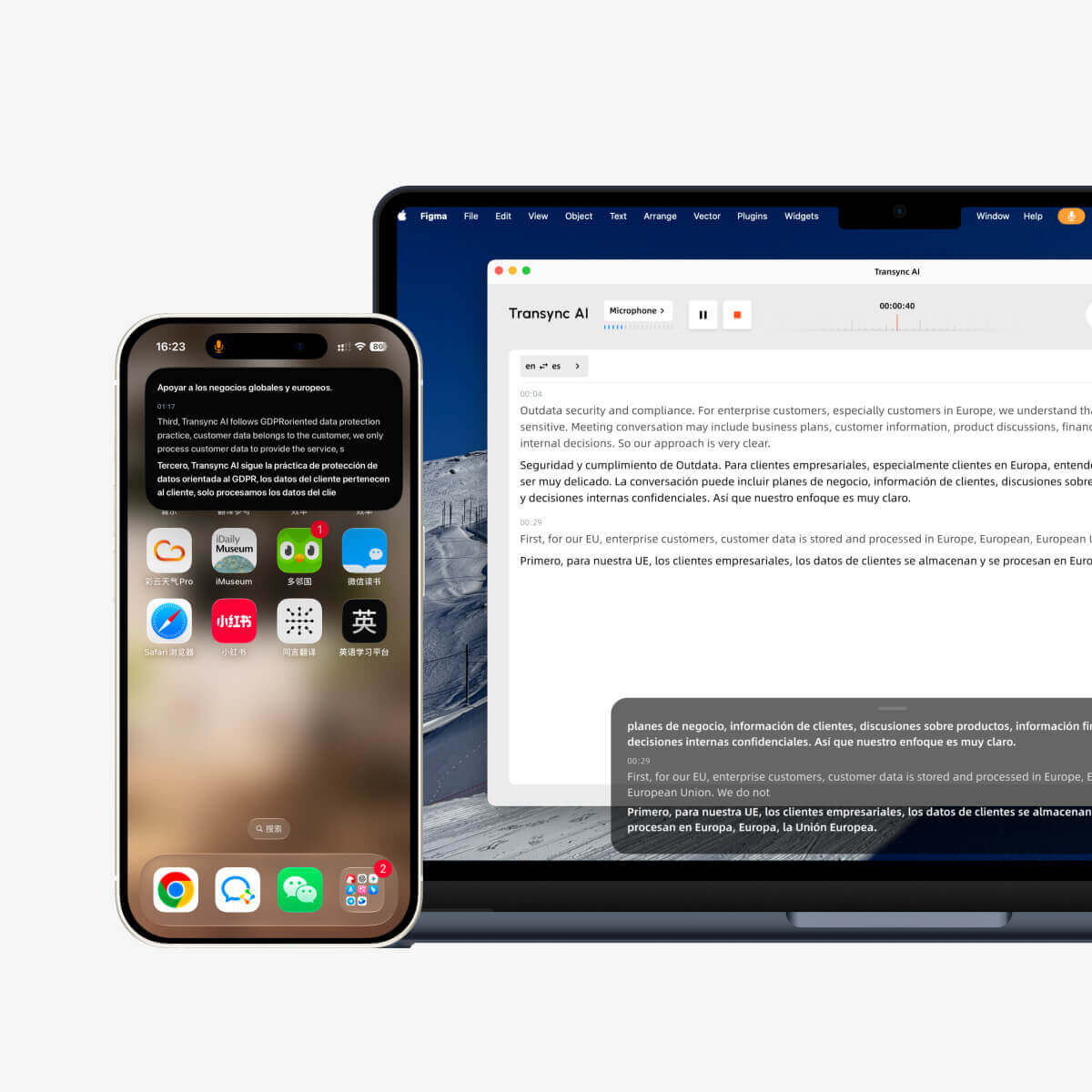 Los subtítulos flotantes son especialmente útiles cuando un usuario:
- Presentación de diapositivas mientras se sigue la traducción del discurso.
- Demostración de software durante una llamada de ventas internacional.
- Tomar notas en una aplicación aparte.
- Seguir una clase mientras se visualiza el material del curso.
Salida de voz traducida natural
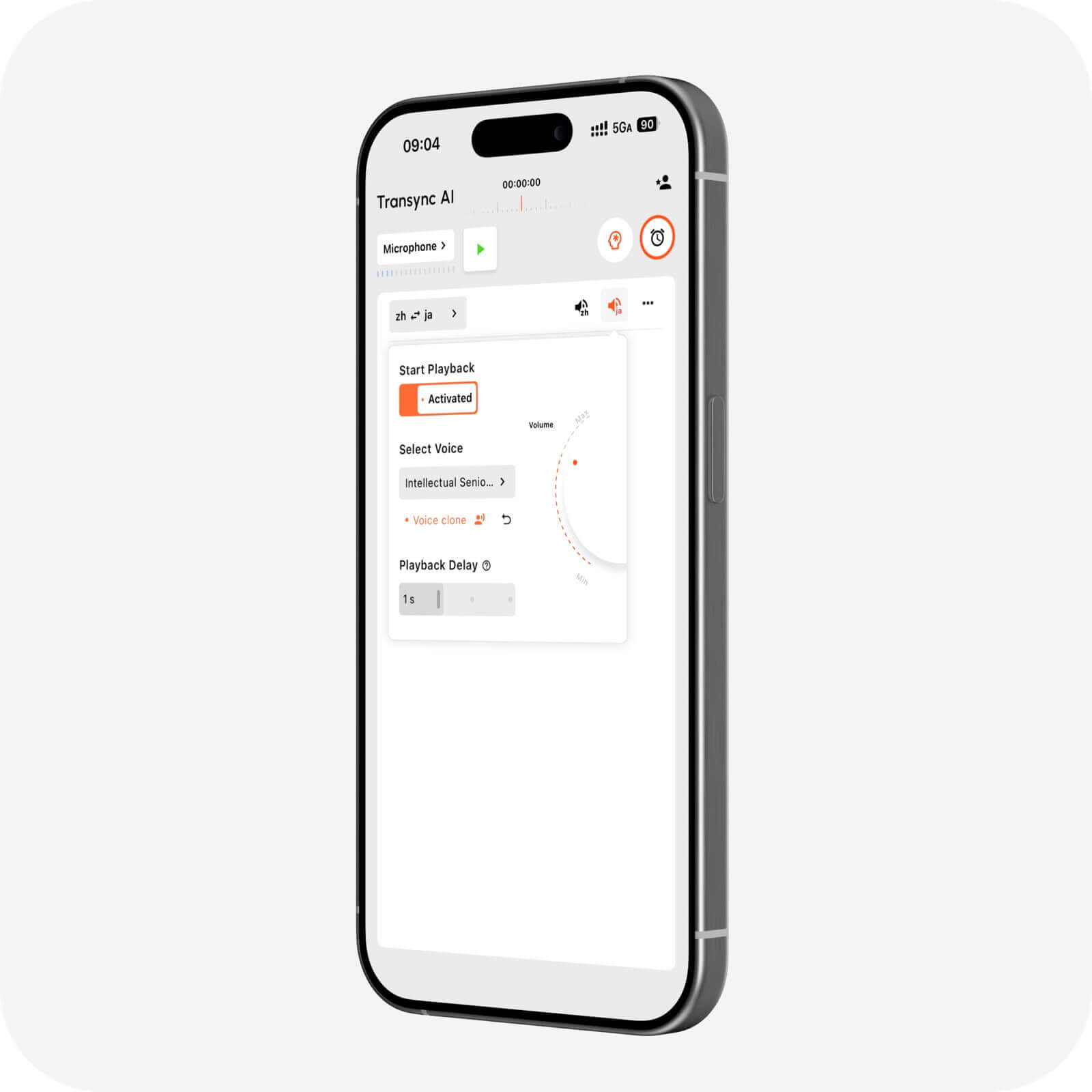
El Traductor de voz con IA Puede reproducir en voz alta el contenido traducido mediante una reproducción de voz natural. Los usuarios pueden elegir entre diferentes estilos y velocidades de voz según la conversación.
El función de clonación de voz Puede reproducir la traducción de voz con una voz modelada a partir de la del usuario. Esto puede hacer que las demostraciones, las clases, las llamadas con clientes y las conversaciones personales suenen más naturales, como si las hubiera pronunciado el hablante original.
 Soporte para reuniones en línea
 Soporte para reuniones en línea
El función de traducción de reuniones en directo trabaja junto a Zoom, Microsoft Teams, y Google Meet. También puede admitir otros flujos de trabajo de llamadas, incluyendo: WhatsApp llamadas.
Transync AI Se trata de un software independiente, no de un complemento específico para una plataforma. Es compatible con flujos de trabajo web, Windows, macOS, iOS y Android, lo que permite a los usuarios elegir la configuración que mejor se adapte a la conversación.
El función de micrófono virtual ayuda a enviar voz traducida a una llamada en línea, mientras que Compartir audio de computadora Permite que la aplicación procese las voces de otros participantes de la reunión.
Palabras clave y contexto para una mayor precisión
El Función de palabras clave y contexto del asistente de IA Permite a los usuarios introducir nombres, marcas, terminología especializada e información de contexto antes de una conversación.
Por ejemplo, un gerente de producto de energías renovables podría proporcionar los nombres de los componentes, el tema de la reunión y las funciones de los participantes. Esto ayuda al sistema a interpretar palabras que, de otro modo, podrían resultar ambiguas.
 Registros generados por IA después de la reunión
 Registros generados por IA después de la reunión
El Función de notas de reuniones de IA Convierte una conversación multilingüe en una transcripción y notas estructuradas. En lugar de depender de la memoria, los participantes pueden repasar la conversación y usar el registro para el seguimiento.
El Guía de gestión de registros de traducción Explica cómo los usuarios pueden acceder y organizar los registros de conversaciones guardados.
Amplia cobertura lingüística y de dispositivos.
Transync AI Admite más de 60 idiomas y más de 1000 pares de idiomas. Dado que la disponibilidad de idiomas puede variar, consulte la Página de idiomas compatibles para el par exacto de origen y destino que se necesita.
¿Cuándo es más apropiado otro traductor en directo?
No existe un producto ideal para todas las tareas. Considere el resultado principal antes de elegir.
Elige una herramienta orientada a los viajes para la traducción móvil informal.
Talkao Se centra en la traducción móvil, los viajes, las funciones de cámara y realidad aumentada, y el aprendizaje de idiomas. Google Translate Es ampliamente accesible para traducciones rápidas de texto, imágenes, sitios web y para el uso diario.
 Estas herramientas pueden ser más adecuadas para letreros, menús, frases cortas y viajes informales. Transync AI No admite el modo sin conexión, el reconocimiento de imágenes ni la traducción de documentos solo de texto.
Elige una plataforma de eventos para una gran audiencia.
Mundo Se centra en reuniones y eventos donde los asistentes pueden acceder a subtítulos o audio traducidos mediante un enlace o código QR. Es una excelente opción para conferencias, seminarios web, eventos híbridos y programas de accesibilidad.
 Elegir Transync AI cuando se necesita un flujo de trabajo de traducción personal o en equipo para reuniones y llamadas regulares. Elija Mundo cuando la distribución de los asistentes y la magnitud del evento son las principales prioridades.
Elige una API cuando estés creando un producto.
Soniox Está dirigido a desarrolladores y equipos técnicos que trabajan con API de conversión de voz a texto, texto a voz y traducción. Es adecuado cuando una empresa desea integrar inteligencia de voz en su propia aplicación.
 Elegir Transync AI cuando los usuarios necesitan un traductor en vivo listo para usar en lugar de un proyecto de desarrollo personalizado.
Elige una plataforma multimedia para la localización y el doblaje.
Maestra Abarca transcripción, subtítulos, doblaje, localización de vídeo, seminarios web y traducción en directo. Los equipos de medios que necesiten flujos de trabajo de edición y publicación pueden beneficiarse de este alcance más amplio.
 Para reuniones multilingües cotidianas, Transync AI Proporciona una combinación más específica de subtítulos en directo, reproducción de voz, contexto y notas.
Elija una plataforma lingüística para texto y documentos.
DeepL Se centra en la traducción de textos, la traducción de documentos, la asistencia para la redacción, las API, los flujos de trabajo lingüísticos empresariales y determinados productos de voz. Puede ser preferible cuando el contenido escrito es más importante que las reuniones en directo.
 Lista de verificación para la selección de traductores en vivo
 Lista de verificación para la selección de traductores en vivo
Antes de suscribirse, pruebe el producto en un escenario real:
- ¿Es compatible con el par de idiomas exacto?
- ¿Puede detectar ambos lados de una conversación bidireccional?
- ¿Es fácil leer los subtítulos mientras se usa otra aplicación?
- ¿Pueden los oyentes oír el habla traducida?
- ¿Es compatible con la plataforma de reuniones requerida?
- ¿Pueden los usuarios proporcionar nombres y vocabulario especializado?
- ¿Se pueden obtener transcripciones o resúmenes posteriormente?
- ¿La política de privacidad es adecuada para la conversación?
- ¿El rendimiento sigue siendo aceptable con acentos realistas y ruido ambiental?
- ¿El precio es adecuado para la duración y frecuencia previstas de las reuniones?
Evite basar su decisión únicamente en la cantidad de idiomas compatibles. El flujo de trabajo, la latencia, la salida y el manejo del contexto pueden ser igualmente importantes.
Cómo utilizar Transync AI para una conversación en vivo
- Abierto Transync AI en un dispositivo compatible.
- Selecciona los dos idiomas utilizados en la conversación.
- Seleccione el micrófono o la fuente de audio del sistema.
- Agregue términos relevantes con el Función de palabras clave y contexto del asistente de IA.
- Comienza el herramienta de traducción en tiempo real.
- Confirma que los subtítulos originales y traducidos se estén actualizando correctamente.
- Habilitar el Traductor de voz con IA o función de micrófono virtual cuando sea necesario escuchar un discurso traducido.
- Abierto Subtítulos bilingües con imagen dentro de imagen si los subtítulos deben permanecer encima de otra aplicación.
- Revise el resultado a través del Función de notas de reuniones de IA después de la conversación.
Realice una breve prueba antes de una llamada importante. Confirme la fuente de audio, el volumen del altavoz, la conexión de red, la dirección del idioma y el vocabulario especializado.
Preguntas frecuentes sobre el traductor en directo
¿Cuál es el mejor traductor en directo para reuniones?
Transync AI es una opción sólida para comenzar la reunión porque combina traducción en tiempo real, subtítulos flotantes bilingües, reproducción de voz traducida, terminología, contexto y Notas de la reunión de IA. La mejor opción sigue dependiendo de los idiomas requeridos, la plataforma, la duración de la sesión y las normas de privacidad.
¿Puede un traductor en directo leer la traducción en voz alta?
Sí. Varios productos proporcionan salida de audio en diferentes flujos de trabajo. El Traductor de voz con IA de Transync AI Puede reproducir audio traducido utilizando voces naturales, con opciones de estilo de voz y clonación de voz.
¿Puede funcionar un traductor en directo durante una videollamada?
Sí. Transync AI funciona junto con herramientas de llamada comunes como Zoom, Microsoft Teams, y Google Meet. Es función de traducción de reuniones en directo Proporciona subtítulos y traducción de voz para llamadas multilingües.
¿Funciona un traductor en directo sin conexión a internet?
Algunas herramientas para el consumidor pueden ofrecer descargas de idiomas sin conexión limitadas. Transync AI Requiere conexión a internet y actualmente no ofrece modo sin conexión.
¿Puede la traducción mediante IA sustituir a un intérprete humano?
No en todas las situaciones. La IA es útil por su rapidez, accesibilidad y para muchas conversaciones rutinarias, pero puede malinterpretar lenguaje ambiguo, la superposición de interlocutores, la terminología poco común o los matices culturales. Las conversaciones legales, médicas, de seguridad crítica y contractuales vinculantes pueden requerir un intérprete humano cualificado o una revisión profesional.
¿La traducción de voz en directo es privada?
La privacidad depende del proveedor. Transync AI indica que los datos del cliente no se utilizan para el entrenamiento de IA por defecto y que el audio se elimina después del procesamiento. Las organizaciones deben revisar el Centro de confianza y los términos vigentes antes de utilizar cualquier traductor en vivo para contenido sensible.
Veredicto final: ¿Qué traductor en directo debería elegir?
El derecho traductor en vivo Debe estar en consonancia con la conversación, no simplemente tener la lista de características más larga.
- Elegir Talkao o Google Translate para tareas móviles y de viaje informales.
- Elegir Mundo para eventos con gran afluencia de público.
- Elegir Soniox para API de desarrolladores y productos de voz personalizados.
- Elegir Maestra para flujos de trabajo de localización y doblaje de medios.
- Elegir DeepL Para texto, documentos y operaciones lingüísticas más amplias.
- Elegir Transync AI Para reuniones multilingües que requieren subtítulos bilingües en directo, traducción del discurso, terminología contextual y notas posteriores a la llamada.
Para los equipos que se comunican en varios idiomas cada semana, Transync AI Ofrece una forma eficaz de escuchar, comprender, responder y retener la información clave de una conversación multilingüe.
