

Zoom Yapay Zeka Transkripsiyon Kılavuzu: Altyazıların, transkriptlerin, yapay zeka özetlerinin, çevrilmiş alt yazıların ve Transync yapay zekasının çok dilli toplantıları nasıl desteklediğini öğrenin.
Zoom yapay zeka transkripsiyonu Hızlı ilerleyen bir toplantıyı aranabilir yazılı bir kayda dönüştürebilir. Ekiplerin söylenenleri gözden geçirmesine, eylem maddelerini belirlemesine, kaçırılan ayrıntıları tekrar ele almasına ve tamamen el yazısı notlara güvenmeden toplantı özetleri oluşturmasına yardımcı olabilir.
Ancak kullanıcılar tek bir özelliğin her şeyi yapmasını beklediğinde iş akışı karmaşık hale gelir.
Canlı altyazılar her zaman kaydedilmiş bir transkript ile aynı değildir. Transkript, yapay zeka özetiyle aynı şey değildir. Özet, eksiksiz bir kayıt değildir. Transkripsiyon ayrıca her katılımcının tercih ettiği dilde çeviri alacağı anlamına da gelmez.
Bu ayrımlar uluslararası toplantılarda daha da önem kazanır.
Eğer İngilizce konuşan bir kişi, Japon bir tedarikçi ve İspanyolca konuşan bir müşteri aynı görüşmeye katılırsa, İngilizce kelimeleri kaydetmek sorunun sadece bir parçasıdır. Katılımcılar ayrıca gerçek zamanlı çeviriye, iki dilli altyazılara, çevrilmiş ses çıktısına, teknik terminoloji desteğine ve toplantıdan sonra faydalı notlara da ihtiyaç duyabilirler.
Bu kılavuz, Zoom AI transkripsiyonunun nasıl çalıştığını, en çok nerede faydalı olduğunu, yaygın transkripsiyon iş akışlarının neden başarısız olduğunu ve Transync AI gibi araçların çok dilli bir iletişim katmanı nasıl ekleyebileceğini açıklamaktadır.
Kısa Cevap: Zoom Yapay Zeka Transkripsiyonu Nedir?
Zoom yapay zeka transkripsiyonu Bu, toplantı ses kayıtlarını yazılı metne dönüştürmek için konuşma tanıma ve yapay zeka özelliklerinin kullanılmasıdır.
Zoom'un genel iş akışı içerisinde kullanıcılar, birbiriyle ilişkili ancak farklı çeşitli özelliklerle karşılaşabilirler:
| Özellik | Ana amaç |
|---|---|
| Otomatik altyazılar | Canlı toplantı sırasında okunabilir konuşmadan metne dönüştürme altyazıları gösterin. |
| Toplantı tutanakları | Konuşmadan metne dönüştürülen içeriği toplantı kaydı olarak saklayın. |
| Yapay Zeka Destek Toplantısı Özeti | Toplantıdan bir özet ve sonraki adımlar oluşturun. |
| Akıllı Kayıt | Bulut kaydını bölümlere, önemli noktalara ve yapılacak işlere göre düzenleyin. |
| Çevrilmiş altyazılar | Konuşma dilini başka bir dilde altyazıya dönüştürün. |
| Sesli çevirmen | Desteklenen iş akışlarında çevrilmiş altyazıları sesli anlatıma dönüştürün. |
Önemli olan nokta, bu özelliklerin farklı sorunları çözmesidir.
Toplantıyı canlı takip etmek isteyen biri altyazıya ihtiyaç duyar. Kalıcı bir kayda ihtiyaç duyan biri transkripte ihtiyaç duyar. Kısa bir özet isteyen biri yapay zeka özetini tercih edebilir. Başka bir dilde yapılan toplantıya katılan biri, transkripsiyona ek olarak çeviriye de ihtiyaç duyar.
Altyazılar, Transkriptler ve Yapay Zeka Özetleri Arasındaki Farklar
Bu terimler sıklıkla birbirinin yerine kullanılır, ancak kullanılmamalıdır.
Altyazılar, canlı okunabilirlik içindir.
Otomatik altyazılar, toplantı sırasında konuşmayı metin olarak görüntüler. Katılımcıların konuşmacıyı gerçek zamanlı olarak takip etmelerine yardımcı olur ve sesin duyulmasının zor olduğu durumlarda erişilebilirliği artırabilir.
Altyazılar, konuşma gerçekleşirken okunacak şekilde tasarlanmıştır.
Transkriptler saklanmak içindir.
Toplantı tutanağı, konuşmanın metne dönüştürülmüş halini koruyarak daha sonra incelenmesini sağlar.
Bu, takımların aşağıdaki durumlarda ihtiyaç duyduğu daha iyi bir seçenektir:
- Bir ifade arayın
- Bir kararı gözden geçirin
- Bir isim veya numara işaretleyin.
- Dokümantasyon oluşturun
- Kaçırdığınız bir bölümü tekrar inceleyin.
- Toplantı içeriğini başka bir iş akışında kullanın.
Yapay zeka özetleri, yoğunlaştırılmış yorumlardır.
Yapay zeka toplantı özeti, kelimesi kelimesine bir transkript değildir. Bilgileri seçer ve daha kısa bir biçimde düzenler.
Özet şu unsurları içerebilir:
- Ana tartışma noktaları
- Kararlar
- Sonraki adımlar
- Eylem maddeleri
- Sorular
- Takip konuları
Özetler zaman kazandırır, ancak kelime kelime aktarımının önemli olduğu durumlarda metnin tamamının yerini almamalıdır.
2026 için önemli Zoom güncellemesi
Zoom artık canlı altyazıları, kaydedilen toplantı metinlerinden daha net bir şekilde ayırıyor.
18 Mayıs 2026 tarihinden itibaren, altyazılar doğrudan kaydedilemeyecek veya indirilemeyecektir. Altyazılar, toplantı sırasında sınırlı geri kaydırma özelliği de dahil olmak üzere, canlı okunabilirlik için kullanılabilir durumda kalacaktır. Konuşmadan metne dönüştürme verilerini saklaması gereken kullanıcılar, Toplantı transkriptlerini etkinleştirmelidir.
Bu nedenle, toplantı başlamadan önce doğru özelliği yapılandırmak önemlidir.
Zoom Yapay Zeka Transkripsiyonu Ne Zaman Yeterli Olur?
Zoom'un yerleşik transkripsiyon iş akışı şu durumlarda yeterli olabilir:
- Herkes toplantı dilini anlıyor.
- Ana amaç yazılı bir kayıt oluşturmaktır.
- Katılımcıların yalnızca aynı dilde altyazılara ihtiyacı vardır.
- Ekip bir özet ve yapılacaklar listesi istiyor.
- Toplantı, Zoom'un yerleşik iş akışı çerçevesinde gerçekleşir.
- Teknik terminoloji sınırlıdır.
- Kesin çeviri gerekli değildir.
Örneğin, İngilizce konuşan bir ürün ekibi, haftalık durum toplantısını kaydetmek için Zoom yapay zeka transkripsiyonunu kullanabilir. Transkript ayrıntıları sağlarken, yapay zeka özeti alınan kararları ve atanan görevleri vurgular.
Katılımcıların aynı dili konuşmaması durumunda iş akışı daha karmaşık hale gelir.
Ne zaman transkripsiyon yeterli olmaz?
Yazıya dökme, konuşmayı yazılı biçimde kaydeder. Çeviri ise dili değiştirir.
Bunlar ayrı süreçlerdir.
Japon bir tedarikçinin Japonca, Amerikalı bir alıcının ise İngilizce konuştuğu bir toplantıyı ele alalım.
Japonca metin dökümü, Japonca okuyabilen birine yardımcı olur. Ancak İngilizce konuşan katılımcının konuşmayı otomatik olarak anlamasına yardımcı olmaz.
Toplantı şunları gerektirebilir:
- Konuşma tanıma
- Transkripsiyon
- Çeviri
- İki dilli altyazılar
- Çevrilmiş ses çıktısı
- Toplantı sonrası özet
Çok dilli bir toplantı aracı, katılımcıların konuşmaya devam edebilmesi için tüm süreci yeterince hızlı bir şekilde yönetmelidir.
Çözüm 1: Doğru Konuşma Dilini Ayarlayın
Konuşma tanıma, seçilen dile büyük ölçüde bağlıdır.
Toplantı İspanyolca yapılıyor ancak altyazı dili İngilizce olarak ayarlanmışsa, transkripsiyon sistemi İspanyolca sesleri İngilizce kelimeler olarak yorumlamaya çalışabilir. Sonuç yanlış veya okunaksız olabilir.
Toplantı öncesinde:
- Ana konuşma dilinizi doğrulayın.
- Katılımcıların dil değiştireceklerini kontrol edin.
- Doğru altyazı dilini ayarlayın.
- Konuşmacılara transkripsiyon işleminin aktif olduğunu bildirin.
- Mikrofonu kısa bir cümleyle test edin.
- İsimleri, numaraları ve teknik terimleri kontrol edin.
Bu adım, özellikle Zoom AI Companion için önemlidir çünkü özetlerin doğruluğu, temel transkriptin kalitesine bağlıdır.
Zayıf bir transkript, zayıf bir özet oluşturur.
Düzeltme 2: Yalnızca canlı altyazıları değil, transkriptleri de etkinleştirin.
Sık yapılan bir hata, görünür altyazıların otomatik olarak kalıcı bir metne dönüşeceğini varsaymaktır.
Zoom'un güncellenmiş 2026 iş akışına göre, altyazılar ve saklanan transkriptler ayrıdır.
Toplantı tutanağının önemi varsa, şunları teyit edin:
- Toplantı tutanakları yönetici tarafından etkinleştirilir.
- Sunucunun görüşme metnini saklama izni vardır.
- Katılımcılar, toplantı içeriğinin nasıl saklanacağını anlıyorlar.
- Toplantıdan sonra tutanağa erişilebilir.
- Saklama ayarları şirket politikasına uygundur.
- Hassas bilgiler uygun şekilde ele alınmaktadır.
Zoom kullanıcıları, Zoom web portalı üzerinden kaydedilmiş AI Companion transkriptlerine erişebilirler. Kayıtlar ve Transkriptler, Hesap ayarlarına ve izinlerine bağlı olarak.
Genel bir bakış için Zoom'un resmi belgelerine bakın. AI Companion için toplantı tutanakları.
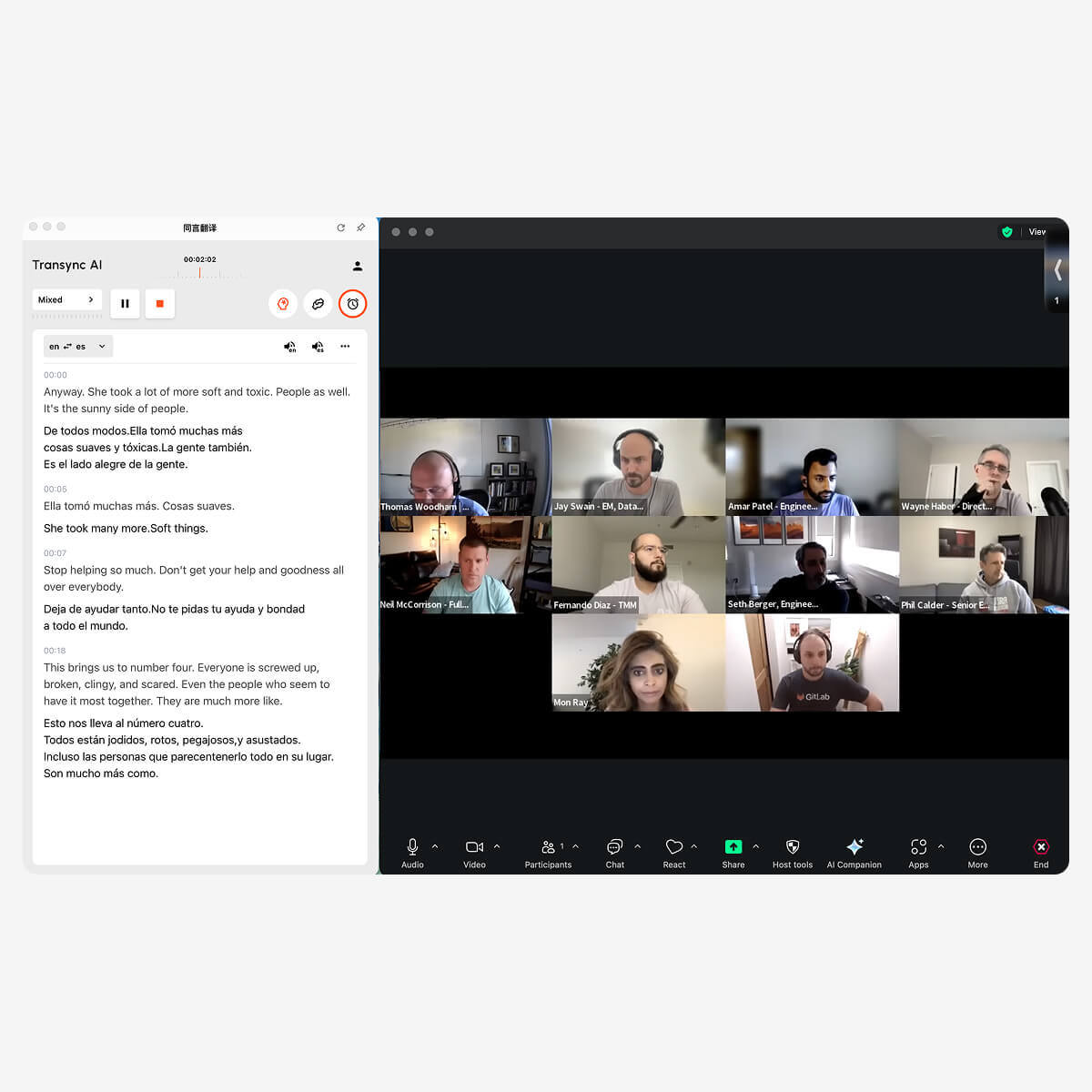
Transync AI, Zoom sunucularının canlı toplantılar sırasında tüm katılımcılar için gerçek zamanlı çevrilmiş altyazı sağlamasına olanak tanır.
Düzeltme 3: Yapay Zeka Özetini Taslak Olarak Değerlendirin
Yapay zekâ özetleri faydalıdır çünkü çoğu insan her toplantıdan sonra tüm metni okumak istemez.
Ancak özet, toplantının bir yorumudur. Ayrıntıları sıkıştırabilir veya atlayabilir.
Toplantı özetinde aşağıdaki hususlar yer alıyorsa, özeti dikkatlice inceleyin:
- Sözleşme şartları
- Fiyatlar
- Yüzdeler
- Teslimat tarihleri
- Ürün model numaraları
- Tıbbi veya hukuki bilgiler
- Teknik gereksinimler
- Müşteri taahhütleri
- Verilen sorumluluklar
Toplantı sonrası pratik bir iş akışı şu şekildedir:
- Yapay zeka özetini okuyun.
- Önemli iddiaları tutanakla karşılaştırın.
- Doğru isimler, sayılar ve terminoloji.
- Kararları ilgili katılımcılarla teyit edin.
- Onaylanan özeti paylaşın.
- Transkripti şirket politikasına uygun olarak saklayın.
Bu, özeti incelemeden kabul etmekten daha uzun sürer, ancak yanlış bilgilerin dağıtılması riskini azaltır.
4. Çözüm: İsimleri ve Teknik Terimleri Hazırlayın
Genel konuşma tanıma sistemleri, belirli bir şirket veya sektör dışında nadir kullanılan kelimelerle genellikle zorlanırlar.
Örnekler şunlardır:
- Ürün adları
- Çalışan isimleri
- Müşteri isimleri
- Kısaltmalar
- Bilimsel terminoloji
- Yazılım özellikleri
- Model numaraları
- Bölgesel marka isimleri
Şu cümleyi ele alalım:
APAC ekibinden John, X300 modelinin fotovoltaik invertör özelliklerini inceleyecek.
Bir transkripsiyon aracı "APAC", "fotovoltaik invertör" veya "X300" gibi ifadeleri yanlış kaydedebilir. Transkript yanlışsa, özet ve çeviri de yanlış olabilir.
Transync AI bu nedenle anahtar kelimeler ve bağlamsal arka plan ayarları sunmaktadır.
Kullanıcılar şu gibi terimler ekleyebilirler:
- Transsync AI = Otomatik Geçiş
- fotovoltaik invertör
- yarı iletken paketleme
- Model X300
- Asya-Pasifik
- John Smith
- tedarik zinciri optimizasyonu
- sinir ağı
Toplantıyı şu şekilde de tanımlayabilirler:
Bu, yenilenebilir enerji ekipmanları, üretim programları, kalite kontrolü, bölgesel uyumluluk ve invertör özellikleri hakkında teknik tedarikçi toplantısıdır.
Bu bağlam, çeviri sisteminin tartışmaya uygun anlamları seçmesine yardımcı olur.
Daha fazla bilgi edinin AI Asistanı Anahtar Sözcükleri Bağlamı.
 Düzeltme 5: Çok Dilli Toplantılar için Gerçek Zamanlı Çeviri Eklendi
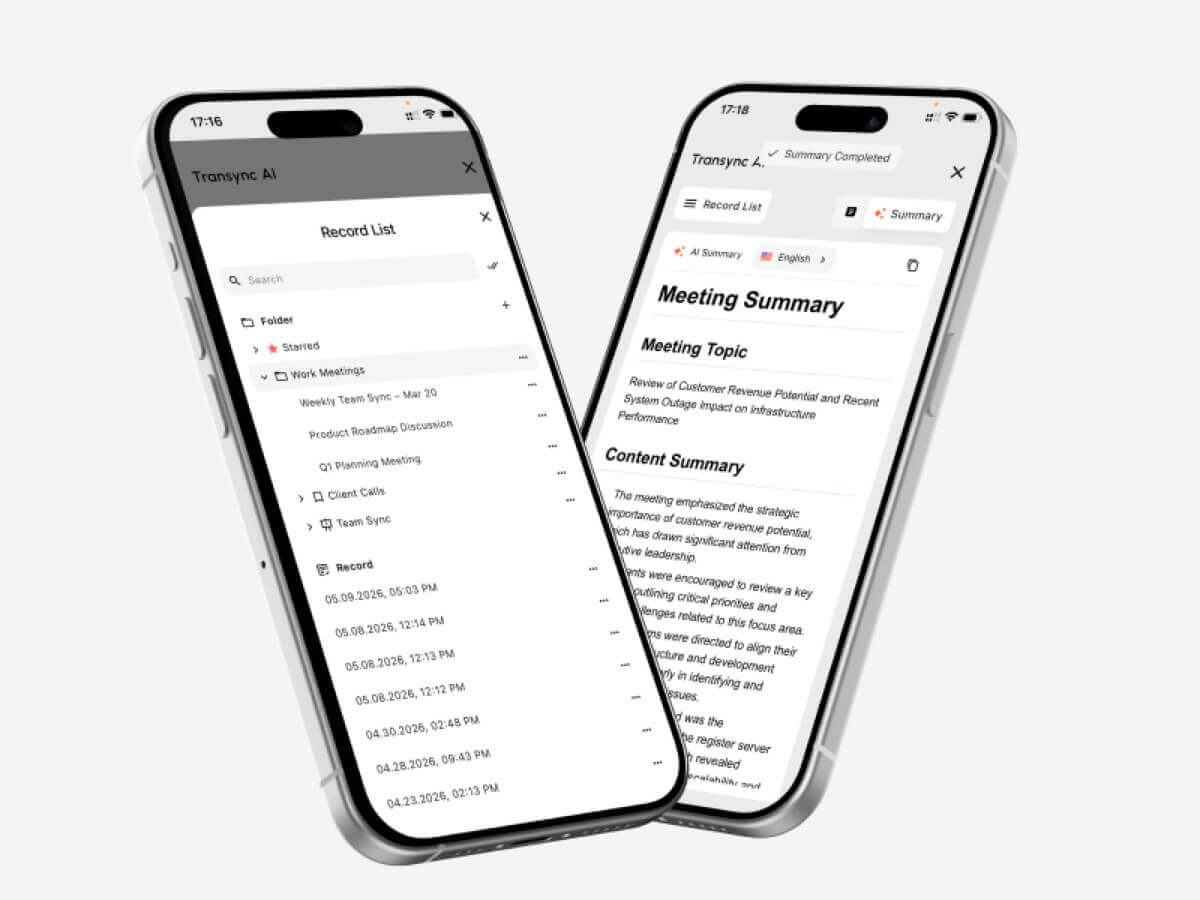 Düzeltme 5: Çok Dilli Toplantılar için Gerçek Zamanlı Çeviri Eklendi
Toplantı sonrasında tutanak tutmak en faydalı olanıdır. Çok dilli katılımcıların toplantı sırasında yardıma ihtiyacı vardır.
Transync AI, Zoom ile birlikte çalışarak şu hizmetleri sağlayabilir:
- İki yönlü gerçek zamanlı çeviri
- Orijinal ve çevrilmiş altyazılar
- Seçilen diller arasında otomatik ayrım
- Yapay zeka ses yayını
- Ses önizlemesi
- Ses klonlama
- Anahtar kelimeler ve bağlam
- Yapay zeka toplantı notları
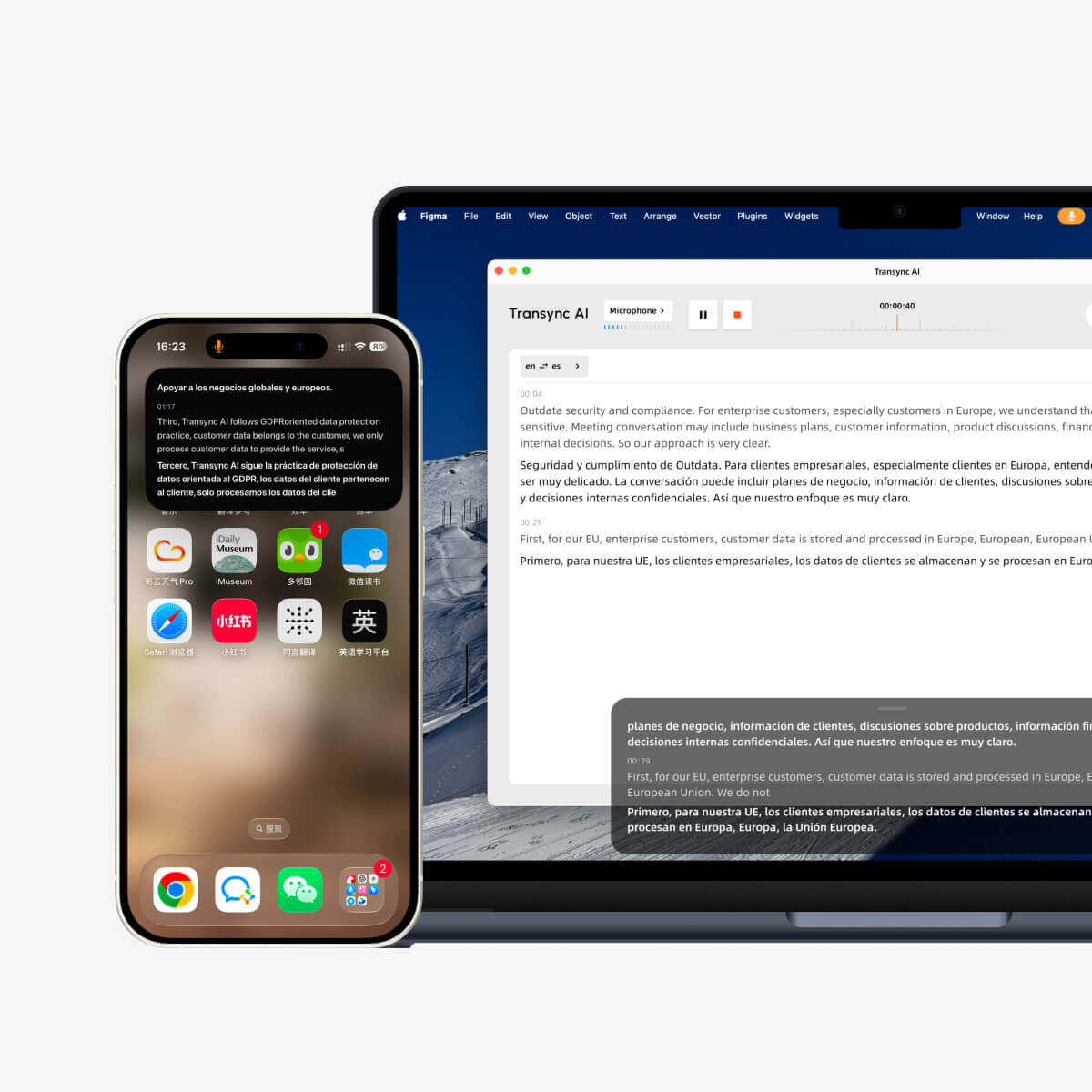
- Resim içinde resim alt yazıları
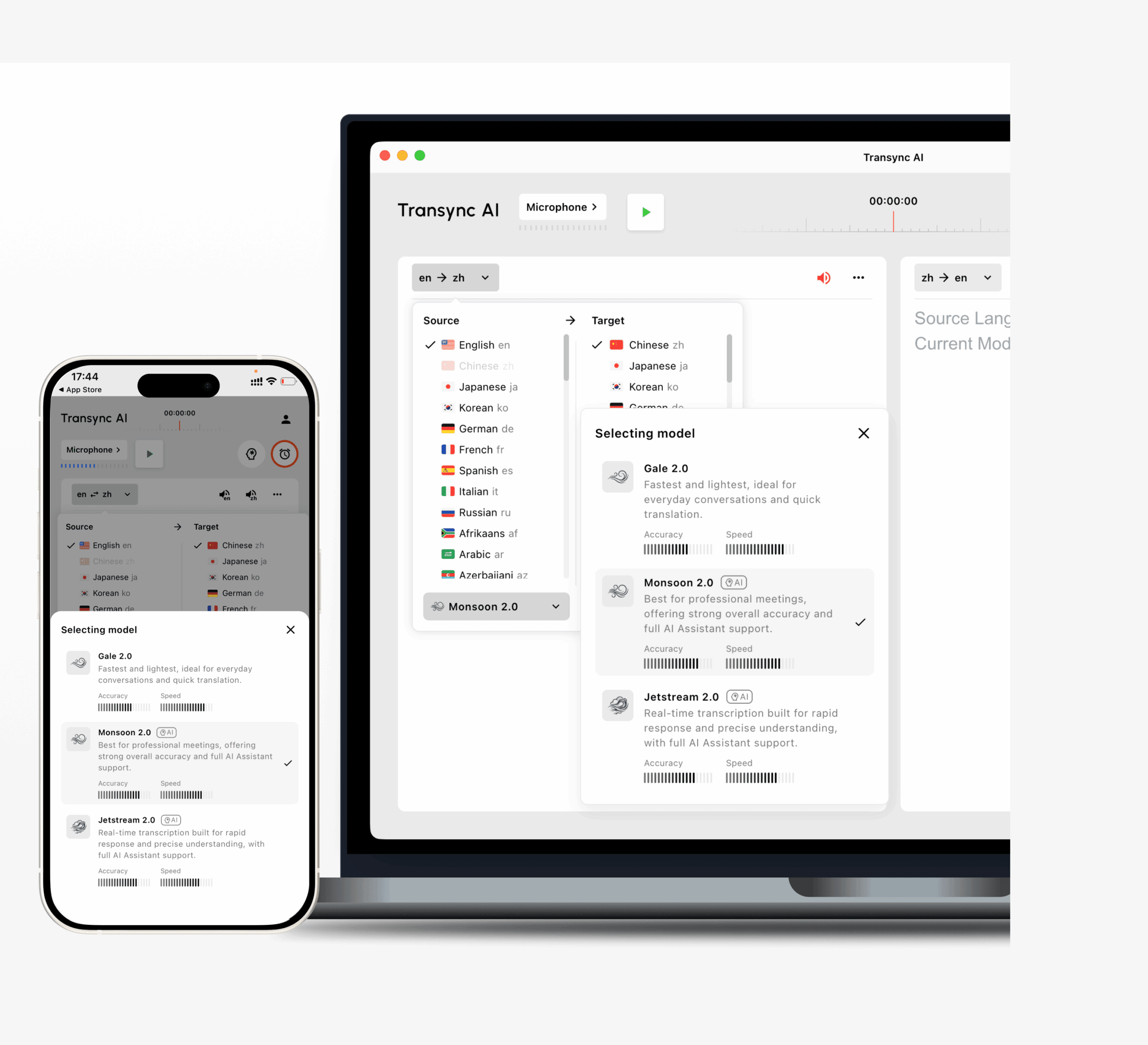
Transync AI, İngilizce, İspanyolca, Çince, Japonca, Korece, Kantonca, Fransızca, Almanca, İtalyanca ve Rusça dahil olmak üzere 60 dili ve 1.000'den fazla dil çiftini desteklemektedir.
Bu, iki katılımcının da tercih ettikleri dillerde konuşmasına olanak tanır; böylece toplantının tamamının ikinci bir dilde yürütülmesi için tek bir kişiye bağımlı kalınmaz.
Mevcut seçenekleri inceleyin. Transync yapay zeka destekli diller sayfa.
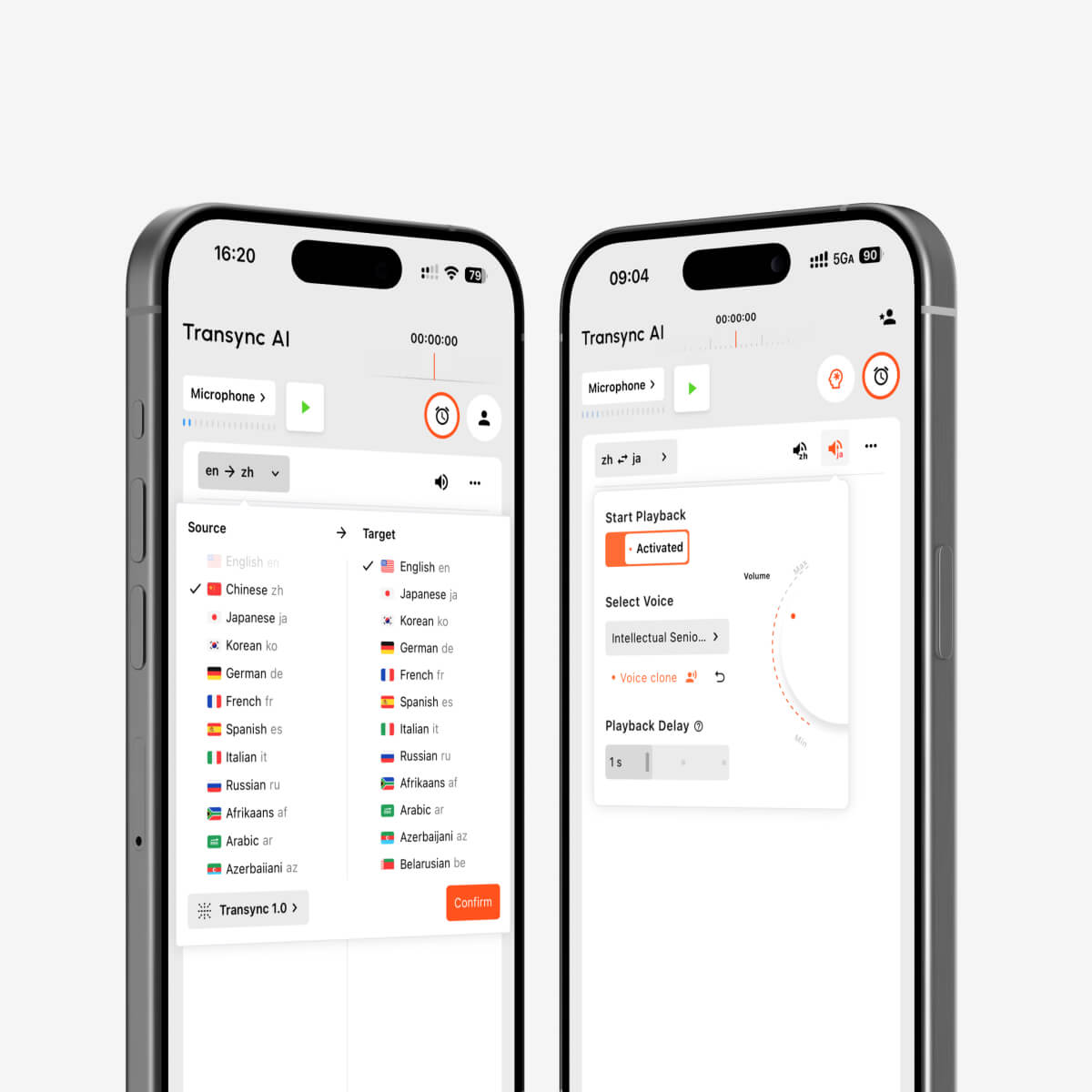
Çok dilli gerçek zamanlı tercüme için yapay zeka destekli ses oynatma ve ses klonlama
Düzeltme 6: Çalışırken Çevrilmiş Altyazıları Görünür Tutun
Toplantı katılımcıları nadiren tüm görüşme boyunca konuşmacı tablosuna bakarlar.
Şunlara ihtiyaç duyabilirler:
- Sunum slaytları
- Yazılımı tanıtın
- Bir belgeyi inceleyin
- Bir elektronik tabloyu kontrol edin.
- Ürün sayfasına gidin
- Not alın.
- Sohbet mesajlarını yanıtlayın
- Tarayıcı sekmelerini değiştirin
Çevrilmiş altyazılar başka bir uygulamanın arkasında kaybolursa, katılımcılar sohbete erişimlerini kaybederler.
Transync AI, desteklenen Mac, Windows ve iOS iş akışlarında resim içinde resim şeklinde kayan altyazılar sunar. Kompakt altyazı penceresi diğer uygulamaların üzerinde kalabilir.
Bu özellikle şu durumlar için faydalıdır:
- Ürün tanıtımları
- Uluslararası web seminerleri
- Çevrimiçi dersler
- Yazılım eğitimi
- Satış sunumları
- Tedarikçi toplantıları
- Teknik atölyeler
Daha fazla bilgi edinin Resim içinde resim şeklinde kayan altyazılar.
Zoom Yapay Zeka Transkripsiyonu vs. Transync Yapay Zeka
Zoom ve Transync AI bazı alanlarda örtüşüyor ancak özdeş ürünler değiller.
| Gereklilik | Zoom'un yerel iş akışı | Transync AI |
| Canlı aynı dildeki altyazılar | Otomatik altyazılar aracılığıyla erişilebilir. | İki dilli çevirinin bir parçası olarak mevcuttur. |
| Toplantı tutanağı saklanmıştır. | Toplantı tutanakları etkinleştirildiğinde kullanılabilir. | Çeviri kayıtları incelenebilir ve dışa aktarılabilir. |
| Yapay zeka toplantısı özeti | AI Companion aracılığıyla erişilebilir. | Yapay zeka tarafından oluşturulan toplantı notları |
| Çevrilmiş altyazılar | Desteklenen Zoom ayarları ve planları aracılığıyla kullanılabilir. | 60 dilde gerçek zamanlı çeviri |
| İki yönlü dil değiştirme | Toplantı özelliğine ve yapılandırmasına bağlıdır. | Seçilen dilleri otomatik olarak ayırt eder. |
| Çevrilmiş ses | Zoom'un desteklediği sesli çeviri iş akışlarında mevcuttur. | Çoklu ses içeren yapay zeka destekli ses yayını |
| Ses klonlama | Ana transkripsiyon iş akışı değil. | Desteklendi |
| Anahtar kelimeler ve toplantı bağlamı | Özel bir çeviri iş akışına kıyasla sınırlı | Kullanıcılar anahtar kelimeler ve bağlamsal arka plan tanımlayabilirler. |
| Kaydırılabilir çift dilli altyazılar | Zoom altyazıları toplantı arayüzünde kalır. | Resim içinde resim penceresi diğer uygulamaların üzerinde kalabilir. |
| Toplantı platformları | Zoom Workplace'in en derin entegrasyonu | Zoom, Teams ve Google Meet için bağımsız bir araç. |
| Çevrimdışı kullanım | Bulut özellikleri bağlantı gerektirir. | Çevrimdışı mod kullanılamıyor. |
Doğru seçenek, soruna bağlıdır.
Eğer herkes aynı dili konuşuyorsa ve ekip esas olarak bir transkript ve özete ihtiyaç duyuyorsa, Zoom'un yerleşik araçları yeterli olabilir.
Katılımcıların farklı dillerde anlamaları ve yanıt vermeleri gerekiyorsa, özel bir gerçek zamanlı çeviri iş akışı daha uygun olabilir.
Zoom Yapay Zeka Transkripsiyonu ve Çevrilmiş Altyazılar Aynı Şey Değildir
Zoom'un çevirili altyazı özelliği, toplantıdaki konuşma dilini başka bir dildeki altyazılara dönüştürebilir.
Bu, çevrilmiş dili okuyabilen katılımcılar için faydalıdır. Bununla birlikte, çevrilmiş altyazılar yine de tam çok dilli bir iş akışından farklıdır.
Ekiplerin ayrıca şunlara da ihtiyacı olabilir:
- İki yönlü çeviri
- Çevrilmiş ses oynatma
- Terminoloji özelleştirmesi
- Uygulamalar arası kayan altyazılar
- Marka isimlerinin bağlama duyarlı şekilde ele alınması
- Çok dilli bir konuşmaya dayalı yapay zeka notları
Katılımcılardan biri okumak yerine dinlemeyi de tercih edebilir. Bu durumda, tercüme edilmiş ses kaydı önem kazanır.
Zoom, desteklenen toplantı iş akışlarında ses çevirisi özelliklerini kullanıma sunarken, Transync AI ise gerçek zamanlı çeviri sisteminin bir parçası olarak yapay zeka destekli ses yayını sağlıyor.
Önemli bir toplantı öncesinde kullanılabilirlik, lisanslar, diller ve yönetim ayarları kontrol edilmelidir.
Transync AI'yı Zoom ile Nasıl Kullanabilirsiniz?
Transync AI, Zoom eklentisi olarak değil, bağımsız bir yazılım olarak çalışır.
Adım 1: Dilleri seçin
Toplantıda kullanılacak iki dili seçin.
Örneğin:
- İngilizce ↔ İspanyolca
- İngilizce ↔ Japonca
- Çince ↔ İngilizce
- Korece ↔ İngilizce
- Fransızca ↔ Almanca
Adım 2: Terminolojiyi ekleyin
İsimleri, markaları, ürün modellerini, kısaltmaları ve teknik terimleri girin.
3. Adım: Toplantı bağlamını ekleyin
Sektörü, katılımcıları ve konuyu açıklayın.
4. Adım: Zoom'u Başlatın
Toplantıya her zamanki gibi katılın.
Adım 5: Transync AI'yı Başlatın
Gerçek zamanlı çeviri görevini başlatın ve doğru ses kaynağının seçildiğini doğrulayın.
Adım 6: Çift dilli veya kayan altyazıları etkinleştirin
Transync AI penceresini görünür halde tutun veya Resim İçinde Resim altyazılarını etkinleştirin.
Adım 7: Gerektiğinde ses çıkışını yapılandırın
Çevrilmiş ses dosyaları, desteklenen sistem sesi veya sanal mikrofon iş akışları aracılığıyla Zoom'a bağlanabilir.
Adım 8: Toplantı notlarını gözden geçirin
Görüşme sonrasında yapay zeka tarafından oluşturulan notları, isimleri, numaraları, teknik terimleri, kararları ve yapılacak işleri kontrol edin.
Görmek Zoom, Teams ve Google Meet için Yapay Zeka Canlı Toplantı Çevirisi Daha fazla bilgi için.
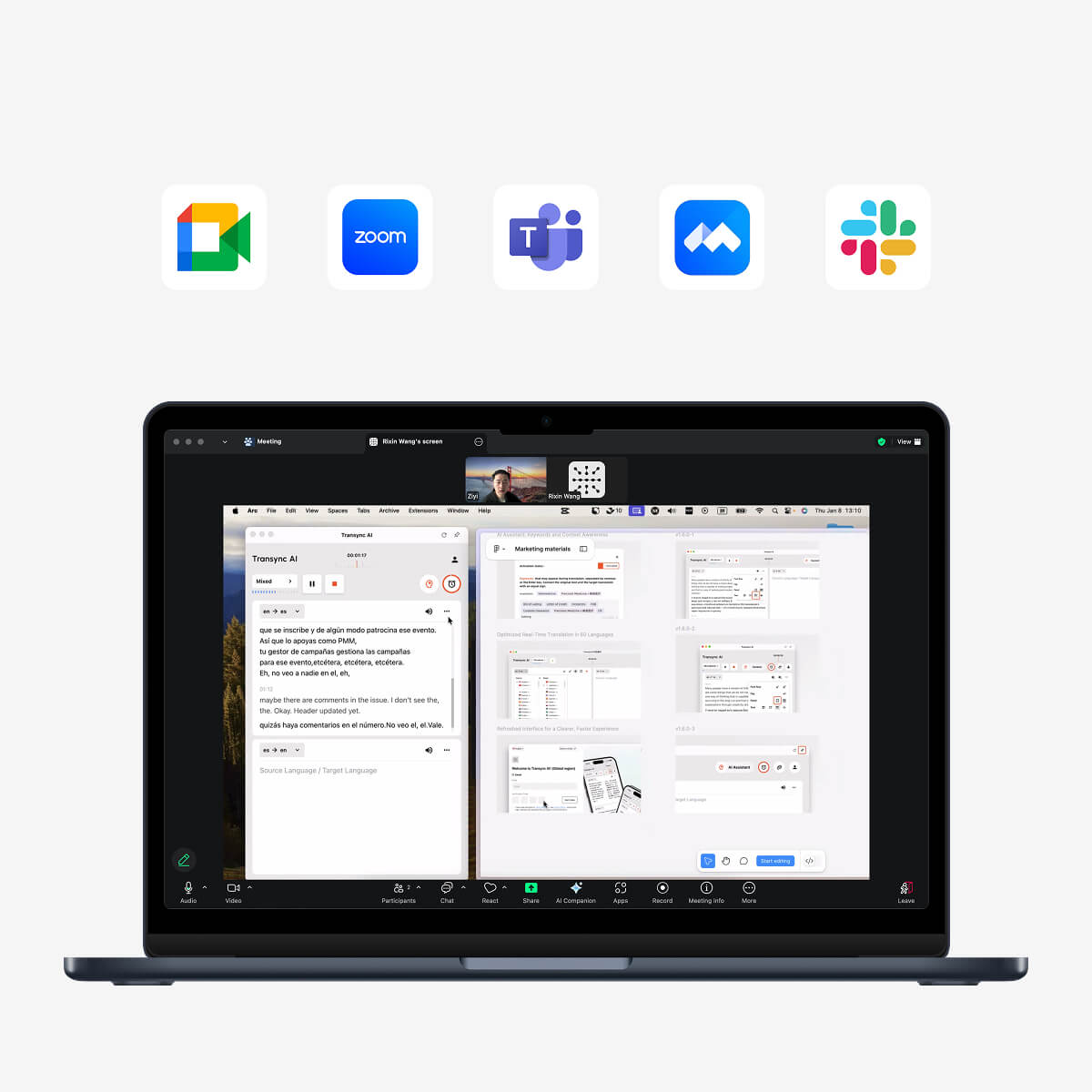
Sorunsuz gerçek zamanlı çeviri için başlıca çevrimiçi toplantı platformlarıyla uyumludur.
Pratik Bir Zoom Transkripsiyon Testi
Önemli bir toplantı için transkripsiyona güvenmeden önce, 15 dakikalık bir test yapın.
Test ortamı
Kayıt:
- Test tarihi
- Zoom sürümü
- Kullanılan transkripsiyon veya altyazı özelliği
- Bilgisayar ve işletim sistemi
- Mikrofon
- Ağ türü
- Toplantı dili
- Konuşmacı sayısı
Test senaryosu
Katmak:
- Kısa bir giriş
- İki konuşmacının adı
- Bir ürün adı
- Teknik bir açıklama
- Bir model numarası
- Bir fiyat
- Yüzde
- Bir teslimat tarihi
- Bir düzeltme
- Son bir gündem maddesi
Örnek:
Güncellenmiş teknik özellikler bu Cuma onaylanırsa, 18 Ekim'e kadar (özür dilerim, 28 Ekim'e kadar) 1.250 adet Model X300 ünitesi teslim edebiliriz.
Değerlendirme tablosu
| Metrik | Neleri kontrol etmeli? |
| Konuşma tanıma | Zoom orijinal kelimeleri doğru bir şekilde yakaladı mı? |
| Konuşmacı etiketleri | Açıklamalar doğru kişiye mi atandı? |
| Sayılar | Tarihler, miktarlar ve fiyatlar doğru muydu? |
| Terminoloji | Ürün adları ve kısaltmalar tanındı mı? |
| Noktalama | Metin okunması kolay mıydı? |
| Özet | Yapay Zeka Destekleyici önemli noktaları korudu mu? |
| Eylem maddeleri | Sorumluluklar doğru şekilde dağıtıldı mı? |
| Çeviri | Çok dilli katılımcılar toplantıyı canlı olarak anlayabildiler mi? |
| Tutulma | Toplantı sonrasında tutanak mevcut muydu? |
Zoom Yapay Zeka Transkripsiyonunda Sık Karşılaşılan Sorunlar
Yanlış altyazı dili
Sistem, konuşmayı yanlış dil modelini kullanarak yorumlayabilir.
Mikrofon kalitesi düşük.
Uzak mikrofonlar, yankı ve arka plan gürültüsü tanıma doğruluğunu düşürür.
Üst üste gelen konuşmacılar
Birden fazla kişi aynı anda konuştuğunda, kelimeler kaybolabilir veya yanlış anlaşılabilir.
İsimler ve kısaltmalar
Nadir kullanılan terimler, benzer sesli sıradan kelimeler olarak yazıya dökülebilir.
Bağlam eksikliği
Sistem kelimeleri yakalayabilir ancak özet içindeki önemlerini yanlış anlayabilir.
Eksik transkript saklama
Kullanıcılar, toplantı transkriptlerini etkinleştirmeden altyazıların kaydedileceğini varsayabilirler.
Özete aşırı güvenmek
Önemli ayrıntılar sıkıştırılmış veya atlanmış olabilir.
Transkripsiyonu çeviriyle karıştırmak
Doğru yazılmış bir İspanyolca metin, yalnızca Japonca okuyabilen birine yardımcı olmaz.
Gizlilik ve Onay Hususları
Toplantı transkriptleri, katılımcıların söylediklerinin kaydını oluşturur.
Etkinleştirmeden önce:
- Katılımcıları bilgilendirin
- Yerel kayıt ve gizlilik yasalarına uyun.
- Kuruluş politikalarını gözden geçirin
- Erişimi yetkili kullanıcılarla sınırlandırın
- Transkriptlerin ne kadar süreyle saklanması gerektiğine karar verin.
- Gereksiz hassas bilgilerden kaçının.
- Toplantı özetlerinin paylaşılıp paylaşılamayacağını onaylayın.
- Toplantı dosyalarına hangi yöneticilerin erişebileceğini kontrol edin.
Zoom yöneticileri, kullanıcıların yapay zeka asistanı özellikleri aracılığıyla oluşturulan transkriptleri saklayıp saklayamayacağını kontrol edebilir.
Transync AI, kullanıcı verilerinin yapay zeka eğitimi için kullanılmadığını belirtiyor. Ancak kuruluşlar, gizli toplantıları işleme almadan önce gizlilik ve uyumluluk belgelerinin tamamını incelemelidir.
Ne zaman bir not tutucu veya tercüman kullanmalısınız?
Yapay zekâ ile yapılan transkripsiyon faydalıdır, ancak hatasız bir kayıt olarak değerlendirilmemelidir.
Toplantı aşağıdaki durumlarda insan incelemesi veya profesyonel destekten yararlanarak gerçekleştirilir:
- Hukuki tanıklık
- Tıbbi kararlar
- Sözleşme müzakeresi
- Mevzuat uyumluluğu
- Çalışan anlaşmazlıkları
- Mali yükümlülükler
- Güvenlik talimatları
- Göçmenlik meseleleri
- Hükümet işlemleri
- Kelime seçiminin önemli olduğu kamuoyu açıklamaları
Yapay zeka manuel iş yükünü azaltabilir. Ancak önemli bilgilerin kontrol edilmesi sorumluluğunu başkasına devretmez.
Sıkça Sorulan Sorular: Zoom Yapay Zeka Transkripsiyonu
Zoom yapay zeka transkripsiyonu nedir?
Zoom yapay zeka transkripsiyonu, toplantı konuşmalarını yazılı metne dönüştürür. Etkinleştirilen özelliklere bağlı olarak canlı altyazılar, kaydedilmiş toplantı transkriptleri, yapay zeka özetleri veya akıllı kayıtlar için kullanılabilir.
Zoom altyazıları ve transkriptleri aynı şey mi?
Hayır. Altyazılar canlı okunabilirlik için tasarlanmıştır. Transkriptler ise toplantıdan sonra konuşmadan metne dönüştürülmüş içeriği korumak için tasarlanmıştır.
Zoom altyazıları hala indirilebiliyor mu?
18 Mayıs 2026'dan itibaren Zoom, kullanıcıların altyazıları doğrudan kaydetmesine veya indirmesine artık izin vermeyecektir. Konuşmadan metne dönüştürme özelliğinin gerekli olduğu durumlarda toplantı transkriptlerinin etkinleştirilmesi gerekmektedir.
Zoom AI Companion toplantı özetleri oluşturuyor mu?
Evet. Yapay Zeka Destekli Toplantı Özeti, toplantı görüşmesine dayanarak yapılandırılmış bir özet ve sonraki adımları oluşturabilir.
Zoom yapay zeka transkripsiyonu dilleri çevirebilir mi?
Transkripsiyon ve çeviri farklı şeylerdir. Zoom, desteklenen iş akışlarında çevrilmiş altyazılar sunar, ancak kullanıcıların doğru ayarları ve dilleri etkinleştirmesi gerekir.
Transync yapay zekası bir Zoom toplantısını tercüme edebilir mi?
Evet. Transync AI, Zoom ile birlikte çalışarak gerçek zamanlı çift dilli altyazı, yapay zeka destekli seslendirme, anahtar kelimeler ve bağlam bilgileri ile yapay zeka toplantı notları sağlayabilir.
Transync AI için Zoom eklentisi gerekiyor mu?
Hayır. Transync AI, Zoom eklentisi değil, bağımsız bir yazılımdır.
Katılımcılar tercüme edilmiş konuşmayı duyabiliyorlar mı?
Transync AI, çevrilmiş ses yayınını destekler. Çevrilmiş sesi Zoom toplantısına göndermek için sistem sesi veya sanal mikrofon yapılandırması gerekebilir.
Transync AI hangi dilleri destekliyor?
Transync AI, İngilizce, İspanyolca, Çince, Japonca, Korece, Kantonca, Fransızca, Almanca, İtalyanca ve Rusça dahil olmak üzere 60 dili ve 1.000'den fazla dil çiftini desteklemektedir.
Transync AI çevrimdışı çalışıyor mu?
Hayır. Transync AI internet bağlantısı gerektirir ve şu anda çevrimdışı çeviriyi desteklememektedir.
Sonuç: Zoom Yapay Zeka Transkripsiyonu Etrafında Doğru İş Akışını Oluşturun
Zoom yapay zeka transkripsiyonu Ekiplerin canlı altyazılara, aranabilir kayıtlara, yapay zeka özetlerine veya daha düzenli bulut kayıtlarına ihtiyaç duyduğu durumlarda değerlidir.
Ancak yazıya dökme, toplantıyı anlamanın yalnızca bir katmanıdır.
Eksiksiz bir iş akışı ayrıca şunları da gerektirebilir:
- Doğru dil ayarları
- Saklanan transkriptler
- İnsan incelemesi
- Gerçek zamanlı çeviri
- İki dilli altyazılar
- Çevrilmiş ses
- Terminoloji kontrolleri
- Toplantı sonrası notlar
- Uygun gizlilik ayarları
Tek dilli toplantılar için Zoom'un yerleşik transkripsiyon ve yapay zeka asistanı özellikleri, gerekli iş akışını zaten sağlayabilir.
Çok dilli toplantılar için Transync AI, Zoom, Microsoft Teams ve Google Meet genelinde çift yönlü çeviri, iki dilli görüntüleme, yapay zeka destekli ses yayını, ses kopyalama, anahtar kelimeler ve bağlam, toplantı notları ve kayan altyazılar özelliklerini ekler.
Doğru soru sadece "Toplantının tutanağı çıkarılabilir mi?" olmamalıdır.“
Şöyledir:
Toplantı sırasında her katılımcı toplantıyı anlayabilir ve sonrasında önemli bilgilere ulaşabilir mi?
Başlamak için ziyaret edin Transync AI, keşfedin gerçek zamanlı çeviri aracı, Ya da tercih ettiğiniz cihaz için uygulamayı indirin.
 🤖
🤖 