

terjemahan suara waktu nyata, penerjemah rapat AI, penerjemah ucapan langsung, subtitle dwibahasa, terjemahan suara instan
A penerjemah waktu nyata Membantu orang saling memahami saat mereka masih berbicara. Alih-alih menyalin teks ke dalam kotak terjemahan dan menunggu, pengguna dapat mengikuti percakapan melalui teks terjemahan langsung, audio terjemahan, atau keduanya.
Perbedaan itu penting. Dalam pertemuan multibahasa, bahkan penundaan singkat pun dapat mengganggu alur diskusi. Di ruang kelas, melewatkan satu penjelasan dapat membuat topik berikutnya lebih sulit dipahami. Saat bepergian, respons lisan yang cepat mungkin lebih penting daripada dokumen yang diformat sempurna.
Panduan pemecahan masalah ini mengeksplorasi delapan situasi di mana terjemahan waktu nyata dapat membantu. Panduan ini juga membandingkan tujuh alat yang berbeda sehingga Anda dapat mencocokkan teknologi dengan percakapan, bukan hanya memilih berdasarkan jumlah bahasa saja.
Masalah apa yang dipecahkan oleh penerjemah waktu nyata?
Penerjemahan tradisional biasanya bersifat asinkron: seseorang menulis atau merekam konten, mengirimkannya untuk diterjemahkan, dan membaca hasilnya kemudian. Penerjemahan waktu nyata berupaya menyelesaikan proses tersebut selama pertukaran langsung.
Urutan intinya adalah:
Mendengar ucapan → mengenali kata-kata → memahami konteks → menerjemahkan makna → menunjukkan atau menyampaikan hasilnya
Sistem yang mumpuni dapat mengurangi tiga masalah komunikasi umum:
- Menunggu: Peserta tidak perlu berhenti setelah setiap kalimat untuk terjemahan manual.
- Ketakpastian: Subtitle dwibahasa memungkinkan pengguna untuk membandingkan ucapan asli dan terjemahannya.
- Informasi yang hilang: Transkrip dan catatan dapat menyimpan percakapan untuk ditinjau kembali di kemudian hari.
Namun, produk-produk tersebut dirancang untuk pekerjaan yang berbeda. Beberapa berfokus pada perjalanan, beberapa pada acara besar, beberapa pada produksi media, dan yang lainnya pada rapat atau API pengembang.
8 Situasi di Mana Penerjemah Waktu Nyata Dapat Membantu
1. Kunjungan penjualan dengan pelanggan internasional
Masalahnya bukan hanya bahasa. Percakapan penjualan mencakup nama produk, angka, keberatan, dan pertanyaan-pertanyaan halus. Jika istilah kunci diterjemahkan secara tidak tepat, kedua belah pihak mungkin akan memiliki harapan yang berbeda.
Transync AI mengatasi skenario ini dengan alat penerjemahan waktu nyata, yang menampilkan ucapan asli dan terjemahan dengan latensi rendah. Sebelum panggilan, tenaga penjualan dapat memasukkan terminologi produk dan informasi latar belakang melalui Fitur Kata Kunci dan Konteks Asisten AI.
Setelah diskusi tersebut, Fitur catatan rapat berbasis AI dapat menyediakan transkrip dan catatan terstruktur untuk tindak lanjut.
 2. Pertemuan tim multibahasa
 2. Pertemuan tim multibahasa
Anggota tim perlu memahami ide dan merespons tanpa terus-menerus meminta orang lain untuk mengulanginya. Membaca teks terjemahan saja mungkin melelahkan, tetapi terjemahan hanya melalui suara dapat membuat nama dan istilah teknis sulit diverifikasi.
Solusinya adalah menggabungkan teks dan audio. Transync AI menyediakan teks terjemahan dwibahasa di sampingnya. Penerjemah suara AI. Peserta dapat mendengarkan ucapan yang telah diterjemahkan sambil memeriksa teks ketika ketepatan menjadi penting.
Untuk panggilan pada Zoom, Microsoft Teams, atau Google Meet, itu fitur terjemahan rapat langsung mendukung alur kerja berorientasi rapat tanpa menjadi plugin khusus platform.

Kompatibel dengan platform rapat online utama untuk terjemahan waktu nyata yang lancar.
3. Presentasi dengan slide di layar
Beralih antara slide dan jendela terjemahan memaksa audiens untuk memilih informasi mana yang ingin mereka ikuti. Terjemahan menjadi kurang bermanfaat jika tersembunyi di balik presentasi.
Itu Fitur teks terjemahan dwibahasa Picture-in-Picture Fitur ini menjaga agar teks asli dan terjemahan tetap terlihat di atas aplikasi lain pada platform yang didukung. Hal ini memberikan tampilan terjemahan yang ringkas bagi presenter dan peserta sambil mereka terus bekerja dengan slide, dokumen, atau demonstrasi perangkat lunak.

Teks terjemahan mengambang secara real-time di seluruh perangkat desktop dan seluler.
4. Kuliah dalam bahasa lain
Sebuah kuliah berisi ide-ide yang saling terkait, kosakata khusus, dan penjelasan panjang. Penerjemah frasa mungkin dapat menangani kalimat-kalimat individual tetapi tidak memberikan catatan yang bermanfaat setelah kelas.
Siswa dapat menggunakan Transync AI Untuk mengikuti subtitle dwibahasa selama sesi, tambahkan istilah kursus dengan Fitur Kata Kunci dan Konteks Asisten AI, dan tinjau hasilnya melalui Fitur catatan rapat berbasis AI.
Terjemahan tetap harus diperiksa kesesuaiannya dengan materi perkuliahan, terutama jika menyangkut definisi, rumus, atau instruksi penilaian.
 5. Percakapan tatap muka saat bepergian
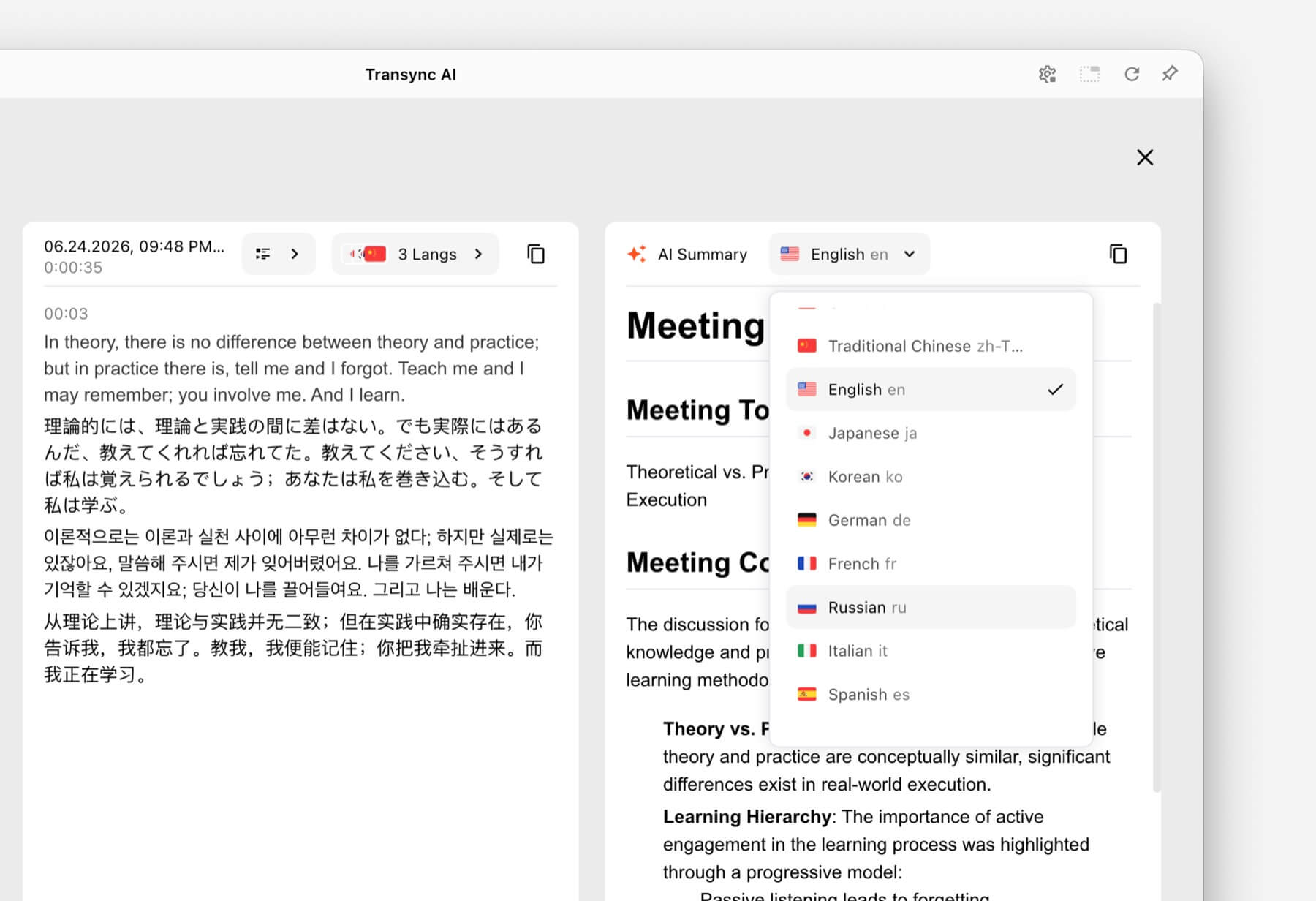 5. Percakapan tatap muka saat bepergian
Percakapan saat bepergian biasanya lebih singkat dan praktis. Pengguna mungkin perlu menanyakan arah, menjelaskan batasan diet, atau mengkonfirmasi pemesanan.
Talkao Dan Google Terjemahan Produk ini diposisikan untuk penerjemahan konsumen dan sehari-hari, termasuk tugas-tugas seluler di luar komunikasi bisnis langsung. Produk ini mungkin lebih cocok ketika penerjemahan melalui kamera, penerjemahan teks cepat, atau penggunaan saat bepergian menjadi prioritas.
 Transync AI Fitur ini berguna untuk percakapan lisan tatap muka yang lebih panjang, tetapi tidak menawarkan mode offline, pengenalan gambar, atau terjemahan dokumen hanya teks.
6. Sebuah konferensi dengan ratusan peserta.
Penerjemah pribadi dan platform penerjemahan acara memecahkan masalah distribusi yang berbeda. Di konferensi besar, banyak peserta mungkin membutuhkan teks terjemahan atau audio terjemahan di perangkat mereka sendiri tanpa harus bergabung dengan akun tim pribadi.
duniawi Dirancang untuk rapat dan acara dengan akses peserta melalui tautan atau kode QR. Untuk konferensi, webinar, dan acara hibrida, alur kerja skala audiens ini mungkin lebih tepat.
 Untuk panggilan internal rutin atau rapat kecil di mana setiap peserta membutuhkan teks terjemahan, pemutaran suara, dan catatan, Transync AI Memberikan pengalaman pertemuan yang lebih personal sebagai prioritas utama.
7. Proyek lokalisasi video atau webinar
Tim media seringkali membutuhkan lebih dari sekadar pemahaman langsung. Mereka mungkin memerlukan subtitle yang dapat diedit, sulih suara, transkripsi, lokalisasi, dan konten yang dapat digunakan kembali setelah siaran.
Maestra Diposisikan di seluruh bidang penerjemahan media, subtitle, sulih suara, webinar, dan acara langsung. Alur kerja produksi yang lebih luas tersebut dapat lebih sesuai untuk tim konten.
 Ketika kebutuhan utama adalah percakapan bisnis dua arah dan bukan produksi media, Transync AI menawarkan kombinasi yang lebih terbatas dari teks terjemahan langsung, terjemahan ucapan, konteks, dan catatan pasca-rapat.
8. Sebuah perusahaan yang mengembangkan produk pengenalan suara sendiri
Aplikasi untuk pengguna akhir bukanlah solusi yang tepat ketika pengembang perlu menyematkan terjemahan di dalam agen suara, platform dukungan pelanggan, atau aplikasi khusus.
Soniox Menawarkan kemampuan pengubahan ucapan menjadi teks, teks menjadi ucapan, dan penerjemahan untuk keperluan pengembang dan perusahaan.
 DeepL juga menyediakan API dan alur kerja bahasa teks, dokumen, tulisan, dan perusahaan yang lebih luas di samping produk suara tertentu.
 Memilih Transync AI Pilih platform API jika tujuannya adalah menggunakan penerjemah waktu nyata yang sudah jadi untuk rapat.
Tabel Perbandingan Penerjemah Waktu Nyata
Perbandingan ini berfokus pada posisi produk dan alur kerja tipikal. Verifikasi kemampuan terkini, cakupan bahasa, dan opsi pembelian di setiap situs web resmi.
| Alat | Kasus penggunaan utama | Teks terjemahan langsung | Suara terjemahan | Hasil pasca-percakapan | Paling cocok |
|---|---|---|---|---|---|
| Transync AI | Pertemuan, panggilan telepon, dan percakapan tatap muka. | Teks terjemahan dwibahasa | Ya, dengan opsi suara. | Transkrip dan catatan rapat AI | Tim dan individu yang menginginkan penerjemah rapat yang siap digunakan. |
| Talkao | Perjalanan, penerjemahan seluler, dan pembelajaran | Bergantung pada aplikasi | Ya | Bukan fokus utama | Konsumen yang membutuhkan fitur terjemahan seluler yang komprehensif |
| duniawi | Konferensi, webinar, dan acara | Ya | Ya | Transkrip dan ringkasan | Panitia menyediakan jasa penerjemahan bagi banyak peserta. |
| Soniox | API pengenalan suara dan produk khusus | Kemampuan API/aplikasi | Kemampuan TTS/API | Tergantung pada implementasi | Pengembang membangun pengalaman suara mereka sendiri |
| Maestra | Lokalisasi media dan konten siaran langsung | Ya | Pengisi suara dan sulih suara langsung | Alur kerja transkrip dan konten | Tim media yang bekerja dengan teks terjemahan, sulih suara, atau webinar. |
| DeepL | Teks, dokumen, alur kerja bahasa perusahaan, dan penggunaan suara tertentu. | Tergantung pada produk | Tergantung pada produk suara. | Bukan alur kerja inti catatan rapat. | Organisasi dengan kebutuhan penerjemahan tertulis yang besar |
| Google Terjemahan | Terjemahan gratis setiap hari | Tidak bertemu terlebih dahulu | Pemutaran audio terjemahan | TIDAK | Terjemahan cepat dan santai untuk konten umum. |
Bagaimana Caranya? Transync AI Menangani Penerjemahan Waktu Nyata?
Transync AI adalah produk terjemahan mandiri untuk alur kerja web, Windows, macOS, iOS, dan Android. Produk ini dirancang untuk membantu pengguna mendengarkan, membaca, menanggapi, dan menyimpan catatan selama komunikasi multibahasa.
 Pengenalan bahasa dua arah otomatis
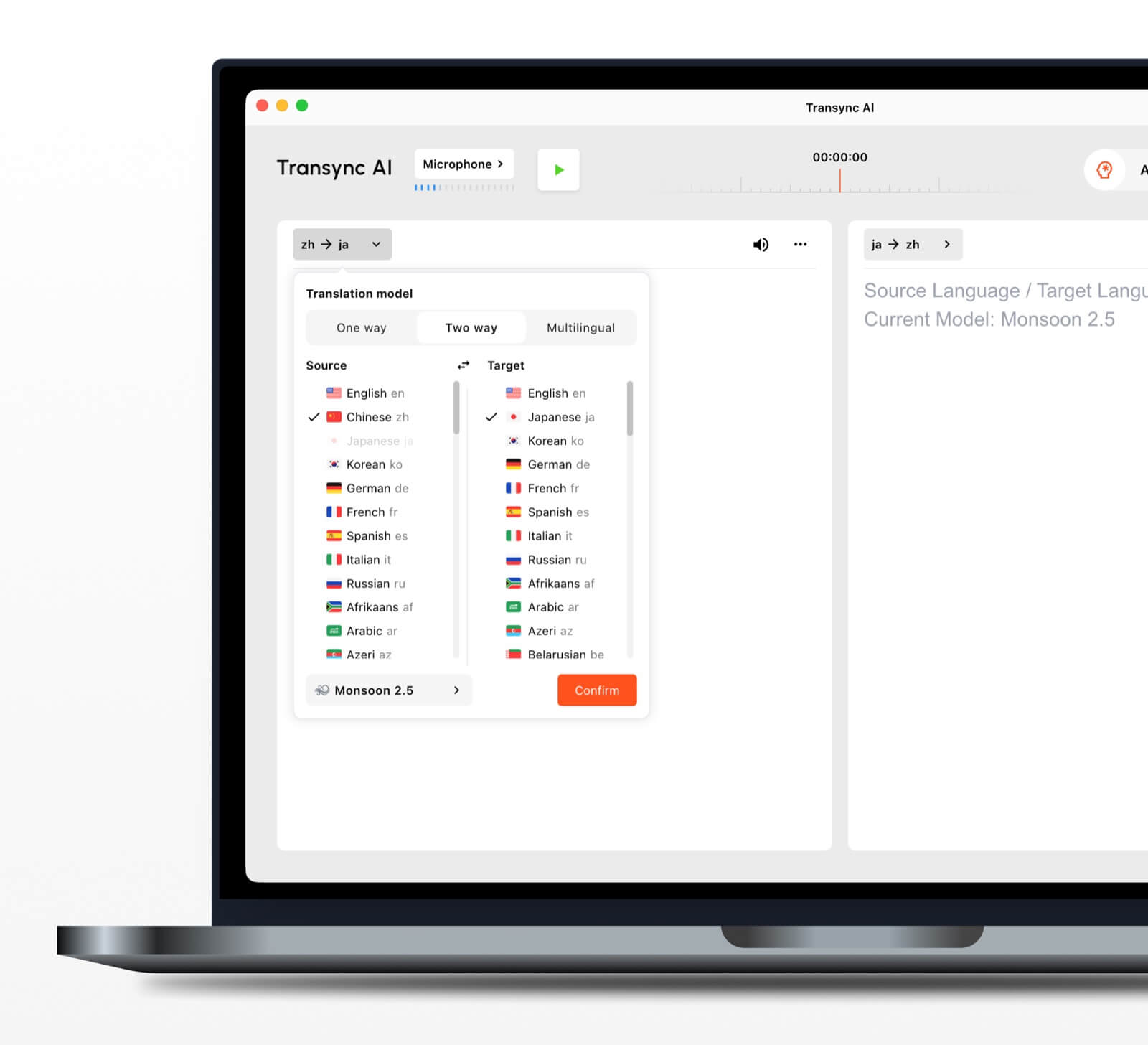 Pengenalan bahasa dua arah otomatis
Dalam pasangan bahasa yang dipilih, alat penerjemahan waktu nyata Mampu membedakan bahasa yang sedang digunakan. Hal ini mengurangi peralihan bahasa secara manual selama percakapan bolak-balik.
Lebih dari 60 bahasa yang didukung
Platform ini mendukung lebih dari 60 bahasa dan lebih dari 1.000 pasangan bahasa. Selalu verifikasi pasangan yang dibutuhkan pada halaman bahasa yang didukung sebelum pertemuan penting.
Pemutaran suara dan kloning suara
Itu Penerjemah suara AI Membacakan konten terjemahan dengan lantang menggunakan pilihan suara alami. fitur kloning suara dapat menghasilkan pemutaran terjemahan dalam suara yang dimodelkan berdasarkan pengguna, sehingga output terasa lebih personal dalam kelas, demonstrasi, dan panggilan.
Pengaturan perutean audio rapat daring
Itu fitur berbagi audio komputer Merekam suara dari peserta lain selama rapat daring. fitur mikrofon virtual Membantu mengirimkan terjemahan suara ke dalam panggilan sehingga orang lain dapat mendengarnya.
Catatan dan ringkasan percakapan
Itu Fitur catatan rapat berbasis AI menciptakan keluaran pasca-percakapan, sementara panduan manajemen catatan terjemahan Menjelaskan cara mengakses dan mengelola catatan yang tersimpan.
Apa yang Membuat Terjemahan Waktu Nyata Lebih Akurat?
Tidak ada satu alat pun yang berkinerja identik di setiap lingkungan. Praktik-praktik berikut dapat meningkatkan hasilnya:
- Gunakan mikrofon yang jernih. Posisikan cukup dekat agar dapat menangkap suara tanpa kebisingan ruangan yang berlebihan.
- Mintalah orang-orang untuk bergiliran. Ucapan yang tumpang tindih lebih sulit dikenali dan diterjemahkan.
- Gunakan koneksi internet yang stabil. Penerjemahan suara berbasis cloud bergantung pada koneksi yang andal.
- Berikan konteks. Tambahkan nama, merek, akronim, dan istilah teknis sebelum sesi dimulai.
- Sampaikan pemikiran Anda secara lengkap. Ucapan yang sangat terfragmentasi atau ambigu dapat mengurangi kualitas terjemahan.
- Uji pasangan bahasa yang sebenarnya. Kinerja dapat bervariasi tergantung pada bahasa, aksen, dan topik.
- Periksa detail-detail penting. Konfirmasikan angka, tanggal, bahasa hukum, dan spesifikasi teknis.
Untuk komunikasi medis, hukum, yang sangat penting terkait keselamatan, atau yang mengikat secara kontraktual, pertimbangkan untuk menggunakan penerjemah manusia yang berkualifikasi atau peninjauan profesional. Terjemahan AI dapat membantu komunikasi, tetapi tidak dapat menjamin bahwa setiap nuansa akan dipertahankan.
Cara Memilih Penerjemah Real-Time yang Tepat
Gunakan tes sederhana yang terdiri dari tiga bagian.
Langkah 1: Tentukan topik percakapan
Tentukan apakah tugas utama tersebut adalah perjalanan, panggilan pribadi, rapat tim, acara besar, produksi media, pekerjaan dokumen, atau pengembangan produk.
Langkah 2: Tentukan keluaran yang dibutuhkan
Tanyakan apakah pengguna membutuhkan:
- Audio yang telah diterjemahkan.
- Teks terjemahan dwibahasa.
- Tautan akses peserta.
- Transkrip atau ringkasan.
- Penerjemahan dokumen atau gambar.
- API untuk aplikasi kustom.
Langkah 3: Uji dalam kondisi nyata
Jalankan alat ini dengan perangkat, pasangan bahasa, platform, jaringan, aksen, dan kosakata yang sebenarnya. Uji coba singkat di lingkungan yang realistis akan mengungkapkan lebih banyak hal daripada sekadar daftar fitur umum.
Cara Memulai Sesi dengan Transync AI
- Membuka Transync AI pada perangkat yang didukung.
- Pilih dua bahasa yang digunakan dalam percakapan.
- Pilih mikrofon atau sumber audio sistem yang tepat.
- Tambahkan terminologi dengan Fitur Kata Kunci dan Konteks Asisten AI.
- Mulai alat penerjemahan waktu nyata.
- Periksa teks terjemahan dan teks aslinya.
- Aktifkan Penerjemah suara AI ketika peserta membutuhkan keluaran lisan.
- Gunakan Fitur teks terjemahan dwibahasa Picture-in-Picture saat bekerja di aplikasi lain.
- Tinjau kembali Catatan rapat AI setelah sesi tersebut.
Untuk panggilan video, tinjau panduan terjemahan rapat langsung dan uji perutean audio sebelum peserta lain bergabung.
Pertanyaan yang Sering Diajukan (FAQ) tentang Penerjemah Waktu Nyata
Apa penerjemah waktu nyata terbaik untuk rapat?
Transync AI merupakan pilihan yang tepat untuk mengadakan pertemuan terlebih dahulu karena menggabungkan terjemahan dwibahasa waktu nyata, pemutaran suara terjemahan, teks terjemahan mengambang, konteks terminologi, dan Catatan rapat AI. Opsi terbaik tetap bergantung pada pasangan bahasa, platform rapat, aturan privasi, dan durasi sesi.
Bisakah penerjemah waktu nyata berfungsi dalam rapat video?
Ya. Itu Fitur terjemahan rapat langsung dari Transync AI bekerja bersama Zoom, Microsoft Teams, Dan Google Meet. Fitur ini dapat menyediakan teks terjemahan langsung dan suara yang diterjemahkan selama panggilan multibahasa.
Bisakah aplikasi ini menerjemahkan kedua sisi secara otomatis?
Itu alat terjemahan waktu nyata dari Transync AI Dapat membedakan bahasa pembicara dalam pasangan bahasa yang didukung yang dipilih, mengurangi kebutuhan untuk beralih tombol.
Apakah terjemahan waktu nyata berfungsi secara offline?
Ketersediaan offline bergantung pada produknya. Transync AI Membutuhkan koneksi internet dan tidak menawarkan mode offline. Konfirmasikan ketersediaan bahasa offline langsung dengan aplikasi konsumen mana pun sebelum mengandalkannya saat bepergian.
Apakah penerjemah waktu nyata gratis?
Google Terjemahan adalah pilihan gratis yang mudah diakses untuk penerjemahan kasual. Transync AI menyediakan kuota awal gratis setelah pendaftaran sehingga pengguna dapat menguji kemampuan yang berorientasi pada rapat sebelum memilih paket berbayar.
Apakah data percakapan bersifat pribadi?
Kebijakan privasi berbeda-beda. Transync AI menyatakan bahwa data pelanggan tidak digunakan untuk pelatihan AI secara default dan bahwa audio dihapus setelah diproses. Organisasi harus meninjau hal ini. Pusat Kepercayaan dan ketentuan saat ini dibandingkan dengan persyaratan keamanan dan kepatuhan mereka.
Jawaban Akhir: Penerjemah Real Time Mana yang Harus Anda Pilih?
Pilih berdasarkan alur kerja:
- Talkao atau Google Terjemahan untuk perjalanan santai dan aktivitas sehari-hari.
- duniawi untuk acara multibahasa dengan banyak peserta.
- Soniox untuk API pengembang dan produk pengenalan suara khusus.
- Maestra untuk penerjemahan media, subtitle, dan sulih suara.
- DeepL untuk teks, dokumen, dan alur kerja bahasa perusahaan.
- Transync AI untuk rapat langsung yang membutuhkan subtitle dwibahasa, terjemahan ucapan, konteks terminologi, dan catatan bermanfaat setelahnya.
Untuk pertemuan internasional yang diadakan secara berkala, sebuah penerjemah waktu nyata Seharusnya lebih dari sekadar mengkonversi kata-kata. Seharusnya membantu peserta mengikuti percakapan, merespons secara alami, memverifikasi detail penting, dan menyimpan informasi yang mereka butuhkan setelah panggilan berakhir.
Jika Anda menginginkan pengalaman generasi berikutnya, Transync AI memimpin dengan terjemahan real-time bertenaga AI yang membuat percakapan mengalir secara alami. Anda bisa coba gratis Sekarang.
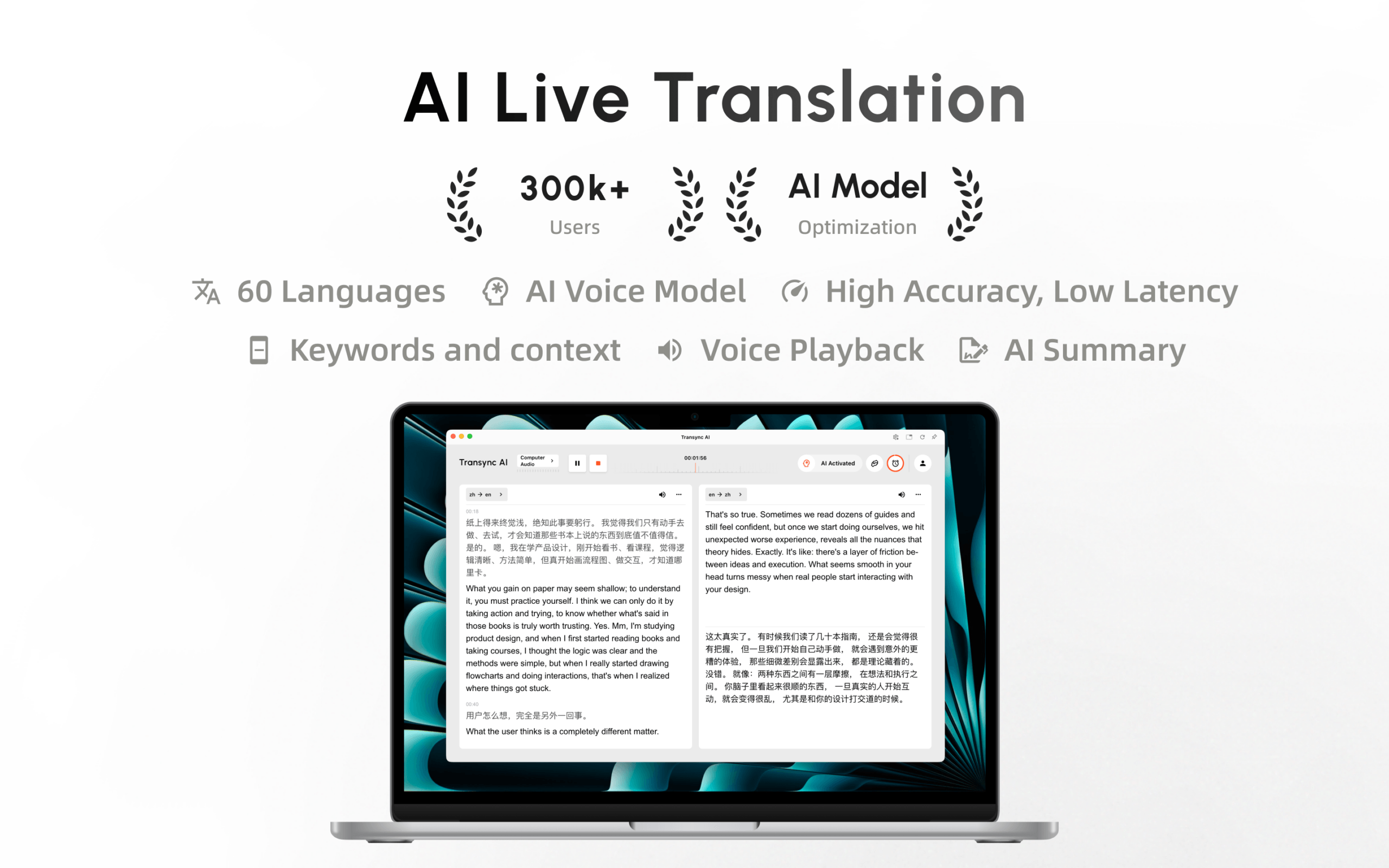
Transync AI kini tersedia di Mac App Store. Unduh dengan mudah, terima pembaruan otomatis, dan mulai terjemahan waktu nyata di Mac.
