
Terjemahan dengan suara mengubah ucapan menjadi audio terjemahan dan teks terjemahan. Jelajahi 7 kasus penggunaan, bandingkan alat-alat terkemuka, dan pelajari fitur mana yang penting.
Terjemahan dengan suara Artinya mengubah bahasa lisan ke bahasa lain dan menyampaikan hasilnya sebagai ucapan yang dapat didengar, seringkali disertai dengan teks terjemahan. Alih-alih meminta pendengar untuk membaca hasil berupa teks saja, teknologi ini mengucapkan terjemahan dengan lantang saat percakapan berlangsung atau setelah audio yang direkam diproses.
Orang mungkin juga menyebutnya terjemahan suara, terjemahan ucapan ke ucapan, terjemahan lisan, atau terjemahan audio. Apa pun istilah yang digunakan, tujuannya sama: membantu orang mendengar dan memahami bahasa lain dengan lebih sedikit gangguan.
Panduan ini menjelaskan cara kerja terjemahan berbasis suara, di mana terjemahan ini paling berguna, dan bagaimana tujuh alat sesuai dengan berbagai kebutuhan—mulai dari perjalanan sehari-hari dan rapat langsung hingga konferensi, produksi media, dan aplikasi pengembang.
Apa Itu Penerjemahan dengan Suara?
Penerjemahan dengan suara menggabungkan beberapa proses AI dalam satu alur kerja:
Input suara → pengenalan ucapan → penerjemahan bahasa → output suara
Pertama, sistem menangkap audio melalui mikrofon, rekaman rapat, atau file media. Pengenalan suara mengubah audio menjadi kata-kata. Model penerjemahan menginterpretasikan maknanya, dan teknologi teks-ke-suara mengubah teks yang diterjemahkan menjadi ucapan yang dapat didengar.
Banyak produk juga menampilkan teks asli dan terjemahannya. Kombinasi ini berharga karena pengguna dapat mendengarkan alur percakapan sambil membaca nama, angka, dan istilah yang tidak dikenal.
Apa Perbedaan Penerjemahan Suara dengan Penerjemahan Teks?
Penerjemahan teks dimulai dengan konten tertulis. Penerjemahan suara harus menyelesaikan masalah tambahan sebelum kata-kata dapat diterjemahkan:
- Mengidentifikasi ucapan di lingkungan yang bising.
- Pisahkan ucapan yang bermanfaat dari musik atau suara latar.
- Mengenali aksen, kecepatan bicara, pengucapan, dan kalimat yang tidak lengkap.
- Tentukan kapan satu pembicara berhenti dan pembicara lainnya mulai berbicara.
- Terjemahkan dengan cukup cepat agar alur percakapan tetap terjaga.
- Menghasilkan keluaran suara yang jernih dan alami.
Sebuah alat yang berkinerja baik pada dokumen mungkin tidak dirancang untuk percakapan langsung. Demikian pula, aplikasi perjalanan yang menerjemahkan frasa pendek mungkin tidak menyediakan teks terjemahan, pengaturan audio, dan catatan yang dibutuhkan untuk rapat bisnis yang panjang.
7 Cara Ampuh Menggunakan Terjemahan dengan Suara
1. Pertemuan daring multibahasa
Selama panggilan internasional, peserta perlu memahami dan merespons tanpa menunggu terjemahan terpisah. Mereka mungkin juga perlu memverifikasi detail teknis dan menyimpan catatan setelahnya.
Transync AI menggabungkannya alat penerjemahan waktu nyata dengan Penerjemah suara AI. Pengguna dapat mengikuti teks terjemahan dwibahasa dan mendengarkan rekaman suara terjemahan selama percakapan yang sama.
Itu fitur terjemahan rapat langsung bekerja bersama Zoom, Microsoft Teams, Dan Google Meet tanpa menjadi plugin khusus platform.

Kompatibel dengan platform rapat online utama untuk terjemahan waktu nyata yang lancar.
2. Percakapan bisnis tatap muka
Penerjemahan lisan dapat mendukung wawancara, negosiasi, kunjungan pelanggan, dan pameran internasional. Dalam situasi ini, sistem harus menangani kedua sisi diskusi, bukan hanya menerjemahkan satu pembicara tetap.
Dalam pasangan bahasa yang didukung yang dipilih, Transync AI dapat membedakan bahasa apa yang sedang digunakan. Hal ini mengurangi kebutuhan untuk mengganti bahasa input secara manual setiap kali pembicara berubah.
Untuk percakapan yang melibatkan nama atau kosakata industri, Fitur Kata Kunci dan Konteks Asisten AI Memungkinkan pengguna untuk memberikan terminologi dan informasi latar belakang terlebih dahulu.
 3. Kelas dan kuliah
 3. Kelas dan kuliah
Siswa yang mendengarkan bahasa lain mungkin memahami topik umum tetapi melewatkan penjelasan individual. Terjemahan audio dapat mengurangi upaya mendengarkan, sementara teks terjemahan dwibahasa membantu pelajar membandingkan frasa asli dengan arti terjemahannya.
Itu Fitur teks terjemahan dwibahasa Picture-in-Picture Teks keterangan dapat tetap ditampilkan di atas slide, materi kursus, atau aplikasi pencatat pada perangkat yang didukung. Setelah sesi berakhir, Fitur catatan rapat berbasis AI dapat menyediakan transkrip dan ringkasan terstruktur untuk ditinjau.

Teks terjemahan mengambang secara real-time di seluruh perangkat desktop dan seluler.
4. Percakapan seputar perjalanan
Para pelancong mungkin perlu menanyakan arah, melakukan check-in di hotel, menjelaskan batasan diet, atau berbicara dengan pengemudi. Dalam percakapan singkat, kemudahan penggunaan ponsel bisa lebih penting daripada catatan rapat atau pengaturan audio tingkat lanjut.
Talkao berfokus pada penerjemahan suara konsumen, perjalanan, kamera dan perangkat lunak AR, serta pembelajaran bahasa. Google Terjemahan merupakan pilihan yang mudah diakses untuk terjemahan teks, gambar, situs web, dan lisan secara kasual.
 Transync AI Dapat mendukung pertukaran suara langsung yang lebih panjang, tetapi tidak menawarkan mode offline, pengenalan gambar, atau terjemahan dokumen hanya teks.
5. Konferensi dan acara multibahasa
Dalam acara besar, tantangannya adalah distribusi. Ratusan peserta mungkin ingin mendengarkan terjemahan atau membaca teks terjemahan di ponsel mereka sendiri tanpa harus menginstal aplikasi tim pribadi.
duniawi Dirancang untuk konferensi, webinar, dan acara hibrida, dengan akses peserta melalui tautan atau kode QR. Ini sangat cocok ketika penyelenggara perlu menyediakan teks terjemahan atau audio dalam skala besar.
 Untuk rapat tim rutin dan percakapan individual, Transync AI Menawarkan alur kerja yang lebih terfokus dengan menggabungkan subtitle pribadi, terjemahan suara, terminologi kontekstual, dan catatan rapat.
6. Pengalihsuaraan video dan lokalisasi media
Media rekaman memerlukan kontrol yang berbeda dari percakapan langsung. Tim konten mungkin memerlukan pengeditan subtitle, sulih suara, pengdubbingan, transkripsi, pengaturan waktu, dan opsi ekspor.
Maestra Mencakup penerjemahan media, subtitle, sulih suara, webinar, dan penerjemahan langsung. Alur kerja lokalisasi yang lebih luas mungkin lebih sesuai untuk tim video dan penerbit.
 Memilih Transync AI ketika tugas utamanya adalah komunikasi dua arah secara langsung. Pilih Maestra ketika audio yang diterjemahkan merupakan bagian dari proses produksi media.
7. Produk dan layanan yang diaktifkan dengan suara
Para pengembang yang membangun agen suara, alat pendukung multibahasa, atau produk komunikasi khusus umumnya membutuhkan teknologi ucapan yang dapat diprogram, bukan antarmuka rapat yang sudah jadi.
Soniox menyediakan kemampuan AI ucapan secara real-time, termasuk opsi ucapan ke teks, terjemahan, dan teks ke ucapan untuk alur kerja pengembang.
 DeepL menyediakan API dan layanan bahasa yang lebih luas untuk teks, dokumen, alur kerja perusahaan, dan produk suara tertentu.
 Transync AI Ini adalah pilihan yang lebih tepat ketika pengguna menginginkan produk komunikasi yang siap pakai daripada membangun dan memelihara tumpukan pengenalan suara khusus.
Penerjemahan dengan Suara: Perbandingan 7 Alat
Tabel berikut membandingkan produk berdasarkan kasus penggunaan umum. Kemampuan dan opsi pembelian dapat berubah, jadi verifikasi persyaratan penting melalui halaman produk resmi.
| Alat | Penggunaan utama terjemahan suara | Audio terjemahan | Teks terjemahan dwibahasa langsung | Hasil pasca-sesi | Paling cocok |
|---|---|---|---|---|---|
| Transync AI | Pertemuan, panggilan telepon, dan percakapan tatap muka. | Ya, dengan beberapa pilihan suara. | Ya | Transkrip dan catatan rapat AI | Pengguna yang membutuhkan alur kerja rapat langsung yang lengkap. |
| Talkao | Perjalanan, penerjemahan seluler, dan pembelajaran | Ya | Bergantung pada percakapan | Bukan fokus utama | Konsumen yang membutuhkan fitur seluler yang lengkap |
| duniawi | Konferensi, webinar, dan acara | Ya | Ya | Transkrip dan ringkasan | Penyelenggara yang melayani banyak peserta |
| Soniox | API pengenalan suara dan produk khusus | Kemampuan TTS/API | Kemampuan API/aplikasi | Tergantung pada implementasi | Pengembang yang membangun pengalaman berbicara |
| Maestra | Pengalihsuaraan, lokalisasi media, dan konten siaran langsung. | Ya | Ya | Alur kerja media dan transkrip | Tim yang menerjemahkan konten video dan audio. |
| DeepL | Pekerjaan bahasa perusahaan dan kasus penggunaan suara terpilih | Tergantung pada produk suara. | Tergantung pada produk | Bukan alur kerja inti catatan rapat. | Organisasi yang menggabungkan kebutuhan penerjemahan tertulis dan suara |
| Google Terjemahan | Terjemahan gratis setiap hari | Pemutaran terjemahan | Tidak bertemu terlebih dahulu | TIDAK | Tugas pribadi dan perjalanan singkat |
Fitur Terjemahan Suara Mana yang Paling Penting?
Output suara latensi rendah
Audio terjemahan harus sampai cukup cepat untuk mendukung pengambilan giliran berbicara. Penundaan yang lama menyebabkan pembicara saling menyela atau lupa pernyataan mana yang sedang diterjemahkan.
Uji latensi dalam kondisi realistis. Kualitas jaringan, pasangan bahasa, mikrofon, kebisingan latar belakang, aksen, dan kecepatan berbicara semuanya dapat memengaruhi kinerja.
Teks dwibahasa untuk verifikasi
Suara memang nyaman, tetapi teks memberikan referensi. Subtitel dwibahasa membantu pengguna memeriksa tanggal, harga, nama, atau istilah teknis tanpa harus memutar ulang audio.
Itu alat terjemahan waktu nyata dari Transync AI Menampilkan teks asli dan teks terjemahan secara bersamaan. Teks tersebut Fitur teks terjemahan dwibahasa Picture-in-Picture Menjaga agar informasi tersebut tetap terlihat saat pengguna bekerja di aplikasi lain.
Suara alami dan identitas suara
Nada suara memengaruhi kesan yang ditimbulkan oleh terjemahan. Suara yang terlalu mekanis dapat mengganggu pendengar bahkan ketika kata-katanya benar.
Itu Penerjemah suara AI dari Transync AI Menawarkan berbagai gaya suara dan kecepatan pemutaran. fitur kloning suara dapat menghasilkan pemutaran terjemahan dalam suara yang dimodelkan berdasarkan pengguna, yang dapat membantu pelajaran, presentasi, atau percakapan dengan klien terasa lebih personal.
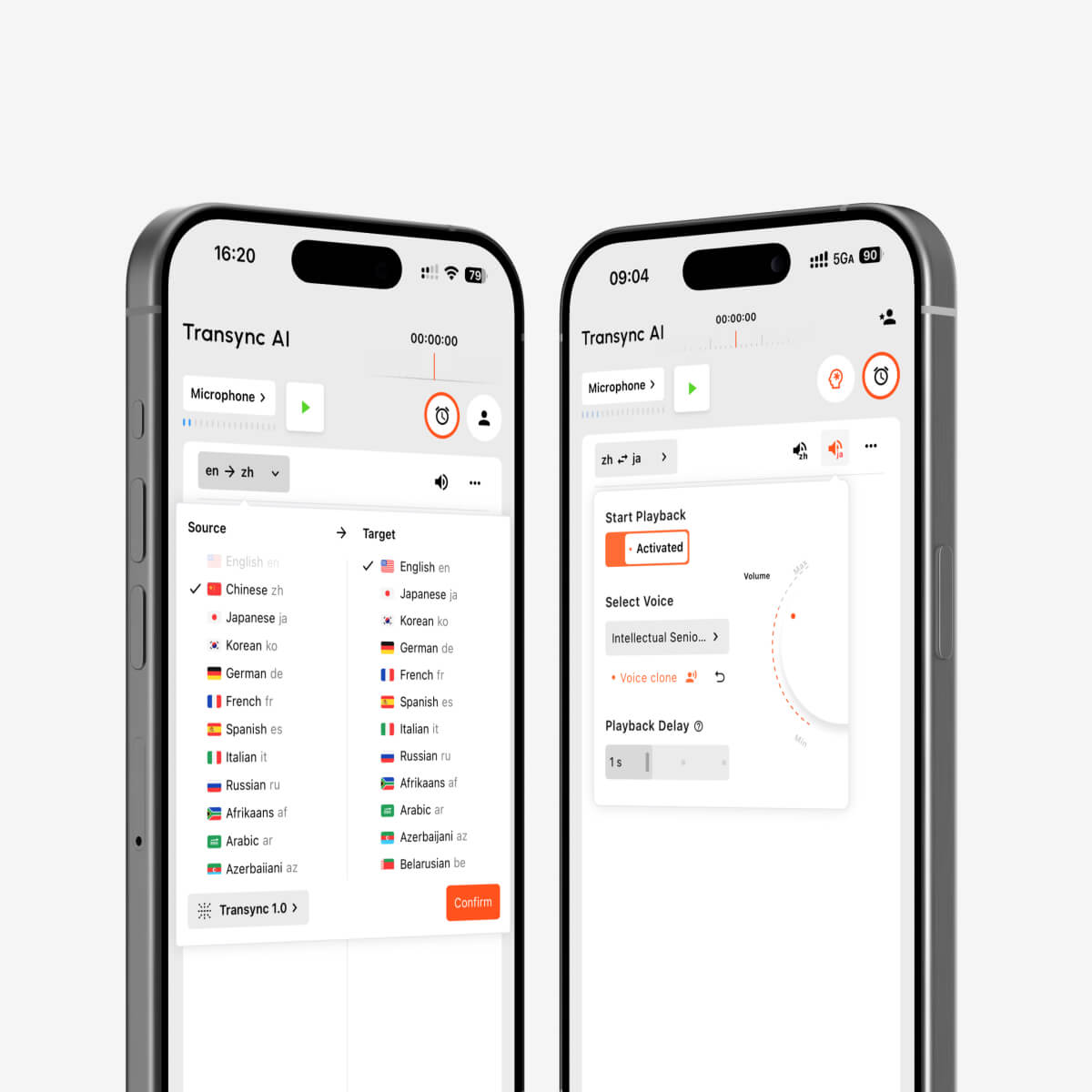
Pemutaran suara AI dan kloning suara untuk interpretasi waktu nyata multibahasa
Pengenalan bahasa dua arah
Percakapan alami berlangsung dua arah. Mengubah bahasa secara manual setelah setiap pembicara menambah hambatan. Pengenalan otomatis dalam pasangan bahasa yang dipilih membuat percakapan lebih mudah diikuti.
Kontrol terminologi dan konteks
Nama, merek, singkatan, dan istilah industri merupakan sumber kesalahan yang umum. Fitur Kata Kunci dan Konteks Asisten AI Memungkinkan pengguna untuk menjelaskan topik dan mendefinisikan kosakata penting sebelum percakapan dimulai.
Pengaturan audio untuk panggilan online
Penerjemahan rapat memerlukan akses ke suara peserta lokal dan audio peserta jarak jauh. fitur berbagi audio komputer menangkap suara dari peserta lain, sementara fitur mikrofon virtual Membantu mengirimkan suara yang telah diterjemahkan ke dalam rapat.
Catatan setelah percakapan
Audio terjemahan bersifat sementara kecuali jika alat tersebut membuat rekaman yang dapat digunakan. Fitur catatan rapat berbasis AI menghasilkan transkrip dan ringkasan, sementara panduan manajemen catatan terjemahan menjelaskan cara menemukan dan mengatur sesi sebelumnya.
Cara Memilih Terjemahan yang Tepat dengan Alat Suara
Ajukan pertanyaan-pertanyaan ini sebelum memilih produk:
- Apakah tugas utama tersebut berupa rapat, percakapan saat perjalanan, acara, proyek media, alur kerja dokumen, atau produk perangkat lunak?
- Apakah pengguna memerlukan terjemahan suara, teks terjemahan, atau keduanya?
- Apakah produk tersebut mendukung pasangan bahasa yang tepat?
- Bisakah sistem ini memproses kedua sisi percakapan?
- Apakah ini berfungsi pada perangkat dan platform rapat yang dibutuhkan?
- Apakah pengguna dapat memberikan kosakata dan konteks khusus?
- Apakah transkrip atau ringkasan diperlukan setelahnya?
- Apa yang terjadi pada audio, transkrip, dan data suara?
- Apakah ini memerlukan koneksi internet?
- Apakah harga yang ditawarkan sesuai dengan durasi dan frekuensi sesi yang diharapkan?
Jangan hanya memilih berdasarkan total bahasa yang diiklankan. Alat terbaik adalah alat yang alur kerja, hasil, dan kontrolnya sesuai dengan situasi nyata.
Cara Penggunaan Transync AI untuk Terjemahan Lisan
- Membuka Transync AI di web, Windows, macOS, iOS, atau Android.
- Pilih dua bahasa yang digunakan dalam percakapan.
- Pilih mikrofon atau input audio komputer yang tepat.
- Tambahkan istilah-istilah penting dengan Fitur Kata Kunci dan Konteks Asisten AI.
- Mulai alat penerjemahan waktu nyata.
- Konfirmasikan bahwa subtitle asli dan terjemahan diperbarui dengan benar.
- Nyalakan Penerjemah suara AI ketika peserta membutuhkan terjemahan yang dapat didengar.
- Gunakan fitur mikrofon virtual untuk hasil terjemahan dalam panggilan online.
- Tinjau hasilnya melalui Fitur catatan rapat berbasis AI.
Periksa halaman bahasa yang didukung Sebelum sesi dimulai, lakukan uji coba singkat dengan pengaturan audio yang sebenarnya.
Apa yang Dapat Menurunkan Kualitas Terjemahan Suara?
Kualitas terjemahan dapat menurun ketika:
- Beberapa orang berbicara secara bersamaan.
- Musik atau suara ruangan lebih keras daripada suara speaker.
- Mikrofonnya terlalu jauh.
- Koneksi internet tidak stabil.
- Para pembicara menggunakan akronim yang tidak dapat dijelaskan atau nama-nama yang tidak umum.
- Kalimat tersebut tidak lengkap atau sangat ambigu.
- Audio sumber mengalami distorsi atau kompresi.
Mintalah peserta untuk bergiliran berbicara, gunakan mikrofon yang jernih, berikan konteks, dan verifikasi angka atau istilah penting. Untuk percakapan yang berkaitan dengan hukum, medis, keselamatan, atau yang mengikat secara kontrak, gunakan penerjemah yang berkualifikasi atau peninjauan profesional bila diperlukan.
Pertanyaan yang Sering Diajukan (FAQ) tentang Terjemahan dengan Suara
Apa yang dimaksud dengan terjemahan dengan suara?
Terjemahan dengan suara Artinya menerjemahkan audio lisan dan mengembalikan hasilnya sebagai ucapan, seringkali dengan teks terjemahan (subtitle). Ini juga dikenal sebagai terjemahan suara, terjemahan ucapan ke ucapan, atau terjemahan audio.
Apakah terjemahan ucapan dapat diputar selama rapat daring?
Ya. Itu Fitur terjemahan rapat langsung dari Transync AI bekerja bersama Zoom, Microsoft Teams, Dan Google Meet. Itu Penerjemah suara AI menyediakan pemutaran terjemahan, dan fitur mikrofon virtual membantu mengarahkannya ke dalam panggilan.
Bisakah saya mendengar terjemahan dengan suara saya sendiri?
Itu Fitur kloning suara dari Transync AI Dapat membuat pemutaran terjemahan dengan suara yang dimodelkan berdasarkan pengguna. Output suara harus diuji sebelum presentasi atau pertemuan penting.
Apakah terjemahan suara juga menyertakan teks terjemahan?
Banyak alat yang menyediakan keduanya. Transync AI Menggabungkan suara yang diterjemahkan dengan teks terjemahan dwibahasa, memungkinkan peserta untuk mendengarkan dan membaca selama percakapan yang sama.
Apakah terjemahan lisan berfungsi secara offline?
Dukungan offline bergantung pada produk dan bahasa. Transync AI Membutuhkan koneksi internet dan tidak menawarkan mode offline. Verifikasi ketersediaan offline langsung dengan penyedia layanan terjemahan konsumen sebelum bepergian.
Apakah terjemahan dengan suara cocok untuk pertemuan rahasia?
Tinjau ketentuan data dan privasi penyedia layanan saat ini sebelum memproses konten sensitif. Transync AI menyatakan bahwa data pelanggan tidak digunakan untuk pelatihan AI secara default dan bahwa audio dihapus setelah diproses. Organisasi dapat meninjau Pusat Kepercayaan untuk informasi lebih lanjut.
Bisakah terjemahan suara menggantikan penerjemah manusia?
Sistem ini dapat mendukung banyak percakapan sehari-hari, pendidikan, dan bisnis, tetapi tidak dapat menjamin keakuratan sempurna atau nuansa budaya. Diskusi medis, hukum, keselamatan, dan kontrak yang berisiko tinggi mungkin memerlukan penerjemah manusia yang berkualifikasi.
Rekomendasi Akhir
Pilih alat yang sesuai dengan sumber suara dan apa yang seharusnya terjadi setelah suara tersebut diterjemahkan:
- Memilih Talkao atau Google Terjemahan untuk perjalanan singkat dan penerjemahan sehari-hari.
- Memilih duniawi ketika audiens acara besar membutuhkan teks terjemahan atau audio.
- Memilih Soniox ketika pengembang membutuhkan API pengenalan suara untuk produk khusus.
- Memilih Maestra untuk sulih suara, teks terjemahan, dan lokalisasi media.
- Memilih DeepL untuk alur kerja teks, dokumen, perusahaan, dan suara tertentu yang lebih luas.
- Memilih Transync AI untuk rapat multibahasa langsung yang membutuhkan subtitle dwibahasa, terjemahan ucapan alami, konteks terminologi, dan catatan setelah percakapan.
Efektif terjemahan dengan suara Lebih dari sekadar mengucapkan kata-kata yang telah diterjemahkan, alat ini membantu pendengar memahami makna, memungkinkan pembicara merespons secara alami, dan memberikan peserta teks atau rekaman yang mereka butuhkan untuk mengkonfirmasi apa yang terjadi.
Jika Anda menginginkan pengalaman generasi berikutnya, Transync AI memimpin dengan terjemahan real-time bertenaga AI yang membuat percakapan mengalir secara alami. Anda bisa coba gratis Sekarang.
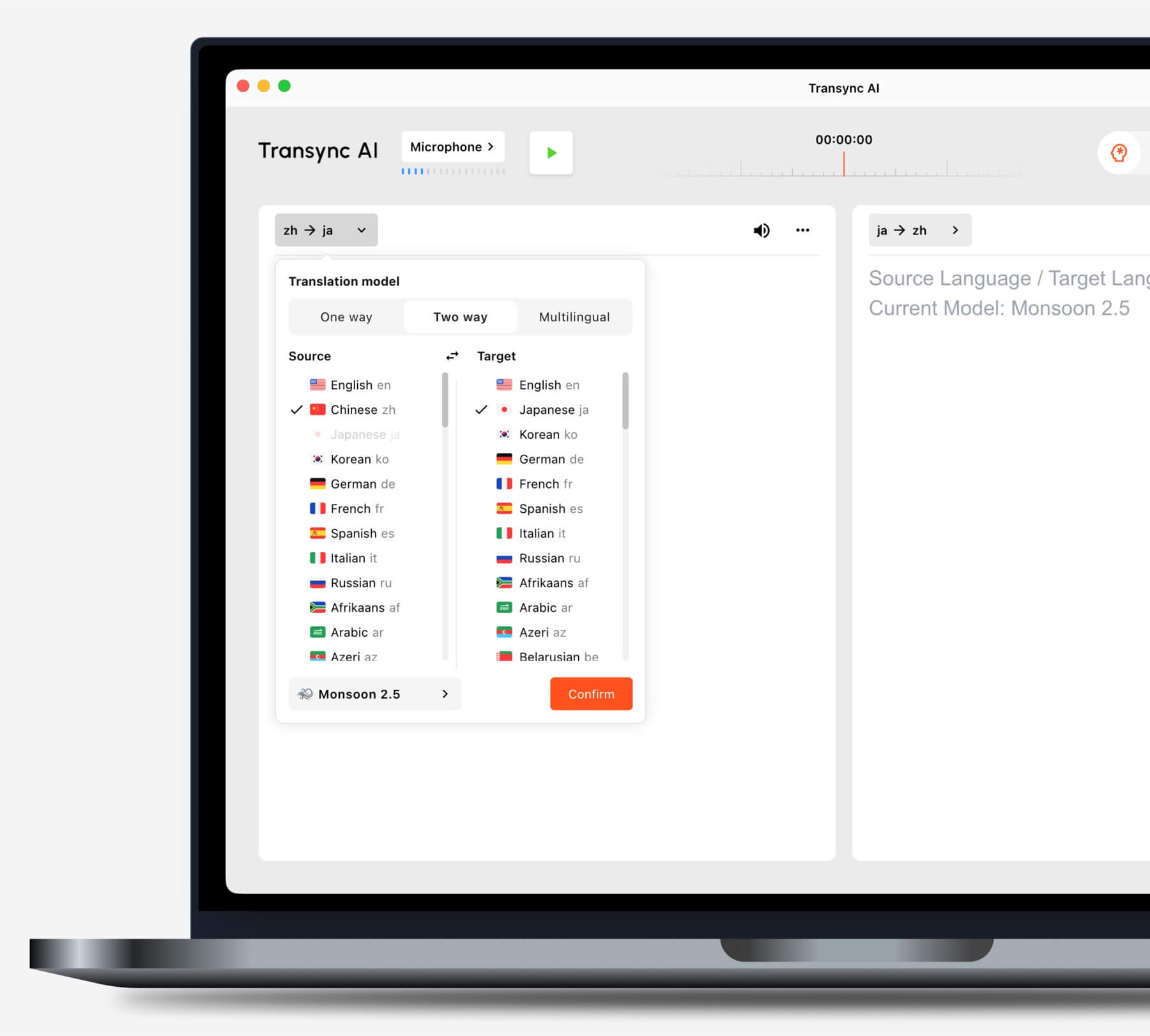
Pilih mode terjemahan yang sesuai dengan skenario Anda sebelum memulai tugas.
