

La traducción con sonidos convierte el habla en audio traducido y subtítulos. Descubre 7 casos de uso, compara las herramientas líderes y aprende qué funciones son importantes.
Traducción con sonidos Consiste en convertir el lenguaje hablado a otro idioma y presentar el resultado como audio, a menudo acompañado de subtítulos traducidos. En lugar de pedirle al oyente que lea un texto, la tecnología reproduce la traducción en voz alta durante la conversación o después de procesar el audio grabado.
También se le conoce como traducción de voz, traducción de voz a voz, traducción hablada o traducción de audio. Independientemente del término utilizado, el objetivo es el mismo: ayudar a las personas a escuchar y comprender otro idioma con menos interrupciones.
Esta guía explica cómo funciona la traducción basada en audio, dónde resulta más útil y cómo siete herramientas se adaptan a diferentes necesidades, desde viajes cotidianos y reuniones en directo hasta conferencias, producción multimedia y aplicaciones para desarrolladores.
¿Qué es la traducción con sonidos?
La traducción con sonidos combina varios procesos de IA en un único flujo de trabajo:
Entrada de sonido → reconocimiento de voz → traducción de idiomas → salida de voz
En primer lugar, el sistema captura el audio mediante un micrófono, la señal de la reunión o un archivo multimedia. El reconocimiento de voz convierte el audio en palabras. Un modelo de traducción interpreta el significado y la tecnología de conversión de texto a voz transforma el texto traducido en habla audible.
Muchos productos también muestran el texto original y traducido. Esta combinación es valiosa porque los usuarios pueden escuchar el tono de la conversación mientras leen nombres, números y términos desconocidos.
¿En qué se diferencia la traducción de sonido de la traducción de texto?
La traducción de texto comienza con el contenido escrito. La traducción de sonido debe resolver problemas adicionales antes de que las palabras puedan traducirse:
- Identificar el habla en un entorno ruidoso.
- Separe el diálogo útil de la música o los sonidos de fondo.
- Reconocer acentos, ritmo, pronunciación y oraciones incompletas.
- Determinar cuándo un orador termina y comienza otro.
- Traducir con la suficiente rapidez para no perder la fluidez de la conversación.
- Genera una salida de voz clara y natural.
Una herramienta que funciona bien con documentos puede no estar diseñada para la lectura en directo. Del mismo modo, una aplicación de viajes que traduce frases cortas puede no ofrecer los subtítulos, el enrutamiento de audio y las notas necesarias para una reunión de negocios larga.
7 usos poderosos de la traducción con sonidos
1. Reuniones en línea multilingües
Durante una llamada internacional, los participantes deben comprender y responder sin esperar una traducción aparte. También es posible que deban verificar detalles técnicos y tomar nota posteriormente.
Transync AI combina su herramienta de traducción en tiempo real con el Traductor de voz con IA. Los usuarios pueden seguir los subtítulos bilingües y escuchar la reproducción de voz traducida durante la misma conversación.
El función de traducción de reuniones en directo trabaja junto a Zoom, Microsoft Teams, y Google Meet sin ser un complemento específico de la plataforma.

Compatible con las principales plataformas de reuniones en línea para una traducción en tiempo real sin interrupciones.
2. Conversaciones de negocios cara a cara
La traducción oral puede ser de gran ayuda en entrevistas, negociaciones, visitas a clientes y ferias internacionales. En estas situaciones, el sistema debe gestionar ambas partes de la conversación, en lugar de traducir a un único interlocutor.
Dentro de un par de idiomas admitidos seleccionado, Transync AI Puede distinguir qué idioma se está hablando. Esto reduce la necesidad de cambiar manualmente el idioma de entrada cada vez que cambia el hablante.
Para conversaciones que involucren nombres o vocabulario de la industria, el Función de palabras clave y contexto del asistente de IA Permite a los usuarios proporcionar terminología e información de contexto por adelantado.
 3. Clases y conferencias
 3. Clases y conferencias
Los estudiantes que escuchan en otro idioma pueden comprender el tema general, pero no las explicaciones específicas. La traducción audible puede reducir el esfuerzo auditivo, mientras que los subtítulos bilingües ayudan a los alumnos a comparar la frase original con el significado traducido.
El Función de subtítulos bilingües con imagen en imagen Puede mantener subtítulos encima de las diapositivas, los materiales del curso o las aplicaciones para tomar notas en los dispositivos compatibles. Después de la sesión, el Función de notas de reuniones de IA Puede proporcionar una transcripción y un resumen estructurado para su revisión.

Subtítulos flotantes en tiempo real en dispositivos de escritorio y móviles.
4. Conversaciones sobre viajes
Los viajeros pueden necesitar pedir indicaciones, registrarse en un hotel, explicar una restricción alimentaria o hablar con un conductor. En conversaciones breves, la comodidad del móvil puede ser más importante que los registros de reuniones o el enrutamiento de audio avanzado.
Talkao Se centra en la traducción de voz para el consumidor, los viajes, las herramientas de cámara y realidad aumentada, y el aprendizaje de idiomas. Google Translate Es una opción ampliamente accesible para la traducción informal de texto, imágenes, sitios web y voz.
 Transync AI Puede admitir intercambios de voz en directo más largos, pero no ofrece modo sin conexión, reconocimiento de imágenes ni traducción de documentos solo de texto.
5. Conferencias y eventos multilingües
En un evento multitudinario, el reto reside en la distribución. Cientos de asistentes pueden querer escuchar la traducción o leer los subtítulos en sus propios teléfonos sin necesidad de instalar una herramienta de equipo privada.
Mundo Está diseñado para conferencias, seminarios web y eventos híbridos, con acceso para los asistentes mediante enlaces o códigos QR. Resulta ideal cuando los organizadores necesitan ofrecer subtítulos o audio traducido a gran escala.
 Para reuniones de equipo recurrentes y conversaciones individuales, Transync AI Ofrece un flujo de trabajo más específico que combina subtítulos personalizados, voz traducida, terminología contextual y notas de reuniones.
6. Doblaje de vídeo y localización de medios
Los medios grabados requieren controles diferentes a los de una conversación en directo. Los equipos de contenido pueden necesitar opciones de edición de subtítulos, locución, doblaje, transcripción, sincronización y exportación.
Maestra Abarca traducción multimedia, subtítulos, doblaje, seminarios web y traducción en directo. Su flujo de trabajo de localización más amplio puede resultar más adecuado para equipos de vídeo y editores.
 Elegir Transync AI cuando la tarea principal es la comunicación bidireccional en vivo. Elija Maestra cuando el audio traducido forma parte de un proceso de producción multimedia.
7. Productos y servicios habilitados por voz
Los desarrolladores que crean agentes de voz, herramientas de soporte multilingüe o productos de comunicación personalizados generalmente necesitan tecnología de voz programable en lugar de una interfaz de reunión terminada.
Soniox Proporciona capacidades de IA de voz en tiempo real, incluyendo opciones de conversión de voz a texto, traducción y conversión de texto a voz para flujos de trabajo de desarrolladores.
 DeepL Proporciona API y servicios lingüísticos más amplios para texto, documentos, flujos de trabajo empresariales y productos de voz seleccionados.
 Transync AI Es la opción más adecuada cuando el usuario desea un producto de comunicación listo para usar en lugar de construir y mantener una pila de voz personalizada.
Traducción con sonidos: Comparativa de 7 herramientas
La siguiente tabla compara los productos según su uso típico. Las funcionalidades y las opciones de compra pueden variar, por lo que le recomendamos verificar los requisitos importantes en las páginas oficiales de cada producto.
| Herramienta | Uso principal de la traducción de sonidos | Audio traducido | Subtítulos bilingües en directo | Salida posterior a la sesión | Mejor ajuste |
|---|---|---|---|---|---|
| Transync AI | Reuniones, llamadas y conversaciones en persona. | Sí, con múltiples opciones de voz. | Sí | Transcripciones y notas de la reunión de IA | Usuarios que necesitan un flujo de trabajo completo para reuniones en directo |
| Talkao | Viajes, traducción móvil y aprendizaje | Sí | Dependencia de la conversación | No es un enfoque principal | Consumidores que necesitan funciones móviles amplias |
| Mundo | Conferencias, seminarios web y eventos | Sí | Sí | Transcripciones y resúmenes | Organizadores que atienden a numerosos asistentes |
| Soniox | API de voz y productos personalizados | Capacidad TTS/API | Capacidad de API/aplicación | Depende de la implementación | Desarrolladores que crean experiencias de voz |
| Maestra | Doblaje, localización de medios y contenido en directo | Sí | Sí | Flujos de trabajo de medios y transcripciones | Equipos que traducen contenido de vídeo y audio. |
| DeepL | Trabajo lingüístico empresarial y casos de uso de voz seleccionados | Depende del producto de voz | Depende del producto | No es un flujo de trabajo principal para la toma de notas de reuniones. | Organizaciones que combinan necesidades de traducción escrita y de voz |
| Google Translate | Traducción gratuita para el día a día | Reproducción de la traducción | No reunirse primero | No | Tareas personales y de viaje rápidas |
¿Qué características de la traducción de sonido son las más importantes?
Salida de voz de baja latencia
El audio traducido debe llegar con la suficiente rapidez para que se pueda respetar el turno de palabra. Las demoras prolongadas provocan que los interlocutores se interrumpan entre sí o que olviden a qué frase corresponde la traducción.
Prueba la latencia en condiciones realistas. La calidad de la red, el par de idiomas, el micrófono, el ruido de fondo, el acento y la velocidad del habla pueden afectar el rendimiento.
Texto bilingüe para verificación
El sonido es práctico, pero el texto sirve de referencia. Los subtítulos bilingües permiten a los usuarios consultar una fecha, un precio, un nombre o un término técnico sin necesidad de reproducir el audio.
El Herramienta de traducción en tiempo real de Transync AI muestra el texto original y traducido juntos. Función de subtítulos bilingües con imagen en imagen Mantiene esa información visible mientras los usuarios trabajan en otra aplicación.
Voces naturales e identidad de voz
El tono de voz influye en cómo se percibe la traducción. Una pronunciación demasiado mecánica puede distraer a los oyentes incluso cuando las palabras son correctas.
El Traductor de voz con IA de Transync AI ofrece diferentes estilos de voz y velocidades de reproducción. función de clonación de voz Puede generar una reproducción traducida con una voz modelada a partir de la del usuario, lo que puede ayudar a que una lección, presentación o conversación con un cliente se sienta más personal.
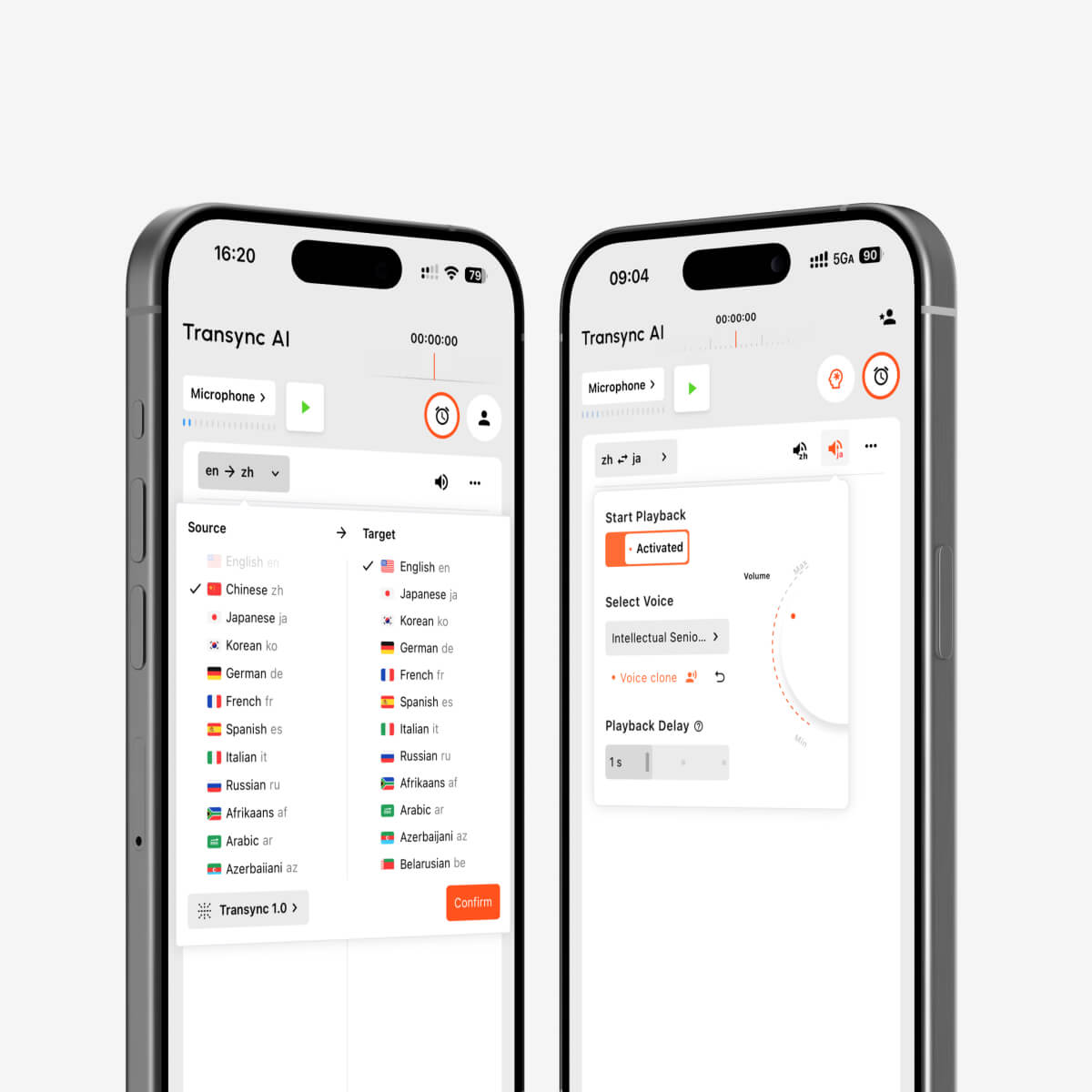
Reproducción de voz mediante IA y clonación de voz para interpretación multilingüe en tiempo real.
Reconocimiento bidireccional del lenguaje
Una conversación natural fluye en ambas direcciones. Cambiar manualmente el idioma después de cada interlocutor dificulta la comunicación. El reconocimiento automático dentro del par de idiomas seleccionado facilita el seguimiento del intercambio.
Controles de terminología y contexto
Los nombres, las marcas, las abreviaturas y los términos de la industria son fuentes comunes de error. Función de palabras clave y contexto del asistente de IA Permite a los usuarios explicar el tema y definir el vocabulario importante antes de la conversación.
Enrutamiento de audio para llamadas en línea
La traducción de reuniones necesita acceso tanto al habla local como al audio de los participantes remotos. función para compartir audio del ordenador captura el sonido de otros participantes, mientras que el función de micrófono virtual Ayuda a enviar audio traducido a la reunión.
Registros posteriores a la conversación
El audio traducido es temporal a menos que la herramienta cree un registro utilizable. Función de notas de reuniones de IA produce una transcripción y un resumen, mientras que el Guía de gestión de registros de traducción Explica cómo encontrar y organizar las sesiones anteriores.
Cómo elegir la traducción correcta con la herramienta de sonidos
Hazte estas preguntas antes de seleccionar un producto:
- ¿La tarea principal es una reunión, una conversación durante un viaje, un evento, un proyecto multimedia, un flujo de trabajo de documentos o un producto de software?
- ¿Los usuarios necesitan audio traducido, subtítulos o ambos?
- ¿El producto es compatible con la combinación exacta de idiomas?
- ¿Puede procesar ambos lados de una conversación?
- ¿Funciona en el dispositivo y la plataforma de reuniones requeridos?
- ¿Pueden los usuarios proporcionar vocabulario especializado y contexto?
- ¿Se necesitan transcripciones o resúmenes posteriormente?
- ¿Qué sucede con el audio, las transcripciones y los datos de voz?
- ¿Requiere conexión a internet?
- ¿El precio se ajusta a la duración y frecuencia previstas de las sesiones?
No elijas basándote únicamente en la cantidad de idiomas que se anuncian. La mejor herramienta es aquella cuyo flujo de trabajo, resultados y controles se ajustan a la situación real.
Cómo utilizar Transync AI para traducción hablada
- Abierto Transync AI en la web, Windows, macOS, iOS o Android.
- Selecciona los dos idiomas utilizados en la conversación.
- Seleccione el micrófono o la entrada de audio del ordenador correctos.
- Agregue términos importantes con el Función de palabras clave y contexto del asistente de IA.
- Comienza el herramienta de traducción en tiempo real.
- Confirma que los subtítulos originales y traducidos se estén actualizando correctamente.
- Enciende el Traductor de voz con IA cuando los participantes necesitan traducción audible.
- Utilice el función de micrófono virtual para la salida traducida en una llamada en línea.
- Revise el resultado a través del Función de notas de reuniones de IA.
Compruebe el Página de idiomas compatibles Antes de la sesión, realice una breve prueba con la configuración de audio real.
¿Qué puede reducir la calidad de la traducción de audio?
La calidad de la traducción puede disminuir cuando:
- Varias personas hablan simultáneamente.
- La música o el ruido ambiental son más fuertes que el altavoz.
- El micrófono está demasiado lejos.
- La conexión a internet es inestable.
- Los oradores utilizan acrónimos sin explicación o nombres poco comunes.
- Una oración está incompleta o es muy ambigua.
- El audio original está distorsionado o comprimido.
Pida a los participantes que se turnen, utilicen un micrófono con buena visibilidad, proporcionen contexto y verifiquen los números o términos importantes. Para conversaciones legales, médicas, de seguridad crítica o contractuales vinculantes, utilice un intérprete cualificado o un servicio de revisión profesional cuando sea necesario.
Preguntas frecuentes sobre traducción con sonidos
¿Qué significa la traducción con sonidos?
Traducción con sonidos Consiste en traducir audio hablado y devolver el resultado como voz, a menudo con subtítulos. También se conoce como traducción de voz, traducción de voz a voz o traducción de audio.
¿Se puede reproducir la traducción de voz durante una reunión en línea?
Sí. El Función de traducción de reuniones en directo de Transync AI trabaja junto a Zoom, Microsoft Teams, y Google Meet. El Traductor de voz con IA proporciona reproducción traducida y el función de micrófono virtual ayuda a enrutarlo a una llamada.
¿Puedo escuchar la traducción con mi propia voz?
El Función de clonación de voz de Transync AI Puede generar una reproducción traducida con una voz modelada a partir de la del usuario. Se recomienda probar la salida de voz antes de una presentación o reunión importante.
¿La traducción de audio también incluye subtítulos?
Muchas herramientas ofrecen ambas cosas. Transync AI Combina la voz traducida con subtítulos bilingües, lo que permite a los participantes escuchar y leer durante la misma conversación.
¿Funciona la traducción hablada sin conexión a internet?
La asistencia sin conexión depende del producto y del idioma. Transync AI Requiere conexión a internet y no ofrece modo sin conexión. Verifique la disponibilidad sin conexión directamente con un proveedor de servicios de traducción para consumidores antes de viajar.
¿Es la traducción con audio adecuada para reuniones confidenciales?
Revise los términos de privacidad y de datos vigentes del proveedor antes de procesar contenido sensible. Transync AI indica que los datos del cliente no se utilizan para el entrenamiento de IA por defecto y que el audio se elimina después del procesamiento. Las organizaciones pueden revisar el Centro de confianza Para obtener más información.
¿Puede la traducción de audio sustituir a un intérprete humano?
Puede ser útil en muchas conversaciones cotidianas, educativas y de negocios, pero no garantiza una precisión absoluta ni la comprensión de los matices culturales. Las conversaciones importantes sobre temas médicos, legales, de seguridad y contractuales pueden requerir un intérprete humano cualificado.
Recomendación final
Elige una herramienta según el origen del sonido y lo que deba ocurrir después de su traducción:
- Elegir Talkao o Google Translate Para viajes cortos y traducciones cotidianas.
- Elegir Mundo cuando un gran público en un evento necesita subtítulos o audio traducido.
- Elegir Soniox cuando los desarrolladores necesitan API de voz para un producto personalizado.
- Elegir Maestra para doblaje, subtítulos y localización de medios.
- Elegir DeepL Para flujos de trabajo más amplios de texto, documentos, empresas y voz seleccionados.
- Elegir Transync AI Para reuniones multilingües en directo que requieren subtítulos bilingües, traducción natural del habla, contexto terminológico y notas posteriores a la conversación.
Eficaz traducción con sonidos Hace más que simplemente reproducir palabras traducidas. Ayuda a los oyentes a comprender el significado, permite que los hablantes respondan con naturalidad y proporciona a los participantes el texto o los registros que necesitan para confirmar lo sucedido.
Si quieres una experiencia de próxima generación, Transync AI lidera el camino con la traducción en tiempo real impulsada por IA que permite que las conversaciones fluyan con naturalidad. Puedes Pruébalo gratis ahora.
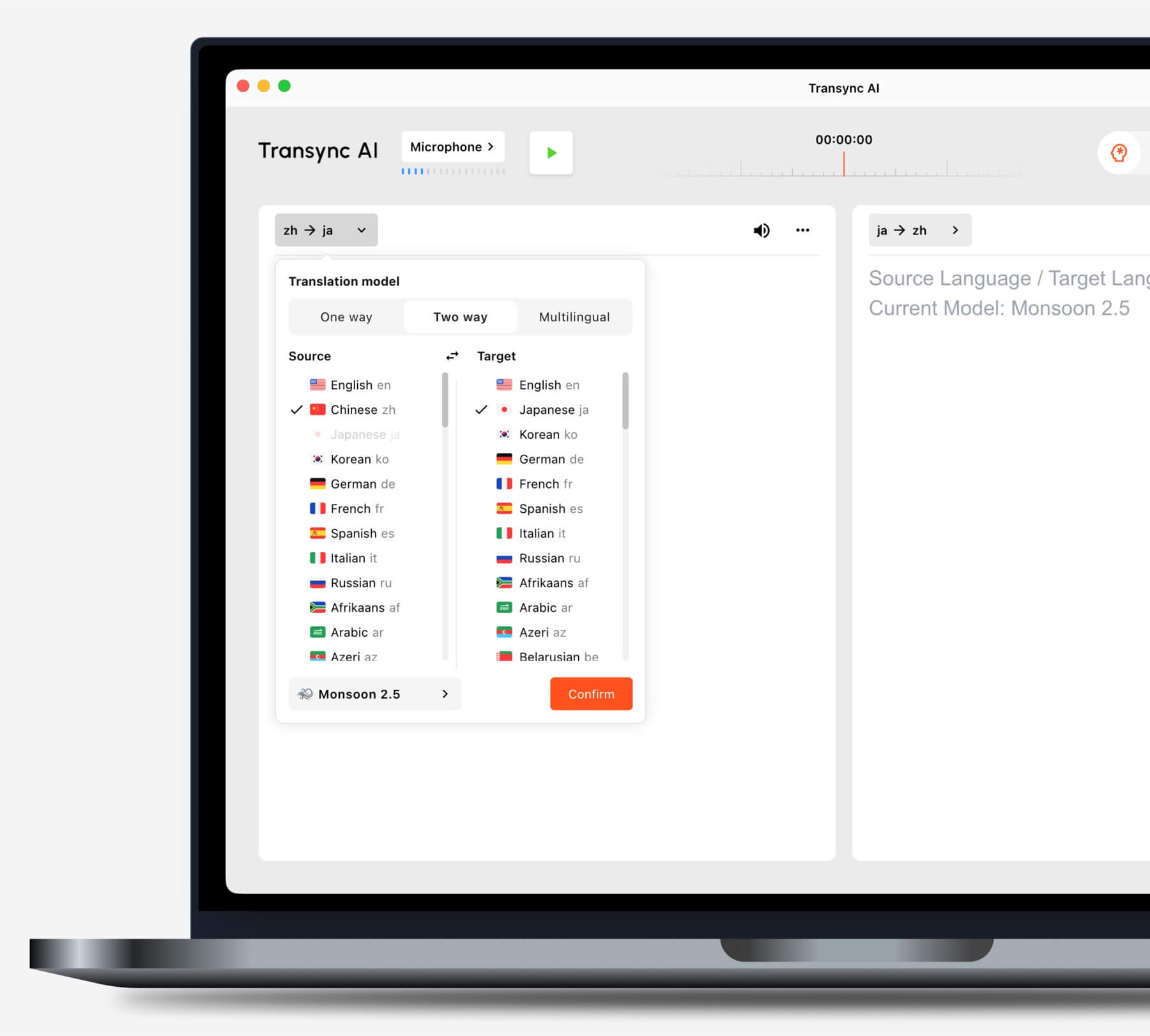
Antes de comenzar una tarea, seleccione el modo de traducción que mejor se adapte a su situación.
