

Compare 7 ferramentas de tradução de idiomas com IA para reuniões, viagens, eventos, mídia e APIs. Use este guia de decisão para escolher o fluxo de trabalho ideal.
Um tradutor de idiomas por IA Utiliza inteligência artificial para interpretar conteúdo em um idioma e produzir um significado equivalente em outro. Dependendo do produto, pode traduzir texto, documentos, imagens, fala ao vivo, mídia gravada ou reuniões multilíngues inteiras.
Essa variedade torna a escolha de uma ferramenta mais difícil do que parece à primeira vista. Um tradutor de viagens gratuito, um assistente para reuniões, uma plataforma de legendagem de eventos, um pacote de localização de mídia e uma API para desenvolvedores resolvem problemas diferentes — mesmo quando cada um deles é descrito como tradução por IA.
Este guia começa pelo usuário, e não pela lista de funcionalidades. Siga o processo de decisão, compare sete opções principais e teste o fluxo de trabalho que melhor se adapta às suas necessidades reais de comunicação.
Resposta rápida: De qual tradutor de idiomas com IA você precisa?
Comece pelo resultado:
- Precisa de frases rápidas para viagem, imagens ou textos informais? Considerar Talkao ou Google Tradutor.
- Precisa de legendas bilíngues, tradução de áudio e anotações de reuniões? Considerar Transync AI.
- Precisa de legendas e áudio para muitos participantes do evento? Considerar Mundano.
- Precisa integrar a tradução ao seu próprio produto? Considerar Soniox.
- Precisa de legendas, dublagem e localização de conteúdo? Considerar Maestra.
- Precisa de texto, documentos, ferramentas de escrita ou fluxos de trabalho de linguagem empresarial? Considerar DeepL.
Nenhum tradutor de IA é o ideal para todas as seis tarefas. Selecionar de acordo com o caso de uso evita pagar por um fluxo de trabalho inadequado.
Como funciona um tradutor de idiomas com IA?
O processo depende da entrada.
Para conteúdo escrito, o sistema identifica padrões de linguagem, contexto e significado antes de gerar o texto traduzido. Para comunicação falada, ele precisa realizar etapas adicionais:
Capturar áudio → reconhecer a fala → interpretar o contexto → traduzir o significado → exibir legendas ou gerar voz
A fala ao vivo é especialmente desafiadora porque a ferramenta precisa lidar com sotaques, pausas, frases incompletas, ruído de fundo e vários falantes sem introduzir um atraso perceptível.
Os produtos modernos podem adicionar controles de terminologia, síntese de voz, clonagem de voz, roteamento de áudio para plataformas de reunião, transcrições, resumos e APIs. Esses recursos adicionais determinam se a ferramenta é adequada para uma frase informal ou para um fluxo de trabalho empresarial completo.
Comparação de Tradutores de IA: 7 Opções
A tabela compara o posicionamento típico do produto. Recursos, idiomas suportados e planos podem mudar, portanto, confirme os requisitos essenciais nos sites oficiais do produto.
| Ferramenta | Melhor para | Entrada principal | Saída de voz ao vivo | Fluxo de trabalho da reunião | Valor pós-sessão |
|---|---|---|---|---|---|
| Transync AI | Reuniões, chamadas e conversas presenciais multilíngues | Transmissão ao vivo e áudio de reuniões | Sim | Legendas bilíngues, roteamento de áudio e ferramentas de contexto | Transcrições e atas de reuniões sobre IA |
| Talkao | Viagens, tradução móvel e aprendizado de idiomas | Entradas de voz, texto, câmera e dispositivos móveis. | Sim | Não é seu foco principal | Ferramentas de tradução para o consumidor |
| Mundano | Conferências, webinars e grandes reuniões | Discurso em evento ao vivo | Sim | Focado no evento e nos participantes. | Transcrições e resumos |
| Soniox | Produtos de fala para desenvolvedores | API e áudio do aplicativo | Capacidade TTS/API | Dependente da implementação | Saída de produto personalizada |
| Maestra | Vídeo, áudio, legendas, dublagem e conteúdo ao vivo | Arquivos de mídia e discurso ao vivo | Sim | Disponível para conteúdo ao vivo | Localização e reutilização de mídia |
| DeepL | Texto, documentos, trabalho com linguagem empresarial e casos de uso de voz selecionados. | Produtos de texto, documentos, API e voz | Dependente do produto | Dependente do produto de voz | Fluxos de trabalho escritos e empresariais |
| Google Tradutor | Tradução gratuita para o dia a dia | Texto, imagens, sites, documentos e fala | Reprodução de tradução | Não se encontrar primeiro | Tradução pessoal rápida |
Caminho de decisão 1: Você está traduzindo reuniões ao vivo?
Se a resposta for sim, concentre-se na fluidez da conversa em vez da qualidade do texto em si. Os recursos mais úteis são baixa latência, reconhecimento de idioma bidirecional, legendas bilíngues, voz traduzida, roteamento de áudio para reuniões, suporte a terminologia e gravações pós-chamada.
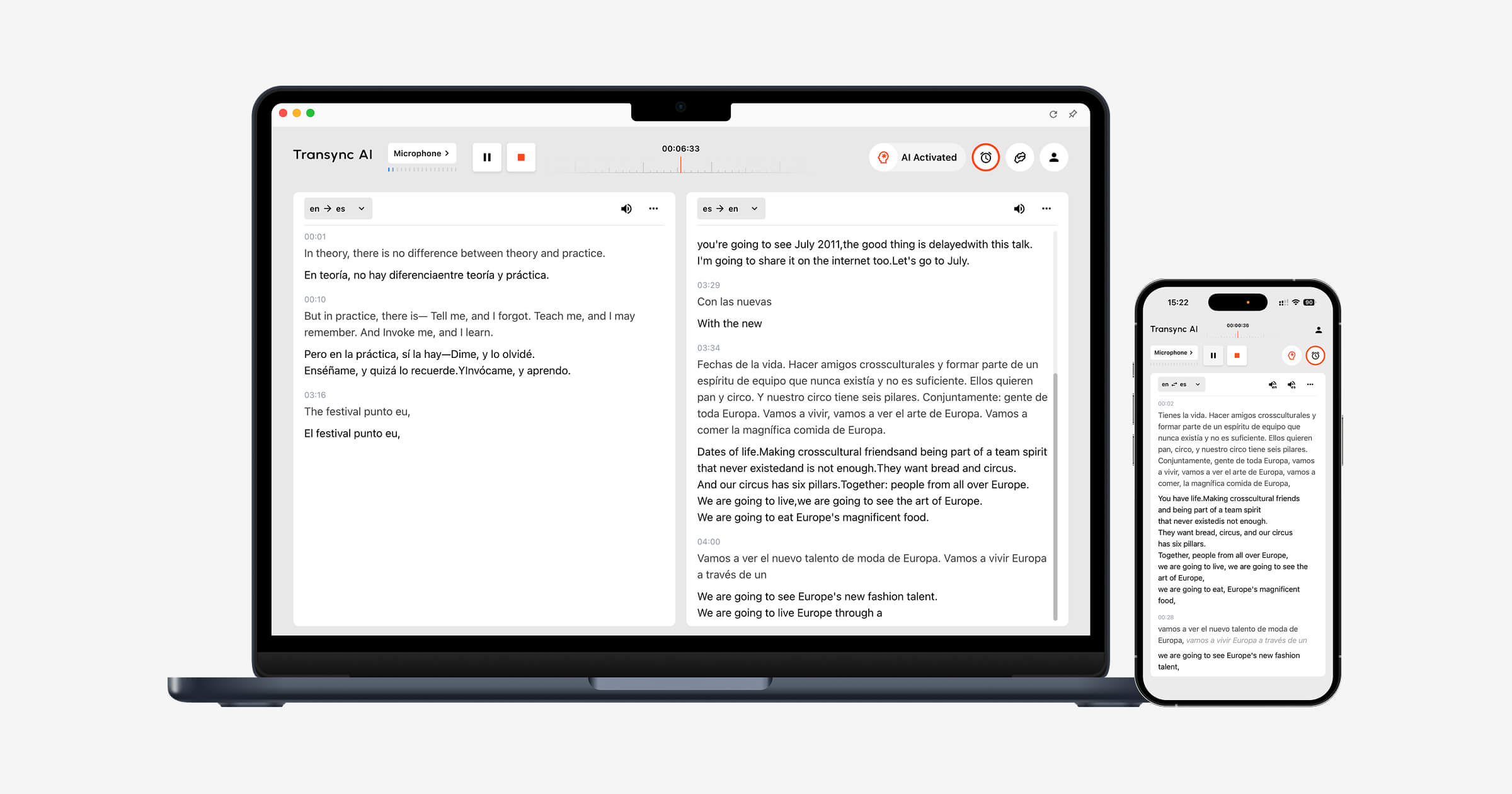
Transync AI foi projetado em torno desses requisitos. Seu ferramenta de tradução em tempo real Exibe o discurso original e a tradução lado a lado enquanto uma conversa está acontecendo.
O Tradutor de voz de IA O apresentador lê em voz alta o resultado traduzido, permitindo que os participantes ouçam e leiam ao mesmo tempo. Recurso de anotações de reuniões com IA Em seguida, cria uma transcrição e anotações estruturadas após a chamada.
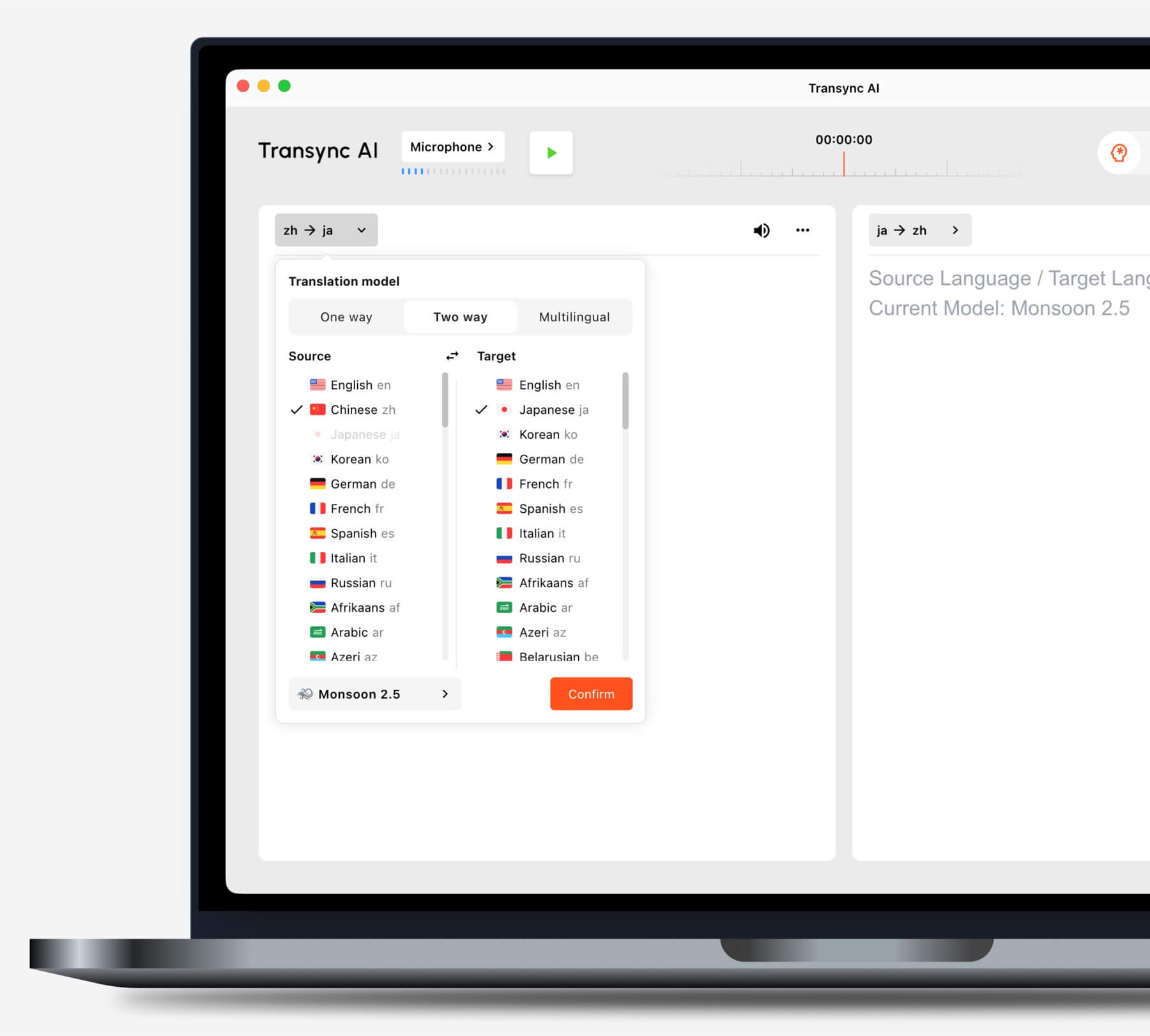
Antes de iniciar uma tarefa, escolha o modo de tradução que melhor se adapta ao seu cenário.
Você utiliza plataformas comuns de videoconferência?
O recurso de tradução ao vivo em reuniões trabalha ao lado de Zoom, Microsoft Teams, e Google Meet. Transync AI É um software independente, e não um plugin específico para uma plataforma.
O recurso de compartilhamento de áudio do computador Captura a fala de participantes remotos. recurso de microfone virtual Ajuda a enviar a voz traduzida para a reunião.

Compatível com as principais plataformas de reuniões online para tradução contínua em tempo real.
Você apresenta slides ou trabalha em outro aplicativo?
O Recurso de legendas bilíngues Picture-in-Picture Mantém as legendas originais e traduzidas visíveis sobre outros aplicativos em dispositivos compatíveis. Isso ajuda os usuários a acompanhar a tradução enquanto apresentam, demonstram softwares ou fazem anotações.
Caminho de decisão 2: Você está traduzindo um evento de grande porte?
Quando centenas de participantes precisam de acesso a recursos linguísticos, a distribuição se torna o principal desafio. Os participantes podem precisar abrir legendas ou áudio traduzido em seus próprios dispositivos, sem criar contas individuais ou instalar uma ferramenta específica para reuniões.
Mundano É ideal para conferências, webinars, eventos híbridos e grandes reuniões. Os participantes podem acessar a tradução por meio de um link ou código QR, tornando-a mais adequada para apresentações em larga escala.
 Escolher Transync AI Para tradução em reuniões pessoais e em equipe. Escolha Mundano Quando um organizador precisa fornecer tradução para um grande grupo.
Caminho de decisão 3: Você está traduzindo conteúdo de viagens ou conteúdo do dia a dia?
Para viagens, os recursos mais importantes podem ser a praticidade do celular, a tradução por câmera, a entrada de texto e a reprodução rápida de voz. Anotações de reuniões e microfones virtuais geralmente são desnecessários.
Talkao Oferece ferramentas de tradução e aprendizagem de idiomas voltadas para o consumidor, incluindo recursos de voz, câmera e dispositivos móveis. Google Tradutor Está amplamente disponível para tradução de texto, imagens, sites, documentos e conversação informal.
 Transync AI Pode ser útil em conversas presenciais mais longas, mas não oferece suporte ao modo offline, reconhecimento de imagem ou tradução de documentos somente texto.
Caminho de decisão 4: Você está localizando a mídia?
A produção de vídeo e áudio exige mais do que simplesmente entender a fala no momento. As equipes podem precisar de legendas editáveis, dublagem, sincronização, transcrição, tradução e opções de exportação.
Maestra A tradução se posiciona em diversas áreas, como tradução de mídia, transcrição, legendagem, dublagem, webinars e conteúdo ao vivo. Sua aplicação se torna ainda mais relevante quando a tradução passa a fazer parte de um fluxo de trabalho de produção e publicação.
 Escolher Transync AI Quando o objetivo principal for uma conversa bidirecional ao vivo. Escolha Maestra quando o conteúdo traduzido precisa ser editado e reutilizado como mídia.
Caminho de decisão 5: Você está criando um produto de tradução?
Uma equipe de produto precisa de infraestrutura programável, documentação, controle de latência e flexibilidade de integração. Geralmente, não precisa de uma interface de reunião para o usuário final.
Soniox Oferece recursos de conversão de fala em texto, tradução e conversão de texto em fala para desenvolvedores que criam produtos de voz.
 DeepL Oferece APIs e serviços linguísticos empresariais para texto, documentos, escrita e fluxos de trabalho de voz selecionados.
 Escolher Transync AI Quando funcionários ou clientes precisam de um tradutor de reunião finalizado, escolha uma plataforma de API quando os engenheiros forem projetar e manter toda a experiência.
Caminho de decisão 6: Texto e documentos são a prioridade?
A tradução escrita valoriza a preservação da formatação, a consistência da terminologia, a revisão, o suporte ao documento e a integração com as ferramentas de trabalho existentes. Os recursos de legendas e voz ao vivo podem ser secundários.
DeepL Possui ampla atuação em tradução de texto e documentos, suporte à escrita, APIs e fluxos de trabalho linguísticos corporativos. Google Tradutor É útil para tarefas rápidas de edição de texto, sites, imagens e documentos para o consumidor final.
Transync AI Não é um tradutor de documentos apenas de texto. Seu principal caso de uso é a comunicação multilíngue em tempo real.
Por que Transync AI Adequado para conversas multilíngues
Transync AI Conecta as etapas de uma conversa ao vivo: ouvir a outra pessoa, ler a tradução, responder e manter um registro.
reconhecimento automático bidirecional
Dentro de um par de idiomas suportados selecionado, o ferramenta de tradução em tempo real É possível distinguir o idioma falado. Os usuários não precisam pressionar um botão de troca de idioma a cada vez.
 Reprodução de voz natural e clonagem de voz
 Reprodução de voz natural e clonagem de voz
O Tradutor de voz de IA Oferece diferentes estilos de voz e velocidades de reprodução. recurso de clonagem de voz Pode gerar fala traduzida com uma voz modelada a partir da do usuário, ajudando a tornar as aulas, apresentações e chamadas com clientes mais pessoais.
 Palavras-chave e contexto
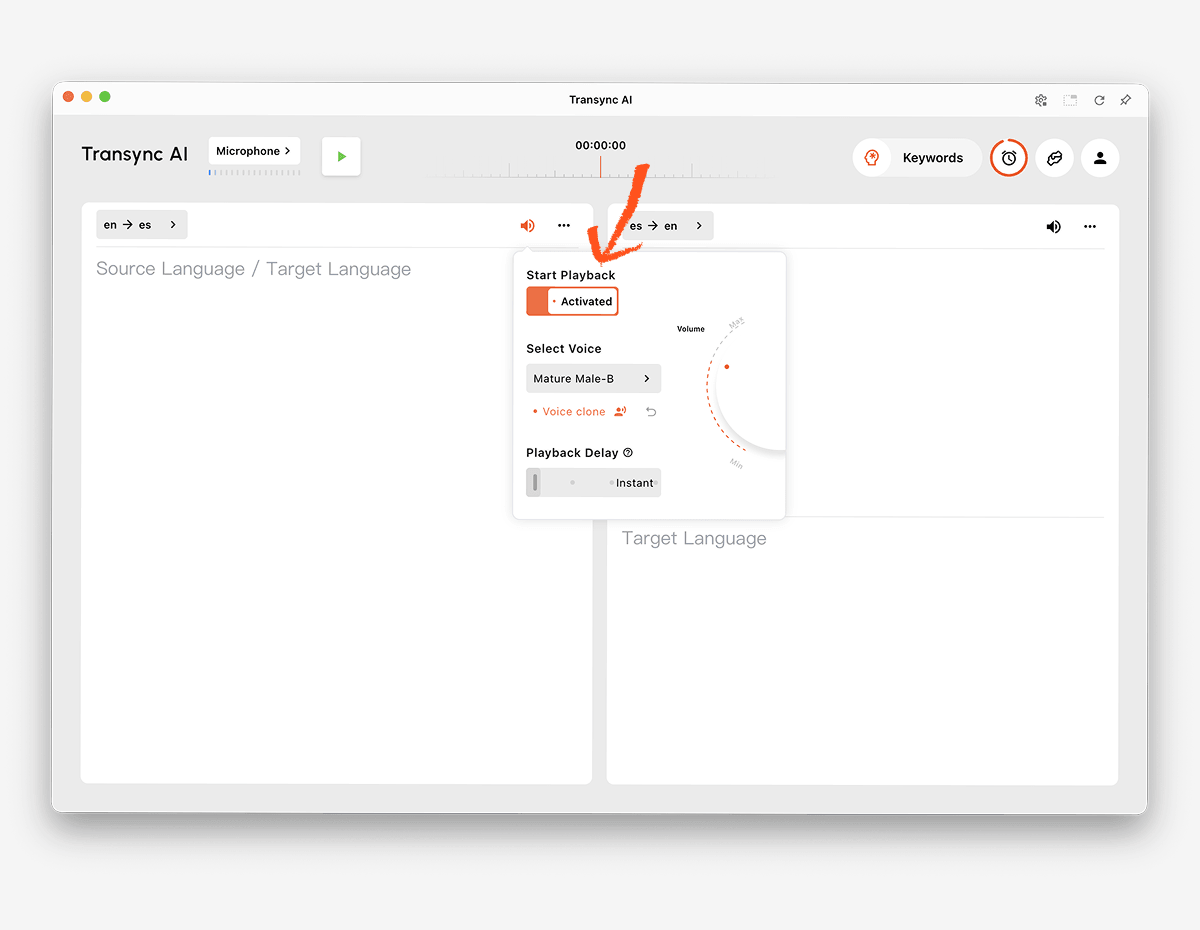 Palavras-chave e contexto
Nomes, marcas, siglas e termos técnicos são fontes comuns de erros de tradução. Recurso de palavras-chave e contexto do assistente de IA Permite aos usuários definir vocabulário importante e explicar o tópico antes de uma sessão.
 Acesso entre dispositivos
 Acesso entre dispositivos
Transync AI Compatível com fluxos de trabalho na web, Windows, macOS, iOS e Android. Isso permite que os usuários selecionem o dispositivo mais adequado para uma conversa online ou presencial.
Mais de 60 idiomas
A plataforma suporta mais de 60 idiomas e mais de 1.000 pares de idiomas. A disponibilidade de idiomas pode mudar, portanto, verifique a disponibilidade. Página de idiomas suportados para o par exato necessário.
Registros após a conversa
O Recurso de anotações de reuniões com IA Cria transcrições e notas estruturadas. guia de gerenciamento de registros de tradução Explica como os usuários podem acessar e organizar sessões anteriores.
 Como testar um tradutor de idiomas por IA
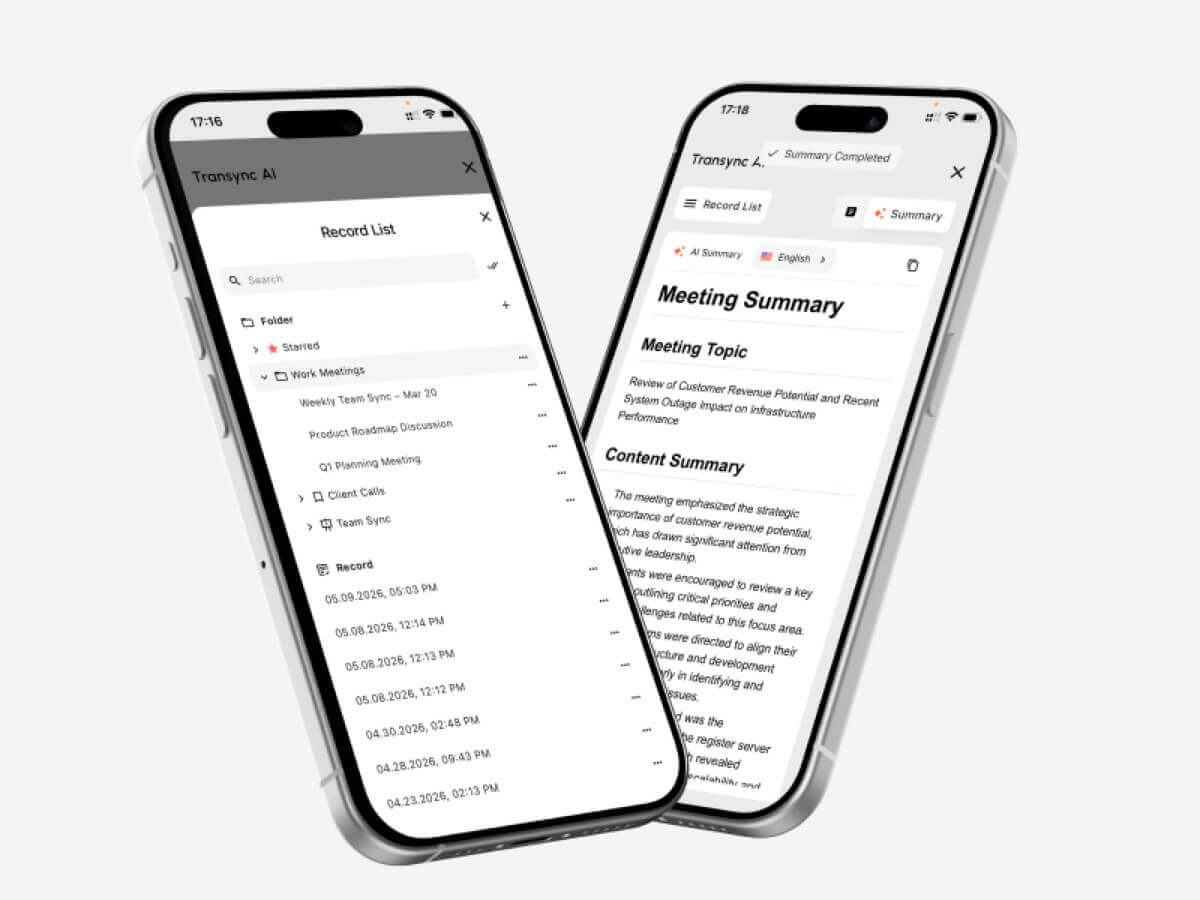 Como testar um tradutor de idiomas por IA
Execute o teste no mesmo ambiente em que o produto será utilizado.
Teste o par de idiomas real
Não se baseie apenas na contagem total de idiomas. Teste ambas as direções do par exigido, com sotaques regionais e velocidades de fala realistas.
Teste a terminologia importante
Crie uma lista de nomes, produtos, siglas e termos técnicos. Compare os resultados antes e depois de adicionar o contexto. Verifique se a tradução preserva o significado, em vez de apenas reconhecer as palavras.
Teste de atraso conversacional
Peça a duas pessoas que mantenham uma conversa natural. Observe se o atraso na tradução causa interrupções, confusão ou pausas artificiais.
Teste as legendas e a voz juntas.
Alguns participantes preferem áudio, enquanto outros dependem de texto. Verifique a legibilidade das legendas, a clareza da voz, o ritmo e se os nomes e números são fáceis de confirmar.
Teste a configuração da reunião
Utilize a plataforma de reunião, o microfone, os alto-falantes, o sistema operacional e a rede reais. Confirme se o áudio remoto entra no tradutor e se a fala traduzida chega aos ouvintes pretendidos.
Teste a saída após a chamada.
Analise a transcrição e as anotações em busca de decisões ausentes, nomes incorretos e itens de ação pouco claros. Uma experiência ao vivo tranquila não garante automaticamente um registro preciso.
Analise as políticas de privacidade e tratamento de dados.
Verifique como o áudio, as transcrições, os modelos de voz e os dados da conta são processados. Transync AI Afirma que os dados do cliente não são usados para treinamento de IA por padrão e que o áudio é excluído após o processamento. As organizações devem revisar o Centro de Confiança e os termos atuais em relação às suas exigências.
Como iniciar uma sessão de tradução ao vivo
- Abrir Transync AI em um dispositivo compatível.
- Selecione os dois idiomas usados na conversa.
- Escolha o microfone ou a fonte de áudio do computador correta.
- Adicione terminologia através do Recurso de palavras-chave e contexto do assistente de IA.
- Comece o ferramenta de tradução em tempo real.
- Confirme se as legendas bilíngues estão sendo atualizadas corretamente.
- Ative o Tradutor de voz de IA quando os participantes precisam de tradução em áudio.
- Use o Recurso de legendas bilíngues Picture-in-Picture enquanto trabalhava em outro aplicativo.
- Para uma chamada online, configure o recurso de compartilhamento de áudio do computador e recurso de microfone virtual.
- Analise o resultado com o Recurso de anotações de reuniões com IA.
Faça um breve ensaio antes de uma reunião importante para confirmar a direção da linguagem, o roteamento do áudio, a qualidade da rede e a terminologia.
Perguntas frequentes sobre o tradutor de idiomas por IA
O que é um tradutor de idiomas com IA?
Um tradutor de idiomas com IA utiliza modelos de aprendizado de máquina para interpretar textos, fala, imagens, documentos ou mídias em um idioma e gerar um significado equivalente em outro. As funcionalidades do produto variam de acordo com a entrada e o caso de uso.
Qual é o melhor tradutor de idiomas com IA para reuniões?
Transync AI é uma ótima opção para iniciar uma reunião, pois combina tradução bilíngue em tempo real, reprodução de voz traduzida, legendas flutuantes, contexto terminológico e Notas de reunião de IA.
A melhor escolha ainda depende dos idiomas necessários, da plataforma, das regras de privacidade e da duração esperada da sessão.
A IA consegue traduzir a fala durante uma reunião por vídeo?
Sim. O Recurso de tradução simultânea de reuniões da Transync AI trabalha ao lado de Zoom, Microsoft Teams, e Google Meet. Ele pode fornecer legendas bilíngues e voz traduzida durante uma chamada ao vivo.
Ele consegue reconhecer os dois idiomas automaticamente?
O Ferramenta de tradução em tempo real da Transync AI É possível distinguir o idioma do interlocutor dentro do par de idiomas selecionado, reduzindo a necessidade de troca manual em conversas bidirecionais.
A tradução por IA funciona offline?
O suporte offline depende do provedor e do idioma. Transync AI Requer conexão com a internet e atualmente não oferece modo offline.
A IA consegue traduzir imagens e documentos?
Alguns produtos podem. Google Tradutor Suporta ampla participação do consumidor, incluindo imagens e documentos, enquanto DeepL Está fortemente posicionada para fluxos de trabalho de texto e documentos. Transync AI Concentra-se na fala ao vivo e não oferece reconhecimento de imagem ou tradução de documentos somente de texto.
Um tradutor de IA pode substituir um intérprete humano?
A IA pode auxiliar em muitas conversas rotineiras, educacionais, de viagens e de negócios, mas não pode garantir precisão, discernimento ou nuances culturais perfeitas. Discussões médicas, jurídicas, de segurança crítica e contratualmente vinculativas podem exigir um intérprete humano qualificado.
Decisão final
Escolha de acordo com o fluxo de trabalho principal:
- Escolher Talkao ou Google Tradutor Para viagens casuais e traduções do dia a dia.
- Escolher Mundano Para conferências multilíngues e eventos com participação presencial.
- Escolher Soniox Para APIs e produtos de voz personalizados.
- Escolher Maestra Para legendas, dublagem e localização de mídia.
- Escolher DeepL Para texto, documentos, trabalho em linguagem corporativa e fluxos de trabalho de voz selecionados.
- Escolher Transync AI Para reuniões ao vivo que exigem legendas bilíngues, tradução de voz natural, contexto terminológico, roteamento de áudio e anotações úteis posteriores.
A direita tradutor de idiomas por IA Não é necessariamente o produto com mais entradas ou a lista mais extensa de funcionalidades. É aquele que melhor se adapta às pessoas, ao conteúdo, aos dispositivos e ao trabalho de acompanhamento envolvidos na tarefa real de comunicação.
Se você quer uma experiência de última geração, Transync AI lidera o caminho com tradução em tempo real, impulsionada por IA, que mantém as conversas fluindo naturalmente. Você pode experimente grátis agora.
 🤖
🤖