

Toplantılar, seyahatler, etkinlikler, medya ve API'ler için 7 yapay zeka dil çeviri aracını karşılaştırın. Doğru iş akışını seçmek için bu karar kılavuzunu kullanın.
Bir Yapay zekâ dil çevirmeni Yapay zekayı kullanarak bir dildeki içeriği yorumlar ve başka bir dilde eşdeğer bir anlam üretir. Ürüne bağlı olarak metinleri, belgeleri, resimleri, canlı konuşmaları, kayıtlı medyayı veya çok dilli toplantıların tamamını çevirebilir.
Bu çeşitlilik, bir araç seçmeyi ilk bakışta göründüğünden daha zor hale getiriyor. Ücretsiz bir seyahat çevirmeni, bir toplantı asistanı, bir etkinlik altyazı platformu, bir medya yerelleştirme paketi ve bir geliştirici API'si, her biri yapay zeka çevirisi olarak tanımlansa bile, farklı sorunları çözüyor.
Bu kılavuz, özellik listesinden ziyade kullanıcıyı merkeze alarak başlar. Karar yolunu izleyin, yedi önde gelen seçeneği karşılaştırın ve gerçek iletişim ihtiyaçlarınıza en uygun iş akışını test edin.
Hızlı Cevap: Hangi Yapay Zeka Dil Çevirmenine İhtiyacınız Var?
Sonuçla başlayalım:
- Hızlı seyahat ifadelerine, görsellere veya gündelik metinlere mi ihtiyacınız var? Dikkate almak Talkao veya Google Çeviri.
- İki dilli altyazıya, çevrilmiş konuşmaya ve toplantı notlarına mı ihtiyacınız var? Dikkate almak Transync AI.
- Etkinliğe katılan çok sayıda kişi için altyazı ve seslendirmeye mi ihtiyacınız var? Dikkate almak Dünyevi.
- Ürününüze çeviri özelliğini entegre etmeniz mi gerekiyor? Dikkate almak Soniox.
- Altyazı, dublaj ve medya yerelleştirme hizmetine mi ihtiyacınız var? Dikkate almak Maestra.
- Metne, belgelere, yazma araçlarına veya kurumsal dil iş akışlarına mı ihtiyacınız var? Dikkate almak DerinL.
Altı işin tamamı için tek bir yapay zekâ dil çevirmeni en iyisi değildir. Kullanım durumuna göre seçim yapmak, yanlış iş akışı için ödeme yapmaktan kaçınmanızı sağlar.
Yapay Zeka Dil Çevirmeni Nasıl Çalışır?
Süreç, girdiye bağlıdır.
Yazılı içerik için sistem, çevrilmiş metni oluşturmadan önce dil kalıplarını, bağlamı ve anlamı belirler. Sözlü iletişim için ise ek adımlar tamamlaması gerekir:
Ses kaydı yap → konuşmayı tanı → bağlamı yorumla → anlamı çevir → altyazı göster veya ses oluştur
Canlı konuşma, özellikle zorlu bir süreçtir çünkü araç, aksanları, duraklamaları, eksik cümleleri, arka plan gürültüsünü ve birden fazla konuşmacıyı, rahatsız edici bir gecikme yaratmadan ele almalıdır.
Modern ürünler, terminoloji kontrolü, ses sentezi, ses klonlama, toplantı platformu ses yönlendirme, transkriptler, özetler ve API'ler gibi özellikler ekleyebilir. Bu eklemeler, aracın gündelik bir ifadeye mi yoksa eksiksiz bir iş akışına mı uygun olduğunu belirler.
Yapay Zeka Dil Çevirmenleri Karşılaştırması: 7 Seçenek
Tablo, tipik ürün konumlandırmasını karşılaştırmaktadır. Özellikler, desteklenen diller ve planlar değişebilir, bu nedenle kritik gereksinimleri resmi ürün web sitelerinde teyit edin.
| Alet | En iyisi için | Ana giriş | Canlı ses çıkışı | Toplantı iş akışı | Seans sonrası değer |
|---|---|---|---|---|---|
| Transync AI | Çok dilli toplantılar, aramalar ve yüz yüze görüşmeler | Canlı konuşma ve toplantı ses kaydı | Evet | İki dilli altyazılar, ses yönlendirme ve bağlam araçları | Toplantı tutanakları ve yapay zeka toplantı notları |
| Talkao | Seyahat, mobil çeviri ve dil öğrenimi | Konuşma, metin, kamera ve mobil girişler | Evet | Asıl odak noktası değil. | Tüketici çeviri araçları |
| Dünyevi | Konferanslar, web seminerleri ve büyük toplantılar | Canlı etkinlik konuşması | Evet | Etkinlik ve katılımcı odaklı | Transkriptler ve özetler |
| Soniox | Geliştirici konuşma ürünleri | API ve uygulama sesi | TTS/API yeteneği | Uygulamaya bağlı | Özel ürün çıktısı |
| Maestra | Video, ses, altyazı, dublaj ve canlı içerik | Medya dosyaları ve canlı konuşma | Evet | Canlı içerik için kullanılabilir. | Yerelleştirme ve medya yeniden kullanımı |
| DerinL | Metin, dokümanlar, kurumsal dil çalışmaları ve seçilmiş ses kullanım durumları | Metin, doküman, API ve ses ürünleri | Ürüne bağlı | Ses ürününe bağlı | Yazılı ve kurumsal iş akışları |
| Google Çeviri | Ücretsiz günlük çeviri | Metin, resimler, web siteleri, belgeler ve konuşma | Çeviri oynatma | Önce görüşmemek | Hızlı kişisel çeviri |
Karar Yolu 1: Canlı Toplantıları Çeviriyor musunuz?
Cevap evet ise, yalnızca metin kalitesinden ziyade konuşma akışına odaklanın. En kullanışlı özellikler düşük gecikme süresi, çift yönlü dil tanıma, çift dilli altyazılar, ses çevirisi, toplantı ses yönlendirmesi, terminoloji desteği ve görüşme sonrası kayıtlardır.
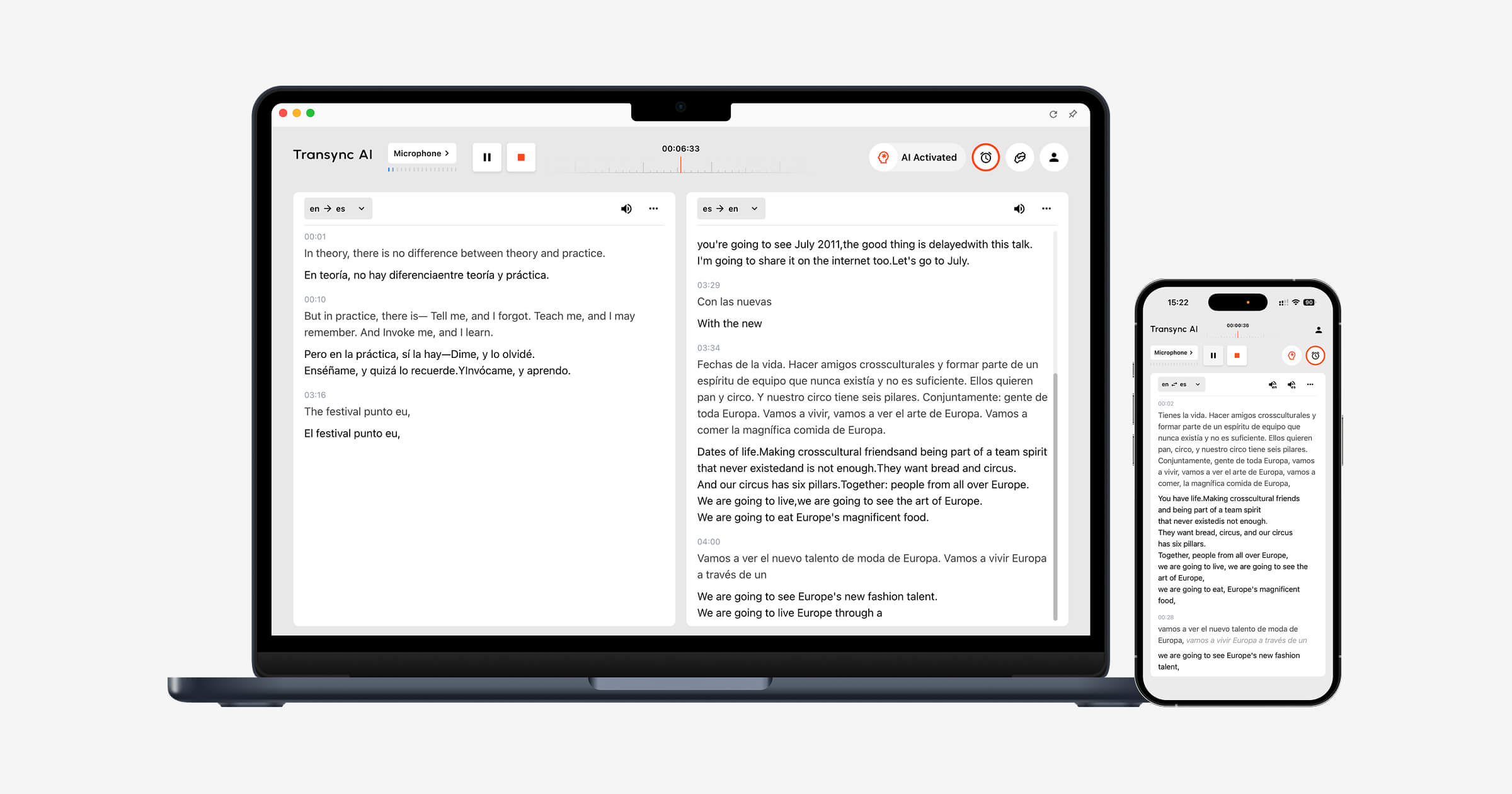
Transync AI Bu gereksinimler göz önünde bulundurularak tasarlanmıştır. gerçek zamanlı çeviri aracı Konuşma devam ederken orijinal konuşmayı ve çevirisini yan yana görüntüler.
The Yapay zeka ses çevirmeni Çevrilen sonucu sesli olarak okur, böylece katılımcılar hem okuyabilir hem de dinleyebilirler. Yapay zeka destekli toplantı notları özelliği Ardından görüşme sonrasında bir transkript ve yapılandırılmış notlar oluşturur.
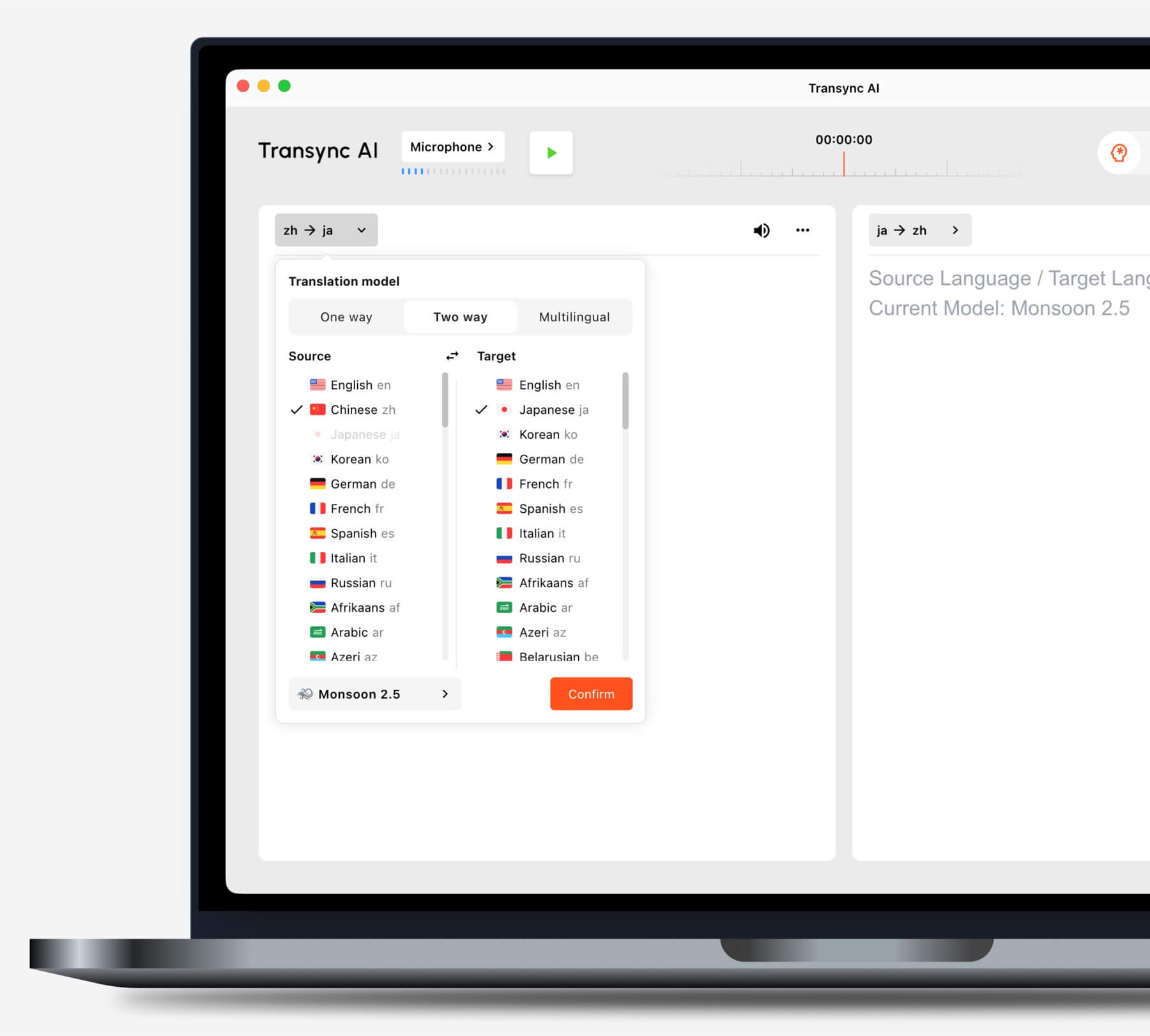
Bir göreve başlamadan önce senaryonuza uygun çeviri modunu seçin.
Yaygın olarak kullanılan video konferans platformlarını kullanıyor musunuz?
The canlı toplantı çeviri özelliği yanında çalışır Zoom, Microsoft Teams, Ve Google Meet. Transync AI Bu, platforma özgü bir eklenti değil, bağımsız bir yazılımdır.
The bilgisayar ses paylaşım özelliği Uzaktaki katılımcılardan gelen konuşmaları kaydeder. sanal mikrofon özelliği Çevrilmiş sesin toplantıya gönderilmesine yardımcı olur.

Sorunsuz gerçek zamanlı çeviri için başlıca çevrimiçi toplantı platformlarıyla uyumludur.
Sunum slaytları mı kullanıyorsunuz yoksa başka bir uygulamada mı çalışıyorsunuz?
The Resim içinde resim çift dilli altyazı özelliği Desteklenen cihazlarda orijinal ve çevrilmiş altyazıların diğer uygulamaların üzerinde görünür kalmasını sağlar. Bu, kullanıcıların sunum yaparken, yazılımı tanıtırken veya not alırken çeviriyi takip etmelerine yardımcı olur.
Karar Yolu 2: Büyük Bir Olayı mı Çeviriyorsunuz?
Yüzlerce katılımcının dil erişimine ihtiyacı olduğunda, dağıtım en büyük zorluk haline gelir. Katılımcılar, bireysel hesap oluşturmadan veya bir toplantı aracı yüklemeden kendi cihazlarında altyazıları veya çevrilmiş sesleri açmak isteyebilirler.
Dünyevi Konferanslar, web seminerleri, hibrit etkinlikler ve büyük toplantılar için tasarlanmıştır. Katılımcılar çeviriye bir bağlantı veya QR kodu aracılığıyla erişebilir, bu da geniş kitlelere yönelik sunumlar için daha uygun hale getirir.
 Seçmek Transync AI Kişisel ve ekip toplantıları için çeviri hizmeti. Seçin Dünyevi Bir organizatörün büyük bir gruba tercüme hizmeti sunması gerektiğinde.
Karar Yolu 3: Seyahat İçeriği mi Yoksa Günlük İçerik mi Çeviriyorsunuz?
Seyahat için en önemli özellikler mobil kullanım kolaylığı, kamera ile çeviri, metin girişi ve hızlı ses oynatma olabilir. Toplantı notları ve sanal mikrofonlar genellikle gereksizdir.
Talkao Ses, kamera ve mobil özellikler de dahil olmak üzere tüketici odaklı çeviri ve dil öğrenme araçları sunar. Google Çeviri Metin, resim, web sitesi, doküman ve günlük konuşma çevirisi için yaygın olarak kullanılabilir.
 Transync AI Yüz yüze yapılan uzun konuşmalarda yardımcı olabilir, ancak çevrimdışı modu, görüntü tanımayı veya yalnızca metin içeren belgelerin çevirisini desteklemez.
Karar Yolu 4: Medya İçeriklerinizi Yerelleştiriyor musunuz?
Video ve ses prodüksiyonu, anlık konuşmayı anlamaktan daha fazlasını gerektirir. Ekiplerin düzenlenebilir altyazılara, dublaja, zamanlamaya, transkripsiyona, çeviriye ve dışa aktarma seçeneklerine ihtiyacı olabilir.
Maestra Çeviri, transkripsiyon, altyazı, dublaj, web seminerleri ve canlı içerik gibi medya alanlarında konumlandırılmıştır. Çeviri, üretim ve yayın iş akışının bir parçası haline geldiğinde daha da uygun hale gelir.
 Seçmek Transync AI Asıl amaç canlı, iki yönlü bir konuşma olduğunda. Seçin Maestra Çevrilen içeriğin düzenlenmesi ve medya olarak yeniden kullanılması gerektiğinde.
Karar Yolu 5: Bir Çeviri Ürünü mü Geliştiriyorsunuz?
Bir ürün ekibinin programlanabilir altyapıya, dokümantasyona, gecikme kontrollerine ve entegrasyon esnekliğine ihtiyacı vardır. Genellikle son kullanıcı toplantı arayüzüne ihtiyaç duymaz.
Soniox Sesli ürünler geliştiren yazılımcılar için konuşmadan metne, çeviri ve metinden konuşmaya dönüştürme özellikleri sunar.
 DerinL Metin, doküman, yazma ve seçili ses iş akışlarında API'ler ve kurumsal dil hizmetleri sunar.
 Seçmek Transync AI Çalışanların veya müşterilerin tamamlanmış bir toplantı çevirisine ihtiyaç duyduğu durumlarda API platformunu tercih edin. Mühendisler tüm deneyimi tasarlayacak ve sürdürecekse API platformunu seçin.
Karar Yolu 6: Metin ve Belgeler Öncelikli mi?
Yazılı çeviri, biçimlendirmenin korunması, terminoloji tutarlılığı, düzenleme, belge desteği ve mevcut çalışma araçlarıyla entegrasyonu ödüllendirir. Canlı altyazı ve seslendirme özellikleri ikincil öneme sahip olabilir.
DerinL Genel olarak metin ve belge çevirisi, yazma desteği, API'ler ve kurumsal dil iş akışları için konumlandırılmıştır. Google Çeviri Hızlı tüketici metin, web sitesi, resim ve belge düzenleme işlemleri için kullanışlıdır.
Transync AI Bu, yalnızca metin çevirisi yapan bir belge çevirmeni değildir. En güçlü kullanım alanı, canlı çok dilli iletişimdir.
Neden Transync AI Çok Dilli Konuşmalara Uygun
Transync AI Canlı bir konuşmanın aşamalarını birbirine bağlar: karşıdaki kişiyi dinlemek, çeviriyi okumak, cevap vermek ve kayıt tutmak.
Otomatik çift yönlü tanıma
Seçilen desteklenen dil çifti içinde, gerçek zamanlı çeviri aracı Konuşulan dili ayırt edebiliyor. Kullanıcıların her turdan sonra dil değiştirme düğmesine basmasına gerek yok.
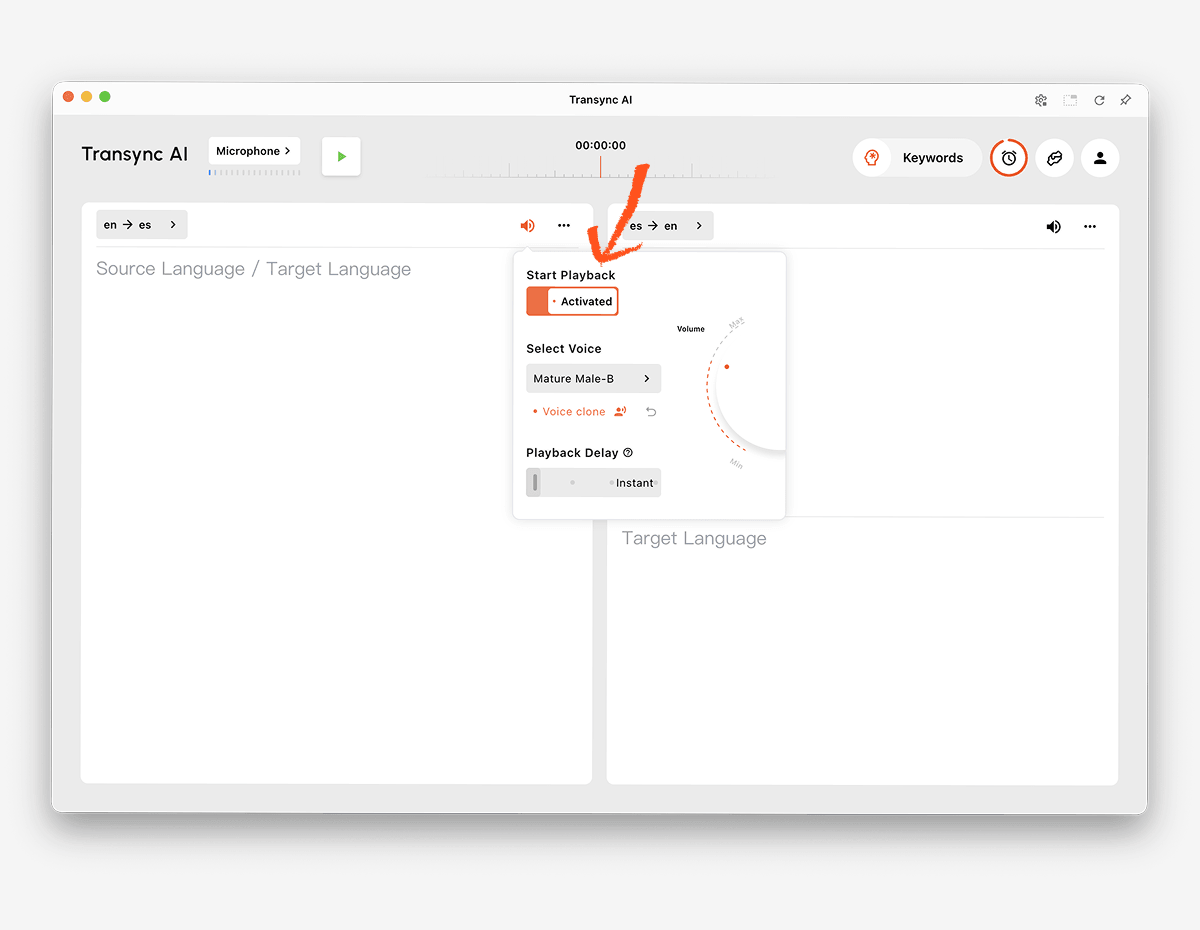
 Doğal ses oynatma ve ses klonlama
 Doğal ses oynatma ve ses klonlama
The Yapay zeka ses çevirmeni Farklı ses stilleri ve oynatma hızları sunar. ses klonlama özelliği Kullanıcının sesine göre modellenmiş bir ses tonuyla çevrilmiş konuşma üretebilir, böylece derslerin, sunumların ve müşteri görüşmelerinin daha kişisel hissettirmesine yardımcı olur.
 Anahtar kelimeler ve arka plan bağlamı
 Anahtar kelimeler ve arka plan bağlamı
İsimler, markalar, kısaltmalar ve uzmanlık terimleri, çeviri hatalarının yaygın kaynaklarıdır. Yapay Zeka Asistanı Anahtar Kelimeler ve Bağlam özelliği Kullanıcıların önemli kelimeleri tanımlamasına ve oturum öncesinde konuyu açıklamasına olanak tanır.
 Cihazlar arası erişim
 Cihazlar arası erişim
Transync AI Web, Windows, macOS, iOS ve Android iş akışlarını destekler. Bu, kullanıcıların çevrimiçi veya yüz yüze görüşme için en uygun cihazı seçmelerine olanak tanır.
60'tan fazla dil
Platform 60'tan fazla dili ve 1.000'den fazla dil çiftini desteklemektedir. Dil kullanılabilirliği zamanla değişebilir, bu nedenle düzenli olarak kontrol edin. desteklenen diller sayfası İhtiyaç duyulan tam çift için.
Konuşmanın ardından yapılan kayıtlar
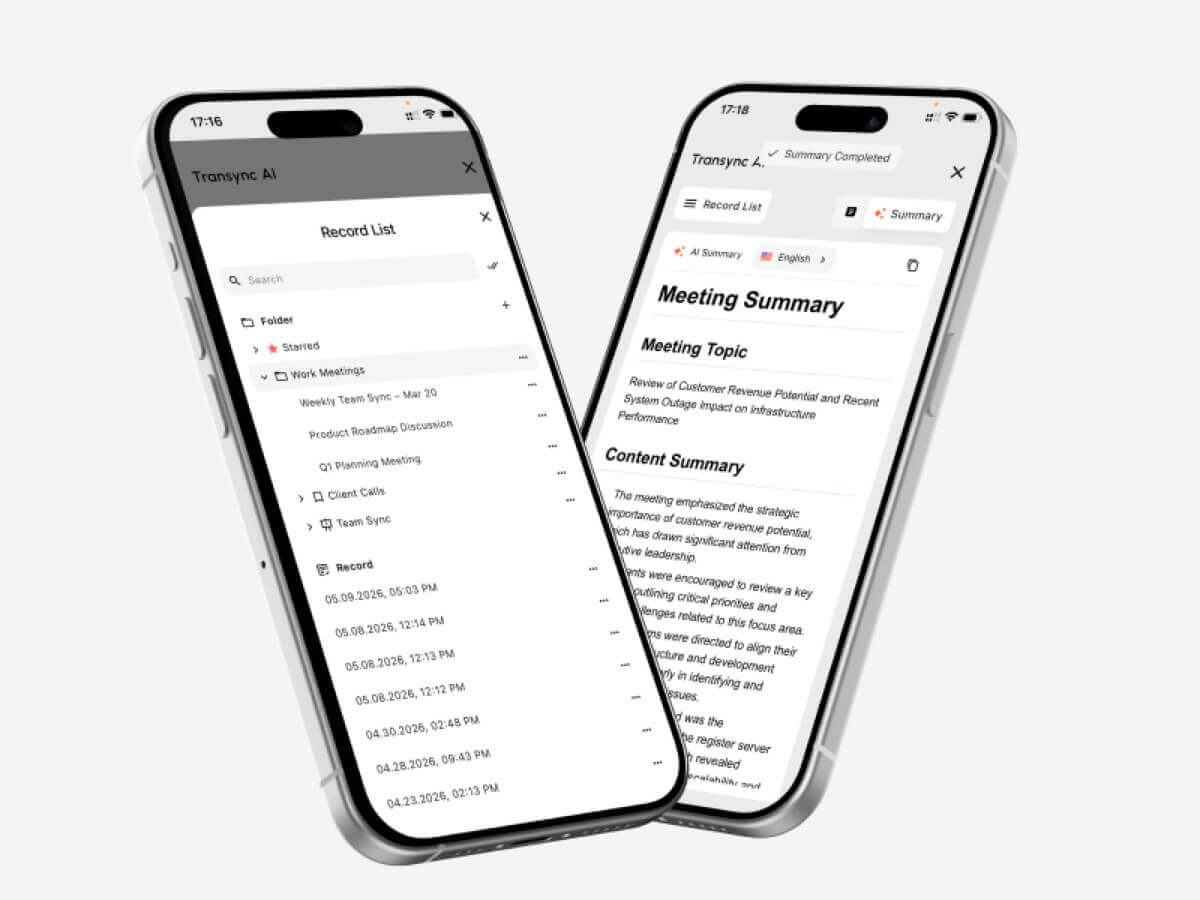
The Yapay zeka destekli toplantı notları özelliği Transkriptler ve yapılandırılmış notlar oluşturur. çeviri kayıt yönetimi kılavuzu Kullanıcıların önceki oturumlara nasıl erişebileceklerini ve bunları nasıl düzenleyebileceklerini açıklar.
 Yapay Zeka Destekli Dil Çevirmeni Nasıl Test Edilir?
 Yapay Zeka Destekli Dil Çevirmeni Nasıl Test Edilir?
Testi, ürünün kullanılacağı ortamda gerçekleştirin.
Gerçek dil çiftini test edin
Yalnızca toplam dil sayısına güvenmeyin. İstenen dil çiftinin her iki yönünü de bölgesel aksanlarla ve gerçekçi konuşma hızlarıyla test edin.
Önemli terminolojiyi test edin
İsimler, ürünler, kısaltmalar ve uzmanlık terimlerinden oluşan bir liste oluşturun. Bağlam eklemeden önce ve sonra sonuçları karşılaştırın. Çevirinin yalnızca kelimeleri tanımak yerine anlamı koruyup korumadığını doğrulayın.
Konuşma gecikmesini test et
İki kişiden doğal bir şekilde sohbet etmelerini isteyin. Çeviri gecikmesinin kesintilere, kafa karışıklığına veya doğal olmayan duraklamalara neden olup olmadığını gözlemleyin.
Altyazıları ve sesi birlikte test edin.
Bazı katılımcılar sesli anlatımı tercih ederken, diğerleri metne güvenir. Altyazıların okunabilirliğini, ses netliğini, anlatım hızını ve isimlerin ve sayıların kolayca doğrulanabilir olup olmadığını kontrol edin.
Toplantı ayarlarını test edin
Gerçek toplantı platformunu, mikrofonu, hoparlörleri, işletim sistemini ve ağı kullanın. Uzaktan gelen sesin çevirmene ulaştığından ve çevrilmiş konuşmanın hedef kitleye ulaştığından emin olun.
Çağrıdan sonra çıktıyı test edin.
Kararların eksikliği, isimlerin yanlış olması ve işlem maddelerinin net olmaması gibi durumlar için tutanakları ve notları gözden geçirin. Sorunsuz bir canlı görüşme, otomatik olarak doğru bir kayıt garantisi vermez.
Gizlilik ve veri işleme politikalarını gözden geçirin.
Ses kayıtlarının, transkriptlerin, ses modellerinin ve hesap verilerinin nasıl işlendiğini kontrol edin. Transync AI Müşteri verilerinin varsayılan olarak yapay zeka eğitimi için kullanılmadığını ve sesin işlendikten sonra silindiğini belirtiyor. Kuruluşlar bunu gözden geçirmelidir. Güven Merkezi ve mevcut şartları kendi gereksinimleriyle karşılaştırarak değerlendiriyorlar.
Canlı Çeviri Oturumu Nasıl Başlatılır?
- Açık Transync AI Desteklenen bir cihazda.
- Konuşmada kullanılan iki dili seçin.
- Doğru mikrofonu veya bilgisayar ses kaynağını seçin.
- Terminolojiyi aşağıdaki yollarla ekleyin: Yapay Zeka Asistanı Anahtar Kelimeler ve Bağlam özelliği.
- Başla gerçek zamanlı çeviri aracı.
- İki dilli altyazıların doğru şekilde güncellendiğini doğrulayın.
- Etkinleştir Yapay zeka ses çevirmeni Katılımcıların sesli çeviriye ihtiyaç duyduğu durumlarda.
- Kullanın Resim içinde resim çift dilli altyazı özelliği başka bir uygulama üzerinde çalışırken.
- Çevrimiçi görüşme için aşağıdaki ayarları yapılandırın. bilgisayar ses paylaşım özelliği Ve sanal mikrofon özelliği.
- Sonucu aşağıdakilerle birlikte inceleyin. Yapay zeka destekli toplantı notları özelliği.
Önemli bir toplantı öncesinde dil yönlendirmesini, ses yönlendirmesini, ağ kalitesini ve terminolojiyi teyit etmek için kısa bir prova yapın.
Yapay Zeka Dil Çevirmeni Hakkında Sıkça Sorulan Sorular
Yapay zekâ destekli dil çevirmeni nedir?
Yapay zekâ dil çevirmeni, makine öğrenimi modellerini kullanarak bir dildeki metni, konuşmayı, görüntüleri, belgeleri veya medyayı yorumlar ve başka bir dilde eşdeğer bir anlam üretir. Ürün yetenekleri, girdi ve kullanım durumuna göre değişiklik gösterir.
Toplantılar için en iyi yapay zekâ destekli dil çevirmeni hangisidir?
Transync AI Toplantıyı ilk sıraya koyma seçeneği güçlüdür çünkü şunları birleştirir: gerçek zamanlı iki dilli çeviri, çevrilmiş ses kaydı, yüzen altyazılar, terminoloji bağlamı ve Yapay zeka toplantı notları.
En iyi seçim, yine de gerekli dillere, platforma, gizlilik kurallarına ve beklenen oturum süresine bağlıdır.
Yapay zeka, video konferans sırasında konuşmaları tercüme edebilir mi?
Evet. Transync AI'nin canlı toplantı çeviri özelliği yanında çalışır Zoom, Microsoft Teams, Ve Google Meet. Canlı görüşme sırasında çift dilli altyazı ve ses çevirisi sağlayabilir.
İki dili de otomatik olarak tanıyabilir mi?
The Transync AI'dan gerçek zamanlı çeviri aracı Seçilen desteklenen dil çifti içindeki konuşmacının dilini ayırt edebilir, böylece iki yönlü konuşmalarda manuel geçiş ihtiyacını azaltır.
Yapay zekâ çevirisi çevrimdışı çalışır mı?
Çevrimdışı destek, sağlayıcıya ve dile bağlıdır. Transync AI İnternet bağlantısı gerektirir ve şu anda çevrimdışı modu sunmamaktadır.
Yapay zeka görüntüleri ve belgeleri çevirebilir mi?
Bazı ürünler bunu yapabilir. Google Çeviri Görüntüler ve belgeler de dahil olmak üzere geniş kapsamlı tüketici girdilerini desteklerken, DerinL Metin ve belge iş akışları için güçlü bir konumda yer almaktadır. Transync AI Canlı konuşmaya odaklanır ve görüntü tanıma veya yalnızca metin içeren belge çevirisi hizmeti sunmaz.
Yapay zekâ çevirmenleri insan tercümanların yerini alabilir mi?
Yapay zekâ birçok rutin, eğitimsel, seyahat ve iş görüşmesini destekleyebilir, ancak mükemmel doğruluk, muhakeme veya kültürel nüans garantisi veremez. Tıbbi, hukuki, güvenlik açısından kritik ve sözleşmeye dayalı bağlayıcı görüşmeler için nitelikli bir insan tercüman gerekebilir.
Nihai Karar
Ana iş akışına göre seçim yapın:
- Seçmek Talkao veya Google Çeviri Günlük seyahat ve çeviri işlemleri için.
- Seçmek Dünyevi Çok dilli konferanslar ve katılımcı odaklı etkinlikler için.
- Seçmek Soniox API'ler ve özel konuşma ürünleri için.
- Seçmek Maestra Altyazı, dublaj ve medya yerelleştirme için.
- Seçmek DerinL Metinler, dokümanlar, kurumsal dil çalışmaları ve seçili sesli iş akışları için.
- Seçmek Transync AI Canlı toplantılar için, iki dilli altyazı, doğal ses çevirisi, terminoloji bağlamı, ses yönlendirme ve sonrasında faydalı notlar gerektiren durumlarda kullanılır.
Sağ Yapay zekâ dil çevirmeni En çok girdiye veya en uzun özellik listesine sahip ürün olmak zorunda değil. Gerçek iletişim görevinde yer alan insanlara, içeriğe, cihazlara ve takip çalışmalarına uygun olan ürün önemlidir.
Yeni nesil bir deneyim istiyorsanız, Transync AI Konuşmaların doğal bir şekilde akmasını sağlayan gerçek zamanlı, yapay zeka destekli çeviriyle öncülük ediyor. ücretsiz deneyin Şimdi.
 🤖
🤖