

Vergelijk 7 AI-taalvertalers voor vergaderingen, reizen, evenementen, media en API's. Gebruik deze beslissingsgids om de juiste workflow te kiezen.
Een AI-taalvertaler Het maakt gebruik van kunstmatige intelligentie om inhoud in één taal te interpreteren en een equivalente betekenis in een andere taal te produceren. Afhankelijk van het product kan het tekst, documenten, afbeeldingen, gesproken woord, opgenomen media of complete meertalige vergaderingen vertalen.
Die grote verscheidenheid maakt het kiezen van een tool lastiger dan het in eerste instantie lijkt. Een gratis reisvertaler, een vergaderassistent, een platform voor ondertiteling bij evenementen, een softwarepakket voor media-lokalisatie en een API voor ontwikkelaars lossen allemaal verschillende problemen op, ook al worden ze allemaal omschreven als AI-vertaling.
Deze handleiding begint bij de gebruiker in plaats van bij de functielijst. Volg het beslissingsproces, vergelijk zeven toonaangevende opties en test de workflow die het beste aansluit op uw daadwerkelijke communicatiebehoeften.
Kort antwoord: Welke AI-taalvertaler heb je nodig?
Begin met het resultaat:
- Zoekt u snel wat reisgerelateerde zinnen, afbeeldingen of informele teksten? Overwegen Talkao of Google Vertalen.
- Heeft u tweetalige ondertitels, vertaalde spraak en notulen van vergaderingen nodig? Overwegen Transync AI.
- Heeft u ondertiteling en audio nodig voor een evenement met veel deelnemers? Overwegen Wereldlijk.
- Wilt u vertalingen in uw eigen product integreren? Overwegen Soniox.
- Heeft u ondertiteling, nasynchronisatie of media-lokalisatie nodig? Overwegen Maestra.
- Heeft u tekst, documenten, schrijfhulpmiddelen of zakelijke taalworkflows nodig? Overwegen DiepL.
Er bestaat geen enkele AI-taalvertaler die voor alle zes taken de beste is. Door te selecteren op basis van de specifieke toepassing, voorkomt u dat u betaalt voor de verkeerde workflow.
Hoe werkt een AI-taalvertaler?
Het proces is afhankelijk van de invoer.
Voor geschreven tekst identificeert het systeem taalpatronen, context en betekenis voordat het de vertaalde tekst genereert. Voor gesproken communicatie moeten er aanvullende stappen worden uitgevoerd:
Audio opnemen → spraak herkennen → context interpreteren → betekenis vertalen → ondertiteling weergeven of spraak genereren
Live spraak is bijzonder uitdagend omdat de tool accenten, pauzes, onvolledige zinnen, achtergrondgeluiden en meerdere sprekers moet kunnen verwerken zonder storende vertraging te veroorzaken.
Moderne producten kunnen functies toevoegen zoals terminologiebeheer, spraaksynthese, stemklonen, audio-routering naar vergaderplatformen, transcripties, samenvattingen en API's. Deze toevoegingen bepalen of de tool geschikt is voor een informele opmerking of voor een complete zakelijke workflow.
Vergelijking van AI-taalvertalers: 7 opties
De tabel vergelijkt typische productpositioneringen. Functies, ondersteunde talen en abonnementen kunnen wijzigen, dus controleer de belangrijkste vereisten op de officiële productwebsites.
| Hulpmiddel | Het beste voor | Hoofdinvoer | Live spraakuitvoer | Werkstroom bij de vergadering | Waarde na de sessie |
|---|---|---|---|---|---|
| Transync AI | Meertalige vergaderingen, telefoongesprekken en persoonlijke gesprekken | Live audio van spraak en vergadering | Ja | Tweetalige ondertitels, audiobewerking en contexttools | Transcripten en notulen van AI-vergaderingen |
| Talkao | Reizen, mobiele vertaling en taal leren | Spraak-, tekst-, camera- en mobiele invoer | Ja | Niet de belangrijkste focus | Consumentenvertaaltools |
| Wereldlijk | Conferenties, webinars en grote bijeenkomsten | Live toespraak tijdens het evenement | Ja | Evenement en deelnemers centraal gesteld | Transcripten en samenvattingen |
| Soniox | Spraakproducten van ontwikkelaars | API en app-audio | TTS/API-functionaliteit | Implementatieafhankelijk | Aangepaste productoutput |
| Maestra | Video, audio, ondertitels, nasynchronisatie en live content. | Mediabestanden en live spraak | Ja | Beschikbaar voor live content | Lokalisatie en hergebruik van media |
| DiepL | Tekst, documenten, zakelijke taalprojecten en geselecteerde spraaktoepassingen | Tekst-, document-, API- en spraakproducten | Productafhankelijk | Spraakproductafhankelijk | Geschreven en bedrijfsworkflows |
| Google Vertalen | Gratis dagelijkse vertaling | Tekst, afbeeldingen, websites, documenten en spraak | Vertaling afspelen | Niet eerst ontmoeten | Snelle persoonlijke vertaling |
Beslissingspad 1: Vertaalt u live vergaderingen?
Als het antwoord ja is, focus dan op de gesprekskwaliteit in plaats van alleen op de tekstkwaliteit. De meest nuttige functies zijn lage latentie, tweewegs spraakherkenning, tweetalige ondertiteling, vertaalde spraak, audio-routering voor vergaderingen, terminologieondersteuning en opnames na het gesprek.
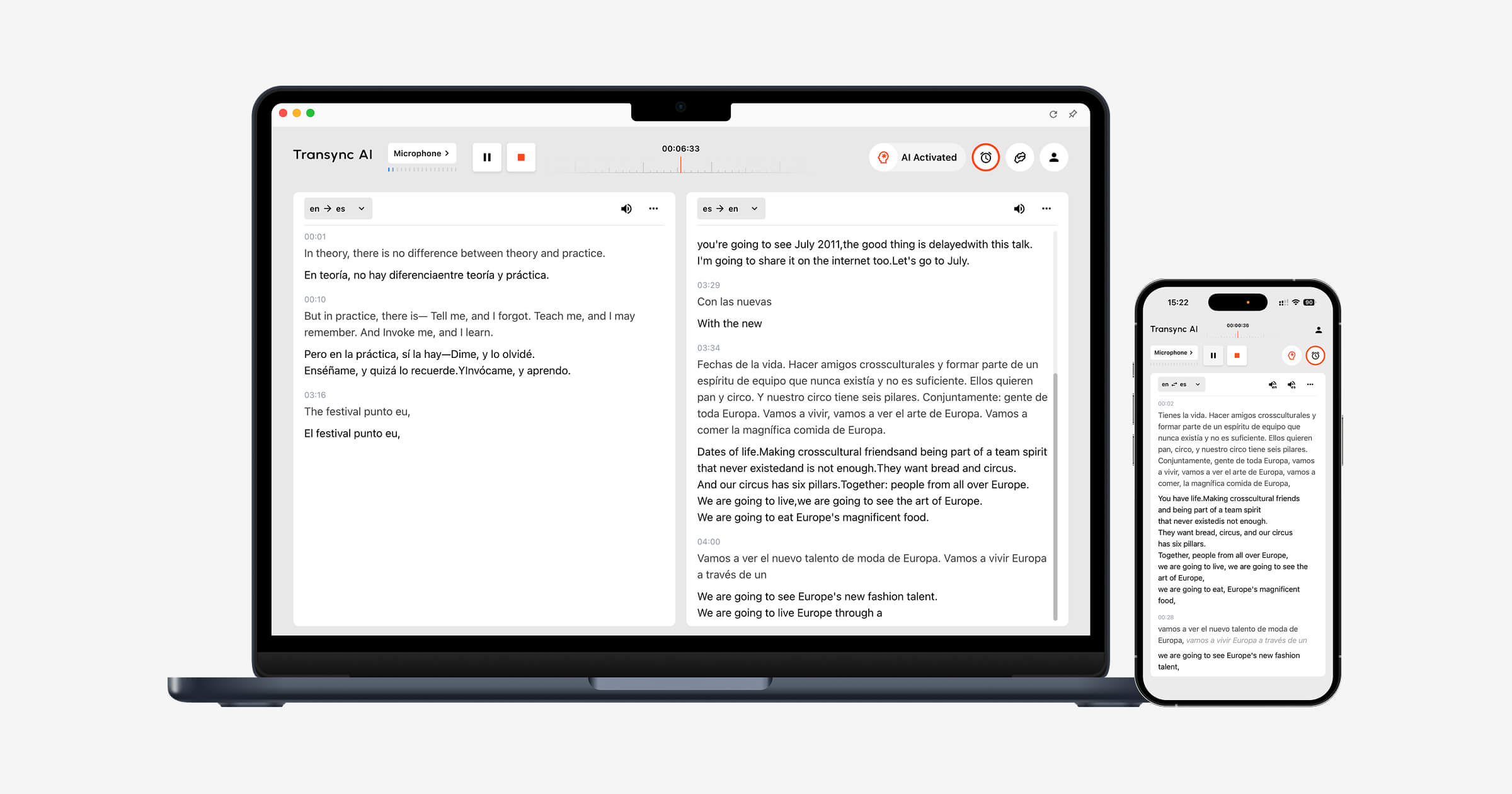
Transync AI is ontworpen rondom deze eisen. Het realtime vertaaltool Toont de originele spraak en de vertaling naast elkaar tijdens een lopend gesprek.
De AI-stemvertaler Spreekt het vertaalde resultaat hardop uit, zodat deelnemers zowel kunnen luisteren als lezen. AI-functie voor vergaderingsnotities Vervolgens maakt hij na het gesprek een transcript en gestructureerde notities.
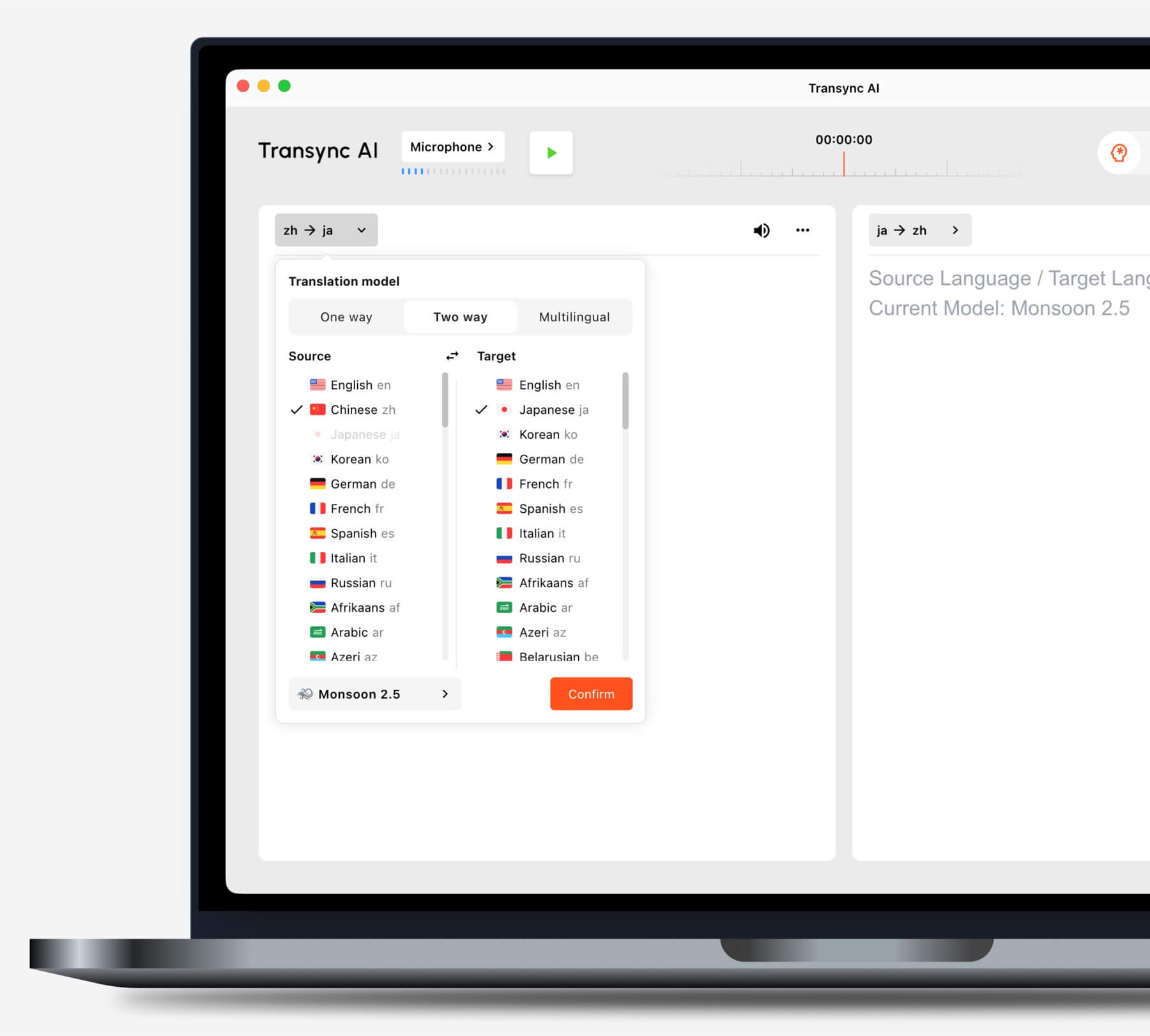
Kies de vertaalmodus die bij uw situatie past voordat u een taak start.
Gebruikt u gangbare platforms voor videovergaderingen?
De Live vertaalfunctie voor vergaderingen werkt samen met Zoom, Microsoft Teams, En Google Meet. Transync AI Het is zelfstandige software en geen platformspecifieke plug-in.
De functie voor het delen van computergeluid legt spraak vast van deelnemers op afstand. virtuele microfoonfunctie Helpt bij het verzenden van vertaalde spraak naar de vergadering.

Compatibel met de belangrijkste online vergaderplatformen voor naadloze realtime vertaling.
Presenteer je met behulp van dia's of werk je in een andere app?
De Picture-in-Picture tweetalige ondertitels Zorgt ervoor dat zowel de originele als de vertaalde ondertiteling zichtbaar blijven boven andere applicaties op ondersteunde apparaten. Dit helpt gebruikers de vertaling te volgen tijdens presentaties, softwaredemonstraties of het maken van aantekeningen.
Beslissingspad 2: Vertalen jullie een groot evenement?
Wanneer honderden deelnemers taalondersteuning nodig hebben, wordt de distributie de grootste uitdaging. Deelnemers moeten mogelijk zelf ondertiteling of vertaalde audio op hun eigen apparaten kunnen openen, zonder individuele accounts aan te maken of een vergadertool te installeren.
Wereldlijk Het is geschikt voor conferenties, webinars, hybride evenementen en grote bijeenkomsten. Deelnemers kunnen de vertaling via een link of QR-code raadplegen, waardoor het beter geschikt is voor presentaties aan een groot publiek.
 Kiezen Transync AI Voor vertalingen tijdens persoonlijke en teamvergaderingen. Kies Wereldlijk wanneer een organisator een vertaling moet verzorgen voor een grote groep.
Beslissingspad 3: Vertaal je reisgerelateerde of alledaagse content?
Voor op reis zijn de belangrijkste functies wellicht het gebruiksgemak van de mobiele telefoon, cameravertaling, tekstinvoer en snelle spraakweergave. Notities tijdens vergaderingen en virtuele microfoons zijn meestal niet nodig.
Talkao biedt consumentgerichte vertaal- en taalleertools, inclusief spraak-, camera- en mobiele functies. Google Vertalen is breed beschikbaar voor tekst, afbeeldingen, websites, documenten en informele gesproken vertalingen.
 Transync AI Het kan helpen bij langere, mondelinge gesprekken, maar het biedt geen ondersteuning voor offline gebruik, beeldherkenning of tekstvertaling van documenten.
Beslissingspad 4: Lokaliseert u uw media?
Video- en audioproductie vereist meer dan alleen het begrijpen van gesproken tekst op het moment zelf. Teams hebben mogelijk bewerkbare ondertitels, nasynchronisatie, timing, transcriptie, vertaling en exportopties nodig.
Maestra Het platform is inzetbaar voor diverse media, zoals vertaling, transcriptie, ondertiteling, nasynchronisatie, webinars en live content. Het is met name geschikt wanneer vertaling onderdeel uitmaakt van een productie- en publicatieproces.
 Kiezen Transync AI wanneer het hoofddoel een live tweeweggesprek is. Kies Maestra wanneer de vertaalde inhoud bewerkt en hergebruikt moet worden als media.
Beslissingspad 5: Ben je bezig met het ontwikkelen van een vertaalproduct?
Een productteam heeft programmeerbare infrastructuur, documentatie, latency control en integratieflexibiliteit nodig. Een interface voor eindgebruikersvergaderingen is doorgaans niet nodig.
Soniox Biedt spraak-naar-tekst-, vertaal- en tekst-naar-spraakfunctionaliteit voor ontwikkelaars die spraakgestuurde producten bouwen.
 DiepL Biedt API's en zakelijke taaldiensten voor tekst, documenten, schrijven en geselecteerde spraakworkflows.
 Kiezen Transync AI Wanneer medewerkers of klanten een vertaler nodig hebben voor een afgeronde vergadering, kies dan voor een API-platform. Dit platform zorgt ervoor dat engineers de volledige functionaliteit ontwerpen en onderhouden.
Beslissingspad 6: Zijn tekst en documenten de prioriteit?
Bij schriftelijke vertalingen is het behoud van de opmaak, consistente terminologie, redactie, documentondersteuning en integratie met bestaande werktools van groot belang. Live ondertiteling en spraakopname zijn mogelijk van secundair belang.
DiepL Het platform is breed inzetbaar voor tekst- en documentvertaling, schrijfondersteuning, API's en taalworkflows voor bedrijven. Google Vertalen is handig voor snelle taken met betrekking tot consumententeksten, websites, afbeeldingen en documenten.
Transync AI Het is geen documentvertaler die alleen tekst vertaalt. De grootste meerwaarde ligt in live meertalige communicatie.
Waarom Transync AI Geschikt voor meertalige gesprekken
Transync AI Het verbindt de fasen van een live gesprek: luisteren naar de andere persoon, de vertaling lezen, terugpraten en een verslag bijhouden.
Automatische tweewegherkenning
Binnen een geselecteerd ondersteund taalpaar, de realtime vertaaltool Het systeem kan de gesproken taal herkennen. Gebruikers hoeven niet na elke beurt op een knop voor taalwisseling te drukken.
 Natuurlijke stemweergave en stemklonen
 Natuurlijke stemweergave en stemklonen
De AI-stemvertaler biedt verschillende stemstijlen en afspeelsnelheden. stemkloningsfunctie Het systeem kan vertaalde spraak genereren met een stem die is gemodelleerd naar de gebruiker, waardoor lessen, presentaties en klantgesprekken persoonlijker aanvoelen.
 Trefwoorden en achtergrondinformatie
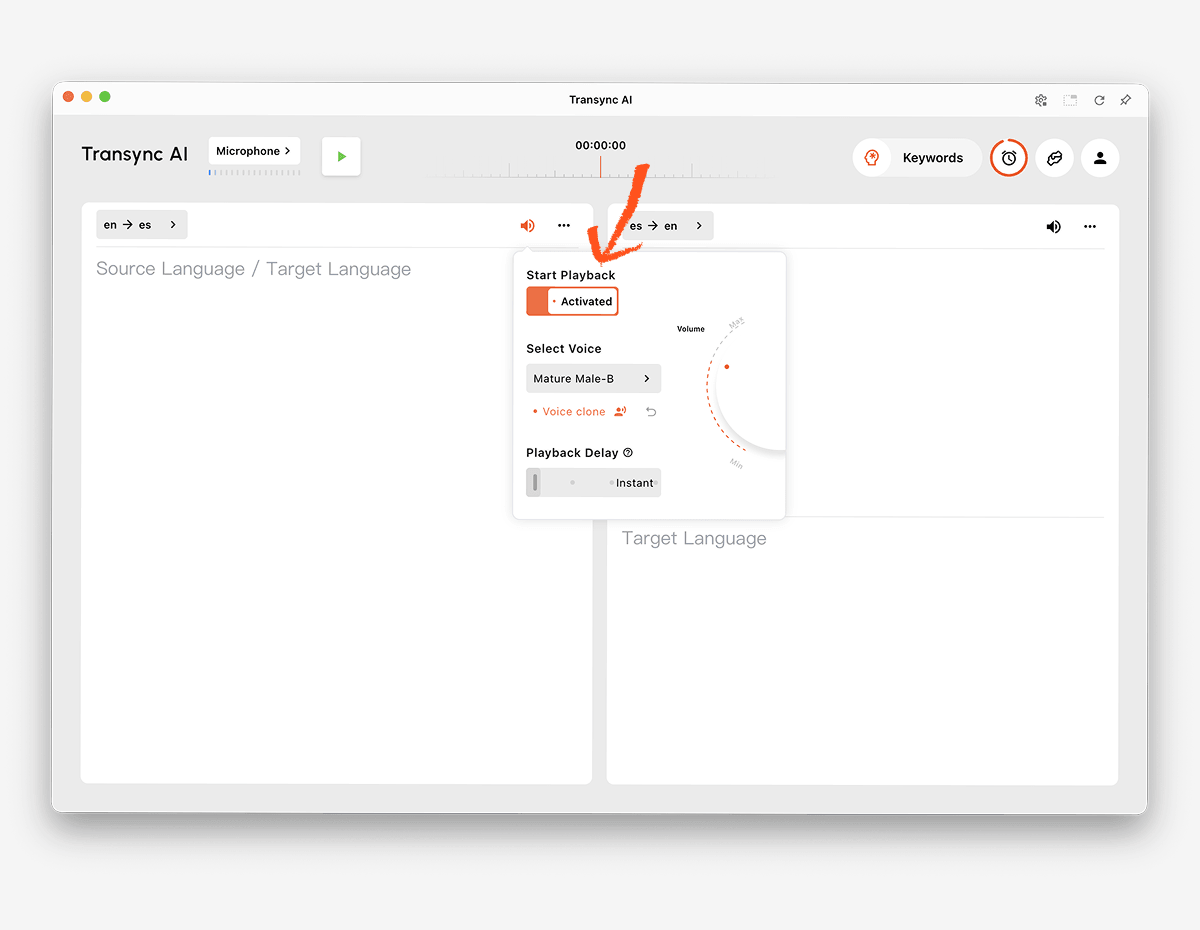 Trefwoorden en achtergrondinformatie
Namen, merken, acroniemen en vaktermen zijn veelvoorkomende bronnen van vertaalfouten. AI-assistent trefwoorden en contextfunctie Hiermee kunnen gebruikers belangrijke woorden definiëren en het onderwerp toelichten vóór een sessie.
 Toegang vanaf meerdere apparaten
 Toegang vanaf meerdere apparaten
Transync AI Het ondersteunt workflows voor web, Windows, macOS, iOS en Android. Hierdoor kunnen gebruikers het apparaat kiezen dat het beste past bij een online of offline gesprek.
Meer dan 60 talen
Het platform ondersteunt meer dan 60 talen en meer dan 1000 taalcombinaties. De beschikbaarheid van talen kan veranderen, dus controleer dit regelmatig. pagina met ondersteunde talen voor het exact benodigde paar.
Verslag na het gesprek
De AI-functie voor vergaderingsnotities Maakt transcripten en gestructureerde notities. handleiding voor het beheer van vertaaldocumenten legt uit hoe gebruikers eerdere sessies kunnen bekijken en ordenen.
 Hoe test je een AI-taalvertaler?
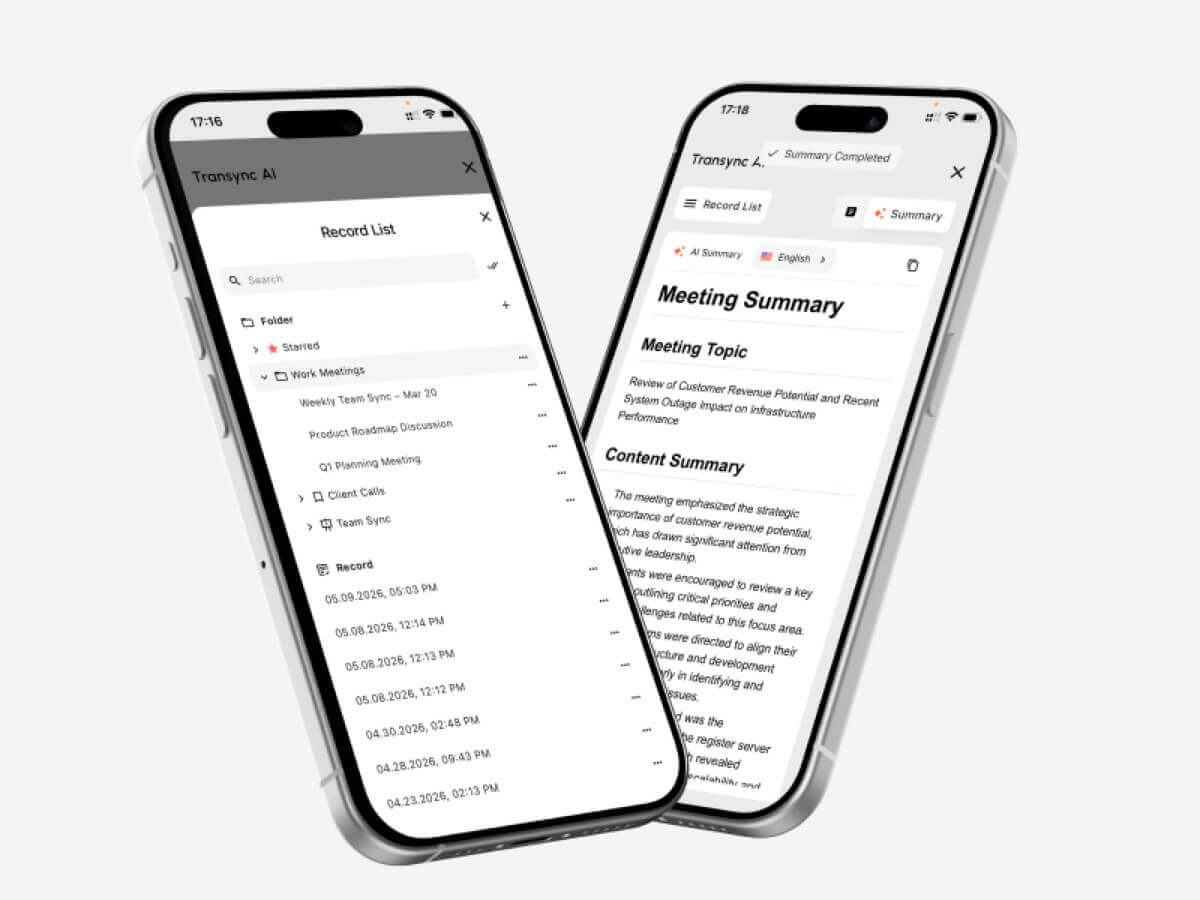 Hoe test je een AI-taalvertaler?
Voer de test uit in dezelfde omgeving waar het product gebruikt zal worden.
Test het daadwerkelijke taalpaar
Vertrouw niet alleen op het totale aantal woorden. Test beide spreekrichtingen van het vereiste paar met regionale accenten en realistische spreeksnelheden.
Test belangrijke terminologie
Maak een lijst van namen, producten, afkortingen en vaktermen. Vergelijk de resultaten vóór en na het toevoegen van context. Controleer of de vertaling de betekenis behoudt in plaats van alleen de woorden te herkennen.
Test de gespreksvertraging
Vraag twee mensen om een natuurlijk gesprek te voeren. Let op of vertraging in de vertaling leidt tot onderbrekingen, verwarring of onnatuurlijke pauzes.
Test de ondertitels en de stem samen.
Sommige deelnemers geven de voorkeur aan audio, terwijl anderen de voorkeur geven aan tekst. Controleer de leesbaarheid van de ondertitels, de verstaanbaarheid van de stem, het spreektempo en of namen en nummers gemakkelijk te herkennen zijn.
Test de vergaderinstellingen
Gebruik het daadwerkelijke vergaderplatform, de microfoon, de luidsprekers, het besturingssysteem en het netwerk. Controleer of de audio van de externe partij de vertaler bereikt en of de vertaalde spraak de beoogde luisteraars bereikt.
Test de uitvoer na de aanroep.
Controleer het transcript en de aantekeningen op ontbrekende beslissingen, onjuiste namen en onduidelijke actiepunten. Een vlekkeloze live-ervaring garandeert niet automatisch een nauwkeurige weergave.
Bekijk de privacy- en gegevensverwerkingsregels.
Controleer hoe audio, transcripties, stemmodellen en accountgegevens worden verwerkt. Transync AI Hierin staat dat klantgegevens standaard niet worden gebruikt voor AI-training en dat audio na verwerking wordt verwijderd. Organisaties dienen dit te herzien. Vertrouwenscentrum en de huidige voorwaarden af te stemmen op hun vereisten.
Hoe start je een live vertaalsessie?
- Open Transync AI op een ondersteund apparaat.
- Selecteer de twee talen die in het gesprek worden gebruikt.
- Kies de juiste microfoon of computergeluidsbron.
- Voeg terminologie toe via de AI-assistent trefwoorden en contextfunctie.
- Begin de realtime vertaaltool.
- Controleer of de tweetalige ondertitels correct worden bijgewerkt.
- Schakel de AI-stemvertaler wanneer deelnemers een hoorbare vertaling nodig hebben.
- Gebruik de Picture-in-Picture tweetalige ondertitels terwijl ik in een andere app aan het werk was.
- Voor een online gesprek moet u de volgende instellingen configureren. functie voor het delen van computergeluid En virtuele microfoonfunctie.
- Bekijk het resultaat met de AI-functie voor vergaderingsnotities.
Houd een korte repetitie vóór een belangrijke vergadering om de taalrichting, audio-instellingen, netwerkkwaliteit en terminologie te controleren.
Veelgestelde vragen over AI-taalvertalers
Wat is een AI-taalvertaler?
Een AI-taalvertaler gebruikt machine learning-modellen om tekst, spraak, afbeeldingen, documenten of media in één taal te interpreteren en een equivalente betekenis in een andere taal te genereren. De mogelijkheden van het product variëren afhankelijk van de invoer en het gebruiksscenario.
Wat is de beste AI-taalvertaler voor vergaderingen?
Transync AI is een sterke optie om eerst een vergadering te houden, omdat het combineert realtime tweetalige vertaling, vertaalde spraakweergave, zwevende ondertitels, terminologiecontext, en Notulen van de AI-vergadering.
De beste keuze hangt nog steeds af van de vereiste talen, het platform, de privacyregels en de verwachte sessieduur.
Kan AI spraak vertalen tijdens een videovergadering?
Ja. De Live vertaalfunctie voor vergaderingen van Transync AI werkt samen met Zoom, Microsoft Teams, En Google Meet. Het biedt de mogelijkheid om tijdens een live gesprek tweetalige ondertitels en een vertaalde stem te tonen.
Kan het beide talen automatisch herkennen?
De Realtime vertaaltool van Transync AI Kan de taal van de spreker binnen het geselecteerde ondersteunde paar onderscheiden, waardoor handmatig schakelen in tweeweggesprekken wordt verminderd.
Werkt AI-vertaling ook offline?
Offline ondersteuning is afhankelijk van de provider en de taal. Transync AI Vereist een internetverbinding en biedt momenteel geen offline modus.
Kan AI afbeeldingen en documenten vertalen?
Sommige producten kunnen dat wel. Google Vertalen ondersteunt een breed scala aan input van consumenten, waaronder afbeeldingen en documenten, terwijl DiepL is uitermate geschikt voor tekst- en documentworkflows. Transync AI Het is gericht op live spraak en biedt geen beeldherkenning of tekstvertaling van documenten.
Kan een AI-vertaler een menselijke tolk vervangen?
AI kan veel routinematige, educatieve, reis- en zakelijke gesprekken ondersteunen, maar kan geen perfecte nauwkeurigheid, oordeelsvermogen of culturele nuances garanderen. Medische, juridische, veiligheidskritische en contractueel bindende gesprekken vereisen mogelijk een gekwalificeerde menselijke tolk.
Definitieve beslissing
Kies op basis van de belangrijkste workflow:
- Kiezen Talkao of Google Vertalen Voor incidenteel reizen en alledaagse vertalingen.
- Kiezen Wereldlijk voor meertalige conferenties en evenementen gericht op deelnemers.
- Kiezen Soniox voor API's en op maat gemaakte spraakproducten.
- Kiezen Maestra voor ondertiteling, nasynchronisatie en media-lokalisatie.
- Kiezen DiepL voor tekst, documenten, zakelijk taalgebruik en bepaalde spraakworkflows.
- Kiezen Transync AI Voor live vergaderingen die tweetalige ondertiteling, natuurlijke spraakvertaling, terminologiecontext, audio-routing en nuttige aantekeningen achteraf vereisen.
Het recht AI-taalvertaler Het product met de meeste inputopties of de langste functielijst is niet per se het product dat het beste aansluit bij de mensen, de inhoud, de apparaten en de vervolgwerkzaamheden die bij de daadwerkelijke communicatietaak komen kijken.
Als u een ervaring van de volgende generatie wilt, Transync AI loopt voorop met realtime, AI-gestuurde vertalingen die gesprekken natuurlijk laten verlopen. U kunt probeer het gratis nu.
 🤖
🤖