Need a vocal translator that handles live speech across languages? Modern AI makes real-time voice translation instant, accurate, and professional-grade.

In today’s global business environment, spoken communication crosses language barriers constantly. Teams collaborate internationally. Customers speak different languages. Events host multilingual audiences.

Yet translating vocal speech in real-time has traditionally been expensive, complex, or simply unavailable when needed.

Common questions we hear:

  • “Can Dragon Speak take vocal speech on YouTube and translate it?”
  • “What’s the best vocal translator for live meetings?”
  • “How do I translate voice in real-time?”
  • “Can AI translate vocal speech accurately?”

This guide explains what a vocal translator is, how it differs from speech recognition tools like Dragon Speak, and why Transync AI leads the category for professional real-time vocal translation across meetings, events, and daily communication.

What is a Vocal Translator?

А vocal translator converts spoken language from one language to another in real-time—enabling multilingual conversation without human interpreters.

Key Distinction:

Speech Recognition (Dragon Speak):

  • Converts speech → text in the same language
  • Example: English speech → English text
  • Does NOT translate between languages
  • Designed for dictation, not translation

Vocal Translator (Transync AI):

  • Converts speech → translated speech in different language
  • Example: English speech → Spanish audio/text
  • Enables real-time multilingual conversation
  • Designed for cross-language communication
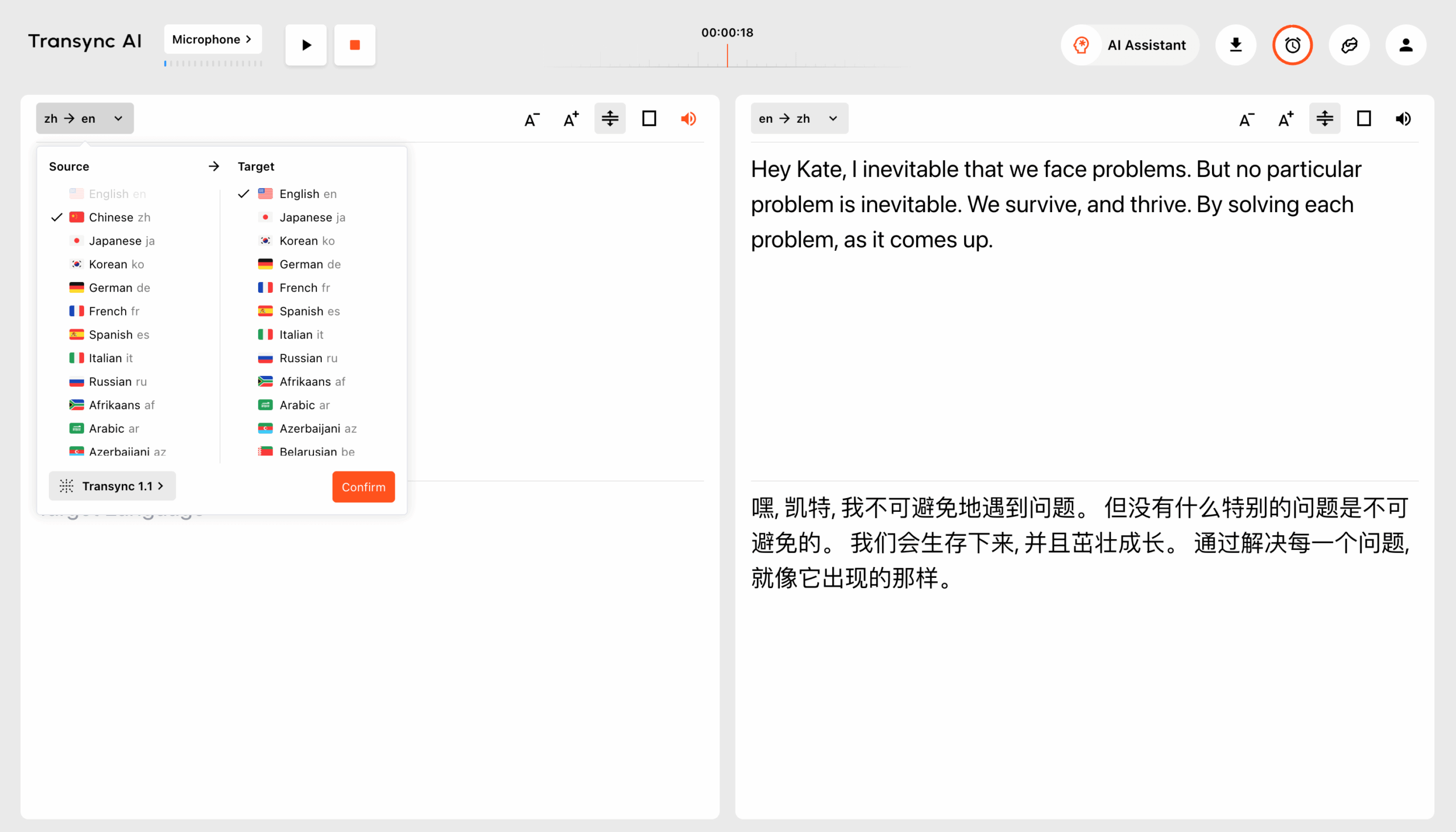
Панель управления воспроизведением голоса Transync AI, отображающая кнопку «Начать воспроизведение» и параметры выбора голоса.
Скриншот интерфейса перевода в реальном времени Transync AI, демонстрирующий панель воспроизведения голоса с кнопкой «Начать воспроизведение (Активно)», регулятором громкости и меню выбора голоса.

Can Dragon Speak Take Vocal Speech on YouTube and Translate It?

Short answer: No. Dragon Speak (Dragon NaturallySpeaking) is speech recognition software, not a vocal translator.

What Dragon Speak Does

Dragon Speak excels at:

  • ✅ Converting English speech → English text (dictation)
  • ✅ Voice commands for computer control
  • ✅ Transcribing audio files in the same language
  • ✅ Medical/legal dictation with specialized vocabularies

What Dragon Speak CANNOT do:

  • ❌ Translate between languages
  • ❌ Convert English speech → Spanish speech
  • ❌ Translate YouTube video vocal speech to other languages
  • ❌ Provide real-time interpretation for meetings
  • ❌ Handle multilingual live conversations

Can Dragon Speak Work with YouTube Videos?

Вопрос: “Can dragonspeak take vocal speech on utube and translate it?”

Отвечать: No, for two reasons:

Reason 1: Dragon Speak doesn’t translate languages. It only transcribes speech to text in the same language.

Reason 2: Dragon Speak requires direct microphone input. It doesn’t capture audio from YouTube videos running on your computer.

If you want to translate YouTube vocal speech: Use a true vocal translator like Transync AI that:

  • Captures audio from any source (YouTube, Zoom, Teams, etc.)
  • Translates speech in real-time across 60 languages
  • Outputs both translated audio and captions

Vocal Translator vs. Speech Recognition Tools

ОсобенностьVocal Translator (Transync AI)Dragon SpeakGoogle Translate Voice
Primary FunctionTranslate speech between languagesSpeech → text (same language)Basic voice translation
Real-time TranslationYes (<100ms) ⭐НетSlow (2-3 seconds)
Поддерживаемые языки60 languages ⭐English + limited others100+ (but low accuracy)
Интеграция встречNative Zoom/Teams/Meet ⭐НетНет
Точность95%+ ⭐99% (same language)75-85%
Голосовой выводNatural, human-like ⭐Только текстРоботизированный
YouTube Audio CaptureДа ⭐НетНет
Professional UseEnterprise-grade ⭐Dictation onlyConsumer-level
ДокументацияAuto transcripts ⭐Manual exportНет
РасходыПодпискаOne-time licenseFree (limited)

Conclusion: For translating vocal speech, use a dedicated vocal translator—not speech recognition software.

How Vocal Translator Works (Real-Time Translation)

Process Flow:

  1. Speaker talks in English: “We should expand into the Mexican market next quarter.”
  2. AI processes instantly (<100ms latency)
  3. Vocal translation generated: “Deberíamos expandirnos al mercado mexicano el próximo trimestre.”
  4. Spanish recipient hears natural Spanish voice audio
  5. Conversation continues seamlessly

Spanish participant’s experience:

  • Hears English speaker speaking fluent Spanish (via vocal translation)
  • Responds in Spanish
  • English speaker hears fluent English version
  • Natural bilingual conversation flows

No Dragon Speak required. No YouTube workarounds. Just professional real-time vocal translation.

Vocal Translator Features

Двунаправленный перевод

A professional handles both directions:

  • English → Spanish vocal translation
  • Spanish → English vocal translation
  • Multiple languages in same session

Speakers select preferred language. Translation flows automatically.

Audio + Text Output

When using a translator, participants can:

  • Listen to translated audio (hear Spanish when English is spoken)
  • Read translated captions (see Spanish text)
  • Use both simultaneously
  • Switch languages mid-session

60 Languages Supported

Transync AI’s translator supports:

  • Spanish, Portuguese, French, Italian, German
  • Chinese (Mandarin/Cantonese), Japanese, Korean
  • Arabic, Hebrew, Hindi, Bengali, Tamil
  • Russian, Polish, Czech, Romanian
  • тайский, вьетнамский, индонезийский, филиппинский
  • Plus 40+ additional languages

Meeting Platform Integration

Professional translator integrates natively with:

  • Увеличить
  • Microsoft Teams
  • Google Встреча
  • Webex
  • In-person events (standalone app)

One-click activation. <5 minutes setup.

Intelligent Documentation

After vocal translation sessions:

  • Full transcripts in all languages used
  • Speaker identification with timestamps
  • AI-generated meeting summary
  • Action items extracted automatically
  • Searchable, exportable format

Vocal Translator Use Cases

Перевод живой встречи

Сценарий: US-Japan partnership meeting. 8 participants (5 English, 3 Japanese). Need real-time vocal translation.

Traditional approach: Hire human interpreters ($2,400 for 8 hours)

Vocal translator solution: Deploy Transync AI ($8.99 for 10 hours)

Результат: Perfect real-time vocal translation. 96% cost savings. Automatic documentation.

International Conference

Сценарий: 500-person tech conference. 40% Spanish speakers, 30% English, 30% other languages.

Испытание: Need vocal translation across all sessions simultaneously.

Решение: Транссинхронный ИИ vocal translator enables attendees to select preferred language. All sessions accessible to all languages.

Результат: 99% attendee satisfaction. $38,500 saved vs. human interpreters.

YouTube Content Translation

Вопрос: “Can I use a vocal translator for YouTube videos?”

Отвечать: Yes, with Transync AI.

Process:

  1. Play YouTube video (English)
  2. Активировать Transync AI vocal translator
  3. Receive real-time Spanish vocal translation
  4. Hear Spanish audio as video plays

Use cases:

  • Educational content in native language
  • Business training videos
  • Conference recordings
  • Webinar replays

Note: Dragon Speak cannot do this. Requires true vocal translator технологии.

Customer Support Calls

Сценарий: Support team receives calls from Spanish, Japanese, and French-speaking customers.

Previous approach: Hire multilingual support staff or use poor-quality phone translation services.

Vocal translator solution: Support agent speaks English. Customer hears their native language via real-time vocal translation.

Результат:

  • 60% faster response times
  • 35% improved customer satisfaction
  • No specialized multilingual hiring needed

Medical Consultations

Сценарий: Doctor needs to communicate with Spanish-speaking patient about symptoms, diagnosis, and treatment.

Испытание: Finding professional medical interpreters on short notice ($200-300/hour).

Решение: В реальном времени vocal translator with medical glossary customization.

Результат:

  • Immediate availability (no booking delays)
  • Accurate medical terminology translation
  • Automatic documentation in both languages
  • Better patient outcomes
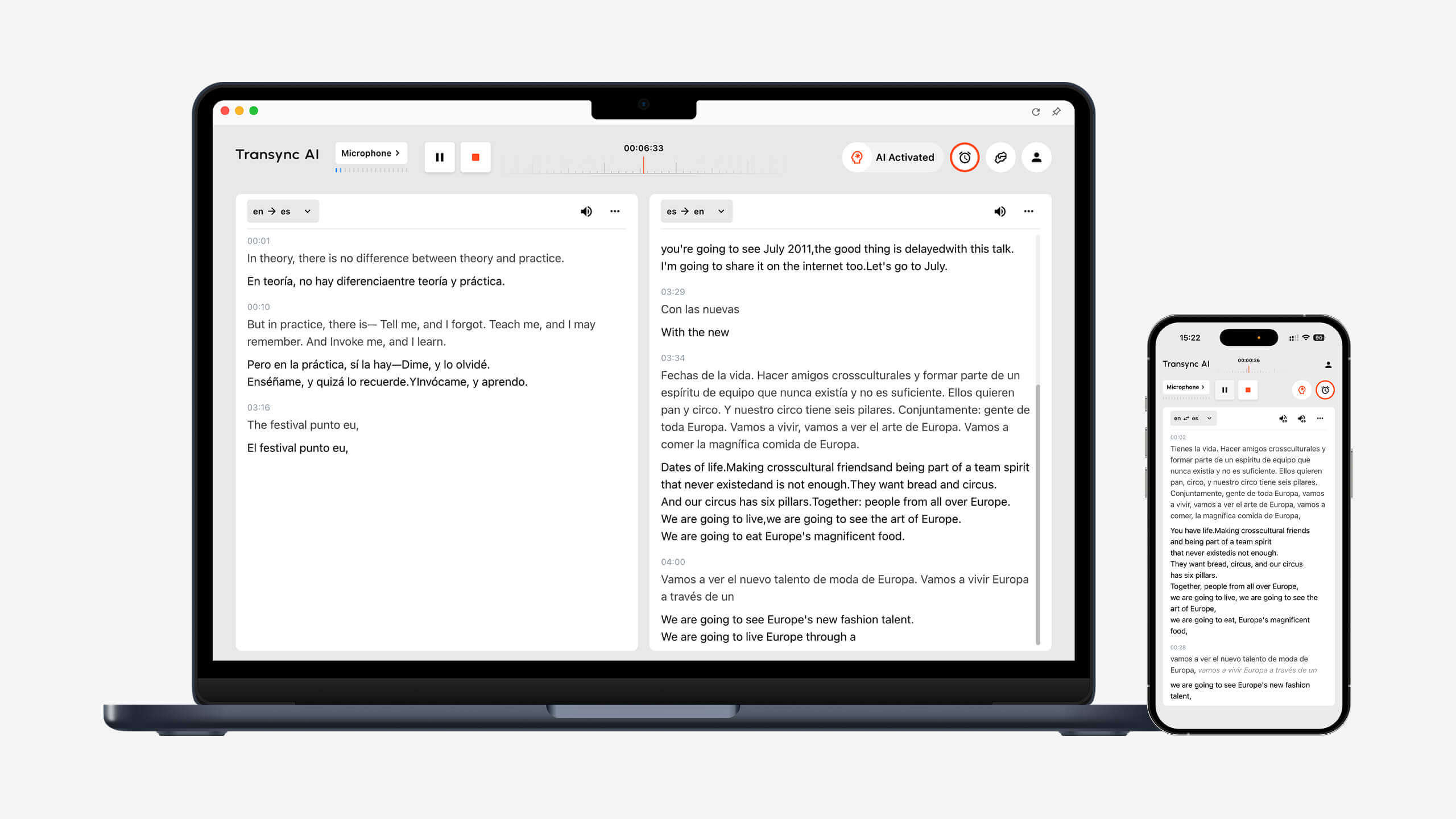
Transync AI, работающий на настольных компьютерах и мобильных устройствах, демонстрирует двуязычный перевод речи в реальном времени на разных устройствах.
Transync AI delivers real-time speech translation seamlessly across desktop and mobile devices.

Vocal Translator FAQs

Q1: Can Dragon Speak translate vocal speech? No. Dragon Speak is speech recognition software that converts speech to text in the same language. It doesn’t translate between languages. For vocal translation, use dedicated software like Transync AI.

Q2: Can vocal translator work with YouTube videos? Yes. Transync AI captures audio from YouTube (or any source) and provides real-time vocal translation. Dragon Speak cannot do this.

Q3: How accurate is AI vocal translation? Профессиональный уровень vocal translator like Transync AI achieves 95%+ accuracy for business, educational, and event content. Custom glossaries improve accuracy for technical terminology.

Q4: Does vocal translator provide audio output or just text? Both. Transync AI provides natural-sounding voice audio translation plus synchronized captions—simultaneously if desired.

Q5: What languages does the best vocal translator support? Transync AI supports 60 languages including Spanish, Chinese, Japanese, French, German, Arabic, Hindi, and 50+ others.

Q6: Can vocal translator work in live meetings? Yes. Native integration with Zoom, Teams, Meet, and Webex. One-click activation. <5 minutes setup.

Q7: How fast is real-time vocal translation? Transync AI processes in <100ms—faster than human reaction time. Enables genuine real-time conversation without delays.

Q8: What’s the cost of vocal translator vs. human interpreters?

  • Услуги переводчиков: $150-300/час
  • Vocal translator (Transync AI): $99-299/month (unlimited use)
  • Savings: 92-98% for regular users

Vocal Translator vs. Alternatives

SolutionЛучше всего подходит дляLimitations
Транссинхронный ИИProfessional meetings, events, real-time translationNone for intended use
Dragon SpeakEnglish dictation, medical transcriptionNo language translation
Google Translate VoiceSimple tourist phrases2-3 second delay, robotic voice, poor accuracy
Переводчики-людиOne-time high-stakes events$150-300/hr, limited scalability
Автоматический переводчик YouTubeBasic video captionsVery poor accuracy, text-only
Papago (Naver)Korean-focused translationLimited languages, slow processing

Вердикт: For professional real-time vocal translation, Transync AI delivers best combination of speed, accuracy, naturalness, and cost-effectiveness.

Real-World Success: Vocal Translator Deployment

Global Manufacturing Company

Profile: 1,200 employees across US, Mexico, Germany, Japan

Испытание: 300+ multilingual meetings monthly. Previous solution: Mix of human interpreters ($120K/year) and poor-quality phone services.

Question they asked: “Can Dragon Speak help?” Answer: No—wrong tool for language translation.

Решение: Deployed Transync AI vocal translator across all platforms.

Results (12 months):

  • 98% cost reduction ($120,000 → $2,400/year)
  • 45% productivity increase (measured by project completion rates)
  • 32% faster decision-making преодолевая языковые барьеры
  • Zero language-based miscommunication incidents
  • ROI: 4,900% first-year return

Отзыв: “We wasted months exploring Dragon Speak for translation before realizing we needed a true vocal translator. Transync AI solved everything overnight.” — VP Global Operations

Getting Started: Vocal Translator

Шаг 1: Выберите свою платформу

  • Zoom, Teams, Meet, Webex, or standalone app

Шаг 2: Активируйте Transync AI

  • Интеграция в один клик
  • <5 minutes total setup

Шаг 3: Выберите языки

  • Choose source and target languages
  • Поддерживается любой из 60 языков.

Step 4: Start Translating

  • Speak naturally in your language
  • Vocal translator processes in real-time
  • Participants hear/read in their preferred language

Шаг 5: Доступ к документации

  • Download transcripts in all languages
  • Review AI-generated summaries
  • Поделиться с заинтересованными сторонами

The Verdict: Professional Vocal Translator

When you need to translate vocal speech:

Don’t use Dragon Speak (it’s speech recognition, not translation) ✅ Don’t rely on YouTube auto-translate (poor accuracy, text-only) ✅ Don’t use consumer apps (insufficient accuracy for business) ✅ Do use professional vocal translator (Transync AI)

Why Transync AI leads:

✅ <100ms real-time processing (fastest available) ✅ 95%+ accuracy with context learning ✅ Natural human-like voice output ✅ 60 languages supported comprehensively ✅ Native meeting platform integration ✅ Automatic intelligent documentation ✅ 24/7 availability on-demand ✅ 98% cost savings vs. human interpreters ✅ Enterprise-grade security and reliability

Stop searching for Dragon Speak workarounds or YouTube translation hacks.

Deploy professional vocal translator technology today.

Выбирать Транссинхронный ИИ for real-time multilingual communication.You can try it free сейчас.

🤖Скачать

🍎Скачать