

Zoekt u een Google Voice-tolk? Vergelijk 6 actuele routes voor telefoongesprekken, vertalingen tijdens persoonlijke gesprekken, vergaderingen, ondertiteling en meertalige evenementen.
A Google spraaktolk is niet de officiële naam van een bestaand product. De zoekterm kan verwijzen naar minstens zes verschillende dingen: een beldienst, een mobiele gespreksvertaler, een belfunctie van Pixel, vertaalde ondertiteling, gesproken vergaderingsvertaling of een platformoverschrijdende vergaderingstolk.
Deze routegids scheidt die paden. Hij behandelt de volgende onderwerpen: Google Voice, Google Vertalen, Pixel Voice Translate, Google Meet, en de gepensioneerden Google Assistent Interpretermodus. Vervolgens vergelijkt het ze met Transync AI Voor meertalige vergaderingen, vertaalde spraak, notities en presentaties voor het publiek.
Het snelle antwoord: Google Voice Het is een bel- en telefoonnummerdienst, geen algemene vertaal- of tolkdienst. Google Vertalen Geschikt voor persoonlijk luisteren en gesprekken op basis van beurtelings gebruik. Pixel Voice Translate Kan ondersteunde telefoongesprekken vertalen op Pixel 10 en latere modellen. Google Meet Biedt platformspecifieke vertaalde ondertiteling en spraakvertaling. Transync AI is de sterkere route wanneer een Google spraaktolk Zoeken betekent eigenlijk: "Ik heb herbruikbare vertalingen nodig voor verschillende vergaderplatformen."“
De Google Voice Interpreter Routeringsdesk
| Wat de gebruiker echt wil | Het juiste product of de juiste functie | Hoofduitvoer | Belangrijke grens |
|---|---|---|---|
| Een telefoonnummer voor binnenlandse of internationale gesprekken | Google Voice | Bellen, sms'en, voicemail en belfuncties die afhankelijk zijn van je abonnement. | Geen algemene live-tolk |
| Een telefoon of tablet die een gesprek vertaalt. | Google Translate Live Translate | Vertaalde tekst en optioneel audio. | Persoonlijke workflow op basis van beurten; ondersteuning voor apparaten en talen varieert. |
| Een telefoongesprek vertaald met een stem die lijkt op die van de beller. | Pixel Voice Translate | Tweewegs vertaalde spraak tijdens ondersteunde gesprekken | Pixel 10 en later; Engels in combinatie met geselecteerde talen |
| Vertaalde tekst tijdens een vergadering | Google Meet vertaalde ondertiteling | Ondertiteling op het scherm | Geschikte abonnementen en workflow die alleen voor online vergaderingen beschikbaar is. |
| Vertaalde spraak tijdens een vergadering | Google Meet spraakvertaling | Stemvertaling die lijkt op de stem van de spreker. | Eén taalpaar, ondersteunde Engelse paren, planning en tijdslimieten |
| Platformoverschrijdende vergaderingen en presentaties | Transync AI | Tweetalige ondertiteling, gesproken weergave, context, notities, talen van het publiek | Online workflow; audio-instellingen en accounttoegang zijn belangrijk. |
De uitdrukking Google spraaktolk Geeft niet aan welke rij bedoeld is. Begin met drie vragen: Is het gesprek telefonisch of in een vergadering? Heeft de luisteraar tekst of gesproken output nodig? Moet het resultaat ook op andere platforms werken?
Route 1: Google Voice Het is een beldienst, geen tolk.
Google Voice Biedt een telefoonnummer en belfuncties aan op ondersteunde persoonlijke en zakelijke accounts. De huidige officiële helpfunctie beschrijft binnenlandse en internationale gesprekken, sms'jes, transcriptie van voicemailberichten, gespreksdoorschakeling en abonnementsafhankelijke functies zoals opnemen, samenvattingen en automatische beantwoorders.
Dat zijn communicatie- en gespreksbeheerfuncties. Ze schakelen niet uit. Google Voice in een algemene realtime-taalvertaler. Een gebruiker kan een internationaal nummer bellen, maar de spraak van de andere persoon wordt niet automatisch vertaald, alleen al omdat het gesprek via de dienst verloopt.
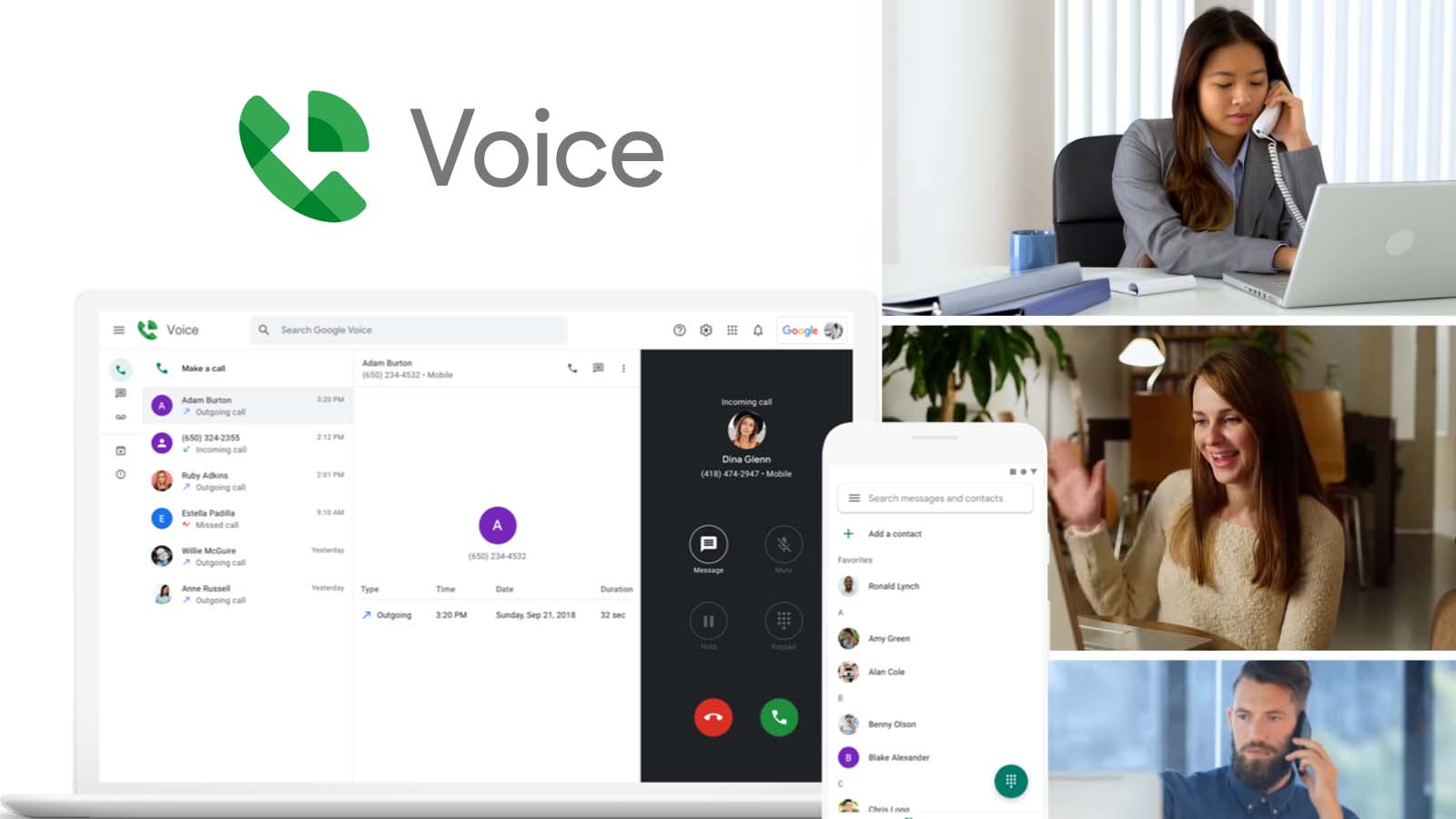
Dit onderscheid is belangrijk voor de prijsstelling en de configuratie. Internationale belmogelijkheden hebben betrekking op hoe een gesprek tot stand komt en hoe de kosten worden berekend; tolken heeft betrekking op hoe spraak wordt herkend, vertaald, gesynthetiseerd en weergegeven. Het zijn verschillende servicelagen.
Als uw Google spraaktolk De zoekopdracht is gestart omdat u al gebruikmaakt van... Google Voice, Bepaal of u het gesprek kunt overzetten naar een ondersteund vertaalproduct of een aparte, goedgekeurde tolkenworkflow kunt toevoegen. Ga er niet van uit dat voicemailtranscriptie, gesprekssamenvattingen of AI-functies automatisch live tweetalige spraak impliceren.
Kies deze route wanneer: Je hebt een telefoonnummer of een dienst voor gespreksbeheer nodig, en vertaling is niet de belangrijkste vereiste.
Route 2: Google Vertalen Livevertaling voor persoonlijke gesprekken
Voor een persoonlijk gesprek of om naar iemand te luisteren., Google Vertalen is meestal het huidige product waarmee mensen bedoelen. Google spraaktolk.
De huidige Live Translate-documentatie beschrijft verschillende modi op ondersteunde telefoons en tablets:
- In de luistermodus wordt realtime vertaalde audio via een hoofdtelefoon of het apparaat weergegeven.
- In de gespreksmodus worden vertalingen hardop afgespeeld terwijl mensen om de beurt spreken.
- In de tekstmodus wordt de vertaling weergegeven zonder dat er geluid wordt afgespeeld.
- Met de aangepaste instellingen kan de gebruiker kiezen voor tekst, luidsprekers of hoofdtelefoon.
- In de face-to-face-modus wordt elke taal op een andere helft van het scherm weergegeven.
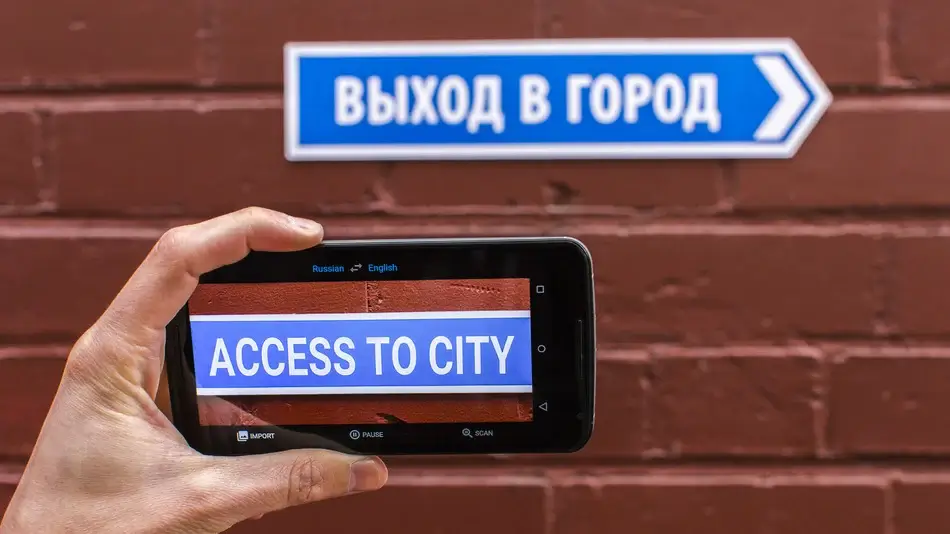
De app kan automatisch detecteren wanneer de ene geselecteerde taal stopt en de andere begint. Het is een praktische optie voor op reis, bij recepties, korte klantgesprekken, luisteren in de klas en informele conversaties.
Het is niet automatisch een systeem voor zakelijke vergaderingen. Een professionele vergadering kan ook audio-opname via de computer, voorbereide terminologie, sprekersbegeleiding, ondertiteling via een andere app, vertaalde spraakroutering, transcripties, samenvattingen, toegangscontrole en een verslag na afloop van het gesprek vereisen.
Test de daadwerkelijke taalcombinatie, app-versie, apparaat, microfoon, hoofdtelefoon en achtergrondgeluid. Google spraaktolk Er moet worden beoordeeld op namen, getallen, negatie, timing en herstel – niet alleen op de natuurlijkheid van de stem.
Kies deze route wanneer: Eén persoon heeft een handig mobiel hulpmiddel nodig voor gesprekken of om mee te luisteren, en de interactie is kort genoeg voor een workflow die voornamelijk via de telefoon verloopt.
Route 3: Pixel Voice Translate voor telefoongesprekken
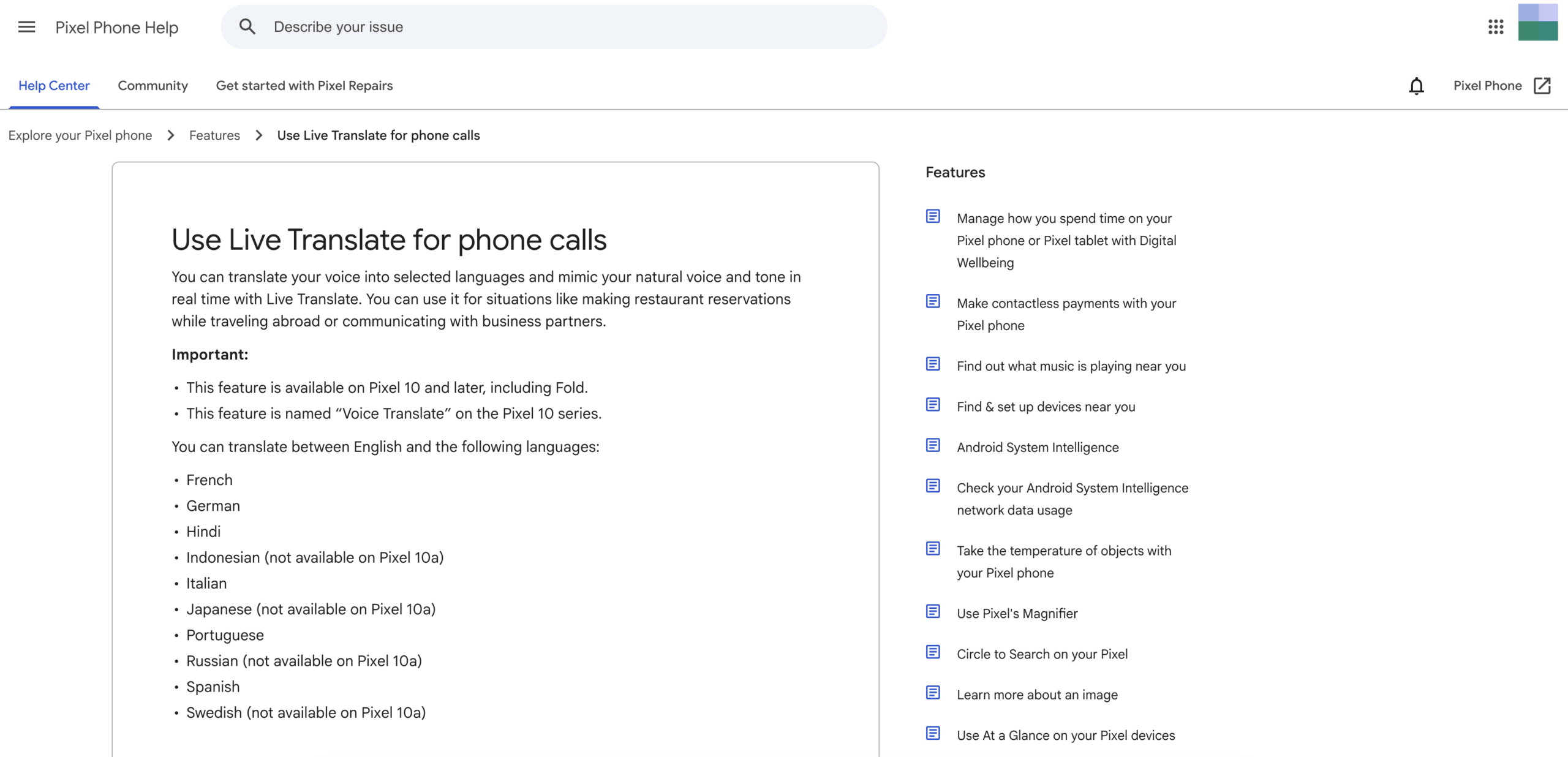
Pixel Voice Translate is de dichtstbijzijnde huidige overeenkomst met een letterlijke Google spraaktolk voor gewone telefoongesprekken. Officieel Google Pixel Volgens de helpfunctie vertaalt het de stem van een gebruiker naar een geselecteerde taal en bootst het in realtime de natuurlijke stem en toon na.
De huidige voorwaarden voor beschikbaarheid zijn specifiek. De functie is beschikbaar op de Pixel 10 en latere modellen, inclusief de Pixel 10 Pro Fold. Het ondersteunt vertalingen tussen Engels en een aantal geselecteerde talen, waaronder Frans, Duits, Hindi, Italiaans, Portugees, Spaans en andere, met enkele modelspecifieke uitzonderingen.
De gebruiker activeert Spraakvertaling in de instellingen van de Telefoon-app, downloadt de benodigde modellen, start een gesprek, opent Gespreksassistent en selecteert de taal van de andere persoon. Beide deelnemers horen een aankondiging voordat de vertaling begint.
Volgens de officiële documentatie kan de functie ook zonder internetverbinding werken. Gespreksaudio en transcripties worden niet op het apparaat opgeslagen, maar verzonden naar een externe bron. Google servers, of opvraagbaar na het gesprek.
De beperkingen zijn eveneens belangrijk. Het is hardware-specifiek, alleen beschikbaar in bepaalde landen en talen, en gekoppeld aan compatibele workflows voor telefoongesprekken. Een bedrijf kan er niet van uitgaan dat elke medewerker, klant of leverancier een ondersteund Pixel-model bezit.
Wanneer iemand om een Google spraaktolk Als ze "klinken alsof ik aan de telefoon ben", dan is dat de functie om te onderzoeken. Wanneer ze een meertalige videovergadering, gedeelde ondertiteling, meer taalcombinaties of een opname achteraf nodig hebben, is een andere oplossing geschikter.
Kies deze route wanneer: Zowel het apparaat als de taalcombinatie worden ondersteund, en de hoofdtaak is het vertalen van een telefoongesprek via de Pixel Phone-app.
Route 4: Google Meet Vertaalde ondertitels
Sommige gebruikers willen tijdens een online vergadering liever een andere taal lezen dan naar een gesynthetiseerde spraak luisteren. Google Meet Vertaalde ondertitels voldoen aan deze eis dat de tekst centraal moet staan.
De huidige officiële helplijst bevat vertaalde ondertitels voor geselecteerde Google Werkruimte edities, waaronder Business Standard, Business Plus, Enterprise Standard, Enterprise Plus en Google AI Pro voor het onderwijs. De beschikbaarheid kan nog steeds afhangen van de uitrol, beheerdersinstellingen, het apparaat en de regio.
Tijdens een vergadering selecteert de gebruiker de vergaderingstaal, schakelt vertaalde ondertiteling in en kiest een doeltaal. Ondertiteling kan worden aangepast qua lettertype, grootte, kleur en achtergrond. Een deelnemer kan door eerdere vertaalde ondertitels scrollen, maar alleen voor de gedeeltes van de vergadering die hij of zij heeft bijgewoond met ingeschakelde ondertiteling.
Vertaalde ondertiteling is geen gesproken interpretatie. Het helpt iemand om de vergadering te volgen, maar het zorgt er niet voor dat elke deelnemer de vertaalde stem hoort. Dat verschil heeft gevolgen voor de toegankelijkheid, de cognitieve belasting, de presentatiestijl en de mogelijkheid om te reageren tijdens het bekijken van gedeelde content.
Als een Google spraaktolk Als je zoekopdracht betekent "Ik heb Engelse ondertitels nodig voor mijn Meet-gesprek", dan zijn vertaalde ondertitels wellicht voldoende. Als je zoekopdracht betekent "Ik wil dat de andere persoon mijn spraak in zijn of haar taal hoort", ga dan verder met spraakvertaling of een professionele vertaler voor vergaderingen.
Kies deze route wanneer: De vergadering blijft binnen. Google Meet, Er zijn diverse ondersteunde abonnementen en talen beschikbaar, en de vertaalde tekst is toereikend.
Route 5: Google Meet Spraakvertaling
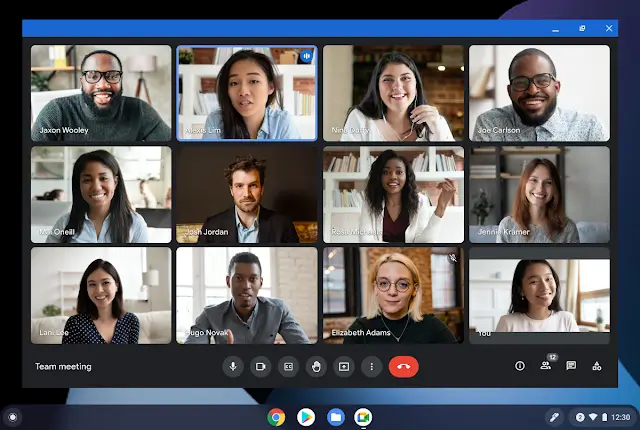
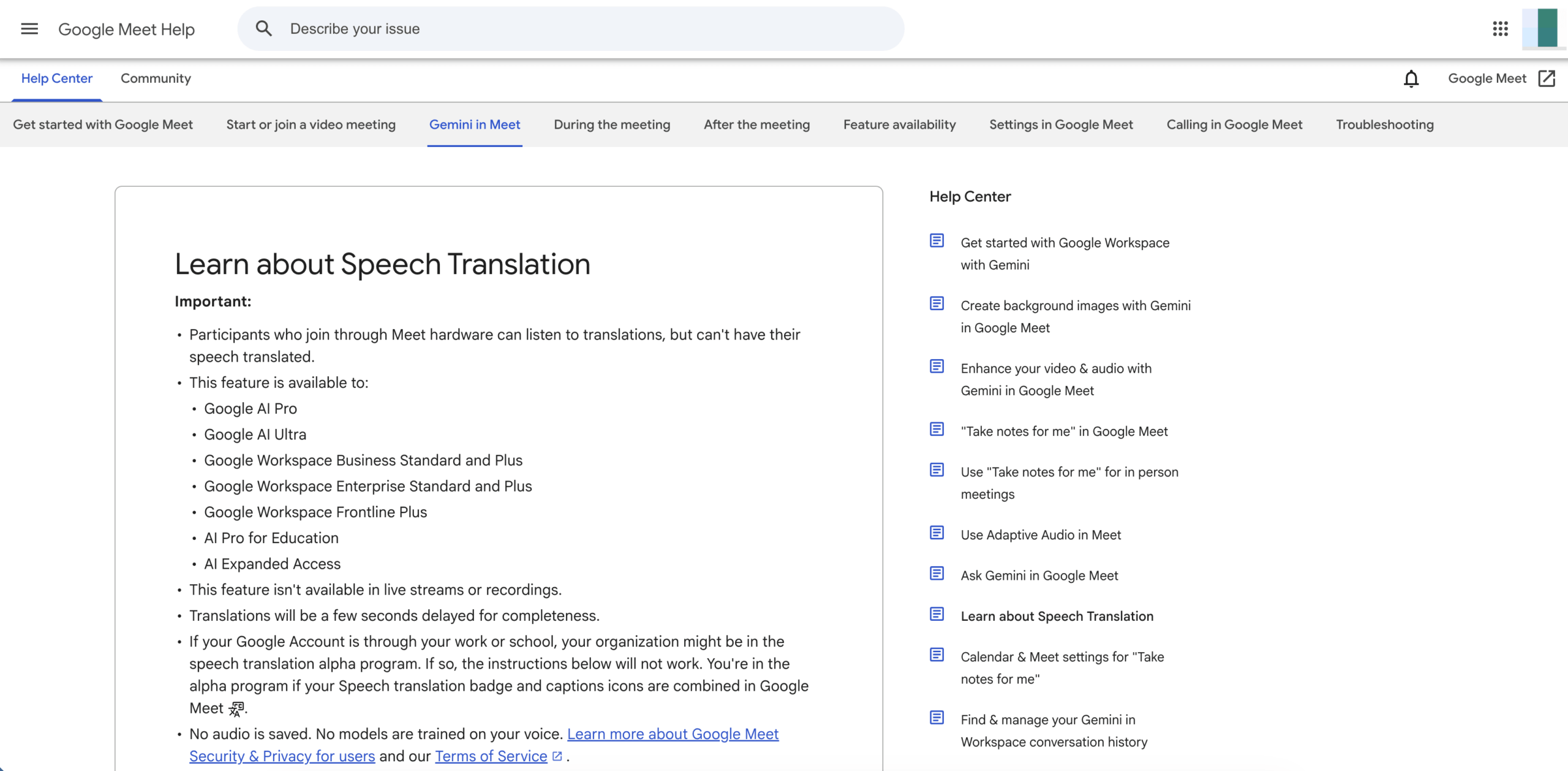
Google Meet Spraakvertaling voegt gesproken uitvoer toe in plaats van alleen ondertiteling. Volgens de huidige officiële documentatie vertaalt het de spraak van een deelnemer vrijwel in realtime naar een stem die lijkt op die van de spreker.
Momenteel bestaat de gedocumenteerde taalarchitectuur uit Engels in combinatie met Frans, Duits, Hindi, Italiaans, Portugees of Spaans. Een gebruiker die hiervoor in aanmerking komt, selecteert één taalpaar voor de gehele vergadering. Deelnemers configureren de taal die ze spreken en willen horen, en ze moeten toestemming geven voor de vertaling van hun stem.
De functie is beschikbaar voor specifieke consumenten-, onderwijs- en Google Werkruimte plannen. De huidige helpfunctie vermeldt ook een limiet van 90 minuten per vergadering, een vertraging van een paar seconden voor de volledigheid en geen beschikbaarheid in livestreams of opnames. Ondersteunde apparaten, accountleeftijd, regio, beheerdersinstellingen en toestemming van deelnemers kunnen ook van invloed zijn op de toegang.
Ontdek Meet Speech Translation
De officiële handleiding voor probleemoplossing waarschuwt voor grammaticale fouten, onverstaanbare woorden, onverwachte accenten, het geslacht van zelfstandige naamwoorden, veranderende stemstijl en slechte netwerkverbindingen. Gebruikers wordt aangeraden te wachten tot de vertaling is voltooid, onduidelijke zinnen te herformuleren en spraakvertaling te combineren met ondertiteling of chat.
Deze aanpak sluit veel beter aan bij de intentie van de gebruiker. Google spraaktolk dan gewone ondertiteling. De belangrijkste beperking is de platform- en taalarchitectuur: de ontmoeting moet binnen plaatsvinden. Google Meet, En er kan slechts één ondersteund taalpaar tegelijk actief zijn voor iedereen.
Kies deze route wanneer: Een in aanmerking komende persoon Google Meet De omgeving heeft een vertaalde spraak nodig voor één ondersteund Engelstalig paar en de limiet van 90 minuten is acceptabel.
Route 6: Transync AI voor platformoverschrijdende vergaderingen
Transync AI lost het bredere vergaderprobleem op dat aan veel zaken ten grondslag ligt Google spraaktolk zoekopdrachten. Het is ontworpen om live spraak te vertalen naast verschillende vergaderplatformen en persoonlijke gesprekken, in plaats van dat de organisatie zich moet standaardiseren op één specifieke vergaderfunctie.
Zijn realtime vertaling Momenteel worden 60 talen ondersteund. Live vergadering vertaalworkflow Biedt tweetalige tekst en kan in ondersteunde configuraties audio van de microfoon of een gedeelde computer opnemen.
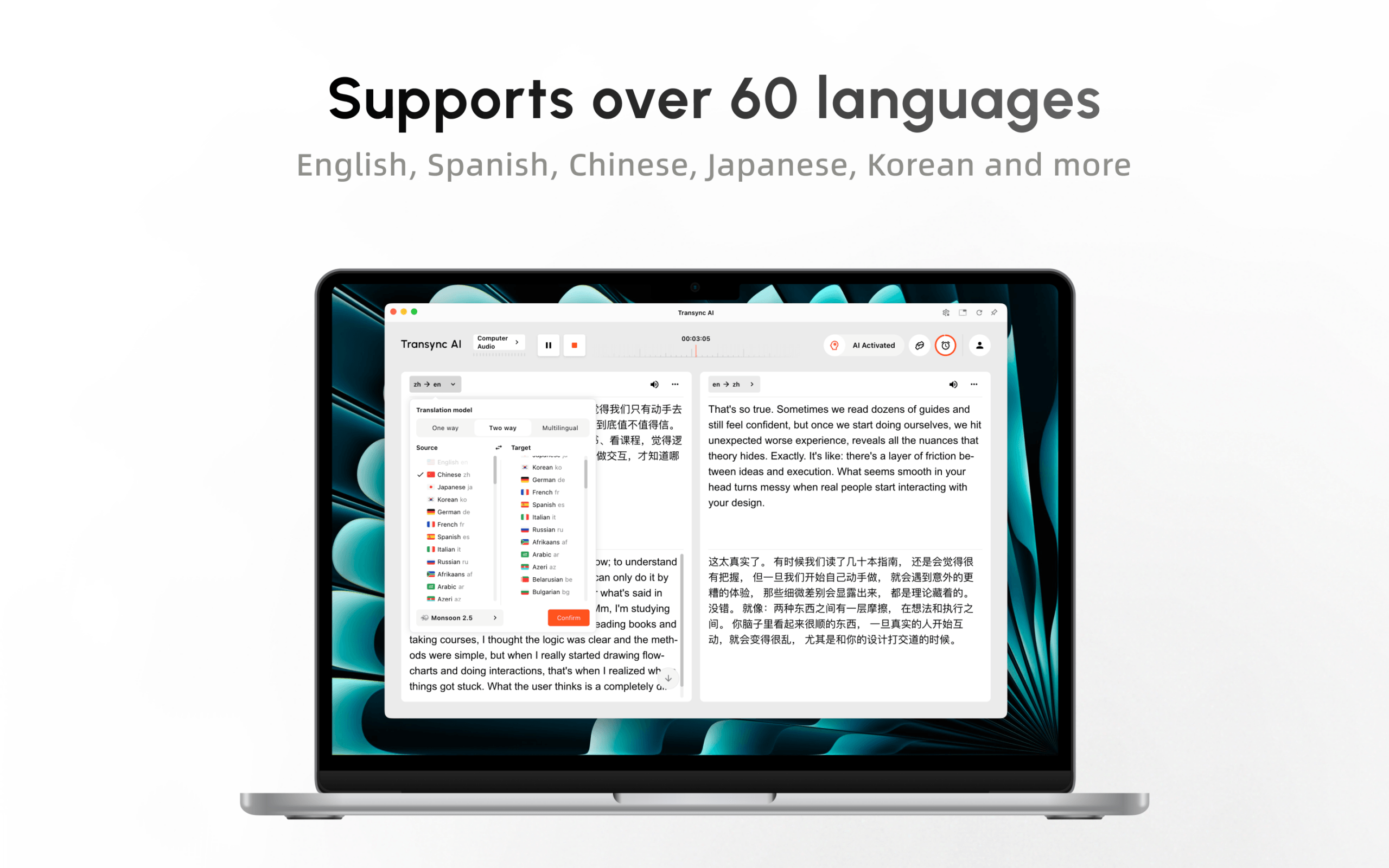
Tijdens een vergadering, een AI-stemvertaler Kan vertaalde spraak afspelen. Picture-in-Picture ondertitels Zorg ervoor dat tweetalige tekst zichtbaar blijft in ondersteunde applicaties. Gebruikers kunnen vóór de vergadering namen, vaktermen en achtergrondinformatie invoeren via trefwoorden en context.

Ondertitels die in realtime meebewegen op zowel desktop- als mobiele apparaten.
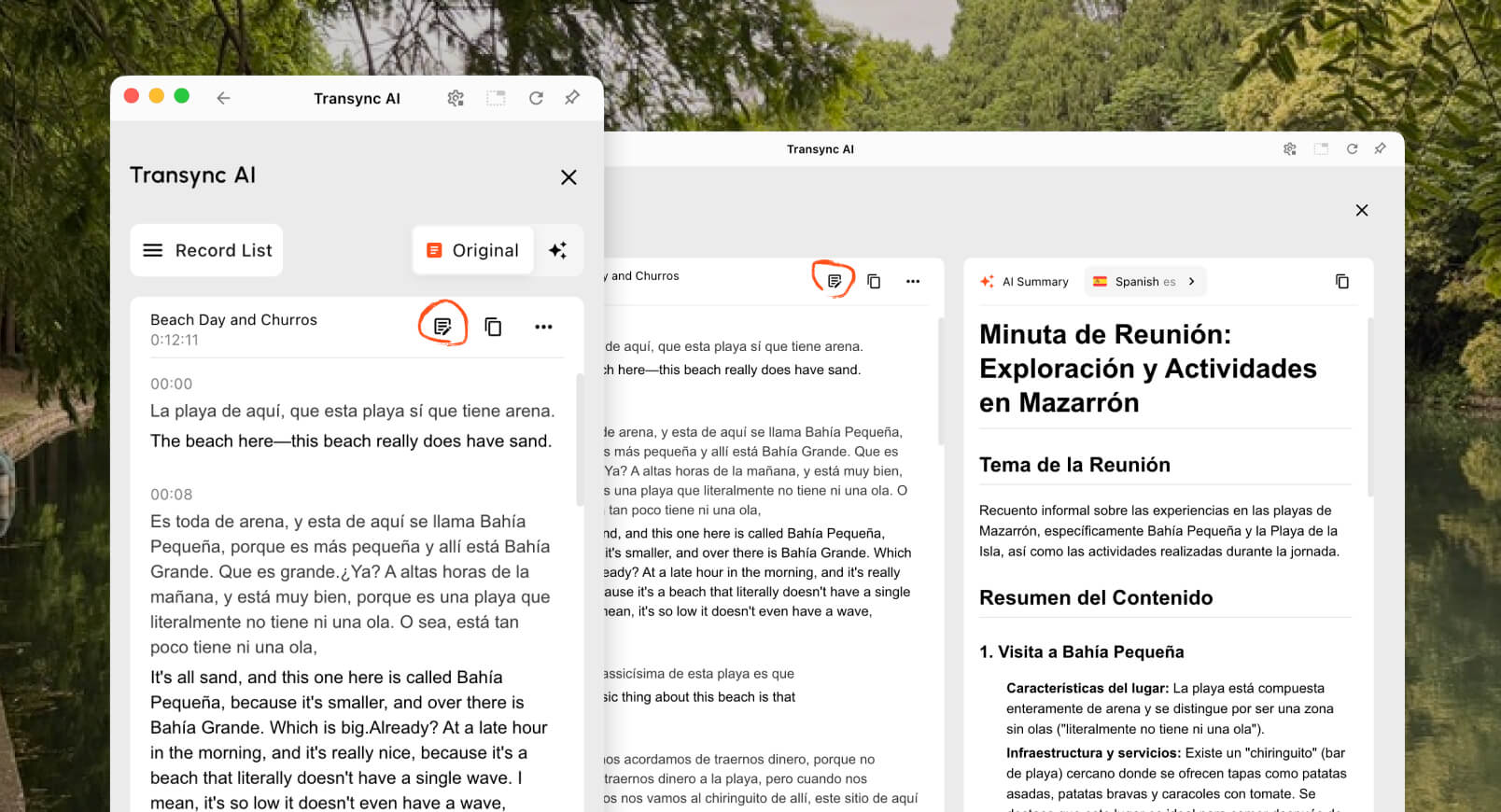
Daarna, Notulen van de AI-vergadering Kan een transcript en een gestructureerde samenvatting leveren. Deze continuïteit helpt teams beslissingen, actiepunten, prijzen en deadlines te bevestigen, zodat de interpretatie niet verloren gaat wanneer het gesprek eindigt.
Transync AI is geen aanbieder van telefoonnummers zoals Google Voice, Een offline Pixel-belfunctie, een cameravertaler of een CAT-tool voor documenten. De prestaties in de praktijk zijn afhankelijk van de microfoonkwaliteit, audio-routering, netwerkcondities, hoofdtelefoon, terminologie en beurtwisseling.
Voor een platformoverschrijdend zakelijk team voorkomt dit echter dat vertalingen afhankelijk worden van één specifieke leverancier van vergadersoftware of één specifiek telefoonmodel. Dit is vaak de betere oplossing wanneer... Google spraaktolk Het betekent eigenlijk: "Mensen in verschillende landen moeten tijdens regelmatige online vergaderingen met elkaar kunnen praten."“
Kies deze route wanneer: Teams hebben behoefte aan tweetalige ondertiteling, vertaalde stemmen, terminologievoorbereiding en notities voor terugkerende vergaderingen en platformen.
Wat is er gebeurd met? Google Assistent Tolkmodus?
In oudere artikelen wordt gebruikers mogelijk gevraagd om "Hey" te zeggen. Google, wees mijn tolk” naar Google Assistent op een telefoon, speaker of smartdisplay. Dat advies moet niet als actueel worden beschouwd.
De officiële "Wijzigingen die we aanbrengen aan Google Assistent”Op de pagina wordt vermeld dat de mogelijkheid om een live gesprek te vertalen via de Tolkmodus niet langer wordt ondersteund. Het vertalen van een enkel woord of een enkele zin blijft mogelijk, maar de oude manier van live converseren is momenteel niet aan te raden.
Deze geschiedenis verklaart een deel van de Google spraaktolk zoekvolume. Mensen onthouden een handig commando, maar stuiten nu op verschillende productnamen en apparaatvereisten. De huidige alternatieven zijn: Google Vertalen Live vertalen, Pixel Voice Translate, Google Meet vertaalde ondertitels of spraakvertaling, en vergaderproducten van derden zoals Transync AI.
Google Voice Interpreter Vergelijking
| Vermogen | Google Voice | Google Translate Live Translate | Pixel Voice Translate | Vertaalde ondertiteling in Google Meet | Google Meet spraakvertaling | Transync AI |
|---|---|---|---|---|---|---|
| Hoofddoel | Bellen en telefoonnummerbeheer | Persoonlijk luisteren en beurtelings converseren | Vertaalde telefoongesprekken | Lees de vertaalde vergadertekst | Luister naar de vertaalde toespraak tijdens de vergadering. | Vertaling van vergaderingen en presentaties op verschillende platforms |
| Uitvoer | Bellen, sms'en, voicemail, abonnementsfuncties | Tekst en optioneel audio | Stem die lijkt op die van de beller | Vertaalde ondertitels | Vertaalde stem die lijkt op die van de spreker | Tweetalige ondertiteling en vertaalde stem |
| Hardwareafhankelijkheid | Account- en ondersteuningsinstellingen voor bellen | Ondersteunde telefoon of tablet | Pixel 10 of later | Ondersteund Meet-apparaat | Ondersteunde Meet-apparaten en geschikte accounts | Web-, desktop- of mobiele workflow |
| Taalarchitectuur | Geen vertaler | Breed toepasbaar, maar afhankelijk van de modus. | Engels plus geselecteerde talen | Uitgebreide lijst met ondertitelingstalen | Eén Engels woordpaar uit geselecteerde talen | 60 talen voor realtime vertaling |
| Platformbereik | Spraakservice | Vertaal-app | Pixel Phone-app-oproepen | Alleen Google Meet | Alleen Google Meet | Werkt samen met meerdere vergaderapps. |
| Voorbereide terminologie | Geen interpretatieproces | Beperkte voorbereiding van de vergadering | Geen workflow voor de woordenlijst van vergaderingen | Beperkt | Beperkt | Trefwoorden en context |
| Neem het daarna op. | Belgeschiedenis en abonnementsspecifieke gegevens | Niet eerst ontmoeten | Geen terugvindbare vertaalde conversatie | Afhankelijk van het plan zijn de afzonderlijke vergaderverslagen van toepassing. | Niet beschikbaar in opnames | Transcript en AI-aantekeningen |
| Beste pasvorm | Beldienst | Reizen en persoonlijke uitwisseling | Ondersteuning voor één-op-één telefoongesprekken | Deelname aan de Meet via tekstcommunicatie | Ondersteunde spraakparen in Meet | Terugkerende meertalige bijeenkomsten |
Geen enkele rij wint in elk scenario. De juiste Google spraaktolk De route is afhankelijk van het belkanaal, het apparaat, de taalcombinatie, het uitvoertype en de behoefte aan gegevensregistratie.
Voor een nuttige Google spraaktolk Vergelijk de mogelijkheden en sluit alle routes uit die het betreffende apparaat, de taalcombinatie of het vergaderkanaal niet ondersteunen.
Een beslissingsboom in zes vragen
Gebruik dit Google spraaktolk Beslissingsboom van boven naar beneden; de eerste "ja" geeft meestal de juiste categorie aan om te testen.
1. Heeft u alleen een telefoonnummer nodig of wilt u ook internationaal bellen?
Gebruik Google Voice. Voor vertaling is een apart product of een professionele dienst nodig.
2. Zijn twee mensen met elkaar aan het bellen?
Poging Google Vertalen Livevertaling of een videogesprek op een ondersteund apparaat.
3. Gaat het om een normaal telefoongesprek op een compatibele Pixel?
Rekening Pixel Voice Translate, de regio en het exacte Engelse taalpaar.
4. Is de vertaalde tekst binnenin voldoende? Google Meet?
Gebruik Google Meet Vertaalde ondertitels worden weergegeven als het account, het abonnement en de talen hiervoor in aanmerking komen.
5. Hebben de deelnemers behoefte aan vertaalde spraak binnenin? Google Meet?
Test Google Meet Spraakvertaling, inclusief de architectuur met één paar sprekers, het toestemmingsproces, de vertraging en de limiet van 90 minuten.
6. Moet de vertaling geschikt zijn voor alle vergaderplatformen of een breed publiek bereiken?
Evalueren Transync AI, Vooral wanneer teams behoefte hebben aan vertaalde spraak, voorbereide terminologie, notities en een workflow die niet beperkt is tot één vergaderplatform.
Presentatiemodus: Wanneer één persoon tot velen spreekt
Een keynote, les, webinar of openbare bijeenkomst heeft een andere structuur dan een telefoongesprek. Eén spreker houdt het woord, terwijl de deelnemers hun eigen taalgebruik moeten kunnen kiezen.
In bèta Presentatiemodus, A Transync AI De host kan tot 10 doeltalen inschakelen. Deelnemers kunnen deelnemen via telefoon of computer met behulp van een QR-code, een deelbare link of een kamer-ID. Er is geen software-installatie vereist, maar deelnemers moeten zich wel registreren of inloggen. Transync AI rekening.

In de presentatiemodus kan één presentator live vertalingen delen met de deelnemers op hun eigen apparaten.
Elke deelnemer kiest een ingeschakelde taal en kan de live vertaling lezen of, indien beschikbaar, naar de gesproken versie luisteren. Deelnemers kunnen geen spraakinvoer naar de host sturen. De host bepaalt of het transcript en de door AI gegenereerde notities na de sessie worden gedeeld.
Geen van beide Google Voice noch de typische persoonlijke Google spraaktolk De workflow creëert deze publieksarchitectuur. Google Meet De functies zijn beschikbaar voor deelnemers aan de vergadering binnen Meet, terwijl de presentatiemodus een apart, in taal selecteerbaar paneel naar de apparaten van het publiek distribueert.
Hoe je spraakinterpretatie eerlijk kunt testen
Bereid voor elke in aanmerking komende route hetzelfde script van drie minuten voor:
- Twee persoonsnamen en één bedrijfsnaam.
- Een datum, tijd, prijs, percentage en modelnummer.
- Vijf vaktermen.
- Een negatieve bewering met "niet" of "tenzij".“
- Een correctie: "De verzending is dinsdag - sorry, donderdagochtend."“
- Eén onderbreking en één verzoek om verduidelijking.
Noteer vervolgens:
| Testlaag | Wat te inspecteren |
|---|---|
| Audio-opname | Heeft het systeem het beoogde microfoonsignaal of gespreksgeluid ontvangen? |
| Herkenning | Zijn de bronnamen, nummers en omstandigheden correct overgeschreven? |
| Vertaling | Heeft de doelgroep de bedoeling van de spreker behouden? |
| Stem | Was de uitspraak verstaanbaar en in een passend tempo? |
| Vertraging | Kon de luisteraar reageren voordat het gesprek verderging? |
| Herstel | Kunnen gebruikers een fout corrigeren of een zin herhalen? |
| Levering | Heeft de beoogde deelnemer het resultaat daadwerkelijk gehoord of gezien? |
| Dossier | Kunnen belangrijke details achteraf nog worden geverifieerd? |
De beste Google spraaktolk De kandidaat is niet degene met de meest natuurlijke stem. Het is degene die de feiten correct weergeeft, op tijd arriveert, de luisteraar bereikt en fouten aan het licht brengt die gecorrigeerd kunnen worden.
De mate van privacy hangt af van de route.
Huidig Pixel Voice Translate Volgens de documentatie kunnen gesprekken offline worden vertaald en wordt de audio of transcriptie van het gesprek niet opgeslagen of verzonden. Google servers. Dat is anders dan bij een cloudvergadering, waar account-, beheerders-, toestemmings- en platformbeleid van toepassing zijn.
Huidig Google Meet Volgens de documentatie over spraakvertaling wordt er geen audio opgeslagen en worden de modellen niet getraind op de stem van de gebruiker. Organisaties zouden hun systemen desalniettemin moeten herzien. Google Werkruimte overeenkomst, vergaderverslagen, chat, ondertiteling, kennisgeving aan deelnemers en toepasselijke wetgeving.
Huidig Transync AI Volgens de informatie wordt audio van live vertalingen na verwerking verwijderd, kan de verwerkte tekst bewaard blijven voor vertalingen of vergaderingssamenvattingen, kunnen records worden verwijderd en worden klantgegevens standaard niet gebruikt voor AI-training. Organisaties dienen de huidige informatie te herzien. Vertrouwenscentrum en de wettelijke vereisten die daaraan verbonden zijn.
Neem geen privacyconclusies over van de ene naar de andere. Google spraaktolk route naar een andere. "Op het apparaat" voor een Pixel-gesprek beschrijft niet elke workflow van Translate of Meet.
Kosten en beschikbaarheid
Google Voice De prijsstelling heeft betrekking op belabonnementen en internationale beltarieven, niet op tolken. Google Vertalen Het biedt brede toegang voor consumenten, maar de ondersteuning van functies verschilt per apparaat en taal. Pixel Voice Translate Vereist compatibele hardware. Google Meet De vertaling is afhankelijk van de in aanmerking komende consumenten- of werkruimteabonnementen.
Een complete Google spraaktolk Het budget moet de volgende zaken omvatten: benodigde telefoon, abonnement, vergaderlicentie, koptelefoon, implementatietijd en evaluatie na de vergadering.
Huidig Transync AI De prijzen zijn inclusief 40 gratis minuten na registratie, Personal Premium voor 8,99 per maand met 10 uur, en Enterprise voor 24,99 per maand per gebruiker met maximaal 40 uur. Sessies in meertalige en presentatiemodus kunnen anders worden gefactureerd, dus controleer dit even. huidige prijs- en gebruiksregels.
Vergelijk de totale kosten: hardware, abonnementen, personeelskosten, vergaderduur, deelnemers, doeltalen, menselijke beoordeling, ondersteuning en de kosten van eventuele mislukkingen.
Veelgestelde vragen
Bestaat er een officieel product genaamd...? Google spraaktolk?
Er bestaat momenteel geen enkel product dat precies die officiële naam gebruikt. De gebruiker bedoelt mogelijk iets anders. Google Vertalen Live vertalen, Pixel Voice Translate, Google Meet Spraakvertaling, of een aparte tolk voor de vergadering.
Doet Google Voice Telefoongesprekken vertalen?
Google Voice Het biedt bel- en telefoonnummerfuncties, maar het is geen algemene tolk voor live talen. Pixel Voice Translate Dit is de relevante, ondersteunde functie voor het vertalen van telefoongesprekken op geschikte Pixel-apparaten.
Wat is ervoor in de plaats gekomen? Google Assistent Tolkmodus?
De erfenis Google Assistent De tolkmodus voor livegesprekken wordt niet langer ondersteund. De huidige opties zijn: Google Vertalen Live Translate voor persoonlijke gesprekken en apparaat- of vergaderingsspecifieke vertaalfuncties.
Kan Google spraaktolk Werk je offline?
Pixel Voice Translate Kan zonder internetverbinding werken op ondersteunde Pixel-modellen nadat de benodigde bestanden zijn gedownload. Andere routes hebben andere verbindingsvereisten. Transync AI En Google Meet Dit zijn workflows voor online vergaderingen.
Kan Google spraaktolk Werkt u ook met andere vergaderplatformen?
Oorspronkelijk Google Meet De vertaling is beperkt tot Meet. Transync AI Het is ontworpen om samen te werken met meerdere vergaderplatformen en kan tweetalige ondertiteling, spraakweergave, context en notities bieden.
Kunnen er tijdens één vergadering meerdere doeltalen worden gebruikt?
Google Meet Spraakvertaling maakt momenteel gebruik van één ondersteunde taalcombinatie voor de vergadering. Transync AI Het ondersteunt workflows voor meertalige vertalingen, terwijl de presentatiemodus een host de mogelijkheid biedt om tot 10 doeltalen voor een publiek in te schakelen.
Wanneer is een menselijke tolk nodig?
Schakel een gekwalificeerde menselijke tolk in voor juridische, medische, regelgevende, immigratie-, financiële, veiligheidskritische of andere communicatie met grote gevolgen. Google spraaktolk Of een ander geautomatiseerd hulpmiddel kan de toegang vergemakkelijken, maar kan geen professionele verantwoordelijkheid aanvaarden.
De kern van de zaak
A Google spraaktolk Het gaat om een zoekintentie, niet om een specifiek product. Google Voice behandelt oproepen, Google Vertalen verzorgt de uitwisseling van persoonlijke talen., Pixel Voice Translate handelt ondersteunde telefoongesprekken af, en Google Meet Biedt ondertiteling of spraakvertaling binnen de eigen vergaderomgeving.
Kiezen Transync AI Wanneer de vereisten verder reiken dan één telefoon of één vergaderplatform: tweetalige ondertiteling, vertaalde spraak, voorbereide terminologie, notulen van de vergadering en toegang voor een meertalig publiek.
Geef eerst het communicatiekanaal aan. Bepaal vervolgens of de luisteraar een vertaalde tekst, een vertaalde spraak, een tweeweggesprek, een verslag van de vergadering of een taalkiezer nodig heeft. Dat is de kortste weg van een vage vraag. Google spraaktolk Zoek naar een tool die echt bij je past.
Als u een ervaring van de volgende generatie wilt, Transync AI loopt voorop met realtime, AI-gestuurde vertalingen die gesprekken natuurlijk laten verlopen. U kunt probeer het gratis nu.
