

Automatische taalherkenning vertaalt zich naar het Engels voor spraak, vergaderingen, reizen en media. Vergelijk 7 tools en ontdek hoe automatische taalherkenning werkt en waar de fouten zich voordoen.
Mensen die zoeken “Taal detecteren naar Engels” Meestal wil men een tool die een onbekende gesproken of geschreven taal kan herkennen en naar het Engels kan vertalen. Dit is handig wanneer een reiziger een onbekende taal hoort, een supportteam meertalige telefoontjes ontvangt of er tijdens een vergadering sprekers zijn die tussen verschillende talen wisselen.
De meest voor de hand liggende formulering is "een taal herkennen en deze naar het Engels vertalen", maar de zoekintentie is duidelijk. Gebruikers willen twee taken tegelijk uitvoeren: de brontaal identificeren en vervolgens een correct Engels resultaat genereren.
Deze handleiding legt uit hoe automatische taalherkenning werkt, waar het mis kan gaan en hoe zeven vertaaltools geschikt zijn voor vergaderingen, reizen, evenementen, media, documenten en maatwerktoepassingen.
Kort antwoord: Hoe detecteer je de taal als Engels?
Volg deze basisprocedure:
- Leg een duidelijk spraakfragment vast of plak voldoende geschreven tekst.
- Laat de tool de waarschijnlijke brontaal identificeren.
- Bevestig indien mogelijk de gedetecteerde taal.
- Selecteer Engels als doeltaal.
- Vertaal de inhoud als tekst, ondertitels of spraak.
- Controleer namen, getallen, terminologie en regionale uitdrukkingen.
Korte fragmenten zijn lastiger te herkennen dan complete zinnen. Achtergrondgeluiden, een mengeling van talen, overeenkomsten in taalgebruik en leenwoorden kunnen de betrouwbaarheid van de identificatie ook verminderen.
Gebruik voor een online vergadering een product dat is ontworpen voor live spraak- en audio-routing. Kies voor een afbeelding of document een product dat deze invoertypen ondersteunt.
Hoe werkt automatische taaldetectie?
Taaldetectiesystemen analyseren patronen in de invoer. Bij tekst kunnen deze patronen bestaan uit tekens, spelling, veelvoorkomende woorden en woordreeksen. Bij spraak moet het systeem eerst audiokenmerken en gesproken woorden interpreteren voordat het de waarschijnlijke taal kan bepalen.
Een workflow voor live spraak volgt over het algemeen deze volgorde:
Audio opnemen → spraakpatronen detecteren → taal identificeren → woorden herkennen → vertalen naar het Engels → resultaat weergeven of uitspreken
Sommige producten vereisen dat gebruikers van tevoren een taalpaar selecteren. Andere kunnen een taal herkennen uit een bredere reeks. Taalherkenning op basis van taalparen is vaak nuttig bij tweewegvergaderingen, omdat het systeem weet welke twee talen het kan verwachten, waardoor de onzekerheid afneemt.
7 manieren om een taal te herkennen en naar het Engels te vertalen
1. Talen detecteren tijdens een tweetalige vergadering
In een bekende tweetalige vergadering kennen de deelnemers doorgaans beide talen, maar willen ze de invoerinstelling niet na elke spreker wijzigen.
Binnen een geselecteerd ondersteund taalpaar, Transync AI kan onderscheiden welke van de twee talen er gesproken wordt. realtime vertaaltool Vervolgens worden de originele spraak en de Engelse vertaling met een lage latentie weergegeven.
Deze op paren gebaseerde workflow ondersteunt een natuurlijke beurtwisseling tijdens verkoopgesprekken, interviews, lessen en interne vergaderingen. Het verschilt van het onbeperkt detecteren van elke onbekende taal, dus gebruikers moeten het verwachte paar selecteren vóór de sessie.
 2. Luister naar een Engelse vertaling tijdens een gesprek.
 2. Luister naar een Engelse vertaling tijdens een gesprek.
Tekst is handig ter verificatie, maar gesproken vertaling stelt deelnemers in staat een gesprek te volgen zonder voortdurend naar een scherm te hoeven staren.
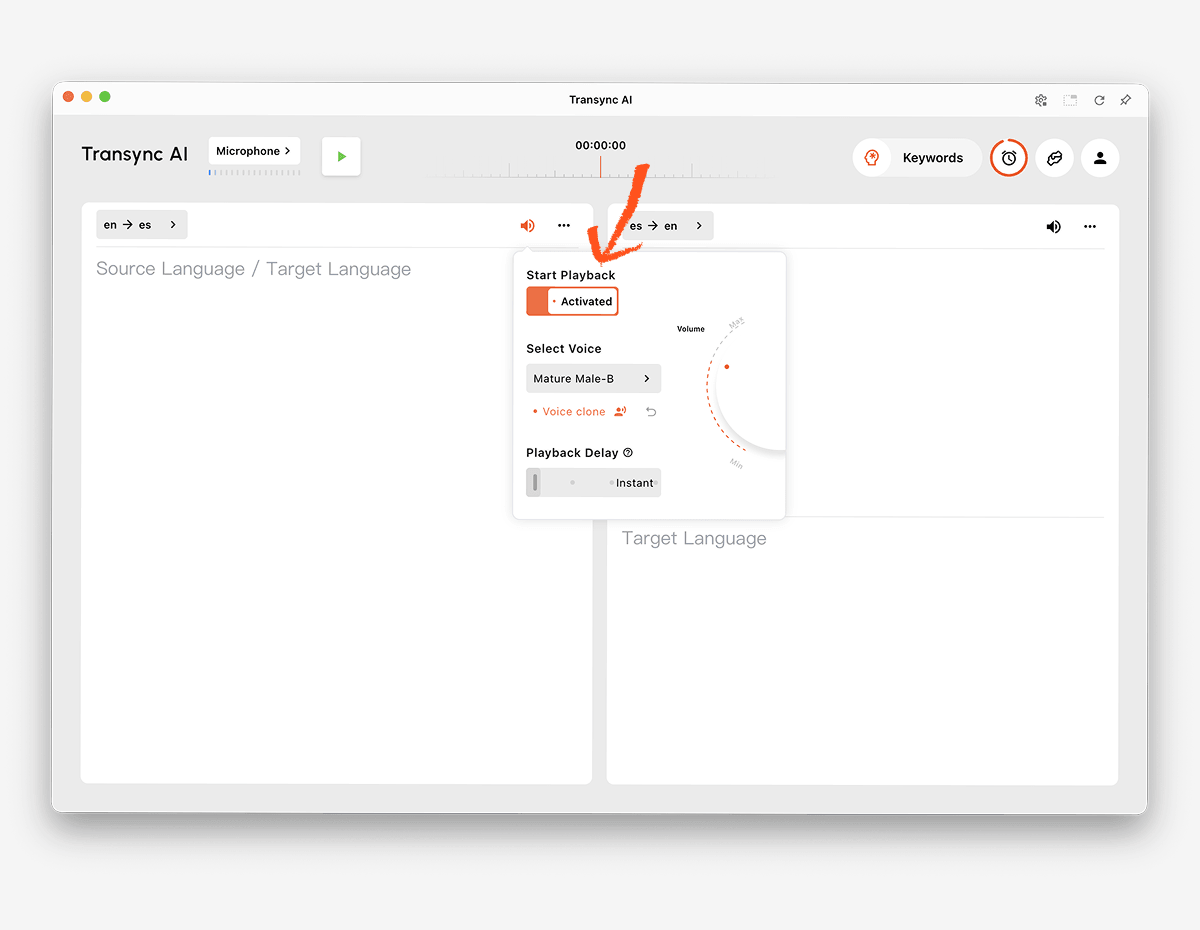
De AI-stemvertaler De Engelse vertaling kan hardop worden voorgelezen met behulp van natuurlijke stemopties. Gebruikers kunnen naar het resultaat luisteren terwijl ze de tweetalige ondertitels controleren op namen, cijfers of technische termen.
De stemkloningsfunctie Het systeem kan ook vertaalde audio afspelen met een stem die is gemodelleerd naar de gebruiker, waardoor presentaties en persoonlijke gesprekken beter aansluiten bij de oorspronkelijke spreker.
 3. Identificeer en vertaal spraak in een online vergadering
 3. Identificeer en vertaal spraak in een online vergadering
Videogesprekken brengen een extra uitdaging met zich mee op het gebied van audio-routering. Het vertaalprogramma moet deelnemers op afstand vastleggen, hun spraak verwerken en de vertaling teruggeven zonder de vergadering te verstoren.
De Live vertaalfunctie voor vergaderingen werkt samen met Zoom, Microsoft Teams, En Google Meet. Transync AI Het is zelfstandige software en geen platformspecifieke plug-in.
De functie voor het delen van computergeluid legt spraak vast van deelnemers op afstand. virtuele microfoonfunctie Helpt bij het terugsturen van de vertaalde Engelse spraak naar het gesprek.

Compatibel met de belangrijkste online vergaderplatformen voor naadloze realtime vertaling.
4. Een onbekende taal herkennen tijdens het reizen
Een reiziger kan een korte gesproken zin, een bord, een menukaart of een geschreven bericht ontvangen zonder de brontaal te kennen. Brede automatische detectie en camerabeelden kunnen belangrijker zijn dan aantekeningen van vergaderingen.
Google Vertalen Wij bieden een breed scala aan vertaaldiensten voor consumenten, waaronder tekst, afbeeldingen, websites, documenten en spraak. Talkao Het platform is gericht op mobiele vertaling, reizen, camera- en AR-functies en taalonderwijs.
Deze producten zijn wellicht handiger voor onbekende teksten, borden en snelle uitwisselingen tijdens het reizen. Transync AI Het is ontworpen voor live gesproken communicatie binnen een geselecteerd taalpaar en biedt geen offline modus, beeldherkenning of tekstvertaling van documenten.
5. Meertalige klantenservicegesprekken vertalen
Een wereldwijd supportteam kan telefoontjes in meerdere talen ontvangen. Zodra de juiste taal is vastgesteld, moeten productnamen, foutcodes en technische termen nog steeds consistent worden vertaald.
De AI-assistent trefwoorden en contextfunctie Hiermee kunnen gebruikers namen, merken, terminologie en achtergrondinformatie opgeven vóór een gesprek. Voor geplande gesprekken kunnen teams de verwachte taal van de klant selecteren en de relevante context voorbereiden.
Als de taal volledig onbekend is, gebruik dan eerst een brede detectie- of intake-procedure om deze te identificeren. Start vervolgens het juiste paar in Transync AI voor het live Engelstalige gesprek.
 6. Verzorg een Engelse vertaling tijdens een evenement.
 6. Verzorg een Engelse vertaling tijdens een evenement.
Tijdens conferenties en webinars hebben veel deelnemers tegelijkertijd behoefte aan Engelse ondertiteling of vertaalde audio. De belangrijkste vereiste is niet alleen dat dit wordt gedetecteerd, maar ook dat het voor het publiek gemakkelijk toegankelijk is.
Wereldlijk Het is ontworpen voor vergaderingen en evenementen, waarbij deelnemers toegang krijgen via links of QR-codes. Het is met name geschikt voor conferenties, hybride evenementen en webinars waar vertalingen een groot publiek moeten bereiken.
 Kiezen Transync AI Voor persoonlijke en teamvergaderingen. Kies Wereldlijk wanneer grootschalige distributie van deelnemers de primaire workflow is.
7. Detecteer en vertaal media- of productaudio
Voor opgenomen media kan transcriptie, taalidentificatie, Engelse ondertiteling, nasynchronisatie, bewerking en export nodig zijn. Een softwareproduct op maat kan daarentegen programmeerbare spraakherkenning en vertaling vereisen.
Maestra is gepositioneerd voor mediavertaling, ondertiteling, nasynchronisatie, webinars en live content.
 Soniox Biedt spraakherkenning, vertaling en tekst-naar-spraakfunctionaliteit voor ontwikkelaarsapplicaties.
 DiepL Biedt API's en bredere workflows voor tekst, documenten, bedrijfsapplicaties en geselecteerde spraakprocessen.
 Kiezen Transync AI Wanneer gebruikers een voltooide vergadering met een vertaler nodig hebben, kies dan een mediasuite of API wanneer de gedetecteerde inhoud in een productie- of maatwerksoftwarepipeline moet worden opgenomen.
Taaldetectie en vergelijking van Engelse vertaling
De tabel vergelijkt typische productpositioneringen. Functies, ondersteunde talen en abonnementen kunnen wijzigen, dus controleer de belangrijkste vereisten op de officiële websites.
| Hulpmiddel | Beste toepassing van detectie naar Engels | Invoertypen | Live Engelstalige weergave | Belangrijkste beperking of onderscheid | Het beste voor |
|---|---|---|---|---|---|
| Transync AI | Tweetalige bijeenkomsten met een geselecteerd talenpaar | Live audio van spraak en vergadering | Tweetalige ondertitels en vertaalde stemmen | Live communicatie tussen paren in plaats van onbeperkte beeld- of documentdetectie. | Teams en individuen in meertalige vergaderingen |
| Talkao | Taalidentificatie voor reizen en mobiele apparaten | Spraak-, tekst-, camera- en mobiele invoer | App-afhankelijk | Consumentgericht in plaats van vergadergericht. | Reizigers en taalstudenten |
| Wereldlijk | Conferenties en meertalige evenementen | Live toespraak tijdens het evenement | Ondertiteling en vertaalde audio | Geoptimaliseerd voor publieksdistributie | Evenementorganisatoren |
| Soniox | Detectie en vertaling binnen maatwerkproducten | API en app-audio | API/app-afhankelijk | Vereist productimplementatie | Ontwikkelaars en productteams |
| Maestra | Het identificeren en lokaliseren van opgenomen of live media. | Video-, audio- en live-content | Ondertiteling, vertaling en nasynchronisatie | Werkstroom voor mediaproductie | Content- en lokalisatieteams |
| DiepL | Geschreven taal en bedrijfsworkflows | Tekst, documenten, API's en geselecteerde spraakproducten | Productafhankelijk | Niet primair een hulpmiddel om vergaderingen te detecteren | Zakelijk werk met veel tekst |
| Google Vertalen | Snelle detectie van alledaagse tekst en spraak. | Tekst, afbeeldingen, websites, documenten en spraak | Tekst- en audioweergave | Geen volledig vergaderproces | Gratis incidenteel en reisgebruik |
Waarom kan taalherkenning mislukken?
Het voorbeeld is te kort.
Een enkel woord kan in meerdere talen voorkomen. Namen, getallen, begroetingen en leenwoorden bieden daar weinig bewijs voor. Gebruik waar mogelijk een volledige zin.
De spreker mengt talen.
Mensen kunnen binnen één zin van taal wisselen, vooral op internationale werkplekken en in meertalige gemeenschappen. Een detector kan het hele tekstfragment labelen op basis van de dominante taal en kortere fragmenten missen.
De talen zijn nauw verwant.
Nauw verwante talen kunnen woordenschat, grammatica en klankpatronen delen. Regionale varianten kunnen ook onder een bredere taalcategorie worden ingedeeld, zelfs als sprekers ze als afzonderlijk beschouwen.
Het geluid is onduidelijk.
Achtergrondgeluid, echo, compressie, een microfoon op afstand of overlappende sprekers kunnen spraakherkenning verstoren. Als het systeem de woorden niet betrouwbaar kan herkennen, kan het de taal ook niet met zekerheid vaststellen.
De inhoud bevat namen of technische termen.
Een zin vol merknamen, productcodes, persoonsnamen en Engelse leenwoorden kan eruitzien of klinken alsof hij in een andere taal is geschreven. Geef een langer voorbeeld en gebruik de AI-assistent trefwoorden en contextfunctie zodra het verwachte taalpaar bekend is.
De detector verwart schrift met taal.
Een schrijfsysteem kan door meerdere talen worden gedeeld. Het Latijnse, Cyrillische, Arabische en andere schriften identificeren op zichzelf geen enkele taal. Bij herkenning moet rekening worden gehouden met woordpatronen en context, niet alleen met tekens.
Hoe de nauwkeurigheid van spraakherkenning naar Engels te verbeteren
- Gebruik een volledig voorbeeld. Geef één of meer natuurlijke zinnen in plaats van één enkel woord.
- Leg helder geluid vast. Plaats de microfoon dichterbij en verminder het achtergrondgeluid.
- Vraag de sprekers om om de beurt aan het woord te komen. Vermijd dat stemmen elkaar overlappen.
- Aparte segmenten met gemengde talen. Vertaal elk onderdeel waar mogelijk afzonderlijk.
- Bevestig de regio. Accent en woordenschat kunnen helpen om taalvarianten te onderscheiden.
- Selecteer een paar na detectie. Een bekende brontaal verbetert de workflow tijdens het liveproces.
- Voeg specialistische terminologie toe. Definieer namen, producten, afkortingen en de gewenste Engelse vertalingen.
- Controleer de belangrijkste gegevens. Controleer de data, prijzen, adressen en contractvoorwaarden.
- Test beide richtingen. Bevestig dat deelnemers in het Engels of de andere taal kunnen antwoorden.
- Bekijk het transcript. Een live resultaat kan nog steeds fouten bevatten in de opgeslagen gegevens.
Bij medische, juridische, veiligheidskritische of contractueel bindende communicatie mag automatische detectie niet de enige waarborg zijn. Bevestig de taal met de spreker en schakel indien nodig een gekwalificeerde tolk in.
Hoe te gebruiken Transync AI Na het identificeren van de taal
- Identificeer de brontaal aan de hand van een betrouwbaar voorbeeld of bevestig dit met de spreker.
- Open Transync AI Via het web, Windows, macOS, iOS of Android.
- Selecteer de opgegeven brontaal en Engels als taalpaar.
- Controleer de pagina met ondersteunde talen om de actuele beschikbaarheid te bevestigen.
- Kies de juiste microfoon of computergeluidsbron.
- Voeg namen en terminologie toe via de AI-assistent trefwoorden en contextfunctie.
- Begin de realtime vertaaltool.
- Controleer of de originele spraak en het Engelse resultaat worden weergegeven in de tweetalige ondertitelingsweergave.
- Schakel de AI-stemvertaler wanneer de Engelse vertaling hardop moet worden uitgesproken.
- Gebruik de Picture-in-Picture tweetalige ondertitels terwijl ik in een andere app aan het werk was.
- Bekijk de sessie nog eens door middel van de AI-functie voor vergaderingsnotities.
Doe een korte test vóór een belangrijke vergadering. Controleer het gekozen taalpaar, de accenten, de terminologie, de audio-instellingen en de spraakweergave.
Taal detecteren naar Engels Veelgestelde vragen
Wat betekent "detect language to English"?
De taal detecteren en omzetten naar Engels Dit is een zoekterm waarmee een onbekende brontaal kan worden geïdentificeerd en naar het Engels kan worden vertaald. De invoer kan tekst, spraak, een afbeelding, een document of media zijn, afhankelijk van de tool.
Kan een tool elke gesproken taal automatisch herkennen?
De mogelijkheden variëren. Sommige consumenten- en API-producten proberen een brede taalherkenning uit te voeren. Transync AI Het systeem maakt tijdens een live gesprek onderscheid tussen de twee geselecteerde ondersteunde talen, in plaats van onbeperkte detectie van elke onbekende taal te beloven.
Kan de gedetecteerde spraak worden omgezet in Engelse audio?
Ja. Nadat de brontaal is geselecteerd, AI-spraakvertaler van Transync AI De Engelse vertaling wordt hardop voorgelezen. Tweetalige ondertitels bieden tegelijkertijd een tekstuele referentie.
Kan ik talen detecteren en vertalen tijdens een videogesprek?
Ja, als het waarschijnlijke talenpaar bekend is. Live vertaalfunctie voor vergaderingen van Transync AI werkt samen met Zoom, Microsoft Teams, En Google Meet.
Wat is de beste optie voor een onbekend bord of document?
Google Vertalen Ondersteunt een breed scala aan input van consumenten, waaronder afbeeldingen en documenten. DiepL is geschikt voor tekst-, document- en bedrijfsworkflows. Transync AI Het is gericht op live spraak en biedt geen beeldherkenning of tekstvertaling van documenten.
Waarom kiest de automatische detectie de verkeerde taal?
Het geluidsfragment is mogelijk te kort, bevat te veel ruis, is vermengd met een andere taal, staat vol met namen of is afkomstig uit een nauw verwante taalvariant. Lever een langer en zuiverder geluidsfragment aan en bevestig het resultaat indien mogelijk met de spreker.
Werkt taalherkenning ook offline?
Offline ondersteuning is afhankelijk van de provider, het apparaat en de taal. Transync AI Vereist een internetverbinding en biedt geen offline modus.
Kan AI-detectie een menselijke tolk vervangen?
Nee. AI kan helpen bij het identificeren en vertalen van veel alledaagse gesprekken, maar kan geen perfecte detectie, nauwkeurigheid, cultureel begrip of professioneel oordeel garanderen. Bij belangrijke gesprekken kan een gekwalificeerde tolk nodig zijn.
Eindaanbeveling
Kies op basis van de input en het publiek:
- Kiezen Talkao of Google Vertalen Voor onbekende reisverhalen, afbeeldingen, korte toespraken en alledaagse inhoud.
- Kiezen Wereldlijk voor conferenties en grote meertalige doelgroepen.
- Kiezen Soniox voor spraakherkenning en vertaling binnen maatwerkproducten.
- Kiezen Maestra voor opgenomen media, ondertiteling, nasynchronisatie en lokalisatie.
- Kiezen DiepL voor tekst, documenten, API's en zakelijke taalworkflows.
- Kiezen Transync AI Na het selecteren van het gewenste taalpaar voor live vergaderingen die tweetalige ondertiteling, Engelse spraakweergave, terminologiecontext, audioroutering en notities na het gesprek vereisen.
Naar De taal detecteren en omzetten naar Engels Om succesvol te vertalen, begin je met voldoende schone input, controleer je indien mogelijk de brontaal en gebruik je vervolgens een vertaalworkflow die is ontworpen voor de inhoud. Detectie identificeert het startpunt; context, audiokwaliteit en het juiste product bepalen of het Engelse resultaat bruikbaar is.
Als u een ervaring van de volgende generatie wilt, Transync AI loopt voorop met realtime, AI-gestuurde vertalingen die gesprekken natuurlijk laten verlopen. U kunt probeer het gratis nu.
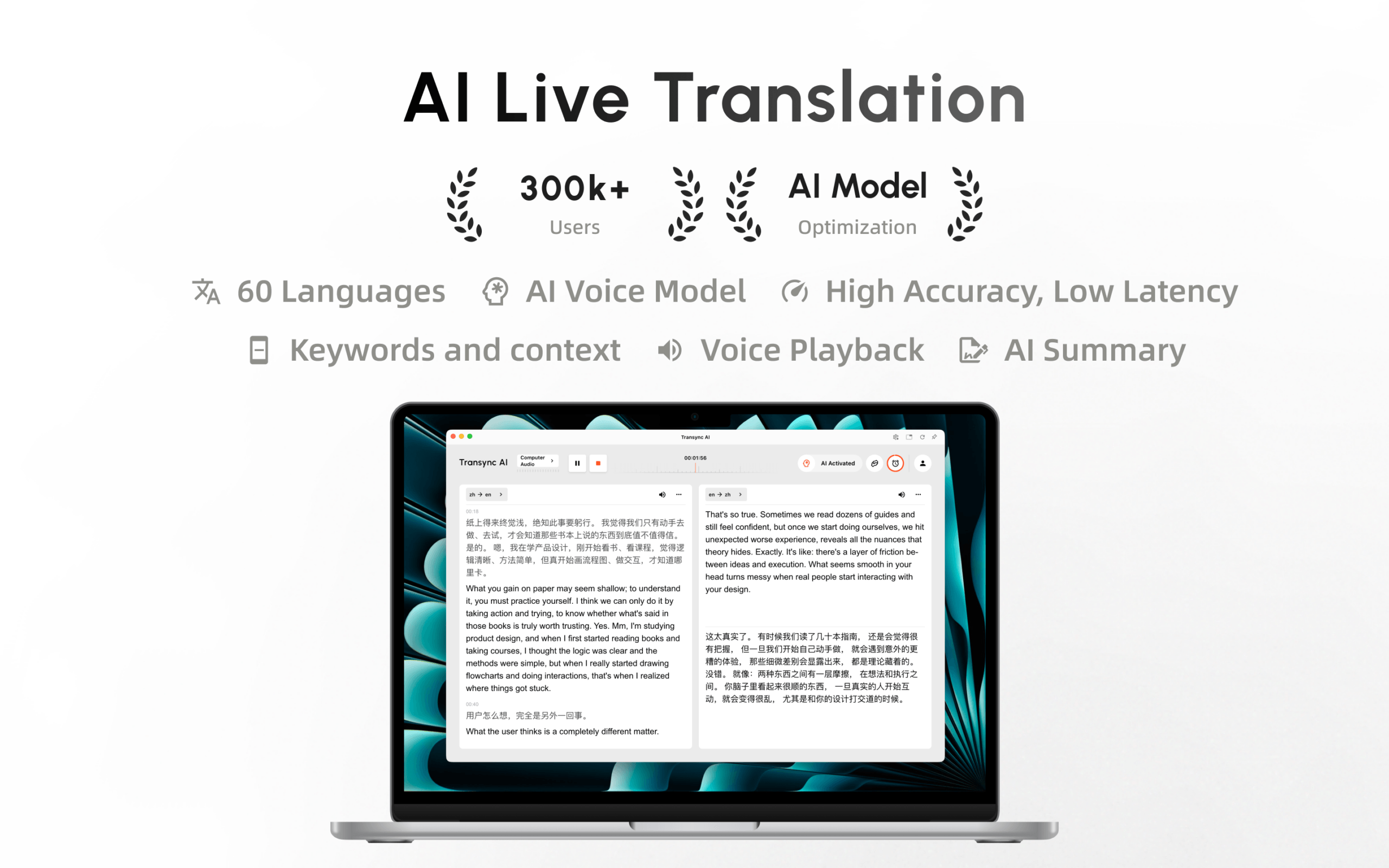
Transync AI is nu beschikbaar in de Mac App Store. Download de app eenvoudig, ontvang automatische updates en begin direct met realtime vertalen op je Mac.
