

Phát hiện ngôn ngữ sang tiếng Anh cho các bài phát biểu, cuộc họp, du lịch và truyền thông. So sánh 7 công cụ và tìm hiểu cách thức hoạt động và những hạn chế của nhận dạng ngôn ngữ tự động.
Mọi người đang tìm kiếm “phát hiện ngôn ngữ sang tiếng Anh” Thông thường, người ta cần một công cụ có thể nhận diện một ngôn ngữ nói hoặc viết không quen thuộc và dịch nó sang tiếng Anh. Điều này rất hữu ích khi một du khách nghe thấy một ngôn ngữ lạ, một nhóm hỗ trợ nhận được các cuộc gọi đa ngôn ngữ, hoặc một cuộc họp có những người tham gia chuyển đổi giữa các ngôn ngữ.
Cách diễn đạt tự nhiên là “phát hiện ngôn ngữ và dịch sang tiếng Anh”, nhưng ý định tìm kiếm rất rõ ràng. Người dùng muốn hai tác vụ được hoàn thành cùng lúc: xác định ngôn ngữ nguồn, sau đó đưa ra kết quả dịch chính xác sang tiếng Anh.
Hướng dẫn này giải thích cách thức hoạt động của nhận dạng ngôn ngữ tự động, những lỗi có thể xảy ra và cách bảy công cụ dịch thuật phù hợp với các cuộc họp, du lịch, sự kiện, truyền thông, tài liệu và các ứng dụng tùy chỉnh.
Câu trả lời nhanh: Làm thế nào để nhận biết ngôn ngữ trong tiếng Anh?
Hãy sử dụng quy trình cơ bản này:
- Ghi âm một đoạn giọng nói rõ ràng hoặc dán đủ văn bản.
- Hãy để công cụ xác định ngôn ngữ nguồn có khả năng nhất.
- Nếu có thể, hãy xác nhận ngôn ngữ đã được phát hiện.
- Chọn tiếng Anh làm ngôn ngữ mục tiêu.
- Dịch nội dung dưới dạng văn bản, phụ đề hoặc giọng nói.
- Kiểm tra tên, số, thuật ngữ và cách diễn đạt theo vùng miền.
Các đoạn văn ngắn khó nhận diện hơn so với câu hoàn chỉnh. Tiếng ồn nền, sự pha trộn ngôn ngữ, các biến thể ngôn ngữ tương tự và từ mượn cũng có thể làm giảm độ tin cậy.
Đối với cuộc họp trực tuyến, hãy sử dụng sản phẩm được thiết kế để định tuyến giọng nói và âm thanh trực tiếp. Đối với hình ảnh hoặc tài liệu, hãy chọn sản phẩm hỗ trợ các loại đầu vào đó.
Hệ thống nhận diện ngôn ngữ tự động hoạt động như thế nào?
Hệ thống nhận diện ngôn ngữ phân tích các mẫu trong dữ liệu đầu vào. Đối với văn bản, các mẫu này có thể bao gồm ký tự, chính tả, từ thông dụng và chuỗi từ. Đối với giọng nói, hệ thống phải diễn giải các đặc điểm âm thanh và từ ngữ được nói trước khi xác định ngôn ngữ có khả năng nhất.
Quy trình giao tiếp bằng giọng nói trực tiếp thường tuân theo trình tự sau:
Thu âm → phát hiện mẫu giọng nói → nhận dạng ngôn ngữ → nhận biết từ ngữ → dịch sang tiếng Anh → hiển thị hoặc đọc kết quả
Một số sản phẩm yêu cầu người dùng chọn trước một cặp ngôn ngữ. Những sản phẩm khác có thể nhận dạng ngôn ngữ từ một tập hợp ngôn ngữ rộng hơn. Nhận dạng theo cặp thường hữu ích trong các cuộc họp hai chiều vì hệ thống biết trước hai ngôn ngữ nào sẽ được sử dụng, giúp giảm thiểu sự không chắc chắn.
7 cách nhận biết một ngôn ngữ và dịch nó sang tiếng Anh
1. Phát hiện ngôn ngữ trong một cuộc họp song ngữ
Trong một cuộc họp song ngữ thông thường, người tham dự thường biết cả hai ngôn ngữ nhưng không muốn chuyển đổi cài đặt đầu vào sau mỗi người nói.
Trong một cặp ngôn ngữ được hỗ trợ đã chọn, AI đồng bộ có thể phân biệt được ngôn ngữ nào trong hai ngôn ngữ đang được nói. công cụ dịch thuật thời gian thực Sau đó, hiển thị cả giọng nói gốc và bản dịch tiếng Anh với độ trễ thấp.
Quy trình làm việc theo cặp này hỗ trợ việc luân phiên lượt nói tự nhiên trong các cuộc gọi bán hàng, phỏng vấn, lớp học và các cuộc họp nội bộ. Nó khác với việc tự động nhận diện bất kỳ ngôn ngữ nào không xác định, vì vậy người dùng nên chọn cặp ngôn ngữ dự kiến trước khi bắt đầu phiên làm việc.
 2. Nghe bản dịch tiếng Anh trong một cuộc hội thoại.
 2. Nghe bản dịch tiếng Anh trong một cuộc hội thoại.
Văn bản rất hữu ích để xác minh, nhưng dịch thuật bằng giọng nói cho phép người tham gia theo dõi cuộc hội thoại mà không cần liên tục nhìn vào màn hình.
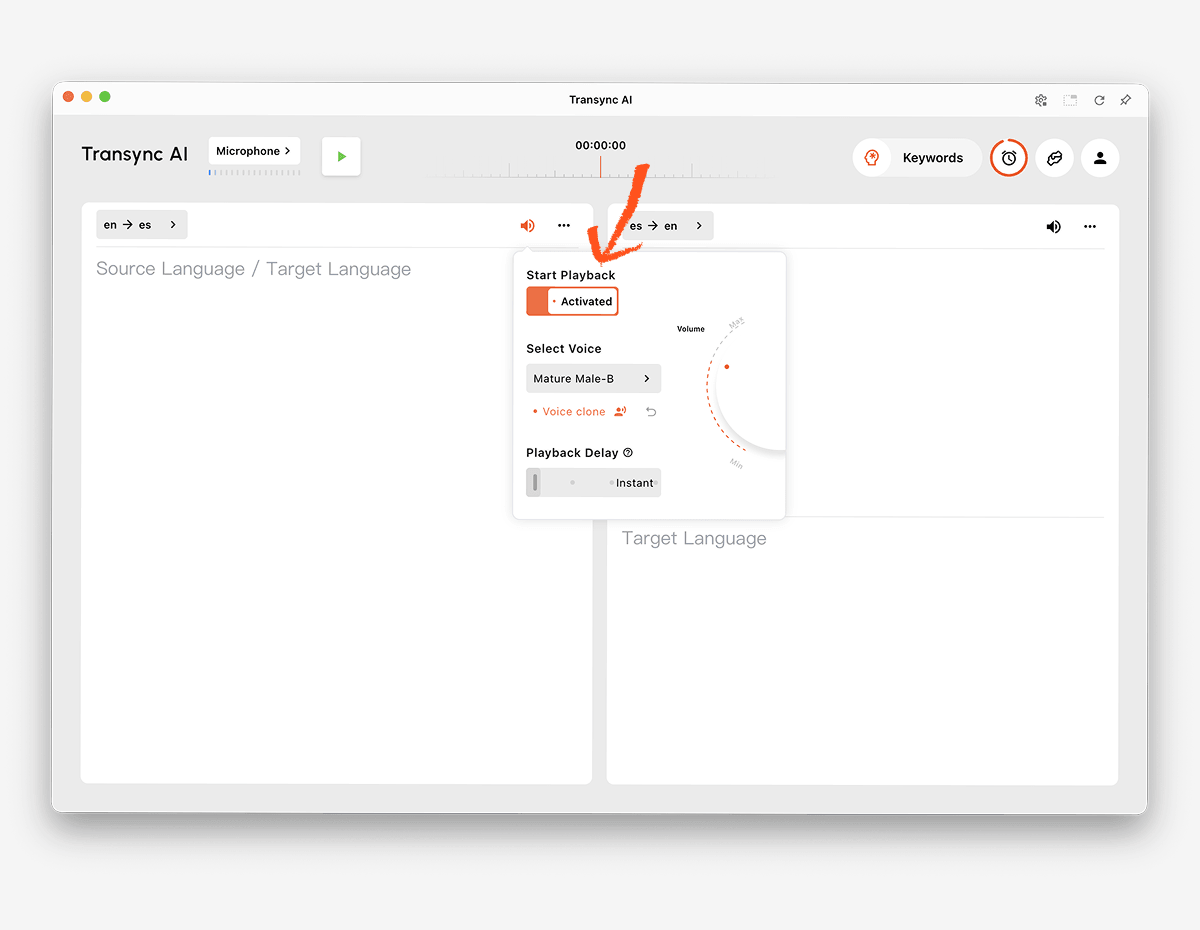
Các Trình dịch giọng nói AI Người dùng có thể đọc to bản dịch tiếng Anh bằng giọng nói tự nhiên. Họ có thể nghe kết quả trong khi kiểm tra phụ đề song ngữ cho tên, số hoặc thuật ngữ kỹ thuật.
Các Tính năng sao chép giọng nói Nó cũng có thể tạo ra bản phát lại đã được dịch với giọng nói được mô phỏng theo người dùng, giúp các bài thuyết trình và cuộc trò chuyện cá nhân trở nên nhất quán hơn với người nói ban đầu.
 3. Nhận diện và dịch lời nói trong cuộc họp trực tuyến
 3. Nhận diện và dịch lời nói trong cuộc họp trực tuyến
Các cuộc gọi video đặt ra thách thức về định tuyến âm thanh. Sản phẩm dịch thuật phải thu âm những người tham gia từ xa, xử lý giọng nói của họ và trả về bản dịch mà không làm ảnh hưởng đến cuộc họp.
Các Tính năng dịch cuộc họp trực tiếp làm việc cùng với Zoom, Microsoft Teams, Và Google Meet. AI đồng bộ Đây là phần mềm độc lập chứ không phải là plugin dành riêng cho một nền tảng cụ thể.
Các Tính năng chia sẻ âm thanh máy tính Ghi âm giọng nói từ những người tham gia từ xa. tính năng micro ảo Giúp gửi lại bản dịch lời thoại tiếng Anh vào cuộc gọi.

Tương thích với các nền tảng họp trực tuyến phổ biến, cho phép dịch thuật thời gian thực liền mạch.
4. Nhận biết ngôn ngữ lạ khi đi du lịch
Một du khách có thể nhận được một cụm từ ngắn bằng giọng nói, biển báo, thực đơn hoặc tin nhắn bằng văn bản mà không cần biết ngôn ngữ nguồn. Khả năng nhận diện tự động rộng rãi và nhập liệu bằng camera có thể quan trọng hơn cả ghi chú cuộc họp.
Google Dịch Cung cấp dịch thuật đa dạng cho người dùng cuối, bao gồm văn bản, hình ảnh, trang web, tài liệu và lời nói. Talkao Ứng dụng tập trung vào dịch thuật di động, du lịch, tính năng chụp ảnh và thực tế ảo tăng cường (AR), cũng như học ngôn ngữ.
Những sản phẩm này có thể tiện lợi hơn cho việc đọc văn bản, xem biển báo và trao đổi thông tin nhanh chóng khi di chuyển. AI đồng bộ Ứng dụng này được thiết kế để giao tiếp bằng giọng nói trực tiếp giữa một cặp ngôn ngữ đã chọn và không cung cấp chế độ ngoại tuyến, nhận dạng hình ảnh hoặc dịch tài liệu chỉ bằng văn bản.
5. Phiên dịch các cuộc gọi hỗ trợ khách hàng đa ngôn ngữ
Đội ngũ hỗ trợ toàn cầu có thể nhận cuộc gọi bằng nhiều ngôn ngữ khác nhau. Sau khi xác định được ngôn ngữ chính xác, tên sản phẩm, mã lỗi và thuật ngữ kỹ thuật vẫn cần được dịch một cách nhất quán.
Các Tính năng từ khóa và ngữ cảnh của Trợ lý AI Cho phép người dùng cung cấp tên, thương hiệu, thuật ngữ và thông tin nền trước khi bắt đầu cuộc trò chuyện. Đối với các cuộc gọi đã lên lịch, nhóm có thể chọn ngôn ngữ dự kiến của khách hàng và chuẩn bị ngữ cảnh phù hợp.
Khi ngôn ngữ hoàn toàn không quen thuộc, trước tiên hãy sử dụng phương pháp nhận diện hoặc sàng lọc tổng quát để xác định nó. Sau đó, bắt đầu với cặp từ phù hợp. AI đồng bộ để trò chuyện trực tiếp bằng tiếng Anh.
 6. Trình bày bản dịch tiếng Anh tại một sự kiện
 6. Trình bày bản dịch tiếng Anh tại một sự kiện
Tại các hội nghị và hội thảo trực tuyến, nhiều người tham dự có thể cần phụ đề tiếng Anh hoặc bản dịch âm thanh cùng lúc. Yêu cầu quan trọng không chỉ là khả năng nhận diện mà còn là sự dễ dàng tiếp cận đối với người tham dự.
Wordly Nền tảng này được thiết kế cho các cuộc họp và sự kiện, với quyền truy cập của người tham dự thông qua các liên kết hoặc mã QR. Nó phù hợp hơn cho các hội nghị, sự kiện kết hợp và hội thảo trực tuyến, nơi cần truyền tải thông điệp đến nhiều người nghe.
 Chọn AI đồng bộ Dành cho các cuộc họp cá nhân và nhóm. Chọn Wordly khi việc phân bổ người tham dự trên quy mô lớn là quy trình làm việc chính.
7. Phát hiện và dịch âm thanh phương tiện hoặc sản phẩm
Các bản ghi âm có thể cần đến quá trình phiên âm, nhận diện ngôn ngữ, phụ đề tiếng Anh, lồng tiếng, chỉnh sửa và xuất file. Ngược lại, một sản phẩm phần mềm tùy chỉnh có thể yêu cầu nhận dạng giọng nói và dịch thuật có thể lập trình được.
Maestra được định vị cho dịch thuật truyền thông, phụ đề, lồng tiếng, hội thảo trực tuyến và nội dung trực tiếp.
 Soniox Cung cấp khả năng nhận dạng giọng nói, dịch thuật và chuyển văn bản thành giọng nói cho các ứng dụng của nhà phát triển.
 DeepL Cung cấp API và các quy trình làm việc văn bản, tài liệu, doanh nghiệp và giọng nói được chọn lọc rộng rãi hơn.
 Chọn AI đồng bộ Khi người dùng cần một bản dịch cuộc họp hoàn chỉnh. Chọn bộ công cụ đa phương tiện hoặc API khi nội dung được phát hiện cần được đưa vào quy trình phần mềm sản xuất hoặc tùy chỉnh.
Phát hiện ngôn ngữ và so sánh bản dịch tiếng Anh
Bảng này so sánh vị trí sản phẩm điển hình. Các tính năng, ngôn ngữ được hỗ trợ và gói dịch vụ có thể thay đổi, vì vậy hãy xác minh các yêu cầu quan trọng thông qua trang web chính thức.
| Dụng cụ | Trường hợp sử dụng tốt nhất để chuyển đổi từ phát hiện sang tiếng Anh | Các loại đầu vào | Phát sóng trực tiếp bằng tiếng Anh | Hạn chế hoặc điểm khác biệt chính | Tốt nhất cho |
|---|---|---|---|---|---|
| AI đồng bộ | Các cuộc họp song ngữ với một cặp ngôn ngữ được lựa chọn | Âm thanh bài phát biểu trực tiếp và cuộc họp | Phụ đề song ngữ và lồng tiếng dịch thuật | Giao tiếp trực tiếp theo cặp thay vì phát hiện hình ảnh hoặc tài liệu không giới hạn. | Các nhóm và cá nhân trong các cuộc họp đa ngôn ngữ |
| Talkao | Nhận dạng ngôn ngữ khi đi du lịch và trên thiết bị di động | Nhập liệu bằng giọng nói, văn bản, camera và thiết bị di động. | Phụ thuộc vào ứng dụng | Tập trung vào khách hàng hơn là đặt cuộc họp lên hàng đầu. | Du khách và người học ngôn ngữ |
| Wordly | Hội nghị và các sự kiện đa ngôn ngữ | Bài phát biểu tại sự kiện trực tiếp | Phụ đề và bản dịch âm thanh | Tối ưu hóa cho việc phân phối khán giả | Ban tổ chức sự kiện |
| Soniox | Phát hiện và dịch thuật bên trong các sản phẩm tùy chỉnh | API và âm thanh ứng dụng | API/ứng dụng phụ thuộc | Yêu cầu triển khai sản phẩm | Các nhà phát triển và nhóm sản phẩm |
| Maestra | Xác định và định vị phương tiện truyền thông đã ghi hoặc trực tiếp | Video, âm thanh và nội dung trực tiếp | Phụ đề, dịch thuật và lồng tiếng | Quy trình sản xuất truyền thông | Nhóm nội dung và bản địa hóa |
| DeepL | Ngôn ngữ viết và quy trình làm việc của doanh nghiệp | Văn bản, tài liệu, API và các sản phẩm thoại được chọn lọc. | Phụ thuộc vào sản phẩm | Đây không phải là công cụ phát hiện cuộc họp chính. | Công việc doanh nghiệp nặng về văn bản |
| Google Dịch | Nhận diện nhanh chóng văn bản và lời nói hàng ngày | Văn bản, hình ảnh, trang web, tài liệu và giọng nói | Phát lại văn bản và âm thanh | Đây không phải là quy trình họp hoàn chỉnh. | Sử dụng miễn phí cho mục đích thông thường và du lịch. |
Tại sao việc nhận diện ngôn ngữ lại có thể thất bại?
Mẫu quá ngắn
Một từ có thể tồn tại trong nhiều ngôn ngữ. Tên riêng, số, lời chào và các thuật ngữ mượn ít cung cấp bằng chứng về điều này. Hãy sử dụng câu hoàn chỉnh khi có thể.
Người nói sử dụng lẫn lộn các ngôn ngữ.
Mọi người có thể chuyển đổi ngôn ngữ ngay trong cùng một câu, đặc biệt là trong môi trường làm việc quốc tế và cộng đồng đa ngôn ngữ. Một thiết bị phát hiện có thể dán nhãn toàn bộ mẫu theo ngôn ngữ chiếm ưu thế và bỏ sót các đoạn ngắn hơn.
Các ngôn ngữ này có mối quan hệ mật thiết với nhau.
Các ngôn ngữ có quan hệ gần gũi có thể chia sẻ từ vựng, ngữ pháp và mô hình âm thanh. Các biến thể khu vực cũng có thể được phân loại vào một nhãn ngôn ngữ rộng hơn ngay cả khi người nói coi chúng là khác biệt.
Âm thanh không rõ ràng
Tiếng ồn nền, tiếng vọng, hiện tượng nén âm thanh, micro đặt xa hoặc tiếng nói chồng chéo có thể làm hỏng khả năng nhận dạng giọng nói. Nếu hệ thống không thể nhận dạng từ một cách đáng tin cậy, nó không thể xác định chính xác ngôn ngữ.
Nội dung có chứa tên hoặc thuật ngữ chuyên ngành.
Một câu chứa đầy các nhãn hiệu, mã sản phẩm, tên riêng và từ mượn tiếng Anh có thể trông hoặc nghe giống như một ngôn ngữ khác. Hãy cung cấp một ví dụ dài hơn và sử dụng... Tính năng từ khóa và ngữ cảnh của Trợ lý AI khi cặp ngôn ngữ dự kiến đã được xác định.
Bộ dò nhầm lẫn giữa chữ viết và ngôn ngữ.
Một hệ thống chữ viết có thể được sử dụng chung bởi nhiều ngôn ngữ. Chữ Latinh, chữ Cyrillic, chữ Ả Rập và các hệ thống chữ viết khác không tự thân xác định một ngôn ngữ duy nhất. Việc nhận dạng cần xem xét các mẫu từ và ngữ cảnh, chứ không chỉ các ký tự.
Làm thế nào để cải thiện độ chính xác của việc nhận dạng từ ngữ sang tiếng Anh
- Hãy sử dụng mẫu hoàn chỉnh. Hãy cung cấp một hoặc nhiều câu hoàn chỉnh thay vì chỉ một từ.
- Thu âm chất lượng cao. Di chuyển micro lại gần hơn và giảm tiếng ồn xung quanh.
- Yêu cầu người phát biểu lần lượt từng người. Tránh để giọng nói chồng chéo lên nhau.
- Tách riêng các đoạn hội thoại bằng nhiều ngôn ngữ khác nhau. Nếu có thể, hãy dịch từng phần một cách độc lập.
- Xác nhận khu vực. Giọng điệu và vốn từ vựng có thể giúp phân biệt các biến thể ngôn ngữ.
- Chọn một cặp sau khi phát hiện. Việc sử dụng ngôn ngữ nguồn quen thuộc giúp cải thiện quy trình làm việc trực tiếp.
- Bổ sung thuật ngữ chuyên ngành. Xác định tên gọi, sản phẩm, từ viết tắt và bản dịch tiếng Anh ưu tiên.
- Xác minh các chi tiết quan trọng. Kiểm tra ngày tháng, giá cả, địa chỉ và các điều khoản hợp đồng.
- Kiểm tra theo cả hai hướng. Xác nhận rằng người tham gia có thể trả lời bằng tiếng Anh hoặc ngôn ngữ khác.
- Xem lại bản ghi. Kết quả hiển thị trực tiếp mượt mà vẫn có thể chứa lỗi trong bản ghi đã lưu.
Đối với các cuộc giao tiếp y tế, pháp lý, an toàn trọng yếu hoặc ràng buộc hợp đồng, việc nhận diện tự động không nên là biện pháp bảo vệ duy nhất. Hãy xác nhận ngôn ngữ với người nói và sử dụng thông dịch viên chuyên nghiệp khi cần thiết.
Cách sử dụng AI đồng bộ Sau khi xác định ngôn ngữ
- Xác định ngôn ngữ nguồn bằng cách sử dụng một mẫu đáng tin cậy hoặc xác nhận lại với người nói.
- Mở AI đồng bộ Trên web, Windows, macOS, iOS hoặc Android.
- Chọn ngôn ngữ nguồn đã xác định và tiếng Anh làm cặp ngôn ngữ.
- Kiểm tra trang ngôn ngữ được hỗ trợ Để xác nhận tình trạng còn hàng hiện tại.
- Chọn đúng micro hoặc nguồn âm thanh máy tính.
- Thêm tên và thuật ngữ thông qua Tính năng từ khóa và ngữ cảnh của Trợ lý AI.
- Bắt đầu công cụ dịch thuật thời gian thực.
- Hãy xác nhận rằng cả bản gốc lời thoại và bản dịch tiếng Anh đều hiển thị trong phụ đề song ngữ.
- Kích hoạt Trình dịch giọng nói AI Khi nào cần đọc to bản dịch tiếng Anh.
- Sử dụng Tính năng phụ đề song ngữ hình trong hình (Picture-in-Picture) trong khi đang làm việc với một ứng dụng khác.
- Xem lại buổi học thông qua... Tính năng ghi chú cuộc họp AI.
Hãy chạy thử một đoạn ngắn trước cuộc họp quan trọng. Xác nhận cặp ngôn ngữ đã chọn, giọng điệu, thuật ngữ, định tuyến âm thanh và đầu ra giọng nói.
Câu hỏi thường gặp về dịch ngôn ngữ sang tiếng Anh
"Phát hiện ngôn ngữ sang tiếng Anh" nghĩa là gì?
Phát hiện ngôn ngữ sang tiếng Anh Đây là cụm từ tìm kiếm dùng để xác định ngôn ngữ nguồn không xác định và dịch nó sang tiếng Anh. Đầu vào có thể là văn bản, giọng nói, hình ảnh, tài liệu hoặc phương tiện truyền thông, tùy thuộc vào công cụ được sử dụng.
Liệu một công cụ có thể tự động nhận diện bất kỳ ngôn ngữ nói nào không?
Khả năng của mỗi loại sản phẩm rất khác nhau. Một số sản phẩm dành cho người tiêu dùng và API cố gắng nhận dạng ngôn ngữ rộng. AI đồng bộ Nó phân biệt giữa hai ngôn ngữ được hỗ trợ đã chọn trong cuộc hội thoại trực tiếp, thay vì hứa hẹn phát hiện không hạn chế mọi ngôn ngữ chưa biết.
Liệu giọng nói được nhận dạng có thể được dịch sang âm thanh tiếng Anh không?
Đúng vậy. Sau khi chọn ngôn ngữ nguồn, thì... Trình dịch giọng nói AI từ Transync AI Có thể đọc to kết quả bằng tiếng Anh. Phụ đề song ngữ cung cấp văn bản tham khảo cùng lúc.
Tôi có thể phát hiện và dịch ngôn ngữ trong khi gọi video không?
Đúng vậy, khi biết được cặp ngôn ngữ có khả năng sử dụng. Tính năng dịch cuộc họp trực tiếp từ Transync AI làm việc cùng với Zoom, Microsoft Teams, Và Google Meet.
Phương án tốt nhất cho một biển báo hoặc tài liệu không rõ nguồn gốc là gì?
Google Dịch Hỗ trợ nhiều nguồn thông tin đầu vào từ người dùng, bao gồm hình ảnh và tài liệu. DeepL Được thiết kế cho quy trình làm việc văn bản, tài liệu và doanh nghiệp. AI đồng bộ Ứng dụng tập trung vào nhận diện giọng nói trực tiếp và không cung cấp tính năng nhận diện hình ảnh hoặc dịch tài liệu chỉ bằng văn bản.
Tại sao tính năng nhận diện tự động lại chọn sai ngôn ngữ?
Mẫu âm thanh có thể quá ngắn, nhiều nhiễu, lẫn với ngôn ngữ khác, chứa nhiều tên riêng, hoặc được lấy từ một biến thể ngôn ngữ có liên quan mật thiết. Hãy cung cấp một mẫu âm thanh dài hơn, rõ ràng hơn và xác nhận kết quả với người nói nếu có thể.
Tính năng nhận diện ngôn ngữ có hoạt động khi ngoại tuyến không?
Việc hỗ trợ ngoại tuyến phụ thuộc vào nhà cung cấp, thiết bị và ngôn ngữ. AI đồng bộ Ứng dụng này yêu cầu kết nối internet và không hỗ trợ chế độ ngoại tuyến.
Liệu trí tuệ nhân tạo (AI) có thể thay thế người phiên dịch?
Không. Trí tuệ nhân tạo có thể giúp nhận diện và dịch nhiều cuộc hội thoại thông thường, nhưng không thể đảm bảo khả năng nhận diện, độ chính xác, hiểu biết văn hóa hoặc đánh giá chuyên nghiệp hoàn hảo. Những cuộc thảo luận quan trọng có thể cần đến người phiên dịch có chuyên môn.
Khuyến nghị cuối cùng
Hãy lựa chọn dựa trên thông tin đầu vào và đối tượng người nghe:
- Chọn Talkao hoặc Google Dịch Dành cho văn bản, hình ảnh, đoạn hội thoại ngắn và nội dung thường nhật liên quan đến du lịch (không rõ nguồn gốc).
- Chọn Wordly Thích hợp cho các hội nghị và các buổi gặp gỡ đông đảo người tham dự nói nhiều ngôn ngữ.
- Chọn Soniox Dùng để nhận diện và dịch giọng nói trong các sản phẩm tùy chỉnh.
- Chọn Maestra Dành cho các phương tiện truyền thông đã ghi hình, phụ đề, lồng tiếng và bản địa hóa.
- Chọn DeepL Dành cho văn bản, tài liệu, API và quy trình làm việc ngôn ngữ doanh nghiệp.
- Chọn AI đồng bộ sau khi chọn cặp ngôn ngữ dự kiến cho các cuộc họp trực tuyến yêu cầu phụ đề song ngữ, phát lại giọng nói tiếng Anh, ngữ cảnh thuật ngữ, định tuyến âm thanh và ghi chú sau cuộc gọi.
ĐẾN phát hiện ngôn ngữ sang tiếng Anh Để dịch thành công, hãy bắt đầu với dữ liệu đầu vào sạch sẽ, xác nhận ngôn ngữ nguồn khi có thể, sau đó sử dụng quy trình dịch được thiết kế cho nội dung. Phát hiện giúp xác định điểm bắt đầu; ngữ cảnh, chất lượng âm thanh và sản phẩm phù hợp sẽ quyết định liệu kết quả tiếng Anh có hữu ích hay không.
Nếu bạn muốn có trải nghiệm thế hệ tiếp theo, AI đồng bộ dẫn đầu với tính năng dịch thuật thời gian thực, hỗ trợ bởi AI giúp cuộc trò chuyện diễn ra tự nhiên. Bạn có thể dùng thử miễn phí Hiện nay.
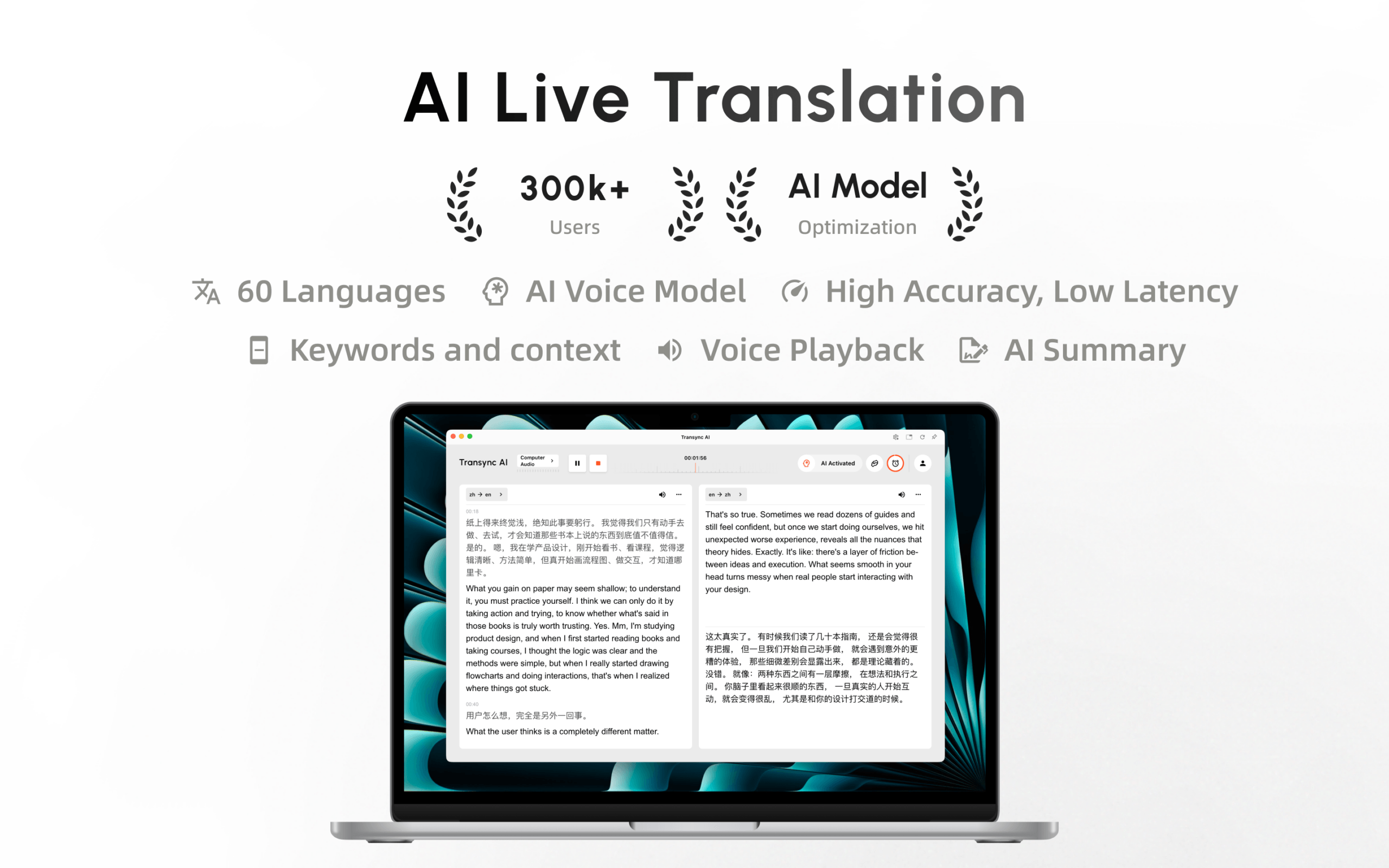
Transync AI hiện đã có mặt trên Mac App Store. Tải xuống dễ dàng, nhận cập nhật tự động và bắt đầu dịch thuật thời gian thực trên máy Mac.
