

Zoom AI文字起こしガイド:キャプション、文字起こし、AI要約、翻訳字幕、およびTransync AIが多言語会議をどのようにサポートするかを学びましょう。.
Zoom AIによる文字起こし テンポの速い会議を、検索可能な文書記録に変換できます。これにより、チームは発言内容を確認したり、行動項目を特定したり、見落とした詳細事項を再確認したり、手書きのメモだけに頼ることなく会議の要約を作成したりすることができます。.
しかし、ユーザーが1つの機能ですべてをこなせると期待すると、ワークフローが混乱してしまう。.
リアルタイム字幕は、必ずしも文字起こしデータと同じではありません。文字起こしデータは、AIによる要約とは異なります。要約データは完全な記録ではありません。また、文字起こしを行ったからといって、参加者全員が希望する言語で翻訳を受け取れるとは限りません。.
こうした区別は、国際会議においてはさらに重要となる。.
英語話者、日本人サプライヤー、スペイン語話者の顧客が同じ通話に参加する場合、英語の音声を録音するだけでは問題は解決しません。参加者は、リアルタイム翻訳、バイリンガル字幕、翻訳された音声出力、専門用語のサポート、会議後の役立つメモなども必要とするかもしれません。.
このガイドでは、Zoom AIの文字起こし機能の仕組み、最も役立つ場面、一般的な文字起こしワークフローが失敗する理由、そしてTransync AIのようなツールが多言語コミュニケーションのレイヤーをどのように追加できるかについて説明します。.
簡単な回答:Zoom AI文字起こしとは何ですか?
Zoom AIによる文字起こし これは、音声認識とAI機能を利用して会議の音声をテキストに変換するものです。.
Zoomのワークフロー全体の中で、ユーザーは関連するものの異なるいくつかの機能に遭遇する可能性があります。
| 特徴 | 主な目的 |
|---|---|
| 自動字幕 | ライブ会議中に読みやすい音声テキスト字幕を表示する |
| 会議記録 | 音声認識コンテンツを会議記録として保存する |
| AIコンパニオンミーティングの概要 | 会議の要約と今後のステップを作成する |
| スマート録画 | クラウド録画をチャプター、ハイライト、アクションアイテムに整理する |
| 翻訳されたキャプション | 音声言語を別の言語の字幕に変換する |
| 音声翻訳 | 対応ワークフローで翻訳された字幕を音声に変換します。 |
重要な点は、これらの機能がそれぞれ異なる問題を解決するということだ。.
会議をリアルタイムで視聴したい人は字幕が必要です。記録を残したい人は文字起こしが必要です。簡潔な要約が必要な人はAIによる要約を好むかもしれません。別の言語で会議に参加する人は、文字起こしに加えて翻訳も必要です。.
字幕 vs. 文字起こし vs. AIによる要約
これらの用語はしばしば混同して使われるが、そうすべきではない。.
字幕はリアルタイムでの読みやすさを向上させるためのものです
自動字幕機能は、会議中に発言内容をテキストとして表示します。これにより、参加者は発言者をリアルタイムで理解しやすくなり、音声が聞き取りにくい場合のアクセシビリティも向上します。.
字幕は、会話の流れに合わせて読めるように設計されています。.
成績証明書は保管用です
会議の議事録は、音声認識された内容を保存するため、後で確認することができます。.
チームが以下のことを必要とする場合、これはより良い選択肢です。
- 声明を検索
- 決定を再検討する
- 名前または番号を確認してください
- ドキュメントを作成する
- 見逃したセクションを再確認する
- 会議コンテンツを別のワークフローで使用する
AIによる要約は、簡潔な解釈である。
AIによる会議要約は、逐語的な議事録ではありません。情報を選別し、より短い形式に整理したものです。.
概要には以下が含まれる場合があります。
- 主な議論のポイント
- 決定
- 次のステップ
- アクション項目
- 質問
- フォローアップトピック
要約は時間を節約できるが、正確な言葉遣いが重要な場合には、文字起こしに取って代わるべきではない。.
2026年版Zoomの重要なアップデート
Zoomは、ライブ字幕と保存された会議の議事録をより明確に区別するようになった。.
2026年5月18日以降、字幕の直接保存やダウンロードはできなくなります。字幕は引き続きリアルタイムで表示され、会議中は限定的なスクロールバックも可能です。音声認識データを保持する必要があるユーザーは、会議の議事録機能を有効にしてください。.
そのため、会議が始まる前に適切な機能を設定することが重要です。.
ZoomのAIによる文字起こしは、いつ十分なのか?
Zoomのネイティブな文字起こしワークフローは、次のような場合には十分かもしれません。
- 会議の共通言語は全員理解している
- 主な目的は、記録を作成することです。
- 参加者は同言語の字幕のみを必要とします。
- チームは概要と行動項目を求めている
- 会議は確立されたZoomのワークフロー内で行われます
- 専門用語は限られています
- 正確な翻訳は不要です
例えば、英語圏の製品開発チームは、ZoomのAI文字起こし機能を使って週次の進捗会議を記録することができます。文字起こしされた内容は詳細を、AIによる要約は決定事項や割り当てられたタスクを分かりやすく示します。.
参加者同士の言語が異なると、ワークフローはより複雑になる。.
文字起こしだけでは不十分なのはどのような場合か?
文字起こしは、音声を文字に書き起こす。翻訳は、言語を変える。.
これらは別々のプロセスです。.
日本のサプライヤーが日本語を話し、アメリカのバイヤーが英語を話す会議を考えてみましょう。.
日本語の文字起こしは、日本語が読める人にとっては役立ちますが、英語を話す参加者が会話を理解するのに役立つとは限りません。.
会議では以下のことが必要となる場合があります。
- 音声認識
- 転写
- 翻訳
- バイリンガル字幕
- 翻訳された音声出力
- 会議後の要約
多言語対応の会議ツールは、参加者が会話を続けられるよう、一連のやり取りを迅速に処理する必要があります。.
修正1:正しい話言語を設定する
音声認識は、選択された言語に大きく依存する。.
会議がスペイン語で行われているにもかかわらず、字幕の言語設定が英語になっている場合、文字起こしシステムがスペイン語の音声を英語の単語として解釈しようとすることがあります。その結果、文字起こしが不正確になったり、判読不能になったりする可能性があります。.
会議前に:
- 主な使用言語を確認してください
- 参加者が言語を切り替えるかどうかを確認してください。
- 正しい字幕言語を設定してください
- 話者に文字起こしが開始されていることを知らせてください。
- 短い文章でマイクをテストしてください。
- 名前、数字、専門用語を確認する
この手順は、Zoom AI Companionにとって特に重要です。なぜなら、要約の精度は、基となる文字起こしの質に左右されるからです。.
質の低い文字起こしは、質の低い要約を生み出す。.
修正2:ライブキャプションだけでなく、トランスクリプトも有効にする
よくある間違いは、表示されている字幕が自動的に永続的な文字起こしになると思い込むことです。.
Zoomの2026年版ワークフローでは、字幕と保存される文字起こしは別々に扱われます。.
会議の議事録が重要な場合は、以下の点を確認してください。
- 会議の議事録は管理者によって有効化されます
- ホストは文字起こしを保存する許可を得ています
- 参加者は、会議コンテンツがどのように保存されるかを理解している。
- 議事録は会議後に閲覧できます。
- 保持設定は会社の方針に準拠しています
- 機密情報は適切に取り扱われます
Zoomユーザーは、Zoomウェブポータルから保存されたAI Companionのトランスクリプトにアクセスできます。 録音と文字起こし, アカウント設定と権限によって異なります。.
概要については、Zoomの公式ドキュメントを参照してください。 AIコンパニオンの会議議事録.
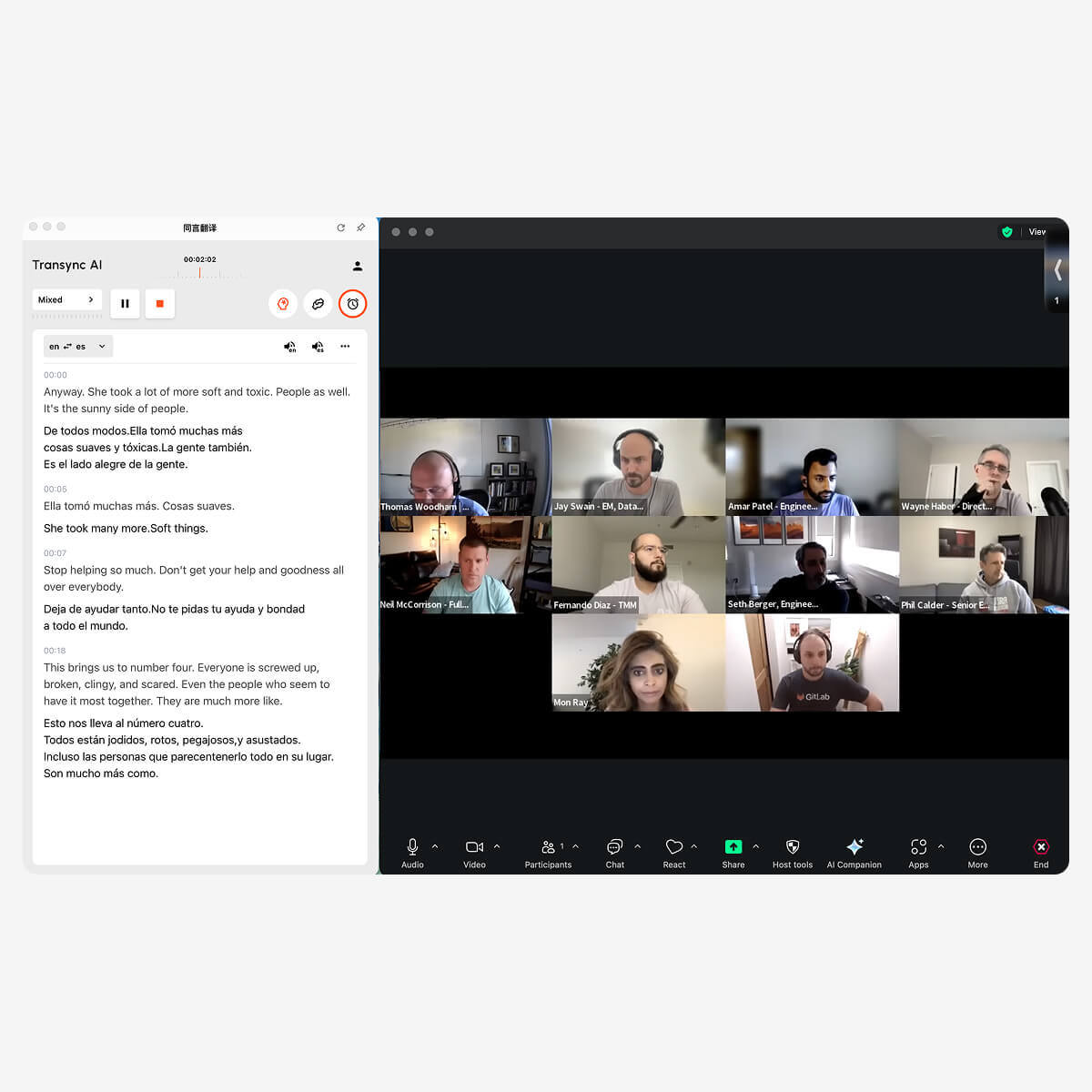
Transync AI を使用すると、Zoom ホストはライブ会議中にすべての参加者にリアルタイムで翻訳された字幕を提供できます。.
修正3:AIサマリーを下書きとして扱う
AIによる要約は、ほとんどの人が会議のたびに議事録全体を読むことを望まないため、非常に役立ちます。.
しかし、要約は会議の内容を解釈したものであり、詳細を省略したり、簡略化したりする可能性がある。.
会議の内容が以下の場合は、要約をよく確認してください。
- 契約条件
- 価格
- パーセンテージ
- 配達日
- 製品型番
- 医療情報または法律情報
- 技術要件
- 顧客への約束
- 割り当てられた責任
会議後の実践的なワークフローは以下のとおりです。
- AIの概要をお読みください。.
- 重要な主張を議事録と比較してください。.
- 正しい名称、数字、用語を使用すること。.
- 決定事項については、関係者と確認してください。.
- 承認された要約を共有してください。.
- 会社の規定に従って、議事録を保管してください。.
これは、要約をレビューせずに受け入れるよりも時間はかかるが、誤った情報が拡散されるリスクを軽減する。.
修正4:名前と専門用語を準備する
一般的な音声認識システムは、特定の企業や業界以外ではあまり使われない単語の認識に苦労することが多い。.
例としては以下のようなものがあります。
- 製品名
- 従業員名
- クライアント名
- 頭字語
- 科学用語
- ソフトウェア機能
- 型番
- 地域ブランド名
次の文を考えてみましょう。
APACチームのジョンが、モデルX300の太陽光発電インバーターの仕様を確認します。.
文字起こしツールによっては、「APAC」「太陽光発電インバーター」「X300」といった単語を誤って認識してしまう可能性があります。文字起こしが間違っている場合、要約や翻訳も間違っている可能性があります。.
Transync AIは、この理由からキーワードと文脈に応じた背景設定を提供しています。.
ユーザーは次のような用語を追加できます。
- Transync AI = 同言翻訳
- 太陽光発電インバーター
- 半導体パッケージ
- モデルX300
- アジア太平洋地域
- ジョン・スミス
- サプライチェーンの最適化
- ニューラルネットワーク
彼らは会議の内容を説明することもできます。
これは、再生可能エネルギー機器、生産スケジュール、品質検査、地域規制への準拠、インバーターの仕様に関する技術サプライヤー会議です。.
この文脈は、翻訳システムが議論に合った意味を選択するのに役立ちます。.
詳細はこちらをご覧ください AI アシスタントのキーワードコンテキスト.
 修正5:多言語会議向けにリアルタイム翻訳機能を追加する
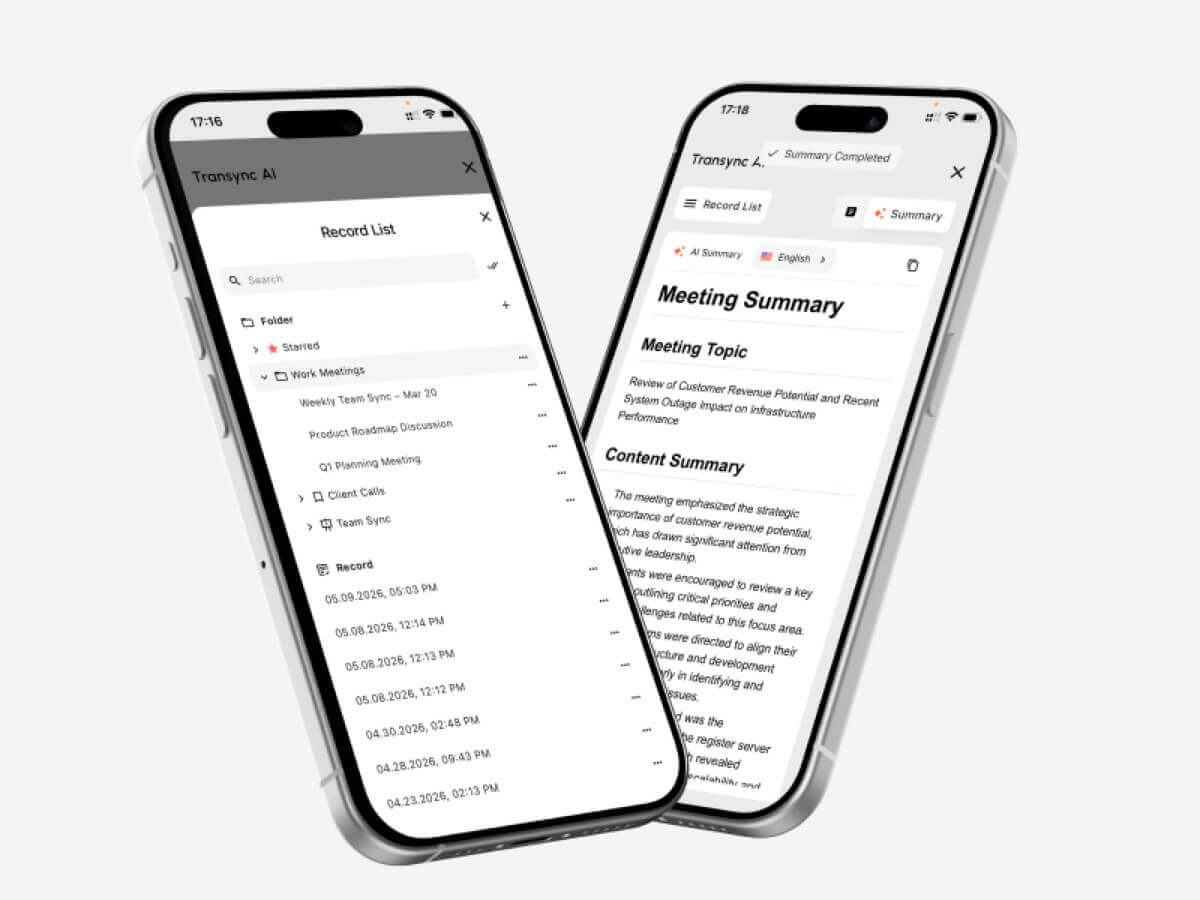 修正5:多言語会議向けにリアルタイム翻訳機能を追加する
議事録は会議後に最も役立ちます。多言語で参加する方は、会議中にサポートが必要です。.
Transsync AIはZoomと連携して以下の機能を提供します。
- 双方向リアルタイム翻訳
- オリジナル字幕と翻訳字幕
- 選択された言語間の自動識別
- AI音声放送
- 音声プレビュー
- 音声クローン
- キーワードとコンテキスト
- AI会議メモ
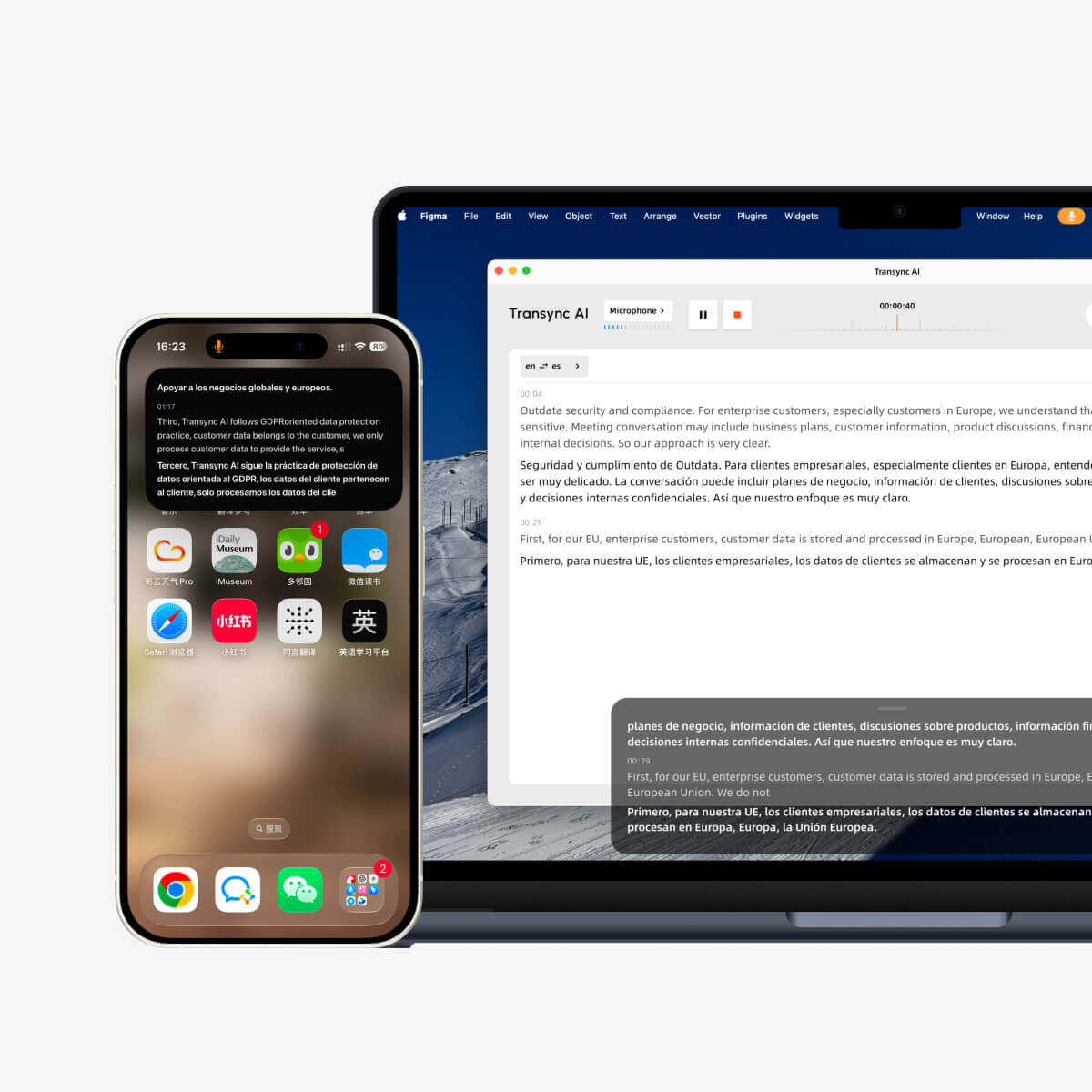
- ピクチャーインピクチャーのキャプション
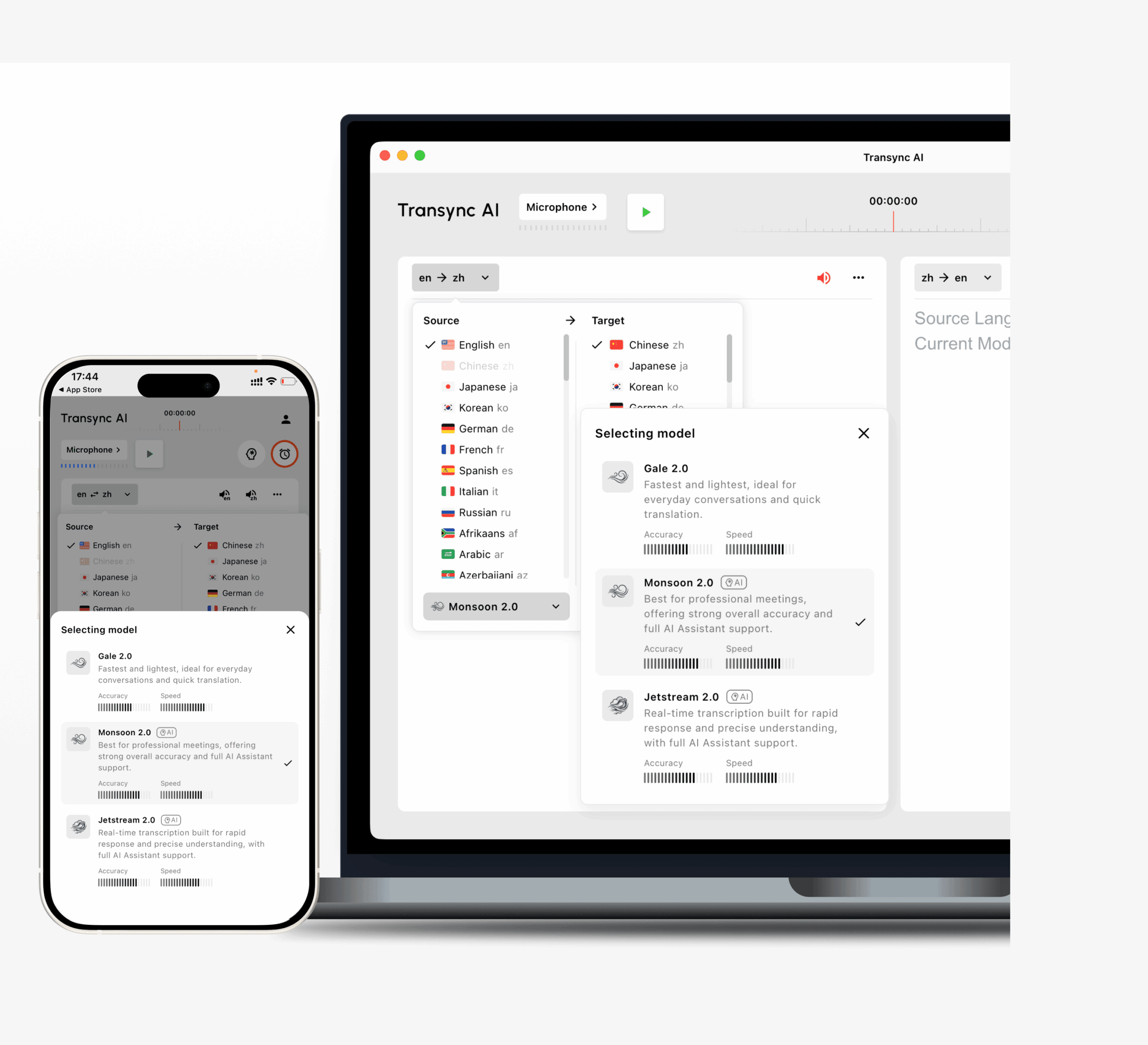
Transsync AIは、英語、スペイン語、中国語、日本語、韓国語、広東語、フランス語、ドイツ語、イタリア語、ロシア語など、60の言語と1,000以上の言語ペアをサポートしています。.
これにより、参加者2人がそれぞれ好みの言語で話すことができ、1人が会議全体を別の言語で進行する必要がなくなります。.
利用可能なオプションを調べてください Transsync AIがサポートする言語 ページ。
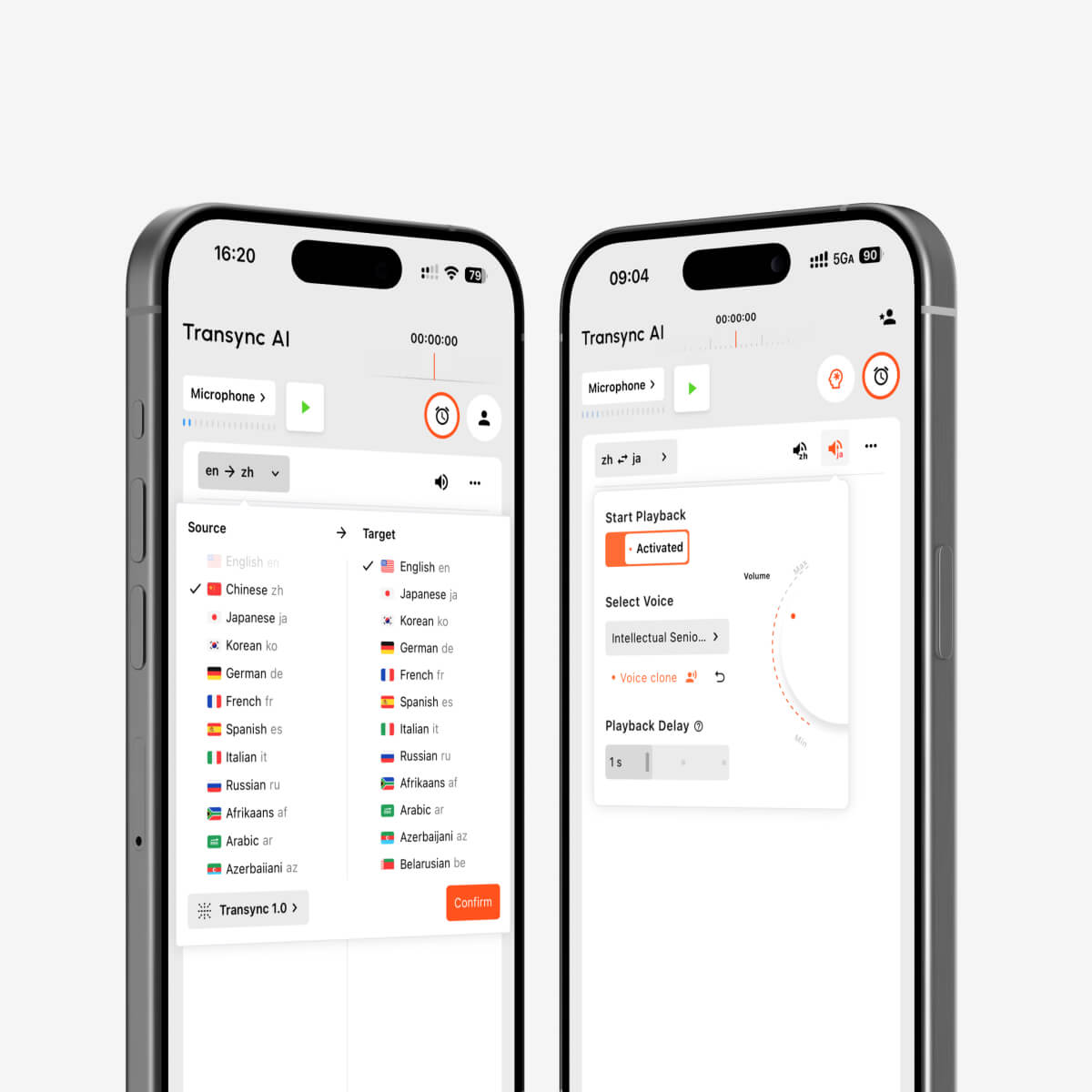
多言語リアルタイム通訳のためのAI音声再生および音声クローン
修正6:作業中も翻訳済み字幕を表示したままにする
会議参加者が通話中ずっと発言者一覧表を見ていることは稀である。.
彼らは以下のことを必要とするかもしれません:
- スライドを提示する
- ソフトウェアのデモンストレーション
- 文書を確認する
- スプレッドシートを確認する
- 商品ページを開く
- メモを取る
- チャットメッセージに返信する
- ブラウザのタブを切り替える
翻訳された字幕が別のアプリケーションの背後に隠れてしまうと、参加者は会話に参加できなくなります。.
Transync AIは、対応するMac、Windows、iOSのワークフローにおいて、ピクチャーインピクチャー方式のフローティング字幕を提供します。コンパクトな字幕ウィンドウは、他のアプリケーションの上に表示させることができます。.
これは特に以下のような場合に役立ちます。
- 製品デモンストレーション
- 国際ウェビナー
- オンライン講義
- ソフトウェアトレーニング
- 営業プレゼンテーション
- サプライヤーとの会議
- 技術ワークショップ
詳細はこちらをご覧ください ピクチャーインピクチャー フローティング字幕.
Zoom AI トランスクリプション vs. Transync AI
ZoomとTransync AIは一部で重複する部分があるものの、全く同じ製品ではない。.
| 要件 | Zoomネイティブワークフロー | Transync AI |
| リアルタイムの同言語字幕 | 自動字幕で利用可能 | バイリンガル翻訳の一部として利用可能です |
| 保存された会議議事録 | 会議議事録が有効になっている場合に利用可能です。 | 翻訳記録は確認およびエクスポートできます。 |
| AI会議の概要 | AI Companionを通じて利用可能 | AI生成の会議メモ |
| 翻訳されたキャプション | サポートされているZoomの設定とプランで利用可能です。 | 60言語でのリアルタイム翻訳 |
| 双方向言語切り替え | 会議の機能と構成によって異なります | 選択された言語を自動的に識別します |
| 翻訳された音声 | サポートされているZoom音声翻訳ワークフローで利用可能です。 | 複数の音声によるAI音声放送 |
| 音声クローン | 主要な文字起こしワークフローではありません | サポート対象 |
| キーワードと会議の背景 | 専用の翻訳ワークフローと比較すると限定的 | ユーザーはキーワードと背景情報を定義できます |
| フローティングバイリンガルキャプション | Zoomの字幕は会議インターフェースに残ります | ピクチャーインピクチャーウィンドウは他のアプリの上に表示できます |
| 会議プラットフォーム | Zoom Workplace内での最も深い統合 | Zoom、Teams、Google Meet用のスタンドアロンツール |
| オフラインでの使用 | クラウド機能には接続が必要です | オフラインモードは利用できません |
最適な選択肢は、問題の内容によって異なります。.
全員が同じ言語を話し、チームが主に文字起こしと要約を必要としている場合は、Zoomの標準機能で十分かもしれません。.
参加者が異なる言語で理解し、回答する必要がある場合は、専用のリアルタイム翻訳ワークフローの方が適しているかもしれません。.
Zoom AIの文字起こしと翻訳された字幕は同じではありません
Zoomの翻訳字幕機能を使えば、会議で使用されている言語を別の言語の字幕に変換できます。.
これは、翻訳された言語を読める参加者にとっては役立ちます。しかし、翻訳された字幕は、完全な多言語ワークフローとは異なります。.
チームには以下のものも必要になる場合があります。
- 双方向翻訳
- 翻訳された音声再生
- 用語のカスタマイズ
- アプリケーションを横断するフローティングキャプション
- 文脈に応じたブランド名の取り扱い
- 多言語会話に基づくAIメモ
参加者によっては、読むよりも聞くことを好む場合もある。その場合、翻訳された音声が重要になる。.
Zoomは、対応する会議ワークフローに音声翻訳機能を導入しており、一方Transync AIは、リアルタイム翻訳システムの一部としてAI音声放送を提供している。.
重要な会議の前に、利用可能性、ライセンス、言語、および管理者設定を確認する必要があります。.
Transsync AIをZoomで使用する方法
Transsync AIは、Zoomのプラグインではなく、スタンドアロンソフトウェアとして動作します。.
ステップ1:言語を選択する
会議で使用される2つの言語を選択してください。.
例えば:
- 英語 ↔ スペイン語
- 英語↔日本語
- 中国語↔英語
- 韓国語 ↔ 英語
- フランス語 ↔ ドイツ語
ステップ2:用語を追加する
名称、ブランド名、製品モデル名、略称、専門用語を入力してください。.
ステップ3:会議のコンテキストを追加する
業界、参加者、およびトピックについて説明してください。.
ステップ4:Zoomを起動する
通常通り会議に参加してください。.
ステップ5:Transsync AIを起動する
リアルタイム翻訳タスクを開始し、正しい音声ソースが選択されていることを確認してください。.
ステップ6:バイリンガル字幕またはフローティング字幕を有効にする
Transsync AIウィンドウを表示したままにするか、ピクチャーインピクチャー字幕を有効にしてください。.
ステップ7:必要に応じて音声出力を設定する
翻訳された音声は、サポートされているシステムオーディオまたは仮想マイクのワークフローを介してZoomに接続できます。.
ステップ8:会議の議事録を確認する
通話後、AIが生成したメモ、名前、番号、専門用語、決定事項、およびアクション項目を確認してください。.
見る Zoom、Teams、Google Meet 向け AI ライブ会議翻訳 詳細については、こちらをご覧ください。.
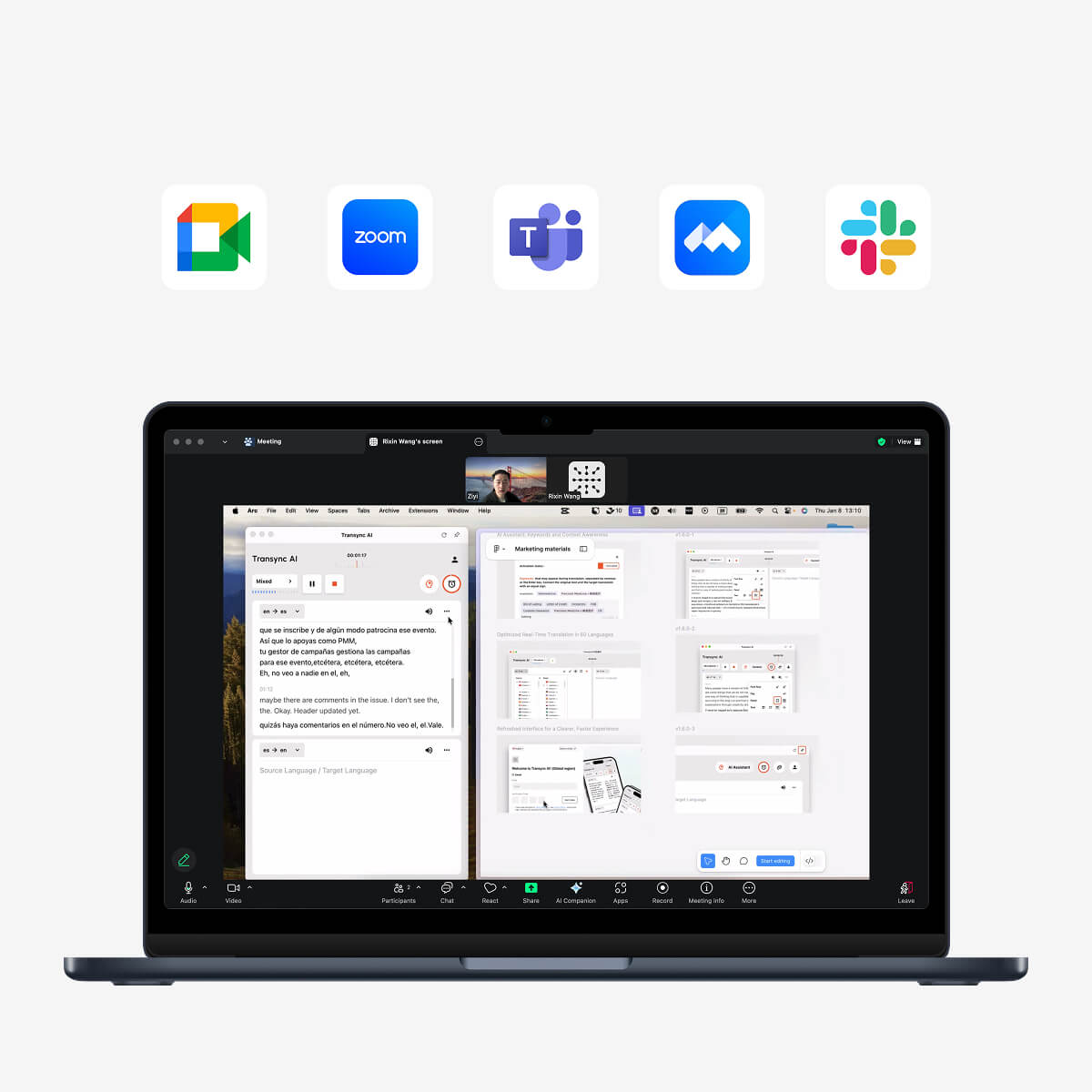
主要なオンライン会議プラットフォームに対応し、シームレスなリアルタイム翻訳を実現
実践的なZoom文字起こしテスト
重要な会議で文字起こしに頼る前に、15分間のテストを実施してください。.
テスト環境
記録:
- 試験日
- ズーム版
- 文字起こしまたは字幕機能が使用されています
- コンピュータとオペレーティングシステム
- マイク
- ネットワークの種類
- 会議の言語
- 講演者数
テストスクリプト
含む:
- 簡単な紹介
- 講演者2名
- 商品名
- 技術的な説明
- 型番
- 価格
- パーセンテージ
- 配達日
- 訂正
- 最後のアクション項目
例:
改訂された仕様が今週金曜日に承認されれば、10月18日(失礼、10月28日)までにモデルX300を1,250台納入できます。.
評価表
| メトリック | チェックすべき事項 |
| 音声認識 | Zoomは元の言葉を正しく捉えましたか? |
| スピーカーラベル | 陳述書は正しい担当者に割り当てられましたか? |
| 数字 | 日付、数量、価格は正確でしたか? |
| 用語 | 商品名や略語は認識されましたか? |
| 句読点 | 議事録は読みやすかったですか? |
| まとめ | AIコンパニオンは重要なポイントをきちんと記録していたか? |
| アクション項目 | 責任分担は適切に行われたか? |
| 翻訳 | 多言語を話す参加者は、会議の内容をリアルタイムで理解できるだろうか? |
| 保持 | 会議後、議事録は入手可能でしたか? |
Zoom AIの文字起こしでよくある問題
キャプションの言語が間違っています
システムが誤った言語モデルを使用して音声を解釈する可能性があります。.
マイクの音質が悪い
遠距離のマイク、反響音、および背景雑音は、認識精度を低下させる。.
重複するスピーカー
複数人が同時に話すと、言葉が聞き取れなかったり、誤って割り当てられたりする可能性がある。.
名称と略語
あまり一般的でない用語は、似たような発音の一般的な単語で表記される場合があります。.
文脈が欠けている
システムは単語を認識するかもしれないが、要約におけるその単語の重要性を誤解する可能性がある。.
不完全な転写産物保持
ユーザーは、会議の議事録機能を有効にしなくても字幕が保存されると考えるかもしれません。.
要約への過度の依存
重要な詳細は省略または圧縮されている場合があります。.
転写と翻訳を混同する
日本語しか読めない人にとって、正確なスペイン語の書き起こしは役に立たない。.
プライバシーと同意に関する考慮事項
会議の議事録は、参加者の発言内容を記録に残すものです。.
有効にする前に:
- 参加者に通知する
- 地域の録音およびプライバシーに関する法律に従ってください。
- 組織の方針をレビューする
- アクセスを許可されたユーザーのみに制限する
- 議事録をどのくらいの期間保管するかを決定する
- 不必要な機密情報を避ける
- 会議の議事録を共有できるかどうか確認してください。
- 会議のアセットにアクセスできる管理者を確認してください。
Zoomの管理者は、AI Companion機能によって生成された文字起こしをユーザーが保持できるかどうかを制御できます。.
Transsync AIは、ユーザーデータはAIのトレーニングには使用されないと述べています。ただし、組織は機密性の高い会議を処理する前に、プライバシーおよびコンプライアンスに関する文書全体を確認する必要があります。.
人間のメモテイカーや通訳者を使うべきなのはどのような場合ですか?
AIによる文字起こしは便利だが、絶対的な記録として扱うべきではない。.
会議の内容が以下の場合は、人間のレビューまたは専門家のサポートを活用してください。
- 法廷証言
- 医療上の決定
- 契約交渉
- 規制遵守
- 従業員間の紛争
- 財政的義務
- 安全上の注意
- 移民問題
- 政府の手続き
- 正確な表現が重要な公式声明
AIは手作業を減らすことができるが、重要な情報の確認責任をAIに移転させるものではない。.
よくある質問:Zoom AI文字起こし
Zoom AIによる文字起こしとは何ですか?
ZoomのAI文字起こし機能は、会議中の音声をテキストに変換します。有効になっている機能に応じて、リアルタイム字幕、会議の議事録保存、AIによる要約、スマート録画などに利用できます。.
Zoomの字幕と文字起こしは同じものですか?
いいえ。字幕はリアルタイムでの読みやすさを考慮して作成されています。文字起こしは、会議後に音声テキストの内容を保持するために作成されています。.
Zoomの字幕はまだダウンロードできますか?
2026年5月18日より、Zoomでは字幕を直接保存またはダウンロードすることができなくなります。音声認識によるテキスト化が必要な場合は、会議の文字起こし機能を有効にしてください。.
Zoom AI Companionは会議の要約を作成しますか?
はい。AIコンパニオンによる会議要約機能は、会議での会話に基づいて、構造化された要約と次のステップを生成できます。.
ZoomのAIによる文字起こしは、言語の翻訳に対応していますか?
文字起こしと翻訳は異なります。Zoomは対応ワークフローで翻訳された字幕を提供しますが、ユーザーは適切な設定と言語を有効にする必要があります。.
Transsync AIはZoom会議を翻訳できますか?
はい。Transync AIはZoomと連携して動作し、リアルタイムのバイリンガル字幕、AI音声配信、キーワードとコンテキスト、AIによる会議メモを提供します。.
Transsync AIにはZoomプラグインが必要ですか?
いいえ。Transync AIはZoomのプラグインではなく、スタンドアロンソフトウェアです。.
参加者は翻訳された音声を聞くことができますか?
Transsync AIは翻訳音声の配信をサポートしています。翻訳音声をZoomミーティングに送信するには、システムオーディオまたは仮想マイクの設定が必要になる場合があります。.
Transync AI はどの言語をサポートしていますか?
Transsync AIは、英語、スペイン語、中国語、日本語、韓国語、広東語、フランス語、ドイツ語、イタリア語、ロシア語など、60の言語と1,000以上の言語ペアをサポートしています。.
Transync AI はオフラインで動作しますか?
いいえ。Transync AIはインターネット接続が必要で、現時点ではオフライン翻訳には対応していません。.
最終的な考察:Zoom AI文字起こしを活用した適切なワークフローを構築しましょう
Zoom AIによる文字起こし チームがリアルタイムの字幕、検索可能な記録、AIによる要約、またはより整理されたクラウド録画を必要とする場合に役立ちます。.
しかし、文字起こしは会議内容を理解するための一つの側面に過ぎない。.
完全なワークフローには、以下のものも必要となる場合があります。
- 正しい言語設定
- 保持された転写産物
- 人間によるレビュー
- リアルタイム翻訳
- バイリンガル字幕
- 翻訳された音声
- 用語コントロール
- 会議後のメモ
- 適切なプライバシー設定
単一言語の会議であれば、Zoomのネイティブな文字起こし機能とAIコンパニオン機能で、必要なワークフローは既に提供されている可能性があります。.
多言語会議向けに、Transync AIは、Zoom、Microsoft Teams、Google Meet全体で、双方向翻訳、バイリンガル表示、AI音声放送、音声クローン、キーワードとコンテキスト、会議メモ、フローティング字幕などの機能を追加します。.
正しい問いは単に「会議の議事録を作成できるか?」ではない。“
それは:
会議の参加者全員が、会議中に内容を理解し、後から重要な情報を探し出すことができるだろうか?
まずは、こちらをご覧ください。 Transync AI, 探索する リアルタイム翻訳ツール, または、お好みのデバイス用のアプリケーションをダウンロードしてください。.
 🤖
🤖 