

اكتشف اللغة الإنجليزية للتحدث والاجتماعات والسفر والإعلام. قارن بين 7 أدوات وتعرف على كيفية عمل التعرف التلقائي على اللغة ومواطن قصوره.
أشخاص يبحثون “"الكشف عن اللغة الإنجليزية"” عادةً ما يحتاج الناس إلى أداة قادرة على تحديد لغة منطوقة أو مكتوبة غير معروفة وترجمتها إلى الإنجليزية. وهذا مفيد عندما يسمع المسافر لغة غير مألوفة، أو عندما يتلقى فريق الدعم مكالمات متعددة اللغات، أو عندما يضم اجتماع متحدثين يتنقلون بين اللغات.
العبارة الطبيعية هي "الكشف عن لغة وترجمتها إلى الإنجليزية"، لكن هدف البحث واضح. يريد المستخدمون إنجاز مهمتين معًا: تحديد اللغة المصدر، ثم الحصول على نتيجة دقيقة باللغة الإنجليزية.
يشرح هذا الدليل كيفية عمل التعرف التلقائي على اللغة، وأين يمكن أن يفشل، وكيف تتناسب سبع أدوات ترجمة مع الاجتماعات والسفر والفعاليات ووسائل الإعلام والمستندات والتطبيقات المخصصة.
إجابة سريعة: كيف يمكنك اكتشاف اللغة الإنجليزية؟
استخدم هذه العملية الأساسية:
- قم بتسجيل عينة صوتية واضحة أو الصق نصاً مكتوباً كافياً.
- دع الأداة تحدد لغة المصدر المحتملة.
- تأكد من اللغة التي تم اكتشافها كلما أمكن ذلك.
- اختر اللغة الإنجليزية كلغة مستهدفة.
- قم بترجمة المحتوى كنص أو ترجمة مصاحبة أو صوت.
- تحقق من الأسماء والأرقام والمصطلحات والتعبيرات الإقليمية.
يصعب تحديد العينات القصيرة مقارنةً بالجمل الكاملة. كما أن الضوضاء المحيطة، واللغات المختلطة، واللهجات اللغوية المتشابهة، والكلمات المُقترضة، كلها عوامل قد تُقلل من دقة النتائج.
للاجتماعات عبر الإنترنت، استخدم منتجًا مصممًا لتوجيه الصوت والكلام المباشر. أما بالنسبة للصور أو المستندات، فاختر منتجًا يدعم أنواع الإدخال هذه.
كيف يعمل نظام الكشف التلقائي عن اللغة؟
تقوم أنظمة الكشف عن اللغة بتحليل الأنماط في المدخلات. بالنسبة للنصوص، قد تشمل هذه الأنماط الأحرف، والتهجئة، والكلمات الشائعة، وتسلسلات الكلمات. أما بالنسبة للكلام، فيجب على النظام أولاً تفسير خصائص الصوت والكلمات المنطوقة قبل تحديد اللغة المحتملة.
عادةً ما يتبع سير العمل الصوتي المباشر هذا التسلسل:
تسجيل الصوت ← اكتشاف أنماط الكلام ← تحديد اللغة ← التعرف على الكلمات ← الترجمة إلى الإنجليزية ← عرض النتيجة أو نطقها
تتطلب بعض المنتجات من المستخدمين اختيار زوج من اللغات مسبقًا، بينما تستطيع منتجات أخرى تحديد اللغة من مجموعة أوسع. غالبًا ما يكون التعرف على اللغات بناءً على أزواج اللغات مفيدًا في الاجتماعات الثنائية، لأن النظام يعرف اللغتين المتوقعتين، مما يقلل من الغموض.
7 طرق لاكتشاف لغة ما وترجمتها إلى الإنجليزية
1. اكتشاف اللغات أثناء اجتماع ثنائي اللغة
في اجتماع ثنائي اللغة معروف، يعرف المشاركون عادةً اللغتين لكنهم لا يرغبون في تغيير إعدادات الإدخال بعد كل متحدث.
ضمن زوج اللغات المدعومة المختارة،, Transync AI يستطيع التمييز بين اللغتين المستخدمتين. أداة الترجمة في الوقت الفعلي ثم يعرض الكلام الأصلي والترجمة الإنجليزية بزمن استجابة منخفض.
يدعم هذا النظام القائم على الحوار الثنائي تبادل الأدوار الطبيعي في مكالمات المبيعات والمقابلات والدروس والاجتماعات الداخلية. وهو يختلف عن الكشف غير المقيد عن أي لغة غير معروفة، لذا ينبغي على المستخدمين تحديد الحوار الثنائي المطلوب قبل بدء الجلسة.
 2. استمع إلى ترجمة إنجليزية أثناء المحادثة
 2. استمع إلى ترجمة إنجليزية أثناء المحادثة
يُعد النص مفيدًا للتحقق، لكن الترجمة الصوتية تتيح للمشاركين متابعة المحادثة دون التحديق باستمرار في الشاشة.
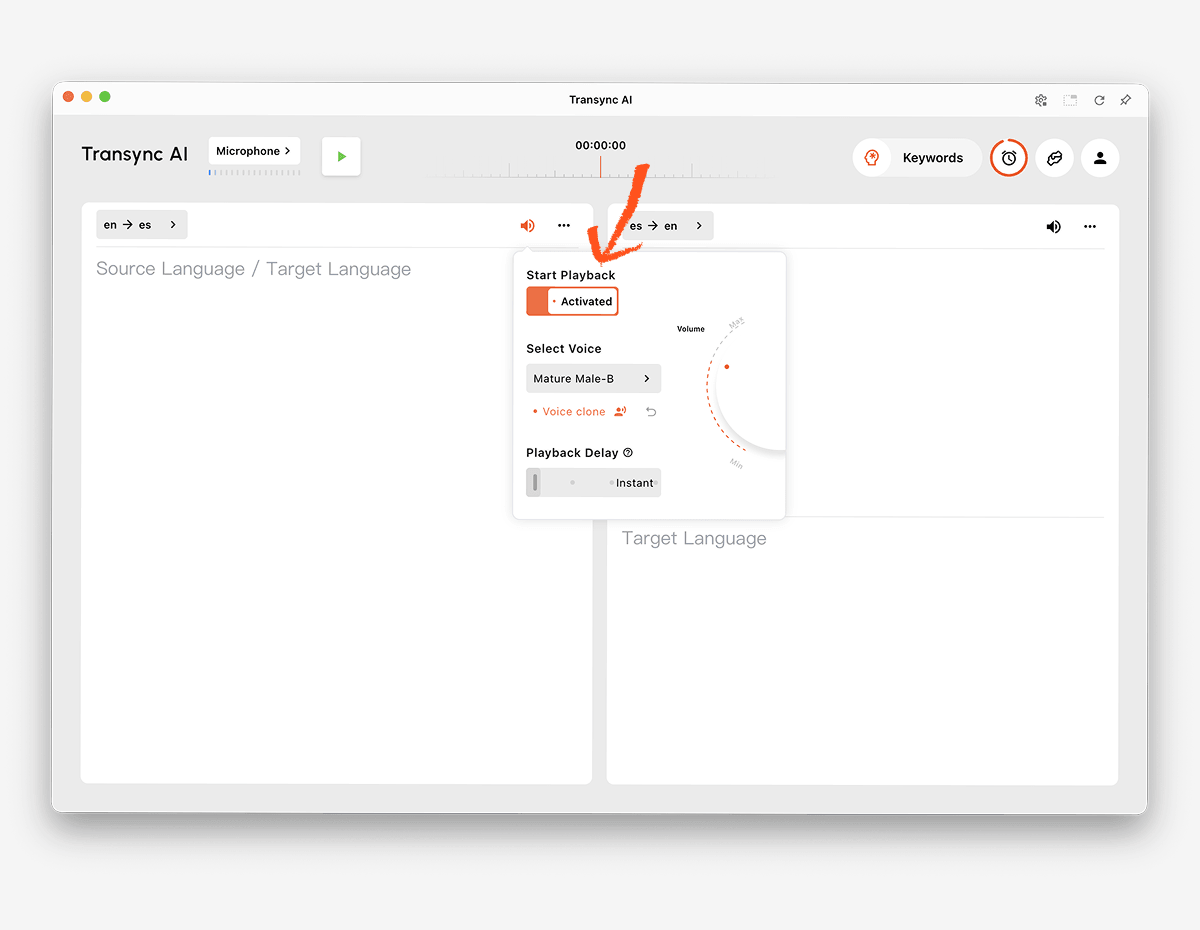
ال مترجم صوتي بالذكاء الاصطناعي يمكن تشغيل الترجمة الإنجليزية بصوت عالٍ باستخدام خيارات الصوت الطبيعي. ويمكن للمستخدمين الاستماع إلى النتيجة أثناء التحقق من الترجمة الثنائية اللغة للأسماء أو الأرقام أو المصطلحات التقنية.
ال ميزة استنساخ الصوت ويمكن أيضًا إنشاء تشغيل مترجم بصوت مصمم على غرار المستخدم، مما يساعد العروض التقديمية والمحادثات الشخصية على أن تبدو أكثر اتساقًا مع المتحدث الأصلي.
 3. تحديد وترجمة الكلام في اجتماع عبر الإنترنت
 3. تحديد وترجمة الكلام في اجتماع عبر الإنترنت
تُضيف مكالمات الفيديو تحديًا في توجيه الصوت. يجب أن يلتقط برنامج الترجمة المشاركين عن بُعد، ويعالج كلامهم، ويعيد الناتج المترجم دون التشويش على الاجتماع.
ال ميزة الترجمة الفورية للاجتماعات يعمل جنبًا إلى جنب Zoom, Microsoft Teams، و Google Meet. Transync AI هو برنامج مستقل وليس إضافة خاصة بمنصة معينة.
ال ميزة مشاركة الصوت عبر الكمبيوتر يلتقط هذا البرنامج الكلام من المشاركين عن بعد. ميزة الميكروفون الافتراضي يساعد في إعادة إرسال الكلام الإنجليزي المترجم إلى المكالمة.

متوافق مع منصات الاجتماعات عبر الإنترنت الرئيسية لترجمة فورية سلسة
4. اكتشاف لغة غير مألوفة أثناء السفر
قد يتلقى المسافر عبارة منطوقة قصيرة، أو إشارة، أو قائمة طعام، أو رسالة مكتوبة دون معرفة اللغة الأصلية. وقد يكون الكشف التلقائي الشامل وإدخال الكاميرا أكثر أهمية من تدوين ملاحظات الاجتماع.
ترجمة جوجل يقدم خدمات ترجمة شاملة للمستهلكين للنصوص والصور والمواقع الإلكترونية والوثائق والكلام. تالكاو يتمحور هذا المشروع حول الترجمة عبر الهاتف المحمول، والسفر، وميزات الكاميرا والواقع المعزز، وتعلم اللغات.
قد تكون هذه المنتجات أكثر ملاءمة للنصوص غير المعروفة واللافتات وعمليات التبادل السريع أثناء السفر. Transync AI تم تصميمه للتواصل الشفهي المباشر ضمن زوج لغوي محدد، ولا يوفر وضعًا غير متصل بالإنترنت، أو التعرف على الصور، أو ترجمة المستندات النصية فقط.
5. ترجمة مكالمات دعم العملاء متعددة اللغات
قد يتلقى فريق الدعم العالمي مكالمات بلغات متعددة. وبمجرد تحديد اللغة الصحيحة، يجب ترجمة أسماء المنتجات ورموز الأخطاء والمصطلحات التقنية بشكل متسق.
ال ميزة الكلمات المفتاحية والسياق لمساعد الذكاء الاصطناعي يُمكّن هذا النظام المستخدمين من إدخال الأسماء والعلامات التجارية والمصطلحات ومعلومات أساسية قبل بدء المحادثة. أما بالنسبة للمكالمات المجدولة، فيمكن للفرق اختيار اللغة التي يتوقعها العميل وإعداد السياق المناسب.
عندما تكون اللغة غير معروفة تمامًا، استخدم أولًا كاشفًا عامًا أو عملية إدخال بيانات لتحديدها. ثم ابدأ الزوج المناسب في Transync AI للمحادثة الإنجليزية المباشرة.
 6. تقديم الترجمة الإنجليزية في فعالية ما
 6. تقديم الترجمة الإنجليزية في فعالية ما
في المؤتمرات والندوات عبر الإنترنت، قد يحتاج العديد من الحضور إلى ترجمة مكتوبة باللغة الإنجليزية أو ترجمة صوتية في الوقت نفسه. ولا يقتصر الشرط المهم على مجرد الكشف عن هذه الحاجة، بل يشمل أيضاً سهولة وصول الجمهور إليها.
ووردلي صُمم هذا النظام للاجتماعات والفعاليات، حيث يمكن للحضور الوصول إليه عبر الروابط أو رموز الاستجابة السريعة. وقد يكون أكثر ملاءمة للمؤتمرات والفعاليات الهجينة والندوات عبر الإنترنت التي تتطلب ترجمة تصل إلى عدد كبير من المستمعين.
 يختار Transync AI للاجتماعات الشخصية واجتماعات الفريق. اختر ووردلي عندما يكون توزيع الحضور على نطاق واسع هو سير العمل الأساسي.
7. اكتشاف وترجمة الصوت الخاص بالوسائط أو المنتجات
قد تتطلب الوسائط المسجلة نسخًا نصيًا، وتحديدًا للغة، وترجمةً إلى الإنجليزية، ودبلجةً، وتحريرًا، وتصديرًا. أما منتج البرامج المخصصة فقد يتطلب بدلاً من ذلك التعرف على الكلام وترجمته بشكل قابل للبرمجة.
مايسترا وهي مهيأة لترجمة الوسائط، والترجمة المصاحبة، والدبلجة، والندوات عبر الإنترنت، والمحتوى المباشر.
 سونيوكس يوفر إمكانيات التعرف على الكلام والترجمة وتحويل النص إلى كلام لتطبيقات المطورين.
 ديب إل يوفر واجهات برمجة التطبيقات (APIs) وسير عمل أوسع نطاقًا للنصوص والمستندات والمؤسسات والصوتيات المختارة.
 يختار Transync AI عندما يحتاج المستخدمون إلى مترجم اجتماعات جاهز. اختر مجموعة وسائط أو واجهة برمجة تطبيقات (API) عندما يجب إدخال المحتوى المكتشف في مسار إنتاج أو مسار برمجي مخصص.
مقارنة بين الكشف عن اللغة والترجمة الإنجليزية
يقارن الجدول بين مواقع المنتجات النموذجية. قد تتغير الميزات واللغات المدعومة والخطط، لذا يُرجى التحقق من المتطلبات الأساسية من خلال المواقع الإلكترونية الرسمية.
| أداة | أفضل حالة استخدام للكشف عن البيانات وتحويلها إلى اللغة الإنجليزية | أنواع الإدخال | مخرجات اللغة الإنجليزية المباشرة | القيد الرئيسي أو التمييز | الأفضل ل |
|---|---|---|---|---|---|
| Transync AI | اجتماعات ثنائية اللغة مع زوج لغوي مختار | بث مباشر للخطابات والاجتماعات الصوتية | ترجمة ثنائية اللغة وصوت مترجم | التواصل المباشر القائم على الأزواج بدلاً من الكشف غير المقيد عن الصور أو المستندات | الفرق والأفراد في اجتماعات متعددة اللغات |
| تالكاو | تحديد هوية اللغة أثناء السفر والهواتف المحمولة | المدخلات الصوتية والنصية والكاميرا والهاتف المحمول | يعتمد على التطبيق | التركيز على المستهلك بدلاً من التركيز على الاجتماع أولاً | المسافرون ومتعلمو اللغات |
| ووردلي | المؤتمرات والفعاليات متعددة اللغات | خطاب مباشر في فعالية | ترجمة نصية وصوتية | مُحسَّن لتوزيع الجمهور | منظمو الفعاليات |
| سونيوكس | الكشف والترجمة داخل المنتجات المخصصة | واجهة برمجة التطبيقات وصوت التطبيق | يعتمد على واجهة برمجة التطبيقات/التطبيق | يتطلب تنفيذ المنتج | فرق التطوير والمنتجات |
| مايسترا | تحديد وتحديد موقع الوسائط المسجلة أو المباشرة | محتوى الفيديو والصوت والبث المباشر | الترجمة والترجمة الصوتية والدبلجة | سير عمل إنتاج الوسائط | فرق المحتوى والترجمة |
| ديب إل | اللغة المكتوبة وسير العمل المؤسسي | النصوص والمستندات وواجهات برمجة التطبيقات ومنتجات الصوت المختارة | يعتمد على المنتج | ليست أداة للكشف عن الاجتماعات في المقام الأول | أعمال مؤسسية تعتمد بشكل كبير على النصوص |
| ترجمة جوجل | الكشف السريع عن النصوص والكلام اليومي | النصوص والصور والمواقع الإلكترونية والوثائق والصوت | تشغيل النصوص والصوت | ليست سير عمل اجتماع كامل | استخدام مجاني للارتداء اليومي والسفر |
لماذا قد تفشل عملية الكشف عن اللغة؟
العينة قصيرة جدًا
قد توجد الكلمة الواحدة في لغات متعددة. الأسماء والأرقام والتحيات والمصطلحات المُستعارة لا تُقدّم دليلاً كافياً. استخدم جملة كاملة كلما أمكن.
يمزج مكبر الصوت بين اللغات
قد ينتقل الأشخاص بين اللغات في جملة واحدة، لا سيما في بيئات العمل الدولية والمجتمعات متعددة اللغات. وقد يقوم نظام الكشف بتصنيف العينة بأكملها وفقًا للغة السائدة، متجاهلاً المقاطع الأقصر.
اللغات مترابطة بشكل وثيق
قد تتشارك اللغات المتقاربة في المفردات والقواعد والأنماط الصوتية. كما يمكن تصنيف اللهجات الإقليمية تحت مسمى لغوي أوسع حتى عندما يعتبرها المتحدثون لغات متميزة.
الصوت غير واضح
قد تؤثر الضوضاء الخلفية، والصدى، والضغط، والميكروفون البعيد، أو تداخل أصوات المتحدثين سلبًا على نظام التعرف على الكلام. إذا لم يتمكن النظام من تحديد الكلمات بدقة، فلن يتمكن من تحديد اللغة بثقة.
يحتوي المحتوى على أسماء أو مصطلحات فنية
قد تبدو الجملة المليئة بالعلامات التجارية ورموز المنتجات والأسماء الشخصية والكلمات الإنجليزية الدخيلة وكأنها بلغة أخرى. قدم عينة أطول واستخدم ميزة الكلمات المفتاحية والسياق لمساعد الذكاء الاصطناعي بمجرد معرفة زوج اللغات المتوقع.
يخلط الكاشف بين النص المكتوب واللغة
قد تشترك عدة لغات في نظام كتابة واحد. فالكتابة اللاتينية والسيريلية والعربية وغيرها من أنظمة الكتابة لا تُحدد لغة واحدة بمفردها. لذا، ينبغي أن يأخذ الكشف في الاعتبار أنماط الكلمات وسياقها، وليس الأحرف فقط.
كيفية تحسين دقة الكشف عن اللغة الإنجليزية
- استخدم عينة كاملة. قدّم جملة أو أكثر من الجمل الطبيعية بدلاً من كلمة واحدة.
- تسجيل صوت نقي. قرّب الميكروفون وقلل الضوضاء المحيطة.
- اطلب من المتحدثين التناوب. تجنب تداخل الأصوات.
- مقاطع منفصلة بلغات مختلطة. قم بترجمة كل قسم على حدة كلما أمكن ذلك.
- تأكد من المنطقة. يمكن أن تساعد اللهجة والمفردات في تمييز أنواع اللغات المختلفة.
- اختر زوجًا بعد الكشف. إن استخدام لغة مصدر معروفة يحسن سير العمل المباشر.
- أضف المصطلحات المتخصصة. حدد الأسماء والمنتجات والاختصارات والترجمات الإنجليزية المفضلة.
- تحقق من التفاصيل الرئيسية. تحقق من التواريخ والأسعار والعناوين وبنود العقد.
- اختبر كلا الاتجاهين. تأكد من أن المشاركين قادرون على الرد باللغة الإنجليزية أو اللغة الأخرى.
- راجع نص المحادثة. قد تحتوي النتيجة المباشرة السلسة على أخطاء في السجل المحفوظ.
في الاتصالات الطبية والقانونية والحساسة للسلامة أو الملزمة تعاقديًا، لا ينبغي أن يكون الكشف التلقائي هو الضمانة الوحيدة. تأكد من اللغة مع المتحدث واستخدم مترجمًا بشريًا مؤهلًا عند الاقتضاء.
كيفية الاستخدام Transync AI بعد تحديد اللغة
- حدد اللغة المصدر باستخدام عينة موثوقة أو تأكد منها مع المتحدث.
- يفتح Transync AI على الويب، أو ويندوز، أو ماك أو إس، أو آي أو إس، أو أندرويد.
- حدد لغة المصدر المحددة واللغة الإنجليزية كزوج لغوي.
- تحقق من صفحة اللغات المدعومة للتأكد من التوافر الحالي.
- اختر الميكروفون أو مصدر الصوت المناسب من الكمبيوتر.
- أضف الأسماء والمصطلحات من خلال ميزة الكلمات المفتاحية والسياق لمساعد الذكاء الاصطناعي.
- ابدأ أداة الترجمة في الوقت الفعلي.
- تأكد من ظهور النص الأصلي والنتيجة الإنجليزية في عرض الترجمة الثنائية اللغة.
- تفعيل مترجم صوتي بالذكاء الاصطناعي متى يجب نطق الترجمة الإنجليزية بصوت عالٍ.
- استخدم ميزة الترجمة الثنائية اللغة مع خاصية صورة داخل صورة أثناء العمل في تطبيق آخر.
- راجع الجلسة من خلال ميزة تدوين ملاحظات الاجتماعات بالذكاء الاصطناعي.
قم بإجراء اختبار قصير قبل اجتماع مهم. تأكد من اختيار زوج اللغة، واللهجات، والمصطلحات، وتوجيه الصوت، وإخراج الصوت.
الأسئلة الشائعة حول اكتشاف اللغة إلى الإنجليزية
ماذا تعني عبارة "الكشف عن اللغة إلى الإنجليزية"؟
الكشف عن اللغة الإنجليزية هي عبارة بحث تُستخدم لتحديد لغة مصدر غير معروفة وترجمتها إلى الإنجليزية. قد يكون المدخل نصًا أو كلامًا أو صورة أو مستندًا أو وسائط، وذلك حسب الأداة المستخدمة.
هل يمكن لأداة ما أن تكتشف أي لغة منطوقة تلقائياً؟
تختلف الإمكانيات. تحاول بعض منتجات المستهلكين ومنتجات واجهة برمجة التطبيقات (API) تحديد اللغة على نطاق واسع. Transync AI يميز بين اللغتين المختارتين المدعومتين أثناء المحادثة المباشرة بدلاً من الوعد بالكشف غير المقيد عن كل لغة غير معروفة.
هل يمكن ترجمة الكلام المكتشف إلى صوت باللغة الإنجليزية؟
نعم. بعد اختيار لغة المصدر، مترجم صوتي يعمل بالذكاء الاصطناعي من شركة Transync AI يمكن نطق النتيجة الإنجليزية بصوت عالٍ. وتوفر الترجمة الثنائية اللغة مرجعًا نصيًا في الوقت نفسه.
هل يمكنني اكتشاف اللغات وترجمتها أثناء مكالمة الفيديو؟
نعم، عندما يكون الزوج اللغوي المحتمل معروفاً. ميزة الترجمة الفورية للاجتماعات من Transync AI يعمل جنبًا إلى جنب Zoom, Microsoft Teams، و Google Meet.
ما هو الخيار الأفضل في حالة وجود علامة أو وثيقة غير معروفة؟
ترجمة جوجل يدعم مدخلات المستهلكين على نطاق واسع، بما في ذلك الصور والوثائق. ديب إل تم تصميمه خصيصاً للتعامل مع النصوص والمستندات وسير العمل المؤسسي. Transync AI يركز على الكلام المباشر ولا يقدم خاصية التعرف على الصور أو ترجمة المستندات النصية فقط.
لماذا يختار الكشف التلقائي اللغة الخاطئة؟
قد تكون العينة قصيرة جدًا، أو مشوشة، أو مختلطة بلغة أخرى، أو مليئة بالأسماء، أو مأخوذة من لهجة لغوية قريبة. لذا، يُرجى تقديم عينة أطول وأكثر وضوحًا، والتأكد من النتيجة مع المتحدث كلما أمكن ذلك.
هل تعمل خاصية التعرف على اللغة دون اتصال بالإنترنت؟
يعتمد الدعم دون اتصال بالإنترنت على مزود الخدمة والجهاز واللغة. Transync AI يتطلب اتصالاً بالإنترنت ولا يوفر وضع عدم الاتصال بالإنترنت.
هل يمكن للذكاء الاصطناعي أن يحل محل المترجم البشري؟
لا. يمكن للذكاء الاصطناعي المساعدة في تحديد وترجمة العديد من المحادثات الروتينية، لكنه لا يضمن الكشف التام أو الدقة أو الفهم الثقافي أو الحكم المهني. قد تتطلب المناقشات الحساسة مترجمًا مؤهلًا.
التوصية النهائية
اختر وفقًا للمدخلات والجمهور:
- يختار تالكاو أو ترجمة جوجل للنصوص والصور والخطابات القصيرة والمحتوى اليومي غير المعروف المتعلق بالسفر.
- يختار ووردلي للمؤتمرات والجماهير الكبيرة متعددة اللغات.
- يختار سونيوكس للكشف عن الكلام وترجمته داخل المنتجات المخصصة.
- يختار مايسترا للوسائط المسجلة، والترجمة، والدبلجة، والتوطين.
- يختار ديب إل للنصوص والمستندات وواجهات برمجة التطبيقات وسير العمل اللغوي للمؤسسات.
- يختار Transync AI بعد اختيار زوج اللغة المتوقع للاجتماعات المباشرة التي تتطلب ترجمة ثنائية اللغة، وتشغيل الصوت باللغة الإنجليزية، وسياق المصطلحات، وتوجيه الصوت، وملاحظات ما بعد المكالمة.
ل تحويل اللغة إلى الإنجليزية لتحقيق النجاح، ابدأ بكمية كافية من المدخلات الواضحة، وتأكد من لغة المصدر كلما أمكن، ثم استخدم آلية ترجمة مصممة خصيصًا للمحتوى. يحدد الكشف نقطة البداية؛ بينما يحدد السياق وجودة الصوت والمنتج المناسب مدى فائدة الترجمة الإنجليزية.
إذا كنت تريد تجربة الجيل القادم، Transync AI تقود الطريق مع الترجمة الفورية المدعومة بالذكاء الاصطناعي التي تحافظ على سير المحادثات بشكل طبيعي. يمكنك جربه مجانا الآن.
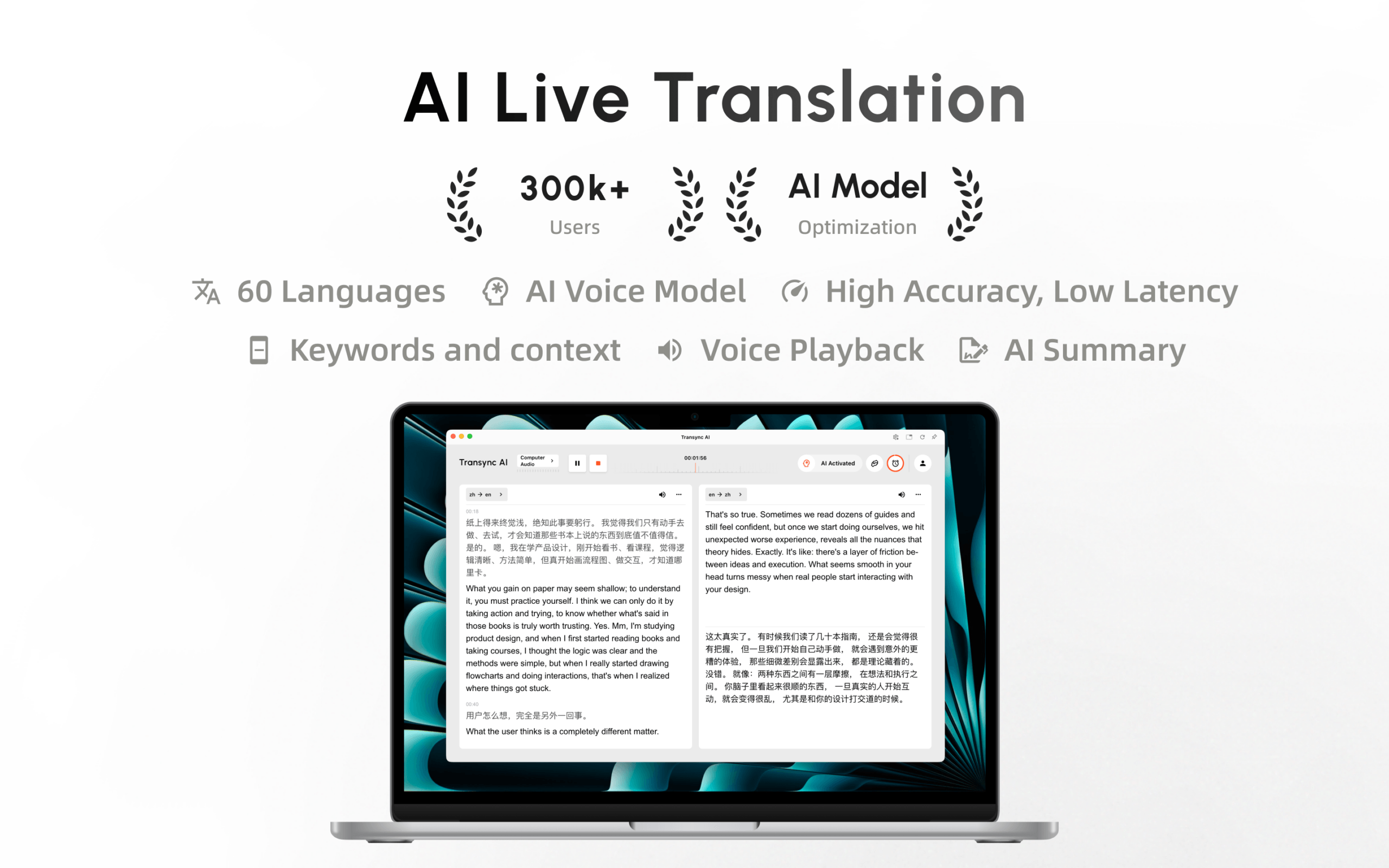
تطبيق Transync AI متوفر الآن على متجر تطبيقات Mac. حمّله بسهولة، واحصل على التحديثات التلقائية، وابدأ الترجمة الفورية على جهاز Mac.
