

Compare 7 AI language translator tools for meetings, travel, events, media, and APIs. Use this decision guide to choose the right workflow.
An AI language translator uses artificial intelligence to interpret content in one language and produce an equivalent meaning in another. Depending on the product, it may translate text, documents, images, live speech, recorded media, or entire multilingual meetings.
That variety makes choosing a tool harder than it first appears. A free travel translator, a meeting assistant, an event-captioning platform, a media-localization suite, and a developer API all solve different problems—even when each one is described as AI translation.
This guide starts with the user rather than the feature list. Follow the decision path, compare seven leading options, and test the workflow that best matches your real communication needs.
Quick Answer: Which AI Language Translator Do You Need?
Start with the outcome:
- Need quick travel phrases, images, or casual text? Consider Talkao or Google Translate.
- Need bilingual subtitles, translated speech, and meeting notes? Consider Transync AI.
- Need captions and audio for many event attendees? Consider Wordly.
- Need to build translation into your own product? Consider Soniox.
- Need subtitles, dubbing, and media localization? Consider Maestra.
- Need text, documents, writing tools, or enterprise language workflows? Consider DeepL.
No single AI language translator is best for all six jobs. Selecting by use case prevents paying for the wrong workflow.
How Does an AI Language Translator Work?
The process depends on the input.
For written content, the system identifies language patterns, context, and meaning before generating translated text. For spoken communication, it must complete additional steps:
Capture audio → recognize speech → interpret context → translate meaning → display captions or generate voice
Live speech is especially challenging because the tool must handle accents, pauses, incomplete sentences, background noise, and multiple speakers without introducing a disruptive delay.
Modern products may add terminology controls, voice synthesis, voice cloning, meeting-platform audio routing, transcripts, summaries, and APIs. These additions determine whether the tool fits a casual phrase or a complete business workflow.
AI Language Translator Comparison: 7 Options
The table compares typical product positioning. Features, supported languages, and plans can change, so confirm critical requirements on the official product websites.
| Tool | Best for | Main input | Live voice output | Meeting workflow | Post-session value |
|---|---|---|---|---|---|
| Transync AI | Multilingual meetings, calls, and in-person conversations | Live speech and meeting audio | Yes | Bilingual subtitles, audio routing, and context tools | Transcripts and AI meeting notes |
| Talkao | Travel, mobile translation, and language learning | Speech, text, camera, and mobile inputs | Yes | Not its primary focus | Consumer translation tools |
| Wordly | Conferences, webinars, and large meetings | Live event speech | Yes | Event and attendee focused | Transcripts and summaries |
| Soniox | Developer speech products | API and app audio | TTS/API capability | Implementation-dependent | Custom product output |
| Maestra | Video, audio, subtitles, dubbing, and live content | Media files and live speech | Yes | Available for live content | Localization and media reuse |
| DeepL | Text, documents, enterprise language work, and selected voice use cases | Text, documents, API, and voice products | Product-dependent | Voice-product dependent | Written and enterprise workflows |
| Google Translate | Free everyday translation | Text, images, websites, documents, and speech | Translation playback | Not meeting-first | Quick personal translation |
Decision Path 1: Are You Translating Live Meetings?
If the answer is yes, focus on conversation flow rather than text-only quality. The most useful features are low latency, two-way language recognition, bilingual captions, translated voice, meeting audio routing, terminology support, and post-call records.
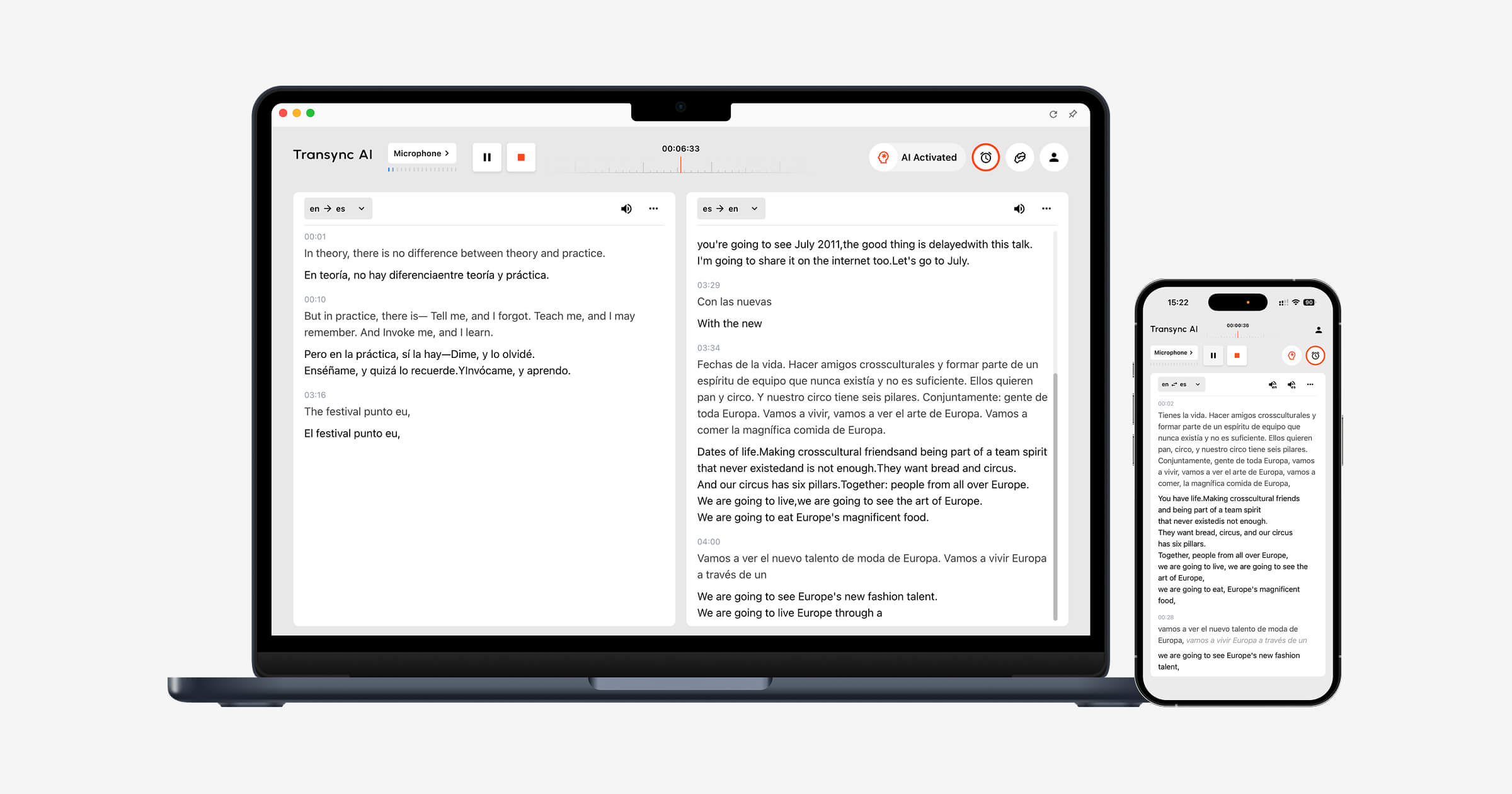
Transync AI is designed around these requirements. Its real-time translation tool displays the original speech and translation side by side while a conversation is happening.
The AI voice translator speaks the translated result aloud, allowing participants to listen as well as read. The AI meeting notes feature then creates a transcript and structured notes after the call.
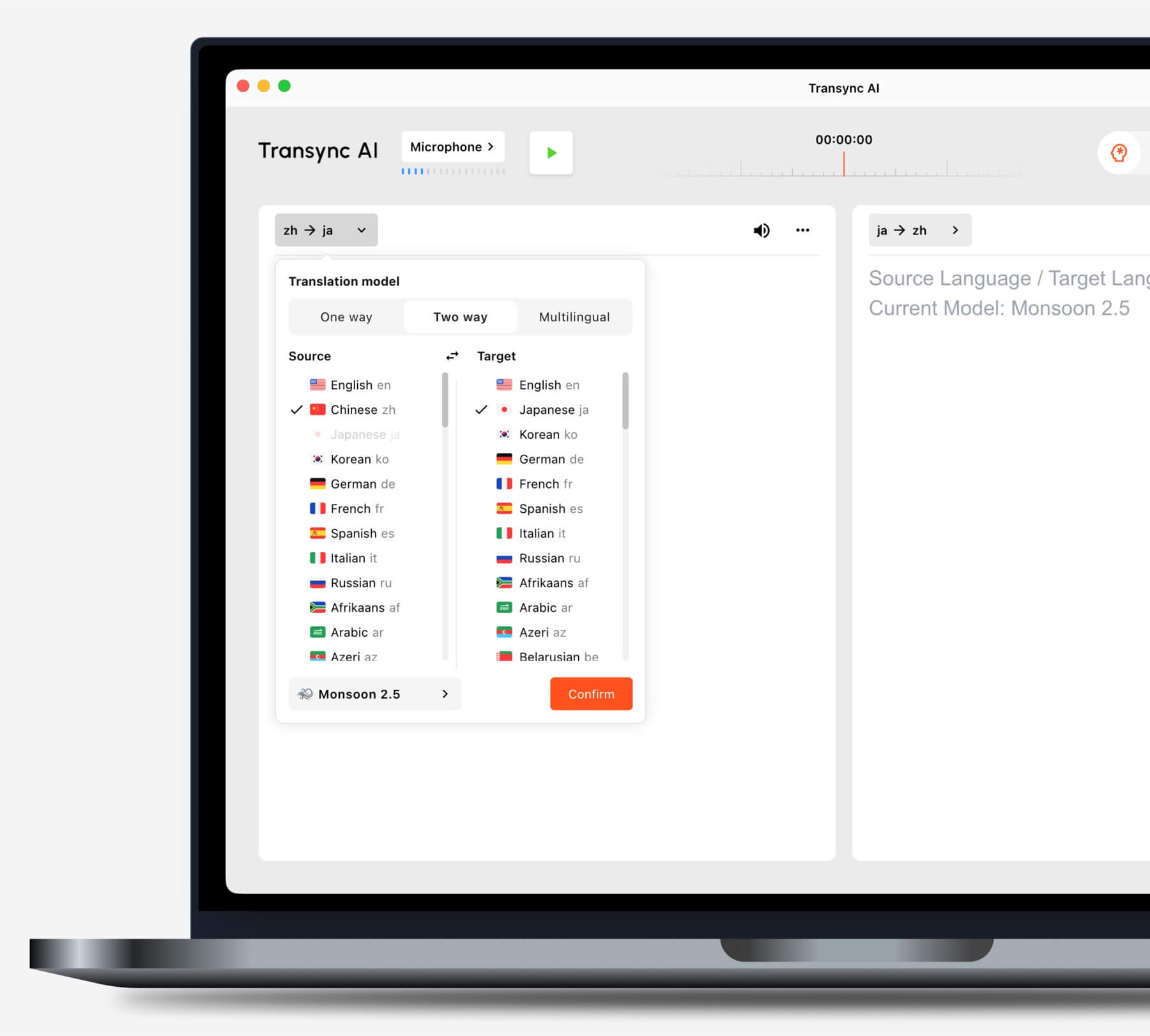
Choose the translation mode that matches your scenario before starting a task.
Do you use common video-meeting platforms?
The live meeting translation feature works alongside Zoom, Microsoft Teams, and Google Meet. Transync AI is standalone software rather than a platform-specific plugin.
The computer-audio sharing feature captures speech from remote participants. The virtual microphone feature helps send translated voice into the meeting.

Compatible with major online meeting platforms for seamless real-time translation
Do you present slides or work in another app?
The Picture-in-Picture bilingual subtitles feature keeps original and translated captions visible above other applications on supported devices. This helps users follow translation while presenting, demonstrating software, or taking notes.
Decision Path 2: Are You Translating a Large Event?
When hundreds of attendees need language access, distribution becomes the main challenge. Participants may need to open captions or translated audio on their own devices without creating individual accounts or installing a meeting tool.
Wordly is positioned for conferences, webinars, hybrid events, and large meetings. Attendees can access translation through a link or QR code, making it more suitable for audience-scale delivery.
 Choose Transync AI for personal and team-based meeting translation. Choose Wordly when an organizer must deliver translation to a large group.
Decision Path 3: Are You Translating Travel or Everyday Content?
For travel, the most important features may be mobile convenience, camera translation, text input, and quick voice playback. Meeting notes and virtual microphones are usually unnecessary.
Talkao offers consumer-oriented translation and language-learning tools, including voice, camera, and mobile features. Google Translate is widely available for text, images, websites, documents, and casual spoken translation.
 Transync AI can help with longer in-person spoken conversations, but it does not support offline mode, image recognition, or text-only document translation.
Decision Path 4: Are You Localizing Media?
Video and audio production requires more than understanding speech in the moment. Teams may need editable subtitles, dubbing, timing, transcription, translation, and export options.
Maestra is positioned across media translation, transcription, subtitles, dubbing, webinars, and live content. It is a stronger fit when translation becomes part of a production and publishing workflow.
 Choose Transync AI when the main goal is a live two-way conversation. Choose Maestra when the translated content must be edited and reused as media.
Decision Path 5: Are You Building a Translation Product?
A product team needs programmable infrastructure, documentation, latency controls, and integration flexibility. It generally does not need an end-user meeting interface.
Soniox provides speech-to-text, translation, and text-to-speech capabilities for developers building voice products.
 DeepL provides APIs and enterprise language services across text, documents, writing, and selected voice workflows.
 Choose Transync AI when employees or customers need a finished meeting translator. Choose an API platform when engineers will design and maintain the complete experience.
Decision Path 6: Are Text and Documents the Priority?
Written translation rewards formatting preservation, terminology consistency, editing, document support, and integration with existing work tools. Live subtitle and voice features may be secondary.
DeepL is broadly positioned for text and document translation, writing support, APIs, and enterprise language workflows. Google Translate is useful for quick consumer text, website, image, and document tasks.
Transync AI is not a text-only document translator. Its strongest use case is live multilingual communication.
Why Transync AI Fits Multilingual Conversations
Transync AI connects the stages of a live conversation: hearing the other person, reading the translation, speaking back, and keeping a record.
Automatic two-way recognition
Within a selected supported language pair, the real-time translation tool can distinguish the language being spoken. Users do not need to press a language-switch button after every turn.
 Natural voice playback and voice cloning
 Natural voice playback and voice cloning
The AI voice translator offers different voice styles and playback speeds. The voice cloning feature can generate translated speech in a voice modeled on the user, helping lessons, presentations, and client calls feel more personal.
 Keywords and background context
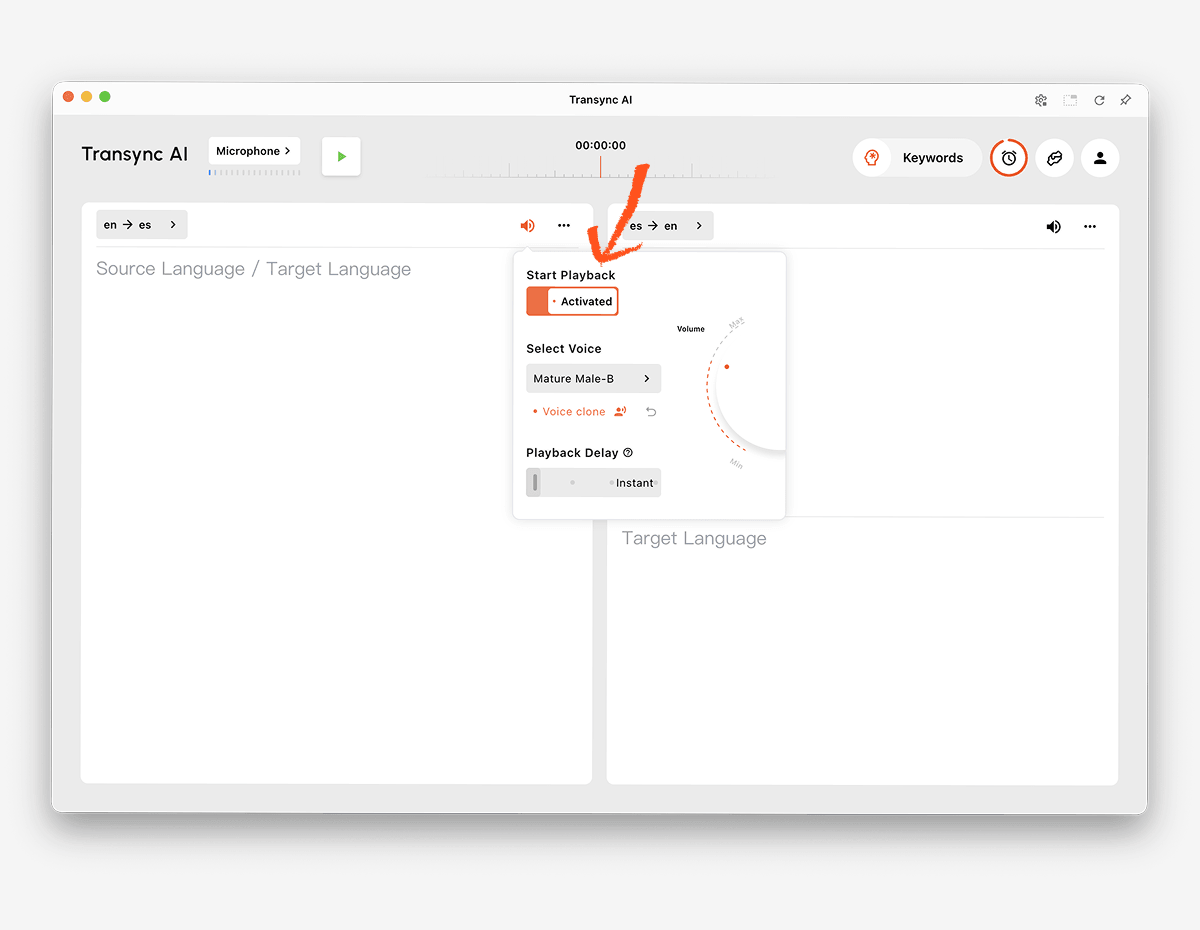 Keywords and background context
Names, brands, acronyms, and specialist terms are common sources of translation errors. The AI Assistant Keywords and Context feature lets users define important vocabulary and explain the topic before a session.
 Cross-device access
 Cross-device access
Transync AI supports web, Windows, macOS, iOS, and Android workflows. This allows users to select the device that best fits an online or in-person conversation.
More than 60 languages
The platform supports more than 60 languages and over 1,000 language pairs. Language availability can evolve, so check the supported languages page for the exact pair required.
Records after the conversation
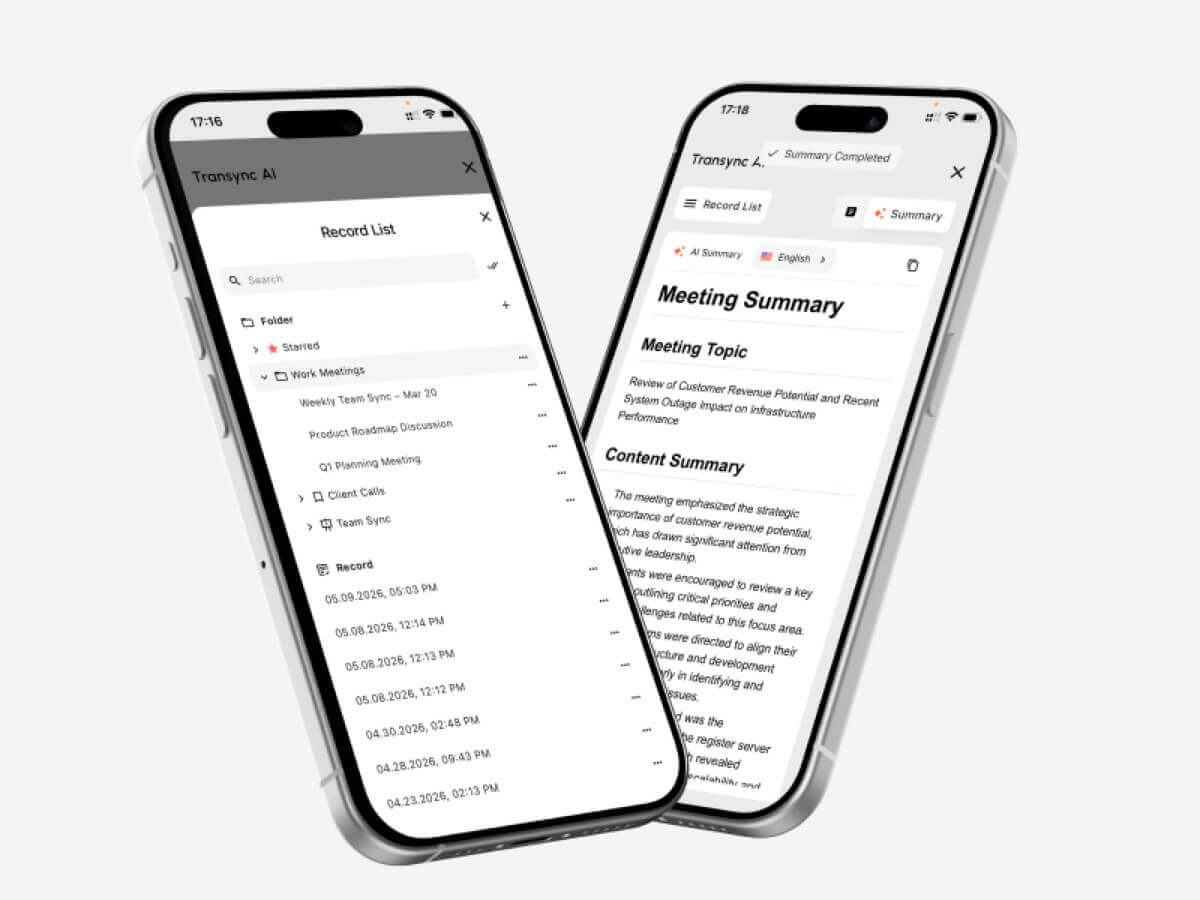
The AI meeting notes feature creates transcripts and structured notes. The translation record management guide explains how users can access and organize previous sessions.
 How to Test an AI Language Translator
 How to Test an AI Language Translator
Run the test in the same environment where the product will be used.
Test the actual language pair
Do not rely only on a total language count. Test both directions of the required pair with regional accents and realistic speaking speeds.
Test important terminology
Create a list of names, products, acronyms, and specialist terms. Compare results before and after adding context. Verify whether the translation preserves meaning rather than only recognizing the words.
Test conversational delay
Ask two people to hold a natural discussion. Notice whether translation delay causes interruptions, confusion, or unnatural pauses.
Test subtitles and voice together
Some participants prefer audio, while others rely on text. Check subtitle readability, voice clarity, pacing, and whether names and numbers are easy to confirm.
Test the meeting setup
Use the real meeting platform, microphone, speakers, operating system, and network. Confirm that remote audio enters the translator and translated speech reaches the intended listeners.
Test the output after the call
Review the transcript and notes for missing decisions, incorrect names, and unclear action items. A smooth live experience does not automatically guarantee an accurate record.
Review privacy and data handling
Check how audio, transcripts, voice models, and account data are processed. Transync AI states that customer data is not used for AI training by default and that audio is deleted after processing. Organizations should review the Trust Center and current terms against their requirements.
How to Start a Live Translation Session
- Open Transync AI on a supported device.
- Select the two languages used in the conversation.
- Choose the correct microphone or computer-audio source.
- Add terminology through the AI Assistant Keywords and Context feature.
- Start the real-time translation tool.
- Confirm that the bilingual subtitles are updating correctly.
- Enable the AI voice translator when participants need audible translation.
- Use the Picture-in-Picture bilingual subtitles feature while working in another app.
- For an online call, configure the computer-audio sharing feature and virtual microphone feature.
- Review the result with the AI meeting notes feature.
Run a short rehearsal before an important meeting to confirm language direction, audio routing, network quality, and terminology.
AI Language Translator FAQ
What is an AI language translator?
An AI language translator uses machine-learning models to interpret text, speech, images, documents, or media in one language and generate an equivalent meaning in another. Product capabilities vary by input and use case.
What is the best AI language translator for meetings?
Transync AI is a strong meeting-first option because it combines real-time bilingual translation, translated voice playback, floating subtitles, terminology context, and AI meeting notes.
The best choice still depends on the required languages, platform, privacy rules, and expected session length.
Can AI translate speech during a video meeting?
Yes. The live meeting translation feature from Transync AI works alongside Zoom, Microsoft Teams, and Google Meet. It can provide bilingual subtitles and translated voice during a live call.
Can it recognize both languages automatically?
The real-time translation tool from Transync AI can distinguish the speaker’s language within the selected supported pair, reducing manual switching in two-way conversations.
Does AI translation work offline?
Offline support depends on the provider and language. Transync AI requires an internet connection and does not currently offer offline mode.
Can AI translate images and documents?
Some products can. Google Translate supports broad consumer inputs, including images and documents, while DeepL is strongly positioned for text and document workflows. Transync AI focuses on live speech and does not provide image recognition or text-only document translation.
Can an AI translator replace a human interpreter?
AI can support many routine, educational, travel, and business conversations, but it cannot guarantee perfect accuracy, judgment, or cultural nuance. Medical, legal, safety-critical, and contractually binding discussions may require a qualified human interpreter.
Final Decision
Choose according to the main workflow:
- Choose Talkao or Google Translate for casual travel and everyday translation.
- Choose Wordly for multilingual conferences and attendee-facing events.
- Choose Soniox for APIs and custom speech products.
- Choose Maestra for subtitles, dubbing, and media localization.
- Choose DeepL for text, documents, enterprise language work, and selected voice workflows.
- Choose Transync AI for live meetings requiring bilingual subtitles, natural voice translation, terminology context, audio routing, and useful notes afterward.
The right AI language translator is not necessarily the product with the most inputs or longest feature list. It is the one that fits the people, content, devices, and follow-up work involved in the real communication task.
If you want a next-generation experience, Transync AI leads the way with real-time, AI-powered translation that keeps conversations flowing naturally. You can try it free now.
 🤖
🤖