Руководство по онлайн-переводу языков на 2026 год: сравнение субтитров, голосового вывода, поддержки совещаний, задержки, контекста, цен и реальных сценариев использования.
А переводчик в реальном времени Это легко понять в демонстрации продукта.
Один человек говорит чётко. В комнате тихо. Предложение короткое. Появляется перевод, и всё кажется совершенно лёгким.
В реальной жизни общение редко бывает настолько контролируемым.
На международной встрече докладчики перебивают друг друга, меняют тему на полпути предложения, используют названия товаров, упоминают цены, говорят с акцентом и ожидают немедленного ответа. На выставке фоновый шум может затруднить распознавание речи. В классе лектор может говорить непрерывно в течение 40 минут без перерывов на перевод.
Таким образом, ценность живого переводчика измеряется не только тем, может ли он правильно перевести одно предложение.
Это также должно ответить на более практический вопрос:
Могут ли люди продолжать общаться во время перевода?
В этом полевом руководстве объясняется, как работает перевод речи в реальном времени, какие особенности имеют значение в разных контекстах, как подготовиться к многоязычному разговору и когда специализированный инструмент, такой как Transync AI, может быть более подходящим, чем обычный текстовый или туристический переводчик.
Краткий ответ: Что такое онлайн-переводчик?
А переводчик в реальном времени Слушает устную речь и переводит ее, пока говорящий еще продолжает говорить.
В зависимости от продукта, результат может выглядеть следующим образом:
- Переведенные субтитлы
- Двуязычный текст, расположенный рядом
- Голосовой вывод искусственного интеллекта
- Интерфейс для двустороннего общения
- Стенограмма в режиме реального времени
- Краткое изложение результатов совещания
- Пункты плана действий и примечания
Современный переводчик в режиме реального времени также может предоставлять:
- Автоматическое различение двух выбранных языков
- Терминология и настройки ключевых слов
- Контекстные подсказки
- Плавающие субтитлы
- Выбор голоса
- клонирование голоса
- Поддержка Zoom, Microsoft Teams и Google Meet
- Записи перевода после сессии
Перевод в реальном времени отличается от обычного текстового перевода тем, что система должна обрабатывать неполный и быстро меняющийся язык.
Необходимо найти баланс между скоростью и контекстом.
Если переводить слишком долго, слушатель отстаёт. Если переводить слишком рано, предложение может быть неправильно понято ещё до того, как говорящий закончит.
Как работает перевод речи в режиме реального времени?
Большинство систем перевода в реальном времени обрабатывают речь в несколько этапов.
| Этап | Что происходит |
|---|---|
| Запись звука | Микрофон или системный аудиосигнал улавливает речь говорящего. |
| Распознавание речи | Устная речь преобразуется в текст. |
| Идентификация языка | Система определяет, на каком из выбранных языков ведется речь. |
| Перевод | Распознанный текст переводится на целевой язык. |
| вывод субтитров | Оригинальный и переведенный текст отображаются на экране. |
| Поколение голосов | Искусственный интеллект может зачитать перевод вслух. |
| Обработка после сеанса | Стенограмму можно резюмировать в виде заметок или пунктов плана действий. |
На каждом этапе могут возникать задержки или ошибки.
Например:
- Слабый микрофон может повлиять на распознавание речи.
- Неправильное распознавание может привести к неправильному переводу.
- Отсутствие контекста может привести к неверному техническому толкованию.
- Генерация голоса может привести к дополнительной задержке.
- Некачественная стенограмма может привести к неточному резюме совещания.
Именно поэтому синхронный перевод следует оценивать как целостный рабочий процесс, а не как отдельный механизм перевода.
В каких случаях онлайн-переводчик наиболее полезен?
Один и тот же инструмент может вести себя совершенно по-разному в зависимости от окружающей среды.
Онлайн-встречи
Для проведения онлайн-совещания с участием нескольких языков может потребоваться:
- Двусторонний перевод речи
- Двуязычные субтитры
- Перевод голосового вывода
- Техническая терминология
- Подведение итогов встречи
- Совместимость с существующим программным обеспечением для проведения совещаний.
Перевод должен оставаться видимым, пока участники открывают документы, просматривают слайды или демонстрируют программное обеспечение.
Личные беседы
При личной беседе приоритеты другие:
- Быстрое переключение языков
- Четкий мобильный дисплей
- громкость динамиков
- Легко соблюдать очередность
- Портативный микрофон для захвата звука
- Минимальная настройка
Это полезно для поездок, посещений кампуса, выставок, офисной работы, обслуживания клиентов и неформальных деловых встреч.
Лекции и занятия
В образовательных учреждениях обычно имеют место более длительные периоды односторонней речи.
Важные особенности включают в себя:
- Стабильные субтитры для длительных сеансов
- Читаемые субтитлы
- Поддержка технической терминологии
- Плавающие субтитры
- Заметки с собрания или лекции
- Простой обзор после занятия
Торговые выставки и экспозиции
Выставочные залы создают сложные акустические условия:
- Шум толпы
- Музыка
- Эхо
- Несколько разговоров поблизости
- Динамики перемещаются
- Незнакомая терминология, связанная с продукцией
Инструмент для перевода следует тестировать в условиях шума, а не только в тихом офисе.
Звонки клиентов и поставщиков
В этих разговорах часто содержатся следующие темы:
- Номера заказов
- Модели продукции
- Сроки доставки
- Цены
- Количества
- Информация об учетной записи
- Технические характеристики
Переведенные субтитлы особенно полезны, поскольку позволяют пользователям визуально проверять важные детали.
Презентации и вебинары
Перевод презентации должен оставаться видимым и не закрывать представляемый контент.
Функция «картинка в картинке» позволяет участникам одновременно видеть слайды и перевод.
Карта сценариев работы онлайн-переводчика языков
| Сценарий | Главная сложность перевода | Приоритетные функции |
| Разговор двух человек | Быстрая смена реплик | Двустороннее определение языка и низкая задержка |
| Онлайн-деловая встреча | Речь, терминология и последующие действия | Субтитры, голосовой вывод, контекст, протокол совещания |
| Университетская лекция | Длинная непрерывная речь | Стабильные субтитлы и аннотации. |
| Демонстрация продукта | Перевод не должен охватывать интерфейс. | Плавающие субтитлы |
| Звонок поставщику | Модели, даты, цены и технические термины | Ключевые слова, двуязычный текст, анализ стенограммы |
| Торговая выставка | Шум и короткие разговоры | Высокое качество записи звука и быстрая передача данных. |
| Вебинар | Один говорящий и множество слушателей | Стабильность работы в течение длительного сеанса и читаемые субтитры. |
| Юридическая или медицинская консультация | Серьезные последствия ошибок | Профессиональный переводчик |
Контрольный список для начала работы на объекте
Качество перевода в режиме реального времени повышается при надлежащей подготовке сессии.
1. Подтвердите точную языковую пару.
Не выбирайте слишком общий термин, не проверив его на конкретном языке или в региональном контексте.
Например:
- Под "китайским" может подразумеваться мандаринский или кантонский диалект.
- Словарный запас испанского языка может различаться в Испании и странах Латинской Америки.
- В Бразилии и Португалии могут быть различия в португальском языке.
- Французский акцент и лексика различаются в зависимости от региона.
По возможности проверяйте сами динамики.
2. Определите тип разговора.
Спросите, является ли сессия:
- Один человек говорит непрерывно.
- Два человека по очереди
- Групповое обсуждение
- Презентация
- Звонок от клиента
- Техническое совещание
- Гибридное или онлайн-мероприятие
Инструмент, оптимизированный для лекций, может оказаться не столь эффективным в быстрой двусторонней дискуссии.
3. Подготовьте важную терминологию.
Создайте список из:
- Личные имена
- Названия компаний
- Названия продуктов
- Номера моделей
- Сокращения
- Отраслевые термины
- Региональные топонимы
- Предпочтительные переводы
Например:
- Transync AI = 同言翻译
- фотоэлектрический инвертор
- Модель X300
- Азиатско-Тихоокеанский регион
- Джон Смит
- упаковка полупроводников
- оптимизация цепочки поставок
- нейронная сеть
4. Добавьте контекстную информацию.
Одно слово может иметь несколько правильных переводов.
Например, слово “модель” может относиться к:
- Модель искусственного интеллекта
- Модель продукта
- Бизнес-модель
- статистическая модель
- Физический прототип
Предоставление контекста помогает системе выбрать желаемый смысл.
Пример:
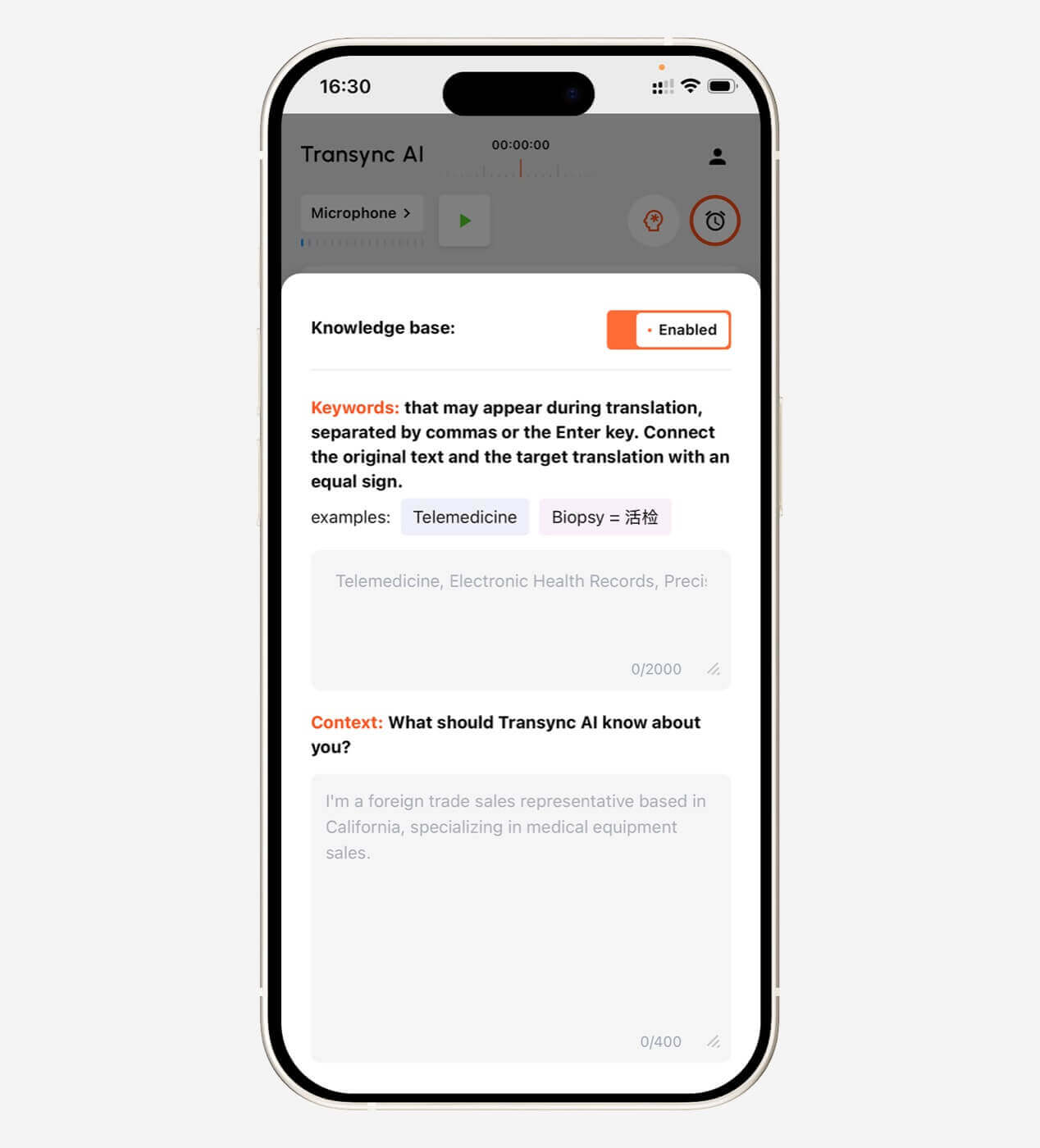
Это встреча поставщиков, посвященная оборудованию для возобновляемой энергетики, техническим характеристикам фотоэлектрических инверторов, графикам производства, контролю качества и соблюдению региональных норм.
Transync AI позволяет пользователям определять ключевые слова и контекстную информацию перед началом работы над переводом.
Более подробная информация доступна по адресу: Ключевые слова помощника ИИ Контекст страница.
 5. Проверьте источник звука.
 5. Проверьте источник звука.
Подтвердите, нужно ли инструменту фиксировать следующие данные:
- Микрофон устройства
- Системное аудио
- аудиозапись совещания
- Bluetooth-гарнитура
- Внешний микрофон
- Виртуальный микрофон
Инструмент не может перевести аудио, которое он не может четко записать.
6. Решите, что лучше: субтитры или озвучка.
Голосовой перевод не всегда является лучшим вариантом.
Выбирайте субтитры, когда:
- Необходимо проверить номера и имена.
- Встреча проходит быстро.
- Может выступить несколько человек.
- Воспроизведение голоса прервет следующего говорящего.
- Участники хотят сравнить оригинал и перевод.
Выбирайте голосовой вывод в следующих случаях:
- Участники не могут смотреть на экран.
- Перевод нужно прослушать вслух.
- Один из участников читает медленно.
- Разговор в основном строится на поочередном обмене репликами.
- Для презентации необходим устный перевод.
Во многих профессиональных рабочих процессах используются оба подхода.
Тестирование переводчика в реальном времени: используйте реальный разговор, а не демо-сценарий.
Короткое рекламное предложение не может раскрыть, как инструмент работает в реальном общении.
Проведите тест продолжительностью от 15 до 20 минут.
Запишите условия проведения испытаний.
Запишите:
- Дата тестирования
- Версия приложения
- Устройство
- Операционная система
- интернет-соединение
- Микрофон
- Платформа для проведения встреч
- Языковая пара
- Количество выступающих
- Аудиосреда
Используйте реалистичный тестовый сценарий.
Включать:
- Краткое введение
- Имя человека
- Название компании
- Пять технических терминов
- Модель продукта
- Цена
- Процент
- Свидание
- Исправление
- Прерывание предложения
- Речь на разных языках
- Окончательное решение
Пример:
Мы сможем отгрузить 1250 единиц модели X300 к 18 октября — точнее, к 28 октября — если инженерная группа Азиатско-Тихоокеанского региона утвердит пересмотренные технические характеристики в эту пятницу.
Это предложение проверяет:
- Числа
- Даты
- Исправления
- Названия продуктов
- Сокращения
- Технический контекст
- непрерывность предложения
Система оценки качества живого перевода
| Метрическая система | Что оценивать |
| Распознавание речи | Правильно ли инструмент распознал исходные слова? |
| Значение перевода | Было ли сохранено намерение говорящего? |
| Задержка | Результат был получен до того, как тема обсуждения изменилась? |
| Двусторонний поток | Смогли бы оба участника ответить естественно? |
| Терминология | Были ли названия и технические термины согласованы? |
| Качество субтитров | Были ли субтитры читаемыми и стабильными? |
| Качество голоса | Был ли переведенный аудиоматериал четким и естественным? |
| шумоподавление | Сохранялась ли работоспособность устройства на приемлемом уровне вне тихой комнаты? |
| Стабильность в течение длительного сеанса | Оставался ли инструмент неизменным с течением времени? |
| Заметки после сессии | Были ли расшифровка и краткое изложение полезны впоследствии? |
Проверьте оба направления перевода.
Результаты перевода с английского на японский могут отличаться от результатов перевода с японского на английский. То же самое относится к парам «китайский-английский», «испанский-английский» и другим.
Что такое допустимая задержка перевода?
Задержка перевода в реальном времени обычно измеряется от конца произнесенной фразы до появления или воспроизведения переведенного результата.
| Приблизительная задержка | Практический опыт |
| Менее 2 секунд | Отлично подходит для активного общения. |
| 2–4 секунды | Обычно удобен для совещаний и занятий. |
| 4–6 секунд | Лучше подходит для лекций и неспешных презентаций. |
| Более 6 секунд | Может нарушить ритм разговора. |
Указанные диапазоны являются лишь практическими рекомендациями.
Фактические результаты могут отличаться в зависимости от:
- Длина предложения
- Языковая пара
- Модель
- Качество сети
- Микрофон
- Фоновый шум
- Настройки генерации голоса
- Производительность устройства
Вывод субтитров обычно происходит быстрее, чем перевод голоса, поскольку генерация голоса добавляет еще один этап обработки.
Как работает Transync AI в качестве переводчика в режиме реального времени
Transync AI разработан для обеспечения возможности общения посредством речи в режиме реального времени.
Он поддерживает:
- Двусторонний перевод на 60 языках
- Более 1000 языковых пар
- Оригинальный и переведенный текст отображаются вместе.
- ИИ-голосовая трансляция
- Несколько вариантов выбора голоса
- Предварительный просмотр голоса
- клонирование голоса
- Ключевые слова и контекстные подсказки
- Заметки о встречах, созданные ИИ
- Субтитры «картинка в картинке»
- Доступ между устройствами
- Рабочие процессы в Zoom, Teams и Google Meet
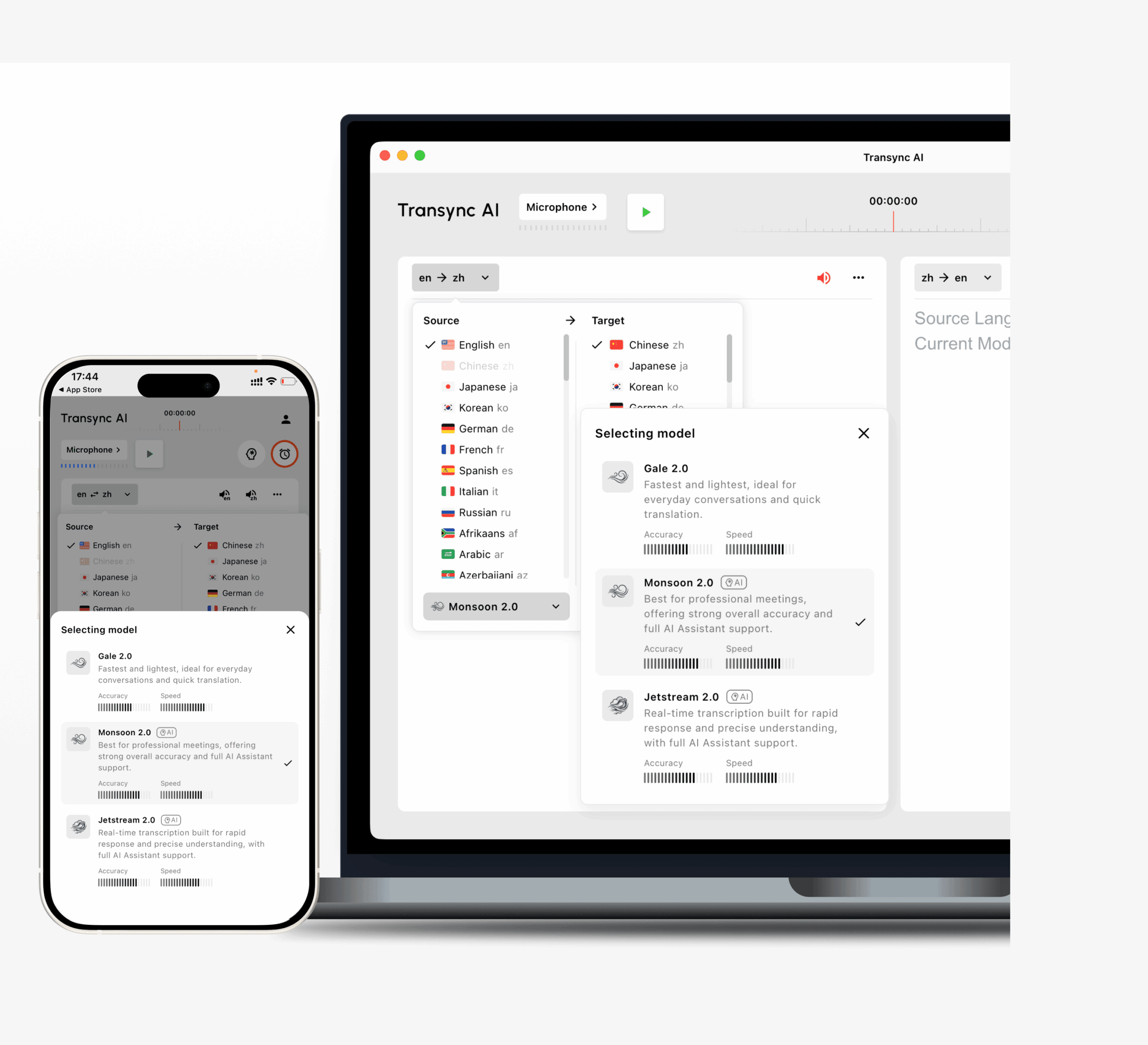
В состав Transync AI v2.0 входят модели Gale 2.0, Monsoon 2.0 и Jetstream 2.0.
Обновленные модели разработаны для повышения скорости, точности, непрерывности и стабильности в реальной речи, включая:
- Короткие предложения
- Смешанное языковое общение
- Шумная среда
- Нерегулярные паузы
- Границы неполных предложений
Пользователи могут изучить инструмент перевода в реальном времени и провести анализ текущих поддерживаемые языки.
 Двусторонний перевод без постоянного переключения кнопок.
 Двусторонний перевод без постоянного переключения кнопок.
В ходе живого разговора часто чередуются два языка.
Например:
- Спикер А задает вопрос на английском языке.
- Спикер Б отвечает на японском языке.
- Докладчик А продолжает на английском языке.
- Говорящий Б поправляет одну деталь в японском языке.
Эффективный переводчик в режиме реального времени должен различать выбранные языки, не заставляя участников менять язык ввода после каждого хода.
Transync AI может автоматически определять язык говорящего в рамках выбранной задачи двустороннего перевода.
Это полезно для:
- Звонки клиентов
- Интервью
- обсуждения с поставщиками
- Визиты в офис
- Обслуживание клиентов
- Классы
- Разговоры о путешествиях
Естественная смена говорящих по-прежнему важна. Если оба участника говорят одновременно, любая автоматизированная система может потерять или смешать часть входных данных.
Двуязычные субтитлы против субтитров только с переводом.
Отображение только целевого языка создает понятный интерфейс. Отображение обоих языков обеспечивает дополнительную проверку.
Двуязычные субтитлы помогают пользователям:
- Проверьте имена
- Проверьте номера
- Сравните терминологию
- Выявление ошибок распознавания
- Понимание структуры предложений
- Следуйте указаниям оригинального докладчика.
Transync AI отображает оригинальный и переведенный контент рядом друг с другом.
Это особенно важно в профессиональной коммуникации, где небольшая ошибка в количестве, дате или номере модели может изменить смысл.
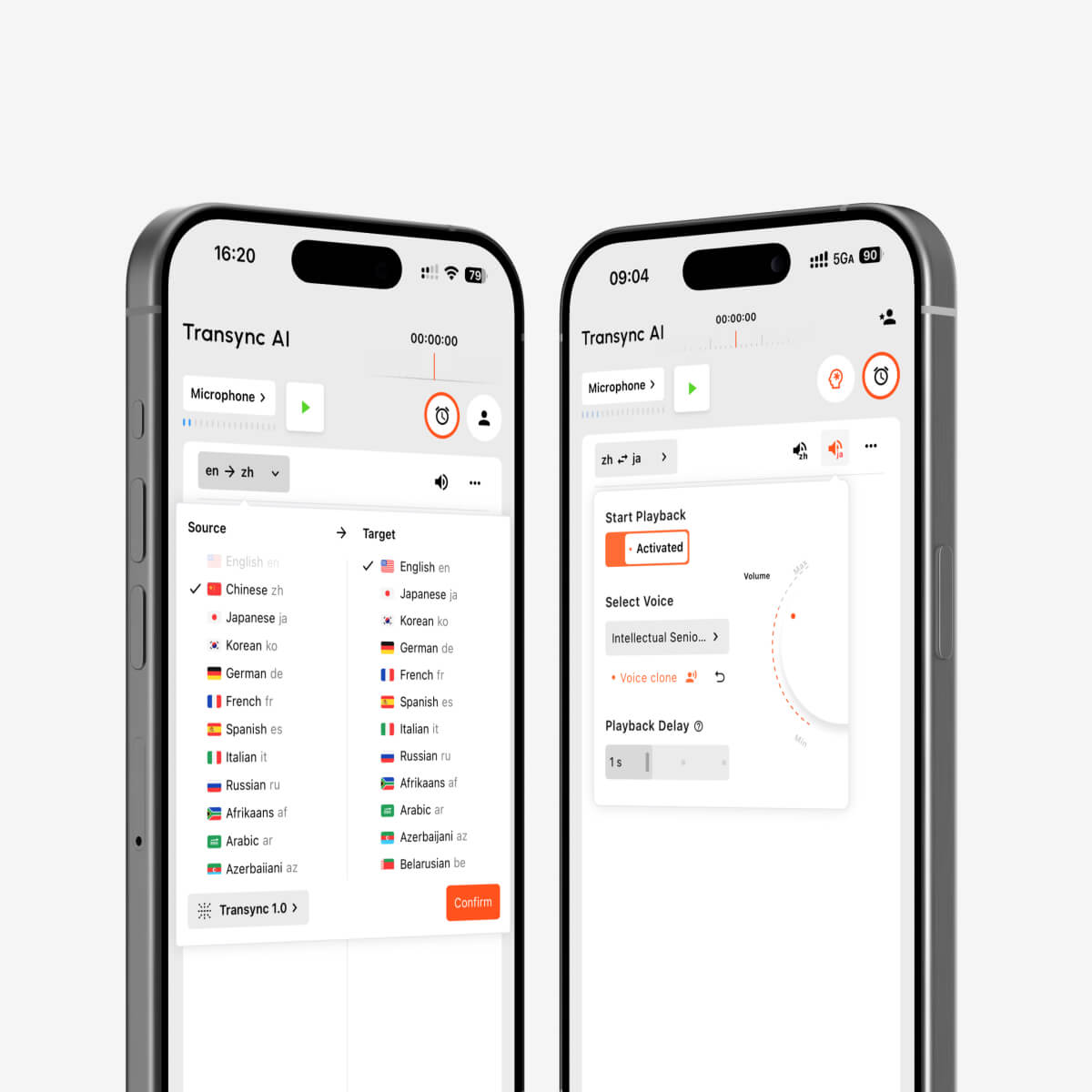
Искусственный интеллект для вывода голоса и клонирования голоса
Перевод голоса может помочь сделать общение более прямым.
Transync AI поддерживает несколько голосов ИИ с разными тонами и скоростью для таких сценариев, как:
- Деловые встречи
- Классы
- Непринужденные беседы
- Демонстрация продукции
- Международные звонки
Пользователи могут предварительно прослушать голоса перед началом выполнения задания.
Функция клонирования голоса позволяет использовать в переводе речь голос, максимально приближенный к собственному голосу пользователя. Это может сделать презентации и международные беседы более личными.
Голосовые данные надежно хранятся и не используются для обучения ИИ.
Исследовать Искусственный интеллект для перевода голоса и вывода речи..
Перевод видеоконференций в режиме реального времени для Zoom, Teams и Google Meet
Transync AI работает как автономное программное обеспечение, а не как браузер или плагин для проведения совещаний.
Оно может работать параллельно с:
- Zoom
- Microsoft Teams
- Google Meet
Для создания субтитлов Transync AI захватывает звук совещания и отображает исходный и переведенный контент.
Для вывода переведенного текста пользователям может потребоваться настроить системный звук или виртуальный микрофон, чтобы другие участники могли слышать сгенерированный перевод.
Автономный рабочий процесс может быть полезен для тех, кто использует несколько платформ для проведения совещаний и не хочет зависеть от встроенных функций перевода одной из платформ.
Видеть Перевод встреч с помощью ИИ для Zoom, Teams и Google Meet.
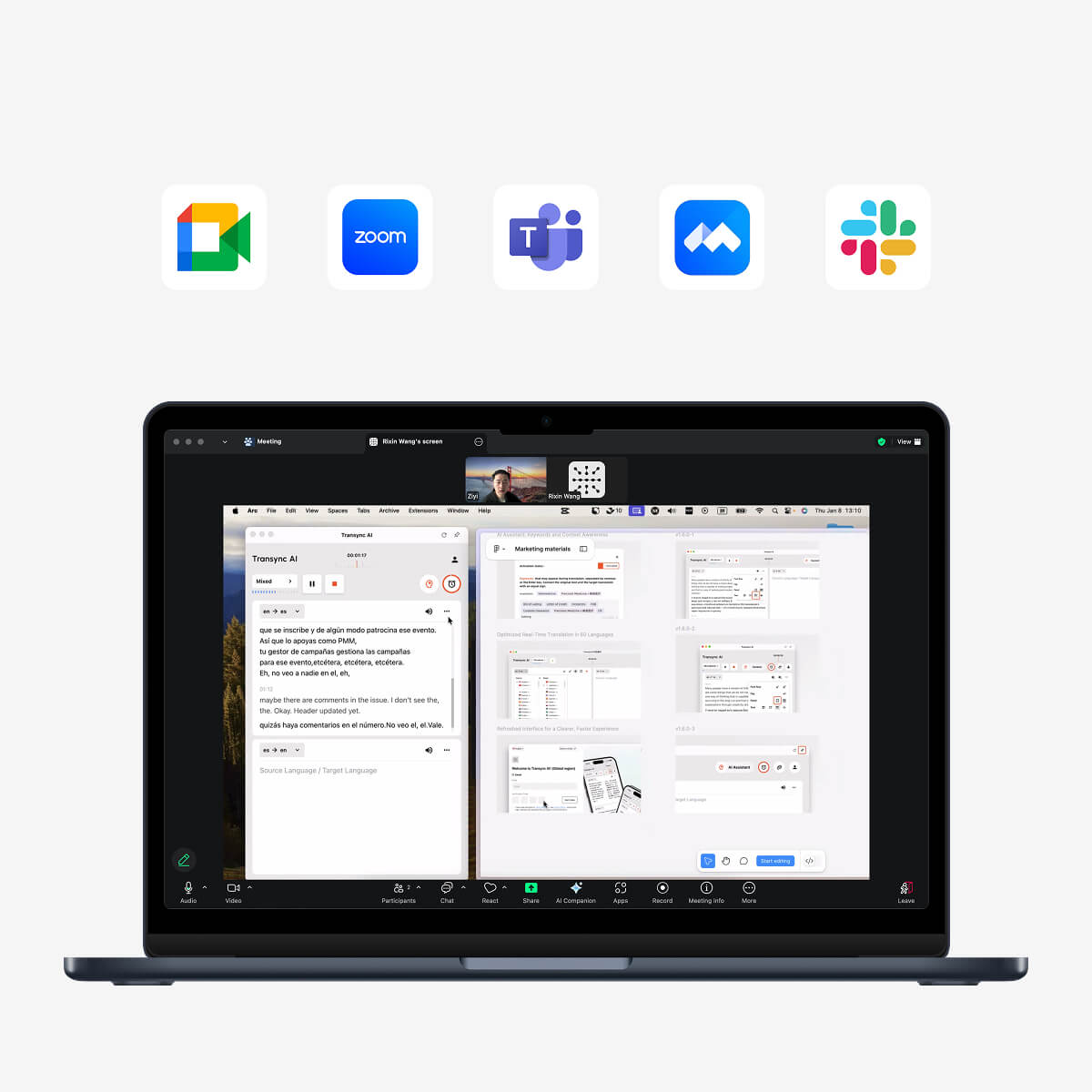
Совместимость с основными платформами для онлайн-встреч обеспечивает бесперебойный перевод в режиме реального времени.
Плавающие субтитлы во время презентаций
Во время совещания участникам может потребоваться открыть следующие разделы:
- Слайды
- Электронные таблицы
- Страницы товаров
- Местные документы
- Инструменты проектирования
- Демонстрационное программное обеспечение
- Вкладки браузера
Если субтитры остаются в окне переводчика, пользователям приходится постоянно переключаться между приложениями.
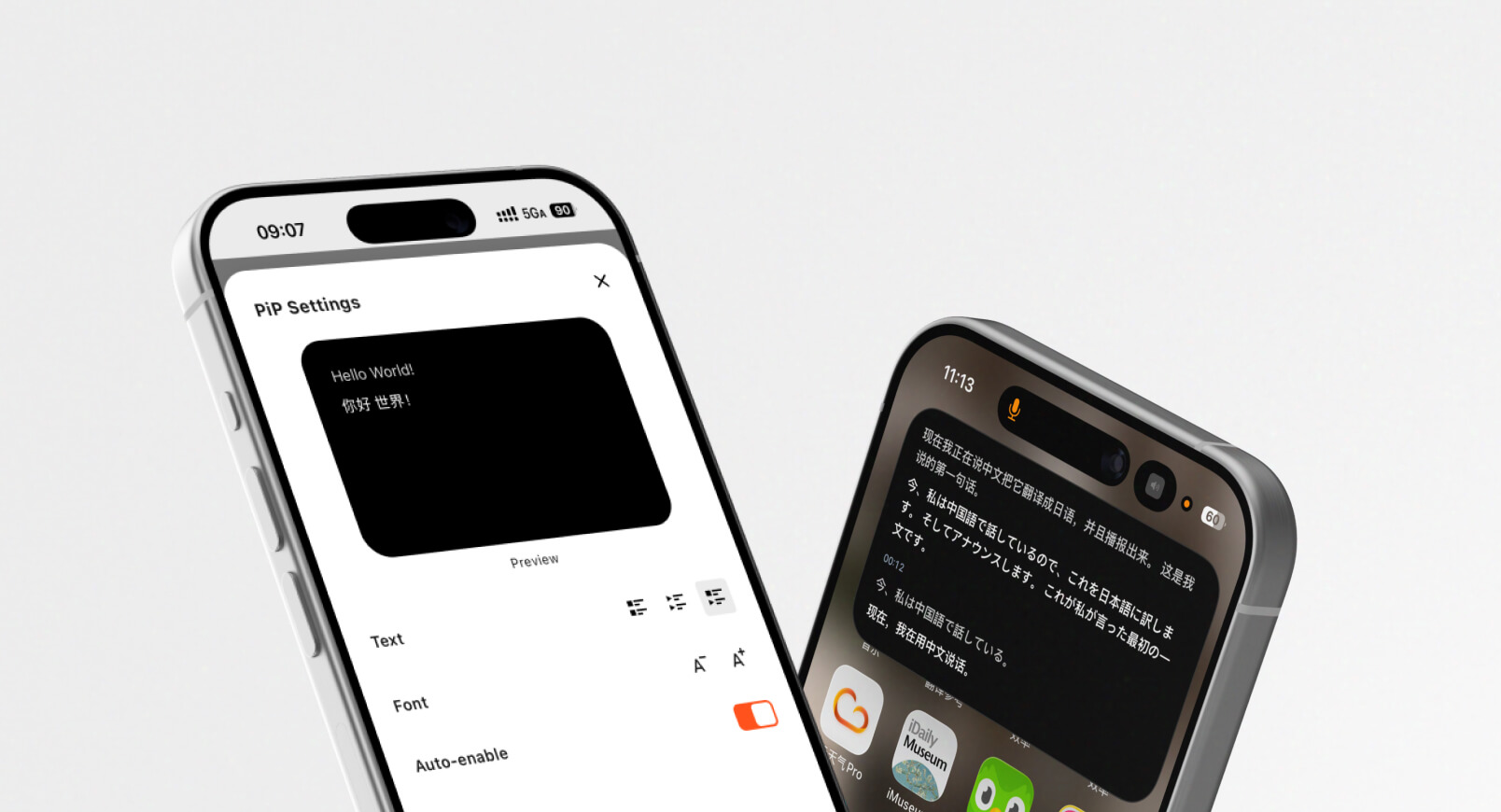
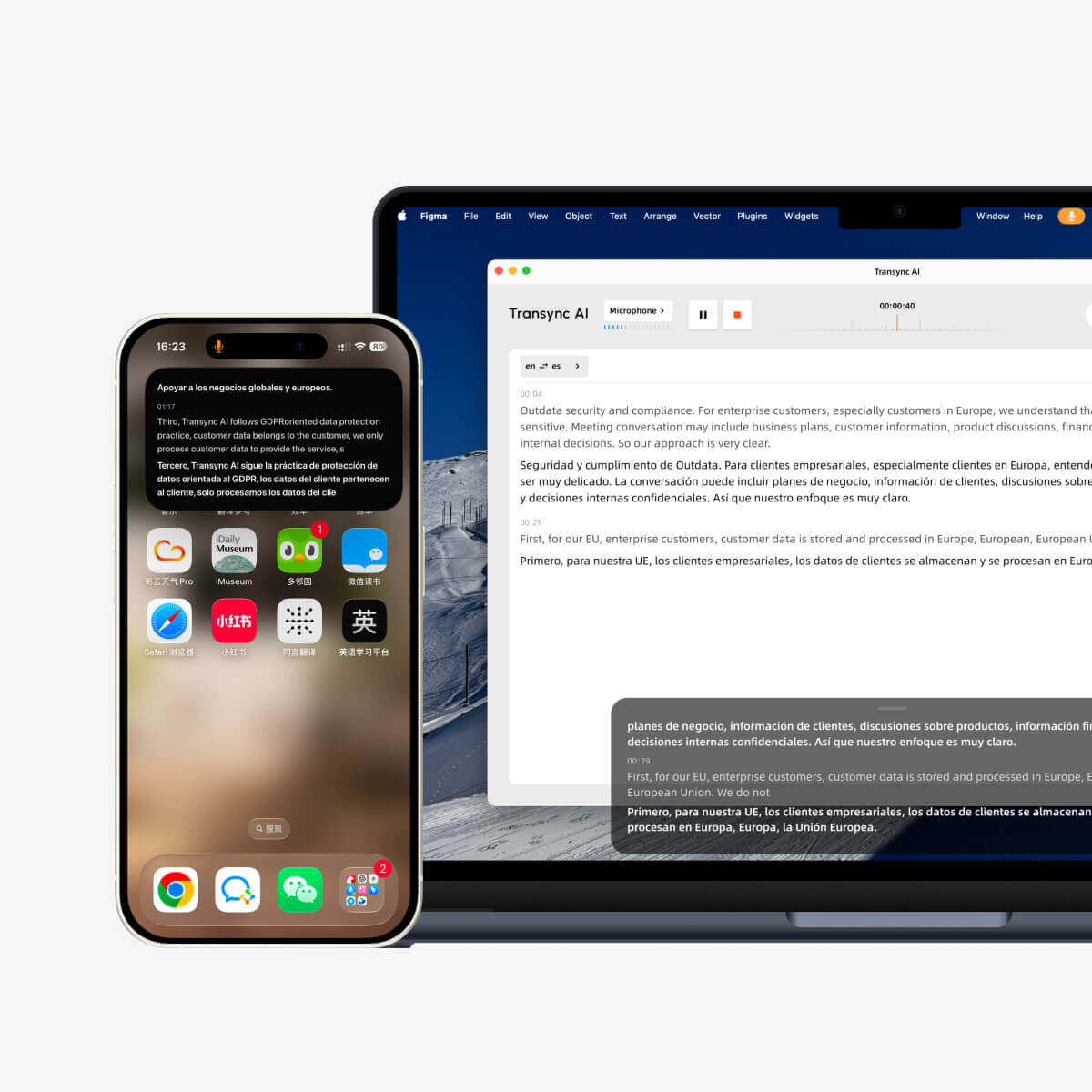
Transync AI обеспечивает отображение субтитлов в режиме «картинка в картинке» на поддерживаемых платформах Mac, Windows и iOS.
Плавающее окно субтитров может оставаться поверх других приложений, помогая пользователям читать перевод во время презентации или при выполнении нескольких задач одновременно.
Плавающее окно на рабочем столе также может запоминать свое предыдущее положение и поддерживает элементы управления паузой и возобновлением в обновленном рабочем процессе.
Узнайте больше от Плавающие субтитлы «картинка в картинке».
Что происходит после онлайн-беседы?
Получение информации в режиме реального времени — это лишь часть рабочего процесса.
После совещания пользователям может потребоваться ознакомиться со следующими материалами:
- Решения
- Сроки
- Задачи
- Вопросы
- Требования к продукту
- Цены
- Сроки доставки
- Обязательства спикеров
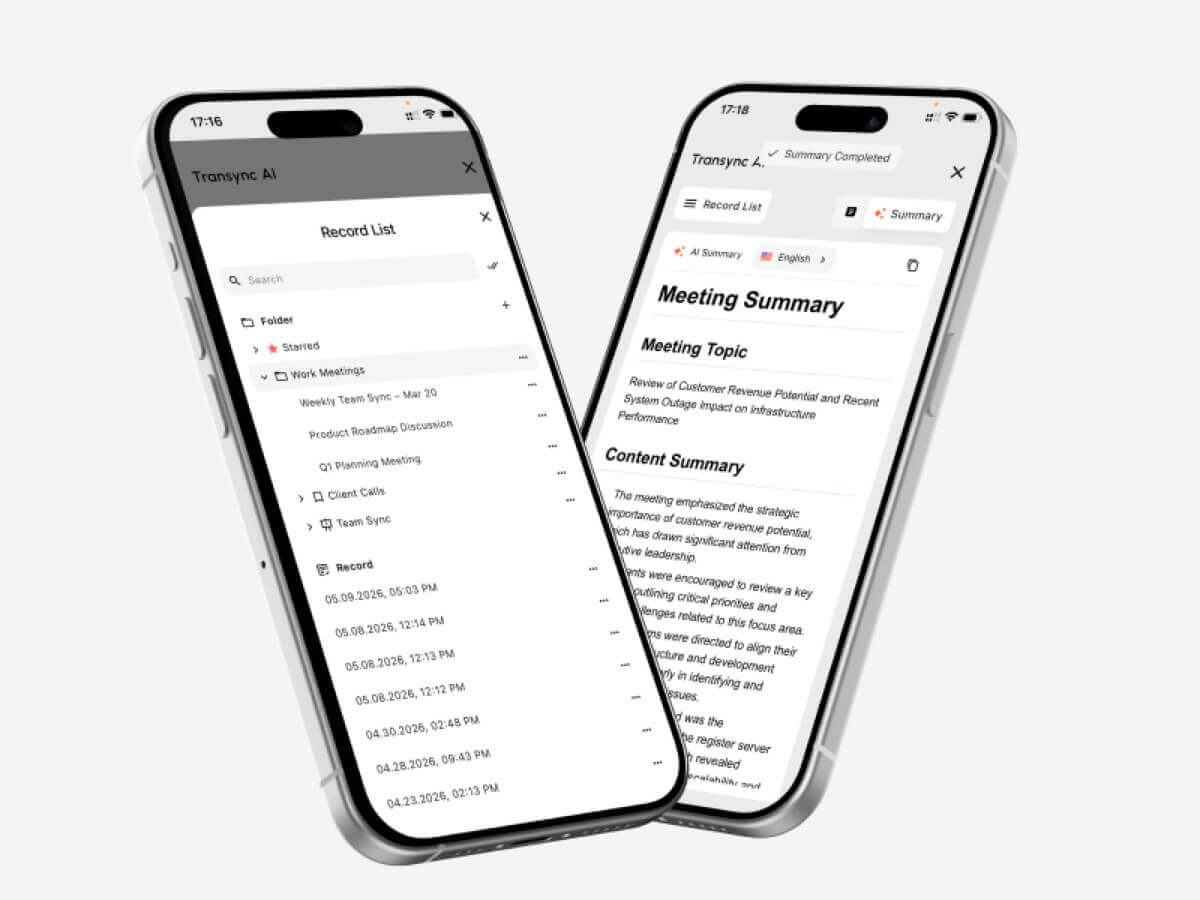
Transync AI включает в себя сгенерированные искусственным интеллектом заметки к совещаниям, которые извлекают ключевую информацию из разговора.
Записи совещаний экономят время на проверку, но важную информацию все равно следует сверять с документацией по переводу.
Всегда проверяйте:
- Имена
- Числа
- Даты
- Цены
- Технические термины
- Юридические или договорные обязательства
Исследовать Создание протоколов совещаний с помощью ИИ и перевод в реальном времени..
 Переводчик языка в реальном времени против текстового переводчика
 Переводчик языка в реальном времени против текстового переводчика
| Особенность | Переводчик текста | Переводчик языка в реальном времени |
| Основной ввод | Напечатанный или вставленный текст | Устное аудио |
| Время | Перевод после завершения ввода | Перевод в процессе общения |
| Двусторонний разговор | Обычно ручной | Часто поддерживается |
| Захват микрофона | Необязательный | Существенный |
| Задержка субтитров | Неактуально | Критический |
| Голосовой вывод | Иногда доступно | Распространено в продвинутых инструментах |
| Изменения в составе говорящего | Неактуально | Необходимо обработать |
| Поддержка встреч | Обычно ограниченный | Основной сценарий использования некоторых инструментов |
| Примечания и резюме | Редкий | Доступно в инструментах, ориентированных на проведение совещаний. |
| Наилучшее применение | Сообщения, веб-страницы и документы | Звонки, встречи, занятия и беседы |
В некоторых случаях текстовый переводчик может оказаться лучшим вариантом:
- Документы
- Электронные письма
- Веб-страницы
- Письменная локализация
- Контент, требующий редактирования
Использование переводчика в режиме реального времени особенно полезно, когда у людей нет возможности прерывать общение, чтобы набирать каждое предложение.
Живой переводчик против живого устного переводчика
| Фактор | ИИ-переводчик в реальном времени | Переводчик-человек |
| Доступность | Обычно немедленно | Часто требует планирования. |
| Расходы | Подписка или оплата по факту использования | Обычно оплата производится по времени или за мероприятие. |
| Рутинное общение | Удобен для частого использования. | Возможно, это будет дороговато для повседневного использования. |
| Культурный нюанс | Может не упустить тонкие нюансы. | Лучше интерпретирует намерения. |
| Техническая терминология | Можно улучшить с помощью ключевых слов. | Зависит от квалификации переводчика. |
| Протокол совещания | Может быть сгенерировано автоматически. | Обычно это отдельная услуга. |
| Профессиональная ответственность | Ограниченный | Могут применяться профессиональные стандарты. |
| Наилучшее применение | Регулярные встречи и беседы | Серьезные или деликатные ситуации |
В случаях, когда ошибка может повлиять на: , следует привлекать квалифицированного переводчика.
- Медикаментозное лечение
- Юридические права
- Условия договора
- Иммиграционный статус
- Личная безопасность
- Соответствие нормативным требованиям
- Финансовые решения
- Правительственные заседания
- деликатные вопросы трудоустройства
Искусственный интеллект может улучшить доступность, но он не берет на себя профессиональную ответственность за последствия ошибок.
Сколько стоит услуги переводчика в режиме реального времени?
Стоимость услуг по переводу может рассчитываться следующим образом:
- Минута
- Час
- Пользователь
- Сиденье
- Встреча
- Событие
- Ежемесячная подписка
- использование API
Для общения в режиме реального времени сравнивайте включенное время перевода, а не только ежемесячную плату.
| План Transync AI | Цена | Включено в использование | Лучше всего подходит для |
| Бесплатно | $0 | 40 минут для новых пользователей | Первоначальное тестирование |
| Персональная премия | $8.99/месяц | 10 часов в течение периода действия активного членства | Индивидуальные и регулярные встречи |
| Предприятие | $24.99/месяц/место | До 40 часов в месяц на одно рабочее место | Команды и организации |
| Карта времени | От $0,70/час | Дополнительное время на перевод | Пользователи с изменяющимся ежемесячным спросом |
Часы, отмеченные на карте учета рабочего времени, не сгорают, но могут быть использованы только в течение действия абонемента.
Перед выбором тарифного плана оцените:
- Часы проведения ежемесячных встреч
- Количество участников
- Количество пользователей
- Частота использования переведенных голосовых команд
- Количество языковых пар
- Требования к управлению командой
- Необходимость соблюдения корпоративных требований
Распространенные проблемы перевода в режиме реального времени
Инструмент перестаёт распознавать речь.
Возможные причины включают:
- Низкая громкость динамиков
- Удаленный микрофон
- Фоновый шум
- Неверный источник звука
- Сетевой сбой
- Модель, рассматривающая речь как шум.
Приблизьтесь к микрофону, увеличьте громкость входного сигнала или приостановите и возобновите перевод.
Перевод представлен фрагментами.
Короткие фрагменты могут образоваться в результате:
- Нерегулярные паузы
- Неполные предложения
- Слабое звучание
- Очень быстрая речь
- Длительные непрерывные сеансы
По возможности высказывайте свои мысли законченными предложениями и соблюдайте естественные границы предложений.
Названия товаров переведены неправильно.
Добавьте название в качестве ключевого слова и укажите соответствующий контекст встречи.
Голосовой вывод перекрывает речь следующего говорящего.
Используйте субтитры во время быстрых дискуссий или попросите выступающих делать короткую паузу после каждого хода обсуждения.
Несколько динамиков звучат одновременно.
Избегайте одновременной речи и, по возможности, используйте отдельные микрофоны.
Качество перевода ухудшается при длительной сессии.
Перед важной встречей проверьте стабильность работы программы в течение длительного сеанса. Если качество изменится, приостановите и перезапустите задачу перевода.
Ограничения переводчика, работающего в режиме реального времени.
Ни один автоматический переводчик в режиме реального времени не идеален.
На производительность могут влиять следующие факторы:
- Громкий фоновый шум
- Эхо в комнате
- Слабые микрофоны
- Нестабильный интернет
- Несколько динамиков
- Очень быстрая речь
- Региональные акценты
- Сленг
- Неполные предложения
- Технические термины
- Быстрое переключение языков
- Неоднозначные выражения
Компания Transync AI также имеет четкие продуктовые границы:
- Автономный режим недоступен
- Распознавание изображений не поддерживается.
- Перевод статического текста не является его основным назначением.
- Это программное обеспечение работает как автономная программа, а не как плагин для проведения совещаний.
- Использование учитывается суммарно по всем устройствам.
- На результаты влияют качество звука и состояние сети.
Благодаря этому Transync AI лучше всего подходит для устного общения в режиме реального времени, а не для перевода изображений, локализации веб-сайтов, отсканированных документов или перевода текстов для путешествий в автономном режиме.
Практический рабочий процесс синхронного перевода
Перед началом занятия
- Выберите языки.
- Добавьте имена и терминологию.
- Опишите тему встречи.
- Проверьте микрофон.
- Выберите голос.
- Проверьте подключение к интернету.
- Уточните, будут ли использоваться субтитры или озвучка.
Во время сессии
- Говорите чётко.
- Избегайте наложения речи.
- Оставьте двуязычные субтитлы видимыми.
- Подтвердите важные цифры.
- Используйте плавающие субтитры во время презентации.
- После технических пояснений сделайте короткую паузу.
- Если распознавание становится нестабильным, перезапустите задачу.
После сессии
- Просмотрите протокол совещания.
- Проверьте имена и терминологию.
- Подтвердите даты, цены и количество.
- Поделитесь утвержденным резюме.
- Добавьте новые встречающиеся термины в список ключевых слов.
- Удалите записи, которые больше не нужно хранить.
Часто задаваемые вопросы: Онлайн-переводчик языков
Что такое переводчик в режиме реального времени?
Переводчик в режиме реального времени прослушивает устную речь и создает переведенные субтитлы или голосовой вывод во время общения.
Какой лучший переводчик языков в режиме реального времени?
Выбор оптимального инструмента зависит от языковой пары, среды, платформы для проведения совещаний, терминологии, качества звука, продолжительности сессии, а также от того, нужны ли пользователям субтитры, голосовое сопровождение или заметки к совещанию.
Может ли переводчик в режиме реального времени распознать два языка?
Некоторые инструменты способны различать два выбранных языка. Transync AI поддерживает автоматическое различение языков в задачах двустороннего перевода.
Может ли Transync AI переводить видеоконференции в Zoom?
Да. Transync AI может работать параллельно с Zoom, Microsoft Teams и Google Meet, обеспечивая двуязычные субтитры в реальном времени и перевод голосовых сообщений.
Поддерживает ли Transync AI перевод речи?
Да. Поддерживается трансляция голоса с помощью ИИ, выбор нескольких вариантов голоса, предварительный просмотр голоса и клонирование голоса.
Может ли синхронный перевод обрабатывать технические термины?
Производительность повышается, когда инструмент поддерживает ключевые слова и контекст. Transync AI позволяет пользователям определять важные термины и описывать контекст совещания.
Может ли переводчик в режиме реального времени работать в шумной обстановке?
Это возможно, но точность может снизиться. Используйте микрофон, расположенный близко к собеседнику, уменьшите фоновый шум и проверьте реальную обстановку перед важным разговором.
Может ли синхронный перевод заменить переводчика-человека?
Он может использоваться для проведения обычных встреч, занятий, поездок и повседневных разговоров. Однако человеческий перевод по-прежнему рекомендуется в юридических, медицинских, финансовых, регуляторных и других ситуациях с высокими ставками.
Работает ли Transync AI в автономном режиме?
Нет. Transync AI требует подключения к интернету и в настоящее время не поддерживает перевод в автономном режиме.
В заключение: Живой переводчик должен защищать диалог.
А переводчик в реальном времени Ценность заключается не только в том, что оно может переводить один язык в другой.
Это ценно, когда это обеспечивает защиту потока информации.
Перевод должен появляться до смены темы. Оба участника должны иметь возможность говорить. Важная терминология должна оставаться неизменной. Субтитры должны быть читаемыми. Голосовой вывод не должен прерывать разговор. Полезная информация должна оставаться доступной и после окончания сессии.
Transync AI сочетает двусторонний перевод на 60 языках с двуязычными субтитрами, голосовым вещанием с использованием ИИ, клонированием голоса, ключевыми словами и контекстом, заметками о совещаниях и субтитрами в режиме «картинка в картинке».
Это делает его особенно актуальным для многоязычных встреч, занятий, собеседований, звонков поставщикам, презентаций и профессиональных бесед, где людям необходимо мгновенно понимать друг друга.
Наиболее полезным инструментом для перевода в реальном времени является не обязательно тот, у которого самый длинный список языков.
Это тот способ, который позволяет людям продолжать говорить, слушать и принимать решения, не допуская, чтобы перевод стал еще одним препятствием.
Для начала посетите Transync AI, изучите инструмент перевода в реальном времени, или загрузите приложение для предпочитаемого вами устройства.