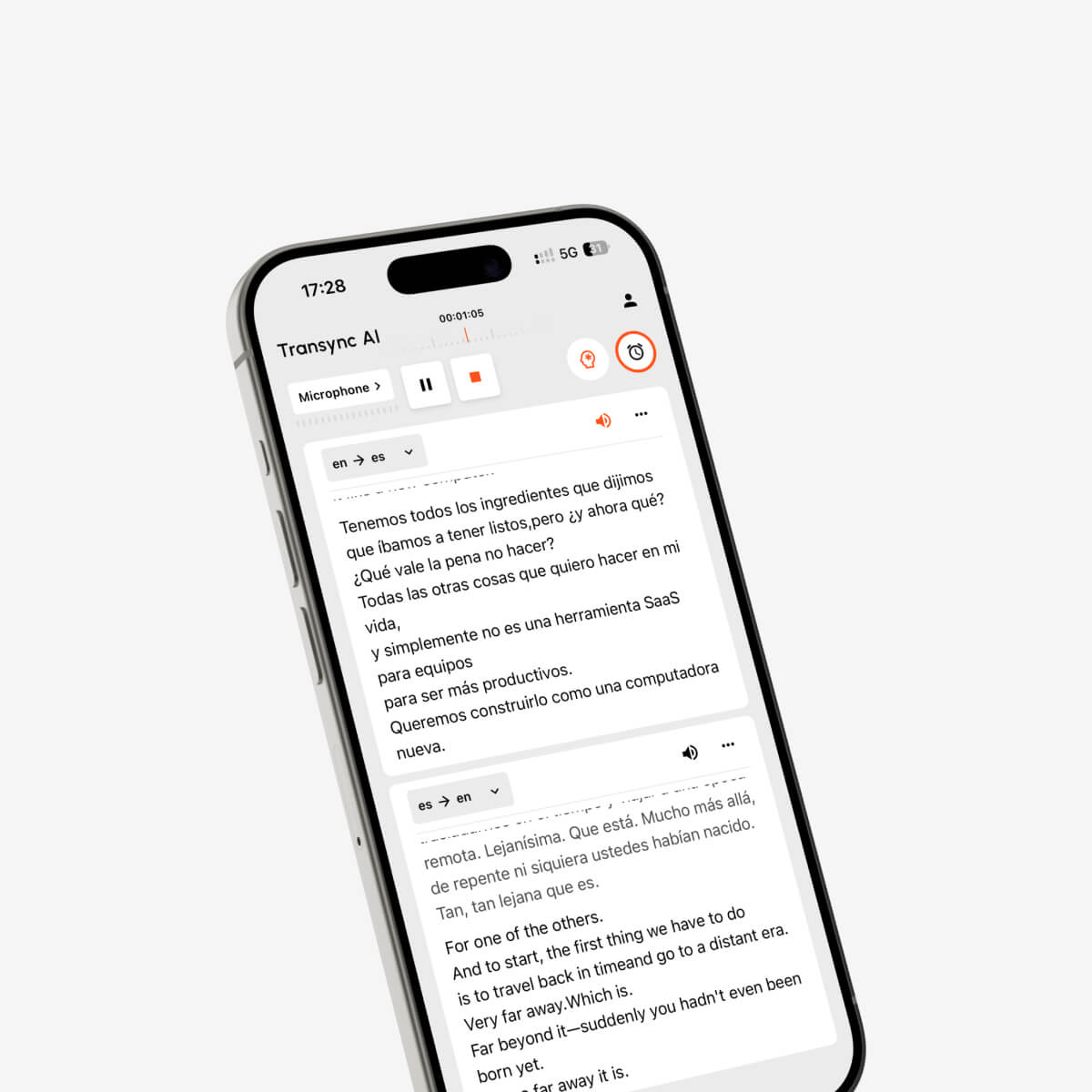
Руководство по использованию расширений-переводчиков: сравните возможности перевода веб-страниц, текста, PDF-файлов, субтитров и видеоконференций перед установкой браузерного переводчика.
В поисках удлинительный переводчик Обычно это означает, что вы хотите, чтобы перевод происходил внутри браузера, без многократного копирования текста на другой веб-сайт.
Звучит просто. Установите расширение, откройте страницу на иностранном языке, нажмите кнопку и прочитайте перевод.
На практике потребности в переводе для различных браузеров сильно различаются.
Одному пользователю может потребоваться перевести целую новостную статью. Другому могут понадобиться двуязычные субтитлы для онлайн-курса. Исследователь может захотеть прочитать PDF-файлы на иностранном языке, а международная команда может нуждаться в переводе в режиме реального времени во время звонков в Zoom или Google Meet.
Для решения этих задач требуются разные инструменты.
Расширение-переводчик для браузера может отлично подходить для веб-страниц, выделенного текста, PDF-файлов и существующих субтитров. Однако оно может быть не предназначено для перевода непрерывной речи в режиме реального времени, различения двух говорящих, воспроизведения переведенного голоса на совещании или создания полезных заметок после многоязычной дискуссии.
В этом руководстве объясняется, что может делать расширение для переводчика, какие функции важны, какие разрешения следует проверять и когда лучше использовать автономный инструмент для перевода в реальном времени.
Краткий ответ: Что такое удлинительный преобразователь?
Ан удлинительный переводчик Это расширение для браузера, которое переводит контент, не требуя от пользователя покидать текущую веб-страницу.
В зависимости от расширения, оно может поддерживать:
- Перевод на всю страницу
- Перевод выделенного текста
- Всплывающие определения из словаря
- Двуязычное отображение веб-страницы
- перевод PDF
- Перевод субтитров к видео
- Помощь в написании текста
- Инструменты для изучения языков
- Автоматический перевод для отдельных веб-сайтов
Большинство расширений-переводчиков предназначены для чтения контента, уже имеющегося в браузере.
Они особенно полезны для:
- Новости на иностранных языках
- Страницы товаров
- Научные статьи
- Онлайн-документация
- Сообщения в социальных сетях
- Электронные письма, открытые в браузере.
- Субтитры к видео
- Содержание для изучения языка
Расширение для перевода обычно менее подходит для сложных устных разговоров, где нескольким людям необходимо понимать и отвечать в режиме реального времени.
Что может переводить расширение-переводчик для браузера?
Расширения для перевода в браузерах можно сгруппировать по типу обрабатываемого ими контента.
| Тип расширения | Основная функция | Наилучшее применение |
|---|---|---|
| Полностраничный переводчик | Заменяет или накладывает текст на веб-страницу. | Чтение зарубежных веб-сайтов |
| Двуязычный переводчик страниц | Отображает оригинальный и переведенный текст одновременно. | Изучение и подробное чтение |
| переводчика выбранного текста | Переводит выделенные слова или предложения. | Быстрые проверки словарного запаса |
| переводчик PDF | Переводит текст внутри PDF-файлов, открытых в браузере. | Исследования и документы |
| переводчик субтитров | Добавляет переведенные субтитлы к поддерживаемым видео. | Курсы и развлечения |
| Переводчик текстов | Переводит текст во время ввода пользователем. | Электронные письма, формы и сообщения |
| Переводчик аудиосвязи для совещаний | Обрабатывает речь, полученную в ходе онлайн-совещаний. | Многоязычные звонки в режиме реального времени |
Некоторые продукты объединяют несколько категорий, но поддержка может различаться в зависимости от браузера, веб-сайта, видеоплатформы и формата контента.
Прежде чем что-либо устанавливать, определите точную проблему, которую вы пытаетесь решить.
Проверка 1: Вам нужен перевод страницы или перевод диалога?
Это самое важное различие.
Выбирайте расширение для перевода в браузере, когда это необходимо:
- Прочитайте иностранную веб-страницу
- Перевести выбранные абзацы
- Сравните оригинальный и переведенный текст.
- Понимание PDF-файлов, создаваемых в браузере.
- Перевести существующие субтитлы к видео.
- Напишите короткое сообщение на другом языке.
- Ищите слова, не переключая вкладки.
Выбирайте переводчик разговорного формата в режиме реального времени, когда это необходимо:
- Присоединяйтесь к прямой трансляции онлайн-встречи в Zoom.
- Перевод выступлений спикеров в Microsoft Teams
- Понимание диалога в Google Meet
- Ответьте на другом языке.
- Прослушать переведенный голосовой вывод
- Автоматический перевод в обоих направлениях
- Добавьте технические термины перед встречей.
- Создание многоязычных протоколов совещаний
Веб-страница статична. Разговор постоянно меняется.
Переводчик страницы может подождать, пока контент полностью загрузится. Переводчику на совещании необходимо обрабатывать неполные предложения, паузы, исправления, акценты, прерывания и смену говорящих, пока продолжается обсуждение.
Это разные технические проблемы.
Проверка 2: Сохраняет ли расширение исходное содержимое?
Существует два распространенных типа макета веб-страниц для перевода.
Отображение только перевода
Расширение заменяет исходный текст переведенной версией.
Такая компоновка полезна в следующих случаях:
- Вам нужен только смысл.
- Вы хотите получить удовольствие от чтения без неприятных ощущений.
- Сравнивать формулировки не нужно.
- Страница содержит простой контент.
Недостатком является то, что становится сложнее проверять имена, терминологию, цитаты и неоднозначные фразы.
Двуязычный дисплей
Расширение отображает оригинальный и переведенный контент одновременно.
Такой макет лучше подходит для:
- Изучение языка
- Исследовать
- Техническая документация
- Обзор терминологии
- Проверка возможных ошибок перевода
- Понимание структуры предложения
Двуязычный дисплей также может помочь пользователям обнаружить ошибки в переводе названия продукта, номера товара или имени собственного.
Однако одновременное отображение двух языков может привести к тому, что некоторые веб-страницы будут выглядеть перегруженными, особенно на небольших экранах.
При тестировании переводчика расширений откройте несколько типов страниц:
- Простая статья
- Страница товара
- Страница с таблицами
- Техническое руководство
- Страница с меню и кнопками.
- Длинный прокручиваемый документ
Проверьте, остаётся ли переведённый текст читаемым.
Проверка 3: Может ли он обрабатывать PDF-файлы и субтитры к видео?
Многие пользователи устанавливают расширение-переводчик, ожидая, что оно переведет все, что отображается в браузере.
Однако это не всегда так.
перевод PDF
PDF-файл может содержать:
- Выбираемый цифровой текст
- Отсканированные изображения
- Сложные таблицы
- Несколько столбцов
- Сноски
- Диаграммы
- Встроенные шрифты
Расширение может переводить выделенный текст в PDF-файлах, но не сможет работать со сканированными страницами, поскольку для сканированного содержимого требуется оптическое распознавание символов.
Перед выбором расширения для перевода PDF-файлов проверьте следующее:
- Необходимо ли загружать PDF-файл?
- Сохраняется ли форматирование?
- Остаются ли таблицы читаемыми
- Поддерживаются ли отсканированные документы
- Хранятся ли конфиденциальные файлы?
- Наличие ограничений по размеру страницы или файла.
В случае контрактов, медицинских документов, конфиденциальных отчетов или переводов, готовых к публикации, профессиональная проверка все еще может потребоваться.
Перевод субтитров
Расширения для субтитров обычно работают одним из двух способов:
- Они переводят субтитры, уже предоставленные видеоплатформой.
- Сначала они расшифровывают аудиозапись, а затем переводят сгенерированный текст.
Первый метод зависит от наличия субтитров. Если у видео нет дорожки субтитров, то расширение может ничего не переводить.
Второй метод более гибкий, но обычно требует дополнительного распознавания речи, времени обработки и потенциальных ошибок.
При оценке перевода двуязычных субтитров следует обратить внимание на следующее:
- Поддерживаемые видеоплатформы
- Требуются ли оригинальные субтитлы
- Синхронизация субтитров
- Двуязычный дисплей
- Поддержка полноэкранного режима
- Положение и размер субтитров
- Контрольные группы по изучению языка
- Поддерживаются ли прямые трансляции?
Переводчик субтитров для записанных видеороликов не является автоматически переводчиком для проведения онлайн-совещаний.
Проверка 4: Какие разрешения браузера запрашивает программа?
Расширениям браузера может потребоваться разрешение на чтение или изменение содержимого веб-страницы, чтобы они могли распознавать и переводить текст.
Однако пользователям все равно следует проверять, к чему может получить доступ расширение.
К распространенным разрешениям могут относиться:
- Чтение содержимого на текущей странице
- Изменение текста на веб-странице
- Доступ к выбранным веб-сайтам
- Чтение содержимого буфера обмена
- Сохранение настроек перевода
- Подключение к внешней службе перевода
- Доступ к вкладкам браузера
Перед установкой:
- Ознакомьтесь с описанием расширения.
- Уточните у разработчика или издателя.
- Ознакомьтесь с последними отзывами пользователей.
- Проверьте запрошенные разрешения.
- Уточните, можно ли ограничить доступ только к выбранным сайтам.
- Ознакомьтесь с политикой конфиденциальности.
- Избегайте перевода конфиденциальной информации, если применяемые методы обработки данных не являются приемлемыми.
Chrome позволяет пользователям управлять тем, может ли расширение читать и изменять данные на всех веб-сайтах, на выбранных веб-сайтах или только после нажатия на расширение.
Для работы с конфиденциальной деловой информацией рекомендуется ограничить доступ к расширению только для определенных сайтов, а не предоставлять постоянный доступ ко всем веб-страницам.
Проверка 5: Соответствует ли это вашему реальному рабочему процессу?
Длинный список функций не гарантирует бесперебойной работы.
Протестируйте расширение, используя контент, с которым вы действительно работаете.
Для обычного просмотра
Переводить:
- Короткая статья
- Длинная статья
- Страница с навигационными меню
- Страница покупок
- Страница технической поддержки
Проверьте, остаются ли кнопки, меню, таблицы и ссылки доступными для использования.
Для исследований
Тест:
- Академические веб-страницы
- PDF-файлы, открытые в браузере
- Сноски
- Цитаты
- Таблицы
- Специализированная терминология
Проверьте, сохраняет ли расширение имена, номера и ссылки на источники.
Для видеообучения
Тест:
- Короткое видео
- Длинная лекция
- Разные скорости воспроизведения
- Полноэкранный режим
- Двуязычные субтитлы
- Видео без официальных субтитров
Для профессионального общения
Тест:
- Электронная почта на основе браузера
- Панели мониторинга поддержки клиентов
- Формы
- Страницы CRM
- Документация по продукту
- Внутренние веб-инструменты
Не следует предполагать, что расширение корректно работает на каждом веб-сайте. На некоторых страницах используется динамический контент, встроенные фреймы, защищенный текст или пользовательские интерфейсы, которые расширения для перевода не могут обрабатывать надежно.
Пункт 6: Достаточно ли расширения для браузера для проведения онлайн-совещаний?
Веб-конференция может выглядеть как обычная веб-страница, но задача перевода в ней совершенно иная.
Во время онлайн-совещания инструмент должен обрабатывать следующее:
- Непрерывное аудио
- Несколько динамиков
- Короткие и неполные предложения
- Естественные перерывы
- Названия и технические термины
- Двусторонние изменения языка
- Задержка субтитров
- Поколение голосов
- Подведение итогов встречи
- Маршрутизация звука
Стандартный веб-переводчик обычно переводит видимый текст. Он может переводить существующие субтитры к совещаниям, но это все равно зависит от того, насколько правильно были сгенерированы субтитры.
Специальный инструмент для перевода в режиме реального времени прослушивает аудиозапись совещания.
Чем Transync AI отличается от дополнительного переводчика?
Transync AI — это автономное программное обеспечение, а не расширение для браузера.
Она предназначена в первую очередь для общения в режиме реального времени на нескольких языках и проведения совещаний.
| Требование | Расширение-переводчик для браузера | Transync AI |
| Перевести текст веб-страницы | Общая особенность | Не является основной целью |
| Перевести выделенный текст | Общая особенность | Не поддерживается в качестве универсального текстового инструмента. |
| Перевод PDF-файлов | Доступно в некоторых расширениях | Не поддерживается |
| Перевести изображения | Доступно в некоторых инструментах | Не поддерживается |
| Перевести существующие субтитлы к видео. | Доступно в некоторых расширениях | Вместо этого фокусируется на живом звуке. |
| Перевод речи в прямом эфире | Ограниченный или варьируется | Основная функция |
| Двусторонний перевод разговора | Обычно ограниченный | Поддерживается в некоторых языковых парах. |
| Двуязычные субтитлы в реальном времени | Зависит от расширения | Поддерживается |
| Голосовой вывод с помощью ИИ | Нечасто встречается в переводчиках страниц. | Поддерживается |
| клонирование голоса | Редкий | Поддерживается |
| Ключевые слова и контекст | Обычно ограниченный | Поддерживается |
| Заметки о встречах ИИ | Обычно не входит в комплект. | Поддерживается |
| Рабочие процессы Zoom, Teams и Meet | Ограниченный | Поддерживается как автономное программное обеспечение. |
| Плавающие субтитлы | Зависит от расширения | Поддержка режима «картинка в картинке» |
| Автономный режим | Различный | Нет в наличии |
Эти два типа инструментов могут дополнять друг друга.
Расширение для браузера может помочь пользователям читать иностранные веб-страницы перед встречей. Transync AI может помочь им понять происходящее и принять участие в обсуждении, когда оно начнется.
Когда следует использовать оба инструмента?
Комбинированный рабочий процесс может быть полезен для международного бизнеса, исследований и образования.
Перед встречей
Используйте расширение для перевода в браузере, чтобы:
- Ознакомьтесь с сайтом иностранной компании.
- Ознакомьтесь с документацией к продукту.
- Перевести отчет, созданный в браузере
- Понять цель
- Проверьте справочную информацию
Используйте Transync AI для:
- Выберите языки встречи
- Добавьте имена и отраслевые термины.
- Предоставьте контекстную информацию.
- Предварительный просмотр переведенного текста
- Проверьте микрофон и аудиосистему.
Во время встречи
Используйте Transync AI для:
- Перевод устной речи
- Отображать двуязычные субтитлы
- Различите выбранные языки
- Воспроизвести переведенный голос
- Размещайте субтитры поверх других приложений.
- Запись информации для протокола совещания
После встречи
Используйте Transync AI для:
- Проверьте запись о переводе.
- Ознакомьтесь с заметками, сгенерированными искусственным интеллектом.
- Проверьте принятые решения и пункты плана действий.
Используйте расширение для браузера, чтобы:
- Прочитайте последующие страницы.
- Перевести сопроводительную документацию
- Просмотрите ресурсы на иностранных языках.
Такой подход позволяет избежать принуждения одного инструмента к выполнению задач, для которых он не был предназначен.
Выбор удлинительного преобразователя в зависимости от сценария
| Сценарий | Лучший тип инструмента | Ключевая особенность |
| Чтение зарубежных новостей | Полностраничный переводчик | Чистый перевод страницы |
| Изучение языка | Двуязычный переводчик | Оригинальный и переведенный текст вместе. |
| Исследование PDF-файлов | переводчик PDF | Форматирование и терминология |
| Просмотр онлайн-курсов | переводчик субтитров | Синхронизированные двуязычные субтитры |
| Написание электронных писем через браузер | Переводчик текстов | Перевод на месте |
| Участие в многоязычных встречах | Переводчик речи в реальном времени | Низкая задержка и двусторонний перевод |
| Участие в вебинарах | Переводчик субтитров или событий | Стабильные субтитры для длительных сеансов |
| Обработка юридических документов | Перевод, проверенный человеком | Профессиональная ответственность |
Ключевые слова и контекст для профессиональных встреч
Браузерные переводчики часто обрабатывают уже написанный текст. Живая речь более неоднозначна.
Слово “модель” может означать следующее:
- Модель искусственного интеллекта
- Модель продукта
- Бизнес-модель
- статистическая модель
- Дизайнерский прототип
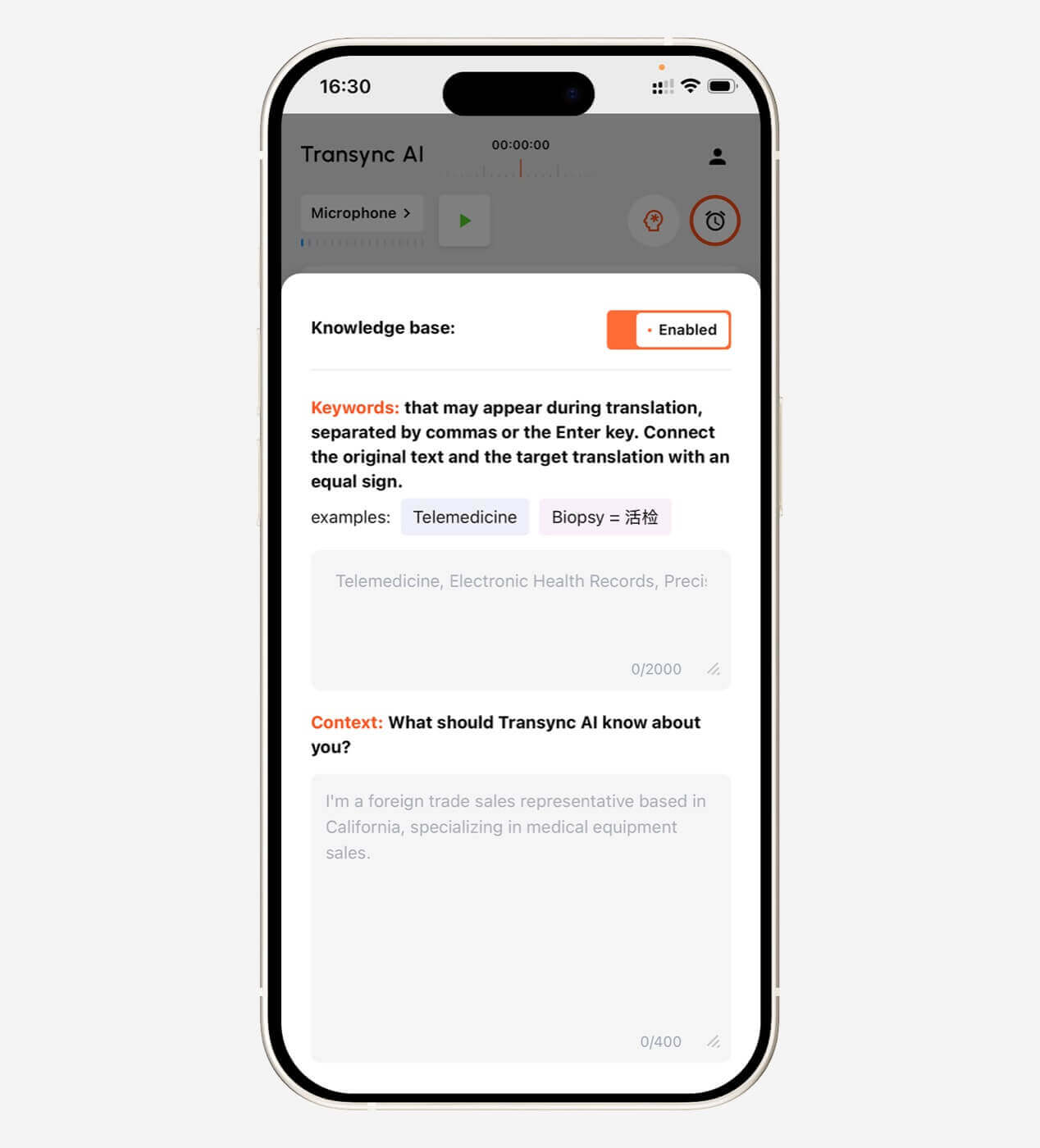
Перед началом технического совещания пользователи Transync AI могут добавить такие ключевые слова, как:
- Transync AI = 同言翻译
- фотоэлектрический инвертор
- упаковка полупроводников
- Азиатско-Тихоокеанский регион
- Джон Смит
- Модель X300
- оптимизация цепочки поставок
- нейронная сеть
Они также могут добавить контекст:
Это совещание поставщиков, посвященное производству полупроводников, контролю качества, графикам поставок, техническим характеристикам и соответствию региональным требованиям.
Это помогает ИИ выбирать значения, которые лучше соответствуют разговору.
Узнайте больше от Ключевые слова помощника ИИ Контекст.
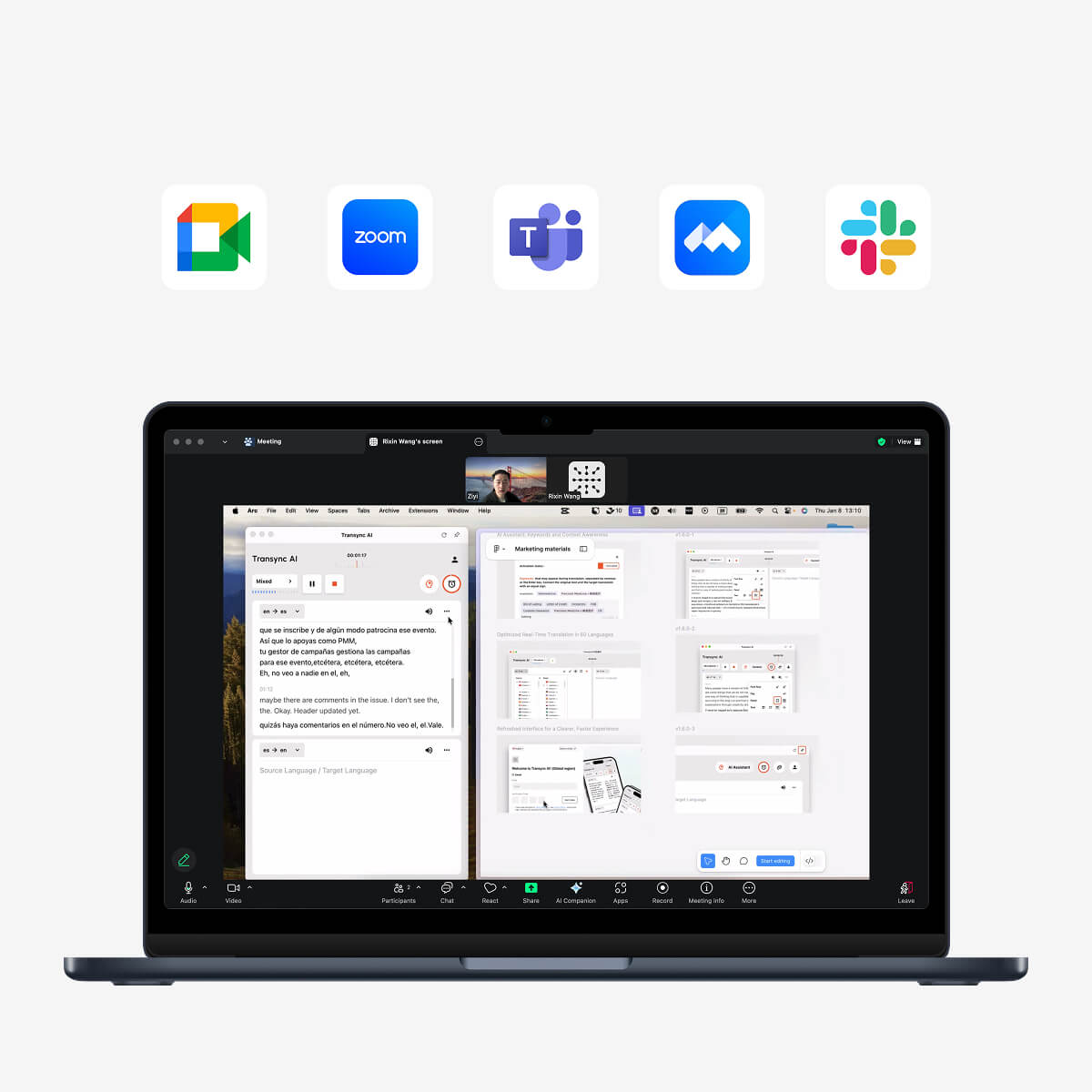
 Перевод в реальном времени для Zoom, Teams и Google Meet
 Перевод в реальном времени для Zoom, Teams и Google Meet
Transync AI может работать параллельно с:
- Zoom
- Microsoft Teams
- Google Meet
Пользователи могут просматривать как оригинальный текст, так и переведенный контент одновременно.
Для воспроизведения переведенного голоса во время совещания может потребоваться настройка системного аудио или виртуального микрофона.
Transync AI v2.0 также включает обновленные модели Gale 2.0, Monsoon 2.0 и Jetstream 2.0, разработанные для повышения скорости, точности и непрерывности реальных разговоров, в том числе:
- Короткие предложения
- Речь на разных языках
- Фоновый шум
- Неправильные переносы предложений
Изучите Перевод встреч с помощью ИИ рабочий процесс.
Плавающие субтитлы вне вкладки браузера
Расширение для браузера обычно работает внутри браузера.
Однако во время совещания пользователи могут переключиться на:
- Программное обеспечение для презентаций
- Электронная таблица
- Настольное приложение
- Программное обеспечение для демонстрации продукта
- локальный документ
- Другое окно браузера
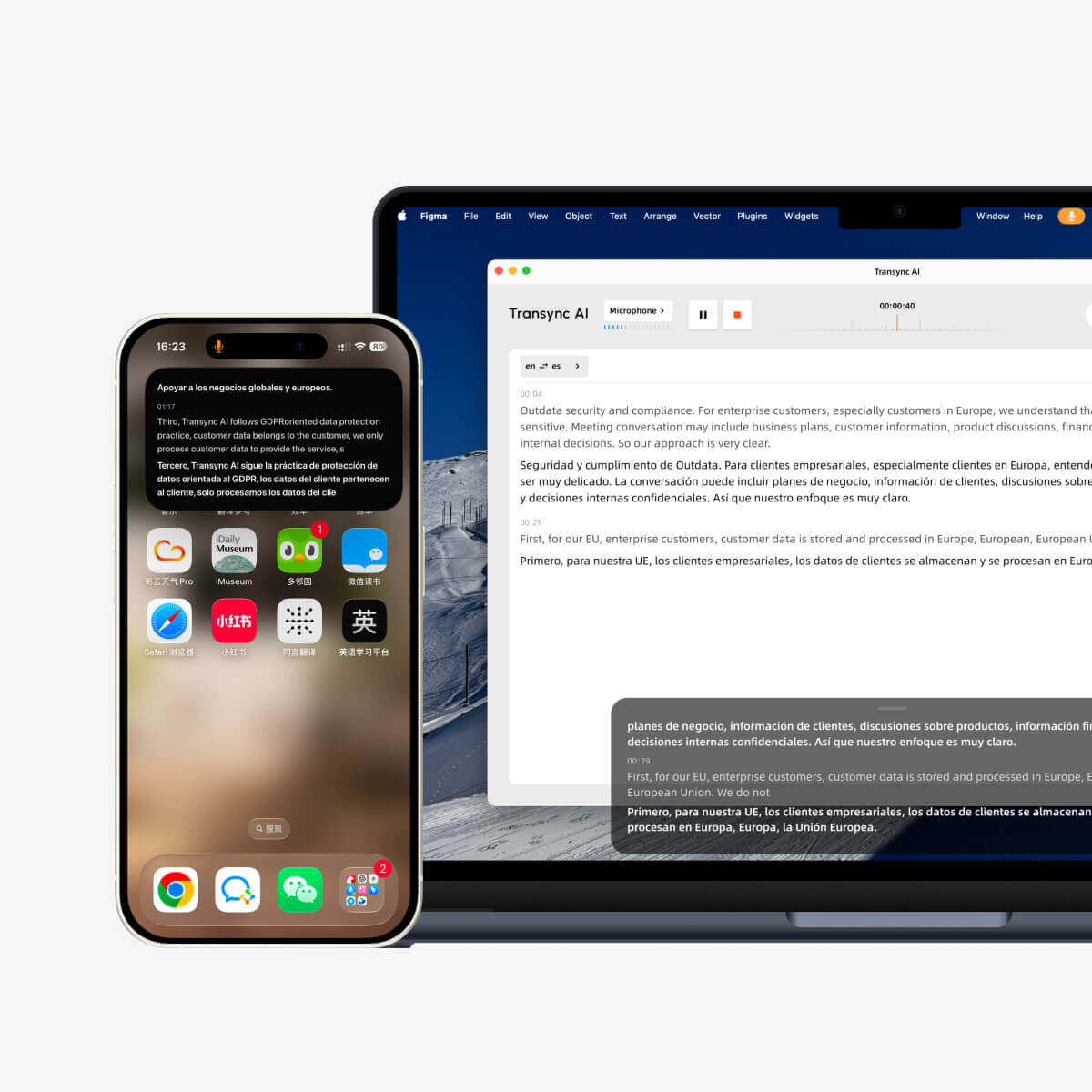
Transync AI обеспечивает отображение субтитлов в режиме «картинка в картинке» на поддерживаемых платформах Mac, Windows и iOS.
Плавающее окно субтитров может оставаться поверх других приложений, позволяя пользователям продолжать следить за переводом во время презентации или выполнения нескольких задач одновременно.
Видеть Плавающие субтитлы «картинка в картинке».
Цена: бесплатное расширение или платный инструмент перевода?
Многие расширения для браузеров предлагают бесплатные базовые функции, но для расширенных возможностей может потребоваться оплата.
Возможные ограничения включают:
- Ежедневный объем переводов
- Ограничение по количеству символов
- Ограничения на количество страниц в PDF-файлах
- Премиум-системы перевода
- Ограничения на субтитры в видео
- кредиты на использование ИИ
- Ограничения по размеру файла
- Особенности команды
В случае перевода онлайн-совещаний стоимость часто рассчитывается исходя из минут, часов, количества пользователей или мест.
| План Transync AI | Цена | Включено в использование | Лучше всего подходит для |
| Бесплатно | $0 | 40 минут для новых пользователей | Первоначальное тестирование |
| Персональная премия | $8.99/месяц | 10 часов в течение периода действия активного членства | Индивидуальные и регулярные встречи |
| Предприятие | $24.99/месяц/место | До 40 часов в месяц на одно рабочее место | Команды и организации |
| Карта времени | От $0,70/час | Дополнительное время на перевод | Пользователи с изменяющимся ежемесячным спросом |
Часы, отмеченные на карте учета рабочего времени, не сгорают, но могут быть использованы только в течение действия абонемента.
Сравните цену с реальными задачами. Бесплатный переводчик страниц может идеально подойти для эпизодического просмотра, в то время как для многоязычных встреч может быть оправдано приобретение специализированного платного инструмента.
Ограничения, которые необходимо знать
Расширения-переводчики для браузеров могут испытывать трудности со следующими задачами:
- Отсканированные PDF-файлы
- Защищенные страницы
- Динамический контент веб-сайта
- Сложные таблицы
- Встроенные приложения
- Видео без субтитров
- Живое аудио
- разделение динамиков
- Конфиденциальная информация
- Веб-сайты, блокирующие изменение страниц.
У технологии Transync AI также есть очевидные ограничения:
- Это не расширение для браузера.
- Автономный режим недоступен
- Распознавание изображений не поддерживается.
- Перевод статического текста не поддерживается в качестве основной функции.
- Оно функционирует как автономное программное обеспечение.
- Использование учитывается суммарно по всем устройствам.
- Качество перевода зависит от качества звука и сети.
Понимание этих границ предотвращает выбор пользователями неподходящего инструмента для выполнения задачи.
Часто задаваемые вопросы: Дополнительный переводчик
Что означает "extension traductor"?
Эта фраза обычно относится к расширению для браузера, которое переводит веб-страницы, выделенный текст, PDF-файлы, субтитры или текст, введенный в приложения на основе браузера.
Какой удлинительный трансдуктор лучше всего подходит?
Выбор оптимального расширения зависит от задачи. Для просмотра веб-страниц можно выбрать полностраничный переводчик, для изучения языков — двуязычное расширение, для исследований — переводчик PDF-файлов, а для видео — расширение для субтитров.
Может ли расширение-переводчик перевести целую веб-страницу?
Многие расширения для перевода веб-страниц в браузере могут переводить целые веб-страницы, хотя качество верстки и поддержка различаются в зависимости от веб-сайта.
Может ли расширение переводить PDF-файлы?
Некоторые расширения могут переводить выделенный текст в PDF-файлах. Для сканированных документов может потребоваться оптическое распознавание символов, и эта функция может не поддерживаться.
Может ли расширение для браузера переводить видео и аудио?
Некоторые расширения переводят существующие субтитлы. Другие могут сначала генерировать субтитлы из аудио. Проверьте, требует ли расширение наличия официальных субтитров в видео.
Может ли переводчик с расширения переводить записи совещаний в Zoom?
Стандартный веб-переводчик может переводить видимые субтитлы, но не может напрямую обрабатывать звук во время онлайн-совещания. Специализированный инструмент, такой как Transync AI, предназначен для непрерывного перевода речи в режиме реального времени.
Transync AI — это расширение для браузера?
Нет. Transync AI — это автономное программное обеспечение, которое может работать параллельно с Zoom, Microsoft Teams и Google Meet.
Способен ли Transync AI переводить веб-страницы?
Нет. Transync AI в основном специализируется на обработке речи в реальном времени, двуязычных субтитрах, переводе голоса, ключевых словах и контексте, а также на создании заметок с совещаний с помощью ИИ.
Работает ли Transync AI в автономном режиме?
Нет. Transync AI требует подключения к интернету и в настоящее время не поддерживает перевод в автономном режиме.
В заключение: установите инструмент, соответствующий содержимому.
Ан удлинительный переводчик Это удобный способ перевода контента без выхода из браузера.
Это особенно хорошо подходит для:
- Веб-страницы
- Выбранный текст
- Двуязычное чтение
- PDF-файлы
- Существующие субтитлы
- Написание текстов через браузер
Однако чтение контента и участие в многоязычной беседе в режиме реального времени — это разные задачи.
Для проведения совещаний, занятий, интервью, звонков поставщикам и международных презентаций пользователям может потребоваться двусторонний перевод речи, двуязычные субтитры, вывод голоса с помощью ИИ, настройки терминологии, плавающие субтитры и заметки после совещания.
Transync AI разработан именно для этого второго типа рабочих процессов.
Наиболее эффективная конфигурация может заключаться не в выборе между расширением-переводчиком и инструментом перевода в реальном времени. Возможно, она состоит в использовании каждого из них там, где он показывает наилучшие результаты: расширение для чтения иностранного контента, а Transync AI — для понимания речи собеседника.
Для начала посетите Transync AI, изучите инструмент перевода в реальном времени, или загрузите приложение для предпочитаемого вами устройства.