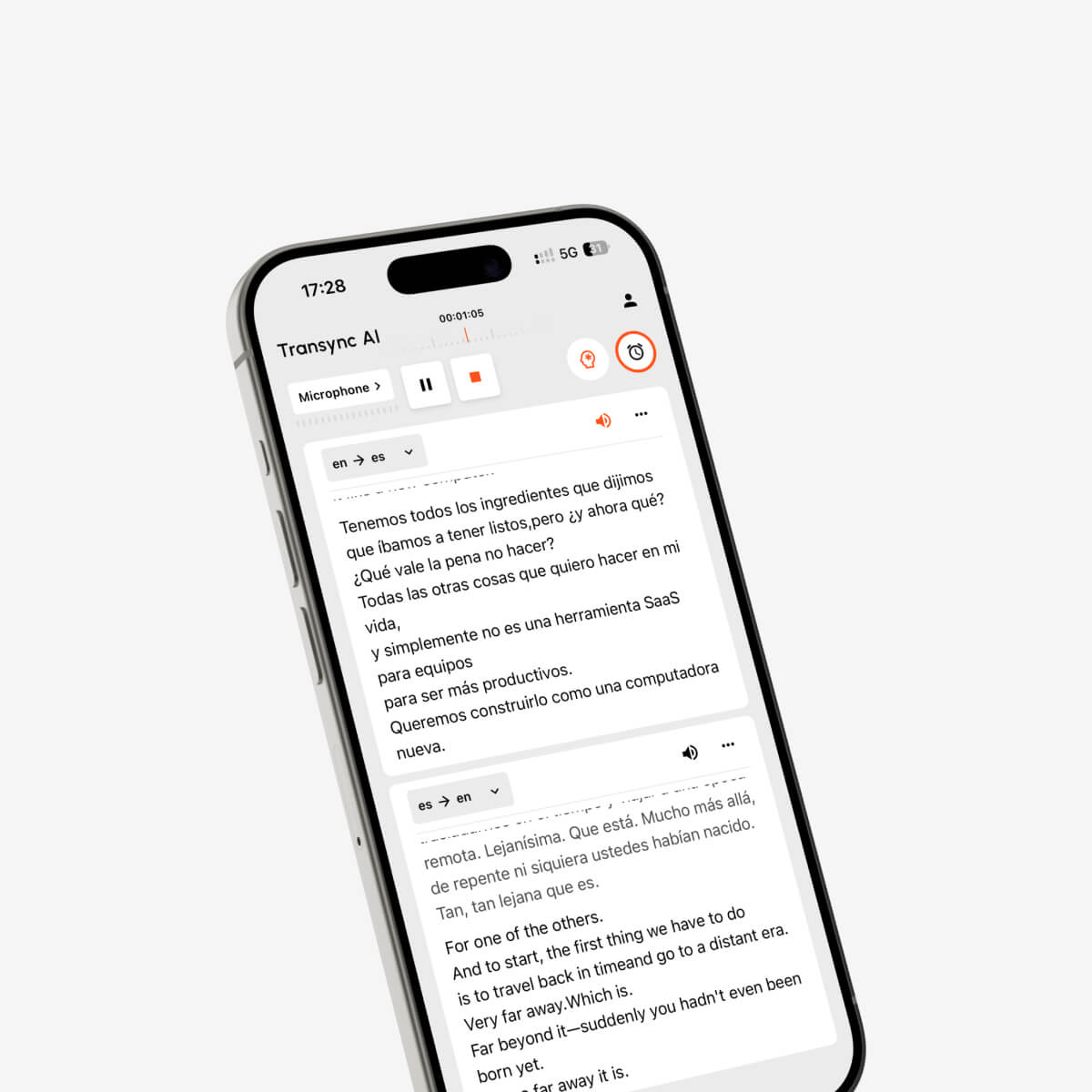
คู่มือการใช้งานส่วนขยายตัวแปลภาษา: เปรียบเทียบคุณสมบัติการแปลเว็บเพจ ข้อความ PDF คำบรรยาย และการประชุม ก่อนติดตั้งตัวแปลภาษาในเบราว์เซอร์.
กำลังค้นหา นักแปลส่วนขยาย โดยปกติหมายความว่าคุณต้องการให้การแปลเกิดขึ้นภายในเบราว์เซอร์ โดยไม่ต้องคัดลอกข้อความไปยังเว็บไซต์อื่นซ้ำๆ.
ฟังดูง่ายนะ แค่ติดตั้งส่วนขยาย เปิดหน้าเว็บภาษาต่างประเทศ คลิกปุ่ม แล้วก็อ่านคำแปลได้เลย.
ในทางปฏิบัติ ความต้องการในการแปลของเบราว์เซอร์แต่ละตัวนั้นแตกต่างกันอย่างมาก.
ผู้ใช้บางรายอาจต้องการแปลบทความข่าวทั้งหมด บางรายอาจต้องการคำบรรยายสองภาษาสำหรับหลักสูตรออนไลน์ นักวิจัยอาจต้องการอ่านไฟล์ PDF ภาษาต่างประเทศ ในขณะที่ทีมงานนานาชาติอาจต้องการการแปลแบบเรียลไทม์ระหว่างการประชุมผ่าน Zoom หรือ Google Meet.
งานเหล่านี้ต้องใช้เครื่องมือที่แตกต่างกัน.
ส่วนเสริมแปลภาษาของเบราว์เซอร์นั้นยอดเยี่ยมสำหรับเว็บเพจ ข้อความที่เลือก ไฟล์ PDF และคำบรรยายที่มีอยู่แล้ว อย่างไรก็ตาม มันอาจไม่ได้ออกแบบมาเพื่อแปลคำพูดสดต่อเนื่อง แยกแยะความแตกต่างระหว่างผู้พูดสองคน เล่นเสียงที่แปลแล้วในการประชุม หรือสร้างบันทึกที่เป็นประโยชน์หลังจากการสนทนาหลายภาษา.
คู่มือนี้จะอธิบายว่าส่วนเสริมสำหรับโปรแกรมแปลภาษาสามารถทำอะไรได้บ้าง คุณสมบัติใดบ้างที่สำคัญ ควรตรวจสอบสิทธิ์อะไรบ้าง และเมื่อใดที่เครื่องมือแปลภาษาแบบเรียลไทม์แบบสแตนด์อโลนจะเป็นตัวเลือกที่ดีกว่า.
คำตอบโดยย่อ: Extension Translater คืออะไร?
หนึ่ง นักแปลส่วนขยาย เป็นส่วนเสริมของเบราว์เซอร์ที่แปลเนื้อหาโดยไม่ต้องให้ผู้ใช้เปลี่ยนหน้าเว็บปัจจุบัน.
ขึ้นอยู่กับส่วนขยาย อาจรองรับสิ่งต่อไปนี้:
- การแปลแบบเต็มหน้า
- การแปลข้อความที่เลือก
- คำจำกัดความพจนานุกรมแบบป๊อปอัพ
- การแสดงผลเว็บเพจสองภาษา
- การแปล PDF
- การแปลคำบรรยายวิดีโอ
- ความช่วยเหลือด้านการเขียน
- เครื่องมือการเรียนรู้ภาษา
- ระบบแปลอัตโนมัติสำหรับเว็บไซต์ที่เลือก
ส่วนเสริมแปลภาษาส่วนใหญ่ได้รับการออกแบบมาเพื่ออ่านเนื้อหาที่มีอยู่แล้วในเบราว์เซอร์.
สิ่งเหล่านี้มีประโยชน์อย่างยิ่งสำหรับ:
- ข่าวภาษาต่างประเทศ
- หน้าสินค้า
- บทความวิจัย
- เอกสารออนไลน์
- โพสต์บนโซเชียลมีเดีย
- อีเมลที่เปิดในเบราว์เซอร์
- คำบรรยายวิดีโอ
- เนื้อหาการเรียนรู้ภาษา
โดยทั่วไปแล้ว ส่วนเสริมแปลภาษามักไม่เหมาะสำหรับบทสนทนาที่ซับซ้อนซึ่งมีผู้คนหลายคนจำเป็นต้องเข้าใจและตอบโต้กันแบบเรียลไทม์.
ส่วนขยายตัวแปลภาษาของเบราว์เซอร์สามารถแปลอะไรได้บ้าง?
ส่วนขยายการแปลของเบราว์เซอร์สามารถจัดกลุ่มได้ตามประเภทของเนื้อหาที่ส่วนขยายเหล่านั้นจัดการ.
| ประเภทส่วนขยาย | ฟังก์ชันหลัก | การใช้งานที่ดีที่สุด |
|---|---|---|
| โปรแกรมแปลแบบเต็มหน้า | แทนที่หรือซ้อนทับข้อความบนหน้าเว็บ | อ่านเว็บไซต์ต่างประเทศ |
| โปรแกรมแปลหน้าเว็บสองภาษา | แสดงข้อความต้นฉบับและข้อความที่แปลแล้วพร้อมกัน | การศึกษาและการอ่านอย่างละเอียด |
| โปรแกรมแปลข้อความที่เลือก | แปลคำหรือประโยคที่ไฮไลต์ไว้ | ตรวจสอบคำศัพท์อย่างรวดเร็ว |
| โปรแกรมแปลไฟล์ PDF | แปลข้อความภายในไฟล์ PDF ที่เปิดในเบราว์เซอร์ | การวิจัยและเอกสาร |
| โปรแกรมแปลคำบรรยาย | เพิ่มคำบรรยายที่แปลแล้วให้กับวิดีโอที่รองรับ | หลักสูตรและกิจกรรมบันเทิง |
| นักแปลงานเขียน | แปลข้อความขณะที่ผู้ใช้กำลังพิมพ์ | อีเมล แบบฟอร์ม และข้อความ |
| โปรแกรมแปลภาษาสำหรับการประชุม | ประมวลผลเสียงจากการประชุมผ่านเบราว์เซอร์ | โทรสดหลายภาษา |
ผลิตภัณฑ์บางอย่างรวมหลายหมวดหมู่เข้าด้วยกัน แต่การรองรับอาจแตกต่างกันไปตามเบราว์เซอร์ เว็บไซต์ แพลตฟอร์มวิดีโอ และรูปแบบเนื้อหา.
ก่อนติดตั้งอะไรก็ตาม ให้ระบุปัญหาที่คุณต้องการแก้ไขให้ชัดเจนเสียก่อน.
ตรวจสอบข้อ 1: คุณต้องการแปลหน้าเว็บหรือการแปลบทสนทนา?
นี่คือความแตกต่างที่สำคัญที่สุด.
เลือกใช้ส่วนขยายตัวแปลภาษาสำหรับเบราว์เซอร์เมื่อคุณต้องการ:
- อ่านเว็บเพจต่างประเทศ
- แปลย่อหน้าที่เลือก
- เปรียบเทียบข้อความต้นฉบับและข้อความที่แปลแล้ว
- ทำความเข้าใจเกี่ยวกับไฟล์ PDF บนเว็บเบราว์เซอร์
- แปลคำบรรยายวิดีโอที่มีอยู่แล้ว
- เขียนข้อความสั้นๆ ในภาษาอื่น
- ค้นหาคำศัพท์โดยไม่ต้องเปลี่ยนแท็บ
เลือกใช้โปรแกรมแปลบทสนทนาแบบเรียลไทม์เมื่อคุณต้องการ:
- ติดตามการประชุม Zoom สด
- แปลบทสนทนาบน Microsoft Teams
- ทำความเข้าใจบทสนทนาใน Google Meet
- ตอบกลับด้วยภาษาอื่น
- ฟังเสียงแปล
- แปลทั้งสองทิศทางโดยอัตโนมัติ
- เพิ่มคำศัพท์ทางเทคนิคก่อนการประชุม
- สร้างบันทึกการประชุมหลายภาษา
เว็บเพจนั้นคงที่ แต่การสนทนาเปลี่ยนแปลงอยู่ตลอดเวลา.
นักแปลหน้าเว็บสามารถรอจนกว่าเนื้อหาจะโหลดเสร็จสมบูรณ์ได้ แต่นักแปลการประชุมต้องจัดการกับประโยคที่ไม่สมบูรณ์ การหยุดชั่วคราว การแก้ไข สำเนียง การขัดจังหวะ และการเปลี่ยนผู้พูดในขณะที่การสนทนายังดำเนินอยู่.
นี่เป็นปัญหาทางเทคนิคที่แตกต่างกัน.
ตรวจสอบข้อที่ 2: ส่วนขยายนี้รักษาเนื้อหาต้นฉบับไว้หรือไม่?
รูปแบบการแปลเว็บเพจโดยทั่วไปมีสองแบบ.
แสดงผลเฉพาะคำแปล
ส่วนขยายนี้จะแทนที่ข้อความต้นฉบับด้วยข้อความที่แปลแล้ว.
รูปแบบนี้มีประโยชน์เมื่อ:
- คุณต้องการแค่ความหมายเท่านั้น
- คุณต้องการประสบการณ์การอ่านที่สะอาดตา
- คุณไม่จำเป็นต้องเปรียบเทียบถ้อยคำ
- หน้าเว็บนี้มีเนื้อหาที่เรียบง่าย
ข้อเสียคือทำให้การตรวจสอบชื่อ คำศัพท์ คำพูด และวลีที่ไม่ชัดเจนทำได้ยากขึ้น.
การแสดงผลสองภาษา
ส่วนเสริมนี้จะแสดงเนื้อหาต้นฉบับและเนื้อหาที่แปลแล้วควบคู่กันไป.
รูปแบบนี้เหมาะสำหรับ:
- การเรียนรู้ภาษา
- วิจัย
- เอกสารทางเทคนิค
- ทบทวนคำศัพท์
- ตรวจสอบข้อผิดพลาดในการแปลที่อาจเกิดขึ้น
- ความเข้าใจเกี่ยวกับโครงสร้างประโยค
การแสดงผลสองภาษายังช่วยให้ผู้ใช้ตรวจจับได้ว่าชื่อผลิตภัณฑ์ หมายเลข หรือชื่อเฉพาะใดได้รับการแปลผิดพลาด.
อย่างไรก็ตาม การแสดงผลสองภาษาพร้อมกันอาจทำให้บางหน้าเว็บดูรก โดยเฉพาะบนหน้าจอขนาดเล็ก.
เมื่อทดสอบโปรแกรมแปลภาษาเสริม ให้เปิดหน้าเว็บหลายประเภท:
- บทความง่ายๆ
- หน้าสินค้า
- หน้าเว็บที่มีตาราง
- คู่มือทางเทคนิค
- หน้าเว็บที่มีเมนูและปุ่มต่างๆ
- เอกสารแบบเลื่อนยาว
ตรวจสอบว่ารูปแบบที่แปลแล้วยังคงอ่านได้ชัดเจนหรือไม่.
ตรวจสอบข้อที่ 3: สามารถจัดการกับไฟล์ PDF และคำบรรยายวิดีโอได้หรือไม่?
ผู้ใช้หลายคนติดตั้งส่วนขยายแปลภาษาโดยคาดหวังว่ามันจะแปลทุกอย่างที่ปรากฏในเบราว์เซอร์.
แต่ก็ไม่เป็นเช่นนั้นเสมอไป.
การแปล PDF
ไฟล์ PDF อาจมีข้อมูลดังต่อไปนี้:
- ข้อความดิจิทัลที่เลือกได้
- ภาพที่สแกน
- ตารางที่ซับซ้อน
- คอลัมน์หลายคอลัมน์
- เชิงอรรถ
- แผนภูมิ
- ฟอนต์ฝังตัว
ส่วนเสริมอาจแปลข้อความในไฟล์ PDF ที่เลือกได้ แต่จะล้มเหลวกับหน้าเอกสารที่สแกน เนื่องจากเนื้อหาที่สแกนต้องใช้การรู้จำอักษรด้วยแสง (OCR).
ก่อนเลือกใช้ส่วนขยายการแปล PDF โปรดตรวจสอบสิ่งต่อไปนี้:
- จำเป็นต้องอัปโหลดไฟล์ PDF หรือไม่
- รูปแบบจะถูกรักษาไว้หรือไม่
- ตารางยังคงอ่านได้อยู่หรือไม่
- รองรับเอกสารที่สแกนแล้วหรือไม่
- มีการจัดเก็บไฟล์ที่เป็นความลับหรือไม่
- มีข้อจำกัดเรื่องจำนวนหน้าหรือขนาดไฟล์หรือไม่
สำหรับสัญญา เอกสารทางการแพทย์ รายงานลับ หรือเอกสารแปลที่พร้อมสำหรับการตีพิมพ์ อาจยังคงจำเป็นต้องมีการตรวจสอบโดยผู้เชี่ยวชาญอยู่ดี.
คำแปลคำบรรยาย
ส่วนขยายคำบรรยายมักทำงานในสองวิธีหลักๆ ดังนี้:
- พวกเขามีหน้าที่แปลคำบรรยายที่ทางแพลตฟอร์มวิดีโอจัดเตรียมไว้ให้แล้ว.
- พวกเขาถอดเสียงจากไฟล์เสียงก่อน แล้วจึงแปลข้อความที่ได้ออกมา.
วิธีแรกขึ้นอยู่กับคำบรรยายที่มีอยู่แล้ว หากวิดีโอไม่มีคำบรรยาย ไฟล์อาจไม่มีไฟล์ใดให้แปล.
วิธีที่สองมีความยืดหยุ่นมากกว่า แต่โดยปกติแล้วจะเกี่ยวข้องกับการจดจำเสียงพูดเพิ่มเติม เวลาในการประมวลผล และโอกาสเกิดข้อผิดพลาดมากกว่า.
เมื่อประเมินการแปลคำบรรยายสองภาษา ให้ตรวจสอบสิ่งต่อไปนี้:
- แพลตฟอร์มวิดีโอที่รองรับ
- จำเป็นต้องมีคำบรรยายต้นฉบับหรือไม่
- การซิงโครไนซ์คำบรรยาย
- การแสดงผลสองภาษา
- รองรับโหมดเต็มหน้าจอ
- ตำแหน่งและขนาดของคำบรรยาย
- การควบคุมการเรียนรู้ภาษา
- รองรับการถ่ายทอดสดหรือไม่
โปรแกรมแปลคำบรรยายสำหรับวิดีโอที่บันทึกไว้ ไม่ได้หมายความว่าจะสามารถแปลคำบรรยายสำหรับการประชุมสดได้โดยอัตโนมัติ.
ตรวจสอบข้อที่ 4: เบราว์เซอร์ขอสิทธิ์การเข้าถึงอะไรบ้าง?
ส่วนขยายของเบราว์เซอร์อาจต้องการสิทธิ์ในการอ่านหรือแก้ไขเนื้อหาของเว็บเพจ เพื่อให้สามารถตรวจจับและแปลข้อความได้.
อย่างไรก็ตาม ผู้ใช้ควรตรวจสอบว่าส่วนขยายนั้นสามารถเข้าถึงอะไรได้บ้าง.
สิทธิ์การเข้าถึงทั่วไปอาจรวมถึง:
- กำลังอ่านเนื้อหาในหน้านี้
- การเปลี่ยนข้อความบนหน้าเว็บ
- การเข้าถึงเว็บไซต์ที่เลือก
- กำลังอ่านเนื้อหาในคลิปบอร์ด
- การบันทึกการตั้งค่าการแปล
- การเชื่อมต่อกับบริการแปลภายนอก
- การเข้าถึงแท็บเบราว์เซอร์
ก่อนการติดตั้ง:
- อ่านคำอธิบายส่วนขยาย.
- ตรวจสอบกับผู้พัฒนาหรือผู้จัดจำหน่าย.
- ตรวจสอบความคิดเห็นล่าสุดจากผู้ใช้งาน.
- ตรวจสอบสิทธิ์ที่ร้องขอ.
- ตรวจสอบว่าสามารถจำกัดการเข้าถึงเฉพาะเว็บไซต์ที่เลือกไว้ได้หรือไม่.
- โปรดอ่านนโยบายความเป็นส่วนตัว.
- ควรหลีกเลี่ยงการแปลเนื้อหาที่เป็นความลับ เว้นแต่ว่าหลักปฏิบัติเกี่ยวกับข้อมูลนั้นเป็นที่ยอมรับได้.
Chrome อนุญาตให้ผู้ใช้จัดการได้ว่าส่วนขยายจะสามารถอ่านและเปลี่ยนแปลงข้อมูลบนเว็บไซต์ทั้งหมด เว็บไซต์ที่เลือก หรือเฉพาะหลังจากคลิกส่วนขยายเท่านั้น.
สำหรับงานธุรกิจที่ต้องการข้อมูลสำคัญ ควรพิจารณาจำกัดการใช้งานส่วนขยายให้เฉพาะเว็บไซต์ที่ระบุไว้ แทนที่จะอนุญาตให้เข้าถึงทุกหน้าเว็บอย่างถาวร.
ข้อที่ 5: มันรองรับขั้นตอนการทำงานจริงของคุณหรือไม่?
รายการฟีเจอร์ที่ยาวเหยียดไม่ได้หมายความว่าจะรับประกันประสบการณ์การใช้งานที่ราบรื่นเสมอไป.
ทดสอบส่วนขยายโดยใช้เนื้อหาที่คุณใช้งานจริง.
สำหรับการเรียกดูทั่วไป
แปล:
- บทความสั้น
- บทความยาว
- หน้าเว็บที่มีเมนูนำทาง
- หน้าช้อปปิ้ง
- หน้าสนับสนุนทางเทคนิค
ตรวจสอบว่าปุ่ม เมนู ตาราง และลิงก์ต่างๆ ยังใช้งานได้หรือไม่.
เพื่อการวิจัย
ทดสอบ:
- เว็บเพจทางวิชาการ
- ไฟล์ PDF ที่เปิดในเบราว์เซอร์
- เชิงอรรถ
- การอ้างอิง
- ตาราง
- ศัพท์เฉพาะทาง
ตรวจสอบว่าส่วนขยายนั้นเก็บรักษาชื่อ ตัวเลข และการอ้างอิงแหล่งที่มาไว้หรือไม่.
สำหรับการเรียนรู้ผ่านวิดีโอ
ทดสอบ:
- วิดีโอสั้น
- การบรรยายที่ยาวนาน
- ความเร็วในการเล่นที่แตกต่างกัน
- โหมดเต็มหน้าจอ
- คำบรรยายสองภาษา
- วิดีโอที่ไม่มีคำบรรยายอย่างเป็นทางการ
สำหรับการสื่อสารอย่างมืออาชีพ
ทดสอบ:
- อีเมลผ่านเว็บเบราว์เซอร์
- แดชบอร์ดฝ่ายสนับสนุนลูกค้า
- แบบฟอร์ม
- หน้า CRM
- เอกสารประกอบผลิตภัณฑ์
- เครื่องมือเว็บภายใน
อย่าคิดว่าส่วนขยายจะทำงานได้อย่างถูกต้องบนทุกเว็บไซต์ บางหน้าเว็บใช้เนื้อหาแบบไดนามิก เฟรมฝังตัว ข้อความที่ได้รับการป้องกัน หรืออินเทอร์เฟซแบบกำหนดเอง ซึ่งส่วนขยายการแปลไม่สามารถประมวลผลได้อย่างน่าเชื่อถือ.
ข้อควรตรวจสอบข้อที่ 6: ส่วนขยายเบราว์เซอร์เพียงพอสำหรับการประชุมสดหรือไม่?
การประชุมผ่านเว็บเบราว์เซอร์อาจดูเหมือนเว็บเพจอื่น แต่ความท้าทายในการแปลนั้นแตกต่างกัน.
ระหว่างการประชุมสด เครื่องมือนี้ต้องสามารถจัดการกับสิ่งต่อไปนี้ได้:
- เสียงต่อเนื่อง
- ผู้พูดหลายคน
- ประโยคสั้นและไม่สมบูรณ์
- การหยุดชะงักตามธรรมชาติ
- ชื่อและศัพท์ทางเทคนิค
- การเปลี่ยนภาษาแบบสองทาง
- ความล่าช้าของคำบรรยาย
- การสร้างเสียง
- สรุปการประชุม
- การกำหนดเส้นทางเสียง
โปรแกรมแปลเว็บเพจมาตรฐานมักจะแปลเฉพาะข้อความที่มองเห็นได้เท่านั้น อาจจะแปลคำบรรยายการประชุมที่มีอยู่แล้วได้ แต่ก็ยังขึ้นอยู่กับการสร้างคำบรรยายที่ถูกต้องก่อนด้วย.
เครื่องมือแปลภาษาแบบเรียลไทม์โดยเฉพาะจะรับฟังเสียงการประชุมโดยอัตโนมัติ.
Transync AI แตกต่างจาก Extension Translate อย่างไร
Transync AI เป็นซอฟต์แวร์แบบสแตนด์อโลน ไม่ใช่ส่วนขยายของเบราว์เซอร์.
ออกแบบมาเพื่อการสื่อสารด้วยเสียงและการประชุมแบบหลายภาษาแบบเรียลไทม์เป็นหลัก.
| ความต้องการ | ส่วนขยายตัวแปลภาษาสำหรับเบราว์เซอร์ | Transync เอไอ |
| แปลข้อความบนหน้าเว็บ | ลักษณะทั่วไป | ไม่ใช่จุดประสงค์หลัก |
| แปลข้อความที่เลือก | ลักษณะทั่วไป | ไม่รองรับการใช้งานเป็นเครื่องมือข้อความทั่วไป |
| แปลไฟล์ PDF | มีให้ใช้งานในส่วนขยายบางตัว | ไม่รองรับ |
| แปลรูปภาพ | มีให้ใช้งานในเครื่องมือบางชนิด | ไม่รองรับ |
| แปลคำบรรยายวิดีโอที่มีอยู่แล้ว | มีให้ใช้งานในส่วนขยายบางตัว | เน้นที่เสียงสดแทน |
| แปลคำพูดสด | จำกัดหรือแตกต่างกันไป | ฟังก์ชันหลัก |
| การแปลบทสนทนาสองทาง | โดยปกติจะมีข้อจำกัด | รองรับเฉพาะคู่ภาษาที่เลือกไว้เท่านั้น |
| คำบรรยายสดสองภาษา | ขึ้นอยู่กับส่วนขยาย | ได้รับการสนับสนุน |
| เอาต์พุตเสียง AI | ไม่ค่อยพบในโปรแกรมแปลหน้าเว็บ | ได้รับการสนับสนุน |
| การโคลนเสียง | หายาก | ได้รับการสนับสนุน |
| คำสำคัญและบริบท | โดยปกติจะมีข้อจำกัด | ได้รับการสนับสนุน |
| บันทึกการประชุม AI | โดยปกติจะไม่รวมอยู่ด้วย | ได้รับการสนับสนุน |
| ขั้นตอนการทำงานของ Zoom, Teams และ Meet | จำกัด | รองรับการใช้งานเป็นซอฟต์แวร์แบบสแตนด์อโลน |
| คำบรรยายลอยตัว | ขึ้นอยู่กับส่วนขยาย | รองรับภาพซ้อนภาพ |
| โหมดออฟไลน์ | แตกต่างกันไป | ไม่สามารถใช้งานได้ |
เครื่องมือทั้งสองประเภทสามารถใช้เสริมซึ่งกันและกันได้.
ส่วนเสริมของเบราว์เซอร์สามารถช่วยให้ผู้ใช้อ่านหน้าเว็บต่างประเทศก่อนการประชุมได้ ส่วน Transync AI สามารถช่วยให้พวกเขาเข้าใจและมีส่วนร่วมในการประชุมเมื่อเริ่มขึ้นได้.
คุณควรใช้เครื่องมือทั้งสองอย่างเมื่อใด?
กระบวนการทำงานแบบบูรณาการมีประโยชน์สำหรับธุรกิจระหว่างประเทศ การวิจัย และการศึกษา.
ก่อนการประชุม
ใช้ส่วนขยายตัวแปลภาษาของเบราว์เซอร์เพื่อ:
- อ่านเว็บไซต์ของบริษัทต่างชาติ
- ตรวจสอบเอกสารประกอบผลิตภัณฑ์
- แปลรายงานที่แสดงบนเว็บเบราว์เซอร์
- เข้าใจวาระการประชุม
- ตรวจสอบข้อมูลพื้นฐาน
ใช้ Transync AI เพื่อ:
- เลือกภาษาสำหรับการประชุม
- เพิ่มชื่อและศัพท์เฉพาะทางอุตสาหกรรม
- ให้ข้อมูลพื้นฐานประกอบบริบท
- ดูตัวอย่างเสียงที่แปลแล้ว
- ทดสอบไมโครโฟนและการตั้งค่าเสียง
ระหว่างการประชุม
ใช้ Transync AI เพื่อ:
- แปลบทสนทนา
- แสดงคำบรรยายสองภาษา
- แยกแยะความแตกต่างระหว่างภาษาที่เลือก
- เล่นเสียงที่แปลแล้ว
- ควรตั้งค่าคำบรรยายให้อยู่เหนือแอปพลิเคชันอื่นๆ
- บันทึกข้อมูลสำหรับจดบันทึกการประชุม
หลังจากการประชุม
ใช้ Transync AI เพื่อ:
- ตรวจสอบบันทึกการแปล
- อ่านบันทึกที่สร้างโดย AI
- ตรวจสอบการตัดสินใจและรายการดำเนินการ
ใช้ส่วนขยายเบราว์เซอร์เพื่อ:
- อ่านข้อมูลเพิ่มเติมในเว็บเพจ
- แปลเอกสารประกอบ
- ตรวจสอบแหล่งข้อมูลภาษาต่างประเทศ
แนวทางนี้ช่วยหลีกเลี่ยงการบังคับให้เครื่องมือหนึ่งทำงานที่ไม่ได้ออกแบบมาให้ทำ.
การเลือกโปรแกรมแปลภาษาเสริมตามสถานการณ์
| สถานการณ์ | ประเภทเครื่องมือที่ดีที่สุด | คุณสมบัติหลัก |
| อ่านข่าวต่างประเทศ | โปรแกรมแปลแบบเต็มหน้า | การแปลหน้าเว็บที่สะอาด |
| การเรียนภาษา | นักแปลสองภาษา | ข้อความต้นฉบับและข้อความที่แปลแล้วอยู่ด้วยกัน |
| การค้นคว้าไฟล์ PDF | โปรแกรมแปลไฟล์ PDF | รูปแบบและการใช้คำศัพท์ |
| การรับชมหลักสูตรออนไลน์ | โปรแกรมแปลคำบรรยาย | คำบรรยายสองภาษาแบบซิงโครไนซ์ |
| การเขียนอีเมลผ่านเบราว์เซอร์ | นักแปลงานเขียน | การแปลภาคสนาม |
| การเข้าร่วมการประชุมหลายภาษา | โปรแกรมแปลคำพูดแบบเรียลไทม์ | ความหน่วงต่ำและการแปลแบบสองทาง |
| การเข้าร่วมสัมมนาออนไลน์ | ผู้แปลคำบรรยายหรือเหตุการณ์ | คำบรรยายภาพที่เสถียรและแสดงผลได้นาน |
| การจัดการเอกสารทางกฎหมาย | การแปลที่ผ่านการตรวจสอบโดยมนุษย์ | ความรับผิดชอบทางวิชาชีพ |
คำสำคัญและบริบทสำหรับการประชุมระดับมืออาชีพ
โปรแกรมแปลภาษาในเบราว์เซอร์มักประมวลผลเนื้อหาที่เขียนไว้แล้ว ในขณะที่การพูดสดนั้นมีความคลุมเครือมากกว่า.
คำอย่างเช่น “model” อาจหมายถึง:
- แบบจำลอง AI
- แบบจำลองผลิตภัณฑ์
- แบบจำลองธุรกิจ
- แบบจำลองทางสถิติ
- ต้นแบบการออกแบบ
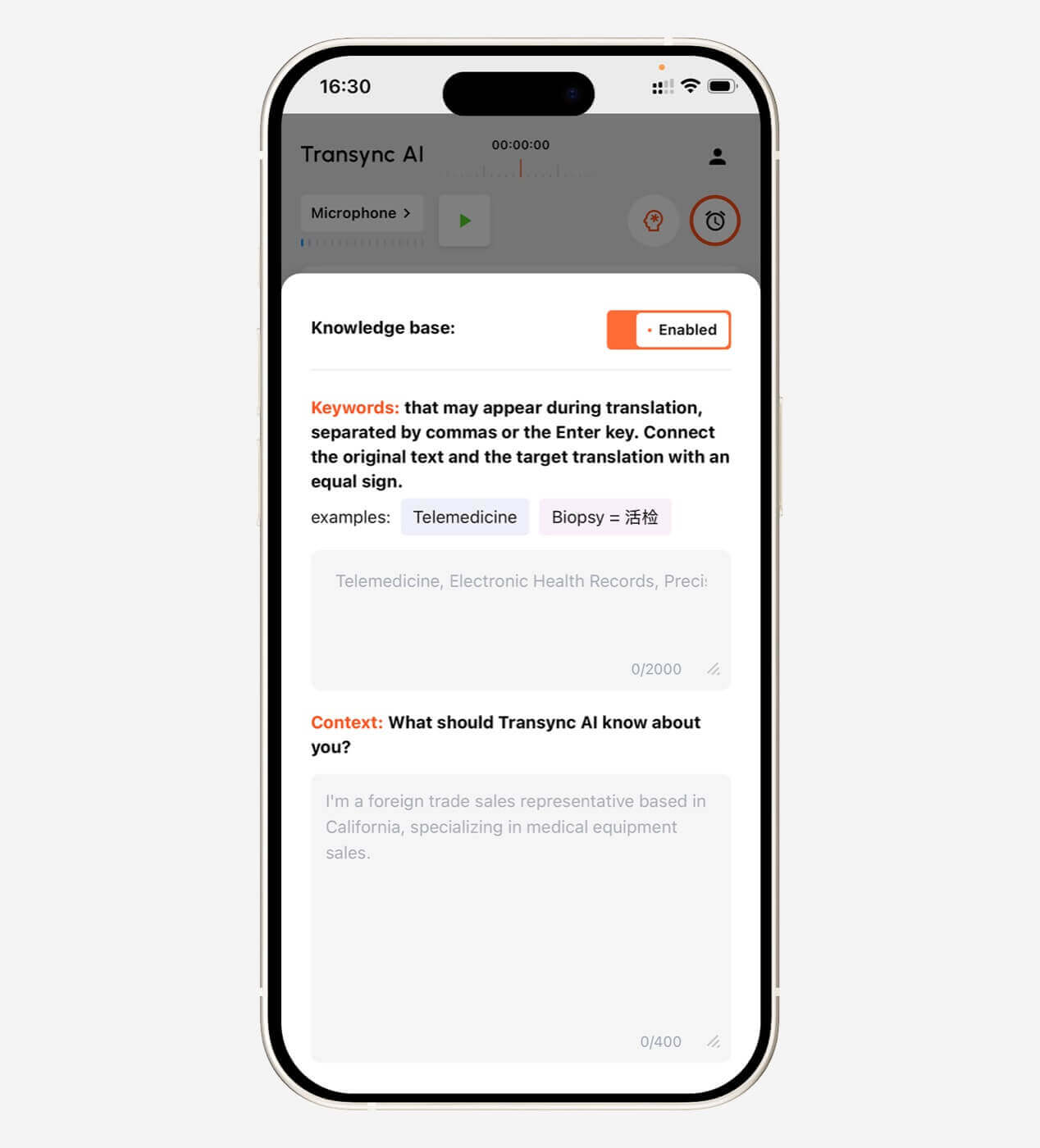
ก่อนการประชุมทางเทคนิค ผู้ใช้ Transync AI สามารถเพิ่มคำสำคัญ เช่น:
- Transync AI = 同言翻译
- อินเวอร์เตอร์เซลล์แสงอาทิตย์
- บรรจุภัณฑ์เซมิคอนดักเตอร์
- เอเชียแปซิฟิก
- จอห์น สมิธ
- รุ่น X300
- การเพิ่มประสิทธิภาพห่วงโซ่อุปทาน
- เครือข่ายประสาทเทียม
นอกจากนี้ยังสามารถเพิ่มบริบทได้อีกด้วย:
นี่เป็นการประชุมกับซัพพลายเออร์เกี่ยวกับกระบวนการผลิตเซมิคอนดักเตอร์ การตรวจสอบคุณภาพ ตารางการส่งมอบ ข้อกำหนดทางเทคนิค และการปฏิบัติตามกฎระเบียบในระดับภูมิภาค.
วิธีนี้ช่วยให้ AI เลือกความหมายที่ตรงกับบทสนทนาได้ดียิ่งขึ้น.
เรียนรู้เพิ่มเติมจาก บริบทคำสำคัญของผู้ช่วย AI.
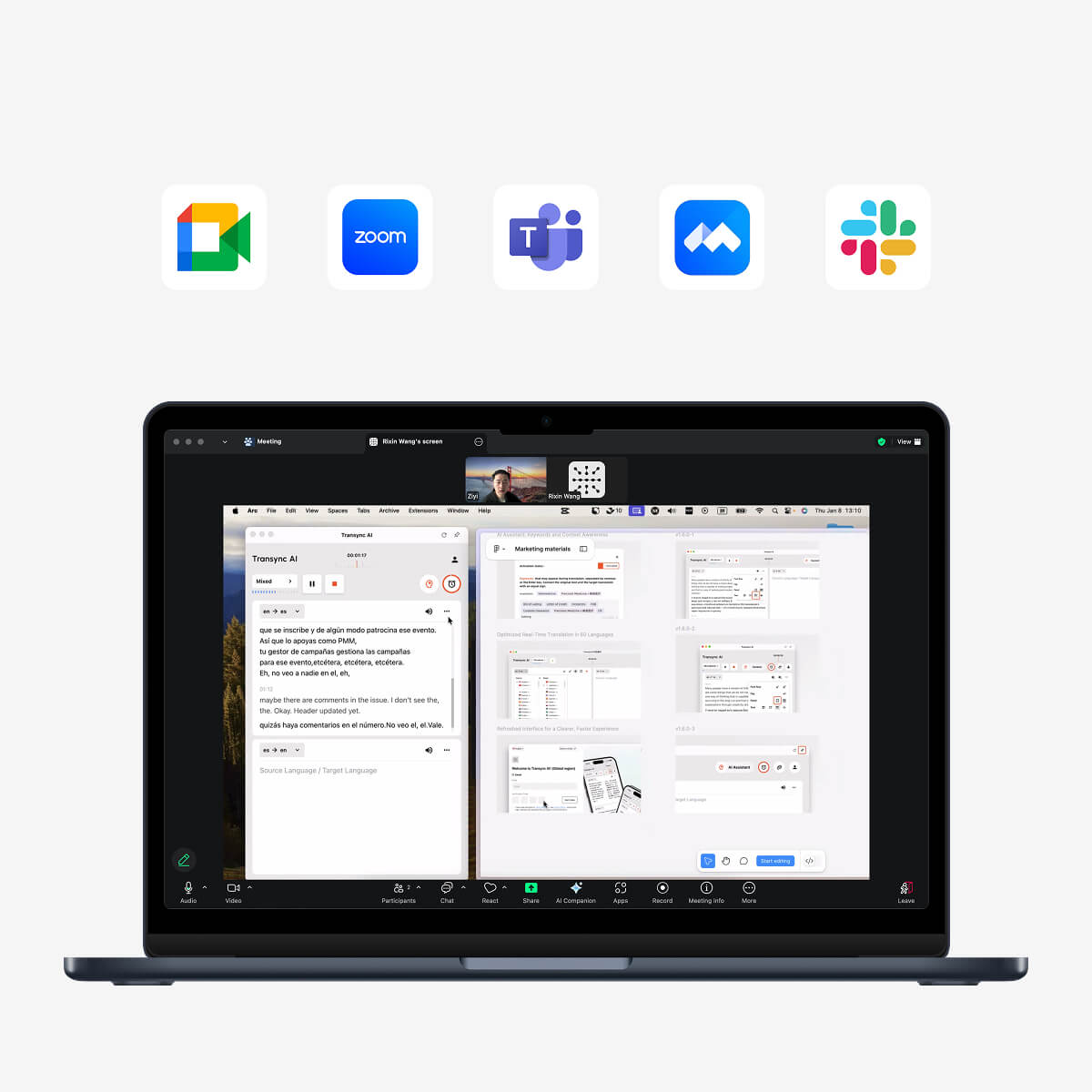
 บริการแปลภาษาแบบเรียลไทม์สำหรับ Zoom, Teams และ Google Meet
 บริการแปลภาษาแบบเรียลไทม์สำหรับ Zoom, Teams และ Google Meet
Transync AI สามารถใช้งานร่วมกับ:
- Zoom
- Microsoft Teams
- Google Meet
ผู้ใช้สามารถดูคำพูดต้นฉบับและเนื้อหาที่แปลแล้วได้พร้อมกัน.
สำหรับการเล่นเสียงที่แปลแล้วในการประชุม อาจจำเป็นต้องตั้งค่าระบบเสียงหรือไมโครโฟนเสมือน.
Transync AI v2.0 ยังรวมถึงโมเดล Gale 2.0, Monsoon 2.0 และ Jetstream 2.0 ที่ได้รับการอัปเดต ซึ่งออกแบบมาเพื่อปรับปรุงความเร็ว ความแม่นยำ และความต่อเนื่องในการสนทนาจริง รวมถึง:
- ประโยคสั้นๆ
- การพูดแบบผสมภาษา
- เสียงรบกวนพื้นหลัง
- การแบ่งประโยคที่ไม่สม่ำเสมอ
สำรวจ การแปลการประชุมสดด้วย AI ขั้นตอนการทำงาน.
คำบรรยายลอยอยู่นอกแท็บเบราว์เซอร์
ส่วนขยายของเบราว์เซอร์มักจะทำงานอยู่ภายในเบราว์เซอร์.
อย่างไรก็ตาม ในระหว่างการประชุม ผู้ใช้สามารถเปลี่ยนไปใช้โหมดต่อไปนี้ได้:
- ซอฟต์แวร์นำเสนอ
- สเปรดชีต
- แอปพลิเคชันบนเดสก์ท็อป
- ซอฟต์แวร์สาธิตผลิตภัณฑ์
- เอกสารท้องถิ่น
- หน้าต่างเบราว์เซอร์อีกหน้าต่างหนึ่ง
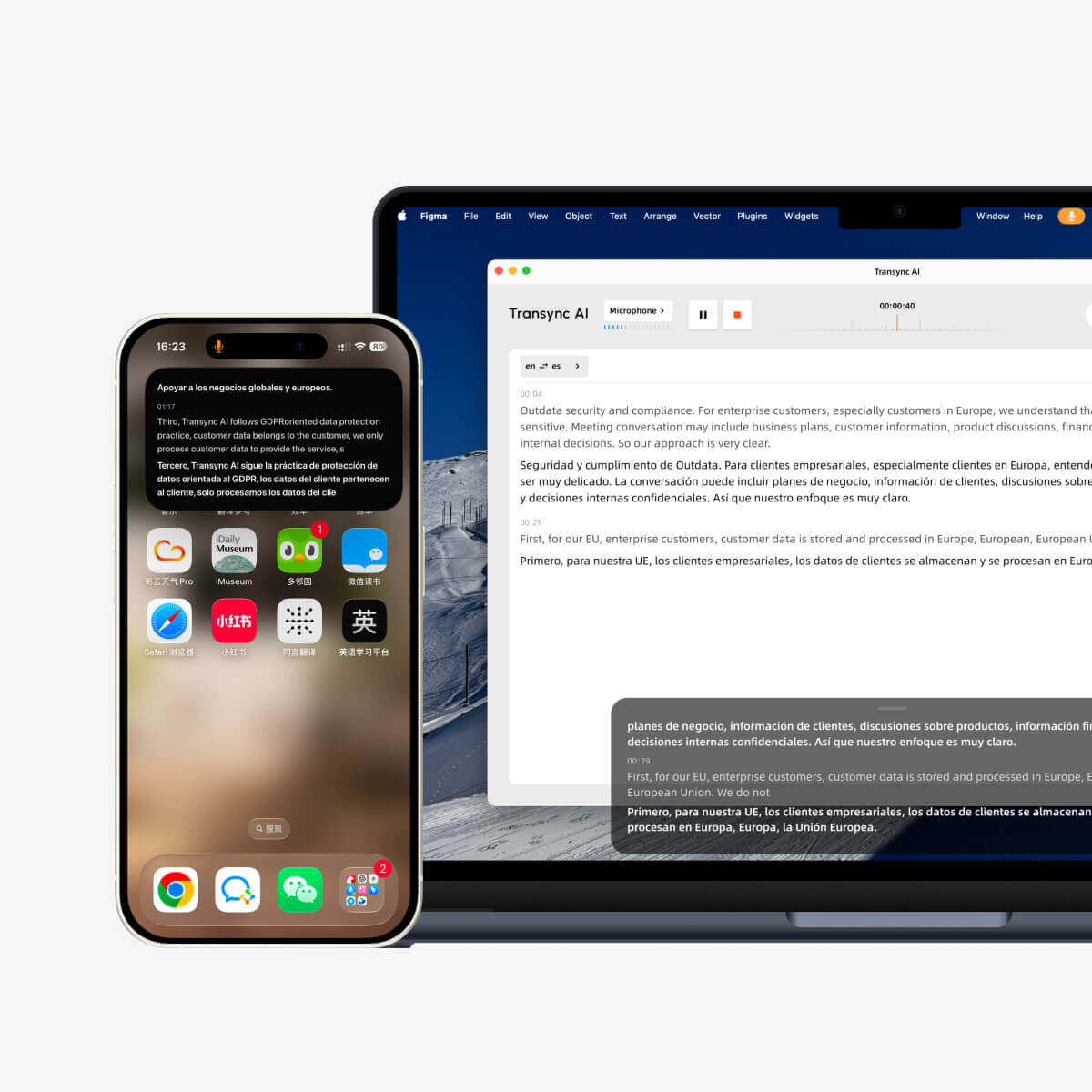
Transync AI ให้บริการคำบรรยายแบบ Picture-in-Picture บนเวิร์กโฟลว์ Mac, Windows และ iOS ที่รองรับ.
หน้าต่างคำบรรยายแบบลอยตัวสามารถอยู่เหนือแอปพลิเคชันอื่นๆ ได้ ทำให้ผู้ใช้สามารถติดตามคำแปลได้อย่างต่อเนื่องขณะนำเสนอหรือทำงานหลายอย่างพร้อมกัน.
ดู คำบรรยายลอยตัวแบบภาพซ้อนภาพ.
ราคา: ส่วนเสริมฟรี หรือ เครื่องมือแปลภาษาแบบเสียเงิน?
ส่วนเสริมของเบราว์เซอร์หลายตัวมีฟีเจอร์พื้นฐานให้ใช้งานฟรี แต่ฟังก์ชันขั้นสูงอาจต้องเสียค่าใช้จ่าย.
ข้อจำกัดที่เป็นไปได้ ได้แก่:
- ปริมาณงานแปลรายวัน
- ข้อจำกัดจำนวนตัวอักษร
- ข้อจำกัดจำนวนหน้าของไฟล์ PDF
- เครื่องมือแปลภาษาคุณภาพสูง
- ข้อจำกัดของคำบรรยายวิดีโอ
- เครดิตการใช้งาน AI
- ข้อจำกัดขนาดไฟล์
- คุณสมบัติของทีม
สำหรับการแปลการประชุมสด ราคาจะคิดตามจำนวนนาที ชั่วโมง จำนวนผู้ใช้ หรือจำนวนที่นั่ง.
| แผน AI ของ Transync | ราคา | รวมถึงการใช้งาน | ดีที่สุดสำหรับ |
| ฟรี | $0 | 40 นาทีสำหรับผู้ใช้ใหม่ | การทดสอบเบื้องต้น |
| Personal Premium | $8.99/เดือน | 10 ชั่วโมงในช่วงระยะเวลาสมาชิกภาพ | บุคคลและการประชุมปกติ |
| องค์กร | $24.99/เดือน/ที่นั่ง | สูงสุด 40 ชั่วโมงต่อเดือนต่อที่นั่ง | ทีมและองค์กร |
| บัตรลงเวลา | เริ่มต้นที่ $ 0.70/ชั่วโมง | เวลาในการแปลเพิ่มเติม | ผู้ใช้งานที่มีความต้องการรายเดือนเปลี่ยนแปลงไป |
ชั่วโมงในบัตรลงเวลาไม่มีวันหมดอายุ แต่สามารถใช้ได้เฉพาะขณะที่สมาชิกภาพยังใช้งานอยู่เท่านั้น.
เปรียบเทียบราคาและปริมาณงานจริง โปรแกรมแปลหน้าเว็บฟรีอาจเหมาะสำหรับการใช้งานทั่วไป แต่สำหรับการประชุมที่มีผู้เข้าร่วมหลายภาษา อาจจำเป็นต้องใช้เครื่องมือเฉพาะทางแบบเสียเงิน.
ข้อจำกัดที่ควรรู้
ส่วนขยายตัวแปลภาษาของเบราว์เซอร์อาจมีปัญหาในการใช้งานกับ:
- ไฟล์ PDF ที่สแกนแล้ว
- หน้าเว็บที่ได้รับการป้องกัน
- เนื้อหาเว็บไซต์แบบไดนามิก
- ตารางที่ซับซ้อน
- แอปพลิเคชันฝังตัว
- วิดีโอที่ไม่มีคำบรรยาย
- เสียงสด
- การแยกเสียงลำโพง
- ข้อมูลที่เป็นความลับ
- เว็บไซต์ที่บล็อกการแก้ไขหน้าเว็บ
Transync AI ก็มีข้อจำกัดที่ชัดเจนเช่นกัน:
- มันไม่ใช่ส่วนขยายของเบราว์เซอร์
- โหมดออฟไลน์ไม่พร้อมใช้งาน
- ระบบไม่รองรับการจดจำภาพ
- การแปลข้อความคงที่ไม่ได้เป็นฟังก์ชันหลักที่รองรับ
- มันทำงานในฐานะซอฟต์แวร์แบบสแตนด์อโลน
- การใช้งานจะถูกนับรวมแบบสะสมจากทุกอุปกรณ์
- คุณภาพการแปลขึ้นอยู่กับสภาพเสียงและเครือข่าย
การเข้าใจขอบเขตเหล่านี้จะช่วยให้ผู้ใช้ไม่เลือกใช้เครื่องมือที่ไม่เหมาะสมกับงาน.
คำถามที่พบบ่อย: ตัวแปลภาษาส่วนขยาย
“extension traductor” หมายความว่าอย่างไร?
โดยทั่วไปวลีนี้หมายถึงส่วนเสริมของเบราว์เซอร์ที่ใช้แปลหน้าเว็บ ข้อความที่เลือก ไฟล์ PDF คำบรรยาย หรือข้อความที่ป้อนลงในแอปพลิเคชันบนเบราว์เซอร์.
ตัวแปลส่วนขยายที่ดีที่สุดคืออะไร?
การเลือกส่วนเสริมที่ดีที่สุดนั้นขึ้นอยู่กับลักษณะงาน เลือกส่วนเสริมแปลทั้งหน้าสำหรับงานท่องเว็บ ส่วนเสริมสองภาษาสำหรับการเรียนภาษา ส่วนเสริมแปลไฟล์ PDF สำหรับงานวิจัย หรือส่วนเสริมคำบรรยายสำหรับวิดีโอ.
ส่วนเสริมโปรแกรมแปลภาษาสามารถแปลทั้งเว็บเพจได้หรือไม่?
ส่วนขยายการแปลของเบราว์เซอร์หลายตัวสามารถแปลหน้าเว็บทั้งหมดได้ แม้ว่าคุณภาพการจัดวางและการรองรับจะแตกต่างกันไปในแต่ละเว็บไซต์ก็ตาม.
ส่วนเสริมสามารถแปลไฟล์ PDF ได้หรือไม่?
ส่วนเสริมบางตัวสามารถแปลข้อความในไฟล์ PDF ที่เลือกได้ เอกสารที่สแกนอาจต้องใช้การรู้จำอักษรด้วยแสง (OCR) และอาจไม่รองรับ.
ส่วนเสริมของเบราว์เซอร์สามารถแปลงเสียงในวิดีโอได้หรือไม่?
ส่วนขยายบางตัวจะแปลคำบรรยายที่มีอยู่แล้ว ในขณะที่บางตัวอาจสร้างคำบรรยายจากเสียงก่อน ตรวจสอบว่าส่วนขยายนั้นต้องการให้วิดีโอมีแทร็กคำบรรยายอย่างเป็นทางการหรือไม่.
โปรแกรมแปลภาษาเสริมสามารถแปลการประชุม Zoom ได้หรือไม่?
โปรแกรมแปลเว็บเพจทั่วไปอาจแปลคำบรรยายที่มองเห็นได้ แต่ไม่สามารถประมวลผลเสียงในการประชุมสดได้โดยตรง เครื่องมือเฉพาะทาง เช่น Transync AI ถูกออกแบบมาเพื่อการแปลเสียงพูดสดอย่างต่อเนื่อง.
Transync AI เป็นส่วนเสริมของเบราว์เซอร์หรือไม่?
ไม่ Transync AI เป็นซอฟต์แวร์แบบสแตนด์อโลนที่สามารถใช้งานร่วมกับ Zoom, Microsoft Teams และ Google Meet ได้.
Transync AI สามารถแปลเว็บเพจได้หรือไม่?
ไม่เลย Transync AI เน้นไปที่การประมวลผลเสียงแบบเรียลไทม์ คำบรรยายสองภาษา เสียงแปล คำสำคัญและบริบท และบันทึกการประชุมด้วย AI เป็นหลัก.
Transync AI ทำงานแบบออฟไลน์ได้หรือไม่?
ไม่ค่ะ Transync AI ต้องใช้การเชื่อมต่ออินเทอร์เน็ต และปัจจุบันยังไม่รองรับการแปลแบบออฟไลน์.
ข้อคิดสุดท้าย: ติดตั้งเครื่องมือที่เหมาะสมกับเนื้อหา
หนึ่ง นักแปลส่วนขยาย เป็นวิธีที่สะดวกในการแปลเนื้อหาโดยไม่ต้องออกจากเบราว์เซอร์.
ใช้งานได้ดีเป็นพิเศษในกรณี:
- เว็บเพจ
- ข้อความที่เลือก
- การอ่านสองภาษา
- ไฟล์ PDF
- คำบรรยายที่มีอยู่แล้ว
- การเขียนบนเว็บเบราว์เซอร์
แต่การอ่านเนื้อหาและการเข้าร่วมสนทนาสดหลายภาษาเป็นงานที่แตกต่างกัน.
สำหรับการประชุม การเรียนการสอน การสัมภาษณ์ การติดต่อซัพพลายเออร์ และการนำเสนอในระดับนานาชาติ ผู้ใช้อาจต้องการการแปลเสียงแบบสองทาง คำบรรยายสองภาษา เสียงพูดจาก AI การตั้งค่าคำศัพท์ คำบรรยายแบบลอยตัว และบันทึกหลังการประชุม.
Transync AI ได้รับการออกแบบมาเพื่อรองรับเวิร์กโฟลว์แบบที่สอง.
การตั้งค่าที่มีประสิทธิภาพที่สุดอาจไม่ใช่การเลือกระหว่างส่วนเสริมสำหรับแปลภาษาและเครื่องมือแปลสด แต่อาจเป็นการใช้แต่ละอย่างในจุดที่มันทำงานได้ดีที่สุด: ส่วนเสริมสำหรับการอ่านเนื้อหาภาษาต่างประเทศ และ AI ของ Transync สำหรับการทำความเข้าใจคำพูดของผู้คน.
เริ่มต้นด้วยการเยี่ยมชม Transync เอไอ, สำรวจ เครื่องมือแปลแบบเรียลไทม์, หรือดาวน์โหลดแอปพลิเคชันสำหรับอุปกรณ์ที่คุณต้องการใช้งาน.