

会話、会議、プレゼンテーションで、よりクリアな音声、字幕、音声再生、録音機能を備えたライブ翻訳を7つのステップで活用する方法を学びましょう。.
知ること ライブ翻訳の使い方 重要なのは、ボタンを探すことではなく、話し手から聞き手へとスムーズなコミュニケーション経路を構築することです。最適な設定は、状況によって異なります。電話を共有する2人、オンライン会議に参加する同僚、プレゼンテーションを視聴する聴衆など、それぞれ異なる入力と出力が必要となります。.
最も簡潔で実用的な手順は以下のとおりです。会話の種類を選択し、言語を選択し、実際に音声が収録されているオーディオを接続し、結果を読者に見せるか音声で聞かせるかを決定し、90秒間のリハーサルを実行します。このリハーサルで名前、数字、訂正をうまく処理できれば、実際のセッションがうまくいく可能性がはるかに高くなります。.
始める前に:リスニングの瞬間をイメージしてみましょう
通訳を必要とする人を想像してみてください。その人はどこにいて、誰かが話している間、何をしているでしょうか?
- カフェのカウンターでは、二人の間に置かれたスマートフォンをじっと見つめることがある。.
- オンライン会議では、共有画面を見ながら二言語字幕を読むことができる。.
- 営業電話の際、相手側の参加者は通訳された音声を通話に取り込む必要がある場合があります。.
- 講演会では、聴衆一人ひとりが自分のデバイスで異なる言語を使いたいと思うかもしれない。.
これは多くのチュートリアルが省略している質問です。 ライブ翻訳の使い方 リスナーの体験から始まる。なぜなら、それがデバイス、音源、翻訳モード、配信方法を決定するからだ。.
ライブ翻訳の使い方(7つのステップ)
1. ルーム名を指定してライブ翻訳を使用する方法
まず、会話の場を4つの部屋のうちの1つに設定することから始めましょう。.
共用電話室: 二人が並んで立っていて、交代で話すことができます。携帯型の会話翻訳アプリがあれば通常は十分です。.
リスニングルーム: 一人が数分間話した後、別の人がそれに続く。一方通行の通訳、ヘッドホン、または頻繁な交代を必要としない翻訳字幕を使用する。.
会議室: 複数の人が会議ソフトウェアを通して会話する。通訳者は、マイクの音声とコンピューターから出力される音声の両方を受信する必要がある。.
プレゼンテーションルーム: 一人の司会者が大勢の聴衆に向けて話す場合、聴衆はリンク、QRコード、または同様の方法で言語を個別に選択できるようにする必要がある。.
設定を行う前に、次の文を書き留めてください。「スピーカーは、 _、そしてリスナーは_を通じて翻訳を受け取ります.その一文は、最もよくある設定ミス、つまり、音源を聞き取れず、聴衆に届かない魅力的な機能を選んでしまうことを防ぐ。.
2. 適切な部屋でライブ翻訳を使用する方法
普遍的な「リアルタイム翻訳」ワークフローは存在しません。これら4つの方法は、それぞれ意味の異なるタスクを解決するものです。.
短い対面での会話の場合、, Google翻訳 対応するスマートフォンやタブレットでは、リスニング、会話、テキストのみ、カスタム設定、対面モードが利用できます。会話モードでは、交互に話を進め、翻訳音声はスマートフォンのスピーカーまたはヘッドホンから再生されます。対面モードでは、画面が分割され、両者が同時に読むことができます。.
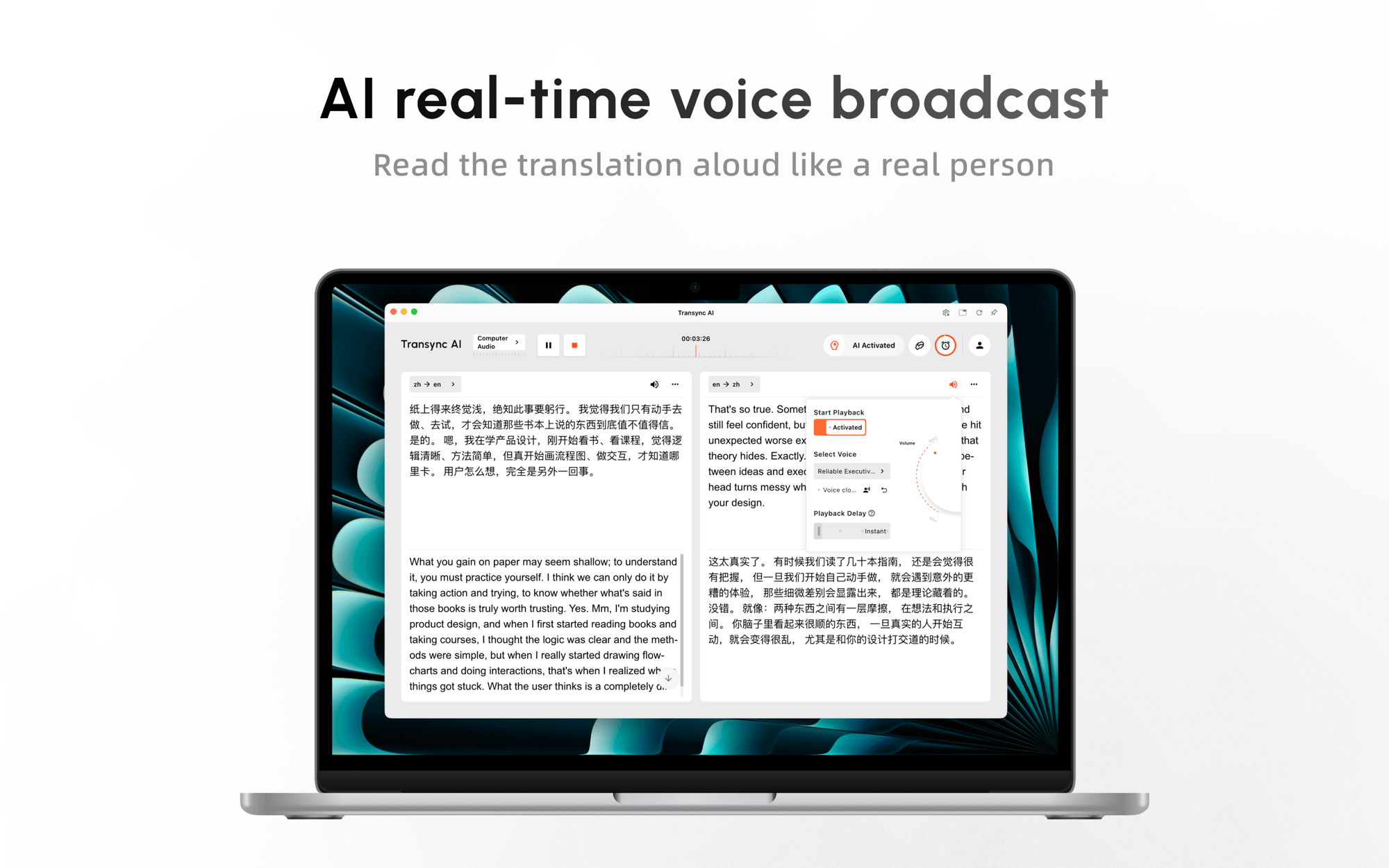
異なるプラットフォーム間での定期的な通話や会議については、, Transync AI 提供する リアルタイム翻訳 バイリンガル字幕とオプションの翻訳音声付き。 Zoom, Microsoft Teams, Google Meet, ブラウザコンテンツや対面での会話も含め、すべての会話を1つの会議製品内に限定する必要がないようにする。.
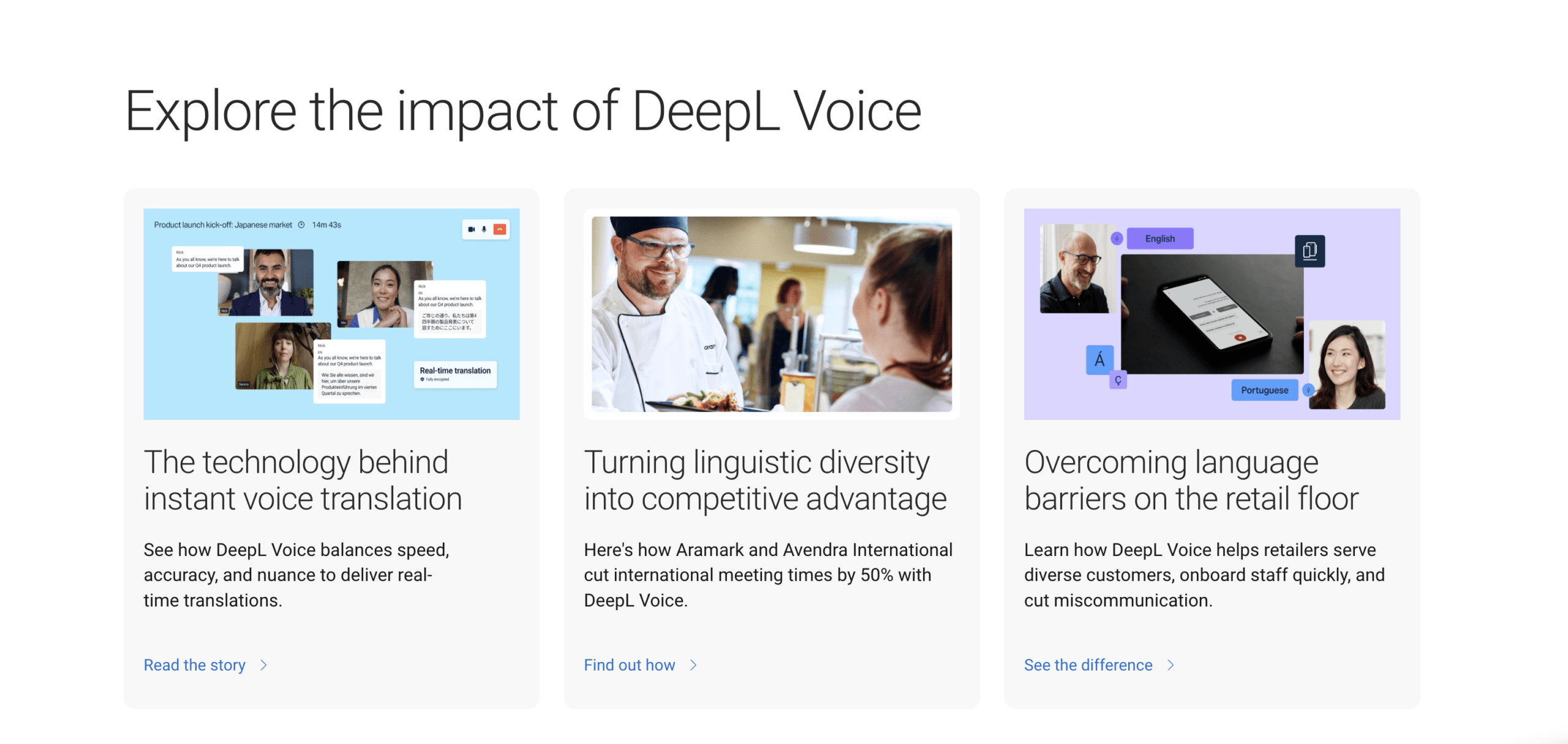
エンタープライズ会議レイヤーを好む組織の場合、, DeepL音声 互換性のある会議ワークフローではリアルタイム翻訳字幕をサポートし、現在のデスクトップ版では音声翻訳機能を提供しています。利用可能な機能は、ボイスプランとワークフローによって異なります。ブラウザベースの会議翻訳では会議ボットと参加者リンクを使用する場合がありますが、デスクトップアプリでは異なる設定が提供されます。.
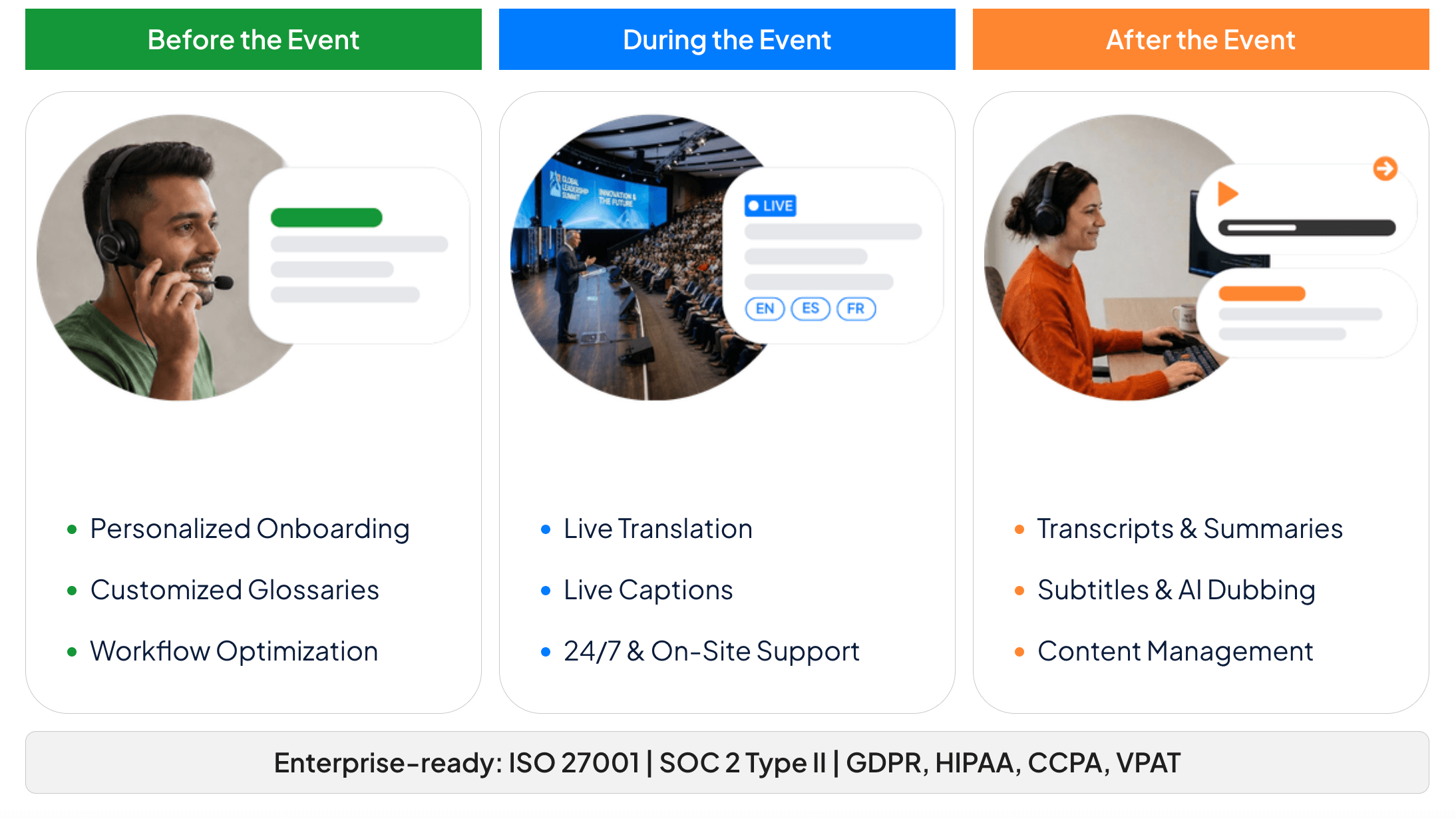
会議や管理イベントの場合、, ワードリー 主催者はセッションを作成し、URLまたはQRコードを通じてアクセス権を配布できます。参加者は各自のデバイスから参加し、利用可能な言語を選択して、参加者アカウントを作成することなく字幕を読んだり、翻訳された音声を聞いたりできます。.
どのライブ翻訳ルートがあなたのタスクに最適ですか?
| 製品 | 最高の出発点 | 言語がどのように入り込むか | リスナーが受け取るもの | メイン設定境界 |
|---|---|---|---|---|
| Google翻訳 | 短い対面での会話、または個人的な傾聴 | 電話またはタブレットのマイク | 翻訳されたテキストとオプションの音声 | デバイス、モード、言語のサポート状況は様々です。 |
| Transync AI | 定期的な会議、電話会議、授業、プレゼンテーション | マイク、サポートされているコンピューターオーディオワークフロー、またはルームオーディオ | バイリンガル字幕、翻訳音声、録画、または視聴者の視点 | インターネット接続と適切なオーディオルーティングが必要です |
| DeepL音声 | ライセンス取得済みの企業向け会議ワークフロー | デスクトップ会議の検出または会議ボットのワークフロー | 翻訳された字幕とプランに応じた音声機能 | ライセンス、プラットフォーム、ボット、および管理者の要件はそれぞれ異なります。 |
| ワードリー | カンファレンス、ウェビナー、参加者向けセッション | プレゼンターまたはイベントの音声フィード | リンク/QRコードによる個人用字幕または翻訳音声 | 主催者側のセットアップと、会場/ネットワークの信頼性の高い音声 |
この表はランキングではありません。 ライブ翻訳の使い方 ホテルのフロントデスクであれば、共有電話が最も手軽な解決策となるでしょう。定期的なビジネスミーティング、専門用語、音声翻訳、議事録が必要な場合は、ミーティング優先のワークフローがより適しています。数百人の参加者がアカウントなしで参加する必要がある場合は、翻訳品質をテストする前に、イベントアクセス権限によって選択が決まるかもしれません。.
3.言語と会話の形式を選択する
言語を選ぶ際は、国名だけを見て判断しないでください。話者が実際に使用する言語の種類(ブラジルポルトガル語やヨーロッパポルトガル語など)を確認し、製品が会話に必要な言語の違いを識別できるかどうかをテストしてください。.
次の部分は ライブ翻訳の使い方 音声が一方向に流れるのか、双方向に流れるのか、あるいは一人の話者から複数の言語グループに向かうのかを判断する。.
次に、モードを選択してください。.
- 一方通行翻訳: 一方が話し、もう一方が主に聞いている状態が最適だ。.
- 双方向翻訳: 両者がそれぞれの母国語で応答する会話に最適です。.
- 多言語翻訳: 同じ情報源を複数の対象言語に配信する必要がある場合に最適です。.
- プレゼンテーションの実施方法: 司会者がリアルタイムで通訳を視聴者のデバイスに配信するのが最適だ。.
で Transync AI, セッション開始前にモードを選択する必要があります。双方向翻訳は双方向の会議に適しており、一方通行翻訳は講義やリスニング作業を簡素化し、多言語翻訳は1つのタスクで複数のターゲット言語を出力できます。言語数を増やすと使用頻度が高くなる可能性があるため、実際に必要な言語のみを有効にしてください。.
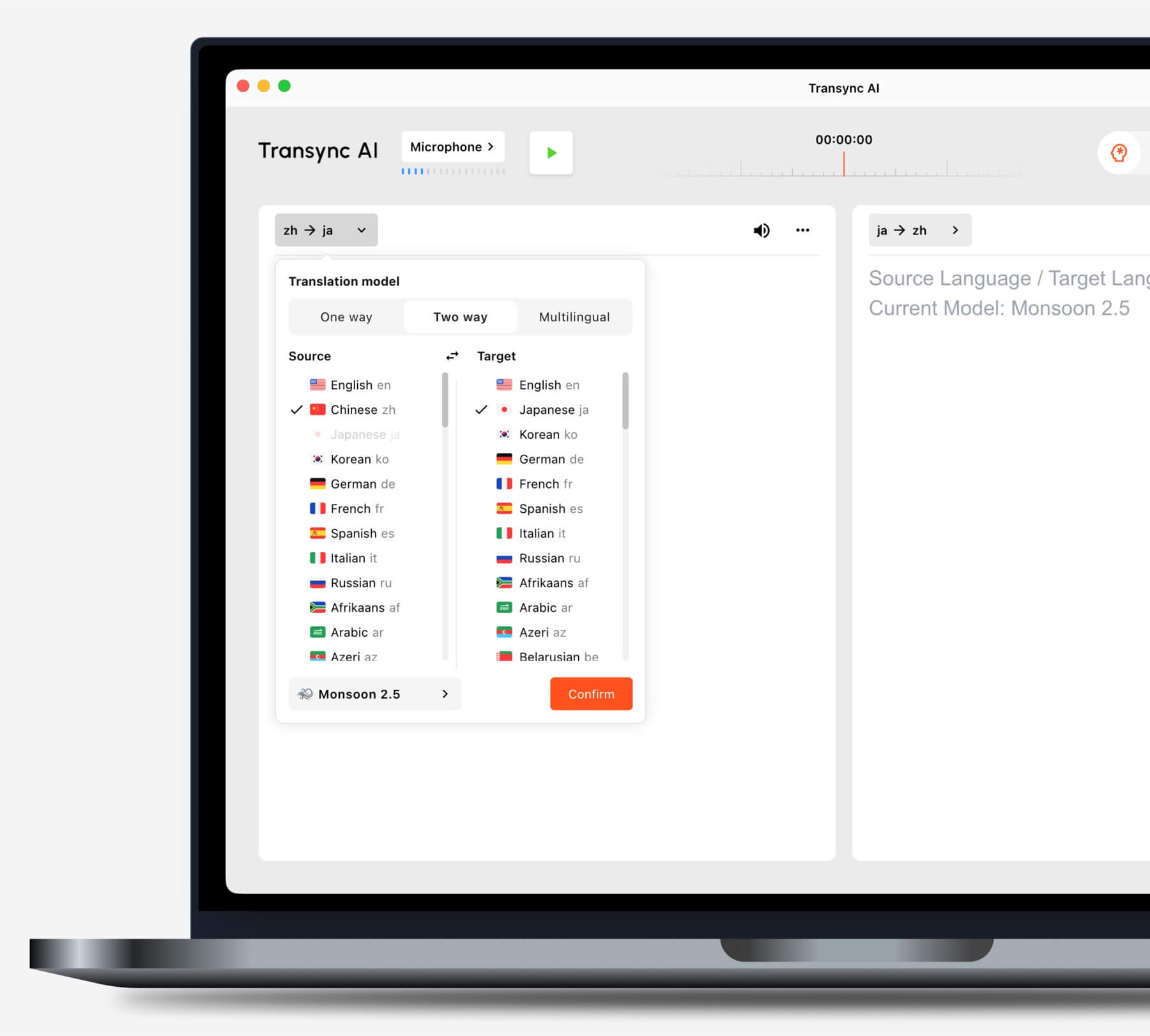
タスクを開始する前に、ご自身の状況に合った翻訳モードを選択してください。.
で Google翻訳, アプリを開いたら、ライブ翻訳モードと言語ペアを選択してください。リスニングは音声翻訳を聞くためのモード、会話は会話者が交互に翻訳を再生するモード、テキストのみは音声を削除したモード、対面モードは両者が画面を読む方法を変更するモードです。.
検索している人々 ライブ翻訳の使い方 自動検出をテストせずに有効にしてしまうケースがよくあります。自動検出は便利ですが、話者が常に同じ言語を使用し、名前や短い専門用語が別の言語と誤認される可能性がある場合は、ソース言語を固定する方が安全です。.
4. 正しい音声でライブ翻訳を使用する方法
リアルタイム翻訳では、受信していない音声は翻訳できません。モデルの品質について考える前に、入力メーターまたはソースの文字起こしを確認し、正しい音声が表示されていることを確認してください。.
対面での会話では、マイクをスピーカーの横に置かないように注意しながら、両方の話者に十分近づけてください。テレビの音、音楽、会話の重なり、エコーを軽減してください。電話を相手の口に直接当てるのではなく、自然な順番交代を促してください。.
オンライン会議の場合は、2つの音声経路を分離してください。
- マイク音声 自分のスピーチを携えて。.
- コンピューターオーディオ 遠隔地の参加者、ビデオ、その他の音声をコンピュータを通して伝送する。.
その ライブ会議の翻訳ワークフロー で Transync AI これらのソースは、サポートされている設定で使用できます。重要な通話に参加する前に両方を設定し、リモート参加者に発言してもらい、マイクの音声だけでなく、参加者の発言もソースの文字起こしに反映されていることを確認してください。.

主要なオンライン会議プラットフォームに対応し、シームレスなリアルタイム翻訳を実現
他の参加者が翻訳された音声を聞く必要がある場合、コンピューターで再生をオンにするだけでは会議に音声が送信されない可能性があります。設定によっては、会議プラットフォームのコンピューターオーディオ共有コントロールまたは仮想マイクワークフローを使用してください。ヘッドホンを使用するとエコーを軽減できますが、再生経路も変更される場合があります。.
この音声チェックは、 ライブ翻訳の使い方. 元の文字起こしが間違っている場合、翻訳された音声やターゲット言語を変更しても、入力は修正されません。.
5. 翻訳者に推測不可能な単語を与える
名前、製品コード、略語、地名、専門用語などは、誤訳されると非常に大きな損失につながります。会話の前に必ず準備しておきましょう。.
信頼できるアプローチ ライブ翻訳の使い方 この準備を、通話の途中で試みられる修正ではなく、セットアップの一部として扱います。.
で Transync AI, キーワードと背景 ユーザーが短い用語と会議の背景説明を入力できるようにしてください。キーワードは、イコール記号を使って希望する翻訳と組み合わせることもできます。キーワードは短くし、より詳しい説明はコンテキスト欄に入力してください。.
例えば:
キーワード: Oriona X4、Jun Chen、SLA、太陽光発電インバータ 推奨用語: gross margin = margen bruto コンテキスト: 太陽光発電機器会社の四半期ごとのサプライヤーレビュー。.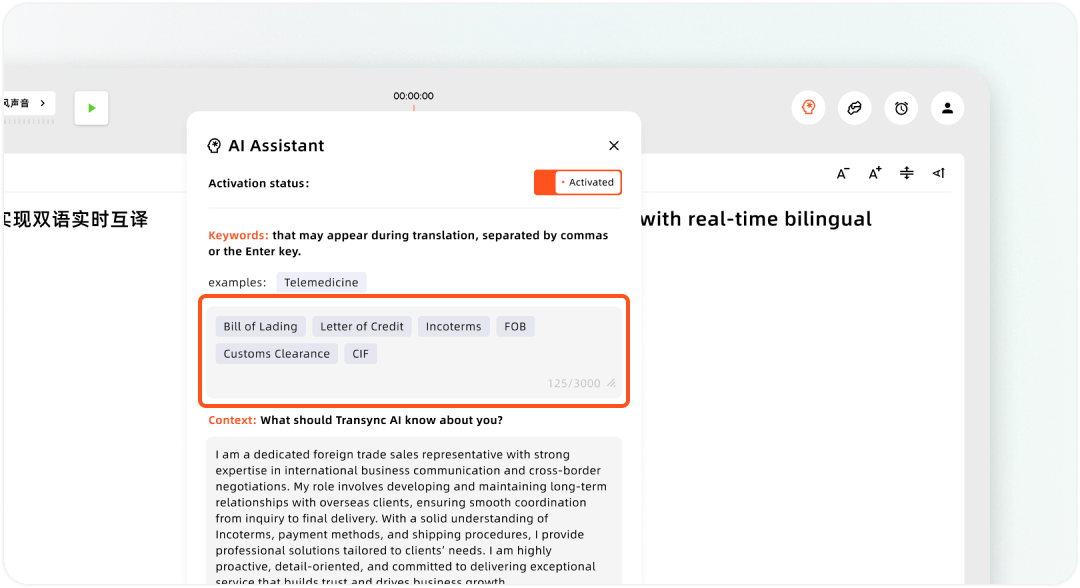
Transsync AIアシスタントでカスタムキーワードとユーザーコンテキストを設定する
他の製品では、この機能を用語集、音声用語、カスタム語彙、または用語管理と呼ぶ場合があります。. DeepL音声 会議用製品には、プランに応じた用語集と音声用語集が用意されています。製品名に関わらず、公平な比較を行うために、すべての製品で同じテストリストを使用してください。.
ライブ翻訳者に用語管理機能がない場合は、あまり一般的でない名前はゆっくりと紹介するか、会議チャットに入力するか、口頭で確認してください。 ライブ翻訳の使い方 これには、システムが1音節からすべての固有名詞を推測することを期待するのではなく、システムが助けを必要としているタイミングを把握することも含まれます。.
6. ライブ翻訳をテキスト、音声、またはオーディエンスビューとして使用する方法
翻訳された文章は、メイン画面上のテキスト、フローティングキャプション、音声、または個人用ビューという4つの便利な形式で表示されます。主要な出力形式を1つ、バックアップ形式を1つ選択してください。.
作品の横にテキストを配置する
ピクチャーインピクチャー字幕 で Transync AI 翻訳されたテキストを、対応するデスクトップアプリケーションの上部、またはモバイル端末のフローティングウィンドウに表示させることができます。これは、聞き手がスライド、スプレッドシート、または他の会議ウィンドウを確認しながら、翻訳画面に頻繁に切り替える必要がない場合に便利です。.

デスクトップとモバイルデバイス間でリアルタイムに浮動する字幕
認識精度を確認する際は原文のみの表示、読みやすさを重視する場合は翻訳のみの表示、両方を比較する必要がある場合は混合表示を使用してください。画面共有を開始する前にフォントサイズを大きくしてください。会議が始まるまで待たないでください。.
人々に結果を聞かせよう
アン AI音声翻訳 翻訳された出力を音声で読み上げることができます Transync AI. 速度と完全なフレーズのバランスを取るため、まずは1秒の再生遅延から始めてください。応答速度がより重要な場合は「即時」を、話者が文の途中で頻繁に間を置く場合はより長い遅延を使用してください。.
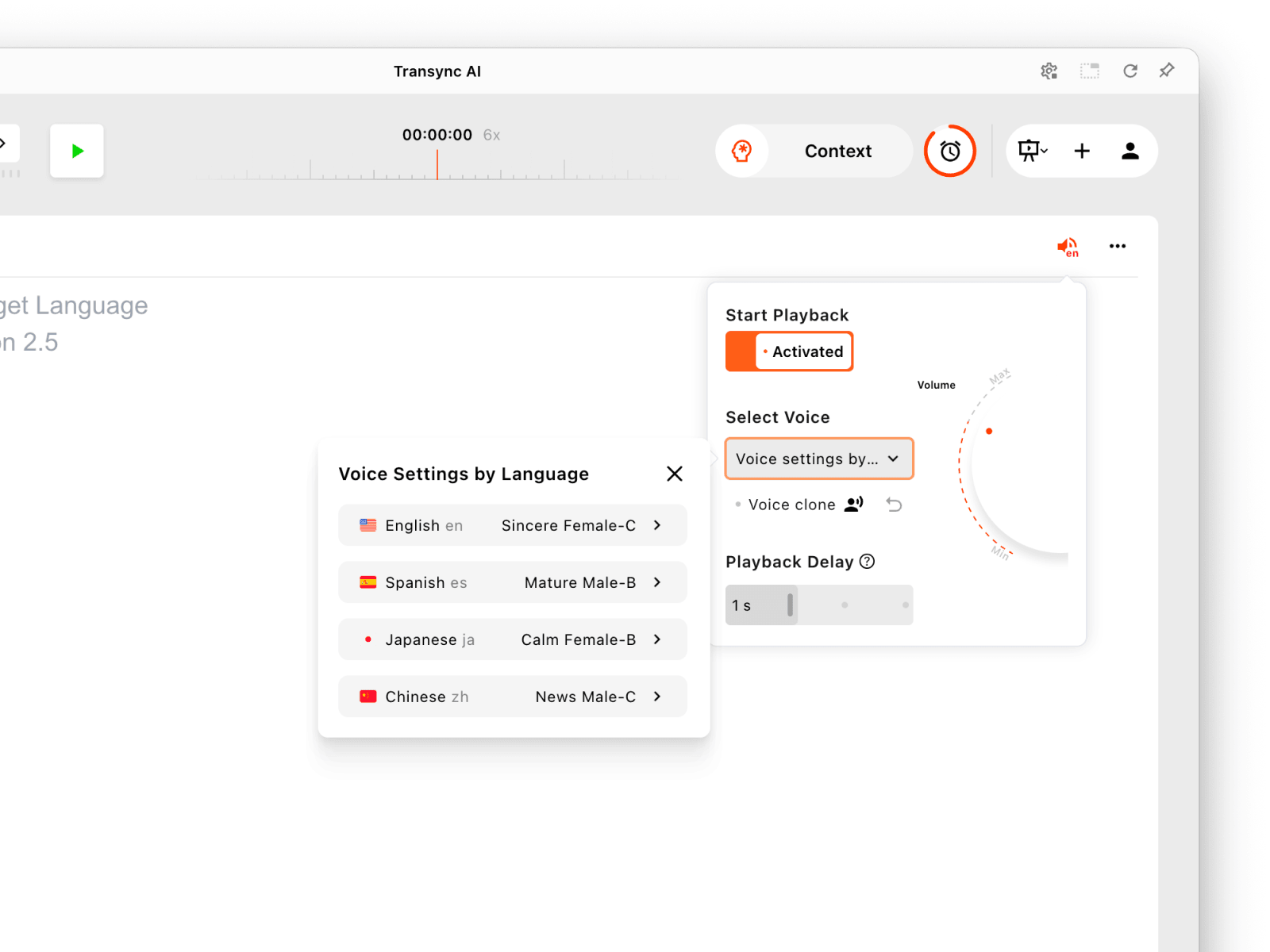
プレゼンテーション言語ごとに音声再生を個別に設定してください。.
両側から同時に翻訳音声を送信すると、音声の重複やエコーが発生する場合があります。まず片側のみ再生を有効にし、必要に応じてヘッドホンを使用し、テスト後に反対側の再生を追加してください。.
視聴者に独自の言語観を与える
ベータ版 プレゼンテーションモード, 、 Transync AI ホストは最大10言語まで対応言語を設定できます。参加者はリンク、QRコード、またはルームIDで参加し、各自のデバイスで対応言語を選択します。ライブテキストの閲覧や音声再生(利用可能な場合)は可能ですが、ホストのタスクに音声入力を送信することはできません。現在の参加フローにサインイン手順が表示される場合があります。.
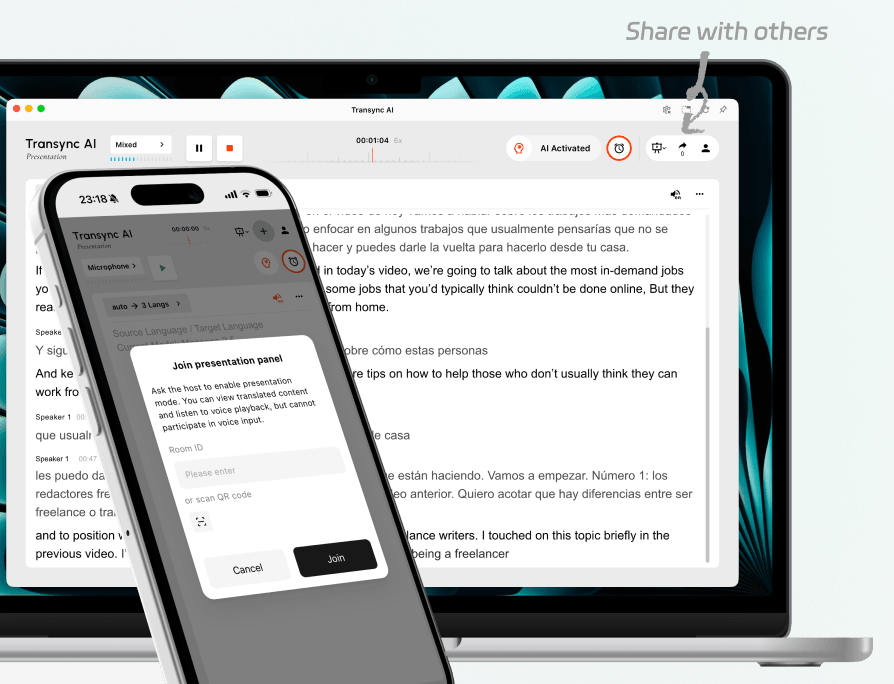
会場にいる参加者と遠隔地から参加する参加者を、同じライブプレゼンテーションに招待します。.
ワードリー また、イベント配信には参加者リンクやQRコードも利用しています。現在の公開情報によると、参加者はアプリをダウンロードしたりアカウントを作成したりすることなく、最新のブラウザから参加できるとのことです。この違いは、大勢の人が迅速に入場する必要がある場合に重要となる可能性があります。.
最も適切な回答は ライブ翻訳の使い方 必ずしもより良い翻訳モデルとは限りません。これは、聞き手が実際に利用できる場所に結果を提示する配信方法の一つです。.
7. 90秒間のリハーサルを行い、重要な部分だけを保存する
「こんにちは、お元気ですか?」のような質問でテストしないでください。実際の障害箇所を明らかにするスクリプトを使用してください。
このリハーサルは ライブ翻訳の使い方 設定リストから、観察可能なコミュニケーションテストを作成する。.
おはようございます。オリオナシステムズのジュン・チェンです。修正後の注文数は1,450台で、1,540台ではありません。納品日は火曜日から9月24日木曜日に変更となります。粗利益は18.5%以上を維持してください。申し訳ありません、訂正です。電話会議の開始時間は9時13分ではなく9時30分です。.
通常の速度で読んでください。そして、以下の5つの項目に点数をつけてください。
| チェック | 合格条件 |
|---|---|
| 捕獲 | 元の文字起こしでは、意図された話者の声を聞き、ループ再生は行いません。 |
| 事実 | 名前、日付、数字、ネガ、訂正は正確です |
| 意味 | この翻訳では、誰が何をいつまでにしなければならないかという点が保持されている。 |
| タイミング | 聞き手は結果をすぐに受け取るので、自然に反応することができる。 |
| 配達 | 適切な人物であれば、補助なしで翻訳を読んだり聞いたりすることができる。 |
音声の文字起こしがうまくいかない場合は、マイク、コンピューターの音声ソース、距離、ノイズ、または話者の重なりを修正してください。認識は良好でも名前が聞き取れない場合は、専門用語を追加するか、導入部分をゆっくり再生してください。フレーズが断片的すぎる場合は、再生遅延を調整し、話者に発言を終えるまで中断しないように依頼してください。.
終わりに Transync AI タスクを実行すると、セッションを停止してトランスクリプトを確認できます。. AI会議メモ 議論を整理して、フォローアップに役立つ記録として残すことができます。プレゼンテーションモードでは、ホストが文字起こしを聴衆と共有するかどうかを制御できます。.
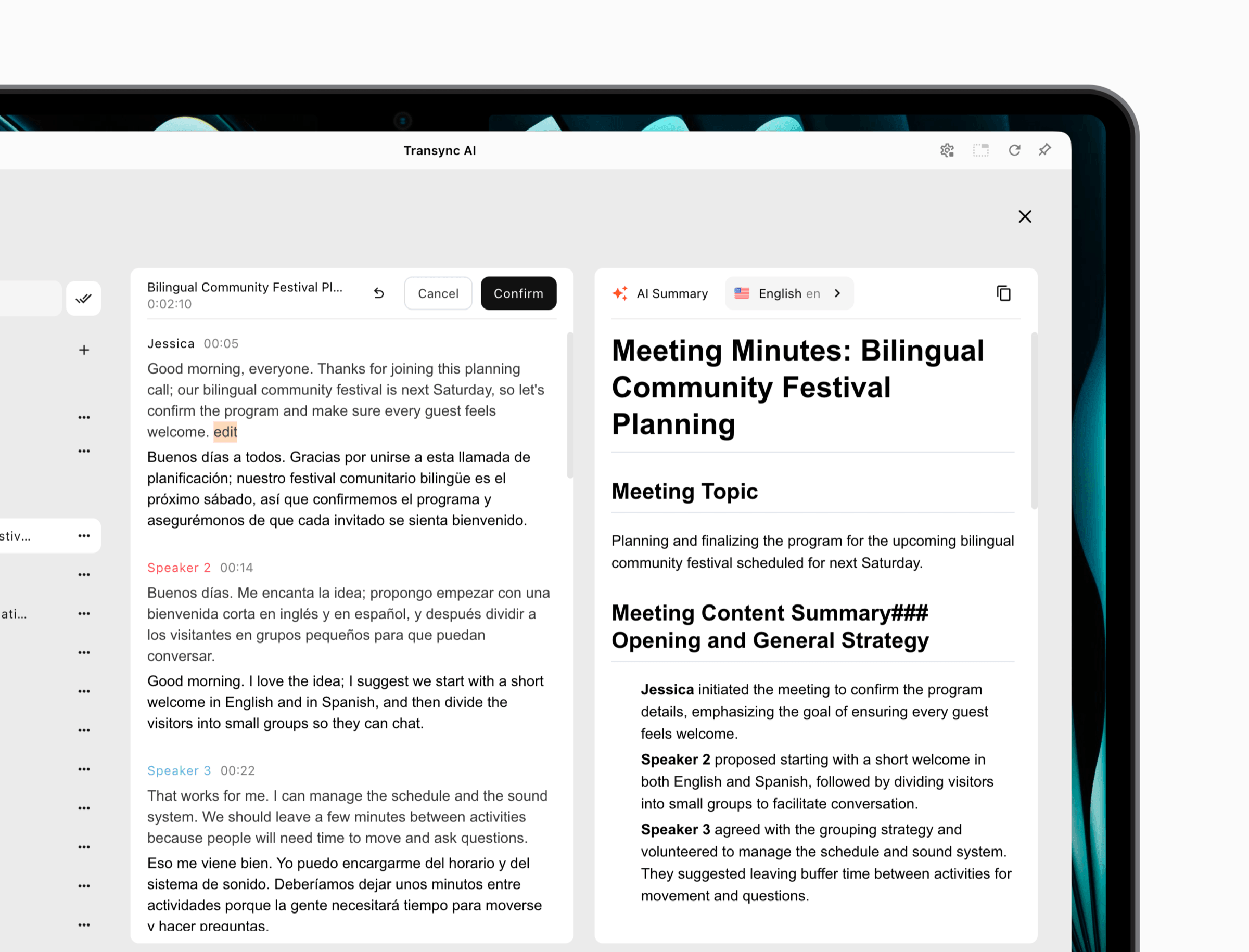 他の製品は、記録の扱い方が異なります。. ディープL トランスクリプトのダウンロードプランに依存する一方、個人 Google翻訳 この会話形式の機能は、完全な会議記録ワークフローとして設計されているわけではありません。参加者が永続的な議事録、要約、または記録を一切必要としないかを、セッション開始前に決定してください。.
この最終ステップで完了します ライブ翻訳の使い方翻訳は適切に削除されるか、次のアクションをサポートする管理された記録となるべきである。.
5分でわかるトラブルシューティングマップ
アプリはあなたの声は聞き取りますが、遠隔地の参加者の声は聞き取りません。
翻訳者はマイクのみを使用している可能性があります。サポートされているコンピューターオーディオまたはタブオーディオのパスを有効にしてから、ソーステキストを見ながら遠隔地の人に話してもらってください。.
字幕は正確だが、翻訳された音声がない
対象方向の音声再生が有効になっていること、正しい音声が選択されていること、デバイスの音量が聞こえること、そして必要に応じて会議で共有コンピューター音声または仮想マイク出力が受信されることを確認してください。.
翻訳が繰り返される
マイクが翻訳された音声を拾い、それを翻訳機に送り返している可能性があります。ヘッドホンを使用するか、スピーカーの音量を下げるか、マイクの位置を変えるか、あるいは一方向のみに放送するように設定してください。.
名前や番号は変わり続ける
開始前に名前と専門用語を明記し、周囲の雑音を減らし、数字はまとめて発音し、重要な詳細は繰り返してください。価格、日付、薬の名前、法律用語、安全上の指示は、必ず適切な専門的手続きを通して確認してください。.
観客は参加したが、間違った言語が表示されている
ホストが必要な対象言語を有効にしていることを確認してください。参加者に言語セレクターを開くように依頼してください。言語が利用できない場合は、製品と現在のアプリの動作によっては、ホストがタスクを再起動または再構成する必要がある場合があります。.
誰かが知っているときはいつでもこの地図を使用してください ライブ翻訳の使い方 理論上は問題ないはずなのに、実際のセッションでは依然として失敗する。問題のほとんどは、入力、設定、配信、またはエコーのいずれかに起因するものであり、翻訳だけに起因するものではない。.
プライバシーは設定の一部です
開始前に、自動翻訳が有効になっていることを参加者に伝え、音声、文字起こし、または要約が保存されるかどうかを説明してください。製品の最新のプライバシーポリシーと組織の規則を確認してください。.
プライバシーは、あらゆる責任ある説明の中に含まれる ライブ翻訳の使い方, なぜなら、同じ音声コンテンツでも、製品やモードによって処理や保持のされ方が異なる場合があるからである。.
Transync AI デフォルトでは、顧客データはAIトレーニングに使用されないと記載されています。翻訳レコードには機密性の高いビジネス情報が含まれる可能性があるため、アカウントコントロールを使用し、不要になったレコードは削除してください。 トラストセンター 最新のセキュリティ情報については、こちらをご覧ください。.
DeepL音声 ドキュメントには、顧客とのミーティングデータはトレーニングには使用されないと記載されています。 ディープL 言語モデルを用いて、会議ワークフローにおける一時的な処理とローカル保持の動作を記述する。. ワードリー そして Google翻訳 独自の処理モデルとアカウントモデルを持ち、プライバシーに関する結論をある経路から別の経路に転送しない。.
法律、医療、金融、移民、規制、または安全に関わる重要な会話においては、専門的な責任が求められる場合、資格のある人間の通訳者または校正者を利用してください。AIによるリアルタイム翻訳はアクセス性を向上させることはできますが、その責任を負わせることはできません。.
よくある質問
スマートフォンでリアルタイム翻訳を使うにはどうすればいいですか?
短時間の対面でのやり取りには、対応翻訳アプリを開き、2つの言語を選択し、「会話」または「対面」モードを選択してマイクへのアクセスを許可し、交互に話してください。重要な詳細を話し合う前に、スマートフォンをスピーカーの間に置き、音声再生をテストしてください。.
オンライン会議でリアルタイム翻訳を使うにはどうすればいいですか?
会議対応の翻訳ツールを選択し、言語ペアとモードを選択します。マイクと会議用コンピューターの音声を有効にし、元の文字起こしで両方の音声を確認します。その後、字幕または翻訳音声を設定し、参加者が参加する前に簡単なリハーサルを行います。.
ライブ翻訳は複数の言語を同時に扱うことができますか?
はい、一部の製品は多言語出力に対応しています。. Transync AI 多言語翻訳とプレゼンテーションモードのワークフローを提供し、 ワードリー イベント参加者は、主催者がサポートする言語から選択できます。利用方法、プラン、言語の提供状況は異なるため、必要な言語のみを有効にしてください。.
字幕を使うべきか、それとも翻訳音声を使うべきか?
参加者が言葉遣いを確認したり、静かに会議を視聴したり、原文と訳文を比較したりする必要がある場合は、字幕を使用してください。会話やプレゼンテーションの妨げになる場合は、翻訳音声を使用してください。重要なセッションでは、音声が主な出力であっても、字幕をバックアップとして用意しておいてください。.
ライブ翻訳はオフラインでも使えますか?
製品とモードによって異なります。. Transync AI インターネット接続が必要です。一部の翻訳機能はダウンロードした言語に対応している場合があります。ただし、オフラインで使用できる機能だからといって、ライブ音声、会議、会話のワークフローがオフライン時と同じとは限りません。旅行前に必ずデバイスとモードをテストしてください。.
最も重要なライブ翻訳テストは何ですか?
システムが正しい音声ソースを認識していることを確認してください。次に、実名、数字、否定文、訂正文をテストしてください。洗練された音声でも、音声ソースの欠落や不正確なキャプチャを補うことはできません。.
ライブ翻訳について考えるより良い方法
学ぶ ライブ翻訳の使い方 これはコミュニケーションデザインのちょっとした練習です。モデルも重要ですが、マイク、言語モード、スクリーン、ヘッドホン、会議のルール、参加者のアクセス、そして会話後の録音も同様に重要です。.
電話を2人で共有する場合は、設定はシンプルにしましょう。定期的な会議の場合は、音声と用語に関する再現可能なワークフローを構築しましょう。プレゼンテーションの場合は、参加者それぞれに個別の言語パスを用意しましょう。いずれの場合も、実際に使用する前に、実名と電話番号をテストしてください。.
ライブ翻訳を確実に活用するには、適切な音声を捉え、意味を損なわず、時間通りに配信し、人々が本当に必要とする記録だけを残すことが重要です。.
次世代の体験をお求めなら、 Transync AI リアルタイムのAI翻訳で自然な会話の流れを実現します。 無料でお試しください 今。
