

Naučte se, jak používat živý překlad v 7 krocích pro konverzace, schůzky a prezentace s jasnějším zvukem, titulky, přehráváním hlasu a nahrávkami.
Vědomí jak používat živý překlad Nejde ani tak o nalezení tlačítka, jako spíše o vybudování čisté cesty od řečníka k posluchači. Správné nastavení se mění v závislosti na místnosti: dva lidé sdílející telefon, kolegové na online schůzce a publikum sledující prezentaci, všichni potřebují různé vstupy a výstupy.
Zde je nejkratší užitečná verze. Vyberte typ konverzace, vyberte jazyky, připojte zvuk, který skutečně obsahuje řeč, rozhodněte se, zda si lidé výsledek přečtou nebo poslechnou, a spusťte 90sekundovou zkoušku. Pokud se při zkoušce zaznamenají jména, čísla a oprava, je mnohem pravděpodobnější, že skutečná relace bude fungovat.
Než začnete: Představte si okamžik naslouchání
Představte si osobu, která potřebuje překlad. Kde je a co bude dělat, zatímco někdo jiný bude mluvit?
- U pultu v kavárně se mohou dívat na telefon umístěný mezi dvěma lidmi.
- Na online schůzce si mohou číst dvojjazyčné titulky a zároveň sledovat sdílenou obrazovku.
- Během prodejního hovoru může druhý účastník potřebovat, aby byl do hovoru směrován přeložený projev.
- Na přednášce si každý posluchač může přát na svém zařízení jiný jazyk.
Tuto otázku mnoho tutoriálů přeskakuje. Učení jak používat živý překlad začíná posluchačovou zkušeností, protože ta určuje zařízení, zdroj zvuku, režim překladu a způsob podání.
Jak používat Živý překlad v 7 krocích
1. Jak používat Živý překlad pojmenováním místnosti
Začněte tím, že konverzaci přesunete do jedné ze čtyř místností.
Sdílená telefonní místnost: Dva lidé stojí vedle sebe a mohou se střídat. Obvykle stačí mobilní tlumočník konverzace.
Poslechová místnost: Jeden řečník mluví několik minut, zatímco ho druhý následuje. Používejte jednosměrný tlumočení, sluchátka nebo přeložené titulky, které nevyžadují neustálé střídání.
Zasedací místnost: Několik lidí hovoří prostřednictvím konferenčního softwaru. Tlumočník musí přijímat jak zvuk z mikrofonu, tak hlasy přicházející z počítače.
Prezentační místnost: Jeden moderátor mluví s mnoha lidmi. Publikum potřebuje odkaz, QR kód nebo podobný způsob, jak si může samostatně vybrat jazyky.
Před jakoukoli konfigurací si napište jednu větu: “Řečník bude mluvit skrz…“ _ a posluchač obdrží překlad prostřednictvím _.”Tato věta zabraňuje nejčastější chybě v nastavení – výběru atraktivního prvku, který nedokáže slyšet zdroj nebo oslovit publikum.“.
2. Jak používat živý překlad ve správné místnosti
Neexistuje žádný univerzální pracovní postup “živého překladu”. Tyto čtyři postupy řeší smysluplně odlišné úkoly.
Pro krátký osobní rozhovor, Překladač Google nabízí režimy Poslech, Konverzace, Pouze text, Vlastní nastavení a Osobní kontakt na podporovaných telefonech a tabletech. V režimu Konverzace se účastníci střídají a překlady lze přehrávat přes reproduktor telefonu nebo sluchátka. Režim Osobní kontakt rozděluje displej, aby si mohli číst oba účastníci.
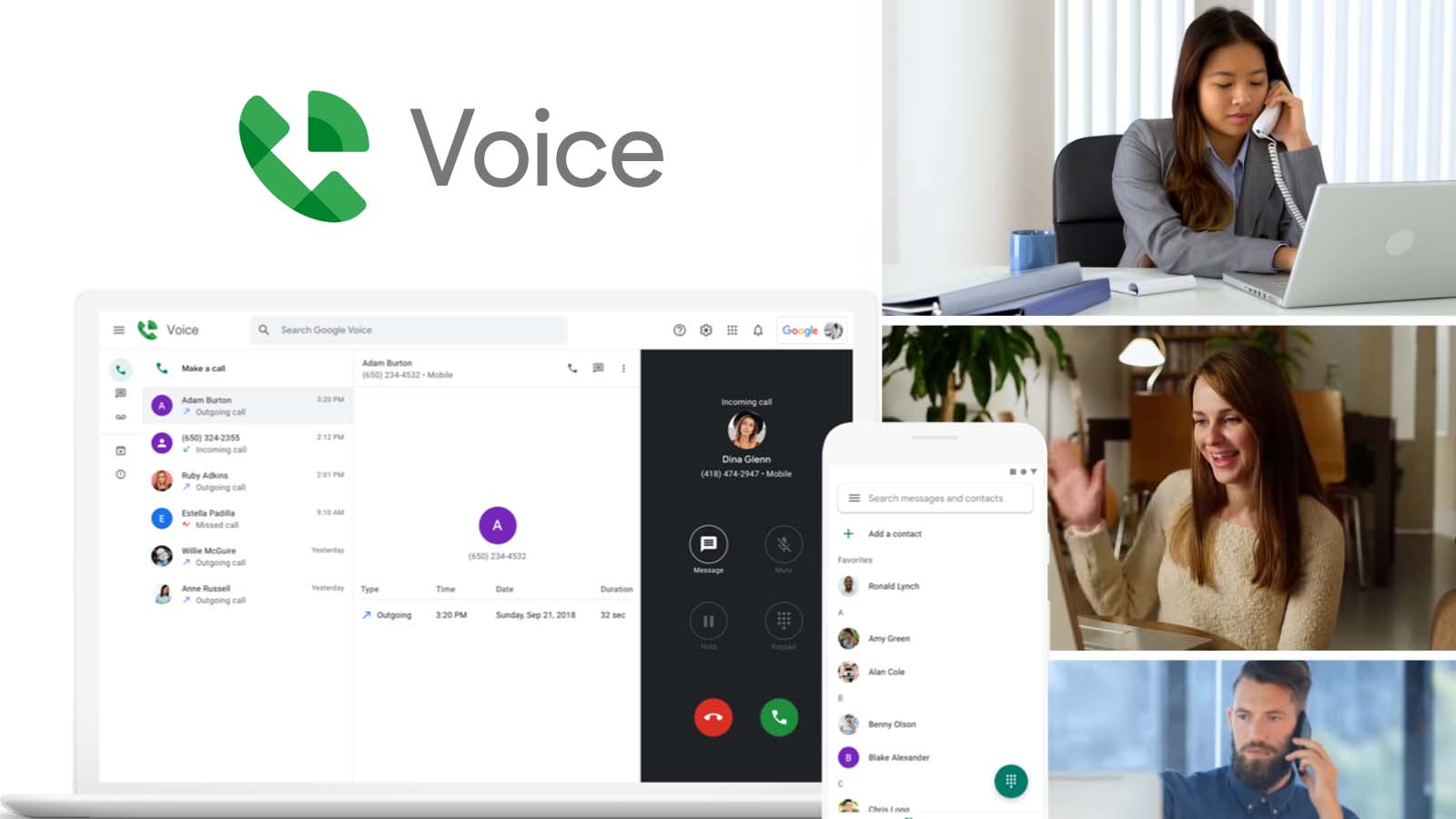
Pro opakované hovory a schůzky napříč různými platformami, Transync AI poskytuje překlad v reálném čase s dvojjazyčnými titulky a volitelným přeloženým hlasem. Může fungovat společně s Zoom, Microsoft Teams, Google Meet, obsah prohlížeče a osobní konverzace, spíše než vyžadovat, aby každá konverzace zůstala v rámci jednoho produktu pro schůzky.
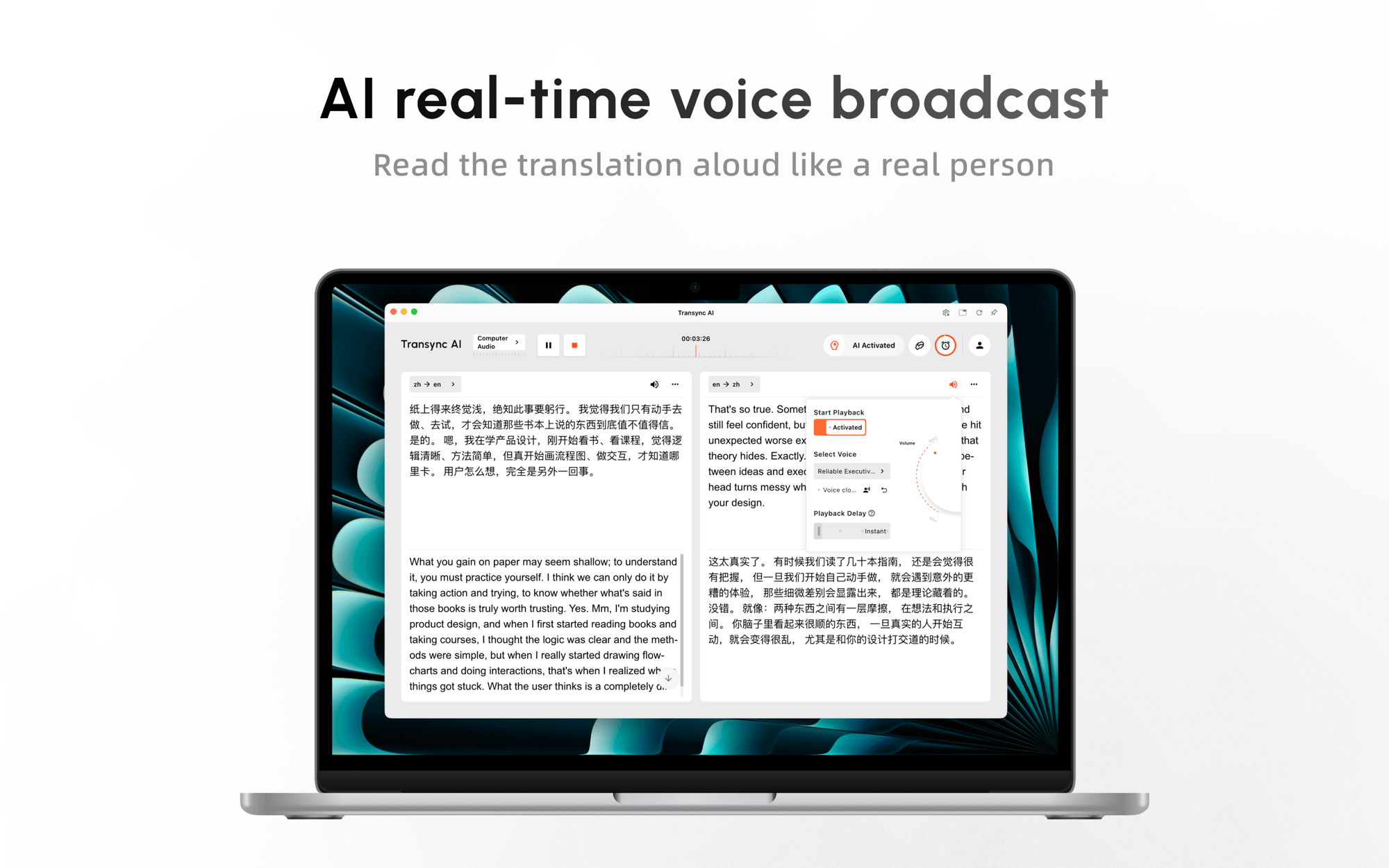
Vyzkoušejte Transync AI zdarma
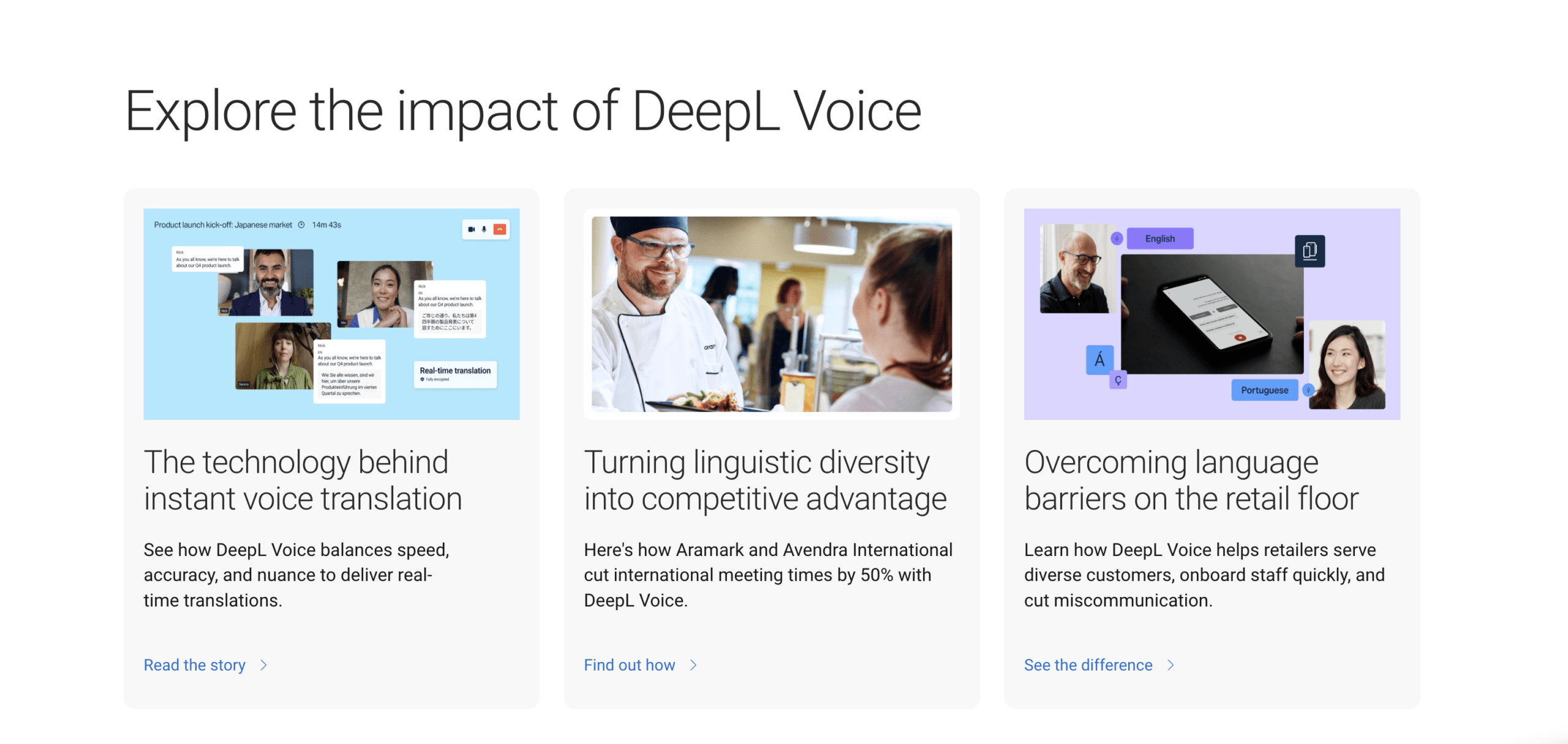
Pro organizace, které preferují vrstvu pro podnikové schůzky, Hlas DeepL Podporuje živě překládané titulky v kompatibilních pracovních postupech pro schůzky a nabízí hlasový překlad v aktuálním prostředí pro stolní počítače. Dostupné funkce závisí na tarifu Voice a pracovním postupu; překlad schůzek v prohlížeči může používat robota pro schůzky a odkaz na účastníka, zatímco desktopová aplikace nabízí jiné nastavení.
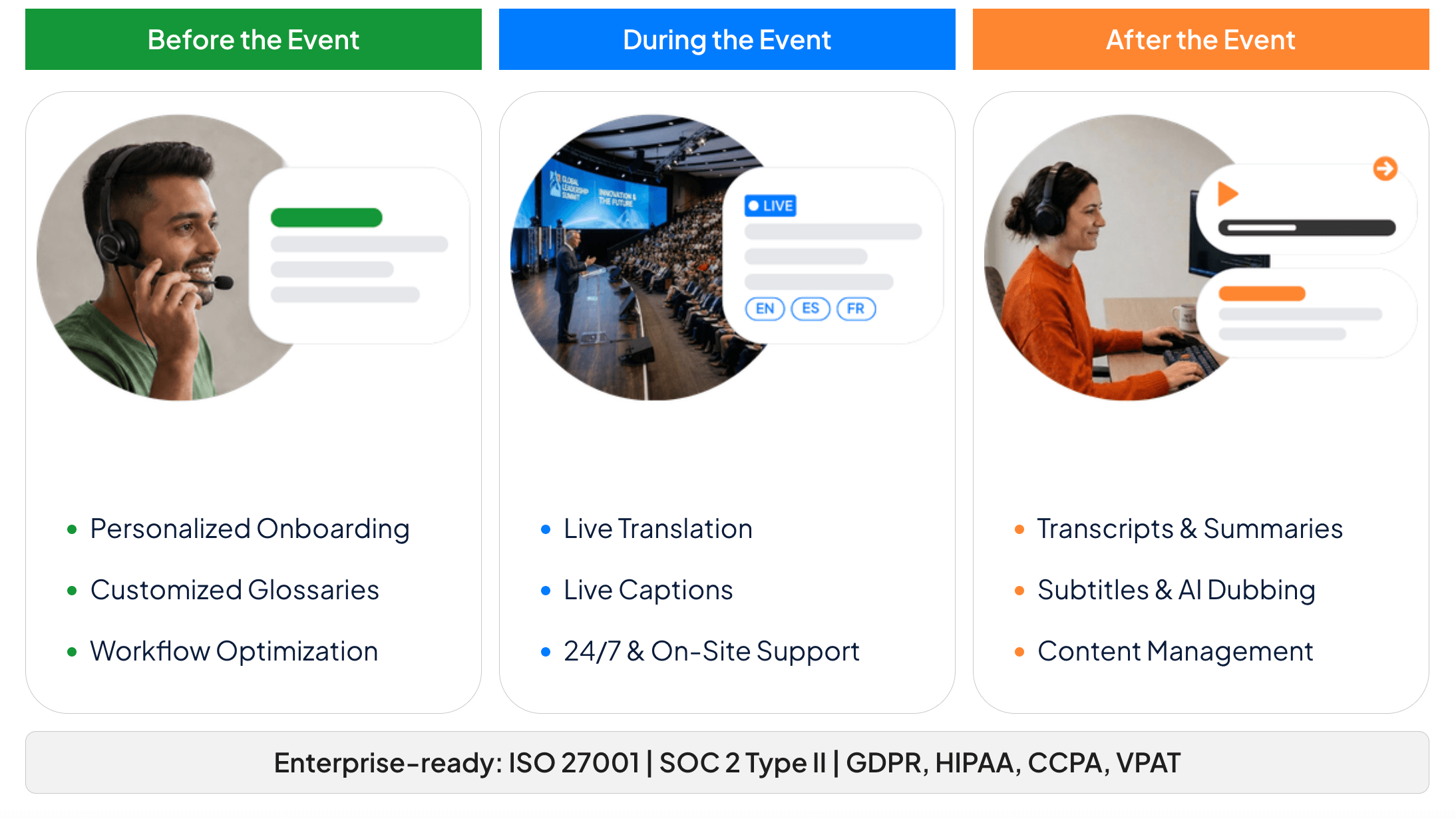
Pro konference a řízené akce, Slovní umožňuje organizátorovi vytvořit relaci a distribuovat přístup prostřednictvím URL nebo QR kódu. Účastníci se mohou připojit ze svých vlastních zařízení, vybrat si dostupný jazyk a číst titulky nebo poslouchat přeložený zvuk, aniž by si museli vytvářet účet účastníka.
Která trasa živého překladu je pro váš úkol nejvhodnější?
| Produkt | Nejlepší výchozí bod | Jak se projevuje řeč | Co posluchač dostává | Hlavní hranice nastavení |
|---|---|---|---|---|
| Překladač Google | Krátký osobní rozhovor nebo osobní naslouchání | Mikrofon telefonu nebo tabletu | Přeložený text a volitelný zvuk | Podpora zařízení, režimu a jazyků se liší |
| Transync AI | Opakující se schůzky, hovory, kurzy a prezentace | Mikrofon, podporovaný pracovní postup pro počítačový zvuk nebo zvuk v místnosti | Dvojjazyčné titulky, přeložený hlas, záznamy nebo zobrazení pro publikum | Vyžaduje internet a správné směrování zvuku |
| Hlas DeepL | Licencované pracovní postupy pro podnikové schůzky | Detekce schůzek na počítači nebo pracovní postup s robotem pro schůzky | Přeložené titulky a hlasové funkce závislé na tarifu | Požadavky na licenci, platformu, bota a administrátora se liší |
| Slovní | Konference, webináře a setkání pro účastníky | Zvukový kanál prezentujícího nebo události | Osobní titulky nebo přeložený zvuk přes odkaz/QR kód | Nastavení organizátora a spolehlivý zvuk v místě konání/síti |
Tato tabulka není žebříček. Pokud se učíte jak používat živý překlad Pro hotelový stůl může být sdílený telefon nejčistším řešením. Pokud potřebujete opakující se obchodní schůzky, terminologii, překládaný hlas a poznámky, je vhodnější pracovní postup zaměřený na schůzku. Pokud se musí stovky účastníků připojit bez účtů, může přístup k události rozhodnout o volbě ještě před testováním kvality překladu.
3. Vyberte jazyky – a tvar konverzace
Nevybírejte jazyky pouze podle názvů zemí. Ověřte si jazykovou variantu, kterou budou vaši mluvčí skutečně používat, například brazilskou nebo evropskou portugalštinu, a vyzkoušejte, zda produkt rozlišuje variantu, která je pro vaši konverzaci důležitá.
Další část jak používat živý překlad rozhoduje o tom, zda se řeč pohybuje jedním směrem, oběma směry nebo od jednoho mluvčího k několika jazykovým skupinám.
Dále vyberte režim.
- Jednosměrný překlad: Nejlepší je, když jeden člověk mluví a druhý primárně poslouchá.
- Obousměrný překlad: Nejlepší pro konverzaci, ve které obě strany odpovídají ve svém vlastním jazyce.
- Vícejazyčný překlad: Nejlepší, když se stejný zdroj musí dostat do několika cílových jazyků.
- Prezentace: Nejlepší je, když jeden hostitel distribuuje živý překlad na zařízení publika.
V Transync AI, režim by měl být vybrán před začátkem lekce. Obousměrný překlad se hodí pro schůzky s přednáškami, jednosměrný překlad zjednodušuje přednášky a poslechové úkoly a vícejazyčný překlad umožňuje překlad do několika cílových jazyků v rámci jednoho úkolu. Více jazyků může zvýšit jejich využití, proto povolte pouze jazyky, které lidé skutečně potřebují.
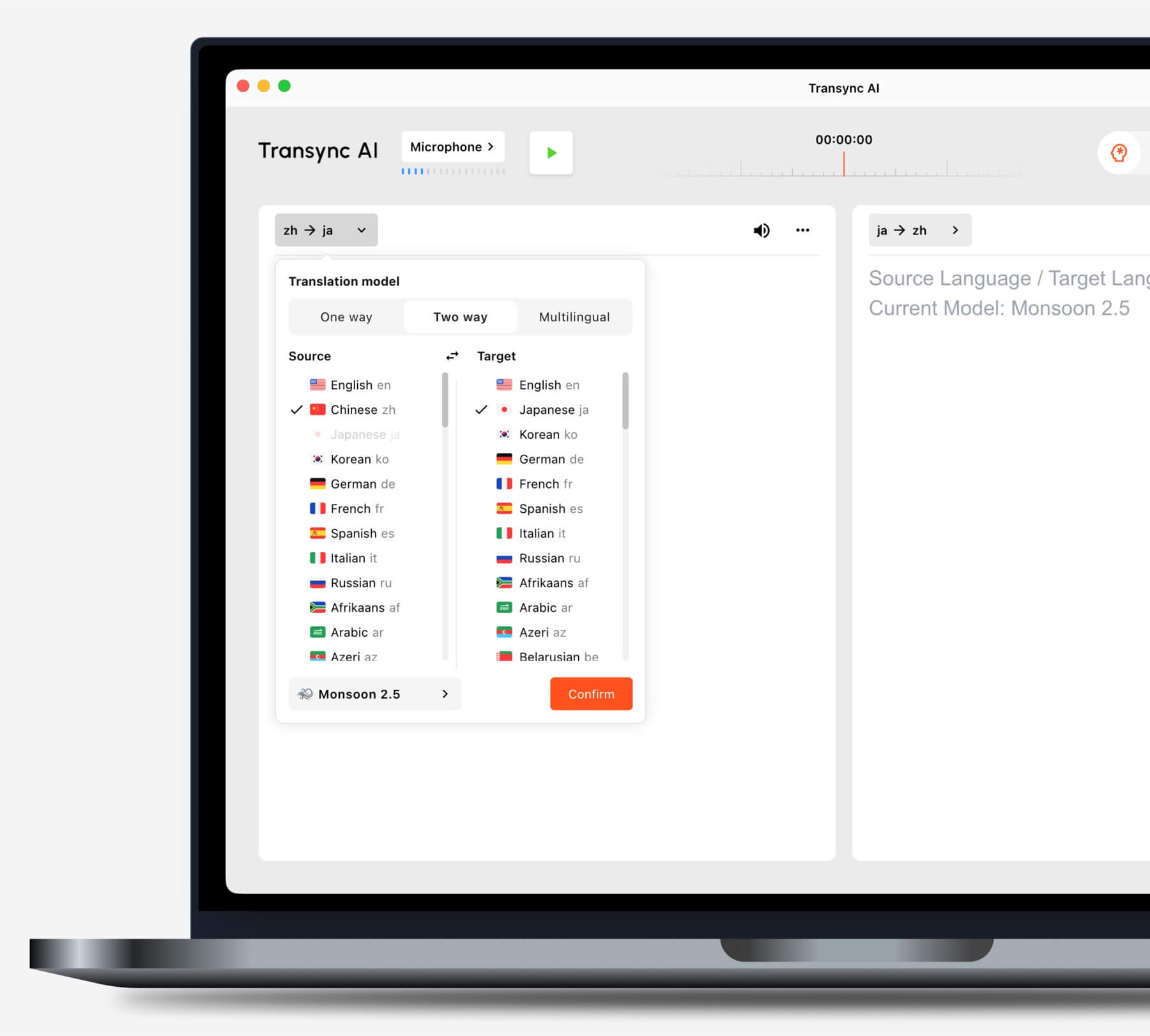
Před zahájením úkolu vyberte režim překladu, který odpovídá vašemu scénáři.
V Překladač Google, po otevření aplikace vyberte režim Živý překlad a jazykovou dvojici. Poslech je určen pro poslech překladu, Konverzace přehrává překlady, jak se lidé střídají, Pouze text odstraňuje zvuk a Osobní sezení mění způsob, jakým obě strany čtou obrazovku.
Lidé hledají jak používat živý překlad často povolují automatickou detekci bez testování. Automatická detekce je pohodlná, ale pevný zdrojový jazyk může být bezpečnější, když mluvčí zůstane v jednom jazyce a názvy nebo krátké technické fráze by mohly být zaměněny za jiný jazyk.
4. Jak používat živý překlad se správným zvukem
Živý překlad nedokáže přeložit zvuk, který nikdy nepřijme. Než začnete přemýšlet o kvalitě modelu, sledujte ukazatel vstupního signálu nebo zdrojový přepis a ověřte, zda se zobrazuje správný hlas.
Pro osobní hovor umístěte mikrofon dostatečně blízko k oběma reproduktorům, aniž byste jej umístili vedle hlasitého reproduktoru. Snižte šum televize, hudbu, překrývající se konverzace a ozvěnu. Podporujte přirozené střídání v rozhovoru místo držení telefonu přímo u úst jedné osoby.
Pro online schůzku oddělte dvě zvukové cesty:
- Zvuk mikrofonu nese váš vlastní projev.
- Počítačový zvuk přenáší vzdálené účastníky, videa a další zvuk přehrávaný přes počítač.
Ten/Ta/To pracovní postup překladu živých schůzek v Transync AI Tyto zdroje můžete používat v podporovaných nastaveních. Nakonfigurujte oba před připojením k důležitému hovoru a poté požádejte vzdáleného účastníka, aby promluvil, zatímco ověřujete, zda se v přepisu zdroje objevují i jeho slova – nejen váš mikrofon.

Kompatibilní s hlavními platformami pro online schůzky pro bezproblémový překlad v reálném čase
Pokud ostatní účastníci musí slyšet přeloženou řeč, pouhé zapnutí přehrávání na vašem počítači ji nemusí do schůzky odeslat. V závislosti na nastavení použijte ovládací prvky sdílení zvuku z počítače na platformě pro schůzky nebo pracovní postup s virtuálním mikrofonem. Sluchátka sice redukují ozvěnu, ale mohou také změnit směrování přehrávání.
Tato zvuková kontrola je praktickým srdcem jak používat živý překlad. Pokud je zdrojový přepis chybný, změna přeloženého hlasu nebo cílového jazyka vstup neopraví.
5. Dejte překladateli slova, která nelze uhodnout
Názvy, kódy produktů, zkratky, názvy míst a odborné termíny jsou neúměrně drahé, pokud jsou špatně přeloženy. Připravte si je před konverzací.
Spolehlivý přístup k jak používat živý překlad tuto přípravu považuje za součást nastavení, nikoli za pokus o korekci v polovině hovoru.
V Transync AI, Klíčová slova a kontext Umožněte uživatelům zadat krátké termíny a popis pozadí schůzky. Klíčové slovo lze také spárovat s preferovaným překladem pomocí znaménka rovnosti. Klíčová slova udržujte krátká; delší vysvětlení uveďte v poli kontextu.
Například:
Klíčová slova: Oriona X4, Jun Chen, SLA, fotovoltaický střídač Preferovaný termín: hrubá marže = margen bruto Kontext: Čtvrtletní přehled dodavatelů pro společnost zabývající se solárními zařízeními.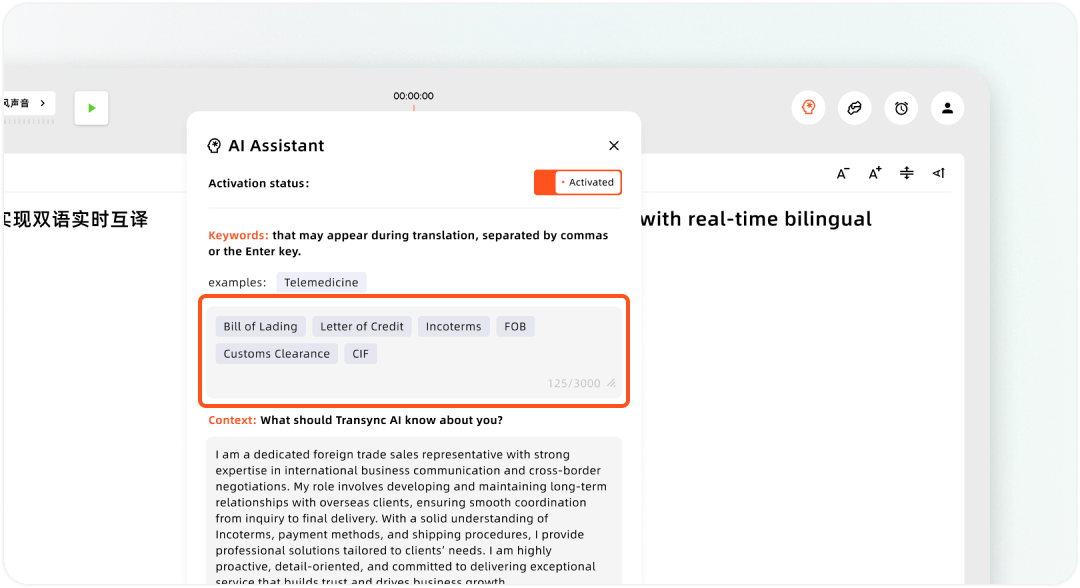
Nastavení vlastních klíčových slov a kontextu uživatele v nástroji Transync AI Assistant
Jiné produkty mohou tuto funkci nazývat glosář, mluvené termíny, vlastní slovní zásoba nebo správa terminologie. Hlas DeepL nabízí ve svém produktu pro schůzky glosáře a mluvené termíny závislé na plánu. Ať už je označení jakékoli, používejte v každém produktu stejný testovací seznam, aby bylo srovnání spravedlivé.
Pokud živý překladatel neovládá terminologii, zavádějte neobvyklá jména pomalu, uvádějte je do chatu na schůzce nebo je ústně potvrzujte. jak používat živý překlad zahrnuje znalost toho, kdy systém potřebuje pomoc, spíše než očekávání, že odvodí každé vlastní jméno z jedné slabiky.
6. Jak používat živý překlad jako text, hlas nebo zobrazení pro publikum
Přeložená věta může být zobrazena ve čtyřech užitečných formách: text na hlavní obrazovce, plovoucí titulky, mluvený zvuk nebo osobní zobrazení pro publikum. Vyberte jeden primární výstup a jeden záložní.
Umístěte text vedle práce
Titulky v režimu obraz v obraze v Transync AI může udržovat přeložený text viditelný nad podporovanými desktopovými aplikacemi nebo v plovoucím okně mobilního zařízení. To je užitečné, když posluchač musí sledovat snímky, tabulku nebo jiné okno schůzky, aniž by se musel neustále přepínat zpět k překladači.

Plovoucí titulky v reálném čase na stolních počítačích a mobilních zařízeních
Při kontrole rozpoznávání použijte pouze originální zobrazení, pro přehlednější čtení použijte zobrazení pouze překlad nebo smíšené zobrazení, když někdo potřebuje porovnat oba texty. Před sdílením obrazovky zvětšete velikost písma; nečekejte na začátek schůzky.
Ať si lidé poslechnou výsledek
An Hlasový překladač s umělou inteligencí může přečíst přeložený výstup nahlas v Transync AI. Začněte s jednosekundovým zpožděním přehrávání, abyste dosáhli rovnováhy mezi rychlostí a celistvostí frází. Pokud je důležitější rychlost odezvy, použijte okamžité přehrávání, nebo delší zpoždění, pokud mluvčí často dělají pauzy uprostřed vět.
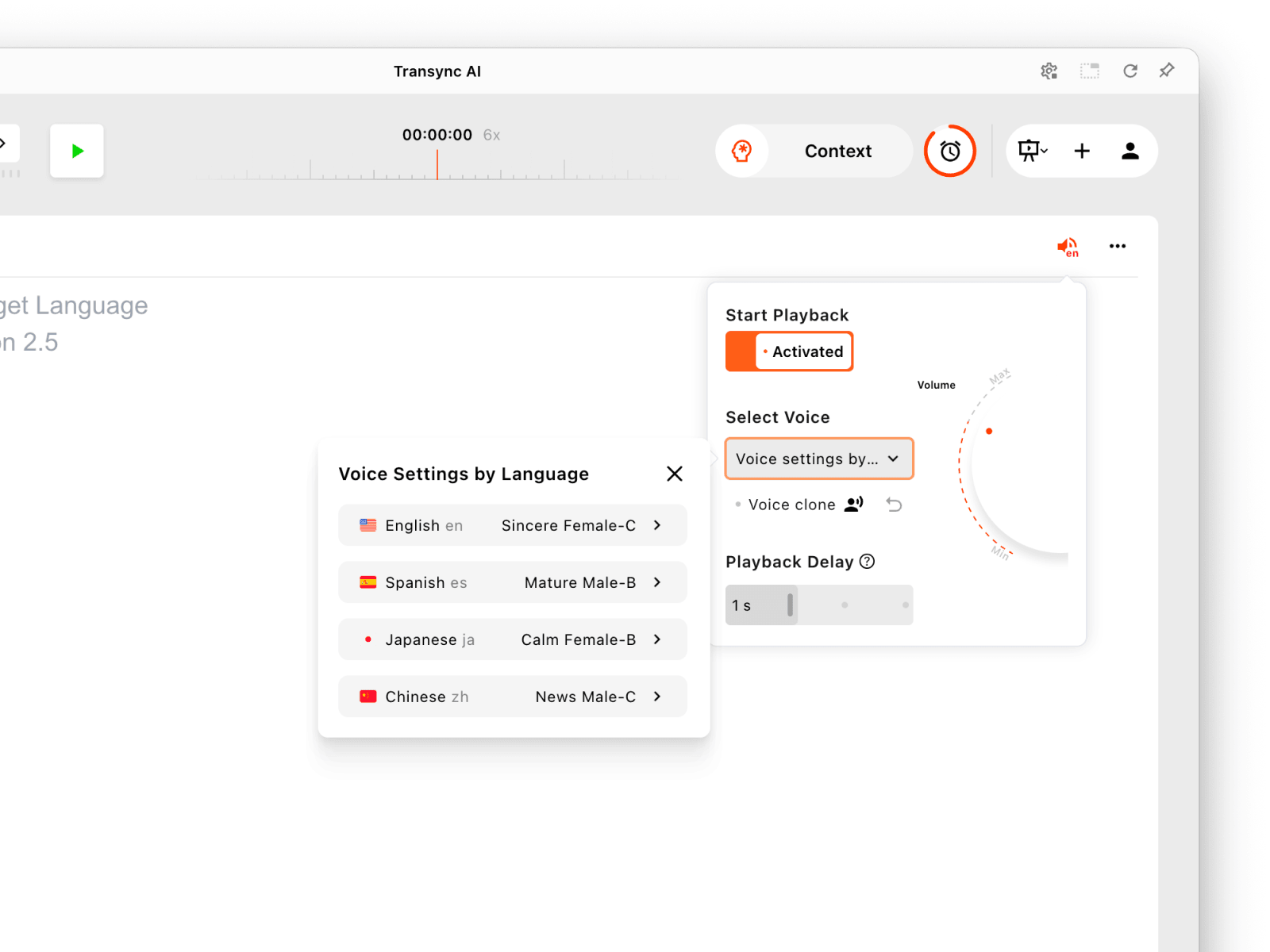
Nakonfigurujte přehrávání hlasu samostatně pro každý jazyk prezentace.
Pokud obě strany vysílají přeloženou řeč najednou, může se objevit opakovaný zvuk nebo ozvěna. Nejprve povolte přehrávání na jedné straně, v případě potřeby použijte sluchátka a druhý směr přidejte až po otestování.
Dejte publiku jeho vlastní jazykový pohled
V beta verzi Prezentační režim, a Transync AI Hostitel může povolit až 10 cílových jazyků. Členové publika se připojují prostřednictvím odkazu, QR kódu nebo ID místnosti a vybírají z povolených jazyků na svých vlastních zařízeních. Mohou číst živý text a používat hlasové přehrávání, pokud je k dispozici, ale nemohou odesílat hlasové vstupy do úlohy hostitele. V aktuálním procesu připojování se může zobrazit krok přihlášení.
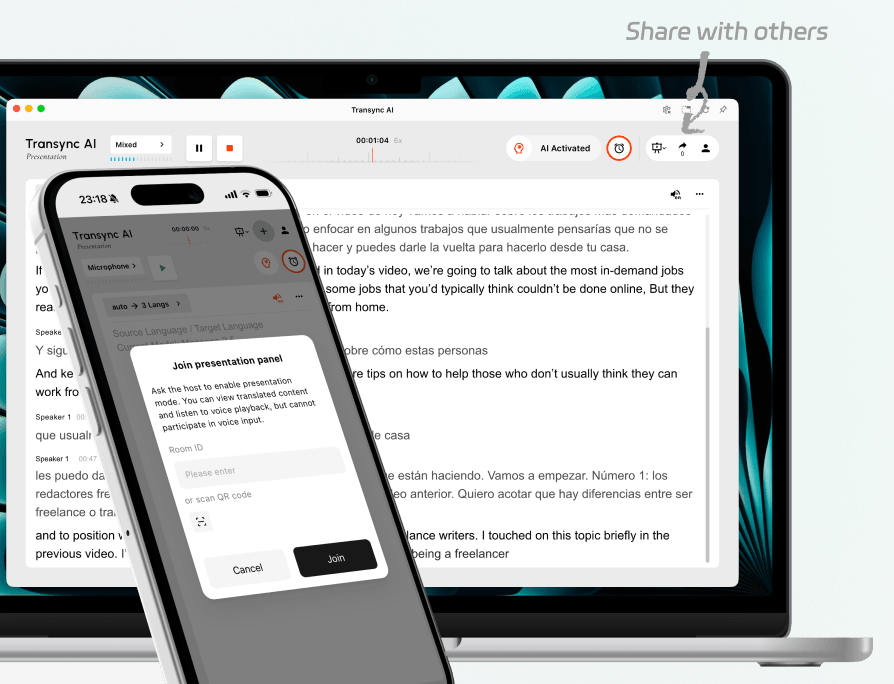
Pozvěte účastníky z publika i vzdálené posluchače na stejnou živou prezentaci.
Slovní Také používá odkazy pro účastníky nebo QR kódy pro doručování událostí. Aktuální veřejné informace uvádějí, že účastníci se mohou připojit prostřednictvím moderního prohlížeče bez nutnosti stahování aplikace nebo vytváření účtu. Tento rozdíl může být důležitý, když se musí rychle připojit velké publikum.
Nejlepší odpověď na jak používat živý překlad někdy není lepším překladovým modelem. Je to metoda doručení, která umístí výsledek tam, kde ho posluchač může skutečně použít.
7. Spusťte 90sekundovou zkoušku a pak si uložte to, na čem záleží
Netestujte skriptem typu “Ahoj, jak se máš?”. Použijte skript, který odhalí skutečné body selhání:
Tato zkouška se změní jak používat živý překlad ze seznamu nastavení do pozorovatelného komunikačního testu.
Dobré ráno. Jsem Jun Chen ze společnosti Oriona Systems. Upravená objednávka je 1 450 kusů – nikoli 1 540 – a dodání se přesouvá z úterý na čtvrtek 24. září. Prosím, udržujte hrubou marži nad 18,51 TP4T. Omlouvám se za opravu: hovor začíná v 9:30, nikoli v 9:13.
Přečtěte si to normálním tempem. Pak ohodnoťte pět věcí:
| Kontrola | Podmínka pro úspěšné provedení |
|---|---|
| Zachycení | Zdrojový přepis slyší zamýšleného mluvčího a nepřehrává se v opakování. |
| Fakta | Jména, data, čísla, zápory a opravy zůstávají přesné |
| Význam | Překlad zachovává, kdo co musí udělat a do kdy |
| Načasování | Posluchač obdrží výsledek dostatečně brzy, aby mohl reagovat přirozeně |
| Dodání | Správná osoba si může přečíst nebo poslechnout překlad bez pomoci |
Pokud se přepis zdrojového textu nezdaří, opravte mikrofon, zdroj zvuku z počítače, vzdálenost, šum nebo překrývání mluvčích. Pokud je rozpoznání dobré, ale jméno selhává, doplňte terminologii nebo zpomalte úvod. Pokud jsou fráze příliš fragmentované, upravte zpoždění přehrávání a požádejte mluvčí, aby dokončili myšlenku, než je přerušíte.
Na konci Transync AI úkol, ukončete relaci a zkontrolujte přepis. Poznámky ze schůzky s umělou inteligencí může uspořádat diskusi do užitečnějšího záznamu pro následnou práci. V režimu prezentace hostitel řídí, zda je přepis sdílen s členy publika.
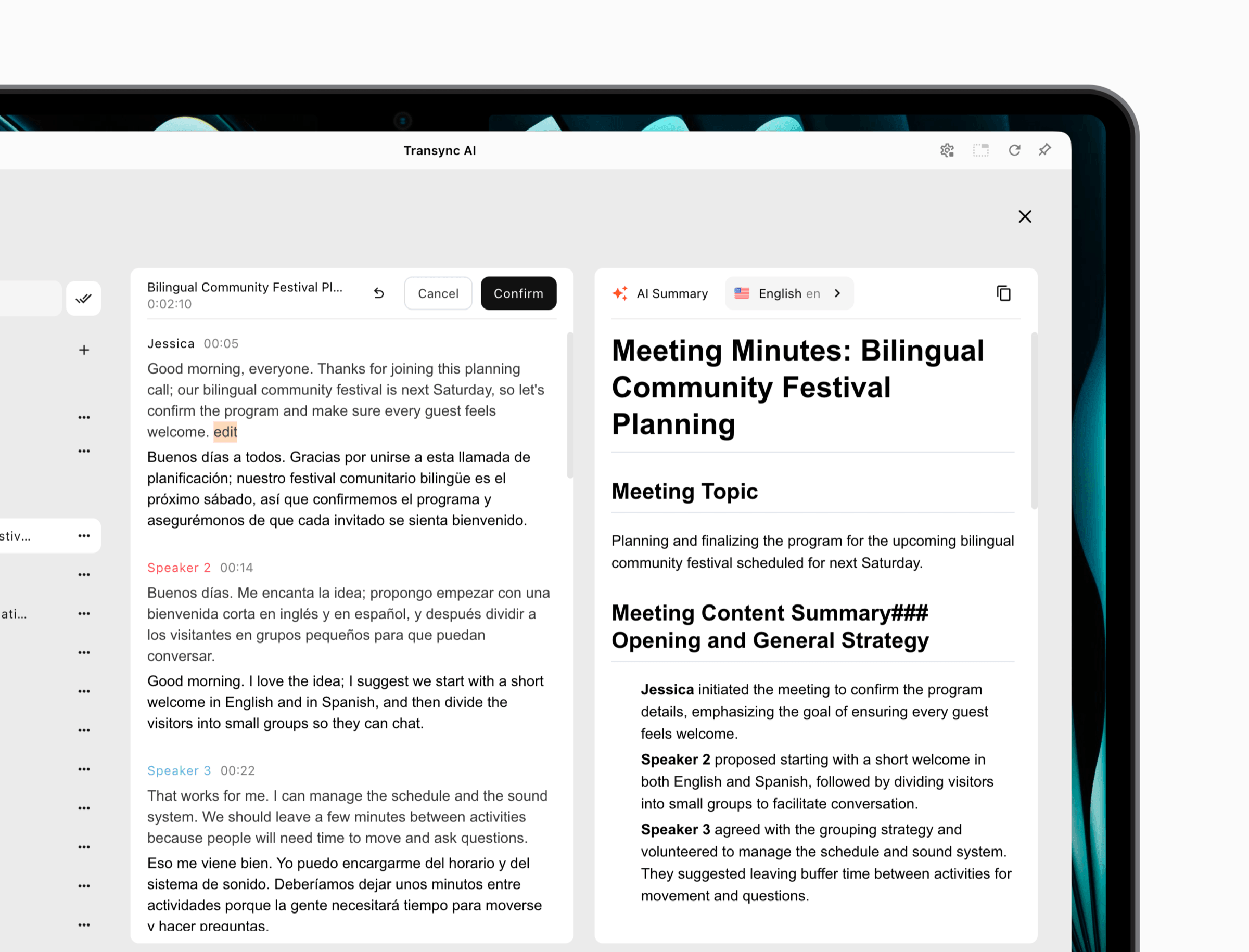 Jiné produkty zpracovávají záznamy odlišně. DeepL stahování přepisů závisí na tarifu, zatímco osobní Překladač Google Konverzace není navržena jako kompletní pracovní postup pro záznam schůzky. Před začátkem schůze se rozhodněte, zda účastníci potřebují trvalý přepis, shrnutí, nebo zda si záznam neuchovávají vůbec.
Tento poslední krok je dokončen jak používat živý překladPřeklad by měl buď odpovídajícím způsobem zmizet, nebo se stát řízeným záznamem, který podporuje další akci.
Mapa pro řešení problémů za pět minut
Aplikace slyší vás, ale ne vzdáleného účastníka
Překladatel pravděpodobně používá pouze mikrofon. Povolte podporovanou cestu zvuku z počítače nebo z karty a poté požádejte vzdálenou osobu, aby mluvila, zatímco vy sledujete zdrojový text.
Titulky jsou přesné, ale chybí přeložený hlas
Ověřte, že je pro cílový směr povoleno přehrávání hlasu, je vybrán správný hlas, je slyšitelná hlasitost zařízení a že účastníky schůzky je v případě potřeby slyšet zvuk ze sdíleného počítače nebo výstup virtuálního mikrofonu.
Překlad se opakuje
Mikrofon možná slyší přeložený zvuk a přenáší ho zpět do překladače. Použijte sluchátka, snižte hlasitost reproduktoru, posuňte mikrofon nebo vysílajte pouze jedním směrem.
Jména a čísla se stále mění
Před zahájením doplňte jména a terminologii, snižte hluk v pozadí, říkejte čísla v celých skupinách a opakujte důležité detaily. Vždy si ověřte ceny, data, názvy léků, právní termíny a bezpečnostní pokyny prostřednictvím vhodného profesionálního postupu.
Publikum se připojilo, ale vidí špatný jazyk
Ověřte, zda hostitel povolil požadovaný cílový jazyk. Požádejte účastníka, aby otevřel výběr jazyka. Pokud jazyk není k dispozici, může být nutné, aby hostitel úlohu restartoval nebo překonfiguroval v závislosti na produktu a aktuálním chování aplikace.
Použijte tuto mapu, kdykoli někdo ví jak používat živý překlad teoreticky, ale skutečná relace stále selhává. Většina problémů se týká vstupu, konfigurace, doručení nebo ozvěny – nikoli pouze překladu.
Soukromí je součástí nastavení
Než začnete, informujte účastníky, že je aktivní automatický překlad, a vysvětlete, zda budou uchovávány zvukové záznamy, přepisy nebo shrnutí. Zkontrolujte aktuální dokumentaci o ochraně osobních údajů daného produktu a pravidla vaší organizace.
Soukromí patří do jakéhokoli zodpovědného vysvětlení jak používat živý překlad, protože stejný mluvený obsah může být zpracováván a uchováván odlišně v různých produktech a režimech.
Transync AI uvádí, že zákaznická data se ve výchozím nastavení nepoužívají pro školení umělé inteligence. Záznamy o překladu mohou obsahovat citlivé obchodní informace, proto používejte ovládací prvky účtů a záznamy mažte, když již nejsou potřeba. Zkontrolujte Centrum důvěryhodnosti pro aktuální bezpečnostní informace.
Hlas DeepL dokumentace uvádí, že data ze schůzek se zákazníky nepoužívají k školení DeepL jazykové modely a popisuje dočasné zpracování a chování lokálního uchovávání pro jeho pracovní postup schůzek. Slovní a Překladač Google mají své vlastní modely zpracování a účtů; nepřevádějte závěr o ochraně osobních údajů z jedné cesty do druhé.
V případě právních, lékařských, finančních, imigračních, regulačních nebo bezpečnostně kritických rozhovorů využijte kvalifikovaného lidského tlumočníka nebo recenzenta, pokud je vyžadována profesionální odpovědnost. Živý překlad s využitím umělé inteligence může zlepšit přístup, ale nemůže tuto odpovědnost převzít.
Často kladené otázky
Jak používat živý překlad v telefonu?
Pro krátkou osobní výměnu názorů otevřete podporovanou překladatelskou aplikaci, vyberte dva jazyky, zvolte režim Konverzace nebo Osobní rozhovor, povolte přístup k mikrofonu a střídejte se v mluvení. Před diskusí o důležitých detailech mějte telefon mezi reproduktory a otestujte přehrávání zvuku.
Jak používat živý překlad na online schůzce?
Vyberte si tlumočníka s podporou schůzky, zvolte jazykový pár a režim, zapněte mikrofon a počítačový zvuk schůzky a ověřte obě strany ve zdrojovém přepisu. Poté nakonfigurujte titulky nebo přeložený hlas a před připojením účastníků spusťte krátkou zkoušku.
Může Live Translate fungovat s několika jazyky najednou?
Ano, některé produkty podporují vícejazyčný výstup. Transync AI nabízí pracovní postupy pro vícejazyčný překlad a prezentaci a zároveň Slovní Umožňuje účastníkům akce vybrat si z jazyků podporovaných organizátorem. Použití, plán a dostupnost jazyků se liší, proto povolte pouze požadované jazyky.
Mám použít titulky nebo přeložený hlas?
Používejte titulky, pokud si účastníci potřebují ověřit formulace, tiše sledovat schůzku nebo porovnat zdrojový a cílový text. Používejte přeložený hlas, pokud by čtení odvádělo pozornost od konverzace nebo prezentace. U důležitých setkání mějte titulky k dispozici jako zálohu, i když je hlas primárním výstupem.
Funguje živý překlad offline?
Záleží na produktu a režimu. Transync AI vyžaduje online připojení. Některé funkce pro překlad pro spotřebitele mohou podporovat stažené jazyky, ale nepředpokládejte, že funkce popsaná jako offline zahrnuje stejný pracovní postup pro živý zvuk, schůzku nebo konverzaci. Před cestou si otestujte přesné zařízení a režim.
Jaký je nejdůležitější test živého překladu?
Ověřte, zda systém slyší správný zdroj zvuku. Poté otestujte skutečné jméno, číslo, záporné prohlášení a opravu. Uhlazený hlas nemůže kompenzovat chybějící nebo nesprávně zachycenou zdrojovou řeč.
Lepší způsob, jak přemýšlet o živém překladu
Učení jak používat živý překlad je malé cvičení v komunikačním designu. Model je důležitý, ale stejně tak i mikrofon, jazykový režim, obrazovka, sluchátka, zásady pro schůzky, přístup publika a nahrávání po konverzaci.
Pro dva lidi, kteří sdílejí telefon, zachovejte jednoduché nastavení. Pro opakované schůzky vytvořte opakovatelný pracovní postup pro práci se zvukem a terminologií. Pro prezentace nabídněte každému posluchači osobní jazykovou cestu. V každém případě si ověřte skutečná jména a čísla, než budou mít nějaké důsledky.
Takto spolehlivě používat živý překlad: zachytit správný hlas, zachovat význam, předat ho včas a zanechat po sobě pouze ten záznam, který lidé skutečně potřebují.
Pokud chcete zážitek nové generace, Transync AI Jste průkopníkem v oblasti překladů v reálném čase s využitím umělé inteligence, které zajišťují přirozený tok konverzací. Můžete vyzkoušejte to zdarma teď.
