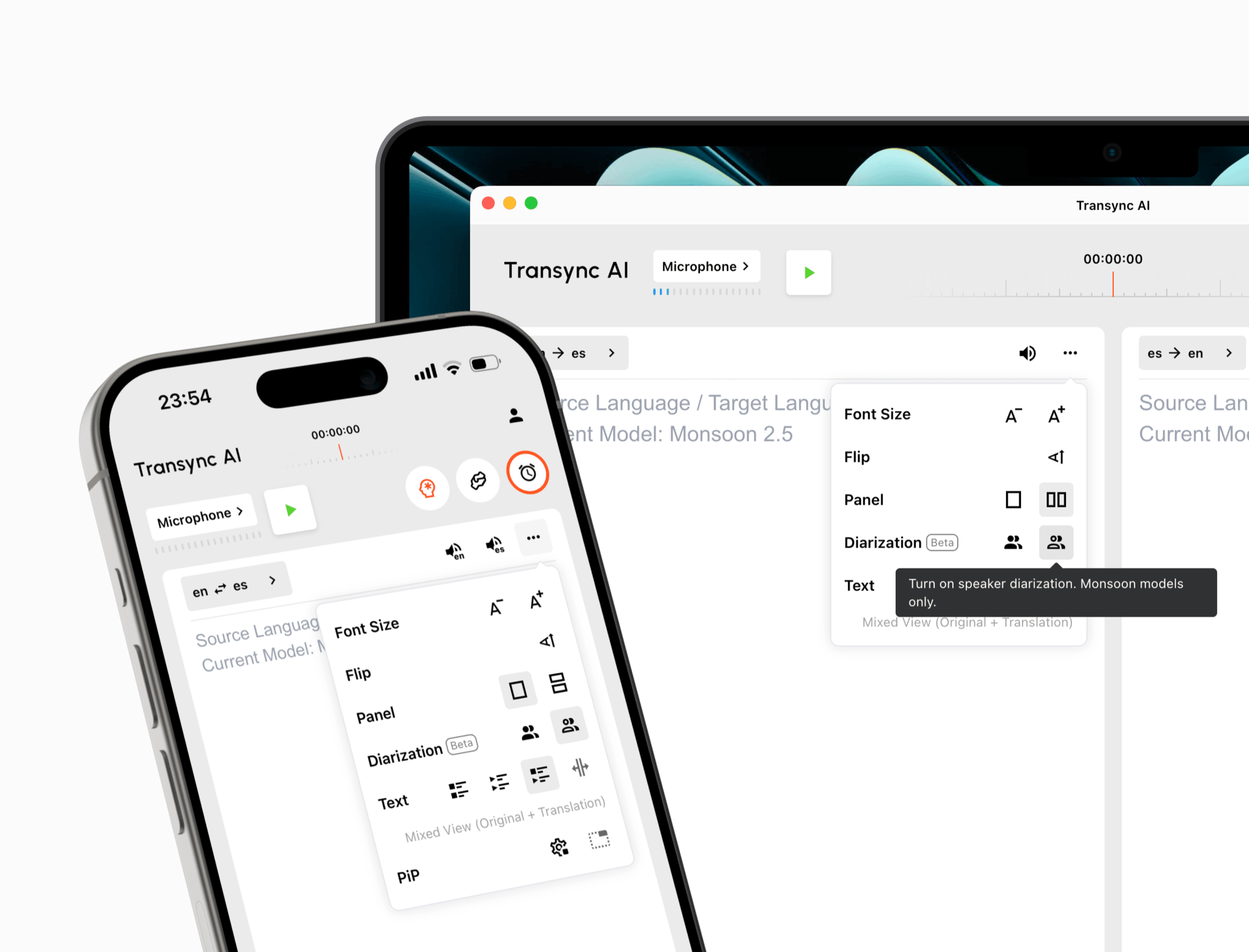
Compare Transync AI and Sonix across live meetings, captions, translated voice, transcription, media translation, AI analysis, APIs, and pricing.
The phrase “meeting translation” can describe two different timelines. One begins while people are still speaking: participants need subtitles or translated audio quickly enough to respond. The other begins after speech has been captured: a team needs a clean transcript, translated text, subtitles, analysis, and exports.
That timeline explains the difference between Transync AI and Sonix. Transync AI is built around multilingual communication during a meeting. Sonix is primarily a transcription and content-processing platform, with enterprise real-time transcription and live captions currently offered through an early-access process.
This review follows Transync AI and Sonix from before the meeting to the live conversation and then into post-meeting work. Six workflow boundaries reveal which product is the more appropriate starting point.
The Short Answer on Transync AI and Sonix
Choose Transync AI when meeting participants must understand and answer one another in real time. It combines bilingual subtitles, translated voice playback, language distinction, terminology context, floating captions, virtual-microphone workflows, and AI meeting notes in a self-serve product.
Choose Sonix when the valuable output is a searchable, editable, and exportable record. It is stronger for uploading audio or video, refining speaker-labeled transcripts, translating completed transcripts, generating subtitles, analyzing content, collaborating on files, and connecting a transcription pipeline through integrations or APIs.
The core Transync AI and Sonix decision is therefore “communication now” or “content afterward.” Real-time captions create some overlap, but translated live conversation and post-production transcription remain different jobs.
Workflow Snapshot
| Workflow area | Transync AI | Sonix |
|---|---|---|
| Primary job | Help people communicate across languages during meetings and conversations | Turn live or recorded speech into editable, searchable, translatable content |
| Main input | Live microphone and computer audio | Uploaded audio/video; enterprise real-time audio stream in early access |
| Live output | Bilingual subtitles and translated AI voice | Live transcription and captions in enterprise early access |
| Two-way interaction | One-way, two-way, and multilingual translation modes | Not positioned as a self-serve two-way speech-to-speech meeting interpreter |
| Translation timing | During the live conversation | Primarily after transcription; selected real-time caption translation use cases are described for enterprise access |
| Post-meeting output | Transcript and AI meeting notes | Transcript editor, translation, summaries, subtitles, media player, exports, search, and AI analysis |
| Meeting access | Standalone app across web, desktop, and mobile | Meeting integrations and streaming API for real-time enterprise workflows; recording imports for established workflows |
| Individual pricing | $8.99/month for 10 hours of live translation | 10/hour pay as you go or subscriptions from 25/month for transcription and translation credits |
| Real-time availability | Self-serve product | Enterprise early access with custom discussion |
| Best fit | Recurring multilingual meetings, calls, classes, and in-person conversations | Transcription, accessibility, research, media, archives, subtitles, and content analysis |
Pricing, availability, and product information checked in August 2026. Confirm current plan terms, credit accounting, real-time access, and supported languages before purchasing.
Use this Transync AI and Sonix snapshot to identify which stage of the meeting creates the most value before comparing feature counts.
Difference 1: What Must Happen Before the Meeting Starts?
The first workflow boundary between Transync AI and Sonix appears before anyone speaks.
For Transync AI, preparation means choosing the required translation mode and language setup, checking microphone or computer-audio routing, and adding vocabulary that the conversation is likely to contain. The AI Assistant Keywords and Context feature lets users provide company names, technical terms, abbreviations, and meeting background before live translation begins.
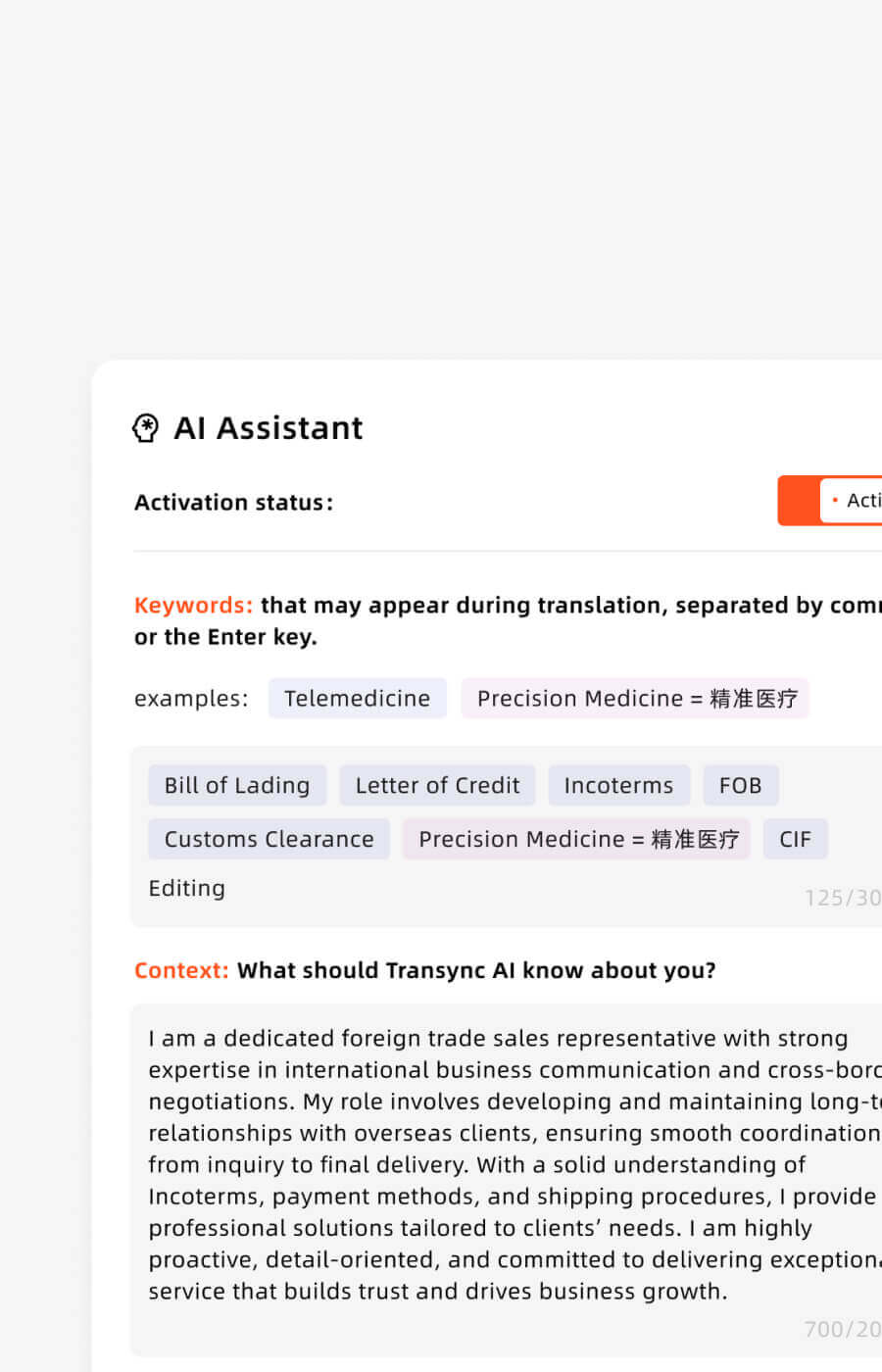
Use the AI Assistant in Transync AI to add custom keywords and contextual information for more accurate real-time translation.
This preparation is participant-oriented. The goal is to improve comprehension and response during the call without creating a separate media-processing project.
For Sonix, preparation depends on whether the workflow is recorded or real time. The established self-serve path usually begins with a recording or an integration that imports a completed meeting file. Teams choose the transcription language, storage location, workspace, dictionary, permissions, and downstream export or analysis needs.
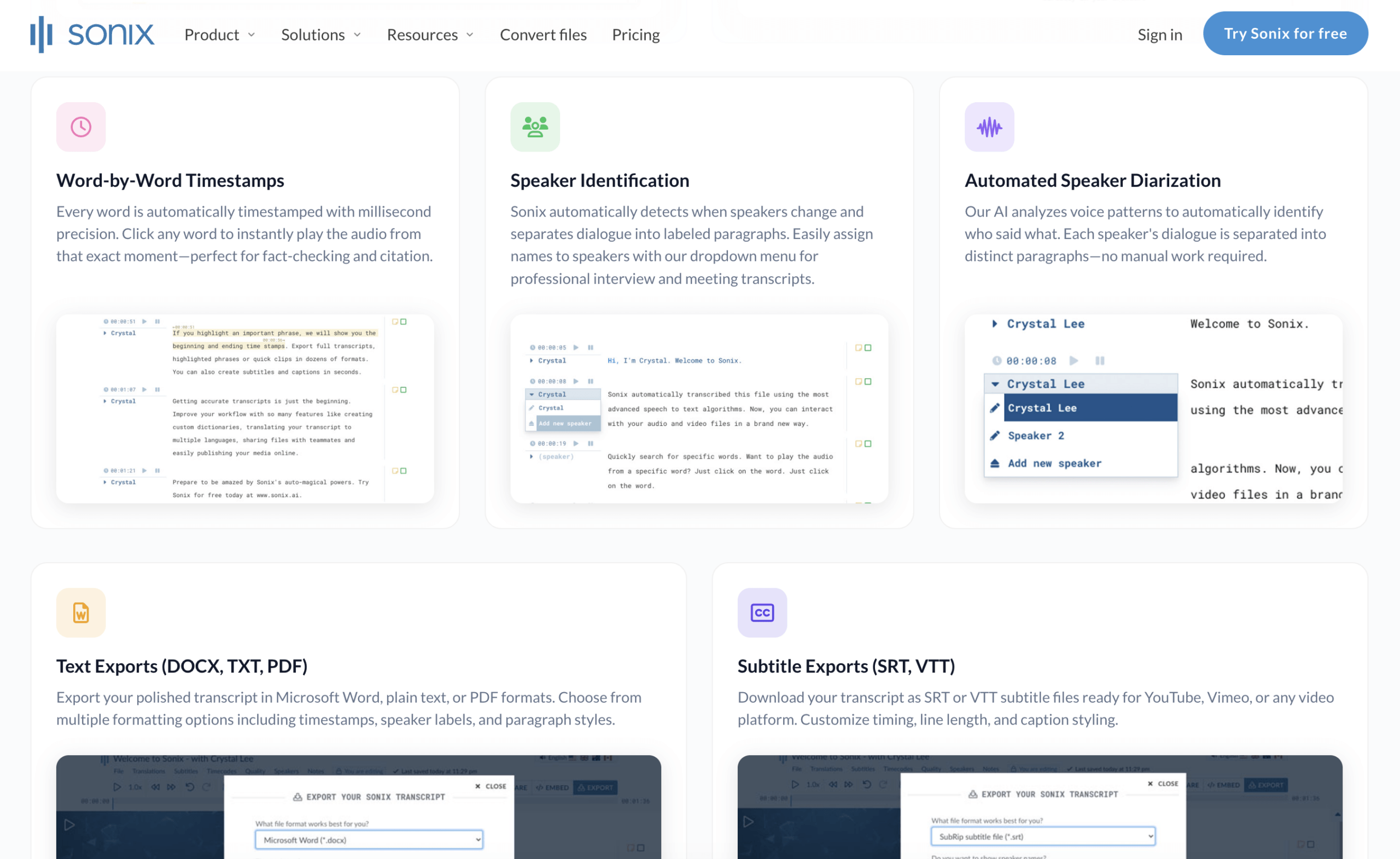 Its enterprise real-time page describes meeting integrations, a streaming API, live captions, security controls, and low-latency transcription. However, the current call to action is “Request early access,” asking about users, contract term, annual transcription hours, and annual real-time hours.
Workflow conclusion: Choose Transync AI when a user needs to prepare and start translation independently. Consider Sonix when the organization is designing a managed transcription, accessibility, or content pipeline.
This first Transync AI and Sonix boundary prevents a meeting app and a transcription operation from being evaluated as if they required the same setup.
Difference 2: What Happens While People Are Speaking?
Live output is where Transync AI and Sonix may look similar on a feature table but behave differently in a meeting.
The real-time translation tool displays the recognized speech and translation together. A participant can check the original, read the meaning, and respond while the discussion continues. One-way, two-way, and multilingual modes adapt the interface to lectures, calls, or conversations involving several languages.
The Picture-in-Picture bilingual subtitles feature can keep captions above another application on supported devices. That is useful when a user must read a contract, presentation, customer record, or meeting chat without losing the translated conversation.

Real-time floating subtitles across desktop and mobile devices
Sonix describes enterprise real-time speech-to-text for meetings, conferences, education, broadcasts, legal records, healthcare, and live events. Its current page lists live captions, speaker identification, searchable transcripts, integrations, and a streaming API. These capabilities support accessibility and documentation while speech is happening.
The distinction is the purpose of the live text. Transync AI uses bilingual output to help a person participate across languages. Sonix emphasizes capturing speech accurately and making the live or completed record accessible and searchable.
Workflow conclusion: Start with Transync AI for participant-facing bilingual communication. Evaluate Sonix for enterprise live captions, accessibility, compliant records, or a transcription API—subject to early-access availability.
Difference 3: Can Participants Hear Translated Speech and Reply?
Translated voice creates the clearest Transync AI and Sonix boundary.
The AI voice translator reads translated speech in a natural AI voice during the conversation. Users can listen locally, share computer audio in supported meeting workflows, or use a virtual microphone where appropriate to help the other side hear translated output.
Because Transync AI includes two-way translation modes and automatic language distinction within supported settings, it is designed for questions, answers, corrections, negotiation, teaching, and other interactive exchanges.
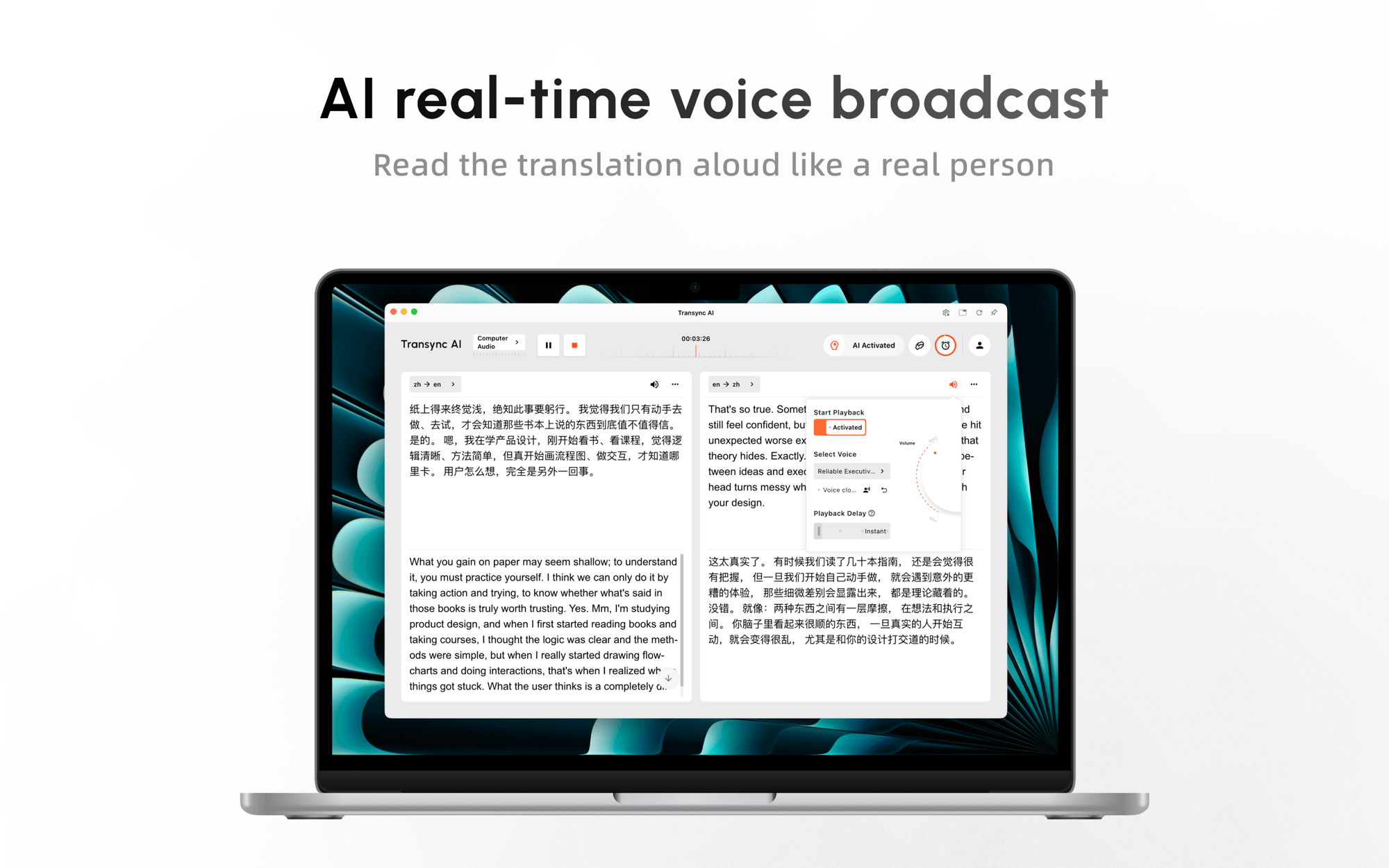 Sonix is not currently positioned as a self-serve speech-to-speech meeting interpreter. Its real-time product emphasizes captions and transcription, while its translation workflow converts a transcript into another language. Its media tools can preserve subtitle timing and support translated content, but that is not the same as speaking a translation back into a live conversation.
 This difference matters even when both products use the word “translation.” Reading a translated transcript after a meeting does not help a participant answer a question during the meeting. Likewise, translated voice is unnecessary when the real requirement is a precise written archive.
Workflow conclusion: Choose Transync AI when live translated speech and two-way response are essential. Choose Sonix when text capture, captions, and later translation are the deliverables.
In practical use, this Transync AI and Sonix distinction determines whether translation helps someone answer now or helps a team process the record later.
Difference 4: What Happens After the Meeting Ends?
The advantage shifts after the conversation. This phase shows why Transync AI and Sonix should not be judged by one universal score.
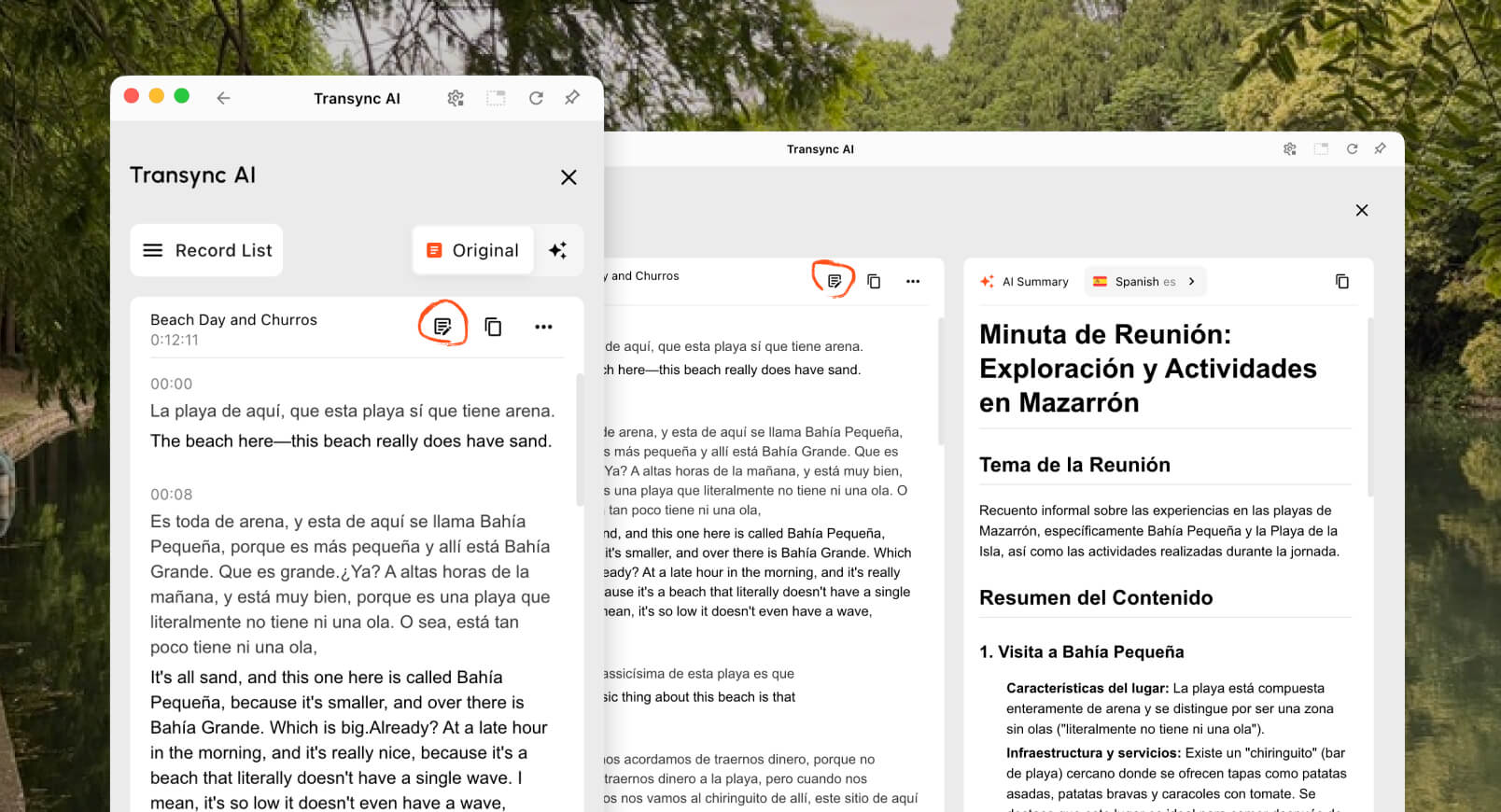
The AI meeting notes feature creates a transcript and structured summary for reviewing decisions and next steps. This completes a meeting-focused loop: understand the live exchange, retain the discussion, and continue work afterward.
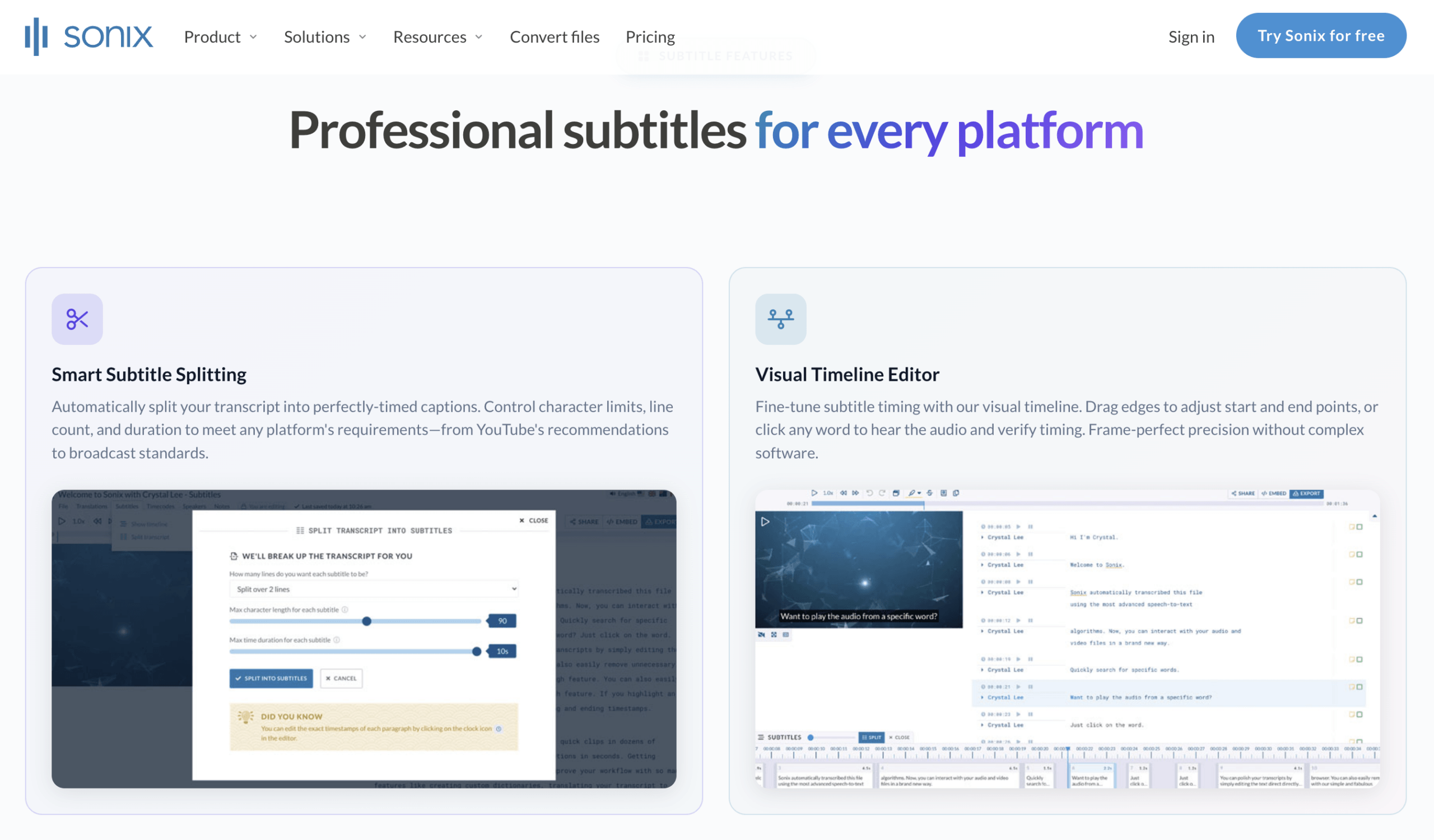
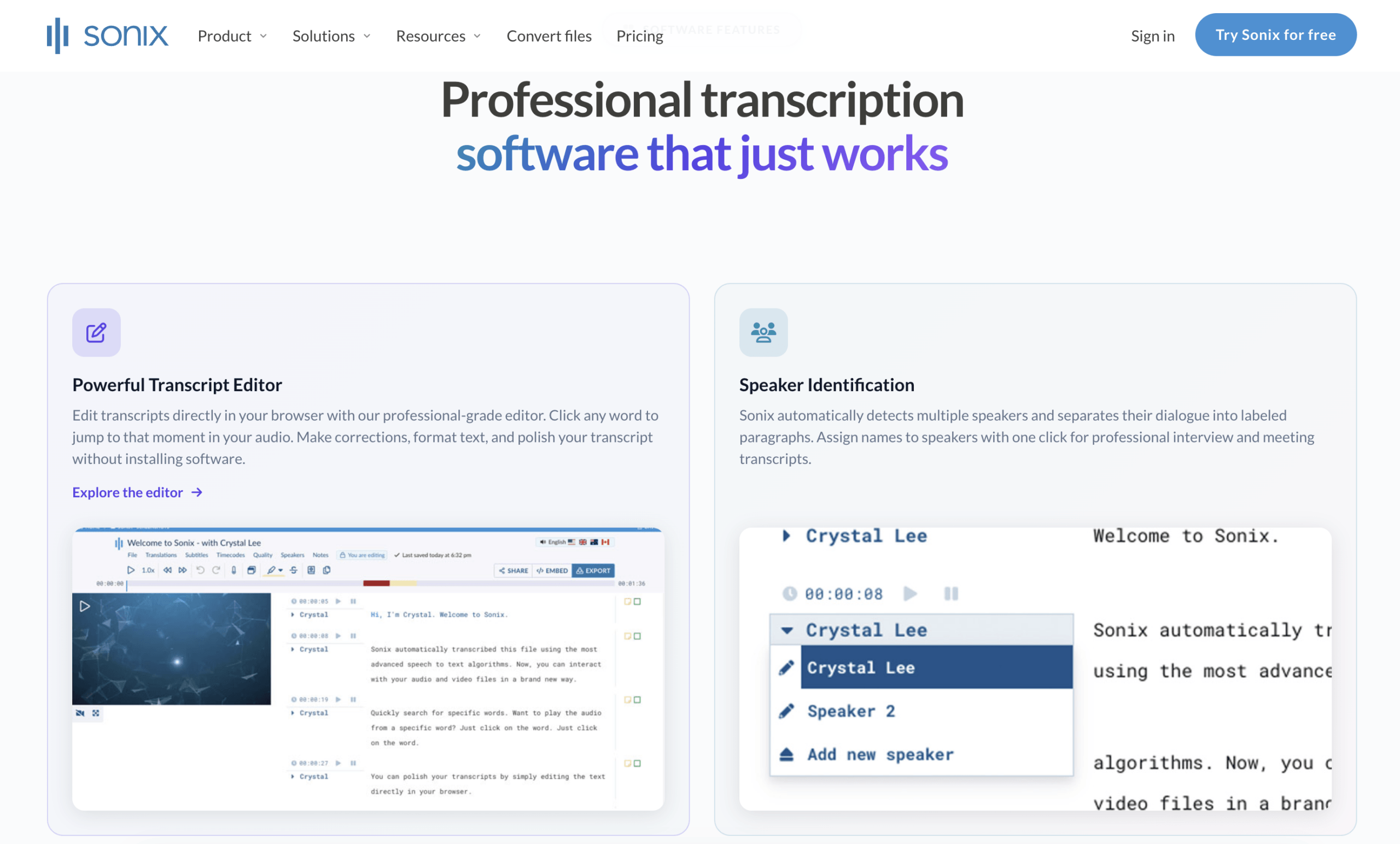
 Sonix provides a more extensive content workspace. Users can upload audio or video, generate speaker-labeled and timestamped transcripts, edit text beside synchronized media, translate the transcript, search the archive, create summaries or action items, and export documents or subtitle formats such as SRT and VTT.
The platform also serves media, research, legal, education, healthcare, and enterprise teams that need storage, collaboration, permissions, an embeddable player, subtitle workflows, or analysis across many recordings.
For translation, Sonix describes a three-step workflow: upload the file, create and review the source transcript, then select a target language. That order can improve post-production quality because the source transcript can be corrected before translation. It also makes clear that the mature self-serve translation experience is file- and transcript-centered.
 Workflow conclusion: Choose Transync AI when the desired output is a useful record of a multilingual meeting. Choose Sonix when the transcript or media asset becomes a project that must be edited, translated, analyzed, shared, embedded, or exported.
Difference 5: How Do Platforms, APIs, and Enterprise Controls Compare?
Deployment priorities create another practical Transync AI and Sonix split.
The live meeting translation feature works alongside Zoom, Microsoft Teams, Google Meet, other calling tools, and in-person conversations. Transync AI supports web, Windows, macOS, iOS, and Android, allowing one user to move between devices and meeting platforms.
This is an end-user product approach. The buyer does not need to build a speech stack or integrate a streaming API before receiving bilingual text and voice.

Compatible with major online meeting platforms for seamless real-time translation
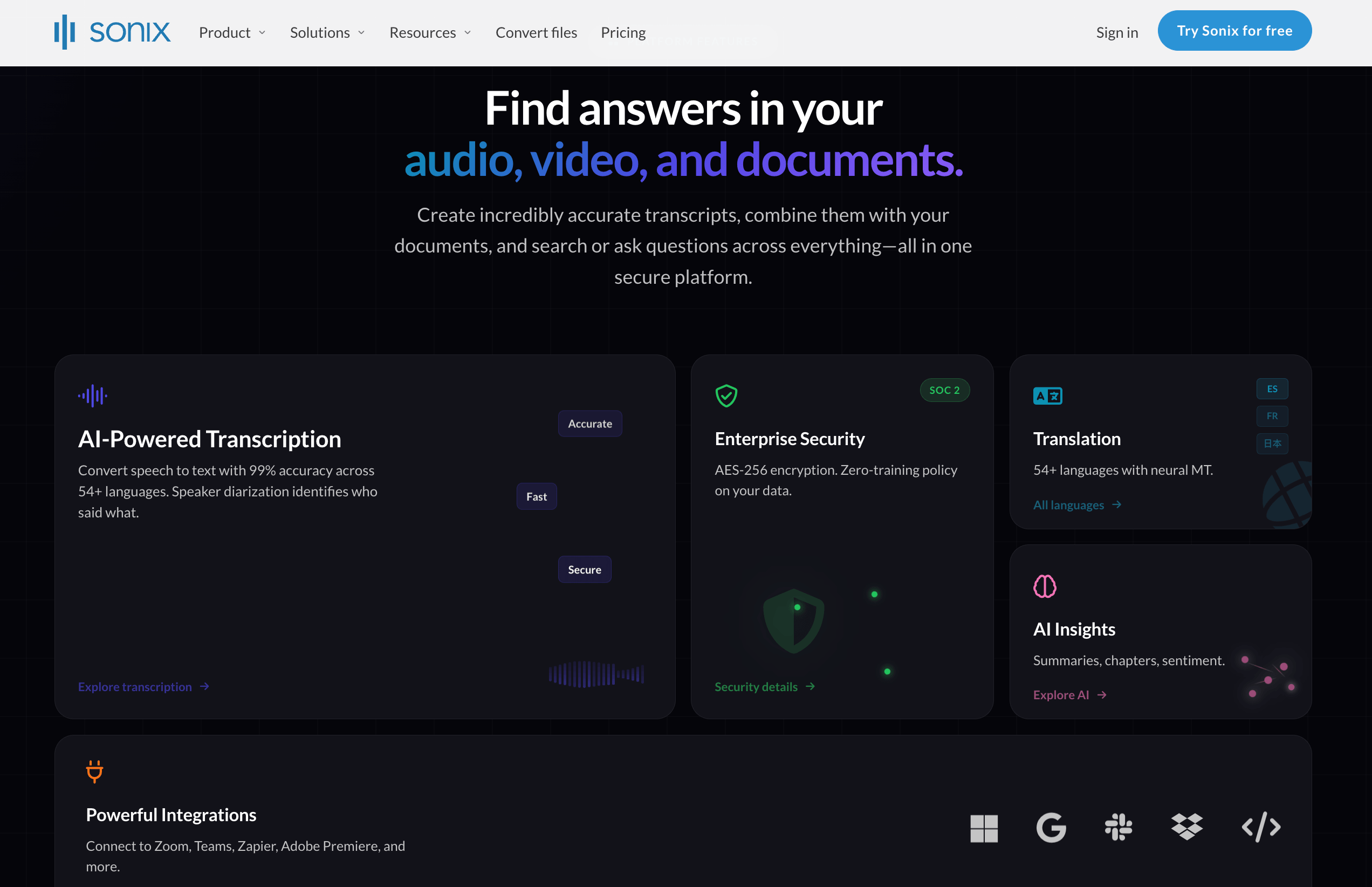
Sonix offers direct meeting-recording integrations, cloud-storage connections, automation, API access, and developer workflows. Its enterprise real-time product describes direct conferencing integrations and WebSocket streaming for building live transcription into other applications.
Enterprise plans add controls such as SSO or SAML, automated provisioning, audit logs, configurable retention, large shared storage, centralized administration, custom agreements, and regulated-industry options. These capabilities may be more important than translated speech to an organization building a governed archive or transcription service.
The correct question is not simply “Does it work with my meeting platform?” Ask whether the user wants a ready-to-use translator or the organization wants a transcription layer that can be embedded, automated, secured, and administered.
 Workflow conclusion: Choose Transync AI for immediate participant use across devices. Choose Sonix for transcription infrastructure, media operations, API development, or enterprise governance.
An IT review of Transync AI and Sonix should therefore separate end-user deployment from infrastructure integration and administration.
Difference 6: How Does Transync AI and Sonix Pricing Compare?
The pricing models of Transync AI and Sonix correspond to different units of value: live communication minutes versus transcription, translation, storage, and AI-workspace capacity.
Current published pricing
| Product or plan | Published price | Included usage | Important scope |
|---|---|---|---|
| Transync AI Free | $0 | 40 minutes after sign-up | Live meeting translation test |
| Transync AI Personal Premium | $8.99/month | 10 hours of real-time translation during the membership period | Bilingual subtitles, voice, context, notes, and cross-device use |
| Transync AI Enterprise | $24.99/month per seat | Up to 40 hours per month per seat | Organization management and predictable live-translation allowance |
| Sonix Free Trial | $0 | 30 minutes | Test transcription, editor, and established self-serve workflow |
| Sonix Pay As You Go | $10/hour | Purchased transcription and translation usage | Audio/video processing with no subscription |
| Sonix Core | $25/month | 5 hours/month of transcription and translation credits; 5 AI-workspace hours | Individual with steady content-processing needs |
| Sonix Advanced | $50/month | 20 hours/month of transcription and translation credits; 25 AI-workspace hours | Growing content or research teams |
| Sonix Pro | $80/month | 40 hours/month of transcription and translation credits; 100 AI-workspace hours | High-volume teams |
| Sonix Enterprise Real-Time | Custom / early access | Defined through enterprise discussion | Live transcription, captions, integrations, API, security, and support |
Sources: Transync AI official pricing page, Sonix official pricing page, and Sonix real-time early-access page. Checked in August 2026.
Where Does Transync AI Have the Pricing Advantage?
For live multilingual meetings, Transync AI has the clearer self-serve offer. Its Personal Premium plan is 8.99 per month for 600 minutes, or approximately 0.015 per included live-translation minute when fully used.
Sonix does not publish a directly comparable self-serve price for enterprise real-time transcription or translated live captions. Access currently requires a request describing users, contract length, annual transcription volume, and annual real-time hours.
The published Sonix subscription rates should not be mislabeled as live meeting-interpretation prices. They apply to transcription, translation credits, storage, AI workspace usage, editing, and related content workflows. The current pricing page also contains different explanations of how translation charges or credits are applied, so buyers should confirm whether a transcribe-and-translate workflow consumes one combined allowance or separate usage at checkout.
This gives Transync AI a price-transparency and deployment advantage for individuals or teams buying live bilingual communication. Sonix may still offer stronger economics for high-volume transcription and post-meeting media processing because its subscriptions include large content and AI-workspace allowances.
A fair Transync AI and Sonix budget should separate:
- Live meeting minutes requiring bilingual text and translated voice.
- Real-time captions needed only for accessibility or recording.
- Uploaded audio and video hours requiring transcription.
- Number of translated target languages.
- AI summaries, analysis, storage, collaboration, and exports.
- API development, enterprise controls, support, and contract requirements.
A Before-During-After Test for Transync AI and Sonix
A useful Transync AI and Sonix test must include both a live meeting and a completed recording.
Before the meeting
Prepare five specialist terms, two names, one abbreviation, a product number, and the desired output. Record setup time, audio routing, permissions, language selection, and any enterprise access requirements.
During the meeting
Run a five-minute conversation containing natural turn-taking and one interruption. Score source recognition, caption stability, translation meaning, delay, voice output, and the ability to respond without stopping the discussion.
After the meeting
Review the transcript, speaker labels, summary, action items, translation editor, search, export formats, subtitles, recording access, and time required to correct an error. Then decide which outputs the organization will actually use.
Testing only a completed recording favors a post-production platform. Testing only spoken replies ignores the value of a professional transcript workspace. The three-stage method gives Transync AI and Sonix their appropriate jobs.
Transync AI and Sonix FAQ
Is Transync AI Cheaper Than Sonix?
In a pricing review of Transync AI and Sonix, Transync AI has a transparent $8.99 monthly offer for self-serve live multilingual meetings, while Sonix real-time transcription is currently enterprise early access with no public fixed price. For uploaded transcription and translation, Sonix has its own pay-as-you-go and subscription pricing, so an overall “cheaper” conclusion depends on the workflow.
Is Sonix a Real-Time Meeting Translator?
Sonix offers enterprise real-time transcription, live captions, integrations, and selected translation use cases through early access. However, its established self-serve translation workflow is centered on transcribing uploaded audio or video and then translating the transcript. It is not currently positioned like a self-serve two-way voice interpreter.
Which product is better during a bilingual meeting?
Transync AI is the more direct fit because it provides live bilingual subtitles, translated voice playback, two-way modes, terminology context, and meeting notes in one participant-facing workflow.
Which product is better after a recorded meeting?
Sonix is stronger when the recording must become a polished transcript, translated text, subtitle file, searchable archive, media player, research asset, or input for AI analysis and team collaboration.
Can both products create meeting summaries?
Yes. Transync AI generates meeting notes and summaries after multilingual conversations. Sonix offers summaries, action items, custom AI analysis, and other transcript-based workflows according to the selected plan.
Does Sonix Provide Translated Voice During Meetings?
Its current public materials emphasize real-time transcription and captions, followed by transcript translation and media workflows. They do not present a general self-serve two-way translated-voice meeting experience comparable to Transync AI.
Which product is better for developers?
Sonix is the stronger fit when a development team needs transcription APIs, automation, webhooks, storage integrations, or real-time WebSocket streaming. Transync AI is a ready-to-use meeting product rather than a speech infrastructure platform.
Final Workflow Decision
The most accurate conclusion about Transync AI and Sonix is that they create value at different moments.
Choose Transync AI when value is created during the meeting: people need to hear, read, understand, and respond across languages without waiting for post-processing. Its live bilingual workflow and $8.99 monthly price are designed for frequent communication.
Choose Sonix when value is created from the record: audio or video must become editable transcripts, translations, subtitles, summaries, analysis, archives, exports, or data for another application. Its enterprise real-time transcription can also serve accessibility and infrastructure needs when early access and custom procurement are appropriate.
For live two-way meeting translation, Transync AI is the clearer choice. For professional transcription and post-meeting content operations, Sonix is the more specialized platform.
If you want a next-generation experience, Transync AI leads the way with real-time, AI-powered translation that keeps conversations flowing naturally. You can try it free now.