

So sánh 7 công cụ dịch ngôn ngữ AI dành cho các cuộc họp, du lịch, sự kiện, truyền thông và API. Sử dụng hướng dẫn này để chọn quy trình làm việc phù hợp.
MỘT Trình dịch ngôn ngữ AI Nó sử dụng trí tuệ nhân tạo để diễn giải nội dung trong một ngôn ngữ và tạo ra ý nghĩa tương đương trong ngôn ngữ khác. Tùy thuộc vào sản phẩm, nó có thể dịch văn bản, tài liệu, hình ảnh, bài phát biểu trực tiếp, phương tiện ghi âm hoặc toàn bộ các cuộc họp đa ngôn ngữ.
Sự đa dạng đó khiến việc lựa chọn công cụ trở nên khó khăn hơn so với tưởng tượng ban đầu. Một công cụ dịch thuật du lịch miễn phí, một trợ lý cuộc họp, một nền tảng phụ đề sự kiện, một bộ công cụ bản địa hóa phương tiện truyền thông và một API dành cho nhà phát triển đều giải quyết những vấn đề khác nhau—ngay cả khi mỗi công cụ đều được mô tả là dịch thuật bằng AI.
Hướng dẫn này bắt đầu từ người dùng chứ không phải danh sách tính năng. Hãy làm theo quy trình ra quyết định, so sánh bảy lựa chọn hàng đầu và thử nghiệm quy trình làm việc phù hợp nhất với nhu cầu giao tiếp thực tế của bạn.
Câu trả lời nhanh: Bạn cần phần mềm dịch ngôn ngữ AI nào?
Hãy bắt đầu với kết quả:
- Bạn cần những cụm từ, hình ảnh hoặc đoạn văn ngắn gọn về du lịch? Coi như Talkao hoặc Google Dịch.
- Bạn cần phụ đề song ngữ, bản dịch bài phát biểu và ghi chú cuộc họp? Coi như AI đồng bộ.
- Bạn cần phụ đề và âm thanh cho nhiều người tham dự sự kiện? Coi như Wordly.
- Bạn cần tích hợp tính năng dịch thuật vào sản phẩm của mình? Coi như Soniox.
- Bạn cần phụ đề, lồng tiếng và bản địa hóa nội dung đa phương tiện? Coi như Maestra.
- Bạn cần văn bản, tài liệu, công cụ soạn thảo hoặc quy trình làm việc ngôn ngữ doanh nghiệp? Coi như DeepL.
Không có một công cụ dịch ngôn ngữ AI nào là tốt nhất cho cả sáu công việc. Việc lựa chọn theo từng trường hợp sử dụng sẽ giúp tránh phải trả tiền cho quy trình làm việc không phù hợp.
Trình dịch ngôn ngữ bằng trí tuệ nhân tạo hoạt động như thế nào?
Quá trình này phụ thuộc vào dữ liệu đầu vào.
Đối với nội dung văn bản, hệ thống xác định các mẫu ngôn ngữ, ngữ cảnh và ý nghĩa trước khi tạo ra văn bản dịch. Đối với giao tiếp bằng lời nói, hệ thống phải hoàn thành thêm các bước sau:
Thu âm → nhận dạng giọng nói → diễn giải ngữ cảnh → dịch nghĩa → hiển thị phụ đề hoặc tạo giọng nói
Việc truyền tải giọng nói trực tiếp đặc biệt khó khăn vì công cụ này phải xử lý được giọng điệu, sự tạm dừng, câu chưa hoàn chỉnh, tiếng ồn nền và nhiều người nói cùng lúc mà không gây ra độ trễ làm gián đoạn.
Các sản phẩm hiện đại có thể bổ sung thêm các chức năng như kiểm soát thuật ngữ, tổng hợp giọng nói, sao chép giọng nói, định tuyến âm thanh nền tảng họp, bản ghi, tóm tắt và API. Những bổ sung này sẽ quyết định liệu công cụ đó phù hợp với cách diễn đạt thông thường hay quy trình làm việc kinh doanh hoàn chỉnh.
So sánh các phần mềm dịch ngôn ngữ AI: 7 lựa chọn
Bảng này so sánh vị trí định vị sản phẩm điển hình. Các tính năng, ngôn ngữ được hỗ trợ và gói dịch vụ có thể thay đổi, vì vậy hãy xác nhận các yêu cầu quan trọng trên trang web chính thức của sản phẩm.
| Dụng cụ | Tốt nhất cho | Đầu vào chính | Phát âm thanh trực tiếp | Quy trình cuộc họp | Giá trị sau phiên |
|---|---|---|---|---|---|
| AI đồng bộ | Các cuộc họp, cuộc gọi và cuộc trò chuyện trực tiếp đa ngôn ngữ | Âm thanh bài phát biểu trực tiếp và cuộc họp | Đúng | Phụ đề song ngữ, định tuyến âm thanh và công cụ ngữ cảnh | Bản ghi và ghi chú cuộc họp AI |
| Talkao | Du lịch, dịch thuật di động và học ngôn ngữ | Nhập liệu bằng giọng nói, văn bản, camera và thiết bị di động. | Đúng | Không phải là trọng tâm chính của nó | Công cụ dịch thuật dành cho người tiêu dùng |
| Wordly | Hội nghị, hội thảo trực tuyến và các cuộc họp lớn | Bài phát biểu tại sự kiện trực tiếp | Đúng | Tập trung vào sự kiện và người tham dự | Bản ghi và tóm tắt |
| Soniox | Sản phẩm giọng nói dành cho nhà phát triển | API và âm thanh ứng dụng | Khả năng TTS/API | tùy thuộc vào cách triển khai | Sản lượng sản phẩm tùy chỉnh |
| Maestra | Video, âm thanh, phụ đề, lồng tiếng và nội dung trực tiếp | Tệp đa phương tiện và bài phát biểu trực tiếp | Đúng | Có sẵn nội dung trực tiếp | Bản địa hóa và tái sử dụng phương tiện truyền thông |
| DeepL | Văn bản, tài liệu, công việc ngôn ngữ doanh nghiệp và các trường hợp sử dụng giọng nói được chọn lọc. | Văn bản, tài liệu, API và sản phẩm thoại | Phụ thuộc vào sản phẩm | Phụ thuộc vào sản phẩm thoại | Quy trình làm việc bằng văn bản và quy trình làm việc của doanh nghiệp |
| Google Dịch | Dịch thuật miễn phí hàng ngày | Văn bản, hình ảnh, trang web, tài liệu và lời nói | Phát lại bản dịch | Không gặp mặt trước | Dịch thuật cá nhân nhanh chóng |
Phương án quyết định 1: Bạn có đang phiên dịch các cuộc họp trực tiếp không?
Nếu câu trả lời là có, hãy tập trung vào luồng hội thoại hơn là chất lượng văn bản thuần túy. Các tính năng hữu ích nhất bao gồm độ trễ thấp, nhận diện ngôn ngữ hai chiều, phụ đề song ngữ, dịch giọng nói, định tuyến âm thanh cuộc họp, hỗ trợ thuật ngữ và ghi âm sau cuộc gọi.
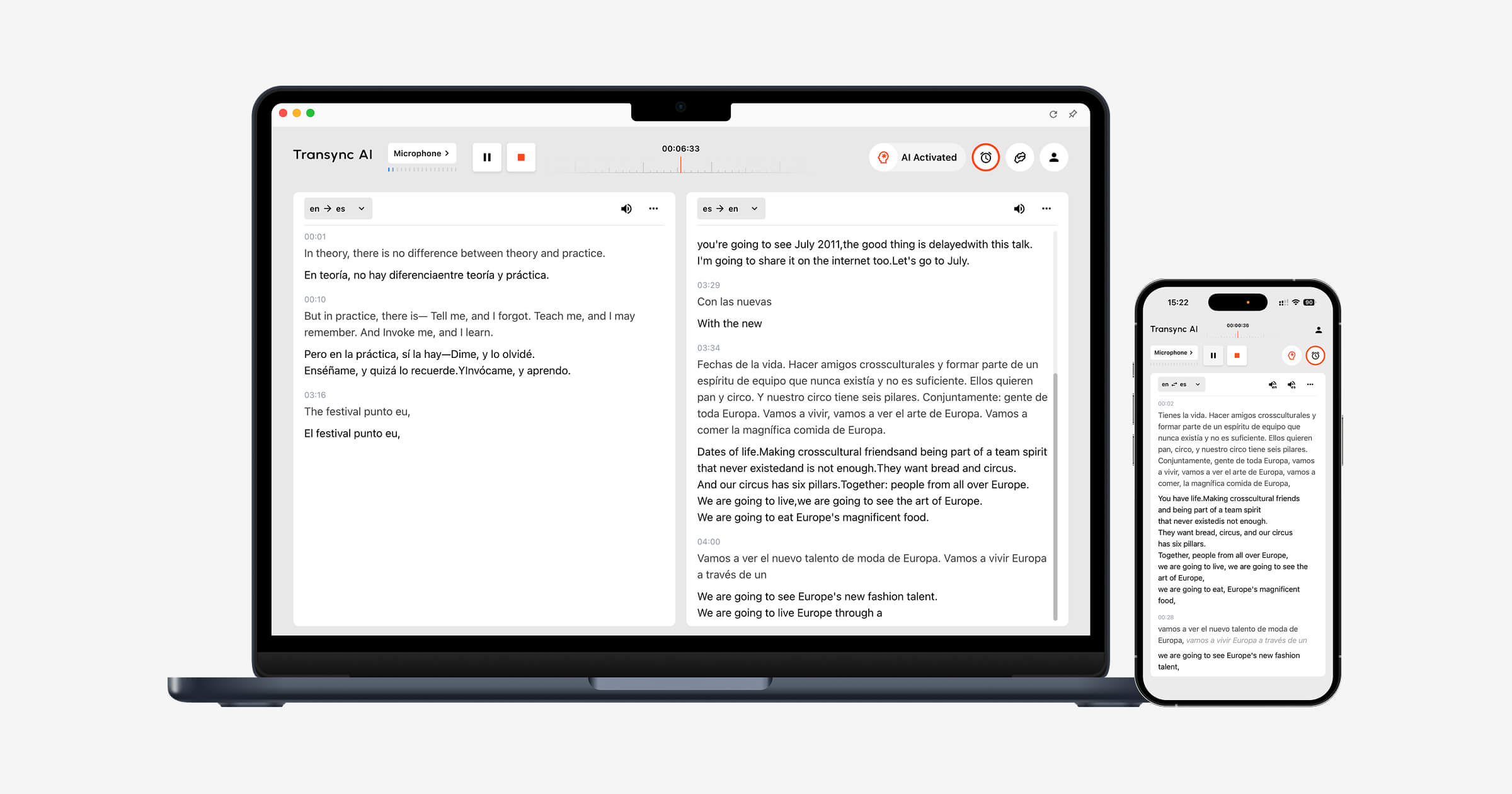
AI đồng bộ được thiết kế dựa trên những yêu cầu này. công cụ dịch thuật thời gian thực Hiển thị bản gốc và bản dịch song song trong khi cuộc hội thoại đang diễn ra.
Các Trình dịch giọng nói AI Phần mềm đọc to kết quả dịch, cho phép người tham gia vừa nghe vừa đọc. Tính năng ghi chú cuộc họp AI Sau đó, biên soạn bản ghi và ghi chú có cấu trúc sau cuộc gọi.
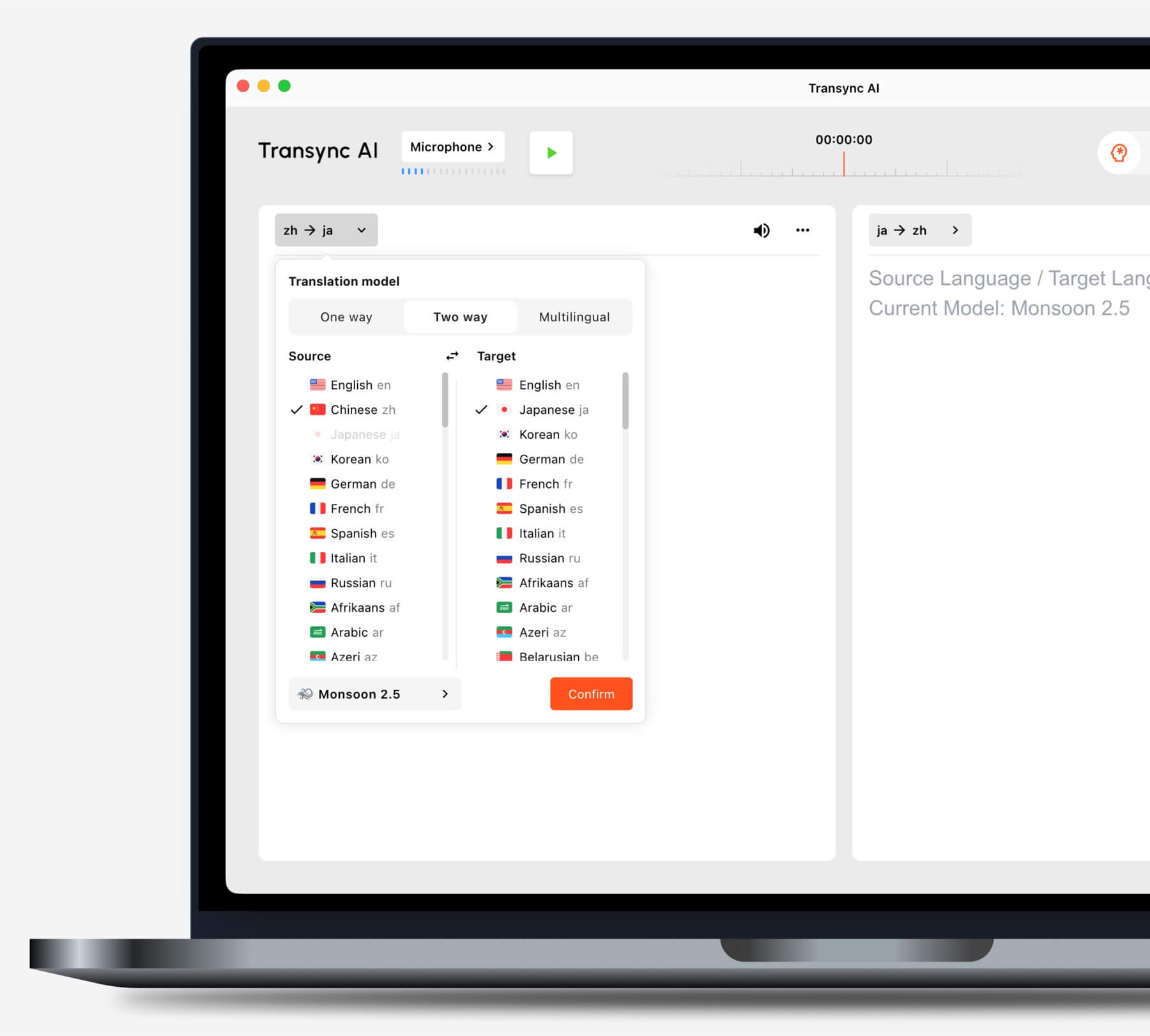
Hãy chọn chế độ dịch phù hợp với tình huống của bạn trước khi bắt đầu một tác vụ.
Bạn có sử dụng các nền tảng họp video phổ biến không?
Các Tính năng dịch cuộc họp trực tiếp làm việc cùng với Zoom, Microsoft Teams, Và Google Meet. AI đồng bộ Đây là phần mềm độc lập chứ không phải là plugin dành riêng cho một nền tảng cụ thể.
Các Tính năng chia sẻ âm thanh máy tính Ghi âm giọng nói từ những người tham gia từ xa. tính năng micro ảo Giúp truyền giọng nói đã được dịch vào cuộc họp.

Tương thích với các nền tảng họp trực tuyến phổ biến, cho phép dịch thuật thời gian thực liền mạch.
Bạn thuyết trình bằng slide hay làm việc trên ứng dụng khác?
Các Tính năng phụ đề song ngữ hình trong hình (Picture-in-Picture) Giữ cho phụ đề gốc và phụ đề đã dịch hiển thị phía trên các ứng dụng khác trên các thiết bị được hỗ trợ. Điều này giúp người dùng theo dõi bản dịch trong khi thuyết trình, trình diễn phần mềm hoặc ghi chú.
Phương án quyết định 2: Bạn đang dịch một sự kiện lớn?
Khi hàng trăm người tham dự cần truy cập ngôn ngữ, việc phân phối trở thành thách thức chính. Người tham dự có thể cần mở phụ đề hoặc âm thanh đã được dịch trên thiết bị của riêng họ mà không cần tạo tài khoản cá nhân hoặc cài đặt công cụ họp trực tuyến.
Wordly Được thiết kế cho các hội nghị, hội thảo trực tuyến, sự kiện kết hợp và các cuộc họp quy mô lớn. Người tham dự có thể truy cập bản dịch thông qua liên kết hoặc mã QR, giúp nó phù hợp hơn cho việc truyền tải thông tin đến nhiều người.
 Chọn AI đồng bộ Dịch vụ dịch thuật cho các cuộc họp cá nhân và nhóm. Chọn Wordly Khi người tổ chức phải cung cấp bản dịch cho một nhóm lớn.
Phương án quyết định 3: Bạn đang dịch nội dung du lịch hay nội dung thường nhật?
Đối với việc đi du lịch, các tính năng quan trọng nhất có lẽ là sự tiện lợi của thiết bị di động, dịch thuật bằng camera, nhập văn bản và phát lại giọng nói nhanh. Ghi chú cuộc họp và micro ảo thường không cần thiết.
Talkao Cung cấp các công cụ dịch thuật và học ngôn ngữ hướng đến người dùng, bao gồm các tính năng giọng nói, camera và di động. Google Dịch Nó được sử dụng rộng rãi cho việc dịch văn bản, hình ảnh, trang web, tài liệu và dịch thuật giao tiếp thông thường.
 AI đồng bộ Ứng dụng này có thể hỗ trợ các cuộc hội thoại trực tiếp kéo dài, nhưng không hỗ trợ chế độ ngoại tuyến, nhận dạng hình ảnh hoặc dịch tài liệu chỉ có văn bản.
Phương án quyết định 4: Bạn có đang bản địa hóa nội dung truyền thông không?
Việc sản xuất video và âm thanh đòi hỏi nhiều hơn là chỉ hiểu lời nói tại thời điểm đó. Các nhóm có thể cần phụ đề có thể chỉnh sửa, lồng tiếng, căn chỉnh thời gian, phiên âm, dịch thuật và các tùy chọn xuất file.
Maestra Nó được ứng dụng rộng rãi trong dịch thuật đa phương tiện, phiên âm, phụ đề, lồng tiếng, hội thảo trực tuyến và nội dung trực tiếp. Nó đặc biệt phù hợp khi dịch thuật trở thành một phần của quy trình sản xuất và xuất bản.
 Chọn AI đồng bộ Khi mục tiêu chính là một cuộc trò chuyện trực tiếp hai chiều. Hãy chọn Maestra khi nội dung đã dịch cần được chỉnh sửa và tái sử dụng dưới dạng phương tiện truyền thông.
Lộ trình quyết định 5: Bạn đang xây dựng một sản phẩm dịch thuật?
Nhóm phát triển sản phẩm cần cơ sở hạ tầng lập trình được, tài liệu, kiểm soát độ trễ và tính linh hoạt trong tích hợp. Thông thường, họ không cần giao diện họp người dùng cuối.
Soniox Cung cấp các khả năng chuyển đổi giọng nói thành văn bản, dịch thuật và chuyển đổi văn bản thành giọng nói cho các nhà phát triển xây dựng sản phẩm giọng nói.
 DeepL Cung cấp API và các dịch vụ ngôn ngữ doanh nghiệp trên nhiều lĩnh vực như văn bản, tài liệu, viết và một số quy trình làm việc bằng giọng nói.
 Chọn AI đồng bộ Khi nhân viên hoặc khách hàng cần một bản dịch cuộc họp hoàn chỉnh. Hãy chọn nền tảng API khi các kỹ sư sẽ thiết kế và duy trì toàn bộ trải nghiệm.
Phương án quyết định 6: Văn bản và tài liệu có phải là ưu tiên hàng đầu?
Dịch thuật văn bản đòi hỏi việc bảo toàn định dạng, tính nhất quán về thuật ngữ, biên tập, hỗ trợ tài liệu và tích hợp với các công cụ làm việc hiện có. Tính năng phụ đề và lồng tiếng trực tiếp có thể chỉ là thứ yếu.
DeepL Nền tảng này có vị thế rộng rãi trong việc dịch văn bản và tài liệu, hỗ trợ viết, API và quy trình làm việc ngôn ngữ doanh nghiệp. Google Dịch Rất hữu ích cho các tác vụ nhanh về văn bản, trang web, hình ảnh và tài liệu dành cho người tiêu dùng.
AI đồng bộ Đây không phải là trình dịch tài liệu chỉ dựa trên văn bản. Trường hợp sử dụng mạnh nhất của nó là giao tiếp đa ngôn ngữ trực tiếp.
Tại sao AI đồng bộ Phù hợp với các cuộc hội thoại đa ngôn ngữ
AI đồng bộ Nó kết nối các giai đoạn của một cuộc hội thoại trực tiếp: nghe người khác nói, đọc bản dịch, đáp lại và ghi chép lại.
Nhận dạng hai chiều tự động
Trong một cặp ngôn ngữ được hỗ trợ đã chọn, thì công cụ dịch thuật thời gian thực Có khả năng phân biệt ngôn ngữ đang được nói. Người dùng không cần phải nhấn nút chuyển đổi ngôn ngữ sau mỗi lượt chơi.
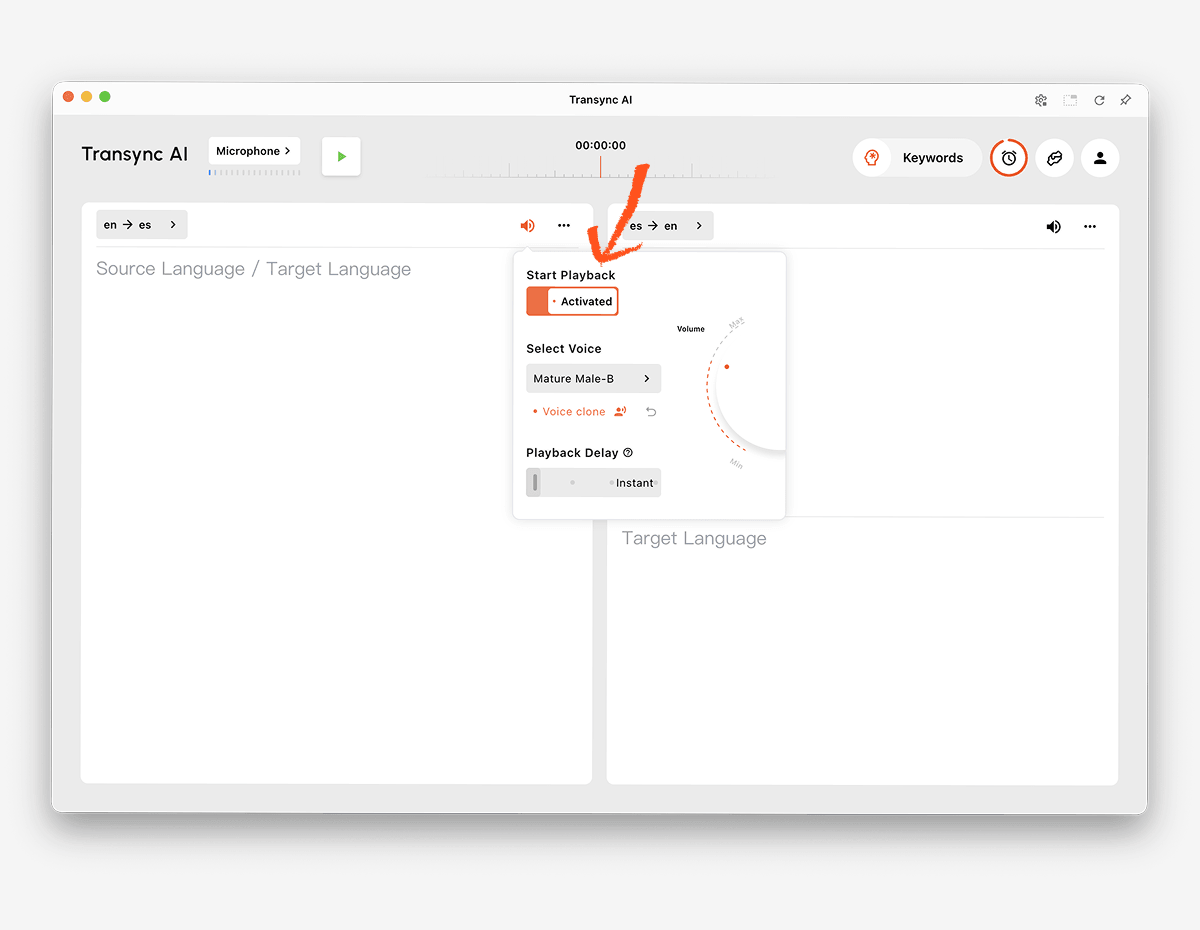
 Phát lại giọng nói tự nhiên và sao chép giọng nói
 Phát lại giọng nói tự nhiên và sao chép giọng nói
Các Trình dịch giọng nói AI Cung cấp nhiều kiểu giọng nói và tốc độ phát lại khác nhau. Tính năng sao chép giọng nói Có thể tạo ra bản dịch lời nói với giọng nói được mô phỏng theo người dùng, giúp các bài học, bài thuyết trình và cuộc gọi với khách hàng trở nên cá nhân hóa hơn.
 Từ khóa và bối cảnh
 Từ khóa và bối cảnh
Tên riêng, thương hiệu, từ viết tắt và thuật ngữ chuyên ngành là những nguồn gây ra lỗi dịch thuật phổ biến. Tính năng từ khóa và ngữ cảnh của Trợ lý AI Cho phép người dùng định nghĩa các từ vựng quan trọng và giải thích chủ đề trước mỗi buổi học.
 Truy cập đa thiết bị
 Truy cập đa thiết bị
AI đồng bộ Hỗ trợ quy trình làm việc trên web, Windows, macOS, iOS và Android. Điều này cho phép người dùng chọn thiết bị phù hợp nhất với cuộc trò chuyện trực tuyến hoặc trực tiếp.
Hơn 60 ngôn ngữ
Nền tảng này hỗ trợ hơn 60 ngôn ngữ và hơn 1.000 cặp ngôn ngữ. Tính khả dụng của các ngôn ngữ có thể thay đổi, vì vậy hãy kiểm tra thường xuyên. trang ngôn ngữ được hỗ trợ cho đúng đôi bạn cần.
Ghi chép sau cuộc trò chuyện
Các Tính năng ghi chú cuộc họp AI Tạo bản ghi và ghi chú có cấu trúc. hướng dẫn quản lý hồ sơ dịch thuật Giải thích cách người dùng có thể truy cập và sắp xếp các phiên làm việc trước đó.
 Cách kiểm tra trình dịch ngôn ngữ AI
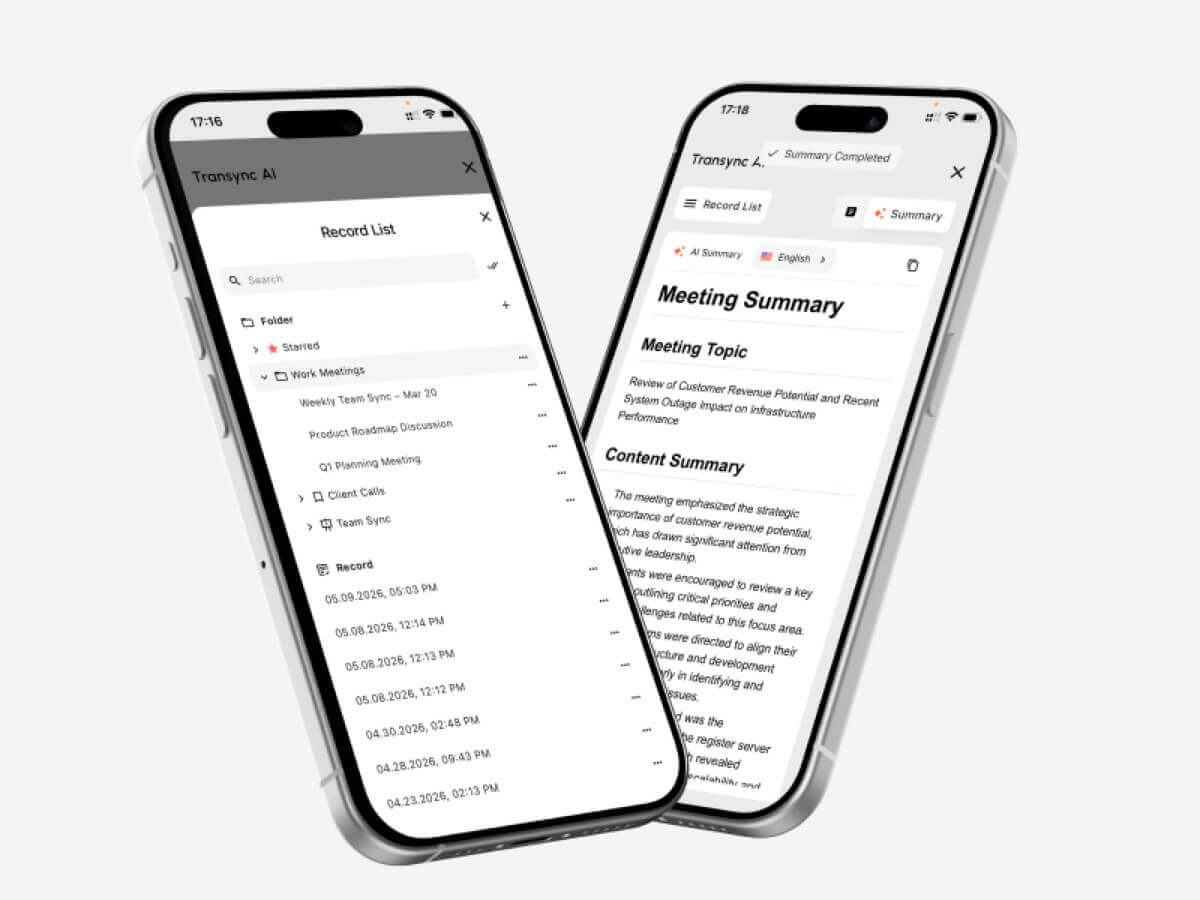 Cách kiểm tra trình dịch ngôn ngữ AI
Hãy tiến hành thử nghiệm trong cùng môi trường mà sản phẩm sẽ được sử dụng.
Kiểm tra cặp ngôn ngữ thực tế
Đừng chỉ dựa vào tổng số từ vựng đã học. Hãy kiểm tra cả hai chiều của cặp từ cần học với giọng địa phương và tốc độ nói thực tế.
Kiểm tra các thuật ngữ quan trọng
Lập danh sách các tên, sản phẩm, từ viết tắt và thuật ngữ chuyên ngành. So sánh kết quả trước và sau khi thêm ngữ cảnh. Kiểm tra xem bản dịch có giữ nguyên ý nghĩa hay chỉ nhận diện từ ngữ.
Kiểm tra độ trễ hội thoại
Hãy yêu cầu hai người tham gia vào một cuộc thảo luận tự nhiên. Quan sát xem sự chậm trễ trong việc phiên dịch có gây ra sự gián đoạn, nhầm lẫn hoặc những khoảng lặng không tự nhiên hay không.
Kiểm tra phụ đề và lồng tiếng cùng nhau
Một số người tham gia thích nghe bằng âm thanh, trong khi những người khác lại thích đọc bằng văn bản. Hãy kiểm tra độ dễ đọc của phụ đề, độ rõ ràng của giọng nói, tốc độ nói và liệu tên và số liệu có dễ nhận biết hay không.
Kiểm tra thiết lập cuộc họp
Hãy sử dụng nền tảng họp trực tuyến, micro, loa, hệ điều hành và mạng thực tế. Xác nhận rằng âm thanh từ xa được truyền đến máy phiên dịch và lời nói đã được dịch đến đúng người nghe.
Kiểm tra kết quả sau khi gọi hàm.
Hãy xem lại bản ghi và ghi chú để tìm những quyết định bị thiếu, tên không chính xác và các mục hành động không rõ ràng. Trải nghiệm trực tiếp suôn sẻ không tự động đảm bảo bản ghi chính xác.
Xem xét lại vấn đề bảo mật và xử lý dữ liệu.
Kiểm tra cách thức xử lý âm thanh, bản ghi, mô hình giọng nói và dữ liệu tài khoản. AI đồng bộ Tuyên bố rằng dữ liệu khách hàng không được sử dụng để huấn luyện AI theo mặc định và âm thanh sẽ bị xóa sau khi xử lý. Các tổ chức nên xem xét lại... Trung tâm tin cậy và các điều khoản hiện hành so với yêu cầu của họ.
Cách bắt đầu một phiên dịch trực tiếp
- Mở AI đồng bộ trên thiết bị được hỗ trợ.
- Hãy chọn hai ngôn ngữ được sử dụng trong cuộc hội thoại.
- Chọn đúng micro hoặc nguồn âm thanh máy tính.
- Thêm thuật ngữ thông qua Tính năng từ khóa và ngữ cảnh của Trợ lý AI.
- Bắt đầu công cụ dịch thuật thời gian thực.
- Hãy xác nhận rằng phụ đề song ngữ đang được cập nhật chính xác.
- Kích hoạt Trình dịch giọng nói AI khi người tham gia cần phiên dịch bằng giọng nói.
- Sử dụng Tính năng phụ đề song ngữ hình trong hình (Picture-in-Picture) trong khi đang làm việc với một ứng dụng khác.
- Để thực hiện cuộc gọi trực tuyến, hãy cấu hình... Tính năng chia sẻ âm thanh máy tính Và tính năng micro ảo.
- Xem lại kết quả với Tính năng ghi chú cuộc họp AI.
Hãy tiến hành một buổi diễn tập ngắn trước cuộc họp quan trọng để xác nhận hướng ngôn ngữ, định tuyến âm thanh, chất lượng mạng và thuật ngữ.
Câu hỏi thường gặp về Trình dịch ngôn ngữ AI
Trình dịch ngôn ngữ bằng trí tuệ nhân tạo là gì?
Phần mềm dịch ngôn ngữ bằng trí tuệ nhân tạo sử dụng các mô hình học máy để diễn giải văn bản, giọng nói, hình ảnh, tài liệu hoặc phương tiện truyền thông từ một ngôn ngữ sang ngôn ngữ khác. Khả năng của sản phẩm thay đổi tùy thuộc vào đầu vào và trường hợp sử dụng.
Đâu là phần mềm dịch ngôn ngữ AI tốt nhất cho các cuộc họp?
AI đồng bộ là một lựa chọn ưu tiên cuộc họp hiệu quả vì nó kết hợp dịch song ngữ thời gian thực, phát lại giọng nói đã dịch, phụ đề nổi, ngữ cảnh thuật ngữ, và Biên bản cuộc họp AI.
Sự lựa chọn tốt nhất vẫn phụ thuộc vào ngôn ngữ yêu cầu, nền tảng, quy tắc bảo mật và thời lượng phiên dự kiến.
Liệu trí tuệ nhân tạo (AI) có thể dịch lời nói trong cuộc họp video không?
Vâng. Cái Tính năng dịch cuộc họp trực tiếp từ Transync AI làm việc cùng với Zoom, Microsoft Teams, Và Google Meet. Nó có thể cung cấp phụ đề song ngữ và dịch giọng nói trong suốt cuộc gọi trực tiếp.
Nó có thể tự động nhận diện cả hai ngôn ngữ không?
Các Công cụ dịch thuật thời gian thực từ Transync AI Có thể phân biệt ngôn ngữ của người nói trong cặp ngôn ngữ được hỗ trợ đã chọn, giảm thiểu việc chuyển đổi thủ công trong các cuộc hội thoại hai chiều.
Liệu tính năng dịch thuật bằng AI có hoạt động ngoại tuyến không?
Hỗ trợ ngoại tuyến tùy thuộc vào nhà cung cấp và ngôn ngữ. AI đồng bộ Ứng dụng này yêu cầu kết nối internet và hiện không hỗ trợ chế độ ngoại tuyến.
Liệu trí tuệ nhân tạo (AI) có thể dịch hình ảnh và tài liệu?
Một số sản phẩm có thể làm được điều đó. Google Dịch hỗ trợ nhiều nguồn thông tin đầu vào từ người tiêu dùng, bao gồm hình ảnh và tài liệu, trong khi DeepL có vị thế vững chắc cho các quy trình xử lý văn bản và tài liệu. AI đồng bộ Ứng dụng tập trung vào nhận diện giọng nói trực tiếp và không cung cấp tính năng nhận dạng hình ảnh hoặc dịch tài liệu chỉ có văn bản.
Liệu trí tuệ nhân tạo (AI) có thể thay thế người phiên dịch?
Trí tuệ nhân tạo (AI) có thể hỗ trợ nhiều cuộc hội thoại thường nhật, mang tính giáo dục, du lịch và kinh doanh, nhưng không thể đảm bảo độ chính xác, khả năng phán đoán hoặc sự tinh tế về văn hóa một cách hoàn hảo. Các cuộc thảo luận về y tế, pháp lý, an toàn và ràng buộc hợp đồng có thể cần đến người phiên dịch chuyên nghiệp.
Quyết định cuối cùng
Hãy lựa chọn theo quy trình làm việc chính:
- Chọn Talkao hoặc Google Dịch Dùng cho du lịch thông thường và dịch thuật hàng ngày.
- Chọn Wordly Dành cho các hội nghị đa ngôn ngữ và các sự kiện có sự tham gia của người tham dự.
- Chọn Soniox Dành cho API và các sản phẩm nhận dạng giọng nói tùy chỉnh.
- Chọn Maestra Dành cho phụ đề, lồng tiếng và bản địa hóa nội dung đa phương tiện.
- Chọn DeepL Dùng cho văn bản, tài liệu, công việc ngôn ngữ doanh nghiệp và một số quy trình thoại nhất định.
- Chọn AI đồng bộ Dành cho các cuộc họp trực tuyến cần phụ đề song ngữ, dịch giọng nói tự nhiên, ngữ cảnh thuật ngữ, định tuyến âm thanh và ghi chú hữu ích sau đó.
Quyền Trình dịch ngôn ngữ AI Sản phẩm tốt nhất không nhất thiết phải là sản phẩm có nhiều tính năng nhất hay danh sách tính năng dài nhất. Điều quan trọng là sản phẩm đó phải phù hợp với người dùng, nội dung, thiết bị và công việc tiếp theo liên quan đến nhiệm vụ giao tiếp thực tế.
Nếu bạn muốn có trải nghiệm thế hệ tiếp theo, AI đồng bộ dẫn đầu với tính năng dịch thuật thời gian thực, hỗ trợ bởi AI giúp cuộc trò chuyện diễn ra tự nhiên. Bạn có thể dùng thử miễn phí Hiện nay.
 🤖
🤖