

Нужно перевести с английского на испанский, но вы не знаете, какой метод использовать?
Перевод с английского на испанский — одна из самых распространенных задач в мире: более 500 миллионов человек говорят по-испански, и испаноязычные рынки продолжают расти. Однако многие сталкиваются с трудностями в обеспечении точности, задержкой и выборе подходящего инструмента.
В этом подробном руководстве вы узнаете, как точно и эффективно переводить с английского на испанский, какие инструменты лучше всего подходят для этой цели и каких распространенных ошибок следует избегать.
Почему перевод с английского на испанский имеет значение
Цифры говорят сами за себя:
- Испанский — это Второй по распространенности язык (Более 500 миллионов динамиков)
- 921% испанских потребителей предпочитают контент на испанском языке.
- Испаноязычные рынки представляют собой $2,3 триллиона в покупательной способности
- Компании, поддерживающие испанский язык, увеличивают выручку. 35% быстрее чем конкуренты, предлагающие только английский язык.
- Каждый шестой американец говорит дома по-испански.
Перевод с английского на испанский открывает следующие возможности:
- ✅ Доступ к более чем 500 миллионам потенциальных клиентов
- ✅ Более высокая удовлетворенность клиентов (предпочтительно родной язык)
- ✅ Более высокие показатели конверсии продаж (увеличение на 25-351 тыс. долларов)
- ✅ Более активное вовлечение в командную работу (испаноговорящих сотрудников)
- ✅ Конкурентное преимущество на рынках Латинской Америки
- ✅ Соответствие стандартам многоязычной поддержки клиентов
Перевод с английского на испанский: Задание по вариантам испанского языка
Критический вопрос: Испанский — это не один язык, а множество диалектов.
Основные варианты испанского языка:
| Вариант | Область | Докладчики | Ключевое отличие |
|---|---|---|---|
| Испания испанский | Испания (кастильский язык) | 46 миллионов | “Произношение "Z" (тета) |
| Мексика Испанский | Мексика | 130 миллионов | Нейтральный, наиболее распространенный |
| Аргентина Испанский | Аргентина | 46 миллионов | Различный сленг, произношение "LL/Y". |
| Колумбия Испанский | Колумбия | 50 миллионов | Четкое произношение, подходит для деловых людей. |
| Перу Испанский | Перу | 34 миллиона | Короткая речь, отчетливый акцент |
Пример отклонения:
| Английский | Испания испанский | Мексика Испанский | Аргентина Испанский |
|---|---|---|---|
| Компьютер | Орденадор | Компьютерадора | Компьютерадора |
| Машина | Коше | Coche/Auto | Авто |
| Сок | Зумо | Джуго | Джуго |
| Вы (формально) | Устед | Устед | Устед |
| Вы (неформально) | Восотрос | Устедес | Устедес |
Когда английский переводят на испанский:
- ✅ Укажите региональный вариант (Мексиканская испанская версия, если целевая аудитория — Мексика)
- ✅ Использовать настройку ключевых слов в инструментах ИИ для сохранения региональных терминов
- ✅ Протестируйте с носителями языка. из целевого региона
Английский Испанский Перевод: Сравнение лучших инструментов
#1: Transync AI – Лучший вариант для перевода с английского на испанский в режиме реального времени.
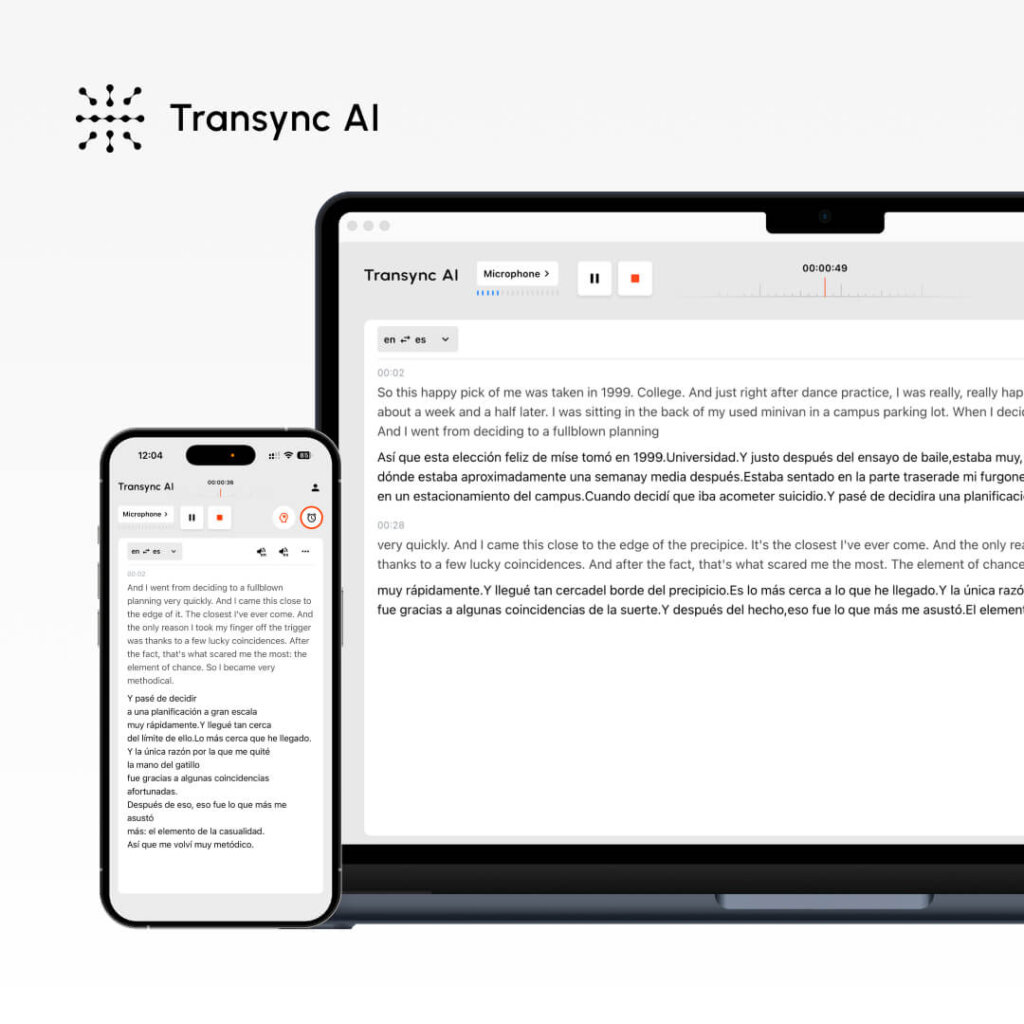
Пример использования: Живые встречи, звонки по продажам, звонки в службу поддержки клиентов.
Как это работает:
- Открытый транссинхронный ИИ
- Выберите “Английский → Испанский”
- Установите флажок “Компьютерный звук”.
- Нажмите “Начать перевод”
- Transync AI осуществляет перевод в режиме реального времени.
- Испаноговорящие слышат английский → испанский (немедленно)
- Носители английского языка слышат испанский → английский (сразу же).
Выступление на английском и испанском языках (перевод):
- Точность: 95%+ (общий), 99% (с настройкой ключевых слов)
- Задержка: <100 мс (незаметно)
- Поддержка испанского варианта: Мексика, Испания, Аргентина, Колумбия
- Качество звука: 9.1/10 (одобрено носителями испанского языка)
- Платформы: Zoom, Teams, Meet, Webex, WhatsApp
Реальный пример:
- Торговый представитель в США (английский) → потенциальный клиент в Мексике (испанский)
- Представитель: “Наше решение позволяет сэкономить 301 TP3T средств”.”
- Мексиканский потенциальный клиент слышит (мгновенно): “Nuestra solución ahorra 30% de Costos”.”
- Потенциальный клиент: “¿Cuántos empleados se necesitan?” (на испанском языке)
- Представитель слышит (мгновенно): “Сколько сотрудников нужно?” (на английском языке)
- Результат: Естественная беседа, сделка завершена
Цены:
- Бесплатно: 40 мин/месяц (первый месяц)
- Начальный тариф: $8.99/месяц (10 часов)
- Плюсы: $19.99/месяц (30 часов)
Преимущества перевода с английского на испанский: ✅ Самая быстрая (<100 мс, без заметной задержки) ✅ Наиболее естественный испанский голос ✅ Простая настройка (<1 минуты) ✅ Автоматическая расшифровка на обоих языках ✅ Поддержка региональных вариантов испанского языка ✅ Идеально подходит для важных деловых разговоров
Недостатки: ❌ Лучше всего подходит для перевода в режиме реального времени, а не для перевода документов. ❌ Требуется настройка с использованием платформы для проведения совещаний.
Вердикт: Лучший выбор для перевода с английского на испанский, когда требуется оперативное и профессиональное общение. (продажи, поддержка, встречи).
#2: Google Translate – Лучший бесплатный переводчик с английского на испанский

Пример использования: Быстрый перевод, неформальное общение, электронная почта
Как это работает:
- Перейдите на translate.google.com
- Вставьте английский текст
- Выберите “Испанский”
- Получите мгновенный перевод
- Скопировать или скачать
Выступление на английском и испанском языках (перевод):
- Точность: 92%
- Скорость: Мгновенный
- Поддержка испанского языка: Испания, Мексика, Аргентина (автоматическое определение)
- Расходы: Бесплатно
- Платформы: Веб-сайт, мобильное приложение
Реальный пример:
- Электронное письмо испанскому покупателю: “Спасибо за покупку. Доставка займет 3-5 дней”.”
- Google Translate: “Спасибо за покупку. Отправлю через 3–5 дней”.”
- Результат: Чётко, понятно клиенту
Преимущества перевода с английского на испанский: ✅ Полностью бесплатно ✅ Регистрация не требуется ✅ Поддерживает все варианты испанского языка ✅ Работает на любом устройстве ✅ Не требует настройки ✅ Подходит для неформального общения
Недостатки: ❌ Более низкая точность (92% по сравнению с 95%+) ❌ Плохое восприятие контекста/тона ❌ Не подходит для критически важных бизнес-задач ❌ Роботизированный голос (7/10)
Вердикт: Лучший вариант для быстрого и бесплатного перевода с английского на испанский. (электронная почта, социальные сети, случайные запросы). Не для критически важных деловых целей.
#3: DeepL – Лучший и точный переводчик с английского на испанский (не в режиме реального времени)

Пример использования: Профессиональные документы, высокоточный перевод.
Как это работает:
- Перейдите на deepl.com
- Вставьте английский текст
- Выберите “Испанский”
- Получите высокоточный перевод
- Скачать с сохранением форматирования
Выступление на английском и испанском языках (перевод):
- Точность: 94% (самый высокий показатель в нереальном времени)
- Скорость: Мгновенный
- Поддержка испанского языка: Общий испанский (подходит для европейского/делового общения)
- Расходы: Бесплатно (500 тыс. символов в месяц) или $8.99 в месяц (без ограничений)
- Поддержка документов: PDF, Word, PowerPoint
Реальный пример:
- Профессиональное бизнес-предложение на английском языке
- DeepL переводит на испанский язык (точность 94%).
- Сохранено форматирование, профессиональный вид.
- Отправляйте сообщения испанским партнерам с уверенностью.
Преимущества перевода с английского на испанский: ✅ Максимальная точность (94% для профессионального уровня) ✅ Сохраняет форматирование документа ✅ Хороший бесплатный тариф (500 тыс. символов) ✅ Доступная цена ($ 8,99/месяц) ✅ Отлично подходит для европейского испанского языка ✅ Прекрасно подходит для деловой переписки
Недостатки: ❌ Работает медленнее, чем Transync AI (не в режиме реального времени) ❌ Только текст (нет перевода совещаний в реальном времени) ❌ Голос менее естественный, чем у Transync AI ❌ Лучше всего подходит для Испании/европейского испанского языка
Вердикт: Идеально подходит для профессионального перевода документов с английского на испанский. когда важны точность и форматирование.
👉 DeepL
#4: ChatGPT – Лучший переводчик с английского на испанский, учитывающий контекст и тон.
Пример использования: Маркетинговый контент, креативное письмо, сложные тексты
Как это работает:
- Перейдите на ChatGPT
- Напишите: “Переведите этот текст с английского на испанский, сохраняя [тон]: [текст]”
- ChatGPT осуществляет перевод с учетом контекста.
- Обзор и использование
Выступление на английском и испанском языках (перевод):
- Точность: 93-95%
- Осведомленность о контексте: Отличный
- Скорость: Мгновенный
- Расходы: Бесплатный уровень или $20/месяц ChatGPT Plus
- Лучше всего подходит для: Тонкий, чуткий к тону перевод
Реальный пример:
- Маркетинговый текст: “Ощутите свободу нашего приложения”
- Задание: “Переведите на испанский, сохраняя энергичный, молодежный тон”.”
- ChatGPT: “Эксперимент по свободе нашего приложения”
- Результат: Тон сохранен, не просто слово в слово.
Преимущества перевода с английского на испанский: ✅ Отлично сохраняет тон ✅ Учитывает контекст (понимает нюансы) ✅ Высокая точность (93-95%) ✅ Доступная цена ($20/месяц) ✅ Идеально подходит для креативного и маркетингового контента ✅ Может обрабатывать сложный текст
Недостатки: ❌ Не подходит для проведения совещаний в режиме реального времени ❌ Требует ввода текста (без голосового ввода) ❌ Более низкая точность, чем у специализированных инструментов перевода ❌ Требует больше итераций для достижения идеальных результатов
Вердикт: Лучший вариант для перевода креативного/маркетингового контента с английского на испанский. где тон и контекст имеют наибольшее значение.
👉 ChatGPT
#5: JotMe – недорогой переводчик с английского на испанский для совещаний.
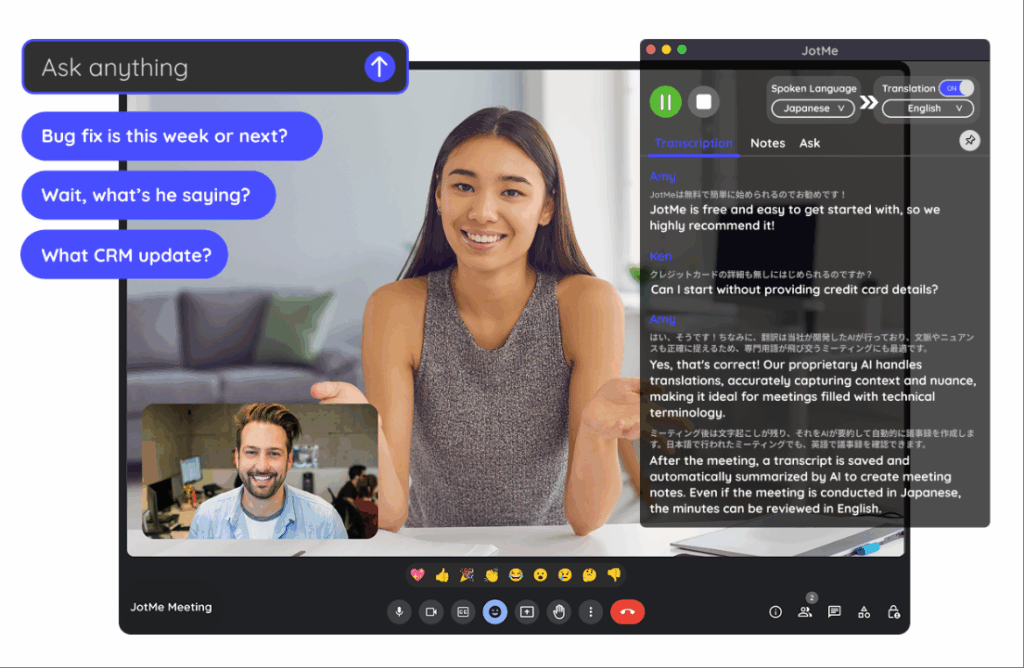
Пример использования: Командные совещания, вебинары, экономически эффективный перевод.
Как это работает:
- Установите расширение для Chrome.
- Присоединяйтесь к Zoom/Teams/Meet
- Включите функцию “Перевести на испанский”.”
- Автоматический перевод в реальном времени
Выступление на английском и испанском языках (перевод):
- Точность: 92-94%
- Задержка: 150-200 мс (слегка заметно)
- Расходы: $9/месяц (200 мин)
- Настраивать: 2-3 минуты
- Качество звука: 7/10 (приемлемо)
Преимущества перевода с английского на испанский: ✅ Более низкая стоимость ($9 в месяц) ✅ Больше языков (всего 77) ✅ Простая настройка (расширение для Chrome) ✅ Работает на разных платформах ✅ Подходит для неформальных встреч
Недостатки: ❌ Более высокая задержка (150-200 мс, заметна) ❌ Более низкая точность (92-94% по сравнению с 95%+) ❌ Менее естественный голос ❌ Не идеально подходит для официальных деловых звонков
Вердикт: Хорошая альтернатива для перевода с английского на испанский. Если бюджет ограничен, а задержка не критична. Для профессиональных разговоров Transync AI лучше.
👉 JotMe
Перевод с английского на испанский: Полная сравнительная таблица
| Аспект | Transync AI | Google Переводчик | DeepL | ChatGPT | JotMe |
|---|---|---|---|---|---|
| Встречи в режиме реального времени | ✅ Лучший | ❌ Нет | ❌ Нет | ❌ Нет | ✅ Хорошо |
| Точность | 95%+ ✅ | 92% | 94% ✅ | 93-95% | 92-94% |
| Задержка | <100 мс ✅ | Мгновенный | Мгновенный | Мгновенный | 150-200 мс |
| Перевод документов | Ограниченный | ✅ Хорошо | ✅ Отлично | ✅ Хорошо | ❌ Нет |
| Качество голоса | 9.1/10 ✅ | 7/10 | Н/Д | Н/Д | 7/10 |
| испанские варианты | Все ✅ | Все | ориентированный на Испанию | Все | Все |
| Время настройки | <1 мин ✅ | 0 мин | 1-2 мин | 2-3 мин | 2-3 мин |
| Расходы | $8.99/мес ✅ | Бесплатно | Бесплатно-$8.99 | Free-$20 | $9/мес. |
| Лучше всего подходит для | Звонки по продажам | Быстрый поиск | Профессиональные документы | Маркетинг | Встречи команды |
Перевод с английского на испанский: пошаговые инструкции
Метод 1: Быстрый перевод электронных писем с английского на испанский.
Сценарий: Нужно отправить электронное письмо испанскому клиенту за 5 минут.
Шаги:
- Вариант А (самый быстрый): Google Переводчик
- Перейдите на translate.google.com
- Вставьте адрес электронной почты
- Скопировать испанскую версию
- Отправить немедленно
- Вариант B (более высокое качество): DeepL
- Перейдите на deepl.com
- Вставьте адрес электронной почты (форматирование сохраняется).
- Скопировать испанскую версию
- Отправлять
Время: <2 минуты Результат: Хороший перевод с английского на испанский для неформальных электронных писем.
Метод 2: Звонок клиенту в режиме реального времени (английский/испанский/перевод)
Сценарий: Важный звонок с потенциальным клиентом, говорящим по-испански, через 30 минут.
Шаги:
- Подготовка (за 15 минут до начала):
- Открытый транссинхронный ИИ
- Выберите “Английский → Испанский”
- Установите флажок “Компьютерный звук”.
- Тестовый микрофон
- Добавьте любые ключевые слова (названия продуктов, технические термины).
- Во время звонка:
- Присоединиться к Zoom обычным способом
- Автоматический перевод Transync AI
- Говорящий по-испански слышит английский → испанский
- Вы слышите испанский → английский
- Естественная беседа
- После звонка:
- Нажмите “Завершить перевод”
- Доступ к автоматически сгенерированной стенограмме
- Итоги совещания по обзору
- Поделиться с командой
Время: <30 минут на подготовку + продолжительность звонка Результат: Профессиональный перевод с английского на испанский, запись для последующего контроля.
Метод 3: Профессиональный перевод документа с английского на испанский.
Сценарий: Необходимо перевести юридический договор с мексиканским партнером.
Шаги:
- Оценивать: Это законно/критично? Да → обратитесь к профессионалу.
- Получить ценовое предложение: Связаться с переводчиком
- Типичная стоимость: $0,15-0,30 за слово
- Контракт объемом 5000 слов: $750-1500
- Сроки: 3-5 дней
- Укажите контекст:
- Отрасль: Юридические услуги/бизнес
- Регион: Мексика
- Тон: Формальный
- Какие конкретные термины следует оставить на английском языке?
- Профессиональный переводчик:
- Переводчик — носитель испанского языка.
- Обзоры юридических экспертов
- Доставка в течение 3-5 дней
- Проверка качества:
- Сравните ключевые слова с помощью Google Переводчика
- Выявите очевидные ошибки
- Одобрить для подписания
Время: 3-5 дней Расходы: $750-1,500 Результат: 99%+ точный перевод с английского на испанский для юридического оформления
Метод 4: Маркетинговый контент. Перевод с английского на испанский.
Сценарий: Описание товара нуждается в переводе для испанского рынка.
Шаги:
- Используйте ChatGPT для сохранения тональности:
- Задание для написания текста: “Переведите это описание товара с английского на испанский, сохранив энергичный, роскошный тон: [текст]”
- ChatGPT переводит с сохранением тональности.
- Сравните с DeepL:
- Вставить в DeepL
- Посмотрите, совпадает ли смысл.
- Выберите вариант, который звучит лучше.
- Запросить отзыв от носителя языка:
- Отправьте обе версии специалисту по маркетингу в Испании.
- Получить обратную связь
- Выберите лучшую версию
- Публиковать:
- Используйте окончательную испанскую версию на веб-сайте/в маркетинговых материалах.
Время: 30 минут Расходы: $0 (при использовании бесплатных версий) или $20/месяц (ChatGPT) Результат: Естественный английский испанский перевод, сохранение фирменного стиля
Перевод с английского на испанский: распространённые ошибки, которых следует избегать.
Ошибка 1: Использование дословного перевода.
❌ Неправильный:
- “Растопить лед”
- Дословный испанский: “Romper el hielo”.”
- Клиент: Растерян (не совсем понятно, как правильно растопить лед?)
✅ Верно:
- “Начните с комфортом”
- Испанский: “Comenzar comodamente”.”
- Результат: Ясный смысл
Когда английский переводят на испанский: Избегайте идиом, используйте понятный язык.
Ошибка 2: Не проверила испанские варианты.
❌ Неправильный:
- Используйте испанские термины для обозначения Испании и Мексики.
- Пример: “Ordenador” (Испания) вместо “Computadora” (Мексика).
- Мексиканский покупатель: “Это старомодно”.”
✅ Верно:
- Проверить целевой регион
- Используйте региональную лексику.
- “Компутадора” (Мексика), “Орденадор” (Испания)
Когда английский переводят на испанский: Укажите регион, проверьте условия.
Ошибка 3: Игнорирование различий между формальным и неформальным языком.
❌ Неправильный:
- Деловая электронная почта с использованием неформального обращения “ты”.”
- Испанский клиент: Оскорблён (слишком небрежно).
✅ Верно:
- В деловой среде используется формальное обозначение “Usted”.”
- Испанский клиент: Профессиональный, уважаемый.
Когда английский переводят на испанский: Соотносите формальный и неформальный стиль с контекстом.
Ошибка 4: Доверие к ИИ 100% при работе с критически важным контентом.
❌ Неправильный:
- Автоматический перевод юридического документа
- Подписать без проверки
- Обнаружение ошибок после подписания (ответственность!)
✅ Верно:
- Используйте ИИ для создания первоначального черновика.
- Профессиональный обзор
- Проверьте ключевые термины
- Подписывайте с уверенностью
Когда английский переводят на испанский: Всегда проводите проверку юридически значимых/критических вопросов вручную.
Ошибка 5: Использование инструментов без предварительного бесплатного пробного периода.
❌ Неправильный:
- Подпишитесь на премиум-инструмент
- Выяснится, что это не соответствует вашим потребностям.
- Потраченные впустую деньги
✅ Верно:
- Сначала попробуйте бесплатные версии.
- Протестируйте с реальным контентом.
- Проверка качества
- Затем подпишитесь
Когда английский переводят на испанский: Всегда проводите тестирование, прежде чем принимать окончательное решение.
Перевод с английского на испанский: Реальные истории успеха
История 1: Торговый представитель заключает сделку, используя перевод с английского на испанский в режиме реального времени.
Ситуация:
- Американская компания-разработчик программного обеспечения обращается к мексиканскому потенциальному клиенту.
- Важнейшая сделка на сумму 1 0 ...
- Потенциальный клиент говорит только по-испански.
- Торговый представитель говорит только по-английски.
Без перевода с английского на испанский в режиме реального времени:
- Вероятна ошибка в коммуникации.
- Сделка, вероятно, провалилась.
- Предполагаемый убыток: $50,000
С помощью Transync AI (перевод с английского на испанский в реальном времени):
- Торговый представитель открывает Transync AI (настройка занимает 40 секунд).
- Потенциальный клиент слышит перевод с английского на испанский (естественный голос, <100 мс)
- Представитель слышит перевод с испанского на английский.
- Естественная беседа
- Результат: Сделка завершена, годовой доход 1 0 ...
- Сэкономленное время: Испанский переводчик не требуется ($, 40-50 тыс. долларов в год)
- Исход: Выгодные отношения, повторные заказы
История 2: Команда поддержки клиентов сократила среднее время обработки запроса 35%
Ситуация:
- Служба поддержки: 10 человек (только на английском языке)
- Количество испанских клиентов: 301 тыс. от общего числа (растет)
- Текущий процесс: Отправка электронного письма на испанском языке → наем переводчика → ответ (2-3 дня)
- Удовлетворенность клиентов: 58%
С помощью Transync AI + английский/испанский перевод:
- Звонок в службу поддержки поступает на испанском языке.
- Откройте Transync AI (1 минута)
- Перевод в режиме реального времени во время звонка
- Немедленно устраните проблему.
- Результат:
- Среднее время обработки: 2 часа → 1,3 часа (снижение 35%)
- Удовлетворенность клиентов: 58% → 89%
- Экономия средств: $5000 в месяц (переводчик не требуется)
- Влияние на выручку: испанский сегмент вырос на 481 тыс. долл. США за 3 месяца.
История 3: Запуск маркетинговой кампании на испанском рынке
Ситуация:
- Глобальная маркетинговая команда
- Кампания успешно прошла на английском языке (50 000 кликов).
- Нужна испанская версия для Мексики.
- Бюджет: $5,000
Традиционный подход (профессиональный перевод):
- Стоимость: $2000-3000 за перевод.
- Сроки: 5 дней
- Кампания отложена
Перевод с английского на испанский (гибридный подход):
- День 1: Используйте ChatGPT для перевода (сохранение тона) + DeepL (проверка качества).
- День 2: Обзоры работ маркетологов, носителей испанского языка (2 часа работы)
- День 3: Запуск кампании на испанском языке.
- Результат:
- Испанская кампания: 120 000 кликов (больше, чем на английском!)
- Стоимость: $0 (использованы бесплатные инструменты + внутренняя проверка)
- Сроки: 3 дня (сэкономлено 2 дня)
- Рентабельность инвестиций: Более высокая вовлеченность испаноязычных пользователей (предпочтение родному языку)
Перевод с английского на испанский: Контрольный список внедрения
Перед переводом проверьте:
☐ Нужен ли мне перевод в режиме реального времени?
- Да → Использовать Transync AI
- Нет → Используйте Google/DeepL/ChatGPT
☐ Каковы требования к точности?
- Критический (юридический) → Профессиональный переводчик
- Важно (для бизнеса) → DeepL или ChatGPT
- Неформальный (электронная почта) → Google Translate
☐ Какой регион Испании мне нужен?
- Мексика → “Компьютадора”, “Авто”, “Юго”
- Испания → “Орденадор”, “Коче”, “Зумо”
- Аргентина → “Computadora”, “Auto”, региональный сленг
☐ Формальный или неформальный тон?
- Бизнес → Используйте “Usted”
- Повседневный → Используйте “tú” (если уместно).
☐ У меня есть время на профессиональную проверку?
- Да → Использовать ИИ + проверку человеком
- Нет → Воспользуйтесь самым быстрым инструментом (Google Translate)
☐ Какой у меня бюджет?
- Бесплатный → Google Translate
- $9-10/месяц → Transync AI или JotMe
- $20/месяц → ChatGPT
- $500+ → Профессиональный переводчик
Перевод с английского на испанский: Рекомендуемые инструменты по сценариям
| Сценарий | Лучший инструмент | Время настройки | Расходы | Точность |
|---|---|---|---|---|
| Звонок клиенту | Transync AI | <1 мин | $8.99/мес. | 95%+ |
| Электронная почта | Google Переводчик | 0 мин | Бесплатно | 92% |
| Документ | DeepL | 1 мин | $8.99/мес. | 94% |
| Маркетинг | ChatGPT | 2 мин | $20/мес. | 93-95% |
| Командное собрание | Transync AI | <1 мин | $8.99/мес. | 95%+ |
| Юридический договор | Профессиональный | 1-2 дня | $1,000+ | 99%+ |
| Быстрый поиск | Google Переводчик | 0 мин | Бесплатно | 92% |
| Официальное предложение | DeepL | 1 мин | $8.99/мес. | 94% |
Заключение: Простой перевод с английского на испанский
Для перевода с английского на испанский язык больше не требуются дорогостоящие переводчики или сложные процессы. Современные инструменты делают это быстро, точно и доступно.
Краткое руководство по принятию решения:
- Нужно немедленно связаться с испаноязычным клиентом? → Transync AI (Задержка <100 мс, звучит естественно)
- Нужен срочный перевод, но бюджет ограничен? → Google Переводчик (бесплатно)
- Нужен профессиональный перевод документов? → DeepL ($8.99/месяц, 94% точно)
- Необходимо сохранить маркетинговый тон? → ChatGPT ($20/месяц, отличный контекст)
- Нужна точность, соответствующая требованиям законодательства? → Профессиональный переводчик (Гарантированное значение 99%+)
Помнить:
- ✅ Укажите испанский регион (Мексика, Испания, Аргентина)
- ✅ Используйте официальное обращение “Usted” в деловых целях.
- ✅ Всегда проверяйте критические переводы.
- ✅ Перед запуском протестируйте на языке носителя языка.
Начните с Transync AI‘Воспользуйтесь бесплатной 40-минутной пробной версией уже сегодня. Убедитесь сами, как быстрый и естественный перевод с английского на испанский может преобразить ваш бизнес. 🚀
Ты можешь попробуйте бесплатно сейчас.

