

テキスト、文書、会話、会議、プレゼンテーション、製品APIなど、6つのスマートなワークフローからオンライン翻訳ツールを選択してください。.
オンライン翻訳ツールは、単に言語リストの豊富さを謳うだけでなく、作業内容に合ったものでなければなりません。レストランのメッセージを貼り付ける人、企画書を翻訳する編集者、バイリンガル会議を行うリモートチーム、アプリをローカライズする開発者など、誰もが翻訳を必要としますが、それぞれに同じシステムは必要ありません。.
このワークフローマップは比較します Transync AI, Google翻訳, ディープL, Microsoft 翻訳、 そして Google Cloud Translation. それはタスクから始まり、入力から出力までの情報の流れを追跡し、各製品が有用になる時点、あるいは適切でなくなる時点を特定します。.
簡潔に答えると、次のようになります。 Google翻訳 高速かつ低摩擦な検索に適しています。; ディープL 有力な文書候補である。; Microsoft 翻訳 個人間および複数デバイス間での会話をサポートします。; Transync AI ライブ会議や多言語プレゼンテーションを中心に設計されており、 Google Cloud Translation 製品や自動化された業務プロセスに組み込まれるべきものです。したがって、最適なオンライン翻訳ツールは、普遍的なランキングではなく、ワークフローに基づいて決定されるべきものです。.
ここから始めましょう:翻訳は何を成し遂げなければならないのか?
インターフェースを比較する前に、最終的なアクションを明確にしましょう。ユーザーは1つの文を理解する必要があるのか、翻訳されたファイルを承認する必要があるのか、通話中に返信する必要があるのか、話者をフォローする必要があるのか、それとも別のアプリケーション内で翻訳されたコンテンツを受け取る必要があるのか、といった点です。
| ワークフロー | 典型的な入力 | 必要な出力 | 最優秀新人候補 | なぜそれが適しているのか |
|---|---|---|---|---|
| 簡単なテキストまたはウェブページ | 貼り付けたテキスト、フレーズ、またはURL | すぐに理解できる意味 | Google翻訳 | 設定がほとんど不要で、すぐにアクセスできます。 |
| レビュー済み文書 | DOCX、PDF、PPTX、またはXLSX | 人間によるレビューのための翻訳ファイル | DeepLまたはGoogle翻訳 | ファイル指向の翻訳ワークフロー |
| 対面での会話 | 交互に話す | 読みやすいまたは聞き取りやすいターン | Microsoft 翻訳 | 個人用および複数デバイスでの会話オプション |
| ライブオンライン会議 | マイクとコンピューターのオーディオ | バイリンガル字幕、音声、録音 | Transync AI | 会議の冒頭の翻訳とメモ |
| 一対多のプレゼンテーション | 司会者1名が話しています | 視聴者が選択した言語 | Transync AI | QRコード、リンク、またはルームIDによる観客アクセス |
| アプリまたはビジネスの自動化 | ソフトウェアからのテキストまたはファイル | APIによって返された翻訳 | Google Cloud Translation または DeepL API | 開発者による制御と拡張可能な統合 |
この表はルーティングマップであり、最終的な判断を示すものではありません。セキュリティ、対応言語、価格、用語、レイテンシ、ファイル制限、および人的レビューの要件によって結果が変わる可能性があります。.
ワークフロー1:オンライン翻訳ツールを使って簡単なテキスト翻訳を行う
最も迅速なワークフローは、同時に最も複雑化しやすいものでもある。
テキストをコピー → 言語を選択 → 翻訳 → 重要な詳細を確認
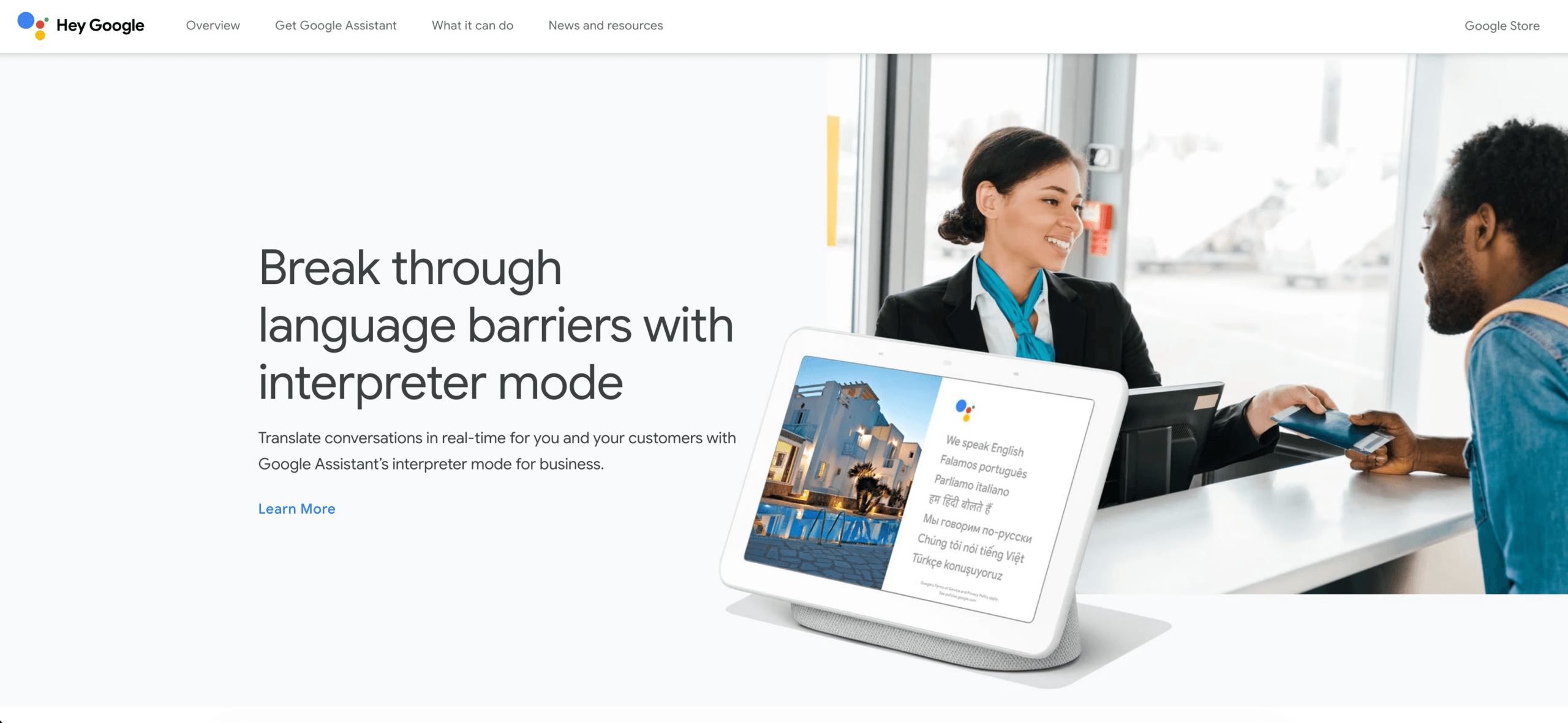
Google翻訳 このパターンには最適です。ユーザーは、プロジェクトを作成することなく、フレーズを貼り付けたり、ウェブページを翻訳したり、テキストとその他のサポートされている入力モードを切り替えたりできます。そのため、旅行に関する質問、非公式なメッセージ、予備調査、馴染みのないコンテンツの大まかな意味の理解などに役立ちます。.
スピードを重視しても、確認の必要性は変わりません。名前、日付、価格、否定表現、地域特有の表現、専門用語などは、必ず再確認する必要があります。便利なオンライン翻訳ツールでも、重要な事実を歪めてしまうような流暢な文章を作成してしまう可能性があります。翻訳された文章が契約条項、医療指示、公式声明、安全指示などに使用される場合は、専門家によるレビュープロセスを経てください。.
軽微な誤りによる損失が少なく、読者が主に即時理解を必要とする場合は、このオンライン翻訳ツールのワークフローを選択してください。利便性を理由に、消費者向けインターフェースが録画された会議や制作ローカライズパイプラインに適していると判断しないでください。.
ワークフロー2:レビュープロセスを維持したままファイルを翻訳する
文書は別の経路をたどります。
ファイルのアップロード → テキストとレイアウトの翻訳 → バージョンの比較 → 用語の編集 → 承認
ディープL は、リアルタイムのやり取りではなく翻訳された文書を納品物とする場合に最適な選択肢です。そのプラットフォームはテキストとファイルの翻訳をサポートしており、開発者向けサービスには用語集やその他のカスタマイズ機能が含まれています。重要なのは、サンプル文が流暢に聞こえるかどうかではなく、実際のファイルが使いやすく、レビューしやすい状態を維持できるかどうかです。.

Google翻訳 また、対応するデスクトップ環境での文書翻訳機能も提供しています。現在のヘルプドキュメントでは、DOCX、PDF、PPTX、XLSX形式に対応しており、ファイルサイズは10MBまで、PDFファイルは最大300ページまで対応しています。スキャンされたPDF画像内のテキストは出力に反映されず、小型画面やモバイル端末では文書翻訳機能は利用できません。.
オンライン翻訳ツールを標準化する前に、代表的なファイルでテストを行ってください。表、見出し、ハイパーリンク、脚注、図表、略語、テキストボックスなどを含め、単なる段落だけでなく、あらゆる要素を含めてください。その後、資格のあるレビュアーに、意味、市場に適した表現、書式、承認済みの用語などを確認してもらってください。.
文書の場合、翻訳されたファイルはあくまでも下書き段階の成果物です。優れたオンライン翻訳ツールのワークフローは、原文を保存し、編集内容を記録し、レビュー担当者を明記し、承認されていない機械翻訳が正式な公開版となることを防ぎます。.
ワークフロー3:対面または少人数グループでの会話をサポートする
会話翻訳は、人々が応答できるほど迅速に発話のタイミングを検出する必要があります。
Aさんが話す → 音声が認識される → 意味が翻訳される → Bさんが読むか聞く → 役割が逆転する
Microsoft 翻訳 このアプリは、個人間のコミュニケーションだけでなく、複数のデバイスが関わる会話にも対応できるように設計されています。現在のアプリ機能には、音声翻訳、画面分割表示、テキスト読み上げ、複数デバイスでの会話機能などが含まれていますが、これらの機能は言語、プラットフォーム、デバイスによって利用できるかどうかが異なる場合があります。.
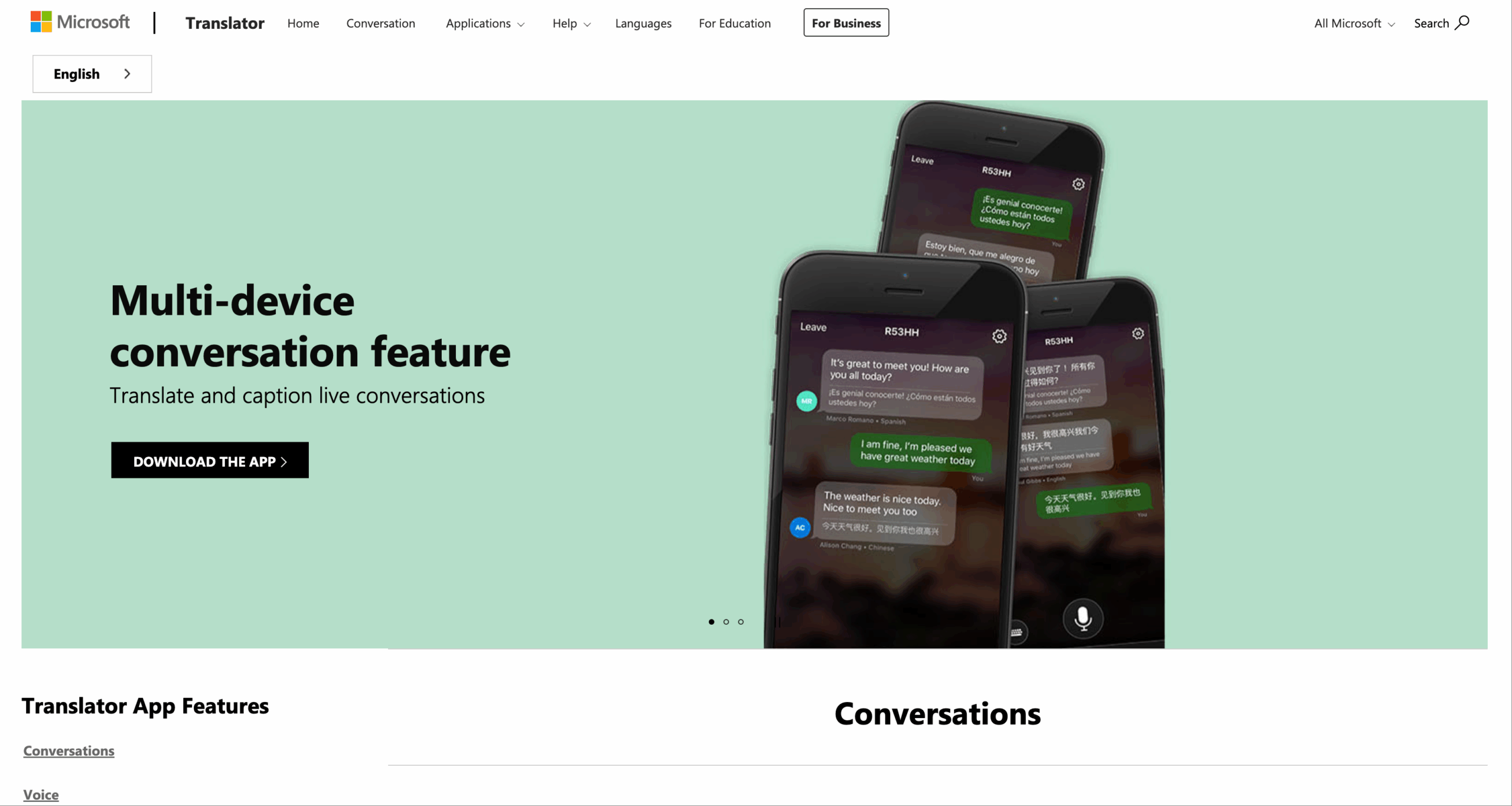
このルートは、受付、非公式な教室グループ、コミュニティでの会話、参加者同士が近くにいる場合のちょっとしたやり取りなどに適しています。オンライン翻訳ツールを実際のデバイスでテストしてください。参加が分かりやすく、各参加者が意図した言語を確認でき、話者が間違いを訂正でき、2人が同時に話してもグループがスムーズに進行することを確認してください。.
会話用のオンライン翻訳ツールは、必ずしも会議のナレッジシステムとして機能するわけではありません。チームがコンピューターによる音声録音、別のアプリケーションでのバイリンガル字幕、検索可能な文字起こし、アクションアイテム、通話後の記録なども必要とする場合は、ライブ会議のワークフローに移行してください。.
ワークフロー4:多言語会議を円滑に進める
会議は、通常の会話よりも多くの要素を付加する。
マイクとコンピューターの音声 → 話者認識 → 翻訳 → 字幕と音声 → 参加者の応答 → 文字起こしとメモ
Transync AI この比較では、会議を優先するオプションです。 リアルタイム翻訳 60言語に対応し、生の音声をバイリンガルテキストと翻訳音声に変換するように設計されています。 ライブ会議の翻訳ワークフロー Zoom、Microsoft Teams、Google Meetなどのプラットフォームと併用でき、各会議主催者がプラットフォーム固有の翻訳プラグインをインストールする必要はありません。.

主要なオンライン会議プラットフォームに対応し、シームレスなリアルタイム翻訳を実現
通話中、, Transync AI 提供できる AI音声翻訳機 参加者は読むだけでなく聞くこともできます。 ピクチャー・イン・ピクチャー方式のバイリンガル字幕 他の対応アプリケーションの上に表示し続けることができるため、ウィンドウを切り替える必要性が軽減されます。.
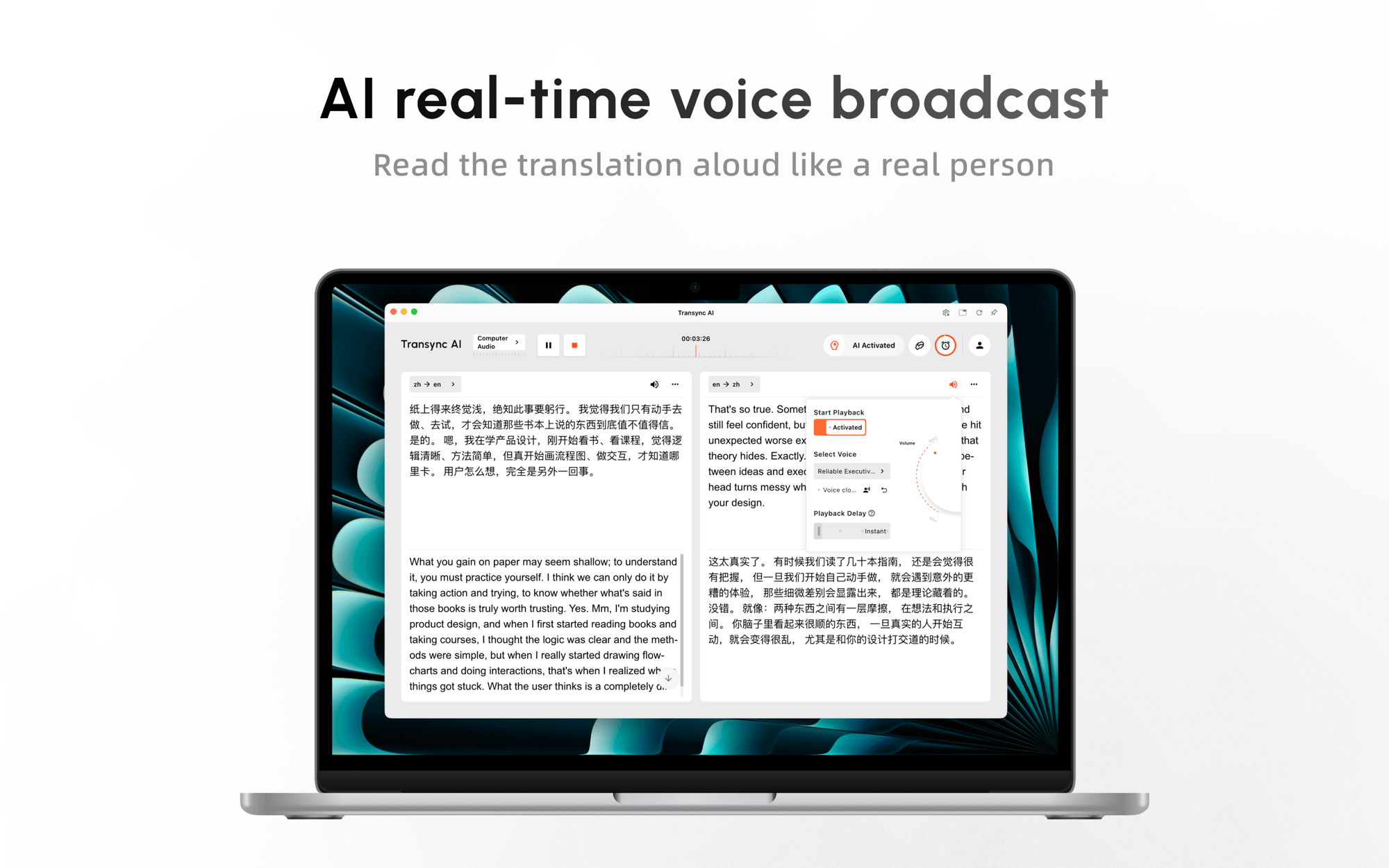 重要な会議の前に、ユーザーは名前、製品用語、略語、背景情報を入力できます。 キーワードと文脈情報. その後、, AI会議メモ 会話を、意思決定やフォローアップに役立つ、より有用な記録に変えることができる。.
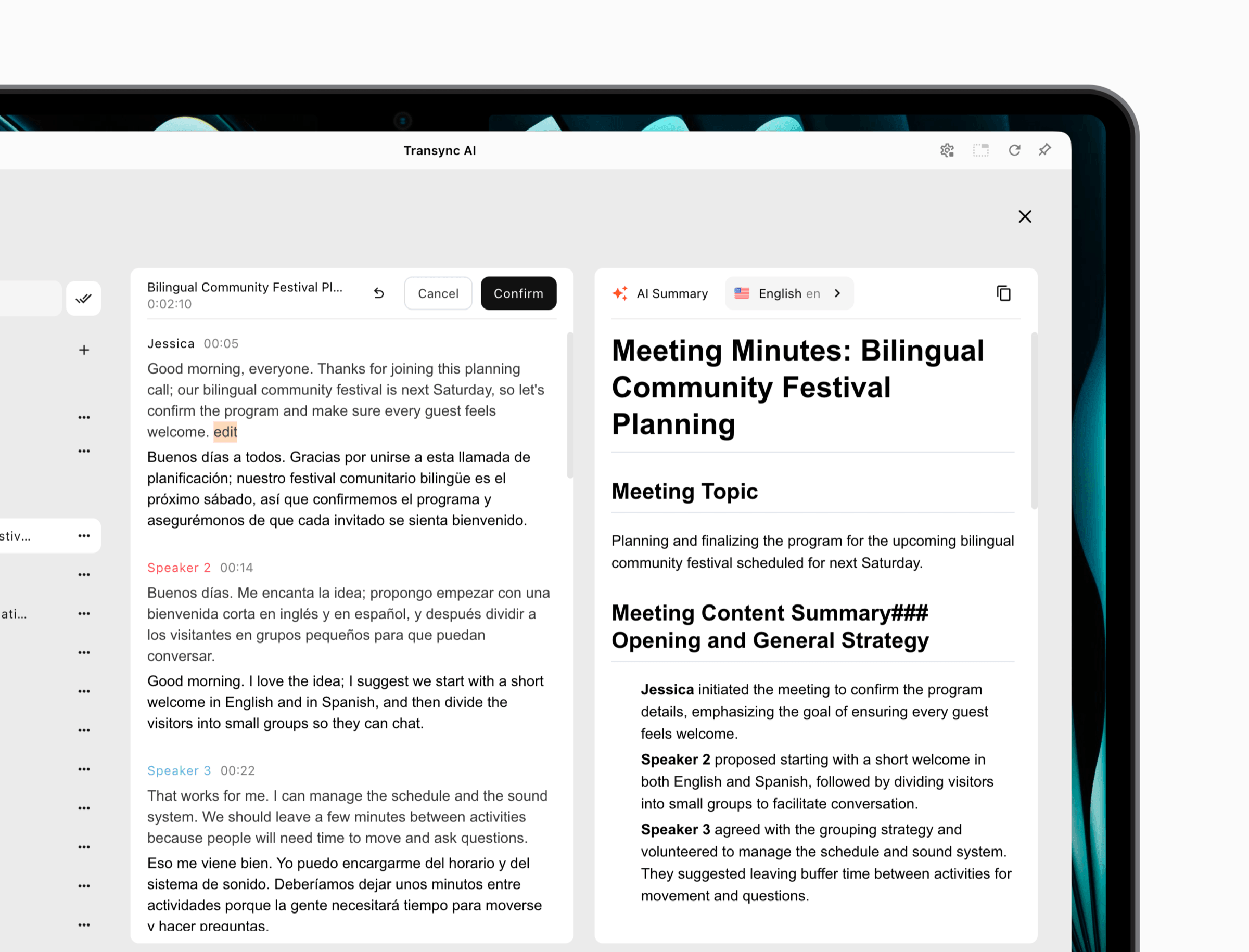 これは Transync AI あらゆる翻訳作業に最適なツールです。オンラインワークフローを採用しており、チームはマイクとコンピューターオーディオのルーティングをテストする必要があります。また、オフラインのカメラ翻訳ツールや文書レイアウトエディターに取って代わるものではありません。会議中に参加者同士が互いの会話を理解し、応答する必要がある場合に、その真価を発揮します。.
会議の遅延、参加度、翻訳された音声、そして会議後の継続性が重要な場合は、このオンライン翻訳ツールを選択してください。遠隔参加者のデバイスでテストしてください。ホストコンピュータで正しくプレビューできたとしても、全員が結果を聞き、理解できるとは限りません。.
ワークフロー5:聴衆に一人の講演者についてもらう
プレゼンテーションは、単に大規模な会話ではありません。通常、話し手は1人で、聞き手は多数います。
司会者が話す → 1つのソースストリームが翻訳される → 視聴者が言語を選択 → 各人が読むか聞く
ベータ版では プレゼンテーションモード, Transync AI 1 つのホストが最大 10 のターゲット言語を有効にできます。視聴者は、QR コード、共有可能なリンク、またはルーム ID を介して、自分のスマートフォンまたはコンピューターから参加できます。ソフトウェアをインストールする必要はありませんが、登録またはサインインする必要があります。 Transync AI アカウント。.
参加者はそれぞれ、主催者が設定した言語の中から1つを選択し、リアルタイムの字幕を読むか、翻訳された音声を聞くことができます。この一方通行モードでは、参加者は音声入力を行うことはできません。セッション終了後、主催者は元の文字起こしとAIが生成したメモを共有するかどうかを選択できます。共有は任意であり、主催者が管理します。.
このアーキテクチャは、研修会、講義、ウェビナー、全体会議、製品デモンストレーション、公開プレゼンテーションなどに適しています。参加者全員が同じ音声パスを設定する必要がないため、参加者が集まる前に、登録状況、Wi-Fi接続状況、QRコードの視認性、ヘッドホン、言語選択、アクセシビリティなどを主催者がテストしておく必要があります。.
聴衆のワークフローにおいては、オンライン翻訳ツールを最初の1分で評価すべきです。遅れて参加した人が、適切な言語を見つけ、セッションが一方通行であるかどうかを理解し、周囲の人々の邪魔をすることなく出力を聞くことができるでしょうか?

プレゼンテーションモードでは、ホストがリアルタイムの翻訳を視聴者と各自のデバイスで共有できます。.
ワークフロー6:翻訳を製品またはプロセス内に組み込む
場合によっては、ユーザーは翻訳サイトにアクセスすべきではありません。翻訳は、アプリケーション内、サポートキュー、コンテンツプラットフォーム、またはデータパイプライン内で行われる必要があります。
ソフトウェアが認証済みコンテンツを送信 → APIがそれを処理する → 翻訳された出力が返される → アプリケーションがそれを検証して表示する
Google Cloud Translation 開発者向けにプログラムによる翻訳機能を提供しています。現在の製品ドキュメントでは、ニューラル機械翻訳を使用するベーシック版と、翻訳LLMへのアクセス、用語集、文書翻訳、バッチ処理、適応型翻訳、その他のカスタマイズ機能などを追加したアドバンスト版を区別しています。.
Google Cloud Translation を探索する
ディープL また、テキストおよび文書全体の翻訳、公式クライアントライブラリ、用語集のカスタマイズのためのAPIも提供しています。APIの選択は、サポートされる言語ペア、文書の動作、用語集の制御、レイテンシ、地域インフラ、セキュリティ要件、データ量、および総運用コストに基づいて行う必要があります。.
APIは、従業員向けの完成されたオンライン翻訳ツールではありません。認証、エラー処理、利用状況の監視、プライバシー管理、再試行、品質評価、そしてユーザーエクスペリエンスといった機能が必要です。このワークフローにおいて、オンライン翻訳ツールとは、チームが翻訳エンジンを中心に構築するシステム全体のことです。開発と継続的な運用コストは、翻訳呼び出し自体よりも高くなる可能性があります。.
翻訳されたコンテンツを製品内に大規模に表示する必要がある場合は、このワークフローを使用してください。実際の要件が単に10人の同僚が週例会議の内容を理解するのを支援することだけであれば、API構築は不必要な複雑さを伴います。.
ワークフロー別オンライン翻訳ツール比較
| ツール | 最適なワークフロー | ライブスピーチ | 文書 | 会議の継続性 | 観客モード | API連携 | 主要境界 |
|---|---|---|---|---|---|---|---|
| Transync AI | 会議とプレゼンテーション | 字幕と翻訳音声 | 主要なワークフローではない | 文字起こしとAIノート | ホスト1台、ベータ版では最大10言語に対応 | 主な購入理由ではない | オンライン;音声設定とアカウントアクセスが重要 |
| Google翻訳 | 簡単なテキスト、ウェブページ、および個人利用 | 対応モードはデバイス/言語によって異なります | 制限付きでサポートされるファイル形式 | 会議用知識ワークスペースではありません | ホスト型プレゼンテーションワークフローではありません | コンシューマー向けツールはクラウド翻訳とは異なります | 利便性は、統制された審査に取って代わるものではない |
| ディープL | テキストと文書をレビューしました | 音声サービスを個別に提供するには、プランの見直しが必要です。 | ファイル指向の優れた候補者 | 主に一般的な会議用ワークスペースではない | コアワークフローではない | テキストおよびドキュメントAPI | テストのフォーマット、条件、対象市場 |
| Microsoft 翻訳 | 個人間および複数デバイスでの会話 | 音声、音声合成、会話機能 | それを選ぶ主な理由ではない | 別個の会話モデル | グループへの参加とプレゼンテーションの実施は異なる | クラウドオプションは別製品です | 機能はプラットフォームと言語によって異なります。 |
| Google Cloud Translation | ソフトウェア内部の翻訳 | API依存の実装 | 高度なドキュメント機能 | 顧客自身が構築する必要がある | 顧客自身が構築する必要がある | 体幹の強さ | エンジニアリングおよび運用管理が必要 |
機能と価格は変更される場合があります。購入または導入前に、プロバイダーの公式サイトで最新の言語、デバイス、プラン、制限、データ利用規約をご確認ください。.
候補者をどのように評価すべきでしょうか?
すべての基準に同じ重み付けをしてはいけません。文書作成チームはレイアウトや用語集の管理を重視するかもしれませんし、営業電話はタイミングや話し手の復帰を重視するかもしれません。また、講堂は聴衆のアクセスのしやすさを重視するかもしれません。.
| 決定要因 | この質問をする | 収集すべき証拠 |
|---|---|---|
| 正確さ | 名前、数字、条件、意図は保持されていますか? | 並行テストスクリプトとバイリンガルレビュー |
| レイテンシー | 会話が進む前に、人々は返答できますか? | 中断ありのタイム制ライブ交流 |
| 配達 | 意図した相手は、その結果を見たり聞いたりできるのか? | 参加者のデバイスでのテスト |
| 用語 | 承認された名称やドメイン名の条件について、ガイダンスを受けることはできますか? | 代表的な用語集テスト |
| 連続 | 後で使える文字起こし、ファイル、またはメモはありますか? | 輸出および共有フローの検査 |
| ガバナンス | 誰がコンテンツにアクセス、保持、共有、または削除できますか? | 契約、プライバシー、および管理に関するレビュー |
| 回復 | 音声が不明瞭になったり、ネットワーク接続が切断されたりした場合、どうなりますか? | 意図的な故障テスト |
| 料金 | 実際の使用量はどのように計測されるのですか? | 予想取引量を用いた月次シナリオ |
のために Transync AI, 現在掲載されているプランには、登録後40分の無料通話、月額8.99ドルで10時間利用できるパーソナルプレミアム、月額24.99ドルで最大40時間利用できるエンタープライズ(1席あたり)が含まれます。多言語モードとプレゼンテーションモードの使用は異なる計測方法が適用されるため、ご確認ください。 現在の料金と利用ルール 想定されるワークフローのため。.
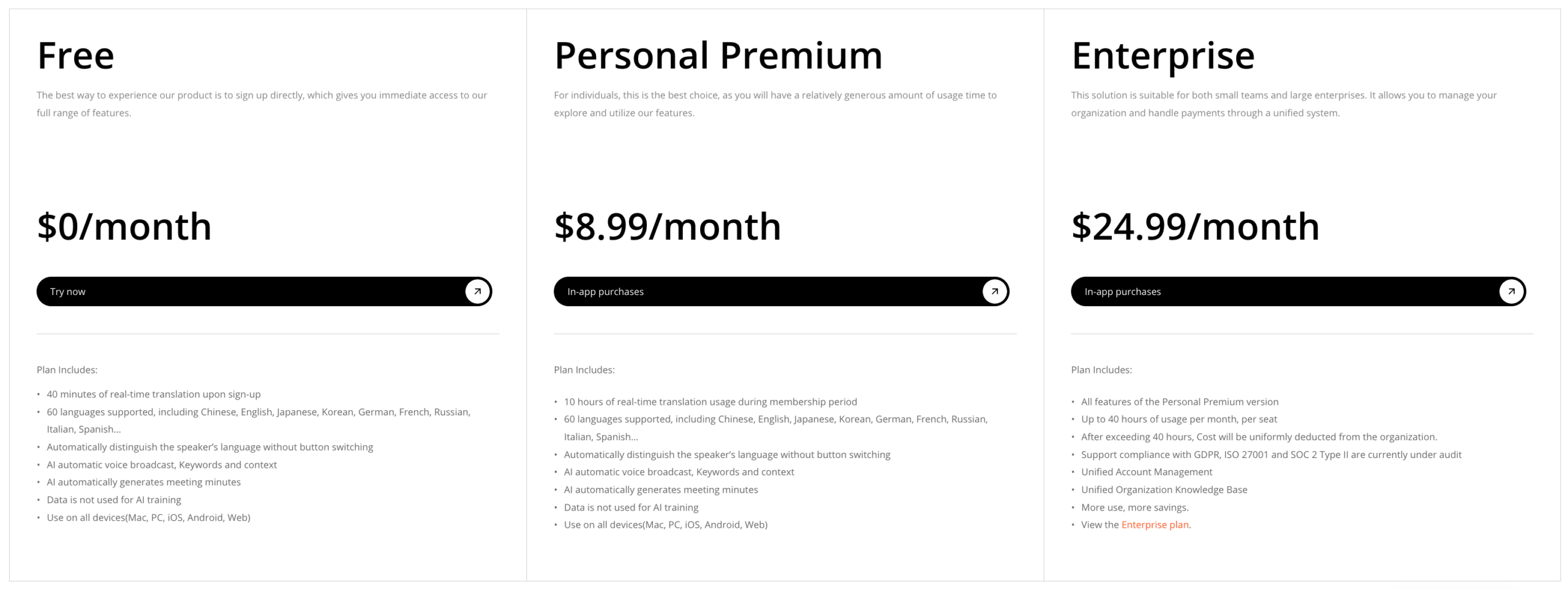 API製品には、使用料、エンジニアリング時間、監視、レビュー作業、障害発生時のコストなど、異なる計算が必要です。無料の消費者向けアクセスと、管理された本番環境への統合を直接比較すべきではありません。.
20分間のオンライン翻訳ツール無料体験
すべての候補者に対して、同じ小規模な証拠資料パックを使用してください。
- 2つの人名、5つの専門用語、3つの数字、1つの訂正、1つの否定条件を含む12の文を作成してください。.
- 表、見出し、ハイパーリンク、画像を含むテキストを収録した2ページの文書を追加します。.
- 話者が交代し、途中で一度中断がある3分間の対話を録音してください。.
- 希望する出力内容を定義します。例えば、迅速な理解、承認済みファイル、リアルタイム応答、オーディエンスアクセス、またはAPIの結果などです。.
- 流暢さよりも事実の意味理解を優先して採点する。.
- リモートリスナーまたは最終リーダーが実際に何を受信するのかを確認する。.
- セットアップ時間、翻訳時間、修正時間、および予想される月額費用を記録してください。.
最適なオンライン翻訳ツールは、作業全体の負担を軽減するものであるべきです。迅速な初稿作成で1時間の修正作業が発生する場合、時間はかかっても管理しやすいワークフローの方が優れているかもしれません。会議の翻訳が完璧に仕上がっていても、提出が遅すぎると、多少粗削りでも質問に間に合うように納品された翻訳の方が、より有用である可能性があります。.
どのオンライン翻訳ツールを選ぶべきか?
選ぶ Google翻訳 リスクが低い場合の、テキスト、ウェブページ、または個人的な理解を迅速に行うには、以下を選択してください。 ディープL 翻訳されたファイルが実際の編集レビューに入る際の文書候補として選択します。 Microsoft 翻訳 関連する言語とデバイスをテストした後、個人または参加可能な小グループでの会話に使用できます。.
選ぶ Transync AI 多言語会議でリアルタイムの字幕、翻訳された音声、コンテキスト、メモが必要な場合、または発表者がプレゼンテーションモードを使用して聴衆に情報を伝える必要がある場合。 Google Cloud Translation または ディープL 翻訳がソフトウェア内部の制御機能となる必要がある場合のAPI。.
オンライン翻訳ツールは、専門家の判断を不要にするものではありません。法律、医療、規制、移民、金融、および安全に関わる重要なコミュニケーションにおいては、結果に責任を負う資格のある人間の翻訳者または通訳者を使用する必要があります。.
最も信頼性の高い判断は、「翻訳後、ユーザーは___できる必要がある」という一文から始まります。この空欄を埋め、そこに至るワークフローを選択し、魅力的な出力結果一つだけでなく、プロセス全体をテストしてください。.
よくある質問
オンライン翻訳ツールとは何ですか?
オンライン翻訳ツールは、インターネット接続サービスを通じてテキスト、文書、音声、またはアプリケーションデータを処理し、別の言語でコンテンツを返します。個人ユーザー向けの製品もあれば、会議、プレゼンテーション、文書作成、またはソフトウェア統合向けに設計された製品もあります。.
会議に最適なオンライン翻訳ツールは何ですか?
Transync AI この比較において、会議を最優先とするソリューションとして最も有力な候補は、リアルタイムのバイリンガル字幕、翻訳音声、用語解説、クロスプラットフォーム対応、文字起こし、AIによるメモ機能などを兼ね備えている点です。ただし、各チームは、自社の会議環境で音声ルーティング、対応言語、レイテンシー、プライバシー、プラン制限などをテストする必要があります。.
一つのツールで文書翻訳と生音声翻訳を同等の精度で行えるだろうか?
プラットフォームによっては複数の入力タイプに対応しているものもありますが、ワークフローはそれぞれ異なります。文書翻訳では、レイアウト、用語、校正、承認が優先されます。音声認識では、認識速度、遅延、ターンテーキング、配信、復旧が優先されます。必要な各モードを個別に評価してください。.
無料のオンライン翻訳ツールは、ビジネス用途に十分な精度を備えているでしょうか?
低リスクの理解には十分かもしれませんが、ビジネスでの利用には機密保持、専門用語、記録、アクセス制御、訂正、説明責任といった要素も含まれます。代表的なコンテンツをテストし、バイリンガルのレビュー担当者または専門の通訳者が引き継ぐ必要がある場合を明確に定義してください。.
オンライン翻訳は人間の通訳に取って代わるのか?
いいえ。自動翻訳はアクセス性やスピードを向上させることはできますが、専門的な責任を負うことはできません。重大な問題、微妙なニュアンスを含むコミュニケーション、または法的影響を伴うコミュニケーションには、資格のある人間の通訳者をご利用ください。.
次世代の体験をお求めなら、 Transync AI リアルタイムのAI翻訳で自然な会話の流れを実現します。 無料でお試しください 今。
