

Metinler, belgeler, konuşmalar, toplantılar, sunumlar ve ürün API'leri için 6 akıllı iş akışı aracılığıyla çevrimiçi bir çeviri aracı seçin.
Çevrimiçi bir çeviri aracı, en uzun dil listesini vaat etmekle kalmamalı, işin şekline uygun olmalıdır. Bir restoran mesajını yapıştıran bir kişi, bir teklifi çeviren bir editör, iki dilli bir toplantı yapan uzaktan çalışan bir ekip ve bir uygulamayı yerelleştiren bir geliştirici, hepsinin çeviriye ihtiyacı vardır, ancak aynı sisteme ihtiyaç duymazlar.
Bu iş akışı haritası karşılaştırır Transync AI, Google Çeviri, DerinL, Microsoft Çevirmen, Ve Google Bulut Çevirisi. Bu süreç, görevle başlar, girdiden çıktıya kadar bilgileri takip eder ve her ürünün kullanışlı hale geldiği veya artık uygun olmadığı noktayı belirler.
Kısa cevap basit: Google Çeviri Hızlı ve düşük sürtünmeli aramalar için uygundur; DerinL güçlü bir doküman hazırlama adayıdır; Microsoft Çevirmen Kişisel ve çoklu cihaz görüşmelerini destekler; Transync AI Canlı toplantılar ve çok dilli sunumlar etrafında tasarlanmıştır; ve Google Bulut Çevirisi Bu, ürünlerin ve otomatikleştirilmiş iş süreçlerinin bir parçasıdır. Dolayısıyla en iyi çevrimiçi çeviri aracı, evrensel bir sıralama listesi değil, bir iş akışı kararıdır.
Buradan Başlayın: Çeviri Neleri Başarmalıdır?
Arayüzleri karşılaştırmadan önce, son işlemi belirleyin. Birinin bir cümleyi anlaması, çevrilmiş bir dosyayı onaylaması, bir arama sırasında cevap vermesi, bir konuşmacıyı takip etmesi veya başka bir uygulama içinde çevrilmiş içerik alması mı gerekiyor?
| İş Akışı | Tipik Giriş | Gerekli Çıktı | En İyi Başlangıç Adayı | Neden Uygun? |
|---|---|---|---|---|
| Hızlı metin veya web sayfası | Yapıştırılan metin, kelime öbeği veya URL | Anında okunabilir anlam | Google Çeviri | Az kurulumla hızlı erişim |
| İncelenen belge | DOCX, PDF, PPTX veya XLSX | İnsan incelemesi için çevrilmiş dosya | DeepL veya Google Translate | Dosya odaklı çeviri iş akışı |
| Yüz yüze görüşme | Alternatif konuşma | Okunabilir veya duyulabilir dönüşler | Microsoft Çevirmen | Kişisel ve çoklu cihaz görüşme seçenekleri |
| Canlı çevrimiçi toplantı | Mikrofon ve bilgisayar sesi | İki dilli altyazı, ses ve kayıt | Transync AI | Toplantı öncesi çeviri ve notlar |
| Bire çok sunum | Sunuculardan biri konuşuyor. | İzleyici tarafından seçilen diller | Transync AI | QR kodu, bağlantı veya Oda Kimliği ile hedef kitleye erişim |
| Uygulama veya iş otomasyonu | Yazılımdan gelen metin veya dosyalar | API tarafından döndürülen çeviri | Google Cloud Translation veya DeepL API | Geliştirici kontrolleri ve ölçeklenebilir entegrasyon |
Bu tablo bir yol haritasıdır, nihai bir karar değildir. Güvenlik, dil seçenekleri, fiyat, terminoloji, gecikme süresi, dosya sınırları ve insan incelemesi gereksinimleri sonucu değiştirebilir.
İş Akışı 1: Hızlı Metin Çevirisi İçin Çevrimiçi Çeviri Aracını Kullanma
En hızlı iş akışı aynı zamanda en kolay karmaşık hale getirilebilen akıştır:
Metni kopyala → dilleri seç → çevir → önemli ayrıntıyı doğrula
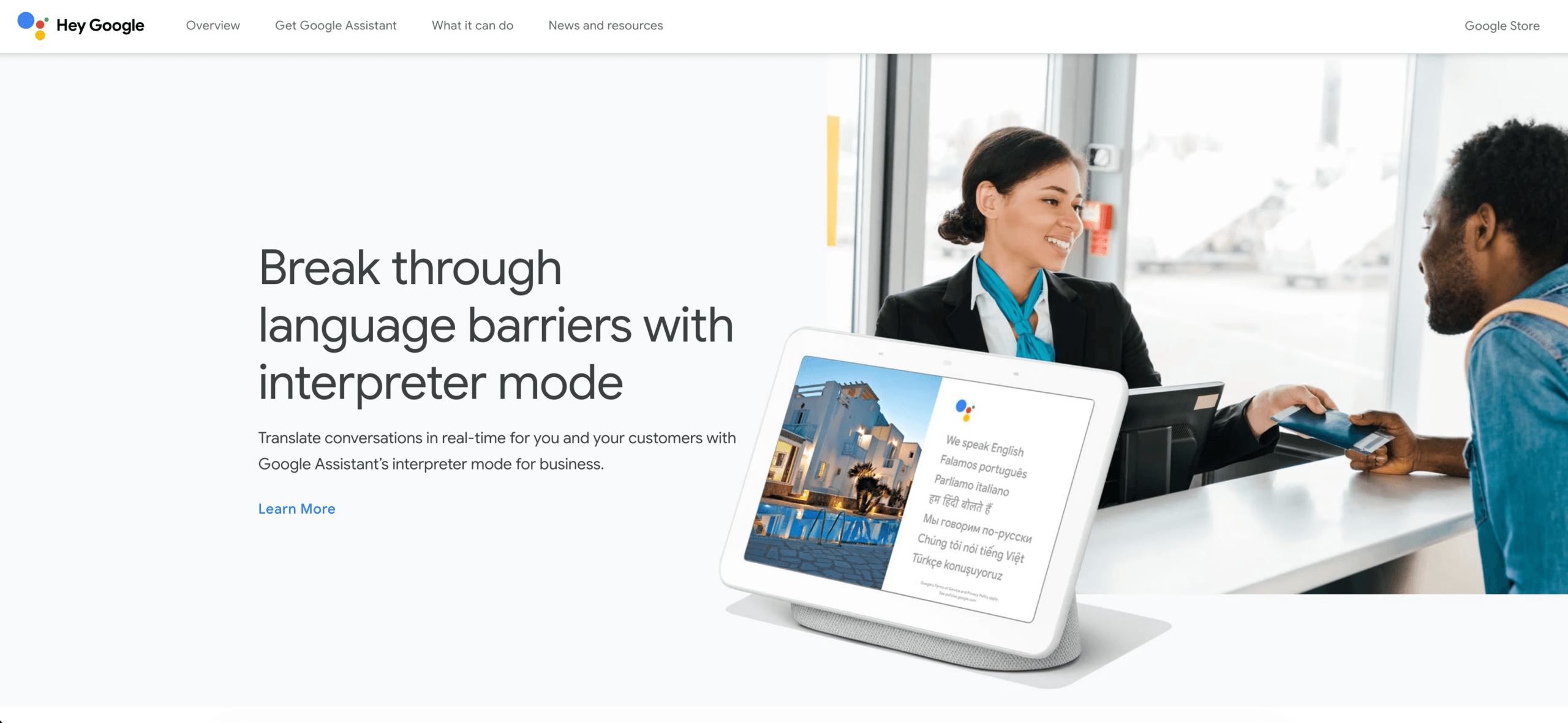
Google Çeviri Bu modele oldukça uygundur. Kullanıcı, bir proje oluşturmadan bir ifade yapıştırabilir, bir web sayfasını çevirebilir veya metin ile diğer desteklenen giriş modları arasında geçiş yapabilir. Bu da onu seyahat soruları, gayri resmi mesajlar, ön araştırmalar ve bilinmeyen içeriğin genel anlamını anlamak için kullanışlı hale getirir.
Hız, doğrulama ihtiyacını ortadan kaldırmaz. İsimler, tarihler, fiyatlar, olumsuzlamalar, bölgesel ifadeler ve teknik terimler ikinci bir incelemeyi hak eder. Hatta kullanışlı bir çevrimiçi çeviri aracı bile, kritik bir gerçeği değiştiren akıcı bir cümle üretebilir. Çevrilen cümle bir sözleşme maddesi, tıbbi talimat, kamuoyu açıklaması veya güvenlik yönergesi haline gelecekse, çalışmayı gözden geçirilmiş profesyonel bir sürece taşıyın.
Küçük bir hatanın maliyeti düşük olduğunda ve okuyucunun esas olarak anında anlama ihtiyacı duyduğunda bu çevrimiçi çeviri aracı iş akışını seçin. Bir tüketici arayüzünün kaydedilmiş bir toplantı veya üretim yerelleştirme süreci için uygun olduğuna dair kanıt olarak kullanım kolaylığını kullanmayın.
İş Akışı 2: İnceleme Sürecini Kaybetmeden Dosya Çevirme
Bir belge farklı bir rota izler:
Dosya yükle → Metni ve düzeni çevir → Sürümleri karşılaştır → Terminolojiyi düzenle → Onayla
DerinL Teslim edilecek ürün canlı bir iletişimden ziyade çevrilmiş bir belge olduğunda pratik bir adaydır. Geniş platformu metin ve dosya çevirisini desteklerken, geliştirici teklifleri sözlükler ve diğer özelleştirme kontrollerini içerir. Önemli olan, örnek bir cümlenin akıcı olup olmadığı değil; gerçek dosyanın kullanılabilir ve incelenebilir olup olmadığıdır.

Google Çeviri Desteklenen masaüstü ortamlarında belge çevirisi de sağlar. Mevcut yardım belgelerinde DOCX, PDF, PPTX ve XLSX formatları listelenmekte olup, dosya sınırı 10 MB'tır; PDF dosyaları en fazla 300 sayfa olabilir. Taranmış PDF görüntülerinin içinde bulunan metinler çıktıya çevrilmez ve belge çevirisi daha küçük ekranlarda veya mobil cihazlarda kullanılamaz.
Herhangi bir çevrimiçi çeviri aracını standartlaştırmadan önce temsili bir dosyayı test edin. Sadece temiz paragraflar değil, tablolar, başlıklar, köprüler, dipnotlar, grafikler, kısaltmalar ve metin kutuları da ekleyin. Ardından, nitelikli bir gözden geçirenden anlamı, pazara uygun dili, biçimlendirmeyi ve onaylanmış terimleri kontrol etmesini isteyin.
Belgeler için çevrilmiş dosya bir taslak niteliğindedir. İyi bir çevrimiçi çeviri aracı iş akışı, orijinali korur, düzenlemeleri kaydeder, gözden geçirenin adını belirtir ve onaylanmamış bir makine çevirisinin yayınlanmış sürüm haline gelmesini önler.
İş Akışı 3: Yüz Yüze veya Küçük Grup Görüşmesini Destekleme
Konuşma çevirisi, insanların yanıt verebilmesi için konuşma sırası değişimlerini yeterince hızlı bir şekilde tespit etmelidir:
A kişisi konuşur → konuşma tanınır → anlam çevrilir → B kişisi okur veya dinler → roller değişir
Microsoft Çevirmen Hem kişisel iletişim hem de birden fazla cihazın dahil olabileceği konuşmalar için tasarlanmıştır. Mevcut uygulama özellik bilgileri arasında konuşma çevirisi, bölünmüş ekran deneyimleri, metinden sese dönüştürme ve çoklu cihazda konuşma yetenekleri yer almaktadır; ancak kullanılabilirlik dil, platform ve cihaza bağlı olarak değişebilir.
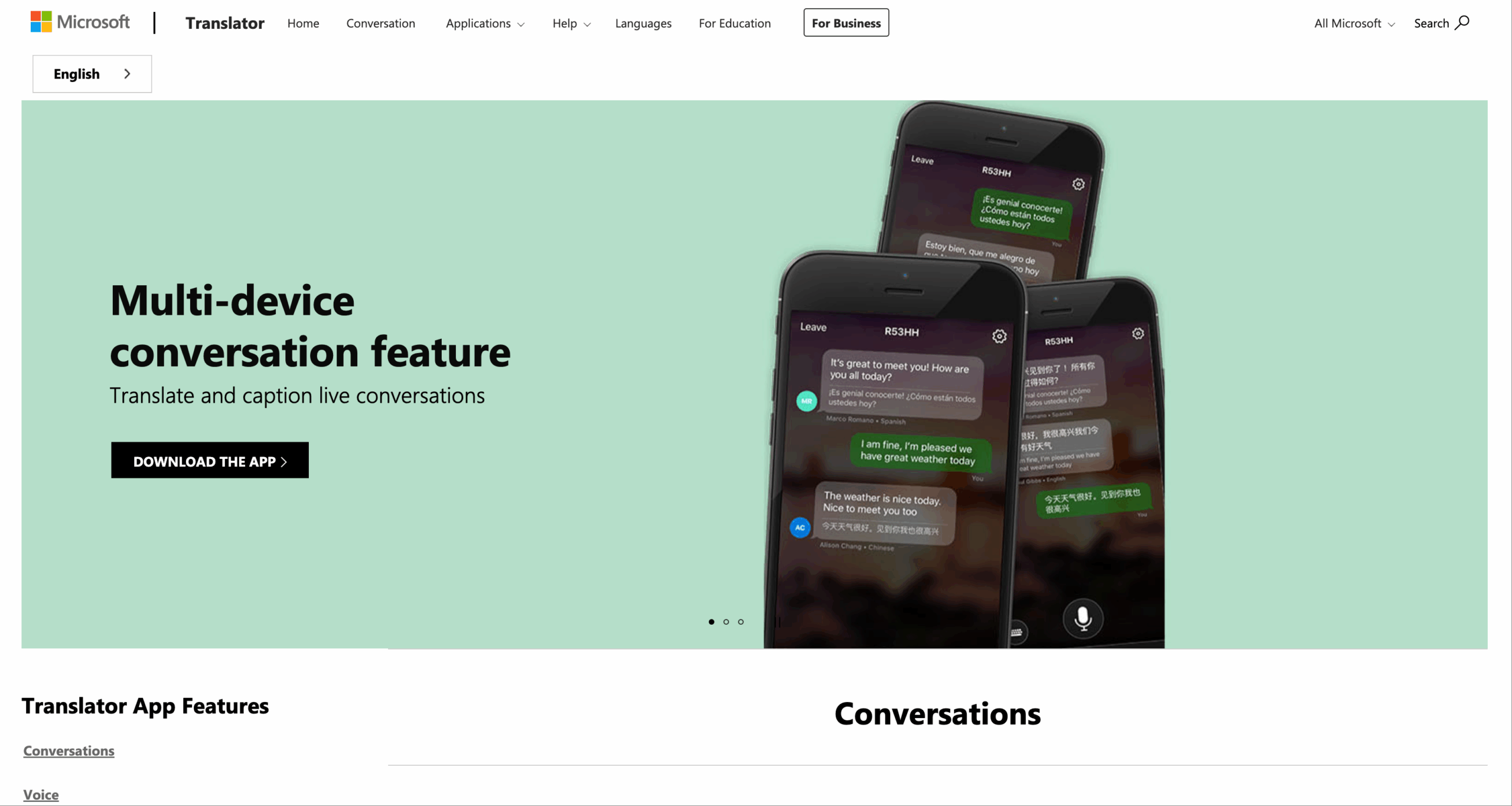
Microsoft Translator'ı keşfedin
Bu rota, resepsiyon masası, gayri resmi sınıf grubu, topluluk sohbeti veya katılımcıların birbirine yakın olduğu hızlı bir iletişim için uygun olabilir. Çevrimiçi çeviri aracını gerçek cihazlarla test edin: Katılım anlaşılabilir olmalı, her kişi hedeflenen dili görmeli, konuşmacılar hataları düzeltebilmeli ve iki kişi aynı anda konuştuğunda grup toparlanabilmelidir.
Konuşmalar için çevrimiçi çeviri aracı, otomatik olarak bir toplantı bilgi sistemi anlamına gelmez. Ekibin ayrıca bilgisayar ses kaydı, başka bir uygulama üzerinden çift dilli altyazı, aranabilir transkriptler, eylem maddeleri ve görüşme sonrası kayıt gibi özelliklere de ihtiyacı varsa, canlı toplantı iş akışına geçin.
İş Akışı 4: Çok Dilli Bir Toplantıyı Akıcı Bir Şekilde Yürütmek
Bir toplantı, sıradan bir sohbete göre daha fazla katman içerir:
Mikrofon ve bilgisayar sesi → konuşmacı tanıma → çeviri → altyazı ve seslendirme → katılımcı yanıtı → transkript ve notlar
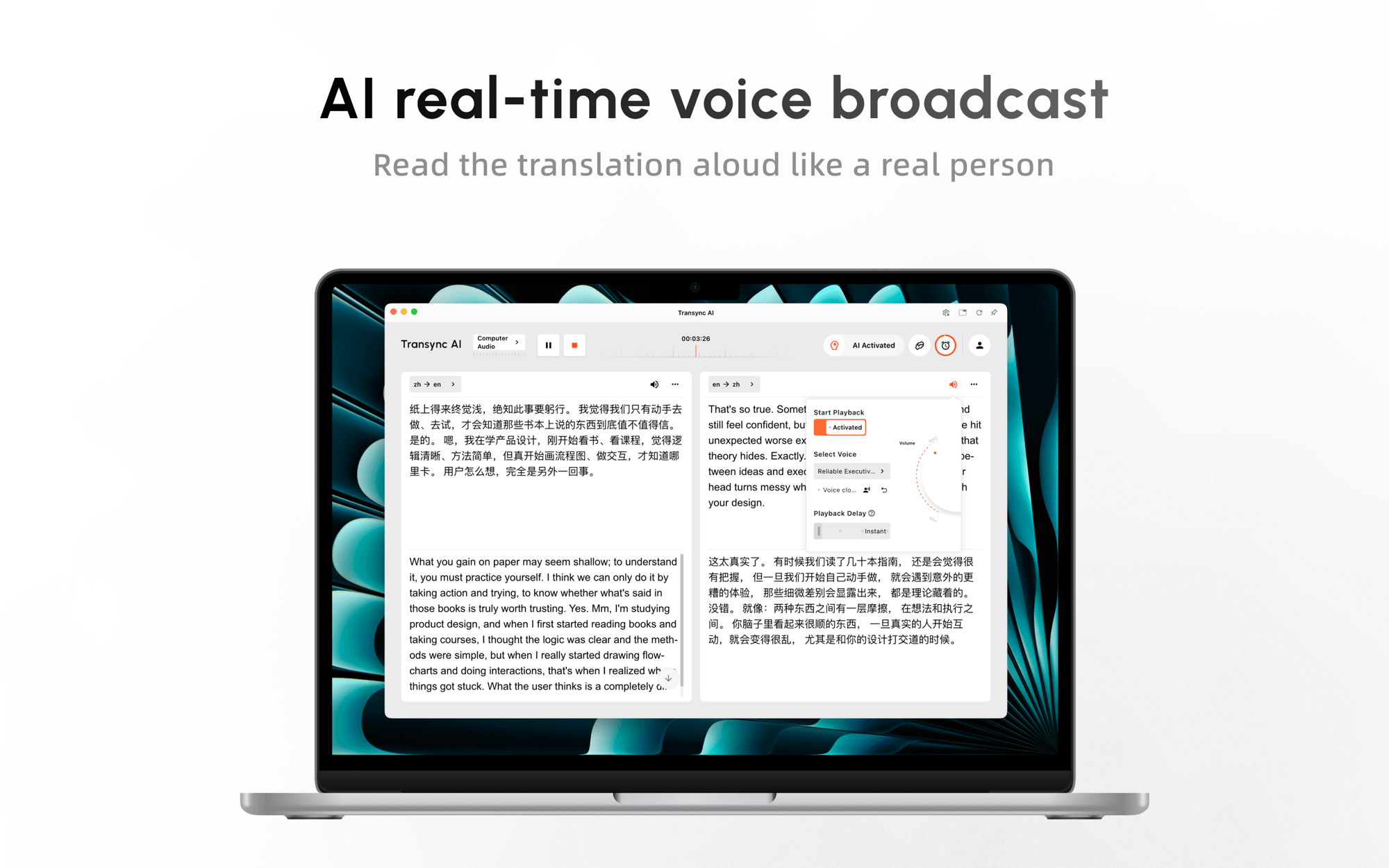
Transync AI Bu karşılaştırmada, öncelikli olarak toplantı yapmayı tercih eden seçenek budur. gerçek zamanlı çeviri 60 dili destekler ve canlı konuşmayı iki dilli metne ve çevrilmiş sese dönüştürmek için tasarlanmıştır. canlı toplantı çeviri iş akışı Zoom, Microsoft Teams ve Google Meet gibi platformlarla birlikte kullanılabilir ve her toplantı sahibinin platforma özgü bir çeviri eklentisi yüklemesini gerektirmez.

Sorunsuz gerçek zamanlı çeviri için başlıca çevrimiçi toplantı platformlarıyla uyumludur.
Transync AI'yı Ücretsiz Deneyin
Telefon görüşmesi sırasında, Transync AI sağlayabilir Yapay zeka ses çevirmeni Böylece katılımcılar hem dinleyebilir hem de okuyabilirler. Resim içinde resim çift dilli altyazılar Desteklenen diğer uygulamaların üzerinde görünür kalabilir, böylece pencereler arasında geçiş yapma ihtiyacı azalır.
 Önemli bir toplantı öncesinde kullanıcılar isimleri, ürün terminolojisini, kısaltmaları ve özgeçmiş bilgilerini girebilirler. anahtar kelimeler ve bağlamsal bilgiler. Sonrasında, Yapay zeka toplantı notları Bu sayede konuşma, kararlar ve takip süreçleri için daha faydalı bir kayda dönüştürülebilir.
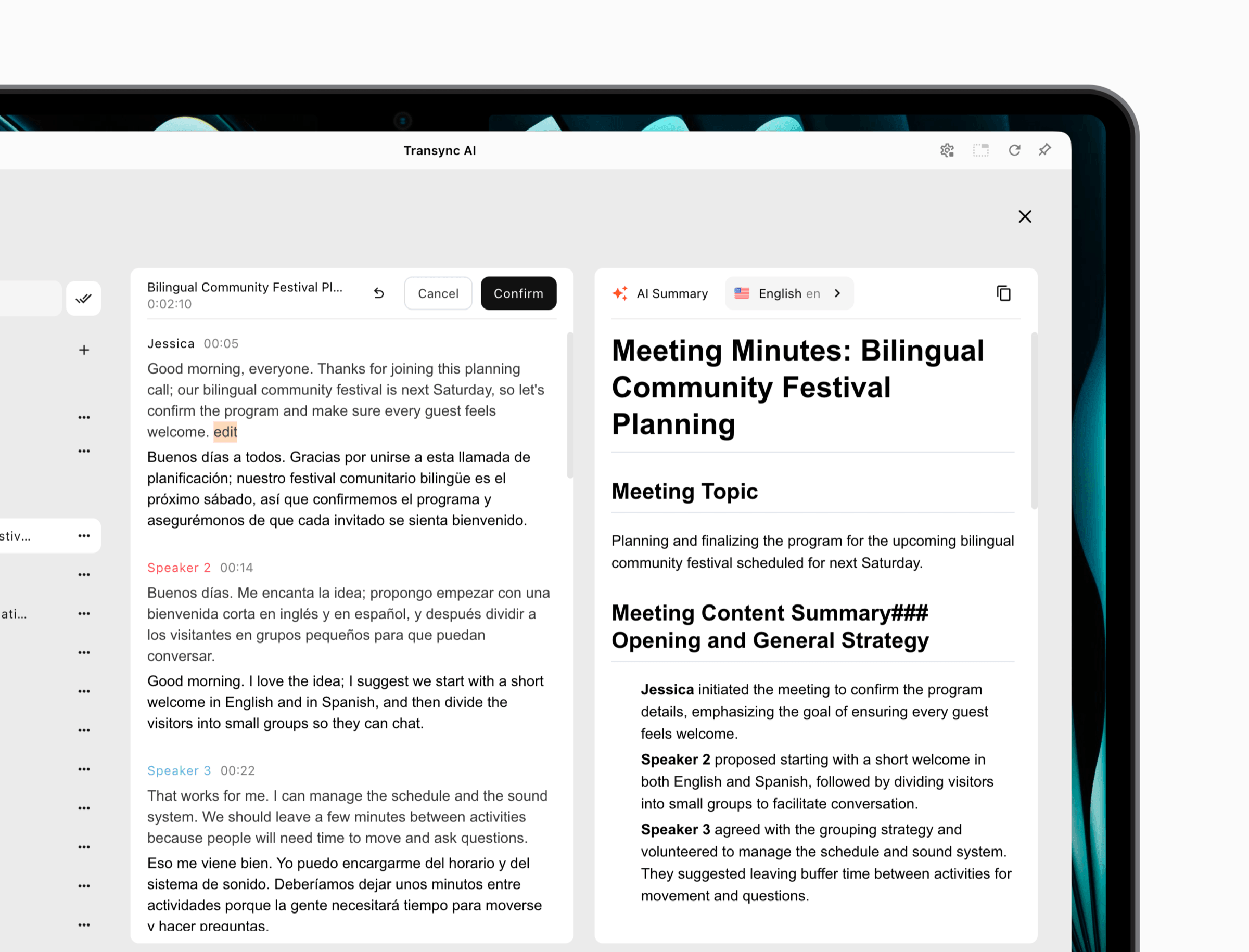 Bu, yapmaz Transync AI Her çeviri görevi için doğru araç. Çevrimiçi bir iş akışıdır, ekiplerin mikrofon ve bilgisayar ses yönlendirmesini test etmesi gerekir ve çevrimdışı kamera çevirmeninin veya belge düzenleme programının yerini alması amaçlanmamıştır. Avantajı, toplantı devam ederken insanların birbirlerini anlamaları ve cevaplamaları gerektiğinde ortaya çıkar.
Gecikme, katılım, çevrilmiş konuşma ve toplantı sonrası süreklilik önemli olduğunda bu çevrimiçi çeviri aracını tercih edin. Uzaktan katılan kişinin cihazından test edin; sunucu bilgisayarındaki doğru önizleme, herkesin sonucu duyabildiğini ve takip edebildiğini kanıtlamaz.
İş Akışı 5: İzleyicilerin Bir Konuşmacıyı Takip Etmesine İzin Verin
Bir sunum, sadece çok uzun bir konuşma değildir. Genellikle bir konuşmacı ve birçok dinleyicisi vardır:
Sunucu konuşur → kaynak akışı çevrilir → izleyiciler dil seçer → her kişi okur veya dinler
Beta sürümünde Sunum Modu, Transync AI Bu özellik, bir sunucunun 10'a kadar hedef dili etkinleştirmesine olanak tanır. Katılımcılar, QR kodu, paylaşılabilir bağlantı veya Oda Kimliği aracılığıyla kendi telefonlarından veya bilgisayarlarından katılabilirler. Yazılım yüklemelerine gerek yoktur, ancak kayıt olmaları veya oturum açmaları gerekir. Transync AI hesap.
Her katılımcı, sunucunun etkinleştirdiği dillerden birini seçer ve canlı altyazıları okuyabilir veya çevrilmiş sesi dinleyebilir. Bu tek yönlü modda izleyiciler sesli giriş gönderemez. Oturumdan sonra, sunucu orijinal transkripti ve yapay zeka tarafından oluşturulan notları paylaşmayı seçebilir; paylaşım isteğe bağlıdır ve sunucu tarafından kontrol edilir.
Bu mimari, eğitim oturumları, dersler, web seminerleri, tüm çalışanların katıldığı toplantılar, ürün tanıtımları ve halka açık sunumlar için uygundur. Her katılımcının aynı ses yolunu yapılandırmasını zorunlu kılmaz, ancak organizatörler yine de salon dolmadan önce kayıt, Wi-Fi kapasitesi, QR görünürlüğü, kulaklık, dil seçimi ve erişilebilirlik konularını test etmelidir.
Bir hedef kitle iş akışı için, çevrimiçi çeviri aracını ilk dakikadan itibaren değerlendirin: Geç gelen bir kişi katılabilir mi, doğru dili bulabilir mi, oturumun tek yönlü olup olmadığını anlayabilir mi ve yakındaki kişileri rahatsız etmeden çıktıyı duyabilir mi?

Sunum Modu, sunucunun canlı çeviriyi izleyicilerle kendi cihazları üzerinden paylaşmasına olanak tanır.
İş Akışı 6: Çeviriyi Bir Ürün veya Sürecin İçine Yerleştirme
Bazen kullanıcının bir çeviri sitesini ziyaret etmesine hiç gerek kalmamalıdır. Çeviri, bir uygulama, destek kuyruğu, içerik platformu veya veri işlem hattı içinde gerçekleşmelidir:
Yazılım yetkilendirilmiş içeriği gönderir → API bunu işler → çevrilmiş çıktı geri döner → uygulama bunu doğrular ve görüntüler
Google Bulut Çevirisi Geliştiriciler için programatik çeviri sunar. Mevcut ürün dokümantasyonu, sinirsel makine çevirisi kullanan Temel sürümü, Translation LLM erişimi, sözlükler, belge çevirisi, toplu işlem, uyarlanabilir çeviri ve diğer özelleştirme yolları gibi özellikler ekleyen Gelişmiş sürümden ayırır.
Google Cloud Translation'ı keşfedin.
DerinL Ayrıca metin ve tam belge çevirisi, resmi istemci kütüphaneleri ve terminoloji özelleştirmesi için API'ler de sunmaktadır. API'ler arasındaki seçim, desteklenen dil çiftlerine, belge davranışına, sözlük kontrollerine, gecikme süresine, bölgesel altyapıya, güvenlik gereksinimlerine, hacme ve toplam işletme maliyetine bağlı olarak yapılmalıdır.
Bir API, çalışanlar için tamamlanmış bir çevrimiçi çeviri aracı değildir. Kimlik doğrulama, hata yönetimi, kullanım izleme, gizlilik kontrolleri, yeniden denemeler, kalite değerlendirmesi ve kullanıcı deneyimi gerektirir. Bu iş akışında, çevrimiçi çeviri aracı aslında ekibinizin çeviri motoru etrafında kurduğu eksiksiz sistemdir. Geliştirme ve devam eden operasyonlar, çeviri çağrılarının kendisinden daha pahalıya mal olabilir.
Çevrilmiş içeriğin bir ürün içinde büyük ölçekte görünmesi gerektiğinde bu iş akışını kullanın. Asıl gereksinim yalnızca on meslektaşın haftalık bir toplantıyı anlamasına yardımcı olmaksa, API oluşturmak gereksiz bir karmaşıklıktır.
İş Akışına Göre Çevrimiçi Çeviri Araçlarının Karşılaştırılması
| Ürün | En Uygun İş Akışı | Canlı Konuşma | Belgeler | Toplantı Sürekliliği | İzleyici Modu | API Entegrasyonu | Anahtar Sınır |
|---|---|---|---|---|---|---|---|
| Transync AI | Toplantılar ve sunumlar | Altyazılar ve ses çevirisi | birincil iş akışı değil | Transkript ve yapay zeka notları | Beta sürümünde tek sunucu, en fazla 10 hedef dil desteği. | Asıl satın alma nedeni değil. | Çevrimiçi; ses ayarları ve hesap erişimi önemlidir. |
| Google Çeviri | Hızlı metin, web sayfaları ve kişisel kullanım | Desteklenen modlar cihaza/dile göre değişiklik gösterir. | Sınırlamalarla desteklenen dosya türleri | Toplantı bilgi çalışma alanı değil | Barındırılan bir sunum iş akışı değil. | Tüketici aracı, Bulut Çevirisinden farklıdır. | Kolaylık, denetlenen incelemenin yerini tutmaz. |
| DerinL | İncelenen metin ve belgeler | Ayrı ses hizmetleri için plan incelemesi gereklidir. | Dosya odaklı güçlü aday | Öncelikle genel toplantı çalışma alanı değil. | Temel iş akışı değil | Metin ve belge API'leri | Test formatı, terimleri ve hedef pazar |
| Microsoft Çevirmen | Kişisel ve çoklu cihaz görüşmesi | Konuşma, metinden sese dönüştürme ve diyalog özellikleri | Seçmenin asıl nedeni bu değil. | Ayrı konuşma modeli | Grup katılımı, sunum yapmaktan farklıdır. | Bulut seçenekleri ayrı ürünlerdir. | Özellikler platforma ve dile göre değişiklik gösterir. |
| Google Bulut Çevirisi | Yazılım içi çeviri | API'ye bağımlı uygulama | Gelişmiş belge özellikleri | Müşteri tarafından inşa edilmelidir. | Müşteri tarafından inşa edilmelidir. | Temel kas gücü | Mühendislik ve operasyonel kontroller gerektirir. |
Özellikler ve fiyatlar değişebilir. Satın almadan veya kurulum yapmadan önce, sağlayıcının resmi sitesinden güncel dil, cihaz, plan, limitler ve veri koşullarını doğrulayın.
Adayları Nasıl Puanlamalısınız?
Her kritere aynı ağırlığı vermeyin. Bir doküman ekibi sayfa düzeni ve sözlük kontrolüne değer verebilir; bir satış görüşmesi zamanlamaya ve konuşmacının toparlanmasına değer verebilir; bir konferans salonu ise izleyiciye kolay erişime değer verebilir.
| Karar Faktörü | Bu soruyu sorun | Toplanacak Kanıtlar |
|---|---|---|
| Kesinlik | İsimler, sayılar, koşullar ve niyet korunuyor mu? | Paralel test senaryosu ve iki dilli inceleme |
| Gecikme | İnsanlar konuşma başka bir konuya geçmeden önce yanıt verebilirler mi? | Kesintili, zaman sınırlı canlı görüşme |
| Teslimat | Hedeflenen kişi sonucu görebilir veya duyabilir mi? | Katılımcı cihazlarında test edin. |
| Terminoloji | Onaylanmış isimler ve alan adı terimleri yönlendirilebilir mi? | Temsili sözlük testi |
| Süreklilik | Sonrasında kullanılabilir bir tutanak, dosya veya not var mı? | İhracat ve paylaşım akışını inceleyin. |
| Yönetişim | İçeriğe kimler erişebilir, içeriği saklayabilir, paylaşabilir veya silebilir? | Sözleşme, gizlilik ve idari inceleme |
| İyileşmek | Ses kalitesinin düşük olması veya ağ bağlantısının kesilmesi durumunda ne olur? | Kasıtlı başarısızlık testi |
| Maliyet | Gerçek kullanım nasıl ölçülüyor? | Beklenen hacim kullanılarak aylık senaryo |
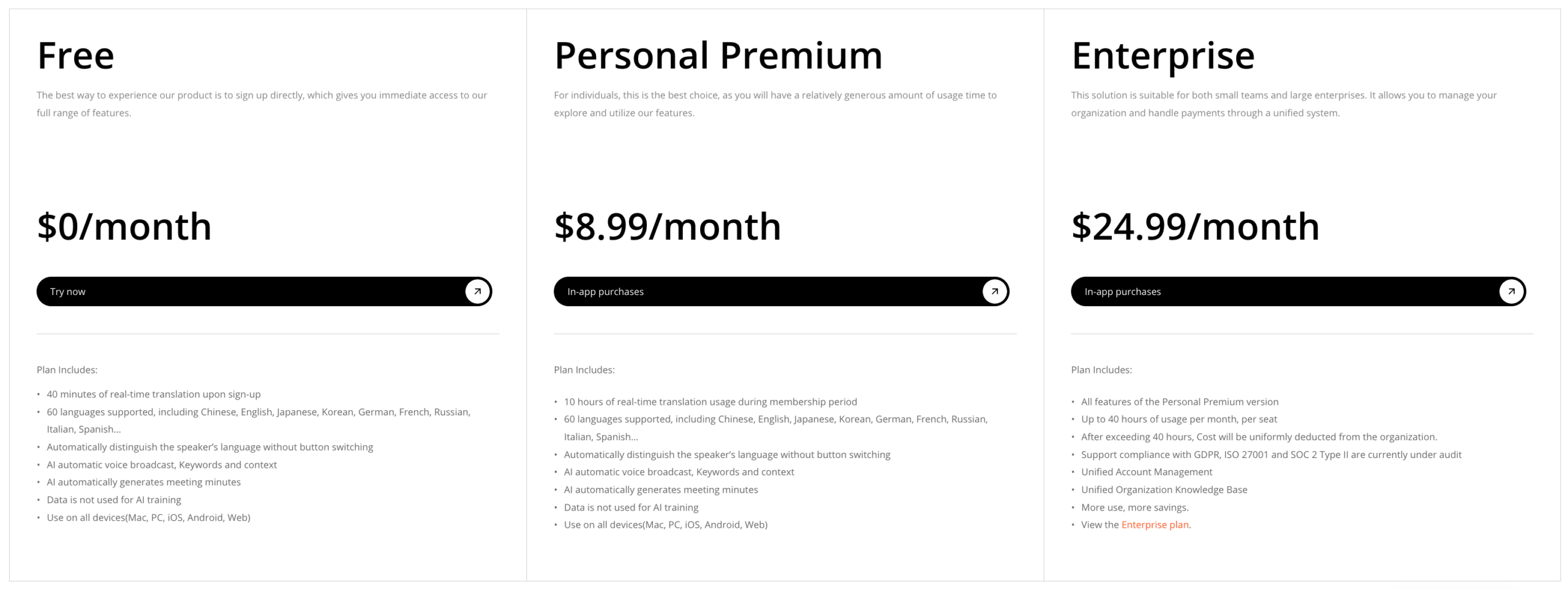
İçin Transync AI, Mevcut listedeki planlar, kayıt olduktan sonra 40 dakika ücretsiz görüşme, aylık 8,99 TL karşılığında 10 saat ücretsiz görüşme içeren Kişisel Premium ve kişi başı aylık 24,99 TL karşılığında 40 saate kadar ücretsiz görüşme içeren Kurumsal planlar içermektedir. Çok dilli ve Sunum Modu kullanımı farklı şekilde ücretlendirilebilir, bu nedenle lütfen teyit edin. mevcut fiyatlandırma ve kullanım kuralları amaçlanan iş akışı için.
 API ürünleri farklı bir hesaplama gerektirir: kullanım ücretleri, mühendislik süresi, izleme, inceleme emeği ve arıza maliyetleri. Ücretsiz tüketici erişimi, denetlenen bir üretim entegrasyonuyla doğrudan karşılaştırılmamalıdır.
20 Dakikalık Çevrimiçi Çeviri Aracı Deneme Sürümü
Her aday için aynı küçük kanıt paketini kullanın:
- İki isim, beş uzmanlık terimi, üç sayı, bir düzeltme ve bir olumsuz koşul içeren 12 cümle yazın.
- Tablo, başlık, köprü ve görsel tabanlı metin içeren iki sayfalık bir belge ekleyin.
- Konuşmacı değişiklikleri ve bir kesinti içeren üç dakikalık bir diyalog kaydedin.
- İstenen çıktıyı tanımlayın: hızlı anlama, onaylanmış dosya, canlı yanıt, hedef kitleye erişim veya API sonucu.
- Akıcılıktan önce olgusal anlamı değerlendirin.
- Uzaktan dinleyicinin veya son okuyucunun gerçekten ne aldığını doğrulayın.
- Kurulum süresini, çeviri süresini, düzeltme süresini ve beklenen aylık maliyeti kaydedin.
En iyi çevrimiçi çeviri aracı, toplam iş yükünü azaltmalıdır. Bir saatlik düzeltme gerektiren hızlı bir ilk taslak, daha yavaş ama kontrol edilebilir bir iş akışına göre daha az faydalı olabilir. Çok geç gelen akıcı bir toplantı çevirisi, bir soru için zamanında teslim edilen biraz daha az cilalanmış bir sonuçtan daha az yararlı olabilir.
Hangi çevrimiçi çeviri aracını seçmelisiniz?
Seçmek Google Çeviri Risk düşük olduğunda hızlı metin, web sayfası veya kişisel kavrayış için. Seçin DerinL Çevrilen dosya gerçek bir editörlük incelemesine girdiğinde, belge adayı olarak seçin. Microsoft Çevirmen İlgili dil ve cihazlar test edildikten sonra, kişisel veya katılımlı küçük grup görüşmeleri için kullanılabilir.
Seçmek Transync AI Çok dilli toplantılarda gerçek zamanlı altyazı, ses çevirisi, bağlam ve notlara ihtiyaç duyulduğunda veya bir konuşmacının Sunum Modu aracılığıyla dinleyicilere ulaşması gerektiğinde. Google Bulut Çevirisi veya DerinL Çeviri işleminin yazılım içinde kontrollü bir işlev haline gelmesi gerektiğinde API kullanımı.
Hiçbir çevrimiçi çeviri aracı, profesyonel yargı ihtiyacını ortadan kaldırmaz. Hukuki, tıbbi, düzenleyici, göçmenlik, finansal ve güvenlik açısından kritik iletişimlerde, sonuçtan sorumlu nitelikli insan çevirmenler veya tercümanlar kullanılmalıdır.
En güvenilir karar tek bir cümleyle başlar: "Çeviriden sonra, kullanıcının şunları yapabilmesi gerekir: ___." Bu boşluğu doldurun, ona ulaşan iş akışını seçin ve tek bir çekici çıktı yerine tüm yolu test edin.
Sıkça Sorulan Sorular
Çevrimiçi çeviri aracı nedir?
Çevrimiçi çeviri aracı, internet bağlantılı bir hizmet aracılığıyla metinleri, belgeleri, konuşmaları veya uygulama verilerini işler ve içeriği başka bir dilde sunar. Bazı ürünler bireysel kullanıcılara hizmet ederken, diğerleri toplantılar, sunumlar, belgeler veya yazılım entegrasyonu için tasarlanmıştır.
Toplantılar için en iyi çevrimiçi çeviri aracı hangisidir?
Transync AI Bu karşılaştırmada, canlı çift dilli altyazılar, çevrilmiş ses, terminoloji bağlamı, platformlar arası kullanım, transkriptler ve yapay zeka notlarını bir araya getirdiği için toplantı odaklı en güçlü adaydır. Ekipler yine de kendi toplantı ortamlarında ses yönlendirmesini, dilleri, gecikmeyi, gizliliği ve planlama sınırlarını test etmelidir.
Tek bir araç, dokümanları ve canlı konuşmaları eşit derecede iyi çevirebilir mi?
Bazı platformlar birden fazla giriş türünü desteklese de, iş akışları farklılık gösterir. Belge çevirisi, düzen, terminoloji, revizyon ve onaylamaya öncelik verir. Canlı konuşma ise tanıma, gecikme, sıra alma, sunum ve kurtarmaya öncelik verir. Gerekli her modu ayrı ayrı değerlendirin.
Ücretsiz çevrimiçi çeviri araçları işletmeler için yeterince doğru mu?
Düşük riskli anlama için yeterli olabilir, ancak iş amaçlı kullanımda gizlilik, terminoloji, kayıtlar, erişim kontrolü, düzeltme ve hesap verebilirlik de söz konusudur. Temsili içerikleri test edin ve iki dilli bir gözden geçiren veya profesyonel bir tercümanın ne zaman devreye girmesi gerektiğini belirleyin.
Çevrimiçi çeviri, insan tercümanın yerini alabilir mi?
Hayır. Otomatik çeviri erişimi ve hızı artırabilir, ancak profesyonel sorumluluk üstlenemez. Kritik, incelikli veya hukuki sonuçları olan iletişimler için nitelikli bir insan tercüman kullanın.
Yeni nesil bir deneyim istiyorsanız, Transync AI Konuşmaların doğal bir şekilde akmasını sağlayan gerçek zamanlı, yapay zeka destekli çeviriyle öncülük ediyor. ücretsiz deneyin Şimdi.
