

Comparez 7 outils de traduction en direct pour les réunions, les voyages, les événements et les médias, incluant la traduction vocale, le sous-titrage bilingue et la prise de notes en réunion.
UN traducteur en direct Il convertit la parole d'une langue à une autre en temps réel. Contrairement à un simple traducteur de texte, il permet de suivre des réunions, des cours, des événements, des appels clients et des discussions en face à face grâce à la traduction vocale, aux sous-titres ou aux deux.
Le choix de la meilleure option dépend du contexte. Un voyageur privilégiera peut-être des phrases rapides sur son mobile, tandis qu'une équipe internationale aura besoin de sous-titres bilingues, d'une restitution vocale naturelle, de la compatibilité avec les plateformes de réunion et de la possibilité de prendre des notes après l'appel. Ce guide compare sept outils et explique comment choisir celui qui convient le mieux à votre flux de travail.
Qu'est-ce qu'un traducteur en direct ?
Un traducteur en direct utilise la reconnaissance vocale, la traduction automatique et la synthèse vocale pour traiter le langage parlé en temps quasi réel. Un flux de travail typique ressemble à ceci :
Audio parlé → reconnaissance vocale → traduction → sous-titres ou voix traduite
Selon le produit, les utilisateurs peuvent recevoir :
- Discours traduit par une voix d'IA naturelle.
- Légendes originales et traduites affichées ensemble.
- Reconnaissance automatique de la langue de l'orateur.
- Une transcription ou un résumé après la conversation.
- Traduction via une application, l'intégration à une réunion ou une API développeur.
Ces différences sont importantes. Un échange de voyages de courte durée n'est pas la même chose qu'une réunion d'affaires de 60 minutes, et une conférence multilingue a des exigences différentes d'un appel commercial privé.
Comparaison rapide : 7 outils de traduction en direct
Le tableau ci-dessous compare chaque produit selon son positionnement principal. Les fonctionnalités des produits peuvent évoluer ; veuillez donc vérifier les caractéristiques essentielles et les langues prises en charge sur les sites web officiels avant tout achat.
| Outil | Idéal pour | Sous-titres en direct | Voix traduite | Compte rendu de réunion | Considération principale |
|---|---|---|---|---|---|
| Transync AI | Réunions multilingues, appels et conversations en personne | Oui, bilingue | Oui | Oui | Un produit conçu pour les réunions, combinant sous-titres, voix, contexte et notes. |
| Talkao | Voyages, traduction mobile et apprentissage des langues | Dépendant de la conversation | Oui | Ce n'est pas un axe de recherche principal. | Des fonctionnalités grand public robustes plutôt qu'un flux de travail dédié aux réunions d'affaires |
| Mondial | Conférences, webinaires et grands événements | Oui | Oui | Transcriptions et résumés | Conçu pour un accès à grande échelle aux participants |
| Soniox | Développeurs créant des produits vocaux | Disponible via les fonctionnalités API/application | Fonctionnalités TTS/API | dépendant du produit | Une plateforme technique plutôt qu'un simple outil de réunion pour utilisateurs finaux |
| Maestra | Localisation de contenus multimédias, doublage, webinaires et événements | Oui | Oui | Oui | Les flux de travail multimédias étendus peuvent dépasser les besoins d'un participant à une réunion. |
| DeepL | Texte, documents, travail linguistique d'entreprise et flux de travail vocaux sélectionnés | dépendant du produit | Disponible via les produits vocaux | Ce n'est pas un axe de traduction principal | Plus connu pour son expertise en matière de langage et de flux de travail documentaire |
| Google Traduction | Traduction gratuite du quotidien | Un flux de travail qui ne privilégie pas les réunions | Lecture audio de la traduction | Non | Pratique pour les tâches rapides, mais limité comme solution de réunion complète |
Que faut-il rechercher chez un traducteur en direct ?
Vitesse en temps réel
De longs délais rendent une conversation artificielle. Un bon traducteur en direct doit traiter la parole suffisamment rapidement pour permettre aux interlocuteurs de répondre sans interruption. Testez la latence en utilisant la paire de langues, le microphone, le réseau, l'accent et les conditions ambiantes que vous prévoyez d'utiliser.
Sortie texte et vocale
La traduction audio favorise une conversation naturelle, tandis que les sous-titres facilitent la vérification des noms, des chiffres et des termes techniques. Les produits proposant les deux options permettent aux utilisateurs d'écouter, de lire ou d'utiliser les deux contenus simultanément.
Terminologie précise
La traduction automatique peut entraîner des erreurs d'interprétation des noms d'entreprises, des termes produits, des abréviations ou du vocabulaire technique. L'ajout d'un contexte permet d'améliorer les résultats en informant le système du sujet de la conversation avant même qu'elle ne commence.
Compatibilité de la plateforme
Un traducteur mobile peut être performant en présentiel, mais peu adapté à une réunion en visioconférence. Vérifiez sa compatibilité avec votre système d'exploitation, votre logiciel de visioconférence, votre source audio et votre appareil.
Résultats utiles de la réunion
Dans le cadre de discussions commerciales, la traduction ne représente qu'une partie du travail. Les transcriptions, les résumés et les comptes rendus de réunion permettent de préserver les décisions et facilitent le suivi.
Confidentialité et traitement des données
Il est essentiel d'examiner attentivement la manière dont un fournisseur traite les flux audio en direct, les transcriptions et les données vocales. Les entreprises doivent également prendre en compte les politiques de conservation des données, les contrôles d'administration, les réglementations en matière de confidentialité et la documentation relative à la sécurité.
Pourquoi utiliser Transync AI en tant que traducteur en direct pour les réunions ?
Transync AI Elle est conçue pour les réunions multilingues, les appels en direct et les conversations en face à face. Elle combine plusieurs étapes du flux de travail de communication au lieu de traiter la traduction vocale comme une série de phrases isolées.
Traduction en temps réel à faible latence
Le outil de traduction en temps réel Il écoute la parole en direct et affiche le contenu original et traduit avec une faible latence. Il distingue automatiquement les deux langues sélectionnées, évitant ainsi d'avoir à appuyer sur un bouton à chaque changement d'interlocuteur.
 C'est utile lors des entretiens, des discussions commerciales, des cours et des conversations quotidiennes où les deux participants souhaitent parler naturellement.
Sous-titres bilingues pendant les conversations en direct
Le fait de voir les deux langues simultanément aide les participants à confirmer ce qui a été dit et à saisir des détails qui pourraient être plus difficiles à comprendre en utilisant uniquement l'audio. Sous-titres bilingues en incrustation d'image peut rester visible au-dessus des autres applications sur les plateformes prises en charge.
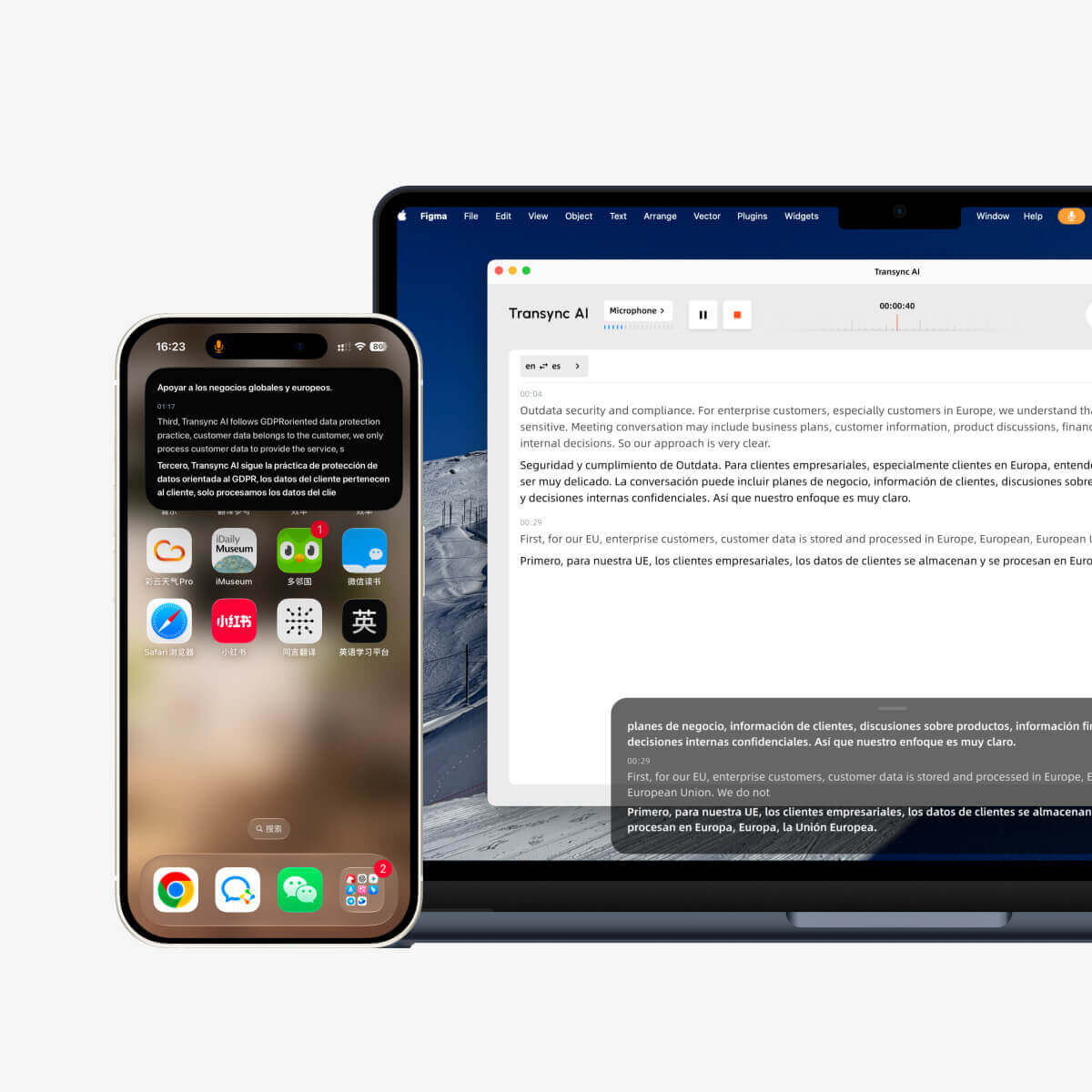 Les sous-titres flottants sont particulièrement utiles lorsqu'un utilisateur est :
- Présentation de diapositives en suivant le discours traduit.
- Démonstration du logiciel lors d'un rendez-vous commercial international.
- Je prends des notes dans une application séparée.
- Suivre un cours tout en consultant le matériel pédagogique.
Sortie vocale traduite naturelle
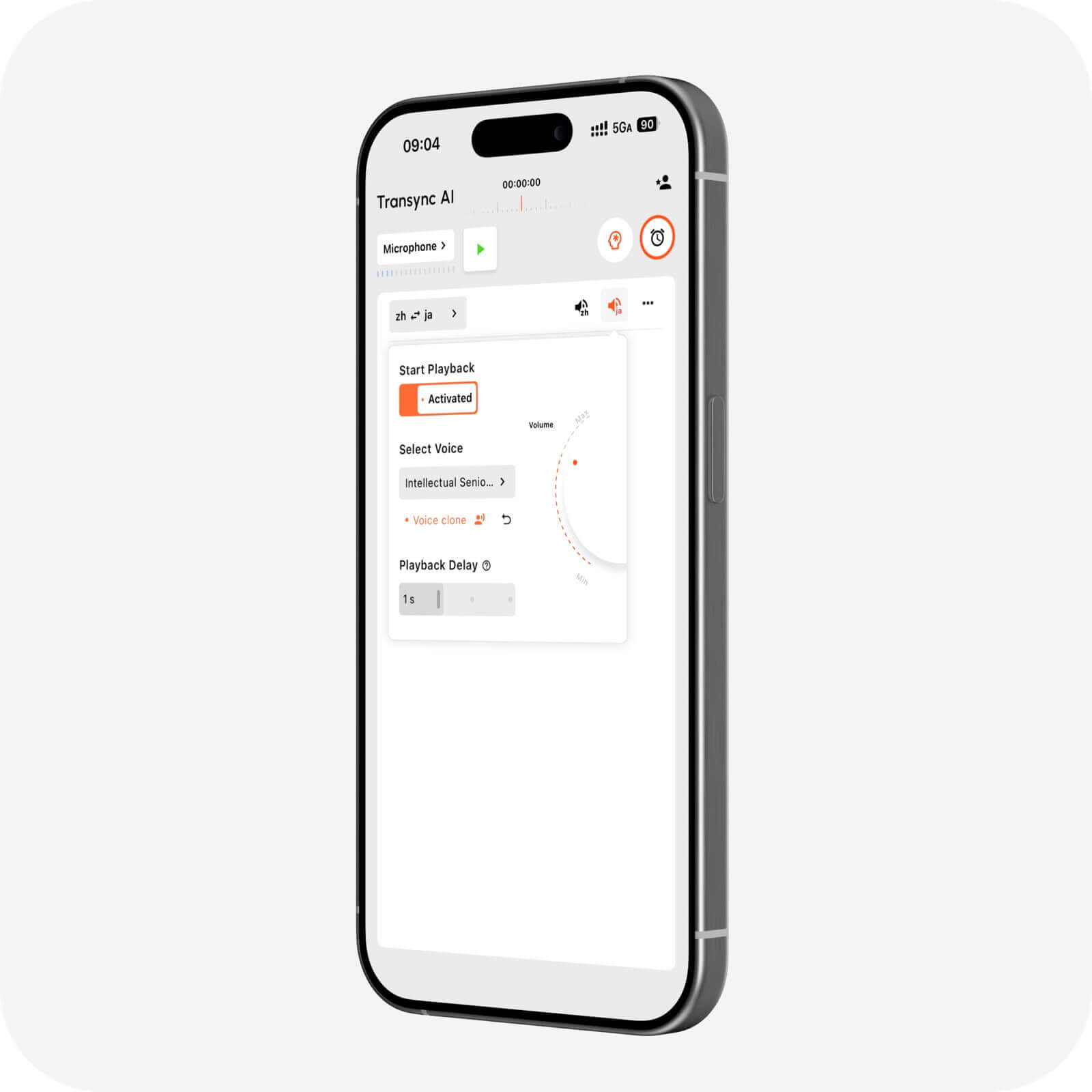
Le Traducteur vocal IA L'application permet de lire à voix haute le contenu traduit grâce à une restitution vocale naturelle. Les utilisateurs peuvent choisir parmi différents styles et débits de voix en fonction de la conversation.
Le fonction de clonage vocal Il est possible de diffuser des textes traduits avec une voix calquée sur celle de l'utilisateur. Cela permet de rendre les démonstrations, les cours, les appels clients et les conversations personnelles plus cohérents avec l'interlocuteur original.
 Soutien aux réunions en ligne
 Soutien aux réunions en ligne
Le fonctionnalité de traduction en direct pour les réunions travaille à côté Zoom, Microsoft Teams, et Google Meet. Il peut également prendre en charge d'autres flux de travail d'appel, notamment WhatsApp appels.
Transync AI Il s'agit d'un logiciel autonome et non d'un plugin spécifique à une plateforme. Il prend en charge les flux de travail Web, Windows, macOS, iOS et Android, permettant aux utilisateurs de choisir une configuration adaptée à leur conversation.
Le fonctionnalité de microphone virtuel permet d'envoyer un discours traduit dans un appel en ligne, tandis que partage audio d'ordinateur permet à l'application de traiter les voix des autres participants à la réunion.
Mots clés et contexte pour une meilleure précision
Le Fonctionnalité Mots clés et contexte de l'assistant IA permet aux utilisateurs de saisir des noms, des marques, une terminologie spécialisée et des informations générales avant une discussion.
Par exemple, un chef de produit en énergies renouvelables pourrait indiquer le nom des composants, le sujet de la réunion et le rôle des participants. Cela permet au système d'interpréter des termes qui pourraient autrement prêter à confusion.
 Enregistrements générés par l'IA après la réunion
 Enregistrements générés par l'IA après la réunion
Le Fonctionnalité de prise de notes de réunion par IA Ce système transforme une conversation multilingue en transcription et en notes structurées. Au lieu de s'appuyer sur leur mémoire, les participants peuvent consulter la discussion et utiliser le compte rendu pour un suivi ultérieur.
Le guide de gestion des dossiers de traduction explique comment les utilisateurs peuvent accéder aux enregistrements de conversations sauvegardées et les organiser.
Couverture étendue des langues et des appareils
Transync AI Il prend en charge plus de 60 langues et plus de 1 000 paires de langues. La disponibilité des langues pouvant évoluer, veuillez consulter la documentation. page des langues prises en charge pour la paire source-cible exacte requise.
Quand un autre traducteur en direct est-il plus approprié ?
Aucun produit n'est idéal pour toutes les tâches. Tenez compte du résultat principal avant de faire votre choix.
Choisissez un outil axé sur le voyage pour la traduction mobile occasionnelle
Talkao Elle est axée sur la traduction mobile, les voyages, les fonctionnalités de l'appareil photo et de la réalité augmentée, et l'apprentissage des langues. Google Traduction est largement accessible pour la traduction rapide de textes, d'images, de sites web et pour les traductions courantes.
 Ces outils sont peut-être plus adaptés aux panneaux, aux menus, aux phrases courtes et aux voyages occasionnels. Transync AI ne prend pas en charge le mode hors ligne, la reconnaissance d'images ni la traduction de documents textuels uniquement.
Choisissez une plateforme événementielle pour un large public
Mondial Cette solution est idéale pour les réunions et événements où les participants peuvent accéder à des sous-titres ou à l'audio traduits via un lien ou un code QR. Elle convient parfaitement aux conférences, webinaires, événements hybrides et programmes d'accessibilité.
 Choisir Transync AI lorsque le besoin concerne un flux de travail de traduction personnel ou d'équipe pour les réunions et appels réguliers. Choisissez Mondial lorsque la répartition des participants et l'ampleur de l'événement sont les principales priorités.
Choisissez une API lorsque vous développez un produit.
Soniox Ce logiciel est destiné aux développeurs et aux équipes techniques travaillant avec les API de reconnaissance vocale, de synthèse vocale et de traduction. Il convient aux entreprises souhaitant intégrer l'intelligence vocale à leurs applications.
 Choisir Transync AI lorsque les utilisateurs ont besoin d'un traducteur en direct prêt à l'emploi plutôt que d'un projet de développement sur mesure.
Choisissez une plateforme média pour la localisation et le doublage.
Maestra Ce service couvre la transcription, le sous-titrage, le doublage, la localisation vidéo, les webinaires et la traduction en direct. Les équipes médias ayant besoin de flux de travail de montage et de publication pourront tirer profit de cette offre plus complète.
 Pour les réunions multilingues quotidiennes, Transync AI offre une combinaison plus ciblée de sous-titres en direct, de lecture vocale, de contexte et de notes.
Choisissez une plateforme linguistique pour les textes et les documents
DeepL Elle s'articule autour de la traduction de textes et de documents, de l'aide à la rédaction, des API, des flux de travail linguistiques d'entreprise et de certains produits vocaux. Elle peut s'avérer préférable lorsque le contenu écrit prime sur les réunions en direct.
 Liste de vérification pour la sélection d'un traducteur en direct
 Liste de vérification pour la sélection d'un traducteur en direct
Avant de vous abonner, testez le produit dans un scénario réel :
- Prend-il en charge exactement cette paire de langues ?
- Peut-il détecter les deux côtés d'une conversation à deux ?
- Les sous-titres sont-ils faciles à lire tout en utilisant une autre application ?
- Les auditeurs peuvent-ils entendre le discours traduit ?
- Est-ce compatible avec la plateforme de réunion requise ?
- Les utilisateurs peuvent-ils fournir des noms et du vocabulaire spécialisé ?
- Des transcriptions ou des résumés sont-ils disponibles par la suite ?
- La politique de confidentialité est-elle adaptée à la conversation ?
- Les performances restent-elles acceptables avec des accents réalistes et le bruit ambiant ?
- Le prix est-il approprié compte tenu de la durée et de la fréquence prévues des réunions ?
Évitez de choisir uniquement en fonction du nombre de langues prises en charge. Le flux de travail, la latence, la sortie et la gestion du contexte sont tout aussi importants.
Comment utiliser Transync AI pour une conversation en direct
- Ouvrir Transync AI sur un appareil compatible.
- Sélectionnez les deux langues utilisées dans la conversation.
- Choisissez le microphone ou la source audio du système.
- Ajoutez les termes pertinents avec le Fonctionnalité Mots clés et contexte de l'assistant IA.
- Commencez le outil de traduction en temps réel.
- Vérifiez que les sous-titres originaux et traduits se mettent à jour correctement.
- Activer Traducteur vocal IA ou fonctionnalité de microphone virtuel lorsque la traduction doit être entendue.
- Ouvrir Sous-titres bilingues en incrustation d'image si les sous-titres doivent rester au-dessus d'une autre application.
- Examinez le résultat via le Fonctionnalité de prise de notes de réunion par IA après la conversation.
Effectuez un test rapide avant un appel important. Vérifiez la source audio, le volume du locuteur, la connexion réseau, la direction de la langue et le vocabulaire spécialisé.
FAQ sur le traducteur en direct
Quel est le meilleur interprète en direct pour les réunions ?
Transync AI est une excellente option pour une première réunion car elle combine traduction en temps réel, sous-titres flottants bilingues, Lecture vocale traduite, le contexte terminologique et Notes de réunion IA. Le meilleur choix dépend toujours des langues requises, de la plateforme, de la durée de la session et des règles de confidentialité.
Un interprète en direct peut-il lire la traduction à voix haute ?
Oui. Plusieurs produits offrent une sortie audio dans différents flux de travail. Traducteur vocal IA de Transync AI peut lire des textes traduits avec des voix naturelles, grâce à des options de style et de clonage de voix.
Un interprète en direct peut-il travailler pendant un appel vidéo ?
Oui. Transync AI fonctionne en parallèle avec les outils d'appel courants tels que Zoom, Microsoft Teams, et Google Meet. C'est fonctionnalité de traduction en direct pour les réunions Il offre des sous-titres et une traduction vocale pour les appels multilingues.
Un interprète en direct peut-il fonctionner sans internet ?
Certains outils grand public peuvent proposer un nombre limité de téléchargements de langues hors ligne. Transync AI Nécessite une connexion internet et ne propose actuellement pas de mode hors ligne.
La traduction automatique par IA peut-elle remplacer un interprète humain ?
L'IA n'est pas adaptée à toutes les situations. Si elle est utile pour sa rapidité, son accessibilité et de nombreuses conversations courantes, elle peut mal interpréter un langage ambigu, des intervenants simultanés, une terminologie peu courante ou des nuances culturelles. Les discussions juridiques, médicales, critiques en matière de sécurité et contractuelles peuvent nécessiter l'intervention d'un interprète humain qualifié ou une relecture par un professionnel.
La traduction vocale en direct est-elle privée ?
La confidentialité dépend du fournisseur. Transync AI Il est indiqué que les données client ne sont pas utilisées par défaut pour l'entraînement de l'IA et que les fichiers audio sont supprimés après traitement. Les organisations devraient examiner les Centre de confiance et les conditions générales en vigueur avant d'utiliser un traducteur en direct pour du contenu sensible.
Verdict final : Quel traducteur en direct choisir ?
Le droit traducteur en direct Elle doit être en phase avec la conversation, et non pas simplement avoir la plus longue liste de fonctionnalités.
- Choisir Talkao ou Google Traduction pour les tâches mobiles et de voyage occasionnelles.
- Choisir Mondial pour les événements destinés à un grand nombre de participants.
- Choisir Soniox pour les API de développement et les produits vocaux personnalisés.
- Choisir Maestra pour les flux de travail de localisation et de doublage des médias.
- Choisir DeepL pour les textes, les documents et les opérations linguistiques plus générales.
- Choisir Transync AI pour les réunions multilingues qui nécessitent des sous-titres bilingues en direct, la traduction des discours, la terminologie contextuelle et des notes après l'appel.
Pour les équipes qui communiquent chaque semaine dans différentes langues, Transync AI offre une méthode ciblée pour écouter, comprendre, répondre et retenir les informations clés d'une conversation multilingue.
