
Guía de traducción de conversaciones: utilice 5 pruebas prácticas para comparar la velocidad, la precisión, la salida de voz, el contexto y la compatibilidad con reuniones antes de elegir una herramienta.
A traductor de conversaciones Puede parecer impresionante en una demostración de producto, pero resultar incómodo en una conversación real.
La diferencia suele notarse cuando la gente deja de leer frases preparadas y empieza a comunicarse de forma natural. Interrumpen. Acortan las frases. Cambian de tema a mitad de la oración. Usan nombres de productos, acrónimos, chistes y expresiones que solo tienen sentido en contexto.
Por eso, elegir un traductor de conversaciones no debería empezar con una sola pregunta: "¿Cuántos idiomas admite?".“
Una pregunta mejor sería:
¿Puede esta herramienta ayudar a dos personas a seguir hablando sin tener que interrumpir constantemente la conversación para gestionar la traducción?
Esta guía utiliza cinco pruebas prácticas para evaluar un traductor de conversación para reuniones, clases, entrevistas, llamadas con clientes, conversaciones con proveedores y comunicación multilingüe cotidiana.
Respuesta rápida: ¿Qué es un traductor de conversaciones?
A traductor de conversaciones Escucha el lenguaje hablado y lo traduce a otro idioma mientras se desarrolla una conversación.
Dependiendo del software, puede proporcionar:
- Subtítulos traducidos en tiempo real
- Detección de idiomas bidireccional
- Reproducción de voz traducida
- Reconocimiento automático del habla
- Soporte para reuniones en línea
- Palabras clave técnicas y sugerencias contextuales
- Transcripciones y notas de la reunión de IA
- Subtítulos flotantes sobre otras aplicaciones
Un traductor de viajes sencillo puede ser útil para preguntas cortas como "¿Dónde está la estación de tren?". Un traductor de conversaciones profesional debe manejar comunicaciones más largas y menos predecibles.
Por ejemplo, una reunión de negocios podría incluir:
- Varios oradores
- Nombres de productos y empresas
- Terminología técnica
- Números y plazos
- Alternancia de códigos chino-inglés o japonés-inglés
- Preguntas formuladas antes de que se complete la respuesta anterior.
- Ruido de fondo procedente de una llamada de oficina o en línea.
La mejor herramienta no es simplemente la que traduce una frase correctamente, sino la que ayuda a que la conversación continúe.
¿Por qué las herramientas de traducción comunes suelen tener dificultades con la conversación?
La traducción de texto generalmente se basa en la introducción de datos completos. El usuario introduce una frase o un párrafo, y la herramienta lo traduce.
La conversación es menos ordenada.
Un orador puede decir:
“Entonces, con respecto al nuevo modelo, ¿el proveedor confirmó la fecha de entrega antes de eso?”
La frase cambia de rumbo a la mitad. Un traductor de conversación debe decidir si esperar a tener más contexto o empezar a traducir inmediatamente.
Si la espera es demasiado larga, el oyente experimenta un retraso. Si la traducción se produce demasiado pronto, puede que sea necesario revisar el significado.
Esto crea un difícil equilibrio entre:
| Requisito | Por qué es importante |
|---|---|
| Velocidad | La traducción debe llegar antes de que la discusión avance. |
| Exactitud | El resultado debe preservar el significado que el hablante pretende transmitir. |
| Continuidad | El sistema debe manejar oraciones incompletas y cambiantes. |
| Contexto | Los nombres, las industrias y las declaraciones anteriores afectan el significado. |
| Salida natural | La voz traducida no debe interrumpir al siguiente orador. |
Un traductor de conversaciones útil debe dominar las cinco.
Prueba 1: ¿El traductor de conversaciones conserva el ritmo?
La primera prueba no es la precisión. Es el ritmo.
Incluso una traducción correcta resulta difícil de usar si llega después de que la conversación ya ha avanzado.
Cómo realizar la prueba del ritmo
En lugar de un monólogo preparado, utilice una breve conversación entre dos personas.
Incluir:
- Un saludo
- Una pregunta de seguimiento
- Una breve interrupción
- Una oración que cambia de dirección
- Un número o fecha
- Una solicitud de aclaración
Por ejemplo:
“Podemos entregar 300 unidades para el 12 de septiembre —perdón, quise decir el 21 de septiembre— si se aprueba la especificación final esta semana.”
Observa si la herramienta:
- Espera la corrección
- Conserva la fecha final
- Genera subtítulos rápidamente
- Evita reproducir la salida de voz antigua sobre la siguiente oración.
- Permite que la segunda persona responda de forma natural.
¿Qué se considera latencia útil?
El retraso ideal depende de la situación.
| retraso en la traducción | Experiencia práctica |
| Menos de 2 segundos | Ideal para conversaciones animadas de ida y vuelta. |
| 2–4 segundos | Generalmente se utiliza para reuniones y clases. |
| 4–6 segundos | Más adecuado para presentaciones que para debates rápidos. |
| Más de 6 segundos | Es probable que interrumpa el ritmo de la conversación. |
La reproducción de voz suele tardar más que la de subtítulos porque el software también tiene que generar audio.
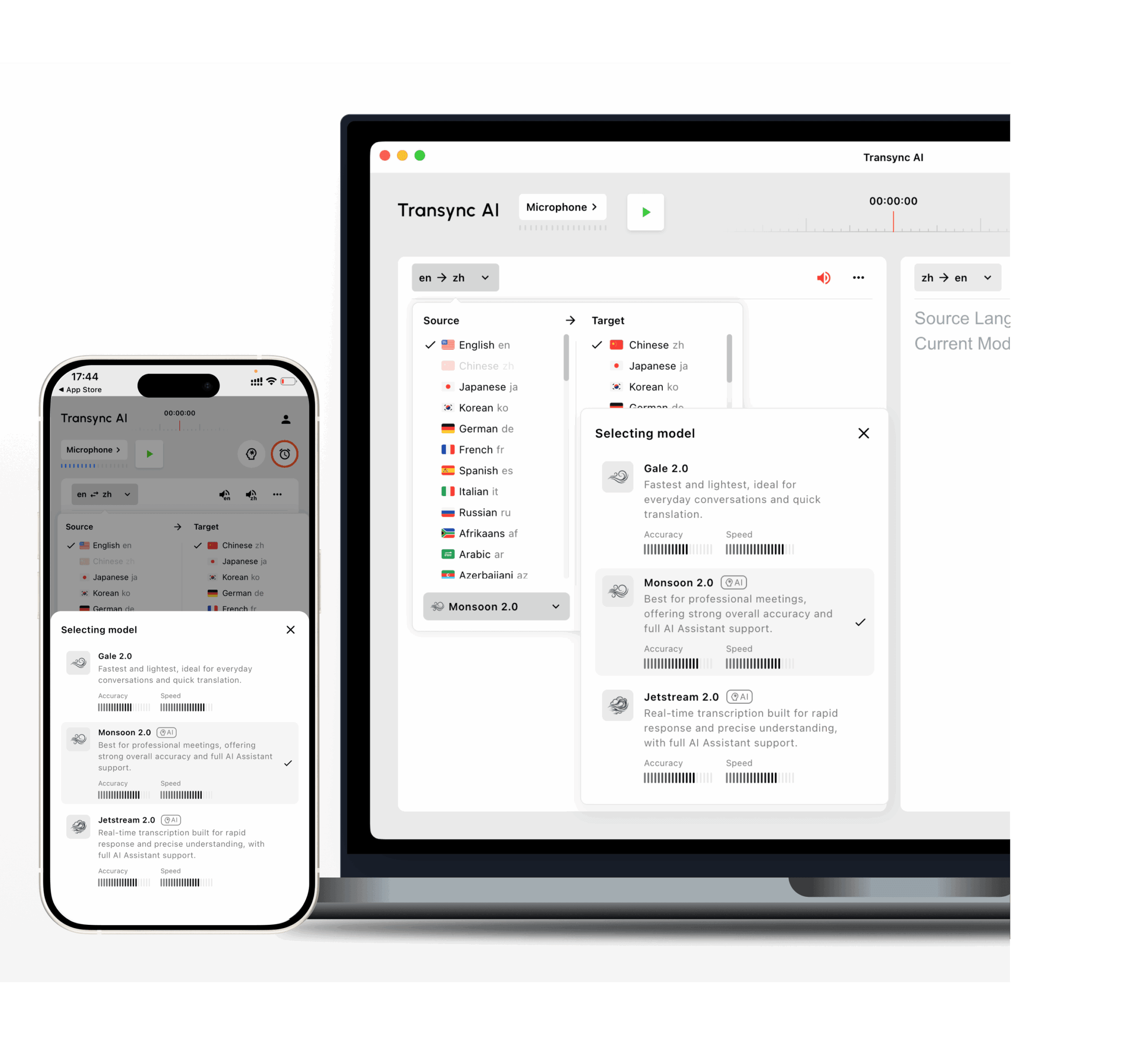
Transync AI Está diseñado para la traducción bilingüe de baja latencia. Sus modelos Gale 2.0, Monsoon 2.0 y Jetstream 2.0 se han optimizado para condiciones conversacionales como frases cortas, habla en varios idiomas, ruido de fondo y pausas irregulares.
 Prueba 2: ¿Puede traducirse de forma natural en ambas direcciones?
 Prueba 2: ¿Puede traducirse de forma natural en ambas direcciones?
Muchas herramientas de traducción funcionan bien cuando una persona habla y la otra solo escucha.
Una conversación es diferente. Ambas partes deben participar.
Una útil traductor de conversaciones en tiempo real Debería admitir la traducción bidireccional sin obligar a los usuarios a pulsar un botón de cambio de idioma después de cada interlocutor.
Por ejemplo:
- El hablante A utiliza el inglés.
- El hablante B habla japonés.
- El interlocutor A formula una pregunta de seguimiento en inglés.
- El hablante B responde en japonés.
- Ambos continúan sin cambiar manualmente la configuración de entrada.
Preguntas para hacer
- ¿Puede la herramienta distinguir entre los dos idiomas seleccionados?
- ¿Se traduce en ambas direcciones?
- ¿Reconoce respuestas cortas como "sí", "todavía no" o "la semana que viene"?
- ¿Qué ocurre cuando un hablante incluye el nombre de un producto en inglés en una frase en chino?
- ¿La voz traducida utiliza el idioma de destino correcto?
- ¿Pueden ambos participantes ver el contenido original y el traducido?
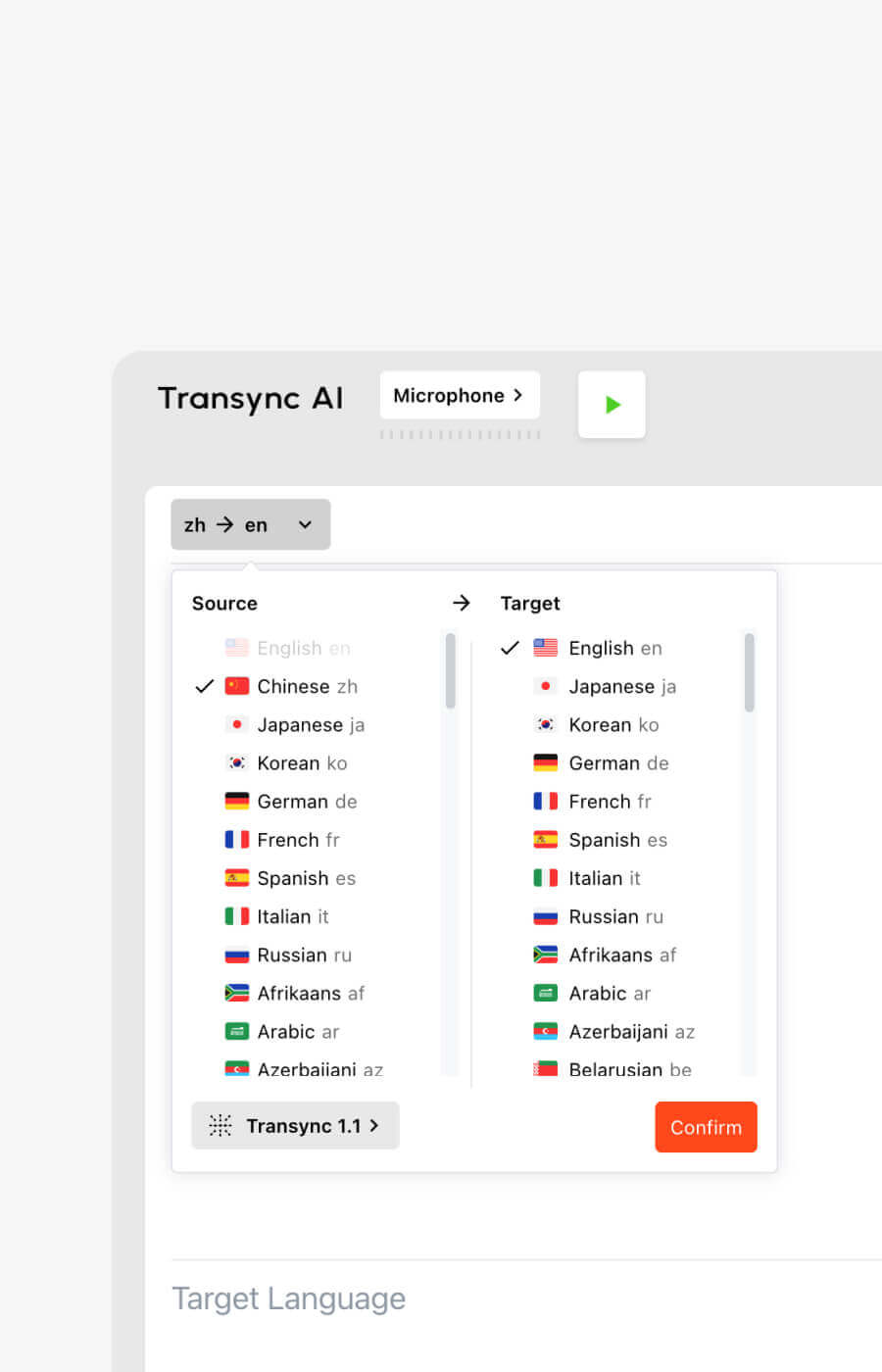
Transync AI admite la traducción bidireccional en tiempo real en 60 idiomas y más de 1000 pares de idiomas.
Las opciones compatibles incluyen idiomas de uso común como:
- Inglés
- Chino
- japonés
- coreano
- cantonés
- Español
- Francés
- Alemán
- italiano
- ruso
Puedes consultar las opciones actuales en el Idiomas compatibles con Transsync AI página.
Prueba 3: ¿Comprende el tema o solo las palabras?
La conversación informal es más fácil que la conversación profesional.
Consideremos la palabra “modelo”. Podría referirse a:
- Un modelo de IA
- Un modelo de producto
- Un modelo estadístico
- Un modelo de negocio
- Un prototipo de diseño
- Una persona que trabaja en la moda
La traducción correcta depende del tema.
Un traductor deficiente procesa la oración de forma aislada. Un traductor que tiene en cuenta el contexto utiliza la conversación circundante, las palabras clave y la información de fondo.
Una prueba práctica de terminología
Prepara diez términos de tu flujo de trabajo real.
Por ejemplo:
- Transsync AI = 同言翻译
- inversor fotovoltaico
- embalaje de semiconductores
- Asia-Pacífico
- Modelo X200
- red neuronal
- optimización de la cadena de suministro
- Juan Smith
- espacio de trabajo empresarial
- campaña de lanzamiento de producto
Luego, utilice los términos dentro de oraciones completas.
No pruebes solo palabras aisladas. Un traductor de conversaciones debe comprender cómo funciona el término dentro de una conversación real.
Por qué las palabras clave y el contexto son importantes
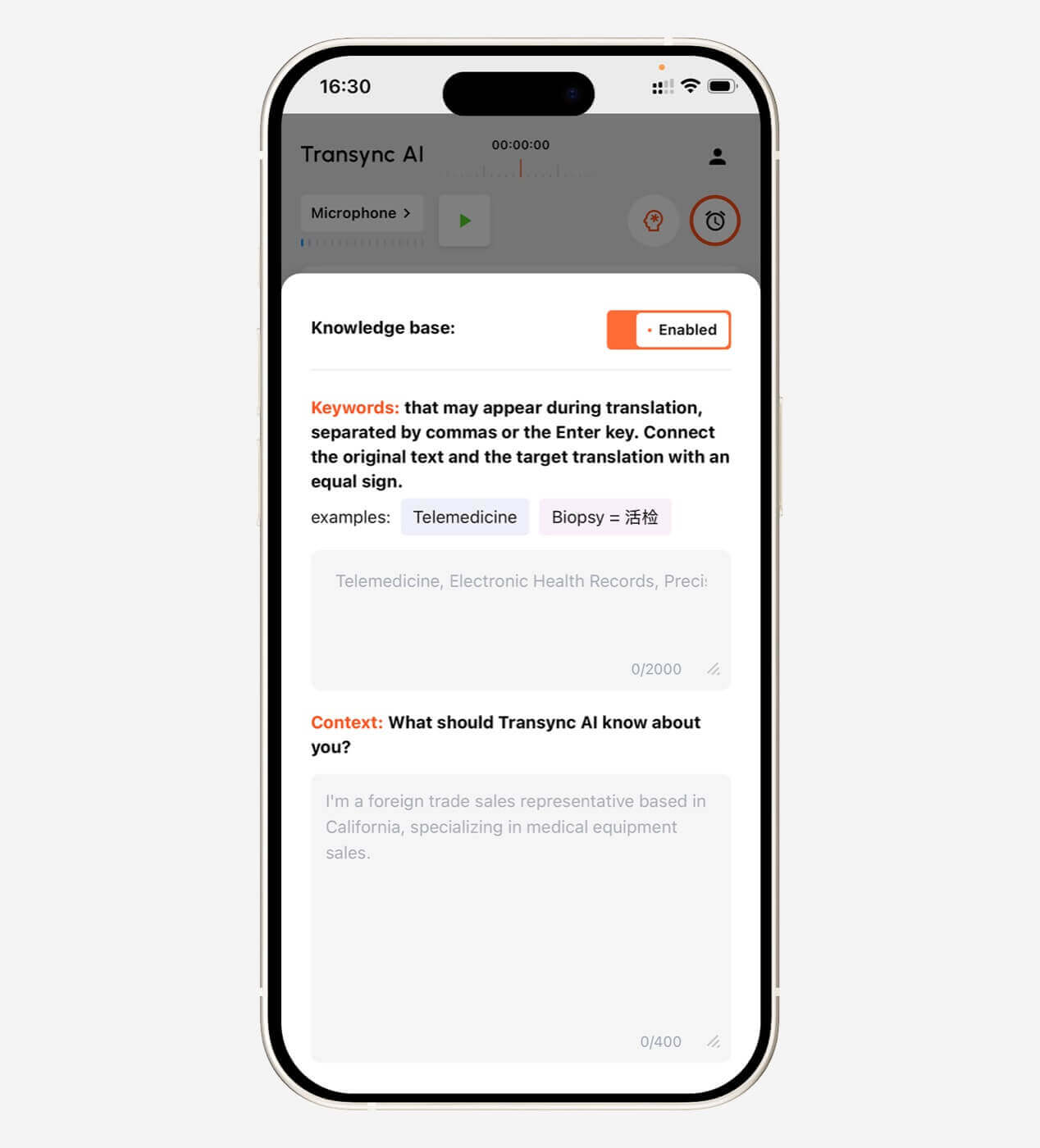
Antes de una reunión, Transync AI permite a los usuarios definir palabras clave y proporcionar información contextual.
Contexto de ejemplo:
Esta es una reunión de proveedores sobre la fabricación de semiconductores, la inspección de calidad, los plazos de entrega y la capacidad de producción.
Esto le da a la IA una mayor probabilidad de interpretar correctamente el lenguaje ambiguo.
La configuración de palabras clave y contexto resulta especialmente útil en:
- Fabricación
- Tecnología
- energía renovable
- Investigación académica
- administración sanitaria
- Finanzas
- Ventas internacionales
- Capacitación sobre el producto
- demostraciones de software
Explora el Contexto de palabras clave del asistente de IA característica.
 Prueba 4: ¿Los subtítulos y la salida de voz son realmente cómodos?
 Prueba 4: ¿Los subtítulos y la salida de voz son realmente cómodos?
La calidad de la traducción es solo una parte de la experiencia. La entrega también es importante.
Algunos usuarios comprenden mejor leyendo. Otros necesitan audio traducido. Muchas conversaciones profesionales se benefician de ambas opciones.
Subtítulos bilingües
Una interfaz de subtítulos útil debería facilitar la comparación entre el audio original y el traducido.
Esto ayuda a los usuarios:
- Verificar nombres y números
- Detectar posibles errores de reconocimiento
- Siga las explicaciones técnicas.
- Comprender dónde termina una idea y comienza otra
- Lee la traducción sin perder al hablante.
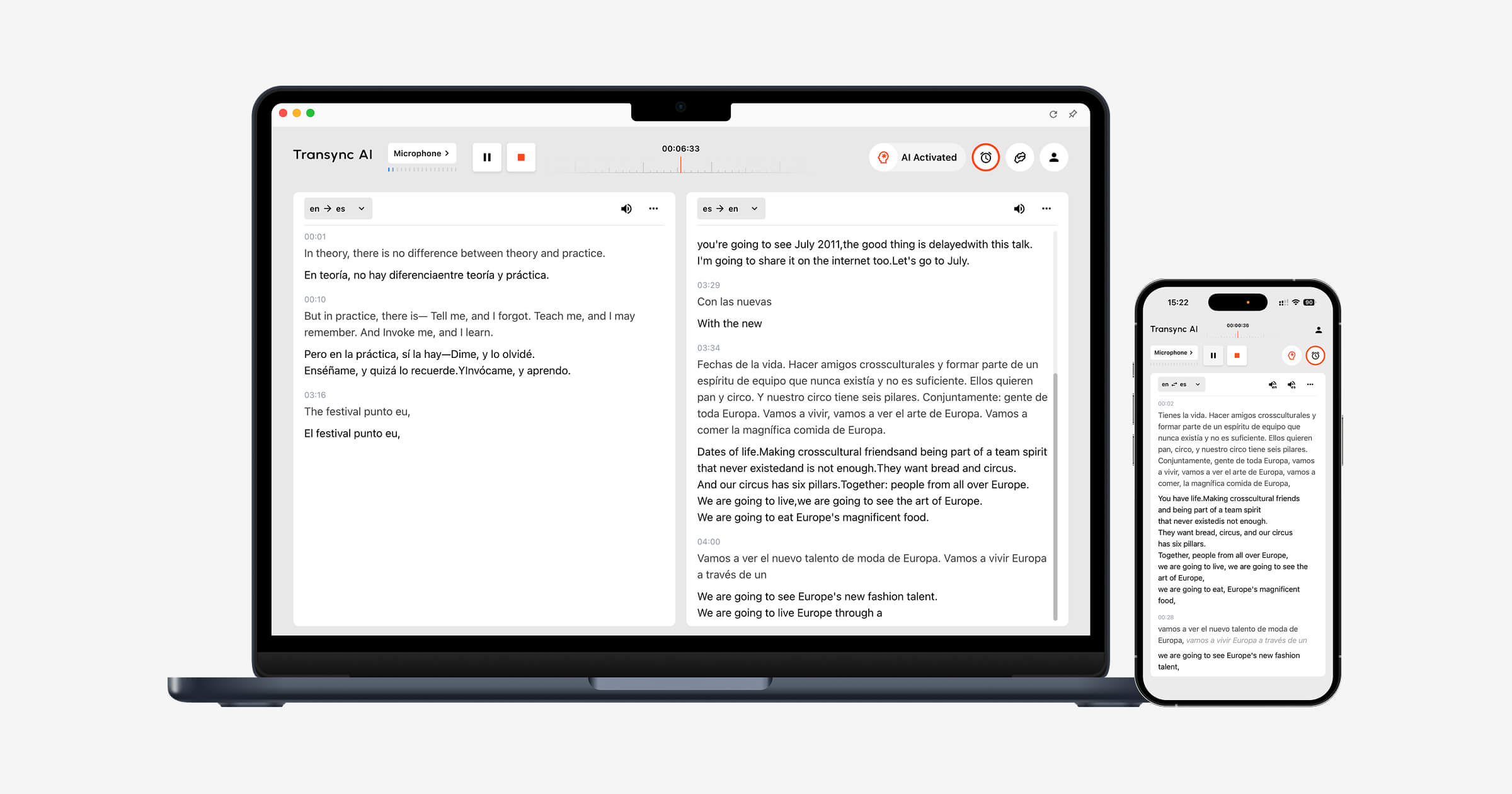
Transync AI utiliza un diseño bilingüe en paralelo para que el contenido original y el traducido puedan visualizarse simultáneamente.
Preguntas para la prueba de subtítulos
- ¿Los subtítulos son lo suficientemente grandes como para leerse?
- ¿Está claramente separado el idioma original de la traducción?
- ¿Los subtítulos se actualizan con demasiada frecuencia?
- ¿El texto abarca las diapositivas o los controles de la reunión?
- ¿Pueden permanecer visibles los subtítulos al cambiar de aplicación?
- ¿Pueden los usuarios pausar o reanudar la traducción fácilmente?
Transync AI también ofrece subtítulos flotantes en modo imagen dentro de imagen en flujos de trabajo compatibles con Mac, Windows e iOS. La ventana de subtítulos puede permanecer visible sobre otras aplicaciones mientras los usuarios visualizan presentaciones, documentos o contenido del navegador.
Ver Subtítulos flotantes en modo imagen dentro de imagen.
 Salida de voz traducida
 Salida de voz traducida
La traducción por voz puede hacer que una conversación parezca más directa, pero una mala calidad de la voz puede crear una nueva barrera.
Evaluar:
- Pronunciación
- Velocidad de habla
- pausas naturales
- Tono
- Claridad
- Retraso antes de la reproducción
- Si la voz interrumpe al siguiente orador
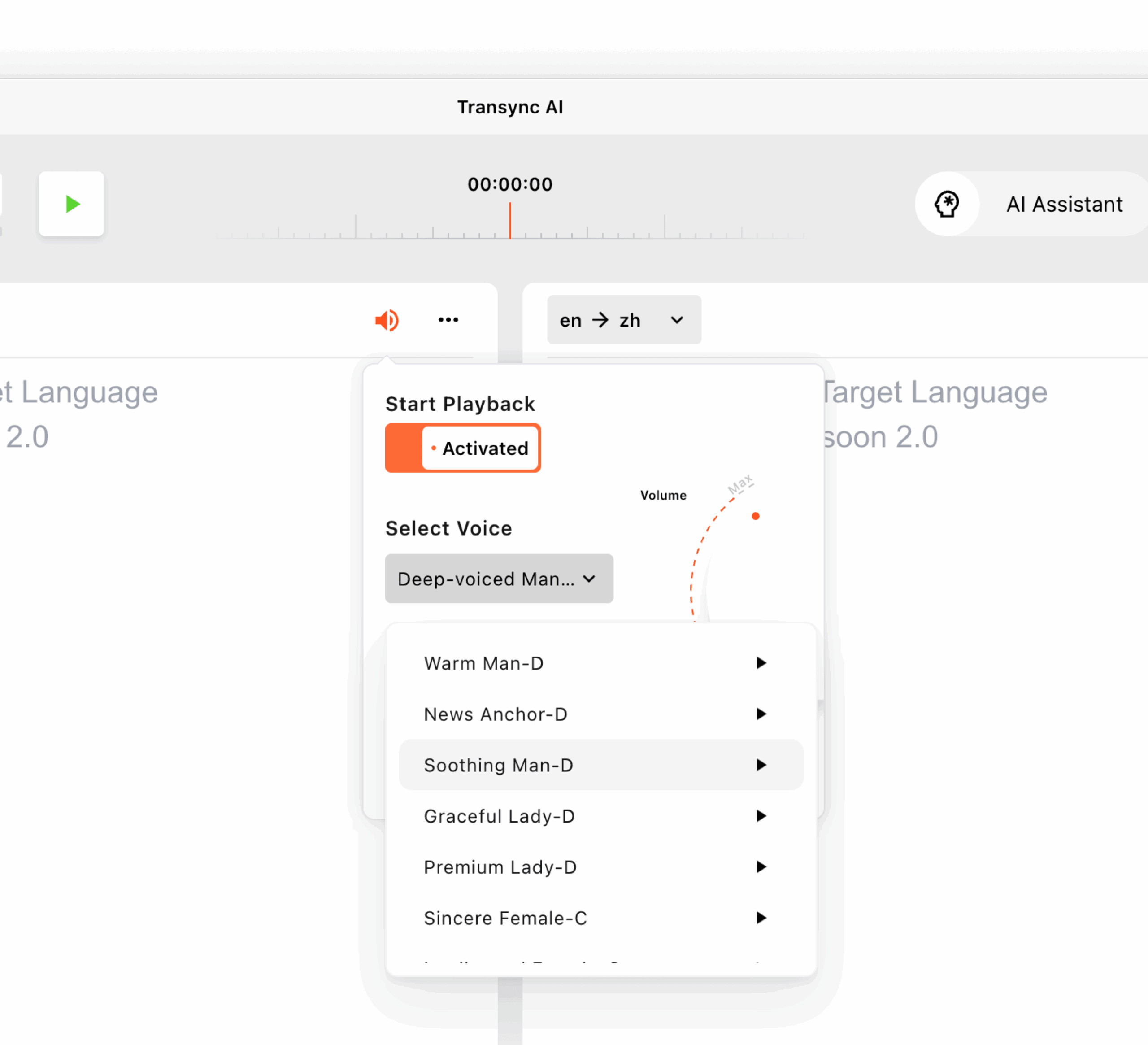
Transync AI admite múltiples opciones de voz con IA y ofrece una vista previa de las voces. Los usuarios pueden escuchar las voces disponibles antes de una sesión y seleccionar la que mejor se adapte a una reunión, clase, demostración o conversación informal.
También admite la clonación de voz, lo que permite que la traducción utilice una voz similar a la del usuario. Los datos de voz se almacenan de forma segura y no se utilizan para el entrenamiento de la IA.
Obtén más información de Traductor de voz con IA y salida de voz.
Prueba 5: ¿Encaja con la conversación anterior, durante y posterior?
 Prueba 5: ¿Encaja con la conversación anterior, durante y posterior?
Un traductor de conversaciones no debe evaluarse únicamente mientras alguien está hablando.
El flujo de trabajo completo consta de tres etapas.
Antes de la conversación
Los usuarios podrían necesitar:
- Seleccione el par de idiomas
- Agregar nombres y términos técnicos
- Describe el tema de la reunión.
- Elige una voz traducida
- Prueba el micrófono
- Confirmar la configuración de audio del sistema
Durante la conversación
Los usuarios deben:
- Lee los subtítulos
- Escuchar la salida de voz
- Cambiar entre diapositivas y documentos
- Responda sin pausas prolongadas.
- Números importantes correctos
- Evite gestionar controles complicados
Después de la conversación
Los usuarios podrían necesitar:
- Revisar la transcripción
- Confirmar decisiones
- Identificar elementos de acción
- Compartir un resumen
- Verifique los nombres y las fechas.
- Prepárense para la próxima reunión.
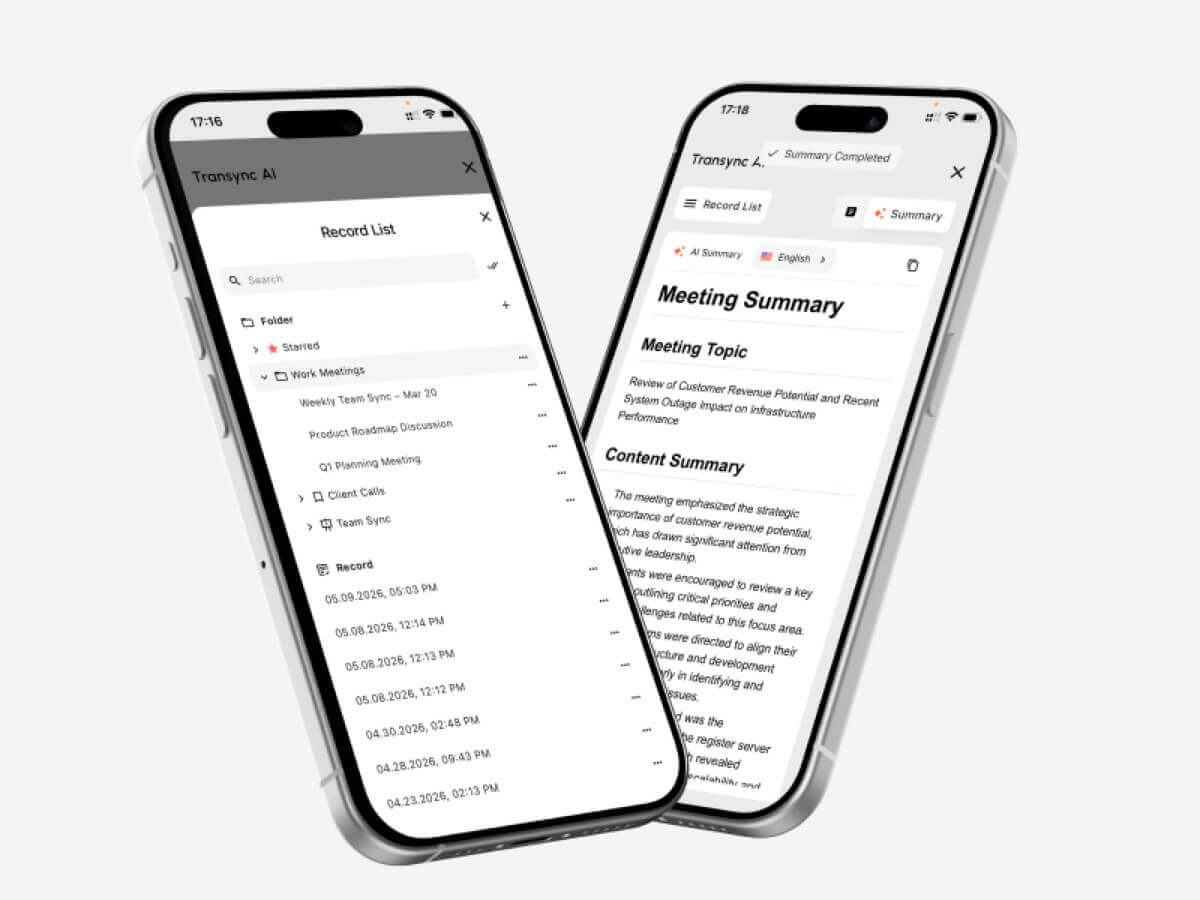
Transync AI combina la traducción en tiempo real con la toma de notas de reuniones mediante IA. Tras una conversación multilingüe, los usuarios pueden revisar la información clave en lugar de depender únicamente de la memoria o de notas manuales.
Visita Notas de reuniones con IA y traducción en tiempo real.
 Traductor de conversaciones vs. Traductor de texto
 Traductor de conversaciones vs. Traductor de texto
Estas herramientas resuelven problemas diferentes.
| Característica | Traductor de texto | Traductor de conversaciones |
| Entrada principal | Texto escrito o pegado | Discurso en directo |
| Interacción | Normalmente una frase a la vez | Discusión bidireccional continua |
| Requisito de velocidad | Moderado | Muy alto |
| Reconocimiento de audio | Generalmente opcional | Básico |
| Cambios de orador | No es relevante | Debe manejarse sin problemas |
| Salida de voz | A veces disponible | Importante para la comunicación oral |
| Apoyo a reuniones | Generalmente limitado | A menudo, un caso de uso importante |
| Configuración de contexto | Varía | Importante para uso profesional |
| Notas de la reunión | Extraño | Disponible en herramientas avanzadas |
| Mejor para | Mensajes, páginas web, texto breve | Llamadas, clases, reuniones y entrevistas |
Un traductor de texto general como Google Translate Puede ser adecuado para frases, mensajes y preguntas rápidas sobre viajes.
Un traductor de conversaciones específico para reuniones resulta más útil cuando el diálogo es continuo y ambos participantes necesitan responder.
Traductor de conversación vs. Intérprete humano
La inteligencia artificial y la interpretación humana no son intercambiables.
| Factor | traductor de conversaciones con IA | Intérprete humano |
| Disponibilidad | Por lo general, se puede iniciar de inmediato. | A menudo requiere programación |
| Costo | Suscripción o basada en el uso | Generalmente se cobra por hora o evento. |
| Reuniones de rutina | Práctico para uso frecuente | Puede resultar caro para uso diario. |
| Matiz cultural | Puede pasar por alto el significado sutil | Mejor capacidad para interpretar la intención y el contexto. |
| Terminología técnica | Se puede mejorar con palabras clave | Depende de la especialización del intérprete. |
| Notas de la reunión | Puede generarse automáticamente | Normalmente es un servicio aparte. |
| Responsabilidad legal | Limitado | Pueden aplicarse normas profesionales. |
| Mejor uso | Reuniones y conversaciones rutinarias | Comunicación delicada y de alto riesgo |
Utilice un intérprete humano cualificado cuando un error pueda afectar a:
- Derechos legales
- Tratamiento médico
- Seguridad
- estatus migratorio
- Decisiones financieras
- Términos del contrato
- Procedimientos gubernamentales
- Asuntos laborales delicados
La traducción mediante IA suele ser más adecuada para llamadas de negocios rutinarias, reuniones internas, clases, demostraciones y comunicación cotidiana.
¿Dónde resulta más útil un traductor de conversaciones?
reuniones de negocios internacionales
Un traductor bidireccional ayuda a los participantes a hablar sobre proyectos, plazos, costes y requisitos técnicos en sus idiomas preferidos.
Las palabras clave y el contexto pueden mejorar el tratamiento de los nombres de empresas, los nombres de productos y los términos especializados.
Llamadas de proveedores y clientes
Los subtítulos en tiempo real facilitan la verificación de números, fechas de entrega, detalles del pedido y códigos de modelo.
Los compromisos importantes deberán confirmarse por escrito después de la llamada.
Clases y conferencias en línea
Los alumnos pueden seguir los subtítulos traducidos mientras el profesor continúa hablando. Las notas de IA proporcionan una referencia después de la sesión.
Entrevistas
Un traductor de baja latencia puede reducir las pausas prolongadas y ayudar a ambas partes a formular preguntas de seguimiento más naturales.
demostraciones de productos
Los subtítulos flotantes permiten a los participantes ver el software o la presentación sin ocultar la traducción.
Exposiciones y reuniones presenciales
Un traductor de conversaciones puede facilitar debates rápidos en eventos, oficinas, campus universitarios y visitas comerciales.
Antes de una conversación importante, conviene comprobar la conexión a internet y el entorno del micrófono.
Uso de Transync AI con Zoom, Teams y Google Meet
Transync AI funciona como un software independiente, en lugar de un complemento para reuniones.
Puede ejecutarse junto con:
- Zoom
- Microsoft Teams
- Google Meet
En cuanto a los subtítulos, la aplicación puede capturar el audio de la reunión y mostrar la traducción bilingüe en su interfaz o en una ventana flotante de subtítulos.
Para la salida de voz traducida, es posible que los usuarios deban configurar el audio del sistema o un micrófono virtual para que los demás participantes de la reunión puedan escuchar la traducción generada.
Este enfoque independiente resulta útil para los usuarios que trabajan con varias plataformas de reuniones.
Ver Traducción de reuniones en vivo con IA para Zoom, Teams y Google Meet.
Guion de prueba para un traductor de conversaciones práctico
Utilice la siguiente estructura de script al comparar herramientas.
Parte 1: Introducción
Cada participante presenta su función, empresa y propósito de la reunión.
Parte 2: Números y fechas
Incluir:
- Un precio
- Un porcentaje
- Un número de modelo
- Una fecha de entrega
- Una cantidad
Parte 3: Vocabulario técnico
Utiliza cinco términos que aparezcan en tu trabajo real.
Parte 4: Interrupción natural
Pida a uno de los oradores que aclare o corrija la afirmación anterior.
Parte 5: Habla en idiomas mixtos
Incluya el nombre del producto, el nombre del departamento o una abreviatura en otro idioma.
Parte 6: Preguntas de seguimiento
Haz preguntas que dependan de la respuesta anterior.
Parte 7: Resumen
Pida a un participante que resuma la decisión y los próximos pasos.
Cuadro de mando de evaluación del traductor de conversación
| Métrico | Qué evaluar |
| Reconocimiento de voz | ¿Captó lo que realmente dijo el orador? |
| Precisión de la traducción | ¿Se conservó el significado previsto? |
| Estado latente | ¿El resultado llegó con la suficiente rapidez? |
| flujo bidireccional | ¿Podrían ambos participantes responder con naturalidad? |
| Terminología | ¿Eran coherentes los nombres y los términos técnicos? |
| Experiencia de subtítulos | ¿Los subtítulos eran legibles y estables? |
| Salida de voz | ¿El audio traducido era claro y natural? |
| Flujo de trabajo de la reunión | ¿La herramienta era compatible con la plataforma existente? |
| Estabilidad en sesiones largas | ¿El rendimiento se mantuvo constante? |
| Valor posterior a la reunión | ¿Fueron útiles las notas o los resúmenes? |
Pruebe la herramienta con sus ponentes, dispositivos, red, combinaciones de idiomas y duración de la reunión habituales. Una breve demostración promocional no puede reproducir todos los entornos de trabajo.
Precios de Transsync AI para la traducción de conversaciones
| Plan | Precio | Uso incluido | Mejor para |
| Gratis | $0 | 40 minutos para nuevos usuarios | Pruebas iniciales |
| Premium personal | $8.99/mes | 10 horas durante el período de membresía activa | Personas y reuniones periódicas |
| Empresa | $24,99/mes/puesto | Hasta 40 horas al mes por puesto. | Equipos y organizaciones |
| Tarjeta de tiempo | Desde $0,70/hora | Tiempo de traducción adicional | Usuarios con demanda mensual variable |
Las horas registradas en la tarjeta de control horario no caducan, pero solo se pueden utilizar mientras la membresía esté activa.
Al comparar precios, calcule el tiempo real que dedica a sus conversaciones mensuales. Una tarifa mensual baja puede resultar poco rentable si el tiempo incluido es demasiado limitado para sus reuniones.
Limitaciones del software de traducción de conversaciones
Ningún traductor de conversaciones funciona a la perfección en todos los entornos.
Las limitaciones comunes incluyen:
- Varios oradores hablando simultáneamente
- Ruido de fondo fuerte
- Eco de la habitación
- Micrófonos débiles
- Internet inestable
- Habla muy rápida
- Fuertes acentos regionales
- Oraciones incompletas
- Jerga local
- Cambio rápido de código
- Terminología ambigua
- Reproducción de voz superpuesta al siguiente orador
Transsync AI también tiene varias limitaciones específicas del producto:
- El modo sin conexión no está disponible.
- El reconocimiento de imágenes no es compatible.
- La traducción de texto estático no es su caso de uso principal.
- Se trata de un software independiente, no de un complemento para reuniones.
- El uso de la cuenta se contabiliza de forma acumulativa en todos los dispositivos.
- La calidad de la traducción aún depende de las condiciones de audio y de la red.
Estas limitaciones hacen que sea más adecuado para la comunicación multilingüe en directo que las imágenes escaneadas, la traducción completa de documentos o la localización de sitios web.
Preguntas frecuentes: Traductor de conversaciones
¿Qué es un traductor de conversaciones?
Un traductor de conversaciones escucha el lenguaje hablado y produce subtítulos traducidos o audio durante una conversación en directo.
¿Cuál es el mejor traductor de conversaciones?
La herramienta más adecuada depende de los idiomas, la plataforma de reuniones, el entorno de audio, la terminología y la duración de la sesión. Para reuniones profesionales, priorice la baja latencia, la traducción bidireccional, los subtítulos, la salida de voz, los controles de contexto y las notas de la reunión.
¿Puede un traductor de conversaciones detectar ambos idiomas automáticamente?
Algunas herramientas pueden distinguir entre dos idiomas seleccionados durante una conversación. Transync AI admite la distinción automática de idiomas en tareas de traducción bidireccional compatibles.
¿Puede la IA de Transync traducir las conversaciones de Zoom?
Sí. Transync AI puede funcionar junto con Zoom, Microsoft Teams y Google Meet para proporcionar subtítulos bilingües en tiempo real y flujos de trabajo de voz traducidos.
¿La IA de Transync admite la traducción de voz?
Sí. Admite la transmisión de voz mediante IA, múltiples opciones de voz, vista previa de voz y clonación de voz.
¿Puede un traductor de conversaciones comprender términos técnicos?
El rendimiento depende de la herramienta y la terminología. Transync AI permite a los usuarios añadir palabras clave y contexto antes de una conversación.
¿Funciona un traductor de conversaciones sin conexión a internet?
Algunas herramientas de viaje ofrecen paquetes de idiomas sin conexión limitados. Actualmente, Transync AI requiere conexión a internet y no admite la traducción sin conexión.
¿Puede la IA reemplazar a un intérprete humano?
La IA puede ser útil para reuniones rutinarias, clases, llamadas y conversaciones cotidianas. Sin embargo, se recomienda contar con un intérprete profesional para comunicaciones legales, médicas, diplomáticas, financieras y otras de gran importancia.
Reflexiones finales: Pon a prueba la conversación, no solo la traducción.
A traductor de conversaciones Debe evaluarse por lo que sucede entre las personas, no solo por la calidad de una frase traducida.
¿Pueden ambos participantes hablar con naturalidad? ¿La traducción llega antes de que cambie el tema? ¿Se entienden los términos técnicos? ¿Pueden los usuarios leer o escuchar el resultado con comodidad? ¿La herramienta sigue siendo útil antes, durante y después de la conversación?
Transync AI combina la traducción bidireccional en 60 idiomas con subtítulos bilingües, transmisión de voz mediante IA, clonación de voz, palabras clave y contexto, notas de reuniones mediante IA y subtítulos en la función Imagen dentro de imagen.
Esto hace que sea especialmente relevante cuando la traducción debe realizarse dentro de una conversación en directo, mientras la gente sigue haciendo preguntas, compartiendo ideas y tomando decisiones.
Para empezar, visite Transync AI, explorar el herramienta de traducción en tiempo real, o descarga la aplicación para tu dispositivo preferido.
 🤖
🤖 