
Leitfaden für Konversationsübersetzer: Nutzen Sie 5 praktische Tests, um Geschwindigkeit, Genauigkeit, Sprachausgabe, Kontext und Unterstützung für Besprechungen zu vergleichen, bevor Sie sich für ein Tool entscheiden.
A Konversationsübersetzer kann bei einer Produktvorführung beeindruckend wirken und sich in einem realen Gespräch dennoch unpassend anfühlen.
Der Unterschied zeigt sich meist dann, wenn Menschen aufhören, vorbereitete Sätze abzulesen und anfangen, natürlich zu kommunizieren. Sie unterbrechen sich. Sie verkürzen Sätze. Sie wechseln mitten im Satz das Thema. Sie verwenden Produktnamen, Akronyme, Witze und Ausdrücke, die nur im Kontext Sinn ergeben.
Deshalb sollte die Auswahl eines Konversationsübersetzers nicht mit einer einzigen Frage beginnen: “Wie viele Sprachen unterstützt er?”
Eine bessere Frage wäre:
Kann dieses Tool zwei Personen dabei helfen, sich ungestört zu unterhalten, ohne ständig unterbrechen zu müssen, um die Übersetzung zu steuern?
Dieser Leitfaden verwendet fünf praktische Tests zur Bewertung eines Konversationsübersetzers für Besprechungen, Kurse, Vorstellungsgespräche, Kundengespräche, Lieferantengespräche und die alltägliche mehrsprachige Kommunikation.
Kurzantwort: Was ist ein Konversationsübersetzer?
A Konversationsübersetzer hört gesprochene Sprache und übersetzt sie während einer Diskussion in eine andere Sprache.
Je nach Software kann Folgendes bereitgestellt werden:
- Echtzeitübersetzte Untertitel
- Zwei-Wege-Spracherkennung
- Übersetzung der Sprachwiedergabe
- Automatische Spracherkennung
- Unterstützung für Online-Meetings
- Technische Schlüsselwörter und kontextbezogene Hinweise
- Protokolle und Notizen der KI-Besprechungen
- Schwebende Untertitel über anderen Anwendungen
Ein einfacher Reiseübersetzer mag für kurze Fragen wie “Wo ist der Bahnhof?” gut geeignet sein. Ein professioneller Konversationsübersetzer muss jedoch längere und weniger vorhersehbare Gespräche bewältigen können.
Ein Geschäftstreffen könnte beispielsweise Folgendes beinhalten:
- Mehrere Sprecher
- Produkt- und Firmennamen
- Fachsprache
- Zahlen und Fristen
- Chinesisch-Englisch oder Japanisch-Englisch Code-Switching
- Fragen, die vor der vollständigen Beantwortung gestellt wurden
- Hintergrundgeräusche aus einem Büro oder einem Online-Anruf
Das beste Werkzeug ist nicht nur dasjenige, das einen Satz korrekt übersetzt. Es ist dasjenige, das dazu beiträgt, dass das Gespräch weitergeführt wird.
Warum gewöhnliche Übersetzungstools oft Schwierigkeiten mit Konversationen haben
Die Textübersetzung basiert üblicherweise auf der vollständigen Eingabe. Der Benutzer gibt einen Satz oder Absatz ein, und das Tool übersetzt ihn.
Die Unterhaltung verläuft weniger geordnet.
Ein Sprecher könnte sagen:
“Also, was das neue Modell betrifft – hat der Lieferant vorher den Liefertermin bestätigt?”
Der Satz ändert mitten im Satz seine Richtung. Ein Konversationsübersetzer muss entscheiden, ob er auf mehr Kontext wartet oder sofort mit der Übersetzung beginnt.
Wenn zu lange gewartet wird, erlebt der Zuhörer eine Verzögerung. Wenn zu früh übersetzt wird, muss die Bedeutung möglicherweise angepasst werden.
Dadurch entsteht ein schwieriges Gleichgewicht zwischen:
| Erfordernis | Warum es wichtig ist |
|---|---|
| Geschwindigkeit | Die Übersetzung muss vor dem Fortgang der Diskussion vorliegen. |
| Genauigkeit | Die Ausgabe muss die vom Sprecher beabsichtigte Bedeutung bewahren. |
| Kontinuität | Das System muss mit unvollständigen und sich ändernden Sätzen umgehen können. |
| Kontext | Namen, Branchen und vorherige Aussagen beeinflussen die Bedeutung |
| Natürliche Leistung | Die übersetzte Stimme sollte den nächsten Sprecher nicht unterbrechen. |
Ein brauchbarer Konversationsübersetzer muss alle fünf Aspekte beherrschen.
Test 1: Behält der Konversationsübersetzer den Rhythmus bei?
Der erste Test besteht nicht in der Genauigkeit, sondern im Rhythmus.
Selbst eine korrekte Übersetzung ist schwer zu gebrauchen, wenn sie erst eintrifft, nachdem das Gespräch bereits weiter fortgeschritten ist.
So führen Sie den Rhythmustest durch
Nutzen Sie ein kurzes Gespräch zu zweit anstelle eines vorbereiteten Monologs.
Enthalten:
- Ein Gruß
- Eine Anschlussfrage
- Eine kurze Unterbrechung
- Ein Satz, der seine Richtung ändert
- Eine Zahl oder ein Datum
- Eine Bitte um Klärung
Zum Beispiel:
“Wir können 300 Einheiten bis zum 12. September – Entschuldigung, ich meine den 21. September – liefern, wenn die endgültige Spezifikation diese Woche genehmigt wird.”
Prüfen Sie, ob das Werkzeug:
- Wartet auf die Korrektur
- Bewahrt das endgültige Datum
- Erstellt schnell Untertitel
- Vermeidet die Wiedergabe der alten Sprachausgabe über dem nächsten Satz
- Ermöglicht es der zweiten Person, natürlich zu reagieren.
Was gilt als nutzbare Latenz?
Die ideale Verzögerung hängt von der Situation ab.
| Übersetzungsverzögerung | Praktische Erfahrung |
| Unter 2 Sekunden | Gut geeignet für einen aktiven Dialog. |
| 2–4 Sekunden | Üblicherweise für Besprechungen und Unterricht geeignet. |
| 4–6 Sekunden | Besser geeignet für Präsentationen als für schnelle Diskussionen |
| Mehr als 6 Sekunden | Stört wahrscheinlich den Gesprächsrhythmus |
Die Wiedergabe von Sprachaufnahmen dauert in der Regel länger als die von Untertiteln, da die Software zusätzlich den Ton erzeugen muss.
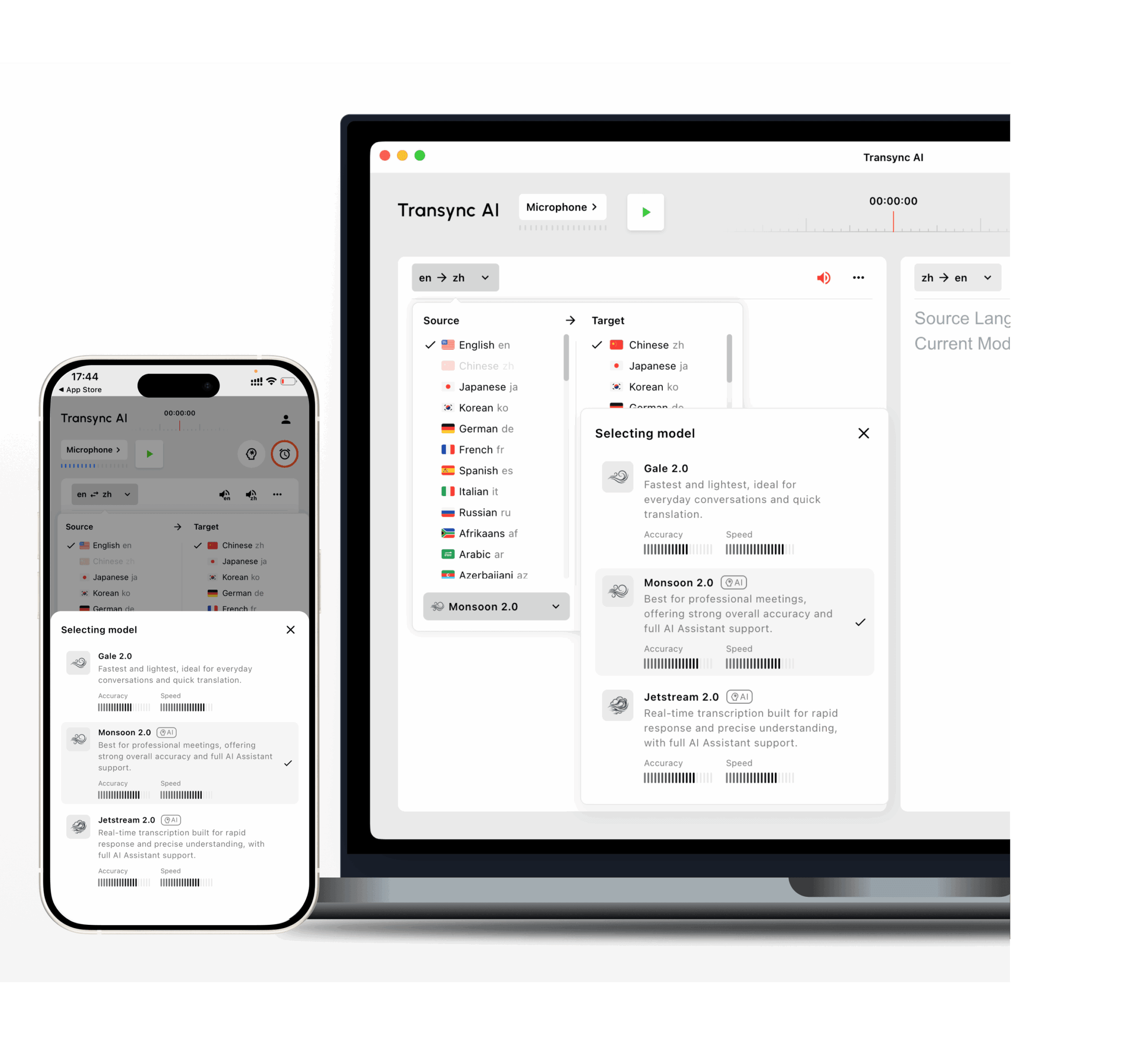
Transync AI Es ist für die latenzarme zweisprachige Übersetzung konzipiert. Seine Modelle Gale 2.0, Monsoon 2.0 und Jetstream 2.0 wurden für Gesprächsbedingungen wie kurze Sätze, gemischtsprachige Sprache, Hintergrundgeräusche und unregelmäßige Pausen optimiert.
 Test 2: Kann es auf natürliche Weise in beide Richtungen übersetzen?
 Test 2: Kann es auf natürliche Weise in beide Richtungen übersetzen?
Viele Übersetzungstools funktionieren gut, wenn eine Person spricht und die andere nur zuhört.
Ein Gespräch ist etwas anderes. Beide Seiten müssen sich beteiligen.
Ein nützlicher Echtzeit-Konversationsübersetzer sollte die Zwei-Wege-Übersetzung unterstützen, ohne dass die Benutzer nach jedem Sprecher eine Sprachumschalttaste drücken müssen.
Zum Beispiel:
- Sprecher A spricht Englisch.
- Sprecher B spricht Japanisch.
- Sprecher A stellt eine Anschlussfrage auf Englisch.
- Sprecher B antwortet auf Japanisch.
- Beide funktionieren ohne manuelle Änderung der Eingabeeinstellungen.
Fragen, die man stellen sollte
- Kann das Tool zwischen den beiden ausgewählten Sprachen unterscheiden?
- Lässt es sich in beide Richtungen übersetzen?
- Erkennt es kurze Antworten wie “ja”, “noch nicht” oder “nächste Woche”?
- Was passiert, wenn ein Sprecher einen englischen Produktnamen in einen chinesischen Satz einfügt?
- Wird für die übersetzte Stimme die korrekte Zielsprache verwendet?
- Können beide Teilnehmer sowohl den Originalinhalt als auch die Übersetzung sehen?
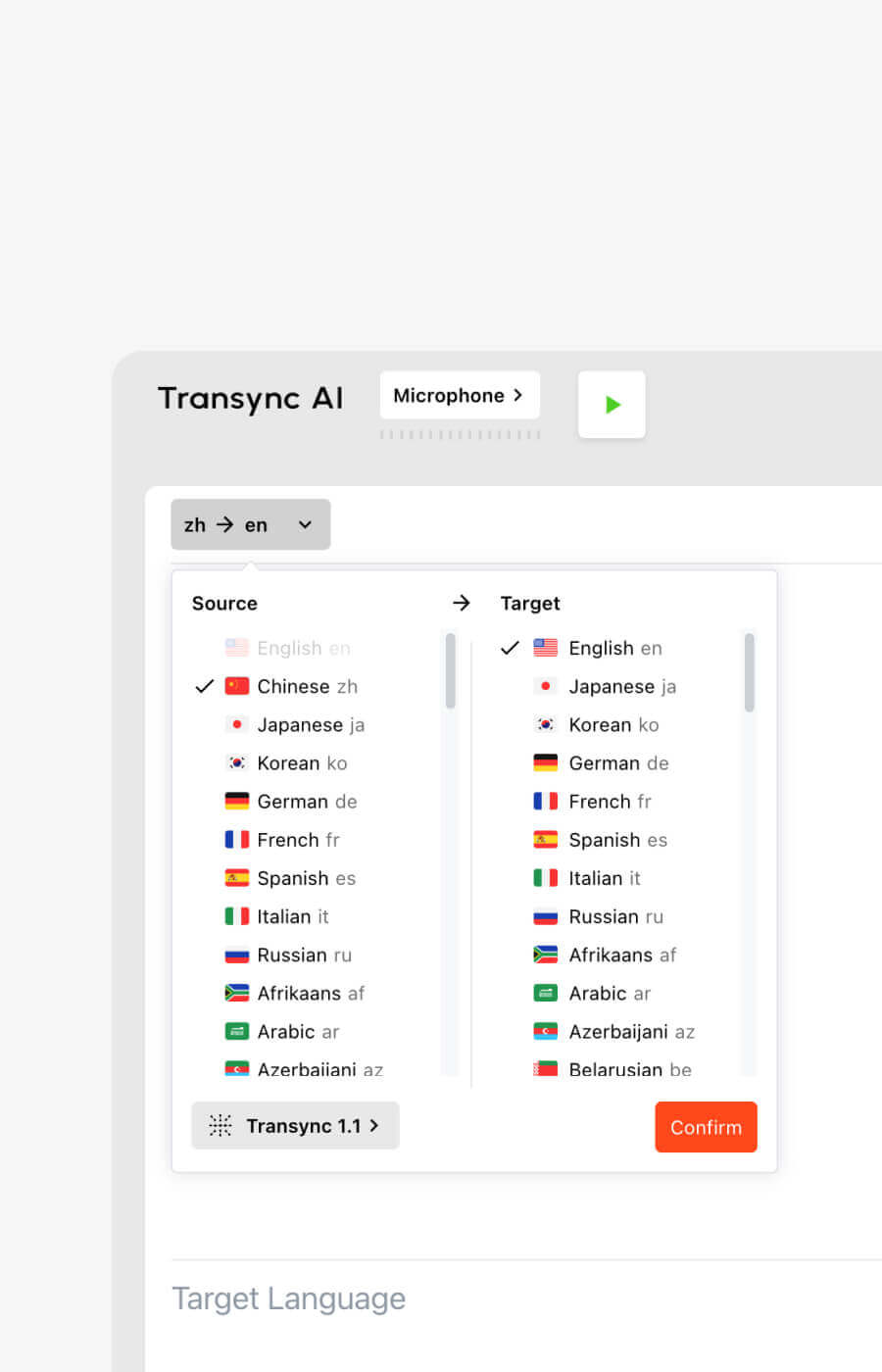
Transync AI unterstützt bidirektionale Echtzeitübersetzung in 60 Sprachen und mehr als 1.000 Sprachpaaren.
Zu den unterstützten Optionen gehören gängige Sprachen wie:
- Englisch
- chinesisch
- japanisch
- Koreanisch
- Kantonesisch
- Spanisch
- Französisch
- Deutsch
- Italienisch
- Russisch
Sie können die aktuellen Optionen auf der Transsync KI-unterstützte Sprachen Seite.
Test 3: Versteht es das Thema – oder nur die Wörter?
Ein normales Gespräch ist einfacher als ein professionelles Gespräch.
Betrachten wir das Wort “Modell”. Es könnte Folgendes bedeuten:
- Ein KI-Modell
- Ein Produktmodell
- Ein statistisches Modell
- Ein Geschäftsmodell
- Ein Designprototyp
- Eine Person, die in der Modebranche arbeitet
Die korrekte Übersetzung hängt vom Thema ab.
Ein schwacher Übersetzer verarbeitet den Satz isoliert. Ein kontextsensitiver Übersetzer nutzt das umgebende Gespräch, Schlüsselwörter und Hintergrundinformationen.
Ein praktischer Terminologietest
Bereiten Sie zehn Begriffe aus Ihrem realen Arbeitsablauf vor.
Zum Beispiel:
- Transsync AI = 同言翻译
- Photovoltaik-Wechselrichter
- Halbleitergehäuse
- APAC
- Modell X200
- neuronales Netzwerk
- Optimierung der Lieferkette
- John Smith
- Unternehmensarbeitsbereich
- Produkteinführungskampagne
Verwenden Sie die Begriffe anschließend in vollständigen Sätzen.
Testen Sie nicht nur einzelne Wörter. Ein Konversationsübersetzer muss verstehen, wie der Begriff in einem realen Gespräch funktioniert.
Warum Schlüsselwörter und Kontext wichtig sind
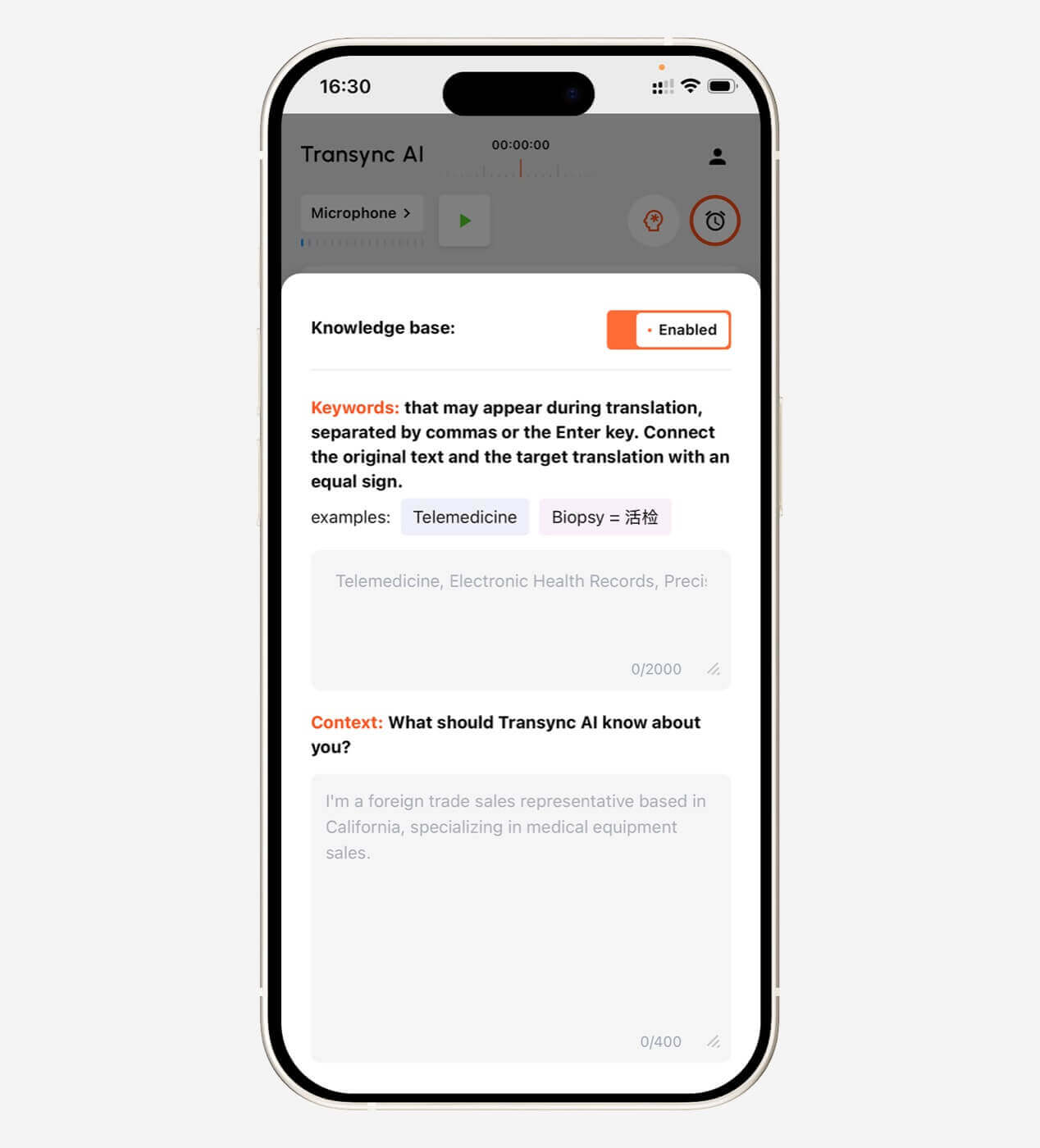
Vor einem Meeting ermöglicht Transync AI den Nutzern, Schlüsselwörter zu definieren und Kontextinformationen bereitzustellen.
Beispielkontext:
Dies ist ein Lieferantentreffen zu den Themen Halbleiterfertigung, Qualitätsprüfung, Liefertermine und Produktionskapazität.
Dadurch erhöht sich die Wahrscheinlichkeit, dass die KI mehrdeutige Sprache richtig interpretiert.
Schlüsselwort- und Kontexteinstellungen sind besonders hilfreich in folgenden Fällen:
- Herstellung
- Technologie
- Erneuerbare Energie
- Akademische Forschung
- Gesundheitsverwaltung
- Finanzen
- Internationaler Vertrieb
- Produktschulung
- Software-Demonstrationen
Erkunden Sie die Schlüsselwörter des KI-Assistenten Kontext Besonderheit.
 Test 4: Sind Untertitel und Sprachausgabe tatsächlich komfortabel?
 Test 4: Sind Untertitel und Sprachausgabe tatsächlich komfortabel?
Die Qualität der Übersetzung ist nur ein Teil des Gesamterlebnisses. Auch die Art der Übermittlung spielt eine Rolle.
Manche Nutzer verstehen Texte besser durch Lesen. Andere benötigen übersetzte Audioaufnahmen. Viele professionelle Gespräche profitieren von beidem.
Zweisprachige Untertitel
Eine benutzerfreundliche Untertitelschnittstelle sollte es erleichtern, den Originaltext mit der Übersetzung zu vergleichen.
Dies hilft den Nutzern:
- Namen und Nummern überprüfen
- Mögliche Erkennungsfehler erkennen
- Folgen Sie den technischen Erläuterungen.
- Verstehe, wo eine Idee endet und eine andere beginnt.
- Lesen Sie die Übersetzung, ohne den Sprecher aus den Augen zu verlieren.
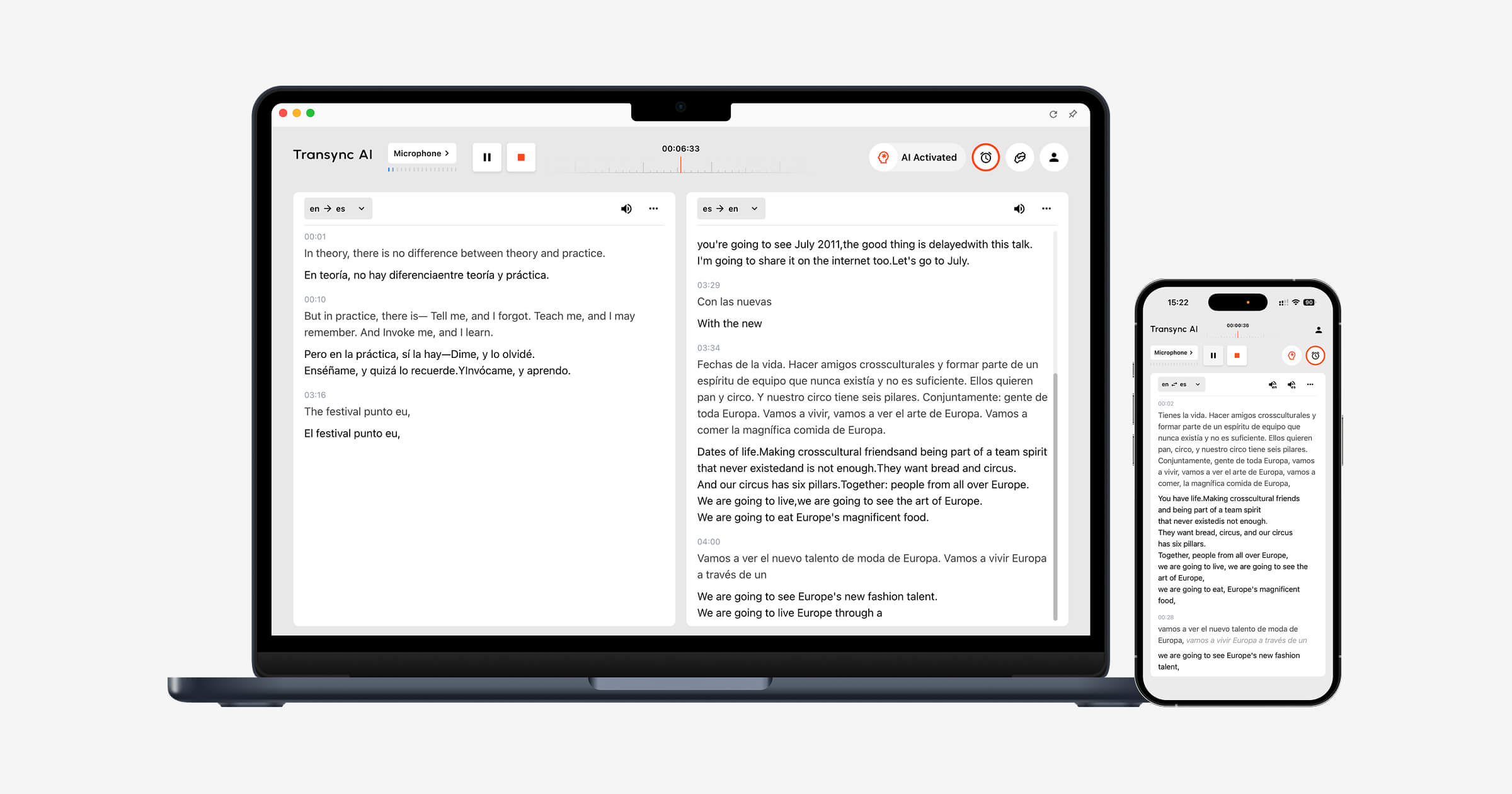
Transync AI verwendet ein zweisprachiges Layout nebeneinander, sodass der Originalinhalt und der übersetzte Inhalt gleichzeitig angezeigt werden können.
Fragen zum Untertiteltest
- Sind die Bildunterschriften groß genug, um sie gut lesen zu können?
- Ist die Originalsprache klar von der Übersetzung getrennt?
- Werden die Untertitel zu häufig aktualisiert?
- Beinhaltet der Text Folien oder Besprechungssteuerungen?
- Bleiben die Untertitel beim Wechseln zwischen Anwendungen sichtbar?
- Können Benutzer die Übersetzung einfach pausieren oder fortsetzen?
Transsync AI bietet außerdem schwebende Untertitel im Bild-in-Bild-Modus für unterstützte Mac-, Windows- und iOS-Workflows. Das Untertitelfenster kann über anderen Anwendungen angezeigt werden, während Benutzer Präsentationen, Dokumente oder Browserinhalte betrachten.
Sehen Bild-in-Bild-Funktion mit schwebenden Untertiteln.
 Übersetzte Sprachausgabe
 Übersetzte Sprachausgabe
Sprachübersetzung kann ein Gespräch direkter wirken lassen, aber eine schlechte Sprachausgabe kann eine neue Barriere schaffen.
Auswerten:
- Aussprache
- Sprechgeschwindigkeit
- Natürliche Pausen
- Ton
- Klarheit
- Verzögerung vor der Wiedergabe
- Ob die Stimme den nächsten Sprecher unterbricht
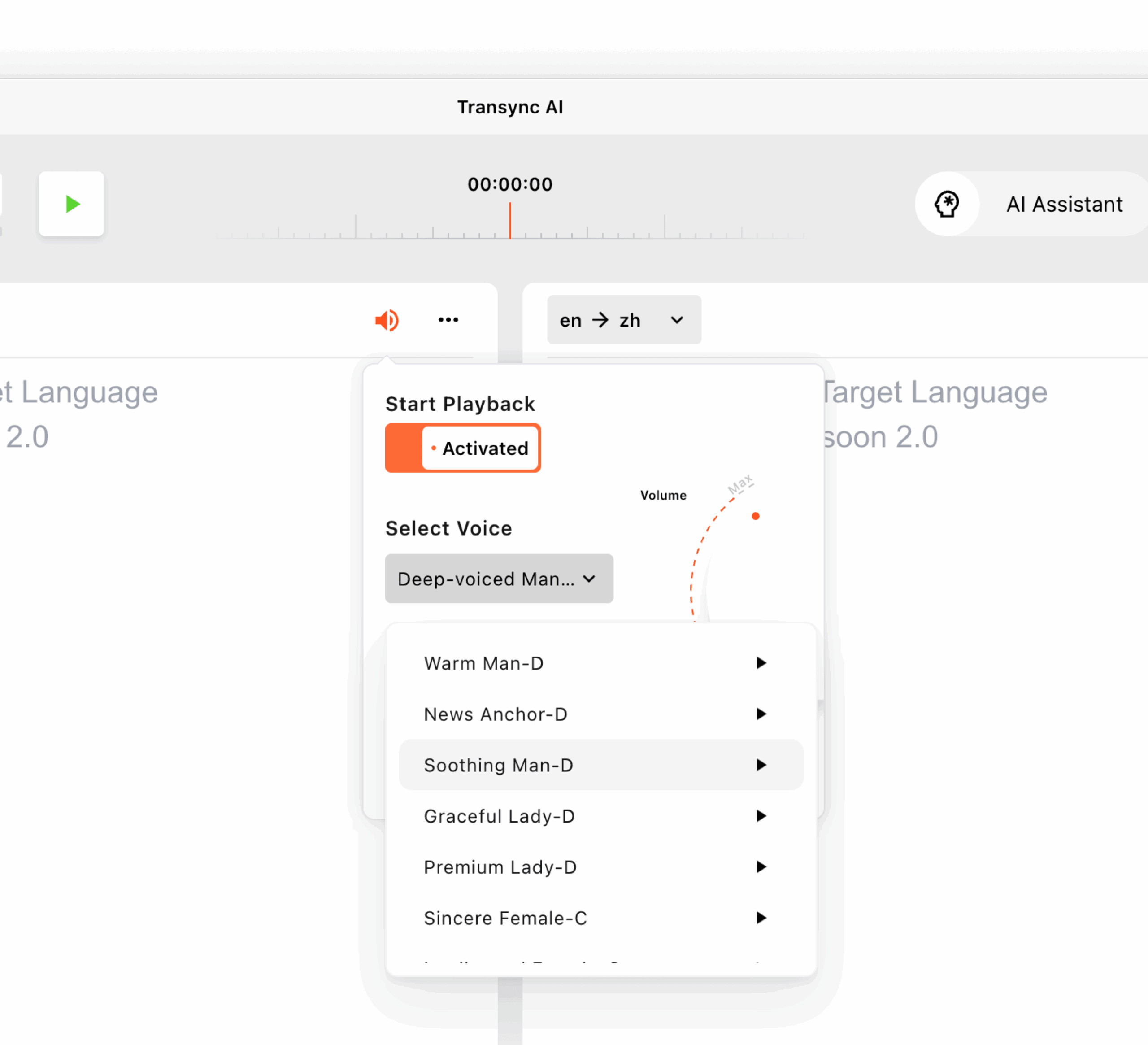
Transync AI unterstützt mehrere KI-Stimmen und eine Sprachvorschau. Nutzer können sich die verfügbaren Stimmen vor einer Sitzung anhören und die passende für ein Meeting, eine Vorlesung, eine Demonstration oder ein lockeres Gespräch auswählen.
Es unterstützt außerdem die Stimmklonierung, sodass die Übersetzung mit einer Stimme ausgegeben wird, die der Stimme des Nutzers ähnelt. Die Sprachdaten werden sicher gespeichert und nicht für das KI-Training verwendet.
Erfahren Sie mehr von KI-Sprachübersetzer und Sprachausgabe.
Test 5: Passt es zum Gespräch vor, während und nach dem Gespräch?
 Test 5: Passt es zum Gespräch vor, während und nach dem Gespräch?
Ein Konversationsübersetzer sollte nicht nur während des Sprechens beurteilt werden.
Der vollständige Arbeitsablauf umfasst drei Phasen.
Vor dem Gespräch
Nutzer müssen möglicherweise Folgendes beachten:
- Wählen Sie das Sprachpaar aus
- Namen und Fachbegriffe hinzufügen
- Beschreiben Sie das Thema des Treffens.
- Wählen Sie eine übersetzte Stimme
- Testen Sie das Mikrofon
- Systemaudioeinstellungen bestätigen
Während des Gesprächs
Nutzer müssen:
- Untertitel lesen
- Sprachausgabe hören
- Zwischen Folien und Dokumenten wechseln
- Reagiere ohne lange Pausen.
- Korrekte wichtige Zahlen
- Vermeiden Sie die Verwaltung komplizierter Steuerungselemente.
Nach dem Gespräch
Nutzer müssen möglicherweise Folgendes beachten:
- Lesen Sie das Transkript.
- Entscheidungen bestätigen
- Maßnahmen identifizieren
- Zusammenfassung teilen
- Namen und Daten prüfen
- Bereiten Sie sich auf das nächste Treffen vor
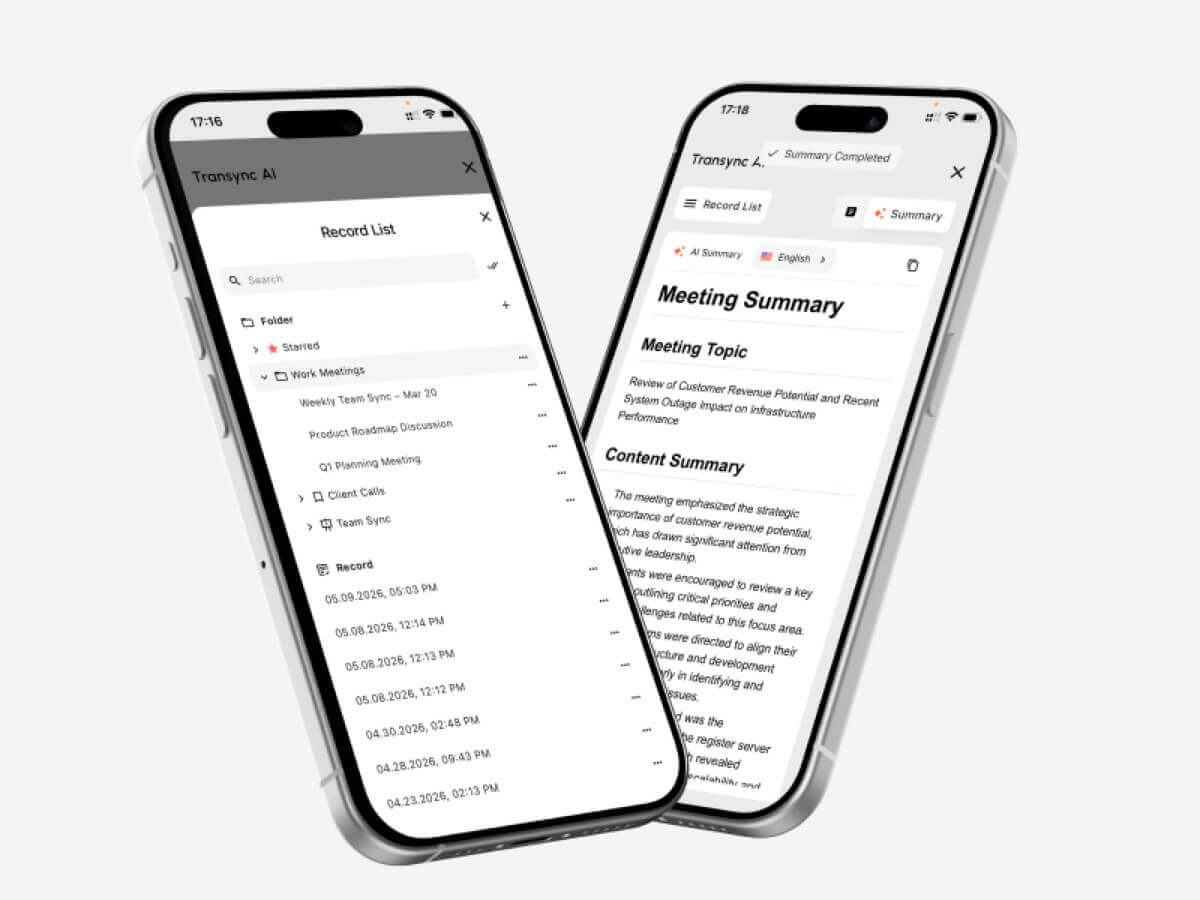
Transync AI kombiniert Live-Übersetzung mit KI-generierten Besprechungsnotizen. Nach einem mehrsprachigen Gespräch können Nutzer wichtige Informationen überprüfen, anstatt sich nur auf ihr Gedächtnis oder manuelle Notizen zu verlassen.
Besuchen KI-gestützte Besprechungsnotizen mit Echtzeitübersetzung.
 Konversationsübersetzer vs. Textübersetzer
 Konversationsübersetzer vs. Textübersetzer
Diese Werkzeuge lösen unterschiedliche Probleme.
| Besonderheit | Textübersetzer | Konversationsübersetzer |
| Haupteingang | Getippter oder eingefügter Text | Live-Rede |
| Interaktion | Normalerweise ein Satz nach dem anderen. | Kontinuierlicher Dialog auf Augenhöhe |
| Geschwindigkeitsanforderung | Mäßig | Sehr hoch |
| Audioerkennung | In der Regel optional | Essentiell |
| Sprecherwechsel | Nicht relevant | Muss reibungslos abgewickelt werden. |
| Sprachausgabe | Manchmal verfügbar | Wichtig für die mündliche Kommunikation |
| Unterstützung bei Besprechungen | In der Regel begrenzt | Oft ein wichtiger Anwendungsfall |
| Kontexteinstellungen | Variiert | Wichtig für den professionellen Einsatz |
| Besprechungsprotokoll | Selten | Verfügbar in erweiterten Tools |
| Am besten geeignet für | Nachrichten, Webseiten, Kurztexte | Anrufe, Kurse, Besprechungen und Vorstellungsgespräche |
Ein allgemeiner Textübersetzer wie z. B. Google Übersetzer Kann für Phrasen, Nachrichten und kurze Reisefragen geeignet sein.
Ein speziell für Besprechungsgespräche entwickelter Dolmetscher ist besonders nützlich, wenn die Rede kontinuierlich ist und beide Teilnehmer reagieren müssen.
Konversationsübersetzer vs. menschlicher Dolmetscher
KI und menschliche Interpretation sind nicht austauschbar.
| Faktor | KI-Konversationsübersetzer | Menschlicher Dolmetscher |
| Verfügbarkeit | Kann in der Regel sofort gestartet werden | Oftmals ist eine Terminplanung erforderlich. |
| Kosten | Abonnement- oder nutzungsbasiert | Üblicherweise wird nach Stunden oder pro Veranstaltung abgerechnet. |
| Routinebesprechungen | Praktisch für den häufigen Gebrauch | Für den täglichen Gebrauch möglicherweise zu teuer. |
| Kulturelle Nuancen | Kann subtile Bedeutungen übersehen | Besser darin, Absicht und Kontext zu erfassen |
| Fachsprache | Kann durch Keywords verbessert werden | Hängt von der Spezialisierung des Dolmetschers ab |
| Besprechungsprotokoll | Kann automatisch generiert werden | Üblicherweise ein separater Service |
| Rechtliche Verantwortung | Beschränkt | Es können Berufsstandards gelten. |
| Optimale Nutzung | Regelmäßige Treffen und Gespräche | Hochriskante und sensible Kommunikation |
Setzen Sie einen qualifizierten Dolmetscher ein, wenn ein Fehler Auswirkungen haben könnte:
- Rechte
- Medizinische Behandlung
- Sicherheit
- Einwanderungsstatus
- Finanzielle Entscheidungen
- Vertragsbedingungen
- Regierungsverfahren
- Sensible Beschäftigungsangelegenheiten
KI-Übersetzungen eignen sich im Allgemeinen besser für routinemäßige Geschäftsgespräche, interne Besprechungen, Kurse, Demonstrationen und die alltägliche Kommunikation.
Wo ist ein Konversationsübersetzer am nützlichsten?
Internationale Geschäftstreffen
Ein Dolmetscher für beide Seiten hilft den Teilnehmern, Projekte, Zeitpläne, Kosten und technische Anforderungen in ihren bevorzugten Sprachen zu besprechen.
Schlüsselwörter und Kontext können die Behandlung von Firmennamen, Produktnamen und Fachbegriffen verbessern.
Anrufe von Lieferanten und Kunden
Echtzeit-Untertitel erleichtern die Überprüfung von Telefonnummern, Lieferterminen, Bestelldetails und Modellcodes.
Wichtige Zusagen sollten nach dem Telefonat noch schriftlich bestätigt werden.
Online-Kurse und -Vorlesungen
Die Schüler können den übersetzten Untertiteln folgen, während der Lehrer weiter spricht. KI-Notizen dienen nach der Sitzung als Referenz.
Interviews
Ein Übersetzer mit geringer Latenz kann lange Pausen reduzieren und beiden Seiten helfen, natürlichere Anschlussfragen zu stellen.
Produktvorführungen
Schwebende Untertitel ermöglichen es den Teilnehmern, die Software oder Präsentation anzusehen, ohne die Übersetzung auszublenden.
Ausstellungen und persönliche Treffen
Ein Konversationsübersetzer kann schnelle Gespräche bei Veranstaltungen, in Büros, auf Universitätsgeländen und bei Geschäftsbesuchen unterstützen.
Vor einem wichtigen Gespräch sollten die Internetverbindung und die Mikrofonumgebung getestet werden.
Nutzung von Transync AI mit Zoom, Teams und Google Meet
Transync AI funktioniert als eigenständige Software und nicht als Meeting-Plugin.
Es kann parallel laufen:
- Zoom
- Microsoft Teams
- Google Meet
Für Untertitel kann die App den Audioverlauf von Meetings aufzeichnen und die zweisprachige Übersetzung in ihrer Benutzeroberfläche oder in einem schwebenden Untertitelfenster anzeigen.
Für die Ausgabe übersetzter Sprachdateien müssen Benutzer möglicherweise die Systemaudioeinstellungen oder ein virtuelles Mikrofon konfigurieren, damit andere Meetingteilnehmer die generierte Übersetzung hören können.
Dieser eigenständige Ansatz ist hilfreich für Benutzer, die mit mehreren Meeting-Plattformen arbeiten.
Sehen KI-Live-Meeting-Übersetzung für Zoom, Teams und Google Meet.
Ein praktisches Testskript für einen Konversationsübersetzer
Verwenden Sie beim Vergleich von Tools die folgende Skriptstruktur.
Teil 1: Einleitung
Jeder Teilnehmer stellt seine Rolle, sein Unternehmen und den Zweck des Treffens vor.
Teil 2: Zahlen und Daten
Enthalten:
- Ein Preis
- Ein Prozentsatz
- Eine Modellnummer
- Ein Liefertermin
- Eine Menge
Teil 3: Fachvokabular
Verwenden Sie fünf Begriffe, die in Ihrer tatsächlichen Arbeit vorkommen.
Teil 4: Natürliche Unterbrechung
Ein Sprecher soll die vorherige Aussage klären oder korrigieren.
Teil 5: Mehrsprachige Rede
Fügen Sie einen Produktnamen, einen Abteilungsnamen oder eine Abkürzung in einer anderen Sprache hinzu.
Teil 6: Anschlussfragen
Stellen Sie Fragen, die von der vorherigen Antwort abhängen.
Teil 7: Zusammenfassung
Bitten Sie einen Teilnehmer, die Entscheidung und die nächsten Schritte zusammenzufassen.
Bewertungsbogen für Konversationsübersetzer
| Metrisch | Was ist zu bewerten? |
| Spracherkennung | Wurde das Gesagte wirklich wiedergegeben? |
| Übersetzungsgenauigkeit | Wurde die beabsichtigte Bedeutung beibehalten? |
| Latenz | Kam das Ergebnis schnell genug? |
| Zwei-Wege-Durchfluss | Konnten beide Teilnehmer natürlich reagieren? |
| Terminologie | Waren die Namen und Fachbegriffe einheitlich? |
| Untertitel-Erlebnis | Waren die Bildunterschriften lesbar und stabil? |
| Sprachausgabe | War die Audioübersetzung klar und natürlich? |
| Besprechungsablauf | Passte das Tool zur bestehenden Plattform? |
| Langzeitstabilität | Blieb die Leistung konstant? |
| Wert nach dem Treffen | Waren die Notizen oder Zusammenfassungen hilfreich? |
Testen Sie das Tool mit Ihren tatsächlichen Sprechern, Geräten, Ihrem Netzwerk, Ihren Sprachpaaren und Ihrer Meetingdauer. Eine kurze Werbedemonstration kann nicht jede Arbeitsumgebung abbilden.
Transync AI-Preisgestaltung für Konversationsübersetzung
| Planen | Preis | Inklusive Nutzung | Am besten geeignet für |
| Frei | $0 | 40 Minuten für neue Benutzer | Erste Tests |
| Persönliche Prämie | $8,99/Monat | 10 Stunden während der aktiven Mitgliedschaftsperiode | Einzelpersonen und regelmäßige Treffen |
| Unternehmen | $24,99/Monat/Sitzplatz | Bis zu 40 Stunden pro Monat und Sitzplatz | Teams und Organisationen |
| Zeitkarte | Ab $0,70/Stunde | Zusätzliche Übersetzungszeit | Nutzer mit schwankender monatlicher Nachfrage |
Die auf der Zeiterfassungskarte gespeicherten Stunden verfallen nicht, können aber nur während der Gültigkeitsdauer einer Mitgliedschaft genutzt werden.
Beim Preisvergleich sollten Sie Ihren tatsächlichen monatlichen Gesprächsbedarf abschätzen. Eine niedrige monatliche Gebühr kann sich als ungünstig erweisen, wenn die enthaltene Gesprächszeit für Ihre Meetings zu kurz ist.
Einschränkungen von Konversationsübersetzersoftware
Kein Konversationsübersetzer funktioniert in jeder Umgebung perfekt.
Häufige Einschränkungen sind:
- Mehrere Sprecher sprechen gleichzeitig
- Laute Hintergrundgeräusche
- Raumecho
- Schwache Mikrofone
- Instabiles Internet
- Sehr schnelles Sprechen
- Starke regionale Akzente
- Unvollständige Sätze
- Lokaler Slang
- Schneller Codewechsel
- Mehrdeutige Terminologie
- Sprachwiedergabe überlappt den nächsten Sprecher
Transync AI weist zudem mehrere produktspezifische Einschränkungen auf:
- Der Offline-Modus ist nicht verfügbar.
- Bilderkennung wird nicht unterstützt.
- Die Übersetzung statischer Texte ist nicht der primäre Anwendungsfall.
- Es handelt sich um eine eigenständige Software und nicht um ein Meeting-Plugin.
- Die Kontonutzung wird geräteübergreifend kumulativ erfasst.
- Die Übersetzungsqualität hängt weiterhin von den Audio- und Netzwerkbedingungen ab.
Aufgrund dieser Einschränkungen eignet es sich besser für die mehrsprachige Live-Kommunikation als für gescannte Bilder, die Übersetzung vollständiger Dokumente oder die Lokalisierung von Websites.
Häufig gestellte Fragen: Konversationsübersetzer
Was ist ein Konversationsübersetzer?
Ein Konversationsübersetzer hört sich gesprochene Sprache an und erzeugt während einer Live-Diskussion übersetzte Untertitel oder Sprachausgabe.
Welcher ist der beste Konversationsübersetzer?
Das beste Tool hängt von den Sprachen, der Meeting-Plattform, der Audioumgebung, der Terminologie und der Sitzungsdauer ab. Für professionelle Meetings sollten geringe Latenz, Zwei-Wege-Übersetzung, Untertitel, Sprachausgabe, Kontextsteuerung und Besprechungsnotizen Priorität haben.
Kann ein Konversationsübersetzer beide Sprachen automatisch erkennen?
Einige Tools können während eines Gesprächs zwischen zwei ausgewählten Sprachen unterscheiden. Transync AI unterstützt die automatische Sprachunterscheidung innerhalb unterstützter bidirektionaler Übersetzungsaufgaben.
Kann Transync AI Zoom-Gespräche übersetzen?
Ja. Transync AI kann parallel zu Zoom, Microsoft Teams und Google Meet ausgeführt werden, um zweisprachige Untertitel in Echtzeit und übersetzte Sprachabläufe bereitzustellen.
Unterstützt Transync AI Sprachübersetzung?
Ja. Es unterstützt KI-Sprachübertragung, mehrere Sprachoptionen, Sprachvorschau und Stimmklonierung.
Kann ein Konversationsübersetzer Fachbegriffe verstehen?
Die Leistung hängt vom verwendeten Tool und der Terminologie ab. Transync AI ermöglicht es Nutzern, vor einem Gespräch Schlüsselwörter und Kontextinformationen hinzuzufügen.
Funktioniert ein Konversationsübersetzer auch offline?
Einige Reise-Tools bieten nur eingeschränkte Offline-Sprachpakete an. Transync AI benötigt derzeit eine Internetverbindung und unterstützt keine Offline-Übersetzung.
Kann KI einen menschlichen Dolmetscher ersetzen?
KI kann routinemäßige Besprechungen, Kurse, Telefonate und alltägliche Gespräche unterstützen. Für juristische, medizinische, diplomatische, finanzielle und andere wichtige Kommunikationen wird weiterhin ein professioneller Dolmetscher empfohlen.
Schlussbetrachtung: Testen Sie das Gespräch, nicht nur die Übersetzung.
A Konversationsübersetzer Die Bewertung sollte sich an dem orientieren, was zwischen den Menschen geschieht, und nicht nur an der Qualität eines einzelnen übersetzten Satzes.
Können beide Teilnehmer natürlich sprechen? Kommt die Übersetzung an, bevor das Thema wechselt? Sind Fachbegriffe verständlich? Können die Nutzer das Ergebnis problemlos lesen oder hören? Bleibt das Tool vor, während und nach der Diskussion nützlich?
Transync AI kombiniert bidirektionale Übersetzung in 60 Sprachen mit zweisprachigen Untertiteln, KI-Sprachausgabe, Stimmklonierung, Schlüsselwörtern und Kontext, KI-Besprechungsnotizen und Bild-in-Bild-Untertiteln.
Das macht es besonders relevant, wenn die Übersetzung während eines laufenden Gesprächs erfolgen muss – während die Beteiligten noch Fragen stellen, Ideen austauschen und Entscheidungen treffen.
Besuchen Sie zunächst Transync AI, erkunden Sie die Echtzeit-Übersetzungstool, Oder laden Sie die Anwendung für Ihr bevorzugtes Gerät herunter.
 🤖
🤖 