
Guide des traducteurs de conversation : utilisez 5 tests pratiques pour comparer la vitesse, la précision, la qualité de la restitution vocale, le contexte et la prise en charge des réunions avant de choisir un outil.
UN traducteur de conversation Peut paraître impressionnant lors d'une démonstration de produit et sembler pourtant maladroit lors d'une véritable discussion.
La différence apparaît généralement lorsque les gens cessent de lire des phrases préparées et commencent à communiquer naturellement. Ils s'interrompent. Ils raccourcissent leurs phrases. Ils changent de sujet en cours de phrase. Ils utilisent des noms de produits, des acronymes, des blagues et des expressions qui n'ont de sens que dans leur contexte.
C’est pourquoi le choix d’un traducteur conversationnel ne devrait pas commencer par une seule question : “ Combien de langues prend-il en charge ? ”
Une meilleure question serait :
Cet outil peut-il aider deux personnes à poursuivre leur conversation sans s'interrompre constamment pour gérer la traduction ?
Ce guide utilise cinq tests pratiques pour évaluer un interprète de conversation lors de réunions, de cours, d'entretiens, d'appels clients, de discussions avec les fournisseurs et de communications multilingues quotidiennes.
Réponse rapide : Qu’est-ce qu’un traducteur de conversation ?
UN traducteur de conversation Il écoute la langue parlée et la traduit dans une autre langue pendant une discussion.
Selon le logiciel, il peut fournir :
- Sous-titres traduits en temps réel
- Détection bidirectionnelle du langage
- Lecture vocale traduite
- Reconnaissance vocale automatique
- Soutien aux réunions en ligne
- Mots clés techniques et invites contextuelles
- Transcriptions et notes de réunion sur l'IA
- Légendes flottantes au-dessus des autres applications
Un simple traducteur de voyage peut convenir pour des questions courtes comme “ Où se trouve la gare ? ”. Un traducteur professionnel pour les conversations doit gérer des échanges plus longs et moins prévisibles.
Par exemple, une réunion d'affaires pourrait comprendre :
- Plusieurs orateurs
- Noms de produits et d'entreprises
- Terminologie technique
- Chiffres et échéances
- Alternance codique chinois-anglais ou japonais-anglais
- Questions posées avant que la réponse précédente ne soit complète
- Bruit de fond provenant d'un appel de bureau ou en ligne
Le meilleur outil n'est pas simplement celui qui traduit correctement une phrase. C'est celui qui permet à la conversation de se poursuivre.
Pourquoi les outils de traduction ordinaires ont souvent du mal avec la conversation
La traduction de texte repose généralement sur une saisie complète. L'utilisateur entre une phrase ou un paragraphe, et l'outil le traduit.
La conversation est moins ordonnée.
Un orateur peut dire :
“ Donc, concernant le nouveau modèle… en fait, avant cela, le fournisseur a-t-il confirmé la date de livraison ? ”
La phrase change de sens à mi-chemin. Un traducteur de conversation doit décider s'il doit attendre plus de contexte ou commencer la traduction immédiatement.
Si la traduction tarde trop, l'auditeur perçoit un délai. Si elle est trop précoce, le sens risque de devoir être revu.
Cela crée un équilibre difficile entre :
| Exigence | Pourquoi c'est important |
|---|---|
| Vitesse | La traduction doit arriver avant que la discussion ne se poursuive. |
| Précision | Le résultat doit préserver le sens voulu par l'orateur |
| Continuité | Le système doit pouvoir gérer les phrases incomplètes et changeantes |
| Contexte | Les noms, les secteurs d'activité et les déclarations antérieures influencent le sens. |
| Débit naturel | La voix traduite ne doit pas interrompre l'orateur suivant. |
Un bon traducteur de conversation doit maîtriser ces cinq aspects.
Test 1 : Le traducteur de conversation préserve-t-il le rythme ?
Le premier test n'est pas la précision. C'est le rythme.
Même une traduction correcte devient difficile à utiliser si elle arrive après que la conversation a déjà progressé.
Comment réaliser le test du rythme cardiaque
Privilégiez une brève discussion à deux plutôt qu'un monologue préparé.
Inclure:
- Salutations
- Une question complémentaire
- Une brève interruption
- Une phrase qui change de direction
- Un nombre ou une date
- Une demande de clarification
Par exemple:
“ Nous pouvons livrer 300 unités d'ici le 12 septembre… pardon, je voulais dire le 21 septembre… si le cahier des charges final est approuvé cette semaine. ”
Observez si l'outil :
- Attend la correction
- Préserve la date finale
- Génère rapidement des sous-titres
- Évite de diffuser l'ancienne sortie vocale au-delà de la phrase suivante
- Permet à la deuxième personne de répondre naturellement
Qu'est-ce qui est considéré comme une latence utilisable ?
Le délai idéal dépend de la situation.
| Délai de traduction | Expérience pratique |
| Moins de 2 secondes | Idéal pour une conversation active et interactive |
| 2 à 4 secondes | Généralement utilisé pour les réunions et les cours |
| 4 à 6 secondes | Plus adapté aux présentations qu'aux discussions rapides |
| Plus de 6 secondes | Susceptible de perturber le rythme de la conversation |
La lecture vocale prend généralement plus de temps que les sous-titres car le logiciel doit également générer l'audio.
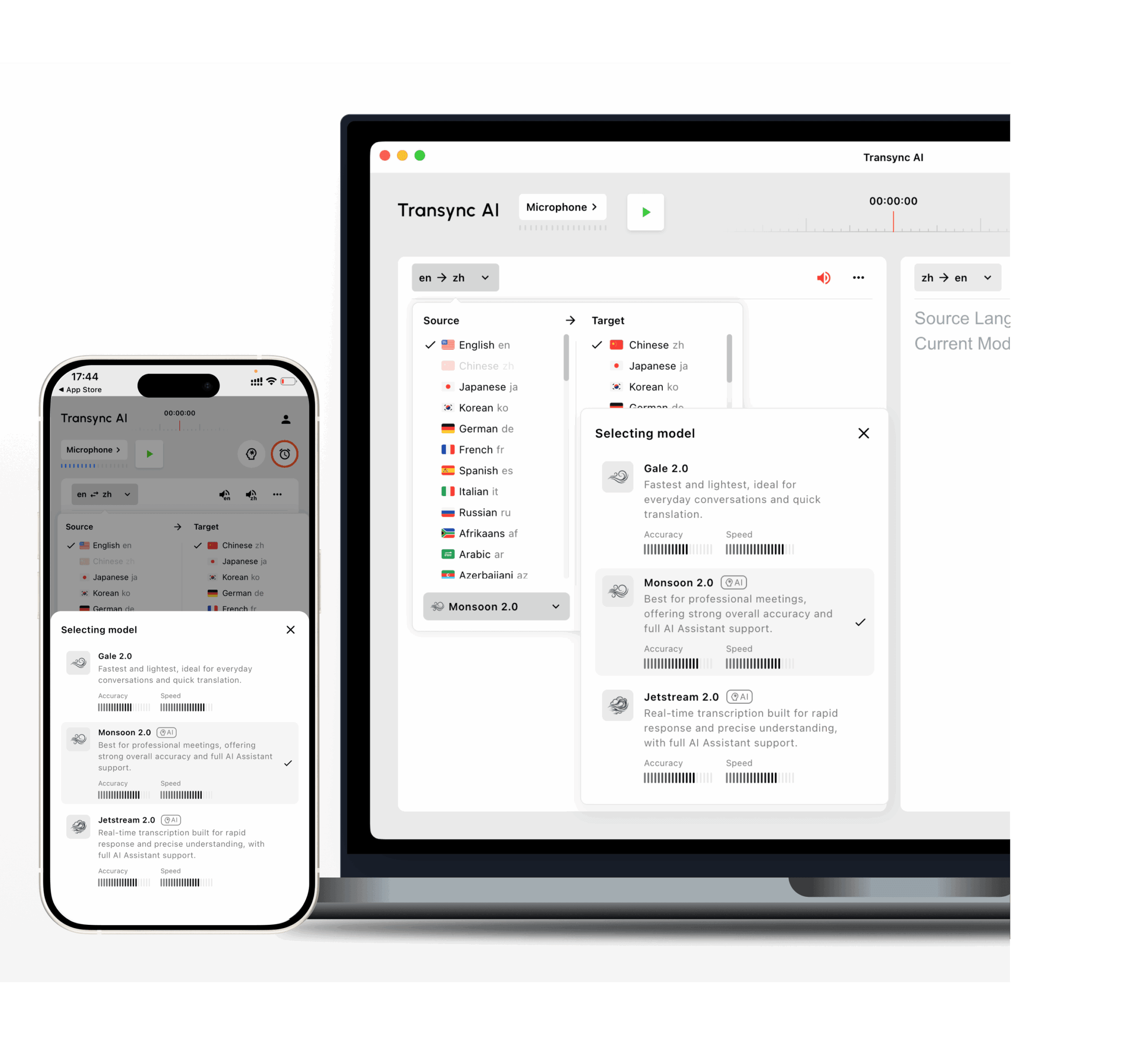
Transync AI est conçu pour la traduction bilingue à faible latence. Ses modèles Gale 2.0, Monsoon 2.0 et Jetstream 2.0 ont été optimisés pour les conditions conversationnelles telles que les phrases courtes, les discours multilingues, le bruit de fond et les pauses irrégulières.
 Test 2 : Peut-il se traduire naturellement dans les deux sens ?
 Test 2 : Peut-il se traduire naturellement dans les deux sens ?
De nombreux outils de traduction fonctionnent bien lorsqu'une personne parle et que l'autre se contente d'écouter.
Une conversation, c'est différent. Les deux parties doivent participer.
Un utile traducteur de conversation en temps réel devrait prendre en charge la traduction bidirectionnelle sans obliger les utilisateurs à appuyer sur un bouton de changement de langue après chaque intervenant.
Par exemple:
- L'orateur A utilise l'anglais.
- L'orateur B utilise le japonais.
- L'interlocuteur A pose une question complémentaire en anglais.
- L'orateur B répond en japonais.
- Les deux opérations se poursuivent sans modification manuelle des paramètres d'entrée.
Questions à poser
- L'outil peut-il faire la distinction entre les deux langues sélectionnées ?
- Est-ce que cela se traduit dans les deux sens ?
- Reconnaît-il les réponses courtes telles que “ oui ”, “ pas encore ” ou “ la semaine prochaine ” ?
- Que se passe-t-il lorsqu'un locuteur inclut le nom d'un produit anglais dans une phrase en chinois ?
- La voix traduite utilise-t-elle la langue cible correcte ?
- Les deux participants peuvent-ils voir le contenu original et le contenu traduit ?
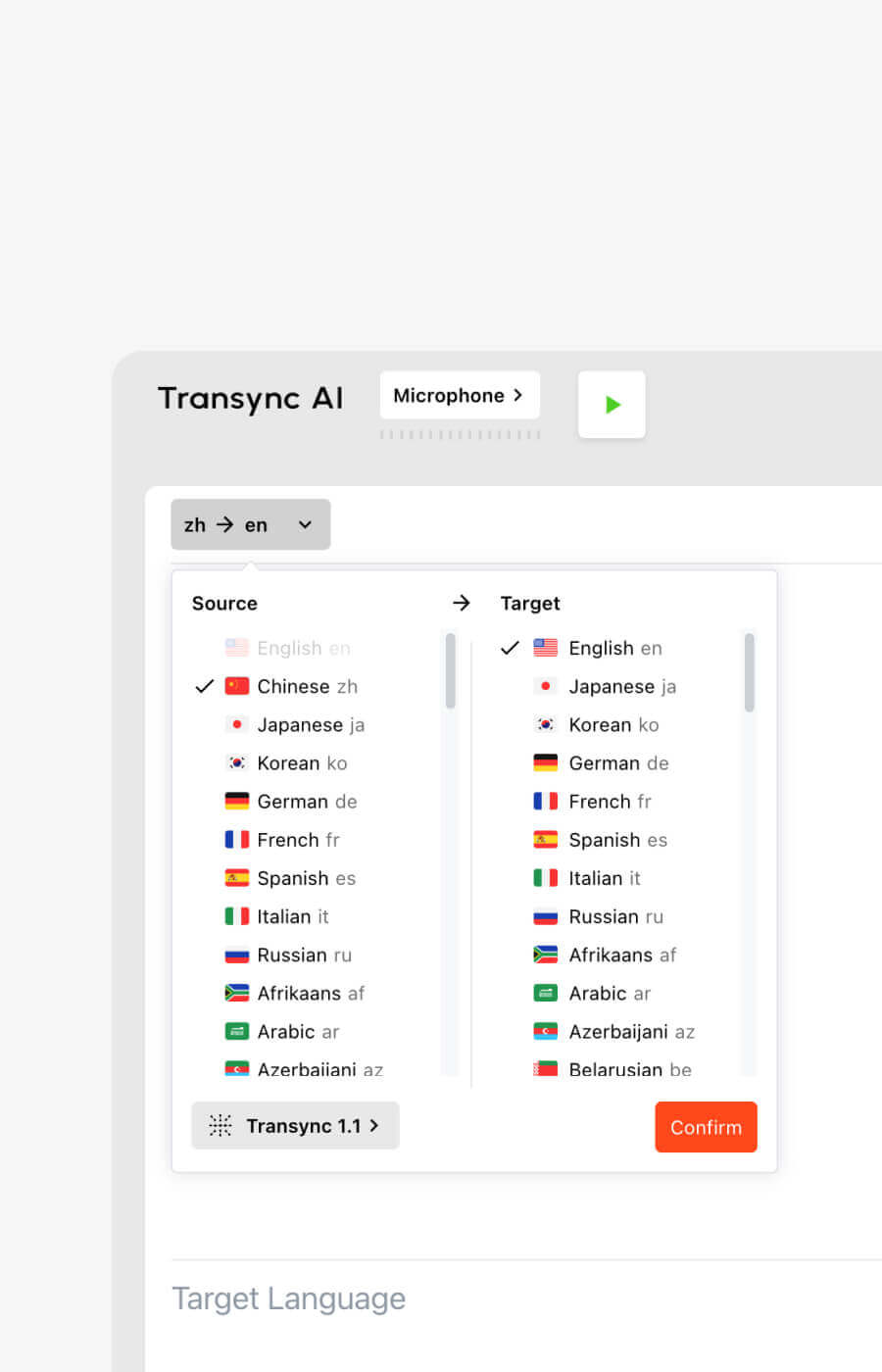
Transync AI prend en charge la traduction bidirectionnelle en temps réel dans 60 langues et plus de 1 000 paires de langues.
Les options prises en charge incluent les langues couramment utilisées telles que :
- Anglais
- Chinois
- japonais
- coréen
- cantonais
- Espagnol
- Français
- Allemand
- italien
- russe
Vous pouvez consulter les options actuelles sur le Langues prises en charge par Transync AI page.
Test 3 : Comprend-il le sujet ou seulement les mots ?
Une conversation générale est plus facile qu'une conversation professionnelle.
Prenons l’exemple du mot “ modèle ”. Il peut désigner :
- Un modèle d'IA
- Un modèle de produit
- Un modèle statistique
- Un modèle d'entreprise
- Un prototype de conception
- Une personne travaillant dans la mode
La traduction correcte dépend du sujet.
Un traducteur peu compétent traite la phrase isolément. Un traducteur sensible au contexte utilise la conversation environnante, les mots-clés et les informations générales.
Un test pratique de terminologie
Préparez dix termes issus de votre flux de travail réel.
Par exemple:
- Transync AI = 同言翻译
- onduleur photovoltaïque
- emballage de semi-conducteurs
- Asie-Pacifique
- Modèle X200
- réseau neuronal
- optimisation de la chaîne d'approvisionnement
- John Smith
- espace de travail d'entreprise
- campagne de lancement de produit
Utilisez ensuite ces termes dans des phrases complètes.
Ne testez pas seulement des mots isolés. Un traducteur de conversation doit comprendre comment le terme fonctionne au sein d'une discussion réelle.
Pourquoi les mots-clés et le contexte sont importants
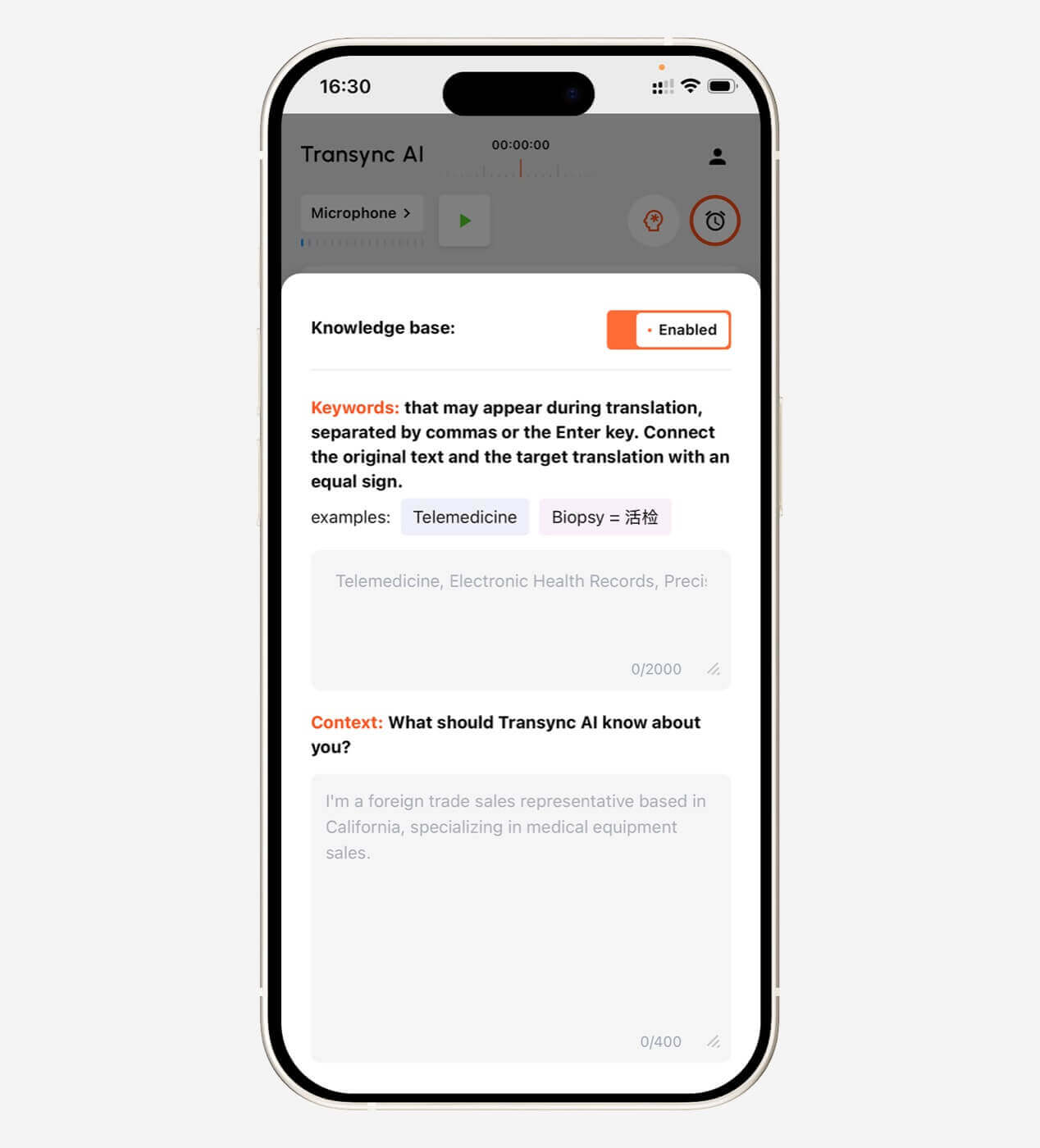
Avant une réunion, Transync AI permet aux utilisateurs de définir des mots-clés et de fournir un contexte.
Exemple de contexte :
Il s'agit d'une réunion avec des fournisseurs concernant la fabrication de semi-conducteurs, le contrôle qualité, les délais de livraison et les capacités de production.
Cela donne à l'IA une meilleure chance d'interpréter correctement un langage ambigu.
Les paramètres de mots-clés et de contexte sont particulièrement utiles dans :
- Fabrication
- Technologie
- Énergie renouvelable
- Recherche universitaire
- Administration des soins de santé
- Finance
- Ventes internationales
- Formation produit
- Démonstrations logicielles
Explorez Contexte des mots-clés de l'assistant IA fonctionnalité.
 Test 4 : Les sous-titres et le rendu vocal sont-ils réellement confortables ?
 Test 4 : Les sous-titres et le rendu vocal sont-ils réellement confortables ?
La qualité de la traduction ne représente qu'une partie de l'expérience. La livraison compte également.
Certains utilisateurs comprennent mieux en lisant. D'autres ont besoin d'une traduction audio. De nombreuses conversations professionnelles tirent profit des deux.
Sous-titres bilingues
Une interface de sous-titrage utile devrait faciliter la comparaison entre le discours original et sa traduction.
Cela aide les utilisateurs :
- Vérifiez les noms et les numéros
- Détecter les éventuelles erreurs de reconnaissance
- Suivez les explications techniques
- Comprendre où une idée s'arrête et où une autre commence.
- Lisez la traduction sans perdre de vue le locuteur.
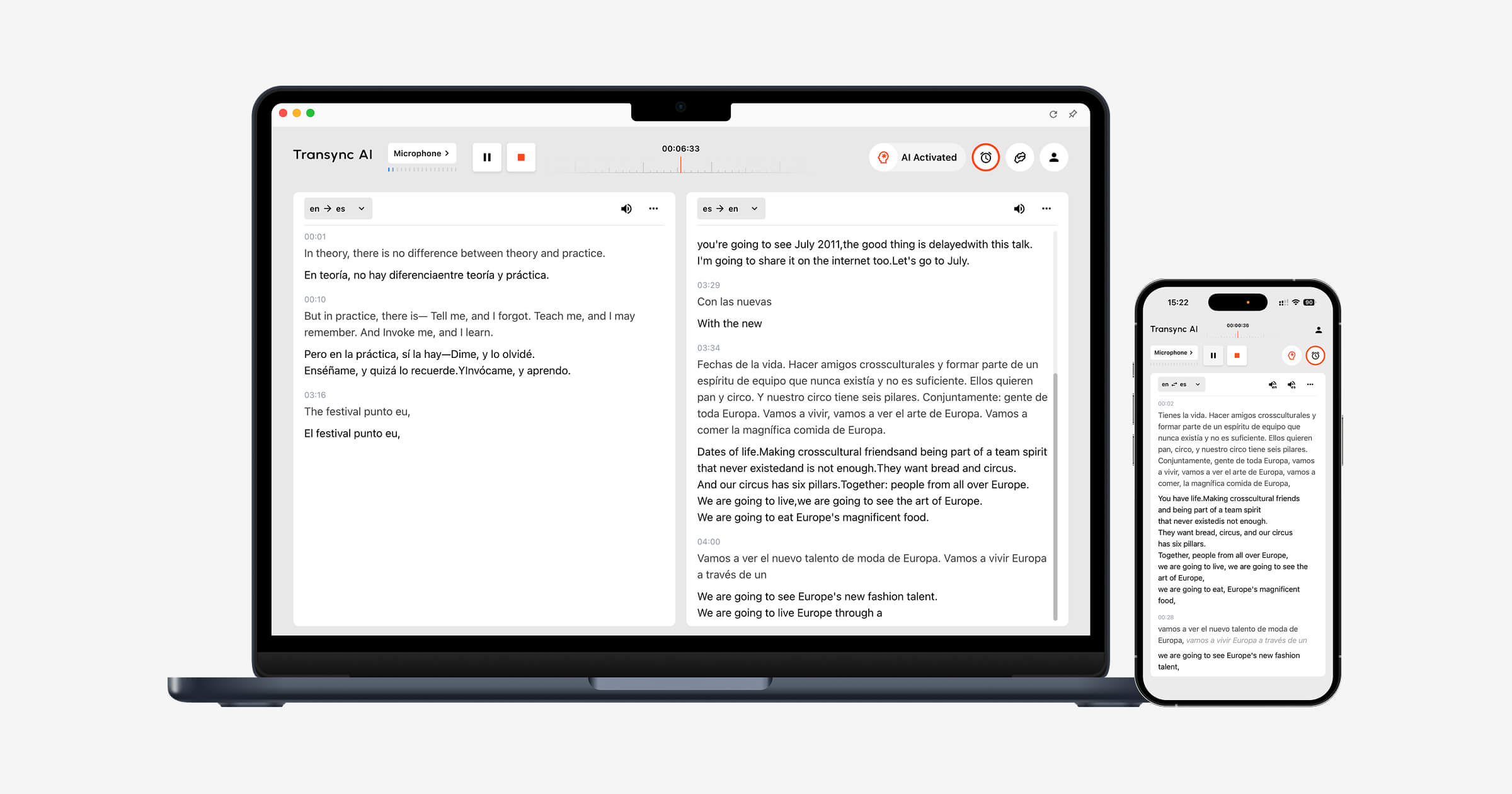
Transync AI utilise une mise en page bilingue côte à côte, permettant de visualiser simultanément le contenu original et sa traduction.
Questions pour les tests de sous-titrage
- Les légendes sont-elles suffisamment grandes pour être lues ?
- La langue originale est-elle clairement séparée de la traduction ?
- Les sous-titres se mettent-ils à jour trop fréquemment ?
- Le texte concerne-t-il les diapositives ou les commandes de réunion ?
- Les sous-titres peuvent-ils rester visibles lors du changement d'application ?
- Les utilisateurs peuvent-ils facilement mettre en pause ou reprendre la traduction ?
Transync AI propose également la fonction Image dans l'image pour les sous-titres flottants sur les systèmes Mac, Windows et iOS compatibles. La fenêtre de sous-titres reste ainsi au premier plan pendant que l'utilisateur consulte des présentations, des documents ou du contenu de son navigateur.
Voir Sous-titres flottants en mode image dans l'image.
 Sortie vocale traduite
 Sortie vocale traduite
La traduction vocale peut rendre une conversation plus directe, mais une mauvaise restitution vocale peut créer un nouvel obstacle.
Évaluer:
- Prononciation
- vitesse de parole
- pauses naturelles
- Tonifier
- Clarté
- Délai avant la lecture
- Si la voix interrompt l'orateur suivant
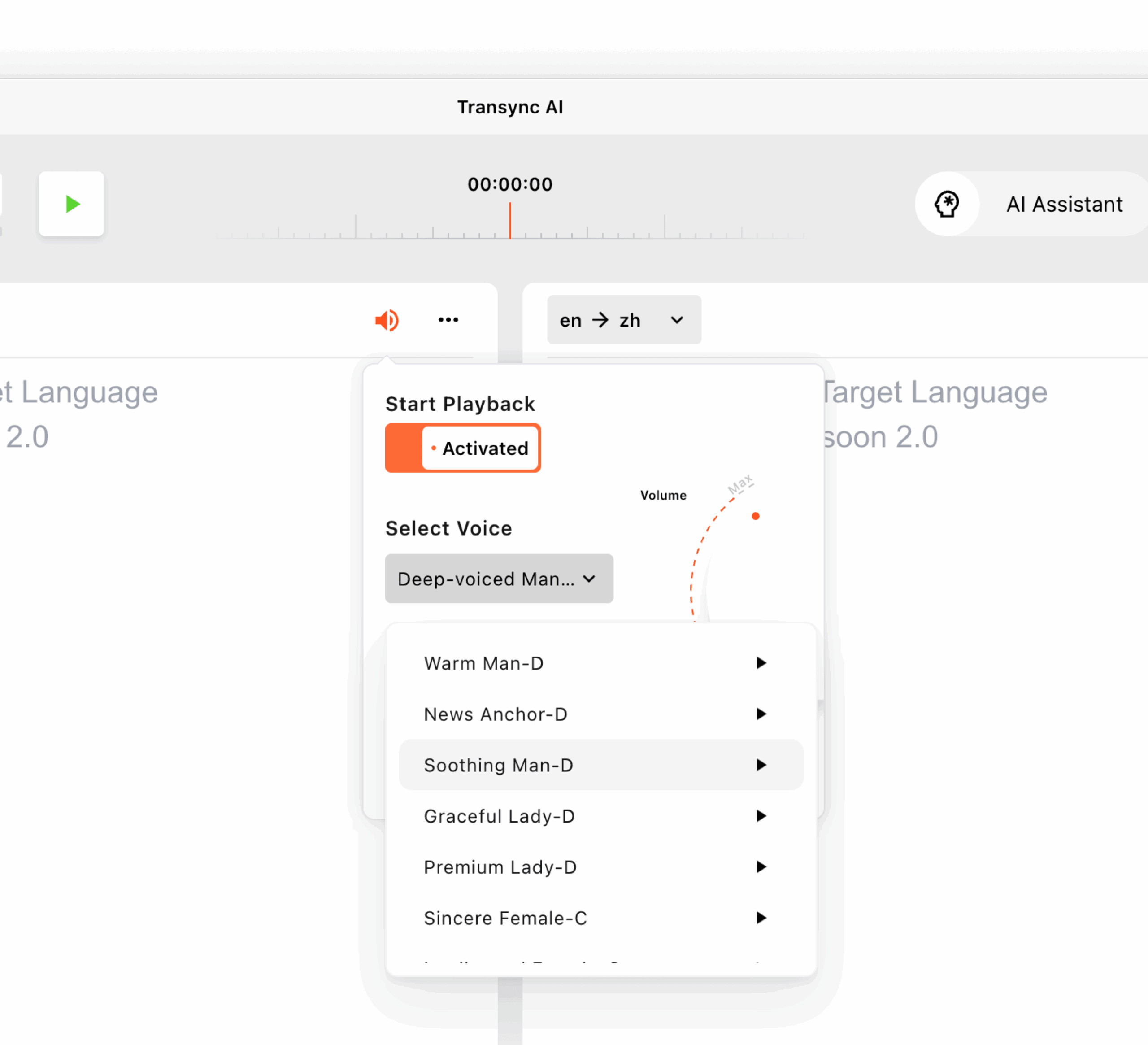
Transync AI propose plusieurs voix d'IA et un aperçu vocal. Les utilisateurs peuvent écouter les voix disponibles avant une session et choisir celle qui convient le mieux à une réunion, un cours, une démonstration ou une conversation informelle.
Il prend également en charge le clonage vocal, permettant ainsi aux traductions d'utiliser une voix ressemblant à celle de l'utilisateur. Les données vocales sont stockées en toute sécurité et ne sont pas utilisées pour l'entraînement de l'IA.
Apprenez-en davantage sur Traducteur vocal IA et sortie vocale.
Test 5 : Est-ce que cela correspond à la conversation avant, pendant et après ?
 Test 5 : Est-ce que cela correspond à la conversation avant, pendant et après ?
Un traducteur de conversation ne doit pas être évalué uniquement pendant que quelqu'un parle.
Le flux de travail complet comporte trois étapes.
Avant la conversation
Les utilisateurs peuvent avoir besoin de :
- Sélectionnez la paire de langues
- Ajouter les noms et les termes techniques
- Décrivez le sujet de la réunion
- Choisissez une voix traduite
- Testez le microphone
- Confirmer les paramètres audio du système
Au cours de la conversation
Les utilisateurs doivent :
- Lire les sous-titres
- Écouter la sortie vocale
- Alterner entre les diapositives et les documents
- Répondre sans longues pauses
- chiffres importants corrects
- Évitez de gérer des contrôles complexes
Après la conversation
Les utilisateurs peuvent avoir besoin de :
- Consultez la transcription
- Confirmer les décisions
- Identifier les actions à entreprendre
- Partager un résumé
- Vérifier les noms et les dates
- Préparez-vous pour la prochaine réunion
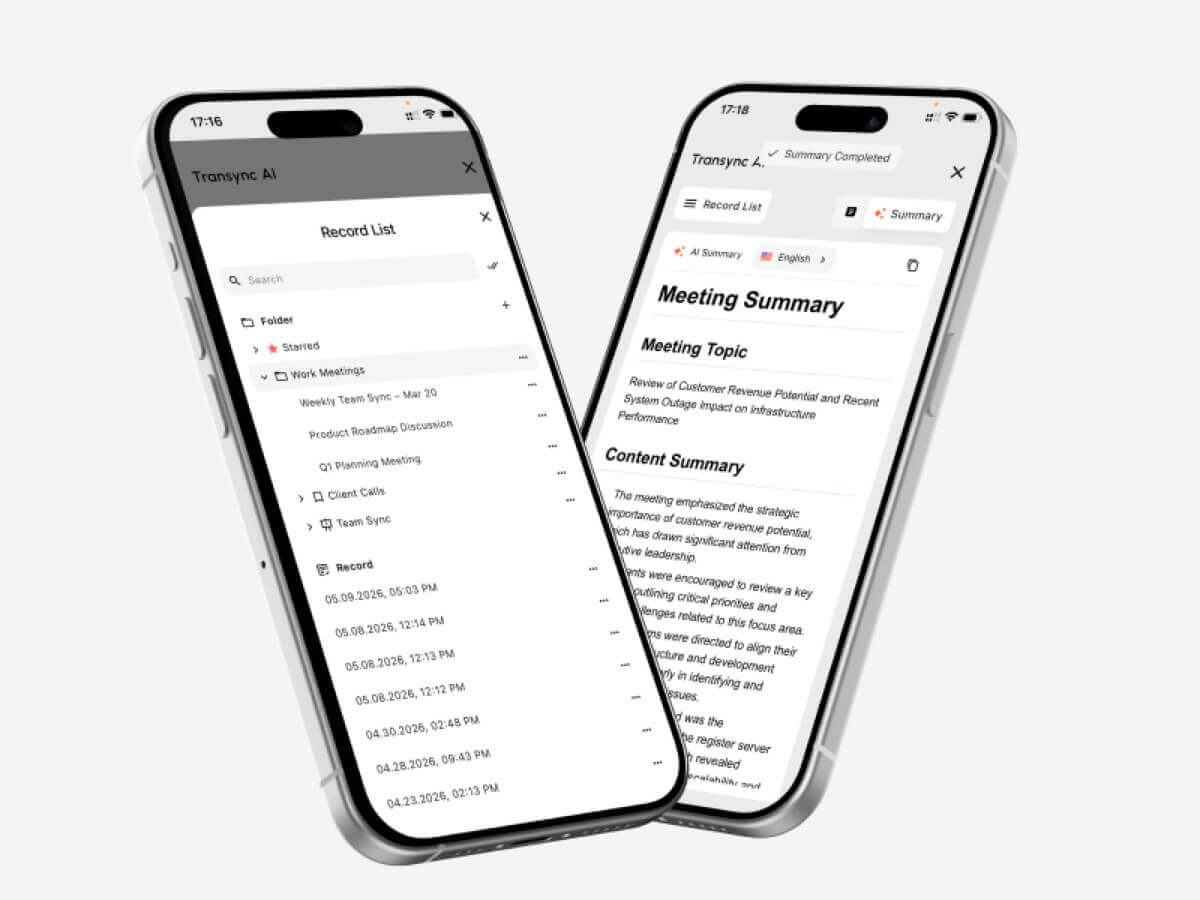
Transync AI combine la traduction instantanée et la prise de notes automatique lors des réunions. Après une conversation multilingue, les utilisateurs peuvent ainsi consulter les informations clés sans se fier uniquement à leur mémoire ou à des notes manuscrites.
Visite Notes de réunion IA avec traduction en temps réel.
 Traducteur de conversation vs. Traducteur de texte
 Traducteur de conversation vs. Traducteur de texte
Ces outils permettent de résoudre des problèmes différents.
| Fonctionnalité | Traducteur de texte | Traducteur de conversation |
| Entrée principale | Texte saisi ou collé | Discours en direct |
| Interaction | Généralement une phrase à la fois | Discussion continue à double sens |
| Exigence de vitesse | Modéré | Très haut |
| Reconnaissance audio | Généralement optionnel | Essentiel |
| Changements de l'orateur | Sans objet | Doit être géré en douceur |
| Sortie vocale | Parfois disponible | Important pour la communication orale |
| Soutien aux réunions | Généralement limité | Souvent un cas d'utilisation majeur |
| Paramètres de contexte | Variable | Important pour un usage professionnel |
| Compte rendu de réunion | Rare | Disponible dans les outils avancés |
| Idéal pour | Messages, pages web, textes courts | Appels, cours, réunions et entretiens |
Un traducteur de texte général tel que Google Traduction Peut convenir pour des phrases, des messages et des questions rapides sur les voyages.
Un interprète dédié aux conversations de réunion est plus utile lorsque la parole est continue et que les deux participants doivent répondre.
Traducteur de conversation vs. interprète humain
L'IA et l'interprétation humaine ne sont pas interchangeables.
| Facteur | Traducteur de conversation IA | Interprète humain |
| Disponibilité | Peut généralement être démarré immédiatement | Nécessite souvent une planification |
| Coût | Abonnement ou à l'usage | Généralement facturé à l'heure ou à l'événement. |
| Réunions de routine | Pratique pour une utilisation fréquente | Peut s'avérer coûteux pour une utilisation quotidienne |
| Nuance culturelle | Peut manquer une signification subtile | Meilleure capacité à comprendre l'intention et le contexte |
| Terminologie technique | Peut être amélioré grâce aux mots-clés | Cela dépend de la spécialisation de l'interprète. |
| Compte rendu de réunion | Peut être généré automatiquement | Généralement un service distinct |
| Responsabilité légale | Limité | Les normes professionnelles peuvent s'appliquer |
| Utilisation optimale | Réunions et conversations de routine | Communication à enjeux élevés et délicate |
Faites appel à un interprète humain qualifié lorsqu'une erreur pourrait avoir des conséquences :
- Droits légaux
- traitement médical
- Sécurité
- Statut d'immigration
- décisions financières
- conditions contractuelles
- Procédures gouvernementales
- Questions sensibles en matière d'emploi
La traduction automatique par IA est généralement plus adaptée aux appels professionnels de routine, aux réunions internes, aux cours, aux démonstrations et à la communication quotidienne.
Dans quels cas un traducteur de conversation est-il le plus utile ?
Réunions d'affaires internationales
Un interprète bidirectionnel aide les participants à discuter des projets, des échéanciers, des coûts et des exigences techniques dans leurs langues de préférence.
Les mots-clés et le contexte peuvent améliorer le traitement des noms d'entreprises, des noms de produits et des termes spécialisés.
Appels des fournisseurs et des clients
Les légendes en temps réel facilitent la vérification des numéros, des dates de livraison, des détails de la commande et des codes modèles.
Les engagements importants doivent néanmoins être confirmés par écrit après l'appel.
Cours et conférences en ligne
Les élèves peuvent suivre les sous-titres traduits pendant que l'enseignant poursuit son exposé. Des notes générées par l'IA servent de référence après la séance.
Entretiens
Un traducteur à faible latence peut réduire les longs silences et aider les deux parties à poser des questions de suivi plus naturelles.
Démonstrations de produits
Les sous-titres flottants permettent aux participants de visionner le logiciel ou la présentation sans masquer la traduction.
Expositions et rencontres en face à face
Un interprète de conversation peut faciliter les échanges rapides lors d'événements, dans les bureaux, sur les campus et lors de visites d'affaires.
Il convient de tester la connexion internet et l'environnement du microphone avant une conversation importante.
Utilisation de Transync AI avec Zoom, Teams et Google Meet
Transync AI fonctionne comme un logiciel autonome et non comme un plugin de réunion.
Il peut fonctionner en parallèle avec :
- Zoom
- Microsoft Teams
- Google Meet
Pour les sous-titres, l'application peut capturer l'audio des réunions et afficher une traduction bilingue dans son interface ou dans une fenêtre de sous-titres flottante.
Pour la sortie vocale traduite, les utilisateurs devront peut-être configurer l'audio du système ou un microphone virtuel afin que les autres participants à la réunion puissent entendre la traduction générée.
Cette approche autonome est utile pour les utilisateurs qui travaillent sur plusieurs plateformes de réunion.
Voir Traduction de réunions en direct par IA pour Zoom, Teams et Google Meet.
Un script de test pour un traducteur de conversation pratique
Utilisez la structure de script suivante pour comparer les outils.
Partie 1 : Introduction
Chaque participant présente son rôle, son entreprise et l'objectif de la réunion.
Partie 2 : Nombres et dates
Inclure:
- Un prix
- Un pourcentage
- Un numéro de modèle
- Une date de livraison
- Une quantité
Partie 3 : Vocabulaire technique
Utilisez cinq termes qui apparaissent dans votre travail.
Partie 4 : Interruption naturelle
Demandez à l'un des intervenants de clarifier ou de corriger la déclaration précédente.
Partie 5 : Discours en langues mixtes
Incluez le nom du produit, le nom du département ou une abréviation dans une autre langue.
Partie 6 : Questions de suivi
Posez des questions qui dépendent de la réponse précédente.
Partie 7 : Résumé
Demandez à un participant de résumer la décision et les prochaines étapes.
Tableau de bord d'évaluation des traducteurs conversationnels
| Métrique | Que faut-il évaluer ? |
| Reconnaissance vocale | Le texte a-t-il retranscrit fidèlement les propos de l'orateur ? |
| Précision de la traduction | Le sens voulu a-t-il été préservé ? |
| Latence | Le résultat est-il arrivé assez rapidement ? |
| Flux bidirectionnel | Les deux participants pourraient-ils réagir naturellement ? |
| Terminologie | Les noms et les termes techniques étaient-ils cohérents ? |
| Expérience de sous-titrage | Les légendes étaient-elles lisibles et stables ? |
| Sortie vocale | La traduction audio était-elle claire et naturelle ? |
| Flux de travail des réunions | L'outil était-il compatible avec la plateforme existante ? |
| Stabilité de longue durée | Les performances sont-elles restées constantes ? |
| Valeur post-réunion | Les notes ou les résumés ont-ils été utiles ? |
Testez l'outil avec vos intervenants, appareils, réseau, paires de langues et durée de réunion habituels. Une courte démonstration promotionnelle ne peut pas reproduire tous les environnements de travail.
Tarification de Transync AI pour la traduction de conversations
| Plan | Prix | Utilisation incluse | Idéal pour |
| Gratuit | $0 | 40 minutes pour les nouveaux utilisateurs | Tests initiaux |
| Prime personnelle | $8,99/mois | 10 heures pendant la période d'adhésion active | Réunions individuelles et régulières |
| Entreprise | $24,99/mois/siège | Jusqu'à 40 heures par mois et par siège | Équipes et organisations |
| Carte de pointage | À partir de $0,70/heure | Temps de traduction supplémentaire | Utilisateurs dont la demande mensuelle varie |
Les heures cumulées sur la carte de temps n'expirent pas, mais elles ne peuvent être utilisées que pendant la durée de l'abonnement.
Pour comparer les prix, estimez votre temps de conversation mensuel réel. Un forfait mensuel peu élevé peut s'avérer peu avantageux si le temps inclus est trop limité pour vos réunions.
Limitations des logiciels de traduction conversationnelle
Aucun traducteur de conversation ne fonctionne parfaitement dans tous les environnements.
Les limitations courantes comprennent :
- Plusieurs personnes parlent simultanément
- Bruit de fond fort
- Écho de la pièce
- Microphones de faible qualité
- Internet instable
- Parole très rapide
- Forts accents régionaux
- Phrases incomplètes
- Argot local
- Changement de code rapide
- Terminologie ambiguë
- Lecture vocale chevauchant celle de l'orateur suivant
Transync AI présente également plusieurs limitations spécifiques au produit :
- Le mode hors ligne n'est pas disponible.
- La reconnaissance d'images n'est pas prise en charge.
- La traduction de texte statique n'est pas son cas d'utilisation principal.
- Il s'agit d'un logiciel autonome et non d'un plugin de réunion.
- L'utilisation du compte est comptabilisée de manière cumulative sur tous les appareils.
- La qualité de la traduction dépend toujours des conditions audio et réseau.
Ces limites le rendent plus adapté à la communication multilingue en direct que les images numérisées, la traduction intégrale de documents ou la localisation de sites web.
FAQ : Traducteur de conversation
Qu'est-ce qu'un traducteur de conversation ?
Un interprète de conversation écoute la langue parlée et produit des sous-titres traduits ou une restitution vocale lors d'une discussion en direct.
Quel est le meilleur traducteur de conversations ?
Le choix de l'outil optimal dépend des langues utilisées, de la plateforme de réunion, de l'environnement audio, de la terminologie et de la durée de la session. Pour les réunions professionnelles, privilégiez une faible latence, la traduction bidirectionnelle, le sous-titrage, la synthèse vocale, les commandes contextuelles et la prise de notes.
Un traducteur de conversation peut-il détecter automatiquement les deux langues ?
Certains outils permettent de distinguer deux langues sélectionnées au cours d'une conversation. Transync AI prend en charge la distinction automatique des langues pour les tâches de traduction bidirectionnelle compatibles.
Transync AI peut-il traduire les conversations Zoom ?
Oui. Transync AI peut fonctionner en parallèle avec Zoom, Microsoft Teams et Google Meet pour fournir des sous-titres bilingues en temps réel et des flux de travail vocaux traduits.
Transync AI prend-il en charge la traduction vocale ?
Oui. Il prend en charge la diffusion vocale par IA, plusieurs options vocales, la prévisualisation vocale et le clonage vocal.
Un interprète de conversation peut-il comprendre les termes techniques ?
Les performances dépendent de l'outil et de la terminologie. Transync AI permet aux utilisateurs d'ajouter des mots-clés et un contexte avant une conversation.
Un traducteur de conversation fonctionne-t-il hors ligne ?
Certains outils de voyage proposent des packs de langues hors ligne limités. Transync AI nécessite actuellement une connexion internet et ne prend pas en charge la traduction hors ligne.
L'IA peut-elle remplacer un interprète humain ?
L'IA peut faciliter les réunions, les cours, les appels et les conversations quotidiennes. Toutefois, le recours à un interprète professionnel reste recommandé pour les communications juridiques, médicales, diplomatiques, financières et autres communications à enjeux élevés.
En conclusion : testez la conversation, pas seulement la traduction.
UN traducteur de conversation L'évaluation devrait se baser sur ce qui se passe entre les personnes, et non pas uniquement sur la qualité d'une phrase traduite.
Les deux participants peuvent-ils s'exprimer naturellement ? La traduction est-elle disponible avant que le sujet ne change ? Les termes techniques sont-ils compris ? Les utilisateurs peuvent-ils lire ou écouter le résultat confortablement ? L'outil reste-t-il utile avant, pendant et après la discussion ?
Transync AI combine la traduction bidirectionnelle dans 60 langues avec des sous-titres bilingues, la diffusion vocale par IA, le clonage vocal, les mots-clés et le contexte, les notes de réunion par IA et les légendes en incrustation d'image.
Cela la rend particulièrement pertinente lorsque la traduction doit avoir lieu au sein d'une conversation en direct, pendant que les personnes posent encore des questions, partagent des idées et prennent des décisions.
Pour commencer, visitez Transync AI, explorez le outil de traduction en temps réel, ou téléchargez l'application pour votre appareil préféré.
 🤖
🤖 