

Erleichtern Sie sich das Übersetzen von Sprachen mit 8 praktischen Entscheidungen zu den Themen Bedeutung, Besprechungen, Dokumente, Reisen, Untertitel, Terminologie, Datenschutz und Überprüfung.
Derselbe Satz kann fünf verschiedene Übersetzungen erfordern. Ein Reisender braucht eine sofortige Antwort. Ein Anwalt benötigt präzise Fachbegriffe. Ein Meetingteilnehmer benötigt Untertitel und Sprachausgabe, bevor das Gespräch fortgesetzt wird. Ein Videoproduzent benötigt getimten Text, den das Publikum lesen kann. Ein internationales Team benötigt all dies möglicherweise innerhalb derselben Woche.
Darum Sprachen übersetzen Es beginnt mit einer Entscheidung über den Auftrag, nicht mit der Suche nach einer universellen App. Die Anzahl der Sprachen ist wichtig, aber auch Kontext, Übertragungsgeschwindigkeit, Interaktion mit dem Sprecher, Dateistruktur, Zugriffsmöglichkeiten für die Zielgruppe, Datenschutz und die Folgen eines Fehlers.
Für Besprechungen und Präsentationen, Transync AI Es übersetzt Sprache in Echtzeit, zeigt Original- und Übersetzungstext an, ermöglicht die Sprachwiedergabe und speichert die Sitzung zur späteren Überprüfung. Andere Tools sind auf Dokumente, Kameraübersetzung, Untertitel oder die Lokalisierung von Transkripten spezialisiert. Dieser Leitfaden verwendet acht Entscheidungskriterien, um den Workflow an das jeweilige Kommunikationsproblem anzupassen.
Die kurze Antwort
Verwenden Transync AI Wann Sprachen übersetzen Es muss die Kommunikation während Live-Meetings, Interviews, Kursen, Supportanrufen oder Präsentationen erleichtern. Es kombiniert zweisprachige Untertitel, übersetzte Sprachausgabe, Meeting-Kontext, eingeblendete Untertitel, Aufzeichnungen und die Publikumskommunikation im Präsentationsmodus.
Nutzen Sie einen Text- oder Dokumentenübersetzer, wenn Formatierung und schriftliche Terminologie wichtiger sind als gesprochene Sprache. Verwenden Sie eine Handykamera für Schilder und kurze Interaktionen unterwegs. Nutzen Sie eine Plattform zur Medienlokalisierung, wenn das Ergebnis Untertitel, Synchronisation oder ein mehrsprachiges Video zur Veröffentlichung sein soll.
Das beste Werkzeug ist dasjenige, das für den endgültigen Bestimmungsort der Übersetzung konzipiert wurde.
Übersetzung von Sprachen nach Aufgaben
| Aufgabe | Besserer Ausgangspunkt | Live-Stimme | Datei- oder Zielgruppen-Workflow | Hauptbeschränkung beim Test |
|---|---|---|---|---|
| Mehrsprachiges Meeting oder Interview | Transync AI | Ja | Original und Übersetzung wurden nach der Sitzung gespeichert. | Audio-Routing, Terminologie und exaktes Sprachpaar |
| Präsentation von einem bis vielen | Transync AI Präsentationsmodus | Ja | Link, QR-Code oder Raum-ID; bis zu 10 Zielsprachen | Multiplikatoren für Kontoanmeldung und Beta-Nutzung |
| Text, Word, PDF oder PowerPoint | DeepL | Textausgabe statt Sprachausgabe | Workflow für Dokumentenübersetzung und Glossarerstellung | Beschränkungen für unterstützte Sprachen und Dateiformate |
| Reisetext, gesprochene Worte, Handschrift oder Kamerabild | Google Übersetzer | Sprachfunktionen verfügbar | Mobilgeräte, Web, Kamera und ausgewählte Offline-Sprachen | Kontext, kleine Schrift, Störungen und Offline-Verfügbarkeit |
| Lokalisierung von Audio-/Videotranskripten | Sonix | Nicht der Hauptübersetzungsworkflow | Korrektes Transkript, Übersetzung, Beibehaltung von Timing und Sprechern | Die Übersetzung orientiert sich an der Qualität des Quelltextes. |
| Untertitel, Synchronisation und lokalisierte Medien | Maestra | Separate Live-Produkte erhältlich | Untertitelbearbeitung, SRT/VTT, Voiceover und Synchronisation | Planvorgaben, Zeitplanung und abschließende menschliche Überprüfung |
| Rechtliche, medizinische, sicherheitsrelevante oder zertifizierte Materialien | Qualifizierter Fachmann | Hängt vom Service ab. | Kontrollierte menschliche Überprüfung und erforderliche Dokumentation | Qualifikation, Gerichtsstand, Vertraulichkeit und Haftung |
Nutzen Sie die Tabelle als Routenkarte. Erfolgreich Sprachen übersetzen Das bedeutet, den richtigen Weg zu wählen, bevor man die Ausdrucksfähigkeit beurteilt.
Entscheidung 1: Erfolgt die Kommunikation mündlich oder schriftlich?
Live-Kommunikation und schriftliche Übersetzung unterliegen unterschiedlichem Zeitdruck.
In einem Live-Gespräch muss das Ergebnis schnell genug eintreffen, damit jemand reagieren kann. Eine Übersetzung, die 20 Sekunden zu spät kommt, mag zwar sprachlich korrekt sein, ist aber für das Gespräch nutzlos. Nutzer müssen außerdem sehen können, wer gesprochen hat, eine falsche Nummer bemerken und nach einer Unterbrechung wieder ins Gespräch einsteigen können.
Schriftliche Übersetzungen bieten mehr Spielraum für Korrekturen im Ausgangsmaterial, Terminologierecherche, Bearbeitung und Überprüfung. Ein Dokumentenworkflow kann Überschriften, Tabellen, Formatierungen und freigegebene Glossareinträge beibehalten. Geschwindigkeit ist weiterhin wichtig, aber der Leser wird während der Dateiverarbeitung nicht ausgeblendet.
Der erste Sprachen übersetzen Die Frage lautet daher:
Muss jemand den Text jetzt verstehen und darauf reagieren, oder muss ein fertiger Text auch später noch verlässlich sein?
Die Live-Route mit Transync AI
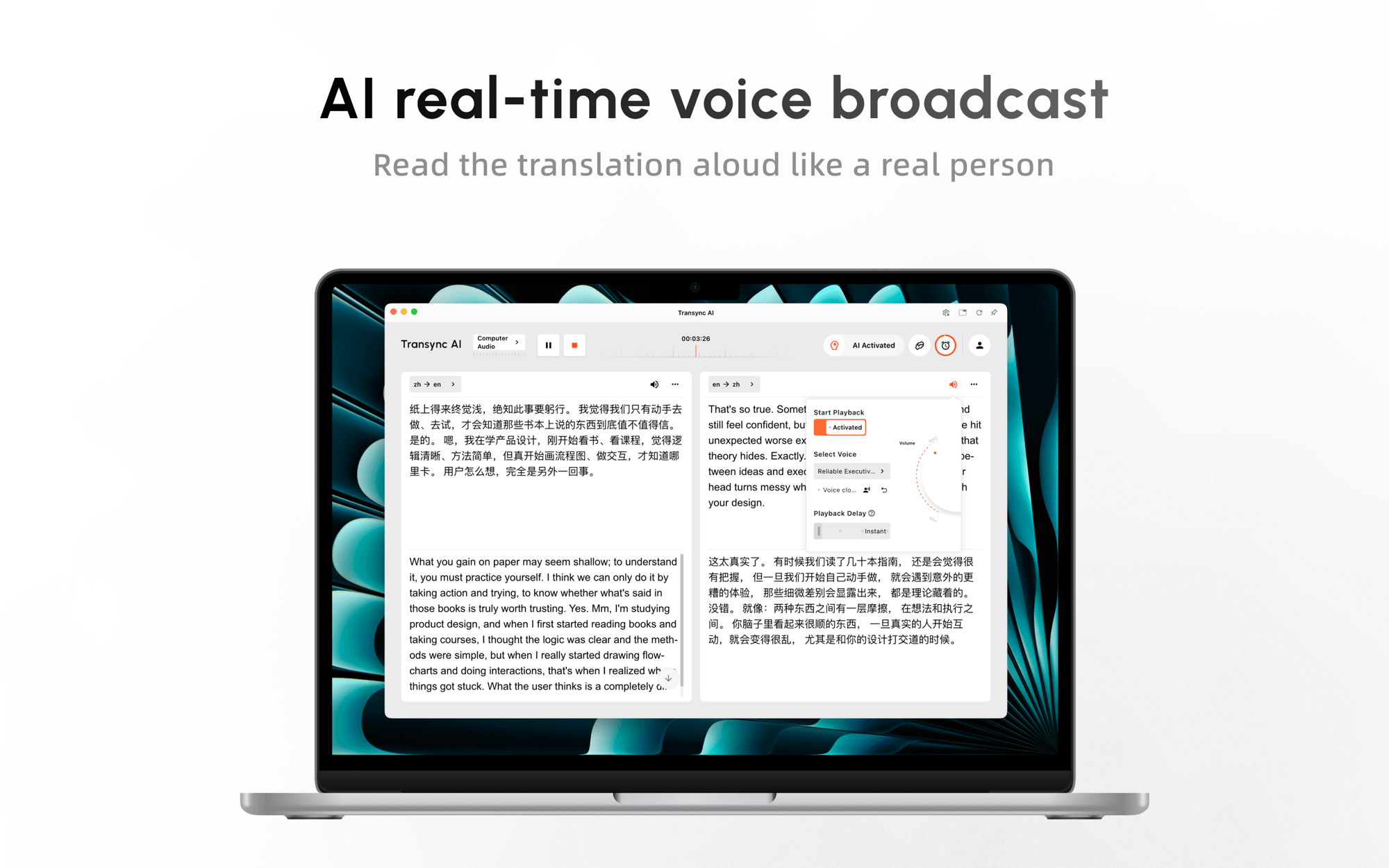
Der Echtzeit-Übersetzungstool zeigt den erkannten Quelltext neben seiner Übersetzung. KI-Sprachübersetzer Fügt eine Audioausgabe hinzu, sodass die Teilnehmer nicht jeden Untertitel ansehen müssen.
Diese Kombination ermöglicht es den Teilnehmern, dem Gesprächsverlauf zu folgen und gleichzeitig Namen, Zahlen und technische Angaben im Text zu überprüfen. Einweg-, Zweiweg- und mehrsprachige Modi unterstützen unterschiedliche Kommunikationsmuster.
 Testen Sie Transync AI kostenlos
Der schriftliche Weg mit DeepL
DeepL eignet sich besser für die Übersetzung von Texten und zugehörigen Dokumenten. Das aktuelle Produkt bietet Textübersetzung und Dokumenten-Workflows für Formate wie PDF, Word und PowerPoint. Glossar und erweiterte Sicherheitsoptionen sind in den entsprechenden Abonnements enthalten.
Das macht DeepL Dies ist nützlich, wenn es sich bei dem Ergebnis um einen Vertragsentwurf, einen Bericht, eine Präsentation oder ein anderes schriftliches Dokument handelt und nicht um eine aktive mehrsprachige Kommunikation. Käufer sollten die unterstützte Ausgangssprache, Zielsprache, den Dateityp, die Dateigröße, das Formatierungsverhalten und die Verfügbarkeit eines Glossars überprüfen.

Man sollte nicht erzwingen, dass sich die beiden Vorgehensweisen gegenseitig imitieren. Das Kopieren von Besprechungsuntertiteln in einen Dokumentenübersetzer lässt den Live-Kontext verloren gehen; die Verwendung einer Besprechungs-App als Dokumentenlokalisierungssystem ignoriert Formatierungs- und Revisionsanforderungen.
Entscheidung 2: Müssen die Gesprächspartner in beide Richtungen sprechen?
Einweg- und Zweiweg-Workflows lösen unterschiedliche Probleme, wenn Sprachen übersetzen.
Eine Keynote, ein Vortrag, eine Führung, eine Predigt oder eine Firmenmitteilung hat üblicherweise einen Hauptredner und viele Zuhörer. Ein Verkaufsgespräch, ein Interview, eine Beratung oder ein Supportgespräch erfordert Fragen, Antworten, Korrekturen und einen schnellen Gesprächswechsel.
Für die Zwei-Wege-Kommunikation testen Sie Folgendes:
- Ob das System die ausgewählten Sprachen unterscheidet.
- Wie es mit Unterbrechungen und überlappenden Redebeiträgen umgeht.
- Ob die übersetzte Audioausgabe den nächsten Zug blockiert.
- Ob die Teilnehmer den Originaltext einsehen können.
- Wie schnell sich das System nach einer Korrektur erholt.
Transync AI Es ist für die einseitige, zweiseitige und mehrsprachige Kommunikation ausgelegt. Der Bediener wählt den für das Meeting passenden Modus und kann die übersetzte Sprache hören, während Originaltext und Übersetzung weiterhin verfügbar sind.
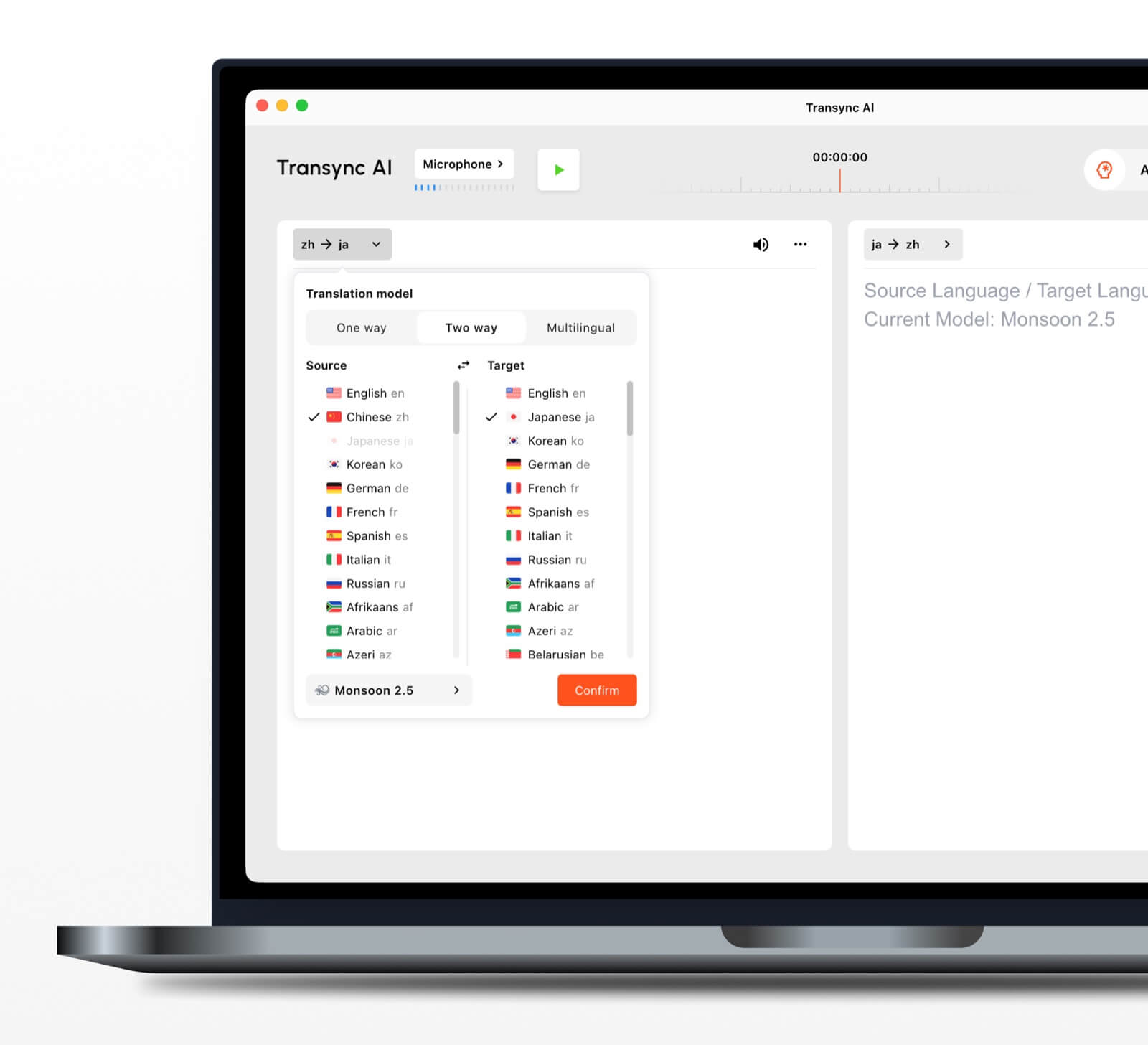 Für Sprachen übersetzen Verwenden Sie in einem echten Anruf ein Testskript mit einer Einleitung, einem Preis, einem Datum, einer Klarstellung, einer Einwendung und einer korrigierten Nummer. Ein einstudierter Monolog kann nicht beweisen, dass ein Produkt natürliche Interaktion unterstützt.
Entscheidung 3: Hört nur eine Person zu oder ein ganzes Publikum?
Die Art der Publikumsdarstellung verändert das technische Problem. Die Übersetzung muss auf vielen Geräten verfügbar sein, ohne dass alle gezwungen sind, eine Sprache auf dem Bildschirm des Moderators zu lesen.
Der Präsentationsmodus-Funktion lässt einen Transync AI Der Gastgeber kann bis zu 10 Zielsprachen festlegen. Die Teilnehmer treten über einen aktiven Link, einen QR-Code oder eine Raum-ID bei und wählen eine der vom Gastgeber konfigurierten Sprachen aus.
Jeder Teilnehmer kann Echtzeit-Untertitel lesen oder, falls verfügbar, die übersetzte Sprachausgabe aktivieren. Der Gastgeber kann die Stimmen nach Sprache konfigurieren, die Wiedergabeverzögerung und die Lautstärke anpassen und Voice Clone nutzen, sofern unterstützt.
Die Zuschauer müssen keine Software installieren, aber sie müssen sich registrieren oder anmelden. Transync AI Sie können lesen, zuhören und zwischen aktivierten Sprachen wechseln, aber keine Spracheingaben an die Aufgabe des Hosts senden. Der Präsentationsmodus ist daher für die Eins-zu-Viele-Kommunikation konzipiert. Sprachen übersetzen, keine vom Publikum geleitete mehrsprachige Diskussion.

Im Präsentationsmodus kann ein Moderator die Live-Übersetzung mit den Zuhörern auf ihren eigenen Geräten teilen.
Diese Funktion befindet sich derzeit in der Beta-Phase. Die Nutzung hängt von der maximalen Anzahl gleichzeitiger Nutzer und der Anzahl der aktivierten Zielsprachen ab. Beachten Sie den im Produkt angezeigten Multiplikator, bevor Sie die Veranstaltungskosten schätzen.
Nach der Sitzung entscheidet der Veranstalter, ob das Transkript mit den eingeladenen Teilnehmern geteilt wird. Die Weitergabe ist optional und erfolgt nicht automatisch, was insbesondere bei vertraulichen Schulungen und internen Präsentationen wichtig ist.
Entscheidung 4: Handelt es sich bei der Eingabe um Text, Sprache, Handschrift oder ein Bild?
Das Quellformat bestimmt, welches Erkennungsproblem vor der Übersetzung auftritt.
Getippter Text ist in der Regel die einfachste Eingabeform. Gesprochene Sprache birgt Risiken wie Akzente, Geräusche, Gesprächswechsel und Erkennungsfehler. Handschrift kann mehrdeutig sein. Kameraaufnahmen bringen zusätzliche Komplexität durch Beleuchtung, Fokus, Aufnahmewinkel, Schriftart und Hintergrund mit sich.
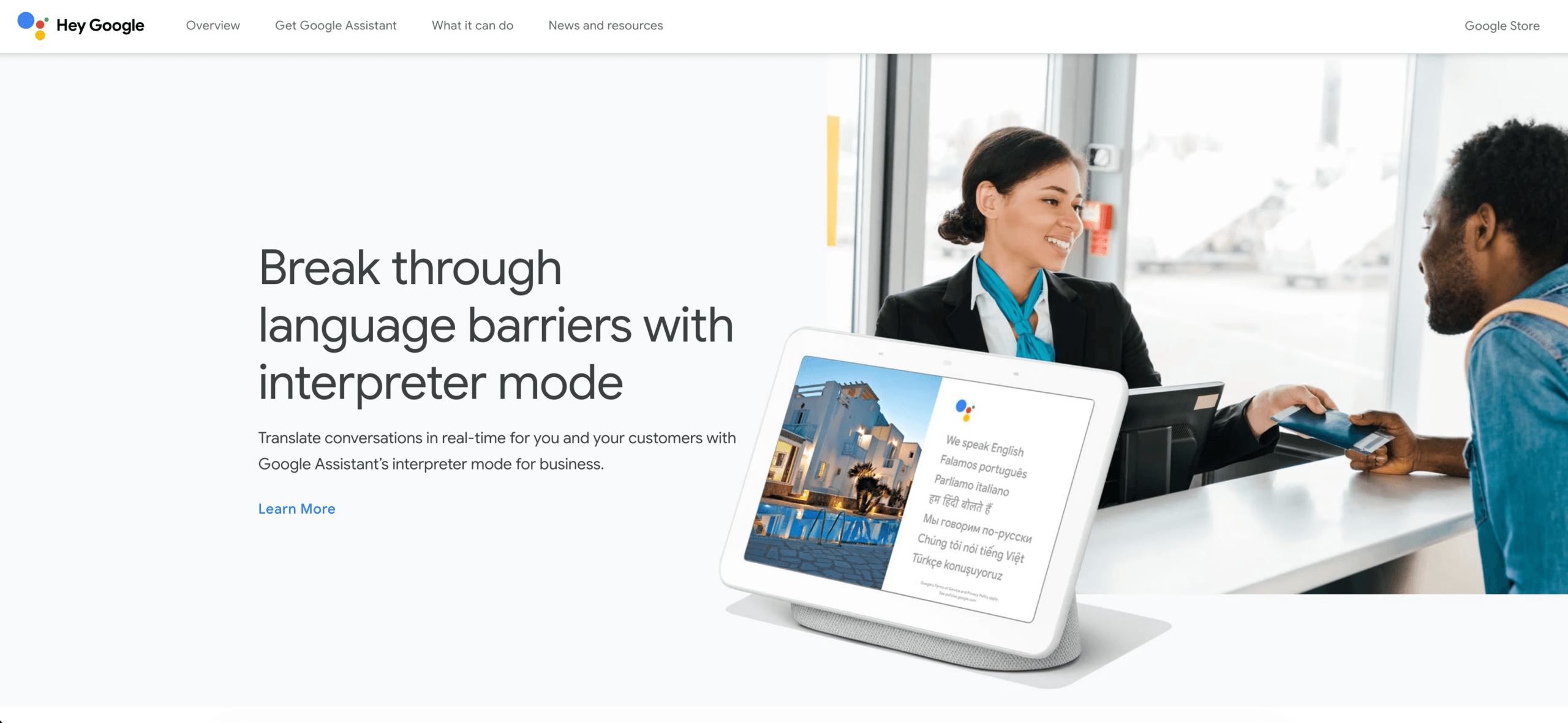
Google Übersetzer Laut der aktuellen Android-Hilfedokumentation unterstützt die App Text, Handschrift, Fotos und Sprache in über 200 Sprachen. Ausgewählte Sprachen können für die Offline-Nutzung heruntergeladen werden, und die Kamera kann Schilder oder Texte in gespeicherten Bildern übersetzen.
Diese Breite macht Google Übersetzer Es eignet sich für Speisekarten, Straßenschilder, Etiketten, kurze Nachrichten und den alltäglichen Reiseverkehr. Für vertrauliche Vorstandssitzungen, Dokumente in Publikationsqualität oder Konferenzen mit vielen Fachbegriffen ist es jedoch nicht automatisch das richtige System.
Wann Sprachen übersetzen Bevor man die Übersetzung kritisiert, sollte man die Quelle verbessern, die mit einer Kamera aufgenommen wurde:
- Verwenden Sie klaren, gleichmäßig beleuchteten Text.
- Vermeiden Sie stilisierte oder sehr kleine Schriftarten.
- Halten Sie die Kamera parallel zur Oberfläche.
- Automatische Spracherkennung bestätigen.
- Namen, Preise, Daten, Allergene und Warnhinweise bitte manuell überprüfen.
- Vergewissern Sie sich vor Reiseantritt, dass die benötigte Sprache auch offline funktioniert.
Ein Bildübersetzer führt zunächst eine visuelle Erkennung und anschließend eine Übersetzung durch. Ein Fehler in einem der beiden Schritte kann das Ergebnis verändern.
Entscheidung 5: Benötigt die Übersetzung einen Branchenkontext?
Wörter haben keine einheitliche Bedeutung. Begriffe wie “Lead”, “charge”, “bond”, “cell” und “margin” verändern sich in Bereichen wie Fertigung, Recht, Finanzen, Medizin, Vertrieb und im alltäglichen Sprachgebrauch.
Der KI-Assistenten-Schlüsselwörter- und Kontextfunktion lass uns Transync AI Die Nutzer geben die erwarteten Namen, Abkürzungen, Fachbegriffe und eine Beschreibung des bevorstehenden Meetings an. Dies ist hilfreich, wenn sich das Thema je nach Kunde oder Projekt ändert.
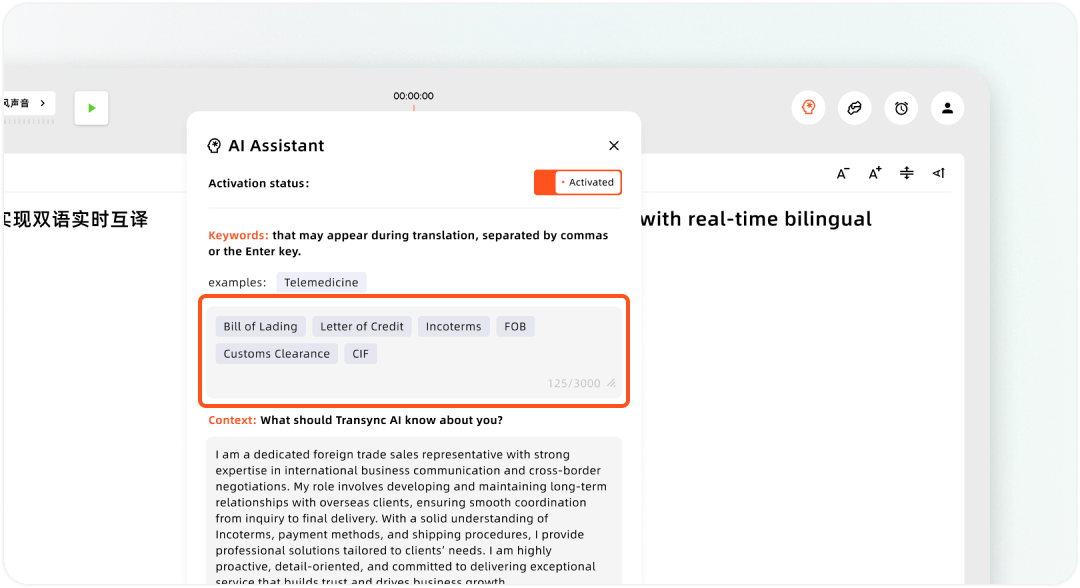
Einrichten von benutzerdefinierten Schlüsselwörtern und Benutzerkontext im Transsync AI Assistant
Für wiederholte schriftliche Arbeiten ist ein Glossar möglicherweise besser geeignet. Aufzeichnung:
| Quellbegriff | Genehmigte Zielperiode | Niemals verwenden | Kontext |
|---|---|---|---|
| Produktname | Offizielles lokalisiertes Formular | wörtliche Übersetzung | Produktseiten und Verkaufsgespräche |
| Akronym | Genehmigtes Akronym oder Erweiterung | Erfundenes Äquivalent | Bei Bedarf beim ersten Auftritt näher erläutern. |
| Messung | Beibehaltene oder umgebaute Einheit | Nicht verifizierte Konvertierung | Die Umrechnungsregel aufzeichnen |
| Rechtsformulierung | Genehmigter Wortlaut | Freie Umschreibung | Erfordert eine qualifizierte Begutachtung |
Gut Sprachen übersetzen Die Praxis schützt auch Begriffe, die nicht übersetzt werden sollten: eingetragene Marken, Modellcodes, URLs, E-Mail-Adressen, Befehlsnamen und einige Softwarebezeichnungen.
Führen Sie nach der Übersetzung eine Konsistenzprüfung durch. Selbst ein flüssiges Dokument, das drei verschiedene Bezeichnungen für dasselbe Merkmal verwendet, führt zu Verwirrung.
Entscheidung 6: Soll das Ergebnis Untertitel, Synchronisation oder ein Transkript sein?
Die Übersetzung von Medieninhalten bringt zusätzliche Anforderungen an Timing und Produktion mit sich, die bei der normalen Textübersetzung nicht zu bewältigen sind.
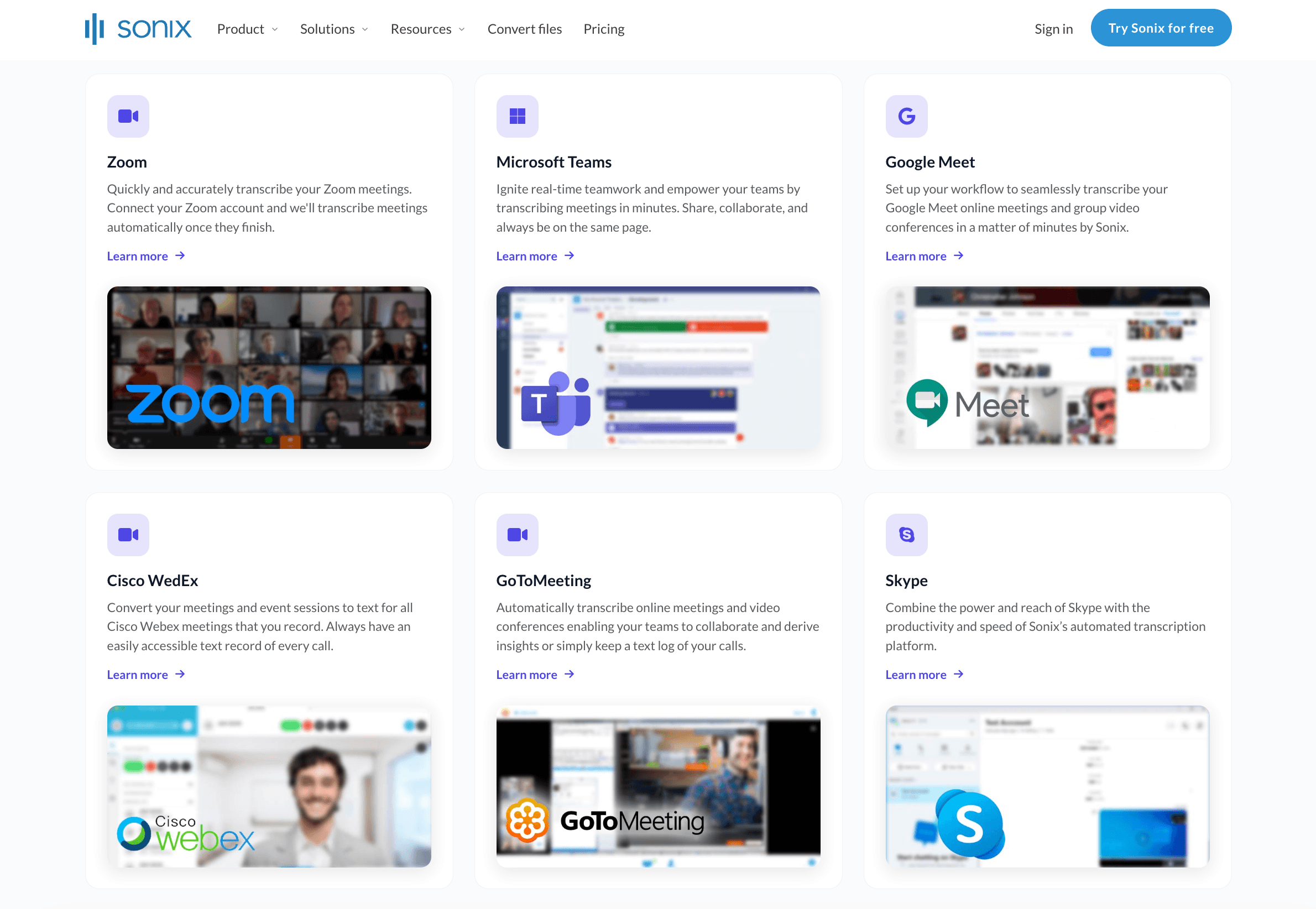
Sonix Der Workflow basiert auf der Transkription. Nutzer laden Audio- oder Videodateien hoch, erstellen und korrigieren das Quelltranskript und übersetzen es anschließend. Laut aktuellen offiziellen Unterlagen bleiben Zeitstempel, Sprecherbezeichnungen und Formatierungen erhalten, und die Übersetzungen können in Untertitel- und Dokumentformate exportiert werden.
Dies macht Sonix nützlich, wenn Sprachen übersetzen Es beginnt mit aufgezeichnetem Gerede und das Team benötigt durchsuchbare Transkripte, synchronisierte Wiedergabe oder mehrsprachige Untertitel.
Maestra Das Angebot erstreckt sich darüber hinaus auf die Medienlokalisierung. Die aktuelle Plattform unterstützt Transkription, Übersetzung, Untertitelgenerierung und -bearbeitung, SRT/VTT-Export, Voiceover und Synchronisation in über 125 Sprachen.
Wählen Maestra Wenn die übersetzten Wörter zeitlich angepasst, formatiert, vertont, in ein Video eingebunden oder als lokalisierte Medien wiederverwendet werden müssen, prüfen Sie die verfügbaren Ressourcen und überprüfen Sie das Endergebnis im jeweiligen Player.
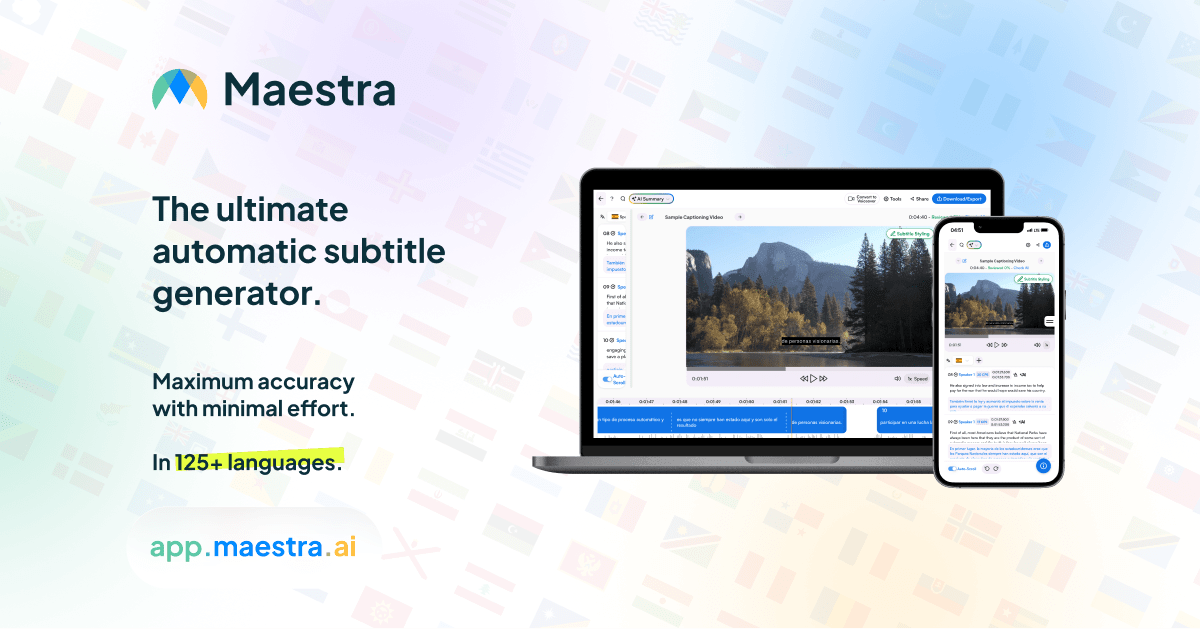
Bei Untertiteln sollten Sie Lesegeschwindigkeit, Einblendzeiten, Zeilenlänge, Zeilenumbrüche, Sprecherwechsel, eingeblendeten Text und Beschreibungen zur Barrierefreiheit überprüfen. Da sich die Zielsprachen oft verändern, ist die ursprüngliche Segmentierung möglicherweise nicht mehr lesbar.
Wenn die letzte Anforderung ein Sitzungsprotokoll und nicht etwa Mediendateien sind, KI-Besprechungsnotizenfunktion erstellt eine strukturierte Zusammenfassung aus den gespeicherten Daten Transync AI Sitzung. Benutzer können zur Originalsprache und den Übersetzungen zurückkehren, ohne ein separates Untertitelprojekt erstellen zu müssen.
Entscheidung 7: Was passiert, wenn die Übersetzung falsch ist?
Das Risiko sollte den Aufwand für die Überprüfung bestimmen.
Verwenden Sie eine praktische Leiter:
Geringes Risiko
Reisefragen, informelle Gespräche, Brainstorming und interne Orientierung können oft mithilfe von KI-Ausgaben und schneller Benutzerbestätigung erfolgen.
Mittleres Risiko
Kundengespräche, Recherchen, Schulungen, Produktdokumentationen und öffentliche Untertitel erfordern eine zweisprachige Überprüfung der Inhalte, der Terminologie und einen Quellenvergleich.
Hohes Risiko
Für rechtliche, medizinische, sicherheitsrelevante, regulatorische, finanzielle, einwanderungsbezogene und vertraglich bindende Kommunikation können qualifizierte Dolmetscher, professionelle Übersetzer, Zertifizierungen oder länderspezifische Verfahren erforderlich sein.
KI ist nützlich für Sprachen übersetzen, Eine flüssige Ausgabe ist jedoch kein Beweis für rechtliche Gültigkeit oder absolute Genauigkeit. Ein Gutachter muss Zugang zum Quelltext haben und über ausreichend Fachwissen verfügen, um einen plausiblen Fehler zu erkennen.
Prüfen Sie mindestens Folgendes:
- Namen, Zahlen, Preise, Daten und Prozentsätze.
- Negative Aspekte, Bedingungen, Verpflichtungen und Unsicherheit.
- Sprecheridentität und zitiertes Material.
- Fach- und Regulierungsbegriffe.
- Einheiten, Währung und länderspezifische Formatierung.
- Ob die Übersetzung die Entscheidung des Lesers verändert.
Maschinell erstellte, nicht geprüfte Übersetzungen dürfen nicht als zertifizierte Übersetzungen vermarktet werden.
Entscheidung 8: Wie wird die Übersetzung gespeichert und weitergegeben?
Das Finale Sprachen übersetzen Die Entscheidung betrifft die Informationsverwaltung.
Vor Beginn fragen:
- Sind die Teilnehmer mit der Aufzeichnung, Transkription, Übersetzung und Speicherung einverstanden, sofern dies erforderlich ist?
- Wer hat Zugriff auf die Originaltonspur, den Originaltext, Übersetzungen und Zusammenfassungen?
- Wie lange soll jeder Datensatz verfügbar bleiben?
- Kann ein Benutzer den Eintrag korrigieren oder löschen?
- Soll das Ergebnis kopiert, heruntergeladen, per E-Mail versendet, veröffentlicht oder über ein kontrolliertes Konto geteilt werden?
- Ist der ausgewählte Anbieter berechtigt, die Inhalte zu verarbeiten?
Nach einem Transync AI Sitzung, Originalrede und Übersetzungen bleiben im Konto erhalten. Übersetzungsdatensätze können umbenannt, mit einem Stern markiert, in Ordnern organisiert, durchsucht, stapelweise verwaltet und gelöscht werden. Dies hilft Teams, Datensätze nach Kunde, Projekt, Sprache oder Prüfstatus zu trennen.
Der Leitfaden zur Verwaltung von Übersetzungsdatensätzen Hier wird erklärt, wie gespeicherte Sitzungen organisiert und gelöscht werden. Für vertrauliche Besprechungen sollten Sie vor der Ansammlung von Datensätzen eine Namenskonvention, einen Verantwortlichen, eine Zugriffsgruppe, einen Überprüfungsstatus und ein Löschdatum festlegen.
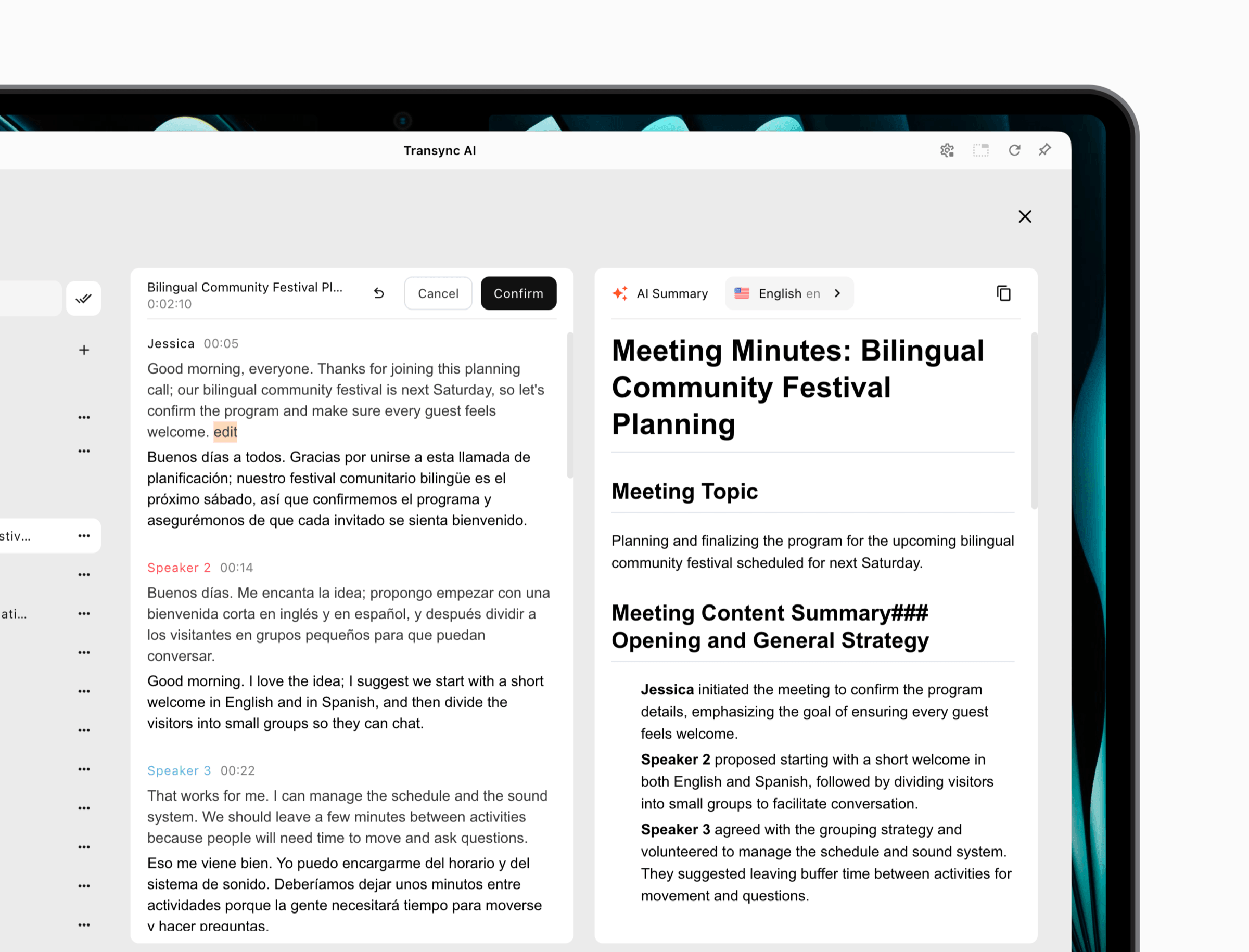 Der Präsentationsmodus bietet eine explizite Option zum Teilen. Der Moderator sollte das Protokoll der Sitzung nur dann freigeben, wenn die Teilnehmer berechtigt sind, es zu behalten.
Ein 8-stufiger Arbeitsablauf zur Sprachenübersetzung
- Definiere die Zielgruppe, die sprachliche Ausrichtung, das Format, die Deadline und das Risiko.
- Wählen Sie den richtigen Weg: Live-Meeting, Präsentation, Dokument, Kamera, Transkript oder Medien.
- Verbessern Sie das Quellmaterial (Audio, Bild, Text oder Datei) vor der Übersetzung.
- Geben Sie Kontext, Namen, Terminologie und Gebietsschema-Anforderungen an.
- Erstelle die erste Übersetzung, ohne die Quelldatei zu verwerfen.
- Überprüfen Sie Bedeutung, Zahlen, Sprecher, Formatierung, Timing und Tonfall.
- Testen Sie die Ausgabe in einer realen Besprechung, einem Dokument, auf einem Gerät oder in einem Videoplayer.
- Vor der Auslieferung sollten Zugriffs-, Aufbewahrungs-, Kennzeichnungs- und Löschregeln angewendet werden.
Dieser Arbeitsablauf hält Sprachen übersetzen mit dem tatsächlichen Kommunikationsergebnis verbunden.
Häufige Probleme beim Übersetzen von Sprachen
| Problem | Wahrscheinliche Ursache | Bessere Maßnahmen |
|---|---|---|
| Die Ausgabe von Fluent enthält falsche Fakten | Quellenerkennungsfehler | Korrigieren Sie zuerst die Audiotranskription oder die Bilderkennung. |
| Die Produktbedingungen ändern sich innerhalb der Datei. | Fehlendes Glossar oder Kontext | Bereiten Sie genehmigte Terminologie vor und führen Sie Konsistenzprüfungen durch. |
| Live-Übersetzung fühlt sich unerträglich langsam an. | Falscher Workflow oder falsche Audioroute | Testen Sie Latenz, Geräte und Meeting-Modus vor dem Kauf |
| Das Publikum findet seine Sprache nicht. | Zugriffs- oder Konfigurationsproblem | Üben Sie Links, QR-Codes, Konten und aktivierte Sprachen. |
| Der Untertiteltext blinkt zu schnell | Der Zieltext überschreitet die Hinweisdauer. | Segmentieren Sie die Segmente neu und testen Sie die Lesegeschwindigkeit im Player. |
| Dokumentformatierungsfehler | Werkzeug oder Dateityp ist ungeeignet | Verwenden Sie einen Dokumentenworkflow und überprüfen Sie die exportierte Datei. |
| Die Übersetzung klingt verlässlicher als der Originaltext. | Tonfall oder Modalität ging verloren | Bedingungen wiederherstellen, Absicherungen vornehmen und den Gesprächskontext anpassen |
| Sensibler Datensatz gelangt in die falschen Hände | Die Eigentumsverhältnisse waren unklar. | Weisen Sie vor dem Beenden eine Host-Entscheidung und eine Zugriffsrichtlinie zu. |
Beheben Sie den Fehler in der entsprechenden Phase. Das Umschreiben des letzten Satzes kann eine fehlerhafte Quelle nicht zuverlässig reparieren.
Häufig gestellte Fragen zum Thema Sprachenübersetzung
Wie beginnt man am besten mit dem Übersetzen von Sprachen?
Definieren Sie zunächst die Aufgabe: Live-Gespräch, Präsentation, Dokument, Bild, Transkript, Untertitel oder wichtige professionelle Kommunikation. Wählen Sie dann ein für diesen Zweck geeignetes Tool und testen Sie die entsprechende Sprachkombination.
Welches Tool eignet sich am besten für Live-Meetings?
Transync AI ist für mehrsprachige Live-Meetings konzipiert, die Original- und übersetzte Untertitel, Sprachwiedergabe, Terminologievorbereitung, schwebende Untertitel und gespeicherte Aufzeichnungen auf gängigen Plattformen benötigen.
Kann ein Publikum mehrere Sprachen gleichzeitig empfangen?
Ja. Transync AI Im Präsentationsmodus kann ein Moderator bis zu 10 Zielsprachen aktivieren. Die Teilnehmer schalten sich über einen Link, einen QR-Code oder eine Raum-ID zu und wählen eine Sprache für Untertitel oder optionale Sprachausgabe aus.
Müssen die Zuschauer etwas installieren? Transync AI?
Es ist keine Softwareinstallation erforderlich, jedoch müssen sich die Zuschauer registrieren oder ein Konto anmelden. Sie können lesen und zuhören, aber keine Spracheingaben an den Präsentationsmodus des Moderators senden.
Welches Tool eignet sich am besten zur Übersetzung von Schildern und Fotos?
Google Übersetzer ist ein praktischer Ausgangspunkt für Kamerabilder, gespeicherte Fotos, kurze Texte, Handschrift und Reisegespräche. Bildschärfe und Offline-Sprachverfügbarkeit sollten überprüft werden.
Welches Tool eignet sich am besten zum Übersetzen von Dokumenten?
DeepL ist eine gute Option für unterstützte Text- und Dokumentformate. Überprüfen Sie vor der Verarbeitung wichtiger Dateien die Sprachunterstützung, Formatierung, den Glossarzugriff, die Vertraulichkeit und die Planbeschränkungen.
Welche Tools eignen sich am besten zum Übersetzen von Untertiteln?
Sonix ist nützlich zum Korrigieren und Übersetzen synchronisierter Transkripte. Maestra Bietet einen umfassenderen Workflow für Untertitel, Voiceover, Synchronisation und Medienlokalisierung. Testen Sie die exportierte SRT- oder VTT-Datei im finalen Player.
Kann KI einen professionellen Übersetzer ersetzen?
KI kann Routinearbeiten beschleunigen Sprachen übersetzen, Sie kann jedoch keine perfekte Beurteilung, Zertifizierung, kulturelle Nuancen oder fachliche Verantwortlichkeit garantieren. Hochriskante und publikationskritische Inhalte erfordern eine entsprechend qualifizierte Prüfung.
Wie kann die Genauigkeit von Übersetzungen verbessert werden?
Verbessern Sie den Quelltext, wählen Sie die richtige Eingabesprache, stellen Sie Kontext und Fachbegriffe bereit, bewahren Sie vollständige Sätze, vergleichen Sie das Ergebnis mit dem Original und weisen Sie den Überprüfungsaufwand dem Risiko zu.
Endgültige Entscheidung für die Übersetzung von Sprachen
Erfolgreich Sprachen übersetzen beginnt damit, den Workflow dem Ziel anzupassen.
Wählen Transync AI Für Besprechungen und Präsentationen, bei denen die Teilnehmer das Gesprochene sofort verstehen, übersetzte Sprachausgabe oder Untertitel erhalten und eine nützliche Aufzeichnung erstellen müssen. Wählen Sie DeepL für unterstützte schriftliche Dokumente, Google Übersetzer für alltägliche Text- und Kamerabedürfnisse, Sonix für die transkriptbasierte Lokalisierung und Maestra für Untertitel- und Medienproduktion.
Die Anzahl der verwendeten Sprachen allein reicht für diese Entscheidung nicht aus. Prüfen Sie die tatsächliche Quelle, die Zielgruppe, die Terminologie, die Plattform, das Gerät, das Format und das Risiko. Die beste Übersetzung ist nicht nur flüssig, sondern hilft dem Empfänger, die beabsichtigte Bedeutung im entscheidenden Moment und im richtigen Format zu verstehen.
Wenn Sie ein Erlebnis der nächsten Generation wünschen, Transync AI ist führend mit Echtzeit-Übersetzungen auf KI-Basis, die einen natürlichen Gesprächsfluss gewährleisten. Sie können kostenlos testen Jetzt.
