

Test an English to Portuguese translator for Brazilian and European Portuguese, live speech, meetings, terminology, tone, and translated voice.
An English to Portuguese translator should do more than produce understandable words. It should choose the right Portuguese variety, preserve the speaker’s intent, handle names and terminology, and deliver the result in the format the listener needs.
That is especially important for live conversations. A translation may look acceptable on screen but sound unnatural when spoken aloud. Brazilian Portuguese and European Portuguese also differ in pronunciation, vocabulary, grammar preferences, and everyday tone.
Instead of another generic feature list, this guide gives you seven practical accuracy tests. Use them to evaluate translation for meetings, customer calls, travel, classes, events, and recorded content.
Quick Recommendation
Choose by task:
| Your task | Start with | Why |
|---|---|---|
| Live meetings and calls | Transync AI | Combines bilingual subtitles, translated voice, terminology context, and meeting notes |
| Travel, signs, and quick phrases | Google Translate or Talkao | Broad consumer and mobile translation workflows |
| Conferences and large audiences | Wordly | Attendee-focused captions and translated audio |
| Video subtitles and dubbing | Maestra | Media-localization and production workflow |
| Custom speech products | Soniox | Developer speech and translation capabilities |
| Text and document workflows | DeepL | Broad written-language and enterprise workflow |
Before choosing, confirm whether you need Brazilian Portuguese, European Portuguese, or another regional variety. A tool can support “Portuguese” while producing a variety that does not fit your audience.
The right English to Portuguese translator should maintain that regional choice across written captions and spoken output, not merely label every result as Portuguese.
Why English-to-Portuguese Translation Needs Regional Context
Portuguese is spoken across multiple countries and communities. Brazilian Portuguese and European Portuguese are mutually understandable, but they do not always sound interchangeable.
Differences can include:
- Vocabulary: Everyday objects and actions may use different words.
- Pronunciation: Vowels, consonants, rhythm, and speech reduction vary.
- Forms of address: Choices such as “você,” “tu,” names, and titles depend on region and relationship.
- Verb use: Common grammatical preferences can differ in speech.
- Tone: A phrase that sounds friendly in one setting may sound overly formal or unnatural in another.
For customer-facing or public content, identify the target audience before translating. “Portuguese for customers in Brazil” is more useful context than simply “Portuguese.”
Test 1: Does It Use the Right Portuguese Variety?
Test the English to Portuguese translator with two short samples: one intended for Brazil and one intended for Portugal. Include everyday vocabulary, a greeting, and a customer-facing request.
Example test intent:
| English source | What to evaluate |
|---|---|
| “Please enter your mobile number to continue.” | Regional word choice for “mobile phone” and a natural interface tone |
| “Can you send me the file?” | Pronoun choice, verb structure, and conversational naturalness |
| “The train leaves at half past six.” | Regional vocabulary and spoken rhythm |
Do not score only grammatical correctness. Ask a native speaker from the target region whether the sentence sounds like something they would actually say.
For a scheduled meeting, add the country, audience, relationship, and desired tone through the AI Assistant Keywords and Context feature before starting Transync AI.
 Test 2: Can It Translate a Two-Way Conversation?
 Test 2: Can It Translate a Two-Way Conversation?
A strong English to Portuguese translator must handle both directions. One participant may speak English, while another answers in Portuguese.
Within a selected supported language pair, the real-time translation tool from Transync AI can distinguish which language is being spoken. This reduces manual switching during a live exchange.
Use a test conversation with:
- A greeting and introduction.
- A question that requires a detailed answer.
- A date, price, and quantity.
- An interruption followed by clarification.
- A closing summary of the next step.
Check whether the translation remains understandable across the entire exchange—not only in isolated sentences. Ask speakers to take turns because overlapping voices can reduce speech-recognition accuracy.
 Test 3: Does Translated Voice Sound Natural?
 Test 3: Does Translated Voice Sound Natural?
Text accuracy is only one part of voice translation. When evaluating an English to Portuguese translator, listen for pacing, pronunciation, pauses, and whether the voice matches the formality of the conversation.
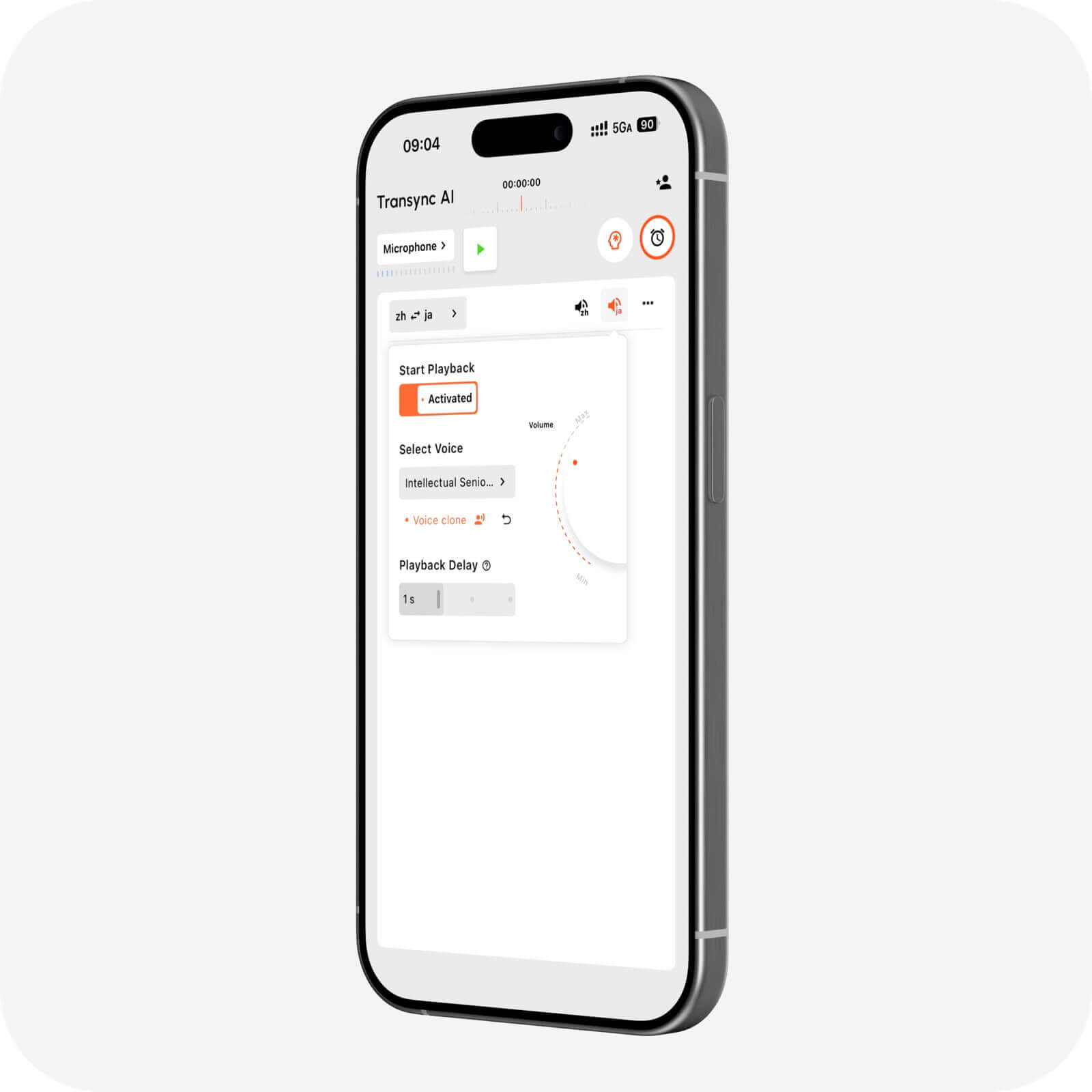
The AI voice translator from Transync AI can speak translated content aloud using different voice options. The voice cloning feature can generate translated playback in a voice modeled on the user.
Test three types of sentence:
- A short greeting.
- A longer explanation with a dependent clause.
- A sentence containing a name, number, and technical term.
The best voice is not necessarily the most expressive one. For meetings, clarity and predictable pacing may be more important than dramatic delivery.
 Test 4: Can It Handle Business Terminology?
 Test 4: Can It Handle Business Terminology?
An English to Portuguese translator may confuse product names, abbreviations, job titles, and English loanwords. Create a list of ten terms used in your real meetings and define the preferred Portuguese equivalents.
Run the same short conversation twice:
- First without providing context.
- Then with the terms entered through the AI Assistant Keywords and Context feature.
Compare recognition, translation consistency, and whether the English term should remain untranslated. This A/B test is more useful than asking whether the product “supports business vocabulary.”
For important contracts, medical instructions, legal advice, or safety information, use professional review. AI translation cannot guarantee that every specialized meaning will be preserved.
Test 5: Does It Work in Your Meeting Platform?
An English to Portuguese translator can perform well in a quiet mobile test and fail when remote audio is routed through a video call.
The live meeting translation feature works alongside Zoom, Microsoft Teams, and Google Meet. Transync AI is standalone software rather than a platform-specific plugin.
During the test:
- Use the same headset, computer, and network planned for the real call.
- Configure the computer-audio sharing feature so remote speech reaches the translator.
- Configure the virtual microphone feature when other participants need to hear translated Portuguese.
- Check for echo, duplicated audio, and excessive delay.
- Ask a remote participant to confirm what they can hear.
Do this before a client joins. Audio routing is part of translation quality because a correct result is useless if it reaches the wrong output.

Compatible with major online meeting platforms for seamless real-time translation
Test 6: Are Bilingual Subtitles Easy to Follow?
Captions help users verify names, figures, and unfamiliar words. A meeting-focused English to Portuguese translator should keep both languages readable when translated audio is difficult to hear or when a participant prefers reading.
The Picture-in-Picture bilingual subtitles feature can keep English and Portuguese captions above other applications on supported devices.
Test the subtitle view while:
- Presenting a slide deck.
- Demonstrating software.
- Taking notes in another window.
- Following a fast speaker.
- Switching between two applications.
Look for readability, line length, delay, and whether the original and translated text are easy to distinguish. More text on screen is not always better; participants need enough time to read it.

Real-time floating subtitles across desktop and mobile devices
Test 7: Is the Post-Meeting Record Useful?
A live conversation can feel successful while the saved transcript contains incorrect names or missing decisions. Review the output as carefully as the live experience.
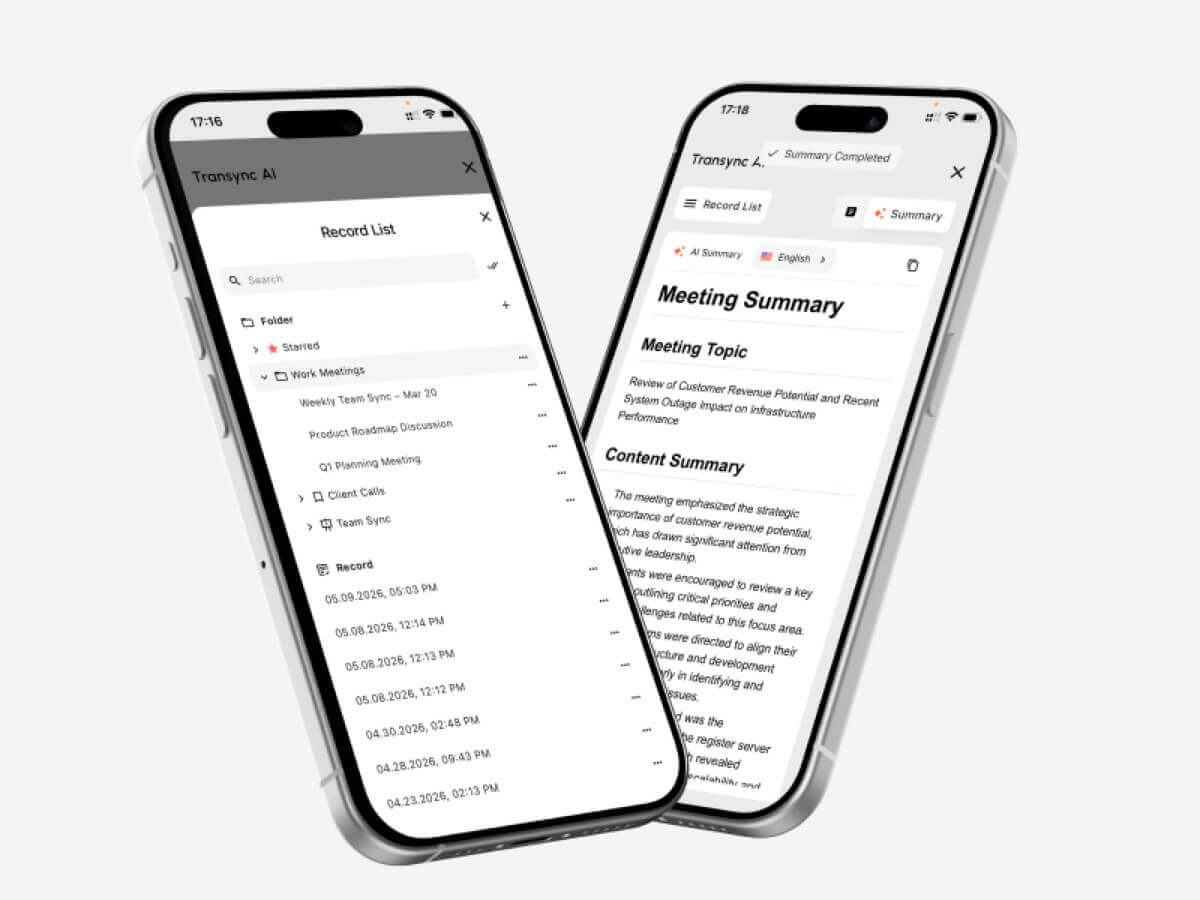
The AI meeting notes feature creates transcripts and structured notes. The translation record management guide explains how users can access previous sessions.
Score the record on five questions:
- Are participant names correct?
- Are prices, dates, and quantities accurate?
- Are decisions separated from general discussion?
- Are action items assigned clearly?
- Can someone who missed the meeting understand the result?
If the notes fail the last question, the output may not be ready for business follow-up without editing.
 English-to-Portuguese Translator Comparison
 English-to-Portuguese Translator Comparison
Use this English to Portuguese translator comparison to match each product to its primary workflow. Verify current features, language coverage, and plans on the official product websites.
| Tool | Best use case | Live bilingual captions | Translated voice | Distinctive workflow |
|---|---|---|---|---|
| Transync AI | Meetings, calls, classes, and in-person conversations | Yes | Yes | Context controls, audio routing, transcripts, and AI meeting notes |
| Talkao | Travel and mobile translation | App-dependent | Yes | Consumer, camera, AR, and learning tools |
| Wordly | Conferences and webinars | Yes | Yes | Attendee access through links or QR codes |
| Soniox | Custom speech products | API/app capability | TTS/API capability | Developer implementation |
| Maestra | Video, audio, subtitles, and dubbing | Yes | Yes | Media localization and reuse |
| DeepL | Text, documents, enterprise work, and selected voice uses | Product-dependent | Voice-product dependent | Written-language and API workflows |
| Google Translate | Quick everyday translation | Not meeting-first | Translation playback | Text, image, website, document, and casual speech translation |
How to Choose by Scenario
Live English-Portuguese meetings
Choose Transync AI when the English to Portuguese translator needs to provide real-time bilingual translation, translated voice, contextual terminology, and AI meeting notes in one workflow.
Travel, signs, and short phrases
Choose Talkao or Google Translate when camera input, text translation, or quick mobile access matters more than meeting features. Transync AI does not offer offline mode, image recognition, or text-only document translation.
 Conferences and audience-scale translation
 Conferences and audience-scale translation
Choose Wordly when many attendees need captions or translated audio through a simple access method. Choose Transync AI for personal or team-based meetings.
 Video localization and dubbing
 Video localization and dubbing
Choose Maestra when English video or audio must become reusable Portuguese subtitles or dubbed media.
 Developer and document workflows
 Developer and document workflows
Choose Soniox when engineers need speech capabilities for a custom product.
 Choose DeepL for text, document, API, and broader enterprise language workflows.
 How to Start an English-Portuguese Meeting
 How to Start an English-Portuguese Meeting
Before using an English to Portuguese translator in a live meeting, confirm the language variety, terminology, audio path, and desired output.
- Confirm whether the audience expects Brazilian or European Portuguese.
- Open Transync AI on a supported device.
- Select English and the available Portuguese option for the conversation.
- Verify current coverage on the supported languages page.
- Add regional context, names, and terminology through the AI Assistant Keywords and Context feature.
- Start the real-time translation tool.
- Enable the AI voice translator when listeners need spoken Portuguese.
- Use the Picture-in-Picture bilingual subtitles feature while presenting or working in another app.
- For online calls, test the computer-audio sharing feature and virtual microphone feature.
- Review the session through the AI meeting notes feature.
English to Portuguese Translator FAQ
Should I choose Brazilian or European Portuguese?
Choose the variety used by your audience. If the content is customer-facing, specify the target country and preferred tone. Before the call, verify that the English to Portuguese translator offers the appropriate Portuguese option.
Can English speech be translated into Portuguese audio?
Yes. The AI voice translator from Transync AI can play translated content aloud. Test the voice with regional vocabulary, names, and long sentences before an important session.
Can I translate English to Portuguese during a video call?
Yes. The live meeting translation feature from Transync AI works alongside Zoom, Microsoft Teams, and Google Meet.
Can the translator handle Portuguese responses?
The real-time translation tool from Transync AI can distinguish the two selected languages during a conversation, reducing manual language switching.
Can I translate Portuguese documents or images?
Google Translate supports broad consumer inputs, including images and documents. DeepL is positioned for text, documents, APIs, and enterprise workflows. Transync AI focuses on live speech rather than image or text-only document translation.
Does English-Portuguese translation work offline?
Offline availability depends on the provider and language. Transync AI requires an internet connection and does not offer offline mode.
Can AI replace a Portuguese interpreter?
AI can support many travel, educational, and business conversations, but it cannot guarantee perfect accuracy, regional tone, or cultural judgment. Medical, legal, safety-critical, and contractually binding discussions may require a qualified human interpreter.
Final Recommendation
The best English to Portuguese translator depends on the job. Use a consumer tool for travel and images, an event platform for large audiences, a media suite for dubbing, an API for product development, and a document platform for written content.
For live meetings, Transync AI combines bilingual subtitles, natural translated speech, terminology context, online-call audio routing, and post-meeting notes. Before choosing, run the seven tests above with the correct Portuguese variety, real speakers, real terminology, and the actual meeting setup.
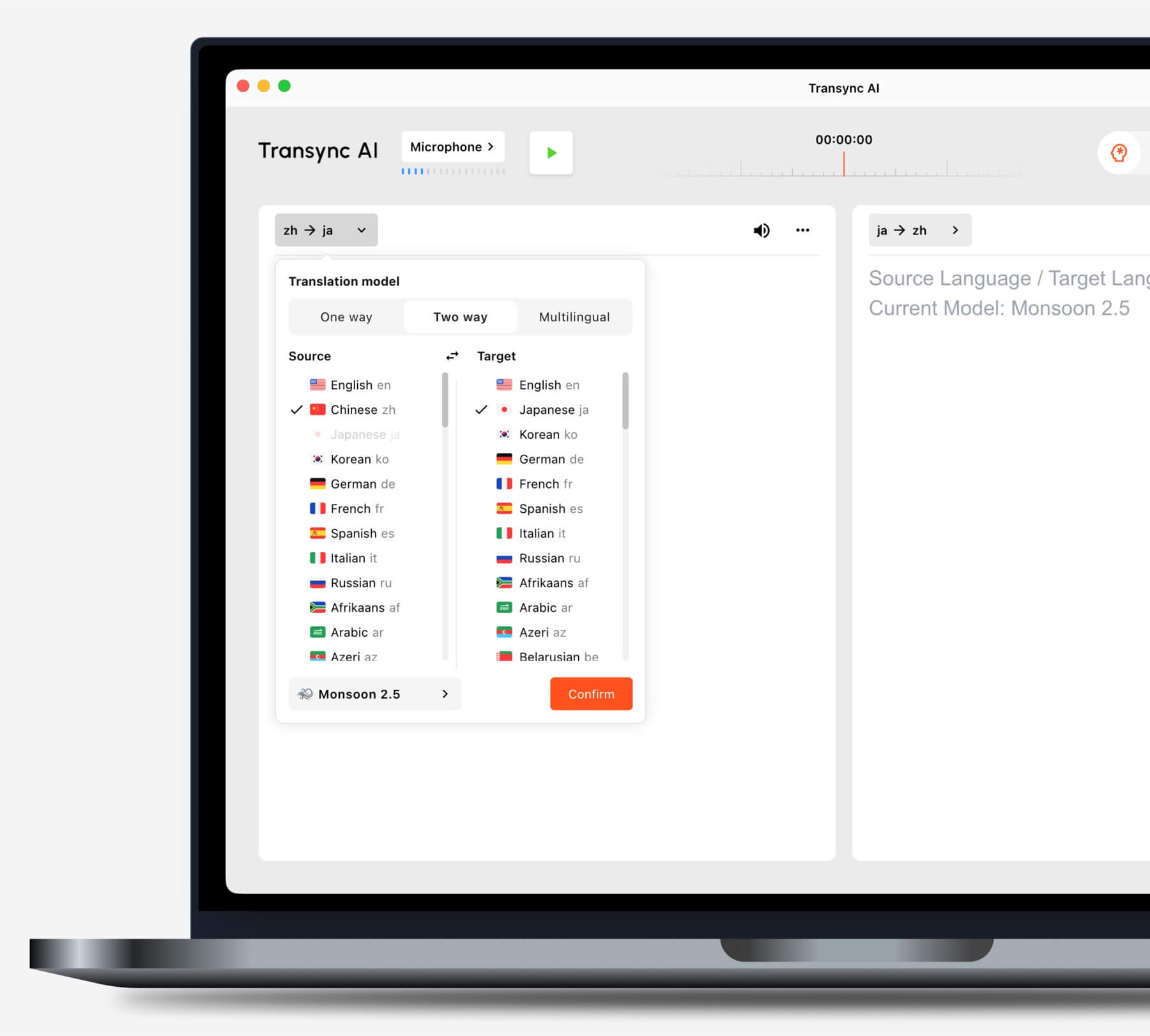
Choose the translation mode that matches your scenario before starting a task.
If you want a next-generation experience, Transync AI leads the way with real-time, AI-powered translation that keeps conversations flowing naturally. You can try it free now.
