

Chọn công cụ dịch thuật trực tuyến thông qua 6 quy trình làm việc thông minh dành cho văn bản, tài liệu, hội thoại, cuộc họp, bài thuyết trình và API sản phẩm.
Công cụ dịch thuật trực tuyến cần phải phù hợp với bản chất công việc – chứ không chỉ đơn thuần hứa hẹn hỗ trợ nhiều ngôn ngữ nhất. Một người dán tin nhắn của nhà hàng, một biên tập viên dịch bản đề xuất, một nhóm làm việc từ xa tổ chức cuộc họp song ngữ và một nhà phát triển bản địa hóa ứng dụng đều cần dịch thuật, nhưng họ không cần cùng một hệ thống.
Sơ đồ quy trình làm việc này so sánh... AI đồng bộ, Google Dịch, DeepL, Trình dịch Microsoft, Và Dịch thuật đám mây Google. Nó bắt đầu từ nhiệm vụ, theo dõi thông tin từ đầu vào đến đầu ra, và xác định điểm mà mỗi sản phẩm trở nên hữu ích—hoặc không còn phù hợp nữa.
Câu trả lời ngắn gọn rất đơn giản: Google Dịch Phù hợp với việc tra cứu nhanh chóng và dễ dàng; DeepL Đây là một ứng viên tài liệu tiềm năng; Trình dịch Microsoft Hỗ trợ các cuộc trò chuyện cá nhân và đa thiết bị; AI đồng bộ được thiết kế xoay quanh các cuộc họp trực tiếp và các bài thuyết trình đa ngôn ngữ; và Dịch thuật đám mây Google Nó thuộc về các sản phẩm và quy trình kinh doanh tự động. Do đó, công cụ dịch thuật trực tuyến tốt nhất là một quyết định dựa trên quy trình làm việc, chứ không phải là một bảng xếp hạng chung.
Bắt đầu từ đây: Bản dịch cần đạt được điều gì?
Trước khi so sánh các giao diện, hãy xác định hành động cuối cùng. Người dùng cần hiểu một câu, phê duyệt một tập tin đã dịch, trả lời trong cuộc gọi, theo dõi người nói hoặc nhận nội dung đã dịch trong một ứng dụng khác?
| Quy trình làm việc | Đầu vào điển hình | Đầu ra yêu cầu | Ứng viên khởi đầu tốt nhất | Vì sao nó phù hợp |
|---|---|---|---|---|
| Văn bản ngắn hoặc trang web | Văn bản, cụm từ hoặc URL được dán | Ý nghĩa dễ đọc ngay lập tức | Google Dịch | Truy cập nhanh chóng với thiết lập đơn giản. |
| Tài liệu đã được xem xét | DOCX, PDF, PPTX hoặc XLSX | Tệp đã dịch để người xem xét | DeepL hoặc Google Translate | Quy trình dịch thuật dựa trên tệp |
| Cuộc trò chuyện trực tiếp | Lời nói xen kẽ | Chuyển đổi sang dạng đọc hoặc dạng âm thanh | Trình dịch Microsoft | Các tùy chọn trò chuyện cá nhân và đa thiết bị |
| Cuộc họp trực tuyến trực tiếp | Âm thanh micro và máy tính | Phụ đề song ngữ, giọng nói và bản ghi âm | AI đồng bộ | Bản dịch và ghi chú cuộc họp đầu tiên |
| Bài thuyết trình từ một đến nhiều người | Một người dẫn chương trình đang nói | Ngôn ngữ do khán giả lựa chọn | AI đồng bộ | Truy cập khán giả qua mã QR, liên kết hoặc ID phòng |
| Tự động hóa ứng dụng hoặc doanh nghiệp | Văn bản hoặc tệp từ phần mềm | Bản dịch được API trả về | API Google Cloud Translation hoặc DeepL | Kiểm soát của nhà phát triển và tích hợp có khả năng mở rộng |
Bảng này là bản đồ định tuyến, không phải là phán quyết cuối cùng. Bảo mật, khả năng hỗ trợ ngôn ngữ, giá cả, thuật ngữ, độ trễ, giới hạn tệp và yêu cầu xem xét của con người có thể làm thay đổi kết quả.
Quy trình 1: Sử dụng công cụ dịch trực tuyến để dịch văn bản nhanh
Quy trình làm việc nhanh nhất cũng là quy trình dễ bị phức tạp hóa nhất:
Sao chép văn bản → Chọn ngôn ngữ → Dịch → Kiểm tra chi tiết quan trọng
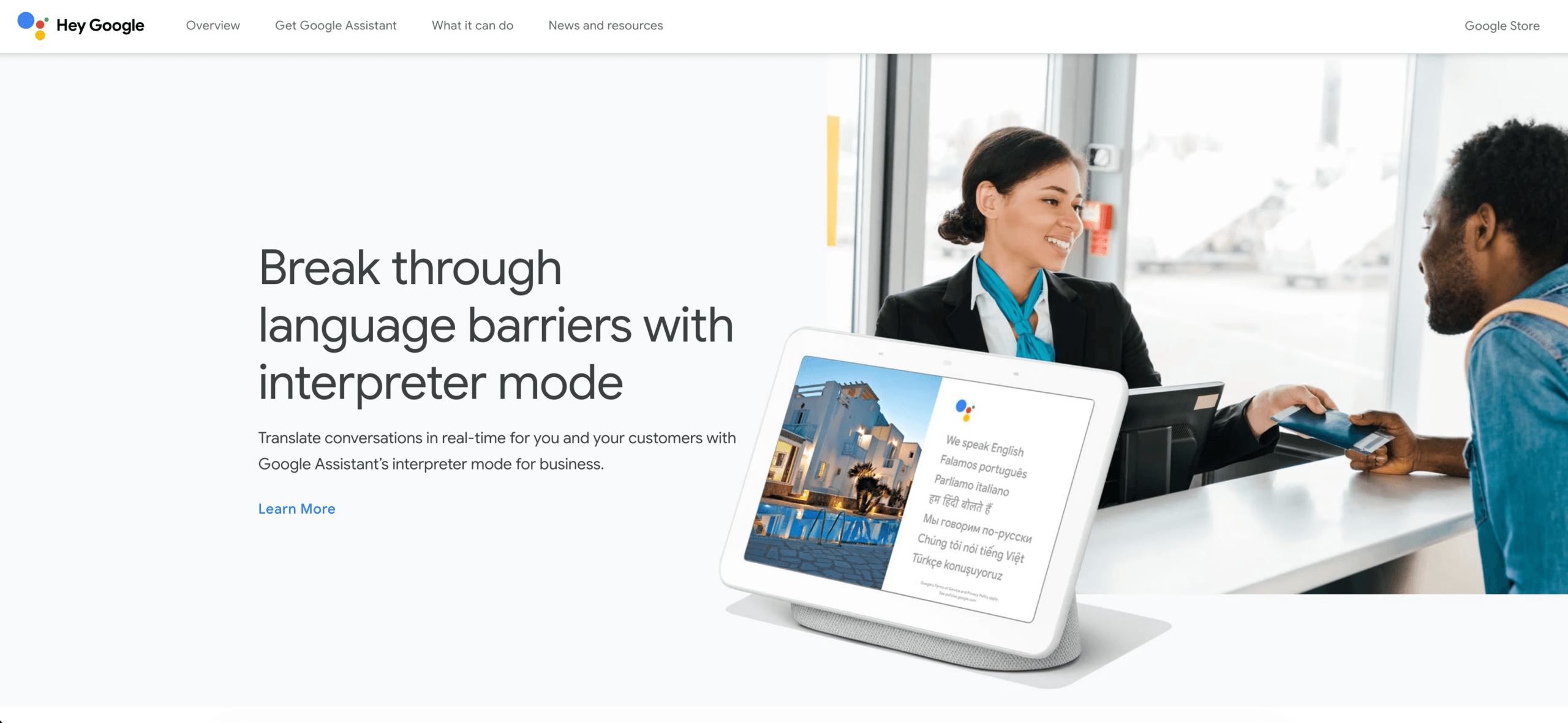
Google Dịch Nó rất phù hợp với mô hình này. Người dùng có thể dán một cụm từ, dịch một trang web hoặc chuyển đổi giữa văn bản và các chế độ nhập liệu được hỗ trợ khác mà không cần tạo dự án. Điều đó làm cho nó hữu ích cho các câu hỏi về du lịch, tin nhắn không chính thức, nghiên cứu sơ bộ và hiểu ý nghĩa chung của nội dung không quen thuộc.
Tốc độ không loại bỏ được nhu cầu xác minh. Tên, ngày tháng, giá cả, phủ định, cách diễn đạt vùng miền và thuật ngữ chuyên ngành đều cần được xem xét kỹ lưỡng. Ngay cả một công cụ dịch thuật trực tuyến tiện lợi cũng có thể tạo ra một câu văn trôi chảy nhưng lại làm thay đổi một thông tin quan trọng. Nếu câu văn được dịch sẽ trở thành điều khoản hợp đồng, hướng dẫn y tế, tuyên bố công khai hoặc chỉ dẫn an toàn, hãy chuyển công việc đó sang quy trình chuyên nghiệp đã được xem xét lại.
Hãy chọn quy trình làm việc của công cụ dịch thuật trực tuyến này khi chi phí của một lỗi nhỏ không đáng kể và người đọc chủ yếu cần hiểu ngay lập tức. Đừng dùng sự tiện lợi làm bằng chứng cho thấy giao diện người dùng phù hợp với cuộc họp được ghi âm hoặc quy trình bản địa hóa sản phẩm.
Quy trình làm việc 2: Dịch một tập tin mà không làm mất đi quy trình xem xét
Tài liệu này đi theo một lộ trình khác:
Tải lên tập tin → Dịch văn bản và bố cục → So sánh các phiên bản → Chỉnh sửa thuật ngữ → Phê duyệt
DeepL Đây là một lựa chọn thiết thực khi sản phẩm đầu ra là một tài liệu đã được dịch chứ không phải là một cuộc trao đổi trực tiếp. Nền tảng rộng hơn của nó hỗ trợ dịch văn bản và tệp, trong khi các tính năng dành cho nhà phát triển bao gồm bảng thuật ngữ và các công cụ tùy chỉnh khác. Câu hỏi quan trọng không phải là liệu một câu mẫu có nghe trôi chảy hay không; mà là liệu tệp thực tế có còn sử dụng được và có thể xem xét lại được hay không.

Google Dịch Ứng dụng cũng cung cấp tính năng dịch tài liệu trên các thiết bị máy tính để bàn được hỗ trợ. Tài liệu trợ giúp hiện tại liệt kê các định dạng DOCX, PDF, PPTX và XLSX, với giới hạn dung lượng tệp là 10 MB; tệp PDF có thể có tối đa 300 trang. Văn bản chỉ có trong hình ảnh PDF được quét sẽ không được dịch trong kết quả đầu ra, và tính năng dịch tài liệu không khả dụng trên màn hình nhỏ hơn hoặc thiết bị di động.
Hãy thử nghiệm với một tệp mẫu trước khi chuẩn hóa bất kỳ công cụ dịch trực tuyến nào. Tệp mẫu cần bao gồm bảng biểu, tiêu đề, liên kết, chú thích, biểu đồ, từ viết tắt và hộp văn bản—không chỉ đơn thuần là các đoạn văn sạch sẽ. Sau đó, hãy nhờ một người đánh giá có chuyên môn kiểm tra ý nghĩa, ngôn ngữ phù hợp với thị trường, định dạng và các thuật ngữ đã được phê duyệt.
Đối với tài liệu, tệp đã dịch là bản nháp. Quy trình làm việc của một công cụ dịch trực tuyến tốt sẽ bảo toàn bản gốc, ghi lại các chỉnh sửa, nêu tên người đánh giá và ngăn chặn bản dịch máy chưa được phê duyệt trở thành phiên bản được xuất bản.
Quy trình 3: Hỗ trợ cuộc trò chuyện trực tiếp hoặc nhóm nhỏ
Dịch thuật hội thoại phải phát hiện lượt lời đủ nhanh để người nói có thể phản hồi:
Người A nói → lời nói được nhận biết → ý nghĩa được dịch → người B đọc hoặc nghe → vai trò đảo ngược
Trình dịch Microsoft Ứng dụng này được thiết kế cho giao tiếp cá nhân cũng như các cuộc hội thoại có thể liên quan đến nhiều thiết bị. Thông tin về các tính năng hiện tại của ứng dụng bao gồm dịch giọng nói, trải nghiệm chia màn hình, chuyển văn bản thành giọng nói và khả năng hội thoại đa thiết bị, mặc dù tính khả dụng có thể phụ thuộc vào ngôn ngữ, nền tảng và thiết bị.
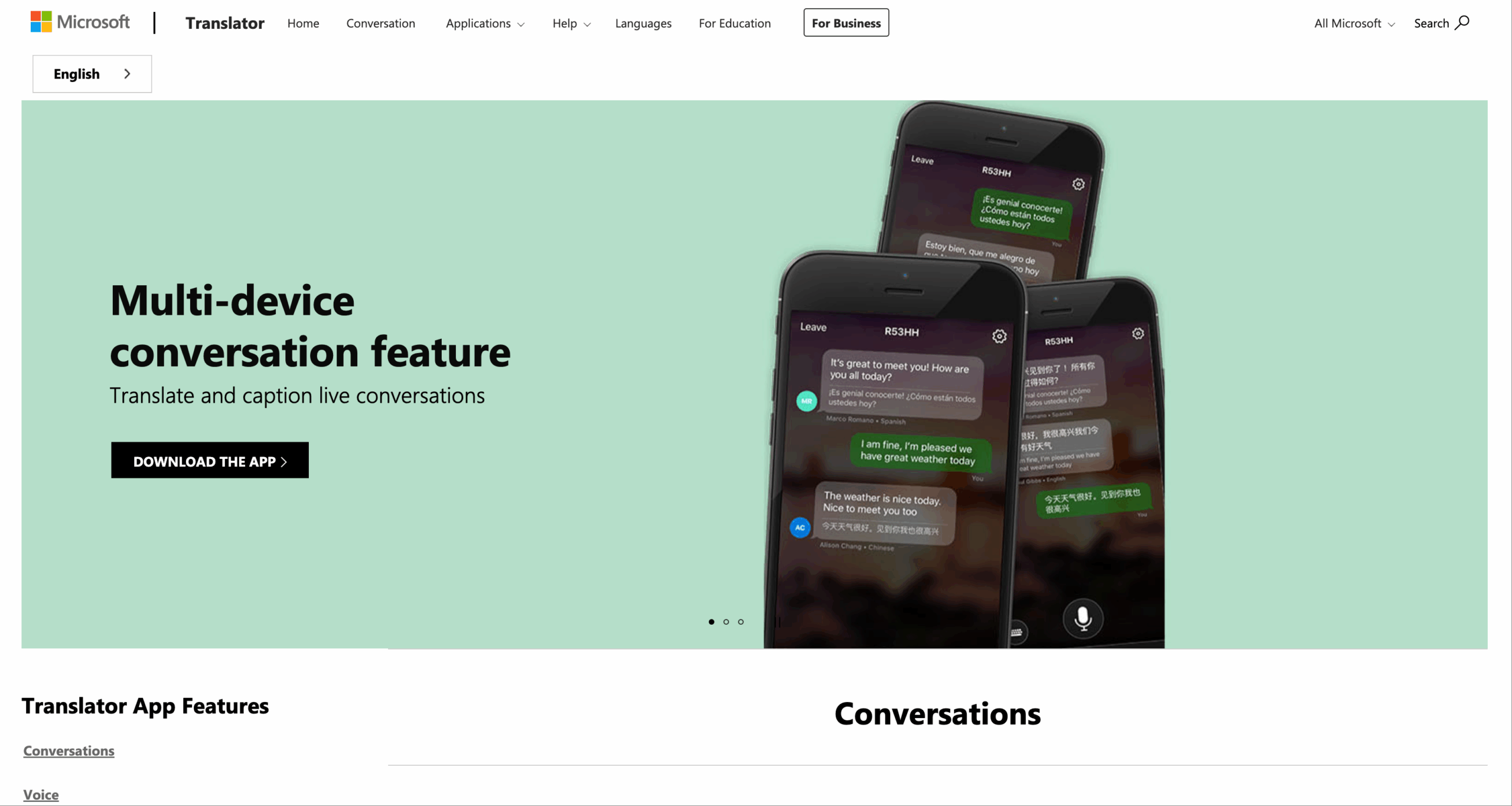
Lộ trình này có thể phù hợp với quầy lễ tân, nhóm học tập không chính thức, cuộc trò chuyện cộng đồng hoặc trao đổi nhanh giữa những người tham gia ở gần nhau. Hãy thử nghiệm công cụ dịch thuật trực tuyến với các thiết bị thực tế: việc tham gia phải dễ hiểu, mỗi người phải nhìn thấy ngôn ngữ dự định, người nói phải có khả năng sửa lỗi và nhóm phải tiếp tục hoạt động bình thường khi hai người nói cùng lúc.
Công cụ dịch thuật trực tuyến dành cho hội thoại không tự động trở thành hệ thống quản lý kiến thức cuộc họp. Nếu nhóm cũng cần ghi âm cuộc gọi, phụ đề song ngữ trên ứng dụng khác, bản ghi có thể tìm kiếm, các mục hành động và bản ghi sau cuộc gọi, hãy chuyển sang quy trình làm việc cuộc họp trực tiếp.
Quy trình làm việc 4: Giữ cho cuộc họp đa ngôn ngữ diễn ra suôn sẻ
Một cuộc gặp mặt có nhiều tầng ý nghĩa hơn so với một cuộc trò chuyện thông thường:
Âm thanh từ micro và máy tính → Nhận dạng người nói → Dịch thuật → Phụ đề và giọng nói → Phản hồi của người tham gia → Bản ghi và ghi chú
AI đồng bộ là lựa chọn ưu tiên cuộc họp trong sự so sánh này. dịch thuật thời gian thực Ứng dụng hỗ trợ 60 ngôn ngữ và được thiết kế để chuyển đổi giọng nói trực tiếp thành văn bản song ngữ và âm thanh đã được dịch. quy trình dịch thuật cuộc họp trực tiếp Có thể sử dụng song song với các nền tảng như Zoom, Microsoft Teams và Google Meet mà không yêu cầu mỗi người chủ trì cuộc họp phải cài đặt plugin dịch thuật dành riêng cho nền tảng đó.

Tương thích với các nền tảng họp trực tuyến phổ biến, cho phép dịch thuật thời gian thực liền mạch.
Hãy dùng thử Transync AI miễn phí
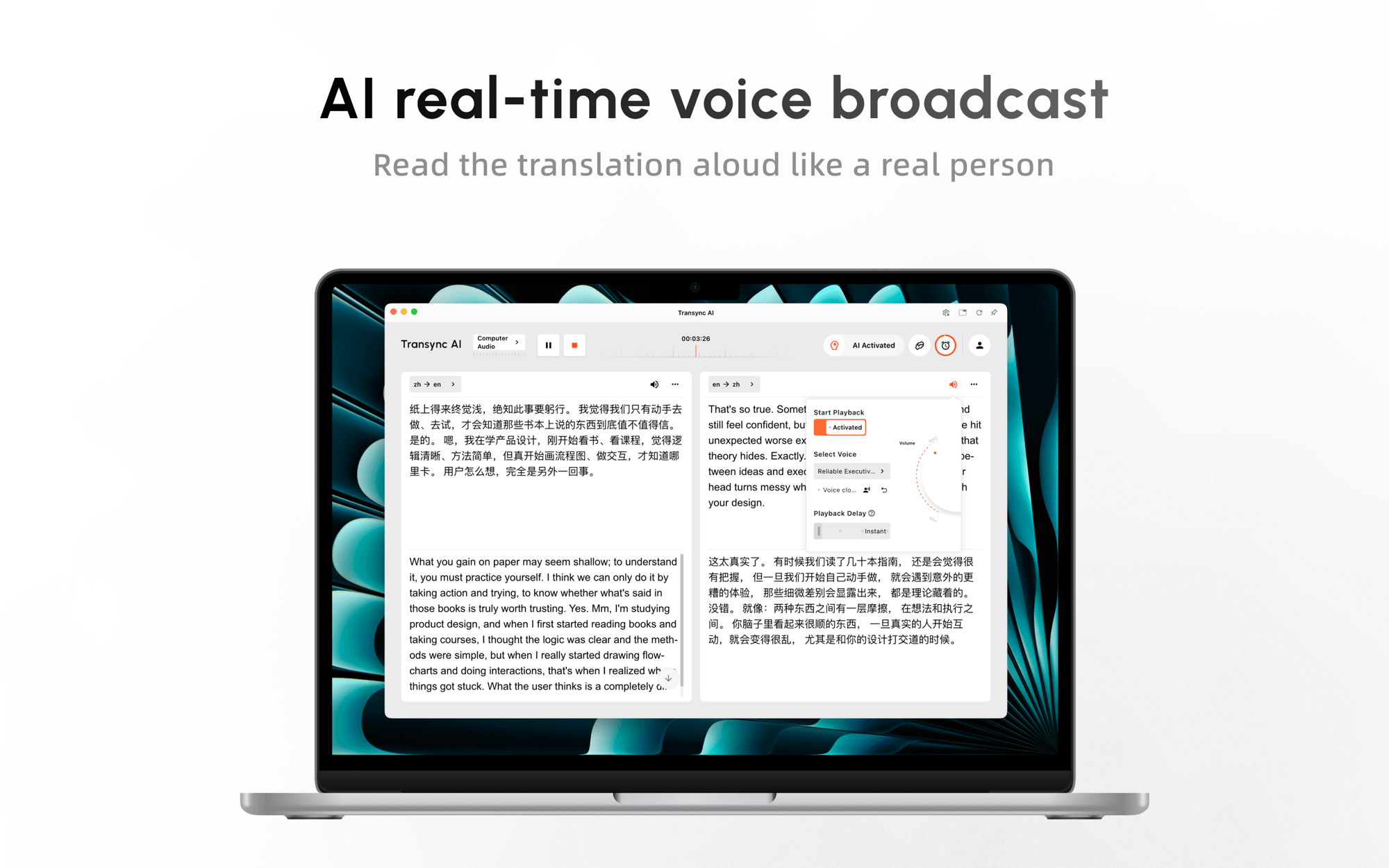
Trong khi đang gọi điện, AI đồng bộ có thể cung cấp một Trình dịch giọng nói AI để người tham gia có thể vừa nghe vừa đọc. Phụ đề song ngữ dạng hình trong hình Có thể hiển thị đồng thời trên một ứng dụng được hỗ trợ khác, giảm thiểu nhu cầu chuyển đổi cửa sổ.
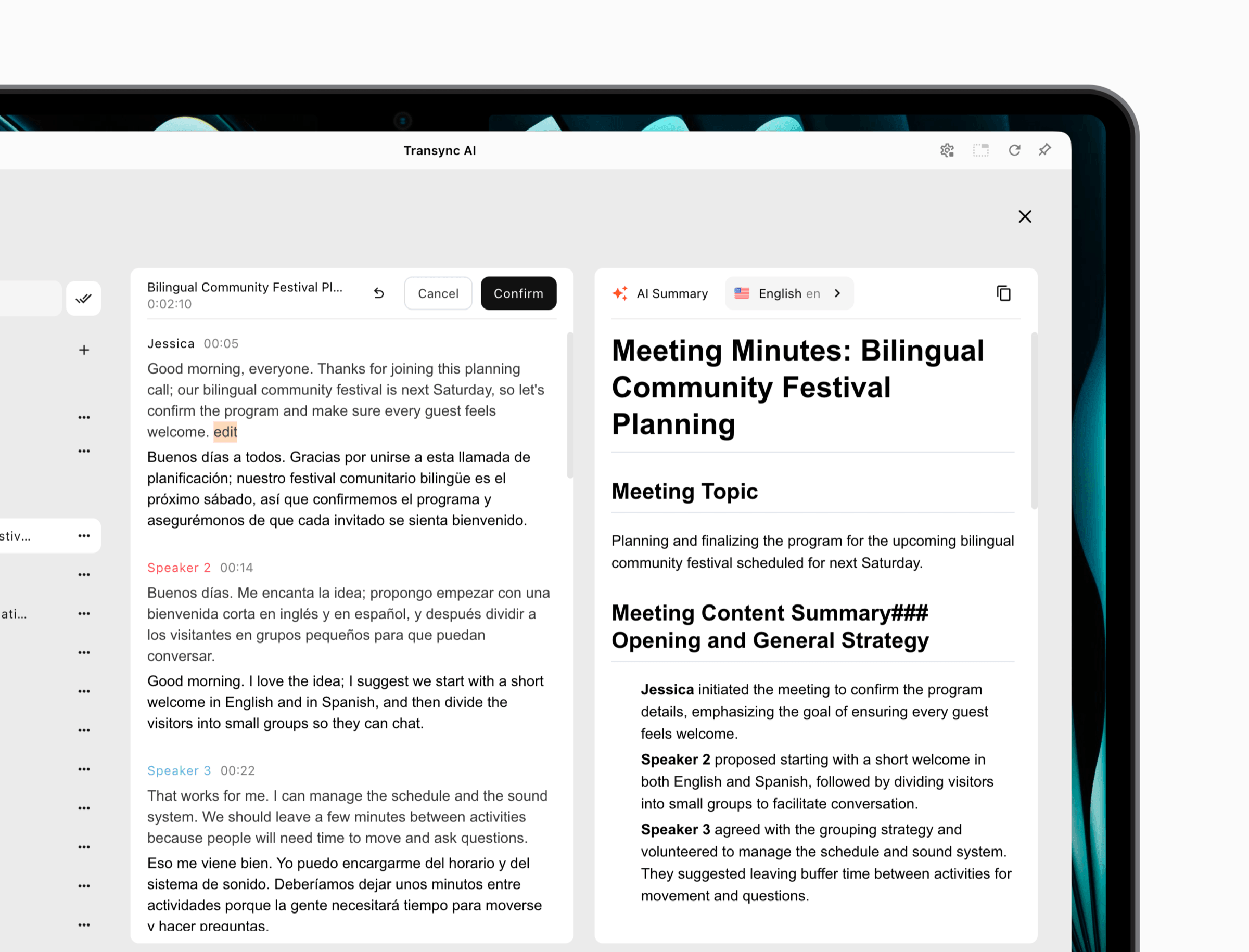
 Trước một cuộc họp quan trọng, người dùng có thể nhập tên, thuật ngữ sản phẩm, từ viết tắt và thông tin cá nhân thông qua từ khóa và thông tin ngữ cảnh. Sau đó, Biên bản cuộc họp AI Có thể biến cuộc trò chuyện thành một bản ghi hữu ích hơn cho việc ra quyết định và theo dõi.
 Điều này không có nghĩa là AI đồng bộ Đây là công cụ phù hợp cho mọi nhiệm vụ dịch thuật. Nó là một quy trình làm việc trực tuyến, các nhóm nên kiểm tra micro và định tuyến âm thanh máy tính, và nó không nhằm mục đích thay thế người dịch camera ngoại tuyến hoặc người biên tập bố cục tài liệu. Ưu điểm của nó thể hiện rõ khi mọi người cần hiểu và trả lời lẫn nhau trong khi cuộc họp vẫn đang diễn ra.
Hãy chọn công cụ dịch thuật trực tuyến này khi độ trễ, sự tham gia, chất lượng bản dịch và tính liên tục sau cuộc họp đều là những yếu tố quan trọng. Hãy kiểm tra nó trên thiết bị của người tham gia từ xa; việc xem trước chính xác trên máy tính chủ trì không đảm bảo rằng mọi người đều có thể nghe và theo dõi kết quả.
Quy trình 5: Cho phép khán giả theo dõi một diễn giả
Một bài thuyết trình không chỉ đơn thuần là một cuộc trò chuyện rất dài. Thông thường, nó có một người nói và nhiều người nghe:
Người dẫn chương trình nói → một luồng phát trực tiếp được dịch → khán giả chọn ngôn ngữ → mỗi người đọc hoặc nghe
Trong phiên bản beta Chế độ trình bày, AI đồng bộ Cho phép một người chủ trì thiết lập tối đa 10 ngôn ngữ mục tiêu. Người tham dự có thể tham gia trên điện thoại hoặc máy tính của họ thông qua mã QR, liên kết chia sẻ hoặc ID phòng. Họ không cần cài đặt phần mềm, nhưng phải đăng ký hoặc đăng nhập vào tài khoản. AI đồng bộ tài khoản.
Mỗi người tham dự chọn một trong các ngôn ngữ được người chủ trì cho phép và có thể đọc phụ đề trực tiếp hoặc nghe giọng nói đã được dịch. Người tham dự không thể gửi phản hồi bằng giọng nói trong chế độ một chiều này. Sau phiên họp, người chủ trì có thể chọn chia sẻ bản ghi gốc và ghi chú do AI tạo ra; việc chia sẻ là tùy chọn và do người chủ trì quyết định.
Kiến trúc này phù hợp với các buổi đào tạo, bài giảng, hội thảo trực tuyến, họp toàn thể nhân viên, trình diễn sản phẩm và thuyết trình trước công chúng. Nó tránh việc bắt buộc mọi người tham dự phải thiết lập cùng một đường dẫn âm thanh, nhưng ban tổ chức vẫn nên kiểm tra việc đăng ký, dung lượng Wi-Fi, khả năng hiển thị mã QR, tai nghe, lựa chọn ngôn ngữ và khả năng truy cập trước khi phòng họp đầy người.
Để đánh giá quy trình làm việc của người tham dự, hãy xem xét công cụ dịch thuật trực tuyến trong phút đầu tiên: Người đến muộn có thể tham gia, tìm được ngôn ngữ phù hợp, hiểu xem phiên họp có phải là một chiều hay không, và nghe được bản dịch mà không làm ảnh hưởng đến những người xung quanh không?

Chế độ trình chiếu cho phép người dẫn chương trình chia sẻ bản dịch trực tiếp với người tham dự trên thiết bị của họ.
Quy trình làm việc 6: Tích hợp bản dịch vào sản phẩm hoặc quy trình
Đôi khi người dùng không nên truy cập vào trang web dịch thuật. Việc dịch thuật phải diễn ra bên trong ứng dụng, hàng đợi hỗ trợ, nền tảng nội dung hoặc quy trình xử lý dữ liệu:
Phần mềm gửi nội dung được ủy quyền → API xử lý nội dung đó → trả về kết quả đã dịch → ứng dụng xác thực và hiển thị kết quả.
Dịch thuật đám mây Google Phần mềm này cung cấp tính năng dịch thuật lập trình dành cho các nhà phát triển. Tài liệu sản phẩm hiện tại phân biệt phiên bản Cơ bản sử dụng dịch máy thần kinh với phiên bản Nâng cao bổ sung các khả năng như truy cập Translation LLM, bảng thuật ngữ, dịch tài liệu, làm việc hàng loạt, dịch thích ứng và các tùy chỉnh khác.
Khám phá Google Cloud Translation
DeepL Ngoài ra, nó còn cung cấp API cho việc dịch văn bản và toàn bộ tài liệu, thư viện máy khách chính thức và tùy chỉnh thuật ngữ. Việc lựa chọn giữa các API nên dựa trên các cặp ngôn ngữ được hỗ trợ, hành vi tài liệu, kiểm soát thuật ngữ, độ trễ, cơ sở hạ tầng khu vực, yêu cầu bảo mật, khối lượng và tổng chi phí vận hành.
API không phải là một công cụ dịch thuật trực tuyến hoàn chỉnh dành cho nhân viên. Nó cần có xác thực, xử lý lỗi, giám sát sử dụng, kiểm soát quyền riêng tư, thử lại, đánh giá chất lượng và trải nghiệm người dùng. Trong quy trình này, công cụ dịch thuật trực tuyến thực sự là hệ thống hoàn chỉnh mà nhóm của bạn xây dựng xung quanh công cụ dịch thuật. Chi phí phát triển và vận hành liên tục có thể cao hơn cả chi phí của các lệnh dịch thuật.
Hãy sử dụng quy trình này khi nội dung đã dịch cần được hiển thị trong sản phẩm với số lượng lớn. Nếu yêu cầu thực tế chỉ đơn giản là giúp mười đồng nghiệp hiểu được cuộc họp hàng tuần, thì việc xây dựng API sẽ tạo ra sự phức tạp không cần thiết.
So sánh các công cụ dịch thuật trực tuyến theo quy trình làm việc
| Sản phẩm | Quy trình làm việc phù hợp nhất | Bài phát biểu trực tiếp | Tài liệu | Đảm bảo tính liên tục của cuộc họp | Chế độ khán giả | Tích hợp API | Ranh giới chính |
|---|---|---|---|---|---|---|---|
| AI đồng bộ | Các cuộc họp và thuyết trình | Phụ đề và giọng nói được dịch | Không phải quy trình làm việc chính của nó | Bản ghi và ghi chú AI | Một máy chủ, hỗ trợ tối đa 10 ngôn ngữ đích (phiên bản beta). | Không phải là lý do mua hàng chính. | Trực tuyến; vấn đề thiết lập âm thanh và truy cập tài khoản |
| Google Dịch | Văn bản nhanh, trang web và sử dụng cá nhân | Các chế độ được hỗ trợ khác nhau tùy theo thiết bị/ngôn ngữ. | Các loại tệp được hỗ trợ với giới hạn | Không phải là không gian làm việc kiến thức dành cho các cuộc họp | Không phải là quy trình trình bày được lưu trữ. | Công cụ dành cho người dùng cá nhân khác với Dịch thuật đám mây. | Sự tiện lợi không thể thay thế cho việc xem xét theo quy định. |
| DeepL | Đã xem xét văn bản và tài liệu. | Các gói dịch vụ thoại riêng biệt yêu cầu xem xét lại kế hoạch. | Ứng viên giỏi về quản lý hồ sơ | Không phải là không gian làm việc chủ yếu dành cho các cuộc họp chung. | Không phải quy trình làm việc cốt lõi | API văn bản và tài liệu | Kiểm tra định dạng, thuật ngữ và thị trường mục tiêu |
| Trình dịch Microsoft | Trò chuyện cá nhân và đa thiết bị | Tính năng giọng nói, chuyển văn bản thành giọng nói và hội thoại | Đó không phải là lý do chính để lựa chọn nó. | Mô hình hội thoại riêng biệt | Việc tham gia nhóm khác với việc thuyết trình. | Các tùy chọn điện toán đám mây là các sản phẩm riêng biệt. | Các tính năng có thể khác nhau tùy thuộc vào nền tảng và ngôn ngữ. |
| Dịch thuật đám mây Google | Dịch thuật bên trong phần mềm | triển khai phụ thuộc vào API | Khả năng tài liệu nâng cao | Phải do khách hàng tự xây dựng. | Phải do khách hàng tự xây dựng. | Sức mạnh cốt lõi | Cần có các biện pháp kiểm soát kỹ thuật và vận hành. |
Các tính năng và giá cả có thể thay đổi. Vui lòng xác nhận ngôn ngữ, thiết bị, gói cước, giới hạn và điều khoản dữ liệu hiện tại trên trang web chính thức của nhà cung cấp trước khi mua hoặc triển khai.
Bạn nên chấm điểm ứng viên như thế nào?
Không nên gán cùng một trọng số cho mọi tiêu chí. Nhóm soạn thảo tài liệu có thể coi trọng bố cục và việc kiểm soát thuật ngữ; cuộc gọi bán hàng coi trọng thời gian và khả năng phục hồi của người thuyết trình; hội trường coi trọng sự dễ dàng tiếp cận của khán giả.
| Yếu tố quyết định | Hãy đặt câu hỏi này | Bằng chứng cần thu thập |
|---|---|---|
| Sự chính xác | Tên, số liệu, điều kiện và ý định có được lưu giữ không? | Kịch bản kiểm thử song song và đánh giá song ngữ |
| Độ trễ | Mọi người có thể phản hồi trước khi cuộc trò chuyện chuyển sang chủ đề khác không? | Trao đổi trực tiếp theo thời gian định sẵn, có gián đoạn. |
| Vận chuyển | Người được nhắm đến có thể nhìn thấy hoặc nghe thấy kết quả không? | Kiểm tra trên thiết bị của người tham gia |
| Thuật ngữ | Liệu các tên miền và điều khoản tên miền đã được phê duyệt có thể được hướng dẫn không? | Bài kiểm tra thuật ngữ tiêu biểu |
| Tính liên tục | Sau đó có bản ghi, tập tin hoặc ghi chú nào có thể sử dụng được không? | Kiểm tra quy trình xuất khẩu và chia sẻ |
| Quản trị | Ai có thể truy cập, lưu giữ, chia sẻ hoặc xóa nội dung? | Xem xét hợp đồng, quyền riêng tư và quản trị. |
| Sự hồi phục | Điều gì xảy ra sau khi âm thanh bị nhiễu hoặc mạng bị gián đoạn? | Thử nghiệm lỗi có chủ đích |
| Trị giá | Việc sử dụng thực tế được đo lường như thế nào? | Kịch bản hàng tháng sử dụng khối lượng dự kiến |
Vì AI đồng bộ, Các gói cước hiện tại bao gồm 40 phút miễn phí sau khi đăng ký, gói Cá nhân Cao cấp với giá 8,99 đô la mỗi tháng kèm 10 giờ sử dụng, và gói Doanh nghiệp với giá 24,99 đô la mỗi tháng cho mỗi người dùng kèm tối đa 40 giờ sử dụng. Việc sử dụng Chế độ Đa ngôn ngữ và Chế độ Trình chiếu có thể được tính phí khác nhau, vì vậy hãy xác nhận lại thông tin chi tiết. quy tắc định giá và sử dụng hiện hành cho quy trình làm việc dự định.
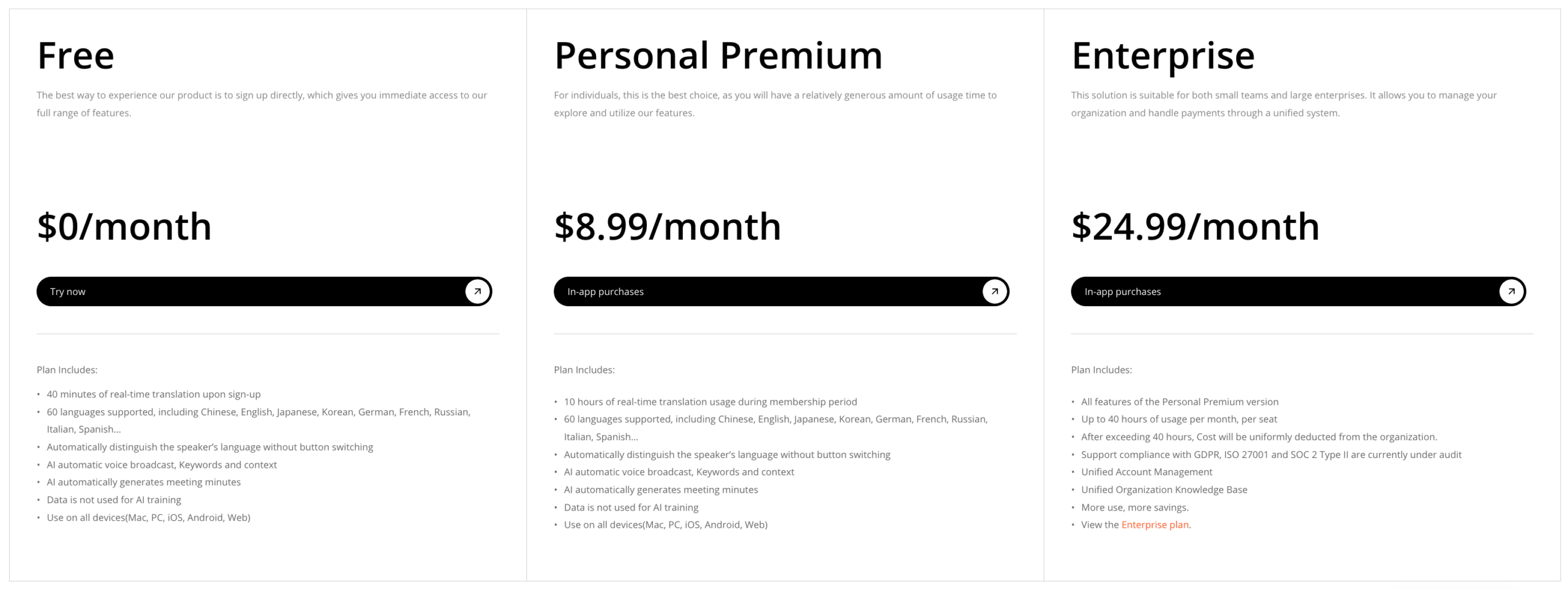 Các sản phẩm API đòi hỏi cách tính toán khác nhau: phí sử dụng, thời gian kỹ thuật, giám sát, nhân công xem xét và chi phí phát sinh lỗi. Quyền truy cập miễn phí cho người dùng không nên được so sánh trực tiếp với việc tích hợp vào môi trường sản xuất được quản lý chặt chẽ.
Dùng thử công cụ dịch thuật trực tuyến trong 20 phút (phiên bản dùng thử miễn phí)
Sử dụng cùng một bộ hồ sơ chứng cứ nhỏ gọn cho mọi ứng viên:
- Viết 12 câu, mỗi câu chứa hai tên riêng, năm thuật ngữ chuyên ngành, ba số, một lời đính chính và một câu phủ định.
- Thêm một tài liệu hai trang bao gồm bảng, tiêu đề, liên kết và văn bản dựa trên hình ảnh.
- Ghi âm một đoạn hội thoại dài ba phút với sự thay đổi người nói và một lần gián đoạn.
- Xác định kết quả mong muốn: hiểu nhanh, tệp đã được phê duyệt, phản hồi trực tiếp, quyền truy cập của khán giả hoặc kết quả API.
- Hãy đánh giá ý nghĩa thực tế trước khi đánh giá sự trôi chảy.
- Hãy xác minh xem người nghe từ xa hoặc người đọc cuối cùng thực sự nhận được những gì.
- Ghi lại thời gian thiết lập, thời gian dịch thuật, thời gian hiệu đính và chi phí dự kiến hàng tháng.
Công cụ dịch thuật trực tuyến tốt nhất nên giúp giảm thiểu tổng khối lượng công việc. Bản nháp đầu tiên được thực hiện nhanh chóng nhưng cần thêm một giờ để chỉnh sửa có thể kém hiệu quả hơn so với quy trình làm việc chậm hơn nhưng có thể kiểm soát được. Bản dịch cuộc họp trôi chảy nhưng đến quá muộn có thể ít hữu ích hơn so với kết quả kém trau chuốt hơn một chút nhưng được gửi kịp thời để trả lời câu hỏi.
Bạn nên chọn công cụ dịch thuật trực tuyến nào?
Chọn Google Dịch Để đọc nhanh văn bản, trang web hoặc hiểu nội dung cá nhân khi rủi ro thấp. Chọn DeepL Là ứng viên cho tài liệu đã dịch khi tệp tin sẽ được đưa vào quy trình biên tập thực tế. Chọn Trình dịch Microsoft Dùng cho các cuộc trò chuyện cá nhân hoặc nhóm nhỏ có thể tham gia sau khi đã thử nghiệm ngôn ngữ và thiết bị phù hợp.
Chọn AI đồng bộ Khi các cuộc họp đa ngôn ngữ cần phụ đề thời gian thực, giọng nói được dịch, ngữ cảnh và ghi chú—hoặc khi một người thuyết trình cần tiếp cận khán giả thông qua Chế độ Trình chiếu. Hãy chọn Dịch thuật đám mây Google hoặc DeepL API khi việc dịch thuật cần trở thành một chức năng được kiểm soát bên trong phần mềm.
Không có công cụ dịch thuật trực tuyến nào có thể thay thế được sự cần thiết của phán đoán chuyên nghiệp. Việc giao tiếp trong lĩnh vực pháp lý, y tế, quy định, nhập cư, tài chính và an toàn cần sử dụng người dịch hoặc phiên dịch chuyên nghiệp có trình độ và chịu trách nhiệm về kết quả.
Quyết định đáng tin cậy nhất bắt đầu bằng một câu: “Sau khi dịch, người dùng phải có khả năng ___.” Hãy điền vào chỗ trống đó, chọn quy trình làm việc dẫn đến kết quả đó, và kiểm tra toàn bộ quy trình chứ không chỉ một kết quả đầu ra hấp dẫn.
Câu hỏi thường gặp
Công cụ dịch thuật trực tuyến là gì?
Công cụ dịch thuật trực tuyến xử lý văn bản, tài liệu, giọng nói hoặc dữ liệu ứng dụng thông qua dịch vụ kết nối internet và trả về nội dung bằng ngôn ngữ khác. Một số sản phẩm phục vụ người dùng cá nhân; những sản phẩm khác được thiết kế cho các cuộc họp, thuyết trình, tài liệu hoặc tích hợp phần mềm.
Công cụ dịch thuật trực tuyến nào tốt nhất cho các cuộc họp?
AI đồng bộ Đây là ứng cử viên mạnh nhất cho việc ưu tiên cuộc họp trong sự so sánh này vì nó kết hợp phụ đề song ngữ trực tiếp, giọng nói được dịch, ngữ cảnh thuật ngữ, sử dụng đa nền tảng, bản ghi và ghi chú AI. Các nhóm vẫn nên kiểm tra định tuyến âm thanh, ngôn ngữ, độ trễ, quyền riêng tư và giới hạn gói cước trong môi trường họp của riêng họ.
Liệu một công cụ duy nhất có thể dịch tài liệu và lời nói trực tiếp tốt như nhau không?
Một số nền tảng hỗ trợ nhiều loại đầu vào, nhưng quy trình làm việc vẫn khác nhau. Dịch tài liệu ưu tiên bố cục, thuật ngữ, chỉnh sửa và phê duyệt. Dịch giọng nói trực tiếp ưu tiên nhận dạng, độ trễ, luân phiên lượt nói, tốc độ truyền đạt và khả năng phục hồi. Cần đánh giá riêng từng chế độ yêu cầu.
Liệu công cụ dịch thuật trực tuyến miễn phí có đủ chính xác cho mục đích kinh doanh?
Nó có thể đủ dùng cho việc hiểu nội dung ở mức độ rủi ro thấp, nhưng việc sử dụng trong kinh doanh cũng liên quan đến tính bảo mật, thuật ngữ, hồ sơ, kiểm soát truy cập, chỉnh sửa và trách nhiệm giải trình. Kiểm tra nội dung mang tính đại diện và xác định khi nào cần có người đánh giá song ngữ hoặc thông dịch viên chuyên nghiệp tiếp quản.
Liệu dịch thuật trực tuyến có thể thay thế phiên dịch viên con người?
Không. Dịch tự động có thể cải thiện khả năng truy cập và tốc độ, nhưng nó không thể gánh vác trách nhiệm chuyên môn. Hãy sử dụng phiên dịch viên chuyên nghiệp cho những cuộc giao tiếp quan trọng, phức tạp hoặc có tính pháp lý.
Nếu bạn muốn có trải nghiệm thế hệ tiếp theo, AI đồng bộ dẫn đầu với tính năng dịch thuật thời gian thực, hỗ trợ bởi AI giúp cuộc trò chuyện diễn ra tự nhiên. Bạn có thể dùng thử miễn phí Hiện nay.
