

การแปลด้วยเสียงจะแปลงคำพูดให้เป็นไฟล์เสียงและคำบรรยายที่แปลแล้ว สำรวจ 7 กรณีศึกษา เปรียบเทียบเครื่องมือชั้นนำ และเรียนรู้ว่าคุณสมบัติใดมีความสำคัญ.
การแปลพร้อมเสียง หมายถึงการแปลงภาษาพูดเป็นอีกภาษาหนึ่งและส่งผลลัพธ์ออกมาเป็นเสียงพูดที่ได้ยินได้ โดยมักจะมีคำบรรยายที่แปลแล้วประกอบอยู่ด้วย แทนที่จะให้ผู้ฟังอ่านเฉพาะข้อความ เทคโนโลยีนี้จะพูดคำแปลออกมาดัง ๆ ในขณะที่การสนทนากำลังดำเนินอยู่ หรือหลังจากที่ประมวลผลเสียงที่บันทึกไว้แล้ว.
บางคนอาจเรียกวิธีการนี้ว่า การแปลด้วยเสียง การแปลจากคำพูดเป็นคำพูด การแปลโดยใช้เสียงพูด หรือการแปลโดยใช้ไฟล์เสียง ไม่ว่าจะใช้คำใดก็ตาม เป้าหมายก็เหมือนกัน คือ ช่วยให้ผู้คนได้ยินและเข้าใจภาษาอื่นได้โดยมีการขัดจังหวะน้อยลง.
คู่มือนี้อธิบายวิธีการทำงานของการแปลโดยใช้เสียง ประโยชน์สูงสุดของการแปลด้วยเสียง และวิธีที่เครื่องมือทั้งเจ็ดเหมาะสมกับความต้องการที่แตกต่างกัน ตั้งแต่การเดินทางในชีวิตประจำวันและการประชุมสด ไปจนถึงการประชุม การผลิตสื่อ และแอปพลิเคชันสำหรับนักพัฒนา.
การแปลด้วยเสียงคืออะไร?
การแปลด้วยเสียงเป็นการผสานรวมกระบวนการ AI หลายอย่างเข้าไว้ในขั้นตอนการทำงานเดียว:
การรับเสียง → การรู้จำเสียงพูด → การแปลภาษา → การส่งออกเสียง
ขั้นแรก ระบบจะบันทึกเสียงผ่านไมโครโฟน สัญญาณการประชุม หรือไฟล์มีเดีย จากนั้นระบบรู้จำเสียงพูดจะแปลงเสียงเป็นคำพูด โมเดลการแปลจะตีความความหมาย และเทคโนโลยีแปลงข้อความเป็นเสียงพูดจะแปลงข้อความที่แปลแล้วให้เป็นเสียงพูดที่ได้ยินได้.
ผลิตภัณฑ์หลายอย่างแสดงทั้งข้อความต้นฉบับและข้อความที่แปลแล้ว การผสมผสานนี้มีประโยชน์เพราะผู้ใช้สามารถฟังการสนทนาไปพร้อมๆ กับการอ่านชื่อ ตัวเลข และคำศัพท์ที่ไม่คุ้นเคยได้.
การแปลเสียงแตกต่างจากการแปลข้อความอย่างไร?
การแปลข้อความเริ่มต้นด้วยเนื้อหาที่เขียนไว้ ส่วนการแปลเสียงต้องแก้ไขปัญหาเพิ่มเติมก่อนที่จะสามารถแปลคำพูดได้:
- ระบุเสียงพูดในสภาพแวดล้อมที่มีเสียงรบกวน.
- แยกเสียงพูดที่มีประโยชน์ออกจากเสียงเพลงหรือเสียงพื้นหลัง.
- จดจำสำเนียง จังหวะการพูด การออกเสียง และประโยคที่ไม่สมบูรณ์.
- ระบุช่วงเวลาที่ผู้พูดคนหนึ่งหยุดพูดและอีกคนหนึ่งเริ่มพูด.
- แปลให้เร็วพอที่จะรักษาความต่อเนื่องของการสนทนา.
- สร้างเสียงพูดที่ชัดเจนและเป็นธรรมชาติ.
เครื่องมือที่ใช้งานได้ดีกับเอกสารอาจไม่ได้ออกแบบมาสำหรับการสนทนาสด ในทำนองเดียวกัน แอปสำหรับการเดินทางที่แปลวลีสั้นๆ อาจไม่สามารถให้คำบรรยาย การกำหนดเส้นทางเสียง และบันทึกย่อที่จำเป็นสำหรับการประชุมทางธุรกิจที่ยาวนานได้.
7 วิธีทรงพลังในการใช้เสียงเพื่อการแปล
1. การประชุมออนไลน์หลายภาษา
ในการสนทนาทางไกลระหว่างประเทศ ผู้เข้าร่วมจำเป็นต้องเข้าใจและตอบกลับโดยไม่ต้องรอการแปลแยกต่างหาก นอกจากนี้ พวกเขาอาจต้องตรวจสอบรายละเอียดทางเทคนิคและบันทึกข้อมูลไว้หลังจากนั้นด้วย.
Transync เอไอ ผสมผสานมันเข้าด้วยกัน เครื่องมือแปลแบบเรียลไทม์ ด้วย เครื่องแปลเสียง AI. ผู้ใช้สามารถติดตามคำบรรยายสองภาษาและฟังเสียงแปลในระหว่างการสนทนาเดียวกันได้.
การ ฟีเจอร์การแปลการประชุมสด ทำงานควบคู่กันไป Zoom, Microsoft Teams, และ Google Meet โดยไม่ถือเป็นปลั๊กอินเฉพาะแพลตฟอร์ม.

ใช้งานร่วมกับแพลตฟอร์มการประชุมออนไลน์หลักๆ เพื่อการแปลแบบเรียลไทม์ที่ราบรื่น
2. การสนทนาทางธุรกิจแบบพบหน้ากัน
การแปลคำพูดสามารถสนับสนุนการสัมภาษณ์ การเจรจา การเยี่ยมลูกค้า และนิทรรศการระดับนานาชาติ ในสถานการณ์เหล่านี้ ระบบต้องจัดการกับทั้งสองฝ่ายของการสนทนา แทนที่จะแปลเฉพาะผู้พูดคนใดคนหนึ่งเท่านั้น.
ภายในคู่ภาษาที่รองรับที่เลือกไว้, Transync เอไอ สามารถแยกแยะได้ว่ากำลังพูดภาษาอะไรอยู่ ซึ่งช่วยลดความจำเป็นในการเปลี่ยนภาษาป้อนข้อมูลด้วยตนเองทุกครั้งที่ผู้พูดเปลี่ยน.
สำหรับการสนทนาที่เกี่ยวข้องกับชื่อบุคคลหรือศัพท์เฉพาะทางในวงการนั้น ฟีเจอร์คำหลักและบริบทของ AI Assistant อนุญาตให้ผู้ใช้ระบุคำศัพท์และข้อมูลพื้นฐานล่วงหน้าได้.
 3. ชั้นเรียนและการบรรยาย
 3. ชั้นเรียนและการบรรยาย
นักเรียนที่ฟังภาษาอื่นอาจเข้าใจหัวข้อโดยรวม แต่พลาดรายละเอียดเฉพาะเจาะจง การแปลด้วยเสียงสามารถลดความพยายามในการฟัง ในขณะที่คำบรรยายสองภาษาช่วยให้ผู้เรียนเปรียบเทียบถ้อยคำต้นฉบับกับความหมายที่แปลแล้วได้.
การ คุณสมบัติคำบรรยายสองภาษาแบบภาพซ้อนภาพ สามารถแสดงคำบรรยายเหนือสไลด์ เอกสารประกอบการเรียน หรือแอปจดบันทึกบนอุปกรณ์ที่รองรับได้ หลังจากจบการเรียนการสอนแล้ว ฟีเจอร์บันทึกการประชุมด้วย AI สามารถจัดทำเอกสารถอดเสียงและสรุปเนื้อหาอย่างเป็นระบบเพื่อการตรวจสอบได้.

คำบรรยายแบบลอยตัวแบบเรียลไทม์บนเดสก์ท็อปและอุปกรณ์มือถือ
4. บทสนทนาระหว่างเดินทาง
นักเดินทางอาจจำเป็นต้องสอบถามเส้นทาง เช็คอินโรงแรม อธิบายข้อจำกัดด้านอาหาร หรือพูดคุยกับคนขับรถ ในการสนทนาสั้นๆ ความสะดวกสบายจากอุปกรณ์พกพาอาจมีความสำคัญมากกว่าการบันทึกการประชุมหรือระบบกำหนดเส้นทางเสียงขั้นสูง.
ทอล์คาโอ โดยมุ่งเน้นที่การแปลด้วยเสียงสำหรับผู้บริโภค การท่องเที่ยว กล้องและเครื่องมือ AR และการเรียนรู้ภาษา. Google แปล เป็นตัวเลือกที่เข้าถึงได้ง่ายสำหรับการแปลข้อความ รูปภาพ เว็บไซต์ และคำพูดแบบไม่เป็นทางการ.
 Transync เอไอ สามารถรองรับการสนทนาสดได้นานขึ้น แต่ไม่มีโหมดออฟไลน์ การจดจำภาพ หรือการแปลเอกสารเฉพาะข้อความ.
5. การประชุมและกิจกรรมหลายภาษา
ในการจัดงานขนาดใหญ่ ความท้าทายอยู่ที่การกระจายข้อมูล ผู้เข้าร่วมงานหลายร้อยคนอาจต้องการฟังคำแปลหรืออ่านคำบรรยายบนโทรศัพท์ของตนเองโดยไม่ต้องติดตั้งแอปพลิเคชันสำหรับทีมเป็นการส่วนตัว.
โลกแห่งโลก ออกแบบมาสำหรับงานประชุม สัมมนาออนไลน์ และกิจกรรมแบบผสมผสาน โดยผู้เข้าร่วมสามารถเข้าถึงได้ผ่านลิงก์หรือคิวอาร์โค้ด เหมาะอย่างยิ่งสำหรับผู้จัดงานที่ต้องการนำเสนอคำบรรยายหรือเสียงแปลในวงกว้าง.
 สำหรับการประชุมทีมที่จัดขึ้นเป็นประจำและการสนทนาส่วนตัว, Transync เอไอ นำเสนอขั้นตอนการทำงานที่เน้นประสิทธิภาพมากขึ้น โดยผสานรวมคำบรรยายส่วนบุคคล เสียงแปล คำศัพท์เฉพาะบริบท และบันทึกการประชุมเข้าด้วยกัน.
6. การพากย์เสียงวิดีโอและการแปลสื่อตามท้องถิ่น
สื่อที่บันทึกไว้ต้องการการควบคุมที่แตกต่างจากการสนทนาสด ทีมงานด้านเนื้อหาอาจต้องการตัวเลือกในการแก้ไขคำบรรยาย การพากย์เสียง การถอดเสียง การกำหนดเวลา และการส่งออก.
อาจารย์ ครอบคลุมการแปลสื่อ คำบรรยาย การพากย์เสียง การสัมมนาออนไลน์ และการแปลสด กระบวนการทำงานด้านการแปลที่ครอบคลุมกว่านี้อาจเหมาะสมกว่าสำหรับทีมงานวิดีโอและสำนักพิมพ์.
 เลือก Transync เอไอ เมื่อภารกิจหลักคือการสื่อสารสองทางแบบเรียลไทม์ ให้เลือก อาจารย์ เมื่อไฟล์เสียงที่แปลแล้วเป็นส่วนหนึ่งของกระบวนการผลิตสื่อ.
7. ผลิตภัณฑ์และบริการที่รองรับการสั่งงานด้วยเสียง
โดยทั่วไปแล้ว นักพัฒนาที่สร้างระบบตอบรับอัตโนมัติด้วยเสียง เครื่องมือสนับสนุนหลายภาษา หรือผลิตภัณฑ์การสื่อสารแบบกำหนดเอง มักต้องการเทคโนโลยีการพูดที่ตั้งโปรแกรมได้ มากกว่าอินเทอร์เฟซการประชุมที่เสร็จสมบูรณ์แล้ว.
โซนิอ็อกซ์ 提供ความสามารถด้าน AI เสียงแบบเรียลไทม์ รวมถึงตัวเลือกการแปลงเสียงเป็นข้อความ การแปล และการแปลงข้อความเป็นเสียง สำหรับเวิร์กโฟลว์ของนักพัฒนา.
 ดีพแอล ให้บริการ API และบริการด้านภาษาที่ครอบคลุมมากขึ้นสำหรับข้อความ เอกสาร เวิร์กโฟลว์ขององค์กร และผลิตภัณฑ์เสียงบางประเภท.
 Transync เอไอ เหมาะสมกว่าเมื่อผู้ใช้ต้องการผลิตภัณฑ์การสื่อสารที่พร้อมใช้งาน แทนที่จะสร้างและบำรุงรักษาชุดซอฟต์แวร์สำหรับการพูดแบบกำหนดเอง.
การแปลด้วยเสียง: การเปรียบเทียบเครื่องมือ 7 ชนิด
ตารางต่อไปนี้เปรียบเทียบผลิตภัณฑ์ตามกรณีการใช้งานทั่วไป คุณสมบัติและตัวเลือกการซื้ออาจมีการเปลี่ยนแปลง ดังนั้นโปรดตรวจสอบข้อกำหนดที่สำคัญผ่านทางหน้าผลิตภัณฑ์อย่างเป็นทางการ.
| เครื่องมือ | การใช้งานการแปลเสียงหลัก | ไฟล์เสียงที่แปลแล้ว | คำบรรยายสดสองภาษา | ผลลัพธ์หลังการประชุม | เหมาะสมที่สุด |
|---|---|---|---|---|---|
| Transync เอไอ | การประชุม การโทร และการสนทนาแบบตัวต่อตัว | ใช่ มีตัวเลือกเสียงให้เลือกหลากหลาย | ใช่ | บันทึกการประชุมและรายงานการประชุมที่สร้างโดย AI | ผู้ใช้ที่ต้องการเวิร์กโฟลว์การประชุมสดแบบครบวงจร |
| ทอล์คาโอ | การเดินทาง การแปลผ่านมือถือ และการเรียนรู้ | ใช่ | ขึ้นอยู่กับการสนทนา | ไม่ใช่เป้าหมายหลัก | ผู้บริโภคที่ต้องการคุณสมบัติการใช้งานมือถือที่หลากหลาย |
| โลกแห่งโลก | การประชุม สัมมนาออนไลน์ และกิจกรรมต่างๆ | ใช่ | ใช่ | บทถอดเสียงและบทสรุป | ผู้จัดงานให้บริการผู้เข้าร่วมงานจำนวนมาก |
| โซนิอ็อกซ์ | API สำหรับการพูดและผลิตภัณฑ์ที่ออกแบบเอง | ความสามารถ TTS/API | ความสามารถของ API/แอป | ขึ้นอยู่กับการนำไปใช้งาน | นักพัฒนาที่สร้างประสบการณ์ด้านการพูด |
| อาจารย์ | การพากย์เสียง การแปลสื่อ และเนื้อหาสด | ใช่ | ใช่ | ขั้นตอนการทำงานของสื่อและการถอดเสียง | ทีมงานแปลเนื้อหาวิดีโอและเสียง |
| ดีพแอล | การใช้งานภาษาในระดับองค์กรและกรณีการใช้งานเสียงที่เลือกไว้ | ขึ้นอยู่กับผลิตภัณฑ์เสียง | ขึ้นอยู่กับผลิตภัณฑ์ | ไม่ใช่เวิร์กโฟลว์หลักสำหรับการจดบันทึกการประชุม | องค์กรที่ต้องการบริการแปลทั้งเอกสารและเสียง |
| Google แปล | บริการแปลภาษาฟรีทุกวัน | การเล่นคำแปล | ไม่ได้นัดพบกันก่อน | เลขที่ | งานส่วนตัวและงานเดินทางด่วน |
คุณลักษณะการแปลเสียงข้อใดสำคัญที่สุด?
เอาต์พุตเสียงที่มีความหน่วงต่ำ
ไฟล์เสียงที่แปลแล้วควรส่งมาอย่างรวดเร็วพอที่จะช่วยให้ผู้พูดสามารถผลัดกันพูดได้ ความล่าช้าเป็นเวลานานจะทำให้ผู้พูดขัดจังหวะกันหรือลืมว่าคำแปลนั้นเป็นของประโยคใด.
ทดสอบความหน่วงภายใต้สภาวะที่สมจริง คุณภาพเครือข่าย คู่ภาษา ไมโครโฟน เสียงรบกวนรอบข้าง สำเนียง และความเร็วในการพูด ล้วนส่งผลต่อประสิทธิภาพได้.
ข้อความสองภาษาสำหรับการตรวจสอบ
เสียงช่วยให้สะดวก แต่ข้อความช่วยอ้างอิงได้ดี คำบรรยายสองภาษาช่วยให้ผู้ใช้ตรวจสอบวันที่ ราคา ชื่อ หรือคำศัพท์ทางเทคนิคได้โดยไม่ต้องฟังเสียงซ้ำ.
การ เครื่องมือแปลภาษาแบบเรียลไทม์จาก Transync AI แสดงข้อความต้นฉบับและข้อความที่แปลแล้วพร้อมกัน คุณสมบัติคำบรรยายสองภาษาแบบภาพซ้อนภาพ ข้อมูลดังกล่าวจะยังคงแสดงให้เห็นในขณะที่ผู้ใช้กำลังใช้งานแอปพลิเคชันอื่น.
เสียงที่เป็นธรรมชาติและเอกลักษณ์ของเสียง
น้ำเสียงมีผลต่อความรู้สึกในการแปล การพูดที่ดูเป็นกลไกมากเกินไปอาจทำให้ผู้ฟังเสียสมาธิได้ แม้ว่าคำศัพท์จะถูกต้องก็ตาม.
การ โปรแกรมแปลเสียง AI จาก Transync AI มีรูปแบบเสียงและความเร็วในการเล่นที่หลากหลายให้เลือก คุณสมบัติการโคลนเสียง สามารถสร้างการเล่นเสียงที่แปลแล้วโดยใช้เสียงที่จำลองมาจากเสียงของผู้ใช้ ซึ่งอาจช่วยให้บทเรียน การนำเสนอ หรือการสนทนากับลูกค้ามีความเป็นส่วนตัวมากขึ้น.
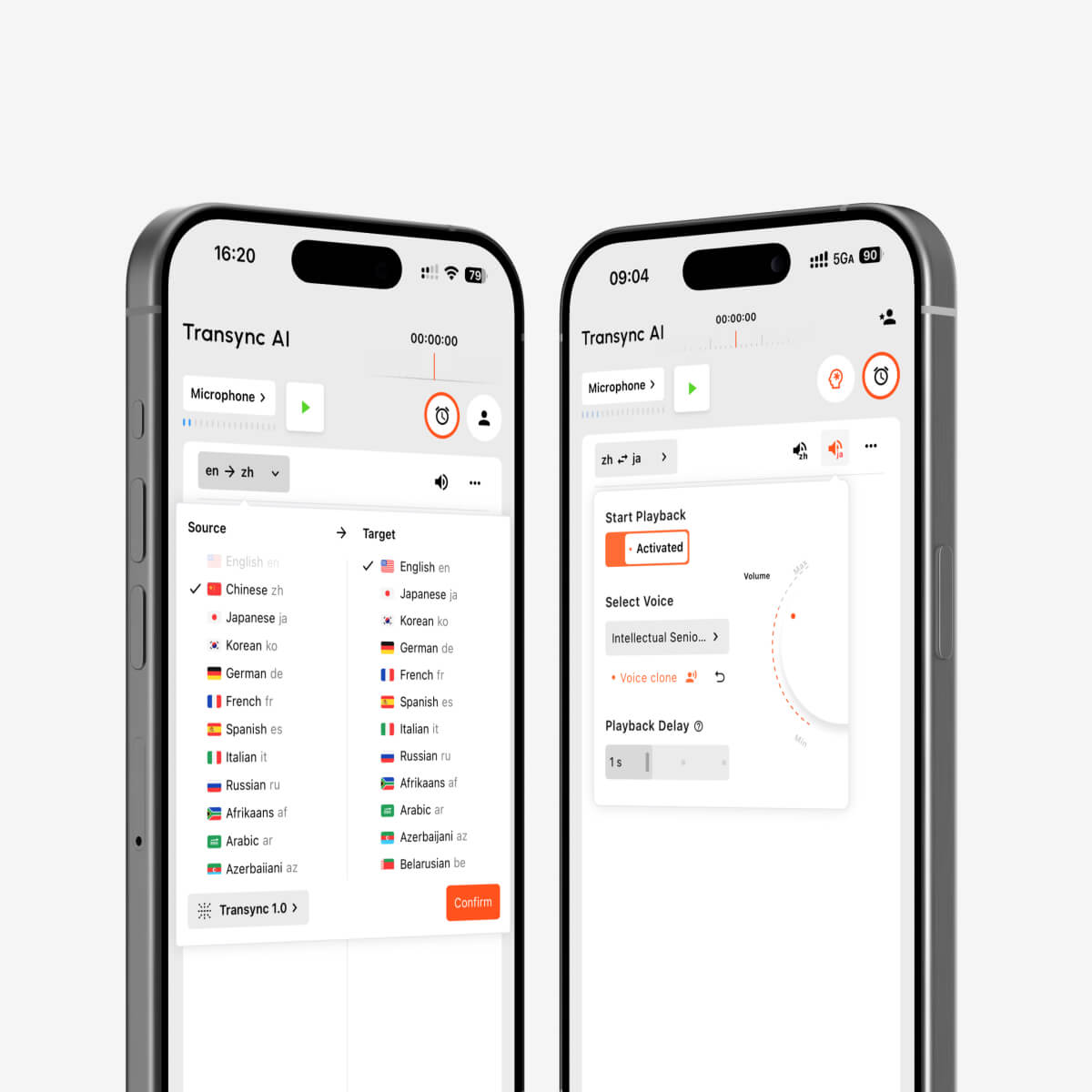
การเล่นเสียงและโคลนเสียงด้วย AI สำหรับการแปลแบบเรียลไทม์หลายภาษา
การรู้จำภาษาแบบสองทาง
การสนทนาที่เป็นธรรมชาติจะมีการสื่อสารไปมาทั้งสองทาง การเปลี่ยนภาษาด้วยตนเองหลังจากผู้พูดแต่ละคนจะทำให้เกิดความไม่สะดวก การจดจำภาษาโดยอัตโนมัติภายในคู่ภาษาที่เลือกจะทำให้การสนทนาเข้าใจง่ายขึ้น.
การควบคุมคำศัพท์และบริบท
ชื่อ แบรนด์ ตัวย่อ และศัพท์เฉพาะทางอุตสาหกรรม เป็นแหล่งที่มาของข้อผิดพลาดได้ทั่วไป ฟีเจอร์คำหลักและบริบทของ AI Assistant ช่วยให้ผู้ใช้สามารถอธิบายหัวข้อและกำหนดคำศัพท์สำคัญก่อนเริ่มการสนทนาได้.
การกำหนดเส้นทางเสียงสำหรับการโทรออนไลน์
การแปลการประชุมจำเป็นต้องเข้าถึงทั้งเสียงพูดในพื้นที่และเสียงของผู้เข้าร่วมจากทางไกล คุณสมบัติการแชร์เสียงคอมพิวเตอร์ บันทึกเสียงจากผู้เข้าร่วมคนอื่นๆ ในขณะที่ คุณสมบัติไมโครโฟนเสมือนจริง ช่วยส่งเสียงแปลเข้าสู่การประชุม.
บันทึกหลังจากการสนทนา
ไฟล์เสียงที่แปลแล้วจะเป็นเพียงไฟล์ชั่วคราว เว้นแต่ว่าเครื่องมือจะสร้างไฟล์บันทึกที่ใช้งานได้จริง ฟีเจอร์บันทึกการประชุมด้วย AI สร้างเอกสารถอดเสียงและบทสรุป ในขณะที่ คู่มือการจัดการบันทึกการแปล อธิบายวิธีการค้นหาและจัดการเซสชันก่อนหน้า.
วิธีเลือกคำแปลที่เหมาะสมด้วยเครื่องมือเสียง
ก่อนเลือกซื้อสินค้า ควรพิจารณาคำถามเหล่านี้:
- งานหลักคือการประชุม การสนทนาระหว่างเดินทาง งานอีเวนต์ โครงการสื่อ การจัดการเอกสาร หรือการพัฒนาผลิตภัณฑ์ซอฟต์แวร์หรือไม่?
- ผู้ใช้ต้องการเสียงแปล, คำบรรยาย หรือทั้งสองอย่าง?
- ผลิตภัณฑ์รองรับคู่ภาษาที่ระบุไว้อย่างถูกต้องหรือไม่?
- สามารถประมวลผลการสนทนาได้ทั้งสองฝ่ายหรือไม่?
- ใช้งานได้กับอุปกรณ์และแพลตฟอร์มการประชุมที่ต้องการหรือไม่?
- ผู้ใช้สามารถให้คำศัพท์เฉพาะทางและบริบทเพิ่มเติมได้หรือไม่?
- จำเป็นต้องมีเอกสารถอดเสียงหรือบทสรุปหลังจากนั้นหรือไม่?
- ไฟล์เสียง ข้อมูลถอดเสียง และข้อมูลเสียงจะถูกจัดการอย่างไร?
- จำเป็นต้องใช้การเชื่อมต่ออินเทอร์เน็ตหรือไม่?
- ราคาเหมาะสมกับระยะเวลาและความถี่ในการใช้งานที่คาดหวังไว้หรือไม่?
อย่าเลือกเพียงเพราะจำนวนภาษาที่โฆษณาไว้ เครื่องมือที่ดีที่สุดคือเครื่องมือที่มีขั้นตอนการทำงาน ผลลัพธ์ และการควบคุมที่ตรงกับสถานการณ์จริง.
วิธีการใช้งาน Transync เอไอ สำหรับการแปลด้วยเสียงพูด
- เปิด Transync เอไอ บนเว็บ, Windows, macOS, iOS หรือ Android.
- เลือกภาษาทั้งสองที่ใช้ในการสนทนา.
- เลือกไมโครโฟนหรืออุปกรณ์รับสัญญาณเสียงจากคอมพิวเตอร์ที่ถูกต้อง.
- เพิ่มคำศัพท์สำคัญด้วย ฟีเจอร์คำหลักและบริบทของ AI Assistant.
- เริ่ม เครื่องมือแปลแบบเรียลไทม์.
- ตรวจสอบว่าคำบรรยายต้นฉบับและคำบรรยายที่แปลแล้วอัปเดตอย่างถูกต้องหรือไม่.
- เปิดใช้งาน เครื่องแปลเสียง AI เมื่อผู้เข้าร่วมต้องการการแปลด้วยเสียง.
- ใช้ คุณสมบัติไมโครโฟนเสมือนจริง สำหรับผลลัพธ์ที่แปลแล้วในการสนทนาออนไลน์.
- ตรวจสอบผลลัพธ์ผ่านทาง ฟีเจอร์บันทึกการประชุมด้วย AI.
ตรวจสอบ หน้าภาษาที่รองรับ ก่อนเริ่มการประชุม ให้ทำการทดสอบสั้นๆ ด้วยระบบเสียงจริง.
อะไรบ้างที่สามารถลดคุณภาพการแปลเสียงได้?
คุณภาพการแปลอาจลดลงเมื่อ:
- มีคนหลายคนพูดพร้อมกัน.
- เสียงเพลงหรือเสียงรบกวนในห้องดังกว่าเสียงลำโพง.
- ไมโครโฟนอยู่ไกลเกินไป.
- การเชื่อมต่ออินเทอร์เน็ตไม่เสถียร.
- ผู้พูดใช้คำย่อที่ไม่ได้รับการอธิบายหรือชื่อที่ไม่คุ้นเคย.
- ประโยคไม่สมบูรณ์หรือคลุมเครือมาก.
- ไฟล์เสียงต้นฉบับมีการบิดเบือนหรือถูกบีบอัด.
ขอให้ผู้เข้าร่วมผลัดกันพูด ใช้ไมโครโฟนที่ให้เสียงชัดเจน ให้ข้อมูลบริบท และตรวจสอบตัวเลขหรือคำศัพท์ที่สำคัญ สำหรับการสนทนาทางกฎหมาย การแพทย์ ความปลอดภัยที่สำคัญ หรือข้อผูกพันตามสัญญา ควรใช้ล่ามที่มีคุณสมบัติเหมาะสมหรือการตรวจสอบโดยผู้เชี่ยวชาญเมื่อเหมาะสม.
คำถามที่พบบ่อยเกี่ยวกับการแปลพร้อมเสียง
การแปลด้วยเสียงหมายความว่าอย่างไร?
การแปลพร้อมเสียง หมายถึงการแปลเสียงพูดและส่งผลลัพธ์กลับมาเป็นเสียงพูด โดยมักจะมีคำบรรยายประกอบด้วย เรียกอีกอย่างว่า การแปลเสียงพูด การแปลจากเสียงพูดเป็นเสียงพูด หรือการแปลไฟล์เสียง.
สามารถเปิดเสียงพูดที่แปลแล้วระหว่างการประชุมออนไลน์ได้หรือไม่?
ใช่. ฟีเจอร์การแปลการประชุมสดจาก Transync AI ทำงานควบคู่กันไป Zoom, Microsoft Teams, และ Google Meet. เดอะ เครื่องแปลเสียง AI ให้บริการเล่นเสียงที่แปลแล้ว และ คุณสมบัติไมโครโฟนเสมือนจริง ช่วยส่งต่อไปยังการโทร.
ฉันสามารถฟังคำแปลด้วยเสียงของตัวเองได้ไหม?
การ ฟีเจอร์การโคลนเสียงจาก Transync AI สามารถสร้างเสียงพูดที่แปลแล้วโดยจำลองเสียงของผู้ใช้ได้ ควรทดสอบเสียงพูดก่อนการนำเสนอหรือการประชุมที่สำคัญ.
การแปลเสียงรวมถึงคำบรรยายด้วยหรือไม่?
เครื่องมือหลายอย่างมีทั้งสองอย่างนี้ให้ใช้งาน. Transync เอไอ แอปพลิเคชันนี้ผสานเสียงแปลเข้ากับคำบรรยายสองภาษา ทำให้ผู้เข้าร่วมสามารถฟังและอ่านไปพร้อมๆ กันในระหว่างการสนทนาได้.
ระบบแปลเสียงพูดสามารถใช้งานแบบออฟไลน์ได้หรือไม่?
การรองรับการใช้งานแบบออฟไลน์ขึ้นอยู่กับผลิตภัณฑ์และภาษา. Transync เอไอ จำเป็นต้องเชื่อมต่ออินเทอร์เน็ตและไม่มีโหมดออฟไลน์ โปรดตรวจสอบความพร้อมใช้งานแบบออฟไลน์โดยตรงกับผู้ให้บริการแปลภาษาสำหรับผู้บริโภคก่อนเดินทาง.
การแปลโดยใช้เสียงเหมาะสมสำหรับการประชุมลับหรือไม่?
โปรดตรวจสอบข้อกำหนดด้านข้อมูลและความเป็นส่วนตัวของผู้ให้บริการก่อนดำเนินการกับข้อมูลที่มีความละเอียดอ่อน. Transync เอไอ ระบุว่าโดยปกติแล้วข้อมูลลูกค้าจะไม่ถูกนำไปใช้ในการฝึกอบรม AI และไฟล์เสียงจะถูกลบหลังจากประมวลผลเสร็จแล้ว องค์กรต่างๆ สามารถตรวจสอบได้ ศูนย์ความไว้วางใจ สำหรับข้อมูลเพิ่มเติม.
การแปลด้วยเสียงสามารถใช้แทนล่ามที่เป็นมนุษย์ได้หรือไม่?
การแปลภาษาอัตโนมัติสามารถใช้สนับสนุนการสนทนาในชีวิตประจำวัน การศึกษา และธุรกิจได้มากมาย แต่ไม่สามารถรับประกันความถูกต้องแม่นยำหรือความละเอียดอ่อนทางวัฒนธรรมได้อย่างสมบูรณ์แบบ การสนทนาที่มีความสำคัญสูงในด้านการแพทย์ กฎหมาย ความปลอดภัย และสัญญา อาจต้องใช้ล่ามที่เป็นมนุษย์ที่มีคุณสมบัติเหมาะสม.
คำแนะนำสุดท้าย
เลือกเครื่องมือให้เหมาะสมกับแหล่งที่มาของเสียงและสิ่งที่ควรเกิดขึ้นหลังจากแปลเสร็จแล้ว:
- เลือก ทอล์คาโอ หรือ Google แปล เหมาะสำหรับการเดินทางระยะสั้นและการแปลในชีวิตประจำวัน.
- เลือก โลกแห่งโลก เมื่อผู้ชมจำนวนมากในงานอีเวนต์ต้องการคำบรรยายหรือเสียงแปล.
- เลือก โซนิอ็อกซ์ เมื่อนักพัฒนาต้องการ API สำหรับการประมวลผลเสียงเพื่อใช้กับผลิตภัณฑ์ที่กำหนดเอง.
- เลือก อาจารย์ สำหรับการพากย์เสียง คำบรรยาย และการปรับสื่อให้เข้ากับท้องถิ่น.
- เลือก ดีพแอล สำหรับเวิร์กโฟลว์ข้อความ เอกสาร องค์กร และเวิร์กโฟลว์เสียงที่เลือกไว้ในวงกว้าง.
- เลือก Transync เอไอ สำหรับใช้ในการประชุมสดหลายภาษาที่ต้องการคำบรรยายสองภาษา การแปลคำพูดที่เป็นธรรมชาติ บริบทของคำศัพท์ และบันทึกหลังการสนทนา.
มีประสิทธิภาพ การแปลพร้อมเสียง มันทำมากกว่าแค่พูดคำที่แปลงแล้ว มันช่วยให้ผู้ฟังเข้าใจความหมาย ช่วยให้ผู้พูดตอบได้อย่างเป็นธรรมชาติ และให้ผู้เข้าร่วมมีข้อความหรือบันทึกที่จำเป็นเพื่อยืนยันสิ่งที่เกิดขึ้น.
หากคุณต้องการประสบการณ์รุ่นถัดไป Transync เอไอ นำทางด้วยการแปลแบบเรียลไทม์ที่ขับเคลื่อนด้วย AI ซึ่งช่วยให้การสนทนาไหลลื่นอย่างเป็นธรรมชาติ คุณสามารถ ทดลองใช้ฟรี ตอนนี้.
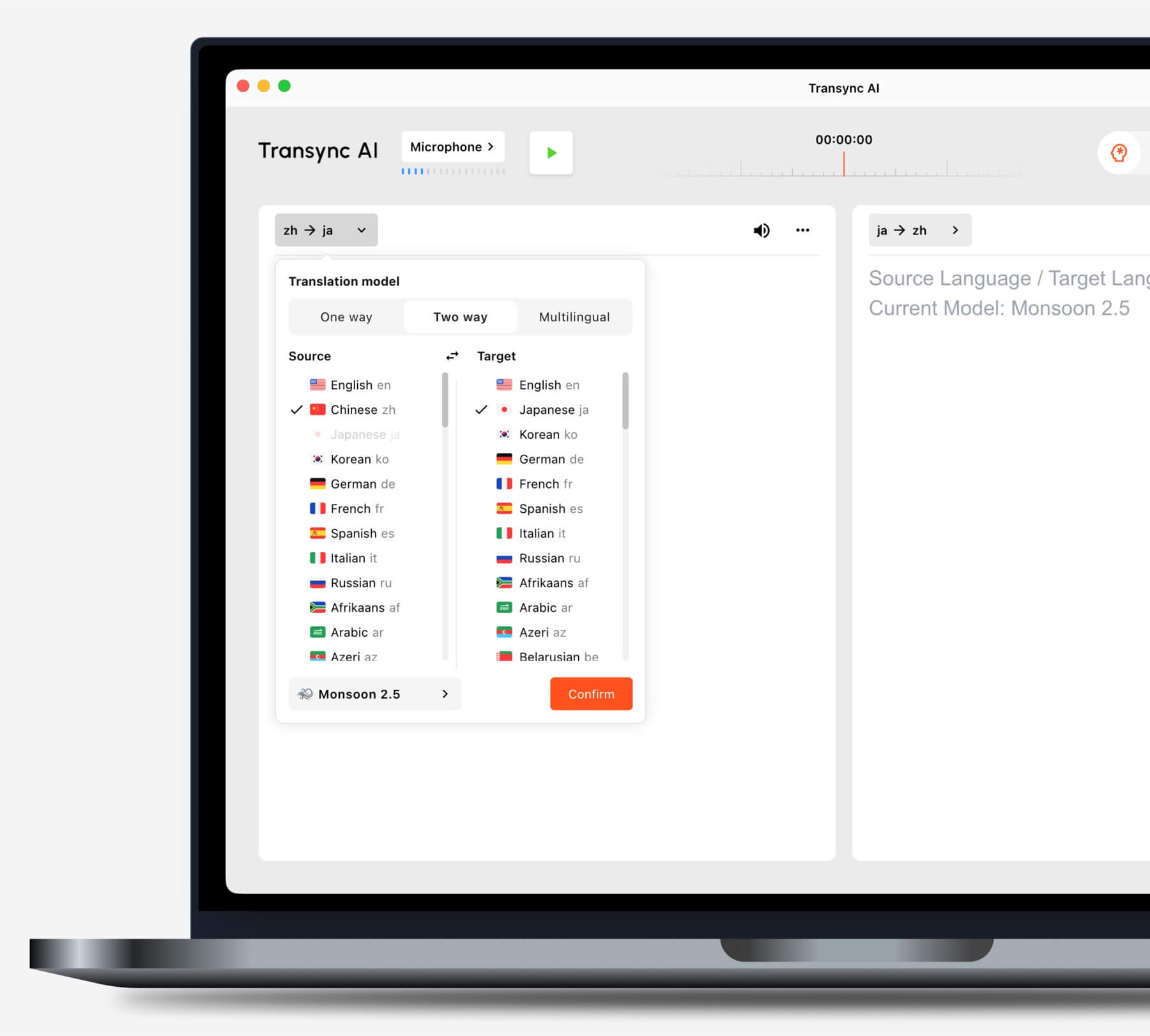
เลือกโหมดการแปลที่เหมาะสมกับสถานการณ์ของคุณก่อนเริ่มงาน.
