

AI-taalvertaler, realtime vertaaltool, spraakvertaler-app, meertalige vergadervertaler, software voor live tolken
De beste taalvertalers zijn niet allemaal hetzelfde. De een is misschien een kei in het voorlezen van een menukaart, de ander in het perfectioneren van een contract, en weer een ander in het in goede banen leiden van een meertalige vergadering, zelfs wanneer mensen via een onvolmaakte microfoon spreken. Een enkele algemene ranglijst verhult die verschillen.
Deze redactie selecteert zes winnaars op basis van hun beroep: Transync AI, Google Vertalen, Apple Translate, DiepL, Microsoft Vertaler, En Wereldlijk. Het doel is niet om een universele winnaar aan te wijzen, maar om te laten zien welke workflow het meest waarschijnlijk helpt op het moment dat het er echt toe doet.
De zes winnaars in 30 seconden
- Het meest geschikt voor live vergaderingen: Transync AI
- Ideaal voor snelle vertalingen tijdens het reizen: Google Vertalen
- Het meest geschikt voor gesprekken over Apple-apparaten: Apple Translate
- Het meest geschikt voor documentgerichte vertalingen: DiepL
- Het meest geschikt voor informele groepsgesprekken waaraan je kunt deelnemen: Microsoft Vertaler
- Het meest geschikt voor georganiseerde, grootschalige evenementen: Wereldlijk
Als vergaderingen uw voornaamste gebruiksdoel zijn, begin dan met Transync AI. Het combineert realtime tweetalige ondertiteling, vertaalde spraak, terminologiecontext, compatibiliteit met vergaderplatformen, notities en een presentatiemodus voor meerdere deelnemers. Als je onderweg slechts een zin nodig hebt, is een lichtere consumentenapp meestal sneller te openen en gemakkelijker te gebruiken.
Vergelijkingstabel van de beste taalvertalers
| Vertaler | Onze prijs | Kerninput | Hoofduitvoer | Geschikt voor groeps- of vergaderdoeleinden | Offline potentieel | Koopmodel |
|---|---|---|---|---|---|---|
| Transync AI | Het meest geschikt voor live vergaderingen. | Live toespraak | Tweetalige ondertitels, vertaalde stem, toelichting | Zeer geschikt voor vergaderingen en presentaties. | Online workflow | Gratis, persoonlijke en zakelijke abonnementen |
| Google Vertalen | Ideaal voor snelle reisvertalingen | Tekst, handschrift, foto's en spraak | Tekst- en spraakondersteunde ervaringen | Meer geschikt voor spontaan gebruik dan voor geplande vergaderingen. | Geselecteerde gedownloade talen | Consumentenapp en webtool |
| Apple Translate | Het meest geschikt voor gesprekken over Apple-apparaten. | Tekst en spraak | Gespreksweergaven en vertaalde uitvoer | Focus op persoonlijke gesprekken | Gedownloade talen en modus op het apparaat | Meegeleverd op compatibele apparaten |
| DiepL | Het meest geschikt voor documenten | Tekst en bestanden | Geschreven vertaling | Niet primair bedoeld als vergaderruimte. | Productafhankelijk | Gratis en betaalde aanbiedingen |
| Microsoft Vertaler | Het meest geschikt voor informele groepen waar je je makkelijk bij kunt aansluiten. | Tekst en spraak | Gesprek via gesplitst scherm of met meerdere apparaten | Deelnemers kunnen deelnemen aan een gezamenlijk gesprek. | Offline pakketten richten zich voornamelijk op tekst. | Opties voor consumenten en het Microsoft-ecosysteem |
| Wereldlijk | Het meest geschikt voor georganiseerde, grootschalige evenementen. | Live audio van evenement of vergadering | Audio, ondertiteling, transcripties en samenvattingen | Sterke, op gebeurtenissen gerichte workflow | Online workflow | Commerciële pakketten en demo's |
Functies, ondersteunde talen, prijzen en apparaatvereisten kunnen veranderen. Controleer de exacte taalcombinatie en het abonnement voordat u een van de beste vertaalprogramma's aanschaft.
Hoe we de beste taalvertalers hebben gekozen
Deze selectie beoordeelt het volledige communicatieproces in plaats van een ingestudeerde zin in een stille ruimte. Elke categorie stelt een andere vraag:
- Betekenis: Behoudt de vertaling de intentie van de spreker?
- Tijdstip: Komt het resultaat snel genoeg binnen voor de taak?
- Modaliteit: Kunnen gebruikers lezen, luisteren, spreken, uploaden of fotograferen wat ze nodig hebben?
- Context: Kunnen terminologie, namen of achtergrondinformatie de uitkomst beïnvloeden?
- Deelname: Kan het apparaat comfortabel gebruikt worden door één persoon, twee personen, een team of een publiek?
- Continuïteit: Is er achteraf een nuttig document, transcript of samenvatting beschikbaar?
- Risico: Zijn de privacyinstellingen en de menselijke beoordeling geschikt voor de inhoud?
- Kosten: Wat kost de complete workflow, niet alleen het abonnementsgeld?
De beste taalvertalers verdienen hun plek in deze categorie door de hele klus met zo min mogelijk frictie te klaren. Een app met honderden talen is misschien nog steeds geen goede keuze voor een bestuursvergadering; een platform voor zakelijke evenementen is wellicht overbodig om lunch te bestellen.
Beste tolken voor vergaderingen: Transync AI
Transync AI Het is het beste uitgangspunt wanneer vertaling moet plaatsvinden binnen een lopend gesprek. In plaats van elke zin als een afzonderlijk verzoek te behandelen, ondersteunt het de bijeenkomst van gesproken input tot vertaalde output en de daaropvolgende evaluatie.
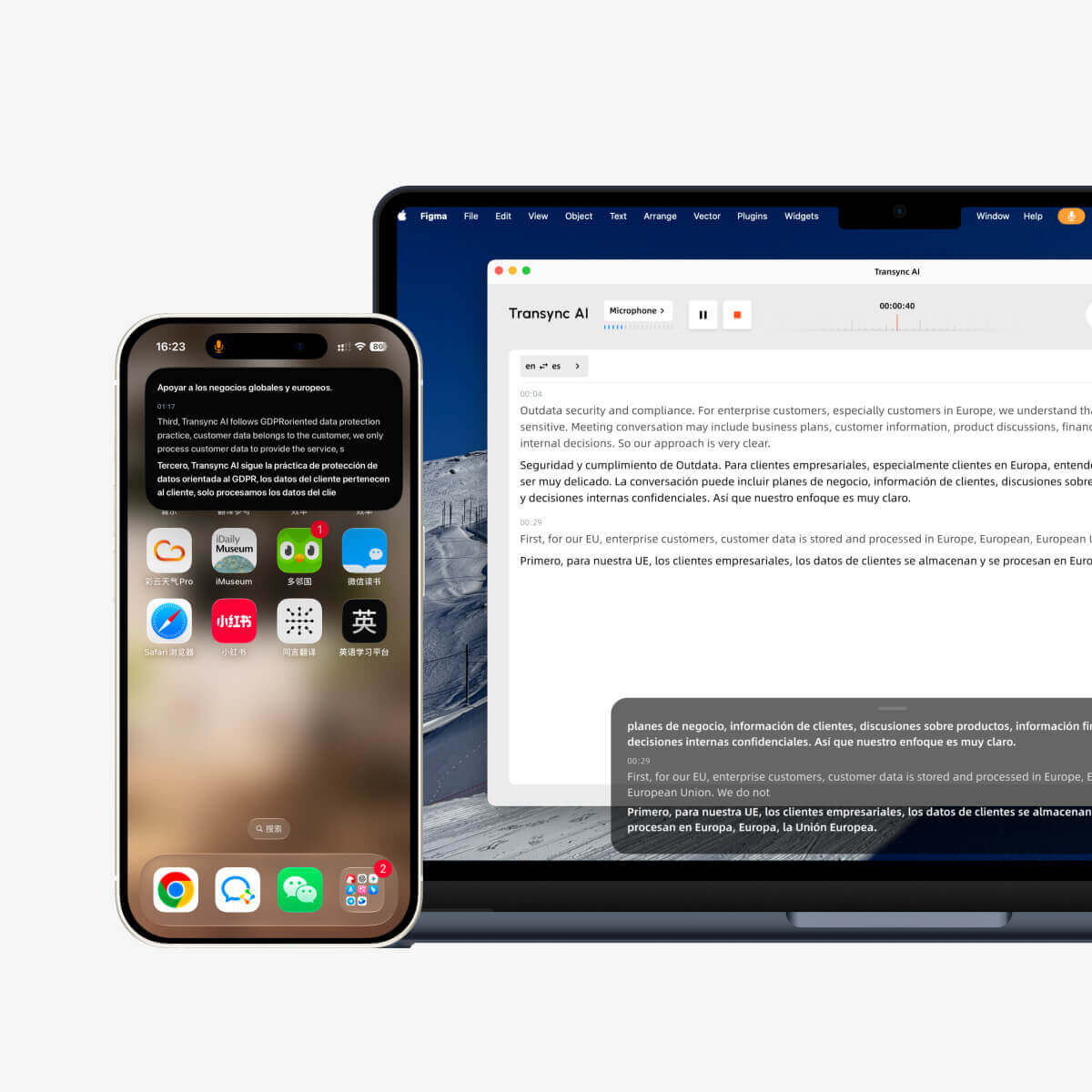
Zijn realtime vertaling De bron- en doeltaal worden weergegeven als tweetalige ondertitels. De momenteel gepubliceerde talenlijst omvat 60 talen, waardoor teams kunnen controleren of hun specifieke taalcombinatie beschikbaar is vóór een gesprek.
Voor deelnemers die liever luisteren, Transync AI omvat een AI-stemvertaler. Zijn Tweetalige ondertitels met beeld-in-beeld-functie Kan zichtbaar blijven boven een andere ondersteunde app, waardoor het minder vaak nodig is om te schakelen tussen de vergadering en een apart vertaalvenster.
Waarom het de vergadercategorie wint
- Tweewegs, realtime vertaling voor een vloeiend gesprek.
- Tweetalige ondertitels en vertaalde gesproken tekst.
- Automatische onderscheiding tussen de geselecteerde ondersteunde talen.
- Beschikbaar op meerdere platformen: web, desktop en mobiel.
- Contextuele voorbereiding op specialistische terminologie.
- Een verslag dat na de vergadering als notities kan dienen.
Transync AI ondersteunt een Live vergadering vertaalworkflow voor Zoom, Microsoft Teams, En Google Meet. Die platformoverschrijdende aanpak helpt teams die niet telkens de vertaling opnieuw willen opbouwen wanneer een klant een link van een andere aanbieder stuurt.
Voordat een belangrijk telefoongesprek plaatsvindt, kunnen gebruikers de Trefwoorden en contextuele informatie van de AI-assistent. Productnamen, afkortingen, vakjargon en achtergrondinformatie kunnen onnodige onduidelijkheden verminderen. Daarna, Notulen van de AI-vergadering Deelnemers helpen om beslissingen en vervolgstappen te heroverwegen.
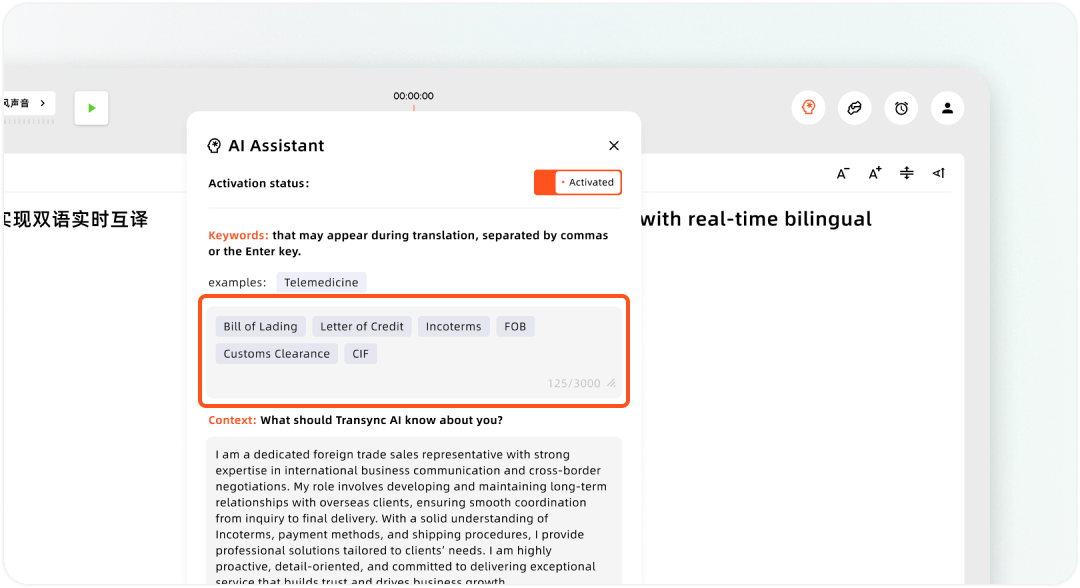
Aangepaste zoekwoorden en gebruikerscontext instellen in de Transync AI Assistant.
De presentatiemodus wijzigt de workflow voor het publiek.
In de bètaversie van de presentatiemodus kan één host tot 10 doeltalen configureren. Deelnemers kunnen deelnemen vanaf hun eigen telefoon of computer met behulp van een QR-code, een deelbare link of een ruimte-ID. Ze hoeven geen software te installeren, maar moeten zich wel registreren of inloggen. Transync AI rekening.
Elke deelnemer kiest een van de door de host ingeschakelde doeltalen en kan live ondertiteling lezen of naar de vertaalde versie luisteren. Het is niet mogelijk om in deze modus zelf spraakinvoer te versturen. De host bepaalt of het originele transcript en de door AI gegenereerde notities na het evenement worden gedeeld; delen is optioneel en gebeurt niet automatisch.
Dit Presentatiemodus is relevant voor trainingen, lezingen, bedrijfsbijeenkomsten, conferenties, rondleidingen, kerkdiensten en andere evenementen met één spreker.
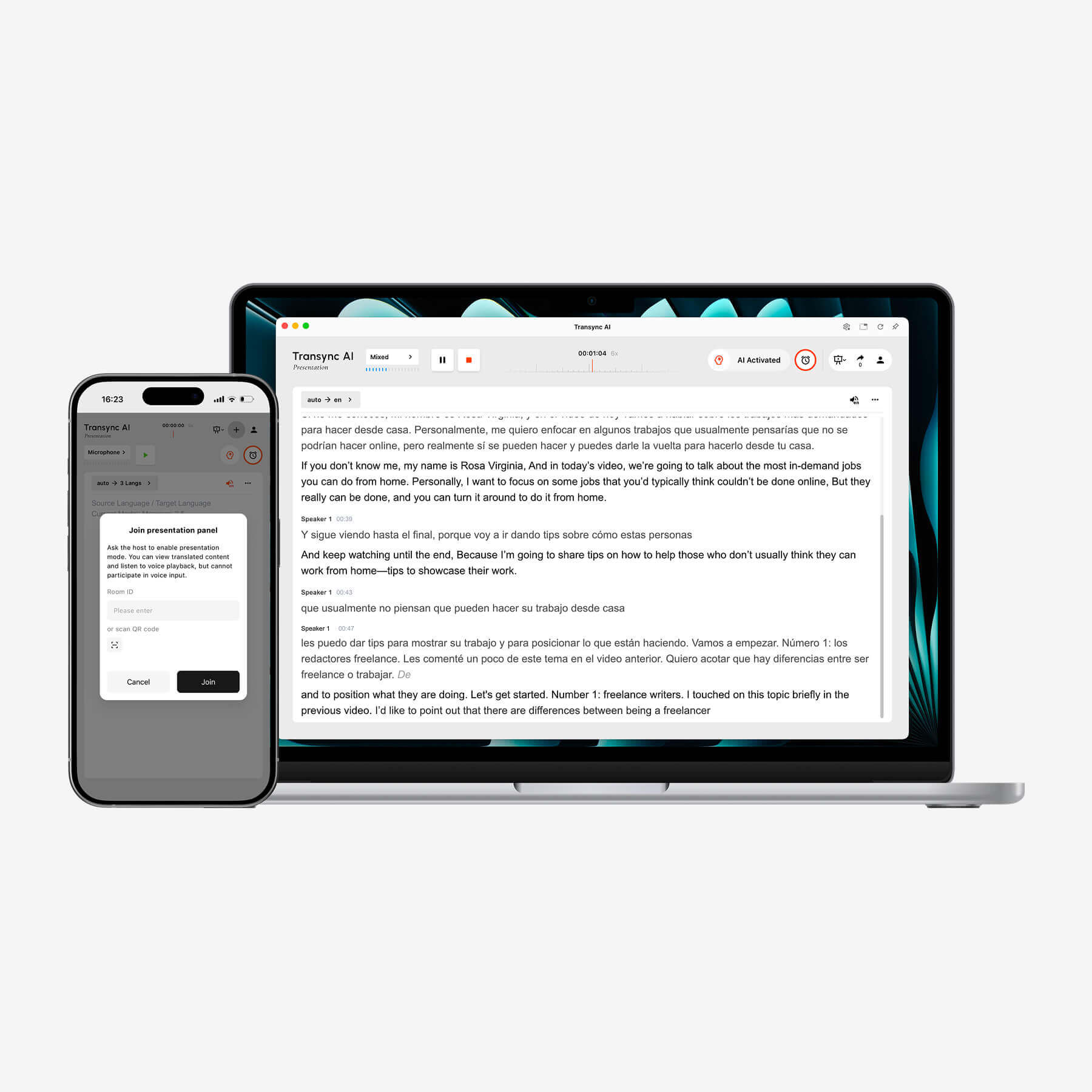
Transync AI toont realtime tweetalige transcriptie op een laptop, terwijl een mobiel apparaat de presentatiebediening mogelijk maakt.
Beperkingen om rekening mee te houden
Transync AI Dit is een online vertaalworkflow, geen offline taalgids. De presentatiemodus is ontworpen voor communicatie tussen één en meerdere personen, in plaats van een open discussie met een publiek. Teams moeten de microfoons en audio-instellingen testen vóór een belangrijk gesprek.
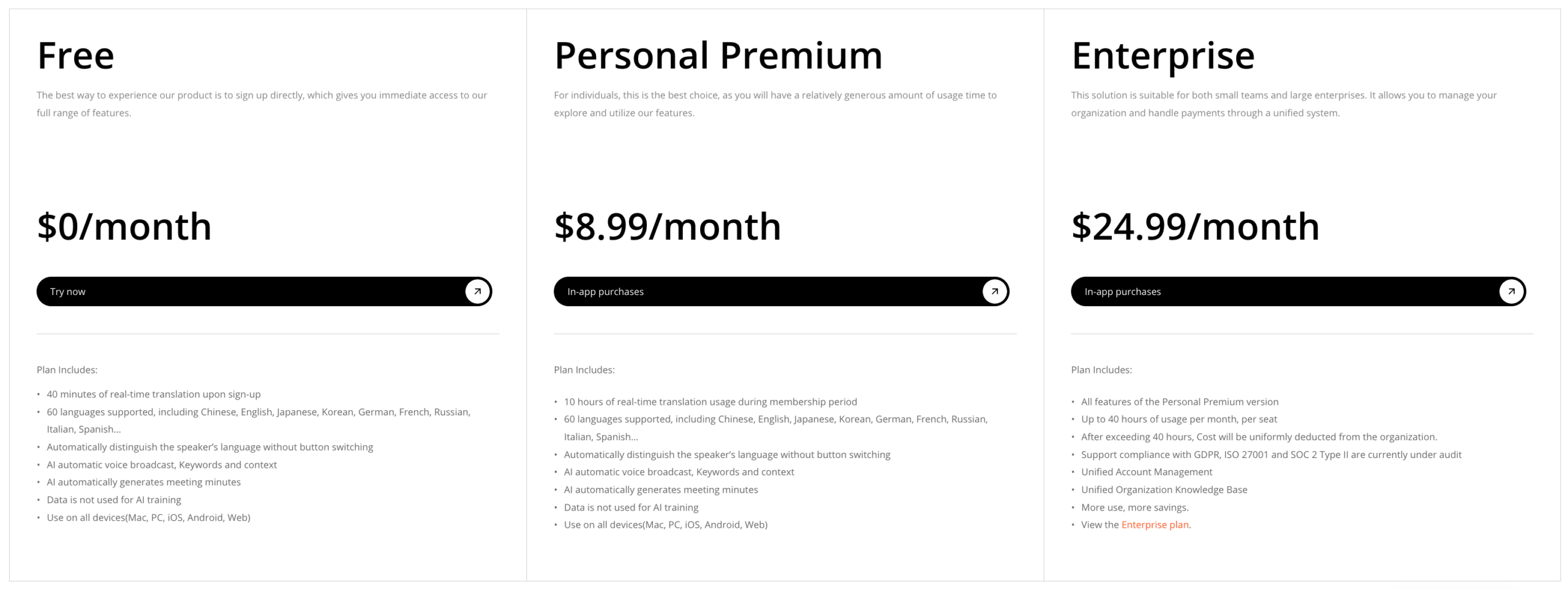
De huidige gepubliceerde abonnementen bieden 40 gratis minuten na aanmelding, Personal Premium kost 8,99 per maand met 10 uur, en Enterprise kost 24,99 per maand per gebruiker met maximaal 40 uur per gebruiker. Voor meertalig gebruik en presentatiemodus gelden aparte factureringsregels, dus raadpleeg de actuele prijscalculator voordat u een grote evenement plant.
Beste taalvertalers voor reizen: Google Vertalen
Google Vertalen Het blijft een van de beste taalvertalers voor spontane communicatie in verschillende formaten. Volgens de officiële help-pagina kan de app tekst, handschrift, foto's en spraak vertalen in meer dan 200 talen. Dat brede aanbod is handig wanneer een reis bijvoorbeeld verandert van het lezen van een bord naar het tonen van een getypte zin of een gesprek met iemand anders.
Waarom het de reiscategorie wint
- Snelle toegang via mobiel en internet.
- Tekst-, camera-, handschrift- en spraakinvoer.
- Brede dekking van de gepubliceerde talen.
- Bepaalde talen kunnen worden gedownload voor offline gebruik.
- Een vertrouwde interface voor korte, praktische uitwisselingen.
Het offline gedeelte vereist aandacht. Een gedownloade taal garandeert niet dat alle spraak-, camera- en gespreksfuncties offline op elk apparaat werken. Download beide talen vóór vertrek en test de vliegtuigmodus terwijl u nog thuis bent.
Beperkingen om rekening mee te houden
Google Vertalen Het is uitstekend geschikt voor een korte zin, een gebaar, een foto of een beknopte uitwisseling, maar het is niet zo georganiseerd als een permanente vergaderomgeving met contextuele voorbereiding en notulen. Voor een meertalige onderhandeling van 45 minuten is gemak alleen niet voldoende.
Beste taalvertalers per apparaat-ecosysteem: Apple Translate
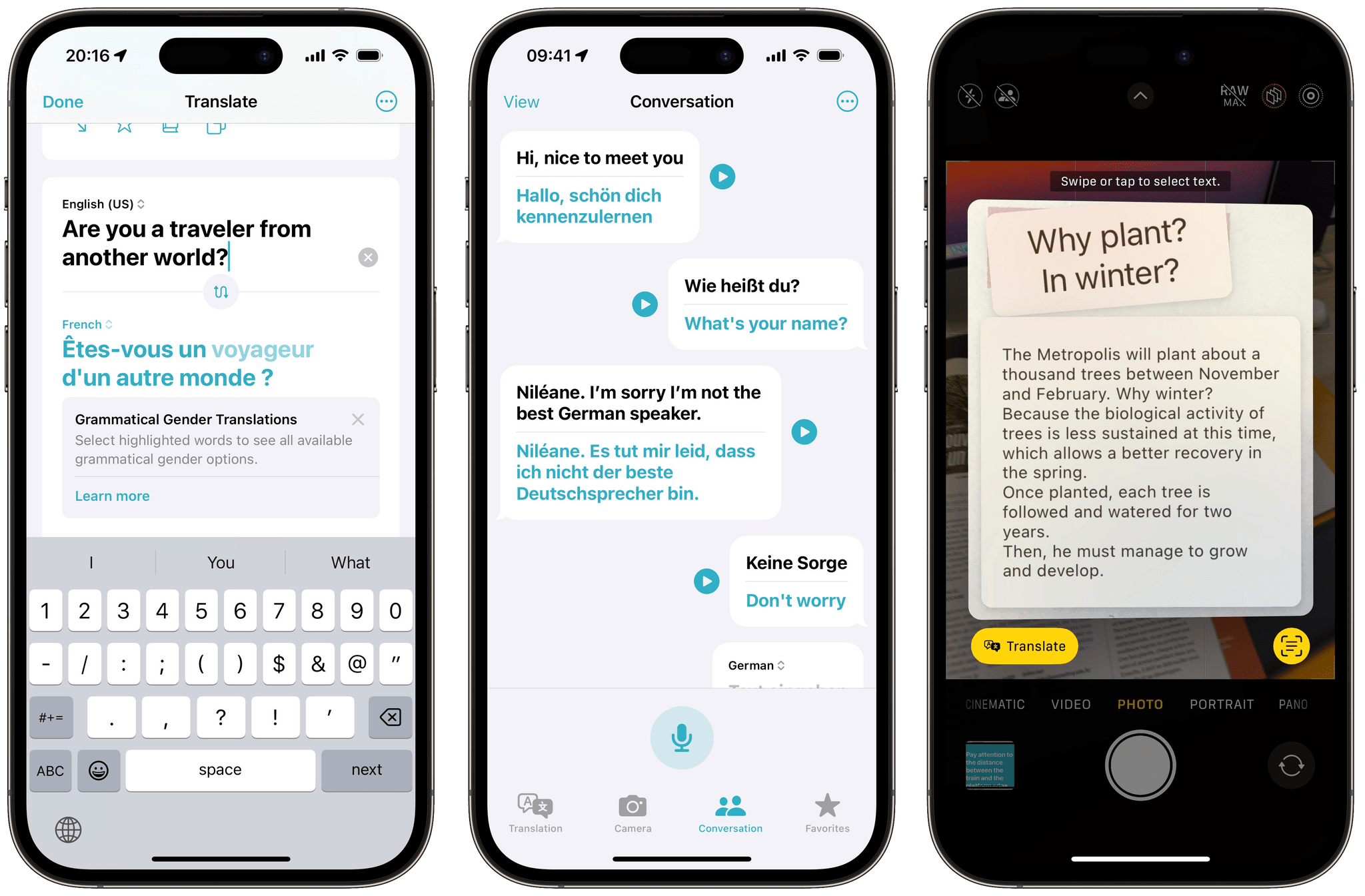
Apple Translate verdient zijn plek in deze categorie door op natuurlijke wijze in de ondersteunde categorieën te passen. Appel apparaten. De huidige iPhone-handleiding beschrijft tekst- en spraakvertaling, de gespreksmodus, Auto Translate en de Face-to-Face-weergave. Gedownloade talen kunnen ook worden gebruikt in de modus 'Op het apparaat'.
Waarom het de ecosysteemcategorie wint
- Een overzichtelijke workflow voor tekst- en spraakgesprekken.
- Automatische vertaling kan herhaaldelijk tikken verminderen.
- De Face to Face-weergave maakt het mogelijk dat twee personen één apparaat delen.
- Ondersteuning voor gedownloade talen voor gebruik op het apparaat.
- Handig voor mensen die al compatibele hardware gebruiken.
Beperkingen om rekening mee te houden
De beschikbaarheid is afhankelijk van de hardware, de versie van het besturingssysteem, de taal en de regio. De focus ligt op persoonlijke gesprekken in plaats van op het beheren van vergaderingen voor de hele organisatie. Gebruikers dienen de taalondersteuning te controleren en het betreffende apparaat te testen voordat ze op reis gaan.
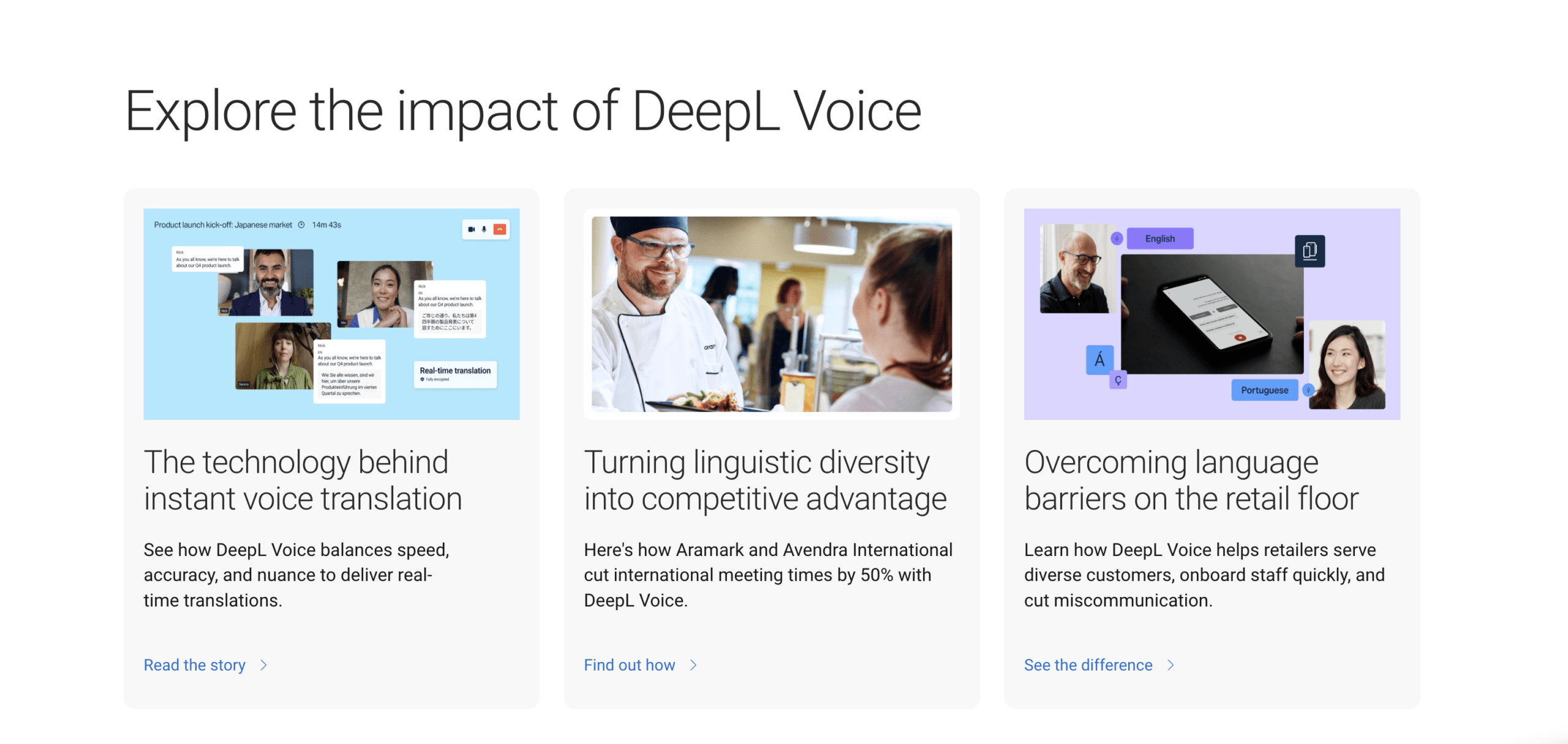
Beste vertalers voor documenten: DiepL
DiepL Deze vertaler hoort thuis op een lijst van de beste taalvertalers als het gaat om geschreven tekst. Het is een logische keuze voor e-mails, rapporten, presentaties en documenten waarvan de terminologie en toon vóór publicatie moeten worden gecontroleerd.
Waarom het de documentcategorie wint
- Sterke focus op tekst- en documentvertaling.
- Terminologieworkflows met een focus op een woordenlijst.
- Handig voor het vergelijken van alternatieve schriftelijke formuleringen.
- Ontwikkelaarsproducten voor tekst- en documentintegratie.
- Geschikt voor een redactie- en beoordelingsproces.
De juiste toets bestaat niet uit één enkele zin. Upload of plak een representatief document met kopjes, tabellen, herhaalde termen, cijfers en merknamen. Laat een tweetalige beoordelaar de betekenis, terminologie, toon, weglatingen en opmaak beoordelen.
Beperkingen om rekening mee te houden
DiepL Het is geen directe vervanging voor een product dat primair op vergaderingen is gericht, alleen omdat de schriftelijke output vloeiend is. Live conversatie vereist ook spraakherkenning, beurtwisseling, latencymanagement, audio-weergave, participatie en follow-upregistratie. De mogelijkheden van het product en het plan moeten afzonderlijk worden gecontroleerd.
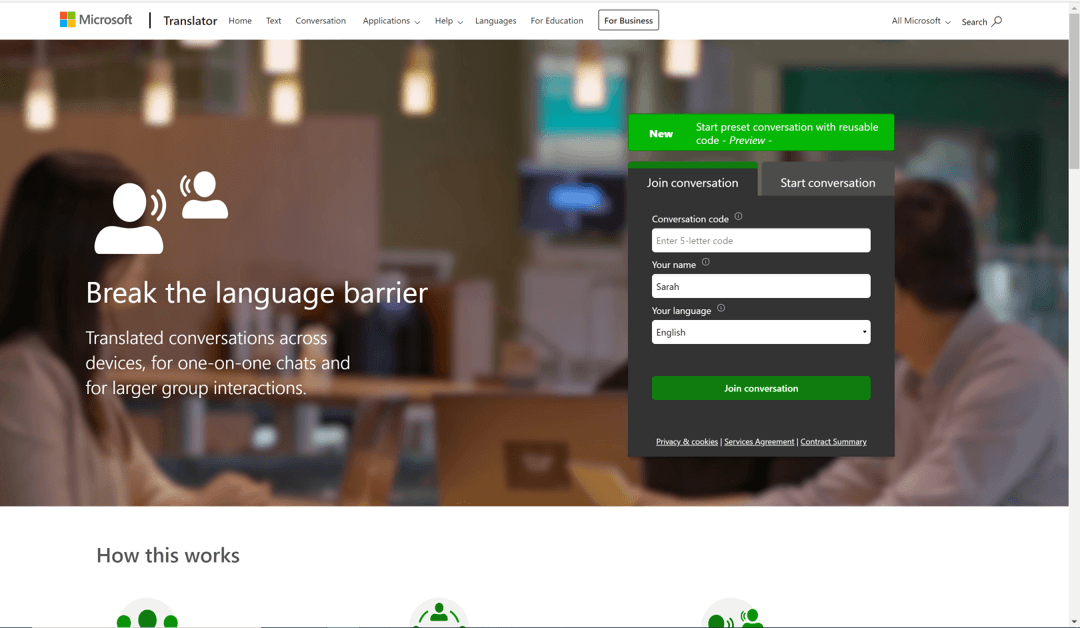
Winnaar 5: Microsoft Vertaler — Het meest geschikt voor informele groepen waar je je makkelijk bij kunt aansluiten
Microsoft Vertaler Het is handig wanneer meerdere mensen willen deelnemen aan een meertalig gesprek zonder steeds hetzelfde apparaat te hoeven gebruiken. De app biedt onder andere de mogelijkheid tot vertaling via gesplitst scherm voor twee personen op één apparaat en tot gesprekken tussen meerdere apparaten waarbij deelnemers een gedeelde code gebruiken.
Waarom het de categorie 'informele groep' wint
- Gesprek in gesplitst scherm op één apparaat.
- Gesprekken tussen meerdere apparaten via een code.
- Deelnemers kunnen in hun eigen taal spreken of typen.
- Mogelijkheden voor deelname via app en browser.
- Handig voor klaslokalen, buurtverenigingen of tijdelijke bijeenkomsten.
Beperkingen om rekening mee te houden
De aparte gespreksruimte is mogelijk niet geschikt voor elk formeel vergaderproces. Offline taalpakketten ondersteunen voornamelijk tekst in plaats van de volledige live gesprekservaring na te bootsen. Organisaties moeten het consumentenproduct voor conversatie onderscheiden van cloudvertalingsdiensten die elders worden aangeboden. Microsoft ecosysteem.
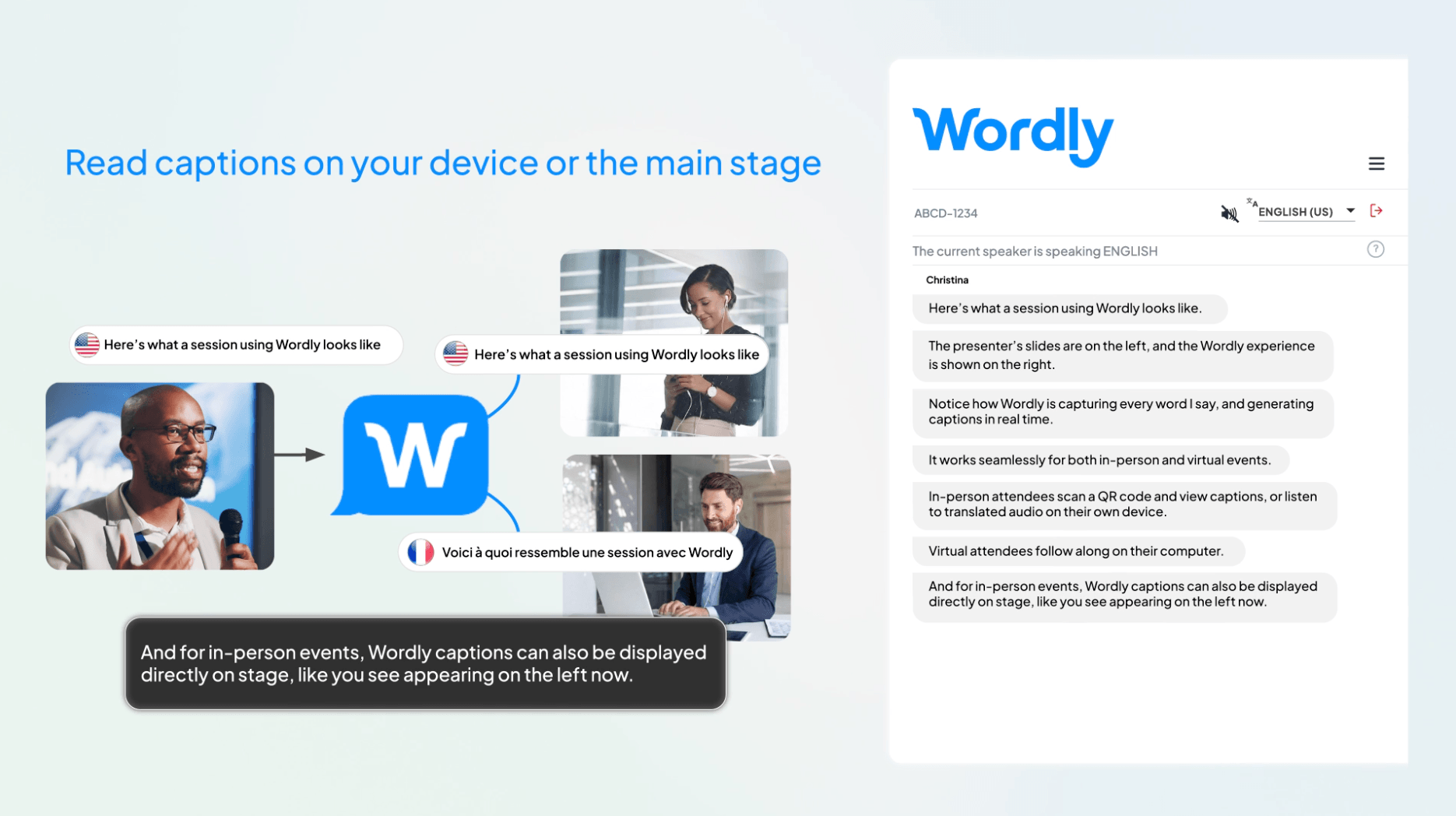
Winnaar 6: Wereldlijk — Het meest geschikt voor georganiseerde, grootschalige evenementen
Wereldlijk Het is gericht op conferenties, openbare bijeenkomsten, webinars, trainingen en andere evenementen waar organisatoren een beheerde workflow voor vertaling en ondertiteling nodig hebben. De officiële productinformatie beschrijft live audio en ondertiteling, transcripties, samenvattingen, aanpasbare woordenlijsten en integraties met belangrijke vergader- en evenementenplatformen.
Deelnemers kunnen via een QR-code of URL op hun eigen apparaten deelnemen en een taal kiezen voor de audio of ondertiteling. Wereldse Zoals te zien is op de huidige pagina over vertaalsoftware, hoeven deelnemers geen app te downloaden, geen account aan te maken of persoonlijke gegevens te verstrekken. Dit verschilt van... Transync AI Presentatiemodus, waarvoor registratie of aanmelding van een publieksaccount vereist is, ook al hoeft er geen software gedownload te worden.
Waarom het de categorie voor grote evenementen wint
- Evenementgerichte onboarding en workflowplanning.
- QR-code en URL-toegang voor deelnemers.
- Audio- en ondertiteling in de door de deelnemer gekozen taal.
- Aangepaste verklarende woordenlijsten voor organisatiespecifieke terminologie.
- Transcripten en samenvattingen na de sessies.
- Ondersteuning voor fysieke, virtuele en hybride formats.
Beperkingen om rekening mee te houden
Wereldlijk Het is een platform voor commerciële evenementen en niet de meest voor de hand liggende keuze voor een individuele reiziger of een incidenteel gesprek tussen twee personen. Potentiële kopers dienen de actuele prijzen op te vragen, de benodigde evenementondersteuning te controleren en het volledige audiopad op de locatie te testen.
Welke van de beste taalvertalers past het beste bij jouw dag?
U heeft een afspraak met een klant uit het buitenland.
Kiezen Transync AI Wanneer beide partijen moeten spreken, lees dan de tweetalige ondertitels, luister naar de vertaalde spraak en beluister het gesprek later opnieuw. Bereid de namen van de klanten en de technische termen voor het gesprek voor.
Je navigeert door een stad zonder betrouwbare gegevens.
Begin met Google Vertalen of Apple Translate. Download de relevante talen, sla belangrijke adressen apart op en controleer de offline functies voordat u de wifi-verbinding verlaat.
Je vertaalt een rapport voor publicatie.
Begin met DiepL, Wijs vervolgens een tweetalige beoordelaar aan die de doelmarkt begrijpt. Bewaar het origineel en houd materiële wijzigingen bij.
Een klas of een gemeenschapsgroep heeft behoefte aan een gezamenlijk gesprek.
Poging Microsoft Vertaler Wanneer deelnemers kunnen deelnemen met hun eigen apparaten en een gesprekscode. Geef een korte introductie voordat de discussie begint.
U organiseert een grote meertalige conferentie.
Vergelijken Wereldlijk met Transync AI Presentatiemodus. Wereldlijk De nadruk ligt op een beheerde evenementlevering en toegang zonder dat deelnemers accounts nodig hebben; Transync AI Het combineert een toegankelijker instapmodel met mogelijkheden die gericht zijn op vergaderingen en een presentatiemodus waarin ingelogde deelnemers kunnen kiezen uit maximaal 10 geconfigureerde doeltalen.
Beste taalvertalers volgens Decision Factor
| Beslissingsfactor | Wat te vragen | Sterke kandidaten |
|---|---|---|
| Live tweewegsspraak | Kunnen beide personen reageren zonder handmatig van taal te wisselen? | Transync AI, Microsoft Translator |
| Tweetalige ondertiteling voor de vergadering | Kunnen de ondertitels naast de vergadering zichtbaar blijven? | Transync AI |
| Toegang voor één-op-veel-publiek | Hoe kunnen deelnemers zich aanmelden en een taal kiezen? | Transync AI, Wordly |
| Veelzijdigheid tijdens het reizen | Kan het spraak, foto's, handschrift en offline tekst verwerken? | Google Vertalen |
| apparaatspecifieke ervaring | Past het op de apparatuur die mensen al bij zich hebben? | Apple Translate |
| Documentenbeoordeling | Kunnen de terminologie en de schrijfstijl worden verfijnd? | DiepL |
| Continuïteit na de sessie | Zijn er transcripten, samenvattingen of aantekeningen beschikbaar? | Transync AI, Wordly |
Daarom moet de uitdrukking "beste taalvertalers" altijd worden gevolgd door "waarvoor?". Het antwoord verandert immers wanneer de gebruiker, de invoer, de omgeving en de gewenste uitvoer veranderen.
Een test van 15 minuten voordat je een definitieve beslissing neemt.
Kies niet alleen op basis van schermafbeeldingen de beste taalvertalers. Gebruik één herhaalbare test.
Minuten 1-3: Normale invoer
Lees of lever realistisch materiaal aan met namen, data, prijzen en volledige zinnen. Voeg in documenten kopjes toe en vermijd herhaalde termen.
Minuten 4-6: Natuurlijke complexiteit
Voeg een accent, een gematigd achtergrondgeluid, een correctie, een onderbreking of een lange zin toe. Voor een evenementtool kunt u deelnemen vanaf een tweede apparaat.
Minuten 7-9: Ervaring met de output
Controleer het transcript van de brontekst, de vertaalde tekst, de timing van de audio, de lay-out en de taalkeuze. Vraag een tweetalige persoon of de betekenis natuurlijk overkomt.
Minuten 10-12: Continuïteit van de workflow
Zoek het transcript, de samenvatting, de notities of het vertaalde bestand. Test het delen en verwijderen. Noteer alle benodigde handmatige werkzaamheden.
Notulen 13-15: Kosten en risico
Schat een normale maand in op basis van het werkelijke volume. Beoordeel het personeelsbehoud, het trainingsbeleid, de toegangscontrole en de behoefte aan professionele menselijke beoordeling.
Geef een score van één tot vijf voor betekenis, snelheid, gebruiksgemak, context, gegevensregistratie, privacy en totale kosten. De hoogste score in uw gewogen scenario is belangrijker dan de langste functielijst.
Prijsbepaling: Vergelijk de voltooide werkzaamheden
De beste vertalers hanteren zeer verschillende inkoopmodellen, waardoor de vermelde prijzen gemakkelijk verkeerd geïnterpreteerd kunnen worden.
Transync AI Het bedrijf biedt een gratis instapmogelijkheid en maandelijkse abonnementen voor particulieren en bedrijven. Op de huidige pagina staat 40 minuten na gratis aanmelding, 10 uur voor Personal Premium voor € 8,99 per maand en tot 40 uur per zakelijke gebruiker voor € 24,99 per maand. Gebruik voor eenrichtings-, tweerichtings-, meertalige en presentatiegesprekken kan anders worden gemeten.
 Consumententools zoals Google Vertalen En Apple Translate Ze zijn weliswaar gemakkelijk toegankelijk, maar bieden niet automatisch een workflow voor zakelijke vergaderingen. DiepL biedt verschillende producten en pakketten aan voor vertaalbehoeften. Wereldlijk stuurt organisaties richting commerciële pakketten of een demo. Microsoft Vertaler omvat consumentengesprekservaringen en bredere Microsoft diensten.
Houd rekening met de installatie, apparaten, ontwikkeling, evenementondersteuning, deelnemersvereisten, beoordelingstijd en de kosten van een fout. Een gratis app kan duur uitvallen als medewerkers tijdens een vergadering elke zin handmatig kopiëren. Een bedrijfsplatform kan overbodig zijn als de hele taak uit één enkele zin bestaat.
Veiligheid, privacy en menselijke beoordeling
Een lijst met de beste taalvertalers mag niet suggereren dat geautomatiseerde vloeiendheid risico's uitsluit. Data, doseringen, ontkenningen, contractvoorwaarden, veiligheidswaarschuwingen en cultureel gevoelige formuleringen vereisen bijzondere aandacht.
Schakel een gekwalificeerde tolk of vertaler in voor risicovolle communicatie op het gebied van geneeskunde, recht, regelgeving, immigratie en veiligheid. Voor minder risicovolle communicatie kunt u de brontekst bewaren, belangrijke cijfers hardop bevestigen, machinaal gegenereerde inhoud identificeren en een eenvoudige manier bieden om fouten te corrigeren.
Voordat je een platform kiest, stel jezelf dan de volgende vragen:
- Wordt onbewerkt audiomateriaal opgeslagen, en zo ja, hoe lang?
- Wordt de vertaalde tekst behouden?
- Kunnen gebruikers records verwijderen?
- Worden klantgegevens standaard gebruikt om modellen te trainen?
- Waar vindt de verwerking plaats?
- Welke beveiligings- of complianceverplichtingen zijn van toepassing op het aangeschafte abonnement?
- Wie heeft toegang tot transcripten en samenvattingen?
Transync AI's Op de huidige pagina met prijs- en beveiligingsinformatie staat dat onbewerkte audio na verwerking wordt verwijderd, dat verwerkte tekst door gebruikers kan worden verwijderd en dat klantgegevens standaard niet worden gebruikt voor modeltraining, tenzij de gebruiker daar expliciet toestemming voor geeft. Organisaties dienen dit echter nog steeds te herzien. Transync AI Vertrouwenscentrum en hun eigen eisen.
Veelgestelde vragen
Welke taalkundigen zijn het meest geschikt voor vergaderingen?
Transync AI Dit is een uitstekend uitgangspunt voor terugkerende meertalige vergaderingen, omdat het tweewegvertaling, tweetalige ondertiteling, vertaalde spraak, terminologiecontext, compatibiliteit met vergaderplatformen en notities combineert. Test de exacte taalcombinatie en audio-instellingen vóór een belangrijk gesprek.
Wat zijn de beste taalvertalers voor op reis?
Google Vertalen En Apple Translate zijn handige opties voor korte persoonlijke uitwisselingen. Google Vertalen ondersteunt verschillende invoertypen, terwijl Apple Translate past compatibel Appel apparaten en biedt opties voor gedownloade talen. Test het offline gedrag vóór vertrek.
Welke taalvertaler is het meest geschikt voor documenten?
DiepL is een sterke kandidaat voor documentgericht werk. De uiteindelijke keuze moet gebaseerd zijn op een representatief bestand, terminologiecontrole, opmaakresultaten, privacyvereisten en een tweetalige beoordeling door een medewerker.
Welke vertaler is het meest geschikt voor een meertalig publiek?
Vergelijken Transync AI Presentatiemodus en Wereldlijk. Beide systemen kunnen vertaalde ondertitels of audio leveren aan de apparaten van deelnemers, maar hun toegangsvereisten, evenementworkflows, taalconfiguraties, ondersteuningsmodellen en prijzen verschillen.
Kunnen de beste taalvertalers menselijke tolken vervangen?
Ze kunnen de toegang verbeteren en wrijving verminderen in veel dagelijkse en zakelijke situaties, maar ze mogen niet de enige autoriteit zijn wanneer een fout medische, juridische, financiële, regelgevende of veiligheidsschade kan veroorzaken.
Hoe moet ik de nauwkeurigheid van vertalingen vergelijken?
Gebruik voor elk product hetzelfde realistische materiaal en laat tweetalige beoordelaars de betekenis, weglatingen, namen, cijfers, terminologie, toon en timing beoordelen. Gebruik geen irrelevante demonstraties en beoordeel niet alleen de grammaticale correctheid.
Eindconclusie
De beste taalvertalers krijgen verschillende opdrachten. Google Vertalen is een aanpasbare reisgenoot. Apple Translate is handig binnen een compatibel apparaatecosysteem. DiepL is een sterke kandidaat voor dit document. Microsoft Vertaler Maakt informele gesprekken via meerdere apparaten toegankelijker. Wereldlijk is gebouwd rondom georganiseerde vergaderingen en evenementen.
Voor teams die vertaling nodig hebben binnen terugkerende gesprekken, Transync AI Deze app biedt de meest evenwichtige workflow met vergaderfocus in deze selectie: tweetalige ondertiteling, vertaalde spraak, terminologiecontext, platformoverschrijdend vergadergebruik, AI-notities en presentatiemodus voor communicatie met meerdere deelnemers.
Kies op basis van de workflow en test vervolgens met echte sprekers, bestanden, terminologie, apparaten en risico's. De beste taalvertalers zijn niet degenen met de grootste beloftes. Het zijn degenen die de beoogde doelgroep helpen te begrijpen, te reageren en te handelen met zo min mogelijk onnodige wrijving.
Als u een ervaring van de volgende generatie wilt, Transync AI loopt voorop met realtime, AI-gestuurde vertalingen die gesprekken natuurlijk laten verlopen. U kunt probeer het gratis nu.
