

Zjistěte, jak funguje živé titulky Google v systémech Android a Chrome, kde je k dispozici překlad a kdy je vhodnější multiplatformní překladač pro schůzky.
Živé titulky Google dokáže převést řeč z médií a hovorů na čitelný text, ale jeho název se často používá pro několik různých funkcí. Titulky na zařízení, přeložené titulky v prohlížeči, titulky schůzek a přeložená řeč jsou související funkce – nikoli jeden univerzální přepínač.
Na tomto rozdílu záleží. Člověk, který sleduje podcast, má jiné potřeby než vícejazyčný tým, který má hovor s klientem. Tato příručka mapuje danou funkci napříč... Android, Google Chromea Google Meet, pak to porovná s Transync AI když uživatelé potřebují překlad schůzek napříč platformami, mluvený výstup, přípravu terminologie, poznámky nebo vícejazyčný přístup k publiku.
Rychlá odpověď: Živé titulky Google je vynikající pro přístupnost a osobní porozumění na podporovaných zařízeních. Podpora překladu závisí na zařízení a souvisejícím nastavení Živého překladu. Google Meet nabízí samostatné živé titulky, přeložené titulky a funkce překladu řeči. Transync AI je vhodnější, když se jedná o opakovaně použitelný vícejazyčný pracovní postup pro schůzky, než o titulkování jednoho zařízení nebo jedné platformy pro schůzky.
Nejprve určete, kterou funkci máte na mysli
| Funkce | Kde to běží | Primární výstup | Překlad? | Nejlepší použití |
|---|---|---|---|---|
| Živé titulky Google v systému Android | Pixel a vybrané telefony s Androidem | Titulky v zařízení pro média a hovory | Vyžaduje Živý překlad na podporovaných zařízeních Pixel | Osobní přístupnost a porozumění médiím |
| Živé titulky v Chromu | Chrome na podporovaných počítačích | Bublina s titulky pro zvuk v prohlížeči | Živý překlad umí překládat titulky | Videa, podcasty, streamy, hovory z prohlížeče a další zvukové soubory z prohlížeče |
| Živé titulky v Google Meet | Uvnitř schůzky Meet | Titulky ve stejném jazyce viditelné pro jednotlivé uživatele | Ne; přeložené titulky jsou samostatné nastavení | Následující řeč během hovoru Meet |
| Přeložené titulky v Google Meet | Vhodné edice Workspace | Text přeložený do zvoleného jazyka | Ano | Čtení vícejazyčných titulků v aplikaci Meet |
| Překlad řeči v Google Meet | Způsobilé plány a podporovaná zařízení | Přeložený hlas hlasem připomínajícím mluvčího | Ano, pro podporované jazykové páry angličtiny | Mluvená komunikace v rámci služby Meet |
| Živý překlad s umělou inteligencí Transync | Webové, stolní a mobilní pracovní postupy spolu s aplikacemi pro schůzky | Dvojjazyčný text, přeložený hlas a záznamy | Ano | Meziplatformní setkání a prezentace |
Pokud je v článku podpory nebo na obrazovce nastavení uvedeno “titulky”, nepředpokládejte, že je tam uvedeno i “přeložit”. Pokud je tam uvedeno “přeložené titulky”, nepředpokládejte, že účastníci uslyší přeloženou řeč.
Fakt 1: Živé titulky Google Je to primárně funkce přístupnosti
Podporováno Android zařízení, Živé titulky Google automaticky přidává titulky k řeči přehrávané na zařízení. Aktuální oficiální nápověda uvádí média, jako jsou videa, podcasty, telefonní hovory, videohovory a zvukové zprávy. Pole s titulky lze přesouvat, roztahovat, měnit jeho velikost a přizpůsobovat.
Tato funkce je cenná i bez překladu. Někdo může sledovat hlučné video bez zvuku, číst podcast, rozumět nejasnému zvuku telefonu nebo používat titulky jako pomůcku pro usnadnění přístupu.
Aktuální podpora zařízení se liší. Oficiální nápověda uvádí podporu pouze v angličtině na starších generacích telefonů Pixel, více jazyků na novějších telefonech a rozšířenou skupinu jazyků na Pixelu 6 a novějších a také na vybraných zařízeních s novějšími verzemi Androidu. Pokud se ovládací prvek Živé titulky nezobrazuje, výrobce telefonu, model, verze operačního systému nebo region jej pravděpodobně nepodporují.
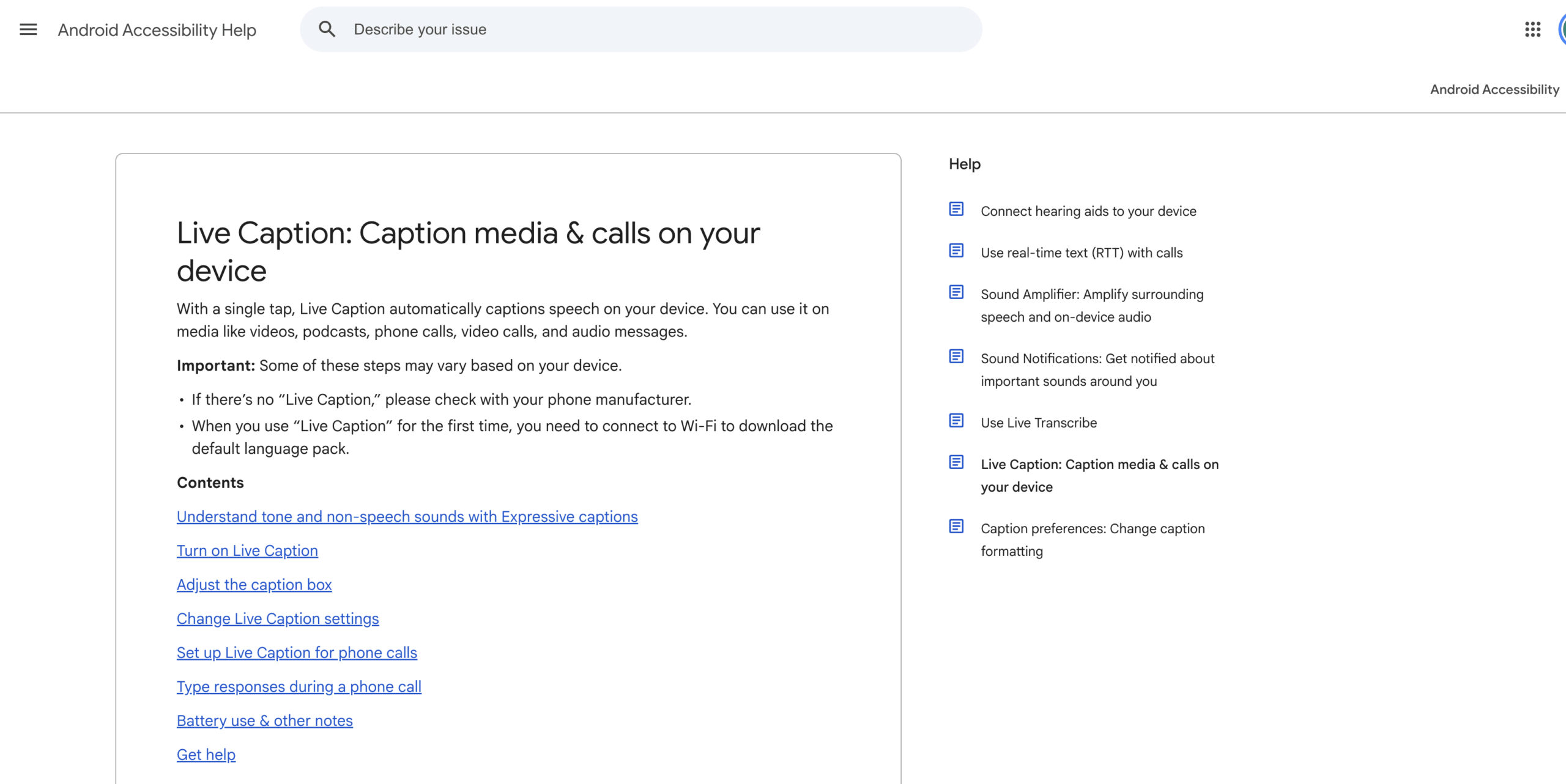
Prozkoumejte živé titulky Google
Živé titulky Google Proto by se mělo nejprve posuzovat z hlediska přístupnosti: Rozpoznává jazyk, udržuje srozumitelnou řeč, zůstává čitelné a funguje v mediální nebo volací aplikaci, kterou skutečně používáte?
Fakt 2: Titulky a překlad jsou oddělené vrstvy
Základní Živé titulky Google převádí řeč na text v jazyce titulků. Pro překlad titulků na podporovaných telefonech musí být u uživatelů povolena funkce Živý překlad. Aktuální oficiální dokumentace uvádí, že tato možnost překladu je k dispozici na zařízeních Pixel 6 a novějších.
To vytváří dvouvrstvý proces:
- Telefon rozpoznává řeč a vytváří titulky.
- Živý překlad převede tyto titulky do preferovaného jazyka.
Tento rozdíl vysvětluje, proč uživatel může vidět titulky, ale žádný přeložený výsledek. Výsledek ovlivňuje stažený jazyk titulků, vybraný preferovaný jazyk a dostupnost funkce Živý překlad.
Funkce volání vytvářejí další hranici. Živé titulky Google může umožnit některým uživatelům během hovoru napsat odpověď a nechat ji zařízení přečíst nahlas, ale oficiální nápověda výslovně uvádí, že tato funkce nepřekládá; podporuje konverzaci v aktuálním jazyce.
Fráze titulky na Google Live se online často používá jako zkratka pro “cokoli, co překládá řeč na telefonu Pixel”. Přesnější otázka zní: “Potřebuji titulky ve stejném jazyce, přeložený text nebo přeložený hlas?”
Fakt 3: Živé titulky v systému Android mohou fungovat i bez internetu
Pro základní generování titulků na podporovaných telefonech se zvuk a titulky zpracovávají lokálně. Oficiální nápověda uvádí, že se neukládají, neopouštějí zařízení a nevyžadují mobilní data ani připojení k internetu.
To je důležitá výhoda z hlediska soukromí a spolehlivosti osobních médií. Znamená to také Živé titulky Google může zůstat užitečný i při slabém připojení.
Stále platí několik omezení:
- První použití vyžaduje Wi-Fi pro stažení výchozího jazykového balíčku.
- Podporované jazyky závisí na generaci zařízení a operačním systému.
- Některé mediální a volací aplikace nemusí poskytovat použitelné titulky.
- Jasná řeč a nízká hladina šumu v pozadí vedou k lepším výsledkům.
- Hudba není podporována jako běžný obsah mluvených titulků.
- Tato funkce spotřebovává více energie z baterie a v režimu úspory baterie se vypne.
- Titulky hovorů nejsou určeny pro hovory, kterých se účastní více než jedna další osoba.
Offline titulky také neznamenají, že každá překladatelská funkce je offline. Živé titulky Google Překlad závisí na samostatné funkci Živý překlad a podporovaných kombinacích jazyka zařízení. Před cestou nebo důležitou schůzkou si otestujte přesné nastavení.
Fakt 4: Chrome má vlastní ovládací prvky pro živé titulky a živý překlad
Na podporovaných počítačích, Google Chrome Můžete přidávat titulky k zvuku z videí, podcastů, her, živých streamů, videohovorů a dalších médií v prohlížeči. Titulky se zobrazují v pohyblivé bublině a uživatelé si mohou přidat jazyky titulků a přizpůsobit prezentaci.
Chování ochrany soukromí se změní, když je povolen překlad. Aktuální oficiální nápověda uvádí, že běžné zvukové a titulkové funkce Živý překlad se zpracovávají lokálně a nejsou ukládány ani odesílány. Když je zapnutý Živý překlad, lze titulky odesílat na Google pro překlad.
Aktuální dokumentace uvádí definovanou sadu jazyků titulků ve zdrojovém jazyce a uvádí, že přeložené titulky lze vytvořit ve více než 100 cílových jazycích dostupných v nabídce “Přeložit titulky do”. Uživatelé by si měli zkontrolovat výběr skutečného jazyka, protože seznamy podpory titulků ve zdrojovém jazyce a podpory překladu do cílového jazyka nejsou totožné.
Živé titulky Google v prohlížeči je užitečné, když se zdrojový zvuk již přehrává uvnitř Google Chrome. Nejedná se automaticky o systém pro správu schůzek: sám o sobě neposkytuje připravenou terminologii, přeložené hlasové směrování pro každého účastníka, strukturovaný záznam schůze ani nezávislé jazykové kanály pro publikum akce.
 Fakt 5: Google Meet Titulky jsou jiný pracovní postup produktu
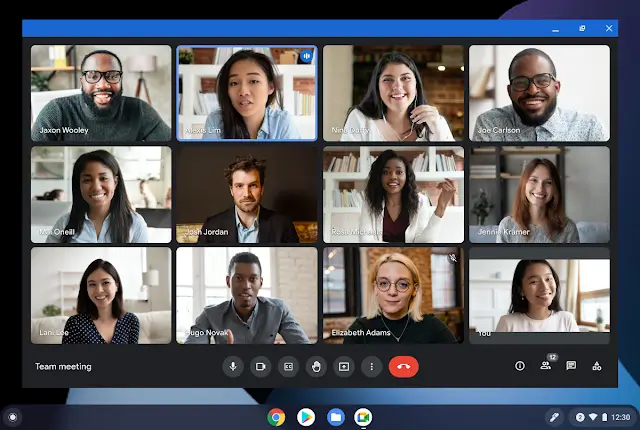
 Fakt 5: Google Meet Titulky jsou jiný pracovní postup produktu
Uvnitř Google Meet, běžné živé titulky zobrazují titulky, jakmile účastníci mluví. Titulky daného uživatele jsou povoleny a přeložené titulky vyžadují samostatné nastavení.
Oprávněný Google Workspace Vydání mohou používat přeložené titulky. Aktuální oficiální seznamy nápovědy jsou Business Standard, Business Plus, Enterprise Standard, Enterprise Plus a Google AI Pro pro vzdělávání, přičemž je třeba poznamenat, že zavádění funkcí může ovlivnit dostupnost. Uživatelé si vyberou jazyk schůzky, zapnou přeložené titulky a zvolí preferovaný cílový jazyk.
Přeložené titulky jsou text, nikoli přeložený hlas. Uživatelé se mohou procházet předchozími přeloženými titulky pouze pro tu část konverzace, během níž byli přítomni a měli titulky zapnuté.
Google Meet má také samostatnou funkci překladu řeči. Současná oficiální dokumentace uvádí, že poskytuje téměř v reálném čase přeloženou řeč hlasem připomínajícím mluvčího mezi angličtinou a francouzštinou, němčinou, hindštinou, italštinou, portugalštinou nebo španělštinou. Dostupnost je omezena na vybrané spotřebitele a Google Workspace plány, překlady jsou kvůli úplnosti zpožděny o několik sekund a funkce má 90minutový limit na schůzku.
Překlad řeči v současné době podporuje pro danou schůzku vždy jeden jazykový pár. Není k dispozici v živých přenosech ani v nahrávkách a účastníci musí povolit překlad svého hlasu. Oficiální nápověda také upozorňuje, že gramatika, srozumitelnost, přízvuk, rod podstatného jména, styl hlasu, připojení, zařízení, region a způsobilost mohou ovlivnit zážitek.
Volání všech těchto funkcí titulky na Google Live ztěžuje řešení problémů. Při kontrole způsobilosti a chování použijte přesný název – Živé titulky, přeložené titulky nebo Překlad řeči.
Fakt 6: Transync AI Řeší širší pracovní postup pro schůzky
Transync AI nenahrazuje účel přístupnosti na zařízení. Živé titulky Google. Řeší širší obchodní problém: pomáhá lidem porozumět, odpovídat a uchovávat si informace během vícejazyčných schůzek.
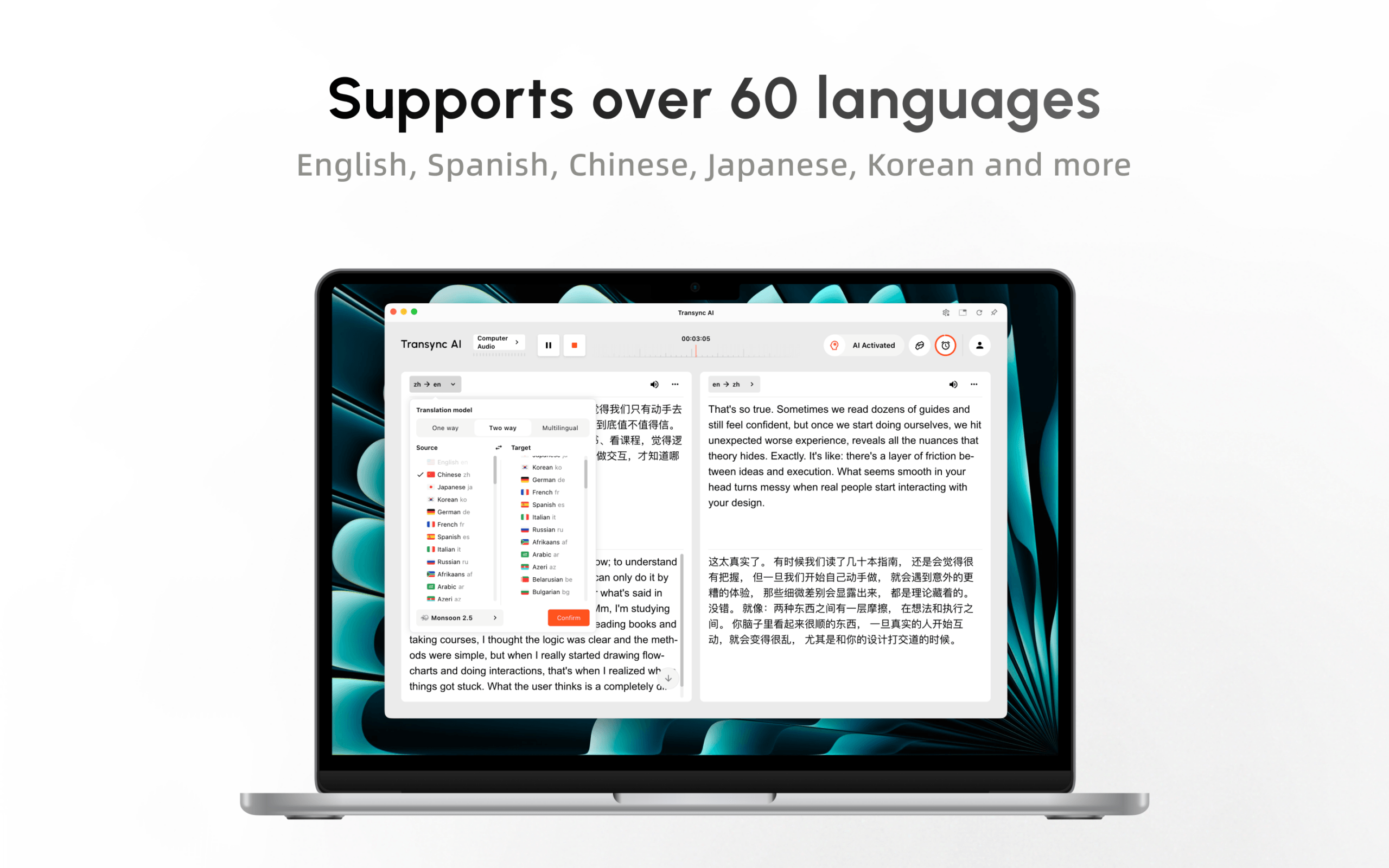
Jeho překlad v reálném čase v současné době podporuje 60 jazyků. pracovní postup překladu živých schůzek může fungovat společně s více konferenčními prostředími, místo aby byl omezen na jednu nativní konferenční platformu.
Vyzkoušejte Transync AI zdarma
Během hovoru, Transync AI poskytuje dvojjazyčné titulky a Hlasový překladač s umělou inteligencí pro mluvený výstup. Titulky v režimu obraz v obraze může zůstat viditelný přes podporované aplikace.

Plovoucí titulky v reálném čase na stolních počítačích a mobilních zařízeních
Před schůzkou mohou uživatelé přidat jména účastníků, odbornou terminologii a informace o pozadí prostřednictvím klíčová slova a kontext. Poté, Poznámky ze schůzky s umělou inteligencí může poskytnout přepis a strukturované shrnutí.

Díky tomu Transync AI Užitečné pro opakované hovory s klienty, diskuse s dodavateli, pohovory, kurzy, demonstrace a globální týmové schůzky. Nejedná se o offline nástroj pro titulky, překladač kamer ani editor rozvržení dokumentů. Před důležitým hovorem by se měl otestovat vstup pro mikrofon, zvuk z počítače, sluchátka, kvalita sítě a vzdálené doručování.
Pokud je požadavek “popsat titulky k podcastu přehrávanému v telefonu”,” Živé titulky Google je to správné. Pokud je to “přeložit schůzku, sdělit výsledek, zachovat terminologii a rozhodnutí později zkontrolovat”,” Transync AI pokrývá více pracovních postupů.
Fakt 7: Překlad prezentace potřebuje model publika
Hlavní projev, přednáška, webinář nebo setkání na radnici není jen velký telefonát. Jeden moderátor mluví, zatímco diváci potřebují různé jazyky na různých zařízeních.
V beta verzi Prezentační režim, a Transync AI Hostitel může povolit až 10 cílových jazyků. Účastníci se připojují ze svých telefonů nebo počítačů pomocí QR kódu, odkazu ke sdílení nebo ID místnosti. Není vyžadována instalace softwaru, ale členové publika se musí zaregistrovat nebo přihlásit do Transync AI účet.
Každý účastník si zvolí povolený jazyk a může si přečíst přeložený text nebo poslouchat hlasový záznam, pokud je k dispozici. Členové publika nemohou do překladatelské úlohy hostitele odesílat hlasové vstupy. Hostitel následně rozhodne, zda bude sdílet přepis a poznámky generované umělou inteligencí.

Prezentační režim umožňuje jednomu moderátorovi sdílet živý překlad s diváky na jejich vlastních zařízeních.
Živé titulky Google zůstává osobním nástrojem pro titulky na úrovni zařízení; nevytváří tento pracovní postup pro hostitele a publikum. Google Meet přeložené titulky slouží účastníkům schůzky, zatímco Transync AI Prezentační režim distribuuje jazykově volitelný zážitek na zařízení publika v místnosti nebo na dálku.
Pro skutečnou událost je nutné zkontrolovat registraci, viditelnost QR kódů, Wi-Fi, sluchátka, přepínání cílového jazyka, přístupnost, pozdní příchod a zvuk moderátora. První minuta přístupu publika je součástí kvality překladu.
Živé titulky Google vs. Transync AI
| Schopnost | Živé titulky Google | Živé titulky / Překlad v Chrome | Funkce Google Meet | Transync AI |
|---|---|---|---|---|
| Primární účel | Osobní přístupnost pro média a hovory v zařízení | Zvukové titulky prohlížeče a volitelný překlad | Titulky, přeložené titulky a překlad řeči v Meetu | Vícejazyčné schůzky a prezentace napříč platformami |
| Titulky ve stejném jazyce | Ano, na podporovaných zařízeních/v podporovaných jazycích | Ano | Ano | Dvojjazyčný zdrojový a cílový text |
| Překlad titulků | Vyžaduje Živý překlad na podporovaných zařízeních Pixel | Ano, když je zapnutý Živý překlad | Přeložené titulky u vybraných tarifů | Základní pracovní postup překladu v reálném čase |
| Přeložený hlas | Není to základní funkce živých titulků | Zaměřeno na titulky | Samostatný překlad řeči s vybranými tarify a jazykovými omezeními | Přehrávání hlasu v podporovaných jazycích |
| Rozsah platformy pro setkání | Závisí na zařízení a aplikaci | Přehrávání zvuku v Chromu | Pouze Google Meet | Funguje s více platformami pro setkání |
| Příprava terminologie | Žádný pracovní postup pro glosář pro schůzky | Žádný pracovní postup pro glosář pro schůzky | Omezené ve srovnání s vyhrazenou přípravou kontextu | Klíčová slova a kontext |
| Poznámky po | Žádný | Žádný pracovní postup pro poznámky ze schůzky | Samostatné funkce přepisu a poznámky závisí na tarifu | Přepis a poznámky ze schůze s umělou inteligencí |
| Výběr jazyka publika | Nastavení osobního zařízení | Nastavení osobního prohlížeče | Titulky vybrané účastníky v Meet | Panel publika v režimu prezentace |
| Použití offline | Základní titulky mohou na zařízení fungovat | Lokální titulky; chování překladu se liší | Vyžaduje se online schůzka | Online pracovní postup |
| Nejlepší padnutí | Přístupnost a osobní média | Rozpoznávání médií v prohlížeči | Týmy oddané ekosystému Meet | Schůzky, hlas, záznamy a prezentace napříč platformami |
Správné srovnání nezní “Který má lepší titulky?”, ale “Čí zvuk se zpracovává, kde se musí výsledek objevit, potřebuje někdo přeložený hlas a co musí po něm zůstat?”.”
10 minut Živé titulky Google Kontrola nastavení
Na telefonu s Androidem
- Vyhledejte v Nastavení Živé titulky nebo je otevřete pomocí ovládání hlasitosti.
- Ověřte, zda lze stáhnout požadovaný jazyk titulků.
- Přehrajte si zřetelně mluvené video a zkontrolujte zdrojové titulky.
- Pokud je vyžadován překlad, ověřte, zda je k dispozici a povolena funkce Živý překlad.
- Vyberte preferovaný jazyk překladu.
- Otestujte skutečnou mediální nebo volací aplikaci.
- Zapněte režim v letadle a ověřte, které funkce jsou stále k dispozici.
- Zkontrolujte chování baterie a čitelnost titulků.
V Chromu
- Otevřete Nastavení a poté Zpřístupnění.
- Zapněte živé titulky a přidejte zdrojový jazyk titulků.
- Přehrajte zvuk v prohlížeči a najděte pohyblivou bublinu s titulky.
- Zapněte Živý překlad, pouze pokud jsou vyžadovány přeložené titulky.
- Vyberte cílový jazyk a ověřte si důsledky pro ochranu soukromí při odesílání titulků k překladu.
- Otestujte skutečné video, stream, hru nebo volání prohlížeče.
V Google Meet
- Rozhodněte, zda uživatel potřebuje živé titulky, přeložené titulky nebo překlad řeči.
- Potvrďte plán hostitele, nastavení správce, region, zařízení a jazykový pár.
- Požádejte každého příslušného účastníka o ověření jeho nastavení.
- Zpoždění testu, korekce a schopnost účastníka reagovat.
- Ověřte, zda jsou vyžadovány přepisy nebo poznámky a kdo k nim má přístup.
Tato kontrola nastavení zabraňuje běžné chybě: očekávání Živé titulky Google chování ze zcela odděleného Google Meet funkce.
Přesnost: Před překladem ověřte zdroj
Vytvořte krátký skript obsahující:
- Dvě osobní jména a jeden název firmy.
- Datum, čas, cena, procento a číslo modelu.
- Jedna věta obsahující “ne” nebo “pokud”.”
- Oprava: “Uzávěrka je v úterý – promiňte, ve čtvrtek ráno.”
- Pět odborných termínů.
- Jedno přerušení a jedna změna řečníka.
Nejprve zkontrolujte zdrojový titulek. Poté zkontrolujte přeložený titulek nebo hlas. Pokud Živé titulky Google špatně rozpozná zdroj, překladová vrstva může přesně přeložit nesprávná slova.
Dbejte na věcný význam před gramatickou stránkou nebo přirozeností hlasu. Posluchač musí dostat správnou osobu, děj, podmínku, množství a termín. Chyba v plynulém projevu je stále chybou.
Soukromí: Lokální titulky nejsou totéž co cloudový překlad
Prohlášení o ochraně osobních údajů by měla odpovídat přesné funkci:
| Pracovní postup | Aktuální oficiální popis | Otázka k položení |
|---|---|---|
| Živé titulky pro Android | Zvuk a titulky se zpracovávají lokálně, nejsou uloženy ani odesílány do Googlu | Je povolen i překlad a liší se jeho zpracování? |
| Živé titulky v Chromu | Lokální zpracování pro generování běžných titulků | Odesílá Živý překlad titulky k překladu? |
| Překlad řeči v Google Meet | Neukládá se žádný zvuk a hlas se pro trénování modelu nepoužívá. | Jaká pravidla pro účty, organizace, souhlas a uchovávání dat se také vztahují? |
| Živý překlad s umělou inteligencí Transync | Živý zvuk po zpracování smazán; text lze uchovat pro překlad nebo poznámky a lze jej smazat. | Které záznamy jsou povoleny, kdo k nim má přístup a kdy budou smazány? |
V případě důvěrné práce si prostudujte aktuální dokumentaci k produktu, plán, organizační dohodu, regionální zpracování, řízení přístupu, mazání, nastavení správce a příslušné zákony. Pokud je funkce “v zařízení” v jednom režimu, neznamená to, že všechny související funkce jsou v zařízení.
Náklady a způsobilost
Základní Živé titulky Google je to funkce zařízení, ale přístup závisí na podporovaném hardwaru a softwaru. Google Meet Přeložené titulky a překlad řeči závisí na vhodných tarifech, nastavení správce, zařízeních, regionech a podporovaných jazykových kombinacích.
Proud Transync AI Ceník zahrnuje 40 minut zdarma po registraci, Personal Premium za 8,99 měsíčně s 10 hodinami a Enterprise za 24,99 měsíčně za licencované zařízení s až 40 hodinami. Využití vícejazyčného a prezentačního režimu se může vypočítávat odlišně, proto si ověřte... aktuální pravidla pro tvorbu cen a používání pro zamýšlený scénář.
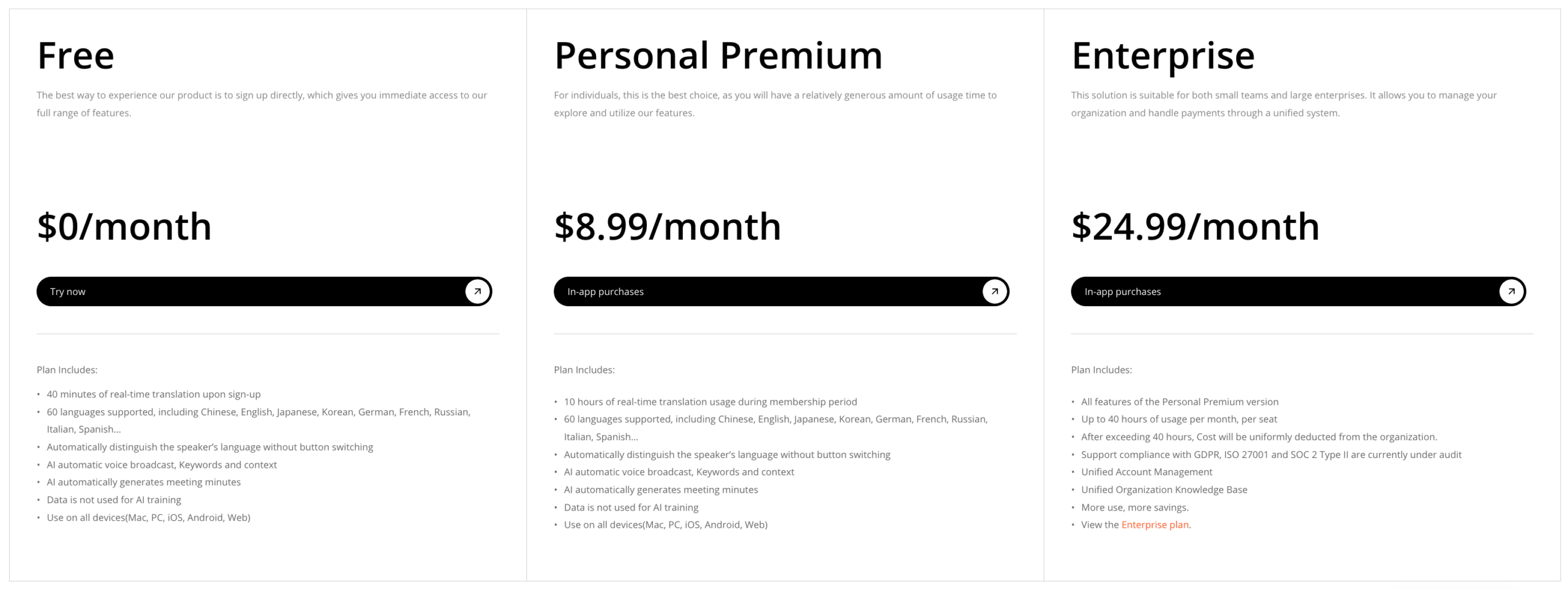 Porovnávejte celkové náklady na pracovní postup, nikoli cenu na ceně. Zahrňte požadavky na zařízení, předplatné schůzek, nastavení personálu, dobu překladu, kontrolu, podporu, neúspěšné konzultace, poznámky a použití napříč platformami.
Kterou funkci byste si měli vybrat?
Vybrat Živé titulky Google když:
- Potřebujete osobní titulky pro média nebo podporované hovory.
- Zpracování v zařízení a offline titulky jsou důležité.
- Primárním cílem je přístupnost ve stejném jazyce.
- Požadovaný telefon, jazyk a aplikace jsou podporovány.
Vybrat Google Chrome Živé titulky a živý překlad, když:
- Zvuk se již přehrává v prohlížeči.
- Chcete pohyblivou bublinu s titulky.
- Podporované jazyky titulků zdroje pokrývají obsah.
- Odesílání titulků pro cloudový překlad je přijatelné, pokud je překlad povolen.
Vybrat Google Meet titulky nebo překlad, když:
- Všichni pracují uvnitř této platformy pro setkání.
- Požadovaná edice Workspace a nastavení pro správu jsou k dispozici.
- Přeložený text nebo podporovaný jazykový pár překladu řeči odpovídá schůzce.
- Omezení specifická pro platformu jsou přijatelná.
Vybrat Transync AI když:
- Schůzky probíhají na různých platformách.
- Účastníci potřebují dvojjazyčné titulky a tlumočený hlas.
- Názvy a odborné termíny by měly být připraveny předem.
- Následně je potřeba přepis a poznámky AI.
- Hostitel potřebuje distribuovat více jazyků publika prostřednictvím prezentačního režimu.
Pokud právní, lékařské, regulační, imigrační, finanční nebo bezpečnostní důsledky vyžadují profesionální odpovědnost, použijte kvalifikovaného lidského tlumočníka.
Často kladené otázky
Je titulky na Google Live stejné jako překlad?
Č. Základní Živé titulky Google převádí řeč do titulků. Překlad titulků vyžaduje na podporovaných zařízeních funkci Živý překlad. Uvnitř Google Meet, přeložené titulky a překlad řeči jsou samostatné funkce.
Má titulky na Google Live pracovat offline?
Základní Živé titulky Google Na podporovaných telefonech Android zpracovává titulky přímo v zařízení a po stažení potřebného jazykového balíčku nevyžaduje připojení k internetu. Dostupnost překladu má další požadavky na zařízení a jazyk.
Může titulky na Google Live překládat telefonní hovory?
Na podporovaných zařízeních Pixel dokáže Živý překlad překládat titulky z určitých médií a hovorů. Dostupnost se liší. Samotná funkce přístupnosti “psát odpovědi během hovorů” nepřekládá a funguje pouze v aktuálním jazyce.
Má titulky na Google Live pracovat v Google Chrome?
Google Chrome má vlastní funkci živých titulků pro zvuk v prohlížeči. Může také nabídnout živý překlad, který odesílá titulky k překladu. Ovládání a jazyková podpora se liší od funkce pro Android.
Je titulky na Google Live k dispozici v Google Meet?
Google Meet má vlastní živé titulky, přeložené titulky, přepisy a překlad řeči. Tyto funkce by neměly být považovány za stejnou funkci na úrovni zařízení, i když je uživatelé mohou všechny popsat stejnou frází.
Jaká je nejlepší alternativa pro vícejazyčné schůzky?
Transync AI je silnou alternativou, když týmy potřebují dvojjazyčné titulky pro více platforem, přeložený hlas, připravenou terminologii, titulky v obraze a poznámky, spíše než osobní překryvné titulky.
Může titulky na Google Live podpořit vícejazyčné publikum na akcích?
Titulkuje obsah na podporovaném zařízení jednotlivce. Pro jednoho hostitele, který distribuuje několik cílových jazyků na zařízení publika, Transync AI Prezentační režim nabízí účelový odkaz, QR kód a pracovní postup pro ID místnosti.
Sečteno a podtrženo
Živé titulky Google je cenná funkce pro usnadnění přístupu, zejména pro média a hovory v zařízení. Díky lokálnímu zpracování a možnosti offline titulků se významně liší od cloudového překladu schůzek.
Zmatek začíná, když se stejný název použije pro Google Chrome Živé titulky, Živý překlad Pixel, Google Meet titulky, přeložené titulky a překlad řeči. Každý z nich má své vlastní zařízení, jazyk, tarif, pravidla ochrany osobních údajů a doručování.
Vybrat Živé titulky Google pro osobní titulky. Vyberte příslušné Google Meet funkce, když je celý pracovní postup spuštěn v aplikaci Meet. Vyberte Transync AI když je potřeba vícejazyčná komunikace napříč platformami pro setkání, zahrnout přeložený hlas, použít připravenou terminologii, vytvářet poznámky nebo oslovit publikum v několika jazycích.
Nejlepšího výsledku dosáhnete přesným pojmenováním požadovaného výstupu: titulky ve stejném jazyce, přeložený text, přeložený hlas, záznam schůzky nebo vícejazyčný přístup pro publikum.
Pokud chcete zážitek nové generace, Transync AI Jste průkopníkem v oblasti překladů v reálném čase s využitím umělé inteligence, které zajišťují přirozený tok konverzací. Můžete vyzkoušejte to zdarma teď.
