

Searching for traductor voice google? Learn which Google tool handles conversations, Pixel calls, Meet speech, and when meetings need Transync AI.
The query traductor voice google is not the official name of one product. It is a mixed Spanish-English search phrase that usually means, “I want a Google tool to hear speech and translate it aloud.” The correct answer changes according to where the sound begins and who must receive the result.
For a face-to-face conversation, Google Translate is normally the closest match. Google Voice places and manages calls but is not a live language interpreter. Google Pixel offers compatible phone-call translation on Pixel 10 and later. Google Meet has translated captions and a separate Speech Translation feature for eligible accounts. Transync AI addresses cross-platform meetings that need bilingual captions, translated voice, terminology preparation, and a record afterward.
Instead of treating these names as interchangeable, follow the audio through five handoffs: product selection, speech capture, meaning, delivery, and memory. A failure at any handoff can make a fluent translation useless to the person who needs it.
The Short Answer: Which Tool Should You Open?
| Situation | Tool to investigate first | What the other person receives | Main boundary |
|---|---|---|---|
| Two people sharing a phone in person | Google Translate Live Translate | Text, speaker audio, headphones audio, or split-screen text | Designed around a mobile device and supported modes |
| An international call placed from a Google number | Google Voice | The call itself | Calling and translation are different services |
| A supported ordinary phone call on recent Pixel hardware | Pixel Voice Translate / Live Translate | Translated voice during the call | Pixel 10 or later; supported countries, apps, and language pairs |
| A meeting held entirely in Google Meet | Google Meet translated captions or Speech Translation | Translated text or translated voice | Eligible plan, device, region, language, consent, and time limits |
| A meeting that may use Zoom, Teams, Google Meet, or another platform | Transync AI | Bilingual captions, translated voice, transcript, and notes | Online workflow; audio routing must be tested |
If your traductor voice google search is about a quick conversation, start with Google Translate. If it is about a phone call, check the exact Pixel model and language pair. If it is about a business meeting, define the platform, recipient, output, and record before choosing a tool.
Handoff 1: From a Search Phrase to the Correct Product
The first handoff happens before anyone speaks. The user must turn an imprecise query into a specific job. A traductor voice google decision begins with the audio situation, not the first familiar product name in the results.
Google Voice Does Not Automatically Translate a Call
The word “voice” causes the most common wrong turn. Google Voice is a calling service. It can provide a number, place domestic or international calls, send messages, and manage voicemail or call functions according to the account and plan. Its official calling instructions discuss dialing, routing, balances, and international rates—not automatic bilingual interpretation.
An international call is therefore not the same thing as a translated call. One service connects two phones; another recognizes speech, translates meaning, and sends text or synthesized audio to the listener.
Do not buy calling credit because a traductor voice google search result appeared beside Google Voice. First decide whether you need connectivity, translation, or both.
The Three Questions That Resolve the Name
Ask these questions in order:
- Is the source a face-to-face conversation, a normal phone call, device media, or an online meeting?
- Must the listener read translated text, hear translated speech, or receive both?
- Must the translated result remain available after the conversation?
Those answers route the task more reliably than the word “voice.” A tourist sharing one phone, a salesperson calling a restaurant, and a project team in a video meeting all need different audio paths.
Handoff 2: From the Microphone to Accurate Source Speech
Every traductor voice google workflow begins with capture, not translation. If the microphone hears the wrong words, the translation engine may produce a polished version of the wrong source.
What Google Translate Live Translate Now Offers
Current official documentation separates several mobile modes:
- Listening: Hear real-time translations through headphones or by holding the phone to the ear.
- Conversation: Take turns speaking while translations play through the device speaker or headphones.
- Text only: Read translations without audio playback.
- Custom settings: Choose text, speaker, or headphones according to the setup.
- Face-to-face: Give each speaker a separate half of the screen for transcription and translation.
The microphone can detect when one selected language stops and the other begins. The session can also continue while the app is in the background on supported setups. This makes Google Translate practical for travel, reception desks, informal interviews, and short two-person exchanges.
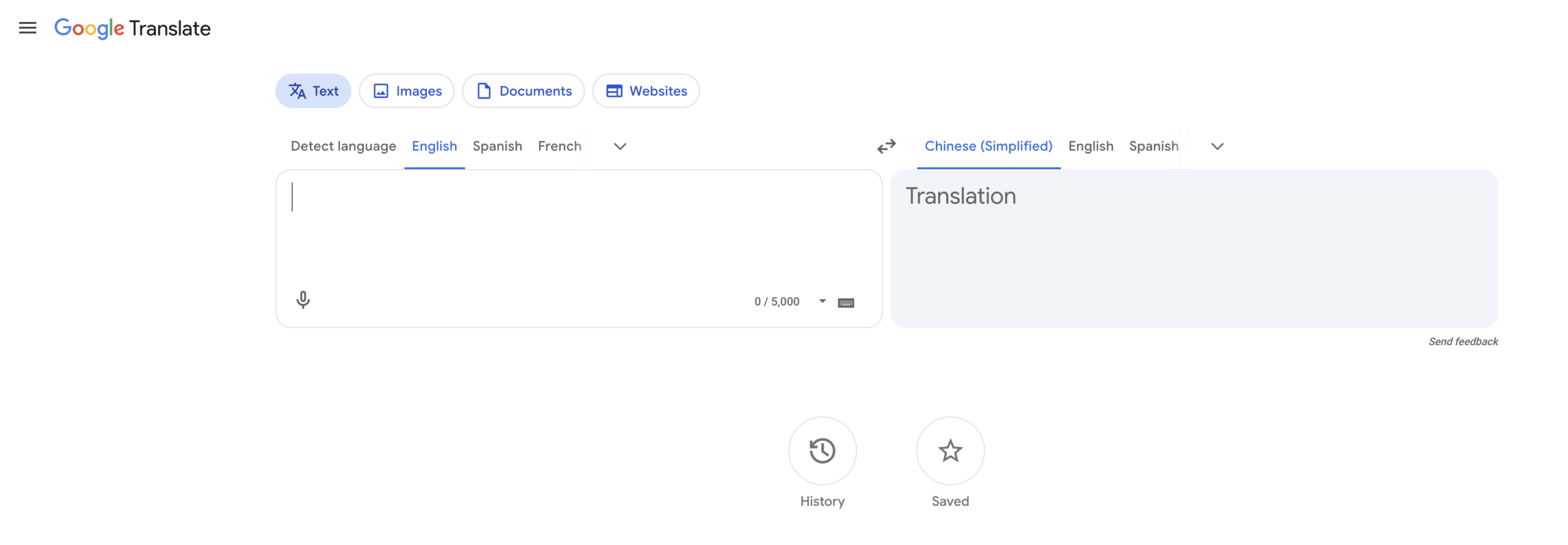
Offline availability deserves a precise qualifier. The current mobile help page says downloadable offline languages for Live Translate are available on Pixel 9, 10, and 11 devices, with a defined set of English-paired languages. That is narrower than the full online Live Translate language list. Test the exact phone, operating system, app version, and pair before depending on a traductor voice google workflow without a connection.
A Source-Capture Test Before Translation
Read this line at a normal pace:
“Marina did not approve 15 units for Thursday; she approved 50 units for Tuesday, model AX-17.”
Before judging the target language, inspect or listen for five source facts:
- Marina is the decision-maker.
- The first clause is negative.
- The numbers are 15 and 50, not interchangeable.
- Thursday is rejected and Tuesday is approved.
- AX-17 is a model code, not ordinary vocabulary.
Run the same line with background noise, a longer distance from the microphone, and one interruption. A useful traductor voice google test must expose capture weaknesses, not protect the app with perfect studio audio.
Handoff 3: From Source Words to the Intended Meaning
Recognition answers “What sounds were heard?” Translation answers “What do those words mean here?” The third handoff must preserve the actor, action, number, date, condition, and level of certainty.
Phone-Call Translation on Recent Pixel Devices
Current Google Pixel documentation says Live Translate for phone calls is available on Pixel 10 and later, including Fold models. On the Pixel 10 series, the interface calls the feature Voice Translate; on Pixel 11 and later, it appears as Live Translate.
The current language list pairs English with French, German, Hindi, Indonesian, Italian, Japanese, Portuguese, Russian, Spanish, and Swedish, with some Pixel 10a exceptions. Required models may need to be downloaded first. During a call, both people hear an announcement before translation begins.
The call translation can work without an internet connection. Official documentation also says conversation audio and transcription are not stored on the device, sent to Google servers, or retrievable after the call. That privacy model is useful, but it also means the user should not expect a transcript to audit later.
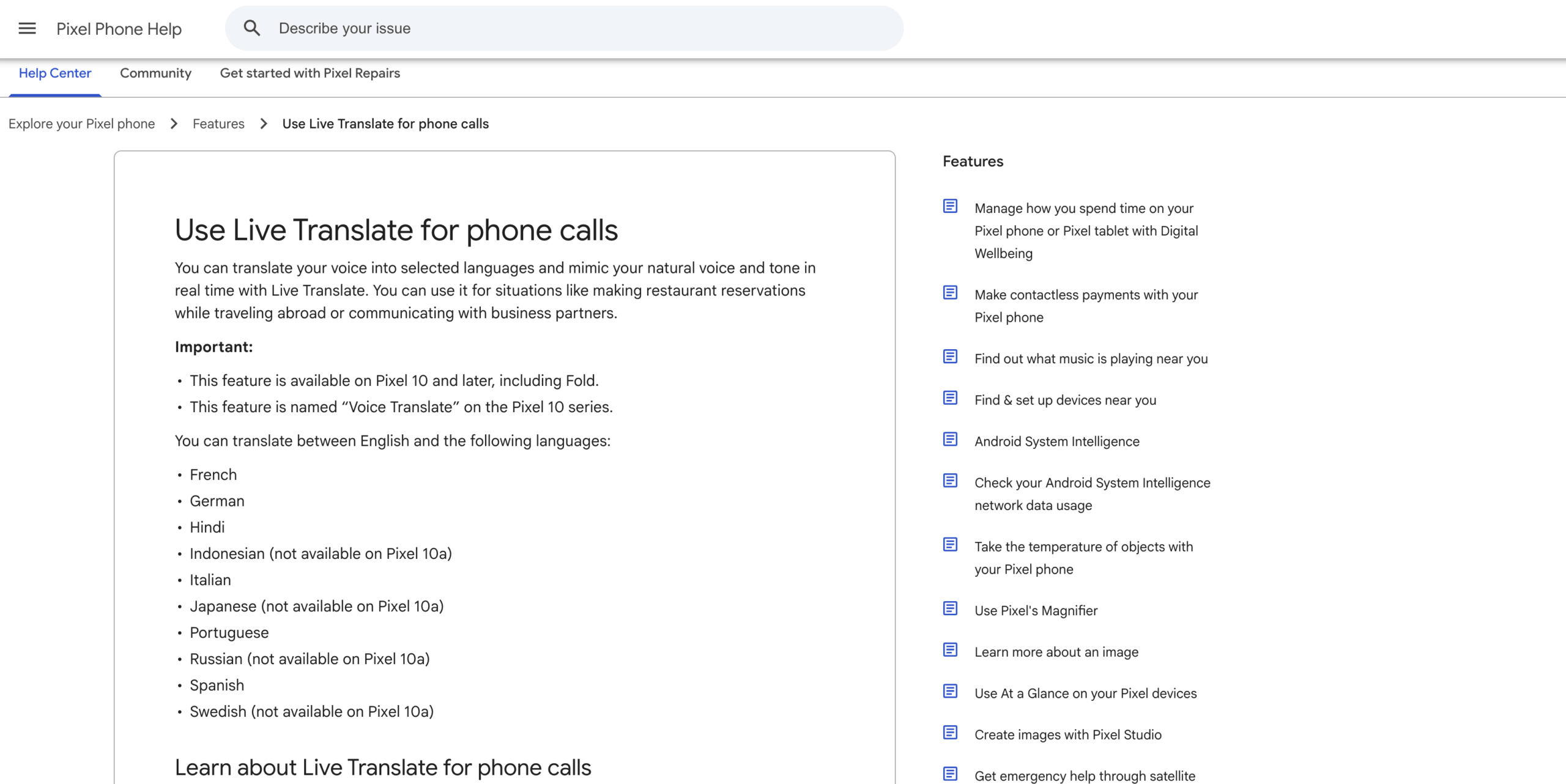
Explore Pixel Call Translation
This route is a strong literal answer to traductor voice google when the job is a normal call and the hardware, region, app, and pair are supported. It is not a universal feature that every phone, employee, customer, or language can use.
Why Terminology Changes the Meaning Test
General translation models may hear a name as a common word, expand an acronym incorrectly, or normalize a model number. For a low-stakes restaurant reservation, the speakers can repeat themselves. For a technical review or supplier call, one wrong component code may change a purchase. Any professional traductor voice google trial therefore needs domain terms, not only everyday greetings.
Build a ten-item test list from the real conversation:
- Two personal names.
- Two company or product names.
- Two specialist terms.
- One acronym.
- One number with a decimal.
- One date and time zone.
- One sentence containing “not,” “unless,” or “except.”
Score factual preservation before accent or voice beauty. Natural audio is valuable only after the meaning is correct.
Handoff 4: From a Translation to the Right Recipient
A translation can be accurate and still reach the wrong place. The phone owner may hear it while the remote participant hears only the original language. A caption may appear for one meeting participant but not the rest. A speaker may play translated audio into headphones that nobody else can access. This delivery gap is the most easily overlooked part of a traductor voice google setup.
Google Meet: Captions and Speech Are Separate Deliveries
Translated captions in Google Meet display translated text for eligible editions and supported languages. A participant chooses the meeting language and a preferred translation language. This is useful when reading is sufficient, but captions do not automatically become translated speech.
Speech Translation is a separate feature. Current official documentation lists eligible consumer, business, enterprise, frontline, and education plans. It translates between English and French, German, Hindi, Italian, Portuguese, or Spanish in a voice like the speaker. It can be delayed by a few seconds for completeness, has a 90-minute limit per meeting, and is not available in livestreams or recordings. Participants must permit their voices to be translated.
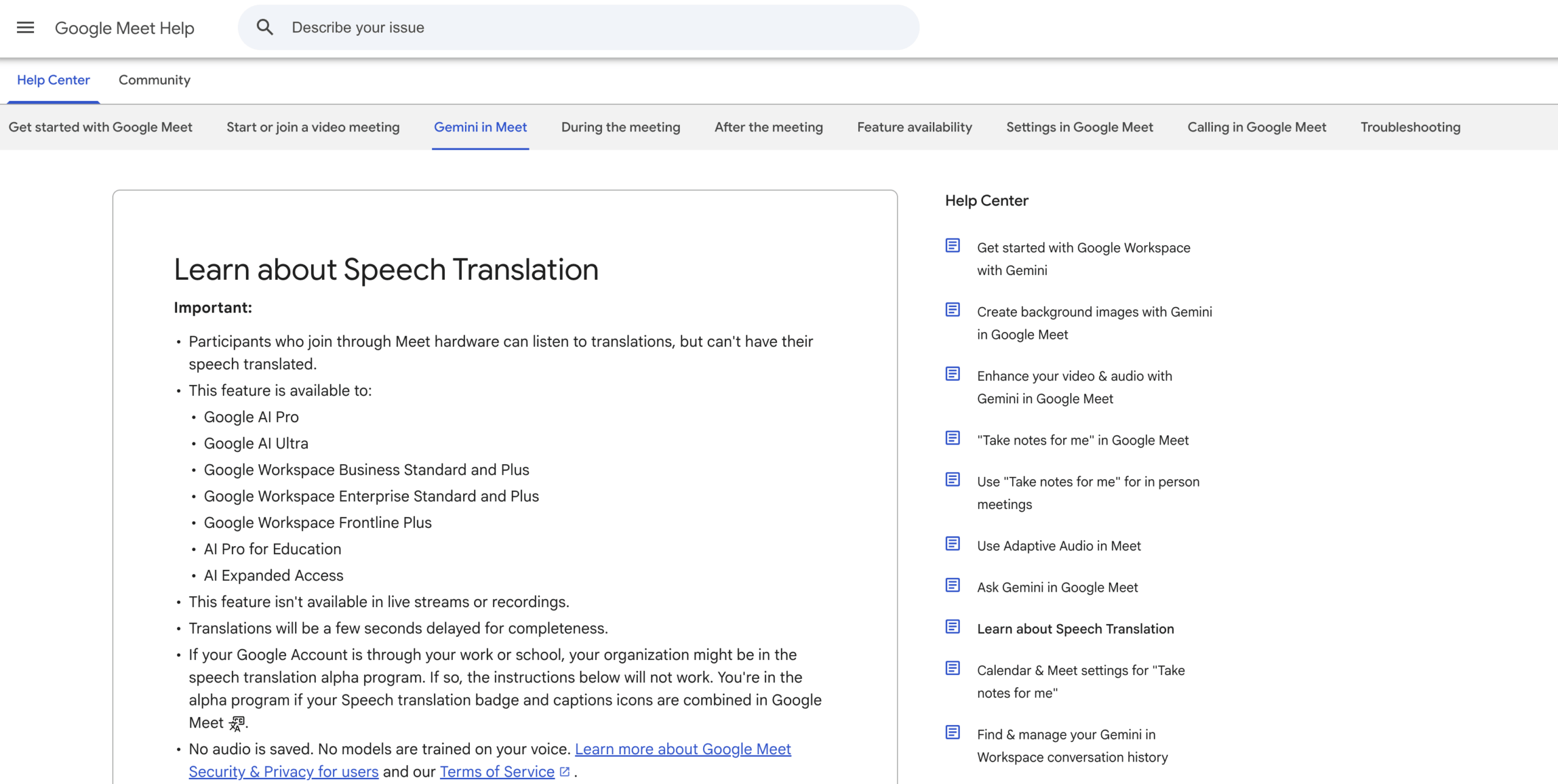
Explore Google Meet Speech Translation
These constraints do not make the feature weak. They define its delivery contract: the meeting is inside Google Meet, the account is eligible, the pair is supported, and participants follow the consent and device workflow.
Cross-Platform Delivery with Transync AI
When a traductor voice google search actually means “translate whichever meeting platform my client uses,” a platform-specific feature may be too narrow. Transync AI can capture live microphone and computer audio for live meeting translation alongside common meeting environments.
Its bilingual captions let the operator compare source and target text. Its AI voice translator can play translated speech, while playback delay controls whether the voice starts instantly or waits through a short pause for a more complete phrase.
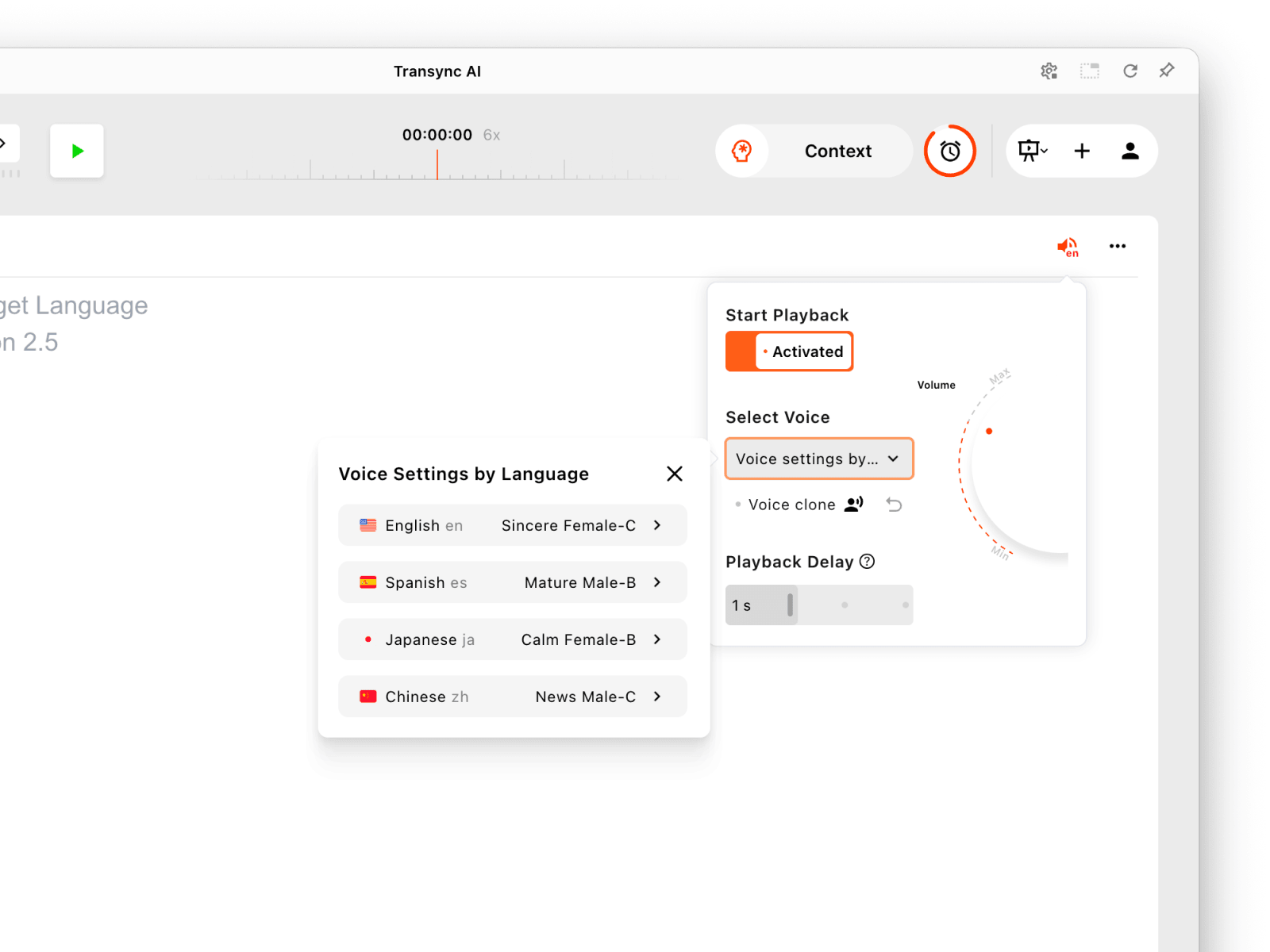
Configure voice playback separately for each presentation language.
For remote delivery, audio routing matters. On macOS, the virtual microphone can send translated playback into the meeting as the selected microphone input. On Windows, the documented workflow uses a virtual audio cable. Screen sharing with computer audio is another route when the meeting platform supports it. The operator should enable only the playback direction intended for the other participant, or the other person may hear their own speech translated back.
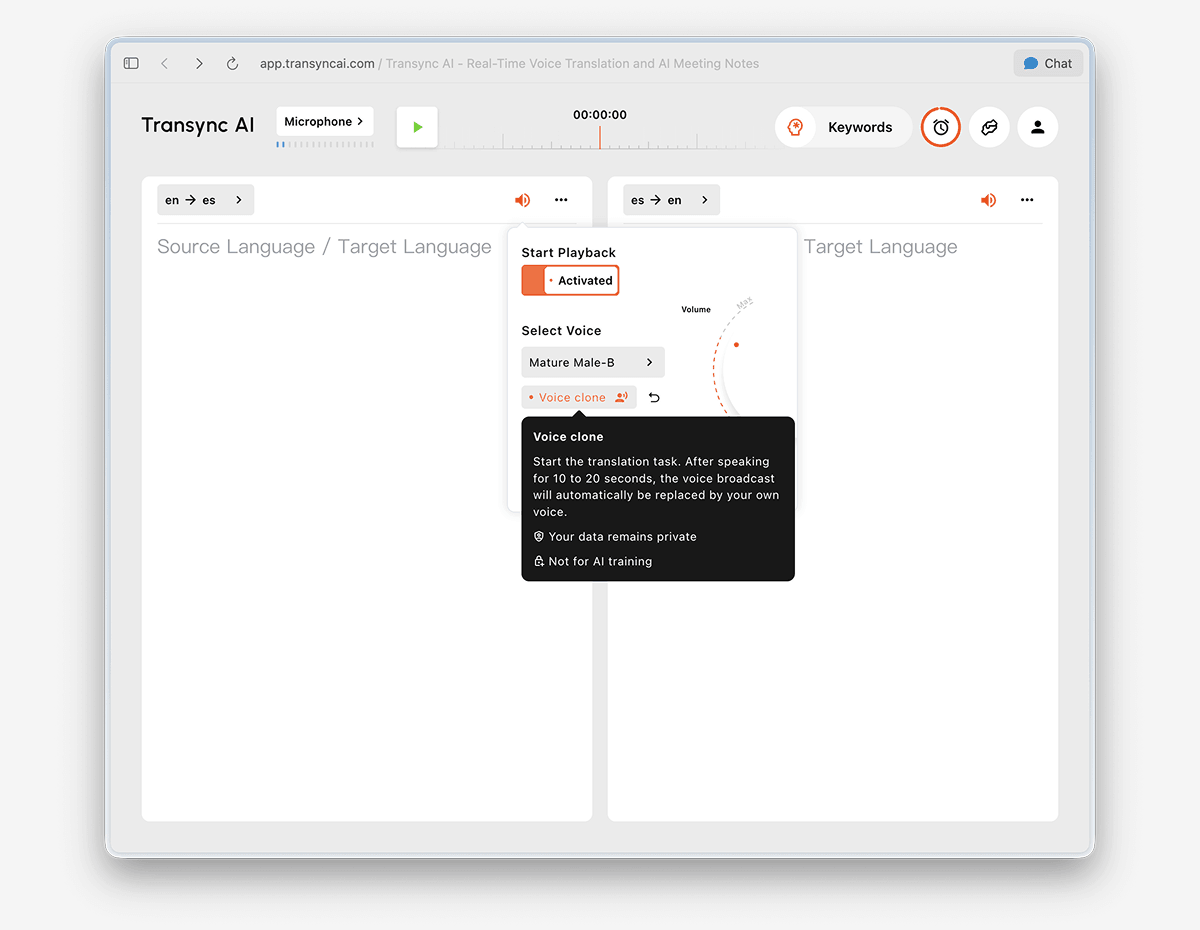
This makes Transync AI a meeting workflow, not a replacement for every Google Translate travel use case or Pixel call feature. It requires an online connection and is not a general text, image, document, or offline translator.
A Recipient Contract Prevents Silent Failure
Before starting, complete this one-line contract:
| Field | Example decision | Why it matters |
|---|---|---|
| Source | Remote participant in a browser meeting | Determines microphone or system-audio capture |
| Operator | Host on a MacBook | Determines permissions and routing options |
| Recipient | Client inside the meeting | Prevents translation from playing only to the operator |
| Output | Spanish voice plus bilingual captions | Separates hearing from reading |
| Direction | English to Spanish only | Reduces echo and translated speech loops |
| Record | Transcript and action summary | Determines retention, access, and follow-up |
| Fallback | Chat plus a human interpreter contact | Gives the meeting a recovery path |
The recipient contract is especially useful because traductor voice google says nothing about the listener. A complete traductor voice google plan names the recipient and channel before the microphone turns on. “The translation works on my screen” is not proof that the intended person received it.
Handoff 5: From the Live Moment to a Usable Record
Some conversations should disappear when they end. Others need decisions, quotations, action owners, or subtitles afterward. The fifth handoff is therefore a deliberate choice, not an automatic benefit. Retention should be part of the traductor voice google requirement from the beginning.
Ephemeral Calls Versus Account Records
Pixel phone-call translation emphasizes an ephemeral, on-device path: official documentation says audio and transcription are not stored or retrievable after the call. That can be a privacy advantage for a quick exchange, but it will not create minutes for a project review.
Google Meet translated captions can be reviewed during the portion of the meeting in which a participant was present and had captions enabled. Recording, caption embedding, transcripts, and other meeting artifacts depend on the exact feature, plan, settings, and organizational policy. Do not assume that hearing translated speech automatically creates a bilingual record.
Transync AI can preserve original and translated text and generate AI meeting notes. A summary is not a verbatim transcript: it selects and compresses information. Important numbers, approvals, quotations, and deadlines should be verified against the transcript.
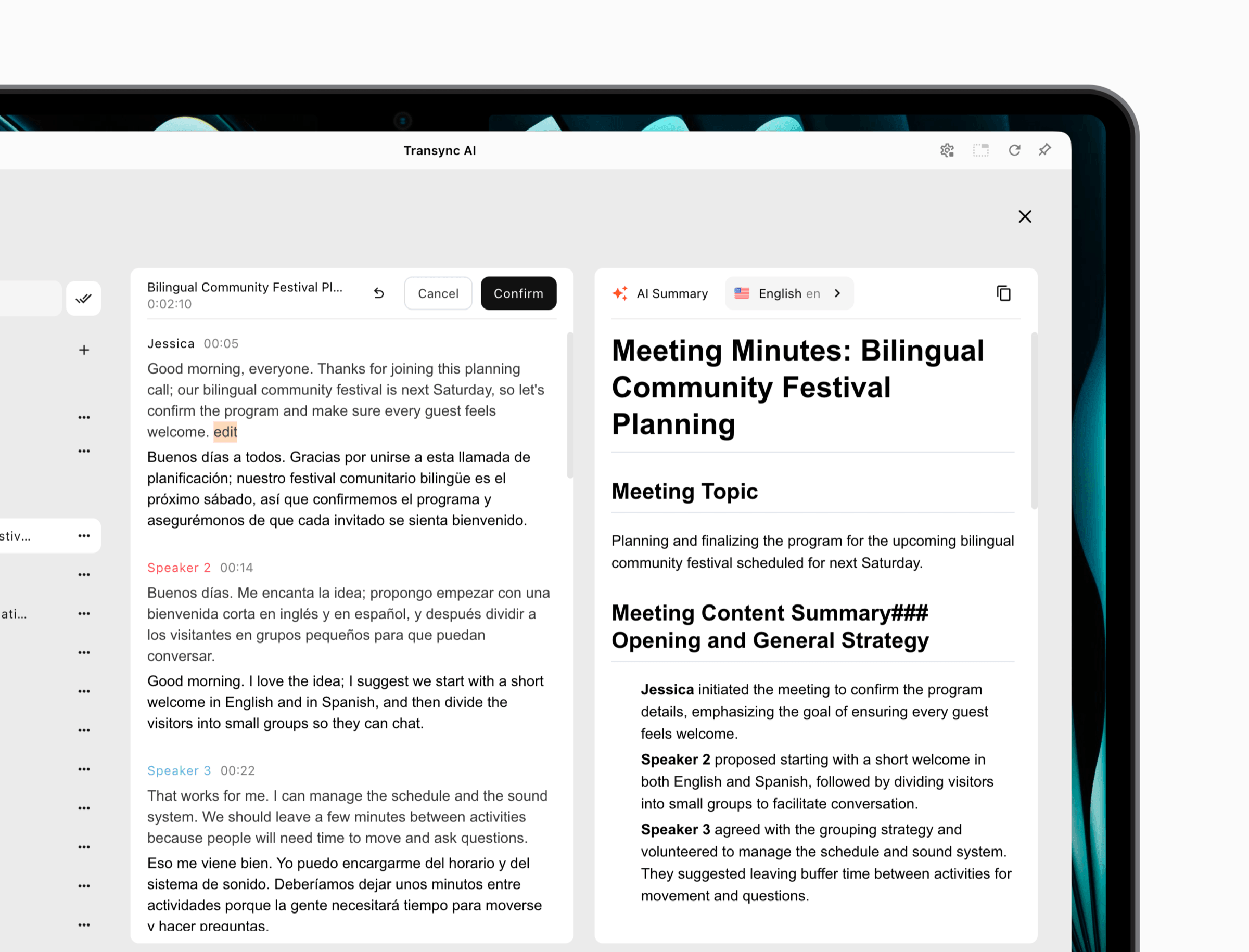 For specialized meetings, users can prepare names, terminology, and background through keywords and context before the session. This improves the workflow around the meaning handoff, but users should still test the actual language pair and subject matter.
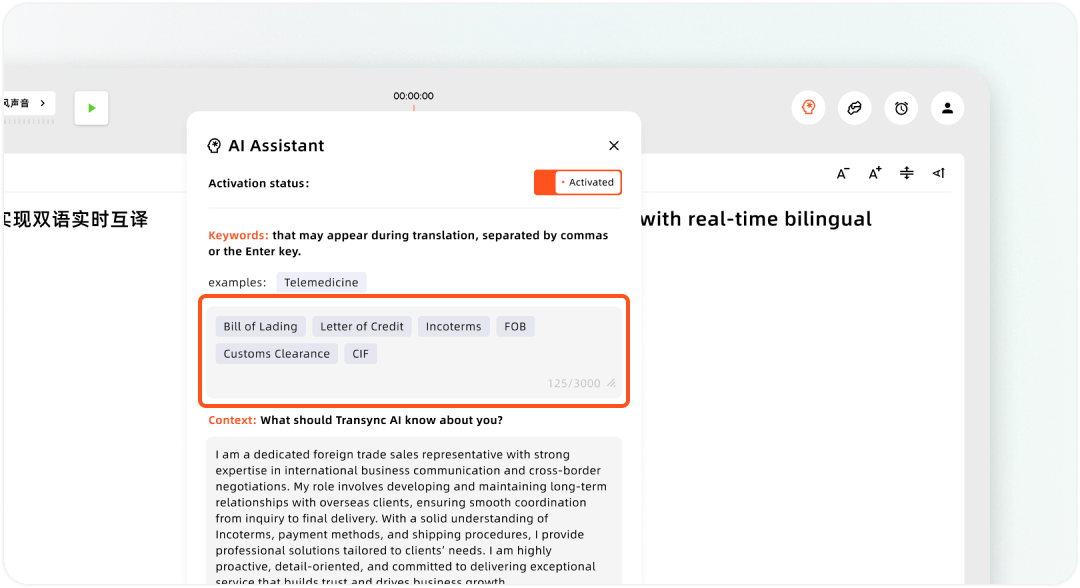
Setting up custom keywords and user context in the Transync AI Assistant
The right traductor voice google alternative is not always the tool that stores the most. It is the tool whose retention behavior matches consent, legal obligations, and the purpose of the conversation.
Product Comparison Across the Five Handoffs
| Product or feature | Best source | Translation delivery | Offline position | Record afterward | Best fit | Main limitation |
|---|---|---|---|---|---|---|
| Google Voice | Domestic or international calls | No general live translation layer | Calling behavior varies | Call-service records vary by feature | Phone number and call management | Not a voice translator |
| Google Translate Live Translate | Face-to-face speech or personal listening | Text, device speaker, or headphones | Selected offline pairs on Pixel 9–11 | Session-oriented, not meeting-note focused | Travel and short personal conversations | Phone-centered workflow |
| Pixel Voice Translate / Live Translate | Supported Pixel phone calls | Translated voice for both callers | Yes, for supported call setup | Audio/transcription not retrievable | Compatible calls on Pixel 10+ | Hardware, region, app, and language limits |
| Google Meet translated captions | Speech inside Meet | Participant-selected translated text | No | Feature and plan dependent | Reading multilingual meetings in Meet | Text is not translated voice |
| Google Meet Speech Translation | Speech inside Meet | Translated voice resembling the speaker | No | Not available in recordings | Eligible Meet calls using supported English pairs | Few-second delay, 90-minute limit, platform rules |
| Transync AI | Microphone and computer audio | Bilingual captions and translated voice | No | Transcript and AI meeting notes | Cross-platform multilingual meetings | Requires audio setup; not a file or document translator |
This comparison turns traductor voice google into a procurement question. Choose by source, recipient, output, hardware, platform, and record—not by brand familiarity alone.
A 90-Second Field Test
Use one realistic passage instead of random phrases:
“Hello, this is Marina from Northwind. We need model AX-17—not AX-70—delivered by Tuesday at 3:30 p.m. Pacific Time. The quantity is 50, and approval is conditional on the revised safety certificate.”
Seconds 0–30: Capture
Speak once clearly and once with moderate background noise. Confirm the name, company, model, negation, quantity, time, and condition in the source text.
Seconds 31–60: Meaning
Check the target text or voice for the same seven facts. Do not award a pass because the sentence sounds fluent. A wrong model number or lost condition is a failure.
Seconds 61–90: Delivery
Ask the intended recipient to repeat the facts. Confirm that they heard or saw the translation in their own channel—not merely on the operator’s device. Then check whether the required record exists and can be accessed by the right person.
Repeat the traductor voice google test after changing headphones, meeting platform, network, or language direction. Those changes can expose a routing problem that a perfect first demonstration hides.
Failure Diagnosis by Handoff
| Symptom | Likely handoff | First check |
|---|---|---|
| The microphone icon is disabled | Capture | App/browser permission and supported source language |
| Fluent output contains the wrong number | Capture or meaning | Compare the source recognition before judging translation |
| The operator hears Spanish but the client does not | Delivery | Speaker, screen-audio share, or virtual microphone routing |
| The same translated sentence repeats back | Delivery | Disable the unintended playback direction and check echo paths |
| Speech Translation is missing in Meet | Product or eligibility | Host plan, admin setting, region, device, age, and language pair |
| Live Translate works online but not offline | Eligibility | Pixel generation and downloadable offline pair |
| No transcript exists after a translated call | Memory | Confirm whether the chosen feature promises retention |
A good traductor voice google troubleshooting process identifies the failed handoff before switching products. Reinstalling an app will not fix an unsupported plan, and changing translators will not fix audio sent to the wrong participant.
Privacy Questions for Voice Translation
Ask these questions before a sensitive conversation:
- Is speech processed on the device, in the cloud, or through both paths?
- Is audio stored, even temporarily?
- Is source or translated text retained?
- Can the user retrieve or delete the record?
- Is voice data used for model training?
- Who controls the account, organization, and meeting settings?
- Does every participant know that translation is active?
Do not copy one privacy statement across an entire product family. Pixel phone-call translation, Google Translate Live Translate, Google Meet Speech Translation, and Google Voice are different workflows. Their processing, storage, account, and consent behavior must be checked separately.
For high-stakes legal, medical, immigration, safety, or financial communication, use a qualified human interpreter or reviewer according to the applicable requirements. Consumer convenience is not a substitute for professional responsibility.
Frequently Asked Questions
Is Traductor Voice Google an Official Product Name?
No. traductor voice google is a search phrase, not the official name of one application. For personal speech translation, the likely destination is Google Translate. For compatible Pixel phone calls, investigate Voice Translate or Live Translate. For meetings, check Google Meet translated captions or Speech Translation.
Does Google Voice Translate International Calls?
No general live interpretation feature is described in the official calling instructions. Google Voice can place international calls and charge the applicable rate, but placing a call does not automatically translate the speakers.
Can Google Translate Play the Translation Aloud?
Yes, for supported languages and modes. Live Translate can provide conversation playback, listening through headphones or the device, text-only output, and face-to-face text. Availability depends on the current app, device, language, and mode.
Can Traductor Voice Google Work Offline?
Some routes can. Pixel call translation is documented as working without an internet connection for supported setups. Offline Live Translate downloads are currently limited to specified Pixel generations and English-paired languages. Google Meet and Transync AI are online meeting workflows.
Is Google Meet Speech Translation the Same as Translated Captions?
No. Translated captions provide text. Speech Translation provides translated voice for supported English language pairs and eligible meetings. They have different controls, coverage, and delivery.
When Is Transync AI a Better Fit?
Choose Transync AI when the conversation may happen across different meeting platforms and the team needs bilingual captions, translated voice routing, prepared terminology, a transcript, and meeting notes in one workflow. Choose the Google route when its device or platform boundary matches the task more directly.
How Should I Evaluate Traductor Voice Google Accuracy?
Test names, numbers, negation, dates, model codes, specialist terms, interruptions, background noise, and the recipient’s actual channel. Check source recognition before translation and factual meaning before voice naturalness.
Final Verdict
The best answer to traductor voice google is not one logo or microphone button. It is a complete audio path.
Use Google Translate for phone-centered personal listening and conversation. Use Pixel call translation when a supported Pixel 10-or-later setup matches the phone call and language pair. Use Google Meet when the meeting, account, recipients, and supported output all live inside Meet. Use Transync AI when a cross-platform meeting needs bilingual captions, translated voice, terminology support, and a usable record afterward.
The five handoffs make the decision auditable: select the right product, capture the correct speech, preserve meaning, deliver it to the intended listener, and retain only the record the conversation truly needs. That is a stronger traductor voice google test than simply hearing a fluent synthetic voice.
