

Test traducción en voz with four real-audio checks and choose the right tool for travel, meetings, live events, or multilingual video.
Traducción en voz may look effortless in a product demo: one person speaks, a clean translation appears, and another voice plays it aloud. Real audio is less cooperative. People use accents, interrupt each other, say similar numbers, mention unfamiliar names, and join calls through imperfect microphones. A fluent synthetic voice can then deliver the wrong message with complete confidence.
This guide does not begin with a generic list of translation apps. It follows one sentence through four tests: capture, meaning, voice, and delivery. That process separates a travel translator from a meeting system, an in-person conversation tool, and a media-dubbing platform.
The Short Answer
The Spanish phrase traducción en voz is commonly used to search for several related tasks: translating speech into captions, translating speech into spoken output, making typed translations audible, or dubbing recorded media. Those workflows share technology, but they do not require the same product.
For live meetings and calls, Transync AI combines bilingual captions, translated voice playback, prepared terminology, and post-meeting notes. DeepL Voice provides business-focused products for online meetings and in-person conversations. iTranslate is better aligned with mobile travel tasks that may involve voice, text, camera input, or offline use. Maestra is the more relevant category when the final deliverable is a dubbed video, localized audio file, or multilingual voice-over.
The right choice depends on where the translated voice must go. A phrase played through a phone speaker is different from translated audio routed into a video call. Both are different from a polished track that will be edited and published.
What Can Traducción en Voz Mean?
Before comparing products, identify the direction of information.
| Workflow | Input | Main output | Typical use |
|---|---|---|---|
| Speech-to-translated-text | Live speech | Captions in another language | Following a meeting silently |
| Voice-to-voice translation | Live speech | Spoken translation, often with captions | Calls and face-to-face conversations |
| Text-to-translated-speech | Typed text | Written and spoken translation | Playing a prepared phrase while traveling |
| Dubbing | Recorded audio or video | Edited target-language voice track | Courses, interviews, and marketing video |
A media platform may create excellent translated audio after several minutes of processing and editing, yet be unsuitable for a live interruption. A mobile app may speak immediately but provide no script editor, lip synchronization, multitrack export, or team review.
If a product page says “voice translation,” ask whether voice is the input, output, or both. Then ask whether the result is intended for the person beside the device, a remote meeting participant, an audience, or a future viewer.
The Test Sentence
Use the same sentence for all four checks:
“Do not send fifty units on March 13. Send fifteen on March 30 to Ana María from the XR-17 team.”
This sentence contains negation, similar numbers, two dates, an accented name, and an alphanumeric code. It tells you far more about traducción en voz than a greeting does. Each element can survive or fail at a different stage.
When testing another language pair, preserve the structure. Replace the name and code with terms your team actually uses, but keep the negation, similar numbers, and dates. Run every product with the same device, microphone, room, network, and speaking pace.
Test 1: Did the System Hear the Source Correctly?
Every live traducción en voz workflow starts with speech recognition. If the system hears “fifty” instead of “fifteen,” a later translation can be grammatically perfect and operationally disastrous.
Run the capture test in three conditions:
- Read the sentence slowly in a quiet room.
- Repeat it at normal speed with café noise in the background.
- Ask a second speaker with a different accent to read it.
Watch the source transcript, not only the translation. Some systems display provisional words and revise them as more context arrives. Others wait for a sentence boundary before showing stable text. That behavior affects perceived latency and determines how quickly a user can spot a mistake.
A useful traducción en voz workflow should expose both the recognized source and the target. Bilingual captions reveal whether the error began at the microphone, recognition, translation, or playback stage. If the interface only produces final audio, the user may never discover that “do not” disappeared.
Transync AI is built for live conversations. Its live meeting translation workflow can capture a microphone or shared computer audio, display bilingual subtitles, and play translated speech. It works across web, desktop, and mobile environments. It requires an internet connection and is not a general offline, image, document, or pasted-text translator.
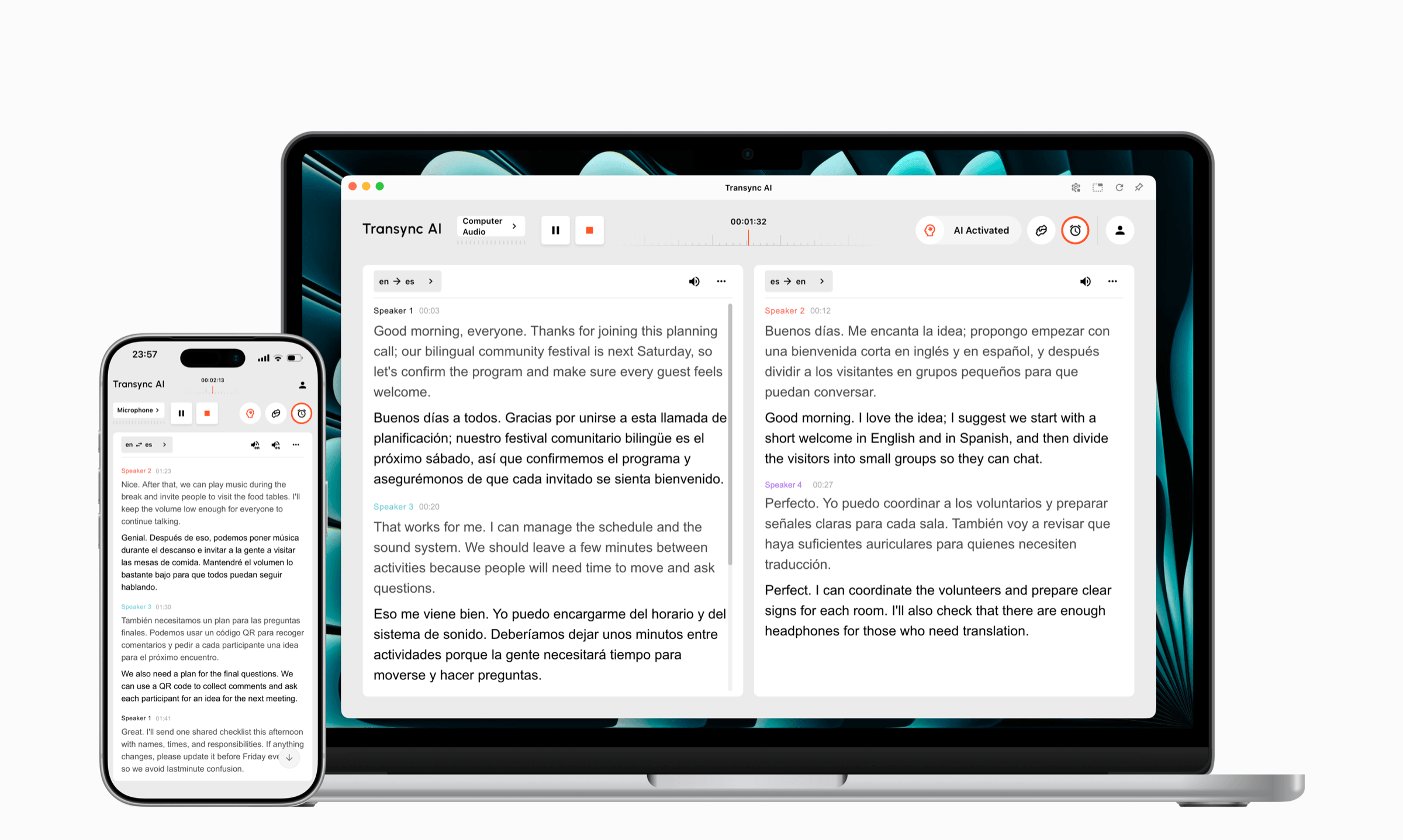
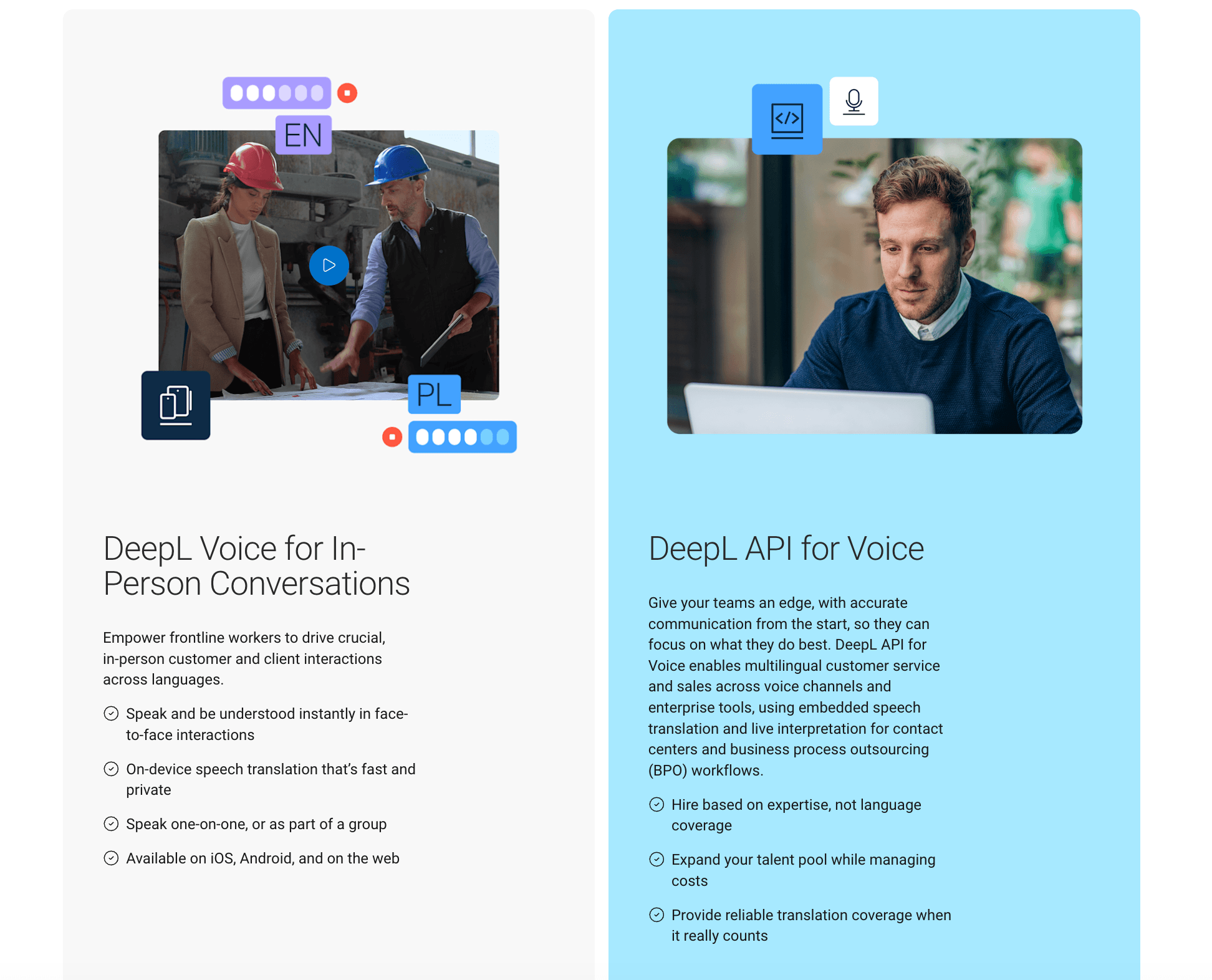
DeepL Voice offers an in-person conversation product for iOS, Android, and the web, including face-to-face views and group conversations. Its current desktop application can also detect Zoom, Microsoft Teams, and Google Meet calls, show translated subtitles in an overlay, and provide voice-to-voice translation.
Score the Capture
Give two points when an element is correct, one when it requires a minor repair, and zero when it changes meaning. Score these five elements: negation, quantity, date, name, and code. Repeat the test five times; consistency matters more than one perfect attempt.
Use the production microphone. A laptop microphone, Bluetooth headset, conference-room array, and shared presentation audio produce very different input. A traducción en voz test with the wrong microphone measures a setup you will never use.
Test 2: Did the Translation Preserve the Intention?
Accurate transcription does not guarantee accurate meaning. A reliable traducción en voz workflow must preserve intent after it recognizes the words. “Send” could refer to a file, a shipment, or a person. “Team” may need a different term depending on industry and region. Formality can also change whether the sentence sounds like a request, an instruction, or a reprimand.
Test traducción en voz with three levels of preparation:
- No context: submit only the test sentence.
- Short context: add “This is a logistics meeting about a spare-parts shipment.”
- Prepared context: identify “XR-17” as an untranslatable code and “Ana María” as a person’s name.
Review the target text before listening to it. Check who performs the action, whether negation survives, how the quantities are written, whether dates become ambiguous, and whether names remain intact. In language pairs with different date conventions, avoid reducing “March 13” to a numerical form that can be misread.
Transync AI provides Keywords and Context for names, brands, acronyms, paired terms, and meeting background. This is useful in recurring supplier calls, product demonstrations, classes, and technical discussions. It does not make automated output infallible, but it gives a team a repeatable way to test whether preparation fixes a known terminology error.
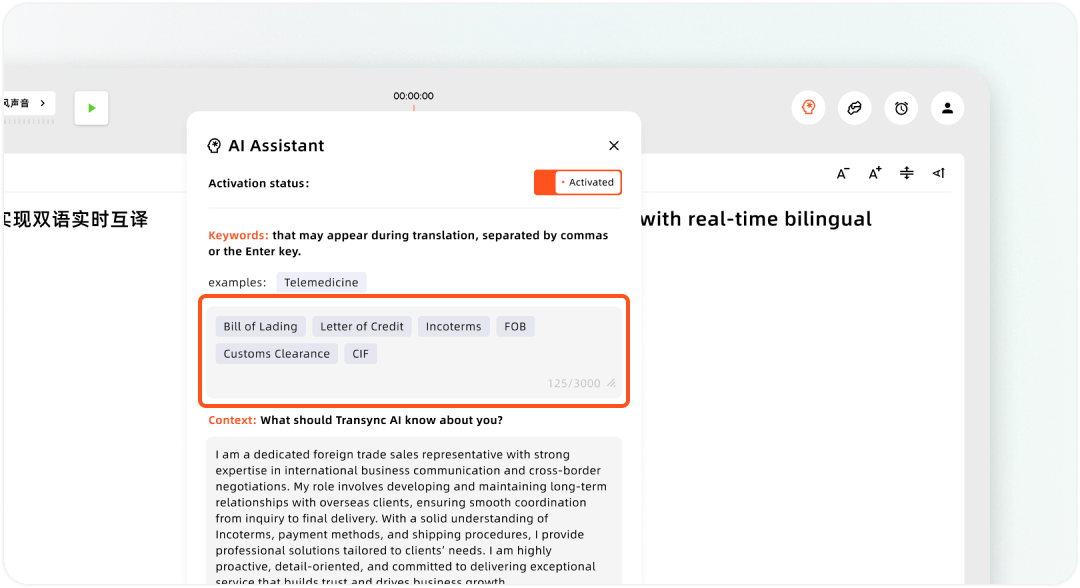
Setting up custom keywords and user context in the Transync AI Assistant
DeepL Voice provides glossaries, spoken terms, and formality-related controls depending on the product and plan. Its current business materials position those features as ways to stabilize company terminology and product names during spoken communication.
A serious traducción en voz review should answer six questions:
- Does the translation preserve the actor and action?
- Does it retain the negation?
- Does it distinguish 15 from 50?
- Does it protect names and codes?
- Does it use the intended level of formality?
- Does it avoid an ambiguous date?
For medical treatment, consent, immigration, finance, legal rights, emergencies, or safety instructions, a high score does not replace a qualified human interpreter and appropriate professional review.
Test 3: Does the Target Voice Clarify or Conceal?
Now listen to the result. Natural speech can reduce caption fatigue, support people who cannot watch a screen, and maintain conversational flow. It can also make a mistranslation sound more trustworthy.
Evaluate five elements of traducción en voz output:
- Pronunciation of names and codes.
- Pace and pauses.
- Difference between a question, statement, and warning.
- Suitability of the regional voice.
- Delay before playback begins.
iTranslate is a consumer-oriented choice for travel, language learning, and everyday communication. Its current official pages describe text translation across 100+ languages, voice translation, customizable voices, camera input, a keyboard extension, and offline features. Text, recognition, playback, and offline coverage should not be assumed to be identical; users need to verify the exact language, device, mode, and plan.
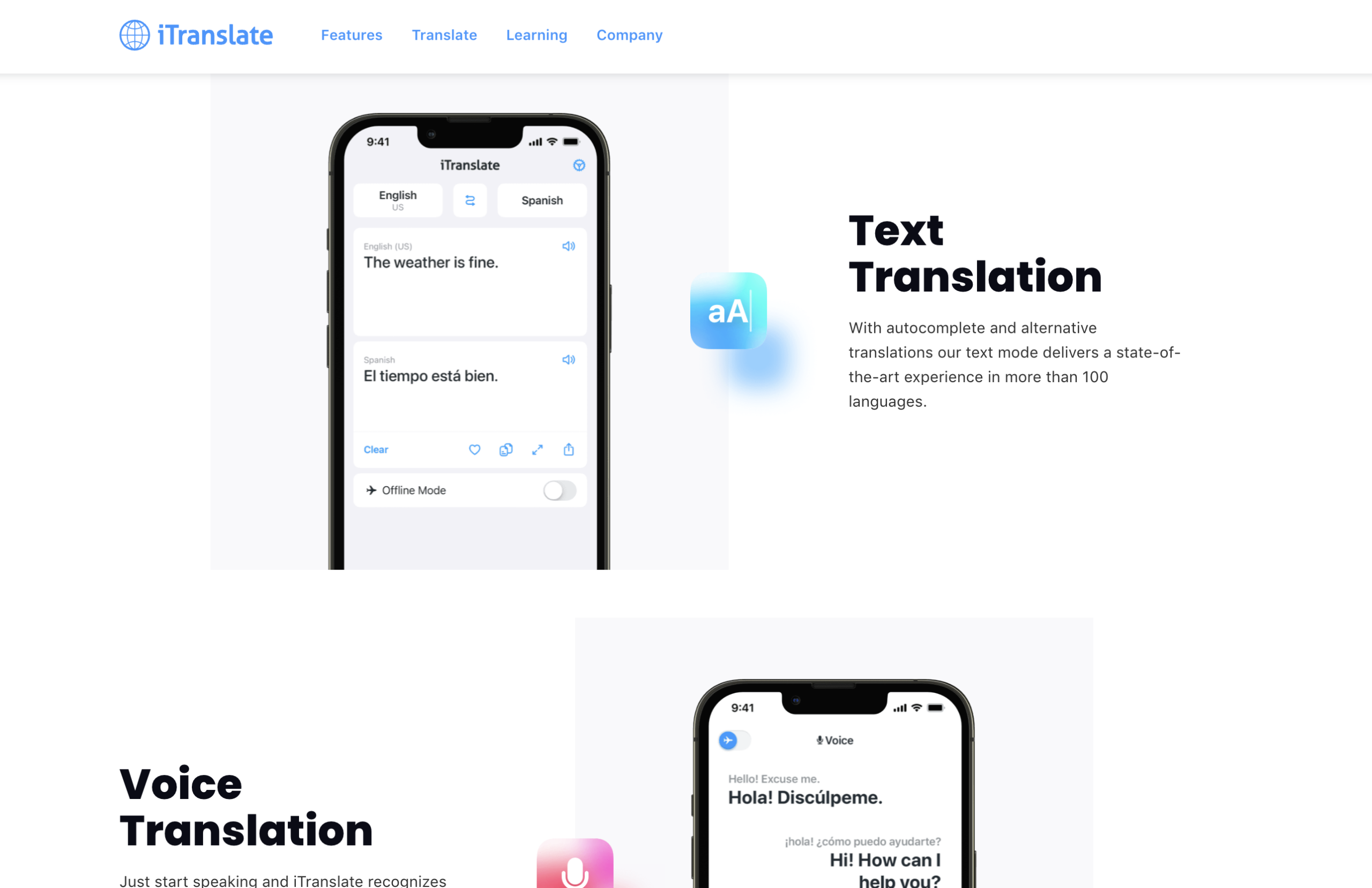
A mobile product such as iTranslate can be more practical than a meeting platform when the listener is standing beside the phone. If offline use matters, download the required language, enable airplane mode, close and reopen the app, enter a new phrase, translate it, and play it. Replaying a cached favorite does not prove that the complete workflow operates offline.
Transync AI distinguishes its 60+ real-time translation languages from the 40+ languages currently available for voice playback. That distinction matters: “supported language” does not mean every voice, style, or speech function is available. Its AI voice translator supports voice selection, playback timing, and voice cloning where available.
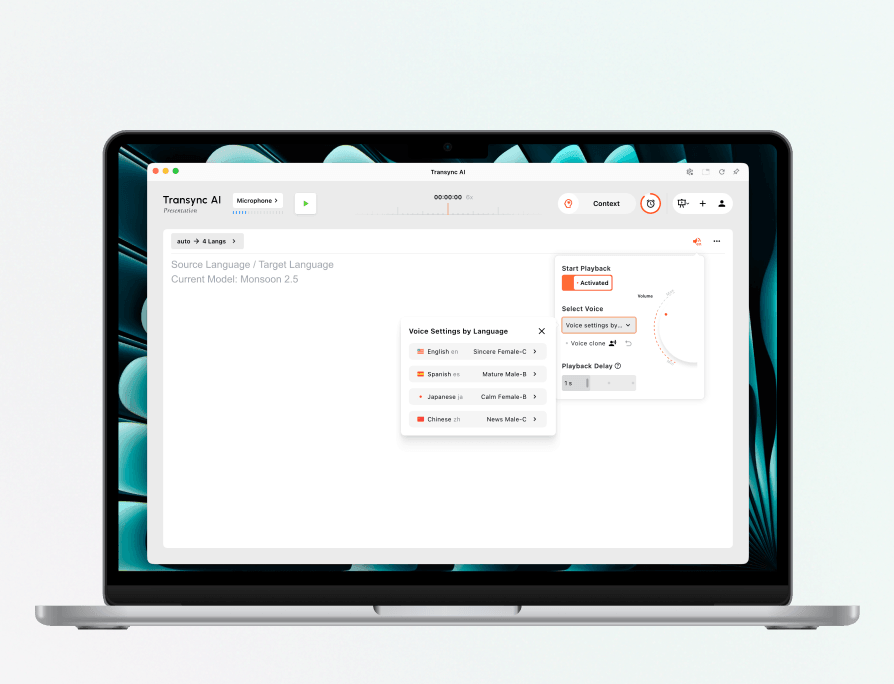
Configure voice playback separately for every presentation language.
DeepL Voice announced in September 2026 that its unified desktop app and voice-to-voice translation for Zoom, Teams, and Meet were generally available. Its current voice models can preserve speaker characteristics, with voice preservation initially released for 12 languages. Buyers should confirm current availability before promising that experience in a particular language.
Test Whether Natural Speech Creates False Confidence
Play one intentionally wrong version: “Send fifty units on March 13.” Ask a listener who cannot see the screen to rate their confidence in both the correct and incorrect versions. If both sound equally authoritative, the workflow needs a visible confirmation step for consequential details.
The best traducción en voz does not hide the text. Audio makes communication easier; visible text makes it inspectable.
Test 4: Did the Voice Reach the Correct Listener?
Delivery changes with the setting. An end-to-end traducción en voz test must follow the sound to the recipient. A phone speaker may be enough in person. A remote meeting requires translated audio to enter the call. A presentation may need a separate language on every attendee’s device. A recorded video requires an exportable track.
In-Person Conversation
Place the phone at the distance you expect in real use, add ambient noise, and ask the listener to repeat the translated number, name, and deadline. Check volume, replay, and face-to-face display. iTranslate fits a mobile exchange, while DeepL Voice offers a workplace product specifically for individual and group in-person conversations.
Online Meeting
Holding a phone beside a laptop speaker can create feedback, weak remote audio, and recognition loops. Transync AI can send translated playback through a virtual microphone in compatible workflows. On macOS, the translation microphone can be activated in the app. On Windows, the current setup may use a third-party virtual audio cable. Both routes should be rehearsed before an important call.
The desktop app from DeepL Voice currently supports Zoom, Microsoft Teams, and Google Meet. Test from a second account. The organizer’s local sound is not proof of what remote participants receive.
Presentation or Class
One-to-many traducción en voz needs distribution, not merely a louder speaker. Presentation Mode in Transync AI lets a host configure up to ten target languages and invite the audience through a link, QR code, or Room ID. Each attendee chooses from enabled languages, reads live translation, and can hear playback when the host enables it. The feature is currently Beta. Attendees do not send speech back into the host’s task, so it suits lectures, training, and webinars better than an open multilingual debate.
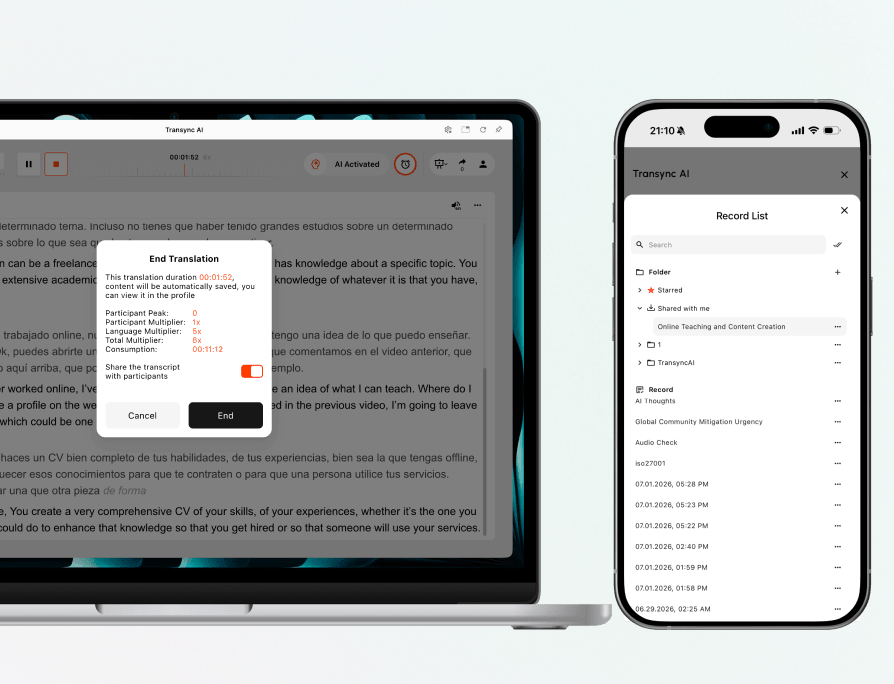
Choose whether to share the transcript when the presentation ends.
Recorded Video, Podcast, or Course
Maestra is a media-localization platform. Its current official site combines transcription, translation, subtitles, text-to-speech, AI dubbing, voice cloning, and lip synchronization. It describes audio and video translation across more than 125 languages and supports exports such as subtitles or video with embedded voice-over.
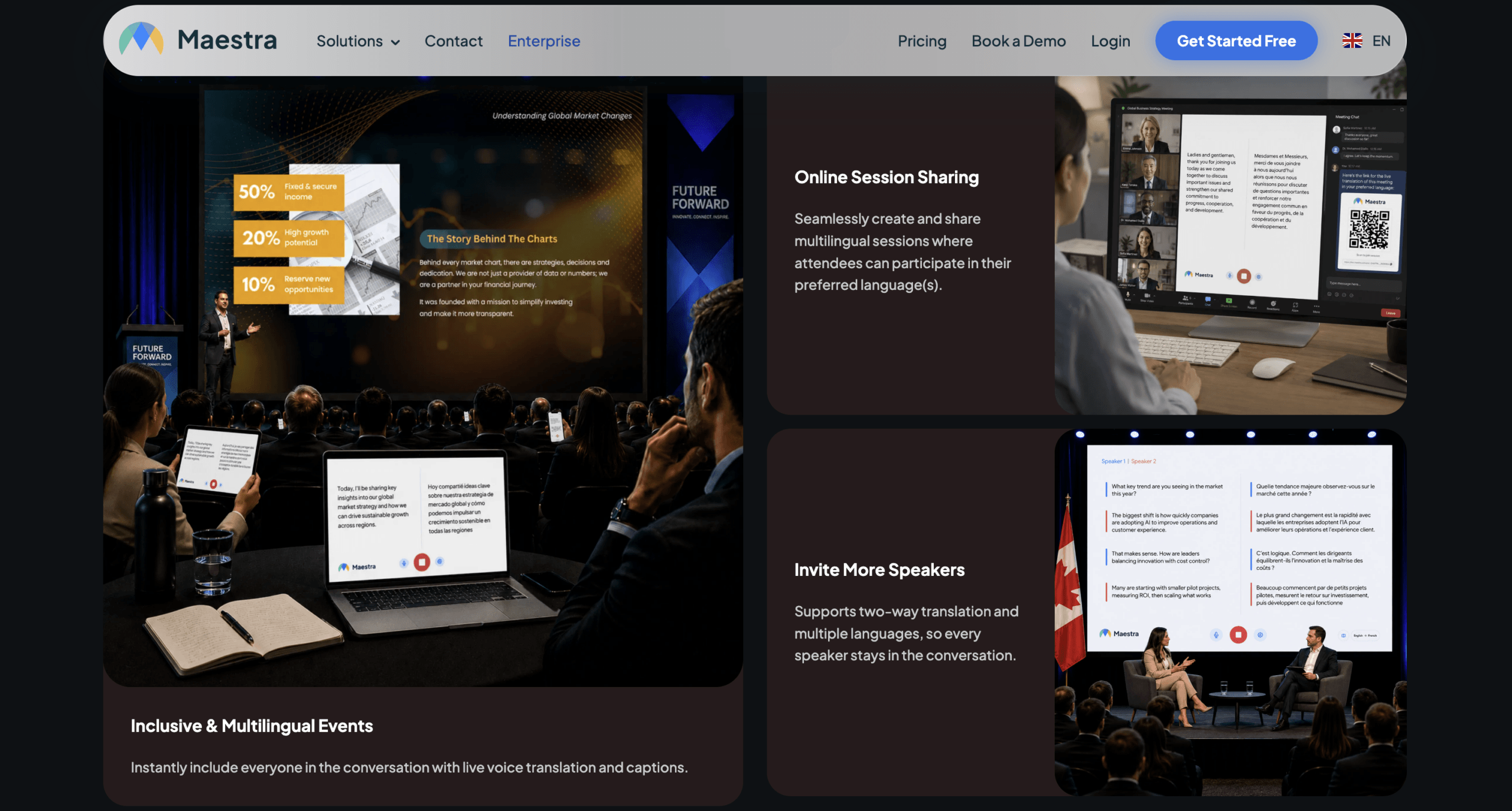
Maestra also provides live capabilities, but its clearest differentiation appears when a team has a file, script, editing stage, and published output. Do not judge that workflow by the latency standard of a two-person conversation. For media, reviewability, synchronization, pronunciation, voice consistency, and export formats matter more.
Traducción en Voz Comparison by Destination
This traducción en voz table does not declare one universal winner. It maps each product to the job it is designed to complete. Verify current language, voice, plan, platform, and offline availability before buying.
| Product | Primary input | Spoken output | Live workflow | Record or file | Best fit | Boundary to verify |
|---|---|---|---|---|---|---|
| Transync AI | Speech, microphone, and system audio | Playback in 40+ languages; voice cloning where available | Meetings, calls, conversations, and presentations | Transcript and AI meeting notes | Teams needing bilingual captions, translated speech, and follow-up | No general text, document, image, or offline translation |
| DeepL Voice | In-person or meeting speech | Voice-to-voice in current supported workflows | In-person conversations, groups, Zoom, Teams, and Meet | Business live-communication workflow | Organizations evaluating DeepL’s language ecosystem | Confirm license, language, and speaker-preservation availability |
| iTranslate | Mobile voice, text, and camera input | Customizable voices where supported | Travel and mobile conversations | History, favorites, and shareable phrases | Everyday mobile translation and trips | Voice and offline coverage vary by language and plan |
| Maestra | Audio, video, text, and live streams | Text-to-speech, dubbing, cloning, and live voice | Media streams and selected live events | Editable projects and exported subtitles or video | Video, course, podcast, and media localization | Do not confuse media processing with low-latency conversation |
To choose a traducción en voz solution, finish this sentence: “The translated voice must reach __, and afterward I need __.” If the answer is “the person beside my phone, and no record,” a travel app may be enough. If it is “remote participants, plus notes,” use a meeting workflow. If it is “future viewers of a finished video,” choose editing and export.
A 40-Point Scorecard
Run all four tests with the same language pair and assign zero to two points for every criterion.
| Test | Criteria | Maximum |
|---|---|---|
| Capture | Negation, quantity, date, name, and code | 10 |
| Meaning | Action, register, terminology, ambiguity, and date format | 10 |
| Voice | Pronunciation, pace, intonation, regional fit, and delay | 10 |
| Delivery | Volume, audio route, echo recovery, replay, and record | 10 |
| Total | 20 observations | 40 |
Repeat the scorecard with noise and a second speaker. A traducción en voz product may score 36 in Spanish-to-English and 24 in another pair. It may perform well on mobile but fail through a laptop’s audio path. Record the device, language pair, network, and environment with the score; a number without test conditions is not useful evidence.
Do not silently fix the output. Preserve the first result, the correction required, and the time needed to recover. A slightly less elegant translation that makes mistakes visible can be safer than polished audio that conceals them.
Privacy: Separate Audio, Text, and Cloned Voice
Privacy in traducción en voz cannot be reduced to “stored” or “not stored.” Ask about each layer:
- Original live audio.
- Source transcript.
- Translated text.
- Summary and notes.
- Voice-cloning sample.
- Uploaded media file.
- Diagnostics and technical logs.
Current official information from Transync AI states that live translation audio recordings are not stored, text transcripts may be stored temporarily to create meeting notes, and users can delete them. It also states that customer data is not used for AI training. Organizations should still verify current region, retention, contract, and account controls for their own requirements.
DeepL Voice states that meeting content is not used to train its models and documents encryption, processing, and enterprise privacy options. Maestra processes uploaded media and editable projects, which is a different data path from an ephemeral conversation. iTranslate combines online, offline, and extension-based modes; review what each specific mode processes.
Any enterprise traducción en voz review should involve security and privacy teams when conversations contain personal data, confidential plans, customer information, or intellectual property. A convincing voice does not compensate for an incompatible data path.
FAQ
Does the Search Phrase Mean Voice Input or Voice Output?
The search phrase can refer to either spoken input or audible translated output. Confirm whether the actual need is translated captions, voice-to-voice conversation, typed text read aloud, or media dubbing.
Is Real-Time Voice Translation Available?
Yes. Transync AI and DeepL Voice translate supported conversations and meetings while they happen. “Real time” does not mean zero latency: the system needs enough context to recognize, translate, confirm, and play a phrase.
Which Option Is Better for Travel?
iTranslate is a reasonable candidate because it combines voice, text, camera, and offline options. Download the languages and test both directions in airplane mode before departure. Do not assume every function works offline for every language.
Which Product Is Designed for Video Dubbing?
Maestra is oriented toward transcribing, translating, subtitling, and dubbing audio or video. It can create voice-over and export media results. A live meeting app does not replace that editing and publishing workflow.
Can Transync AI Translate Pasted Text or Documents?
No. Transync AI focuses on live speech, bilingual captions, translated voice playback, and meeting notes. It does not provide general document, image, or pasted-text translation, and it has no offline mode.
Can the Translation Preserve the Original Speaker’s Voice?
Some products provide cloning or speaker preservation. Transync AI offers voice cloning in supported languages. DeepL Voice launched speaker preservation initially for a limited set of languages. Maestra offers cloning within its media workflows. Verify consent, privacy, language, plan, and intended use before enabling it.
Can Automated Translation Replace a Human Interpreter?
It can support frequent meetings, travel, training, and lower-risk content. For medical care, consent, legal proceedings, immigration, emergencies, safety, or critical negotiations, use qualified interpreters and professional review appropriate to the situation.
Final Verdict
A trustworthy traducción en voz decision begins with real audio, not a feature list. First verify what the system hears. Then inspect what it means, judge how it speaks, and confirm who receives the result. Keep the sentence, language pair, device, and environment constant so the comparison is fair.
Choose iTranslate for mobile travel when text, camera, and offline options matter. Evaluate DeepL Voice for business conversations and supported meetings. Use Maestra when the output is a localized media file or dubbed track. Consider Transync AI when a live meeting needs bilingual captions, translated voice playback, terminology preparation, and post-meeting notes.
The best traducción en voz is not simply the one that sounds most human in a quiet demo. It is the workflow that preserves the negation, number, name, and intention; reaches the correct listener; and gives people a practical way to detect and repair errors.
