Real-time translators for meetings now range from lightweight personal apps to enterprise event platforms, meeting bots, native conferencing features, and media-localization suites. They may all promise live translation, but they do not solve the same meeting problem.

A two-person sales call needs fast turn-taking. A conference needs language access for hundreds of attendees. A technical team may need custom vocabulary. A company committed to one meeting platform may prefer a built-in interpreter, while another team may want one translator that works across platforms and devices.

This 1 vs 11 comparison uses one meeting-first baseline and evaluates it against eleven alternatives spanning personal apps, transcription tools, event systems, native platform features, and enterprise interpretation services.

Quick Verdict

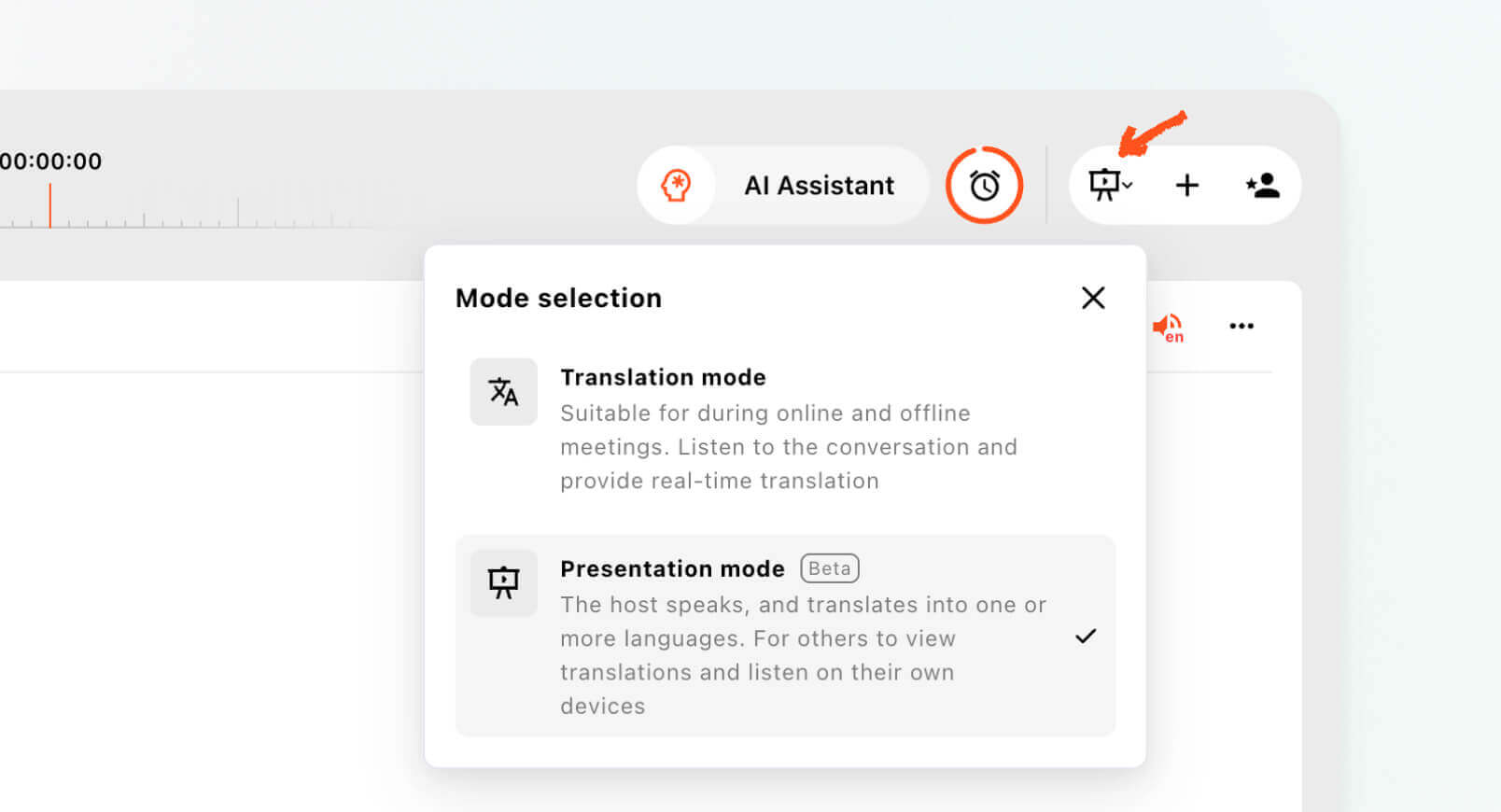
Choose Transync AI when you want a ready-to-use translator for recurring multilingual calls or one-to-many presentations. It combines bilingual subtitles, translated voice playback, terminology context, floating captions, meeting notes, and audience access in one cross-platform workflow. In Presentation Mode, a host can enable up to 10 target languages and invite audience members by link, QR code, or Room ID.

The eleven alternatives become stronger choices in more specialized situations:

  • Large or technically managed events requiring professional interpreters, AV integration, production support, or advanced event administration.

  • Human and AI interpretation in one procurement model.

  • Managed enterprise summits with technical support.

  • Bot-based translation inside selected meeting platforms.

  • Native translation inside a single meeting ecosystem.

  • Media localization after the live session.
  • Live transcription, accessibility captions, and searchable meeting archives.
  • Developer or highly customized workflows.

The best choice depends on who needs the translation, how they access it, whether they must hear or read it, and what should happen after the meeting ends.

How We Compare Real-Time Translators for Meetings

Every product is evaluated through the same seven questions.

1. What meeting is it built for?

A private team sync, external customer call, webinar, town hall, hybrid conference, and in-person discussion have different requirements.

2. How does translation enter the meeting?

The product may run beside the call, join as a bot or agent, work through a native meeting feature, or provide a shareable attendee session.

3. What do participants receive?

Some tools provide captions only. Others add translated speech, voice simulation, voice cloning, transcripts, summaries, or downloadable media.

4. How are terminology and context handled?

Names, abbreviations, product terms, and professional vocabulary can matter more than general language coverage.

5. Which meeting platforms are supported?

Teams should test their real workflow across Zoom, Microsoft Teams, Google Meet, or other required platforms.

6. What happens after the meeting?

Useful output may include transcripts, summaries, action items, translated recordings, subtitle files, or searchable conversation history.

7. How is the product purchased and managed?

Self-serve apps, enterprise platforms, usage-based services, and native licensed features create different buying and administration experiences.

Transync AI vs 11 Alternatives: Comparison Table

Brand names are bold and link-free in the table. Product details can change, so confirm language coverage, plans, and platform requirements directly with each provider.

Tool Best meeting fit Delivery model Captions Translated voice Post-meeting value Main tradeoff
Transync AI
Recurring calls, customer meetings, classes, training, lectures, presentations, and self-managed multilingual events
Standalone companion plus Presentation Mode access by link, QR code, or Room ID
Bilingual meeting subtitles and audience-selected translations
Yes
Transcript, AI meeting notes, and optional presentation transcript sharing
Not a managed interpreter, AV-production, or full event-services platform
Maestra Meetings that may become webinars, subtitles, dubbing, or localized media Browser sessions, links, QR access, and integrations Yes Yes Recordings, transcripts, summaries, and media reuse Broader production suite may be more than a meeting participant needs
Wordly Conferences, webinars, town halls, and attendee-scale meetings Attendee access through personal devices, links, or QR codes Yes Yes Transcripts and summaries Event-oriented buying and setup may not suit small recurring calls
KUDO Corporate meetings, trainings, and events needing AI or human interpretation Enterprise interpretation platform Yes Yes Session-dependent recordings and event output More complex than a lightweight personal translator
Interprefy High-stakes enterprise meetings, conferences, and managed events Enterprise platform, app, agent, integrations, and support Yes Yes Event and media workflows Typically requires enterprise planning and sales engagement
Talo Customer calls, demos, and small online meetings Meeting bot or platform workflow Product-dependent Yes Searchable meeting records A visible bot and platform-dependent setup may not fit every call
DeepL Voice Business meetings needing strong caption workflows and enterprise language controls Web entry point and meeting bot/access link Yes Voice capabilities vary by product availability Dashboard transcripts Voice-to-voice availability and purchasing requirements should be verified
Langfinity Meetings and events emphasizing natural voice and industry vocabulary Meeting-platform and attendee-access workflows Yes Yes Recordings, transcripts, highlights, and summaries Platform availability and plan details should be confirmed
Microsoft Teams Interpreter Organizations already standardized on Teams and Copilot Native Teams feature Yes Speech-to-speech Original-language transcript and multilingual recap options Restricted to Teams eligibility, supported meeting types, and a defined language list
Google Meet Speech Translation Eligible Meet users wanting built-in voice translation Native Google Meet feature Can be combined with captions Yes Limited by native recording and translation rules Beta restrictions, eligible plans, one active language pair, and usage limits
JotMe Individuals needing translation, transcription, notes, and recordings across calls Desktop, mobile, and browser/extension workflows Yes Available in selected workflows Transcripts, summaries, decisions, action items, and Q&A Product experience varies by device and output mode
Sonix Meetings prioritizing live transcription, accessibility captions, and searchable records Enterprise real-time transcription plus meeting-recording imports Yes Not positioned as a core live voice-translation feature Speaker-labeled transcripts, archives, translation, and exports Stronger for capturing and processing meetings than two-way spoken translation

Compare Transync AI


1. Transync AI: Best Meeting-First Balance

Transync AI Presentation Mode on a host laptop with an audience member joining from a phone.

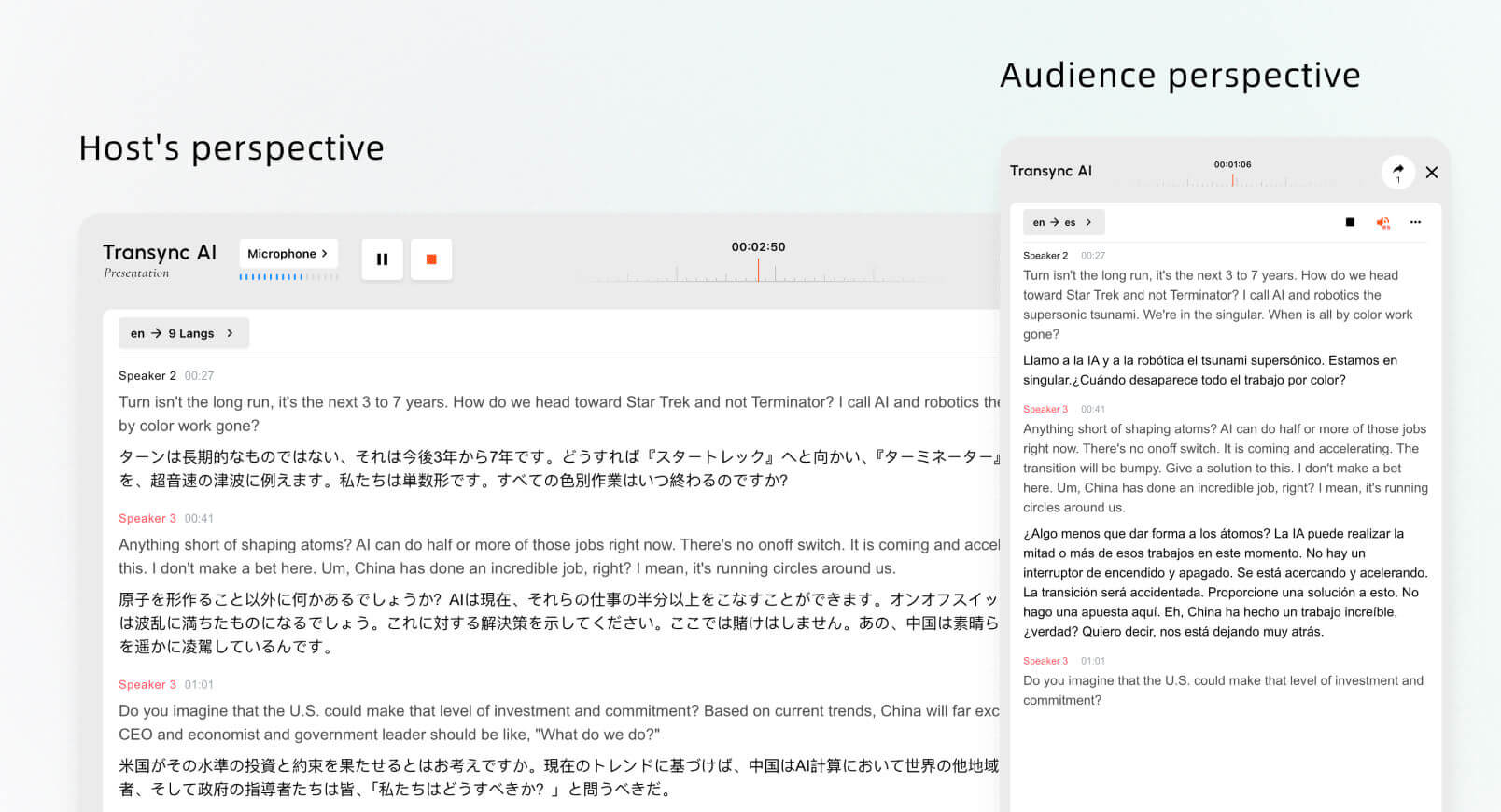
Presentation Mode lets one host share live translation with audience members on their own devices.

Among real-time translators for meetings, Transync AI is built for multilingual calls, classes, demonstrations, and in-person conversations. Its real-time translation tool provides side-by-side original and translated subtitles. The AI voice translator adds spoken output, while the AI Assistant Keywords and Context feature helps prepare names and specialist terminology.

For online calls, the live meeting translation feature works alongside common meeting platforms. The computer-audio sharing feature captures remote voices, and the virtual microphone feature helps send translated speech into the call.

The Picture-in-Picture bilingual subtitles feature keeps captions visible over other applications on supported devices. After the conversation, the AI meeting notes feature produces a record for review.

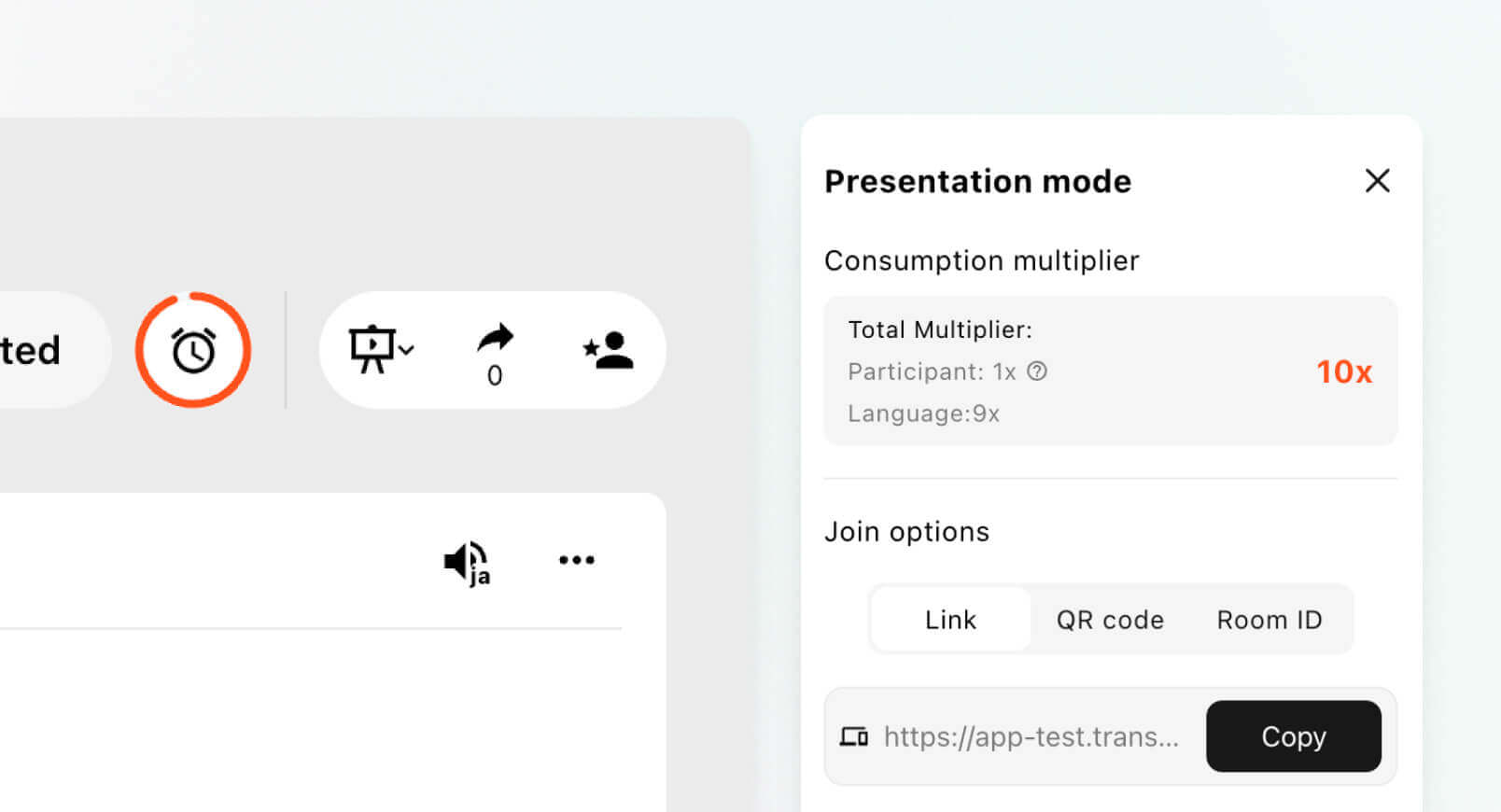
The Presentation Mode feature extends Transync AI from personal meeting translation into one-to-many multilingual communication. One host can enable up to 10 target languages and invite audience members through an active link, QR code, or Room ID.

Each audience member follows from a personal computer or phone, chooses one of the languages enabled by the host, and receives real-time translated subtitles or optional voice playback. No software installation is required, although audience members must register or sign in to a Transync AI account. They can read, listen, and switch among enabled languages but cannot send voice input into the host’s presentation task.

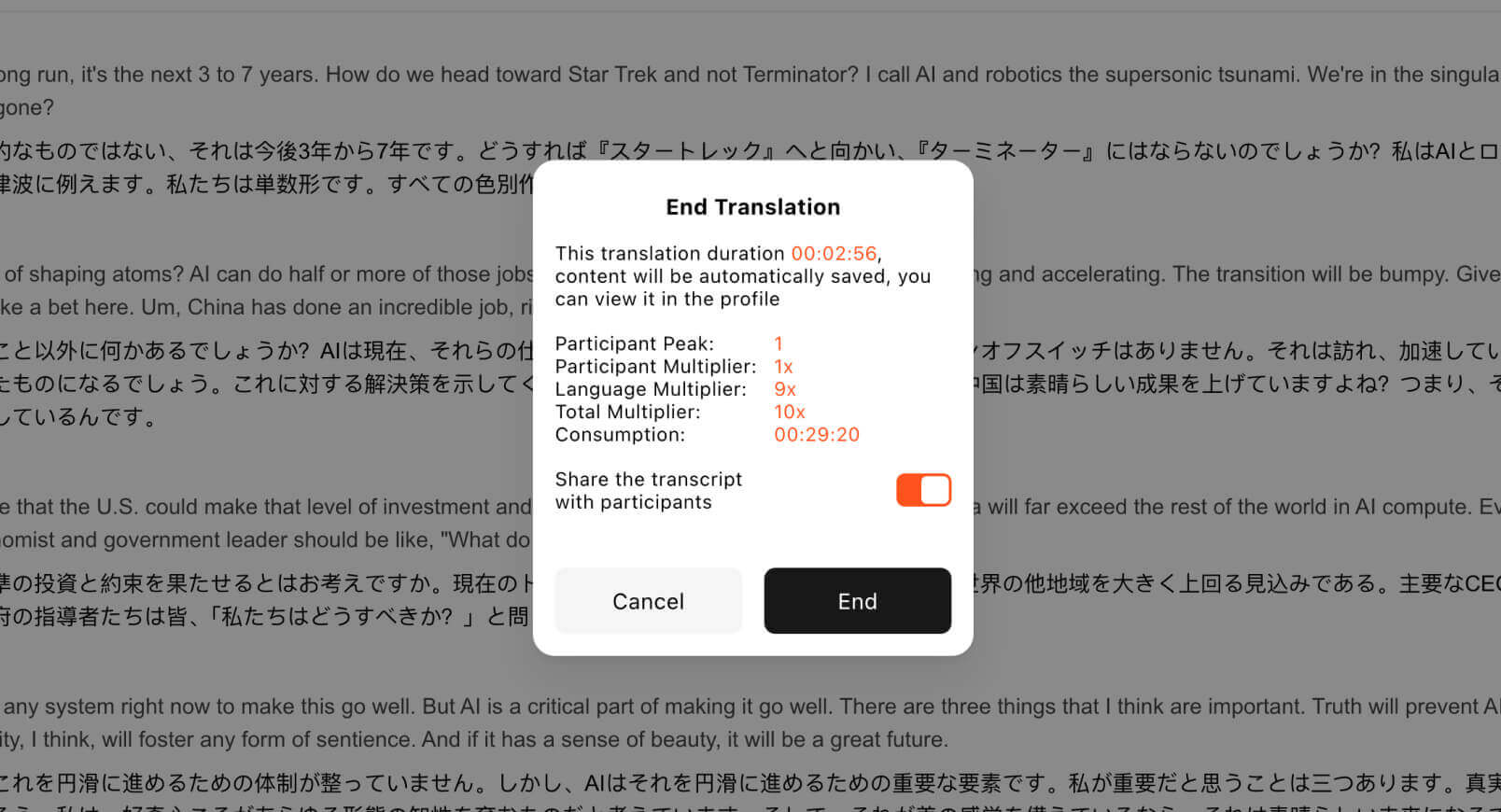
Presentation Mode is currently in beta. Consumption depends on the peak simultaneous audience and the number of enabled target languages, so hosts should review the displayed usage multiplier before starting a public event. After the presentation, the host can choose whether to share the transcript with invited audience members.

Strengths

  • Meeting-first combination of bilingual captions, translated voice, context, and notes.
  • Presentation Mode for one-to-many audience delivery through links, QR codes, or Room IDs.
  • Up to 10 target languages in one presentation, with personal subtitle and voice-playback choices.
  • Standalone workflow without requiring a visible meeting bot or platform-specific plugin.
  • Suitable for recurring calls, training, lectures, presentations, and self-managed events across web, desktop, and mobile.
  • Automatic language distinction within supported modes.

Limitations

  • Presentation Mode is currently in beta and uses peak-audience and target-language multipliers.
  • Audience members do not need to install software but must register or sign in.
  • Audience members can read and listen but cannot speak into the host’s Presentation Mode task.
  • It is not a professional-interpreter marketplace, remote simultaneous interpretation console, managed AV-production service, or full event-operations platform.
  • It does not provide offline mode, image recognition, or text-only document translation.
  • Teams should rehearse audio routing and audience access before important meetings or events.

Choose Transync AI when: You need a practical cross-platform translator for multilingual conversations or a self-managed presentation in which audience members receive translated subtitles and voice playback on their own devices.

Try Transync AI Free

2. Maestra vs Transync AI

Maestra combines live translation with transcription, subtitles, dubbing, voice cloning, recordings, and media localization. Its live sessions can support meetings and events, while shareable links or QR codes help attendees follow translated output.

Among real-time translators for meetings, audience access is no longer the main difference because Transync AI Presentation Mode can also distribute translated subtitles and voice playback through links, QR codes, or Room IDs. Maestra’s clearer advantage is what happens around and after the event: subtitle editing, dubbing, recordings, media localization, branded presentation, and publishing workflows.

Strengths

  • Broad live and on-demand localization workflow.
  • Live captions, translated speech, speaker identification, custom terminology, and summaries.
  • Useful for webinars and meetings that later become published content.

Limitations

  • Media and event capabilities can add complexity for someone who only needs regular bilingual calls.
  • Some sharing, voice, or session features depend on plan level.

Choose Maestra when: Your meeting or presentation must continue into subtitles, dubbing, localized recordings, or media publishing.

Choose Transync AI when: You want a lower-cost tool for everyday multilingual meetings or self-managed one-to-many presentations without a visible meeting bot.

Explore Maestra


3. Wordly vs Transync AI

Wordly focuses on live translation and captions for meetings, conferences, webinars, and events. Attendees can listen or read on their own devices, and organizers can deliver translated output through links, QR codes, or room displays.

Within real-time translators for meetings, both Wordly and Transync AI can now distribute translated audio and captions to personal audience devices. Transync AI combines that capability with participant-controlled meetings, bilingual subtitles, translated voice, context, and notes. Wordly remains more extensively centered on recurring event programs, organizational glossaries, annual hour packages, accessibility workflows, and optional event support.

Strengths

  • Attendee-friendly access without complex individual setup.
  • Captions, translated audio, transcripts, and summaries in one event workflow.
  • Suitable for in-person, virtual, and hybrid formats.

Limitations

  • Event-oriented purchasing may be excessive for one person or a small team.
  • Venue audio and attendee onboarding still require planning.

Choose Wordly when: You run a recurring program of conferences, town halls, government meetings, webinars, or hybrid events and need event-oriented administration, shared organizational resources, and support options.

Choose Transync AI when: You need both recurring meeting translation and self-service audience delivery through links, QR codes, or Room IDs at a lower published entry price.

Explore Wordly


4. KUDO vs Transync AI

KUDO serves multilingual meetings and events through AI speech translation and professional interpretation workflows. This makes it relevant to organizations that want the option to use AI for routine sessions and human interpreters for higher-stakes meetings.

When comparing real-time translators for meetings, the key difference is not simply AI quality. It is procurement and operating model. KUDO is closer to an enterprise interpretation environment; Transync AI is a self-directed meeting product.

Strengths

  • AI and human interpretation options within a broader multilingual-event offering.
  • Designed for corporate meetings, training, and larger sessions.
  • Professional interpreters, sign-language access, enterprise integrations, and managed audience delivery.

Limitations

  • More setup and organizational planning than a lightweight translator.
  • Buyers may need sales consultation for the appropriate service model.

Choose KUDO when: Your organization needs professional interpreters, sign-language access, native integrations, technical support, or a managed delivery route for high-risk and enterprise events.

Choose Transync AI when: Users want to manage two-way meeting translation or one-to-many AI presentation delivery themselves at a transparent monthly price.

Explore KUDO


5. Interprefy vs Transync AI

Interprefy provides enterprise interpretation, AI speech translation, live captions, event access modes, integrations, and managed support. Its platform is designed for meetings, conferences, broadcasts, and events where reliability and delivery logistics matter.

Among enterprise real-time translators for meetings, both products can deliver translated subtitles and speech to audience devices. Transync AI does this through a self-operated Presentation Mode using links, QR codes, or Room IDs. Interprefy extends further through meeting Agents, human interpreters, professional support, event-platform integrations, onsite AV delivery, receivers, and managed online or hybrid production.

Strengths

  • Human interpretation, AI speech translation, and captions under one enterprise provider.
  • Multiple participant access modes and broad meeting-platform integrations.
  • Suitable for high-stakes or technically managed events.

Limitations

  • Enterprise scope can be more expensive and operationally involved.
  • Smaller teams may not need managed event support or complex access options.

Choose Interprefy when: A high-profile meeting or event needs professional interpreters, managed enterprise delivery, platform or AV integrations, multiple access methods, and technical support.

Choose Transync AI when: A team wants to run multilingual meetings or one-to-many presentations independently without purchasing a managed event service.

Explore Interprefy


6. Talo vs Transync AI

Talo is designed for real-time voice translation in online meetings. Its meeting workflow is useful for customer calls, product demonstrations, and small or mid-sized sessions where participants need translated audio.

For bot-based real-time translators for meetings, the important operational difference is the meeting-entry model. Bot-based translation can simplify audio capture, but some organizations dislike visible bots or restrict automated participants. Transync AI runs as standalone software and does not need to enter the meeting as a visible bot.

Strengths

  • Meeting-oriented voice translation.
  • Straightforward use for common online conferencing scenarios.
  • Participants can receive translated output without building a custom speech stack.

Limitations

  • Bot permissions and organizational meeting policies may affect setup.
  • Accuracy with specialist vocabulary and performance under unstable networks should be tested.

Choose Talo when: Your team is comfortable with a meeting bot and prioritizes translated voice in online calls.

Choose Transync AI when: You prefer a standalone meeting companion with bilingual captions, context settings, and notes.

Explore Talo


7. DeepL Voice vs Transync AI

DeepL Voice provides live translated captions for business meetings and supports Zoom, Microsoft Teams, and Google Meet through its meeting workflow. It also connects with the wider DeepL ecosystem for text, documents, terminology, and enterprise language operations.

When assessing real-time translators for meetings, buyers should distinguish live caption translation from voice-to-voice capabilities whose availability may differ by product or rollout stage. They should confirm exactly whether they need captions, spoken output, or both. Transync AI already centers its meeting workflow on both bilingual subtitles and translated voice playback.

Strengths

  • Strong fit for organizations already using the wider DeepL language platform.
  • Live multilingual caption workflow across major meeting platforms.
  • Enterprise terminology, security, and document-language ecosystem.

Limitations

  • Licensing and bot/access requirements should be reviewed.
  • Voice-to-voice availability should be confirmed rather than inferred from the product name.

Choose DeepL Voice when: Your organization prioritizes translated captions and wants meeting translation connected to existing DeepL language workflows.

Choose Transync AI when: You want bilingual captions, audible translation, context, and notes in a meeting-first self-serve product.

Explore Deepl


8. Langfinity vs Transync AI

Langfinity focuses on voice-to-voice translation, industry-specific terminology, multi-language meetings, voice avatars, and post-session recordings or summaries. It also promotes attendee access for events through links or QR codes.

Among voice-focused real-time translators for meetings, both Langfinity and Transync AI can provide attendee-oriented language access. Langfinity is a strong candidate when voice avatars and industry terminology are central to the experience. Transync AI combines its own link, QR code, and Room ID presentation access with bilingual meeting views, optional audience voice playback, context tools, and meeting records.

Strengths

  • Natural voice-oriented positioning with voice avatars.
  • Industry-specific terminology and multi-language communication.
  • Meeting recordings, transcripts, highlights, and summaries.

Limitations

  • Current platform availability may vary across integrations.
  • Buyers should confirm pricing and which event or meeting features are included.

Choose Langfinity when: Preserving voice character and adapting translation to industry vocabulary are the highest priorities.

Choose Transync AI when: You want a straightforward cross-platform meeting translator with text, voice, context, and notes.

Explore Langfinty


9. Microsoft Teams Interpreter vs Transync AI

Microsoft Teams Interpreter is a native speech-to-speech interpretation feature for eligible Microsoft Teams meetings and calls. Participants can listen in a preferred language, adjust the balance between original and interpreted audio, and use an automated voice or voice simulation when permitted.

Among native real-time translators for meetings, placement is its strongest advantage: users remain inside Microsoft Teams. Its boundaries are equally important. Eligibility depends on licensing and meeting type, only a defined set of languages is supported, and translated interpretation audio is not included in meeting recordings. Transync AI is not locked to a single meeting ecosystem.

Strengths

  • Native Microsoft Teams interface and administration.
  • Real-time speech-to-speech output with voice simulation options.
  • Convenient for organizations already standardized on eligible Microsoft 365 plans.

Limitations

  • Restricted to supported Microsoft Teams meeting types, identities, and licenses.
  • Defined language coverage and limitations around translated recordings or transcripts.
  • Official guidance notes challenges with rapid exchanges, interruptions, and technical terms.

Choose Microsoft Teams Interpreter when: Your organization lives inside Microsoft Teams, has the required licenses, and needs native interpretation in supported languages.

Choose Transync AI when: You need one translator across multiple meeting platforms and devices.

Explore Microsoft Translator

10. Google Meet Speech Translation vs Transync AI

Google Meet Speech Translation is a native Google Meet feature that translates speech in near real time using a voice similar to the speaker’s. It is available to eligible accounts and currently operates with defined English-centered language pairs.

For native real-time translators for meetings, the experience removes third-party setup, but current rules matter: the feature is still described as beta, only one language pair can be active in a meeting, availability depends on plan and region, and official documentation lists restrictions for recordings, live streams, duration, and some devices. Transync AI provides a separate cross-platform workflow rather than depending on one meeting provider’s rollout.

Strengths

  • Built directly into Google Meet.
  • Near-real-time spoken translation with speaker-like voice output.
  • Simple choice for eligible users needing one supported pair.

Limitations

  • Beta availability, eligible-plan requirements, and language-pair restrictions.
  • One active language pair per meeting.
  • Native limitations around recordings, live streams, duration, and meeting hardware.

Choose Google Meet Speech Translation when: Your meetings stay inside Google Meet, the required pair is supported, and the eligible native feature meets your limits.

Choose Transync AI when: You need broader meeting-platform flexibility, bilingual captions, terminology context, and post-meeting notes.

Explore Google Translate


11. JotMe vs Transync AI

JotMe combines live translation, transcription, AI meeting notes, recordings, and multilingual follow-up across desktop, mobile, and browser-extension workflows. Its no-bot approach and context-aware translation make it relevant for individuals moving between meeting platforms.

Among personal real-time translators for meetings, JotMe overlaps more directly with Transync AI than the enterprise event platforms do. Both aim to help an individual understand live meetings and retain useful records. The choice should be made through a hands-on test of language pair, translated voice availability, subtitle experience, device support, context controls, and post-meeting workflow.

Strengths

  • Live translation, transcription, notes, decisions, and follow-up tools.
  • Desktop, mobile, and browser-based options.
  • No visible meeting bot in its primary desktop workflow.

Limitations

  • Features and voice output vary across desktop, mobile, and browser experiences.
  • Teams should verify which capabilities and language limits apply to the selected plan.

Choose JotMe when: You want a multilingual workspace that combines translation, transcription, recordings, notes, and meeting Q&A.

Choose Transync AI when: You prioritize a focused bilingual meeting experience with live subtitles, translated voice playback, terminology context, and floating captions.

Explore Jotme


12. Sonix vs Transync AI

Sonix is primarily a transcription platform, but its real-time offering makes it relevant to meeting buyers. It provides live captions and instant transcription for virtual meetings, conferences, and broadcasts, with support for meeting environments such as Zoom, Microsoft Teams, and Google Meet. It also creates speaker-labeled, searchable meeting archives and supports translation of recorded transcripts.

Among real-time translators for meetings, the distinction is important. Sonix is strongest when the goal is to capture speech accurately, improve accessibility, and process the meeting record afterward. Its public product information does not position live translated voice as a central meeting feature. Transync AI is designed for communication during the meeting, combining bilingual subtitles with translated voice playback, terminology context, and follow-up notes.

Strengths

  • Live captions and real-time transcription for meetings and broadcasts.
  • Searchable transcripts with speaker identification and flexible export options.
  • Useful post-meeting workflow for editing, translating, sharing, and archiving recordings.
  • Enterprise-oriented streaming API and security options.

Limitations

  • More transcription-centered than conversation-centered.
  • Translation is stronger for transcripts and recorded content than for live two-way spoken interaction.
  • Teams needing participants to hear translated speech should verify current live output capabilities before purchasing.

Choose Sonix when: Your main priority is accurate live transcription, accessibility captions, searchable archives, or translating meeting content after it has been captured.

Choose Transync AI when: Participants need to understand and respond across languages during the meeting through bilingual captions and translated voice.

Explore Sonix


Best Real-Time Translators for Meetings by Scenario

Meeting scenario Best starting point Why
Recurring multilingual team calls

Self-managed training, lecture, or presentation
Transync AI
Balanced subtitles, voice, context, notes, and cross-platform use

Up to 10 target languages with audience access by link, QR code, or Room ID
Meeting plus media localization Maestra Live session can continue into subtitles, dubbing, and reusable media
Recurring conference or event program
Wordly
Organizer-oriented packages, attendee access, glossaries, and event support
AI plus professional interpreters KUDO Multiple interpretation service models
High-stakes managed enterprise event Interprefy
Human interpretation, integrations, AV delivery, and professional support
Bot-based customer calls or demos Talo Meeting-focused translated voice workflow
Enterprise caption translation DeepL Voice Meeting captions connected to a broader language platform
Voice character and industry terminology Langfinity Voice avatars and domain-oriented translation
Native Teams interpretation Microsoft Teams Interpreter Built into eligible Teams meetings and calls
Native Meet speech translation Google Meet Speech Translation Built into eligible Meet sessions
Translation plus multilingual meeting workspace JotMe Translation, transcription, recordings, notes, and Q&A
Live transcription and searchable meeting archives Sonix Accessibility captions, speaker-labeled transcripts, translation, and exports

How to Run a Fair 1 vs 11 Meeting Test

Do not compare these products using different meetings. Use one repeatable test script and the same equipment.

Prepare one five-minute conversation

Include:

  • A personal name and company name.
  • Five industry terms.
  • A price, quantity, date, and deadline.
  • One idiom or ambiguous phrase.
  • A clarification request.
  • Two speakers changing turns naturally.

Keep the environment consistent

Use the same meeting platform, laptop, headset, network, language pair, and speakers. If testing an event product, use the same microphone feed and attendee devices.

When testing Transync AI Presentation Mode, invite several audience members through the link, QR code, and Room ID. Verify account sign-in, language selection, subtitles, voice playback, language switching, peak-audience reporting, usage multipliers, and optional transcript sharing.

Compare this with each event product’s attendee requirements, supported languages, capacity, administration, support, and post-event output. Do not treat QR access alone as proof that one platform has stronger event capabilities.

Score the same outputs

Metric Question
Recognition Did the source transcript capture what was actually said?
Translation Was meaning preserved, including terminology and tone?
Latency Could participants respond without awkward interruption?
Captions Were original and translated text readable and stable?
Voice Was translated speech clear, natural, and correctly routed?
Setup How long did configuration take, and who needed an account?
Platform fit Did the tool work with the required meeting type and device?
Follow-up Were transcript, notes, action items, or recordings useful?
Privacy Did data handling and access controls meet organizational needs?

Do not hide failure cases

Record missed names, overlapping speech, wrong numbers, speaker changes, and audio-routing errors. A credible comparison explains where each product stops fitting, not only where it performs well.

Real-Time Translators for Meetings FAQ

What is the best overall real-time translator for meetings?

Transync AI is the best starting point in this comparison for individuals and teams wanting bilingual subtitles, translated voice, terminology context, floating captions, notes, and self-managed audience delivery across common meeting workflows. Its Presentation Mode supports up to 10 target languages and lets audience members join by link, QR code, or Room ID. Events requiring professional interpreters, complex AV integration, managed production, or extensive media localization may still point to a specialized alternative.

Does Sonix belong among real-time translators for meetings?

Sonix belongs in the broader comparison because it supports real-time transcription and live meeting captions. However, it is better suited to accessibility, searchable records, and post-meeting translation than to live two-way translated speech. Teams should evaluate it against their actual communication goal rather than treating every meeting language tool as interchangeable.

Which tool is best for large events?

Transync AI is now a practical self-service option for presentations, lectures, training sessions, conferences, tours, and other one-to-many events. It can distribute up to 10 translated languages as subtitles or optional voice playback to audience devices.

Wordly remains attractive for recurring organizer-led event programs. Maestra is stronger when the event becomes localized media. KUDO and Interprefy are stronger when professional interpreters, sign-language access, enterprise integrations, AV infrastructure, technical support, or managed production are required.

Which products provide translated voice?

Translated speech is central to Transync AI, Maestra, Wordly, KUDO, Interprefy, Talo, Langfinity, Microsoft Teams Interpreter, and Google Meet Speech Translation in their supported workflows. DeepL Voice buyers should confirm current voice-to-voice availability, JotMe users should check the selected device experience, and Sonix is better evaluated as a live-caption and transcription platform than as a voice interpreter.

Which tools work without a visible meeting bot?

Transync AI and JotMe offer primary workflows that run beside the meeting without adding a visible bot. Native tools such as Microsoft Teams Interpreter and Google Meet Speech Translation also avoid a third-party participant. Other products may use integrations, agents, bots, links, or external attendee sessions depending on configuration.

Which tool is best for Zoom, Teams, and Google Meet?

Transync AI is designed to work alongside all three without being locked to one ecosystem. Maestra, DeepL Voice, Interprefy, Talo, Langfinity, JotMe, and Sonix also cover multiple platforms in selected workflows. Always test the exact meeting type and plan.

Can AI meeting translators replace human interpreters?

They can support many routine calls, classes, trainings, and business meetings, but they cannot guarantee perfect accuracy, judgment, or cultural nuance. Legal, medical, safety-critical, diplomatic, and contractually binding meetings may still require professional interpreters.

What should I test before purchasing?

Test the real language pair, accents, terminology, network, meeting platform, meeting length, attendee count, audio path, subtitle readability, voice output, privacy rules, and post-meeting record.

Can attendees join a Transync AI presentation by QR code?

Yes. A Presentation Mode host can invite audience members through an active link, QR code, or Room ID. Audience members follow from their own devices, select an enabled language, and receive translated subtitles or optional voice playback. They do not need to install software, but registration or sign-in to a Transync AI account is required.

How many languages can a Transync AI presentation offer?

The current Presentation Mode design supports up to 10 target languages in one presentation task. Different audience members can select different enabled languages at the same time. The feature is currently in beta, and usage changes according to the peak audience and number of target languages.

Final Verdict

The market for real-time translators for meetings is not one market. It contains personal meeting companions, enterprise interpretation platforms, event-access systems, meeting bots, native platform features, media suites, and multilingual workspaces.

Choose Transync AI for recurring multilingual communication or self-managed one-to-many presentations. It combines bilingual subtitles, translated speech, terminology context, floating captions, meeting notes, and personal-device audience access without committing the host to one conferencing ecosystem or adding a visible meeting bot.

Choose one of the eleven alternatives when its specialization matches the meeting: Maestra for event-to-media localization, Wordly for recurring organizer-led event programs, KUDO for AI plus professional and sign-language interpretation, Interprefy for managed enterprise and AV delivery, Talo for bot-based voice translation, DeepL Voice for enterprise caption workflows with low-friction guest access, Langfinity for voice character and industry terminology, Microsoft Teams Interpreter or Google Meet Speech Translation for native platform translation, JotMe for a broader multilingual meeting workspace, and Sonix for live transcription and searchable archives.

The arrival of Presentation Mode changes the comparison boundary: links, QR codes, personal language selection, and audience voice playback are now part of Transync AI’s own offering. Specialized competitors should therefore be selected for capabilities beyond basic audience access, such as professional interpreters, event administration, native integrations, managed production, media localization, or platform-specific convenience.

If you want a next-generation experience, Transync AI leads the way with real-time, AI-powered translation that keeps conversations flowing naturally. You can try it free now.

🤖Download

🍎Download